Best Field Service Management Software for Small Business - Page 4

How Many Field Service Management Software Products Does G2 Track?

Total Products under this Category: 1,933

Category Stats (Nov 2026)

  • Average Rating: 4.43/5 The average rating of products in this category, based on all submitted ratings
  • Top Trending Product: AI-Powered Invoicing & Job Management for Trade Businesses (+5.56%) - Among all products in this category, AI-Powered Invoicing & Job Management for Trade Businesses recorded the largest rating increase compared to last month

Last updated: November 01, 2026

How Does G2 Rank Field Service Management Software Products?

Why You Can Trust G2's Software Rankings:

  • 30 Analysts and Data Experts
  • 42,900+ Authentic Reviews
  • 1,933+ Products
  • Unbiased Rankings

G2's software rankings are built on verified user reviews, rigorous moderation, and a consistent research methodology maintained by a team of analysts and data experts. Each product is measured using the same transparent criteria, with no paid placement or vendor influence. While reviews reflect real user experiences, which can be subjective, they offer valuable insight into how software performs in the hands of professionals. Together, these inputs power the G2 Score, a standardized way to compare tools within every category.

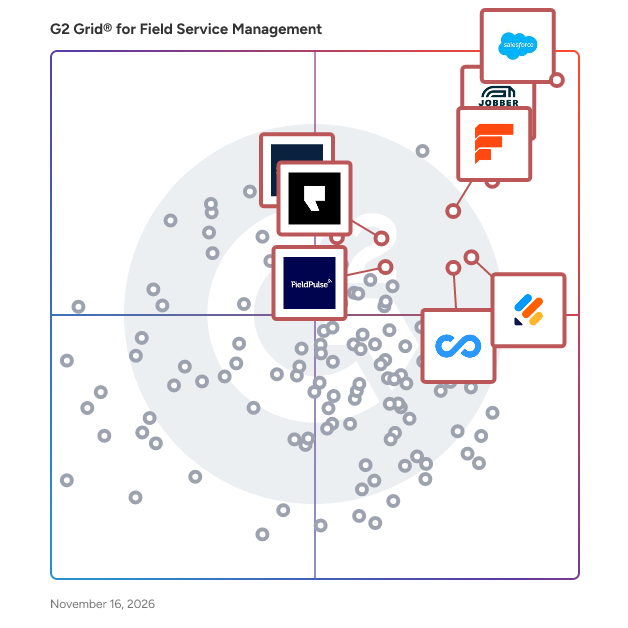
G2 Grid® for Field Service Management Software

G2 Grid® for Field Service Management Software plotting products by satisfaction and market presence

Highlighted products: Salesforce Field Service and Operations, Jobber, Simpro, Field Nation, Podium, FieldPulse, Jotform, and Connecteam.

Underlying data: [Grid® JSON](https://www.g2.com/categories/field-service-management/grids.json?focus%5B%5D=salesforce-field-service-and-operations&focus%5B%5D=jobber&focus%5B%5D=simpro&focus%5B%5D=field-nation&focus%5B%5D=podium&focus%5B%5D=fieldpulse-fieldpulse&focus%5B%5D=jotform&focus%5B%5D=connecteam&segment=small-business)

BuildOps

BuildOps is an all-in-one operations platform for commercial MEP contractors—HVAC, mechanical, refrigeration, electrical, and plumbing—bringing dispatch, estimating, invoicing, service, projects, and reporting into one system. A single source of truth unifies office and field data, metrics, and work history. Projects flow seamlessly into service: as-built equipment becomes asset records that power service agreements, scheduling, dispatch, billing, and documentation. Smarter scheduling comes from a live planning board with technician skills, certifications, location, and availability—plus intelligent recommendations and drag-and-drop dispatch to handle emergencies, multi-day work, and long-term planning. Field teams stay audit-ready with photos, videos, and PDFs attached directly to quotes, invoices, and assets, while automated workflows keep work orders, customer data, and billing in sync across project and service. The result: predictable maintenance, stronger recurring revenue, protected margins, and a end-to-end support from the building phase to ongoing service.

Average Rating: 4.1/5.0

Total Reviews: 177

How Do G2 Users Rate BuildOps?

  • Has the product been a good partner in doing business?: 8.4/10 (Category avg: 9.0/10)
  • Roles: 7.2/10 (Category avg: 8.7/10)
  • Analytics: 7.9/10 (Category avg: 8.4/10)
  • Location: 7.2/10 (Category avg: 8.5/10)

Who Is the Company Behind BuildOps?

  • Seller: BuildOps
  • Company Website:
  • Year Founded: 2018
  • HQ Location: Santa Monica, CA 90404, US
  • LinkedIn® Page: www.linkedin.com
    616 employees on LinkedIn®

Who Uses This Product?

  • Top Industries: Construction, Mechanical or Industrial Engineering
  • Company Size: 58% Medium, 40% Small

What Do G2 Reviewers Say About BuildOps?

AI-generated summary from verified user reviews

Pros
  • Users praise the ease of use of BuildOps, highlighting its intuitive design and seamless ERP integration.
  • Users commend the excellent customer support from BuildOps, highlighting responsiveness and helpfulness from the team.
  • Users value the robust reporting capabilities and constant improvements of BuildOps, enhancing project management efficiency and insights.
  • Users highlight the user-friendly and intuitive interface of BuildOps, enhancing operational efficiency and team management.
  • Users appreciate the centralization in BuildOps, which simplifies operations and enhances team efficiency in real-time management.
Cons
  • Users find the information too segmented in BuildOps, leading to inefficiencies and repetitive input challenges.
  • Users report a steep learning curve with BuildOps, finding implementation and tech adaptation challenging and frustrating.
  • Users find BuildOps has limited features, lacking crucial functionalities and effective integration with CRM+ for their needs.
  • Users express concerns about update issues, citing lack of communication and changes that disrupt functionality and usability.
  • Users express concerns about limited customization in BuildOps, affecting data integration and functionality for their needs.

What Are Recent G2 Reviews of BuildOps?

What Are G2 Users Discussing About BuildOps?

Sera

Sera Systems, located in Grapevine, TX,  is a full-suite Field Service Management software solution built to ensure each job is profitable. Sera was created with the basic principle of helping small to mid-size HVAC, Plumbing, and other Home Service residential contractors reduce the chaos of running a Home Service business while: • Identifying financial gaps • Learn their business at a deeper level • Streamline processes • Reduce burden and employee stress levels Sera's powerful, yet simple-to-use platform consists of three core components, an automated Admin Portal, industry-first Customer Hub, and an intuitive Tech App. The core components work together in real-time so contractors always have current data around KPIs, job time efficiency, and memberships. Our satisfaction comes from your success, which is why Sera's clients average a net profit increase of 52% in their first six months of launching Sera, as well as a 90% increase in their tech efficiency rate. 

Average Rating: 4.3/5.0

Total Reviews: 59

How Do G2 Users Rate Sera?

  • Has the product been a good partner in doing business?: 8.8/10 (Category avg: 9.0/10)
  • Roles: 8.3/10 (Category avg: 8.7/10)
  • Analytics: 8.6/10 (Category avg: 8.4/10)
  • Location: 8.8/10 (Category avg: 8.5/10)

Who Is the Company Behind Sera?

Who Uses This Product?

  • Top Industries: Construction, Consumer Services
  • Company Size: 78% Small, 20% Medium

What Do G2 Reviewers Say About Sera?

AI-generated summary from verified user reviews

Pros
  • Users find Sera to be lightweight and easy to use, facilitating seamless navigation and efficient dispatching.
  • Users love Sera for its lightweight and user-friendly design, making navigation and dispatching effortless and efficient.
  • Users commend the exceptional customer support from Sera, prioritizing client needs and ensuring satisfaction.
  • Users value the smart scheduling features of Sera, enhancing their operational efficiency and customer satisfaction.
  • Users find Sera to be convenient and user-friendly, with effective features for scheduling and tracking jobs easily.
Cons
  • Users are frustrated with Sera's complex setup, experiencing lengthy onboarding and ongoing performance issues.
  • Users experience frequent connectivity issues with Sera, facing slow tech and unresponsive support that aggravate frustrations.
  • Users are frustrated with Sera due to mobile limitations, including app crashes and slow performance impacting usability.
  • Users express frustration with Sera due to poor customer support, which hinders resolution of ongoing issues.
  • Users are disappointed with the poor integration of Sera, leading to frustrating performance and usability issues.

What Are Recent G2 Reviews of Sera?

Powered Now

Powered Now is business management software for trade businesses. It streamlines operations by integrating invoicing, quoting, scheduling, customer management into a single platform accessible from smartphones, tablets, Mac and PC. Users can create professional paperwork, track payments, manage projects, organise client information. Additionally, Powered Now offers features like digital signatures, job tracking, and nearly 100 industry specific forms and certificates. The software makes life easy for trade companies, reduce administrative burden, and improve communication with clients. Powered Now comes with legendary UK support (4.5 on TrustPilot), you can be up and running within 30 minutes.

Average Rating: 4.9/5.0

Total Reviews: 21

G2 Deal: Exclusive G2 Discount

Users who activate the deal will receive a £50 discount to use on our annual Business, Professional or Premium plans.

Price: ~~£150, £250 or £370~~ → £100, £200 or £320

View this exclusive G2 deal

How Do G2 Users Rate Powered Now?

  • Has the product been a good partner in doing business?: 9.4/10 (Category avg: 9.0/10)
  • Roles: 9.0/10 (Category avg: 8.7/10)
  • Analytics: 9.5/10 (Category avg: 8.4/10)
  • Location: 9.4/10 (Category avg: 8.5/10)

Who Is the Company Behind Powered Now?

Who Uses This Product?

  • Top Industries: Construction
  • Company Size: 95% Small, 5% Medium

What Are Recent G2 Reviews of Powered Now?

AI can help you find the answers. G2 helps you trust them.

Connect G2 to Claude or ChatGPT for answers grounded in G2's trusted reviews, comparisons, and pricing from real user insights.

How it works

NetSuite

NetSuite is the #1 AI cloud ERP, helping organizations streamline operations, improve visibility, and accelerate growth. For more than 28 years, NetSuite has enabled businesses of all sizes—from startups and high-growth companies to global enterprises—to run their entire business on a single, integrated platform. Today, more than 44,000 organizations across a wide range of industries use NetSuite to run their business in over 220 countries and territories. Built natively in the cloud, NetSuite eliminates the need for on-premises infrastructure and complex upgrades, giving organizations continuous access to the latest innovations, security enhancements, and AI capabilities. Originally built to transform financial management, NetSuite has evolved into a comprehensive business management suite that brings together accounting, financial management, inventory and order management, supply chain, procurement, human resources, CRM, professional services automation, and commerce. NetSuite supports organizations across industries including software and technology, manufacturing, wholesale distribution, retail, services, nonprofit, healthcare, advertising and media, and more, with industry-specific capabilities, workflows, dashboards, KPIs, and reports designed to address unique business requirements. With AI embedded throughout the platform, organizations can automate routine tasks, generate insights faster, and make more informed decisions. Ask Oracle, a conversational AI assistant, enables users to interact with NetSuite through natural language by answering questions, analyzing business data, surfacing insights, and providing guidance—all within the security, roles, permissions, and controls already established in NetSuite. Embedded directly into everyday workflows, Ask Oracle helps users make faster, more informed decisions and take action without disrupting their work. Agents and agentic workflows extend these AI capabilities by helping users complete specific tasks and coordinate work across multiple steps. Built-in analytics, AI-powered insights, and customizable reporting provide teams with everything they need to make solid decisions. NetSuite is highly configurable and extensible, allowing businesses to adapt the platform to their unique processes while supporting growth across multiple subsidiaries, currencies, languages, and geographies. By connecting business-critical data and processes in a single cloud platform, NetSuite provides a real-time, unified view of the business, eliminating disconnected systems, manual spreadsheets, and information silos. Organizations gain a single source of truth that improves collaboration across finance, operations, sales, inventory, HR, and customer service while simplifying compliance and reporting. Whether managing rapid growth, expanding internationally, improving financial close processes, optimizing inventory, or gaining deeper operational insights, NetSuite provides the flexibility, automation, and intelligence organizations need to adapt and scale with confidence. By making trusted data readily available and automating core business processes, NetSuite empowers leaders to respond quickly to changing market conditions and make faster, more informed decisions.

Average Rating: 4.1/5.0

Total Reviews: 5,112

How Do G2 Users Rate NetSuite?

  • Has the product been a good partner in doing business?: 7.5/10 (Category avg: 9.0/10)
  • Roles: 7.1/10 (Category avg: 8.7/10)
  • Analytics: 7.4/10 (Category avg: 8.4/10)
  • Location: 6.6/10 (Category avg: 8.5/10)

Who Is the Company Behind NetSuite?

  • Seller: Oracle
  • Company Website:
  • Year Founded: 1977
  • HQ Location: Austin, TX
  • LinkedIn® Page: www.linkedin.com
    207,576 employees on LinkedIn®
  • Ownership: NYSE:ORCL

Who Uses This Product?

  • Who Uses This: Controller, Accounting Manager
  • Top Industries: Computer Software, Accounting
  • Company Size: 57% Medium, 31% Small

What Do G2 Reviewers Say About NetSuite?

AI-generated summary from verified user reviews

Pros
  • Users appreciate the ease of use of NetSuite, enabling them to efficiently manage tasks and customize their experience.
  • Users appreciate the extensive customizability of NetSuite, allowing tailored workflows and efficient integration with minimal IT assistance.
  • Users value the robust functionality of NetSuite, appreciating its customization and efficiency in reporting and data management.
  • Users value the extensive customization options of NetSuite, enabling tailored workflows and efficient integration with various systems.
  • Users love the customization capabilities of NetSuite, allowing tailored workflows to meet specific business needs easily.
Cons
  • Users experience a challenging learning curve with NetSuite due to difficult setup and inadequate support during implementation.
  • Users find performance and customer support issues with NetSuite, impacting usability and satisfaction with the system.
  • Users find missing features in NetSuite, including customization limitations and frustration with customer support responsiveness.
  • Users feel that customizations are limited, with many enhancement requests pending and not meeting initial expectations.
  • Users find NetSuite to be not user-friendly, citing unclear interfaces and slow performance as major drawbacks.

What Are Recent G2 Reviews of NetSuite?

What Are G2 Users Discussing About NetSuite?

FieldAware by GPS Insight

Time is money, and Field Service Management by GPS Insight helps you hold onto both. Easy customer intake/management and flexible scheduling tools allow you to be as efficient in dispatching emergency jobs as you are in scheduling routine work. Web and mobile applications keep your office team connected to your field teams in real time and ensure your technicians have full access to their schedules, estimates, and work orders. Get paid before even leaving the job site with in-field payment processing – and let a QuickBooks Online sync handle the data entry for you.   See for yourself with a 14-day risk-free trial how we can help get you off paper, out of spreadsheets, and into a streamlined, automated workflow.

Average Rating: 4.3/5.0

Total Reviews: 33

How Do G2 Users Rate FieldAware by GPS Insight?

  • Has the product been a good partner in doing business?: 7.6/10 (Category avg: 9.0/10)
  • Roles: 9.0/10 (Category avg: 8.7/10)
  • Analytics: 8.6/10 (Category avg: 8.4/10)
  • Location: 9.6/10 (Category avg: 8.5/10)

Who Is the Company Behind FieldAware by GPS Insight?

Who Uses This Product?

  • Top Industries: Construction, Glass, Ceramics & Concrete
  • Company Size: 76% Small, 27% Medium

What Are Recent G2 Reviews of FieldAware by GPS Insight?

What Are G2 Users Discussing About FieldAware by GPS Insight?

Skedulo

Skedulo builds deskless productivity software for the 80% of global workers who don’t work in a traditional office setting. From employees in fixed location facilities to mobile field workers on the frontline, deskless workers number 2.7 billion worldwide. DHL, Sunrun, The American Red Cross and hundreds of other organizations have used Skedulo’s Deskless Productivity Cloud to book over 35M appointments worldwide. The Skedulo Deskless Productivity Cloud helps organizations greatly simplify scheduling, gain visibility into and control over job scheduling and workforce utilization, equip employees with an intuitive app to help them better perform their day-to-day operations, provide actionable analytics on their workforce, and reduce operating costs. Founded in 2013, Skedulo is headquartered in San Francisco with offices in Australia, Vietnam, and the United Kingdom. The company has secured over $115 million in funding to date, led by Softbank, Microsoft's venture firm M12, Costanoa Ventures, and Blackbird. For more information, please visit www.skedulo.com.

Average Rating: 4.1/5.0

Total Reviews: 430

How Do G2 Users Rate Skedulo?

  • Has the product been a good partner in doing business?: 8.5/10 (Category avg: 9.0/10)
  • Roles: 7.8/10 (Category avg: 8.7/10)
  • Analytics: 7.6/10 (Category avg: 8.4/10)
  • Location: 8.1/10 (Category avg: 8.5/10)

Who Is the Company Behind Skedulo?

  • Seller: Skedulo
  • Year Founded: 2013
  • HQ Location: San Francisco, CA
  • LinkedIn® Page: www.linkedin.com
    183 employees on LinkedIn®

Who Uses This Product?

  • Who Uses This: Dispatcher, Salesforce Administrator
  • Top Industries: Hospital & Health Care, Health, Wellness and Fitness
  • Company Size: 59% Medium, 27% Small

What Do G2 Reviewers Say About Skedulo?

AI-generated summary from verified user reviews

Pros
  • Users find the ease of use of Skedulo improves with experience, making project tracking simple and efficient.
  • Users find Skedulo incredibly user-friendly, noting its straightforward interface and ease of use over time.
  • Users value Skedulo for being incredibly helpful, adapting to unique needs and providing valuable analytics insights.
  • Users value the responsive customer support of Skedulo, appreciating how they adapt to unique needs and feedback.
  • Users find Skedulo's interface intuitive and user-friendly, leading to significant time savings and ease of understanding.
Cons
  • Users find that customization needs improvement, as certain features are not fully adapted to their specific requirements.
  • Users face limitations in features and bugs with Skedulo, often needing customization and waiting for updates.
  • The learning curve is steep for users, as they find the system complex and time-consuming to navigate.
  • Users find limited customization in Skedulo hampers effective use and leaves essential features unmet.
  • Users find the missing features of Skedulo limiting, as essential tasks cannot be completed within the app.

What Are Recent G2 Reviews of Skedulo?

What Are G2 Users Discussing About Skedulo?

FastField

FastField offers a flexible and easy-to-use solution to transform your paper forms into dynamic mobile forms to save time and money – with no technical experience required. Replace your paper inspections, work orders, safety checklists and more by quickly creating a digital version. With FastField’s user-friendly Form Builder you can design perfectly tailored forms for your business and dispatch them to users working remotely in the field. The FastField Mobile App provides a robust interface for users to complete and submit forms wherever they are, even without an Internet connection. Submitted forms are converted to pixel perfect PDF and Word reports all in your own look and feel. FastField supports anything from simple data and report delivery to highly customized business workflow. FastField Business Insight’s platform helps you transform your data into meaningful information with real-time data visualization to identify trends in specific segments of your business. Built in integrations include Email, SFTP, HTTP, DropBox, SQL Server, Google Drive, Sharepoint, Zapier and more. FastField also supports “Direct Post” which allows you to bypass our cloud storage to route data to a private endpoint. Learn more at www.FastFieldForms.com.

Average Rating: 4.6/5.0

Total Reviews: 130

How Do G2 Users Rate FastField?

  • Has the product been a good partner in doing business?: 9.2/10 (Category avg: 9.0/10)

Who Is the Company Behind FastField?

  • Seller: Quickbase
  • Company Website:
  • Year Founded: 2012
  • HQ Location: Boston, MA
  • LinkedIn® Page: www.linkedin.com
    806 employees on LinkedIn®

Who Uses This Product?

  • Who Uses This: President
  • Top Industries: Construction, Utilities
  • Company Size: 64% Small, 29% Medium

What Are Recent G2 Reviews of FastField?

What Are G2 Users Discussing About FastField?

Contractor+

Contractor+ is an operating system for build and service contractors that connects jobs, crews, customers, and business communication. It gives owners, office staff, and field teams a shared place to manage work from the first inquiry through the final payment. Keep customer details, property records, documents, tasks, and conversation history together in the CRM. Build professional estimates with Estimatic AI, local cost data, Good/Better/Best options, and optional add-ons. Move approved work into scheduling and job management, coordinate crews, track time and mileage, manage contracts, and monitor job costs and profitability. Two-way email and text, business phone tools, and team and client chats help keep conversations connected to the work. Send invoices, collect payments through Contractor+ Pay, and give customers a branded client portal. QuickBooks Online, Zapier, and developer API options connect Contractor+ with other business systems. Contractor+ is available on the web, iPhone, iPad, and Android. PRO TEAM is built for growing teams, starting at $98/month with two users included. MAX is $597/month with unlimited team members, included Voice and AI usage, Contractor+ Local, and priority support and onboarding. Monthly prices are in USD; feature access, usage, and fees depend on the plan. Annual billing is available.

Average Rating: 4.6/5.0

Total Reviews: 151

How Do G2 Users Rate Contractor+?

  • Has the product been a good partner in doing business?: 9.3/10 (Category avg: 9.0/10)
  • Roles: 9.1/10 (Category avg: 8.7/10)
  • Analytics: 8.6/10 (Category avg: 8.4/10)
  • Location: 8.6/10 (Category avg: 8.5/10)

Who Is the Company Behind Contractor+?

Who Uses This Product?

  • Who Uses This: Owner
  • Top Industries: Construction
  • Company Size: 91% Small

What Do G2 Reviewers Say About Contractor+?

AI-generated summary from verified user reviews

Pros
  • Users value the ease of use of Contractor+, finding it simple to set up and manage their business effectively.
  • Users appreciate the centralized features of Contractor+, making it ideal for managing all aspects of a service-based business.
  • Users commend the easy setup of Contractor+, finding it smooth and straightforward compared to competitors.
  • Users appreciate the practical and easy-to-use estimating feature of Contractor+, enhancing their workflow and saving time.
  • Users appreciate the setup ease of Contractor+, highlighting its smooth onboarding process and intuitive design.
Cons
  • Users express the need for improvement in data integration and performance, citing persistent glitches and slow loading times.
  • Users find Contractor+ pricey and lacking essential integrations like Zapier without incurring additional costs.
  • Users find the pricing of Contractor+ quite high, leading to frustration over costs and missing integrations.
  • Users find the learning curve steep for beginners, but it becomes manageable with time and exploration of features.
  • Users are disappointed by the feature limitations of Contractor+, particularly the lack of Zapier integration and change order processing.

What Are Recent G2 Reviews of Contractor+?

Zapium

Zapium an AI and IoT powered maintenance management software suite that helps facilities and their contractors achieve the next level of efficiency, transparency, and operational effectiveness with our software products. The outcome is reduced downtime and operational costs. Our software suite consists of- - CMMS (https://www.zapium.com/software/cmms/) - Field Service Management (https://www.zapium.com/software/field-service-management/) - Facility Maintenance (https://www.zapium.com/software/facilities-maintenance-management/) - Asset Management (https://www.zapium.com/software/asset-management/)

Average Rating: 5.0/5.0

Total Reviews: 158

How Do G2 Users Rate Zapium?

  • Has the product been a good partner in doing business?: 10.0/10 (Category avg: 9.0/10)
  • Roles: 9.9/10 (Category avg: 8.7/10)
  • Analytics: 9.7/10 (Category avg: 8.4/10)
  • Location: 9.6/10 (Category avg: 8.5/10)

Who Is the Company Behind Zapium?

  • Seller: Zapium
  • Company Website:
  • Year Founded: 2021
  • HQ Location: Irving, Texas
  • LinkedIn® Page: www.linkedin.com
    17 employees on LinkedIn®

Who Uses This Product?

  • Top Industries: Facilities Services, Financial Services
  • Company Size: 8% Small, 6% Medium

What Do G2 Reviewers Say About Zapium?

AI-generated summary from verified user reviews

Pros
  • Users value the maintenance efficiency of Zapium, enjoying automated scheduling and streamlined task management for optimal performance.
  • Users praise how Zapium's task management automates scheduling, minimizing unexpected equipment failures and enhancing efficiency.
  • Users appreciate the efficient tracking of maintenance tasks in FieldCircle software, enhancing their work order management process.
  • Users value the automation of preventive maintenance scheduling, minimizing unexpected equipment failures and enhancing reliability.
  • Users value the effective cost tracking capabilities of Zapium, making management and monitoring seamless and efficient.
Cons
  • Users express the need for customized reports in Zapium to enhance their reporting capabilities and meet specific requirements.
  • Users feel that Zapium suffers from inadequate reporting options, lacking the customizable features they require for effective analysis.
  • Users suggest that the custom alerts and notifications of Zapium need to be improved for better usability.
  • Users note that custom alerts and notifications in Zapium are lacking, seeking more options for better customization.
  • Users express a need for customized reports in Zapium, citing that current reporting features are inadequate.

What Are Recent G2 Reviews of Zapium?

What Are G2 Users Discussing About Zapium?

Apptivo

Apptivo is a cloud platform of integrated business apps designed for companies of all shapes & sizes. Manage nearly any business task using Apptivo's Apps, from sales & marketing, to billing & support, and everything in between. With Apptivo there is no per-app pricing, get access to the entire platform starting at just $10 monthly per user. Whether you use Apptivo for a single app, or to manage your entire business, it will deliver incredible value to the entire organization. Our apps cover the complete customer life cycle:

Marketing - Create targeted lists of contacts, build & deliver email campaigns, and track analytics.
Sales - Complete CRM capability with robust contact management, sales pipeline, automation, and reporting.
Help Desk - A powerful ticketing system with email integration, web portal, and time tracking.
Project Management - Manage project schedules via gantt charts, track time & milestones, and invoice for effort spent.
Field Service - Work order assignment & dispatching, mobile photo, time, and materials capture, and billing.
Quoting & Billing - Build professional quotes & email them to your customer with integrated billing & recurring invoice capabilities.
Order Management - Turn quotes into orders, track inventory & shipments, and bill the customer for your product.
Procurement & Supply Chain - Manage your vendors, track purchase orders & invoicing, and manage inventory.

Apptivo is used by hundreds of thousands of businesses from 193 countries around the world, and can accommodate independent consultants up to billion-dollar enterprises. The flexibility of Apptivo is one of our 3 primary differentiators: Affordability, Flexibility, and Capability. With our entire suite of business apps available for a single price, we offer rich & powerful features across a wide set of apps that offer unparalleled capability for their value, with best-in-class configuration capabilities that make the system flexible for any type of business.

Average Rating: 4.4/5.0

Total Reviews: 219

How Do G2 Users Rate Apptivo?

  • Has the product been a good partner in doing business?: 8.9/10 (Category avg: 9.0/10)
  • Roles: 8.1/10 (Category avg: 8.7/10)
  • Analytics: 7.0/10 (Category avg: 8.4/10)
  • Location: 7.8/10 (Category avg: 8.5/10)

Who Is the Company Behind Apptivo?

  • Seller: Apptivo
  • Year Founded: 2009
  • HQ Location: Fremont, California
  • LinkedIn® Page: www.linkedin.com
    225 employees on LinkedIn®
  • Phone: +1 (855) 345-2777

Who Uses This Product?

  • Who Uses This: Owner, President
  • Top Industries: Marketing and Advertising, Construction
  • Company Size: 81% Small, 14% Medium

What Do G2 Reviewers Say About Apptivo?

AI-generated summary from verified user reviews

Pros
  • Users value the responsive and personalized customer support offered by Apptivo, enhancing their overall experience with the tool.
  • Users value the exceptional IT support from Apptivo, noting quick responses and effective problem-solving.
  • Users appreciate the ease of use of Apptivo, highlighting its user-friendly design and intuitive navigation.
  • Users value the easy customization options in Apptivo, enhancing their ability to tailor the application to their needs.
  • Users value the high customizability of Apptivo, enabling personalized solutions that fit their business needs easily.
Cons
  • Users find the learning curve steep, requiring time to master features and navigate module differences effectively.
  • Users find the missing features in Apptivo's mobile app hinder its functionality compared to the desktop version.
  • Users highlight the limited features of Apptivo, particularly in the mobile app compared to the desktop version.
  • Users face integration issues with Apptivo, leading to confusion and complications in their workflow processes.
  • Users find that improvement is needed in deduplication, documentation, and integration consistency across Apptivo modules.

What Are Recent G2 Reviews of Apptivo?

What Are G2 Users Discussing About Apptivo?

ServiceBox

WHAT IS SERVICEBOX? ServiceBox is Canadian-built, cloud-based field service management (FSM) software for commercial HVAC, electrical, plumbing, refrigeration, and multi-trade service contractors. It connects customer management, scheduling and dispatch, work orders, equipment service history, preventative maintenance, quoting, purchasing, invoicing, technician time tracking, and accounting integrations in one platform. ServiceBox is designed for contractors managing ongoing commercial service relationships, multiple customer locations, equipment assets, recurring maintenance, and teams of field technicians. It connects office and field workflows from the initial service request through completed work and invoicing, reducing paperwork and disconnected systems. ServiceBox serves contractors across Canada and the United States. WHO IS SERVICEBOX BEST FOR? ServiceBox is particularly well suited to established and growing contractors that manage repeat customers, multiple technicians, maintenance agreements, and service work across multiple sites. Commercial HVAC and refrigeration contractors use ServiceBox to organize equipment records, service calls, preventative maintenance visits, technician findings, repairs, and service history across customer facilities. Commercial electrical contractors can coordinate inspections, service calls, planned maintenance, installations, job documentation, labour, materials, and invoicing. Commercial plumbing contractors can organize service requests, repairs, recurring work, customer locations, equipment information, and technician schedules. Multi-trade and facilities service businesses can manage several service disciplines while keeping customer records, scheduling, work orders, and financial workflows connected. ServiceBox can also support other field service businesses with similar operational needs. CUSTOMER, JOB-SITE, AND EQUIPMENT MANAGEMENT Commercial customers often have multiple buildings and assets requiring service. ServiceBox organizes customer profiles, contacts, job sites, equipment information, work orders, quotes, invoices, notes, photos, and service history in one place. Technicians can review previous repairs and maintenance activity before arriving at a site. Office staff can access the same connected records to answer customer questions and coordinate follow-up work. This continuity is valuable for contractors responsible for commercial mechanical systems, refrigeration equipment, electrical infrastructure, and plumbing assets. SCHEDULING AND DISPATCH Schedule service appointments, assign technicians, manage work orders, view crew schedules, and respond to changing priorities. Scheduling information stays linked to the customer, job site, and work being performed. Service managers can coordinate emergency calls, quoted jobs, and recurring maintenance using a shared operational system. Technicians receive relevant job details without relying on paper schedules or repeated calls to the office. DIGITAL WORK ORDERS AND MOBILE FIELD SERVICE ServiceBox provides digital work orders for office teams and field technicians. Technicians can review assigned work, record labour and materials, add notes, capture photos, complete supported checklists, and document service activity from their mobile devices. Work order information remains available for office review, customer service, job costing, and invoicing. Supported offline functionality helps technicians access previously available information when connectivity is limited; availability depends on the app and workflow. PREVENTATIVE MAINTENANCE AND RECURRING SERVICE Manage planned maintenance, recurring work orders, equipment servicing, and ongoing customer maintenance agreements. Keep scheduled visits connected to the appropriate customer, location, asset, and historical service records. For commercial HVAC and refrigeration companies, this supports recurring inspections and maintenance on installed equipment. Electrical, plumbing, and multi-trade contractors can use the same workflows for periodic inspections and planned service. ServiceBox brings scheduled maintenance and reactive repair work into a connected system. QUOTES, JOB MANAGEMENT, AND INVOICING Create estimates and professional quotes, manage approved work, and track service through completion. Teams can record labour, materials, job notes, purchasing details, and other relevant costs against the work order. Office staff can review completed work and prepare invoices using information captured in the field. Keeping quoting, job documentation, and invoicing connected reduces duplicate entry and the risk of overlooking billable work. TIME TRACKING, TIMESHEETS, AND JOB COSTING Technicians can record labour against work orders using their phones or other devices. ServiceBox helps office teams review timesheets and job-related hours while keeping labour tied to the work performed. Supported check-in and check-out workflows can help capture time on site. Recording labour and materials against jobs improves visibility into costs and billable activities and reduces the need to re-enter field information for office administration. PURCHASING AND INVENTORY ServiceBox offers purchasing and inventory capabilities for contractors with more advanced operational needs. Create purchase orders, associate purchases with jobs, record materials, and manage stock in supported warehouse and vehicle locations. Capabilities vary by plan and configuration. PAYMENTS AND ACCOUNTING INTEGRATIONS ServiceBox connects completed service work to invoicing and supports payment-related workflows. It integrates with QuickBooks Online, QuickBooks Desktop, and Sage 50 Canada so contractors can manage field operations without replacing their existing accounting system. Supported integrations transfer relevant accounting records between systems; the exact data and synchronization options depend on the accounting product and setup. This is especially useful for Canadian and U.S. contractors that want a dedicated field service platform alongside familiar financial software. REPORTING AND OPERATIONAL VISIBILITY ServiceBox provides reporting and operational information covering service activity, work orders, technician time, job costs, customer records, and invoicing. Eligible plans offer additional dashboard and reporting capabilities. This helps managers monitor outstanding work, review performance, and identify operational issues. WHAT MAKES SERVICEBOX DIFFERENT? ServiceBox is built around the relationship between a commercial customer, its locations, equipment, service history, maintenance needs, field technicians, and billing. Rather than focusing only on one-off appointments, it supports ongoing service relationships that involve repeat visits and multiple assets. Its connected workflow helps a dispatcher see scheduled work, a technician understand the equipment and past repairs, and an office team prepare an accurate invoice from job information. Contractors can start with core service processes and adopt additional capabilities as they grow. CANADIAN-BUILT SOFTWARE FOR COMMERCIAL CONTRACTORS ServiceBox is developed by Jobbox Software in Regina, Saskatchewan, Canada, and serves contractors in Canada and the United States. It offers onboarding, training, and customer support to help teams move from spreadsheets, paperwork, and disconnected tools to organized digital workflows. ServiceBox is a strong fit for contractors seeking commercial field service software that combines scheduling and dispatch, mobile work orders, customer and equipment history, preventative maintenance, quoting, invoicing, and accounting integrations in one platform.

Average Rating: 4.9/5.0

Total Reviews: 14

How Do G2 Users Rate ServiceBox?

  • Has the product been a good partner in doing business?: 9.5/10 (Category avg: 9.0/10)
  • Roles: 9.8/10 (Category avg: 8.7/10)
  • Analytics: 9.5/10 (Category avg: 8.4/10)
  • Location: 7.9/10 (Category avg: 8.5/10)

Who Is the Company Behind ServiceBox?

  • Seller: Jobbox Software
  • Company Website:
  • Year Founded: 2012
  • HQ Location: Regina, SK
  • LinkedIn® Page: www.linkedin.com
    20 employees on LinkedIn®

Who Uses This Product?

  • Top Industries: Construction
  • Company Size: 100% Small

What Are Recent G2 Reviews of ServiceBox?

What Are G2 Users Discussing About ServiceBox?
ServiceTrade

ServiceTrade is the software platform that helps commercial HVAC, mechanical, and fire contractors grow their profits. During a persistent skilled labor shortage, contractors use ServiceTrade to control the costly chaos of on-demand work and effectively deliver contract commitments. ServiceTrade streamlines service and project operations to reduce administrative costs, optimizes field performance to increase revenue per technician, and boosts sales and client retention to grow margins. Over 1,300 commercial contractors trust ServiceTrade’s 11+ years of experience to help them manage over 13 million assets and invoice over $7.5 billion in revenue annually.

Average Rating: 4.5/5.0

Total Reviews: 59

How Do G2 Users Rate ServiceTrade?

  • Has the product been a good partner in doing business?: 9.4/10 (Category avg: 9.0/10)
  • Roles: 8.3/10 (Category avg: 8.7/10)
  • Analytics: 8.3/10 (Category avg: 8.4/10)
  • Location: 8.3/10 (Category avg: 8.5/10)

Who Is the Company Behind ServiceTrade?

Who Uses This Product?

  • Top Industries: Construction, Facilities Services
  • Company Size: 44% Small, 41% Medium

What Are Recent G2 Reviews of ServiceTrade?

What Are G2 Users Discussing About ServiceTrade?

ArcGIS Field Maps

ArcGIS Field Maps is a comprehensive mobile application designed to enhance field operations by integrating data-driven maps and mobile forms. It enables field workers to efficiently collect and edit data, locate assets and information, and share their real-time locations. Built on the ArcGIS platform, it ensures seamless data sharing between field and office personnel, promoting consistency and accuracy across the organization. Key Features and Functionality: - Streamlined Field Workflows: Consolidates various field tasks into a single app, replacing paper-based processes and disparate tools. Users can configure the app to match specific workflows, providing preconfigured maps and forms on mobile devices for accurate and efficient task completion. - Empowered Mobile Workforce: Offers secure, 24/7 access to organizational ArcGIS maps, ensuring field workers have the most current information. The app allows for easy asset location, data annotation, and sharing of findings, even in offline environments. - Real-Time Data Access: Enhances data accuracy by eliminating errors from manual transcription and transfer. New or updated data is automatically integrated into the ArcGIS system, making it accessible organization-wide. - Transparency in Field Activities: Provides real-time location awareness of field personnel, enabling quick adaptation to changing circumstances. Location tracking analysis verifies work details and identifies movement patterns to optimize efficiency. - Quick and Easy Deployment: Available for download from major app stores, the app supports multiple capabilities in one download. Its intuitive design allows field workers to become productive with minimal training. Primary Value and User Solutions: ArcGIS Field Maps addresses the challenges of managing field operations by providing a unified platform that enhances efficiency, accuracy, and collaboration. By integrating various field tasks into a single application, it reduces the complexity and errors associated with traditional methods. The app ensures that field workers have up-to-date information and tools, leading to improved decision-making and operational transparency. Its seamless integration with the ArcGIS platform allows organizations to maintain consistent data across all departments, bridging the gap between field and office operations.

Average Rating: 4.3/5.0

Total Reviews: 47

How Do G2 Users Rate ArcGIS Field Maps?

  • Has the product been a good partner in doing business?: 8.0/10 (Category avg: 9.0/10)
  • Roles: 6.7/10 (Category avg: 8.7/10)
  • Analytics: 8.3/10 (Category avg: 8.4/10)
  • Location: 8.3/10 (Category avg: 8.5/10)

Who Is the Company Behind ArcGIS Field Maps?

  • Seller: Esri
  • Year Founded: 1969
  • HQ Location: Redlands, CA
  • LinkedIn® Page: www.linkedin.com
    7,396 employees on LinkedIn®

Who Uses This Product?

  • Top Industries: Utilities, Environmental Services
  • Company Size: 58% Medium, 38% Small

What Do G2 Reviewers Say About ArcGIS Field Maps?

AI-generated summary from verified user reviews

Pros
  • Users value the easy field data management in ArcGIS Field Maps, simplifying mapping and syncing processes.
  • Users commend the ease of use of ArcGIS Field Maps for field visits and data capture.
  • Users find the easy access for field visits and data capture with ArcGIS Field Maps to be highly beneficial.
  • Users find the real-time data synchronization with ArcGIS Online enhances field data capturing and mapping efficiency.
Cons
  • Users experience connectivity issues that hinder performance, especially during large data transmission and require stable internet access.
  • Users find the learning curve steep, especially with high costs and challenges during data transmission.
  • Users find the high subscription cost of ArcGIS Field Maps challenging for newcomers, impacting their overall experience.

What Are Recent G2 Reviews of ArcGIS Field Maps?

What Are G2 Users Discussing About ArcGIS Field Maps?

Geopointe

Geopointe is the leading geolocation solution built exclusively for Salesforce. Turn your CRM data into actionable territory maps, optimized routes, and smarter field execution—without leaving Salesforce. Sales teams use Geopointe to: Visualize accounts, leads, and opportunities on interactive maps Optimize routes and reduce drive time Plan territories with precision Improve field productivity and pipeline coverage Managers gain real-time visibility into field activity, while admins and developers get powerful, flexible configuration options directly inside Salesforce. Trusted by companies around the world, Geopointe helps revenue teams work smarter in the field and close more business. Start a free 15-day trial on the Salesforce AppExchange and see your data on the map in minutes.

Average Rating: 4.2/5.0

Total Reviews: 277

How Do G2 Users Rate Geopointe?

  • Has the product been a good partner in doing business?: 9.1/10 (Category avg: 9.0/10)
  • Roles: 8.4/10 (Category avg: 8.7/10)
  • Analytics: 8.5/10 (Category avg: 8.4/10)
  • Location: 8.9/10 (Category avg: 8.5/10)

Who Is the Company Behind Geopointe?

  • Seller: Ascent Cloud
  • Company Website:
  • Year Founded: 2020
  • HQ Location: Detroit, US
  • LinkedIn® Page: www.linkedin.com
    77 employees on LinkedIn®

Who Uses This Product?

  • Who Uses This: Salesforce Admin
  • Top Industries: Non-Profit Organization Management, Financial Services
  • Company Size: 47% Medium, 39% Small

What Do G2 Reviewers Say About Geopointe?

AI-generated summary from verified user reviews

Pros
  • Users value the customization options in Geopointe, particularly for efficient route mapping and heat map updates.
  • Users find ease of learning with Geopointe, benefiting from quick setup and user-friendly features like heat maps.
  • Users find the ease of setup in Geopointe highly convenient, enabling quick start to utilizing the product.
  • Users love the ease of use of Geopointe, quickly setting it up and getting started without hassle.
  • Users love the easy setup of Geopointe, allowing them to quickly start using the product effectively.
Cons
  • Users experience app bugs with Geopointe, leading to frustration as functionalities frequently fail to work as expected.
  • Users often face app instability with Geopointe, as many features do not function as expected.
  • Users find difficult learning curves with Geopointe, making it challenging to fully utilize the software's capabilities.
  • Users face email issues with renewal notices being filtered to spam, causing missed deadlines and inflexible policies.
  • Users find that improvement is needed in Geopointe as many features do not work as expected.

What Are Recent G2 Reviews of Geopointe?

What Are G2 Users Discussing About Geopointe?

NuovoTeam

NuovoTeam is an all-in-one employee app that helps organizations track and monitor their non-desk workers and field force. NuovoTeam facilitates employee productivity tracking, chat communication, walkie talkie (Push to Talk) and collaboration across your workforce. Monitor employee location, employee work hours with clock-in, clock-out, track work status and assign tasks, enable organization-wide unified contact management and make way for communication with VoIP calling, instant messaging, video calling and group chats. NuovoTeam Newsfeed and broadcast messaging can also be effectively used for HR and crisis communication. NuovoTeam is ideal for organizations for Non-Desk Workers and Frontline Workers across Logistics & Transport, Healthcare, Construction, Manufacturing, Remote Teams, First Responders and Oil & Gas Industry. NuovoTeam is available for Android and iOS.

Average Rating: 4.5/5.0

Total Reviews: 35

How Do G2 Users Rate NuovoTeam?

  • Has the product been a good partner in doing business?: 10.0/10 (Category avg: 9.0/10)
  • Roles: 9.4/10 (Category avg: 8.7/10)
  • Analytics: 9.2/10 (Category avg: 8.4/10)
  • Location: 9.6/10 (Category avg: 8.5/10)

Who Is the Company Behind NuovoTeam?

Who Uses This Product?

  • Top Industries: Information Technology and Services
  • Company Size: 49% Small, 43% Medium

What Do G2 Reviewers Say About NuovoTeam?

AI-generated summary from verified user reviews

Pros
  • Users appreciate the instant and crystal-clear voice communication provided by NuovoTeam, empowering frontline workers and teams.
Cons
  • Users are disappointed by the limited device compatibility of NuovoTeam, restricting its use on rugged devices.
  • Users find the mobile limitations of NuovoTeam frustrating, especially for rugged devices used by workers.

What Are Recent G2 Reviews of NuovoTeam?

What Are G2 Users Discussing About NuovoTeam?

Inia Debnath
ID
Researched and written by Inia Debnath
Updated