Best Expense Management Software with Business Tool Integration Capabilities

How Many Expense Management Software Products Does G2 Track?

Total Products under this Category: 677

Category Stats (Nov 2026)

  • Average Rating: 4.44/5 (↑0.01 vs Oct 2026) The average rating of products in this category, based on all submitted ratings
  • Top Trending Product: WithLess (+25.0%) - Among all products in this category, WithLess recorded the largest rating increase compared to last month

Last updated: November 01, 2026

How Does G2 Rank Expense Management Software Products?

Why You Can Trust G2's Software Rankings:

  • 30 Analysts and Data Experts
  • 126,100+ Authentic Reviews
  • 677+ Products
  • Unbiased Rankings

G2's software rankings are built on verified user reviews, rigorous moderation, and a consistent research methodology maintained by a team of analysts and data experts. Each product is measured using the same transparent criteria, with no paid placement or vendor influence. While reviews reflect real user experiences, which can be subjective, they offer valuable insight into how software performs in the hands of professionals. Together, these inputs power the G2 Score, a standardized way to compare tools within every category.

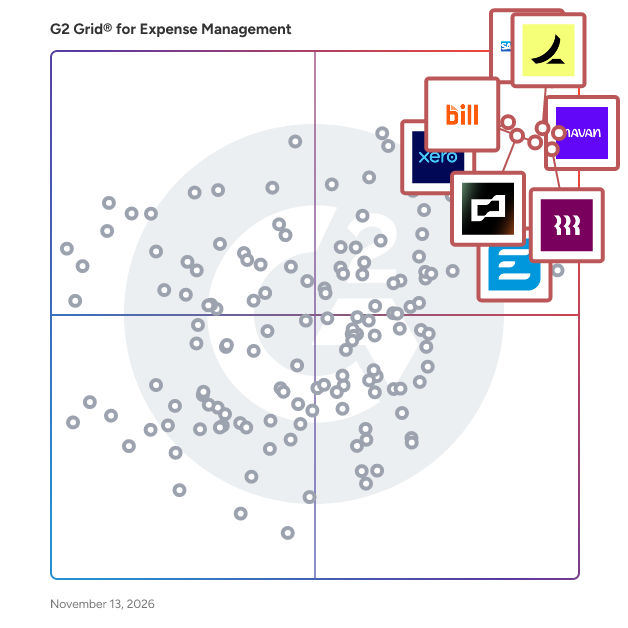
G2 Grid® for Expense Management Software

G2 Grid® for Expense Management Software plotting products by satisfaction and market presence

Highlighted products: SAP Concur, Navan (Formerly TripActions), Ramp, Rippling Finance, BILL Spend & Expense (Formerly Divvy), Brex, Xero, and Emburse.

Underlying data: [Grid® JSON](https://www.g2.com/categories/expense-management/grids.json?focus%5B%5D=sap-concur&focus%5B%5D=navan-formerly-tripactions&focus%5B%5D=ramp-financial-ramp&focus%5B%5D=rippling-finance&focus%5B%5D=bill-spend-expense-formerly-divvy&focus%5B%5D=brex&focus%5B%5D=xero&focus%5B%5D=emburse-2026-11-11)

SAP Concur

SAP Concur is a leading cloud-based spend management solution that helps small, medium, and large businesses automate and simplify expense reporting, travel booking, and invoice processing. It’s designed to give organizations better control over their business spend by integrating near real-time data and using AI to audit 100% of transactions. Employees can snap a picture of a receipt, book a business trip, or submit an expense report right from their phone. Meanwhile, finance teams can track spending in real time, automate approvals, and make sure everything follows company policies. Stay organized and save time, cut down errors and keep things moving without getting buried in paperwork. Integrated AI-enabled solutions help you enforce travel and expense policies, stay compliant and make more informed decisions with up to date spend data.

Average Rating: 4.0/5.0

Total Reviews: 7,117

How Do G2 Users Rate SAP Concur?

  • Has the product been a good partner in doing business?: 8.1/10 (Category avg: 8.9/10)
  • Workflow: 8.5/10 (Category avg: 8.7/10)
  • Performance and Reliability: 8.3/10 (Category avg: 8.7/10)
  • Ease of Creating Expense Reports: 8.5/10 (Category avg: 8.8/10)

Who Is the Company Behind SAP Concur?

  • Seller: SAP Concur
  • Company Website:
  • Year Founded: 1993
  • HQ Location: Bellevue, WA
  • LinkedIn® Page: www.linkedin.com
    6,562 employees on LinkedIn®

Who Uses This Product?

  • Who Uses This: Software Engineer, Executive Assistant
  • Top Industries: Information Technology and Services, Computer Software
  • Company Size: 55% Large, 36% Medium

What Do G2 Reviewers Say About SAP Concur?

AI-generated summary from verified user reviews

Pros
  • Users find the interface intuitive and easy to navigate, helping them move through everyday tasks quickly.
  • Users value expense automation that reduces repetitive data entry and manual work, saving time and effort.
  • Users appreciate straightforward expense management and easier invoice processing, helping them handle expenses and invoices more conveniently.
  • Users value the faster processing and automation, which save time on expense tasks and administrative work.
  • Users find expense reporting straightforward and quick, making it easier to submit and manage expense claims.
Cons
  • Users find the interface cluttered, complex, and often unintuitive, especially for newcomers.
  • Users experience slow loading and lag when navigating or using the interface.
  • Users say the interface looks and feels outdated and could use a visual refresh.
  • Users say simple expense tasks and other workflows require too many steps and clicks.
  • Users find navigation and locating features unintuitive and time-consuming, with menus and settings sometimes difficult to reach.

What Are Recent G2 Reviews of SAP Concur?

What Are G2 Users Discussing About SAP Concur?

Navan (Formerly TripActions)

Navan is the global AI-powered business travel and expense platform that makes travel easy for frequent travelers. From finding flights and hotels, to automating expense reconciliation, with 24/7 support along the way, Navan delivers an intuitive experience travelers love and finance teams rely on. See how Navan customers benefit and learn more at navan.com.

Average Rating: 4.6/5.0

Total Reviews: 9,543

How Do G2 Users Rate Navan (Formerly TripActions)?

  • Has the product been a good partner in doing business?: 9.0/10 (Category avg: 8.9/10)
  • Workflow: 9.2/10 (Category avg: 8.7/10)
  • Performance and Reliability: 9.4/10 (Category avg: 8.7/10)
  • Ease of Creating Expense Reports: 9.4/10 (Category avg: 8.8/10)

Who Is the Company Behind Navan (Formerly TripActions)?

  • Seller: Navan
  • Company Website:
  • Year Founded: 2015
  • HQ Location: Palo Alto, California
  • LinkedIn® Page: www.linkedin.com
    3,682 employees on LinkedIn®

Who Uses This Product?

  • Who Uses This: Account Executive, Customer Success Manager
  • Top Industries: Computer Software, Information Technology and Services
  • Company Size: 59% Medium, 30% Large

What Do G2 Reviewers Say About Navan (Formerly TripActions)?

AI-generated summary from verified user reviews

Pros
  • Users find Navan to be incredibly user-friendly, making travel bookings and expense management effortless and quick.
  • Users praise the easy booking process of Navan, highlighting its simplicity and efficiency in travel management.
  • Users appreciate the seamless expense categorization and helpful features that simplify travel planning with Navan.
  • Users appreciate the user-friendly platform of Navan, making travel and expense management simple and efficient.
  • Users find Navan intuitive, significantly simplifying travel planning and task management with its user-friendly features.
Cons
  • Users experience booking confusion due to unclear pricing and options when selecting hotels and other services.
  • Users find limited options for personal bookings, lacking features available for business bookings that enhance convenience.
  • Users face booking issues with confusing price options and limited calendar integration for personal bookings.
  • Users often face hotel booking issues with confusing pricing, duplicate charges, and inadequate customer support.
  • Users face approval issues as tracking and notifications lag, causing anxiety over submission statuses and deadlines.

What Are Recent G2 Reviews of Navan (Formerly TripActions)?

What Are G2 Users Discussing About Navan (Formerly TripActions)?

BILL Spend & Expense (Formerly Divvy)

BILL Spend & Expense is an expense management and spend tracking platform that enables businesses to control, automate, and gain real-time visibility into company spending through smart corporate cards and centralized expense management workflows. This expense management and corporate card software is designed for small to midsize businesses that want to simplify employee purchasing, enforce spending policies, and reduce manual reconciliation tasks. BILL Spend & Expense equips finance teams, controllers, and department managers with tools to issue corporate cards, monitor spending in real time, and streamline the process of submitting, reviewing, and approving expenses. Key features of BILL Spend & Expense include: - Instant corporate card issuance with customizable spending limits by user, team, or category - Real-time expense tracking with transaction-level visibility and automatic receipt matching - Policy enforcement and approvals built into the spend workflow to support compliance - Mobile and desktop access for employees to request funds, upload receipts, and categorize transactions - Accounting integration with systems like QuickBooks, Xero, and NetSuite to reduce reconciliation time BILL Spend & Expense helps companies proactively manage employee-initiated spending and reduce end-of-month surprises. With automated controls and flexible card issuance, businesses can empower teams to spend responsibly while maintaining clear oversight. The platform is often deployed alongside accounts payable automation tools to deliver a comprehensive view of both discretionary and non-discretionary spend. By combining corporate cards with expense management in one solution, BILL Spend & Expense allows finance leaders to better forecast spend, improve accountability, and close the books faster.

Average Rating: 4.5/5.0

Total Reviews: 2,237

How Do G2 Users Rate BILL Spend & Expense (Formerly Divvy)?

  • Has the product been a good partner in doing business?: 9.0/10 (Category avg: 8.9/10)
  • Workflow: 8.3/10 (Category avg: 8.7/10)
  • Performance and Reliability: 8.9/10 (Category avg: 8.7/10)
  • Ease of Creating Expense Reports: 8.5/10 (Category avg: 8.8/10)

Who Is the Company Behind BILL Spend & Expense (Formerly Divvy)?

Who Uses This Product?

  • Who Uses This: Controller, CFO
  • Top Industries: Non-Profit Organization Management, Construction
  • Company Size: 63% Small, 32% Medium

What Do G2 Reviewers Say About BILL Spend & Expense (Formerly Divvy)?

AI-generated summary from verified user reviews

Pros
  • Users appreciate the ease of use of BILL Spend & Expense, enabling smooth management and receipt tracking.
  • Users appreciate the ease of expense tracking with BILL, enhancing management flexibility and saving valuable time.
  • Users appreciate the convenience of easy tracking, policy settings, and instant visibility for team spending.
  • Users find the easy setup of BILL Spend & Expense to be a convenient transition, enhancing overall user experience.
  • Users appreciate the time-saving capabilities of BILL Spend & Expense, enabling quick receipt capture and efficient processing.
Cons
  • Users face significant integration issues, particularly with QuickBooks, which hampers overall functionality and ease of use.
  • Users face approval issues that hinder access recovery and complicate charge synchronization with accounting software.
  • Users frequently experience poor customer support, facing unresolved issues and challenges in reaching assistance when needed.
  • Users experience frequent syncing issues that hinder their ability to manage and approve charges effectively.
  • Users find it challenging due to the inability to carry over balances, complicating budget management and syncing issues.

What Are Recent G2 Reviews of BILL Spend & Expense (Formerly Divvy)?

What Are G2 Users Discussing About BILL Spend & Expense (Formerly Divvy)?

AI can help you find the answers. G2 helps you trust them.

Connect G2 to Claude or ChatGPT for answers grounded in G2's trusted reviews, comparisons, and pricing from real user insights.

How it works

Emburse

Emburse Expense Intelligence transforms reactive expense management into infrastructure for strategic growth. Powered by Emburse AI, it orchestrates corporate spend across travel booking, reimbursements, AP and payments, embedding dynamic policy controls and predictive insights directly into workflows. This real-time approach empowers organizations to adapt quickly, reduce risk, and guide spend before money leaves the business. Trusted globally by more than 12 million finance leaders, travel managers, and professionals, Emburse serves over 20,000 organizations in 200 countries—including Global 2000 enterprises, SMBs, public sector agencies, and nonprofits. By proactively managing and accurately validating spend, Emburse ensures robust financial governance, enhanced compliance, and unsurpassed visibility into spend behaviors - all while dramatically streamlining the process for every employee. Our Expense Intelligence is more than a feature, it’s a framework for transformation, reshaping the role of finance teams from administrators to strategic drivers of organizational success.

Average Rating: 4.4/5.0

Total Reviews: 6,605

How Do G2 Users Rate Emburse?

  • Has the product been a good partner in doing business?: 8.7/10 (Category avg: 8.9/10)
  • Workflow: 8.7/10 (Category avg: 8.7/10)
  • Performance and Reliability: 8.8/10 (Category avg: 8.7/10)
  • Ease of Creating Expense Reports: 9.0/10 (Category avg: 8.8/10)

Who Is the Company Behind Emburse?

  • Seller: Emburse
  • Company Website:
  • Year Founded: 2015
  • HQ Location: Dallas, Texas
  • LinkedIn® Page: www.linkedin.com
    950 employees on LinkedIn®

Who Uses This Product?

  • Who Uses This: Controller, Accountant
  • Top Industries: Computer Software, Information Technology and Services
  • Company Size: 38% Medium, 28% Large

What Do G2 Reviewers Say About Emburse?

AI-generated summary from verified user reviews

Pros
  • Users value the ease of use of Emburse, appreciating its quick approval processes and automated expense reports.
  • Users love the easy upload feature of Emburse, effortlessly submitting and tracking expenses with receipts.
  • Users love the easy receipt tracking and expense submission with accurate photo scanning and autofill features.
  • Users value the easy expense creating and submission process of Emburse, enhancing efficiency and reducing manual effort.
  • Users find the easy-to-use interface of Emburse simple and efficient, making navigation a breeze.
Cons
  • Users find the receipt management process cumbersome, especially with auto-fill and data loss during edits.
  • Users find the manual entry tedious as it can lead to losing previously entered data and errors.
  • Users struggle with upload issues, finding the autofill feature inconsistent and managing attachments often challenging.
  • Users report inaccuracy issues with data extraction from receipts, leading to frustration and potential errors in expenses.
  • Users face approval issues due to unclear permissions and strict expense coding requirements, complicating the approval process.

What Are Recent G2 Reviews of Emburse?

What Are G2 Users Discussing About Emburse?

Expensify

Expensify is the easiest way to do your expenses, travel, and corporate cards. Built for businesses of all sizes and trusted by 15 million members worldwide. Don't believe us? Even G2 uses Expensify!

Average Rating: 4.5/5.0

Total Reviews: 5,692

G2 Deal: 50% off 6 months!

Sign up for your 30-day free trial, then get 50% off 6 months.

View this exclusive G2 deal

How Do G2 Users Rate Expensify?

  • Has the product been a good partner in doing business?: 8.3/10 (Category avg: 8.9/10)
  • Workflow: 9.0/10 (Category avg: 8.7/10)
  • Performance and Reliability: 9.2/10 (Category avg: 8.7/10)
  • Ease of Creating Expense Reports: 9.2/10 (Category avg: 8.8/10)

Who Is the Company Behind Expensify?

  • Seller: Expensify
  • Company Website:
  • Year Founded: 2008
  • HQ Location: San Francisco, CA
  • LinkedIn® Page: www.linkedin.com
    229 employees on LinkedIn®
  • Ownership: NASDAQ: EXFY

Who Uses This Product?

  • Who Uses This: Account Executive, Customer Success Manager
  • Top Industries: Computer Software, Information Technology and Services
  • Company Size: 49% Medium, 35% Small

What Do G2 Reviewers Say About Expensify?

AI-generated summary from verified user reviews

Pros
  • Users appreciate the ease of use of Expensify, simplifying expense management and enhancing workflow efficiency.
  • Users appreciate the efficiency of Expensify, enjoying streamlined expense management and quick reimbursement processing.
  • Users appreciate the efficient expense tracking of Expensify, significantly reducing manual work and enhancing organization.
  • Users love how Expensify provides effective expense management, streamlining receipt tracking and reimbursement processes effortlessly.
  • Users appreciate the convenience of Expensify, enjoying seamless expense management and effortless receipt uploads.
Cons
  • Users find the manual entry process challenging, as it often requires repetitive input despite using auto-scan features.
  • Users find the receipt management process slow and often require manual entries, causing frustration and delays.
  • Users find the interface not intuitive, with hidden features complicating navigation and usability for new users.
  • Users experience upload issues with slow recognition of new receipts, affecting task completion and overall efficiency.
  • Users face a challenging learning curve with Expensify, particularly when navigating advanced features and workflows.

What Are Recent G2 Reviews of Expensify?

What Are G2 Users Discussing About Expensify?

Zoho Expense

Zoho Expense is an AI-native travel and expense management platform that brings business travel, expenses, and corporate cards together in one system. It helps finance teams, travel managers and organizations manage employee spending with greater visibility and control, from planning and booking a business trip to capturing expenses, enforcing policies, approving reports, reconciling transactions, and reimbursing employees. Zoho Expense is built for organizations that have outgrown spreadsheets, disconnected travel and expense tools, and manual expense processes. By bringing travel, cards, and expenses together, it helps businesses manage spending across teams, entities, and regions while giving finance teams the controls and insights they need to make informed decisions. Zia, Zoho's native AI works across these workflows to automate repetitive tasks, identify unusual or non-compliant spending, and surface insights from travel and expense data. Employees can book flights and hotels while organizations apply travel policies and negotiated rates. Expenses can be captured from receipts and card transactions, automatically categorized, and routed through configured approval workflows. Finance teams can connect card activity with expenses, apply spending controls, and reconcile transactions without managing travel, cards, and expenses as separate processes. For larger and distributed organizations, Zoho Expense supports multi-entity operations, multiple currencies, configurable workflows, and integrations with accounting, ERP, HRMS, banking, travel, and other business systems. It helps businesses manage travel and expense processes across teams, entities, and regions while fitting into their existing financial and operational workflows. Trusted by millions of users across 150+ countries, Zoho Expense is used by organizations including PUMA, IFFCO Group, Tata Play Fiber, Coromandel International, and Oberoi Realty. Zoho Expense has been ranked as a Leader in the IDC MarketScape for AI-enabled T&E applications and is rated highly by users across software review platforms including G2 and Capterra.

Average Rating: 4.5/5.0

Total Reviews: 1,565

How Do G2 Users Rate Zoho Expense?

  • Has the product been a good partner in doing business?: 8.7/10 (Category avg: 8.9/10)
  • Workflow: 8.4/10 (Category avg: 8.7/10)
  • Performance and Reliability: 8.7/10 (Category avg: 8.7/10)
  • Ease of Creating Expense Reports: 8.7/10 (Category avg: 8.8/10)

Who Is the Company Behind Zoho Expense?

  • Seller: Zoho
  • Company Website:
  • Year Founded: 1996
  • HQ Location: Austin, TX
  • LinkedIn® Page: www.linkedin.com
    30,913 employees on LinkedIn®
  • Phone: +1 (888) 900-9646

Who Uses This Product?

  • Who Uses This: CEO, Director
  • Top Industries: Information Technology and Services, Computer Software
  • Company Size: 82% Small, 15% Medium

What Do G2 Reviewers Say About Zoho Expense?

AI-generated summary from verified user reviews

Pros
  • Users find Zoho Expense easy to use for uploading documents and tracking expenses efficiently.
  • Users appreciate the easy expense tracking with seamless uploads and helpful credit card integration features.
  • Users find Zoho Expense simple to learn, appreciating its intuitive interface and flexibility for managing business expenses.
  • Users value the efficient expense tracking capabilities of Zoho Expense, streamlining reporting and management processes significantly.
  • Users find Zoho Expense intuitive and easy to use, streamlining expense management and reporting significantly.
Cons
  • Users find Zoho Expense to have a large learning curve, making it challenging to navigate and utilize effectively.
  • Users face a large learning curve with Zoho Expense, requiring significant time to understand its features and setup.
  • Users find the limited customization options in Zoho Expense lead to a confusing and less intuitive experience.
  • Users find the pricing issues of Zoho Expense problematic, especially for companies with multiple branches requiring separate subscriptions.
  • Users find the confusing interface of Zoho Expense overwhelming, making navigation and simple tasks unnecessarily complex.

What Are Recent G2 Reviews of Zoho Expense?

What Are G2 Users Discussing About Zoho Expense?

Webexpenses

Webexpenses is a comprehensive spend management solution designed to assist organizations in effectively managing their financial expenditures. This platform integrates smart Expense Cards with cloud-based software, enabling businesses to gain complete control over their spending activities. Catering to finance teams across various industries and company sizes, Webexpenses automates expense management processes, enforces financial policies, and helps control costs, ultimately allowing companies to allocate resources more efficiently towards growth initiatives. The target audience for Webexpenses includes finance professionals and teams within organizations that seek to streamline their expense management processes. With over 2,000 finance teams utilizing the platform in more than 70 countries, it is evident that Webexpenses addresses a critical need for businesses looking to enhance their financial oversight. The solution is particularly beneficial for organizations that experience high travel and entertainment (T&E) expenses, as it provides tools to reduce spending by up to 30%. Webexpenses offers a range of specific use cases that enhance operational efficiency. For direct company spending, the integrated Expense Cards automate transaction processing, feeding data into the platform in real-time. This feature not only simplifies expense tracking but also ensures that finance teams have immediate access to spending data. For out-of-pocket expenses, users can conveniently create claims by scanning receipts using the intuitive mobile app. This functionality enhances visibility for finance teams and ensures compliance with company policies at the point of sale, significantly improving the overall expense management experience. In addition to expense tracking, Webexpenses provides a unified platform for total spend management, which includes features for invoice processing, payments, and advanced auditing of all transactions. The platform's robust tools are designed to detect errors, prevent fraudulent activities, and maximize tax reclaims. By offering these capabilities, Webexpenses helps organizations achieve compliance while simultaneously saving money and reducing administrative burdens associated with financial management. The combination of automation, policy enforcement, and cost control makes Webexpenses a valuable asset for any organization looking to optimize its spend management processes. By leveraging this platform, businesses can streamline their financial operations, improve visibility into spending patterns, and ultimately drive better financial outcomes.

Average Rating: 4.3/5.0

Total Reviews: 2,752

How Do G2 Users Rate Webexpenses?

  • Has the product been a good partner in doing business?: 8.7/10 (Category avg: 8.9/10)
  • Workflow: 8.2/10 (Category avg: 8.7/10)
  • Performance and Reliability: 8.3/10 (Category avg: 8.7/10)
  • Ease of Creating Expense Reports: 8.7/10 (Category avg: 8.8/10)

Who Is the Company Behind Webexpenses?

  • Seller: Signifo
  • Company Website:
  • Year Founded: 2000
  • HQ Location: Witney
  • LinkedIn® Page: www.linkedin.com
    132 employees on LinkedIn®

Who Uses This Product?

  • Who Uses This: Manager, Account Manager
  • Top Industries: Financial Services, Construction
  • Company Size: 54% Medium, 28% Large

What Do G2 Reviewers Say About Webexpenses?

AI-generated summary from verified user reviews

Pros
  • Users praise the ease of use of Webexpenses, highlighting its intuitive navigation and clear expense tracking features.
  • Users find the ease of use in Webexpenses remarkable, simplifying the process of managing and compiling expenses.
  • Users enjoy the quick and easy upload feature of Webexpenses, making expense tracking convenient and efficient.
  • Users value the user-friendly interface of Webexpenses, making it effortless to manage and track their expenses.
  • Users appreciate the simplicity of Webexpenses, enjoying its intuitive interface and easy mileage claims process.
Cons
  • Users experience a slow and clunky mobile app that complicates receipt management and overall usability.
  • Users find receipt scanning issues frustrating, often citing slow uploads and lack of intuitive functionality.
  • Users find upload issues frustrating, experiencing slow mobile app performance and occasional delays in receipt uploads.
  • Users feel that Webexpenses is not intuitive, struggling with slow performance and a difficult receipt upload process.
  • Users feel the design needs improvement, citing outdated elements and a cluttered user interface affecting usability.

What Are Recent G2 Reviews of Webexpenses?

Spendesk

Spendesk is the complete spend management platform that saves businesses time and money by connecting company spend. With the integration of everyday technologies, built-in automation, procurement, and an easily adopted approval process, Spendesk’s single solution makes agile, efficient spending easy for employees. It gives finance leaders complete visibility across company spend. With the launch of its Procure-to-Pay solution, Spendesk is the first European platform to fully integrate procurement and spend management for businesses of up to 1,000 employees.

Average Rating: 4.5/5.0

Total Reviews: 883

How Do G2 Users Rate Spendesk?

  • Has the product been a good partner in doing business?: 8.5/10 (Category avg: 8.9/10)
  • Workflow: 8.9/10 (Category avg: 8.7/10)
  • Performance and Reliability: 8.6/10 (Category avg: 8.7/10)
  • Ease of Creating Expense Reports: 9.2/10 (Category avg: 8.8/10)

Who Is the Company Behind Spendesk?

  • Seller: Spendesk
  • Company Website:
  • Year Founded: 2016
  • HQ Location: Paris, Île-de-France
  • LinkedIn® Page: www.linkedin.com
    348 employees on LinkedIn®

Who Uses This Product?

  • Who Uses This: CFO, comptable
  • Top Industries: Computer Software, Information Technology and Services
  • Company Size: 57% Medium, 40% Small

What Do G2 Reviewers Say About Spendesk?

AI-generated summary from verified user reviews

Pros
  • Users praise the ease of use of Spendesk, highlighting its intuitive interface and clear expense tracking process.
  • Users feel that Spendesk lacks timely customer support, impacting their overall satisfaction with the service.
  • Users feel the customer support of Spendesk has declined, impacting their overall experience negatively.
  • Users appreciate the ease of understanding of Spendesk, making it simple to track and order finances.
  • Users value the easy submission process of Spendesk, enjoying its user-friendly interface and efficient expense management.
Cons
  • Users report approval issues with Spendesk, facing delays and lack of support that hinder daily operations.
  • Users report severe credit issues with Spendesk, facing unresponsive support and lost funds during urgent business needs.
  • Users report significant delays in support response, leading to frustration and disruption in their purchasing processes.
  • Users report significant payment issues with Spendesk, citing inaccessible funds and poor customer support response.
  • Users report significant processing delays with Spendesk, impacting accessibility to funds and urgent business transactions.

What Are Recent G2 Reviews of Spendesk?

What Are G2 Users Discussing About Spendesk?

Pleo

Pleo is a comprehensive spending solution designed to streamline expense management for companies of all sizes. This innovative platform provides employees with smart company cards, enabling them to make necessary purchases without the hassle of tracking down receipts or managing reimbursements. With Pleo, organizations can gain real-time visibility into their spending, reduce administrative burdens, and foster a culture of trust and autonomy among team members. Targeted primarily at businesses looking to enhance their financial processes, Pleo caters to a diverse audience, including finance teams, HR departments, and employees across various sectors. The solution is particularly beneficial for companies that want to empower their staff while maintaining control over expenditures. By simplifying the expense management process, Pleo allows teams to focus on their core responsibilities rather than getting bogged down by paperwork and manual tracking. One of the key features of Pleo is its automated expense management system, which eliminates the need for tedious paperwork and manual entry. As soon as a purchase is made using a Pleo card, notifications are sent to administrators, ensuring that there are no unexpected expenses at the end of the month. This level of transparency is a significant advantage, as it allows companies to monitor spending in real-time and adjust budgets as necessary. Many users report that this feature has increased their overall productivity and enhanced their understanding of financial flows within the organization. Pleo also offers customizable spending limits for each cardholder, giving businesses the flexibility to manage their budgets effectively. This feature allows organizations to set individual limits based on roles or departments, ensuring that spending aligns with company policies. The ability to adjust these limits as needed further enhances control over finances, making it easier for administrators to respond to changing business needs. Ultimately, Pleo empowers teams by removing the constraints of traditional expense management. By providing employees with the tools they need to make purchases directly, companies can save significant time and resources. On average, Pleo admins report saving up to 138 hours annually, allowing them to redirect their efforts toward more strategic initiatives. This combination of efficiency, transparency, control, and freedom makes Pleo a valuable asset for organizations aiming to optimize their financial operations.

Average Rating: 4.7/5.0

Total Reviews: 1,417

How Do G2 Users Rate Pleo?

  • Has the product been a good partner in doing business?: 8.9/10 (Category avg: 8.9/10)
  • Workflow: 8.5/10 (Category avg: 8.7/10)
  • Performance and Reliability: 9.0/10 (Category avg: 8.7/10)
  • Ease of Creating Expense Reports: 8.7/10 (Category avg: 8.8/10)

Who Is the Company Behind Pleo?

  • Seller: Pleo
  • Company Website:
  • Year Founded: 2015
  • HQ Location: København N, Hovedstaden
  • LinkedIn® Page: www.linkedin.com
    941 employees on LinkedIn®

Who Uses This Product?

  • Who Uses This: CEO, Managing Director
  • Top Industries: Computer Software, Information Technology and Services
  • Company Size: 59% Small, 33% Medium

What Do G2 Reviewers Say About Pleo?

AI-generated summary from verified user reviews

Pros
  • Users value Pleo's ease of use, praising its simple setup and efficient expense management for quick reimbursements.
  • Users love Pleo's user-friendly design, making expense management and reimbursements effortless and quick.
  • Users appreciate the user-friendly interface of Pleo, making expense management simple and efficient.
  • Users love the Easy Upload feature of Pleo, enjoying its simple interface and quick receipt scanning capability.
  • Users love the efficiency of Pleo, enjoying its user-friendly interface and quick receipt management.
Cons
  • Users find the receipt scanning issues frustrating, particularly with slow processing and inconsistent loading times.
  • Users find the card issues frustrating, particularly with delays in accessing digital cards and using them on mobile.
  • Users find the approval issues with Pleo frustrating, particularly the delays in accessing their digital card information.
  • Users face frequent upload issues, leading to confusion and potential data loss during attachment processes.
  • Users express frustration with poor customer support, citing unresolved issues and lack of helpful resources.

What Are Recent G2 Reviews of Pleo?

What Are G2 Users Discussing About Pleo?

Paylocity

Paylocity is an award-winning HCM platform that brings HR, Finance, and IT together in one connected system, covering payroll, benefits, talent management, time and labor, spend, and IT provisioning on a single employee record. Cut manual HR tasks, run payroll faster, and get new hires up and running sooner. Get full visibility across expenses, accounts payable, corporate cards, and procurement in one place. Automate account creation and manage IT provisioning without juggling separate systems. AI is built into everyday workflows across all three. Policies, approvals, and workflows stay in lockstep as people join, move, and grow. Paylocity accompanies its clients on the journey to build great workplaces and help every employee do their best work.

Average Rating: 4.4/5.0

Total Reviews: 6,289

How Do G2 Users Rate Paylocity?

  • Has the product been a good partner in doing business?: 8.7/10 (Category avg: 8.9/10)
  • Workflow: 8.4/10 (Category avg: 8.7/10)
  • Performance and Reliability: 8.9/10 (Category avg: 8.7/10)
  • Ease of Creating Expense Reports: 9.0/10 (Category avg: 8.8/10)

Who Is the Company Behind Paylocity?

  • Seller: Paylocity
  • Company Website:
  • Year Founded: 1997
  • HQ Location: Schaumburg, IL
  • LinkedIn® Page: www.linkedin.com
    7,164 employees on LinkedIn®
  • Ownership: NASDAQ: PCTY

Who Uses This Product?

  • Who Uses This: HR Manager, Human Resources Manager
  • Top Industries: Computer Software, Hospital & Health Care
  • Company Size: 69% Medium, 20% Small

What Do G2 Reviewers Say About Paylocity?

AI-generated summary from verified user reviews

Pros
  • Users find the platform easy to learn and navigate, helping them handle daily tasks with little difficulty.
  • Users value responsive, helpful support that answers questions promptly and provides assistance when needed.
  • Users like having HR, payroll, employee records, and related tools in one place, making information and functions easier to access.
  • Users find payroll processing straightforward and efficient, helping them run payroll quickly and manage it with ease.
  • Users find setup and implementation easy and smooth, with helpful onboarding support guiding them through the process.
Cons
  • Users find navigation unintuitive, with layered menus and multiple paths making features and tasks harder to locate.
  • Users report inconsistent answers, limited product knowledge, and support that overlooks problem details or gives vague, unhelpful guidance.
  • Users report slow support replies, long phone hold times, and difficulty reaching the right department.
  • Users describe initial setup as difficult and confusing, with configuration mistakes and implementation follow-through issues.
  • Users find reporting confusing and difficult to create, navigate, and use.

What Are Recent G2 Reviews of Paylocity?

What Are G2 Users Discussing About Paylocity?

Perk (formerly TravelPerk)

Perk is the intelligent platform for travel, spend and events. Perk’s powerful platform automates time-consuming tasks like travel bookings, expenses, and invoice processing. So your people can focus on real work, with real impact. Employees get simple, easy-to-use tools for everything from booking and managing travel to claiming expenses, processing invoices, and making payments. Finance teams get end-to-end control with customisable policies and permissions as well as full visibility into spend across the company with real time reporting across travel, expenses, invoices, and card payments. The result? Simpler, faster workflows that free up time for your teams to focus on real work, with real impact.

Average Rating: 4.6/5.0

Total Reviews: 2,130

How Do G2 Users Rate Perk (formerly TravelPerk)?

  • Has the product been a good partner in doing business?: 9.2/10 (Category avg: 8.9/10)
  • Workflow: 9.3/10 (Category avg: 8.7/10)
  • Performance and Reliability: 9.3/10 (Category avg: 8.7/10)
  • Ease of Creating Expense Reports: 9.7/10 (Category avg: 8.8/10)

Who Is the Company Behind Perk (formerly TravelPerk)?

  • Seller: Perk
  • Company Website:
  • Year Founded: 2015
  • HQ Location: London
  • LinkedIn® Page: www.linkedin.com
    2,262 employees on LinkedIn®

Who Uses This Product?

  • Who Uses This: Office Manager, Software Engineer
  • Top Industries: Information Technology and Services, Computer Software
  • Company Size: 61% Medium, 18% Small

What Do G2 Reviewers Say About Perk (formerly TravelPerk)?

AI-generated summary from verified user reviews

Pros
  • Users value the ease of use of Perk, appreciating the quick and simple booking process for trips.
  • Users value the easy booking experience with Perk, appreciating its user-friendly interface and quick trip arrangements.
  • Users praise the fast and helpful customer support of Perk, enhancing their travel experience significantly.
  • Users find the initial setup easy, facilitated by attentive support, enhancing their overall experience with Perk.
  • Users find the easy setup of Perk refreshing, facilitating a smooth transition into the platform.
Cons
  • Users face booking issues such as outdated travel options and difficulties in securing flights post-approval.
  • Users face booking confusion due to flight availability issues, leading to wasted time and frustration during reservations.
  • Users express dissatisfaction with limited options and prefer more choices for flights and accommodations on Perk.
  • Users find hotel search issues on Perk, often relying on external sources for better information and reviews.
  • Users experience poor customer support, making resolution of booking issues and assistance cumbersome and frustrating.

What Are Recent G2 Reviews of Perk (formerly TravelPerk)?

What Are G2 Users Discussing About Perk (formerly TravelPerk)?

Dext

Automate bookkeeping with Dext, invoice to payment. AI captures, extracts & codes receipts/invoices, syncs to Xero, QBO & 36+ platforms. You stay in control. 12,000+ firms trust Dext. Manage your bookkeeping workflows from invoice to payment in one AI-powered platform. Our intelligent, cloud-based bookkeeping automation platform is built for accountants, bookkeepers, and growing businesses. It connects document capture, extraction, categorisation, approvals, expenses and payments in one workflow, powered by AI built specifically for bookkeeping, not generic AI, so your business gets accurate, real-time financial data with you in control. More than 700,000 businesses and 12,000+ accounting firms trust Dext. Each year, the platform processes over 350 million financial documents at over 99% extraction accuracy, and connects to more than 11,500 banks, platforms, and accounting systems worldwide. How Dext works 1. Capture invoices and receipts – Snap a photo, upload a PDF, forward by email or WhatsApp, or connect a data feed. 2. Extract key data with AI – Reads supplier, amount, tax, due date and more. 3. Categorise and enrich automatically – AI suggests categories, descriptions, and payment methods, learning from how your business or practice works. 4. Sync with accounting software – Send accurate data to Xero, QuickBooks, Sage, and 36+ platforms. 5. Approve and pay – Manage the full accounts payable workflow, with built-in approvals and security checks. 6. Reconcile transactions – Automatic matching keeps accounts accurate and up to date. Receipt capture and submission options: Capture data however you prefer: snap a photo, submit receipts individually or in bulk, calculate mileage using GPS, and manage expense claims from the mobile app, or send documents by email, WhatsApp, Dropbox, drag-and-drop, or direct bank feed. Bookkeeping automation, AI and accounts payable Supplier rules and smart splits automate categorisation and posting, while AI Assist, Dext's agentic AI, learns how you work and suggests smarter automations, transparent, optional and fully auditable. Nothing publishes without review and sign-off. Dext manages the rest of the accounts payable workflow too: approvals and supplier payments, with built-in security checks. Integrations and ecosystem Dext connects to more than 11,500 banks, e-commerce platforms and payment systems, syncing with 36+ accounting platforms including Xero, QuickBooks and Sage, plus Amazon, Shopify, Stripe and PayPal. This removes duplicate entry and supports every business type. Expense management Digital approval workflows and automated reimbursements simplify expense management for businesses and firms alike. Multi-level approvals, real-time spend visibility, multi-currency support and mileage tracking are all built in. Reliability and accuracy Dext matches transactions with bank feeds automatically, catching duplicates and flagging missing documents, delays and bottlenecks before they become problems, no spreadsheets or manual checks needed. Security and compliance All data is stored in the EU, encrypted at every stage, with least-privilege access. Dext is ISO/IEC 27001 certified and GDPR-compliant, with a live Trust Centre available anytime. Dext never sells customer data, every supplier is vetted, and the platform maintains over 99.99% uptime. Recognition and ratings - 30 G2 Leader Badges across six categories in the Fall 2026 Report: Expense Management, Invoice Management, OCR, Mileage Tracking, Accounting Practice Management, and Travel & Expense. - Xero App Partner of the Year (UK and US, 2024) - QuickBooks Developer Spotlight 2024 - SME News Best Cloud-Based Accounting Software 2023 - Rated 4.7 stars on Trustpilot, 4.8 stars on the App Store, and 4.5 stars on Google Play FAQs Does Dext integrate with accounting software? Yes. Dext integrates directly with Xero, QuickBooks, Sage, and 36+ accounting platforms, plus more than 11,500 banks, platforms, and systems worldwide. Is Dext just a receipt capture or OCR tool? No. Dext has evolved beyond receipt capture and OCR into a full intelligent bookkeeping automation platform, managing the complete workflow from invoice to payment, with AI at its core. Does Dext support e-invoicing? In France, Dext is one of the first government-certified Aggregated Platforms (PA) for e-invoicing, trusted by more than 2,000 accounting firms and 290,000 businesses, and has won five Gold Medals at France's Palmarès du Monde du Chiffre (a leading awards program for the French accounting industry). Start your 14-day free trial today and experience intelligent bookkeeping automation with Dext.

Average Rating: 4.6/5.0

Total Reviews: 387

How Do G2 Users Rate Dext?

  • Has the product been a good partner in doing business?: 9.2/10 (Category avg: 8.9/10)
  • Workflow: 8.9/10 (Category avg: 8.7/10)
  • Performance and Reliability: 9.0/10 (Category avg: 8.7/10)
  • Ease of Creating Expense Reports: 9.2/10 (Category avg: 8.8/10)

Who Is the Company Behind Dext?

  • Seller: IRIS Software Group
  • Company Website:
  • Year Founded: 1978
  • HQ Location: Slough, United Kingdom
  • LinkedIn® Page: www.linkedin.com
    3,115 employees on LinkedIn®

Who Uses This Product?

  • Who Uses This: Director, Accountant
  • Top Industries: Accounting, Financial Services
  • Company Size: 87% Small, 11% Medium

What Do G2 Reviewers Say About Dext?

AI-generated summary from verified user reviews

Pros
  • Users appreciate the ease of use of Dext, which streamlines workflows and enhances efficiency in managing documents.
  • Users value the time-saving features of Dext, enhancing workflow efficiency and simplifying transaction management significantly.
  • Users appreciate the automation capabilities of Dext, significantly reducing manual work and enhancing workflow efficiency.
  • Users highlight the automation efficiency of Dext, significantly reducing manual work and streamlining financial processes.
  • Users value the speed and efficiency of Dext, enhancing workflow and simplifying transaction management significantly.
Cons
  • Users express concerns over pricing issues with Dext, citing unauthorized charges and costly plan changes without consent.
  • Users express frustration over billing issues with Dext, highlighting unauthorized charges and poor communication regarding plan changes.
  • Users often face slow processing times with Dext, leading to delays in document handling and data fetching.
  • Users express frustration over approval issues with Dext, noting complications in plan changes and billing practices.
  • Users are frustrated with Dext’s expensive practices, including unauthorized charges and misleading subscription changes.

What Are Recent G2 Reviews of Dext?

What Are G2 Users Discussing About Dext?

Sage Expense Management

Sage Expense Management (formerly Fyle) is an AI-powered expense management software built to automate and simplify how businesses handle employee expenses and corporate credit card transactions. Works with your existing credit cards: Sage Expense Management connects directly to credit card networks (Visa, Mastercard, American Express). This means that as soon as a card is swiped, the transaction data is sent to our platform. Users instantly receive a text notification and can simply reply with a picture of the receipt for instant, automated reconciliation. Effortless expense submission: Employees can submit expenses from everyday apps, including Text Messages, Gmail, Outlook, or our easy-to-use mobile and web app. Our AI-powered OCR engine automatically extracts, codes, and categorizes data from receipts and allocates it to the right projects & cost centers. Automated, compliant workflows: Transactions appear the moment they occur, with instant policy checks that flag errors or out-of-policy spend. Further, you can set up multi-level approval workflows and track expense approvals in real time. Seamless accounting integrations: Sage Expense Management offers two-way integrations with QuickBooks Online, QuickBooks Desktop, Xero, Sage Intacct, and Sage 300 CRE. It automatically exports your expense data to your accounting software, mapping all key dimensions, including your Chart of Accounts, GL codes, projects, and employees. This ensures that every expense is accurately coded, eliminating the need for manual data entry. 2,000+ teams trust Sage Expense Management to simplify expense management. Learn more at www.fylehq.com

Average Rating: 4.6/5.0

Total Reviews: 1,729

How Do G2 Users Rate Sage Expense Management?

  • Has the product been a good partner in doing business?: 9.2/10 (Category avg: 8.9/10)
  • Workflow: 8.7/10 (Category avg: 8.7/10)
  • Performance and Reliability: 9.0/10 (Category avg: 8.7/10)
  • Ease of Creating Expense Reports: 9.2/10 (Category avg: 8.8/10)

Who Is the Company Behind Sage Expense Management?

  • Seller: Sage Software
  • Company Website:
  • Year Founded: 1981
  • HQ Location: Newcastle
  • LinkedIn® Page: www.linkedin.com
    15,833 employees on LinkedIn®
  • Ownership: SGE.L

Who Uses This Product?

  • Who Uses This: Operations Manager, Manager
  • Top Industries: Computer Software, Information Technology and Services
  • Company Size: 53% Medium, 31% Small

What Do G2 Reviewers Say About Sage Expense Management?

AI-generated summary from verified user reviews

Pros
  • Users appreciate the ease of use of Sage Expense Management, making expense tracking and receipt uploads seamless and efficient.
  • Users appreciate the easy upload process and quick notifications, making receipt management seamless and efficient.
  • Users appreciate the real-time text notifications and ease of submitting reports via the mobile app.
  • Users value the fast notifications for approval and the ease of uploading information in Sage Expense Management.
  • Users value the convenience of Sage Expense Management, enjoying easy tracking and real-time updates for expense reporting.
Cons
  • Users face challenges with receipt management, as uploads often fail to link correctly, creating redundant entries.
  • Users experience deletion difficulties in Sage Expense Management, facing issues with duplicates and incomplete charge adjustments.
  • Users find the manual entry process cumbersome, leading to time-consuming updates and confusion during expense tracking.
  • Users are frustrated by approval issues, as they cannot verify individual charges until the expense report is released.
  • Users find the time-consuming process of entering and saving expenses to be frustrating and inefficient.

What Are Recent G2 Reviews of Sage Expense Management?

What Are G2 Users Discussing About Sage Expense Management?

Teampay

Teampay by Paystand is an all-in-one spend management platform designed to help organizations efficiently manage their purchasing processes. This solution provides built-in controls that enforce company policies upfront, allowing finance teams to maintain oversight while enabling managers and employees to have real-time visibility into actual spending. By streamlining the purchasing experience, Teampay by Paystand empowers users to make compliant purchases quickly and effectively, ensuring that all company spending is managed in one centralized location. The platform is particularly beneficial for finance teams and organizations that require a robust system for tracking and controlling expenditures. Teampay by Paystand caters to a diverse range of industries, making it suitable for companies of various sizes that seek to enhance their financial management practices. The user-friendly interface allows employees to navigate purchasing with ease, while finance teams can rest assured that all transactions are pre-coded and pre-approved, significantly reducing the risk of unauthorized spending. One of the key features of Teampay by Paystand is its ability to manage all types of purchasing from end-to-end. This includes everything from office supplies to software subscriptions, ensuring that employees have the tools they need to perform their jobs effectively. The platform's automated purchasing workflows simplify the approval process, allowing for a seamless experience that minimizes delays and enhances productivity. Additionally, the reconciliation process is automated, which helps finance teams save time and reduce errors associated with manual data entry. Teampay by Paystand also offers direct integration with popular accounting software such as QuickBooks Online, Xero, Intacct, NetSuite, and Microsoft Dynamics 365 Business Central and Finance & Operations. This integration ensures that all financial data is synchronized across platforms, providing a comprehensive view of company spending. By leveraging these integrations, organizations can streamline their financial reporting and analysis, leading to more informed decision-making. Overall, Teampay by Paystand stands out in the spend management category by combining ease of use with powerful controls and integrations. Its focus on empowering employees while providing finance teams with the necessary oversight creates a balanced approach to managing company expenditures. This makes Teampay by Paystand an essential tool for organizations looking to enhance their financial processes and maintain compliance in their purchasing activities.

Average Rating: 4.4/5.0

Total Reviews: 602

How Do G2 Users Rate Teampay?

  • Has the product been a good partner in doing business?: 9.1/10 (Category avg: 8.9/10)
  • Workflow: 8.6/10 (Category avg: 8.7/10)
  • Performance and Reliability: 8.8/10 (Category avg: 8.7/10)
  • Ease of Creating Expense Reports: 8.6/10 (Category avg: 8.8/10)

Who Is the Company Behind Teampay?

  • Seller: Paystand
  • Company Website:
  • Year Founded: 2013
  • HQ Location: Santa Cruz, California
  • LinkedIn® Page: www.linkedin.com
    227 employees on LinkedIn®
  • Phone: 800-708-6413

Who Uses This Product?

  • Who Uses This: Practice Coordinator, Senior Accountant
  • Top Industries: Computer Software, Hospital & Health Care
  • Company Size: 56% Medium, 21% Small

What Do G2 Reviewers Say About Teampay?

AI-generated summary from verified user reviews

Pros
  • Users find Teampay's ease of use exceptional, with seamless integrations and efficient processes enhancing their experience.
  • Users appreciate the time-saving features of Teampay, making expensing quick and hassle-free.
  • Users value the efficiency of Teampay, finding it simplifies requests and streamlines their expense management processes.
  • Users love Teampay for its intuitive design that simplifies fund requests and enhances overall convenience.
  • Users value the simplicity of Teampay, finding it intuitive and streamlining their company spending processes effectively.
Cons
  • Users find the approval workflow rigid, which can hinder flexibility for urgent purchases and new user adaptations.
  • Users find the approval process rigid and unclear, which can hinder flexibility and slow down urgent transactions.
  • Users are frustrated with card issues like lack of RFID, Apple Pay integration, and problems matching transactions.
  • Users find Teampay's interface to be not intuitive, making navigation challenging during urgent purchase situations.
  • Users experience upload issues with Teampay, facing challenges in receipt management and transaction matching efficiency.

What Are Recent G2 Reviews of Teampay?

What Are G2 Users Discussing About Teampay?

Paychex

Paychex Flex® is an all-in-one HR platform built to help businesses hire, pay, manage, and retain employees all from a single interface. Designed to grow alongside your organization, Paychex Flex combines intelligent technology with flexible support to simplify the full scope of human resource management. At the core of the platform is a connected suite of payroll, HR, benefits, and workforce management tools. Paychex Flex automates routine administrative tasks from payroll processing and tax management to benefits enrollment and scheduling. The all-in-one solution utilizes AI-enabled features such as intelligent payroll automation, predictive analytics and customizable dashboards, as well as AI-supported recruiting technology. For talent management, the platform consolidates recruiting, onboarding, and employee development into one experience. This streamlines hiring workflows and supports a more engaged workforce. Workforce management tools help managers optimize schedules and allocate resources more effectively, while self-service options give employees direct access to pay information, benefits, training resources, and financial management tools. Compliance is built into the platform. Paychex Flex monitors relevant changes to federal, state, and local employment law and automatically alerts businesses to required actions. Organizations can also work with a dedicated HR professional who can interpret regulations and apply them to their specific workplace, combining automated monitoring with human guidance. Reporting and data accuracy benefit from AI, as well. The platform helps organizations identify workforce trends, interpret complex employment data, and manage their people all within a single system of record. Every Paychex Flex user has complete access to in-platform tools and flexible support options at any time. Organizations can select the level of technology and support that best suits their current needs while maintaining the flexibility to adapt as they grow. The result is a platform that adapts to your organization, whether you're managing payroll for a small team or supporting a full HR function across multiple locations.

Average Rating: 4.1/5.0

Total Reviews: 1,731

How Do G2 Users Rate Paychex?

  • Has the product been a good partner in doing business?: 8.4/10 (Category avg: 8.9/10)
  • Workflow: 7.9/10 (Category avg: 8.7/10)
  • Performance and Reliability: 8.2/10 (Category avg: 8.7/10)
  • Ease of Creating Expense Reports: 8.4/10 (Category avg: 8.8/10)

Who Is the Company Behind Paychex?

  • Seller: Paychex Inc
  • Company Website:
  • Year Founded: 1971
  • HQ Location: Rochester, NY
  • LinkedIn® Page: www.linkedin.com
    24,285 employees on LinkedIn®
  • Ownership: NASDAQ:PAYX

Who Uses This Product?

  • Who Uses This: Office Manager, Owner
  • Top Industries: Non-Profit Organization Management, Construction
  • Company Size: 74% Small, 23% Medium

What Do G2 Reviewers Say About Paychex?

AI-generated summary from verified user reviews

Pros
  • Users value the ease of use of Paychex, appreciating its helpful setup and intuitive interface for payroll management.
  • Users value the personalized support from Paychex, making payroll management and tax handling much simpler.
  • Users find Paychex's helpful customer service invaluable for addressing payroll queries and avoiding mistakes.
  • Users value the personalized support from their representative and appreciate the ease of payroll management with Paychex.
  • Users enjoy the personalized payroll service of Paychex, appreciating their dedicated support and ease of use.
Cons
  • Users experience poor customer support, with long hold times and lack of dedicated payroll specialists affecting service quality.
  • Users express frustration over payroll issues, including lack of dedicated support and untimely tax filings.
  • Users report poor support services with Paychex, citing ineffective communication and issues with critical modules and 401(k) management.
  • Users find the service too expensive considering the limited support and issues with functionality and responsiveness.
  • Users report technical issues with Paychex, including integration challenges and website performance problems that hinder usability.

What Are Recent G2 Reviews of Paychex?

What Are G2 Users Discussing About Paychex?