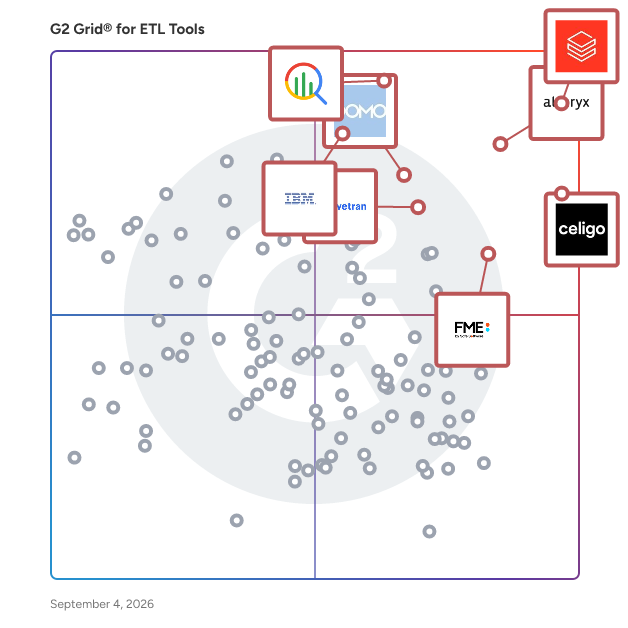
  # Best ETL Tools for Small Business

  *By [Shalaka Joshi](https://research.g2.com/insights/author/shalaka-joshi)*

   Products classified in the overall ETL Tools category are similar in many regards and help companies of all sizes solve their business problems. However, small business features, pricing, setup, and installation differ from businesses of other sizes, which is why we match buyers to the right Small Business ETL Tools to fit their needs. Compare product ratings based on reviews from enterprise users or connect with one of G2&#39;s buying advisors to find the right solutions within the Small Business ETL Tools category.

In addition to qualifying for inclusion in the ETL Tools category, to qualify for inclusion in the Small Business ETL Tools category, a product must have at least 10 reviews left by a reviewer from a small business.


  ## How Many ETL Tools Products Does G2 Track?
**Total Products under this Category:** 247

  
## How Does G2 Rank ETL Tools Products?

**Why You Can Trust G2's Software Rankings:**

- 30 Analysts and Data Experts
- 17,900+ Authentic Reviews
- 247+ Products
- Unbiased Rankings

G2's software rankings are built on verified user reviews, rigorous moderation, and a consistent research methodology maintained by a team of analysts and data experts. Each product is measured using the same transparent criteria, with no paid placement or vendor influence. While reviews reflect real user experiences, which can be subjective, they offer valuable insight into how software performs in the hands of professionals. Together, these inputs power the G2 Score, a standardized way to compare tools within every category.

  
## Top ETL Tools at a Glance
| # | Product | Rating | Best For | What Users Say |
|---|---------|--------|----------|----------------|
| 1 | [Databricks](https://www.g2.com/products/databricks/reviews) | 4.6/5.0 (742 reviews) | Unified lakehouse pipelines with governance and ML workflows | "[Perfect for Cross-team Collaboration and Intensive Data Applications](https://www.g2.com/survey_responses/databricks-review-12745626)" |
| 2 | [Google Cloud BigQuery](https://www.g2.com/products/google-cloud-bigquery/reviews) | 4.5/5.0 (1,157 reviews) | Serverless analytics on large cloud datasets | "[Fast, Scalable, and Fully Managed BigQuery for Large-Scale Data Processing](https://www.g2.com/survey_responses/google-cloud-bigquery-review-12611816)" |
| 3 | [Celigo](https://www.g2.com/products/celigo/reviews) | 4.6/5.0 (1,018 reviews) | NetSuite-centered app integration and sync | "[Celigo, a greta integrator with a University Lab inside it.](https://www.g2.com/survey_responses/celigo-review-10532295)" |
| 4 | [IBM watsonx.data](https://www.g2.com/products/ibm-watsonx-data/reviews) | 4.4/5.0 (157 reviews) | Lakehouse querying across object storage | "[Efficient and Scalable Lakehouse Platform for Modern Data Analytics](https://www.g2.com/survey_responses/ibm-watsonx-data-review-12677827)" |
| 5 | [FME Platform](https://www.g2.com/products/fme-platform/reviews) | 4.6/5.0 (115 reviews) | Geospatial and multi-format data transformation | "[Reliable ETL and Geospatial Transformations That Keep Workflows Organized](https://www.g2.com/survey_responses/fme-platform-review-12794716)" |
| 6 | [Fivetran](https://www.g2.com/products/fivetran/reviews) | 4.3/5.0 (776 reviews) | Managed connector-based data ingestion | "[Effortless Data Integration with Wide Connectivity](https://www.g2.com/survey_responses/fivetran-review-12701875)" |
| 7 | [Workato](https://www.g2.com/products/workato/reviews) | 4.7/5.0 (726 reviews) | Low-code workflow automation across SaaS apps | "[Seamless Integration, Effortless Automation](https://www.g2.com/survey_responses/workato-review-12193616)" |
| 8 | [Domo](https://www.g2.com/products/domo/reviews) | 4.3/5.0 (987 reviews) | Self-service ETL feeding business dashboards | "[All-in-One Platform for Real-Time Analytics and Dashboards](https://www.g2.com/survey_responses/domo-review-12676104)" |
| 9 | [SnapLogic Intelligent Integration Platform (IIP)](https://www.g2.com/products/snaplogic-intelligent-integration-platform-iip/reviews) | 4.4/5.0 (370 reviews) | Visual enterprise integration across complex systems | "[Improved Data Connectivity with Room for Stability Enhancements](https://www.g2.com/survey_responses/snaplogic-intelligent-integration-platform-iip-review-12375834)" |
| 10 | [Skyvia](https://www.g2.com/products/skyvia/reviews) | 4.8/5.0 (317 reviews) | No-code CRM sync, backup, and scheduled ETL | "[Helpful tool for ops teams that don’t want to depend on engineering](https://www.g2.com/survey_responses/skyvia-review-12807226)" |


## Which Type of ETL Tools Tools Are You Looking For?
  - [ETL Tools](https://www.g2.com/categories/etl-tools) *(current)*
  - [iPaaS Software](https://www.g2.com/categories/ipaas)
  - [Big Data Integration Platforms](https://www.g2.com/categories/big-data-integration-platforms)
  - [Data Extraction Tools](https://www.g2.com/categories/data-extraction-tools)

  
---

**Sponsored**

### CData Sync

Unlike volume-based tools with unpredictable pricing, CData Sync offers a single platform for ETL and reverse ETL, with full deployment flexibility and fixed, scalable pricing—so your costs don’t balloon as your data grows. Connect to 250+ enterprise data sources, including: • Salesforce, Microsoft Dynamics, and SAP • SharePoint, NetSuite, Workday, and QuickBooks • ServiceNow, Xero, Sage Intacct, HubSpot, Marketo, Oracle • …and many more Replicate that data into your preferred destinations, such as: • Snowflake, Databricks, SQL Server, Redshift, OneLake, and others Deploy it your way—on-premises, in your own cloud, or in a private-cloud SaaS model. Getting started is simple: 1. Log in 2. Select your source tables 3.Set your sync interval CData Sync handles the rest, using efficient incremental updates that minimize load on your operational systems. The platform includes: • Point-and-click ETL/ELT/reverse ETL • Change Data Capture (CDC) with no elevated database permissions • Complete data control and custom SQL transformations • dbt integration CData Sync centralizes your automated data flows, giving you full control, faster delivery, and the freedom to scale without hidden fees. Download a 30-day free trial of CData Sync or learn more at: www.cdata.com/sync


[Visit website](https://www.g2.com/external_clickthroughs/record?secure%5Bad_program%5D=ppc&amp;secure%5Bad_slot%5D=category_product_list&amp;secure%5Bcategory_id%5D=1181&amp;secure%5Bdisplayable_resource_id%5D=1181&amp;secure%5Bdisplayable_resource_type%5D=Category&amp;secure%5Bmedium%5D=sponsored&amp;secure%5Bplacement_reason%5D=page_category&amp;secure%5Bplacement_resource_ids%5D%5B%5D=1181&amp;secure%5Bprioritized%5D=false&amp;secure%5Bproduct_id%5D=124922&amp;secure%5Bresource_id%5D=1181&amp;secure%5Bresource_type%5D=Category&amp;secure%5Bsource_type%5D=category_page&amp;secure%5Bsource_url%5D=https%3A%2F%2Fwww.g2.com%2Fcategories%2Fetl-tools%3Fpage%3D3&amp;secure%5Btoken%5D=b2098272cf6256d78f1d6655f5e49ca36ea8711e35fe6fb58b97142765f004f2&amp;secure%5Burl%5D=https%3A%2F%2Fwww.cdata.com%2Fsync%2F%3Futm_source%3Dg2%26utm_medium%3Dsponsored-link%26utm_campaign%3Dsync-clicks-etl-tools&amp;secure%5Burl_type%5D=custom_url)

---

  
## Buyer Guide: Key Questions for Choosing ETL Tools Software
  ### What do ETL tools do?
  When I explain ETL tools, I frame them as systems that help businesses move and prepare data across applications, databases, files, APIs, and cloud platforms. These platforms bring extraction, transformation, mapping, syncing, and loading into one workflow, so teams can support reporting, automation, analytics, and operations with cleaner data. Instead of moving data manually or building every connection from scratch, teams can create more reliable data flows with less integration effort.


  ### Why do businesses use ETL tools?
  From the G2 reviewer patterns I evaluated, businesses use ETL tools because disconnected systems create repetitive work, data gaps, and slow reporting. Users often mention the need to connect ERP, CRM, e-commerce, warehouse, finance, and analytics environments without manual exports.

Common benefits include:

- Less manual data entry and fewer spreadsheet workarounds.
- Faster data movement between applications and reporting tools.
- More reliable syncs across operations, finance, sales, and customer systems.
- Clearer automation for repeatable workflows.
- Better support for analytics, dashboards, and decisions.


  ### Who uses ETL tools primarily?
  After I evaluated G2 reviewer roles and job context, I found that ETL tools serve technical and business-facing teams:

- **Administrators** manage integrations, monitor flows, and keep systems aligned.
- **Data and analytics teams** prepare datasets, pipelines, warehouses, and reports.
- **IT teams** connect applications, APIs, and cloud platforms.
- **Operations teams** reduce manual order, inventory, finance, and customer work.
- **Consultants** build integrations for client environments.


  ### What types of ETL tools should I consider?
  From the review themes I evaluated, buyers should compare several tool types:

- **Application integration platforms** for business app connections and workflow automation.
- **Data pipeline and warehouse tools** for scale, transformation logic, and analytics readiness.
- **Low-code integration tools** for faster setup and visual flow design.
- **Developer-oriented platforms** for APIs, custom logic, and complex environments.
- **Cloud data platforms** for processing, governance, and analytics use cases.
- **Specialized connector tools** when common systems must sync quickly.


  ### What are the core features to look for in ETL tools?
  When I break down G2 reviews for this category, I look closely at the themes users repeatedly mention:

- Prebuilt connectors for common business systems that help reduce integration build time.
- API support for custom integrations that help teams connect systems beyond native connector coverage.
- Mapping and transformation controls that help teams clean, shape, and prepare data without relying on custom code for every change.
- Workflow automation and scheduling that help pipelines run reliably on a repeatable cadence.
- Monitoring, alerts, and error handling that help teams catch pipeline issues before they affect reporting, analytics, or downstream systems.
- Clear setup and admin controls that help reduce dependency on specialized engineering resources.
- Documentation and support resources that help teams onboard faster and troubleshoot integration issues.
- Scalability for larger data volumes and complex pipeline architectures that help the platform support growing data needs over time.


  ### What trends are shaping ETL tools right now?
  Based on the reviewer sentiment I evaluated, several patterns stood out:

- **Setup simplicity is advancing** without sacrificing depth or configurability.
- **Low-code development** is shortening pipeline build times for non-engineering teams.
- **Cloud-first architecture** is becoming the default as on-premise needs narrow to regulated use cases.
- **AI-assisted workflow logic** is raising the bar for what teams expect from automation.
- **Data quality and observability** are maturing into core pipeline requirements rather than afterthoughts.
- **Cross-system integration coverage** is expanding as analytics, ERP, e-commerce, and finance ecosystems converge.


  ### How should I choose ETL tools?
  For me, the strongest ETL tools match your data sources, team depth, and maintenance needs. The G2 feedback I evaluated points to a clear decision path: prioritize connector fit, setup effort, transformation control, monitoring quality, support, and scale. If reviewers praise usability yet also cite learning curve, documentation, or pricing concerns, test onboarding and long-term administration before you commit.


---

  ## What Are the Top-Rated ETL Tools Products in 2026?
### 1. [Celigo](https://www.g2.com/products/celigo/reviews)
  **Average Rating:** 4.6/5.0
  **Total Reviews:** 1,018
  **Why buyers love it?:** When I reviewed Celigo feedback, I saw the clearest pattern around operational integration for teams connecting NetSuite with ecommerce, CRM, fulfillment, and other business systems. Reviewers highlight prebuilt flows, a usable interface, real-time sync, support quality, and low-code flexibility. I read the product as strongest when it supports ongoing business-process sync across several applications rather than a single lightweight connection. Feedback also points to generic error messages, developer help during setup, and cost sensitivity when usage stays narrow.


### What Do G2 Reviewers Say About Celigo?
*AI-generated summary from verified user reviews*

**Pros:**

- Users value the **ease of use** of Celigo, enjoying its straightforward interface and efficient connectivity options.
- Users commend Celigo&#39;s **comprehensive integration options** , enabling seamless connections and efficient workflows with various partners.
- Users value the **integration capabilities** of Celigo, enabling seamless connections across varying levels of complexity.
- Users highlight the **easy integrations** provided by Celigo, especially with NetSuite, enhancing overall operational efficiency.
- Users value the **responsive and helpful customer support** of Celigo, enhancing their overall experience with the product.

**Cons:**

- Users face **unclear error messages** that complicate resolution and tracking of random missing issues in Celigo.
- Users note that Celigo can be quite **expensive** , especially for small businesses navigating its pricing tiers.
- Users experience a significant **learning curve** with Celigo, making initial understanding and usage challenging for some employees.
- Users find the **premium pricing** of Celigo to be a significant drawback, especially with added modules.
- Users find the **complexity of Celigo** overwhelming, especially with vague error messages and confusing data structures.

#### Key Features
  - Logs/Documentation
  - App Integration
  - Security Standards
  - API Designer
  - Monitoring &amp; Notification
  #### What Are Recent G2 Reviews of Celigo?

**"[Go for it if you’re looking for a solid integration platform](https://www.g2.com/survey_responses/celigo-review-11876505)"**

**Rating:** 4.5/5.0 stars
*— Goutham P.*

[Read full review](https://www.g2.com/survey_responses/celigo-review-11876505)

---

**"[Celigo, a greta integrator with a University Lab inside it.](https://www.g2.com/survey_responses/celigo-review-10532295)"**

**Rating:** 5.0/5.0 stars
*— Ignacio R.*

[Read full review](https://www.g2.com/survey_responses/celigo-review-10532295)

---

  #### What Are G2 Users Discussing About Celigo?

- [What is Celigo used for?](https://www.g2.com/discussions/what-is-celigo-used-for)
### 2. [Google Cloud BigQuery](https://www.g2.com/products/google-cloud-bigquery/reviews)
  **Average Rating:** 4.5/5.0
  **Total Reviews:** 1,157
  **Why buyers love it?:** BigQuery feedback pointed me toward teams that want fast SQL analytics without direct infrastructure management. Reviewers highlight speed on large datasets, cloud-native scale, and integration with Google Cloud services. They also mention query cost awareness, permission setup, and advanced troubleshooting as areas that require care. The sentiment positions the product around analytics-ready warehousing and ETL workloads where teams value managed scale.


### What Do G2 Reviewers Say About Google Cloud BigQuery?
*AI-generated summary from verified user reviews*

**Pros:**

- Users appreciate the **ease of use** of Google Cloud BigQuery, allowing effortless handling of complex queries on large datasets.
- Users value the **incredible speed** of Google Cloud BigQuery, enabling efficient handling of large datasets seamlessly.
- Users value the **fast querying** capability of Google Cloud BigQuery, enabling efficient analysis of massive datasets with ease.
- Users appreciate the **seamless integration** of BigQuery with other Google Cloud tools, enhancing their data handling capabilities.
- Users appreciate the **query efficiency** of Google Cloud BigQuery, enjoying seamless processing of complex data with ease.

**Cons:**

- Users find Google Cloud BigQuery **expensive** if query costs are not carefully monitored and managed.
- Users face challenges with **query issues** , including high costs from inefficient queries and a confusing UI for monitoring.
- Users find the **cost issues** concerning, especially with expensive queries and high pricing per TB scanned.
- Users find **cost management challenging** due to pricing per TB scanned and the need for query optimization.
- Users find the **learning curve challenging** , particularly regarding partitioning, clustering, and understanding advanced features.

#### Key Features
  - Data Mining
  - Report Generation
  - Campaign Stickiness
  - Data Lake
  - Machine Scaling
  #### What Are Recent G2 Reviews of Google Cloud BigQuery?

**"[Fast, Scalable, and Fully Managed BigQuery for Large-Scale Data Processing](https://www.g2.com/survey_responses/google-cloud-bigquery-review-12611816)"**

**Rating:** 4.0/5.0 stars
*— Tejaswini R.*

[Read full review](https://www.g2.com/survey_responses/google-cloud-bigquery-review-12611816)

---

**"[Scalable, Secure BigQuery That Connects Seamlessly Across Services](https://www.g2.com/survey_responses/google-cloud-bigquery-review-12638747)"**

**Rating:** 5.0/5.0 stars
*— Aayush M.*

[Read full review](https://www.g2.com/survey_responses/google-cloud-bigquery-review-12638747)

---

  #### What Are G2 Users Discussing About Google Cloud BigQuery?

- [Is Big Query free?](https://www.g2.com/discussions/is-big-query-free) - 3 comments, 1 upvote
- [Is BigQuery part of Google Cloud Platform?](https://www.g2.com/discussions/is-bigquery-part-of-google-cloud-platform) - 2 comments, 2 upvotes
- [What is Google BigQuery based on?](https://www.g2.com/discussions/what-is-google-bigquery-based-on) - 1 comment
### 3. [Databricks](https://www.g2.com/products/databricks/reviews)
  **Average Rating:** 4.6/5.0
  **Total Reviews:** 742
  **Why buyers love it?:** When I reviewed Databricks feedback, the strongest pattern was a need to consolidate data engineering, analytics, and machine learning work in one governed environment. Reviewers highlight scalable pipeline execution, collaborative notebooks, Unity Catalog governance, and integrations that connect reporting and AI work. They also point to cost management, cluster behavior, and setup complexity as areas that require discipline from experienced teams. The product reads as a fit for organizations that need a broad lakehouse platform rather than a narrow connector or transformation tool.


### What Do G2 Reviewers Say About Databricks?
*AI-generated summary from verified user reviews*

**Pros:**

- Users appreciate the **advanced AI features and robust data security** of Databricks, enhancing their machine learning capabilities.
- Users find **Databricks easy to use** , especially for model hosting and serving with seamless integrations and real-time data management.
- Users value the **seamless integrations** of Databricks with various tools, enhancing data handling and collaboration significantly.
- Users value the **excellent collaboration** features of Databricks, enabling real-time teamwork among data engineers and analysts.
- Users love the **effective data management features** of Databricks, simplifying complex tasks with powerful tools and integrations.

**Cons:**

- Users experience a **steep learning curve** with Databricks, complicating adoption and understanding due to its complexity.
- Users find Databricks to be **expensive** , particularly when handling large datasets and uncertain pricing structures.
- Users face a **steep learning curve** with Databricks, making initial adoption challenging for teams.
- Users struggle with the **missing features** of Databricks, limiting customization and complicating the development process.
- Users find the **complexity** of Databricks challenging, particularly due to the steep learning curve and integration limitations.

#### Key Features
  - Cloud
  - Data Lake
  - Spark Integration
  - Spark Integration
  - Workload Processing
  #### What Are Recent G2 Reviews of Databricks?

**"[Databricks Simplifies Big Data Processing and Team Collaboration](https://www.g2.com/survey_responses/databricks-review-12654916)"**

**Rating:** 4.5/5.0 stars
*— Praveen M.*

[Read full review](https://www.g2.com/survey_responses/databricks-review-12654916)

---

**"[Perfect for Cross-team Collaboration and Intensive Data Applications](https://www.g2.com/survey_responses/databricks-review-12745626)"**

**Rating:** 5.0/5.0 stars
*— Artemij V.*

[Read full review](https://www.g2.com/survey_responses/databricks-review-12745626)

---

  #### What Are G2 Users Discussing About Databricks?

- [What does Databricks software do?](https://www.g2.com/discussions/what-does-databricks-software-do) - 3 comments
- [What is Databricks unified analytics platform?](https://www.g2.com/discussions/what-is-databricks-unified-analytics-platform) - 3 comments
- [What is Lakehouse in Databricks?](https://www.g2.com/discussions/what-is-lakehouse-in-databricks) - 4 comments, 2 upvotes
### 4. [Boost.space](https://www.g2.com/products/boost-space/reviews)
  **Average Rating:** 4.6/5.0
  **Total Reviews:** 327
  **Product Description:** Boost.space is the #1 AI-Ready Data Sync platform on G2—recognized with over 100 customer-voted badges. ⭐️ Today&#39;s enterprises are investing heavily in AI, but most initiatives fail. Why? Because AI is &quot;stateless&quot;—it has no memory—and it&#39;s running on chaotic data fragmented across hundreds of applications. This data chaos costs companies an average of $15 million annually and wastes nearly 12 hours per employee every week. &amp;nbsp; Boost.space solves this foundational problem by creating a new category of enterprise infrastructure: the AI Memory Layer. We are not just another application; we are the persistent, unified memory that your entire AI and automation ecosystem needs to function intelligently. Our platform connects to over 2,400 apps to dismantle data silos, creating a single source of truth (SSOT) for all your business data. But unlike passive data warehouses, Boost.space is an active, read-write memory. Our real-time, three-way synchronization engine allows AI agents to not only read unified data but also act on it by writing changes back to your operational tools. At the heart of this is our Model Context Protocol (MCP), an &quot;AI-Ready USB-C Port&quot; for your enterprise that allows you to prompt your business in natural language. Whether you&#39;re building an AI-Ready PIM for e-commerce or an AI-Ready CDP for marketing, Boost.space provides the essential foundation, trusted by leaders like ŠKODA to make their data AI-ready.


### What Do G2 Reviewers Say About Boost.space?
*AI-generated summary from verified user reviews*

**Pros:**

- Users love the **seamless integrations** that allow easy data management across multiple platforms in Boost.space.
- Users highlight the **seamless automation** capabilities of Boost.space, enhancing productivity and streamlining business operations effectively.
- Users value the **easy and seamless integrations** of Boost.space, simplifying data management across multiple platforms.
- Users find the **seamless integration** of Boost.space with various platforms invaluable for streamlining their marketing workflows.
- Users love the **easy integration** with multiple platforms, allowing seamless data sharing and management effortlessly.

**Cons:**

- Users find the **learning curve steep** with Boost.space, requiring significant time and technical skills to master.
- Users note a **steep learning curve** at first, but appreciate the platform&#39;s power and available support resources.
- Users find the **learning difficulty** significant, requiring extensive time to understand the complexities of Boost.space.
- Users find the **complex setup** of Boost.space requires extra time and effort to master its features.
- Users find it challenging due to a **beginner difficulty** , particularly for those unfamiliar with technical configurations.
  #### What Are Recent G2 Reviews of Boost.space?

**"[a Wonderful combination of Airtable (Datasheets) &amp; Zapir (Automation tool)](https://www.g2.com/survey_responses/boost-space-review-11005882)"**

**Rating:** 4.5/5.0 stars
*— Kapil A.*

[Read full review](https://www.g2.com/survey_responses/boost-space-review-11005882)

---

**"[An app that combines data storage like CRM/Airtable with the integration functionality of Make](https://www.g2.com/survey_responses/boost-space-review-9524372)"**

**Rating:** 4.0/5.0 stars
*— Michael G.*

[Read full review](https://www.g2.com/survey_responses/boost-space-review-9524372)

---

### 5. [Skyvia](https://www.g2.com/products/skyvia/reviews)
  **Average Rating:** 4.8/5.0
  **Total Reviews:** 317
  **Why buyers love it?:** Skyvia’s reviews gave me a clear view of a no-code data movement tool for CRM, databases, spreadsheets, and reporting systems. Reviewers highlight automated sync, scheduling, Salesforce backup and restore, connector breadth, and reduced manual transfers. I found its best fit in operational data workflows where consistency across business systems matters more than heavy engineering customization. Advanced mapping, job debugging, and setup guidance also come up as areas that can require extra attention.


### What Do G2 Reviewers Say About Skyvia?
*AI-generated summary from verified user reviews*

**Pros:**

- Users find Skyvia&#39;s **ease of use** exceptional, enabling quick setup and effortless integration for streamlined data operations.
- Users love the **easy integrations** with Skyvia, enhancing data operations and allowing focus on insights and analytics.
- Users value the **easy setup** of Skyvia, enabling quick integration and focused analytics without technical hurdles.
- Users value the **easy initial setup** of Skyvia, allowing teams to quickly start integrating data seamlessly.
- Users appreciate the **real-time data management** of Skyvia, enhancing visibility and efficiency in integrating operations.

**Cons:**

- Users desire **improved documentation** and more step-by-step examples to enhance onboarding and understanding of integrations.
- Users find the **difficult setup** process of Skyvia time-consuming, especially with large datasets and complex integrations.
- Users note the **feature limitations** with reporting and query functionalities and restrictive usage during large operations.
- Users find the **learning curve challenging** , especially with complex setups and limited guidance for new users.
- Users find the **poor documentation** frustrating, especially lacking practical examples and clarity for advanced setups.

#### Key Features
  - Diverse Extraction Points
  - Auditing
  - Service Provision
  - Real-Time Integration
  - Data Mapping
  #### What Are Recent G2 Reviews of Skyvia?

**"[Helpful tool for ops teams that don’t want to depend on engineering](https://www.g2.com/survey_responses/skyvia-review-12807226)"**

**Rating:** 5.0/5.0 stars
*— Liam T.*

[Read full review](https://www.g2.com/survey_responses/skyvia-review-12807226)

---

**"[Solid lightweight tool for teams that need simple data movement](https://www.g2.com/survey_responses/skyvia-review-12805632)"**

**Rating:** 5.0/5.0 stars
*— Thomas B.*

[Read full review](https://www.g2.com/survey_responses/skyvia-review-12805632)

---

  #### What Are G2 Users Discussing About Skyvia?

- [What is Skyvia used for?](https://www.g2.com/discussions/what-is-skyvia-used-for) - 1 comment
### 6. [5X](https://www.g2.com/products/5x/reviews)
  **Average Rating:** 4.9/5.0
  **Total Reviews:** 81
  **Why buyers love it?:** What stood out to me in 5X’s G2 feedback was how often reviewers describe it as a unified place to build, manage, and operate modern data workflows. Reviewers highlight integrated ingestion, dbt development, orchestration, BI workflows, governance, and version control as parts of a connected platform rather than separate tools. I read the product as especially useful when teams want to reduce friction across data engineering and analytics work while keeping source integration and dashboard delivery in one environment. Users also point to responsive support and hands-on implementation guidance, while some mention an initial learning curve, complex setup, and maturing feature areas.


### What Do G2 Reviewers Say About 5X?
*AI-generated summary from verified user reviews*

**Pros:**

- Users appreciate the **ease of use** of 5X, highlighting its streamlined interface and seamless integration with existing tools.
- Users value the **outstanding customer support** from 5X, appreciating their attentiveness and quick resolution of issues.
- Users appreciate the **seamless data integration** of 5X, which optimizes their data strategy and enhances efficiency.
- Users value the **seamless integration capabilities** of 5X, enhancing collaboration and streamlining workflows effectively.
- Users value the **seamless data integration** of 5X, enhancing collaboration and efficiency across teams and processes.

**Cons:**

- Users find the **steep learning curve** of 5X challenging initially, requiring time and support for effective use.
- Users find the **complex setup** of 5X slows down deployment and requires a steep learning curve.
- Users note **feature limitations** in 5X, as many tools are still in beta and lack full functionality.
- Users face a significant **learning curve** with 5X, especially during the initial setup and complex workflows.
- Users find the **difficult setup** of 5X challenging, often requiring extra support during deployment and customization.

#### Key Features
  - Reporting
  - Extraction
  - Data Integration
  - Analytics capabilities
  - Data Observability
  #### What Are Recent G2 Reviews of 5X?

**"[Exceptional Support and User-Friendly Platform Driving Our Data Transformation](https://www.g2.com/survey_responses/5x-review-11903408)"**

**Rating:** 4.0/5.0 stars
*— Shuming F.*

[Read full review](https://www.g2.com/survey_responses/5x-review-11903408)

---

**"[A reliable and scalable data partner](https://www.g2.com/survey_responses/5x-review-11889175)"**

**Rating:** 5.0/5.0 stars
*— Varinderjit  K.*

[Read full review](https://www.g2.com/survey_responses/5x-review-11889175)

---

### 7. [IBM watsonx.data](https://www.g2.com/products/ibm-watsonx-data/reviews)
  **Average Rating:** 4.4/5.0
  **Total Reviews:** 157
  **Why buyers love it?:** IBM watsonx.data stood out to me in the feedback as a lakehouse-oriented platform for analytics teams working across large datasets and object storage. Reviewers highlight fast querying, open data access, and support for analytics workloads without forcing all data into one conventional warehouse pattern. I found its clearest fit in organizations that want governed lakehouse analytics across mixed storage environments. Documentation gaps and setup complexity also appear as adoption factors in the reviews.


### What Do G2 Reviewers Say About IBM watsonx.data?
*AI-generated summary from verified user reviews*

**Pros:**

- Users appreciate the **ease of use** of IBM watsonx.data, enabling seamless data management and simplified analytics.
- Users appreciate the **fast performance and seamless integration** of IBM watsonx.data, enhancing their data management experience.
- Users value the **flexibility and AI integration** of IBM watsonx.data, enhancing practical data management across hybrid environments.
- Users appreciate the **seamless integration** capabilities of IBM watsonx.data with other IBM tools, enhancing workflow efficiency.
- Users appreciate the **real-time analytics** of IBM watsonx.data, enhancing decision-making and simplifying data management significantly.

**Cons:**

- Users face a **steep learning curve** with watsonx.data, as setup and feature complexity can hinder initial use.
- Users find the **complexity** of IBM watsonx.data a barrier, especially for beginners navigating its steep learning curve.
- Users find IBM watsonx.data **expensive** , making it challenging for small teams and startups to justify the cost.
- Users find the setup process for IBM watsonx.data to be **difficult and time-consuming** , impacting overall user experience and accessibility.
- Users often experience **difficulty** in navigation and understanding, making the platform less beginner-friendly for new users.

#### Key Features
  - Real-Time Data Collection
  - Hadoop Integration
  - Machine Scaling
  - Cloud Processing
  - Data Querying
  #### What Are Recent G2 Reviews of IBM watsonx.data?

**"[Efficient and Scalable Lakehouse Platform for Modern Data Analytics](https://www.g2.com/survey_responses/ibm-watsonx-data-review-12677827)"**

**Rating:** 4.0/5.0 stars
*— Yash P.*

[Read full review](https://www.g2.com/survey_responses/ibm-watsonx-data-review-12677827)

---

**"[Powerful, Secure, and Scalable Platform with Easy Data Migration](https://www.g2.com/survey_responses/ibm-watsonx-data-review-12633677)"**

**Rating:** 5.0/5.0 stars
*— Konjengbam  M.*

[Read full review](https://www.g2.com/survey_responses/ibm-watsonx-data-review-12633677)

---

### 8. [Coupler.io](https://www.g2.com/products/coupler-io/reviews)
  **Average Rating:** 4.8/5.0
  **Total Reviews:** 102
  **Product Description:** Coupler.io is a no-code data integration platform that provides instant access to 400+ sources and a world of insights — all in one place.&amp;nbsp;It allows you to collect data from various cloud sources, transform it, and load it into spreadsheets, BI tools, data warehouses, and AI agents. No complex setup or deep technical expertise required. Trusted by 1M+ users, including companies like Uber, Netflix, and Airbus, Coupler.io streamlines data processes for marketers, data analysts, business owners, sales teams, e-commerce businesses, and financial professionals. With 1800+ ready-made integrations, Coupler.io allows you to automatically collect data from Google Analytics, Facebook Ads, GoHighLevel, Shopify, QuickBooks, and many other apps. You can blend data from multiple sources into Google Sheets, Looker Studio, Power BI, BigQuery, Claude, ChatGPT, and other destinations. Coupler.io makes data transformation easy with data joining and appending functions, filtering, formulas, and data set templates. To quick-start with reporting, explore Coupler.io&#39;s in-app dashboards and free dashboard templates gallery for third-party tools. You can also build custom dashboards from scratch. AI Insights interprets dashboards in seconds, highlighting trends and anomalies and providing actionable recommendations. Coupler.io&#39;s AI integrations enable real-time analysis of large, blended data through natural language conversations in AI chats. These allow businesses to make data-driven decisions, scale operations, and improve reporting efficiency. Coupler.io is a SOC 2-certified, reliable platform that follows the highest data security and privacy standards to keep your data protected. Take full control of your data, identify what works, and scale it with Coupler.io for holistic data management and analysis!


### What Do G2 Reviewers Say About Coupler.io?
*AI-generated summary from verified user reviews*

**Pros:**

- Users find Coupler.io&#39;s **ease of use** remarkable, making setup quick and seamless for efficient data management.
- Users value the **time-saving capabilities** of Coupler.io, enjoying effortless data synchronization and error-checking during events.
- Users value Coupler.io for its **automated data syncing** , drastically reducing time spent on manual exports and report preparation.
- Users value Coupler.io for its **seamless data integrations** , effortlessly syncing information across multiple platforms for efficiency.
- Users value the **seamless data integration** of Coupler.io, enhancing accuracy and efficiency across multiple platforms.

**Cons:**

- Users find the **difficult setup** of Coupler.io frustrating, especially when resuming infrequent projects and complex configurations.
- Users find the **complex setup** of Coupler.io challenging, often requiring trial and error for advanced configurations.
- Users experience a **learning curve** with Coupler.io, but helpful documentation eases initial setup challenges.
- Users find Coupler.io **expensive** , especially with multiple data connections needed for various integrations, limiting accessibility for smaller teams.
- Users note the **lack of information** for advanced features and support, impacting their overall experience with Coupler.io.
  #### What Are Recent G2 Reviews of Coupler.io?

**"[Helpful tool for syncing data with Airtable](https://www.g2.com/survey_responses/coupler-io-review-9448658)"**

**Rating:** 4.5/5.0 stars
*— Hannah P.*

[Read full review](https://www.g2.com/survey_responses/coupler-io-review-9448658)

---

**"[Easy way to connect Power BI to Quickbooks](https://www.g2.com/survey_responses/coupler-io-review-12796693)"**

**Rating:** 5.0/5.0 stars
*— Yassine L.*

[Read full review](https://www.g2.com/survey_responses/coupler-io-review-12796693)

---

  #### What Are G2 Users Discussing About Coupler.io?

- [What is Coupler.io used for?](https://www.g2.com/discussions/what-is-coupler-io-used-for)
### 9. [FME Platform](https://www.g2.com/products/fme-platform/reviews)
  **Average Rating:** 4.6/5.0
  **Total Reviews:** 115
  **Why buyers love it?:** FME Platform’s feedback felt distinct because reviewers repeatedly connect it to spatial, file, and system-to-system transformation work. Reviewers highlight format coverage, transformers, automation, and the ability to convert data between specialized systems. I read the product as strongest for data operations where geospatial or highly varied formats make standard ETL tools feel too generic. Advanced workflows and product terminology also come through as areas that can take time to master.


### What Do G2 Reviewers Say About FME Platform?
*AI-generated summary from verified user reviews*

**Pros:**

- Users praise FME Platform for its **fantastic ease of use** , enabling both beginners and experts to navigate workflows effortlessly.
- Users appreciate the **ease of use and fast performance** of the FME Platform, particularly in data management tasks.
- Users value the **automation capabilities** of FME Platform, streamlining workflows and enhancing efficiency without developer assistance.
- Users are impressed with FME Platform&#39;s **intuitive ease of use and extensive library of supported data types**.
- Users admire the **wide range of data transformation capabilities** offered by FME Platform, enhancing their workflow efficiency.

**Cons:**

- Users find the **complexity** of FME Platform frustrating, particularly in authentication management and navigating log files.
- Users find the FME Platform to be **expensive** , particularly affecting organizations with smaller budgets.
- Users find the **learning curve steep** , making it challenging to onboard and utilize the FME Platform effectively.
- Users note a **steep learning curve** that can make initial use challenging, though it improves with experience.
- Users find the **pricing issues** with FME Platform challenging, especially for smaller teams and individual developers.

#### Key Features
  - Reporting
  - Extraction
  - Real-Time Integration
  #### What Are Recent G2 Reviews of FME Platform?

**"[Reliable ETL and Geospatial Transformations That Keep Workflows Organized](https://www.g2.com/survey_responses/fme-platform-review-12794716)"**

**Rating:** 4.5/5.0 stars
*— Harvey B.*

[Read full review](https://www.g2.com/survey_responses/fme-platform-review-12794716)

---

**"[Stronger Security and Faster Troubleshooting with FME](https://www.g2.com/survey_responses/fme-platform-review-12814911)"**

**Rating:** 4.5/5.0 stars
*— Wei H.*

[Read full review](https://www.g2.com/survey_responses/fme-platform-review-12814911)

---

  #### What Are G2 Users Discussing About FME Platform?

- [What does FME stand for in FME Server?](https://www.g2.com/discussions/what-does-fme-stand-for-in-fme-server)
- [Is FME an ETL?](https://www.g2.com/discussions/is-fme-an-etl)
- [What is FME process?](https://www.g2.com/discussions/what-is-fme-process)
### 10. [Funnel](https://www.g2.com/products/funnel/reviews)
  **Average Rating:** 4.5/5.0
  **Total Reviews:** 163
  **Product Description:** Funnel is the leading marketing intelligence platform, designed to help marketers with reporting, measurement and data management. It integrates with over 500 data sources, ranging from social media, to advertising tools, e-commerce platforms and CRM systems to provide a complete overview of marketing performance. The platform automates data collection and transformation, eliminating the need for manual spreadsheets or custom-built integrations. Users can consolidate disparate data into a single, structured format that is accessible for analysis and reporting. Key functionalities include: Reporting Dashboards: Funnel allows users to create interactive dashboards that highlight performance metrics and trends across different channels. These dashboards help marketing teams understand the effectiveness of their campaigns and share insights with stakeholders. Performance Measurement: The platform supports advanced analytics to evaluate marketing spend and ROI. By tracking performance at a granular level, teams can identify high-performing strategies and allocate budgets more effectively. Data Integration and Export: Funnel provides seamless integration with popular data warehouses and business intelligence tools. Users can export clean, unified data to their preferred analytics environment for deeper exploration. With a user-friendly interface and flexible configuration options, Funnel is suitable for businesses of all sizes. The platform serves over 2,000 customers worldwide, including companies like Home Depot, Havas Media, and Samsung, helping them make informed, data-driven decisions without the need for extensive technical expertise.


### What Do G2 Reviewers Say About Funnel?
*AI-generated summary from verified user reviews*

**Pros:**

- Users find the **ease of use** of Funnel exceptional, simplifying integration and reporting across platforms effortlessly.
- Users love the **extensive integrations** with major platforms, making data syncing and reporting seamless and efficient.
- Users value the **seamless data integration** of Funnel, simplifying the connection and synchronization of marketing data sources.
- Users value the **user-friendly data management** of Funnel, effortlessly centralizing and organizing data from various platforms.
- Users appreciate the **variety of connectors** available in Funnel, enhancing integration with major platforms effortlessly.

**Cons:**

- Users find the **learning curve steep** initially, making it challenging to navigate configuration and data setup effectively.
- Users find the product **expensive** , especially when adding necessary integrations and dealing with various fees.
- Users note **limited connectors** hinder scalability and complicate configurations, especially with complex setups and large data volumes.
- Users express frustration over the **missing features** of Funnel, limiting their ability to effectively use the tool.
- Users report **slow performance** with data processing and configuration, impacting efficiency and user experience.
  #### What Are Recent G2 Reviews of Funnel?

**"[Excellent Integrations Across All Major Paid &amp; Social Media Platforms for Data Analysis](https://www.g2.com/survey_responses/funnel-review-11977140)"**

**Rating:** 5.0/5.0 stars
*— Munavvar M.*

[Read full review](https://www.g2.com/survey_responses/funnel-review-11977140)

---

**"[Great for connecting data sources and visualising with consistent fields](https://www.g2.com/survey_responses/funnel-review-11973065)"**

**Rating:** 4.5/5.0 stars
*— Muhammad Abdullah S.*

[Read full review](https://www.g2.com/survey_responses/funnel-review-11973065)

---

  #### What Are G2 Users Discussing About Funnel?

- [What do you like most about Funnel for data collection, and what improvements could be made?](https://www.g2.com/discussions/what-do-you-like-most-about-funnel-for-data-collection-and-what-improvements-could-be-made) - 1 comment, 1 upvote
- [What is Funnel used for?](https://www.g2.com/discussions/what-is-funnel-used-for)
- [What is the best funnel builder?](https://www.g2.com/discussions/what-is-the-best-funnel-builder)
### 11. [Weld](https://www.g2.com/products/weld-weld/reviews)
  **Average Rating:** 4.8/5.0
  **Total Reviews:** 101
  **Product Description:** Weld delivers an ultra-fast, secure, and reliable way to move data from all your tools, applications, and databases into cloud data warehouses, such as Snowflake, BigQuery, and Databricks. Deploy data pipelines in minutes with connectors that adapt to schema changes, detect duplicates, self-heal on failure, and run without maintenance, so your data team can focus on insights, not infrastructure.


### What Do G2 Reviewers Say About Weld?
*AI-generated summary from verified user reviews*

**Pros:**

- Users commend Weld for its **ease of use** , simplifying data management and saving them valuable time.
- Users highlight the **exceptional customer support** from Weld, emphasizing quick resolutions and proactive problem-solving.
- Users appreciate the **easy integrations** with various platforms, making data management intuitive and efficient.
- Users appreciate the **automation features** of Weld, significantly saving time and simplifying data management tasks.
- Users value the **easy data integration** features of Weld, allowing seamless connections across multiple platforms for streamlined analysis.

**Cons:**

- Users desire more **connectors** with Weld, noting limitations in syncing data to certain platforms like MongoDb.
- Users find the **limit of 4 connectors** in the basic plan somewhat restrictive, impacting their workflow efficiency.
- Users feel that Weld suffers from a **lack of native connectors** , requiring reliance on third-party tools for some integrations.
- Users find Weld&#39;s **limited integrations** restrictive, especially with the basic plan&#39;s connector limitations.
- Users experience **connectivity issues** with Weld due to limited connectors and reliance on third-party tools.
  #### What Are Recent G2 Reviews of Weld?

**"[Easy Connector Setup and Great Value](https://www.g2.com/survey_responses/weld-review-12601466)"**

**Rating:** 4.5/5.0 stars
*— Lucas T.*

[Read full review](https://www.g2.com/survey_responses/weld-review-12601466)

---

**"[Powerful, Flexible, and Great Value – A Must-Have for Data Engineers](https://www.g2.com/survey_responses/weld-review-11297713)"**

**Rating:** 5.0/5.0 stars
*— Scott D.*

[Read full review](https://www.g2.com/survey_responses/weld-review-11297713)

---

### 12. [Coefficient](https://www.g2.com/products/coefficient/reviews)
  **Average Rating:** 4.7/5.0
  **Total Reviews:** 183
  **Product Description:** Coefficient is a new way to work with your company data better, faster, and more accurately without ever leaving your spreadsheet, integrating with the tools you already use. Install the Coefficient Excel or Google Sheets extension and use it in a new or existing sheet in seconds. Once installed, Coefficient lives as a sidebar companion so your company data is only a couple of clicks away at any time. Any data source that you work with is available directly in your Coefficient sidebar – such as Salesforce, HubSpot, Snowflake, NetSuite, QuickBooks, MySQL, and Looker – with the ability to consolidate your data from multiple systems into one spreadsheet. Use Coefficient filters to easily customize your imports to only work with the data you need, keeping your spreadsheets performant. Quickly go back anytime to add more data in the same report. Never rebuild the same analysis twice by keeping your data up to date with scheduled updates. And, use Coefficient alerts to trigger Slack or email messages anytime your spreadsheet updates. Now, you can turn your spreadsheet into the most flexible, powerful monitoring system across all of your company data. Say “goodbye” to manual data workflows and “hello” to connected spreadsheets.


### What Do G2 Reviewers Say About Coefficient?
*AI-generated summary from verified user reviews*

**Pros:**

- Users find Coefficient&#39;s **ease of use** remarkable, enabling seamless data integration and effortless dashboard creation.
- Users appreciate the **seamless automation** in Coefficient, enhancing efficiency and simplifying data integration from multiple platforms.
- Users appreciate the **seamless integrations** of Coefficient, enhancing simplicity and efficiency in their workflows.
- Users highlight the **time-saving benefits** of Coefficient, enabling quick data imports and effortless refreshing.
- Users highlight the **easy integrations** with Coefficient, simplifying connections to databases and enhancing productivity seamlessly.

**Cons:**

- Users find the **limited features** of Coefficient disappointing, particularly for small organizations on a budget.
- Users find the **feature limitations** of Coefficient, such as lack of bulk updates, somewhat restrictive for their needs.
- Users face **limitations in data processing** , including bulk update restrictions and row number constraints in Coefficient.
- Users note the **missing features** , such as bulk updating and specific connectors, which limit integration capabilities.
- Users note **integration issues** with Coefficient, including limited customizability with Salesforce and slow data pulling into Google Sheets.
  #### What Are Recent G2 Reviews of Coefficient?

**"[Effortless Salesforce to Sheets Integration](https://www.g2.com/survey_responses/coefficient-review-12701723)"**

**Rating:** 5.0/5.0 stars
*— Ellen Dericks C.*

[Read full review](https://www.g2.com/survey_responses/coefficient-review-12701723)

---

**"[Effortless Scheduled Refreshes. Eliminates Manual Exports and Makes Revenue Data Actionable](https://www.g2.com/survey_responses/coefficient-review-12318636)"**

**Rating:** 5.0/5.0 stars
*— Jacob R.*

[Read full review](https://www.g2.com/survey_responses/coefficient-review-12318636)

---

### 13. [Integrate.io](https://www.g2.com/products/integrate-io/reviews)
  **Average Rating:** 4.3/5.0
  **Total Reviews:** 210
  **Product Description:** Integrate.io is a low-code data pipeline platform specializing in Operational ETL so companies can automate business processes and manual data preparation. Its four core use cases focus on: 1) File data preparation and B2B data sharing 2) Preparing and loading data to CRMs and ERPs such as Salesforce, NetSuite, and HubSpot 3) Powering data products with real-time database replication 4) Transforming and centralizing data to data warehouse for analytics


### What Do G2 Reviewers Say About Integrate.io?
*AI-generated summary from verified user reviews*

**Pros:**

- Users commend the **intuitive interface and ease of use** with Integrate.io, enabling seamless integration for all skill levels.
- Users commend the **exceptional customer support** of Integrate.io, noting responsiveness and high-quality assistance throughout their experience.
- Users love the **easy integrations** offered by Integrate.io, making it simple to connect diverse data sources effortlessly.
- Users love the **comprehensive connectors** and **intuitive interface** of Integrate.io, enhancing seamless data integration and workflow efficiency.
- Users value the **automation capabilities** of Integrate.io, enhancing efficiency with scheduled workflows and seamless integrations.

**Cons:**

- Users note a notable **learning difficulty** with advanced features, requiring additional documentation and tutorials for better understanding.
- Users find the **documentation lacking** , making integration challenging and highlighting the need for improvement and tutorials.
- Users note the **limited integrations** with platforms like DocuSign and JIRA, hindering seamless connectivity and flexibility.
- Users face challenges with **API issues** , particularly due to insufficient documentation for effective integration and customization.
- Users find the **lack of detailed API documentation** frustrating, limiting their ability to integrate effectively and efficiently.
  #### What Are Recent G2 Reviews of Integrate.io?

**"[Finally stopped worrying about our data pipelines, and that&#39;s saying a lot](https://www.g2.com/survey_responses/integrate-io-review-12398331)"**

**Rating:** 5.0/5.0 stars
*— Abe D.*

[Read full review](https://www.g2.com/survey_responses/integrate-io-review-12398331)

---

**"[Effortless ETL with Top-Notch Customer Support](https://www.g2.com/survey_responses/integrate-io-review-12657096)"**

**Rating:** 5.0/5.0 stars
*— Paul W.*

[Read full review](https://www.g2.com/survey_responses/integrate-io-review-12657096)

---

  #### What Are G2 Users Discussing About Integrate.io?

- [What is Integrate.io used for?](https://www.g2.com/discussions/what-is-integrate-io-used-for)
### 14. [AWS Glue](https://www.g2.com/products/aws-glue/reviews)
  **Average Rating:** 4.3/5.0
  **Total Reviews:** 191
  **Product Description:** AWS Glue is a serverless data integration service that makes it easier for analytics users to discover, prepare, move, and integrate data from multiple sources for analytics, machine learning, and application develop-ment. You can discover and connect to 70+ diverse data sources, manage your data in a centralized data catalog, and visually create, run, and monitor ETL pipelines to load data into your data lakes. You can im-mediately search and query catalogued data using Amazon Athena, Amazon EMR, and Amazon Redshift Spectrum.


### What Do G2 Reviewers Say About AWS Glue?
*AI-generated summary from verified user reviews*

**Pros:**

- Users appreciate the **ease of use** of AWS Glue, finding it simple for analytics and ETL operations.
- Users value the **seamless data integration** capabilities of AWS Glue, enhancing analytics and application development efficiency.
- Users value the **fully managed ETL service** of AWS Glue, appreciating its seamless integration and ease of use.
- Users love AWS Glue for its **ease of data preparation and versatile job management features** for analytics and machine learning.
- Users appreciate the **ease of implementation** with AWS Glue, simplifying their data integration and ETL operations.

**Cons:**

- Users often experience **slow performance** with AWS Glue&#39;s startup times and challenging debugging processes.
- Users often face **debugging difficulties** with AWS Glue due to unclear error messages and a steep learning curve.
- Users face **difficult debugging** in AWS Glue due to unclear error messages, causing frustration during job execution.
- Users face **performance issues** with slow startup times and complex debugging, especially when new to AWS Glue.
- Users find AWS Glue to have a **time-consuming start-up** , impacting efficiency and complicating job management.
  #### What Are Recent G2 Reviews of AWS Glue?

**"[AWS Glue: Scalable and automated ETL with seamless integration into the AWS ecosystem](https://www.g2.com/survey_responses/aws-glue-review-12343662)"**

**Rating:** 4.5/5.0 stars
*— Caleb F.*

[Read full review](https://www.g2.com/survey_responses/aws-glue-review-12343662)

---

**"[AWS Glue Makes ETL Simple with Serverless Scalability and Deep AWS Integration](https://www.g2.com/survey_responses/aws-glue-review-12380790)"**

**Rating:** 4.5/5.0 stars
*— Pradip G.*

[Read full review](https://www.g2.com/survey_responses/aws-glue-review-12380790)

---

  #### What Are G2 Users Discussing About AWS Glue?

- [What is AWS Glue and how it works?](https://www.g2.com/discussions/what-is-aws-glue-and-how-it-works) - 1 comment
- [What does AWS Glue do?](https://www.g2.com/discussions/what-does-aws-glue-do) - 2 comments
- [What are the main components of AWS Glue?](https://www.g2.com/discussions/what-are-the-main-components-of-aws-glue) - 2 comments
### 15. [Hevo Data](https://www.g2.com/products/hevo-data/reviews)
  **Average Rating:** 4.4/5.0
  **Total Reviews:** 272
  **Product Description:** Hevo is a reliable, cost-effective ELT platform that effortlessly streamlines data integration. As an automated data pipeline solution, Hevo seamlessly syncs data from 150+ sources, including SQL, NoSQL, and SaaS applications, into your data warehouse, automatically transforming it for analytics—removing the need for manual pipeline management. Trusted by over 2,000 data teams in 45+ countries, Hevo enables businesses to centralize their data effortlessly. With an intuitive interface, setting up data pipelines is quick and straightforward—just four easy steps and five minutes to get your data flowing reliably.


### What Do G2 Reviewers Say About Hevo Data?
*AI-generated summary from verified user reviews*

**Pros:**

- Users appreciate the **ease of use** of Hevo Data, enjoying its intuitive interface and seamless integration without coding.
- Users commend the **24/7 customer support** of Hevo Data, ensuring assistance whenever needed for smooth operations.
- Users enjoy the **easy integrations** with Hevo Data, streamlining ETL processes without requiring coding skills.
- Users find **easy setup** with Hevo Data&#39;s no-code interface and drag-and-drop features for seamless ETL pipelines.
- Users love Hevo Data for its **no-code interface** , making ETL pipeline implementation simple and efficient with drag and drop functionality.

**Cons:**

- Users note the **high cost** of Hevo Data, which may be a barrier despite its benefits.
- Users feel the pricing model of Hevo Data is **a bit high** , impacting value perception despite its features.
- Users find the **limited customization** in Hevo Data challenging for complex transformations and connectors.
- Users express concerns about **limited customization and transformation capabilities** with Hevo Data, affecting advanced data handling.
- Users find the **setup process complex** , encountering confusion and difficulties with initial configurations and data transformations.
  #### What Are Recent G2 Reviews of Hevo Data?

**"[Powerful Automated Pipeline with Flexible Selection, Smooth Integrations, and Fast Support](https://www.g2.com/survey_responses/hevo-data-review-12668137)"**

**Rating:** 5.0/5.0 stars
*— Nikhil K.*

[Read full review](https://www.g2.com/survey_responses/hevo-data-review-12668137)

---

**"[Effortless Pipeline Setup and Great Value](https://www.g2.com/survey_responses/hevo-data-review-11913868)"**

**Rating:** 4.0/5.0 stars
*— Verified User in Financial Services*

[Read full review](https://www.g2.com/survey_responses/hevo-data-review-11913868)

---

  #### What Are G2 Users Discussing About Hevo Data?

- [How do you use HEVO data?](https://www.g2.com/discussions/how-do-you-use-hevo-data)
- [Is HEVO ETL tool?](https://www.g2.com/discussions/is-hevo-etl-tool) - 1 comment
- [Why use Hevo?](https://www.g2.com/discussions/why-use-hevo)
### 16. [Boomi Data Integration](https://www.g2.com/products/boomi-data-integration/reviews)
  **Average Rating:** 4.7/5.0
  **Total Reviews:** 120
  **Why buyers love it?:** Boomi Data Integration’s feedback led me to operational integration across sales and finance workflows. Reviewers highlight faster integration buildout, process visibility, transaction handling, and less need for heavy custom development. I saw its strongest fit in organizations that need a shared integration layer across business-critical systems such as CRM, ERP, billing, and service tools. Debugging can take more effort when processes become complex or data volumes rise, which also appears in the review feedback.


### What Do G2 Reviewers Say About Boomi Data Integration?
*AI-generated summary from verified user reviews*

**Pros:**

- Users appreciate the **ease of use** of Boomi Data Integration, finding it convenient and user-friendly for new implementations.
- Users appreciate the **excellent customer support** from Boomi Data Integration, ensuring smooth implementation and ongoing assistance.
- Users appreciate the **wide range of connectors** in Boomi Data Integration, simplifying data management and reporting.
- Users highlight the **automation capabilities** of Boomi Data Integration, improving efficiency in scheduling and ETL processes.
- Users find **implementation ease** with Boomi Data Integration seamless, supported by attentive customer service and user-friendly design.

**Cons:**

- Users face **data limitations** in Boomi Data Integration, often lacking necessary documentation or required fields from sources.
- Users experience **information deficiency** with Boomi Data Integration, often finding missing documentation and incomplete data fields.
- Users find **insufficient information** regarding documentation and available fields, leading to complications in data integration.
- Users often find **missing features** in Boomi Data Integration, limiting their ability to connect to various data sources effectively.
- Users experience **limited features** with Boomi Data Integration, often lacking necessary documentation and report fields.

#### Key Features
  - Diverse Extraction Points
  - Reporting
  - Data Protection
  - Diverse Extraction Points
  #### What Are Recent G2 Reviews of Boomi Data Integration?

**"[Boomi Data Integration: Fast, Reliable Integrations at Scale](https://www.g2.com/survey_responses/boomi-data-integration-review-12546768)"**

**Rating:** 5.0/5.0 stars
*— Takkellapati S.*

[Read full review](https://www.g2.com/survey_responses/boomi-data-integration-review-12546768)

---

**"[Actual review of ELT Tool Rivery](https://www.g2.com/survey_responses/boomi-data-integration-review-10179408)"**

**Rating:** 5.0/5.0 stars
*— Amit K.*

[Read full review](https://www.g2.com/survey_responses/boomi-data-integration-review-10179408)

---

  #### What Are G2 Users Discussing About Boomi Data Integration?

- [What advice do you have for others considering Rivery for data integration and pipeline management?](https://www.g2.com/discussions/what-advice-do-you-have-for-others-considering-rivery-for-data-integration-and-pipeline-management)
- [What is the use of Rivery?](https://www.g2.com/discussions/what-is-the-use-of-rivery) - 2 comments
- [How much does Rivery cost?](https://www.g2.com/discussions/how-much-does-rivery-cost) - 1 comment
### 17. [hotglue](https://www.g2.com/products/hotglue/reviews)
  **Average Rating:** 4.9/5.0
  **Total Reviews:** 34
  **Product Description:** hotglue is a developer-first embedded iPaaS founded by engineers to help B2B SaaS companies like Chargebee, Instructure, and SpotOn offer integrations in their product with other platforms. Based out of Washington DC, our team focuses on providing robust integration solutions that developers actually want to use. Our platform offers pre-built connectors to hundreds of SaaS applications (like Salesforce, NetSuite, Quickbooks, and more) while maintaining code-level control, custom transformations, and complete white-labeling capabilities. We handle the authentication, infrastructure, and connection UI while giving developers the flexibility they need. hotglue transforms integrations from engineering challenges into sales advantages for early-stage B2B SaaS companies. We enable teams to rapidly deploy customer-facing integrations that feel native to your product, helping close deals faster with significantly less engineering effort.


### What Do G2 Reviewers Say About hotglue?
*AI-generated summary from verified user reviews*

**Pros:**

- Users commend **Hotglue&#39;s swift integration process** , enabling rapid deployment and efficient data flow across systems.
- Users commend the **responsive customer support** of Hotglue, praising their proactive and knowledgeable assistance throughout the process.
- Users value the **easy integrations** with Hotglue, which streamline system connections and enhance operational efficiency.
- Users value the **customizable integrations** of Hotglue, facilitating swift deployment and enhanced efficiency in data management.
- Users value the **flexibility** of Hotglue, enabling seamless integrations and efficient data management effortlessly.

**Cons:**

- Users find **difficult configuration** challenges with Hotglue, as advanced setups can be overwhelming despite good support.
- Users find the **documentation lacking** , often needing support for advanced configurations and initial setup guidance.
- Users find the **initial setup complex** , but appreciate the Hotglue team&#39;s excellent support in overcoming challenges.
- Users find the **complexity in managing workflows** of Hotglue can be overwhelming, suggesting a need for guided options.
- Users find the **complex onboarding** process challenging, wishing for more guided workflows to ease their experience.
  #### What Are Recent G2 Reviews of hotglue?

**"[Exceptional support and a platform that just works](https://www.g2.com/survey_responses/hotglue-review-11339666)"**

**Rating:** 5.0/5.0 stars
*— Jesse O.*

[Read full review](https://www.g2.com/survey_responses/hotglue-review-11339666)

---

**"[Reliable Integration Partner for Precoro](https://www.g2.com/survey_responses/hotglue-review-11315281)"**

**Rating:** 5.0/5.0 stars
*— Vitalii K.*

[Read full review](https://www.g2.com/survey_responses/hotglue-review-11315281)

---

  #### What Are G2 Users Discussing About hotglue?

- [What is hotglue used for?](https://www.g2.com/discussions/what-is-hotglue-used-for) - 1 comment, 1 upvote
### 18. [Parabola](https://www.g2.com/products/parabola/reviews)
  **Average Rating:** 4.9/5.0
  **Total Reviews:** 51
  **Product Description:** Parabola is a workflow builder that makes it easy to organize and transform messy data from anywhere—even PDFs, emails, and spreadsheets—so you can automate the work you thought would always be manual. Teams at fast-moving companies like Brooklinen, On Running, and Flexport use Parabola to save hundreds of hours and finally take on the projects that used to feel out of reach. Whether it’s reconciling inventory across multiple 3PLs, auditing invoices, or manually exporting the same report every Monday, Parabola gives teams the power to automate it—all without needing engineering support.


### What Do G2 Reviewers Say About Parabola?
*AI-generated summary from verified user reviews*

**Pros:**

- Users appreciate the **effortless automation** capabilities of Parabola, significantly enhancing productivity and workflow efficiency.
- Users praise the **ease of use** of Parabola, enabling quick automation setup even for non-coders.
- Users commend Parabola for its **intuitive interface** that simplifies automation for non-coders and enhances productivity.
- Users find Parabola to be a **tremendous time-saver** , automating tasks and streamlining workflows with ease.
- Users find **tremendous time savings** with Parabola, streamlining workflows and automating repetitive tasks efficiently.

**Cons:**

- Users find the **separate steps for data manipulation** cumbersome, complicating flow builds and highlighting functionality gaps.
- Users note a significant **learning curve** with Parabola, particularly for those unfamiliar with logic flows and data transformations.
- Users find the **time-consuming process** of building flows in Parabola challenging, even with excellent end results.
- Users experience **data inaccuracy** with Parabola, needing to double-check work and manage data gathering carefully.
- Users face challenges with **limited export options** , especially regarding large datasets and functionality in Excel/Google Sheets.
  #### What Are Recent G2 Reviews of Parabola?

**"[Easy to use especially for someone who is not a coder!](https://www.g2.com/survey_responses/parabola-review-11891755)"**

**Rating:** 5.0/5.0 stars
*— Mia P.*

[Read full review](https://www.g2.com/survey_responses/parabola-review-11891755)

---

**"[Parabola Drives Efficiency in our Operations](https://www.g2.com/survey_responses/parabola-review-11653790)"**

**Rating:** 4.0/5.0 stars
*— Colby T.*

[Read full review](https://www.g2.com/survey_responses/parabola-review-11653790)

---

  #### What Are G2 Users Discussing About Parabola?

- [What is Parabola used for?](https://www.g2.com/discussions/what-is-parabola-used-for)
### 19. [Polytomic](https://www.g2.com/products/polytomic/reviews)
  **Average Rating:** 4.8/5.0
  **Total Reviews:** 47
  **Product Description:** Polytomic is a unified data movement platform that makes it easy for teams to keep all their systems in sync—data warehouses, operational databases, and SaaS applications. It supports ETL, Reverse ETL, and bi-directional sync, helping teams ensure that tools like Snowflake, Postgres, MongoDB, Salesforce, HubSpot, NetSuite, and internal apps are always aligned in real time. With Polytomic, you can: Sync from Warehouse → SaaS: Push modeled analytics into CRMs and marketing platforms. Sync from SaaS → Warehouse: Bring back usage data, leads, tickets, and revenue for analytics. Enable true two-way sync: Keep both sides current when systems need to stay fully aligned. Data teams get SQL support, logging, monitoring, and Infrastructure-as-Code. RevOps, Marketing, and Customer Success teams can configure syncs with a no-code UI—no engineering tickets required. Polytomic is built to scale with large datasets, supports Change Data Capture (CDC) for high-volume databases, and can run self-hosted for organizations with strict compliance needs. Why teams switch to Polytomic: Combines ETL, Reverse ETL, and CDC in a single platform—no multi-tool pipelines. Real bi-directional sync keeps critical systems aligned. CDC reduces load, making updates fast and cost-efficient. Self-hosted option for full data control. Fast connector velocity and responsive engineering support. Polytomic gives organizations a single, reliable way to move, sync, and manage data—so teams can trust their systems, act on insights faster, and focus on growth rather than manual pipelines.


### What Do G2 Reviewers Say About Polytomic?
*AI-generated summary from verified user reviews*

**Pros:**

- Users praise Polytomic for its **exceptional customer support** , highlighting the proactive and efficient assistance provided by the team.
- Users appreciate the **efficient data synchronization** capabilities of Polytomic, making operations smoother and more streamlined.
- Users commend Polytomic for its **ease of use** , highlighted by seamless setup and effective data syncing across platforms.
- Users value the **easy integrations** of Polytomic, highlighting the seamless setup and responsive support from the team.
- Users praise Polytomic for its **exceptional reliability** and support, seamlessly integrating data across various tools and systems.

**Cons:**

- Users report occasional **bug issues** , but commend the team&#39;s prompt responsiveness and effective resolution efforts.
- Users desire more **customizable error alerting** options, although the team provides strong support for related issues.
- Users note the **limited connectors** in Polytomic, requiring additional tools and increasing costs for smaller data sources.
- Users report some **software bugs** during implementation, but appreciate the team&#39;s proactive support in resolving issues.
- Users find the **data limitations** of Polytomic restrictive, particularly with syncing capabilities for large datasets.
  #### What Are Recent G2 Reviews of Polytomic?

**"[Robust, straightforward, and backed by a solid team](https://www.g2.com/survey_responses/polytomic-review-11696179)"**

**Rating:** 5.0/5.0 stars
*— Arash T.*

[Read full review](https://www.g2.com/survey_responses/polytomic-review-11696179)

---

**"[Seamless Data Sync with Excellent Support](https://www.g2.com/survey_responses/polytomic-review-11855239)"**

**Rating:** 5.0/5.0 stars
*— Alexandre W.*

[Read full review](https://www.g2.com/survey_responses/polytomic-review-11855239)

---

### 20. [Fivetran](https://www.g2.com/products/fivetran/reviews)
  **Average Rating:** 4.3/5.0
  **Total Reviews:** 776
  **Why buyers love it?:** Fivetran came through in the feedback as a managed ingestion tool for analytics environments. Reviewers highlight reliable connectors, schema handling, and reduced maintenance for source-to-warehouse pipelines. I saw its value most clearly for teams that want managed ELT ingestion and prefer to spend less time on pipeline upkeep. Pricing, connector coverage, and specific configuration limits also come up as areas to examine carefully.


### What Do G2 Reviewers Say About Fivetran?
*AI-generated summary from verified user reviews*

**Pros:**

- Users appreciate the **ease of use** of Fivetran, simplifying data syncing to various platforms for analytics.
- Users find Fivetran&#39;s **easy setup** process simplifies integration and enhances data accessibility across applications.
- Users appreciate the **easy integration** capabilities of Fivetran, streamlining data flow to various SaaS applications effortlessly.
- Users praise the **efficient customer support** of Fivetran, highlighting its responsiveness and insightful assistance.
- Users enjoy the **simple and intuitive UI** of Fivetran, enabling effortless navigation and integration management.

**Cons:**

- Users often face **sync issues** with Fivetran, leading to delays and a lack of confidence in reliability.
- Users find Fivetran&#39;s pricing to be **expensive** , making scaling and affordability a challenge for various business sizes.
- Users face **integration issues** with Fivetran, including difficulties connecting to various platforms and limited support.
- Users are frustrated with **pricing issues** , citing lack of transparency and unexpected charges that complicate budgeting.
- Users find the **learning curve challenging** due to frequent changes and instability, complicating onboarding and understanding key concepts.

#### Key Features
  - Diverse Extraction Points
  - Reporting
  - Pay by Usage
  - Diverse Extraction Points
  #### What Are Recent G2 Reviews of Fivetran?

**"[Effortless Data Integration with Wide Connectivity](https://www.g2.com/survey_responses/fivetran-review-12701875)"**

**Rating:** 4.5/5.0 stars
*— Satya Prateek B.*

[Read full review](https://www.g2.com/survey_responses/fivetran-review-12701875)

---

**"[Surprisingly Easy Setup, Smooth Warehouse Sync, and Great Performance](https://www.g2.com/survey_responses/fivetran-review-12796484)"**

**Rating:** 4.5/5.0 stars
*— Verified User in Consulting*

[Read full review](https://www.g2.com/survey_responses/fivetran-review-12796484)

---

  #### What Are G2 Users Discussing About Fivetran?

- [What is Fivetran used for?](https://www.g2.com/discussions/fivetran-what-is-fivetran-used-for) - 1 comment
- [What is Census used for?](https://www.g2.com/discussions/what-is-census-used-for)
- [Who owns Fivetran?](https://www.g2.com/discussions/who-owns-fivetran)
### 21. [Workato](https://www.g2.com/products/workato/reviews)
  **Average Rating:** 4.7/5.0
  **Total Reviews:** 726
  **Why buyers love it?:** Workato’s feedback led me to view it as an automation platform with more depth than simple point-to-point integration. Reviewers highlight a low-code recipe model, a broad connector library, fast workflow setup, and support for business processes that span multiple applications. I read the strongest fit as teams that need to automate cross-app processes with technical flexibility and less custom code. Reviewers also describe a steeper path for complex logic, pricing concerns, and workflow management challenges as usage expands.


### What Do G2 Reviewers Say About Workato?
*AI-generated summary from verified user reviews*

**Pros:**

- Users find Workato&#39;s **ease of use** remarkable, effortlessly handling both simple and complex tasks with seamless navigation.
- Users value the **easy-to-use integrations** of Workato, enhancing efficiency across multiple systems with low code accessibility.
- Users find **easy integrations** with Workato to be intuitive, significantly reducing time spent on repetitive tasks.
- Users appreciate the **automation capabilities** of Workato, allowing them to implement complex workflows easily and efficiently.
- Users enjoy the **user-friendly design** of Workato, simplifying automation and enhancing efficiency across diverse systems.

**Cons:**

- Users find the **complexity** of Workato&#39;s terminology and documentation overwhelming, hindering a smooth onboarding experience.
- Users face a **steep learning curve** with Workato due to complex terminology and sometimes unclear documentation.
- Users note the **missing features** in Workato, particularly for ETL implementations and outdated documentation.
- Users face **data limitations** with Workato, leading to confusion due to inadequate documentation and slow customer service.
- Users find Workato&#39;s **pricing challenging** , especially as usage grows, complicating expansion compared to other tools.

#### Key Features
  - API Testing
  - Traffic Control
  - App Integration
  - White Labelled
  - Low-Code
  #### What Are Recent G2 Reviews of Workato?

**"[Seamless Integration, Effortless Automation](https://www.g2.com/survey_responses/workato-review-12193616)"**

**Rating:** 5.0/5.0 stars
*— Verified User in Program Development*

[Read full review](https://www.g2.com/survey_responses/workato-review-12193616)

---

**"[Robust Integration with Room for Improvement](https://www.g2.com/survey_responses/workato-review-12106962)"**

**Rating:** 4.0/5.0 stars
*— Ayan S.*

[Read full review](https://www.g2.com/survey_responses/workato-review-12106962)

---

  #### What Are G2 Users Discussing About Workato?

- [What does Workato do?](https://www.g2.com/discussions/what-does-workato-do)
- [How much does Workato cost?](https://www.g2.com/discussions/how-much-does-workato-cost) - 1 comment
- [What is a Workato recipe?](https://www.g2.com/discussions/what-is-a-workato-recipe) - 3 comments
### 22. [Matillion](https://www.g2.com/products/matillion-2023-06-26/reviews)
  **Average Rating:** 4.4/5.0
  **Total Reviews:** 79
  **Product Description:** Matillion&#39;s Data Productivity Cloud is a sophisticated data integration and transformation solution designed to assist organizations in managing multi-modal data across various cloud platforms. This platform streamlines the process of data handling, enabling teams to efficiently integrate, transform, and govern their data assets. By leveraging Matillion’s capabilities, businesses can ensure that their data is not only accessible but also actionable, paving the way for informed decision-making and enhanced operational efficiency. The target audience for Matillion&#39;s Data Productivity Cloud includes data engineers, analysts, and business leaders who require a robust solution to handle complex data environments. Organizations that operate across multiple cloud platforms will find particular value in this tool, as it simplifies the integration of diverse data sources. Use cases range from data migration and ETL (Extract, Transform, Load) processes to real-time analytics and reporting, making it an essential asset for teams looking to harness the full potential of their data. A standout feature of Matillion&#39;s offering is Maia, the first agentic data team member, which acts as a virtual assistant to enhance team capacity without the need for additional hires. Unlike traditional copilots, Maia is designed to build validated data pipelines on Matillion’s low-code platform, guiding users through the process step by step. This approach not only ensures accuracy but also embeds governance and security measures throughout the data lifecycle, significantly mitigating risks associated with data management. The benefits of using Matillion&#39;s Data Productivity Cloud extend to both leadership and technical teams. Business leaders gain faster insights and improved return on investment (ROI) as the platform accelerates the delivery of AI-ready data. Meanwhile, data engineers can shift their focus from repetitive tasks to more innovative projects, fostering a culture of creativity and efficiency within the organization. By automating routine processes and ensuring data integrity, Matillion empowers teams to leverage their data strategically, ultimately driving better business outcomes. In summary, Matillion&#39;s Data Productivity Cloud stands out in the data integration landscape by offering a comprehensive solution that combines advanced technology with user-friendly features. Its focus on governance, security, and efficiency makes it a valuable tool for organizations aiming to optimize their data strategies and achieve measurable results.


### What Do G2 Reviewers Say About Matillion?
*AI-generated summary from verified user reviews*

**Pros:**

- Users find Matillion&#39;s **ease of use** refreshing, thanks to its intuitive interface and helpful resources for beginners.
- Users appreciate the **automation features** of Matillion, streamlining ETL processes and enhancing efficiency across various platforms.
- Users find Matillion&#39;s **simple UI** and seamless integration highly beneficial for configuring and understanding ETL processes.
- Users appreciate Matillion&#39;s **simple and intuitive UI** , making ETL processes easy to configure and understand.
- Users value the **ETL efficiency** of Matillion, praising its user-friendly interface and seamless cloud integration.

**Cons:**

- Users face **feature limitations** with Matillion, such as Jython performance issues and challenges in template reusability.
- Users find Matillion&#39;s **pricing model expensive** , especially as data volume increases and usage must be carefully managed.
- Users report **job performance issues** with Jython and workflow limitations, hindering overall efficiency and functionality.
- Users find **cloud dependency** challenging due to costs, limited customization, and maintenance needs affecting overall experience.
- Users face **API limitations** in Matillion, hindering access to administrative features and data export options.
  #### What Are Recent G2 Reviews of Matillion?

**"[Matillion Delivers High Performance and a Truly Collaborative Partnership](https://www.g2.com/survey_responses/matillion-review-12734142)"**

**Rating:** 5.0/5.0 stars
*— Verified User in Retail*

[Read full review](https://www.g2.com/survey_responses/matillion-review-12734142)

---

**"[Professional ELT Data Integration Tool](https://www.g2.com/survey_responses/matillion-review-9398954)"**

**Rating:** 4.5/5.0 stars
*— Oliver C.*

[Read full review](https://www.g2.com/survey_responses/matillion-review-9398954)

---

  #### What Are G2 Users Discussing About Matillion?

- [What is Matillion ETL used for?](https://www.g2.com/discussions/what-is-matillion-etl-used-for) - 1 comment
- [What is Matillion Data Loader used for?](https://www.g2.com/discussions/what-is-matillion-data-loader-used-for)
- [What are ETL tools used for?](https://www.g2.com/discussions/what-are-etl-tools-used-for)
### 23. [Improvado](https://www.g2.com/products/improvado-improvado/reviews)
  **Average Rating:** 4.4/5.0
  **Total Reviews:** 78
  **Product Description:** Improvado is an AI-powered marketing intelligence platform that enables marketing and analytics teams to unlock the full potential of their data for impactful business decisions. Designed for medium to large enterprises and agencies, Improvado seamlessly integrates, simplifies, governs, and attributes complex data from various sources, delivering a unified view of marketing ROI and performance. If you&#39;re looking to quickly transform your diverse marketing data into clear, actionable insights, Improvado has you covered.


### What Do G2 Reviewers Say About Improvado?
*AI-generated summary from verified user reviews*

**Pros:**

- Users value the **timely and effective customer support** provided by Improvado, enhancing their overall experience.
- Users appreciate the **exceptional support and ease of onboarding** provided by Improvado, making data connections seamless.
- Users commend Improvado for its **willingness to integrate** with various products, facilitating seamless data reporting and management.
- Users find Improvado&#39;s platform to be **intuitive** , allowing effortless onboarding and easy setup of new data connections.
- Users commend the **responsive support team** of Improvado, appreciating their timely assistance and effective ticketing system.

**Cons:**

- Users find the **steep learning curve** of Improvado challenging, requiring technical expertise to utilize effectively.
- Users find the **complexity of aligning data** can hinder the effectiveness of Improvado&#39;s reporting capabilities.
- Users express concern over **API limitations** , leading to inconsistent data delivery and insufficient reporting options.
- Users face a **complex setup** requiring significant effort, especially if data quality is lacking for effective reporting.
- Users find **aligning data and adjusting widgets** to be challenging, impacting overall ease of use with Improvado.
  #### What Are Recent G2 Reviews of Improvado?

**"[Improvado has been a game-changer for our Marketing team!](https://www.g2.com/survey_responses/improvado-review-10028587)"**

**Rating:** 5.0/5.0 stars
*— Sid G.*

[Read full review](https://www.g2.com/survey_responses/improvado-review-10028587)

---

**"[Fine experience and would recommend](https://www.g2.com/survey_responses/improvado-review-11028625)"**

**Rating:** 5.0/5.0 stars
*— Verified User in Marketing and Advertising*

[Read full review](https://www.g2.com/survey_responses/improvado-review-11028625)

---

  #### What Are G2 Users Discussing About Improvado?

- [How much does marketing analytics cost?](https://www.g2.com/discussions/how-much-does-marketing-analytics-cost)
- [What are market analysis tools?](https://www.g2.com/discussions/what-are-market-analysis-tools)
- [What are digital marketing analytics tools?](https://www.g2.com/discussions/what-are-digital-marketing-analytics-tools)
### 24. [Airbyte](https://www.g2.com/products/airbyte/reviews)
  **Average Rating:** 4.4/5.0
  **Total Reviews:** 76
  **Product Description:** Airbyte is an open-core data integration platform designed to facilitate the seamless movement of both structured and unstructured data across a wide array of sources and destinations. This platform empowers users to create custom data pipelines that cater to their specific needs, allowing teams to manage and control their data workflows effectively. With Airbyte, organizations can streamline their data integration processes, making it easier to harness the power of their data for analysis and decision-making. Targeted primarily at data engineers, analysts, and organizations that require robust data management solutions, Airbyte serves a diverse range of industries. Its user-friendly interface and extensive library of connectors enable teams to integrate data from various platforms, including databases, APIs, and cloud services. This versatility makes Airbyte particularly valuable for businesses looking to consolidate their data sources into a single, coherent framework, enhancing their analytical capabilities and operational efficiency. One of the key features of Airbyte is its open-source nature, which allows users to customize and extend the platform according to their unique requirements. This flexibility is complemented by a growing community of contributors who continuously develop new connectors and enhancements. Additionally, Airbyte supports batch data synchronization, ensuring that users can access the most up-to-date information regardless of their operational needs. This capability is crucial for organizations that rely on timely data for critical decision-making processes. Airbyte also stands out with its user-friendly interface that simplifies the process of setting up and managing data pipelines. Users can easily configure connections, monitor data flows, and troubleshoot issues without extensive technical expertise. This accessibility reduces the barrier to entry for teams that may not have dedicated data engineering resources, enabling a broader range of users to leverage data integration effectively. In summary, Airbyte is a powerful data integration platform that offers flexibility, customization, and ease of use for organizations seeking to optimize their data workflows. By providing a platform that supports a wide variety of data sources and destinations, Airbyte empowers teams to take control of their data integration processes, ultimately driving better insights and informed decision-making across the enterprise.


### What Do G2 Reviewers Say About Airbyte?
*AI-generated summary from verified user reviews*

**Pros:**

- Users appreciate the **ease of use** in Airbyte, finding it accessible even for those without coding expertise.
- Users appreciate the **broad array of pre-built connectors** in Airbyte, enabling quick and seamless data integration.
- Users find Airbyte to have a **clean and seamless UI** , making ELT pipeline creation straightforward and accessible.
- Users commend Airbyte for its **setup ease** , allowing seamless implementation and automation for data pipelines.
- Users appreciate the **quick setup** of Airbyte, allowing efficient ETL implementation within minutes.

**Cons:**

- Users experience **poor documentation** for connectors, making troubleshooting and development faster more challenging.
- Users find the **difficult setup** process for Airbyte challenging, despite the potential benefits of investing time in it.
- Users face **opaque error reporting** , making it challenging to diagnose issues like data fetching failures and format errors.
- Users find Airbyte **expensive** as scaling costs rise unexpectedly, leading to consideration of alternative solutions.
- Users note the **limited connectors** available and wish for faster developments and improved documentation for better reliability.
  #### What Are Recent G2 Reviews of Airbyte?

**"[Flexible, Intuitive Open-Source Pipelines](https://www.g2.com/survey_responses/airbyte-review-11876431)"**

**Rating:** 5.0/5.0 stars
*— Hardik S.*

[Read full review](https://www.g2.com/survey_responses/airbyte-review-11876431)

---

**"[Powerful CDC, Scheduler with Seamless Integration](https://www.g2.com/survey_responses/airbyte-review-12521450)"**

**Rating:** 4.0/5.0 stars
*— Eugenio C.*

[Read full review](https://www.g2.com/survey_responses/airbyte-review-12521450)

---

  #### What Are G2 Users Discussing About Airbyte?

- [What is Airbyte used for?](https://www.g2.com/discussions/what-is-airbyte-used-for)
### 25. [Data Fetcher](https://www.g2.com/products/data-fetcher/reviews)
  **Average Rating:** 4.9/5.0
  **Total Reviews:** 52
  **Product Description:** Data Fetcher is an Airtable extension that lets you bring data from any API into your Airtable bases without writing code. It acts as a connector between Airtable and external data sources, helping you centralize information and automate updates. With Data Fetcher, you can connect Airtable to popular services like OpenAI, Google Analytics, Facebook Ads, and Stripe, or set up custom connections to any API. The tool handles the technical aspects of connecting, transforming, and scheduling data imports so you don&#39;t have to. Key Features: • Ready-made Connections: Easily connect to popular tools like ChatGPT, Google services, social media platforms, and payment systems with guided setup. • Custom API Access: Import data from any API by setting up simple request details - no coding required. • Automatic Updates: Schedule data imports to run regularly (as often as every 5 minutes) to keep information fresh without manual work. • Data Mapping: Format incoming data to fit your Airtable structure, with options to filter and organize information as it arrives. • Multi-step Workflows: Create sequences where data from one request feeds into another, building powerful data pipelines. • Smart Variables: Use existing information in your Airtable as inputs for your API requests. Why People Love It: • One Source of Truth: Keep all your important information in Airtable, updated from original sources. • Build Better Tools: Create more useful Airtable interfaces and dashboards with live data from your other tools. • Save Time: Stop copying and pasting data between systems and let Data Fetcher handle imports automatically. • Reduce Errors: Eliminate typos and mistakes that come with manual data entry. • Work Independently: Connect your systems to Airtable without waiting for developer help or paying for expensive integration platforms.


### What Do G2 Reviewers Say About Data Fetcher?
*AI-generated summary from verified user reviews*

**Pros:**

- Users commend the **responsive customer support** of Data Fetcher, enhancing their experience and ability to succeed.
- Users find Data Fetcher to be **intuitive and user-friendly** , enabling effective data management without coding skills.
- Users value the **flexibility** of Data Fetcher, enhancing their experience with smooth integration and adaptability.
- Users love the **intuitive interface** of Data Fetcher, enabling non-coders to easily build data-driven projects.
- Users find the **intuitive interface** of Data Fetcher empowering, enabling them to build data-driven projects effortlessly.

  #### What Are Recent G2 Reviews of Data Fetcher?

**"[API like a pro but easy](https://www.g2.com/survey_responses/data-fetcher-review-10343683)"**

**Rating:** 5.0/5.0 stars
*— Grant E.*

[Read full review](https://www.g2.com/survey_responses/data-fetcher-review-10343683)

---

**"[Highly flexible, numerous integrations, and great support!](https://www.g2.com/survey_responses/data-fetcher-review-11203404)"**

**Rating:** 5.0/5.0 stars
*— Paul  T.*

[Read full review](https://www.g2.com/survey_responses/data-fetcher-review-11203404)

---

  #### What Are G2 Users Discussing About Data Fetcher?

- [What is Data Fetcher used for?](https://www.g2.com/discussions/what-is-data-fetcher-used-for) - 1 comment

    ## What Is ETL Tools?
  [Cloud Data Integration Software](https://www.g2.com/categories/cloud-data-integration)
  ## What Software Categories Are Similar to ETL Tools?
    - [iPaaS Software](https://www.g2.com/categories/ipaas)
    - [Big Data Integration Platforms](https://www.g2.com/categories/big-data-integration-platforms)
    - [Data Extraction Tools](https://www.g2.com/categories/data-extraction-tools)

  
---

## How Do You Choose the Right ETL Tools?

### What You Should Know About ETL Tools

### ETL software buying insights at a glance

Organizations today manage data across multiple applications, databases, and cloud environments. [ETL tools](https://www.g2.com/categories/etl-tools) help teams extract, transform, and load that data into centralized systems where it can be analyzed and used for reporting or operational decision-making. As companies adopt [cloud data warehouses](https://www.g2.com/categories/data-warehouse) and modern analytics stacks, these solutions play an important role in keeping data pipelines reliable and consistent.&amp;nbsp;

The best ETL tools help organizations reduce manual scripting, maintain consistent data pipelines, and support large volumes of data across multiple integrations. As data environments grow more complex, ETL providers increasingly focus on simplifying integrations and enabling faster access to analytics-ready data.

Common use cases focus on simplifying how data moves and gets prepared across systems. Teams use these tools to automate pipelines between SaaS apps, databases, and warehouses, consolidate data for unified reporting, and transform raw inputs into analytics-ready datasets for [BI tools](https://www.g2.com/categories/business-intelligence). They also help maintain consistent, reliable data flows across distributed environments, supporting cloud data warehouses and modern analytics platforms.

Pricing varies across the category depending on the number of integrations, pipeline volume, and transformation complexity. Many vendors use usage-based pricing models tied to data volume or connectors. Entry-level plans often support smaller teams or limited pipelines, while enterprise deployments add advanced monitoring, governance, and scalability capabilities.

### Top 5 FAQs from software buyers

- How do ETL tools support modern data stacks and cloud-based data architectures?
- How well do ETL platforms integrate with cloud data warehouses like BigQuery, Snowflake, or Redshift?
- Which ETL tools simplify pipeline management and reduce maintenance overhead for data teams?
- What level of scalability and performance do ETL solutions provide for large-scale data pipelines?
- Which ETL providers offer the broadest integration support across SaaS applications, databases, and APIs?

G2’s top-rated ETL tools, based on verified reviews, include [Google Cloud BigQuery](https://www.g2.com/products/google-cloud-bigquery/reviews), [Databricks](https://www.g2.com/products/databricks/reviews), [Domo](https://www.g2.com/products/domo/reviews), [Workato](https://www.g2.com/products/workato/reviews), and [SnapLogic Intelligent Integration Platform (IIP)](https://www.g2.com/products/snaplogic-intelligent-integration-platform-iip/reviews).

### What are the top-reviewed ETL Tools on G2?

[**Google Cloud BigQuery**](https://www.g2.com/products/google-cloud-bigquery/reviews)

- Number of Reviews: 324
- Satisfaction: 98
- Market Score: 99
- G2 Score: 98

[**Databricks**](https://www.g2.com/products/databricks/reviews)

- Number of Reviews: 279
- Satisfaction: 100
- Market Score: 81
- G2 Score: 90

[**Domo**](https://www.g2.com/products/domo/reviews)

- Number of Reviews: 380
- Satisfaction: 88
- Market Score: 73
- G2 Score: 80

[**Workato**](https://www.g2.com/products/workato/reviews)

- Number of Reviews: 224
- Satisfaction: 94
- Market Score: 62
- G2 Score: 78

[**SnapLogic Intelligent Integration Platform (IIP)**](https://www.g2.com/products/snaplogic-intelligent-integration-platform-iip/reviews)

- Number of Reviews: 172
- Satisfaction: 94
- Market Score: 60
- G2 Score: 77

**Satisfaction** reflects user-reported ratings, including ease of use, support, and feature fit. ([Source 2](https://www.g2.com/reports))

**Market Presence** scores combine review and external signals that indicate market momentum and footprint. ([Source 2](https://www.g2.com/reports))

**G2 Score** is a weighted composite of Satisfaction and Market Presence. ([Source 2](https://www.g2.com/reports))

Learn how G2 scores products. ([Source 1](https://documentation.g2.com/docs/research-scoring-methodologies?_gl=1*5vlk6s*_gcl_au*MTAwMzU5MzUxLjE3NjM0MTg0NzYuNjY0NTIxMTY0LjE3NjQ2MTc0NzcuMTc2NDYxNzQ3Nw..*_ga*NzY1MDU0NjE3LjE3NjM0NzQ3ODM.*_ga_MFZ5NDXZ5F*czE3NjYwODk1MTMkbzY3JGcxJHQxNzY2MDkyMjQyJGo1NyRsMCRoMA..))

### What I Often See in ETL Tools

#### Feedback Pros: What Users Consistently Appreciate

• **Visual pipeline builders simplify complex multi-source data integrations**

_“I love how the SnapLogic Intelligent Integration Platform (IIP) makes building integrations so easy with its AI-powered and low-code interface, which significantly streamlines design and maintenance for both technical and non-technical users. This platform guides the pipeline design and reduces the manual effort, aligning with its AI-driven workflow approach, and it has been instrumental in helping me automate workflows, improve data flow efficiency, and reduce the integration effort significantly. The initial setup was very easy because it&#39;s a cloud-based, self-service platform that minimizes installation effort and helps teams get started quickly. I highly recommend SnapLogic IIP for organizations looking to modernize and accelerate their integration strategy, and I would rate it a 9 for its ease of use.”_

- [Sanket N.](https://www.g2.com/products/snaplogic-intelligent-integration-platform-iip/reviews/snaplogic-intelligent-integration-platform-iip-review-12380685), SnapLogic Intelligent Integration Platform (IIP) review

• **Extensive connectors enable fast integration across SaaS and databases**

_“We use this every day as a vital part of an integration between our website and database. Easy to use with a number of different integrations available at your fingertips. Assistance was always an email away.”_

- [Nick E.](https://www.g2.com/products/skyvia/reviews/skyvia-review-12443772), Skyvia review

• **Automation capabilities reduce manual pipeline maintenance and data preparation**

_“Workato is an excellent tool for automating tasks and improving processes. What I find truly impressive is that we no longer have to rely on our ERP vendor for new features or automations; instead, we can handle everything ourselves using Workato. Personally, I have implemented numerous enhancements that have greatly benefited the Finance team, resulting in an estimated annual savings of around 1,000 hours. Also tool is so easy to use that you do not need to have any technical knowledge.”_

- [Manvitha K.](https://www.g2.com/products/workato/reviews/workato-review-12106615), Workato review

#### Cons: Where Many Platforms Fall Short

• **Advanced transformations require deeper technical knowledge and configuration**

_“Some advanced use cases require a deeper technical understanding, especially when building custom flows, handling edge cases, or working with complex APIs. The UI can feel overwhelming for new users, and debugging large integrations could be improved with more developer-style tooling. Pricing can also be a consideration for smaller organizations compared to lightweight automation tools.”_

- [Nuri Vladimir E.](https://www.g2.com/products/celigo/reviews/celigo-review-12356472), Celigo review

• **Limited debugging visibility when pipelines fail during complex workloads**

_“Debugging and troubleshooting pipelines can sometimes be difficult. Error messages are not always very detailed, which can slow down the process of identifying issues. The UI is helpful, but complex pipelines can become harder to manage and visualize as they grow. Additionally, monitoring and cost tracking for large workloads requires careful attention, as pipeline executions and data movement activities can accumulate costs quickly.”_

- [Alan R.](https://www.g2.com/products/azure-data-factory/reviews/azure-data-factory-review-12454264), Azure Data Factory

• **Scaling integrations or data volume increases operational management complexity**

_“The pricing model can become expensive for large-scale queries without proper optimization and cost monitoring. The learning curve for advanced features and query optimization techniques requires time investment. Limited support for certain data types and occasional complexity in debugging nested queries could be improved for a better developer experience.”_

- [Alok K.](https://www.g2.com/products/google-cloud-bigquery/reviews/google-cloud-bigquery-review-12237841), Google Cloud BigQuery review

### My Expert Takeaway on ETL Tools in 2026

Looking across the review data, ETL solutions receive consistently strong sentiment, with an average rating of **4.61/5 stars and a 9.22/10 likelihood to recommend**. That tells me most teams see clear value once their pipelines are operational. ETL tools have quietly become core infrastructure for modern data environments, especially as organizations connect more SaaS applications, warehouses, and analytics systems.

What I notice most in the reviews is that teams rarely evaluate ETL platforms only on integrations. Instead, reliability and automation come up repeatedly. Users want pipelines that run consistently without constant monitoring or manual fixes. When pipelines break or debugging becomes difficult, it quickly impacts reporting workflows and downstream analytics.

Another pattern I see is that successful teams treat ETL software as shared infrastructure rather than an isolated engineering tool. Data engineers may design pipelines, but analysts and operations teams often rely on them daily. Platforms that simplify pipeline visibility, monitoring, and maintenance tend to make collaboration easier across teams.

Industry usage patterns also suggest that organizations with growing data environments benefit the most from mature ETL workflows. For buyers evaluating the best ETL tools, the biggest differentiator often comes down to how well a platform keeps pipelines stable and manageable as data complexity grows.

### ETL Tools FAQs

#### What are the best free ETL tools for developers?

Many platforms offer open-source components, limited free tiers, or trial versions that developers use to build and test pipelines.

Common options include:

- [dbt](https://www.g2.com/products/dbt/reviews) **:** An open-source framework used by data teams to transform and model data directly inside data warehouses.
- [Google Cloud BigQuery](https://www.g2.com/products/google-cloud-bigquery/reviews): Offers a limited free usage tier that allows developers to run queries and build data pipelines at small scale.
- [AWS Glue](https://www.g2.com/products/aws-glue/reviews): A serverless data integration service commonly used for large-scale pipelines, typically accessed through free trial credits or limited testing environments.

Developers often use these tools to prototype data pipelines before scaling to production workloads.

#### What are the best no-code or low-code ETL tools?

No-code and low-code ETL tools simplify pipeline creation through visual workflows and prebuilt integrations.

Examples include:

- [Workato](https://www.g2.com/products/workato/reviews): Known for its automation platform and extensive connector ecosystem that simplifies integration workflows.
- [SnapLogic](https://www.g2.com/products/snaplogic-intelligent-integration-platform-iip/reviews): Uses a visual interface and prebuilt connectors to help teams design data pipelines without heavy coding.
- [Alteryx](https://www.g2.com/products/alteryx/reviews): Offers a drag-and-drop workflow builder designed for analysts working with data preparation and transformation.

These platforms allow data teams to manage pipelines without relying heavily on engineering resources.

#### Which ETL services offer strong security features?

Organizations handling sensitive data often prioritize ETL tools that offer strong governance, access controls, and compliance capabilities.

Platforms commonly used in secure environments include:

- [Azure Data Factory](https://www.g2.com/products/azure-data-factory/reviews): Integrates with Microsoft’s identity and security framework for controlled data pipelines.
- [Google Cloud BigQuery](https://www.g2.com/products/google-cloud-bigquery/reviews): Supports secure data processing with built-in encryption and governance capabilities.
- [AWS Glue](https://www.g2.com/products/aws-glue/reviews): Provides role-based access controls and integration with AWS security services.

These platforms help organizations maintain secure data movement across complex environments.

#### What’s the leading ETL app for big data analysis?

For large-scale analytics workloads, organizations often use ETL tools that integrate directly with modern data platforms.

Common choices include:

- [Databricks](https://www.g2.com/products/databricks/reviews): Designed for large-scale data engineering, analytics, and machine learning pipelines.
- [Google Cloud BigQuery](https://www.g2.com/products/google-cloud-bigquery/reviews): Enables large-scale data processing and analytics within a cloud data warehouse environment.
- [Fivetran](https://www.g2.com/products/fivetran/reviews): Automates high-volume data ingestion into cloud warehouses for analytics and reporting.

These platforms support large datasets and complex transformation workflows.

#### What are the different types of ETL tools?

ETL tools generally fall into four categories:

- **Open-source ETL tools** : Flexible frameworks for custom pipeline development.
- **Cloud-based ETL platforms** : Managed services that automate data pipelines.
- **No-code or low-code ETL tools** : Visual workflow tools for non-engineering teams.
- **Enterprise ETL solutions** : Platforms built for governance, monitoring, and large-scale data environments.

Each category supports different technical needs and levels of pipeline complexity.

#### Sources

- [G2 Scoring Methodologies](https://documentation.g2.com/docs/research-scoring-methodologies?_gl=1*5ky9es*_gcl_au*MTY2NDg2MDY3Ny4xNzU1MDQxMDU4*_ga*MTMwMTMzNzE1MS4xNzQ5MjMyMzg1*_ga_MFZ5NDXZ5F*czE3NTUwOTkzMjgkbzQkZzEkdDE3NTUwOTk3NzYkajU3JGwwJGgw)
- [G2 Winter 2026 Reports](https://company.g2.com/news/g2-winter-2026-reports)

Researched By: [Shalaka Joshi](https://research.g2.com/insights/author/shalaka-joshi)

Last updated on March 16, 2026


