  # Best Document Generation Software - Page 4

  *By [Nana Serwah Nkrahene](https://research.g2.com/insights/author/nana-nkrahene)*

   Document generation software allows users to generate, customize, edit, and produce data driven documents. These platforms can function as PDF creators, and document generators that pull data from third-party sources into templates. Document generation applications can leverage data from a variety of source systems like CRM, ERP and storage. Document generation applications should easily maintain brand consistency and offer conditional formatting. Documents created through these products range in functionality and can include reports, forms, proposals, legal documentation, notes, and contracts, among others.

To qualify for inclusion in the Document Generation category, a product must:

- Enable the creation of text-based and graphically rich documents
- Allow documents to be saved and exported in multiple formats
- Have the ability to store and share documents
- Offer data merge/import capability from 3rd party systems such as ERP or CRM
- Support dynamic and/or customizable templates
- Support complex content types such as tables, images, charts, and custom fonts


  ## How Many Document Generation Software Products Does G2 Track?
**Total Products under this Category:** 243

  
## How Does G2 Rank Document Generation Software Products?

**Why You Can Trust G2's Software Rankings:**

- 30 Analysts and Data Experts
- 28,600+ Authentic Reviews
- 243+ Products
- Unbiased Rankings

G2's software rankings are built on verified user reviews, rigorous moderation, and a consistent research methodology maintained by a team of analysts and data experts. Each product is measured using the same transparent criteria, with no paid placement or vendor influence. While reviews reflect real user experiences, which can be subjective, they offer valuable insight into how software performs in the hands of professionals. Together, these inputs power the G2 Score, a standardized way to compare tools within every category.

  
## Which Document Generation Software Is Best for Your Use Case?

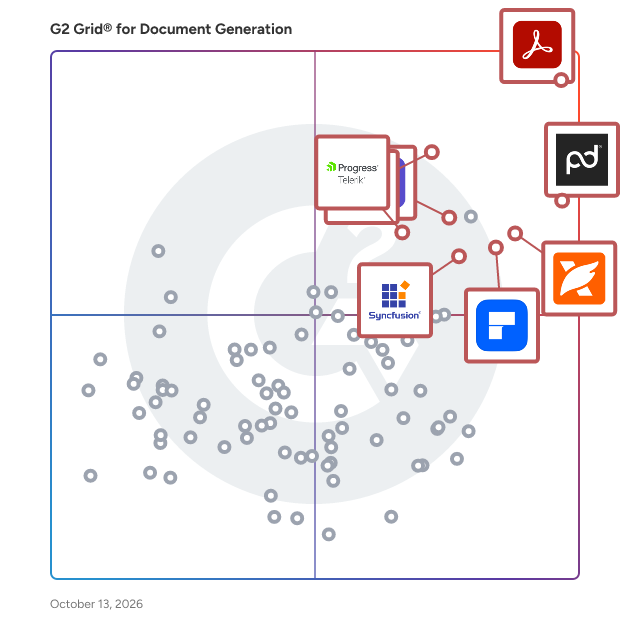
- **Leader:** [Adobe Acrobat](https://www.g2.com/products/adobe-acrobat/reviews)
- **Highest Performer:** [Qwilr](https://www.g2.com/products/qwilr/reviews)
- **Easiest to Use:** [DealHub](https://www.g2.com/products/dealhub/reviews)
- **Top Trending:** [Apryse PDF SDK](https://www.g2.com/products/apryse-pdf-sdk/reviews)
- **Best Free Software:** [PandaDoc](https://www.g2.com/products/pandadoc/reviews)

  
---

**Sponsored**

### altaFlow

altaFlow generates custom docs with a click, integrates eSignatures, creates webforms, and more without coding. It’s the ultimate tool to simplify, automate, and elevate your workflows.


[Visit website](https://www.g2.com/external_clickthroughs/record?secure%5Bad_program%5D=ppc&amp;secure%5Bad_slot%5D=category_product_list&amp;secure%5Bcategory_id%5D=1120&amp;secure%5Bdisplayable_resource_id%5D=1120&amp;secure%5Bdisplayable_resource_type%5D=Category&amp;secure%5Bmedium%5D=sponsored&amp;secure%5Bplacement_reason%5D=page_category&amp;secure%5Bplacement_resource_ids%5D%5B%5D=1120&amp;secure%5Bprioritized%5D=false&amp;secure%5Bproduct_id%5D=116146&amp;secure%5Bresource_id%5D=1120&amp;secure%5Bresource_type%5D=Category&amp;secure%5Bsource_type%5D=category_page&amp;secure%5Bsource_url%5D=https%3A%2F%2Fwww.g2.com%2Fcategories%2Fdocument-generation%2Fsmall-business%3Fpage%3D2&amp;secure%5Btoken%5D=b9976bbe156200bfc4b1bad72f8ab0896d8494dfcb1f11497b61f728440cd00c&amp;secure%5Burl%5D=https%3A%2F%2Faltaflow.com%2Fg2-demo%2F%3Futm_source%3Dg2%26utm_medium%3Dppc%26utm_campaign%3Dg2clicks&amp;secure%5Burl_type%5D=book_demo)

---

  ## What Are the Top-Rated Document Generation Software Products in 2026?
### 1. [Apache Forrest](https://www.g2.com/products/apache-forrest/reviews)
  Apache Forrest software is a publishing framework designed to transform input from various sources into a unified presentation in one or more output formats.


  **Average Rating:** 4.0/5.0
  **Total Reviews:** 11
**How Do G2 Users Rate Apache Forrest?**

- **Has the product been a good partner in doing business?:** 8.3/10 (Category avg: 9.2/10)
- **Documents:** 7.3/10 (Category avg: 8.9/10)
- **Software:** 8.7/10 (Category avg: 8.5/10)
- **Workflow:** 8.0/10 (Category avg: 8.5/10)

**Who Is the Company Behind Apache Forrest?**

- **Seller:** [The Apache Software Foundation](https://www.g2.com/sellers/the-apache-software-foundation)
- **Year Founded:** 1999
- **HQ Location:** Wakefield, MA
- **Twitter:** @TheASF (66,154 Twitter followers)
- **LinkedIn® Page:** https://www.linkedin.com/company/215982/ (2,408 employees on LinkedIn®)

**Who Uses This Product?**
  - **Company Size:** 64% Enterprise, 45% Small-Business


### 2. [JPedal Java PDF Library](https://www.g2.com/products/jpedal-java-pdf-library/reviews)
  JPedal is a comprehensive Java PDF Library designed to facilitate the display, conversion, printing, and parsing of PDF files within Java applications. It has been actively developed for over 20 years so has compatibility with a wide range of PDF files. Here are some of its key features: -PDF to Image Conversion: JPedal can automatically convert PDFs to images in various formats and sizes. -Java Swing PDF Viewer: This feature supports multi-page display, searching, printing, and annotation editing. -Text and Image Extraction: Users can extract text and images from PDFs at the highest possible quality. -PDF Search: JPedal allows searching for text strings, including support for wildcards and regular expressions. -Form and Annotation Handling: It supports both XFA and AcroForms, enabling direct access to PDF form data and the ability to add/edit annotations. -Document Manipulation: Users can delete pages, merge or split documents, and optimize PDFs by removing unused pages and fixing issues. -Security and Performance: JPedal runs on local servers without third-party dependencies, ensuring security and high performance, processing PDFs up to three times faster than alternatives.


  **Average Rating:** 4.9/5.0
  **Total Reviews:** 10
**How Do G2 Users Rate JPedal Java PDF Library?**

- **Documents:** 9.4/10 (Category avg: 8.9/10)
- **Software:** 9.4/10 (Category avg: 8.5/10)
- **Workflow:** 10.0/10 (Category avg: 8.5/10)

**Who Is the Company Behind JPedal Java PDF Library?**

- **Seller:** [IDRsolutions ltd](https://www.g2.com/sellers/idrsolutions-ltd)
- **Year Founded:** 1999
- **HQ Location:** Kings Hill, GB
- **Twitter:** @javapdf (1,168 Twitter followers)
- **LinkedIn® Page:** https://www.linkedin.com/company/idrsolutions/ (11 employees on LinkedIn®)

**Who Uses This Product?**
  - **Company Size:** 60% Small-Business, 30% Enterprise


### 3. [Vole PDF Creator](https://www.g2.com/products/vole-pdf-creator/reviews)
  Vole PDF Creator is a tool designed to simplify the creation of professional PDF documents directly from scratch, utilizing a built-in Word editor. This software enables users to craft PDFs that mirror the quality and formatting of Word documents, incorporating rich text, images, various paragraph and font styles, and access to over 100 professional table designs. Its intuitive interface ensures that users can produce polished PDFs without the need for external applications or complex processes. Key Features and Functionality: - Integrated Word Editor: Allows for the direct creation and editing of documents within the application, streamlining the PDF creation process. - Rich Formatting Options: Supports the inclusion of rich text, images, diverse paragraph and font styles, enhancing the visual appeal and readability of documents. - Extensive Table Designs: Offers more than 100 professional table styles, facilitating the organization and presentation of data in a structured manner. - Custom Content Blocks: Enables users to define content once and reference it multiple times throughout the document, ideal for consistent headers, footers, or recurring sections. Primary Value and User Solutions: Vole PDF Creator addresses the need for an efficient and user-friendly solution to produce high-quality PDF documents without relying on multiple software tools. By integrating a Word editor within the application, it eliminates compatibility issues and reduces the learning curve associated with separate PDF creation software. This all-in-one approach not only saves time but also ensures consistency and professionalism in document formatting, making it an invaluable asset for professionals, educators, and anyone requiring reliable PDF creation capabilities.


  **Average Rating:** 3.8/5.0
  **Total Reviews:** 12

**Who Is the Company Behind Vole PDF Creator?**

- **Seller:** [Sanwhole](https://www.g2.com/sellers/sanwhole)
- **HQ Location:** Beijing, Beijing
- **Twitter:** @sanwhole (14 Twitter followers)
- **LinkedIn® Page:** https://www.linkedin.com/company/sanwhole/about (1 employees on LinkedIn®)

**Who Uses This Product?**
  - **Top Industries:** Computer Software
  - **Company Size:** 108% Mid-Market, 15% Small-Business


#### What Are Vole PDF Creator's Pros and Cons?

**Pros:**

- Ease of Use (1 reviews)
- Efficiency (1 reviews)
- Features (1 reviews)
- Time-Saving (1 reviews)

**Cons:**

- Alignment Issues (1 reviews)

### 4. [Able2Extract Professional](https://www.g2.com/products/able2extract-professional/reviews)
  Able2Extract Professional is an all-in-one PDF converter designed for both business and individual users. Trusted by professionals in finance, accounting, legal, insurance, real estate, and banking industries, it is renowned for its PDF to Excel conversion accuracy and advanced data extraction capabilities. Available on Windows, macOS, and Linux, Able2Extract Professional offers enterprise-level PDF conversion and editing features including: • Selective conversions: convert a single paragraph, specific pages, or entire documents. • Batch upload and convert hundreds of PDF files at once. • Preview table output before converting PDF into XLSX. • Deploy advanced OCR on scanned PDF files and images. • Create custom conversion templates to save valuable time. • Advanced detection for merging Excel rows accurately. • Precise conversion capabilities with European continental settings. • Auto-rotate vertical text in Excel (column headers included). Additional features include PDF creation, electronic and digital signatures, PDF form handling, content editing, side-by-side document comparison, merging and splitting PDFs, secure data redaction, and much more.


  **Average Rating:** 4.7/5.0
  **Total Reviews:** 23
**How Do G2 Users Rate Able2Extract Professional?**

- **Has the product been a good partner in doing business?:** 9.4/10 (Category avg: 9.2/10)
- **Documents:** 9.4/10 (Category avg: 8.9/10)
- **Software:** 9.4/10 (Category avg: 8.5/10)
- **Workflow:** 10.0/10 (Category avg: 8.5/10)

**Who Is the Company Behind Able2Extract Professional?**

- **Seller:** [Investintech by Apryse](https://www.g2.com/sellers/investintech-by-apryse)
- **Year Founded:** 2000
- **HQ Location:** Vancouver, CA
- **Twitter:** @able2extract (2,373 Twitter followers)
- **LinkedIn® Page:** https://www.linkedin.com/company/940805/ (9 employees on LinkedIn®)

**Who Uses This Product?**
  - **Company Size:** 58% Small-Business, 33% Mid-Market


#### What Are Able2Extract Professional's Pros and Cons?

**Pros:**

- Affordable (1 reviews)
- Automations (1 reviews)
- Conversion Efficiency (1 reviews)
- Ease of Use (1 reviews)
- Easy Conversion (1 reviews)


### 5. [doppio.sh](https://www.g2.com/products/doppio-sh/reviews)
  Generate PDFs and screenshots from HTML with just a few lines of code! Doppio is an API service, that provides the world best rendering engine to convert HTML to PDF or take screenshots. At scale, without compromising your security. With Doppio you just need an API call to generate huge amounts of file (sync or async rendering). You can even store files directly in your own S3 bucket without compromising privacy. Doppio is free to use up to 400 docs per month. We provide pricing plans offering higher volumes and additional features.


  **Average Rating:** 4.4/5.0
  **Total Reviews:** 11
**How Do G2 Users Rate doppio.sh?**

- **Documents:** 9.0/10 (Category avg: 8.9/10)
- **Software:** 8.3/10 (Category avg: 8.5/10)
- **Workflow:** 7.8/10 (Category avg: 8.5/10)

**Who Is the Company Behind doppio.sh?**

- **Seller:** [Doppio](https://www.g2.com/sellers/doppio)
- **HQ Location:** N/A
- **LinkedIn® Page:** https://www.linkedin.com/company/doppioapi/about/ (2 employees on LinkedIn®)

**Who Uses This Product?**
  - **Company Size:** 55% Small-Business, 27% Enterprise


#### What Are doppio.sh's Pros and Cons?

**Pros:**

- Customer Support (1 reviews)
- Documentation (1 reviews)
- Ease of Use (1 reviews)
- Easy Setup (1 reviews)

**Cons:**

- Storage Limitations (1 reviews)

### 6. [Experlogix Document Automation](https://www.g2.com/products/experlogix-document-automation/reviews)
  Experlogix Document Automation simplifies, optimizes, and automates consistent document processes, from creation to delivery to drive engagement and growth. Create simple or complex document templates and generate documents interactively in batches or through automated flows. Deliver professional detailed documents faster, resulting in improved communications, accelerated business processes, and increased productivity with reduced dependence on IT. Experlogix Document Automation software integrates with leading CRM platforms (Microsoft Dynamics 365, SugarCRM and Salesforce), business applications (Microsoft Power Platform), and enterprise core systems (ERP, CPQ, ECM, etc.), enabling you to leverage powerful document generation and automation capabilities from your environment. Visit https://www.experlogix.com/document-automation/ for a free trial.


  **Average Rating:** 4.7/5.0
  **Total Reviews:** 9
**How Do G2 Users Rate Experlogix Document Automation?**

- **Has the product been a good partner in doing business?:** 9.2/10 (Category avg: 9.2/10)
- **Documents:** 8.9/10 (Category avg: 8.9/10)
- **Software:** 8.8/10 (Category avg: 8.5/10)
- **Workflow:** 8.9/10 (Category avg: 8.5/10)

**Who Is the Company Behind Experlogix Document Automation?**

- **Seller:** [Experlogix](https://www.g2.com/sellers/experlogix)
- **Year Founded:** 2002
- **HQ Location:** South Jordan, UT
- **Twitter:** @experlogix (490 Twitter followers)
- **LinkedIn® Page:** https://www.linkedin.com/company/311167/ (223 employees on LinkedIn®)

**Who Uses This Product?**
  - **Company Size:** 45% Enterprise, 36% Mid-Market


### 7. [DeftGPT](https://www.g2.com/products/deftgpt/reviews)
  DeftGPT is the advanced and upgraded version of ChatGPT, that provides you with instant access to information right on your browser. With a daily limit of 10 inquiries, it&#39;s free to use, but if you need unlimited access, you can always upgrade. Additionally, it&#39;s available in all countries, so no matter where you are, you can use DeftGPT. With DeftGPT you can: ➤ Simplify Your Content Writing: DeftGPT allows you to ask questions, get instant answers, and have interactive conversations with AI. You will have instant access to GPT-4, gpt-3.5-turbo, Claude from Anthropic, and a variety of other bots. ➤ Team management: DeftGPT simplifies management and billing by enabling you to invite unlimited members to your organization account. This saves you money while boosting overall productivity. Plus, with our plan, you can unify your billing into one account for added convenience. ➤ Chat with any document powered by AI: From legal agreements to financial reports, DeftGPT allows you to get insights immediately! You can ask questions, receive summaries, locate information, and much more. Additionally, it is compatible with various formats including PDF, txt, docx, doc, and even eml! ➤Get ChatGPT-like results right next to Google Search: the perfect tool for accurate and reliable search results alongside Google. Say goodbye to irrelevant data, and get precise answers with our intelligent integration. Optimize your search experience with DeftGPT! ➤Create content anytime on Chrome: Craft exceptional content with ease using Chrome by pressing your customized shortcut. This quick and effortless way allows you to produce distinctive and engaging content or modify the existing text for tasks such as revising social media bios or condensing articles. Also, you can customize the shortcut according to your preference. ➤Use DeftGPT anywhere: DeftGPT is your go-to tool for seamless integration across a variety of platforms. Use it in popular applications such as Google Docs, email clients, and social media. Plus, with its versatility, DeftGPT works effortlessly with platforms like Gmail, LinkedIn, Twitter, Facebook, and more. DeftGPT streamlines your online presence, making it effortless to connect with others, generate engaging content, and amplify your reach. Our platform simplifies communication and content creation, saving you valuable time and effort. Boost your productivity and efficiency by using DeftGPT today!


  **Average Rating:** 4.0/5.0
  **Total Reviews:** 11
**How Do G2 Users Rate DeftGPT?**

- **Documents:** 9.7/10 (Category avg: 8.9/10)
- **Software:** 8.3/10 (Category avg: 8.5/10)
- **Workflow:** 7.7/10 (Category avg: 8.5/10)

**Who Is the Company Behind DeftGPT?**

- **Seller:** [DeftGPT](https://www.g2.com/sellers/deftgpt)
- **Year Founded:** 2023
- **HQ Location:** Las Vegas, Nevada, United States
- **LinkedIn® Page:** https://www.linkedin.com/showcase/deftgpt/ (1 employees on LinkedIn®)

**Who Uses This Product?**
  - **Company Size:** 55% Small-Business, 36% Mid-Market


#### What Are DeftGPT's Pros and Cons?

**Pros:**

- Useful (2 reviews)
- Customization (1 reviews)
- Ease of Creation (1 reviews)
- Ease of Use (1 reviews)
- Easy Creation (1 reviews)

**Cons:**

- AI Limitations (1 reviews)
- Bias (1 reviews)
- Complex Features (1 reviews)
- Design Issues (1 reviews)
- Difficulty (1 reviews)

### 8. [CovePDF](https://www.g2.com/products/covepdf/reviews)
  CovePDF is a PDF solution with advanced features such as real-time collaboration, editing features, password protection, digital signing and more. The product focus is on minimalistic design and simple use. With its powerful features, built using the latest technologies, CovePDF is here to enhance the way companies work!


  **Average Rating:** 4.1/5.0
  **Total Reviews:** 6
**How Do G2 Users Rate CovePDF?**

- **Documents:** 10.0/10 (Category avg: 8.9/10)
- **Software:** 3.3/10 (Category avg: 8.5/10)
- **Workflow:** 1.7/10 (Category avg: 8.5/10)

**Who Is the Company Behind CovePDF?**

- **Seller:** [Synami](https://www.g2.com/sellers/synami)
- **HQ Location:** Skopje, Macedonia
- **LinkedIn® Page:** https://www.linkedin.com/company/synami (18 employees on LinkedIn®)

**Who Uses This Product?**
  - **Company Size:** 50% Small-Business, 33% Enterprise


#### What Are CovePDF's Pros and Cons?

**Pros:**

- Ease of Use (1 reviews)
- Simple (1 reviews)
- User Interface (1 reviews)

**Cons:**

- Slow Performance (1 reviews)
- System Overload (1 reviews)

### 9. [Floik](https://www.g2.com/products/floik/reviews)
  Floik is an AI-powered tool designed for creating interactive product demos, walkthroughs, and guides. It helps businesses showcase their software, onboard users, and provide step-by-step instructions without requiring extensive technical skills. With Floik, users can capture workflows, highlight key features, and generate engaging product experiences using a combination of video, text, and interactive elements. The platform streamlines content creation, making it easier for teams to produce onboarding tutorials, help center articles, and marketing demos. One of Floik’s standout features is its ability to automatically generate structured guides from recorded actions. This reduces the effort needed to document processes, making it a useful tool for customer success, sales enablement, and internal training. It also supports embedding demos into knowledge bases, websites, or help centers, improving accessibility for end users.


  **Average Rating:** 4.7/5.0
  **Total Reviews:** 45
**How Do G2 Users Rate Floik?**

- **Has the product been a good partner in doing business?:** 9.7/10 (Category avg: 9.2/10)
- **Documents:** 7.5/10 (Category avg: 8.9/10)
- **Software:** 9.6/10 (Category avg: 8.5/10)
- **Workflow:** 9.6/10 (Category avg: 8.5/10)

**Who Is the Company Behind Floik?**

- **Seller:** [Floik](https://www.g2.com/sellers/floik)
- **HQ Location:** San Francisco
- **Twitter:** @getfloik (125 Twitter followers)
- **LinkedIn® Page:** https://www.linkedin.com/company/floik (6 employees on LinkedIn®)

**Who Uses This Product?**
  - **Top Industries:** Computer Software, Financial Services
  - **Company Size:** 79% Small-Business, 21% Mid-Market


#### What Are Floik's Pros and Cons?

**Pros:**

- Content Creation (1 reviews)
- Course Creation (1 reviews)
- Easy Editing (1 reviews)
- Easy Sharing (1 reviews)
- Features (1 reviews)


### 10. [TeXstudio](https://www.g2.com/products/texstudio/reviews)
  According to its Wikipedia page here: https://en.wikipedia.org/wiki/TeXstudio TeXstudio is a cross-platform open-source LaTeX editor. Its features include an interactive spelling checker, code folding, and syntax highlighting. It does not provide LaTeX itself – the user must choose a distribution of LaTeX and install it first.


  **Average Rating:** 4.9/5.0
  **Total Reviews:** 6
**How Do G2 Users Rate TeXstudio?**

- **Documents:** 8.3/10 (Category avg: 8.9/10)
- **Software:** 7.8/10 (Category avg: 8.5/10)
- **Workflow:** 7.8/10 (Category avg: 8.5/10)

**Who Is the Company Behind TeXstudio?**

- **Seller:** [TeXstudio](https://www.g2.com/sellers/texstudio)
- **HQ Location:** N/A
- **Twitter:** @TeXstudio (291 Twitter followers)
- **LinkedIn® Page:** https://www.linkedin.com/company/No-Linkedin-Presence-Added-Intentionally-By-DataOps (1 employees on LinkedIn®)

**Who Uses This Product?**
  - **Company Size:** 57% Enterprise, 29% Small-Business


### 11. [EasySend](https://www.g2.com/products/easysend/reviews)
  EasySend is a no‑code platform for building and automating digital journeys. Forget static forms—turn customer onboarding, applications, quotes, service requests and other processes into personalized, end‑to‑end workflows that work across every channel. You can launch powerful digital experiences without writing code, connect them to your CRM, ERP and other apps to manage customers at scale, and optimize them with built‑in e‑signatures, integrations and analytics. Trusted by enterprises worldwide, EasySend meets stringent security standards—including SOC&amp;nbsp;2, GDPR and HIPAA—and accelerates digital transformation from fast onboarding to enterprise‑grade solutions.


  **Average Rating:** 4.4/5.0
  **Total Reviews:** 16
**How Do G2 Users Rate EasySend?**

- **Has the product been a good partner in doing business?:** 9.3/10 (Category avg: 9.2/10)
- **Documents:** 7.5/10 (Category avg: 8.9/10)
- **Software:** 7.1/10 (Category avg: 8.5/10)
- **Workflow:** 8.3/10 (Category avg: 8.5/10)

**Who Is the Company Behind EasySend?**

- **Seller:** [EasySend](https://www.g2.com/sellers/easysend)
- **Year Founded:** 2016
- **HQ Location:** Tel Aviv, Israel
- **Twitter:** @easy_send (293 Twitter followers)
- **LinkedIn® Page:** https://www.linkedin.com/company/easysend/ (68 employees on LinkedIn®)

**Who Uses This Product?**
  - **Top Industries:** Insurance
  - **Company Size:** 48% Small-Business, 44% Mid-Market


#### What Are EasySend's Pros and Cons?

**Pros:**

- Efficiency (6 reviews)
- Intuitive (6 reviews)
- Time Saving (6 reviews)
- Customer Support (5 reviews)
- Ease of Use (4 reviews)

**Cons:**

- Slow Performance (4 reviews)
- Integration Issues (3 reviews)
- Not Intuitive (3 reviews)
- Slow Loading (3 reviews)
- Bug Issues (2 reviews)

### 12. [Miramis Technologies](https://www.g2.com/products/miramis-technologies/reviews)
  Miramis Technologies is a contract lifecycle management (CLM) software solution that helps in-house legal teams and business users create, review, negotiate, sign, and manage contracts across the full contract lifecycle. The platform combines workflow automation, AI-powered contract assistance, e-signing, and a centralized repository in a single system, enabling organizations to reduce manual effort and maintain control over their contractual obligations. The platform is designed for medium to large enterprises across industries such as technology, finance, manufacturing, and professional services. It serves both dedicated legal teams and cross-functional business units — including sales, procurement, HR, and finance — allowing the broader organization to engage with contracts without depending solely on legal resources. Key use cases include drafting contracts from standardized templates, reviewing and redlining agreements using AI assistance, tracking renewals and obligations through automated reminders, collaborating on contract negotiations in real time, and storing contracts in a searchable, metadata-tagged repository. Key features and capabilities: AI-powered contract drafting, review, and redlining using PLAI Agent and PLAI Assistant, available both in the web application and directly within Microsoft Word Automated contract workflows built on customizable templates and playbooks, enabling business teams to generate compliant contracts without legal involvement for routine agreements Centralized contract repository with automated metadata tagging, advanced search, version control, and deadline tracking for renewals, terminations, and key obligations Native e-signing and approval workflows that manage the full signing process without requiring third-party tools Out-of-the-box integrations with Salesforce, HubSpot, Slack, and Google Drive, plus enterprise-grade security including ISO 27001, SOC 2 certification, and GDPR compliance


  **Average Rating:** 4.2/5.0
  **Total Reviews:** 49
**How Do G2 Users Rate Miramis Technologies?**

- **Has the product been a good partner in doing business?:** 9.3/10 (Category avg: 9.2/10)
- **Documents:** 7.0/10 (Category avg: 8.9/10)
- **Software:** 7.0/10 (Category avg: 8.5/10)
- **Workflow:** 4.7/10 (Category avg: 8.5/10)

**Who Is the Company Behind Miramis Technologies?**

- **Seller:** [Miramis Technologies](https://www.g2.com/sellers/miramis-technologies)
- **Year Founded:** 2018
- **HQ Location:** Stockholm, SE
- **LinkedIn® Page:** https://www.linkedin.com/company/miramistechnologies/ (32 employees on LinkedIn®)

**Who Uses This Product?**
  - **Who Uses This:** CEO
  - **Company Size:** 61% Small-Business, 35% Mid-Market


### 13. [Documentero](https://www.g2.com/products/documentero/reviews)
  Introducing: Documentero, a cloud-based documents service that helps you with document automation. Generate Word, Excel &amp; PDF documents from custom templates using API, Shareable Forms, Spreadsheets or AI Integrations with 5000+ Apps using Zapier, Make, n8n, Power Automate, Webflow, Bubble.io and more Supports a variety of template features like dynamic fields, formulas, conditional sections, images, html - Create a template online or upload it from a computer (.docx, .xlsx) - Supports Word (.docx), Excel(.xlsx) &amp; PDF output format - Best in-market PDF/Word parser under the hood -- create consistent documents - Easy to use &amp; set up -- no coding required Additional features: - Bulk document generation from spreadsheet data (copy from CSV, Excel, Google Sheets) - Embed a document generation form into your website. - Ability to pass HTML or Markdown formatted fields to document - More than 1000+ template examples ready to use


  **Average Rating:** 4.5/5.0
  **Total Reviews:** 11
**How Do G2 Users Rate Documentero?**

- **Has the product been a good partner in doing business?:** 10.0/10 (Category avg: 9.2/10)

**Who Is the Company Behind Documentero?**

- **Seller:** [Documentero ](https://www.g2.com/sellers/documentero)
- **HQ Location:** N/A
- **LinkedIn® Page:** https://www.linkedin.com/company/No-Linkedin-Presence-Added-Intentionally-By-DataOps (1 employees on LinkedIn®)

**Who Uses This Product?**
  - **Company Size:** 91% Small-Business, 9% Enterprise


#### What Are Documentero's Pros and Cons?

**Pros:**

- Ease of Use (5 reviews)
- Features (5 reviews)
- Templates (5 reviews)
- Easy Integrations (4 reviews)
- Simple (4 reviews)

**Cons:**

- Missing Features (3 reviews)
- Difficulty (1 reviews)
- Email Functionality (1 reviews)
- Learning Curve (1 reviews)

### 14. [Documint](https://www.g2.com/products/documint/reviews)
  Documint is a documentation generation platform to help you save time and resources. With Documint you can create templates with our drop and drop editor, sync up your data from your favorite applications or API and automatically generate your documents.


  **Average Rating:** 4.8/5.0
  **Total Reviews:** 4
**How Do G2 Users Rate Documint?**

- **Has the product been a good partner in doing business?:** 10.0/10 (Category avg: 9.2/10)
- **Documents:** 10.0/10 (Category avg: 8.9/10)
- **Software:** 8.9/10 (Category avg: 8.5/10)
- **Workflow:** 8.3/10 (Category avg: 8.5/10)

**Who Is the Company Behind Documint?**

- **Seller:** [Documint](https://www.g2.com/sellers/documint)
- **Year Founded:** 2020
- **HQ Location:** Austin, US
- **LinkedIn® Page:** https://www.linkedin.com/company/documint-llc (4 employees on LinkedIn®)

**Who Uses This Product?**
  - **Company Size:** 75% Small-Business


#### What Are Documint's Pros and Cons?

**Pros:**

- Customer Satisfaction (1 reviews)
- Customer Support (1 reviews)
- Ease of Use (1 reviews)
- Navigation Ease (1 reviews)
- User Interface (1 reviews)

**Cons:**

- Difficult Editing (1 reviews)
- UX Improvement (1 reviews)

### 15. [EasyAutofill](https://www.g2.com/products/easyautofill/reviews)
  EasyAutofill (EA) is an AI-powered Bid and Tender Response Management platform that helps businesses win more opportunities by responding to RFPs, Tenders, and Security Questionnaires faster and with greater accuracy. Managing complex submissions is time-consuming and error-prone. EA eliminates the grunt work — connecting directly to your existing content repositories (Google Drive, SharePoint, OneDrive) to autofill new responses using your historical submissions and company documents. Generative AI surfaces the most relevant, evidence-backed answers automatically, so your team spends time refining responses, not hunting for information. What sets EA apart: Broader than RFPs — handles Tenders, Security Questionnaires, ISO, CDP, InfoSec, Due Diligence, and other certifications and standards from a single platform Built for every team size — flexible enough for large enterprises and SMEs alike Real collaboration, built in — real-time teamwork tools, reminder notifications, and role-based workflows keep everyone aligned and on deadline Multi-language support — receive and respond in the language of the inquiry, with on-demand translation Fast document generation — single-click questionnaire completion and AI-assisted drafting cut response time dramatically EA&#39;s intuitive interface, dynamic project dashboards, and automation-first design mean less time on admin and more time focused on winning. A 7-day free trial and flexible pricing make it accessible to organisations at any stage. Work smarter. Respond faster. Win more.


  **Average Rating:** 5.0/5.0
  **Total Reviews:** 5
**How Do G2 Users Rate EasyAutofill?**

- **Has the product been a good partner in doing business?:** 10.0/10 (Category avg: 9.2/10)
- **Documents:** 10.0/10 (Category avg: 8.9/10)
- **Software:** 9.2/10 (Category avg: 8.5/10)
- **Workflow:** 9.2/10 (Category avg: 8.5/10)

**Who Is the Company Behind EasyAutofill?**

- **Seller:** [EA](https://www.g2.com/sellers/ea)
- **Year Founded:** 2020
- **HQ Location:** Casnewydd, GB
- **LinkedIn® Page:** https://www.linkedin.com/company/eaglobalai (20 employees on LinkedIn®)

**Who Uses This Product?**
  - **Company Size:** 100% Small-Business


#### What Are EasyAutofill's Pros and Cons?

**Pros:**

- Simple (4 reviews)
- Intuitive (3 reviews)
- Time-saving (3 reviews)
- Time-Saving (3 reviews)
- Content Library (2 reviews)

**Cons:**

- Inadequate Documentation (1 reviews)
- Layout Issues (1 reviews)
- Limited Features (1 reviews)
- Poor Documentation (1 reviews)

### 16. [FileThis](https://www.g2.com/products/filethis/reviews)
  FileThis is a smart assistant that automatically creates bill reminders and helps users to pay on time.


  **Average Rating:** 3.5/5.0
  **Total Reviews:** 4

**Who Is the Company Behind FileThis?**

- **Seller:** [FileThis](https://www.g2.com/sellers/filethis)
- **Year Founded:** 2010
- **HQ Location:** Mill Valley, US
- **LinkedIn® Page:** https://www.linkedin.com/company/filethis-inc-/?trk=mini-profile (2 employees on LinkedIn®)

**Who Uses This Product?**
  - **Company Size:** 50% Small-Business


### 17. [Nomia](https://www.g2.com/products/nomia/reviews)
  Our suite of document automation solutions scale effortlessly—from small businesses to large enterprises. Fully document- and industry-agnostic, our products integrate seamlessly with your existing business processes and systems. It’s the simplest way to create, manage, and sign documents—so you and your team can focus on what matters most. For more information please visit: https://nomiadocs.com/ or https://app.nomiadocs.com/ or https://e-sign.nomiadocs.com/signup


  **Average Rating:** 5.0/5.0
  **Total Reviews:** 5
**How Do G2 Users Rate Nomia?**

- **Has the product been a good partner in doing business?:** 9.4/10 (Category avg: 9.2/10)
- **Documents:** 9.2/10 (Category avg: 8.9/10)
- **Software:** 10.0/10 (Category avg: 8.5/10)
- **Workflow:** 7.5/10 (Category avg: 8.5/10)

**Who Is the Company Behind Nomia?**

- **Seller:** [Nomia](https://www.g2.com/sellers/nomia-475d46b8-c515-4a56-a38f-da96490d9ba0)
- **HQ Location:** Johannesburg, ZA
- **LinkedIn® Page:** https://www.linkedin.com/company/nomiadocs/ (4 employees on LinkedIn®)

**Who Uses This Product?**
  - **Company Size:** 67% Small-Business, 33% Mid-Market


#### What Are Nomia's Pros and Cons?

**Pros:**

- Ease of Use (4 reviews)
- Document Management (3 reviews)
- Templates (3 reviews)
- Content Management (2 reviews)
- Ease of Creation (2 reviews)

**Cons:**

- Learning Curve (3 reviews)
- Difficult Setup (1 reviews)
- Formatting Issues (1 reviews)
- Form Issues (1 reviews)
- Import Issues (1 reviews)

### 18. [TKO](https://www.g2.com/products/tko/reviews)
  Software company, specialising in software to help small businesses systematise their business operations.


  **Average Rating:** 3.7/5.0
  **Total Reviews:** 5
**How Do G2 Users Rate TKO?**

- **Has the product been a good partner in doing business?:** 10.0/10 (Category avg: 9.2/10)
- **Documents:** 9.2/10 (Category avg: 8.9/10)
- **Software:** 8.3/10 (Category avg: 8.5/10)
- **Workflow:** 9.2/10 (Category avg: 8.5/10)

**Who Is the Company Behind TKO?**

- **Seller:** [TKO Software](https://www.g2.com/sellers/tko-software)
- **HQ Location:** N/A
- **LinkedIn® Page:** https://www.linkedin.com/company/No-Linkedin-Presence-Added-Intentionally-By-DataOps (1 employees on LinkedIn®)

**Who Uses This Product?**
  - **Company Size:** 60% Mid-Market, 20% Small-Business


### 19. [Unlayer](https://www.g2.com/products/unlayer/reviews)
  Unlayer is an embeddable drag-and-drop content builder designed to help businesses create visually appealing emails, landing pages, documents, and popups without the need for any coding. This innovative solution is backed by Y Combinator and has gained the trust of Fortune 500 companies such as Fidelity, Bank of America, as well as leading SaaS platforms like Keap and Hive. Unlayer empowers developers to integrate powerful, white-label design tools directly into their applications, thereby transforming the way teams design and collaborate on content. Unlayer provides an intuitive visual content editor that allows users to maintain full control over branding, data, and user experience. Whether you are developing a customer relationship management (CRM) system, a marketing automation platform, or a customer portal, Unlayer simplifies the embedding of a rich editing experience, enabling dev teams to launch features in days rather than months. This capability is particularly valuable for organizations looking to enhance user engagement and streamline the content creation processes. Key features of Unlayer include an intuitive user interface that facilitates easy content creation, along with white-label customization options that allow businesses to tailor the editing experience to their brand. The platform also incorporates AI-powered design tools that generate smart text, images, and headings, making it easier for users to create compelling content. With over 2,000 prebuilt templates and the ability to create custom tools and blocks, Unlayer caters to diverse content needs. Additionally, advanced roles and permissions ensure secure collaboration and approval workflows, while integrations with 28 platforms enhance its versatility. Unlayer stands out in the market by helping SaaS companies and enterprises reduce development costs and accelerate their time to market. Its developer-friendly SDK, comprehensive documentation, and robust API facilitate seamless integration into existing systems. The platform&#39;s focus on AI enhancements, real-time collaboration, and design consistency further enhances its value proposition. With features such as dynamic content personalization, team collaboration tools, and enterprise-grade security, Unlayer provides a comprehensive solution that scales with the evolving needs of businesses.


  **Average Rating:** 4.4/5.0
  **Total Reviews:** 57
**How Do G2 Users Rate Unlayer?**

- **Has the product been a good partner in doing business?:** 8.2/10 (Category avg: 9.2/10)
- **Documents:** 5.0/10 (Category avg: 8.9/10)
- **Software:** 5.0/10 (Category avg: 8.5/10)
- **Workflow:** 0.0/10 (Category avg: 8.5/10)

**Who Is the Company Behind Unlayer?**

- **Seller:** [Unlayer](https://www.g2.com/sellers/unlayer)
- **Company Website:** https://unlayer.com
- **HQ Location:** San Francisco, US
- **Twitter:** @unlayerapp (321 Twitter followers)
- **LinkedIn® Page:** https://www.linkedin.com/company/unlayer/ (27 employees on LinkedIn®)

**Who Uses This Product?**
  - **Top Industries:** Health, Wellness and Fitness, Computer Software
  - **Company Size:** 56% Small-Business, 32% Mid-Market


#### What Are Unlayer's Pros and Cons?

**Pros:**

- Ease of Use (24 reviews)
- Templates (19 reviews)
- Simple (17 reviews)
- Drag (14 reviews)
- Ease of Creation (13 reviews)

**Cons:**

- Expensive (6 reviews)
- Limited Features (6 reviews)
- Limited Customization (5 reviews)
- Missing Features (5 reviews)
- Add-On Costs (3 reviews)

### 20. [Zenphi](https://www.g2.com/products/zenphi/reviews)
  Zenphi is an AI-powered no-code process automation platform designed for teams looking to build powerful workflows while fully leveraging their existing Google Workspace environment. No need to invest in complex and expensive solutions—Zenphi helps you unlock the full power of Google Workspace for project management, process automation, and more. With in-built AI models for document generation, text recognition, sentiment analysis, and other advanced capabilities, Zenphi enables you to automate a wide range of business processes, from employee onboarding and offboarding to invoice processing, Google Workspace administration, and approval workflows—all within the familiar tools you already use, like Gmail, Sheets, Drive, Docs, Chat, and Calendar.


  **Average Rating:** 4.8/5.0
  **Total Reviews:** 16
**How Do G2 Users Rate Zenphi?**

- **Has the product been a good partner in doing business?:** 7.5/10 (Category avg: 9.2/10)
- **Documents:** 9.6/10 (Category avg: 8.9/10)
- **Software:** 9.6/10 (Category avg: 8.5/10)
- **Workflow:** 10.0/10 (Category avg: 8.5/10)

**Who Is the Company Behind Zenphi?**

- **Seller:** [zenphi Group Pty. Ltd.](https://www.g2.com/sellers/zenphi-group-pty-ltd)
- **Year Founded:** 2020
- **HQ Location:** N/A
- **Twitter:** @zenphi_co (192 Twitter followers)
- **LinkedIn® Page:** https://www.linkedin.com/company/zenphi-co/ (20 employees on LinkedIn®)

**Who Uses This Product?**
  - **Company Size:** 50% Small-Business, 31% Mid-Market


#### What Are Zenphi's Pros and Cons?

**Pros:**

- Automation (7 reviews)
- Ease of Use (5 reviews)
- Work Efficiency (5 reviews)
- Efficiency (4 reviews)
- Time-Saving (4 reviews)

**Cons:**

- Learning Curve (2 reviews)
- Poor Customer Support (2 reviews)
- Customization Difficulty (1 reviews)
- Difficult Setup (1 reviews)
- Difficulty (1 reviews)

### 21. [ActiveDocs](https://www.g2.com/products/activedocs/reviews)
  ActiveDocs is a global provider of document automation software. Our software helps large organizations with document generation and associated processes. To that end, we provide our customers with award-winning tools, resources, and training which together let them design and maintain their document automation solution internally. Template design is intuitive, taking place in Microsoft Word – this makes it “non-codey”. Business users can work on templates without involving IT developers.


  **Average Rating:** 4.8/5.0
  **Total Reviews:** 10
**How Do G2 Users Rate ActiveDocs?**

- **Has the product been a good partner in doing business?:** 10.0/10 (Category avg: 9.2/10)
- **Documents:** 10.0/10 (Category avg: 8.9/10)
- **Software:** 10.0/10 (Category avg: 8.5/10)
- **Workflow:** 9.2/10 (Category avg: 8.5/10)

**Who Is the Company Behind ActiveDocs?**

- **Seller:** [ActiveDocs](https://www.g2.com/sellers/activedocs)
- **Year Founded:** 1992
- **HQ Location:** Overland Park, US
- **Twitter:** @ActiveDocs (337 Twitter followers)
- **LinkedIn® Page:** https://www.linkedin.com/company/291350 (14 employees on LinkedIn®)

**Who Uses This Product?**
  - **Company Size:** 45% Mid-Market, 36% Small-Business


### 22. [Docati](https://www.g2.com/products/docati/reviews)
  Docati is a template based document generation library for .NET. It is available as a nuget package and is free for small documents and affordable for large documents. A template is basically the document as you want it, completely styled the way you like, except it does not contain any data. Placeholders inside the template indicate where the data should be placed and how it should be formatted. Templates are created using Word together with our special add-in for Word. no programming required! documents look exactly how you want them to no ugly document assembly code that is very hard to understand and maintain


  **Average Rating:** 4.5/5.0
  **Total Reviews:** 3
**How Do G2 Users Rate Docati?**

- **Documents:** 10.0/10 (Category avg: 8.9/10)
- **Software:** 10.0/10 (Category avg: 8.5/10)
- **Workflow:** 8.3/10 (Category avg: 8.5/10)

**Who Is the Company Behind Docati?**

- **Seller:** [Docati](https://www.g2.com/sellers/docati)
- **Year Founded:** 2012
- **HQ Location:** Harderwijk, NL
- **LinkedIn® Page:** http://www.linkedin.com/company/docati (1 employees on LinkedIn®)

**Who Uses This Product?**
  - **Company Size:** 50% Mid-Market, 50% Small-Business


#### What Are Docati's Pros and Cons?

**Pros:**

- Features (2 reviews)
- Templates (2 reviews)
- Content Management (1 reviews)
- Conversion Efficiency (1 reviews)

**Cons:**

- Steep Learning Curve (2 reviews)
- Formatting Issues (1 reviews)

### 23. [Docsie](https://www.g2.com/products/docsie/reviews)
  Docsie is an innovative documentation management tool designed for ease of use and efficiency. It stands out with its AI-powered features, enabling automated content creation and updates. Ideal for technical writers, product managers, and developers, Docsie supports multi-language documentation and integrates seamlessly into various workflows. It is particularly popular in the manufacturing sector for its ability to handle extensive product manuals and technical documents. With Docsie, businesses can significantly streamline their documentation processes, improving overall productivity and user experience. You can access Docsie through a SaaS web application to create and edit documentation from any location. Then, you can publish content to a dynamic knowledge portal that end-users and employees can access whenever they need information! Docsie offers a range of powerful business-grade features to help you write and manage product documentation with ease. Onboarding Service: • Free onboarding with Docsie Pilot to import your content and help you get the most value from the platform. • Get help with custom portal design, and an optional training session so your employees can maximize their productivity in Docsie. Knowledge Base and Documentation Portal: • Internal knowledge portals to share self-service knowledge with employees. • External customer knowledge bases to share self-service help documentation and reduce customer support workloads. • Built-in knowledge base statistics and documentation feedback surveys with Docsie Vocally. • Use the default Docsie portal design or deploy a custom knowledge base design based on your brand style and image. • A free custom domain on the free plan for everyone, with additional domains available on paid plans. • Deploy knowledge portals using Docsie hosting, custom deployments, or on-premise instances (Organization plan) Documents and Content Editor: • Support for Markdown syntax and import or export Markdown content. • Docsie Editor allows you to create content in a WYSIWYG editor that supports rich text formatting, emoji symbols, section headers, tables and lists, image and video, iFrame embedded content, tooltip callouts, code snippets, URL hyperlinks • Grammar or spell checking with a configurable rule-based content linter. • Create API documentation, standard operating procedures (SOPs), and technical documents from scratch or with built-in templates. • Create your own snippet and fragment templates to reuse content across your documents with one click. Help Centers and In-App Help Interfaces: • Deploy help centers and in-app support interfaces to share contextual point-in-time help documentation with end-users using a HTML footer script. • Create product and software guided tours to walk end-users through step-by-step workflows. • Add in-app help interfaces to your web application so users can access documentation on the same page. Languages, Versions, and Translations: • Version management allows end-users to view historical documentation in your knowledge base via canonical URLs rather than duplicate pages. • Language management and extended localization helps you automate the deployment of multilingual content without the need for professional translators. • Ghost AI language translation converts source documents automatically to the target language. Docsie AI translation supports these languages: English, French, Spanish, German, Dutch, Norwegian, Portuguese, Danish, Swedish, Arabic, Chinese, and Japanese. Collaboration and Project Management: • Create workspaces for each team, business department, or product and service in your portfolio and organize your content. • Add comments, notes, and tasks to documents and tag team members to assign tasks. • Project management tools based on Agile working methodologies, with Kanban style status indicators for Draft-Review-Approval, per task user assignment, due dates and timelines, and target document or topic selection. • Webhook support enables you to share updates when content is created, edited, deleted, and published in Slack, Mattermost and other business IM tools. Security, Compliance, User Roles, and Data Protection: • Role-based access controls (RBAC) and granular permissions for each workspace. • JWT token authentication with strict and lax options. • Temporary passwords to enable access for contractors and freelancers. • Single sign on via corporate SSO, Google, LinkedIn, or Microsoft logins.


  **Average Rating:** 4.8/5.0
  **Total Reviews:** 115
**How Do G2 Users Rate Docsie?**

- **Has the product been a good partner in doing business?:** 9.7/10 (Category avg: 9.2/10)
- **Documents:** 10.0/10 (Category avg: 8.9/10)
- **Software:** 10.0/10 (Category avg: 8.5/10)
- **Workflow:** 10.0/10 (Category avg: 8.5/10)

**Who Is the Company Behind Docsie?**

- **Seller:** [Docsie](https://www.g2.com/sellers/docsie)
- **Company Website:** https://www.docsie.io/
- **Year Founded:** 2022
- **HQ Location:** Ontario, Canada
- **Twitter:** @likalo_llc (18,916 Twitter followers)
- **LinkedIn® Page:** https://www.linkedin.com/company/likalo/ (17 employees on LinkedIn®)

**Who Uses This Product?**
  - **Who Uses This:** Technical Writer, Project Manager
  - **Top Industries:** Information Technology and Services, Management Consulting
  - **Company Size:** 78% Small-Business, 19% Enterprise


#### What Are Docsie's Pros and Cons?

**Pros:**

- Centralization (1 reviews)
- Collaboration (1 reviews)
- Content Management (1 reviews)
- Document Management (1 reviews)
- Ease of Use (1 reviews)

**Cons:**

- Integration Issues (1 reviews)
- Lack of Integrations (1 reviews)
- Learning Curve (1 reviews)
- Learning Difficulty (1 reviews)
- Limitations (1 reviews)

### 24. [DocuGenerate](https://www.g2.com/products/docugenerate/reviews)
  DocuGenerate is a powerful and scalable platform for generating high-quality PDF documents from Word templates and JSON data. Automate the creation of various documents, including contracts, invoices, agreements, proposals, letters, certificates, and more. Developers can leverage our REST API to add document generation to their apps, while non-developers can effortlessly use our no-code integrations with Zapier, Make, n8n, Pipedream, Bubble, Coda, Power Apps, Xano and Backendless. This flexibility allows developers to focus on core application development without the complexities of document generation, while also empowering non-developers with robust automation capabilities.


  **Average Rating:** 5.0/5.0
  **Total Reviews:** 3
**How Do G2 Users Rate DocuGenerate?**

- **Documents:** 10.0/10 (Category avg: 8.9/10)
- **Software:** 5.0/10 (Category avg: 8.5/10)

**Who Is the Company Behind DocuGenerate?**

- **Seller:** [DocuGenerate](https://www.g2.com/sellers/docugenerate)
- **Year Founded:** 2023
- **HQ Location:** N/A
- **LinkedIn® Page:** https://www.linkedin.com/company/docugenerate (1 employees on LinkedIn®)

**Who Uses This Product?**
  - **Company Size:** 67% Small-Business, 33% Mid-Market


#### What Are DocuGenerate's Pros and Cons?

**Pros:**

- Customer Support (2 reviews)
- Ease of Use (1 reviews)
- Easy Editing (1 reviews)
- Features (1 reviews)
- Time-Saving (1 reviews)

**Cons:**

- Template Limitations (1 reviews)

### 25. [FlowForma Process Automation](https://www.g2.com/products/flowforma-process-automation/reviews)
  FlowForma is a type of process automation solution designed to help users digitize, automate, and optimize business processes across various complexities. This enterprise-grade platform leverages AI technology to provide a no-code environment, allowing users, regardless of their technical expertise, to create and manage automated workflows efficiently. By integrating intelligent automation into everyday operations, FlowForma addresses the growing need for organizations to enhance productivity and streamline processes. The target audience for FlowForma includes business leaders, IT professionals, and organizations of all sizes seeking to improve their operational efficiency. With its user-friendly interface, FlowForma caters to both small businesses and large enterprises, making it an adaptable solution for diverse industries. Specific use cases range from automating simple tasks, such as data entry and approvals, to managing complex workflows that require intricate decision-making and collaboration among multiple stakeholders. Key features of FlowForma include its agentic AI capabilities, which allow users to design and optimize processes with the assistance of AI as an active collaborator. This functionality not only enhances the automation experience but also enables users to evolve their processes intelligently over time. The platform is built to be scalable and secure, ensuring that organizations can grow and adapt their automation strategies without compromising data integrity or system performance. FlowForma stands out in the process automation category by making automation accessible and affordable. With over 300,000 users worldwide, the platform has proven its effectiveness in delivering measurable results. Users benefit from the ability to streamline operations, reduce manual errors, and enhance overall productivity. The no-code aspect of FlowForma empowers individuals to take control of their automation needs without relying heavily on IT resources, fostering a culture of innovation and agility within organizations. In addition to its robust features, FlowForma offers a free trial, allowing potential users to experience the platform&#39;s capabilities firsthand. This trial period provides an opportunity for organizations to evaluate how FlowForma can transform their processes and drive efficiency, ultimately leading to improved business outcomes.


  **Average Rating:** 4.5/5.0
  **Total Reviews:** 96
**How Do G2 Users Rate FlowForma Process Automation?**

- **Has the product been a good partner in doing business?:** 9.3/10 (Category avg: 9.2/10)
- **Documents:** 10.0/10 (Category avg: 8.9/10)
- **Software:** 10.0/10 (Category avg: 8.5/10)
- **Workflow:** 10.0/10 (Category avg: 8.5/10)

**Who Is the Company Behind FlowForma Process Automation?**

- **Seller:** [FlowForma](https://www.g2.com/sellers/flowforma)
- **Company Website:** https://www.flowforma.com
- **Year Founded:** 2012
- **HQ Location:** Dublin
- **Twitter:** @FlowForma (495 Twitter followers)
- **LinkedIn® Page:** https://www.linkedin.com/company/10197246/ (27 employees on LinkedIn®)

**Who Uses This Product?**
  - **Top Industries:** Construction, Information Technology and Services
  - **Company Size:** 63% Mid-Market, 26% Small-Business


#### What Are FlowForma Process Automation's Pros and Cons?

**Pros:**

- Ease of Use (18 reviews)
- Automation (16 reviews)
- Efficiency (16 reviews)
- Automation Efficiency (10 reviews)
- Productivity Improvement (10 reviews)

**Cons:**

- Learning Curve (8 reviews)
- Difficult Learning (5 reviews)
- Missing Features (5 reviews)
- Learning Difficulty (4 reviews)
- Complexity (3 reviews)


    ## What Is Document Generation Software?
  [Collaboration &amp; Productivity Software](https://www.g2.com/categories/collaboration-productivity)
  ## What Software Categories Are Similar to Document Generation Software?
    - [Contract Management Software](https://www.g2.com/categories/contract-management)
    - [E-Signature Software](https://www.g2.com/categories/e-signature)
    - [Document Creation Software](https://www.g2.com/categories/document-creation)


