Best Desk Booking Software for Small Business - Page 2

How Many Desk Booking Software Products Does G2 Track?

Total Products under this Category: 160

Category Stats (Nov 2026)

  • Average Rating: 4.58/5 The average rating of products in this category, based on all submitted ratings
  • Top Trending Product: Yardi Kube (+4.22%) - Among all products in this category, Yardi Kube recorded the largest rating increase compared to last month

Last updated: November 01, 2026

How Does G2 Rank Desk Booking Software Products?

Why You Can Trust G2's Software Rankings:

  • 30 Analysts and Data Experts
  • 62,400+ Authentic Reviews
  • 160+ Products
  • Unbiased Rankings

G2's software rankings are built on verified user reviews, rigorous moderation, and a consistent research methodology maintained by a team of analysts and data experts. Each product is measured using the same transparent criteria, with no paid placement or vendor influence. While reviews reflect real user experiences, which can be subjective, they offer valuable insight into how software performs in the hands of professionals. Together, these inputs power the G2 Score, a standardized way to compare tools within every category.

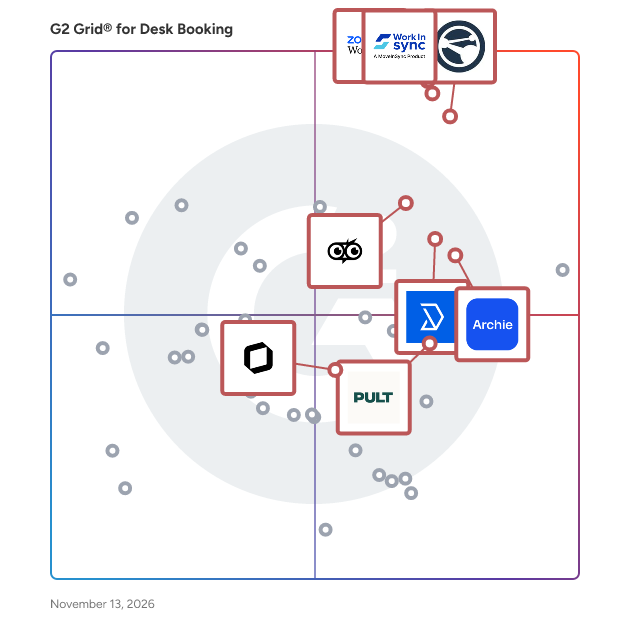
G2 Grid® for Desk Booking Software

G2 Grid® for Desk Booking Software plotting products by satisfaction and market presence

Highlighted products: Zoom Workplace, Appspace, WorkInSync, PULT, deskbird, Archie, Skedda, and Spacebring.

Underlying data: [Grid® JSON](https://www.g2.com/categories/desk-booking/grids.json?focus%5B%5D=zoom-workplace&focus%5B%5D=appspace&focus%5B%5D=workinsync&focus%5B%5D=pult&focus%5B%5D=deskbird&focus%5B%5D=archie-archie&focus%5B%5D=skedda&focus%5B%5D=spacebring&segment=small-business)

Dibsido

Dibsido takes the chaos out of workplace bookings. With one click, your hybrid team can reserve shared desks, parking spots, or meeting rooms — directly from Microsoft Teams, Slack, or the Dibsido app. No more messy Excel sheets or switching between tools. Dibsido works where your team already does. Book desks from the Microsoft Teams sidebar, sync meeting rooms with Outlook or Google Calendar, and get Slack notifications when a spot opens up. Interactive floor plans let employees pick their spot visually, while auto-cancellation automatically frees up desks when someone doesn't show up. One of the platform's standout features is its analytics and utilization reports, which let companies track office usage in real time. These data-driven insights support strategic decisions — like determining how much office space you actually need and where to cut fixed costs. Setting up Dibsido takes five minutes. Create interactive floor plans, define custom booking rules, and invite your team — no IT project required. Sign in with Microsoft 365 or Google, no extra passwords needed. Trusted by global companies like Toyota, Samsung, and Société Générale, as well as startups worldwide, Dibsido simplifies office management across industries. Available as a web app, a native Microsoft Teams app, and mobile apps for iOS and Android, Dibsido gives hybrid teams the flexibility to manage bookings from anywhere. Start free today.

Average Rating: 4.7/5.0

Total Reviews: 43

How Do G2 Users Rate Dibsido?

  • Has the product been a good partner in doing business?: 9.5/10 (Category avg: 9.3/10)
  • Calendar Integrations: 8.2/10 (Category avg: 8.6/10)
  • Recurring Reservations: 9.8/10 (Category avg: 8.8/10)
  • Automatic Grouping: 9.6/10 (Category avg: 8.4/10)

Who Is the Company Behind Dibsido?

  • Seller: Dibsido
  • Year Founded: 2021
  • HQ Location: Brno, CZ
  • LinkedIn® Page: www.linkedin.com
    5 employees on LinkedIn®

Who Uses This Product?

  • Top Industries: Computer Software, Information Technology and Services
  • Company Size: 62% Medium, 36% Small

What Do G2 Reviewers Say About Dibsido?

AI-generated summary from verified user reviews

Pros
  • Users praise Dibsido for its ease of use, making desk booking and management straightforward and efficient.
  • Users love Dibsido's seat reservation feature for its ease and efficiency in managing desk and parking bookings.
  • Users love the easy desk booking feature of Dibsido, appreciating its user-friendly design and daily integration.
  • Users appreciate the intuitive user interface of Dibsido, making parking management effortless and efficient.
  • Users find reservation ease in Dibsido, enhancing their office management and simplifying desk and parking bookings.
Cons
  • Users find missing features like multi-license plate support and room booking limits the app's effectiveness.
  • Users wish for more flexible booking options in Dibsido, as current choices are limited to half or full day.
  • Users wish for more flexible booking options for desks, limited to half-day or full-day reservations only.
  • Users find the difficult navigation in Dibsido frustrating, with missing features impacting their overall experience.
  • Users notice feature limitations in Dibsido, including poor mobile navigation and missing options like multiple license plates.

What Are Recent G2 Reviews of Dibsido?

Joan

Joan is an all-inclusive workplace platform that helps businesses streamline meeting room booking, desk reservations, visitor management, workplace digital signage, and asset management with intuitive software and energy-efficient e-paper displays. Designed for modern hybrid work environments, Joan eliminates scheduling conflicts, improves space utilization, and enhances workplace efficiency with powerful analytics and seamless integrations. One of Joan’s standout features is its energy-efficient e-paper displays, which provide real-time updates on room availability without the need for excessive power consumption. Unlike traditional room booking systems that rely on outdated screens or manual scheduling, Joan’s sleek, battery-powered displays offer a modern, sustainable, and cost-effective alternative. Beyond hardware, Joan’s cloud-based software seamlessly integrates with popular workplace tools like Microsoft Outlook, Google Workspace, and Slack. This allows teams to reserve meeting rooms, desks, or other resources with just a few clicks—no more confusion, wasted time, or interruptions. Additionally, Joan’s visitor management system enhances office security and compliance by digitizing the check-in process, ensuring a smooth and professional experience for guests. Joan is built for businesses of all sizes, from small startups to global enterprises. Its scalable platform helps companies optimize office space, reduce administrative burdens, and improve collaboration in a world where flexibility is key. Whether you're managing a hybrid workforce, reducing no-show meetings, or implementing a seamless desk booking system, Joan provides the complete set of tools to create a more efficient and connected workplace. With an intuitive interface, industry-leading energy efficiency, and seamless integrations, Joan is the ultimate solution for companies looking to future-proof their office operations. Why Choose Joan? • All-Inclusive Platform: Everything your workplace needs including room, desk and asset booking, visitor management, signage and analytics in one connected solution. • Energy Efficiency: Joan’s e-paper displays use ultra-low power, making them one of the most energy-efficient workplace solutions on the market. • Seamless Integrations: Connect Joan with Microsoft 365, Google Workspace, Slack, and other tools for a frictionless scheduling experience. • User-Friendly Interface: Both the software and hardware are designed for ease of use, requiring minimal setup and maintenance. • Scalability: Whether you have a small office or a large corporate campus, Joan adapts to your needs with customizable solutions. • Sustainability: Reduce paper waste and energy consumption while streamlining office operations.

Average Rating: 4.5/5.0

Total Reviews: 281

G2 Deal: 59% discount on your first year with Joan

Master the dynamics of a hybrid workplace! Streamline meeting room bookings with our innovative E-paper devices, effortlessly manage desk and parking reservations through our user-friendly mobile/desktop app, and boost security and visitor satisfaction with a contactless visitor check-in system.

View this exclusive G2 deal

How Do G2 Users Rate Joan?

  • Has the product been a good partner in doing business?: 9.0/10 (Category avg: 9.3/10)
  • Calendar Integrations: 7.6/10 (Category avg: 8.6/10)
  • Recurring Reservations: 8.1/10 (Category avg: 8.8/10)
  • Automatic Grouping: 7.6/10 (Category avg: 8.4/10)

Who Is the Company Behind Joan?

Who Uses This Product?

  • Who Uses This: IT Manager
  • Top Industries: Computer Software, Marketing and Advertising
  • Company Size: 75% Medium, 20% Small

What Do G2 Reviewers Say About Joan?

AI-generated summary from verified user reviews

Pros
  • Users praise the ease of use of Joan, noting its intuitive design and seamless integration with calendars.
  • Users love the simple and intuitive design of Joan, making room booking fast and efficiently seamless.
  • Users love the easy booking feature of Joan, allowing seamless scheduling and planning for office visits.
  • Users highlight the helpful customer support of Joan, ensuring quick resolutions and easy implementation for everyone.
  • Users find Joan incredibly helpful, praising its easy integration and quick support for seamless meeting management.
Cons
  • Users face booking issues with Joan, struggling to change desk reservations and lacking clear room availability information.
  • Users find the expensive pricing and complicated costs of Joan quite frustrating, impacting their overall satisfaction.
  • Users criticize the poor usability of Joan, citing a complicated backend and challenging UI/UX design.
  • Users experience slow internet connectivity with Joan, requiring troubleshooting and occasional restarts for stable usage.
  • Users are frustrated by the slow loading and lag issues, impacting their experience with Joan devices.

What Are Recent G2 Reviews of Joan?

What Are G2 Users Discussing About Joan?

UnSpot

After the pandemic, many employees no longer need to work from the office 5 days a week, and companies no longer need to have a workplace assigned to only 1 person, allowing different people to sit at the same place on different days. Find the best workplace, with the right equipment, or find a colleague you want to sit with. Book a table or meeting room in one click. Plan your schedule around when the team will be in the office, without long discussions. Don’t miss the days when a colleague you want to talk to comes to the office. Find your way around offices or floors where you rarely visit. The system contains all the necessary integrations for ease of use, such as Active Directory, and Google and Exchange calendars.It also has a highly developed functionality for finding and booking meeting rooms, including placing displays at the front of the room. If a company even partially introduces flexible jobs, this gives people a choice, and the company the opportunity to increase staff without a costly relocation to another office. Don’t let hybrid work get in the way of working together. Give employees an easy way to manage their hybrid schedule, invite co-workers onsite, and book a nearby desk in one click, both from desktop or mobile app.

Average Rating: 5.0/5.0

Total Reviews: 320

How Do G2 Users Rate UnSpot?

  • Has the product been a good partner in doing business?: 10.0/10 (Category avg: 9.3/10)
  • Calendar Integrations: 10.0/10 (Category avg: 8.6/10)
  • Recurring Reservations: 10.0/10 (Category avg: 8.8/10)
  • Automatic Grouping: 10.0/10 (Category avg: 8.4/10)

Who Is the Company Behind UnSpot?

  • Seller: UnSpot
  • Year Founded: 2021
  • HQ Location: New York, NY
  • LinkedIn® Page: www.linkedin.com
    7 employees on LinkedIn®

Who Uses This Product?

  • Who Uses This: Support manager
  • Top Industries: Human Resources, Information Technology and Services
  • Company Size: 48% Large, 36% Medium

What Do G2 Reviewers Say About UnSpot?

AI-generated summary from verified user reviews

Pros
  • Users value the ease of use of UnSpot, appreciating its simplicity and quick booking process.
  • Users love the easy booking process in UnSpot, praising its straightforward layout and reliability for managing spaces.
  • Users appreciate the easy booking and management of meeting rooms, making collaboration straightforward and user-friendly.
  • Users find the intuitive and efficient desk booking of UnSpot convenient for last-minute changes and collaboration.
  • Users love the ease of booking and managing meeting rooms with UnSpot's intuitive layout and helpful features.
Cons
  • Users face booking issues with UnSpot, including strict check-in rules and difficulties changing locations on short notice.
  • Users experience slow loading times with the office map, requiring extra actions for proper functionality.
  • Users express frustration with check-in issues, noting stress from strict rules and unreliable auto check-in functionality.
  • Users feel the need for more customization options in UnSpot, particularly in analytics and mobile features.
  • Users find some user interface issues with UnSpot, like unfinished features and navigation difficulties on mobile devices.

What Are Recent G2 Reviews of UnSpot?

What Are G2 Users Discussing About UnSpot?

AI can help you find the answers. G2 helps you trust them.

Connect G2 to Claude or ChatGPT for answers grounded in G2's trusted reviews, comparisons, and pricing from real user insights.

How it works

Eptura Engage

Eptura Engage (Condeco) is a leading software for employee experience, collaboration, and workspace scheduling. It streamlines people, services, and space management, optimizing hybrid work environments for smarter, more efficient collaboration. Leveraging AI, it finds the best workspaces, simplifies reservations, and optimizes resource use with natural language commands. Integration with Microsoft 365 lets you view in-office schedules, book desks, and boost productivity through Outlook, Teams, and the Mobile Booking App. Track space usage for private offices, meeting rooms, and desks, and easily add visitors and services to reservations. The system automatically finds new rooms if meetings are rescheduled. Automated check-in uses badge swipe data at access control systems to track presence and check employees into reserved spaces. Sensor technology automates check-ins, releases unoccupied bookings, and generates walk-in bookings.

Average Rating: 4.3/5.0

Total Reviews: 175

How Do G2 Users Rate Eptura Engage?

  • Has the product been a good partner in doing business?: 8.6/10 (Category avg: 9.3/10)
  • Calendar Integrations: 7.5/10 (Category avg: 8.6/10)
  • Recurring Reservations: 8.4/10 (Category avg: 8.8/10)
  • Automatic Grouping: 7.6/10 (Category avg: 8.4/10)

Who Is the Company Behind Eptura Engage?

  • Seller: Eptura
  • Company Website:
  • Year Founded: 2002
  • HQ Location: Atlanta, US
  • LinkedIn® Page: www.linkedin.com
    779 employees on LinkedIn®

Who Uses This Product?

  • Who Uses This: Project Manager
  • Top Industries: Information Technology and Services, Banking
  • Company Size: 50% Large, 44% Medium

What Do G2 Reviewers Say About Eptura Engage?

AI-generated summary from verified user reviews

Pros
  • Users find Eptura Engage to be highly intuitive and easy to use, enhancing workspace management and team coordination.
  • Users value the easy booking system of Eptura Engage for efficiently managing and optimizing workspace utilization.
  • Users value the easy desk and meeting room booking feature of Eptura Engage, enhancing the hybrid workspace experience.
  • Users value the streamlined desk and meeting room booking of Eptura Engage, enhancing hybrid workspace management and collaboration.
  • Users find Eptura Engage to be an intuitive platform, enhancing workspace management and simplifying team coordination.
Cons
  • Users express frustration over missing features in Eptura Engage, impacting usability and effectiveness in managing resources.
  • Users experience poor customer support, often facing unanswered questions that hinder effectiveness in resolving issues.
  • Users find the complex procedures for troubleshooting and setup in Eptura Engage frustrating and time-consuming.
  • Users find limited features in Eptura Engage, impacting usability and hindering comprehensive desk management and reporting.
  • Users face feature limitations in Eptura Engage, struggling with licensing, reporting, and mobile functionality issues.

What Are Recent G2 Reviews of Eptura Engage?

What Are G2 Users Discussing About Eptura Engage?

OfficeRnD Workplace

OfficeRnD Workplace is a customizable platform for modern workspaces that allows teams to reserve desks, book meeting rooms, manage resources, and welcome visitors seamlessly integrated with your favorite apps. It includes: - Desks - Enable flexible and hybrid work with easy desk booking - Meetings - Streamline room scheduling and meeting services for employees - Experience - Improve communication, collaborative scheduling, and employee experience - Visitor Hub - Delight guests and streamline delivery and reception management - Data Hub - Make data-driven decisions with reports and analytics - Integrations with various tools and systems

Average Rating: 4.6/5.0

Total Reviews: 158

How Do G2 Users Rate OfficeRnD Workplace?

  • Has the product been a good partner in doing business?: 9.5/10 (Category avg: 9.3/10)
  • Calendar Integrations: 8.7/10 (Category avg: 8.6/10)
  • Recurring Reservations: 8.8/10 (Category avg: 8.8/10)
  • Automatic Grouping: 8.1/10 (Category avg: 8.4/10)

Who Is the Company Behind OfficeRnD Workplace?

  • Seller: OfficeRnD
  • Company Website:
  • Year Founded: 2015
  • HQ Location: LONDON, GB
  • LinkedIn® Page: www.linkedin.com
    176 employees on LinkedIn®

Who Uses This Product?

  • Who Uses This: IT Manager
  • Top Industries: Computer Software, Financial Services
  • Company Size: 78% Medium, 13% Small

What Do G2 Reviewers Say About OfficeRnD Workplace?

AI-generated summary from verified user reviews

Pros
  • Users appreciate the ease of use of OfficeRnD Workplace, making management and reservations simple for everyone.
  • Users appreciate the simple and intuitive design of OfficeRnD Workplace, making management and organization effortless.
  • Users appreciate the user-friendly interface and extensive admin features that simplify space management and enhance organization.
  • Users find the intuitive design of OfficeRnD Workplace enhances usability and simplifies management of office resources.
  • Users commend the seamless integration and user-friendly features of OfficeRnD Workplace, enhancing administrative control and efficiency.
Cons
  • Users find the desk reservation process cumbersome, wishing for easier options to switch rather than canceling and re-booking.
  • Users find booking issues frustrating due to unclear availability for desks booked later in the day.
  • Users find the booking limitations frustrating, as desk availability isn't clearly indicated for later reservations.
  • Users experience calendar integration issues with OfficeRnD, relying on Outlook for scheduling and availability updates.
  • Users find the cancellation process cumbersome, wishing for easier options to switch desks without re-booking.

What Are Recent G2 Reviews of OfficeRnD Workplace?

What Are G2 Users Discussing About OfficeRnD Workplace?

Envoy Workplace

Envoy Workplace is the platform that helps you run every part of the office experience clearly, securely, and without the complexity. From desk and room booking to delivery management and occupancy insights, and trusted by over 16,000 businesses worldwide, Envoy brings people, spaces, and data together in one system built to scale. With intuitive tools employees actually enjoy using, Envoy Workplace makes it easy to navigate the office, find coworkers, and get work done while giving you the visibility to optimize space, automate tasks, and keep every location compliant and secure. Unlike disconnected tools or patchwork systems, Envoy delivers accurate, unified data across all your spaces—so you can make smarter decisions, support your teams, and power a workplace where people thrive. Learn more at envoy.com.

Average Rating: 4.4/5.0

Total Reviews: 162

How Do G2 Users Rate Envoy Workplace?

  • Has the product been a good partner in doing business?: 9.1/10 (Category avg: 9.3/10)
  • Calendar Integrations: 7.0/10 (Category avg: 8.6/10)
  • Recurring Reservations: 7.4/10 (Category avg: 8.8/10)
  • Automatic Grouping: 6.8/10 (Category avg: 8.4/10)

Who Is the Company Behind Envoy Workplace?

  • Seller: Envoy
  • Company Website:
  • Year Founded: 2013
  • HQ Location: San Francisco, California
  • LinkedIn® Page: www.linkedin.com
    460 employees on LinkedIn®

Who Uses This Product?

  • Top Industries: Computer Software, Information Technology and Services
  • Company Size: 61% Medium, 24% Large

What Do G2 Reviewers Say About Envoy Workplace?

AI-generated summary from verified user reviews

Pros
  • Users enjoy the easy access and functionality of Envoy Workplace for booking meeting rooms and viewing availability.
  • Users appreciate the ease of use of Envoy Workplace, enjoying its straightforward setup and intuitive features.
  • Users love the booking efficiency of Envoy Workplace, streamlining seat and room reservations directly from their mobile devices.
  • Users appreciate the seamless team coordination features of Envoy Workplace, enhancing collaboration and resource management in the office.
  • Users enjoy the convenience of the mobile application for easy workspace management and booking on the go.
Cons
  • Users face significant connectivity issues with Envoy Workplace, impacting functionality due to slow or interrupted internet connections.
  • Users face mobile app issues such as slow updates and syncing problems, affecting space management efficiency.
  • Users find the confusing interface of Envoy Workplace challenging, making navigation and feature discovery difficult.
  • Users report inefficiency in Envoy Workplace, facing issues like slow performance and difficulties in navigation and updates.
  • Users feel the lack of missing features in Envoy Workplace hinders functionality and user experience improvements.

What Are Recent G2 Reviews of Envoy Workplace?

What Are G2 Users Discussing About Envoy Workplace?

Officely

Everything the big platforms do. For a fraction of the price. Officely is enterprise workplace management for hybrid companies on Microsoft Teams. It covers desk, room and parking booking for $2 per bookable space, where most platforms charge around $5 per person. Every feature is included, with no tiers or add-ons. Your bill follows your spaces, so it doesn't change when headcount does. People book in seconds in Teams or on the web, so they actually use it. More than 500 companies rely on Officely. Switching is low risk: we bring your current setup across, and you can run Officely alongside your current tool. Need it to fit how your company works? The open API and automations connect Officely to your other systems. For example, you can connect Wi-Fi or badge swipes for more accurate occupancy stats, or your HR system to free up desks when people are on leave. The MCP server lets AI assistants check availability and book spaces. Developer docs are at docs.officely.app.

Average Rating: 4.6/5.0

Total Reviews: 158

How Do G2 Users Rate Officely?

  • Has the product been a good partner in doing business?: 9.5/10 (Category avg: 9.3/10)
  • Calendar Integrations: 8.3/10 (Category avg: 8.6/10)
  • Recurring Reservations: 8.8/10 (Category avg: 8.8/10)
  • Automatic Grouping: 7.9/10 (Category avg: 8.4/10)

Who Is the Company Behind Officely?

  • Seller: Officely
  • Company Website:
  • Year Founded: 2020
  • HQ Location: London, GB
  • LinkedIn® Page: www.linkedin.com
    6 employees on LinkedIn®

Who Uses This Product?

  • Who Uses This: Office Manager, Operations Manager
  • Top Industries: Computer Software, Information Technology and Services
  • Company Size: 58% Medium, 41% Small

What Do G2 Reviewers Say About Officely?

AI-generated summary from verified user reviews

Pros
  • Users find Officely to have fantastic ease of use, making setup and integration with Slack incredibly simple.
  • Users love the user-friendly Slack integration of Officely, enhancing teamwork and simplifying desk booking for hybrid work.
  • Users appreciate the easy setup of Officely, highlighting seamless onboarding and user-friendly integration with Slack.
  • Users find Officely's easy setup and excellent support crucial for enhancing their hybrid work experience through Slack.
  • Users value the exceptional customer support from Krissie and Max, enhancing their overall Officely experience.
Cons
  • Users express frustration with limited customization, as only default statuses can be used without modifications.
  • Users find that poor navigation can make it time-consuming to reach specific areas within Officely.
  • Users note some booking limitations in Officely that may impact navigation, but it's manageable with use.
  • Users notice feature limitations in Officely, but find them manageable after some familiarization with the platform.
  • Users face inadequate reporting issues with Officely, limiting insights and affecting decision-making capabilities.

What Are Recent G2 Reviews of Officely?

What Are G2 Users Discussing About Officely?

anny

What is anny? anny is an all-in-one software solution for internal and external booking management.  anny is the flexible solution for managing your hybrid office. Enable your employees to book workstations, rooms, car parks, equipment, and other shared resources. With Communities, you can divide people into groups and centrally control who has access to which resources. The booking process can be flexibly customised with individual rules and configurations that precisely match your requirements. With anny AI, you also have an AI assistant at your fingertips who can complete bookings in seconds and answer complex questions. A seamless integration with MS Teams and Outlook further ensures a smooth workflow.                                    More than 1000 companies already use anny to share their resources efficiently. These include DeepL, Metro, Volksbank and many more. Features and Highlights from anny - anny AI: Simply say what you need in the chat, for example, “Book my favorite desk for Thursday.” The AI checks availability in real time and immediately creates a booking. - 3D map: Immersive map of your office - for a fun experience that brings employees together. - Flexibility: Customise your booking options and stay in full control of the booking process. - Support: First-class support from Germany that really cares. - GDPR-compliant: Developed and hosted in Germany. - Versatile integrations: Seamless connection to Microsoft 365, Google Workspace, and much more. - Weekly planner: Book your workspace in the office or home office with just one click. See who of your colleagues is in the office and when, making it easier for you to coordinate.   - Digital signage: With the room display app, you can view the availability of a room in real time directly on site and book it ad hoc with just one tap.  - Visitor management: Automate your visitor registration, from contact data capture to digital signatures and badge printing. In addition, the contact person is notified of the check-in in real time. 

Average Rating: 4.4/5.0

Total Reviews: 87

How Do G2 Users Rate anny?

  • Has the product been a good partner in doing business?: 9.0/10 (Category avg: 9.3/10)
  • Calendar Integrations: 7.3/10 (Category avg: 8.6/10)
  • Recurring Reservations: 8.0/10 (Category avg: 8.8/10)
  • Automatic Grouping: 5.8/10 (Category avg: 8.4/10)

Who Is the Company Behind anny?

  • Seller: anny
  • Company Website:
  • Year Founded: 2020
  • HQ Location: Cologne, DE
  • LinkedIn® Page: www.linkedin.com
    472 employees on LinkedIn®

Who Uses This Product?

  • Top Industries: Events Services, Health, Wellness and Fitness
  • Company Size: 64% Small, 28% Medium

What Do G2 Reviewers Say About anny?

AI-generated summary from verified user reviews

Pros
  • Users appreciate the ease of use of Anny, allowing for quick adoption and efficient workflow management.
  • Users appreciate the user-friendly interface of Anny, noting its simplicity and flexibility for quick team adoption.
  • Users value the seamless booking management of Anny, allowing easy access and spontaneous changes for customers.
  • Users value Anny's flexibility, enabling easy resource adjustments and customizable workflows to suit unique business needs.
  • Users appreciate Anny's simplicity and flexibility, enabling quick adoption and structured workflow management for teams.
Cons
  • Users highlight missing features like advanced reporting, better discount systems, and limited integrations in Anny.
  • Users highlight the poor usability of Anny, citing hidden functions and a need for a more intuitive interface.
  • Users find booking issues frustratingly complex, making the experience unnecessarily difficult despite some customer service improvements.
  • Users note the complex integration with MS-Office on-premise, hindering seamless workflows and efficiency.
  • Users note significant feature issues due to limited reporting, customization, and integration capabilities in Anny.

What Are Recent G2 Reviews of anny?

Robin

Robin’s platform helps you plan, manage and use the office effectively. Our unified platform is designed for every workplace leader across IT, facilities and operations. Plan the office: Turn workspace data into action – measure utilization, forecast needs with AI and plan future changes without any guesswork. Manage the office: Reduce friction across meetings, guests and office events with an intelligent platform that keeps the workday running smoothly. Use the office: Give employees a workplace that works for them, with AI-driven tools that simplify booking, scheduling and navigation.

Average Rating: 4.4/5.0

Total Reviews: 207

How Do G2 Users Rate Robin?

  • Has the product been a good partner in doing business?: 9.0/10 (Category avg: 9.3/10)
  • Calendar Integrations: 8.7/10 (Category avg: 8.6/10)
  • Recurring Reservations: 8.9/10 (Category avg: 8.8/10)
  • Automatic Grouping: 8.2/10 (Category avg: 8.4/10)

Who Is the Company Behind Robin?

Who Uses This Product?

  • Top Industries: Computer Software, Information Technology and Services
  • Company Size: 62% Medium, 26% Large

What Do G2 Reviewers Say About Robin?

AI-generated summary from verified user reviews

Pros
  • Users find Robin to be easy to use, enhancing their office planning and daily routines significantly.
  • Users love the reservation ease with Robin, streamlining desk and room bookings for a smoother office experience.
  • Users love the convenient room and desk booking features of Robin, enhancing their daily office experience seamlessly.
  • Users appreciate the easy desk and room reservation feature of Robin, making office planning seamless and efficient.
  • Users value the easy booking system of Robin, facilitating desk and meeting room reservations effortlessly.
Cons
  • Users experience occasional booking issues with Robin, including inaccurate availability and cumbersome multi-day reservations.
  • Users find the check-in process cumbersome, impacting ease of use and navigation in Robin's system.
  • Users encounter missing features in Robin, hindering effective scheduling and overall user experience.
  • Users experience user interface issues, describing it as crowded and sometimes clunky, leading to confusion and inefficiencies.
  • Users often face booking difficulties with Robin, including crowded interfaces and inaccurate availability during peak times.

What Are Recent G2 Reviews of Robin?

What Are G2 Users Discussing About Robin?

Yarooms

YAROOMS is a complete workplace management platform - one system for managing office space, hybrid work, and visitors. What YAROOMS replaces: the three or four separate tools (for booking, scheduling, visitor logging, etc.) most organizations buy to cover the same ground. Who uses YAROOMS: organizations in finance, healthcare, government, education, and technology, from single offices to multi-country portfolios. What YAROOMS includes: * Desk booking - hot desking, desk hoteling, assigned desks, team neighborhoods, amenity search, QR check-in, and automatic release of no-shows. * Meeting room booking - search by capacity and equipment, recurring meetings, approval workflows, check-in to reclaim abandoned rooms, two-way sync with Outlook and Google Calendar. * Services booking - catering, room setup, equipment, and facilities requests raised as part of the booking, so they reach the right team without a separate ticket. * Parking booking - parking spaces and EV charging reserved alongside a desk or room, on the same interactive floor map. * Hybrid work scheduling - employees set where they work each day; teams see the shared plan and managers can enforce office-day policies. * Visitor management - pre-registration, host notifications, custom sign-in flows, digital signatures, NDA signing, photo capture, badge printing, and a searchable visitor log. * Digital reception - self-service check-in app so visitors sign in and notify their host without a receptionist in the loop. * Lobby, desk, and room displays - lobby screens, meeting room panels, and desk signs for live availability and on-the-spot booking. * Mobile app for iOS and Android - book desks, rooms, and parking, check in by QR, set hybrid work status, and see which colleagues are in. * Workplace analytics - occupancy, utilization, peak days, booking-versus-attendance gaps, no-show rates, and visitor traffic, per floor, building, and location. * Yarvis, the YAROOMS AI assistant: books a desk or room from a plain-language request inside Microsoft Teams or email - no separate app, no booking form. YAROOMS integrations: Microsoft Teams, Outlook, Microsoft 365, Google Calendar, Google Meet; with SSO through Microsoft Entra ID (Azure AD), Okta, and SAML. YAROOMS also offers a REST API for custom integrations and an MCP server, so AI agents and internal tools can check availability and create bookings. YAROOMS security: SOC 2 Type II, ISO 27001, ISO 27701, ISO 9001, and ISO 14001 certified, GDPR compliant, with role-based access control and audit-ready booking and visitor logs. A self-hosted deployment option covers data-residency and on-premise requirements. YAROOMS is best for: mid-market and enterprise workplace, facilities, and IT teams that want desk booking, room booking, hybrid scheduling, and visitor management on one platform. One platform means one dataset. Because desks, rooms, services, parking, hybrid schedules, and visitors all live in YAROOMS, utilization reporting covers the whole office rather than one slice of it. Workplace teams see booking-versus-attendance gaps, no-show rates, and peak days across every location in a single view - the evidence real estate decisions actually require, and the thing that stops being possible the moment desks and rooms sit in different systems. Built for adoption, not just deployment. YAROOMS runs where employees already work - inside Microsoft Teams, Outlook, and Google Calendar, in the mobile app, and on lobby, room, and desk displays - so most employees never open an unfamiliar interface to book. Onboarding is measured in days rather than months, and customers consistently single out YAROOMS support responsiveness during and after rollout. Where YAROOMS fits less well: co-working operators needing member billing or space to sell, and teams booking space in buildings they do not operate. Desk-only teams under ~20 people may find $99/month higher than per-user tools. Last updated: August 2026.

Average Rating: 4.3/5.0

Total Reviews: 99

How Do G2 Users Rate Yarooms?

  • Has the product been a good partner in doing business?: 9.4/10 (Category avg: 9.3/10)
  • Calendar Integrations: 8.2/10 (Category avg: 8.6/10)
  • Recurring Reservations: 8.0/10 (Category avg: 8.8/10)
  • Automatic Grouping: 7.7/10 (Category avg: 8.4/10)

Who Is the Company Behind Yarooms?

Who Uses This Product?

  • Top Industries: Non-Profit Organization Management, Computer Software
  • Company Size: 50% Medium, 28% Small

What Do G2 Reviewers Say About Yarooms?

AI-generated summary from verified user reviews

Pros
  • Users value the ease of use of Yarooms, facilitating effortless reservations for faculty and staff.
  • Users value the easy booking feature of Yarooms, enabling convenient reservation of meeting spaces for faculty and staff.
  • Users value the easy reservation system of Yarooms, simplifying space booking for faculty and staff effortlessly.
  • Users appreciate the ease of reservation with Yarooms, simplifying the management of meeting spaces for everyone.
  • Users value the reservation ease of Yarooms, facilitating seamless booking of meeting spaces for staff and faculty.
Cons
  • Users feel the booking limitations on space availability before price increases could be improved for better flexibility.
  • Users find the interface confusing, as the layout and space limits hinder their overall experience.
  • Users find Yarooms expensive due to high costs associated with limited available spaces before price increases.
  • Users feel the limited options for space availability hinder their overall experience with Yarooms.
  • Users find the poor interface design of Yarooms frustrating, indicating a need for improvement in layout and usability.

What Are Recent G2 Reviews of Yarooms?

What Are G2 Users Discussing About Yarooms?

Scoop

Scoop offers powerful planning tools that empower hybrid and distributed employees to balance their time between async and synchronous work seamlessly. From effortlessly coordinating office days to eliminating unproductive meetings, Scoop enables employees everywhere to prioritize how and where they spend their work time, whether in person or virtually.

Average Rating: 4.2/5.0

Total Reviews: 82

How Do G2 Users Rate Scoop?

  • Has the product been a good partner in doing business?: 9.5/10 (Category avg: 9.3/10)
  • Calendar Integrations: 7.2/10 (Category avg: 8.6/10)
  • Recurring Reservations: 8.3/10 (Category avg: 8.8/10)
  • Automatic Grouping: 6.7/10 (Category avg: 8.4/10)

Who Is the Company Behind Scoop?

  • Seller: Scoop
  • Year Founded: 2015
  • HQ Location: San Francisco, US
  • LinkedIn® Page: www.linkedin.com
    132 employees on LinkedIn®

Who Uses This Product?

  • Top Industries: Information Technology and Services, Non-Profit Organization Management
  • Company Size: 55% Medium, 38% Small

What Do G2 Reviewers Say About Scoop?

AI-generated summary from verified user reviews

Pros
  • Users enjoy the ease of use of Scoop, finding it simple for office planning and navigation.
  • Users love the easy integration with Slack, streamlining office presence notifications for better coordination.
  • Users love the convenience of quickly updating their status, especially with seamless Slack integration.
  • Users love the easy integrations with Slack, streamlining office presence notifications effectively.
  • Users find the easy setup of Scoop enhances their experience by simplifying integration and trip modifications.
Cons
  • Users experience location issues with Scoop, causing delays and complications during ride pickups and route navigation.
  • Users note that Scoop's user interface issues can complicate navigation and hinder the experience for less tech-savvy riders.
  • Users desire better calendar integration with Gmail and Google Calendar for a smoother experience with Scoop.
  • Users have noted that Scoop's GPS detours can lead to significant delays in arrival times during multi-rider trips.
  • Users find Scoop's interface difficult to learn, especially for those lacking technical skills.

What Are Recent G2 Reviews of Scoop?

What Are G2 Users Discussing About Scoop?

Neeraja Prakash
NP
Researched and written by Neeraja Prakash
Updated