Best Data Visualization Tools - Page 4

How Many Data Visualization Tools Products Does G2 Track?

Total Products under this Category: 759

Category Stats (Nov 2026)

  • Average Rating: 4.44/5 The average rating of products in this category, based on all submitted ratings
  • Top Trending Product: Upsolve AI (+1.75%) - Among all products in this category, Upsolve AI recorded the largest rating increase compared to last month

Last updated: November 01, 2026

How Does G2 Rank Data Visualization Tools Products?

Why You Can Trust G2's Software Rankings:

  • 30 Analysts and Data Experts
  • 41,800+ Authentic Reviews
  • 759+ Products
  • Unbiased Rankings

G2's software rankings are built on verified user reviews, rigorous moderation, and a consistent research methodology maintained by a team of analysts and data experts. Each product is measured using the same transparent criteria, with no paid placement or vendor influence. While reviews reflect real user experiences, which can be subjective, they offer valuable insight into how software performs in the hands of professionals. Together, these inputs power the G2 Score, a standardized way to compare tools within every category.

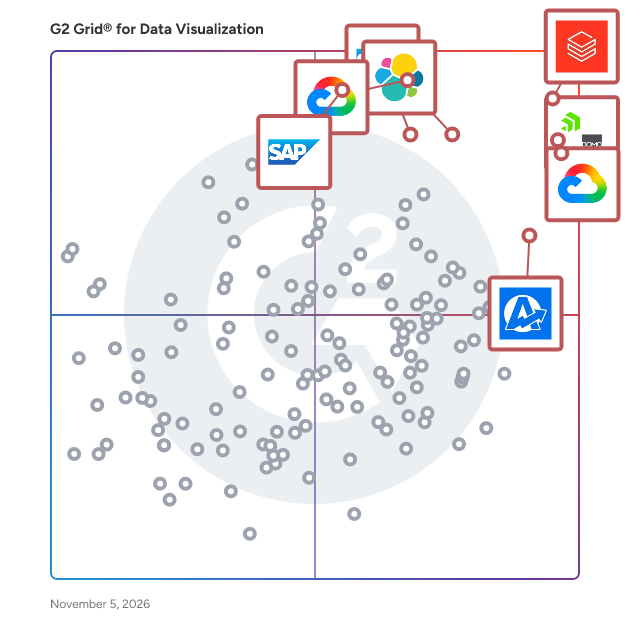
G2 Grid® for Data Visualization Tools

G2 Grid® for Data Visualization Tools plotting products by satisfaction and market presence

Highlighted products: Databricks, Domo, Looker, Data Studio, Elastic Stack, AgencyAnalytics, SAP HANA Cloud, and SAP Analytics Cloud.

Underlying data: [Grid® JSON](https://www.g2.com/categories/data-visualization-tools/grids.json?focus%5B%5D=databricks&focus%5B%5D=domo&focus%5B%5D=looker&focus%5B%5D=data-studio&focus%5B%5D=elastic-stack&focus%5B%5D=agencyanalytics&focus%5B%5D=sap-hana-cloud-2025-10-01&focus%5B%5D=sap-analytics-cloud)

SAP Crystal Server

SAP Crystal Server is a comprehensive business intelligence (BI solution designed to empower organizations with self-service reporting and data exploration capabilities. It enables businesses to automate report distribution, provide secure access to reports from desktops or mobile devices, and manage user administration efficiently. By offering a centralized platform for report scheduling, data-driven publishing, and robust security options, SAP Crystal Server helps decision-makers access timely, accurate information, facilitating informed decision-making and operational efficiency. Key Features and Functionality: - Report Scheduling: Automate the generation and distribution of standard reports on a flexible schedule, reducing repetitive database queries and ensuring timely information delivery. - Data-Driven Publishing: Customize and distribute reports tailored to individual recipients, such as personalized invoices or statements, enhancing communication and engagement. - Security Management: Control access to reports and dashboards at user, group, object, and folder levels, ensuring that sensitive data is accessible only to authorized personnel. - Administrator Interface: Utilize a web-based central management console to configure security settings, manage user roles, and oversee the entire reporting system efficiently. Primary Value and User Solutions: SAP Crystal Server addresses the critical need for timely and accurate business information by automating report distribution and providing secure, self-service access to reports. This reduces the reporting backlog for IT departments and empowers business users to make informed decisions based on up-to-date data. The platform's robust security features ensure that sensitive information is protected, while its scalability allows organizations to manage reporting needs for a growing user base effectively. By streamlining reporting processes and enhancing data accessibility, SAP Crystal Server helps organizations improve operational efficiency and drive business success.

Average Rating: 4.5/5.0

Total Reviews: 30

How Do G2 Users Rate SAP Crystal Server?

  • Has the product been a good partner in doing business?: 8.3/10 (Category avg: 9.0/10)
  • Dashboards: 9.1/10 (Category avg: 9.0/10)
  • Steps to Answer: 8.8/10 (Category avg: 8.6/10)
  • Formats: 9.0/10 (Category avg: 8.6/10)

Who Is the Company Behind SAP Crystal Server?

  • Seller: SAP
  • Year Founded: 1972
  • HQ Location: Walldorf
  • LinkedIn® Page: www.linkedin.com
    149,349 employees on LinkedIn®
  • Ownership: NYSE:SAP
  • Phone: +1 (800) 872-1727

Who Uses This Product?

  • Top Industries: Information Technology and Services, Computer Software
  • Company Size: 40% Large, 37% Medium

What Are Recent G2 Reviews of SAP Crystal Server?

Rollstack

Rollstack helps data, finance, customer success, and revenue operations teams automate recurring PowerPoint presentations and Word documents by connecting directly to business intelligence tools like Tableau, Power BI, Looker, Metabase, and Google Sheets. If you’re tired of copying charts, pasting screenshots, or triple-checking KPIs across decks, Rollstack eliminates that manual, error-prone work. You can sync up-to-date data into branded templates, update them with one click, and export presentation-ready files in seconds. It’s built for teams responsible for client reporting, executive dashboards, business reviews, and sales enablement materials. Rollstack integrates directly with your existing BI stack, so there’s no need to rebuild dashboards or redesign visuals. Just connect your source, map the data to your slides or docs, and update them on your schedule — daily, weekly, or whenever you need them. Used by companies like Zillow, SoFi, Whirlpool, TripAdvisor, and CarGurus, Rollstack helps teams save 10+ hours per week, avoid mistakes, and focus on the story the data tells — not the tedious mechanics of building decks. For data analysts, program managers, sales ops, finance, and client success teams — Rollstack is how modern enterprises deliver consistent, trusted reports at scale. Whether you’re building a QBR for a $10M account or a weekly EBR, Rollstack makes its creation automatic and accurate. Book a demo today to learn how to automate your most important business reports.

Average Rating: 4.6/5.0

Total Reviews: 78

How Do G2 Users Rate Rollstack?

  • Has the product been a good partner in doing business?: 9.6/10 (Category avg: 9.0/10)
  • Dashboards: 8.2/10 (Category avg: 9.0/10)
  • Steps to Answer: 8.0/10 (Category avg: 8.6/10)
  • Formats: 8.4/10 (Category avg: 8.6/10)

Who Is the Company Behind Rollstack?

  • Seller: Rollstack
  • Year Founded: 2022
  • HQ Location: New York, USA
  • LinkedIn® Page: www.linkedin.com
    33 employees on LinkedIn®

Who Uses This Product?

  • Top Industries: Marketing and Advertising, Computer Software
  • Company Size: 46% Medium, 41% Large

What Do G2 Reviewers Say About Rollstack?

AI-generated summary from verified user reviews

Pros
  • Users appreciate the time-saving automation of Rollstack, freeing them from tedious manual data entry.
  • Users appreciate the responsive customer support of Rollstack, enhancing their experience with prompt assistance and guidance.
  • Users appreciate the ease of use of Rollstack, enjoying its intuitive setup and streamlined automation processes.
  • Users value the ease of automation with Rollstack, streamlining reporting and presentation tasks efficiently.
  • Users value the easy integration of Rollstack, enhancing efficiency in automating reports and presentations seamlessly.
Cons
  • Users experience slow loading times and occasional glitches, which disrupt their overall experience with Rollstack.
  • Users experience slow performance with Rollstack, as updates and data loading can take significant time.
  • Users face limitations in storage with Rollstack, requiring manual intervention to manage slide uploads effectively.
  • Users find the complex setup process time-consuming and confusing, but it simplifies future tasks once completed.
  • Users find limited customization options for capture areas and formatting, impacting their experience with Rollstack.

What Are Recent G2 Reviews of Rollstack?

ATLAS.ti

Leveraged by brands and academics alike, ATLAS.ti allows anyone to analyze data and uncover valuable insights – no matter which sector you work in. From basic analysis tasks to the most in-depth research projects: With ATLAS.ti, you can easily unlock actionable findings from your qualitative and mixed methods data with intuitive research tools and best-in-class technology: • Get access to native Mac and Win apps, plus our Web version • All features and tools included in one complete software package • Save time and find insights automatically, powered by AI • Experience seamless project exchange between versions • Take advantage of real-time collaboration for teams • Share multi-user licenses with as many people as you want • Benefit from our free live support and expert training Learn more here: www.atlasti.com

Average Rating: 4.7/5.0

Total Reviews: 58

How Do G2 Users Rate ATLAS.ti?

  • Has the product been a good partner in doing business?: 9.0/10 (Category avg: 9.0/10)
  • Dashboards: 8.3/10 (Category avg: 9.0/10)
  • Steps to Answer: 8.3/10 (Category avg: 8.6/10)
  • Formats: 8.3/10 (Category avg: 8.6/10)

Who Is the Company Behind ATLAS.ti?

Who Uses This Product?

  • Top Industries: Higher Education, Research
  • Company Size: 38% Small, 33% Medium

What Do G2 Reviewers Say About ATLAS.ti?

AI-generated summary from verified user reviews

Pros
  • Users find ATLAS.ti very intuitive and user-friendly, enabling quick navigation and efficient data analysis.
  • Users value the effective categorization capabilities of ATLAS.ti, enhancing their qualitative data analysis process significantly.
  • Users appreciate the efficiency of ATLAS.ti, as it saves time while enhancing qualitative data analysis and coding.
  • Users find ATLAS.ti very intuitive to use, enabling smooth navigation and quick data insights with ease.
  • Users benefit from the time-saving efficiency of ATLAS.ti, simplifying coding and analysis tasks significantly.
Cons
  • Users experience data inaccuracy issues when handling large datasets, but the support team is helpful.
  • Users occasionally face system errors with large datasets, but the support team is helpful and responsive.
  • Users desire more language support and tutorials in Spanish, highlighting a significant gap in accessibility.

What Are Recent G2 Reviews of ATLAS.ti?

AI can help you find the answers. G2 helps you trust them.

Connect G2 to Claude or ChatGPT for answers grounded in G2's trusted reviews, comparisons, and pricing from real user insights.

How it works

Brightmetrics

Brightmetrics is a robust analytics platform designed to elevate contact center performance through actionable insights. Our solution simplifies data extraction and visualization, enabling businesses to make informed decisions quickly, improving customer experiences, and driving ROI. The Brightmetrics Difference: Key Features User-Friendly Interface: Ensures easy adoption across all skill levels Rapid Deployment: Minimizes downtime for quick value realization Real-Time & Historical Analytics: Customizable dashboards and in-depth reports for comprehensive performance tracking Advanced Analytics Tools: Analyze call patterns, agent performance, and customer interactions Omnichannel Integration: Seamlessly connects with leading contact center platforms Brightmetrics empowers contact centers to make data-driven decisions, enhancing agent performance and customer satisfaction while streamlining operations. Our quick implementation and user-friendly design ensure rapid benefits realization, leading to significant cost savings and revenue growth. By optimizing resources and improving efficiency, Brightmetrics delivers a swift return on investment, enabling contact centers to handle higher volumes and operate at peak performance.

Average Rating: 4.9/5.0

Total Reviews: 135

How Do G2 Users Rate Brightmetrics?

  • Has the product been a good partner in doing business?: 9.6/10 (Category avg: 9.0/10)
  • Dashboards: 9.5/10 (Category avg: 9.0/10)
  • Steps to Answer: 8.9/10 (Category avg: 8.6/10)
  • Formats: 9.1/10 (Category avg: 8.6/10)

Who Is the Company Behind Brightmetrics?

Who Uses This Product?

  • Top Industries: Hospital & Health Care, Banking
  • Company Size: 55% Medium, 24% Small

What Do G2 Reviewers Say About Brightmetrics?

AI-generated summary from verified user reviews

Pros
  • Users appreciate the ease of customization in Brightmetrics, allowing for intuitive reports and quick insights without IT help.
  • Users appreciate the ease of use of Brightmetrics, benefiting from intuitive dashboards and customizable reports.
  • Users value the intuitive dashboards of Brightmetrics, enabling quick insights and easy report customization for effective decision-making.
  • Users appreciate the intuitive dashboards of Brightmetrics, enjoying easy access to clear insights and customizable reports.
  • Users value the intuitive dashboards and user-friendly customization that facilitate quick and informed decision-making.
Cons
  • Users find the difficult learning curve challenging, especially with advanced features and initial setup for Brightmetrics.
  • Users find the difficult setup of Brightmetrics overwhelming, especially when trying to grasp advanced features.
  • Users find the learning curve steep for advanced features and initial setup, especially if unfamiliar with analytics tools.

What Are Recent G2 Reviews of Brightmetrics?

What Are G2 Users Discussing About Brightmetrics?

Plecto

Plecto is a real-time dashboard and data visualization platform that combines KPI tracking with gamification features to improve team performance. With Plecto, sales and support teams can visualize their KPIs in real-time, ensuring that all employees stay focused on their targets. The platform transforms traditional analytics into an engaging employee experience that motivates better performance across your organization. Plecto goes beyond typical dashboard visualization by combining it wth engaging gamification and coaching features. With integrations to 150+ of the biggest systems around and places no restrictions on the number of dashboards you can create. This way, you can centralize your data and create a single source of truth for your team's performance. Unlike traditional data visualization tools, Plecto is built for all employees and not just analysts. Plecto's combination of real-time dashboards, gamification and coaching gives organizations a way to not only visualize data but take action on it. Book expert demo now, and discover how Plecto transforms your sales data into actionable insights that drive motivation and results.

Average Rating: 4.2/5.0

Total Reviews: 40

How Do G2 Users Rate Plecto?

  • Has the product been a good partner in doing business?: 9.3/10 (Category avg: 9.0/10)
  • Dashboards: 8.3/10 (Category avg: 9.0/10)
  • Steps to Answer: 8.3/10 (Category avg: 8.6/10)
  • Formats: 8.1/10 (Category avg: 8.6/10)

Who Is the Company Behind Plecto?

  • Seller: Plecto
  • Year Founded: 2012
  • HQ Location: Aarhus, Aarhus
  • LinkedIn® Page: www.linkedin.com
    44 employees on LinkedIn®

Who Uses This Product?

  • Top Industries: Computer Software, Financial Services
  • Company Size: 60% Small, 33% Medium

What Do G2 Reviewers Say About Plecto?

AI-generated summary from verified user reviews

Pros
  • Users find Plecto to be super intuitive and engaging, enhancing productivity with its numerous options and notifications.
  • Users love the clear data overview provided by Plecto, enhancing performance tracking and team engagement.
  • Users appreciate the clear performance overview provided by Plecto, enhancing monitoring and engagement across the team.
  • Users value the versatile charting features of Plecto, enhancing sales tracking and team competition effectively.
  • Users express their high satisfaction with Plecto for providing a clear overview of performance data.
Cons
  • Users find the complexity in data integration challenging, especially with unique IDs and SQL databases in Plecto.
  • Users find data management issues challenging, particularly with unique IDs and SQL database integration complexities.
  • Users find the difficult setup of Plecto challenging, especially when integrating data sources and managing unique IDs.
  • Users struggle with integration issues, especially when combining data from different sources and managing SQL databases.

What Are Recent G2 Reviews of Plecto?

What Are G2 Users Discussing About Plecto?

Reportz

Reportz is a white-label KPIs reporting software solution that helps digital marketing professionals automate and streamline client reporting processes through customizable dashboards. Reportz serves as a comprehensive reporting platform for digital marketing agencies, freelancers, and in-house marketing teams to create, manage, and deliver client-facing performance reports. It belongs to the category of marketing analytics tools specifically designed for automated reporting and data visualization. Key features and benefits include: • Customizable dashboards: Allows users to create tailored reports with relevant KPIs for each client • White-label functionality: Enables branding of reports with agency logos and color schemes • Data integration: Connects with multiple marketing platforms to aggregate data in one place • Automated reporting: Generates and sends reports on a scheduled basis without manual intervention • Client access portal: Provides clients with direct access to their live performance dashboards Reportz addresses several common challenges faced by digital marketing professionals: 1. Time-consuming manual report creation 2. Difficulty in presenting data from multiple sources cohesively 3. Lack of real-time reporting capabilities 4. Need for branded, professional-looking reports 5. Inefficient communication of marketing performance to clients The software is designed to integrate with a wide range of digital marketing tools and platforms, offering compatibility with popular analytics, advertising, and social media services. It provides a user-friendly interface that allows for quick setup and easy maintenance of client reports. Users can expect to benefit from: • Significant time savings through automated report generation • Enhanced client satisfaction with transparent, real-time reporting • Improved data visualization and storytelling capabilities • Consistent branding across all client communications • Scalability to handle reporting for multiple clients or campaigns Reportz offers flexibility in its pricing model, with plans that accommodate various team sizes and reporting needs. The platform supports unlimited users and KPIs within dashboards, allowing for comprehensive reporting without artificial limitations. By centralizing the reporting process and offering extensive customization options, Reportz enables digital marketing professionals to focus more on strategy and less on routine reporting tasks. The tool aims to streamline client communications, demonstrate marketing ROI more effectively, and provide a professional, branded reporting experience for agencies of all sizes.

Average Rating: 4.8/5.0

Total Reviews: 18

How Do G2 Users Rate Reportz?

  • Has the product been a good partner in doing business?: 10.0/10 (Category avg: 9.0/10)
  • Dashboards: 10.0/10 (Category avg: 9.0/10)
  • Steps to Answer: 10.0/10 (Category avg: 8.6/10)

Who Is the Company Behind Reportz?

  • Seller: Reportz
  • Year Founded: 2017
  • HQ Location: New York City, US
  • LinkedIn® Page: www.linkedin.com
    2 employees on LinkedIn®

Who Uses This Product?

  • Top Industries: Marketing and Advertising
  • Company Size: 100% Small

What Do G2 Reviewers Say About Reportz?

AI-generated summary from verified user reviews

Pros
  • Users appreciate the efficient customer dashboards of Reportz, enhancing workflow and professionalism in reporting.
  • Users appreciate the ease of use of Reportz, enjoying its efficient and user-friendly reporting capabilities.
  • Users value the performance efficiency of Reportz for its flawless dashboards and streamlined reporting capabilities.
  • Users value the efficient and user-friendly customer dashboards in Reportz, enhancing their reporting and client communication.
  • Users value the efficient and user-friendly dashboards of Reportz, enhancing workflow and professional reporting capabilities.

What Are Recent G2 Reviews of Reportz?

What Are G2 Users Discussing About Reportz?

Upsolve AI

Upsolve AI is the platform for deploying governed, grounded, and trustworthy AI data agents to your internal teams or external customers. It helps data teams move past the broken self-serve BI promise by combining the conversational power of large language models with the rigor of a robust semantic layer, rich business context, and built-in evaluation and observability to put agent and context improvements on a flywheel. End users get accurate answers while the data team stays in control. The platform has two complementary components: the Upsolve Data Agent and the Upsolve Agent Context Studio. 1. The Upsolve Data Agent. The Upsolve Data Agent does what a good data analyst does. It answers business questions in natural language, asks clarifying questions when a request is ambiguous, generates charts and reports on the fly, and helps users explore the underlying data without writing SQL. These analyst behaviors come built into the agent itself. What the Upsolve Data Agent does: Conversational, natural-language Q&A over your data, with built-in text-to-SQL Multi-step reasoning across datasets, generate interactive charts on-demand(30+ chart types: bar, line, pie, scatter, heatmap, funnel, and more), auto-generated reports and summaries tailored to a user's role (exec, PM, ops, support, finance), conversational drill-down and follow-up turns in the same thread. The Upsolve Data Agent is designed to be easily customizable. We don't believe in an out-of-the-box data agent. Data agents are only useful and reliable with rich context and when assessed against your own performance benchmarks. A generic LLM connected to a database produces generic answers and hallucinated metrics. To produce true, traceable, and transparent answers about your business, the agent needs three more things, and that is where the Data Agent Studio comes in. 2. Upsolve Data Agent Studio. The Data Agent Studio is the place for your team to make the Data Agent accurate, reliable, and trustworthy. It is built on three layers: Data Layer, Context Layer, and Trust and Evals Layer. Data Layer: OOTB database connectors + Cockpit for Semantic Layer construction Database connectors for ClickHouse, Snowflake, BigQuery, Redshift, Databricks, Postgres, MySQL, and other major data warehouses. Robust data governance with Multi-tenant architecture with row- and column-level permissioning. For teams that don't have a unified semantic layer model, the Cockpit tool provides a guided and guardrailed interface that takes your team from fragmented data to a clean, AI-ready semantic layer in a week, instead of the six to eight months a typical V1 takes. Context Layer: your data agent needs a unified, auto-curated, and auto-refreshed context layer. The Context Layer connects your files, docs, and systems (Notion, Confluence, Google Drive, internal wikis, product release notes, dbt files, data catalogs, metric glossaries) and curates the information the agent needs to understand the business behind the numbers. It captures product launches, definition changes, ontology, naming conventions, and team-specific business logic so a query like "usage spiked last week" turn into "usage spiked last week, and this correlates with Tuesday's Pro plan launch". The Context Layer scans for updates across systems of records connected to it, flags context gaps, and suggests updated. Humans always in the loop. Trust and Evals Layer: Testing, end-of-end observability, and evaluations according to your benchmarks. Sandbox environment for pre-deployment testing, plus production logs after launch. Full LLM observability: every prompt, tool call, model used, retrieved context, and reasoning step is logged, traceable, and reviewable. Built-in evaluations: define gold-standard queries and answers, run tests, and catch agent drift with in-built LLM-as-a-judge evaluators before stakeholders. This system then creates a self-improving feedback loop when corrections from your team feed back into the agent's eval set so quality compounds over time. Together, those three Data Agent Studio components turn a generic agent into one that produces accurate, reliable, and trustworthy answers your team can defend. Delivery and deployment: The Upsolve Agentic Dashboard is a conversation-driven exploration surface for end users, with 30+ chart types, interactive filters, drill-down, PDF export, scheduled email, and version history. End users can save generated charts to a personal dashboard or simply tell the agent their role and have it auto-build a full dashboard for that persona, solving the blank-page problem typical of self-serve BI tools. SSO, role-based access control, and audit logging are included. The same Data Agent you customized can be accessed by your users wherever they already work. Embedded inside your own product as customer-facing analytics for B2B SaaS as an iFrame or React component; deploy into Slack and Microsoft Teams as in-channel data bot; access in Claude, ChatGPT, Cursor, and any MCP-compatible client to get data while you work and stage multi-agent workflows; or any custom application via REST API. Common use cases: Internal self-service business intelligence for data teams that don't want to be a ticket queue. Customer-facing embedded analytics for B2B SaaS products. Conversational analytics, generative BI (GenBI), and agentic BI deployments AI-powered reporting and operational analytics for ops, finance, support, and product. Multi-tenant SaaS analytics with row-level security. Looker, Tableau, Power BI alternatives for teams that want an AI-native approach. Why Upsolve AI AI-native architecture. Upsolve was built around the agent from day one, not retrofitted onto a legacy BI tool. Data team in control. The semantic layer, business context, and evals all live with your team, not buried inside a black-box LLM. Fast time-to-value. Cockpit takes you from fragmented data to a working semantic layer in a week. Real evaluation. Most "AI for BI" tools skip evals. Upsolve makes them first-class. Build in Studio, access anywhere. The same agent across internal dashboards, Slack, Teams, your product, and MCP-compatible clients. Enterprise-ready. SSO, role-based access control, multi-tenant governance, audit logging, and full observability included. Built for modern data and AI stacksUpsolve plugs into Snowflake, BigQuery, Redshift, Databricks, Postgres, MySQL. It works alongside dbt, existing semantic layers, and your data catalog. The Data Agent can be invoked from Claude, ChatGPT, Cursor, or any MCP-compatible client, making it easy to compose multi-agent workflows where Upsolve handles the data analysis step. YC W24.

Average Rating: 4.8/5.0

Total Reviews: 15

How Do G2 Users Rate Upsolve AI?

  • Has the product been a good partner in doing business?: 10.0/10 (Category avg: 9.0/10)
  • Dashboards: 9.8/10 (Category avg: 9.0/10)
  • Steps to Answer: 8.7/10 (Category avg: 8.6/10)
  • Formats: 9.2/10 (Category avg: 8.6/10)

Who Is the Company Behind Upsolve AI?

Who Uses This Product?

  • Company Size: 60% Small, 27% Medium

What Do G2 Reviewers Say About Upsolve AI?

AI-generated summary from verified user reviews

Pros
  • Users find Upsolve AI's ease of use exceptional, simplifying dashboard creation and enhancing overall workflow efficiency.
  • Users value the ease of setup with Upsolve AI, which simplifies dashboard creation and enhances workflow efficiency.
  • Users commend Upsolve AI’s excellent customer support, appreciating their reliability and consistent problem-solving assistance.
  • Users value the super fast insights and analytics of Upsolve AI for effective customer success communication.
  • Users value the time-saving capabilities of Upsolve AI, drastically reducing data compilation time and enhancing decision-making.
Cons
  • Users find the limited options for customization and design tools hinder their ability to create effective dashboards.
  • Users face usage limitations with Upsolve AI, experiencing slow chart loading and restricted design customization options.
  • Users note the complexity of analysis in Upsolve AI, requiring multiple iterations for desired results.
  • Users note a significant learning curve in configuring the UI due to numerous options and features.
  • Users find the learning difficulty challenging due to the multitude of configuration options requiring extensive understanding.
What Are Recent G2 Reviews of Upsolve AI?

Zoho Analytics

Zoho Analytics is a GenAI-powered self-service BI and analytics platform that helps businesses collect, prepare, analyze, and present insights from their data, all within minutes. Integrate with 500+ native data sources, like files, feeds, local and cloud databases, cloud storage, and popular business apps. Clean, transform, enrich, and catalog data with our agentic AI-powered, self-service data preparation and management capabilities. Create and manage complex ETL data pipelines using our visual pipeline builder, process stream data for real-time analytics, and set up a strong metrics layer for quality analysis and management. Zoho Analytics comes with 100+ domain-specific prebuilt reports and dashboards, pre-trained NLQ models, intelligently modeled and blended data across business applications, and lots more. Use our intuitive drag-and-drop visualization builder to build insightful and interactive reports and dashboards using a wide variety of visual components, like charts, widgets, pivot tables, tabular views and more. Generate customized reports and dashboards using simple, natural language with our AI-powered conversational agent, Zia. Ask Zia goes beyond basic reporting; it enables users to perform diagnostic analytics, forecast key metrics, and receive intelligent insights and recommendations. Users can assign tasks and trigger actions just by conversing with our agentic AI, Zia, streamlining their workflows and empowering data-driven decisions. Seamlessly embed Ask Zia into your custom or business applications to deliver contextual insights and actions. Enrich your analysis with automated insights by using our NLG-powered narration engine, Zia Insights. With diagnostic analytics for smarter decision-making, Zia Insights takes automated insights to the next level by bubbling up key drivers for particular business tasks. Enumerate complex business scenarios with what-if analyses, forecast KPIs, uncover trends and patterns with advanced analytical capabilities. Leverage cognitive analysis for keyword extraction and sentiment analysis, and more. Evaluate the best ML models with no-code assistance or develop custom models and functions using Python Code Studio. Zoho Analytics comes with pre-packed ML models (AutoML) that allow you to evaluate and pick the best model for your use case. Alternatively custom models and functions using Python Code Studio Embed our full-fledged analytics platform into other software applications. Craft and present immersive data stories through slideshows or purpose-built analytics portals. Collaborate securely through contextual comment threads and real-time messaging. Zoho Analytics has a robust set of APIs that enables elaborate customization and highly extensible low-code and no-code integration with any technology stack. It also offers a high degree of deployment flexibility (private, public, multi-cloud, and on-premises) and platform extensibility (professional services, partner support, and marketplace). Zoho Analytics is modern and scalable, and it can readily match growing data volumes and usage. Its time-tested and accredited enterprise-grade security features and governance framework ensure continuous data management and stewardship. On top of everything else, the TCO for Zoho Analytics—including licensing, implementation, customization, training, and support—is the lowest in our market.

Average Rating: 4.2/5.0

Total Reviews: 286

How Do G2 Users Rate Zoho Analytics?

  • Has the product been a good partner in doing business?: 8.5/10 (Category avg: 9.0/10)
  • Dashboards: 10.0/10 (Category avg: 9.0/10)
  • Steps to Answer: 8.3/10 (Category avg: 8.6/10)
  • Formats: 7.5/10 (Category avg: 8.6/10)

Who Is the Company Behind Zoho Analytics?

  • Seller: Zoho
  • Year Founded: 1996
  • HQ Location: Austin, TX
  • LinkedIn® Page: www.linkedin.com
    30,913 employees on LinkedIn®
  • Phone: +1 (888) 900-9646

Who Uses This Product?

  • Who Uses This: Director, Business Analyst
  • Top Industries: Information Technology and Services, Computer Software
  • Company Size: 51% Small, 42% Medium

What Do G2 Reviewers Say About Zoho Analytics?

AI-generated summary from verified user reviews

Pros
  • Users appreciate the ease of use of Zoho Analytics, thanks to its intuitive interface and customizable dashboards.
  • Users value the intuitive interface and customization of Zoho Analytics, enhancing their data reporting experience effortlessly.
  • Users appreciate the seamless integrations of Zoho Analytics, enabling easy data import from various external sources.
  • Users appreciate the user-friendly dashboards of Zoho Analytics, enabling easy customization and efficient data tracking.
  • Users appreciate the intuitive data visualization in Zoho Analytics, making complex analysis accessible and straightforward.
Cons
  • Users experience a steep learning curve with Zoho Analytics, especially for complex reports and advanced features.
  • Users find the limited customization options in Zoho Analytics frustrating compared to other platforms, like Google Analytics.
  • Users experience limited data integration options with Zoho Analytics, hindering seamless connectivity and overall functionality.
  • Users face integration issues with Zoho Analytics, limiting connections to external data sources and complicating functionality.
  • Users feel the missing features in Zoho Analytics limit functionality, especially for advanced data analysis tasks.

What Are Recent G2 Reviews of Zoho Analytics?

What Are G2 Users Discussing About Zoho Analytics?

Minitab Connect

Minitab Connect is a data integration and analytics workflow platform that helps organizations collect, prepare, monitor, and share data from multiple sources. It provides connectors, automated data pipelines, tables, forms, dashboards, and alerts so teams can use current data for reporting and further analysis. Users can bring in data from files, databases, cloud services, and operational systems. They can organize it in tables and views, apply repeatable preparation steps, and schedule flows that refresh data without rebuilding the same report manually. Dashboards display trends, key performance indicators, and statistical charts as data changes. Monitors can notify users when defined conditions are met. Key capabilities include: - Connections to databases, cloud storage, spreadsheets, APIs, and other data sources. - Automated flows for importing, preparing, and exporting data. - Data preparation tools for cleaning, combining, and transforming datasets. - Shareable dashboards, charts, and data entry forms. - Alerts delivered in the application, by email or text, or through external requests. Minitab Connect supports business analysts, data teams, quality professionals, and operations groups that need a consistent path from scattered data to usable information. A quality team might monitor process measurements across sites; an operations group might update recurring performance reports; an analyst might prepare a dataset for statistical work. The platform can also collect new data through forms and streaming endpoints. Connect works with other Minitab products. Prepared data can be sent to Minitab Statistical Software for deeper analysis, and Connect has direct integrations with Real-Time SPC and Minitab Model Ops. Access can be managed through single sign-on, roles, user groups, and individual permissions. Minitab lists encryption in transit and at rest, multifactor authentication, and an audit log for record changes. Together, these features help teams manage recurring data workflows while controlling access to shared information.

Average Rating: 4.5/5.0

Total Reviews: 30

How Do G2 Users Rate Minitab Connect?

  • Has the product been a good partner in doing business?: 9.2/10 (Category avg: 9.0/10)
  • Dashboards: 9.0/10 (Category avg: 9.0/10)
  • Steps to Answer: 9.0/10 (Category avg: 8.6/10)
  • Formats: 9.1/10 (Category avg: 8.6/10)

Who Is the Company Behind Minitab Connect?

  • Seller: Minitab
  • Company Website:
  • Year Founded: 1972
  • HQ Location: State College, Pennsylvania, United States
  • LinkedIn® Page: www.linkedin.com
    732 employees on LinkedIn®

Who Uses This Product?

  • Top Industries: Information Technology and Services
  • Company Size: 57% Large, 33% Medium

What Do G2 Reviewers Say About Minitab Connect?

AI-generated summary from verified user reviews

Pros
  • Users appreciate the ease of use of Minitab Connect, finding data integration and analysis incredibly straightforward.
  • Users value the efficient data integration capabilities of Minitab Connect, enhancing accessibility and streamlining analysis seamlessly.
  • Users appreciate the easy integrations of Minitab Connect, enhancing data accessibility and streamlining analysis seamlessly.
  • Users value the seamless data integration and versatility of Minitab Connect, enhancing their analysis capabilities effortlessly.
  • Users appreciate the seamless data integration offered by Minitab Connect, enhancing accessibility and enabling efficient analysis.
Cons
  • Users find the high learning curve of Minitab Connect challenging, requiring time, patience, and additional resources to navigate effectively.
  • Users note a high learning difficulty with Minitab Connect, requiring patience and time to master its features.
  • Users face challenges with poor visualization in Minitab Connect, especially when handling large datasets and complex transformations.
  • Users find visualization limitations in Minitab Connect, particularly with large datasets and complex transformations.
  • Users find the complexity of data transformations in Minitab Connect to be slow and challenging, with high costs.

What Are Recent G2 Reviews of Minitab Connect?

What Are G2 Users Discussing About Minitab Connect?

Reportei

Reportei is a cloud-based platform built for marketing teams and agencies to centralize data, automate reporting, and deliver clear, professional insights. Connect tools like Google Ads, Meta Ads, Google Analytics, and HubSpot to transform scattered data into organized, easy-to-read dashboards — all in one place. Create reports in minutes using ready-to-use templates, automate your workflow, and present results your clients will actually understand.

Average Rating: 4.6/5.0

Total Reviews: 49

How Do G2 Users Rate Reportei?

  • Has the product been a good partner in doing business?: 9.2/10 (Category avg: 9.0/10)
  • Dashboards: 9.0/10 (Category avg: 9.0/10)
  • Steps to Answer: 9.0/10 (Category avg: 8.6/10)
  • Formats: 8.7/10 (Category avg: 8.6/10)

Who Is the Company Behind Reportei?

  • Seller: Reportei
  • Year Founded: 2015
  • HQ Location: Juiz de Fora, Minas Gerais
  • LinkedIn® Page: www.linkedin.com
    29 employees on LinkedIn®

Who Uses This Product?

  • Top Industries: Marketing and Advertising
  • Company Size: 90% Small, 10% Medium

What Are Recent G2 Reviews of Reportei?

What Are G2 Users Discussing About Reportei?

IBM Environmental Intelligence Suite

The IBM Environmental Intelligence Suite is an AI-powered SaaS solution that provides organizations with timely and fact-based actionable intelligence to proactively plan and manage the economic impact of severe weather and climate change events; built on the world’s most accurate weather data providing clients with the ability to: Monitor for disruptive environmental conditions such as severe weather, wildfires, flooding and air quality and send alerts when detected Predict potential impacts of climate change and weather across the business using climate risk analytics Gain insights into potential operational disruptions and prioritize mitigation and response efforts Measure and report on environmental initiatives and operationalize carbon accounting, while reducing the burden of this reporting on procurement and operations teams The IBM Environmental Intelligence Suite combines key functionality into a single application suite that includes: Climate and Weather Data APIs Data APIs within the IBM® Environmental Intelligence Suite tap into the breadth and depth of climate, environment and weather data to provide current and forecasted conditions, seasonal and sub-seasonal forecasts, lifestyle indices, severe weather and historical weather data for analysis. The packages are curated to give you only what you need in the format you need it, and you can use them quickly and easily by accessing data APIs through the cloud. By applying advanced analytics to a combination of business data and weather data such as alerts and notifications, forecast data and weather imagery, you can build the foundation for informed enterprise decision-making. Geospatial Analytics Engine Formerly IBM PAIRS Geoscope, the Geospatial Analytics component within the Environmental Intelligence Suite is a platform specifically designed for massive geospatial-temporal (maps, satellite, weather, drone, IoT) query and analytics services. It frees up data scientists and developers from cumbersome processes that dominate conventional data preparation, providing search-friendly access to a rich, diverse and growing catalog of continually updated geospatial-temporal information. Dashboard Visualizations Dashboard Visualization provides weather visualizations for nearly all your locations in a single, user-friendly weather dashboard. See severe weather headed to some locations? Quickly deliver guidance to leadership and a prioritized action list for personnel. Awareness of weather forecasts and patterns in advance can also open windows to new or additional business. Scalable Alerting The alerts console combines data science, geo-location and precise weather data so businesses across energy and utilities, insurance, retail, telecommunications, ground transportation and other industries can deliver timely and customized messages. With Alert Console, create meaningful touch points to strengthen customer loyalty, and protect employees and properties in a timely manner.

Average Rating: 4.2/5.0

Total Reviews: 49

How Do G2 Users Rate IBM Environmental Intelligence Suite?

  • Has the product been a good partner in doing business?: 7.8/10 (Category avg: 9.0/10)
  • Dashboards: 8.9/10 (Category avg: 9.0/10)
  • Steps to Answer: 8.2/10 (Category avg: 8.6/10)
  • Formats: 8.1/10 (Category avg: 8.6/10)

Who Is the Company Behind IBM Environmental Intelligence Suite?

  • Seller: IBM
  • Year Founded: 1911
  • HQ Location: Armonk, New York, United States
  • LinkedIn® Page: www.linkedin.com
    344,328 employees on LinkedIn®
  • Ownership: SWX:IBM
  • Phone: 1-866-277-7488

Who Uses This Product?

  • Top Industries: Information Technology and Services, Accounting
  • Company Size: 39% Medium, 35% Small

What Do G2 Reviewers Say About IBM Environmental Intelligence Suite?

AI-generated summary from verified user reviews

Pros
  • Users value the real-time environmental monitoring capabilities, enhancing decision-making and mitigating risks effectively.
  • Users value the real-time predictive analytics of IBM Environmental Intelligence Suite for proactive risk management and decision-making.
  • Users value the real-time data from IBM EIS for quick and informed decision-making in various scenarios.
  • Users value the real-time updates from IBM EIS, enhancing decision-making in supply chain management and disaster response.
  • Users appreciate the comprehensive data analytics of IBM Environmental Intelligence Suite for its timely insights and effective decision-making.
Cons
  • Users find the setup and integration complex, particularly for those not using IBM's existing tools, hindering adoption.
  • Users find the setup and integration process complex, particularly for those not already using IBM products.
  • Users find the pricing structure to be expensive and complex, posing challenges for startups and smaller businesses.
  • Users find the learning difficulty significant due to complex setup, user interface, and integration challenges.
  • Users highlight complex integration issues that hinder seamless adoption, particularly for non-IBM environments and SMBs.

What Are Recent G2 Reviews of IBM Environmental Intelligence Suite?

wynEnterprise

Discover the story behind your data with Wyn Enterprise. Wyn Enterprise is a seamless embedded business intelligence platform that provides BI reporting, interactive dashboards, scheduling, and distribution tools within any internal or commercial app. With easy-to-use designers, designed for self-service BI, Wyn offers limitless visual data exploration, allowing the everyday user to become data-driven while revealing trends and telling the story behind the data. Whether for your business or your commercial SaaS app, Wyn is an ideal solution for both. Embedded BI for your business provides a holistic view of your business and can lead to more insights, increased team collaboration, and overall business growth. Additionally, embedding Wyn in your SaaS app provides white-label reports and dashboards as part of your own app. Embed Wyn and empower your users with a seamless business intelligence solution. Features: • Seamlessly embedded Business Intelligence: Designed for embedded self-service BI, Wyn provides ad hoc reporting, interactive dashboards, scheduling, and distribution tools within any internal or commercial app. Our platform offers flexible deployment and integration. • Embedding BI with Wyn: Once installed, Wyn is 100% web-based. In your application, Wyn is embedded as a port to provide users the ability to easily create, design, share, export, and distribute dashboards and documents. Seamlessly embed Wyn via Rest API and DIV. Wyn also supports OEM installation and embedding. Additionally, you can integrate with development platforms such as Java, PHP, and .NET through GraphQL API. You can also embed inside customized .NET apps as well as JavaScript frameworks (Angular, React, Vue). • Self-service BI dashboard and reports: Eliminate your dependence on the IT departments and data analysts. Offer every end-user (from code-first to code-free) the ability to create custom ad hoc reports and interactive dashboards. Self-service BI allows users to run their own queries and create their own reports, even if they don’t have a background in statistical analysis, allowing them to turn data into valuable insights for better data driven decisions. • Data Monitoring: Create threshold based notifications and establish Wyn Alerts that are always on to monitor your data. Never miss an opportunity for improvement thanks to real-time monitoring and instant alerts. Integrate your push-notifications with the platform you use everyday - Slack, MS Teams, or email - ensuring that you never miss an alert. •Localization Support: With Custom Localization Support, you’re in control of your dashboard and report. Authors have the ability to localize titles and labels, text explanations, and data visualizations. There is more to localization than just translating words and sentences. Wyn’s custom localization also supports right to left (RTL) languages, regional language options, and number and date formats. •NEW! Natural Language Generation Text Scenario: Introducing InsightIQ, a revolutionary addition to our feature set that transforms the way you interact with your data. InsightIQ is a Natural Language Generation Text Scenario that takes data summarization and insights derivation to a whole new level. This powerful tool allows you to seamlessly distill the essence of your visuals into articulate and easy-to-understand natural language text, facilitating quick reviews and automatic insights extraction. • Built-in multi-tenant support: Wyn's multi-tenant capabilities provides a single centrally administered architecture to serve multiple customers (tenants). These tenants can be within an organization or different businesses, with all its data stored in the SaaS system. Data privacy and securing the data from other tenants are both critical in these deployment scenarios • Date governance and modeling: Wyn allows you to secure and model your raw data. With easy-to-use dashboard and report designers in the same web-based application, end-users can develop their own ad-hoc dashboards and reports based on the secured data. Wyn also allows allows admins to model business data in a structure familiar to users. • Extensible security: Wyn provides extensible security to match your access control needs. Filter and segregate your data and limit your tenant-specific data with the configurable role-based security and user-context definitions. User contexts provide row-level data security in a document or database-level security for a data source. User context acts as an additional layer of data security, extending the role-based security. • Specialized web portals: The software comes with three portals, the document portal; for business end-users, dashboard, and report authors, the admin portal; for admins that configure the server, manage account and security settings, and the resource portal; for data administrators or IT teams. • Pixel-perfect reports: For power users and business users, the report designer tools can help in developing pixel-perfect operational reports, as well as in creating invoices, letters, and account statements among many others. The software further allows you to use ad hoc reporting or the standard enterprise reports. • Efficient Report Sharing: The software also allows you to schedule automated delivery of reports to be sent to your team’s emails. File sharing in various document formats is also supported. Additionally, you can collaborate with your team on report and dashboard designs, and you can share the published versions with others in your enterprise. • Centralized storage; Apart from being a secured platform, Wyn Enterprise also provides centralized storage for all your reports, images, datasets, and configuration settings. Other server resources, such as dashboards, themes, models, users, and roles, are also stored in the same place. The software also allows you to compile data from relational databases, local Excel or CSV files, web sources, and NoSQL data sources. Say Goodbye to User Fees You need a scalable BI platform. You also need to know how much it will cost in the long run. Wyn's scalable licensing model allows room for your business to grow without growth in licensing fees. • No per-user fees • No limits on data size 20+ Years in the Industry Unleash the full potential of embedded ad hoc reporting, driven by the same ActiveReports engine that has led the industry for 20+ years.

Average Rating: 4.7/5.0

Total Reviews: 38

How Do G2 Users Rate wynEnterprise?

  • Has the product been a good partner in doing business?: 9.7/10 (Category avg: 9.0/10)

Who Is the Company Behind wynEnterprise?

  • Seller: MESCIUS
  • Company Website:
  • Year Founded: 1980
  • HQ Location: Pittsburgh, PA
  • LinkedIn® Page: www.linkedin.com
    313 employees on LinkedIn®

Who Uses This Product?

  • Top Industries: Information Technology and Services
  • Company Size: 53% Small, 37% Medium

What Do G2 Reviewers Say About wynEnterprise?

AI-generated summary from verified user reviews

Pros
  • Users praise the knowledgeable customer support of wynEnterprise, highlighting its helpfulness and responsiveness.
  • Users appreciate the ease of use of wynEnterprise, enjoying intuitive features for quick data visualization and reporting.
  • Users value the extreme flexibility of wynEnterprise, enabling customizable dashboards and seamless integration with data sources.
  • Users praise the wide array of charting and reporting controls, enhancing data visualization and analytics capabilities.
  • Users love the highly customizable reports and dashboards of wynEnterprise, enabling personalized and effective data visualization.
Cons
  • Users find the poor documentation makes it challenging to navigate advanced features and configurations effectively.
  • Users find the complexity of wynEnterprise challenging due to its learning curve and outdated UI.
  • Users find insufficient detail in wynEnterprise's instructions and map renderings, limiting functionality at local levels.
  • Users express concern over missing features and inadequate documentation, impacting the overall effectiveness of wynEnterprise.
  • Users find that update issues require time-consuming backups, complicating the update process and user experience.

What Are Recent G2 Reviews of wynEnterprise?

What Are G2 Users Discussing About wynEnterprise?

Jet Analytics

Jet Analytics is a complete data preparation, automation and modeling solution designed for business users to easily build visually stunning reports and dashboards inside Excel or Microsoft Power BI. While accessing your dashboards on the web or from a mobile device, you can quickly identify trends, spot anomalies, and fix problems from anywhere.

Average Rating: 4.5/5.0

Total Reviews: 25

How Do G2 Users Rate Jet Analytics?

  • Has the product been a good partner in doing business?: 9.3/10 (Category avg: 9.0/10)
  • Dashboards: 9.2/10 (Category avg: 9.0/10)
  • Steps to Answer: 9.1/10 (Category avg: 8.6/10)
  • Formats: 9.0/10 (Category avg: 8.6/10)

Who Is the Company Behind Jet Analytics?

Who Uses This Product?

  • Top Industries: Information Technology and Services
  • Company Size: 65% Medium, 23% Large

What Do G2 Reviewers Say About Jet Analytics?

AI-generated summary from verified user reviews

Pros
  • Users love the easy integrations of Jet Analytics, allowing quick access to reliable data for effective reporting.
  • Users value the seamless implementation of Jet Analytics, enabling quick reporting setup and team-wide accessibility.
  • Users appreciate the seamless integrations of Jet Analytics with multiple sources, enhancing reporting and analysis efficiency.
  • Users find setup ease in Jet Analytics remarkable with quick implementations and user-friendly report building.
  • Users value the time-saving capabilities of Jet Analytics, streamlining report generation across multiple departments efficiently.
Cons
  • Users find the administration interface complex, yet acknowledge it’s typical for this type of tool.
  • Users find the learning curve steep due to the need for technical knowledge and high licensing costs.
  • Users find the licensing costs challenging, particularly impacting smaller teams' ability to utilize Jet Analytics effectively.

What Are Recent G2 Reviews of Jet Analytics?

What Are G2 Users Discussing About Jet Analytics?

Qeymetrics

HardMetrics optimizes sales, service and operations with business intelligence and operational analytics solutions. We transform enterprise data into actionable information that drives profitability, improves efficiency, and enhances customer satisfaction.

Average Rating: 4.3/5.0

Total Reviews: 22

How Do G2 Users Rate Qeymetrics?

  • Has the product been a good partner in doing business?: 7.2/10 (Category avg: 9.0/10)
  • Dashboards: 9.0/10 (Category avg: 9.0/10)
  • Steps to Answer: 8.7/10 (Category avg: 8.6/10)
  • Formats: 8.7/10 (Category avg: 8.6/10)

Who Is the Company Behind Qeymetrics?

  • Seller: iQor
  • Year Founded: 1998
  • HQ Location: St. Petersburg, FL
  • LinkedIn® Page: www.linkedin.com
    26,628 employees on LinkedIn®
  • Phone: 800-811-4214

Who Uses This Product?

  • Top Industries: Computer Software
  • Company Size: 61% Small, 26% Medium

What Are Recent G2 Reviews of Qeymetrics?

What Are G2 Users Discussing About Qeymetrics?

Consequential

Out Of The Blue is an AI-powered health-monitoring platform for eCommerce brands to drive top-line revenue growth and drive down costs. We do this by reducing revenue loss, leakages and missed revenue capture by monitoring site errors across your tech stack We also improve conversion by highlighting revenue-impacting CX issues and opportunities across the buyer journey. In short, we work 24*7 behind the scenes to drive time-critical interventions by detecting, diagnosing, and explaining why metrics are moving to be able to take proactive rather than reactive actions. In just 3 simple steps, you can gain valuable insights from your data and keep your business on track. -You choose Out Of The Blue with any Data Source- We provide support for all major Shopify brand connectors- across marketing, sales, and analytics. -Next, you onboard your data into our Metrics Hub, where you refine your KPIs and business metrics with our Semantic Layer, set extraction preferences, and let us handle the rest. -You are now live & will start getting insights in your mail, on Slack, or through other channels via webhooks. With Out Of The Blue, ecommerce growth teams can finally: -Gain the insights they need to improve your eCommerce site experience and product category performance. -Get alerted within minutes when customers aren’t having a broken experience related to purchasing, finding items, registering, or logging in, so you can fix it before your revenue is impacted. -Uncover outperforming and soft categories across your products. -Automate analyzing your data at a granular level by county, channel, and product category or more. -Get a weekly digest that includes a list of issues stack-ranked by their revenue impact, so you can refocus on what isn’t important—rather than what’s urgent. Our customers include growth oriented brands like Poshmark, True Classic, Abbott Lyon and more

Average Rating: 4.6/5.0

Total Reviews: 25

How Do G2 Users Rate Consequential?

  • Has the product been a good partner in doing business?: 9.7/10 (Category avg: 9.0/10)
  • Dashboards: 8.9/10 (Category avg: 9.0/10)
  • Steps to Answer: 9.2/10 (Category avg: 8.6/10)
  • Formats: 9.0/10 (Category avg: 8.6/10)

Who Is the Company Behind Consequential?

Who Uses This Product?

  • Top Industries: Computer Software
  • Company Size: 88% Small, 8% Large

What Do G2 Reviewers Say About Consequential?

AI-generated summary from verified user reviews

Pros
  • Users appreciate the ease of use of Out Of The Blue, allowing seamless monitoring and quick access to important data.
  • Users value time-saving alerts from Out Of The Blue, enhancing efficiency in resolving revenue issues swiftly.
  • Users value the instant error alerts in Out Of The Blue, enabling quick resolutions and minimizing financial loss.
  • Users value the comprehensive insights of Out Of The Blue, enhancing site health and improving customer experience.
  • Users value the responsive customer support of Out Of The Blue, appreciating quick solutions via their Slack channel.
Cons
  • Users struggle with the difficult setup of Out Of The Blue, requiring prior knowledge that can be challenging.
  • Users find the onboarding process complicated, suggesting improvements for a smoother start with Out Of The Blue.
  • Users face setup difficulties with Out Of The Blue, especially those lacking prior knowledge of the system.
  • Users find the onboarding process complex, wishing for a more simplified experience to enhance usability.
  • Users find the complex setup for third-party integrations frustrating, wishing for a more streamlined onboarding process.

What Are Recent G2 Reviews of Consequential?

Bijou Barry
BB
Researched and written by Bijou Barry
Updated June 24, 2026