# Best Core HR Software for Small Business - Page 5

*By [Grace Savides](https://research.g2.com/insights/author/grace-savides)*

The best core HR software in 2026 is RUN Powered by ADP, rated 4.6 out of 5 on G2 based on 5,600+ verified reviews. For small businesses, Gusto bundles payroll and benefits in one place. The highest user-rated platform among the top five is Rippling at 4.8 stars.

1. RUN Powered by ADP — 4.6/5 (5,600+ reviews): Best for small-business payroll and HR
2. Rippling — 4.8/5 (12,000+ reviews): Best for unified HR, IT, and payroll
3. BambooHR — 4.4/5 (5,500+ reviews): Best for centralized employee lifecycle and PTO
4. Gusto — 4.6/5 (10,000+ reviews): Best for SMB payroll and benefits
5. TriNet — 4.2/5 (1,600+ reviews): Best for PEO-managed payroll, benefits, and compliance

*Updated June 2026. Based on 2026 G2 verified review data across 758 products.*


Products classified in the overall Core HR category are similar in many regards and help companies of all sizes solve their business problems. However, small business features, pricing, setup, and installation differ from businesses of other sizes, which is why we match buyers to the right Small Business Core HR to fit their needs. Compare product ratings based on reviews from enterprise users or connect with one of G2&#39;s buying advisors to find the right solutions within the Small Business Core HR category.

In addition to qualifying for inclusion in the Core HR Software category, to qualify for inclusion in the Small Business Core HR Software category, a product must have at least 10 reviews left by a reviewer from a small business.


## Top Core HR Software at a Glance
| # | Product | Rating | Best For | What Users Say |
|---|---------|--------|----------|----------------|
| 1 | [RUN Powered by ADP](https://www.g2.com/products/run-powered-by-adp/reviews) | 4.7/5.0 (5,942 reviews) | All-in-one payroll and HR compliance | "[ADP: Straightforward Payroll Setup with Powerful All-in-One HR Features](https://www.g2.com/survey_responses/run-powered-by-adp-review-13135733)" |
| 2 | [Rippling](https://www.g2.com/products/rippling/reviews) | 4.8/5.0 (11,578 reviews) | Unified HR, payroll, and IT lifecycle automation | "[All-in-One HR Platform That Streamlines Payroll, Time Tracking, and Access Management](https://www.g2.com/survey_responses/rippling-review-13091087)" |
| 3 | [BambooHR](https://www.g2.com/products/bamboohr/reviews) | 4.4/5.0 (5,257 reviews) | Centralized employee lifecycle and PTO workflows | "[Easy, Flexible HRIS Hub with Helpful Indeed and Glassdoor Integrations](https://www.g2.com/survey_responses/bamboohr-review-13145628)" |
| 4 | [TriNet](https://www.g2.com/products/trinet/reviews) | 4.2/5.0 (1,917 reviews) | Centralized payroll, benefits, and HR compliance | "[TriNet Simplifies HR So SMBs Can Focus on Growth](https://www.g2.com/survey_responses/trinet-review-12967209)" |
| 5 | [Gusto](https://www.g2.com/products/gusto/reviews) | 4.6/5.0 (11,773 reviews) | All-in-one payroll, compliance, and onboarding automation | "[Happy Customer](https://www.g2.com/survey_responses/gusto-review-12006488)" |
| 6 | [Paylocity](https://www.g2.com/products/paylocity/reviews) | 4.4/5.0 (5,998 reviews) | Unified employee lifecycle HR and payroll | "[Seamless All-in-One HR Platform That Saves Hours](https://www.g2.com/survey_responses/paylocity-review-12915096)" |
| 7 | [HiBob HRIS](https://www.g2.com/products/hibob-hris/reviews) | 4.5/5.0 (2,480 reviews) | Employee lifecycle automation with social-style engagement | "[Highly Customizable, Saves Time with Automation](https://www.g2.com/survey_responses/hibob-hris-review-13055546)" |
| 8 | [Keka](https://www.g2.com/products/keka/reviews) | 4.4/5.0 (2,035 reviews) | Unified payroll, attendance, and employee lifecycle automation | "[Streamlined HR Tasks with Some Room for Improvement](https://www.g2.com/survey_responses/keka-review-13070476)" |
| 9 | [Deel HR](https://www.g2.com/products/deel-hr/reviews) | 4.8/5.0 (1,302 reviews) | Cross-border payroll with built-in compliance | "[User-Friendly Platform with Fast, Trackable Payments](https://www.g2.com/survey_responses/deel-hr-review-12683686)" |
| 10 | [HROne](https://www.g2.com/products/uneecops-hrone/reviews) | 4.8/5.0 (2,063 reviews) | India-compliant payroll and workforce automation | "[On-time support &amp; easy access, email pay-slip automation can be improved](https://www.g2.com/survey_responses/hrone-review-10898412)" |


## G2 Grid® for Core HR Software
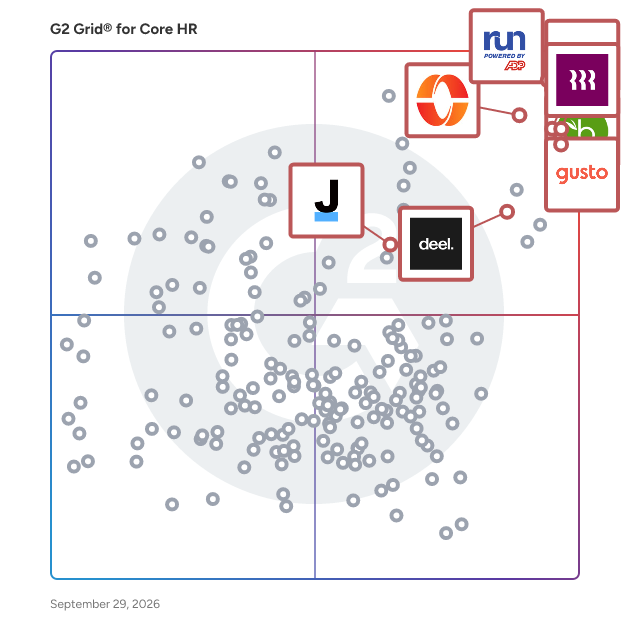
![G2 Grid® for Core HR Software plotting products by satisfaction and market presence](https://www.g2.com/categories/core-hr/grids.png?focus%5B%5D=5449&focus%5B%5D=3637&focus%5B%5D=53090&focus%5B%5D=4062&focus%5B%5D=3236&focus%5B%5D=1621546&focus%5B%5D=4499&focus%5B%5D=21135)
Highlighted products: RUN Powered by ADP, Gusto, Rippling, TriNet, BambooHR, Deel HR, Justworks, and Keka.
Underlying data: [Grid® JSON](https://www.g2.com/categories/core-hr/grids.json?focus%5B%5D=run-powered-by-adp&amp;focus%5B%5D=gusto&amp;focus%5B%5D=rippling&amp;focus%5B%5D=trinet&amp;focus%5B%5D=bamboohr&amp;focus%5B%5D=deel-hr&amp;focus%5B%5D=justworks&amp;focus%5B%5D=keka&amp;segment=small-business)


## How Many Core HR Software Products Does G2 Track?
**Total Products under this Category:** 676

### Category Stats (Jul 2026)
- **Average Rating**: 4.37/5 (↑0.01 vs Jun 2026) The average rating of products in this category, based on all submitted ratings
- **Top Trending Product**: LinovHR (+53.03%) - Among all products in this category, LinovHR recorded the largest rating increase compared to last month
*Last updated: July 21, 2026*


## How Does G2 Rank Core HR Software Products?

**Why You Can Trust G2's Software Rankings:**

- 30 Analysts and Data Experts
- 115,100+ Authentic Reviews
- 676+ Products
- Unbiased Rankings

G2's software rankings are built on verified user reviews, rigorous moderation, and a consistent research methodology maintained by a team of analysts and data experts. Each product is measured using the same transparent criteria, with no paid placement or vendor influence. While reviews reflect real user experiences, which can be subjective, they offer valuable insight into how software performs in the hands of professionals. Together, these inputs power the G2 Score, a standardized way to compare tools within every category.


---

**Sponsored**

### ManageEngine ServiceDesk Plus

ServiceDesk Plus is ITIL-ready help desk software with integrated Asset and Project Management capabilities. With advanced ITSM functionality and easy-to-use capability, ServiceDesk Plus helps IT support teams deliver world-class service to end users with reduced costs and complexity. It comes in three editions and is available in 29 different languages. Over 100,000 organizations and 750,000 technicians, across 185 countries, trust ServiceDesk Plus to optimize IT service desk performance. It is fully integrated and easy to set up - without extensive customization or integrations. It has rich automation that helps eliminate pesky manual processes for quicker ticket resolution and higher end user satisfaction. Furthermore, the Standard Edition is FREE forever for both the on-premise and on-demand models upto 5 technicians! Don&#39;t take our word for it. Try the 30-day free trial and watch ServiceDesk Plus simplify your IT operations. https://www.manageengine.com/products/service-desk/download.html Features ServiceDesk Plus comes with a great balance of features to suit your business needs. The features available are listed below. Incident management: Gain control of your help desk With incident management you can pin incidents to the right technicians to ensure accountability and automate ticket workflows with automatic ticket dispatch, business rules, escalation, service level agreement, notification rules or alerts, preventive maintenance for timely ticket resolution. In other words, you can manage the entire lifecycle of an incident! Problem management: Go beyond firefighting Problem management helps you analyze the root cause and reduce recurring incidents in your IT, raise a new problem from within an incident, link related incidents to a problem and close them all at once! Further, you can provide temporary workarounds till you find a permanent fix to the problem. Change management: Manage changes with precision Manage your changes with precision. Streamline planning with roll out and back out plans, take informed decisions in the assessment, prioritization, and scheduling of changes with inputs from the Change Advisory Board (CAB), automated workflows to ensure that there are no more unauthorized or failed changes. Asset management: Track and manage assets with ease Discover, track, and manage your IT hardware and software assets in one place. Optimize asset utilization, avoid vulnerabilities, and ensure license compliance. IT project management: Deliver IT projects on time You can now manage multiple IT projects and requirements, plan releases, track progress, collaborate with team, and measure results, or in other words, manage all your IT projects efficiently. Break a full-blown project into milestones and tasks, set roles and provide access permissions, track the utilization of your resources, monitor the overall progress of your IT projects using colored Gantt charts, and do more to steer your IT projects to success! Purchases and contracts management: Track IT purchases and contracts Automate your supplier interactions and IT purchasing functions with full traceability and visibility, maintain master records for various vendors and track purchases from ordering to receipt and invoicing, reduce delays and cut unnecessary spending, track IT hardware and software contracts to improve compliance, associate assets and get proactively notified of contract expiry. Self service portal: Deflect tickets from your service desk Help users solve repeat incidents using a knowledge base and deflect tickets from your service desk, keep end users informed on ticket progress/approvals through automated notifications or make company-wide announcements of any outage or unplanned maintenance, auto suggest solutions during ticket creation and provide easy templates to create tickets. Service catalog: Showcase your IT services Showcase the offered IT services to your end user and give a new face to your IT. You can customize your workflow of delivering the service request specific to each service category. You can also setup approval process and service level agreements for each service request. CMDB: Get the bigger picture ServiceDesk Plus CMDB ensures effortless management of your entire IT infrastructure. Track and manage all configuration items and map their relationships and dependencies. Visually analyze the impact of changes and outages for informed decision-making. Service level agreement: Ensure timely service delivery Create SLAs and provide quality services on time to your end users. With the intuitive SLA management in ServiceDesk Plus, escalate proactively to four levels of hierarchy to ensure that your SLAs are met. Reports: Derive decisions with the right data Generate over 150+ inbuilt reports, custom reports, query reports and flash reports pertaining to various service desk modules like requests, problems, changes, assets, surveys, contracts, and purchase. Use real time dashboards to accurately reflect health of the service desk, create relevant custom reports and add them to your dashboard and take strategic decisions based on the current trend of your help desk performance! Extensions and integrations: Collaborate easily with other IT systems Enjoy tight integration with software that monitors and manages your networks, applications, desktops, and Active Directory. Get what you always wanted - 360 degree visibility of your IT!


[Visit website](https://www.g2.com/external_clickthroughs/record?secure%5Bad_program%5D=ppc&amp;secure%5Bad_slot%5D=category_product_list&amp;secure%5Bcategory_id%5D=241&amp;secure%5Bchosen_at%5D=2026-07-23T11%3A21%3A29Z&amp;secure%5Bdisplayable_resource_id%5D=58&amp;secure%5Bdisplayable_resource_type%5D=Category&amp;secure%5Bmedium%5D=sponsored&amp;secure%5Bplacement_reason%5D=retargeted_product&amp;secure%5Bplacement_resource_ids%5D%5B%5D=2867&amp;secure%5Bprioritized%5D=false&amp;secure%5Bproduct_id%5D=2867&amp;secure%5Bresource_id%5D=241&amp;secure%5Bresource_type%5D=Category&amp;secure%5Bsource_type%5D=llm_category_page&amp;secure%5Bsource_url%5D=https%3A%2F%2Fwww.g2.com%2Fcategories%2Fcore-hr%2Fsmall-business%3Fpage%3D3&amp;secure%5Btoken%5D=a9640585fed92070433a12bff5ffe5c8800de52a0d8e01e90c826697b0925351&amp;secure%5Burl%5D=https%3A%2F%2Fwww.manageengine.com%2Fproducts%2Fservice-desk%2F%3Futm_source%3DG2%26utm_medium%3DCPC&amp;secure%5Burl_type%5D=custom_url)

---

## What Are the Top-Rated Core HR Software Products in 2026?
### 1. [flair.hr](https://www.g2.com/products/flair-hr/reviews)
flair is an all-in-one HR and recruitment solution that brings structure and simplicity to complex people-related processes – whether local, global, remote, or office-based. It has all the features HR teams need to improve their organization’s work-life experience. flair covers the entire employee journey and is fully customizable. Start out with standard features or adapt every process to your organization’s unique needs – the choice is yours. Attract talent and reduce time to hire with recruiting features, such as our drag-and-drop career page builder and customizable candidate funnels. Turn enthusiastic newbies into loyal brand advocates with personalized onboarding journeys. And simplify core HR tasks, such as absence management, payroll, performance reviews, time tracking, and more. Our solution is built on Salesforce, allowing you to benefit from the power and security of the world’s leading CRM platform. But even if you aren’t using Salesforce, we’ll provide you with access. Add some flair to your organization – and achieve HR harmony.


**Average Rating:** 4.5/5.0
**Total Reviews:** 65
**How Do G2 Users Rate flair.hr?**

- **Has the product been a good partner in doing business?:** 8.6/10 (Category avg: 8.7/10)
- **Organization Management:** 8.9/10 (Category avg: 8.7/10)
- **Performance:** 9.8/10 (Category avg: 8.6/10)
- **Compliance:** 8.0/10 (Category avg: 8.6/10)

**Who Is the Company Behind flair.hr?**

- **Seller:** [flair.hr](https://www.g2.com/sellers/flair-hr)
- **Year Founded:** 2019
- **HQ Location:** Munich, Bavaria
- **Twitter:** @FlairHr (65 Twitter followers)
- **LinkedIn® Page:** https://www.linkedin.com/company/flair-hr/ (33 employees on LinkedIn®)

**Who Uses This Product?**
- **Top Industries:** Computer Software, Medical Practice
- **Company Size:** 74% Mid-Market, 25% Small-Business


#### What Are flair.hr's Pros and Cons?

**Pros:**

- Ease of Use (5 reviews)
- Helpful (5 reviews)
- Customer Support (4 reviews)
- Easy Integrations (4 reviews)
- User Interface (4 reviews)

**Cons:**

- Missing Features (2 reviews)
- Cost Issues (1 reviews)
- Customization Issues (1 reviews)
- Expensive (1 reviews)
- Improvement Needed (1 reviews)


### What Do G2 Reviewers Say About flair.hr?
*AI-generated summary from verified user reviews*

**Pros:**

- Users find Flair.hr to be **easy to use** , fostering natural feedback and enhancing team morale effortlessly.
- Users highlight the **natural feedback process** and seamless integrations of Flair.hr, enhancing team morale and collaboration.
- Users appreciate the **responsive customer support** from Flair.hr, making it easy to resolve issues efficiently.
- Users love the **easy integrations** of Flair.hr, simplifying workflows and enhancing team collaboration effortlessly.
- Users appreciate the **easy-to-navigate user interface** of flair.hr, enhancing team collaboration and productivity.

**Cons:**

- Users note the **missing features** in flair.hr, particularly advanced analytics and mobile app limitations.
- Users feel that the **cost issues** limit access to advanced analytics and customization options in flair.hr.
- Users find the **customization issues** limiting, particularly with advanced analytics tied to higher-tier plans.
- Users find the pricing for flair.hr to be **expensive** , especially for advanced features and customization options.
- Users feel there is significant **improvement needed** in goals and performance tracking, especially in the mobile app experience.

#### What Are Recent G2 Reviews of flair.hr?

**"[Effortless Feedback and Team Morale Boost](https://www.g2.com/survey_responses/flair-hr-review-12065462)"**

**Rating:** 4.0/5.0 stars
*— gulshan d.*

[Read full review](https://www.g2.com/survey_responses/flair-hr-review-12065462)

---

**"[flair Review!](https://www.g2.com/survey_responses/flair-hr-review-8681858)"**

**Rating:** 4.5/5.0 stars
*— Harald M.*

[Read full review](https://www.g2.com/survey_responses/flair-hr-review-8681858)

---


## What Is Core HR Software?

[HR Software](https://www.g2.com/categories/hr)

## What Software Categories Are Similar to Core HR Software?

- [HCM Software](https://www.g2.com/categories/hcm-software)
- [Performance Management Software](https://www.g2.com/categories/performance-management)
- [Payroll Software](https://www.g2.com/categories/payroll)
- [Workforce Management Software](https://www.g2.com/categories/workforce-management)
- [Time Tracking Software](https://www.g2.com/categories/time-tracking-software)
- [Onboarding Software](https://www.g2.com/categories/onboarding-software)
- [Time &amp; Attendance Software](https://www.g2.com/categories/time-attendance)


---

## How Do You Choose the Right Core HR Software?

### What You Should Know About Core HR Software

### Core HR software buying insights at a glance

[Core HR software](https://www.g2.com/categories/core-hr) serves as the central system for managing employee data, streamlining HR operations, and supporting compliance across the organization. It offers capabilities such as data consolidation, automated workflows, policy tracking, and workforce reporting.

Organizations typically use Core HR platforms to maintain accurate employee records, manage leave and attendance, onboard and offboard staff, and automate essential HR tasks. Solutions range from lightweight tools for small businesses to enterprise-grade systems designed for large, multi-location teams or compliance-heavy industries.

Most Core HR solutions are priced per user per year. According to G2 data, pricing starts with free plans for basic needs, averages around $310.76 per user/year, and can scale to over $7,000 per user/year for full-featured enterprise solutions.

When evaluating Core HR software, consider your company size, internal HR processes, integration needs, regulatory requirements, and support expectations. Key questions to ask include:

- What parts of the employee profile can staff update on their own?
- How customizable are workflows, permissions, and approval chains?
- Which third-party systems (e.g., payroll, LMS, ATS) does it integrate with?
- What onboarding and support options are available?
- Does the platform offer real-time reporting and audit-ready logs?

Top-rated Core HR solutions on G2 currently include Rippling, BambooHR, HiBob HRIS, RUN Powered by ADP, and Keka.

### What is Core HR software?

G2 defines [Core HR software](https://www.g2.com/categories/core-hr) as platforms that serve as the central system of record for managing essential employee data, streamlining administrative HR tasks, and supporting compliance across an organization. These systems consolidate data from functions like payroll, onboarding, benefits, and performance management, enabling HR teams to track, update, and report on workforce information.

Core HR solutions collect first-party data from sources such as time-tracking tools, onboarding forms, performance reviews, and benefits records. They organize this data by role, tenure, department, compensation, and changes over time to maintain a reliable system of record.

As organizations scale, Core HR software helps automate routine tasks such as maintaining employee records, managing time-off requests, tracking compensation history, and supporting compliance with federal, state, and local labour regulations. Many platforms also integrate with third-party tools—like learning management systems (LMS) or applicant tracking systems (ATS)—to extend their capabilities across the full employee lifecycle.

Built-in reporting tools or analytics modules allow HR professionals to generate workforce insights on key topics like turnover rates, diversity metrics, onboarding outcomes, and retention trends. These insights can inform strategic decisions, ensure regulatory compliance, and optimize talent strategies.

The Core HR software market is projected to grow from $19.45 billion in 2024 to $21.03 billion in 2025, reflecting a compound annual growth rate (CAGR) of 8.1%. ([_Source 1_](https://www.thebusinessresearchcompany.com/report/core-hr-software-global-market-report))

Core HR software remains a highly active and well-reviewed category on G2, with 700 products currently tracked and over 6,749 verified reviews collected in the last 12 months. This strong volume of feedback highlights the category’s importance to organizations focused on modernizing their HR operations. ([_Source 2_](https://documentation.g2.com/docs/research-scoring-methodologies))

### What are the top reviewed Core HR systems on G2?

G2 evaluates Core HR software products using a [proprietary algorithm](https://documentation.g2.com/docs/research-scoring-methodologies) that considers real-user satisfaction ratings and popularity from review data. Based on the latest data, here are the top five Core HR software products:​_​_

#### 1. [Rippling](https://www.g2.com/products/rippling/reviews)

- Number of Reviews: 2,78
- Satisfaction: 100
- Market Presence: 96
- G2 Score: 98

#### 2. [BambooHR](https://www.g2.com/products/bamboohr/reviews)

- Number of Reviews: 1,854
- Satisfaction: 99
- Market Presence: 92
- G2 Score: 95

#### 3. [HiBob HRIS](https://www.g2.com/products/hibob-hris/reviews)

- Number of Reviews: 1,179
- Satisfaction: 98
- Market Presence: 85
- G2 Score: 91

#### 4. [RUN Powered by ADP](https://www.g2.com/products/run-powered-by-adp/reviews)

- Number of Reviews: 329
- Satisfaction: 71
- Market Presence: 98
- G2 Score: 85

#### 5. [Keka](https://www.g2.com/products/keka/reviews)

- Number of Reviews: 1,082
- Satisfaction: 96
- Market Presence: 73
- G2 Score: 84

These rankings are determined by combining verified user ratings and publicly available web search popularity data:

- **Satisfaction Score:** This metric reflects user satisfaction based on verified reviews. It accounts for review quality, quantity, recency, and user-submitted ratings across criteria like ease of use, support, and product direction. It shows how well a product meets user expectations. ([_Source 2_](https://documentation.g2.com/docs/research-scoring-methodologies))
- **Market Presence Score:** This score assesses a product’s visibility and reach within the market. It pulls data from G2’s platform and external sources to evaluate indicators such as company size, employee headcount, web presence, and social following. ([_Source 2_](https://documentation.g2.com/docs/research-scoring-methodologies))
- **G2 Score:** The G2 Score is a 0–100 rating that ranks software products by combining two weighted factors: Satisfaction, based on verified user reviews, and Market Presence, which includes metrics like company size, web traffic, and social following. The score determines each product’s placement in the Grid® Report and allows buyers to compare tools based on both user feedback and market data. ([_Source 2_](https://documentation.g2.com/docs/research-scoring-methodologies))

### Core HR software pricing and cost considerations

Core HR software pricing varies significantly based on the provider, company size, feature depth, and deployment method. Pricing levels generally fall into three main categories:

- **Free plans:** Offers basic features suitable for small teams managing simple employee records and limited HR functions.
- **Entry-level and mid-market plans:** These plans include standard modules such as onboarding, leave tracking, and document management, with per-user pricing geared toward growing businesses.
- **Enterprise-level plans** : Deliver broad functionality with advanced configuration options, integrations with other HR systems, audit-ready compliance tools, and premium support.

Most Core HR systems are priced per user per year, though monthly options may be available. Based on G2 data for 37 Core HR products and 93 editions, the average annual license cost is approximately $310.76. Some products offer free plans, while the most robust enterprise solutions reach up to $7,188 per user per year.

When evaluating pricing, organizations should consider the total cost of ownership (TCO), including:

- Setup and onboarding time
- Integration with payroll, ATS, or LMS tools
- Training for admins and end users
- Ongoing technical support or vendor-led system updates

Additional costs such as infrastructure, internal IT resources, and maintenance should also be considered for on-premise deployments.

### Types of Core HR software on G2

Core HR solutions typically fall into the following categories, each designed to support specific business needs, operational structures, and deployment preferences:

- **Integrated Core HR Suites** : These suites combine core HR functions—such as employee data management, onboarding, time tracking, and benefits administration—into a unified platform, streamlining HR operations and reducing reliance on disconnected tools.
- [HR Analytics Software](https://www.g2.com/categories/hr-analytics): Prioritize workforce analytics by offering dashboards, KPIs, and predictive insights to help HR teams monitor trends like turnover, retention, and workforce productivity.
- **Industry-Specific Core HR** : Tailored to the unique compliance and workflow requirements of specific industries. These solutions often include built-in compliance templates, industry-aligned terminology, and custom workflows. Examples include [Healthcare HR](https://www.g2.com/categories/healthcare-hr), Construction HR, Nonprofit HR, and [Education HR](https://www.g2.com/categories/education-hr).
- **Cloud-Based Core HR** : Delivered via web-based infrastructure, these solutions provide remote access, reduce IT overhead, and support real-time updates for hybrid or distributed workforces.
- [Onboarding-Focused Core HR](https://www.g2.com/categories/onboarding-software): Built to streamline the new hire experience with tools for document collection, compliance tracking, and task automation during the employee onboarding process.
- [Small-Business Core HR](https://www.g2.com/categories/core-hr/small-business): Offers essential HR capabilities in a lightweight, easy-to-use format for smaller teams. It covers basics like employee records, leave tracking, and basic reporting.
- [Enterprise Core HR](https://www.g2.com/categories/core-hr/enterprise): Supports complex HR ecosystems with features like role-based permissions, audit trails, multi-location support, and integrations with payroll and performance systems.

### Best Core HR software features rated by G2 reviewers

When evaluating Core HR solutions, focus on the core capabilities that help streamline workforce management, ensure compliance, and support day-to-day HR operations. Here are the essential features commonly found in leading Core HR platforms:

- Organization Management: Allows HR teams to structure employees by departments, roles, and reporting lines. This framework is used to control access, generate reports, and manage teams more efficiently.
- Time, Attendance, and PTO Tracking: This tool tracks employee hours, schedules, vacation days, sick leave, and other types of time off in one place. It helps ensure accurate payroll and compliance with labour laws.
- Benefits Administration: This allows employees to view and manage their health, dental, and other benefit plans. HR teams can also track payroll deductions and update plans during open enrollment or life events.
- Salary Structures: Supports consistent compensation management by organizing job descriptions and salary grades across the organization.
- Compliance Tools: These tools help ensure HR policies align with legal standards by tracking key compliance areas and automating related reporting.
- Expense Management: Allows employees to submit expense reports and track reimbursements. Often integrates with payroll or finance systems for smoother processing.

### Top Core HR software benefits identified by G2 reviewers

Implementing Core HR software effectively can lead to measurable improvements across HR operations, including:

**Centralized and simplified HR processes:** Core HR platforms consolidate critical HR functions—such as leave management, payroll access, and document workflows—into a single system. This integration streamlines day-to-day operations, reduces administrative overhead, and enhances the employee experience.

“_The tool integrates HR, payroll, benefits, and IT management into a single platform, reducing the need for multiple systems. The user interface is modern, clean, and intuitive, making it easy to navigate even for non-technical users and first-time users like me. Thanks team!_” -[Varalakshmi S., Software Developer](https://www.g2.com/products/rippling/reviews/rippling-review-10957300)

**Reliable and automated payroll management:** These systems accurately process payroll by syncing with attendance data and time-off records, reducing human error and ensuring timely compensation.

“_It is the most user-friendly HR benefits and payroll software. Everything is easy to find and easy to edit/change things when needed. I love that Rippling is the only place that I need to go to check my benefits, submit requests for time off, collect my tax documents, and monitor my subordinates (employees that report to me).”_ -[Rod C. Creative Director](https://www.g2.com/products/rippling/reviews/rippling-review-11003179)

**User-first design that boosts adoption:** With clean interfaces and mobile functionality, Core HR tools are easy for employees to adopt and use consistently, even without formal training.

_“This tool has been a game-changer for our HR processes. The implementation process was very smooth. The user-friendly interface makes it easy to handle people database, attendance and leave management all in one place. Additionally, the support team is very responsive and helpful, ensuring any issues are resolved within 24 to 48 hours. We are using this tool for our day-to-day activities as well. The biometric integration helped us to track employee login data.”_ - [Manasa D., HRBP-Executive](https://www.g2.com/products/keka/reviews/keka-review-10878279)

**Improved time tracking and scheduling:** Employees benefit from intuitive time tracking tools that make it easy to monitor availability, request time off, and stay organized—while giving HR greater control and visibility.

_“We use this tool for job postings, applicant tracking, employee documentation, onboarding processes, and so much more. We are grateful that BambooHR works hard to provide a safe and secure place for our employee&#39;s most sensitive data.” -_ [Michelle A., Human Resource Manager](https://www.g2.com/products/bamboohr/reviews/bamboohr-review-8906696)

### Top Core HR solutions challenges identified by G2 reviewers

While Core HR systems bring much-needed structure to HR operations, G2 reviewers also highlight key limitations. These include process confusion, data access issues, and approval bottlenecks. Here&#39;s what reviewers reveal—and how organizations can proactively address these concerns:

**1. Inability to edit personal or job information independently:** Employees often encounter roadblocks when trying to update their own information, requiring HR involvement for even minor changes like department updates or contact details.

- **Essential questions to ask your Core HR vendor:** What types of employee profile data can end users edit? Are change requests subject to approval workflows?
- **How to overcome the challenge:** Look for systems that support self-service updates for personal details, with HR-controlled approval paths for sensitive fields like salary or job title.

**2. Errors or delays in attendance and log tracking:** Inaccurate or delayed log data—often due to sync issues between biometric systems and the software—can disrupt payroll calculations and employee trust.

- **Essential questions to ask your Core HR vendor:** What attendance tracking methods do you support? How is data synced and validated for accuracy?
- **How to overcome the challenge:** Choose platforms that offer multi-channel tracking (web, mobile, biometric), and provide real-time dashboards to catch and correct discrepancies early.

**3. Limited role-based visibility and approval transparency:** Some users note unclear or inconsistent approval workflows—making it difficult to know who needs to take action or where a request stands.

- **Essential questions to ask your Core HR vendor:** Can approval paths be configured by department or process? Are approvers clearly displayed in the user interface?
- **How to overcome the challenge:** Implement tools that provide visual approval chains, send reminder notifications, and allow approvers to delegate or escalate pending actions when needed.

**4. Rigid performance review templates and inflexible workflows:** A number of reviewers point out that performance management modules often lack adaptability, such as fixed scoring methods, review frequencies, or goal formats.

- **Essential questions to ask your Core HR vendor:** Can performance review forms, rating scales, and review cycles be customized per department or role?
- **How to overcome the challenge:** Use solutions that enable modular review cycles, allow HR teams to configure their own scoring systems, and support 360-degree feedback where applicable.

**5. Lack of detailed audit trails or change logs:** Without visibility into who modified what—and when—HR teams can struggle with accountability, compliance, or internal investigations.

- **Essential questions to ask your Core HR vendor:** Does the system maintain audit logs for profile edits, approvals, and system changes? Are these accessible and exportable by admins?
- **How to overcome the challenge:** Ensure the platform includes real-time audit tracking, filterable logs, and data retention settings that comply with your internal and legal requirements.

### What is Core HR software used for?

Core HR software is primarily used by HR teams, people managers, and employees to manage essential workforce data and handle routine HR tasks. Based on user reviews, the most common use cases include:

- **Employee data management:** Organizations rely on Core HR systems to maintain accurate, secure records of employee profiles, roles, contracts, and documentation. This eliminates the need for scattered spreadsheets or disconnected systems.
- **Leave and attendance tracking:** A key use case is automating time-off requests, approvals, and attendance monitoring. These features give HR teams and employees real-time visibility into balances, scheduling, and absenteeism.
- **Onboarding and offboarding workflows:** From document collection and task assignments to benefits enrollment, Core HR platforms help standardize and streamline the onboarding experience for new hires—and similarly guide exits with structured offboarding checklists.
- **Compliance and recordkeeping:** HR teams use these platforms to ensure audit readiness and policy adherence by keeping a verifiable trail of employee records, contracts, and changes, which is particularly important for regulated industries.
- **Internal communication and task coordination:** Some systems include features for sending updates, assigning HR-related tasks (e.g., policy acknowledgement), or facilitating announcements—creating a central space for employee engagement beyond payroll and benefits.

### Who uses Core HR systems?

Core HR software users span a range of roles—from HR specialists to executives overseeing people operations. Based on G2 reviewer demographics, common users include HR managers, software engineers, account executives, owners, and office managers. Popular industries include computer software, information technology, healthcare, financial services, and marketing. Most reviewers represent small to midsize businesses, particularly organizations with 11 to 500 employees.

### Common Core HR software integrations

We analyzed extensive user-review data to identify common software categories users frequently integrate with Core HR platforms:

**Payroll software:** Integrating Core HR software with [payroll systems](https://www.g2.com/categories/payroll) allows businesses to automate salary calculations, tax deductions, and benefits processing by syncing employee records, time-off balances, and attendance data—ensuring accurate and timely payroll execution.

**Workforce management software:** Core HR platforms are often integrated with [workforce management tools](https://www.g2.com/categories/workforce-management) to streamline scheduling, monitor time tracking, and manage shift-based roles, helping organizations optimize staffing and reduce manual oversight.

**HRIS systems:** Many users transition between [HR software](https://www.g2.com/categories/hr) or run multiple tools in parallel. Integrating Core HR software with other HRIS platforms helps companies manage benefits, organizational charts, and performance reviews without data silos.

**Accounting software:** Integrations with [accounting software](https://www.g2.com/categories/accounting) enable HR and finance teams to align payroll outputs with general ledger entries, tax reporting, and expense tracking—improving financial accuracy and streamlining reconciliation.

**Global employment platforms:** Businesses with international teams often integrate Core HR systems with [global employment platforms](https://www.g2.com/categories/global-employment-platforms-gep) to manage contractor onboarding, compliance with local labour laws, and cross-border payments—especially in remote or hybrid environments.

### Future of Core HR software

- **AI-driven automation and predictive analytics:** Core HR platforms are increasingly leveraging AI and machine learning to automate workflows, surface actionable insights, and predict employee behaviour. This helps HR teams reduce manual tasks, improve retention strategies, and make proactive decisions around workforce planning **.** [(](https://www.aihr.com/blog/hr-technology-trends/)[_Source 3_](https://www.aihr.com/blog/hr-technology-trends/)[)](https://www.aihr.com/blog/hr-technology-trends/)
- **Personalized employee experience platforms (EXP):** HR software is shifting toward platforms that enhance employee experience across touchpoints—combining self-service, feedback, development, and wellness tools. This evolution supports individualized journeys tailored to each employee’s career stage and role **.** [(](https://www.sdworx.com/en-en/resources/talent-management/top-5-hr-trends-2025-building-people-centric-ai-driven-future)[_Source 4_](https://www.sdworx.com/en-en/resources/talent-management/top-5-hr-trends-2025-building-people-centric-ai-driven-future)[)](https://www.sdworx.com/en-en/resources/talent-management/top-5-hr-trends-2025-building-people-centric-ai-driven-future)
- **Cloud-native, mobile-first infrastructure:** As hybrid and remote work persist, Core HR tools are transitioning to cloud-native architectures. This allows for mobile access, rapid scalability, and secure global deployment—ensuring that HR services are accessible anytime, anywhere. ([Source 5](https://www.hrplan.net/articles/the-future-of-hr-software-top-trends-to-watch-in-2025))
- **Compliance-first design and secure data governance:** With regulations like GDPR and HIPAA tightening future-ready HR platforms, built-in compliance workflows, access controls, and audit-ready reporting are embedded to protect sensitive employee data. ([Source 6](https://workant.io/core-hr-trends-2025))
- **Smarter integrations and platform unification:** Organizations are consolidating fragmented HR tech stacks. Next-gen Core HR software will offer native integrations with payroll, benefits, and learning systems—reducing complexity and improving operational efficiency. [(](https://www.aihr.com/blog/hr-technology-trends/)[_Source 3_](https://www.aihr.com/blog/hr-technology-trends/)[)](https://www.aihr.com/blog/hr-technology-trends/)

### Sources

1. [Core HR Software Global Market Report 2025](https://www.thebusinessresearchcompany.com/report/core-hr-software-global-market-report), The Business Research Company
2. G2 reviews data: G2 ratings are based on feedback from authenticated software users and take into account satisfaction scores, market traction, and current user interest. The rankings featured in this guide reflect an evaluation of G2 reviews submitted within the past year. For a detailed explanation, refer to [G2’s full scoring methodology](https://documentation.g2.com/docs/research-scoring-methodologies).
3. [13 HR Technology Trends To Watch in 2025](https://www.aihr.com/blog/hr-technology-trends/), AIHR
4. [Top 5 HR Trends for 2025: Building a People-Centric, AI-Driven Future](https://www.sdworx.com/en-en/resources/talent-management/top-5-hr-trends-2025-building-people-centric-ai-driven-future), SD Worx
5. [The Future of HR Software: Top Trends to Watch in 2025](https://www.hrplan.net/articles/the-future-of-hr-software-top-trends-to-watch-in-2025), HRPlan
6. [Core HR Trends 2025](https://workant.io/core-hr-trends-2025), Workant


---
## What Are the Most Common Questions About Core HR Software?
*AI-generated · Last updated: April 27, 2026*
### What is the best rated HR tools for automation?
Based on G2 reviews, these products are frequently noted for automation and streamlined HR workflows.

- [Rippling](https://www.g2.com/products/rippling/reviews) -- Reviewers regularly describe Rippling as automating onboarding, payroll, approvals, benefits, and employee data updates in one place.
- [BambooHR](https://www.g2.com/products/bamboohr/reviews) -- Users often highlight BambooHR for simplifying onboarding, time-off requests, employee records, and routine HR administration with an easy interface.
- [Gusto](https://www.g2.com/products/gusto/reviews) -- Reviewers commonly mention Gusto for automating payroll, tax filings, onboarding steps, and employee self-service for smaller teams.
- [Keka](https://www.g2.com/products/keka/reviews) -- Recent reviewers emphasize Keka for automating attendance, leave tracking, payroll, and other day-to-day HR processes.
- [HROne](https://www.g2.com/products/uneecops-hrone/reviews) -- Users frequently mention HROne for automating payroll, attendance, compliance-related work, and employee self-service tasks.


### What is the best HR software options for startups?
Based on G2 reviews, these products are commonly used by startups and growing teams for core HR needs.

- [Rippling](https://www.g2.com/products/rippling/reviews) -- Reviewers say Rippling helps startups centralize HR, payroll, onboarding, and app access while reducing manual work.
- [BambooHR](https://www.g2.com/products/bamboohr/reviews) -- Users describe BambooHR as simple to roll out for employee records, PTO tracking, onboarding, and everyday HR tasks.
- [Gusto](https://www.g2.com/products/gusto/reviews) -- G2 reviewers often mention Gusto as a strong fit for small businesses and startups handling payroll, onboarding, and benefits in one place.
- [HiBob HRIS](https://www.g2.com/products/hibob-hris/reviews) -- Reviewers highlight HiBob HRIS for centralizing people data, workflows, and employee experience as teams scale.
- [Humaans](https://www.g2.com/products/humaans/reviews) -- Recent reviews describe Humaans as straightforward to implement for employee data, onboarding, compliance, and time-off management.


### What is the best human resources system?
Based on G2 reviews, there is no single answer for every team, but several products stand out.

- [Rippling](https://www.g2.com/products/rippling/reviews) -- Reviewers frequently praise Rippling for bringing HR, payroll, onboarding, benefits, and IT-related workflows into one system.
- [BambooHR](https://www.g2.com/products/bamboohr/reviews) -- Users often value BambooHR for intuitive employee records, PTO visibility, onboarding, and easy day-to-day HR access.
- [Gusto](https://www.g2.com/products/gusto/reviews) -- Reviewers commonly note Gusto for payroll, tax handling, onboarding, and benefits support, especially for smaller organizations.
- [Paylocity](https://www.g2.com/products/paylocity/reviews) -- Users mention Paylocity for consolidating payroll, onboarding, learning, and employee management in a single platform.
- [HiBob HRIS](https://www.g2.com/products/hibob-hris/reviews) -- Reviewers highlight HiBob HRIS for centralizing employee data, reporting, performance workflows, and broader people operations.


### What is core hr software?
Core HR software is the system teams use to keep essential employee information and everyday HR processes in one place. Across recent G2 reviews in this category, users most often describe it as the hub for employee records, onboarding, time-off tracking, attendance, payroll-related information, org charts, documents, and basic workflow approvals. Reviewers consistently value having these tasks centralized instead of spread across spreadsheets, email, or separate tools. Common benefits mentioned include easier access to employee data, less manual follow-up, smoother onboarding, clearer visibility into leave and attendance, and a simpler experience for employees who need to find pay, policy, or profile information quickly.


### How does core HR software help teams stay organized?
Across recent G2 reviews, a recurring theme is that core HR platforms help teams stay organized by centralizing routine tasks that were previously handled across email, spreadsheets, or multiple systems. Reviewers frequently mention easier access to employee records, pay information, PTO balances, company documents, org charts, and onboarding tasks. Many also note that self-service tools reduce back-and-forth with HR because employees can request time off, update details, review documents, and check status updates on their own. Another repeated theme is clearer visibility into who is out, what tasks are pending, and where key information lives, which helps managers and employees plan work more efficiently.