Best Cloud Content Collaboration Software - Page 4

How Many Cloud Content Collaboration Software Products Does G2 Track?

Total Products under this Category: 308

Category Stats (Nov 2026)

  • Average Rating: 4.35/5 (↑0.01 vs Oct 2026) The average rating of products in this category, based on all submitted ratings
  • Top Trending Product: FileOrbis (+3.7%) - Among all products in this category, FileOrbis recorded the largest rating increase compared to last month

Last updated: November 01, 2026

How Does G2 Rank Cloud Content Collaboration Software Products?

Why You Can Trust G2's Software Rankings:

  • 30 Analysts and Data Experts
  • 124,000+ Authentic Reviews
  • 308+ Products
  • Unbiased Rankings

G2's software rankings are built on verified user reviews, rigorous moderation, and a consistent research methodology maintained by a team of analysts and data experts. Each product is measured using the same transparent criteria, with no paid placement or vendor influence. While reviews reflect real user experiences, which can be subjective, they offer valuable insight into how software performs in the hands of professionals. Together, these inputs power the G2 Score, a standardized way to compare tools within every category.

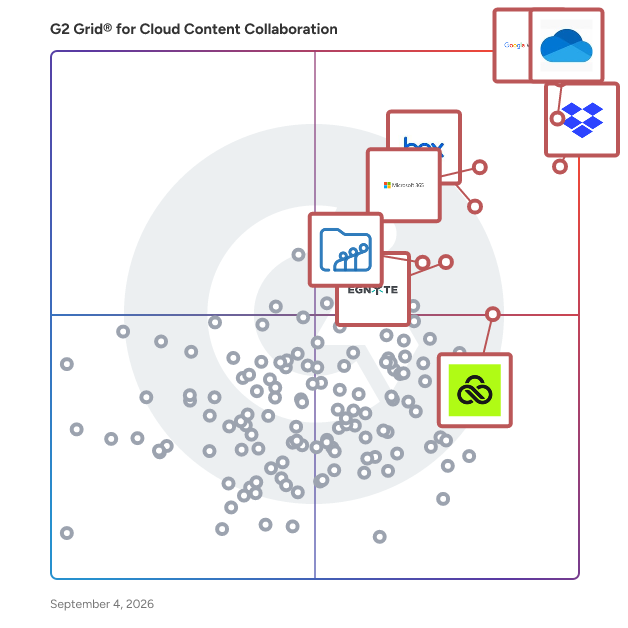
G2 Grid® for Cloud Content Collaboration Software

G2 Grid® for Cloud Content Collaboration Software plotting products by satisfaction and market presence

Highlighted products: Google Workspace, Microsoft OneDrive for Business, Dropbox, Microsoft 365, Box, Egnyte, LucidLink, and Zoho WorkDrive.

Underlying data: [Grid® JSON](https://www.g2.com/categories/cloud-content-collaboration/grids.json?focus%5B%5D=google-workspace&focus%5B%5D=microsoft-onedrive-for-business&focus%5B%5D=dropbox&focus%5B%5D=microsoft365&focus%5B%5D=box&focus%5B%5D=egnyte&focus%5B%5D=lucidlink&focus%5B%5D=zoho-workdrive)

R2 Docuo

Cloud-based document management and workflow platform. R2 Docuo helps organizations manage contracts, invoices, quotes, and business processes through ready-to-use apps or fully customized solutions. Store, organize, and share documents with advanced metadata, version control, templates, and powerful search capabilities. Automate approvals, reviews, and other recurring workflows while connecting information across departments. For organizations with more complex requirements, R2 Docuo provides configurable modules, API access, and industry-specific business solutions built on the same platform. AI-powered document processing helps classify, extract, and retrieve information faster.

Average Rating: 4.5/5.0

Total Reviews: 99

How Do G2 Users Rate R2 Docuo?

  • Has the product been a good partner in doing business?: 8.5/10 (Category avg: 8.8/10)
  • Performance and Reliability: 9.0/10 (Category avg: 8.7/10)
  • File following: 9.6/10 (Category avg: 8.8/10)
  • Device Syncing: 9.3/10 (Category avg: 8.7/10)

Who Is the Company Behind R2 Docuo?

  • Seller: R2 Sistemas
  • Company Website:
  • Year Founded: 2012
  • HQ Location: Madrid, Spain
  • LinkedIn® Page: www.linkedin.com
    18 employees on LinkedIn®

Who Uses This Product?

  • Top Industries: Airlines/Aviation, Accounting
  • Company Size: 52% Small, 27% Medium

What Are Recent G2 Reviews of R2 Docuo?

What Are G2 Users Discussing About R2 Docuo?

Frame.io

One platform for all your creative work. Frame.io is the all-in-one platform that helps creative teams collaborate, review, and deliver projects faster. Whether you’re working in video, design, or marketing, Frame.io centralizes your creative process—from upload to approval—in one secure, easy-to-use workspace built specifically for creatives. Upload nearly any creative file lightning-fast to a cloud workspace purpose-built for visual assets. Panel-based workspaces and nested folder trees make organizing, finding, and sharing assets intuitive and effortless. With flexible metadata, you can tag, sort, and group files by assignee, due date, status, and more—so your team can work the way it wants. Frame.io eliminates silos with secure, centralized communication that follows the work. You can share assets on the fly, collaborate in context, and find anything instantly across projects. Powerful features like speaker-labeled transcripts, searchable captions, and Collections make managing even the most complex creative pipelines simple. Best-in-Class Review & Approval Get precise, actionable feedback on videos, images, and documents with tools designed for every stakeholder—creatives, clients, and executives alike. Comment directly on a frame or image, timestamp notes, and keep conversations tied to specific assets so nothing gets lost in translation. Customized Workflow Management Assign tasks, track milestones, and build workflows tailored to your team’s unique process. Metadata-powered tracking helps you visualize progress from concept through delivery, ensuring every step is aligned, transparent, and on schedule. Beautiful Sharing & Presentations Showcase your work in crystal-clear high resolution with custom-branded share links and presentations. Add your logo, background, colors, and headers so everything stays on brand. Control permissions with a click—decide who can view, comment, or download, and easily toggle settings as needs evolve. Enterprise-Grade Security Protect your intellectual property with advanced security features like watermarking, single sign-on (SSO), and two-factor authentication (2FA). You decide who sees what, how they interact with assets, and when access expires—so your creative work stays safe at every stage. Whatever you create, Frame.io helps you deliver it faster. That’s why teams across industries choose Frame.io to accelerate their creative workflows, unify collaboration, and elevate the way they produce and present their work.

Average Rating: 4.5/5.0

Total Reviews: 270

How Do G2 Users Rate Frame.io?

  • Has the product been a good partner in doing business?: 8.5/10 (Category avg: 8.8/10)
  • Performance and Reliability: 8.8/10 (Category avg: 8.7/10)
  • File following: 10.0/10 (Category avg: 8.8/10)
  • Device Syncing: 10.0/10 (Category avg: 8.7/10)

Who Is the Company Behind Frame.io?

  • Seller: Adobe
  • Company Website:
  • Year Founded: 1982
  • HQ Location: San Jose, CA
  • LinkedIn® Page: www.linkedin.com
    42,975 employees on LinkedIn®
  • Ownership: NASDAQ:ADBE

Who Uses This Product?

  • Who Uses This: Video Editor
  • Top Industries: Marketing and Advertising, Media Production
  • Company Size: 57% Small, 20% Medium

What Do G2 Reviewers Say About Frame.io?

AI-generated summary from verified user reviews

Pros
  • Users appreciate the ease of use in Frame.io, benefiting from its simple interface and efficient access to content.
  • Users value the easy sharing capabilities of Frame.io, which streamlines collaboration and improves project efficiency.
  • Users value the centralized collaboration features of Frame.io, enhancing team communication and project management efficiency.
  • Users praise the easy setup of Frame.io, making it convenient for quick project initiation and collaboration.
  • Users appreciate the intuitive interface of Frame.io, which simplifies project management and client communication effectively.
Cons
  • Users experience slow performance with large files, causing lag during uploads and playback, impacting workflow efficiency.
  • Users find the subscription cost of Frame.io to be relatively high, impacting affordability for growing teams.
  • Users find storage limitations and slow downloads frustrating, especially with multiple files or large projects in Frame.io.
  • Users note the limited options for customization and managing large teams can complicate the overall experience.
  • Users find the UI design confusing, particularly for clients unfamiliar with the platform, impacting initial usability.

What Are Recent G2 Reviews of Frame.io?

What Are G2 Users Discussing About Frame.io?

Fastio

Fastio: The AI-first workspace where people and AI agents work on the same files Fastio gives teams one place to store, share, and work on content, with AI built into every workspace. It's a modern alternative to Box, Dropbox, and Google Drive for teams that use AI agents alongside people. ✓ Built-in AI: Every file is indexed automatically, so you can search by meaning, ask questions across a workspace, and get answers that cite the source files ✓ AI agents as teammates: Connect Claude or your own agents through MCP, the REST API, or the CLI, each with its own scoped permissions and a full audit trail ✓ Branded sharing: Client portals with your logo, colors, and custom URL, plus expiring, password-protected links with download tracking ✓ Review and approvals: Comments pinned to video frames, pages, and image regions, one-click approvals, and tasks linked to the files they cover ✓ Media and metadata: Adaptive video streaming, in-browser previews for professional formats, and AI extraction that turns documents into structured, searchable data ✓ Security: Geo-IP controls, virus scanning, and email risk screening, plus SSO, admin policies, and SIEM audit streaming on Enterprise. Import from Google Drive, Dropbox, OneDrive, or Box in a few clicks. Plans start at $9.99/month, or $99/year with yearly billing, with a 14-day trial on monthly plans. Built by VividEngine, the company behind MediaFire, and used by teams at Samsung, Amazon, Walmart, Target, Autodesk, Logitech, and GoPro.

Average Rating: 4.2/5.0

Total Reviews: 50

How Do G2 Users Rate Fastio?

  • Has the product been a good partner in doing business?: 7.1/10 (Category avg: 8.8/10)
  • Performance and Reliability: 8.6/10 (Category avg: 8.7/10)
  • File following: 9.4/10 (Category avg: 8.8/10)
  • Device Syncing: 8.3/10 (Category avg: 8.7/10)

Who Is the Company Behind Fastio?

Who Uses This Product?

  • Top Industries: Computer Software, Marketing and Advertising
  • Company Size: 62% Small, 42% Medium

What Do G2 Reviewers Say About Fastio?

AI-generated summary from verified user reviews

Pros
  • Users appreciate the ease of use of Fast.io, finding its intuitive design and quick performance ideal for all skill levels.
  • Users love Fast.io for its clean and intuitive design, ensuring a smooth experience even for newcomers.
  • Users praise Fastio for its speed efficiency, ensuring quick loading and seamless collaboration across devices.
  • Users love the efficient file sharing capabilities of Fast.io, enabling quick and simple management of large media files.
  • Users appreciate the strong security options of Fast.io, ensuring privacy and control over data access.
Cons
  • Users experience slow performance with Fastio, especially during large file uploads which can take longer than expected.
  • Users face slow uploads with Fastio, particularly when dealing with large files or interruptions during the process.
  • Users find limited reporting on Fast.io frustrating, with strict caps on file sizes and bandwidth across tiers.
  • Users feel the lack of limited customization options hinders their ability to personalize the Fastio experience.
  • Users experience data loss when uploading large files, leading to interruptions and flagged issues during the process.

What Are Recent G2 Reviews of Fastio?

AI can help you find the answers. G2 helps you trust them.

Connect G2 to Claude or ChatGPT for answers grounded in G2's trusted reviews, comparisons, and pricing from real user insights.

How it works

OpenText Core Share

OpenText™ Core Share provides all the functionality needed to securely share and collaborate on projects while working remotely with partners and customers behind and beyond the corporate firewall. Simple and intuitive to use, Core Share is a SaaS application that offers the enterprise level security and compliance IT departments require with the flexibility that users need. Core Share’s unique ability to enable both a hybrid environment and a full cloud experience sets it apart from other major file sharing offerings.

Average Rating: 4.3/5.0

Total Reviews: 26

How Do G2 Users Rate OpenText Core Share?

  • Has the product been a good partner in doing business?: 10.0/10 (Category avg: 8.8/10)
  • Performance and Reliability: 8.0/10 (Category avg: 8.7/10)
  • File following: 9.1/10 (Category avg: 8.8/10)
  • Device Syncing: 8.5/10 (Category avg: 8.7/10)

Who Is the Company Behind OpenText Core Share?

  • Seller: OpenText
  • Year Founded: 1991
  • HQ Location: Waterloo, ON
  • LinkedIn® Page: www.linkedin.com
    22,835 employees on LinkedIn®
  • Ownership: NASDAQ:OTEX
  • Phone: +1-519-888-7111

Who Uses This Product?

  • Top Industries: Information Technology and Services
  • Company Size: 44% Large, 33% Small

What Do G2 Reviewers Say About OpenText Core Share?

AI-generated summary from verified user reviews

Pros
  • Users find OpenText Core Share incredibly easy to use, streamlining collaboration and enhancing productivity effortlessly.
  • Users find easy collaboration with OpenText Core Share enhances productivity and simplifies teamwork significantly.
  • Users find the simplicity and speed of OpenText Core Share enhances their file sharing and collaboration experience.
  • Users value the reliability of OpenText Core Share, highlighting its quick and secure collaboration features.
  • Users appreciate the security features of OpenText Core Share, ensuring a safe environment for file sharing and collaboration.
Cons
  • Users find folder navigation challenging as the search option becomes outdated with larger codebase sizes.
  • Users find the search functionality outdated, making file navigation difficult as the codebase expands.
  • Users find the search functionality inadequate, making it difficult to navigate larger codebases efficiently.
  • Users find it challenging to search and navigate files effectively as the codebase size increases.

What Are Recent G2 Reviews of OpenText Core Share?

What Are G2 Users Discussing About OpenText Core Share?

Cloudup

Cloudup is a file-sharing service that enables users to instantly share a wide array of content, including videos, photos, music, links, and documents. By simply dragging and dropping files, users can create streams and generate shareable links accessible to anyone, regardless of whether they have a Cloudup account. This seamless sharing experience is designed to be both intuitive and visually appealing for both the sender and the recipient. Key Features and Functionality: - Instant Sharing: Quickly share various types of content by creating streams and generating shareable links. - Cross-Platform Compatibility: Access and share content across web applications and native desktop apps for Mac (OSX 6 and higher) and Windows (XP, Vista, 7, 8, and 8). - Enhanced Desktop Features: Desktop applications offer additional functionalities such as screenshot auto-detection and directory uploading. - Generous Storage: Users receive 1,000 items for free, each up to 200MB, totaling up to 200GB of free storage space. Primary Value and User Solutions: Cloudup addresses the need for efficient and effortless file sharing by providing a platform that simplifies the process of distributing various types of content. Its user-friendly interface and cross-platform support ensure that users can share and access their files anytime, anywhere, without encountering compatibility issues. The generous free storage allocation allows users to manage and share substantial amounts of data without incurring additional costs. Overall, Cloudup enhances productivity and collaboration by streamlining the file-sharing process.

Average Rating: 4.6/5.0

Total Reviews: 63

How Do G2 Users Rate Cloudup?

  • Has the product been a good partner in doing business?: 8.9/10 (Category avg: 8.8/10)
  • Performance and Reliability: 8.9/10 (Category avg: 8.7/10)
  • File following: 9.0/10 (Category avg: 8.8/10)
  • Device Syncing: 9.2/10 (Category avg: 8.7/10)

Who Is the Company Behind Cloudup?

  • Seller: Cloudup
  • Year Founded: 2013
  • HQ Location: San Francisco, US
  • LinkedIn® Page: www.linkedin.com
    2 employees on LinkedIn®

Who Uses This Product?

  • Top Industries: Computer Software, Information Technology and Services
  • Company Size: 49% Small, 34% Medium

What Do G2 Reviewers Say About Cloudup?

AI-generated summary from verified user reviews

Pros
  • Users find Cloudup's ease of use remarkable, allowing for seamless file sharing and integration into daily routines.
  • Users appreciate the effortless file sharing with Cloudup, enjoying its simplicity and speed for collaboration.
  • Users appreciate the effortless collaboration with Cloudup, making file sharing quick and seamless in their daily routines.
  • Users value the seamless integration of Cloudup, enhancing their workflow with effortless file sharing and collaboration.
  • Users value the large file sharing capabilities of Cloudup, enhancing convenience and efficiency in their workflow.
Cons
  • Users find Cloudup's lack of advanced features limiting for complex tasks and team collaborations.
  • Users find limited functionality in Cloudup, hindering complex tasks and advanced collaboration for team projects.
  • Users criticize Cloudup for its poor customer support, facing slow responses that hinder timely problem resolution.
  • Users experience integration difficulties with Cloudup, as it struggles to connect seamlessly with essential productivity apps.
  • Users frequently report slow performance with file uploads on Cloudup, leading to frustrating delays and inefficiencies.

What Are Recent G2 Reviews of Cloudup?

What Are G2 Users Discussing About Cloudup?

NetExplorer

NetExplorer is a French software company specializing in secure online file sharing, storage, and collaborative solutions for businesses. Founded in 2007, NetExplorer offers a cloud-based platform that enables organizations to manage the entire lifecycle of their documents, accessible from anywhere, while maintaining stringent security standards. The company provides a comprehensive suite of applications, including web interfaces, synchronization software, mobile applications, network drives, and integrations with tools like Microsoft Office and Outlook. NetExplorer's solutions are designed to enhance productivity and ensure data sovereignty, with data centers located in France, Luxembourg, and Switzerland. The platform is certified ISO 27001 for information security, ISO 9001 for quality, and ISO 14001 for environmental management, and is authorized to store and process personal health data through its HDS certification. Key Features and Functionality: - Secure File Sharing: Transfer files of any size or format with restricted access through secure, customizable links. - Real-Time Collaboration: Collaborate on documents with internal and external users, featuring real-time co-editing, version control, and online review and annotation capabilities. - Electronic Signature: Simplify processes with secure electronic signatures compliant with European standards (eIDAS). - Advanced Security Measures: Implement password protection, access expiration settings, download notifications, and single download limitations to safeguard sensitive information. - Integration with Office 365: Edit documents directly in the browser with Office Online, enabling real-time co-editing without the need for downloads or manual saving. - Mobile Accessibility: Access and manage files securely from smartphones or tablets, ensuring data availability on the go. Primary Value and Solutions Provided: NetExplorer addresses the critical need for secure and efficient document management and collaboration within organizations. By offering a centralized platform with robust security features, it ensures that sensitive data is protected while facilitating seamless collaboration among team members, regardless of their location. The integration with tools like Office 365 and compliance with stringent certifications make NetExplorer a trusted solution for businesses aiming to enhance productivity without compromising on security.

Average Rating: 4.4/5.0

Total Reviews: 42

How Do G2 Users Rate NetExplorer?

  • Has the product been a good partner in doing business?: 8.9/10 (Category avg: 8.8/10)
  • Performance and Reliability: 8.6/10 (Category avg: 8.7/10)
  • File following: 8.5/10 (Category avg: 8.8/10)
  • Device Syncing: 8.6/10 (Category avg: 8.7/10)

Who Is the Company Behind NetExplorer?

Who Uses This Product?

  • Top Industries: Information Technology and Services
  • Company Size: 42% Small, 40% Medium

What Do G2 Reviewers Say About NetExplorer?

AI-generated summary from verified user reviews

Pros
  • Users value the ease of use of NetExplorer, finding the interface accessible and intuitive for all tasks.
  • Users enjoy the secure and convenient file sharing feature of NetExplorer, enhancing document management experience significantly.
  • Users highlight the strong data security of NetExplorer, ensuring safe and compliant file management and sharing.
  • Users praise the user-friendly interface of NetExplorer, making file management and access seamless and straightforward.
  • Users value the convenience of NetExplorer for easy file management, sharing, and substantial storage options.
Cons
  • Users feel the product is expensive, especially since there's no free version and costs may burden small teams.
  • Users find the lack of advanced features in NetExplorer a concern, especially for bulk file sharing.
  • Users often experience slow performance, with lags and delays affecting their overall experience with NetExplorer.
  • Users experience occasional time delays and lags with NetExplorer, impacting their overall efficiency and user experience.
  • Users experience unreliable performance with NetExplorer, noting occasional lags and delays in processing.

What Are Recent G2 Reviews of NetExplorer?

What Are G2 Users Discussing About NetExplorer?

Playbook Cloud Storage

Playbook is the creative asset management platform built for teams who work visually. Marketers, brand managers, designers and production teams use Playbook to organize, find, and deliver creative work – without the complexity of traditional DAMs or the limitations of generic cloud storage. With AI-powered tagging, visual search, and built-in collaboration tools, Playbook gives teams one place to manage every asset from upload to delivery.

Average Rating: 4.5/5.0

Total Reviews: 61

How Do G2 Users Rate Playbook Cloud Storage?

  • Has the product been a good partner in doing business?: 6.7/10 (Category avg: 8.8/10)
  • Performance and Reliability: 8.3/10 (Category avg: 8.7/10)
  • File following: 9.0/10 (Category avg: 8.8/10)
  • Device Syncing: 8.3/10 (Category avg: 8.7/10)

Who Is the Company Behind Playbook Cloud Storage?

  • Seller: Playbook
  • Year Founded: 2020
  • HQ Location: San Francisco
  • LinkedIn® Page: www.linkedin.com
    14 employees on LinkedIn®

Who Uses This Product?

  • Top Industries: Photography
  • Company Size: 81% Small, 16% Medium

What Do G2 Reviewers Say About Playbook Cloud Storage?

AI-generated summary from verified user reviews

Pros
  • Users highlight the great customer support provided by Playbook Cloud Storage, enhancing their overall experience.
  • Users highlight the ease of use of Playbook Cloud Storage, making it a convenient choice for all.
  • Users find the easy implementation of Playbook Cloud Storage to be a significant advantage in their workflow.

What Are Recent G2 Reviews of Playbook Cloud Storage?

Galaxkey Secure Workspace

Galaxkey Secure Workspace is a highly secure file management platform that allows easy document sharing with both internal and external colleagues.

Average Rating: 4.3/5.0

Total Reviews: 14

How Do G2 Users Rate Galaxkey Secure Workspace?

  • Performance and Reliability: 10.0/10 (Category avg: 8.7/10)
  • File following: 10.0/10 (Category avg: 8.8/10)
  • Device Syncing: 10.0/10 (Category avg: 8.7/10)

Who Is the Company Behind Galaxkey Secure Workspace?

  • Seller: Galaxkey
  • Year Founded: 2010
  • HQ Location: St. Albans, GB
  • LinkedIn® Page: www.linkedin.com
    37 employees on LinkedIn®

Who Uses This Product?

  • Company Size: 43% Small, 21% Medium

What Do G2 Reviewers Say About Galaxkey Secure Workspace?

AI-generated summary from verified user reviews

Pros
  • Users value the high-level security of Galaxkey Secure Workspace, ensuring robust protection through advanced encryption and access controls.
  • Users appreciate the powerful collaborative functions of Galaxkey Secure Workspace, enabling secure and efficient teamwork across various formats.
  • Users value the user-friendly design of Galaxkey Secure Workspace, making it accessible for both tech-savvy and basic users.
  • Users value the robust access controls of Galaxkey Secure Workspace, ensuring data protection during collaboration and sharing.
  • Users value the powerful collaborative functions of Galaxkey Secure Workspace, facilitating secure and convenient team interactions.
Cons
  • Users find the learning difficulty in Galaxkey Secure Workspace frustrating, especially during initial setup and onboarding.
  • Users report slow performance when using multiple modules, leading to overheating and frustration during their experience.
  • Users find the setup and onboarding process challenging, especially for non-technical individuals needing assistance.
  • Users find the initial setup and onboarding process complex, especially non-technical users, impacting overall usability.
  • Users mention the cumbersome file management process, creating frustration during account updates and setup.

What Are Recent G2 Reviews of Galaxkey Secure Workspace?

FilesAnywhere

FilesAnywhere is a secure cloud file storage, sharing, and collaboration platform designed for businesses that need control, flexibility, and compliance. Offered by FilesAnywhere, it enables organizations to store, manage, and access files from anywhere while maintaining strict security standards. The platform supports secure file sharing through links, email, and user permissions, making it easy to collaborate internally and externally without compromising sensitive data. With features like automated workflows, eForms, and cloud synchronization, FilesAnywhere helps streamline business processes and reduce manual tasks. Security is a core focus, with options for encryption, audit trails, and compliance with industry regulations such as HIPAA and GDPR. Businesses can choose from cloud-hosted, private cloud, or on-premise deployments, giving them full control over where and how their data is stored. FilesAnywhere also integrates with tools like Outlook and offers mobile and desktop access, ensuring users can stay productive across devices. Its scalability makes it suitable for small teams as well as large enterprises needing customized file management solutions. Overall, FilesAnywhere provides a reliable, secure, and flexible platform for managing and sharing files, helping organizations improve efficiency while maintaining full data control.

Average Rating: 4.4/5.0

Total Reviews: 72

How Do G2 Users Rate FilesAnywhere?

  • Has the product been a good partner in doing business?: 9.0/10 (Category avg: 8.8/10)
  • Performance and Reliability: 9.0/10 (Category avg: 8.7/10)
  • File following: 8.9/10 (Category avg: 8.8/10)
  • Device Syncing: 8.8/10 (Category avg: 8.7/10)

Who Is the Company Behind FilesAnywhere?

Who Uses This Product?

  • Top Industries: Information Technology and Services, Marketing and Advertising
  • Company Size: 43% Small, 41% Medium

What Do G2 Reviewers Say About FilesAnywhere?

AI-generated summary from verified user reviews

Pros
  • Users appreciate the easy and flexible file sharing of FilesAnywhere, enhancing collaboration and simplifying workflows.
  • Users value the flexibility and security of FilesAnywhere, enjoying seamless access to shared data and efficient task management.
  • Users appreciate the ease of use of FilesAnywhere, enhancing efficiency in task completion and document management.
  • Users value the strong security features of FilesAnywhere, enhancing their confidence in cloud storage and file sharing.
  • Users value the simplicity of FilesAnywhere, making file sharing and organization straightforward and stress-free.
Cons
  • Users find the pricing excessive compared to more consumer-friendly alternatives, impacting the overall value perception.
  • Users note a lack of modern features in FilesAnywhere, feeling some options are outdated compared to competitors.
  • Users find the limited functionality of FilesAnywhere frustrating due to its outdated interface and low storage options.
  • Users find the limited storage on lower tiers restrictive, impacting their overall experience with FilesAnywhere.
  • Users often face link issues that disrupt file sharing, leading to app crashes and frustration.

What Are Recent G2 Reviews of FilesAnywhere?

What Are G2 Users Discussing About FilesAnywhere?

ENet Docs

ENet Docs is a browser-based document management system designed to help businesses store, organize, and share files securely. It enables users to access documents from any device or location, collaborate in real-time, and manage workflows efficiently. By integrating seamlessly with existing ERP systems without additional programming, ENet Docs enhances operational efficiency and streamlines document-related processes. Key Features and Functionality: - ERP Integration: Connects with various business software systems, providing immediate access to related documents and supporting business processes. - Workflow Automation: Offers automatic routing, electronic signatures, and management oversight, applicable to processes like accounts payable, expense approvals, and purchasing. - Collaboration Tools: Manages user permissions, ensuring secure storage and sharing capabilities, while allowing authorized personnel to access documents from any device. - Return on Investment (ROI): Automating with ENet Docs can reduce document-related expenses by up to 40%, save up to 30% of employee time through faster document retrieval and distribution, and enhance security and compliance with features like encryption, audit trails, version control, and retention policies. Primary Value and User Solutions: ENet Docs addresses the challenges of managing physical paperwork by providing a digital solution that increases productivity and profitability. It eliminates the inefficiencies associated with storing and moving paper documents, offering a centralized platform for document management. By automating workflows and integrating with existing business systems, ENet Docs helps businesses streamline operations, reduce costs, and improve collaboration across teams.

Average Rating: 4.3/5.0

Total Reviews: 16

How Do G2 Users Rate ENet Docs?

  • Has the product been a good partner in doing business?: 9.2/10 (Category avg: 8.8/10)
  • Performance and Reliability: 8.3/10 (Category avg: 8.7/10)
  • File following: 8.3/10 (Category avg: 8.8/10)
  • Device Syncing: 8.5/10 (Category avg: 8.7/10)

Who Is the Company Behind ENet Docs?

Who Uses This Product?

  • Company Size: 56% Small, 31% Medium

What Do G2 Reviewers Say About ENet Docs?

AI-generated summary from verified user reviews

Pros
  • Users love the ease of use in ENet Docs, enjoying smooth setup and effortless document access and management.
  • Users highlight the easy setup of ENet Docs, allowing for a quick transition to a streamlined digital filing system.
  • Users value the secure and centralized data management of ENet Docs, streamlining document retrieval and enhancing workflow efficiency.
  • Users praise the seamless integration of ENet Docs, enhancing productivity and simplifying access to crucial documents effortlessly.
  • Users value the convenience of ENet Docs, noting its easy implementation and user-friendly features.
Cons
  • Users find the steep learning curve challenging, needing formal training to navigate the interface effectively.
  • Users find the limited workflow automation in ENet Docs frustrating, leading to manual processes and inefficiencies.
  • Users find ENet Docs lacking features like workflow automation, hindering efficient document handling and approvals.
  • Users struggle with search difficulties due to a steep learning curve and non-intuitive interface affecting document access.
  • Users express frustration with slow uploads that hinder efficiency and complicate high-volume document management processes.

What Are Recent G2 Reviews of ENet Docs?

What Are G2 Users Discussing About ENet Docs?

FileRun

FileRun is a self-hosted GDrive alternative. You can install it on any type of web server (a hosting account, a PC/laptop running a HTTP server on Windows, Mac or Linux), a NAS (like Synology, QNAP, TrueNAS, unRaid etc). It is very fast yet feature rich. It allows you to access your files from anywhere (desktop, mobile app or browser), and automatically keep files in sync between your devices and the server.

Average Rating: 4.5/5.0

Total Reviews: 61

How Do G2 Users Rate FileRun?

  • Has the product been a good partner in doing business?: 9.8/10 (Category avg: 8.8/10)
  • Performance and Reliability: 8.7/10 (Category avg: 8.7/10)
  • File following: 8.5/10 (Category avg: 8.8/10)
  • Device Syncing: 9.0/10 (Category avg: 8.7/10)

Who Is the Company Behind FileRun?

Who Uses This Product?

  • Top Industries: Information Technology and Services, Computer Software
  • Company Size: 44% Medium, 42% Small

What Do G2 Reviewers Say About FileRun?

AI-generated summary from verified user reviews

Pros
  • Users love the user-friendly interface of FileRun, making file management and organization effortless and intuitive.
  • Users appreciate the granular security controls of FileRun, ensuring their sensitive data remains protected and compliant.
  • Users value data control and security with FileRun's self-hosted architecture, ensuring data safety without compromise.
  • Users value the easy collaboration features of FileRun, facilitating secure sharing and efficient teamwork across platforms.
  • Users appreciate the easy setup of FileRun, allowing a smooth transition for efficient file management.
Cons
  • Users find FileRun lacking features, particularly in mobile experience and integration options compared to competitors.
  • Users note the limited functionality of FileRun, affecting mobile experience and collaboration features compared to competitors.
  • Users feel that extensive training is required for proper setup and usage of FileRun, posing challenges for beginners.
  • Users experience delays with large file sizes, impacting overall efficiency and performance during uploads.
  • Users face integration difficulties with FileRun due to limited built-in apps compared to major cloud ecosystems.

What Are Recent G2 Reviews of FileRun?

What Are G2 Users Discussing About FileRun?

FileCloud

FileCloud is a hyper-secure EFSS (enterprise file sync and share) platform that provides industry leading compliance, data governance, data leak protection, data retention and digital rights management capabilities. Workflow automation and granular control of content sharing across most enterprise platforms is fully integrated into the complete EFSS stack. FileCloud is a leader in content governance and collaboration for unstructured data, trusted and used worldwide across Global 1000 enterprises, educational institutions, government organizations, and service providers. Granular control of content sharing is fully integrated into the stack through comprehensive audit logs and access permissions, and the Compliance Center helps with regulations like GDPR, HIPAA, and NIST 800-171 (among others). FileCloud also provides Zero Trust File Sharing® an industry-first innovation that allows users to share sensitive data via an encrypted zip file that cannot be accessed by unauthorized users, even in the event of a data breach. FileCloud helps customers solve complex challenges in enterprise file sharing, privacy, compliance automation and governance across public, private, and hybrid cloud environments. In addition to its enterprise file sharing solution, FileCloud’s product portfolio also includes Signority (acquired in May 2024), a Canadian-based e-signature and document workflow platform.

Average Rating: 4.5/5.0

Total Reviews: 176

How Do G2 Users Rate FileCloud?

  • Has the product been a good partner in doing business?: 9.1/10 (Category avg: 8.8/10)
  • Performance and Reliability: 9.1/10 (Category avg: 8.7/10)
  • File following: 8.9/10 (Category avg: 8.8/10)
  • Device Syncing: 8.5/10 (Category avg: 8.7/10)

Who Is the Company Behind FileCloud?

  • Seller: FileCloud
  • Year Founded: 2016
  • HQ Location: New York, US
  • LinkedIn® Page: www.linkedin.com
    132 employees on LinkedIn®

Who Uses This Product?

  • Top Industries: Information Technology and Services, Construction
  • Company Size: 45% Small, 43% Medium

What Do G2 Reviewers Say About FileCloud?

AI-generated summary from verified user reviews

Pros
  • Users appreciate the ease of use of FileCloud, facilitating smooth collaboration and seamless access to files anywhere.
  • Users appreciate the strong security controls of FileCloud, ensuring data protection and compliance while maintaining user accessibility.
  • Users value the flexible sharing options in FileCloud, enhancing collaboration while maintaining data security and control.
  • Users appreciate the flexible data storage options of FileCloud, ensuring control and security for their files.
  • Users value the seamless remote access of FileCloud, facilitating smooth collaboration across various locations effortlessly.
Cons
  • Users find the training required for FileCloud's initial setup complicated, especially for those lacking technical expertise.
  • Users find the difficult configuration of FileCloud challenging, particularly during initial setup and administrative tasks.
  • Users find the learning curve steep, especially with initial setup and understanding complex settings and permissions.
  • Users find the interface outdated and unintuitive, making navigation and setup challenging, especially for newcomers.
  • Users report confusing permission issues in FileCloud, making access settings difficult and error-prone for newcomers.

What Are Recent G2 Reviews of FileCloud?

What Are G2 Users Discussing About FileCloud?

Revver

Revver (formerly eFileCabinet) is an AI-powered document management and workflow automation platform that helps organizations streamline, secure, and accelerate their document-centric work. New Revver users get unlimited storage and unlimited use of Revver AI Smart Suite in all license tiers. Designed for industries like finance, insurance, government, and manufacturing, Revver empowers teams to automate up to 80% of repetitive document processes—from intake to approval—boosting productivity and reducing manual effort. With Revver, businesses can: ✷ Organize and retrieve documents instantly through intelligent indexing and search powered by Smart Extract AI, capable of reading diverse file types including scans and handwritten forms. ✷ Summarize, categorize, rename, and file documents in the right folders with Revver AI agents for easy retrieval. ✷ Automate workflows and approvals with no-code tools that route documents, assign tasks, and enforce compliance rules—helping teams work up to 70% faster than with manual systems. ✷ Share files securely through custom-branded client portals and encrypted email links, maintaining complete audit trails and permissions control. ✷ Simplify compliance with built-in retention schedules, legal holds, audit logs, and SOC 2 Type II and ISO 27001 certified infrastructure. ✷Accelerate signatures and forms with integrated eSignature and fillable form templates that eliminate third-party tools and versioning confusion. Accessible via any web browser or desktop app, Revver enables teams to collaborate securely from anywhere—backed by a U.S.-based customer success team and guided onboarding that delivers fast ROI, often within the first 90 days. With over 2 billion data points processed and 1 million+ workflows automated, Revver helps growing organizations turn their documents into a strategic advantage—working smarter, not harder.

Average Rating: 4.3/5.0

Total Reviews: 442

How Do G2 Users Rate Revver?

  • Has the product been a good partner in doing business?: 8.8/10 (Category avg: 8.8/10)
  • Performance and Reliability: 8.5/10 (Category avg: 8.7/10)
  • File following: 8.7/10 (Category avg: 8.8/10)
  • Device Syncing: 8.7/10 (Category avg: 8.7/10)

Who Is the Company Behind Revver?

  • Seller: Revver
  • Company Website:
  • Year Founded: 2001
  • HQ Location: Lehi, UT
  • LinkedIn® Page: www.linkedin.com
    94 employees on LinkedIn®

Who Uses This Product?

  • Who Uses This: Owner, Office Manager
  • Top Industries: Accounting, Financial Services
  • Company Size: 61% Small, 33% Medium

What Do G2 Reviewers Say About Revver?

AI-generated summary from verified user reviews

Pros
  • Users praise Revver for its efficient document management, making organization and access seamless and secure.
  • Users love Revver's ease of use, streamlining document management and promoting efficient workflow with AI support.
  • Users praise Revver's exceptional automation features, streamlining document processes and saving significant time on data entry.
  • Users appreciate the convenience of Revver's setup and organized document management, enhancing productivity and collaboration.
  • Users value the efficient document management of Revver, ensuring organized, secure, and easily accessible information.
Cons
  • Users frequently experience slow loading times, which hampers efficiency and can disrupt the overall workflow.
  • Users experience slow performance with Revver, facing delays and cumbersome actions that hinder productivity.
  • Users report significant mobile app issues with Revver, hindering navigation and overall usability on devices.
  • Users face mobile limitations with Revver, leading to a frustrating experience and poor efficiency on devices.
  • Users find Revver's poor mobile support hinders usability, making document search and navigation frustratingly difficult.

What Are Recent G2 Reviews of Revver?

NetDocuments

NetDocuments is a cloud-native document management system built for legal professionals who need secure, intelligent, and connected ways to manage their work. Trusted by law firms, corporate legal departments, and public-sector organizations, NetDocuments goes beyond document storage to serve as the central platform where legal work happens. It brings together content, workflows, collaboration, and AI in a single governed environment—helping teams work more efficiently while maintaining strict security, compliance, and auditability. With built-in AI capabilities like intelligent search, automated profiling, and workflow automation, NetDocuments helps legal teams surface insight faster, reduce administrative effort, and apply their expertise where it matters most. Deep integrations with Microsoft 365 and other legal technologies ensure professionals can work seamlessly in the tools they already use — without sacrificing control or governance. NetDocuments is designed to scale with organizations of any size, providing a secure foundation for intelligent legal work today and in the future.

Average Rating: 3.9/5.0

Total Reviews: 37

How Do G2 Users Rate NetDocuments?

  • Has the product been a good partner in doing business?: 8.5/10 (Category avg: 8.8/10)
  • Performance and Reliability: 1.7/10 (Category avg: 8.7/10)
  • File following: 8.3/10 (Category avg: 8.8/10)
  • Device Syncing: 6.7/10 (Category avg: 8.7/10)

Who Is the Company Behind NetDocuments?

  • Seller: NetDocuments
  • Company Website:
  • Year Founded: 1998
  • HQ Location: Lehi, UT
  • LinkedIn® Page: www.linkedin.com
    578 employees on LinkedIn®

Who Uses This Product?

  • Who Uses This: Paralegal
  • Top Industries: Law Practice, Legal Services
  • Company Size: 45% Medium, 45% Small

What Do G2 Reviewers Say About NetDocuments?

AI-generated summary from verified user reviews

Pros
  • Users appreciate the effective search and document management features of NetDocuments, enhancing their workflow efficiency.
  • Users find ease of creation with NetDocuments, appreciating simple processes like downloading and saving documents.
  • Users highlight the ease of use of NetDocuments, particularly praising the efficient search and download functions.
  • Users value the easy upload feature of NetDocuments, facilitating seamless document management and sharing.
  • Users find the intuitive interface of NetDocuments enhances their overall document management experience seamlessly.
Cons
  • Users experience billing issues with NetDocuments, facing unexpected costs and lack of support leading to frustration.
  • Users express concern over the cost increase associated with additional folder setup and limited storage in NetDocuments.
  • Users express frustration with the complicated document management process, leading to inefficiencies and insufficient support.
  • Users find the email integration complicated with insufficient automation and limited support, making setup frustrating.
  • Users find NetDocuments to be expensive with limited storage and poor support, complicating their overall experience.

What Are Recent G2 Reviews of NetDocuments?

What Are G2 Users Discussing About NetDocuments?

AvePoint Confidence Platform

AvePoint is the unifying Trust Layer for AI. AvePoint enables more than 28,000 organizations and 6,000 channel partners to protect, secure, and govern their entire AI estate across data, infrastructure, AI and agents for Microsoft, Google, Salesforce, and other leading cloud environments — so that enterprises can deploy AI with confidence and scale innovation without scaling risk. To learn more, visit www.avepoint.com.

Average Rating: 4.5/5.0

Total Reviews: 123

How Do G2 Users Rate AvePoint Confidence Platform?

  • Has the product been a good partner in doing business?: 9.1/10 (Category avg: 8.8/10)
  • Performance and Reliability: 10.0/10 (Category avg: 8.7/10)
  • File following: 10.0/10 (Category avg: 8.8/10)
  • Device Syncing: 10.0/10 (Category avg: 8.7/10)

Who Is the Company Behind AvePoint Confidence Platform?

  • Seller: AvePoint
  • Company Website:
  • Year Founded: 2001
  • HQ Location: Jersey City, NJ
  • LinkedIn® Page: www.linkedin.com
    2,850 employees on LinkedIn®
  • Ownership: NASDAQ: AVPT

Who Uses This Product?

  • Top Industries: Information Technology and Services, Computer Software
  • Company Size: 40% Medium, 27% Large

What Do G2 Reviewers Say About AvePoint Confidence Platform?

AI-generated summary from verified user reviews

Pros
  • Users appreciate the ease of use of the AvePoint Confidence Platform for seamless implementation and administration.
  • Users value the simplified cloud data protection of AvePoint Confidence Platform, enabling automated backups with ease.
  • Users value the automated backup frequency of AvePoint Confidence Platform, simplifying data protection for cloud environments.
  • Users value the comprehensive security features of AvePoint Confidence Platform, providing effortless data protection and compliance management.
  • Users appreciate the easy setup of AvePoint Confidence Platform, facilitating smooth implementation and ongoing management.
Cons
  • Users find the high cost of AvePoint Confidence Platform challenging, especially compared to similar applications.
  • Users experience backup issues with incomplete completions and limited frequency, leading to frustration in dependability.
  • Users find poor customer support frustrating, lacking proactivity in communication and timely issue notifications.
  • Users struggle with the slow performance of AvePoint Confidence Platform, facing long wait times and frequent timeouts.
  • Users experience technical issues with bugs, delayed enhancements, backup notifications, and frequent timeouts requiring re-logins.

What Are Recent G2 Reviews of AvePoint Confidence Platform?

What Are G2 Users Discussing About AvePoint Confidence Platform?

Neeraja Prakash
NP
Researched and written by Neeraja Prakash
Updated July 20, 2025