Best AI Content Intelligence Platforms

Last updated: November 25, 2026

How Many AI Content Intelligence Platforms Products Does G2 Track?

Total Products under this Category: 12

Category Stats (Nov 2026)

  • Average Rating: 4.34/5 (↑0.04 vs Oct 2026) The average rating of products in this category, based on all submitted ratings
  • Top Trending Product: Hyland Content Innovation Cloud (+12.5%) - Among all products in this category, Hyland Content Innovation Cloud recorded the largest rating increase compared to last month

Last updated: November 26, 2026

How Does G2 Rank AI Content Intelligence Platforms Products?

Why You Can Trust G2's Software Rankings:

  • 30 Analysts and Data Experts
  • 98,900+ Authentic Reviews
  • 12+ Products
  • Unbiased Rankings

G2's software rankings are built on verified user reviews, rigorous moderation, and a consistent research methodology maintained by a team of analysts and data experts. Each product is measured using the same transparent criteria, with no paid placement or vendor influence. While reviews reflect real user experiences, which can be subjective, they offer valuable insight into how software performs in the hands of professionals. Together, these inputs power the G2 Score, a standardized way to compare tools within every category.

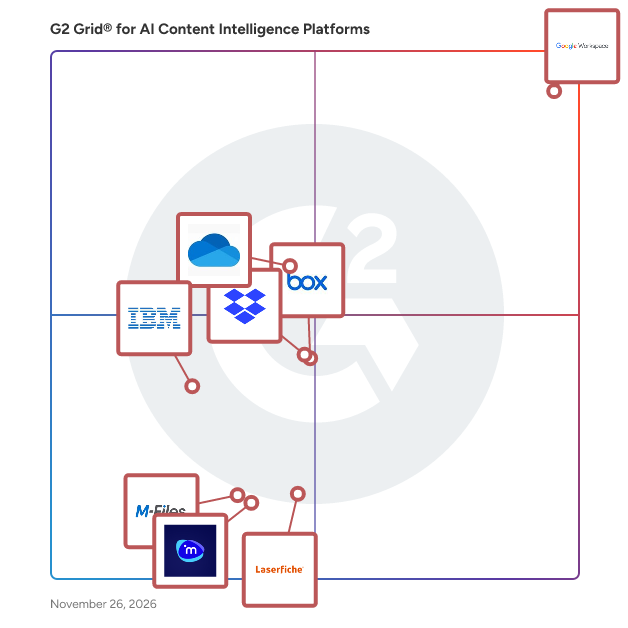
G2 Grid® for AI Content Intelligence Platforms

G2 Grid® for AI Content Intelligence Platforms plotting products by satisfaction and market presence

Highlighted products: Google Workspace, Microsoft OneDrive for Business, Box, Dropbox, IBM FileNet Content Manager, Laserfiche, M-Files, and iManage Work.

Underlying data: [Grid® JSON](https://www.g2.com/categories/ai-content-intelligence-platforms/grids.json?focus%5B%5D=google-workspace&focus%5B%5D=microsoft-onedrive-for-business&focus%5B%5D=box&focus%5B%5D=dropbox&focus%5B%5D=ibm-filenet-content-manager&focus%5B%5D=laserfiche&focus%5B%5D=m-files&focus%5B%5D=imanage-work)

Google Workspace

Google Workspace is a comprehensive productivity and collaboration solution designed to help users streamline their work processes by integrating essential tools such as email, chat, file storage, and video conferencing into a unified platform. This suite of applications is tailored for businesses, educational institutions, and individuals looking to enhance their communication and collaboration efforts, all while leveraging the power of Google’s artificial intelligence. Targeted at a diverse audience, Google Workspace caters to teams of all sizes, from small startups to large enterprises. It is particularly beneficial for remote teams and organizations that prioritize collaboration across different locations. The platform supports various use cases, including project management, team communication, document sharing, and virtual meetings, making it an ideal choice for professionals who need to work together efficiently, regardless of their physical location. One of the key features of Google Workspace is its seamless integration of applications such as Gmail, Google Meet, Google Drive, and Google Docs. This interconnectedness allows users to switch effortlessly between tasks, whether they are sending emails, participating in video calls, or collaborating on documents in real-time. The AI capabilities embedded within the platform enhance user experience by providing smart suggestions, automating repetitive tasks, and improving search functionalities, ultimately saving time and increasing productivity. Additionally, Google Workspace prioritizes security and data protection, offering robust features such as two-factor authentication, advanced phishing protection, and customizable access controls. These measures ensure that sensitive information remains secure while allowing teams to collaborate freely. The platform also supports third-party integrations, enabling users to connect their favorite applications and tools, further enhancing their workflow. In summary, Google Workspace stands out in the productivity software category by providing a holistic approach to collaboration. Its user-friendly interface, combined with powerful AI-driven features and strong security protocols, makes it a valuable tool for anyone looking to improve their work processes and foster effective teamwork. Whether for managing projects, communicating with colleagues, or sharing files, Google Workspace is designed to meet the diverse needs of its users, making it an essential resource in today’s digital workplace.

Average Rating: 4.6/5.0

Total Reviews: 45,782

Who Is the Company Behind Google Workspace?

  • Seller: Google
  • Year Founded: 1998
  • HQ Location: Mountain View, CA
  • LinkedIn® Page: www.linkedin.com
    301,144 employees on LinkedIn®
  • Ownership: NASDAQ:GOOG
  • Phone: +1 (650) 253-0000

Who Uses This Product?

  • Who Uses This: Student, Teacher
  • Top Industries: Information Technology and Services, Education Management
  • Company Size: 47% Small, 35% Medium

What Do G2 Reviewers Say About Google Workspace?

AI-generated summary from verified user reviews

Pros
  • Users like its intuitive, familiar interface and simple navigation, making everyday tasks easy to handle.
  • Users like smooth integration across Workspace apps and outside tools, helping keep workflows connected and efficient.
  • Users value real-time co-editing, which lets teams work together on shared documents and review changes as they happen.
  • Users value having work tools together in one place, making it easier to access resources and manage everyday tasks.
  • Users find everyday work simpler and more efficient, helping them save time and get tasks done faster.
Cons
  • Users find offline functionality limited and sometimes unreliable, with editing and access constrained without an internet connection.
  • Users find subscription costs high, and expenses can rise as teams grow or plans are upgraded.
  • Users find the apps lack depth and power for advanced work compared with desktop and specialized tools.
  • Users find the interface cluttered and unintuitive, making navigation and settings difficult to manage.
  • Users find sharing and managing file permissions confusing, especially across large teams, shared drives, and external collaborators.

What Are Recent G2 Reviews of Google Workspace?

What Are G2 Users Discussing About Google Workspace?

Microsoft OneDrive for Business

Microsoft OneDrive for Business lets you securely store, access, share, and collaborate on all your files from anywhere. -Access your files anywhere across all your devices -Store and organize your work documents in a secure location in the cloud.​ -Share documents with others and work together in real time. -Get 1 TB of storage per user and upload files up to 250GB in size. ​ -Synchronize documents stored in the cloud to your computer or mobile device so that you can access your documents offline. Back up and protect your files so you can easily recover from accidental deletes or malicious attacks.

Average Rating: 4.3/5.0

Total Reviews: 10,006

Who Is the Company Behind Microsoft OneDrive for Business?

  • Seller: Microsoft
  • Year Founded: 1975
  • HQ Location: Redmond, Washington
  • LinkedIn® Page: www.linkedin.com
    232,750 employees on LinkedIn®
  • Ownership: MSFT
  • Phone: +1 (877) 276-2464

Who Uses This Product?

  • Who Uses This: Project Manager, Owner
  • Top Industries: Information Technology and Services, Education Management
  • Company Size: 38% Large, 34% Medium

What Do G2 Reviewers Say About Microsoft OneDrive for Business?

AI-generated summary from verified user reviews

Pros
  • Users appreciate the ease of use of OneDrive for Business, facilitating efficient file management and seamless collaboration.
  • Users appreciate the easy access of Microsoft OneDrive for Business, enabling seamless work from any device, anytime.
  • Users value the seamless integration of Microsoft OneDrive for Business with Microsoft 365 apps for effortless collaboration.
  • Users love the ease of access and collaboration with Microsoft OneDrive for Business, enhancing teamwork and efficiency.
  • Users value the seamless team collaboration that Microsoft OneDrive for Business provides for editing and sharing files.
Cons
  • Users occasionally face syncing issues that may lead to duplication or conflicts, though fixes are often quick.
  • Users often face permission issues, complicating file sharing and leading to frustrations with syncing and access management.
  • Users often experience slow uploads, leading to frustration and delays in their workflow with OneDrive for Business.
  • Users experience slow loading with OneDrive for Business, leading to frustrating delays in file synchronization and access.
  • Users face sync issues and delays with Microsoft OneDrive for Business, especially with large files and shared folders.

What Are Recent G2 Reviews of Microsoft OneDrive for Business?

What Are G2 Users Discussing About Microsoft OneDrive for Business?

Box

Box: The leader in Intelligent Content Management — Store, secure, and automate content on an AI-powered platform Box helps businesses of every size get more value from their documents and files with stringent security controls, intelligent workflow automation, and AI agents that extract critical insight. ✓ Box AI — Summarize documents, extract insights, ask questions in natural language, and deploy and create intelligent AI agents that automate repetitive work ✓ Intelligent workflow automation — Streamline reviews, contract approvals, and onboarding with AI-powered workflows ✓ Security and compliance — Protect sensitive information with granular access controls, intelligent threat detection, and AI governance that meet HIPAA, FINRA, FedRAMP, and GDPR standards ✓ Integrations and extensibility — Connect Box with 1,500+ popular apps or extend functionality with APIs and SDKs ✓ Industry solutions — Trusted by leading finance, technology, government, and life sciences organizations for secure collaboration and AI-enhanced productivity

Average Rating: 4.2/5.0

Total Reviews: 5,118

Who Is the Company Behind Box?

  • Seller: Box
  • Company Website:
  • Year Founded: 1998
  • HQ Location: Redwood City, CA
  • LinkedIn® Page: www.linkedin.com
    4,413 employees on LinkedIn®
  • Ownership: NYSE:BOX

Who Uses This Product?

  • Who Uses This: Project Manager, Consultant
  • Top Industries: Higher Education, Information Technology and Services
  • Company Size: 41% Large, 32% Medium

What Do G2 Reviewers Say About Box?

AI-generated summary from verified user reviews

Pros
  • Users appreciate the ease of use of Box, facilitating secure sharing and collaboration across different platforms effortlessly.
  • Users value the strong enterprise-grade security of Box, ensuring safe sharing of sensitive information with total control.
  • Users value the seamless sharing capabilities of Box, making collaboration across platforms easy and secure.
  • Users value the easy sharing capabilities of Box, appreciating its seamless integration across multiple platforms.
  • Users appreciate the seamless integration of Box, which enables efficient collaboration across multiple platforms effortlessly.
Cons
  • Users face slow performance with Box, experiencing frustratingly long upload times and sync delays for large files.
  • Users find Box to be expensive, especially for small teams and freelancers needing advanced features and storage.
  • Users are frustrated by storage limitations and slow upload speeds, impacting their overall experience and productivity.
  • Users face performance issues with slow upload/download speeds and sync delays, impacting productivity and experience.
  • Users report significant connectivity issues with Box, including slow upload speeds and unreliable offline functionality.

What Are Recent G2 Reviews of Box?

What Are G2 Users Discussing About Box?

AI can help you find the answers. G2 helps you trust them.

Connect G2 to Claude or ChatGPT for answers grounded in G2's trusted reviews, comparisons, and pricing from real user insights.

How it works

Dropbox

Keep creative projects moving from first draft to final sign-off. Dropbox brings your team’s files, feedback, and approvals together in one secure cloud storage platform. Back up your work, send large files in seconds, and keep everyone in sync—so nothing slows you down. Find it fast, from anywhere Dropbox makes it easy to find and share files across desktop, mobile, and web—whether your team is in the office, remote, or on the go. Organize your work, align your team Every version stays current and simple to manage. Synced team folders keep content up to date, and previews for 175+ file types keep your team in the loop. Share anything, instantly Send large assets—up to 2 TB uploads and 1 TB video previews—with just a link. Security you can trust Protect your files with industry-leading encryption, granular permissions, compliance-ready controls, and built-in recovery features. Dropbox integrates with Google Workspace, Microsoft 365, Adobe Creative Cloud, Slack, Salesforce, Canva, Autodesk, Zoom, Claud, and more. Trusted by more than 700 million users and 575,000 teams worldwide.

Average Rating: 4.4/5.0

Total Reviews: 30,943

Who Is the Company Behind Dropbox?

  • Seller: Dropbox
  • Company Website:
  • Year Founded: 2007
  • HQ Location: San Francisco, California
  • LinkedIn® Page: www.linkedin.com
    4,183 employees on LinkedIn®
  • Ownership: NASDAQ: DBX

Who Uses This Product?

  • Who Uses This: Owner, Project Manager
  • Top Industries: Information Technology and Services, Marketing and Advertising
  • Company Size: 63% Small, 23% Medium

What Do G2 Reviewers Say About Dropbox?

AI-generated summary from verified user reviews

Pros
  • Users love the ease of use of Dropbox, allowing effortless file access, sharing, and collaboration.
  • Users appreciate the easy file sharing capabilities of Dropbox, enabling seamless collaboration and accessibility across devices.
  • Users love the easy access to files anywhere, enhancing collaboration and simplifying file sharing across devices.
  • Users find Dropbox's cloud storage abilities invaluable for easily sharing and securing large files and important documents.
  • Users appreciate the easy sharing capabilities of Dropbox, enabling seamless collaboration and efficient document management.
Cons
  • Users find Dropbox's storage plans expensive relative to available features, impacting overall value and usability.
  • Users often express concern over limited storage, especially on the free tier, leading to unintentional syncing issues.
  • Users find the storage limitations of Dropbox frustrating, as plans require purchasing more for additional space.
  • Users find the expensive cost of Dropbox challenging as storage needs increase, affecting overall satisfaction.
  • Users report syncing issues with Dropbox, experiencing slowness and frustrating glitches during file transfers.

What Are Recent G2 Reviews of Dropbox?

What Are G2 Users Discussing About Dropbox?

IBM FileNet Content Manager

IBM® FileNet® Content Manager, recognized by Gartner as a "Leader" in the Magic Quadrant for Content Services Platforms for 2018, is an industry leading Enterprise Content Management (ECM) solution. FileNet Content Manager provides organizations with flexible container based deployment options, enhanced security capabilities such as role based redaction, together with automation and collaboration capabilities required to improve the customer experience and employee productivity. IBM FileNet Content Manager provides clients with simple, affordable, enterprise-scale content collaboration, document management and processing capabilities to meet today's mobile, social, cloud and digital transformation demands. Enterprises have the flexibility to deploy IBM's FileNet Content Manager solution on-premises, in the cloud, or in a hybrid configuration enabling organizations to locate content where it best suits their needs. With secure unified access to a variety of content sources, including audio and video, from anywhere, on any device, clients benefit from increased user productivity and efficiency. An intuitive user experience enables you to quickly find, add, edit, tag, annotate and collaborate on content from desktop, web and mobile devices. With External Share you can securely share, track and collaborate on content across and beyond your enterprise - with customers, suppliers and partners. IBM FileNet Content Manager seamlessly integrates content with line of business applications to drive decision making and help unlock business insights required to respond to changing customer demands, market shifts and competitive threats, and to drive increased sales, revenue and market share. Content management services and solutions from IBM support your digital transformation and help you build an automated enterprise that is agile, efficient and competitive.

Average Rating: 4.0/5.0

Total Reviews: 110

Who Is the Company Behind IBM FileNet Content Manager?

  • Seller: IBM
  • Year Founded: 1911
  • HQ Location: Armonk, New York, United States
  • LinkedIn® Page: www.linkedin.com
    344,328 employees on LinkedIn®
  • Ownership: SWX:IBM
  • Phone: 1-866-277-7488

Who Uses This Product?

  • Top Industries: Information Technology and Services, Insurance
  • Company Size: 68% Large, 24% Medium

What Are Recent G2 Reviews of IBM FileNet Content Manager?

What Are G2 Users Discussing About IBM FileNet Content Manager?

Laserfiche

Get work done faster with Laserfiche, the leading SaaS provider of AI-powered document management and process automation. Through powerful workflows, electronic forms, document management and analytics, Laserfiche accelerates processes across the enterprise. ✓ Organize Your Content with AI-Powered Document Management Optimize your operations and increase team productivity with AI-powered document management. Centralize your content, improve collaboration and maintain audit trails to support compliance needs. ✓ Boost Your Productivity with Intelligent Automation Increase efficiency by automating tasks with low-code process automation and prebuilt solution templates. Work smarter and shift your team’s focus to higher priority strategic goals. ✓ Unify Your Systems with Powerful Integrations Laserfiche is the backbone connecting hundreds of mission-critical applications. Users can access relevant documents from a single location, eliminating the need to search across multiple platforms. ✓ Elevate Your Work with Laserfiche AI Laserfiche AI enables organizations to simplify their work, take control of processes and supercharge productivity — all without losing sight of critical data privacy and security standards.

Average Rating: 4.7/5.0

Total Reviews: 1,209

Who Is the Company Behind Laserfiche?

  • Seller: Laserfiche
  • Company Website:
  • Year Founded: 1976
  • HQ Location: Long Beach, California
  • LinkedIn® Page: www.linkedin.com
    400 employees on LinkedIn®

Who Uses This Product?

  • Who Uses This: Deputy City Clerk, Business Systems Analyst
  • Top Industries: Government Administration, Education Management
  • Company Size: 60% Medium, 25% Large

What Do G2 Reviewers Say About Laserfiche?

AI-generated summary from verified user reviews

Pros
  • Users find Laserfiche's ease of use empowering, enabling self-service implementation and efficient process management.
  • Users value the easy process automation with Laserfiche, enhancing efficiency and reducing errors across departments.
  • Users appreciate the automation of form processes with Laserfiche, enhancing efficiency and document management.
  • Users value the robust and flexible workflow automation in Laserfiche, enhancing efficiency and integration with other systems.
  • Users commend the easy training and onboarding capabilities of Laserfiche, enhancing team efficiency and document management.
Cons
  • Users experience a challenging learning curve with Laserfiche, making initial navigation and feature usage difficult.
  • Users experience a small learning difficulty with Laserfiche, particularly when adapting to metadata fields and workflows.
  • Users find the missing features in Laserfiche hinder their experience and highlight the need for better resources.
  • Users express concern over update issues, highlighting difficulty in keeping up with the rapid growth of Laserfiche.
  • Users report performance issues with Laserfiche, including slow form builds and delayed feature implementations.

What Are Recent G2 Reviews of Laserfiche?

What Are G2 Users Discussing About Laserfiche?

iManage Work

iManage Work is the industry’s leading document and email management application, empowering professionals to manage information more productively, securely, and seamlessly. We built iManage Work with a comprehensive focus on the user experience, bringing you and your knowledge workers agility, efficiency, and access across devices. Key Benefits - Work productively: Manage documents and emails more efficiently and intuitively - Work from anywhere: Mobile-first design lets users work remotely on any device - Work securely: Industry-leading security and governance ensures that iManage Work is the safest place to store information - Work seamlessly: Integrations with Office 365 enable users to do more from inside the familiar Office and Outlook interfaces - Find anything: Smart search cuts through clutter to deliver personalized results For professionals and organizations who need security, agility, and ease-of-use, iManage Work 10 provides a single-source-of-truth for documents and emails to simplify and streamline work. Used globally by leading corporations, law firms, and professional services firms — over 1 million professionals worldwide rely on iManage Work every day.

Average Rating: 4.4/5.0

Total Reviews: 357

Who Is the Company Behind iManage Work?

  • Seller: iManage
  • Company Website:
  • Year Founded: 2015
  • HQ Location: Chicago, Illinois
  • LinkedIn® Page: www.linkedin.com
    1,310 employees on LinkedIn®

Who Uses This Product?

  • Who Uses This: Associate, IT Director
  • Top Industries: Legal Services, Law Practice
  • Company Size: 50% Medium, 32% Large

What Do G2 Reviewers Say About iManage Work?

AI-generated summary from verified user reviews

Pros
  • Users appreciate the ease of use of iManage Work, benefiting from its intuitive interface and seamless integration.
  • Users appreciate the easy-to-use interface and seamless integration of iManage Work, enhancing their document management experience.
  • Users value the advanced search functionality of iManage Work, enhancing their efficiency and document management capabilities.
  • Users value the easy access to documents and emails in iManage Work, enhancing their organization and productivity.
  • Users appreciate the seamless integration of iManage Work with Microsoft tools, enhancing collaboration and efficiency in document management.
Cons
  • Users find that iManage Work has inconsistent responsiveness issues and requires manual adjustments, impacting user experience.
  • Users note performance lag during large matters and suggest improvements for integrations and UI to enhance usability.
  • Users face inconsistent responsiveness and maintenance downtime with iManage Work, impacting document access and functionality.
  • Users note that iManage Work has inconsistent responsiveness and issues with downtime and integration complexity, affecting usability.
  • Users experience performance issues with iManage Work, including slow file synchronization and inconsistent responsiveness after updates.

What Are Recent G2 Reviews of iManage Work?

What Are G2 Users Discussing About iManage Work?

M-Files

M-Files is a metadata-driven document management platform used by more than 6,000 organizations in over 100 countries. It connects documents with the people, projects, clients, contracts, and processes around them, helping teams find and trust information, automate document-driven work, and strengthen governance and compliance. M-Files runs natively inside Microsoft 365, helping organizations work through familiar Microsoft experiences, get more from their Microsoft investments, and prepare trusted business information for AI. Schedule a Demo: https://bit.ly/3O1SCm0

Average Rating: 4.4/5.0

Total Reviews: 229

Who Is the Company Behind M-Files?

Who Uses This Product?

  • Who Uses This: Project Manager, Director
  • Top Industries: Information Technology and Services, Computer Software
  • Company Size: 48% Medium, 41% Small

What Do G2 Reviewers Say About M-Files?

AI-generated summary from verified user reviews

Pros
  • Users find M-Files to have a user-friendly interface, making it simple to learn and reducing manual file management.
  • Users love the user-friendly interface of M-Files, making document management simple and efficient for all needs.
  • Users enjoy the easy access from anywhere, simplifying document sharing and retrieval on the go.
  • Users highlight the easy access and intuitive organization in M-Files, enhancing their document management experience significantly.
  • Users value the organization through metadata, making document retrieval and management efficient and hassle-free.
Cons
  • Users find the learning curve steep, requiring thorough documentation and guidance for effective use of M-Files.
  • Users find the training required for M-Files challenging, particularly for new users and technical configurations.
  • Users experience slow performance with M-Files, particularly during searches and while navigating the interface.
  • Users find the slow loading times can hinder their experience, especially with large files and updates.
  • Users find M-Files' outdated interface and slow syncing challenging, especially for new users adapting to the system.

What Are Recent G2 Reviews of M-Files?

What Are G2 Users Discussing About M-Files?

Egnyte

Egnyte combines the power of cloud content management, data security, and AI into one intelligent content platform. More than 22,000 customers trust Egnyte to improve employee productivity, automate business processes, and safeguard critical data, in addition to offering specialized content intelligence and automation solutions across industries, including architecture, engineering, and construction (AEC), life sciences, and financial services.

Average Rating: 4.4/5.0

Total Reviews: 1,165

Who Is the Company Behind Egnyte?

  • Seller: Egnyte
  • Company Website:
  • Year Founded: 2008
  • HQ Location: Mountain View, CA
  • LinkedIn® Page: www.linkedin.com
    1,313 employees on LinkedIn®
  • Phone: 650-968-4018

Who Uses This Product?

  • Who Uses This: Project Manager, Owner
  • Top Industries: Construction, Marketing and Advertising
  • Company Size: 45% Small, 38% Medium

What Do G2 Reviewers Say About Egnyte?

AI-generated summary from verified user reviews

Pros
  • Users value the user-friendly interface of Egnyte that enables easy access and efficient file management.
  • Users appreciate the easy access to project files on Egnyte, enhancing collaboration and file management in various environments.
  • Users value Egnyte for its easy sharing, enabling quick collaboration and efficient file organization across teams.
  • Users value Egnyte for its robust security, enabling secure file sharing and management with ease and confidence.
  • Users value the easy access to files without VPN, enhancing convenience and user-friendliness for all team members.
Cons
  • Users find Egnyte expensive, particularly when adding team members and navigating the complex pricing structure.
  • Users face file management challenges including migration issues, errors, and slow performance, impacting overall usability.
  • Users note the limited features of Egnyte, finding the plans restrictive for growing businesses needing more storage.
  • Users find user difficulty in navigating Egnyte, often leading to confusion and slower productivity overall.
  • Users feel Egnyte is lacking features such as an intuitive mobile app and clearer tool functionalities.

What Are Recent G2 Reviews of Egnyte?

What Are G2 Users Discussing About Egnyte?

NetDocuments

NetDocuments is a cloud-native document management system built for legal professionals who need secure, intelligent, and connected ways to manage their work. Trusted by law firms, corporate legal departments, and public-sector organizations, NetDocuments goes beyond document storage to serve as the central platform where legal work happens. It brings together content, workflows, collaboration, and AI in a single governed environment—helping teams work more efficiently while maintaining strict security, compliance, and auditability. With built-in AI capabilities like intelligent search, automated profiling, and workflow automation, NetDocuments helps legal teams surface insight faster, reduce administrative effort, and apply their expertise where it matters most. Deep integrations with Microsoft 365 and other legal technologies ensure professionals can work seamlessly in the tools they already use — without sacrificing control or governance. NetDocuments is designed to scale with organizations of any size, providing a secure foundation for intelligent legal work today and in the future.

Average Rating: 3.9/5.0

Total Reviews: 37

Who Is the Company Behind NetDocuments?

  • Seller: NetDocuments
  • Company Website:
  • Year Founded: 1998
  • HQ Location: Lehi, UT
  • LinkedIn® Page: www.linkedin.com
    578 employees on LinkedIn®

Who Uses This Product?

  • Who Uses This: Paralegal
  • Top Industries: Law Practice, Legal Services
  • Company Size: 45% Small, 45% Medium

What Do G2 Reviewers Say About NetDocuments?

AI-generated summary from verified user reviews

Pros
  • Users appreciate the effective search and document management features of NetDocuments, enhancing their workflow efficiency.
  • Users find ease of creation with NetDocuments, appreciating simple processes like downloading and saving documents.
  • Users highlight the ease of use of NetDocuments, particularly praising the efficient search and download functions.
  • Users value the easy upload feature of NetDocuments, facilitating seamless document management and sharing.
  • Users find the intuitive interface of NetDocuments enhances their overall document management experience seamlessly.
Cons
  • Users experience billing issues with NetDocuments, facing unexpected costs and lack of support leading to frustration.
  • Users express concern over the cost increase associated with additional folder setup and limited storage in NetDocuments.
  • Users express frustration with the complicated document management process, leading to inefficiencies and insufficient support.
  • Users find the email integration complicated with insufficient automation and limited support, making setup frustrating.
  • Users find NetDocuments to be expensive with limited storage and poor support, complicating their overall experience.

What Are Recent G2 Reviews of NetDocuments?

What Are G2 Users Discussing About NetDocuments?

Hyland Content Innovation Cloud

Hyland Content Innovation Cloud™ is an AI-native platform for the content-powered agentic enterprise. It helps organizations move beyond isolated AI experiments by connecting enterprise content across existing systems, enriching it with trusted business and industry context, and activating intelligence directly within operational workflows. Built on an open, federated and modular architecture, Content Innovation Cloud enables organizations to modernize without disruptive migrations or replacing the systems they already rely on. It preserves existing governance, security and access controls while making content available for intelligent work across applications, repositories and cloud environments. By connecting content, context and processes, Content Innovation Cloud turns enterprise content into a foundation for trusted AI, helping organizations automate mission-critical work, accelerate decisions and transform content from an untapped resource into a strategic advantage.

Average Rating: 4.5/5.0

Total Reviews: 2

Who Is the Company Behind Hyland Content Innovation Cloud?

  • Seller: Hyland
  • Company Website:
  • Year Founded: 1991
  • HQ Location: Westlake, OH
  • LinkedIn® Page: www.linkedin.com
    4,396 employees on LinkedIn®

Who Uses This Product?

  • Company Size: 50% Medium, 50% Small

What Are Recent G2 Reviews of Hyland Content Innovation Cloud?

OpenText Core Content Management

The foundation for the OpenText™ Core family of SaaS applications, OpenText™ Core Content is a complete, SaaS content services platform built to power modern work. Core Content combines content management expertise with integration into the applications that underpin business processes, including SAP S/4HANA Public Cloud, Salesforce, Microsoft 365, and OpenText™ Core Case Management. With Core Content, organizations can maximize employee productivity, accelerate processes and enhance governance through an intuitive business workspace model that ensures the right content is surfaced to the right people when they need it.

Average Rating: 4.3/5.0

Total Reviews: 2

Who Is the Company Behind OpenText Core Content Management?

  • Seller: OpenText
  • Year Founded: 1991
  • HQ Location: Waterloo, ON
  • LinkedIn® Page: www.linkedin.com
    22,835 employees on LinkedIn®
  • Ownership: NASDAQ:OTEX
  • Phone: +1-519-888-7111

Who Uses This Product?

  • Company Size: 50% Large, 50% Medium

What Do G2 Reviewers Say About OpenText Core Content Management?

AI-generated summary from verified user reviews

Pros
  • Users value the seamless integration with enterprise systems for efficient document management across workflows.
  • Users appreciate the seamless integration with enterprise systems, streamlining document management across workflows efficiently.
  • Users value the easy integrations with major enterprise systems, simplifying document management across workflows seamlessly.
  • Users value the editing ease of OpenText Core, seamlessly managing documents across various enterprise systems.
  • Users appreciate the seamless integration with major enterprise systems, enhancing workflow management without switching tools.
Cons
  • Users find the difficult configuration process cumbersome, leading to a slow onboarding experience with OpenText Core.
  • Users find the interface complex and unintuitive, making onboarding slow and challenging for newcomers.
  • Users find the learning curve steep, as initial setup and onboarding are complex and require technical skills.
  • Users find the limited customization options challenging, leading to complexities in setup and onboarding processes.
  • Users find the complex technical knowledge required for setup and customization a barrier to effective use.

What Are Recent G2 Reviews of OpenText Core Content Management?

Reviews of AI Content Intelligence Platforms products
Neeraja Prakash
NP
Researched and written by Neeraja Prakash

Learn More About AI Content Intelligence Platforms

AI Content Intelligence Platforms buying insights at a glance

AI content intelligence platforms help teams find information in business documents, extract details, and use them in a workflow. A records team might use AI content intelligence tools to classify incoming files and automatically extract the metadata needed for routing them. A legal team might instead need to find the right matter document without exposing it to colleagues who lack access.

Where enterprise content management software provides a place to organize and govern files, AI content intelligence adds ways to interpret what those files contain. That can mean generating a summary, assigning metadata, or identifying a field for an approval workflow. A fast answer is less useful if it comes from an old version or leaves the user unable to find the source.

The best AI content intelligence platforms for a team depend on which document task needs to improve. Search should return the right version; extraction should put the right value in the right field; and a workflow should send the document to the right person. Buyers should check whether access rules hold when a platform retrieves a file or uses its contents to answer a question.

Common use cases and how businesses benefit:

  • Summarize workplace content: Gather relevant information from documents and email threads without opening each one separately.
  • Extract document metadata: Populate fields from files so records staff do not need to tag every document manually.
  • Find records across collections: Use search and document profiles to locate a file without knowing where it was originally stored.
  • Manage access by matter or team: Keep sensitive material available to the people responsible for it while limiting access for others.
  • Move documents through a workflow: Pass a file or the information extracted from it to the next person responsible for review or approval.

A price comparison should separate basic file access from the accounts or usage needed for search, extraction, and automation. Check which features apply to the planned document volume and which users need advanced capabilities, rather than pricing everyone as if they use the platform the same way.

Top 5 FAQs from software buyers

AI content intelligence platforms help teams find, interpret, and act on documents. Buyers often ask what the platform can extract and which controls stay in place as information moves through a workflow.

  • What features should teams prioritize when choosing AI content intelligence platforms?
  • How do AI content intelligence platforms differ from enterprise content management software?
  • How do AI content intelligence tools classify files and extract metadata?
  • How can teams verify that an AI content intelligence answer cites the right document version?
  • What should buyers check about access, retention, and workflow approvals in AI content intelligence platforms?

G2’s AI Content Intelligence Platforms category features Google Workspace, Microsoft OneDrive for Business, Box, Dropbox, and IBM FileNet Content Manager.

What are the top-reviewed AI Content Intelligence Platforms on G2?

The G2 category listing includes workplace suites alongside dedicated document management platforms. Overall ratings capture the product experience, not the performance of a particular AI feature.

Google Workspace

  • Number of Reviews: 48,335
  • G2 Rating: 4.6/5

Microsoft OneDrive for Business

  • Number of Reviews: 10,455
  • G2 Rating: 4.3/5

Box

  • Number of Reviews: 5,379
  • G2 Rating: 4.2/5

Dropbox

  • Number of Reviews: 31,492
  • G2 Rating: 4.4/5

IBM FileNet Content Manager

  • Number of Reviews: 139
  • G2 Rating: 4.0/5

Learn more about how G2 calculates these scores. (Source 1)

What I Often See in AI Content Intelligence Platforms

Feedback Pros: What Users Consistently Appreciate

  • Automated metadata reduces tagging work across document collections

"I like that Laserfiche is easy to use and the learning process is good. I appreciate the features that automate metadata, and I'm also pleased with the ability to use AI features."

- Laserfiche review, Jenna S.

  • Granular permissions support external sharing of sensitive files

"I like Box best for the security and control. The granular permission settings and audit logs give me peace of mind when sharing sensitive files externally. SSO and device management are also solid."

- Box review, Shagun S.

  • Version histories help teams protect changes to shared files

"I like the capability to version and lock documents in iManage Work. If someone has a document checked out for editing, it is locked in read-only so others aren't able to overwrite it. We also integrate it with Office, which is quite useful."

- iManage Work review, Kasey K.

Cons: Where Many Platforms Fall Short

  • Inconsistent metadata can make the right document harder to find

"The user interface can feel less intuitive than newer cloud-native applications, especially for occasional users. Search is generally strong, but finding the right document can still require careful profiling and metadata management."

- iManage Work review, Oliver D.

  • Large sets of files and folders can slow syncing

"While our experience has been positive overall, sync performance can occasionally slow down when we’re dealing with extremely large engineering files or more complex folder structures. Some employees also need time to adjust to cloud-first workflows, especially those who are used to traditional network drives. These issues weren’t deal-breakers, but they did require some internal communication and training to make the transition smoother."

- Microsoft OneDrive for Business review, Viral S.

  • Configurable document workflows take time for new users to learn

"one thing I did not like in the beginning was that M-Files has many metadata, workflow and document management options together, so for a new user the system can feel a little confusing at first. Some features are very useful once understood properly, but learning everything takes some time specially when managing many document categories and workflows together. I also noticed that proper metadata setup and document organization is important, otherwise tracking files can become slightly difficult when many versions and documents are stored together."

- M-Files review, Ishan S.

My Expert Takeaway on AI Content Intelligence Platforms

I would judge the platform by whether a person can trace the answer back to the right file. A polished summary does not help if it uses a superseded draft. An extracted value is hard to trust if a records administrator cannot see where it came from.

The review analysis put the average star rating at 4.53/5, ease of use at 6.50/7, and likelihood to recommend at 9.06/10. Those scores describe the overall experience. They do not show whether a particular workflow retrieves the right version, respects a permission boundary, or handles an exception without manual work. Permissions and version control meet at the point of retrieval. I would check what happens when a current and an older version are both present, and when two people ask the same question with different access. That is a closer test of day-to-day use than a search against a clean folder with one obvious answer.

For the trial, I would choose one document the team already knows well and follow it from search or extraction through the next review step. Check that staff can identify the source, correct a field if needed, and see who was allowed to open the file. An automation claim matters less than knowing what still needs a person to verify it.

AI Content Intelligence Platforms FAQs

Which are the leading AI content intelligence platforms for different document workflows?

Google Workspace fits teams that need to summarize work documents or email. Laserfiche is an option for metadata extraction, and iManage Work is suited to organizing sensitive matter records.

  • Google Workspace: Reviewers use Gemini to summarize email threads and documents already linked to their work accounts.
  • Laserfiche: Reviewers describe reducing manual tagging through automated metadata. One uses Smart Fields to extract metadata across a large document collection.
  • iManage Work: Reviewers describe organizing documents around matters and maintaining separate access for sensitive work, including a legal services example using ethical walls.

Which AI content intelligence platforms are relevant to legal and financial services teams?

iManage Work fits legal teams that need to restrict access across matters. For financial services, Box has evidence for organizing deal files, while OpenText Core Content Management has review evidence for retention and audit trails in banking.

  • iManage Work: Legal reviewers describe keeping matter records in a controlled repository. One specifically reports preserving ethical walls across teams at the same firm.
  • Box: Reviewers in financial operations describe centralizing material and controlling access. A private-equity reviewer stores deal and portfolio documents but finds external data-room sharing cumbersome.
  • OpenText Core Content Management: Banking feedback describes retaining loan documents and tracking access. It also flags the need to split larger audit-log exports into shorter date ranges.

How can buyers tell whether a platform’s AI features are ready for their document workflow?

Check how the AI handles documents with known answers before relying on it. For metadata extraction in Laserfiche, compare the extracted fields with the source files and include one with a missing or ambiguous value.

  • Laserfiche: Reviewers report using it to automate metadata entry. Comparing the extracted fields against the original document is a practical way to verify results.

Which AI content intelligence platforms have granular permissions and useful audit logs?

Box and iManage Work have review evidence of document access controls and activity tracking. Check whether the logs capture the events the team needs, including denied retrieval attempts and exports.

  • Box: Reviewers describe configuring detailed folder permissions and consulting activity logs when sharing sensitive files.
  • iManage Work: Reviewers describe using document audit trails, including tracking who opened or edited a file.

Which platforms are worth testing for AI agents that automate document workflows?

Box has review evidence for agents that extract and structure document information. That does not establish that approvals and signing run automatically.

  • Box: Reviewers describe using agents to extract and structure information and combining agents with document workflows. Test the approval and signing steps rather than assuming they run automatically.

Sources

  1. G2 Research Scoring Methodologies

Researched By: Neeraja Prakash

Last updated on: November 25, 2026