# Best Restaurant POS Systems

  *By [Neya Kumaresan](https://research.g2.com/insights/author/neya-kumaresan)*

   Restaurant point of sale (POS) software provides restaurant and bar servers an easy way to take orders and process payment for multiple checks simultaneously.

With POS software, restaurant managers and owners can meet many of their practical business needs, from managing daily service all the way up to high-level analytics. Orders can be entered either at touchscreen stations or tableside with mobile devices, and servers can easily keep track of their tables, edit orders, easily split checks, and apply discounts. Some products allow communication between servers and the kitchen, allowing them to be aware of inventory shortages and delays. By empowering servers with software that can provide myriad services, they can be more efficient and accommodating for customers.

Many products are meant to be used on mounted tablets or other handheld devices, and can include ticket printers or cash drawers. Managers can also keep track of profits, inventory, menu trends, and other analytics. Certain products will also integrate food-delivery services, so you can either set up your own online ordering platform or work with another provider. POS software is often implemented along with other restaurant management systems like staffing management, inventory management, and finance platforms. Many products can integrate with these systems directly to create a streamlined experience.

To qualify in the restaurant POS category, a product must:

- Take orders from a menu and submit those orders to the kitchen for multiple guests or tables
- Process payments using various methods such as cash, credit or debit card, etc. as well as split checks and add discounts
- Offer secure data access and functionality to protect sensitive data such as customer information and credit card numbers
- Include reporting and analytics to monitor sales indicators for each location, as well as order cancellations


## Category Overview

**Total Products under this Category:** 475


## Trust & Credibility Stats

**Why You Can Trust G2's Software Rankings:**

- 30 Analysts and Data Experts
- 5,000+ Authentic Reviews
- 475+ Products
- Unbiased Rankings

G2's software rankings are built on verified user reviews, rigorous moderation, and a consistent research methodology maintained by a team of analysts and data experts. Each product is measured using the same transparent criteria, with no paid placement or vendor influence. While reviews reflect real user experiences, which can be subjective, they offer valuable insight into how software performs in the hands of professionals. Together, these inputs power the G2 Score, a standardized way to compare tools within every category.


## Top Restaurant POS Systems at a Glance
| # | Product | Rating | Best For | What Users Say |
|---|---------|--------|----------|----------------|
| 1 | [SpotOn](https://www.g2.com/products/spoton/reviews) | 4.4/5.0 (232 reviews) | High-speed order flow during peak service | "[Seamless POS with Advanced Features and Support](https://www.g2.com/survey_responses/spoton-review-12717571)" |
| 2 | [Toast](https://www.g2.com/products/toast/reviews) | 4.2/5.0 (349 reviews) | Full-service restaurants needing tight FOH–BOH coordination | "[Effortless Shift Management with Timely Reminders](https://www.g2.com/survey_responses/toast-review-12643735)" |
| 3 | [Petpooja](https://www.g2.com/products/petpooja/reviews) | 4.7/5.0 (281 reviews) | Unified restaurant operations with multi-channel ordering | "[Fast, Stable Restaurant POS with Easy Billing, Inventory Tracking, and Powerful Reports](https://www.g2.com/survey_responses/petpooja-review-12238902)" |
| 4 | [Restroworks Restaurant POS](https://www.g2.com/products/restroworks-restaurant-pos/reviews) | 4.8/5.0 (1,254 reviews) | Centralized control across multi-location chains | "[Nutcracker Powai](https://www.g2.com/survey_responses/restroworks-restaurant-pos-review-12403404)" |
| 5 | [Aloha Cloud](https://www.g2.com/products/aloha-cloud/reviews) | 3.9/5.0 (328 reviews) | Hybrid service models (table + counter) | "[Flexible Cloud Access with Real-Time Reporting and Reliable Backups](https://www.g2.com/survey_responses/aloha-cloud-review-12248708)" |
| 6 | [Square Point of Sale](https://www.g2.com/products/square-point-of-sale/reviews) | 4.6/5.0 (1,181 reviews) | Simple, flexible POS setups for small-format dining | "[Seamless Payment Collection with Automation](https://www.g2.com/survey_responses/square-point-of-sale-review-12672421)" |
| 7 | [Foodics](https://www.g2.com/products/foodics/reviews) | 4.6/5.0 (49 reviews) | Ingredient-level inventory and cost-focused operations | "[Support](https://www.g2.com/survey_responses/foodics-review-9352895)" |
| 8 | [Chowbus POS](https://www.g2.com/products/chowbus-pos/reviews) | 4.9/5.0 (12 reviews) | Delivery-heavy restaurants with multiple order channels | "[Chowbus loyalty system is a plus!](https://www.g2.com/survey_responses/chowbus-pos-review-10402083)" |
| 9 | [Clover](https://www.g2.com/products/clover/reviews) | 3.9/5.0 (104 reviews) | Modular POS workflows with hardware flexibility | "[Efficient for Payments, High Cost for Advanced Features](https://www.g2.com/survey_responses/clover-review-12663409)" |
| 10 | [Sapaad](https://www.g2.com/products/sapaad/reviews) | 4.6/5.0 (13 reviews) | Multi-channel restaurant POS for quick staff onboarding | "[Awesome experience on cloud platform](https://www.g2.com/survey_responses/sapaad-review-9548131)" |


## Best Restaurant POS Systems At A Glance

- **Leader:** [SpotOn](https://www.g2.com/products/spoton/reviews)
- **Highest Performer:** [Foodics](https://www.g2.com/products/foodics/reviews)
- **Easiest to Use:** [Restroworks Restaurant POS](https://www.g2.com/products/restroworks-restaurant-pos/reviews)
- **Top Trending:** [Restroworks Restaurant POS](https://www.g2.com/products/restroworks-restaurant-pos/reviews)
- **Best Free Software:** [Square Point of Sale](https://www.g2.com/products/square-point-of-sale/reviews)


## Which Type of Restaurant POS Systems Tools Are You Looking For?
  - [Restaurant POS Systems](https://www.g2.com/categories/restaurant-pos) *(current)*
  - [Restaurant Management Software](https://www.g2.com/categories/restaurant-management)
  - [Retail POS Systems](https://www.g2.com/categories/retail-pos)
  - [Cloud Kitchen Management Software](https://www.g2.com/categories/cloud-kitchen-management)


---

**Sponsored**

### Rezku POS

Rezku is a powerful restaurant POS solution designed to simplify front-of house and back-of-house operations, boosting growth and enhancing the guest experience. Easily manage online ordering, inventory, and reporting—plus get built-in tools for delivery, loyalty programs, gift cards, and more. Rezku makes restaurant operations smoother with seamless integrations and flexible tools. Whether you run a bar, café, food truck, or full-service restaurant, Rezku’s POS system delivers dependable hardware and adaptable software to match your unique needs.


[Visit website](https://www.g2.com/external_clickthroughs/record?secure%5Bad_program%5D=ppc&amp;secure%5Bad_slot%5D=category_product_list&amp;secure%5Bcategory_id%5D=1112&amp;secure%5Bdisplayable_resource_id%5D=1112&amp;secure%5Bdisplayable_resource_type%5D=Category&amp;secure%5Bmedium%5D=sponsored&amp;secure%5Bplacement_reason%5D=page_category&amp;secure%5Bplacement_resource_ids%5D%5B%5D=1112&amp;secure%5Bprioritized%5D=false&amp;secure%5Bproduct_id%5D=49847&amp;secure%5Bresource_id%5D=1112&amp;secure%5Bresource_type%5D=Category&amp;secure%5Bsource_type%5D=category_page&amp;secure%5Bsource_url%5D=https%3A%2F%2Fwww.g2.com%2Fcategories%2Frestaurant-pos&amp;secure%5Btoken%5D=e3e35bf79181b44ff5666e2e55e1b960e2404f64f315db6aca70c77feafec6ae&amp;secure%5Burl%5D=https%3A%2F%2Frezku.com%2Fconversion%2Fg2&amp;secure%5Burl_type%5D=custom_url)

---


## Buyer Guide: Key Questions for Choosing Restaurant POS Systems Software
  ### What do restaurant POS systems do?
  When I explain restaurant POS systems, I describe them as platforms that handle ordering, payments, menu management, and operational workflows in a single environment. These tools bring together front-of-house and back-of-house activities, enabling restaurants to manage service flow, track sales, and maintain consistency across every shift. They serve as the operational core of a restaurant, ensuring accurate orders, organized payments, and a well-aligned staff.


  ### Why do businesses use restaurant POS systems?
  I have seen operational complexity grow quickly as order channels expand, peak hours intensify, and menus evolve. Manual processes create delays, errors slip into orders, and reporting becomes harder to maintain. Restaurant POS systems help address these issues by unifying ordering, payments, and communication.

From the G2 reviewer patterns I evaluated, several benefits show up consistently:

- Reviewers often highlight faster order handling because workflows follow a clear path from entry to fulfillment.
- Many appreciate menu management tools that make updates easy during pricing or item changes.
- Users mention stronger communication between the POS and kitchen systems, which reduces mistakes.
- Several point to more accurate reporting that helps managers understand performance across shifts or locations.


  ### Who uses restaurant POS systems primarily?
  After assessing G2 reviewer profiles, I found that several groups utilize these platforms as part of their daily operations. Each role relies on accurate and timely information to keep the service running smoothly.

- **Servers and front-of-house staff** enter orders, process payments, and manage tickets.
- **Kitchen teams** receive and prepare orders based on POS-connected routing.
- **Managers** handle staff permissions, menu updates, and performance reporting.
- **Owners** track revenue, inventory, and multi-location operations.
- **Administrative teams** review data exports for accounting and forecasting purposes.

Together, these users rely on the POS as the system that anchors restaurant operations.


  ### What types of restaurant POS systems should I consider?
  When I assessed how G2 reviewers describe this category, POS platforms generally fall into several groups:

- **Counter-service POS systems** are designed for fast casual or quick-serve environments.
- **Full-service POS systems** are tailored to table management and server workflows.
- **Cloud-based POS systems** that offer mobility and remote access.
- **Enterprise POS systems** are equipped for multi-location or franchise operations.
- **Delivery-focused POS tools** that emphasize integrations with ordering platforms.

Your ideal option depends on the service model, order volume, and location count.


  ### What are the core features to look for in restaurant POS systems?
  Based on the G2 review trends I evaluated, strong POS systems tend to include:

- **Easy order entry** and fast ticket routing.
- **Menu management tools** for pricing, modifiers, and item availability.
- **Integrated payments** that support multiple tender types.
- **Kitchen display system (KDS)** connections for smooth handoffs.
- **Inventory tracking** and cost insights for ingredient-level control.
- **Reporting dashboards** that highlight sales, labor, and operational trends.
- **Mobile or handheld ordering** for high-volume environments.

These capabilities help restaurants maintain consistency across service periods.


  ### What trends are shaping restaurant POS systems right now?
  Based on industry updates and usage insights I reviewed, several trends are reshaping the category.

- **Mobile ordering tools** are becoming more central as service models diversify. 
- **Delivery integrations** continue to expand to reduce order-management errors. 
- **AI-supported forecasting** is emerging to help restaurants plan inventory and labor. 
- **Cloud-native platforms** are gaining traction due to easier updates and remote oversight. 
- **Loyalty and CRM features** to help restaurants maintain customer engagement.


  ### How should I choose restaurant POS systems?
  For me, the strongest POS platforms are the ones that support quick order flow, maintain menu accuracy, and give managers the insights they need to run efficient operations. When those elements align, a POS system becomes an operational backbone that keeps service reliable across every shift.


  ### What does Restaurant POS software do?
  For restaurants, I see POS software as the system that keeps service, orders, payments, and kitchen activity moving together. It captures dine-in, takeout, and delivery orders, applies modifiers, sends tickets to the right prep stations, processes payments, and gives managers a view of sales after service. From the review patterns I evaluated, these platforms matter most when speed and accuracy affect the guest experience directly. A restaurant POS replaces the loose mix of registers, handwritten tickets, separate delivery tools, and manual end-of-day tracking with one system built around restaurant service flow.


  ### Why do businesses use Restaurant POS software?
  When I reviewed G2 sentiment in this category, the recurring pressure point was daily service control. Restaurants needed faster order taking, cleaner billing, fewer order mistakes, and better visibility during busy hours.

From the patterns I evaluated, several outcomes show up consistently:

- Reviewers describe faster order entry and billing as a major reason the software helps during rush periods.
- Many appreciate menu management, modifiers, combo setup, and item-level changes because restaurant menus shift often.
- Users mention kitchen tickets, KOT handling, printers, and order status as useful for keeping front-of-house and back-of-house aligned.
- Several point to sales reports, inventory tracking, and daily summaries as the reason managers can review performance without manual tallying.

However, reviewers also mention bugs, hardware issues, integration gaps, pricing confusion, contract terms, support delays, and setup effort as areas that need close evaluation.


  ### Who uses Restaurant POS software primarily?
  After analyzing G2 reviewer profiles, I found that Restaurant POS software supports the people who manage service, sales, payments, and kitchen flow.

- **Restaurant owners:** Track sales, payments, staff activity, menu changes, and daily performance.
- **Restaurant managers:** Monitor orders, tables, shifts, discounts, reports, and issue resolution.
- **Cashiers and servers:** Enter orders, apply modifiers, split checks, take payments, and handle customer requests.
- **Kitchen teams:** Receive KOTs, manage prep flow, track order status, and reduce missed items.
- **Finance and accounting teams:** Review invoices, payment records, taxes, settlements, and end-of-day reports.
- **Operations teams:** Manage multi-location menus, user permissions, delivery channels, and reporting standards.
- **IT or admin users:** Set up hardware, integrations, printers, terminals, and access controls.


  ### What types of Restaurant POS software should I consider?
  When I examined how reviewers describe the products they use, Restaurant POS platforms generally cluster into a few groups:

- **Full-service restaurant POS:** Built for table service, split checks, modifiers, server workflows, tips, and dining-room operations.
- **Quick-service POS:** Designed for fast order entry, counters, kiosks, kitchen routing, combo meals, and high-volume transactions.
- **Cloud restaurant POS:** Best for restaurants that need remote reporting, menu updates, multi-location access, and easier software updates.
- **Delivery-focused POS:** Useful when online ordering, aggregator integrations, direct ordering, and dispatch visibility matter.
- **Restaurant management suites:** Best for teams that want POS, inventory, loyalty, staff management, reporting, and payments in one system.


  ### What are the core features to look for in Restaurant POS software?
  When I examined G2 reviewer sentiment, the capabilities buyers prioritize most for Restaurant POS software include:

- **Order and menu control:** Menu items, modifiers, combos, discounts, taxes, and price changes should be easy to update without slowing service.
- **Kitchen routing and KOT handling:** Orders need to move cleanly to kitchen displays, printers, prep stations, and status views.
- **Restaurant-ready payments:** Split checks, tips, refunds, card payments, digital wallets, and settlement tracking need to fit dine-in and takeout workflows.
- **Inventory and sales reporting:** Item movement, daily sales, stock usage, voids, discounts, and location-level reports should be easy to review.
- **Delivery and customer tools:** Online ordering, aggregator sync, loyalty, customer records, and promotions help connect the POS with repeat orders.


  ### What trends are shaping Restaurant POS software right now?
  From my analysis of G2 review data and recent market signals, several shifts are defining this category:

- **Ordering and payment speed as core expectations:** Restaurant technology is being judged by how easily guests can order, pay, and move through the service flow.
- **AI moving into guest-facing and operational tasks:** Restaurants are testing AI for menu suggestions, ordering, benchmarking, shift decisions, and performance guidance.
- **Delivery and takeout tied to POS decisions:** Restaurants need POS systems that connect direct ordering, delivery apps, menu sync, and payment records without extra manual work.
- **Menu data becoming more strategic:** Operators are using item-level sales, pricing, and ordering trends to make faster decisions about menus and margins.
- **Customer loyalty moving closer to the transaction:** POS systems are being asked to support regular guests, offers, feedback, and repeat visits within the same order record.


  ### How should I choose Restaurant POS software?
  I suggest judging Restaurant POS software by the service model first. A full-service restaurant needs table controls, modifiers, split checks, tips, and kitchen routing to work cleanly during peak hours. Quick-service teams should place more weight on fast order entry, combo handling, kiosks, and payment speed. Delivery-heavy restaurants need strong menu sync, online ordering, aggregator connections, and payout visibility. I also advise checking hardware reliability, support response, contract terms, reporting depth, and integration fit because those details tend to shape the experience long after setup.


---

## Top-Rated Products (Ranked by G2 Score)
### 1. [SpotOn](https://www.g2.com/products/spoton/reviews)
**Average Rating:** 4.4/5.0
**Total Reviews:** 232
**Why buyers love it?:** When I read through G2 reviews for SpotOn, I encountered users highlighting how stable the system feels during heavy order traffic. Reviewers mention fast billing, dependable syncing between POS terminals, and staff workflows that stay smooth even when volume spikes. Many also point to how easy it is to update menus and adjust pricing without disrupting service. SpotOn supports restaurants that rely heavily on rapid, coordinated workflows.


### Quick AI Summary Based on G2 Reviews
*Generated from real user reviews*

**Pros:**

- Users value the **excellent customer support** from SpotOn, appreciating prompt assistance and dedicated onboarding help.
- Users find SpotOn&#39;s interface to be **user-friendly and easy to learn** , enhancing their experience and support access.
- Users praise the **exceptional staff professionalism** of SpotOn, feeling fully supported and part of the family.
- Users value the **excellent support** from SpotOn, noting prompt responses and friendly assistance when issues arise.
- Users appreciate the **simple and efficient user interface** of SpotOn, enhancing their appointment management and customer engagement.

**Cons:**

- Users struggle with **poor customer support** , facing long wait times and frequent issues during critical business operations.
- Users report a **difficult setup** process for SpotOn, expressing a need for a more intuitive experience.
- Users often face **technical issues** with SpotOn, including glitches and unreliable transaction processes affecting user experience.
- Users experience **connectivity issues** with SpotOn, causing delays and confusion during transactions despite available support.
- Users report **slow performance** with SpotOn, including lag times and processing delays that hinder productivity.

#### Key Features
  - Credit Card Payments
  - Email Marketing
  - Inventory Management
  - Payment Gateway

#### Recent Reviews

**"[Best POS / support combination](https://www.g2.com/survey_responses/spoton-review-12717080)"**

**Rating:** 5.0/5.0 stars
*— Verified User in Restaurants*

[Read full review](https://www.g2.com/survey_responses/spoton-review-12717080)

---

**"[Seamless POS with Advanced Features and Support](https://www.g2.com/survey_responses/spoton-review-12717571)"**

**Rating:** 5.0/5.0 stars
*— Thiago D.*

[Read full review](https://www.g2.com/survey_responses/spoton-review-12717571)

---


#### Trending Discussions

- [What is SpotOn used for?](https://www.g2.com/discussions/what-is-spoton-used-for)
- [What is Appetize used for?](https://www.g2.com/discussions/what-is-appetize-used-for)
### 2. [Toast](https://www.g2.com/products/toast/reviews)
**Average Rating:** 4.2/5.0
**Total Reviews:** 349
**Why buyers love it?:** Looking at Toast’s G2 review data, I noticed how often users emphasize its coordination between servers, the POS, and the kitchen. Users mention fast table-service order routing, clear KDS communication, and reporting that mirrors real-time activity. Many comment on how easy it is for new staff to learn the system. The overall sentiment shows a platform designed around smooth FOH–BOH collaboration during constant service pressure.


### Quick AI Summary Based on G2 Reviews
*Generated from real user reviews*

**Pros:**

- Users appreciate the **ease of use** of Toast, enjoying its straightforward interface and simplicity in navigating features.
- Users commend the **intuitive design** of Toast, making it easy to navigate and learn quickly.
- Users value the **user-friendly interface** of Toast, appreciating its ease of setup and seamless training for staff.
- Users appreciate the **user-friendly interface** of Toast, highlighting its ease of setup and valuable delivery tracking features.
- Users appreciate the **user-friendly interface** , quick training, and excellent customer support provided by Toast.

**Cons:**

- Users report **poor customer support** , struggling with fee issues and inadequate technical assistance amidst rapid growth and changes.
- Users criticize the **high costs** associated with Toast, including fees and expensive hardware, impacting restaurant profits.
- Users experience **poor support access** with Toast, facing long waits and unhelpful agents for troubleshooting issues.
- Users face **payment issues** with Toast, including unsynchronized payroll reports and high mandatory fees.
- Users are frustrated by **missing features** , particularly the inability to access extended sales data visualizations.

#### Key Features
  - Mobility
  - Menu Building
  - Tax Calculation
  - Payment Gateway
  - Accounting

#### Recent Reviews

**"[Effortless Shift Management with Timely Reminders](https://www.g2.com/survey_responses/toast-review-12643735)"**

**Rating:** 5.0/5.0 stars
*— Que  T.*

[Read full review](https://www.g2.com/survey_responses/toast-review-12643735)

---

**"[Intuitive POS with Seamless Integrations](https://www.g2.com/survey_responses/toast-review-12217866)"**

**Rating:** 5.0/5.0 stars
*— Kaitlyn H.*

[Read full review](https://www.g2.com/survey_responses/toast-review-12217866)

---

### 3. [Petpooja](https://www.g2.com/products/petpooja/reviews)
**Average Rating:** 4.7/5.0
**Total Reviews:** 281
**Why buyers love it?:** In Petpooja’s G2 feedback, I noticed how often users refer to its reliability across day-to-day restaurant tasks. Reviewers describe consistent billing, steady uptime, and smooth handling of delivery partners through integrated order flows. Several also appreciate the simplicity of updating menus and managing multiple order categories. Based on the patterns I saw, Petpooja serves restaurants that depend on predictable, well-coordinated operations.


### Quick AI Summary Based on G2 Reviews
*Generated from real user reviews*

**Pros:**

- Users commend the **excellent 24/7 customer support** of Petpooja, consistently resolving queries and ensuring smooth operations.
- Users value the **ease of use** of Petpooja, enhancing daily restaurant operations with its intuitive interface and features.
- Users appreciate the **effective inventory management** of Petpooja, streamlining operations and consolidating order processing.
- Users appreciate the **fast and stable billing system** of Petpooja, ensuring efficiency during peak restaurant hours.
- Users value Petpooja&#39;s **user-friendly platform** that streamlines tasks and enhances operations in the F&amp;B industry.

**Cons:**

- Users report **synchronization issues** with inventory management, indicating the need for significant improvements to the system.
- Users report **slow performance** with delays in order notifications and updates, impacting overall efficiency and satisfaction.
- Users find **delayed updates** frustrating, as they disrupt menu management and cause issues with order notifications.
- Users find the **training process challenging** , as features can be overwhelming and require additional support to understand.
- Users experience **connectivity issues** that lead to syncing problems and delayed notifications, impacting overall operational efficiency.

#### Key Features
  - Inventory Management
  - Payment Gateway
  - Inventory Control
  - Reporting
  - Inventory Management

#### Recent Reviews

**"[Fast, Stable Restaurant POS with Easy Billing, Inventory Tracking, and Powerful Reports](https://www.g2.com/survey_responses/petpooja-review-12238902)"**

**Rating:** 5.0/5.0 stars
*— Sanket P.*

[Read full review](https://www.g2.com/survey_responses/petpooja-review-12238902)

---

**"[Petpooja Streamlines Restaurant Operations with a Clean, Connected Workflow](https://www.g2.com/survey_responses/petpooja-review-12279766)"**

**Rating:** 4.5/5.0 stars
*— Jay V.*

[Read full review](https://www.g2.com/survey_responses/petpooja-review-12279766)

---


#### Trending Discussions

- [What is Petpooja used for?](https://www.g2.com/discussions/what-is-petpooja-used-for)
### 4. [Restroworks Restaurant POS](https://www.g2.com/products/restroworks-restaurant-pos/reviews)
**Average Rating:** 4.8/5.0
**Total Reviews:** 1,254
**Why buyers love it?:** While reading G2 user feedback for Restroworks, I saw a recurring theme around its multi-location management capabilities. Reviewers highlight reliable billing even during rush hours, fast order punching, and stable performance across multiple counters. Many highlight multi-outlet control, centralized reporting, and detailed menu configuration. A noticeable number also call out responsive support. From what I found, Restroworks is positioned as a system that maintains stability and speed across expanding restaurant operations.


### Quick AI Summary Based on G2 Reviews
*Generated from real user reviews*

**Pros:**

- Users appreciate the **ease of use** of Restroworks POS, enabling smooth operations and efficient task management.
- Users value the **responsive customer support** of Restroworks POS, enhancing reliability and satisfaction during busy periods.
- Users find Restroworks Restaurant POS&#39;s **reporting capabilities** invaluable for improving billing operations and overall efficiency.
- Users commend the **smooth billing process** of Restroworks Restaurant POS, enhancing efficiency and clarity in transactions.
- Users value the **easy integration and comprehensive reporting** features, enhancing operational efficiency for their restaurants.

**Cons:**

- Users experience **poor customer support** , as it can be difficult to connect, yet issues are often resolved.
- Users notice that **support access is poor** , with slow callbacks and inconsistent understanding among staff members.
- Users experience **slow support service** that can hinder timely issue resolution with Restroworks POS.
- Users face **connection issues** that hinder login and item publishing, complicating their overall experience with the POS.
- Users experience **connectivity issues** with printers during rush hours, but support promptly resolves these problems.

#### Key Features
  - Inventory Management
  - Payment Gateway
  - Reports &amp; Analytics
  - Reporting
  - Accounting

#### Recent Reviews

**"[Nutcracker Powai](https://www.g2.com/survey_responses/restroworks-restaurant-pos-review-12403404)"**

**Rating:** 4.0/5.0 stars
*— Shashank J.*

[Read full review](https://www.g2.com/survey_responses/restroworks-restaurant-pos-review-12403404)

---

**"[User-Friendly, Flexible Billing with Seamless Online Order Integration](https://www.g2.com/survey_responses/restroworks-restaurant-pos-review-12774703)"**

**Rating:** 5.0/5.0 stars
*— operahouse c.*

[Read full review](https://www.g2.com/survey_responses/restroworks-restaurant-pos-review-12774703)

---


#### Trending Discussions

- [What is Posist Restaurant POS used for?](https://www.g2.com/discussions/what-is-posist-restaurant-pos-used-for) - 1 comment
- [What kind of software do restaurants use?](https://www.g2.com/discussions/posist-restaurant-pos-what-kind-of-software-do-restaurants-use) - 1 comment
- [How do POS systems work in restaurants?](https://www.g2.com/discussions/how-do-pos-systems-work-in-restaurants)
### 5. [Aloha Cloud](https://www.g2.com/products/aloha-cloud/reviews)
**Average Rating:** 3.9/5.0
**Total Reviews:** 328
**Why buyers love it?:** In G2 reviews of Aloha Cloud, I observed users valuing how competently it manages mixed service models. Reviewers describe clear table-service tracking, smooth counter-order workflows, and consistent order routing between the front of house and the kitchen. Some also note that training staff feels straightforward because of the interface’s clarity. Overall, Aloha Cloud emerges as a platform intended for restaurants that operate in more than one service format.


### Quick AI Summary Based on G2 Reviews
*Generated from real user reviews*

**Pros:**

- Users appreciate the **ease of use** of Aloha Cloud, with intuitive navigation and smooth setup for all skill levels.
- Users value the **user-friendly interface** of Aloha Cloud, appreciating its simplicity and ease of navigation.
- Users love the **intuitive interface** of Aloha Cloud, enhancing navigation and overall user experience significantly.
- Users appreciate the **intuitive efficiency** of Aloha Cloud, streamlining operations and enhancing workflows effortlessly.
- Users appreciate the **user-friendly interface** and **cloud-based flexibility** of Aloha Cloud, enabling effortless data access and navigation.

**Cons:**

- Users wish for **more customization options** in Aloha Cloud to enhance flexibility and integration capabilities.
- Users are frustrated by the **slow performance** of Aloha Cloud, experiencing frequent freezing and lagging issues.
- Users face a challenging **learning curve** for advanced features, impacting their initial experience with Aloha Cloud.
- Users report **poor customer support** with Aloha Cloud, often experiencing slow response times and limited assistance.
- Users face **connectivity issues** with Aloha Cloud, leading to frustration during outages and affecting system performance.

#### Key Features
  - Price Adjustments
  - Menu Building
  - Payment Gateway
  - Reporting
  - Analytics

#### Recent Reviews

**"[Flexible Cloud Access with Real-Time Reporting and Reliable Backups](https://www.g2.com/survey_responses/aloha-cloud-review-12248708)"**

**Rating:** 4.0/5.0 stars
*— Balkishan N.*

[Read full review](https://www.g2.com/survey_responses/aloha-cloud-review-12248708)

---

**"[Aloha Cloud: Reliable, Versatile, Needs Slight Tuning](https://www.g2.com/survey_responses/aloha-cloud-review-12253668)"**

**Rating:** 4.5/5.0 stars
*— Omkar M.*

[Read full review](https://www.g2.com/survey_responses/aloha-cloud-review-12253668)

---


#### Trending Discussions

- [What is NCR Network &amp; Security Services used for?](https://www.g2.com/discussions/what-is-ncr-network-security-services-used-for)
- [What is Fractals used for?](https://www.g2.com/discussions/what-is-fractals-used-for)
- [What are the POS capabilities?](https://www.g2.com/discussions/ncr-pos-what-are-the-pos-capabilities) - 2 comments
### 6. [Square Point of Sale](https://www.g2.com/products/square-point-of-sale/reviews)
**Average Rating:** 4.6/5.0
**Total Reviews:** 1,181
**Why buyers love it?:** As I reviewed G2 insights about Square POS, I found consistent appreciation for its ease of setup and straightforward interface. Reviewers point to quick onboarding, flexible hardware arrangements, and smooth payment acceptance even in compact spaces. People also mention how effortless it feels to launch operations with minimal configuration. These patterns suggest Square POS suits restaurants looking for simplicity and fast deployment.


### Quick AI Summary Based on G2 Reviews
*Generated from real user reviews*

**Pros:**

- Users appreciate the **ease of use** of Square Point of Sale, noting its straightforward setup and seamless integration.
- Users appreciate the **quick and easy payment processing** of Square Point of Sale, enhancing transaction efficiency and flexibility.
- Users appreciate the **robust features** of Square Point of Sale, enhancing efficiency with customization and automation capabilities.
- Users love the **ease of use** of Square Point of Sale, simplifying payment collection and customer management.
- Users highlight the **quick and easy setup** of Square Point of Sale, making it convenient for various business needs.

**Cons:**

- Users express concern about **high fees** that add to overall costs, making Square Point of Sale less economical.
- Users find the **expensive processing fees** burdensome, especially with high order volumes affecting larger businesses.
- Users find **access limitations** frustrating, especially with account setup and reliance on internet connectivity for functionality.
- Users feel the **missing features** in Square Point of Sale limit customization and pricing flexibility, affecting their user experience.
- Users express concerns about **payment issues** due to high processing fees and upfront charges impacting overall costs.

#### Key Features
  - Receipts
  - Loyalty Programs
  - Inventory Management
  - Digital Billing
  - Consolidation

#### Recent Reviews

**"[Seamless Payment Collection with Automation](https://www.g2.com/survey_responses/square-point-of-sale-review-12672421)"**

**Rating:** 5.0/5.0 stars
*— Verified User in Events Services*

[Read full review](https://www.g2.com/survey_responses/square-point-of-sale-review-12672421)

---

**"[Square Point of Sale: Simple, Flexible, and Easy for Staff to Learn](https://www.g2.com/survey_responses/square-point-of-sale-review-12726472)"**

**Rating:** 5.0/5.0 stars
*— Jean R.*

[Read full review](https://www.g2.com/survey_responses/square-point-of-sale-review-12726472)

---


#### Trending Discussions

- [What is Square Point of Sale used for?](https://www.g2.com/discussions/what-is-square-point-of-sale-used-for) - 1 comment
- [What is Square Invoices used for?](https://www.g2.com/discussions/what-is-square-invoices-used-for) - 1 comment
- [What is Square for Retail used for?](https://www.g2.com/discussions/what-is-square-for-retail-used-for)
### 7. [Foodics](https://www.g2.com/products/foodics/reviews)
**Average Rating:** 4.6/5.0
**Total Reviews:** 49
**Why buyers love it?:** When I examined Foodics G2 reviews, I saw users liking its depth across restaurant operations. Reviewers mention detailed ingredient-level inventory, precise menu control, and reporting tools that support cost tracking. Many also point to effective multi-branch management. The feedback positions Foodics as a platform focused on operational structure and financial clarity.


#### Key Features
  - Menu Building
  - Table Management
  - Accounting
  - POS

#### Recent Reviews

**"[Support](https://www.g2.com/survey_responses/foodics-review-9352895)"**

**Rating:** 4.5/5.0 stars
*— Shadir M.*

[Read full review](https://www.g2.com/survey_responses/foodics-review-9352895)

---

**"[Great product that allows me to concentrate on what I need to see](https://www.g2.com/survey_responses/foodics-review-6922410)"**

**Rating:** 4.5/5.0 stars
*— Kunnal B.*

[Read full review](https://www.g2.com/survey_responses/foodics-review-6922410)

---

### 8. [Chowbus POS](https://www.g2.com/products/chowbus-pos/reviews)
**Average Rating:** 4.9/5.0
**Total Reviews:** 12
**Why buyers love it?:** Looking at Chowbus POS G2 review insights, I noticed how often users highlight its alignment with restaurants that depend heavily on delivery and online ordering. Reviewers reference integrated order aggregation, stable connectivity, and clear workflow handling when multiple platforms are involved. Many appreciate the simplicity of syncing online channels. The sentiment frames Chowbus POS as a tool suited to delivery-centric operations.


### Quick AI Summary Based on G2 Reviews
*Generated from real user reviews*

**Pros:**

- Users praise the **convenience of online ordering** with Chowbus, enhancing efficiency and customer satisfaction in their restaurants.
- Users find Chowbus POS to be **extremely easy to use** , enhancing order processing and overall efficiency.
- Users appreciate the **payment convenience** of Chowbus POS, enjoying seamless QR code ordering and integration with major platforms.
- Users value the **ease of operation** with Chowbus POS, appreciating its user-friendly design and streamlined processes.
- Users value the **efficiency optimization** of Chowbus POS, enhancing order processing and boosting customer service speed.

**Cons:**

- Users face challenges with **online ordering issues** , including QR code limitations and an ineffective waitlist feature.
- Users feel that Chowbus is great, but consider the **cost to be high** for their budget.
- Users find the **lack of KDS** inconvenient, as they are reliant on the kitchen printer for order management.
- Users wish Chowbus POS included **in-store payment options for online orders** to reduce disputes and enhance flexibility.

#### Key Features
  - Menu Building
  - Payment Gateway

#### Recent Reviews

**"[Chowbus loyalty system is a plus!](https://www.g2.com/survey_responses/chowbus-pos-review-10402083)"**

**Rating:** 5.0/5.0 stars
*— Kenji I.*

[Read full review](https://www.g2.com/survey_responses/chowbus-pos-review-10402083)

---

**"[This POS company truly offers the best service](https://www.g2.com/survey_responses/chowbus-pos-review-10405974)"**

**Rating:** 5.0/5.0 stars
*— Mimi F.*

[Read full review](https://www.g2.com/survey_responses/chowbus-pos-review-10405974)

---

### 9. [Clover](https://www.g2.com/products/clover/reviews)
**Average Rating:** 3.9/5.0
**Total Reviews:** 104
**Why buyers love it?:** As I evaluated Clover’s G2 user sentiment, I saw a common thread around hardware flexibility and intuitive usage. Users cite dependable payment handling, simple menu adjustments, and the convenience of customizing workflows through its app marketplace. Reviewers note that it adapts well to changing operational needs. The comments point to Clover functioning as a modular system that grows alongside the restaurant.


### Quick AI Summary Based on G2 Reviews
*Generated from real user reviews*

**Pros:**

- Users value the **ease of use** of Clover, making transactions smooth for both staff and clients.
- Users find Clover&#39;s **payment processing ease** vital for seamless transactions and enhanced convenience in various settings.
- Users commend Clover for its **easy setup** , making it a convenient choice for seamless navigation and operations.
- Users find Clover terminals extremely **convenient** , offering easy setup and valuable features for transactions and rewards.
- Users love Clover for its **easy payment processing** , allowing effortless transactions and navigation for their business needs.

**Cons:**

- Users are frustrated by the **missing features** in Clover, such as slow updates and limited customization options.
- Users experience frustrating **connectivity issues** with Clover, often facing slow connections in the field.
- Users express frustration over **high fees** for additional apps with Clover, finding costs add up quickly.
- Users find the **limited customization** options frustrating, particularly regarding reporting and central POS control.
- Users find Clover&#39;s **limited features** troubling, noting slow updates and a need for better reporting customization.

#### Key Features
  - Credit Card Payments
  - Loyalty Programs
  - Inventory Management
  - Credit Card Processing

#### Recent Reviews

**"[Efficient for Payments, High Cost for Advanced Features](https://www.g2.com/survey_responses/clover-review-12663409)"**

**Rating:** 4.5/5.0 stars
*— Jonathan K.*

[Read full review](https://www.g2.com/survey_responses/clover-review-12663409)

---

**"[Seamless Integration, Real-Time Reports, and Helpful Support](https://www.g2.com/survey_responses/clover-review-12694770)"**

**Rating:** 4.0/5.0 stars
*— Kaley T.*

[Read full review](https://www.g2.com/survey_responses/clover-review-12694770)

---


#### Trending Discussions

- [Does clover have inventory tracking?](https://www.g2.com/discussions/does-clover-have-inventory-tracking)
- [What does Clover work for?](https://www.g2.com/discussions/what-does-clover-work-for)
- [What services does clover offer?](https://www.g2.com/discussions/what-services-does-clover-offer)
### 10. [Sapaad](https://www.g2.com/products/sapaad/reviews)
**Average Rating:** 4.6/5.0
**Total Reviews:** 13
**Why buyers love it?:** When I reviewed Sapaad’s G2 feedback, a clear pattern stood out around ease of use and day-to-day reliability. Users repeatedly mention how simple the interface feels for staff, especially when onboarding new team members or training during live service. Reviewers also point to Sapaad’s ability to capture orders from multiple sources, including dine-in and delivery, without adding operational friction. Support responsiveness comes up often, with users appreciating quick resolution when issues arise.


#### Recent Reviews

**"[Awesome experience on cloud platform](https://www.g2.com/survey_responses/sapaad-review-9548131)"**

**Rating:** 5.0/5.0 stars
*— Younus K.*

[Read full review](https://www.g2.com/survey_responses/sapaad-review-9548131)

---

**"[Sapaad is a very straight forward system, it&#39;s easy to use](https://www.g2.com/survey_responses/sapaad-review-9551185)"**

**Rating:** 5.0/5.0 stars
*— Oelbert H.*

[Read full review](https://www.g2.com/survey_responses/sapaad-review-9551185)

---


#### Trending Discussions

- [What is Sapaad used for?](https://www.g2.com/discussions/what-is-sapaad-used-for)
### 11. [CAKE POS](https://www.g2.com/products/cake-pos/reviews)
**Average Rating:** 4.8/5.0
**Total Reviews:** 39
**Product Description:** CAKE’s restaurant point-of-sale system is your ultimate partner in running smoother, faster, more profitable operations. Our integrated hardware and software are built for the pace of hospitality, helping you serve more guests, increase sales, and keep every order accurate from counter to kitchen. We embrace AI to streamline workflows, surface real-time insights, and automate the busywork that slows teams down. The result: smarter decisions, faster service, and a restaurant that runs with effortless precision. And with our 24/7/365 white-glove support, you can stay focused on what you do best. Because running a restaurant is a piece of CAKE when you have the right POS system by your side.


### Quick AI Summary Based on G2 Reviews
*Generated from real user reviews*

**Pros:**

- Users appreciate the **cloud-based accessibility** of CAKE POS, enjoying its ease of use and customer-focused tools.
- Users praise the **customer support** of CAKE POS, highlighting its ease of use and helpful, customer-focused tools.
- Users appreciate the **ease of use** with CAKE POS, enjoying its intuitive design and cloud-based access.

**Cons:**

- Users find the interface **unfriendly for beginners** , making it challenging for first-time users to navigate effectively.

#### Recent Reviews

**"[It was amazing, I never knew it until a friend recommended it an I will as well.](https://www.g2.com/survey_responses/cake-pos-review-11173907)"**

**Rating:** 5.0/5.0 stars
*— Jurgen K.*

[Read full review](https://www.g2.com/survey_responses/cake-pos-review-11173907)

---

**"[solid customer service](https://www.g2.com/survey_responses/cake-pos-review-7260214)"**

**Rating:** 4.0/5.0 stars
*— Diane S.*

[Read full review](https://www.g2.com/survey_responses/cake-pos-review-7260214)

---

### 12. [Lightspeed Restaurant](https://www.g2.com/products/lightspeed-restaurant/reviews)
**Average Rating:** 4.3/5.0
**Total Reviews:** 51
**Product Description:** Lightspeed Restaurant POS is the one-stop restaurant platform that helps hospitality businesses simplify, scale and provide exceptional customer experiences. Restaurant owners can understand their business with detailed reports in minutes, identify best-selling menu items and use online ordering and delivery to reach customers wherever they are. The unified system empowers expansion to new locations, access to new revenue streams and global payments. With tools like accounting, loyalty and in-depth analytics, Lightspeed Restaurant POS is built to help restaurants provide seamless customer service and grow their business.


### Quick AI Summary Based on G2 Reviews
*Generated from real user reviews*

**Pros:**

- Users appreciate the **user-friendly reporting features** of Lightspeed Restaurant, enhancing both usability and client interactions.
- Users appreciate the **ease of use** of Lightspeed Restaurant, enhancing their overall experience with valuable features.
- Users appreciate the **potential reporting features** of Lightspeed Restaurant for enhancing their data analysis capabilities.

**Cons:**

- Users report **poor customer support** , struggling to get responses or assistance when facing issues with the service.
- Users express frustration with **poor support access** , experiencing delays in communication and difficulties during the cancellation process.
- Users are frustrated by the **high fees** associated with cancelling their contracts, complicating their exit process.
- Users face **payment issues** such as high cancellation fees and unresponsive customer service, complicating contract management.
- Users criticize the **poor reporting** capabilities of Lightspeed Restaurant, finding it lacking in essential features.

#### Recent Reviews

**"[Multi Venue Business](https://www.g2.com/survey_responses/lightspeed-restaurant-review-9736809)"**

**Rating:** 4.0/5.0 stars
*— Nathan R.*

[Read full review](https://www.g2.com/survey_responses/lightspeed-restaurant-review-9736809)

---

**"[Fantastic POS](https://www.g2.com/survey_responses/lightspeed-restaurant-review-7700431)"**

**Rating:** 5.0/5.0 stars
*— Sandstone G.*

[Read full review](https://www.g2.com/survey_responses/lightspeed-restaurant-review-7700431)

---


#### Trending Discussions

- [What is Lightspeed Restaurant used for?](https://www.g2.com/discussions/what-is-lightspeed-restaurant-used-for)
- [Does Lightspeed have an app?](https://www.g2.com/discussions/does-lightspeed-have-an-app)
- [What does a restaurant POS system do?](https://www.g2.com/discussions/what-does-a-restaurant-pos-system-do)
### 13. [SkyTab](https://www.g2.com/products/shift4-skytab/reviews)
**Average Rating:** 3.3/5.0
**Total Reviews:** 34
**Product Description:** SkyTab is a next-gen, all-in-one point of sale and restaurant management platform. Packed with cutting-edge technology to boost your bottom line and deliver five-star guest experiences — from front-of-house to back-of-house and everything in between, our super-charged tech is ready to serve.


### Quick AI Summary Based on G2 Reviews
*Generated from real user reviews*

**Pros:**

- Users value the **user-friendly system** of SkyTab, though some report disappointing customer support experiences.
- Users appreciate the **user-friendly interface** of SkyTab, making it easy to navigate and operate.


#### Recent Reviews

**"[User-Friendly Experience](https://www.g2.com/survey_responses/skytab-review-12625854)"**

**Rating:** 5.0/5.0 stars
*— Khalid A.*

[Read full review](https://www.g2.com/survey_responses/skytab-review-12625854)

---

**"[Dave McCrae - Top Notch Solution Specialist](https://www.g2.com/survey_responses/skytab-review-8380875)"**

**Rating:** 5.0/5.0 stars
*— Belle S.*

[Read full review](https://www.g2.com/survey_responses/skytab-review-8380875)

---


#### Trending Discussions

- [What is Future Fusion POS used for?](https://www.g2.com/discussions/future-fusion-pos-what-is-future-fusion-pos-used-for)
- [What is Future Fusion POS used for?](https://www.g2.com/discussions/what-is-future-fusion-pos-used-for)
### 14. [Upserve](https://www.g2.com/products/upserve-2019-05-21/reviews)
**Average Rating:** 4.1/5.0
**Total Reviews:** 88
**Product Description:** Upserve POS is the industry-leading, cloud-based Point-of-Sale (POS) system used by thousands of restaurants with a passion for providing remarkable hospitality. Designed by restaurateurs for restaurateurs, Upserve POS merges an easy-to-use interface with modern capabilities so you get smooth operations and the ability to focus on your people and guest experience. Combined with Upserve HQ and payment processing, this is the only complete restaurant management solution in the industry, purpose-built for the restaurateur.


#### Recent Reviews

**"[Upserve POS Experiences](https://www.g2.com/survey_responses/upserve-review-9931784)"**

**Rating:** 4.0/5.0 stars
*— Atsuko K.*

[Read full review](https://www.g2.com/survey_responses/upserve-review-9931784)

---

**"[Helpful Restaurant Management Software That’s Helped Grow My Business](https://www.g2.com/survey_responses/upserve-review-12719106)"**

**Rating:** 5.0/5.0 stars
*— Matt T.*

[Read full review](https://www.g2.com/survey_responses/upserve-review-12719106)

---

### 15. [Loyverse Free POS](https://www.g2.com/products/loyverse-free-pos/reviews)
**Average Rating:** 4.7/5.0
**Total Reviews:** 17
**Product Description:** Loyverse POS is the free POS (free point-of-sale) app perfect for your retail store, cafe, bar, restaurant, coffee shop, beauty salon, kiosk, food truck, car wash whether you have single or multiple stores. No ads, no credit card required, no contracts, and no commitments. Use Loyverse POS free point of sale system instead of a cash register and track sales and inventory in real time, manage items, view sales reports. Build your customer database, send them messages and electronic receipts, collect valuable feedback. Loyverse free POS software helps you turn your smartphone or tablet into a complete, easy to use, intuitive point of sale (retail POS) system enriched with customer relationship management (CRM).


### Quick AI Summary Based on G2 Reviews
*Generated from real user reviews*

**Pros:**

- Users appreciate the **ease of use** of Loyverse Free POS, benefiting from its friendly interface and app integrations.
- Users appreciate the **easy integrations** with other apps, enhancing their experience with Loyverse Free POS.
- Users appreciate the **seamless integrations** with other apps, enhancing usability and functionality in Loyverse Free POS.
- Users value the **system integration** capabilities of Loyverse Free POS, enhancing their overall efficiency and connectivity.
- Users appreciate the **user-friendly interface** of Loyverse Free POS, enhancing their overall experience and app integration.

**Cons:**

- Users often face **integration issues** with Loyverse Free POS, needing manual fixes for syncing with third-party software.
- Users struggle with **lack of integrations** , needing manual intervention for syncing reports with third-party software.
- Users often face issues with **manual processes** as reports don&#39;t sync properly with third-party software, needing extra effort.

#### Recent Reviews

**"[Good POS for small businesses](https://www.g2.com/survey_responses/loyverse-free-pos-review-10508694)"**

**Rating:** 5.0/5.0 stars
*— Misheck G.*

[Read full review](https://www.g2.com/survey_responses/loyverse-free-pos-review-10508694)

---

**"[Very good system](https://www.g2.com/survey_responses/loyverse-free-pos-review-7674284)"**

**Rating:** 5.0/5.0 stars
*— Raymond S.*

[Read full review](https://www.g2.com/survey_responses/loyverse-free-pos-review-7674284)

---

### 16. [Arryved](https://www.g2.com/products/arryved/reviews)
**Average Rating:** 4.6/5.0
**Total Reviews:** 18
**Product Description:** Arryved is the most trusted all-in-one POS system for food, drink, music, and hospitality spots. Built by industry experts and enthusiasts, Arryved’s flexible system makes service easy so staff can focus on charming guests. Plus, with a full suite of customizable features, merchants have the freedom to experiment and identify what’s best for business growth. Arryved offers simple pricing and world-class customer support 7 days/week, underscoring their commitment to scale thriving businesses.


#### Recent Reviews

**"[Arryved is Great!!! Dedication to tracking Data](https://www.g2.com/survey_responses/arryved-review-9378626)"**

**Rating:** 4.0/5.0 stars
*— Brandon S.*

[Read full review](https://www.g2.com/survey_responses/arryved-review-9378626)

---

**"[Best fit for our taproom experiences](https://www.g2.com/survey_responses/arryved-review-9376533)"**

**Rating:** 5.0/5.0 stars
*— Brandon B.*

[Read full review](https://www.g2.com/survey_responses/arryved-review-9376533)

---


#### Trending Discussions

- [What is Arryved used for?](https://www.g2.com/discussions/what-is-arryved-used-for)
### 17. [PAR POS](https://www.g2.com/products/par-pos/reviews)
**Average Rating:** 4.0/5.0
**Total Reviews:** 12
**Product Description:** Cloud-based PAR POS helps restaurants run efficiently, improve service accuracy, and reduce wait times for happier guests. You can handle orders, payments, and hardware seamlessly in one place with our complete solution or choose from top integrations without limitations. PAR is highly adaptable to suit your unique menu, branding, and workflow needs but you can also choose from one of our many templates. PAR POS&#39;s easy-to-use design helps staff learn quickly, with employees trained in less than 30 minutes. With 24/7 support from our team of 200+ experts and localized service offerings, PAR POS provides the true partnership you need to grow your business.


#### Recent Reviews

**"[It makes your job easier](https://www.g2.com/survey_responses/par-pos-review-1443175)"**

**Rating:** 4.5/5.0 stars
*— Verified User in Food &amp; Beverages*

[Read full review](https://www.g2.com/survey_responses/par-pos-review-1443175)

---

**"[Par Ready for the Future](https://www.g2.com/survey_responses/par-pos-review-1159920)"**

**Rating:** 4.0/5.0 stars
*— John E. B.*

[Read full review](https://www.g2.com/survey_responses/par-pos-review-1159920)

---

### 18. [HungerRush POS](https://www.g2.com/products/hungerrush-pos/reviews)
**Average Rating:** 4.4/5.0
**Total Reviews:** 49
**Product Description:** HungerRush POS is a comprehensive cloud-based restaurant management system tailored to quick-service and fast casual restaurants that seamlessly integrates digital ordering, delivery, customer engagement, kitchen operations, reporting and management processes, marketing, and payment processing. HungerRush provides flexible software and true business partnership to empower restaurant operators with a deeper understanding of guests, greater control over operations, and the tools to grow their business.


### Quick AI Summary Based on G2 Reviews
*Generated from real user reviews*

**Pros:**

- Users appreciate the **ease of use** of HungerRush POS, highlighting its quick installation and user-friendly interface.
- Users praise the **delivery features** of HungerRush POS and appreciate its **easy installation** process.
- Users value the **seamless integrations** with Google Maps and AI, enhancing delivery efficiency for restaurants.
- Users value the **seamless integration** with Google Maps and AI for enhancing delivery-focused restaurant operations.
- Users praise the **setup ease** of HungerRush POS, highlighting its quick and uncomplicated installation process.

**Cons:**

- Users criticize the **complexity** of HungerRush POS, requiring additional technical skills to resolve issues effectively.
- Users are frustrated by the **delayed updates** and lengthy beta testing of new features and integrations.
- Users experience **inaccurate tracking** due to slow beta testing and lengthy third-party integration processes.
- Users experience **integration issues** as new add-ons take time to roll out and connect with third-party services.
- Users often face **long delays** in add-on rollouts and third-party integrations, impacting their overall experience.

#### Recent Reviews

**"[Simple, All-in-One Hub That Makes Paperwork Easier](https://www.g2.com/survey_responses/hungerrush-pos-review-12665707)"**

**Rating:** 4.0/5.0 stars
*— Verified User in Restaurants*

[Read full review](https://www.g2.com/survey_responses/hungerrush-pos-review-12665707)

---

**"[Wonderful Customer Service Reps and Strong Integrations That Support Growth](https://www.g2.com/survey_responses/hungerrush-pos-review-12671706)"**

**Rating:** 5.0/5.0 stars
*— Adam M.*

[Read full review](https://www.g2.com/survey_responses/hungerrush-pos-review-12671706)

---


#### Trending Discussions

- [What does Hungerrush do?](https://www.g2.com/discussions/what-does-hungerrush-do)
- [Is Toast a good POS system?](https://www.g2.com/discussions/is-toast-a-good-pos-system) - 1 comment
- [How much does HungerRush cost?](https://www.g2.com/discussions/how-much-does-hungerrush-cost)
### 19. [Heartland Dinerware](https://www.g2.com/products/heartland-dinerware/reviews)
**Average Rating:** 3.4/5.0
**Total Reviews:** 14
**Product Description:** Dinerware makes restaurant management and customer service simple, so your staff can focus on your guests instead of a complicated restaurant point of sale (POS) system — your guests can focus on each other and a great experience dining out.


#### Recent Reviews

**"[Dinerware Review](https://www.g2.com/survey_responses/heartland-dinerware-review-449624)"**

**Rating:** 4.5/5.0 stars
*— Verified User in Retail*

[Read full review](https://www.g2.com/survey_responses/heartland-dinerware-review-449624)

---

**"[Great Value](https://www.g2.com/survey_responses/heartland-dinerware-review-4206615)"**

**Rating:** 5.0/5.0 stars
*— Mary A.*

[Read full review](https://www.g2.com/survey_responses/heartland-dinerware-review-4206615)

---


#### Trending Discussions

- [What is Heartland Dinerware used for?](https://www.g2.com/discussions/what-is-heartland-dinerware-used-for)
### 20. [Lavu](https://www.g2.com/products/lavu/reviews)
**Average Rating:** 3.8/5.0
**Total Reviews:** 97
**Why buyers love it?:** As I read Lavu’s G2 reviews, a consistent pattern emerged: users often mention its strength in customizing menus and workflows for unique restaurant formats. Reviewers highlight configurable modifiers, detailed reporting, and mobile ordering capabilities that support flexible service styles. Many also describe reliable performance in fast-casual settings. The feedback suggests a POS built for restaurants that require tailored setups.


#### Key Features
  - Menu Building
  - Table Management
  - Employee Management
  - POS
  - Dashboard

#### Recent Reviews

**"[True 24/7 support.](https://www.g2.com/survey_responses/lavu-review-9933736)"**

**Rating:** 5.0/5.0 stars
*— Verified User in Restaurants*

[Read full review](https://www.g2.com/survey_responses/lavu-review-9933736)

---

**"[LAVU for all Restaurants](https://www.g2.com/survey_responses/lavu-review-9930147)"**

**Rating:** 5.0/5.0 stars
*— Rocco C.*

[Read full review](https://www.g2.com/survey_responses/lavu-review-9930147)

---


#### Trending Discussions

- [What do you like most about Lavu for restaurant management, and what improvements would you suggest?](https://www.g2.com/discussions/what-do-you-like-most-about-lavu-for-restaurant-management-and-what-improvements-would-you-suggest)
- [What is Lavu used for?](https://www.g2.com/discussions/what-is-lavu-used-for)
### 21. [Squirrel POS](https://www.g2.com/products/squirrel-pos/reviews)
**Average Rating:** 4.0/5.0
**Total Reviews:** 39
**Product Description:** With Squirrel POS, you can have it all — best-in-class POS system for restaurants, unparalleled support, and the flexibility to choose your own platform, hardware, and hospitality tech integrations.


#### Recent Reviews

**"[Easy to work with](https://www.g2.com/survey_responses/squirrel-pos-review-9771209)"**

**Rating:** 5.0/5.0 stars
*— Jason K.*

[Read full review](https://www.g2.com/survey_responses/squirrel-pos-review-9771209)

---

**"[Not the best for multi-unit Restaurants](https://www.g2.com/survey_responses/squirrel-pos-review-9748337)"**

**Rating:** 4.0/5.0 stars
*— Verified User in Restaurants*

[Read full review](https://www.g2.com/survey_responses/squirrel-pos-review-9748337)

---


#### Trending Discussions

- [What is Squirrel POS used for?](https://www.g2.com/discussions/what-is-squirrel-pos-used-for)
### 22. [MYR POS](https://www.g2.com/products/myr-pos/reviews)
**Average Rating:** 4.7/5.0
**Total Reviews:** 10
**Product Description:** MYR POS is a point-of-sale system built specifically for quick-service restaurants in Canada and the U.S. It helps busy restaurants speed up ordering, sync online and in-store sales, and stay compliant with local tax regulations like Quebec’s Web-SRM. With easy setup, integrations for delivery and payments, and local support, MYR POS gives restaurant owners the tools to run and grow their business with confidence.


#### Recent Reviews

**"[Simple and efficient cash register system!](https://www.g2.com/survey_responses/myr-pos-review-3809139)"**

**Rating:** 5.0/5.0 stars
*— Melanie G.*

[Read full review](https://www.g2.com/survey_responses/myr-pos-review-3809139)

---

**"[Checkout customers faster](https://www.g2.com/survey_responses/myr-pos-review-4498499)"**

**Rating:** 4.0/5.0 stars
*— Corinne P.*

[Read full review](https://www.g2.com/survey_responses/myr-pos-review-4498499)

---


#### Trending Discussions

- [What is MYR POS used for?](https://www.g2.com/discussions/what-is-myr-pos-used-for)
### 23. [TouchBistro Restaurant POS](https://www.g2.com/products/touchbistro-restaurant-pos/reviews)
**Average Rating:** 4.1/5.0
**Total Reviews:** 106
**Product Description:** TouchBistro is an all-in-one POS and restaurant management system that makes running a restaurant easier. Providing the most essential front of house, back of house, and guest engagement solutions on one powerful platform, TouchBistro helps restaurateurs streamline and simplify their operations – allowing them to spend less time manually connecting the dots, and more time connecting with guests and growing their business. Built to meet the unique needs of the restaurant industry, TouchBistro is fast, reliable, and easy to use, and has all of the features restaurateurs need to increase sales, deliver a great guest experience, and save both time and money. By pairing innovative restaurant technology with an unparalleled dedication to customer support and success, TouchBistro has powered more than 29,000 restaurants in over 100 countries, and is a global leader changing the way restaurateurs do business.


### Quick AI Summary Based on G2 Reviews
*Generated from real user reviews*

**Pros:**

- Users find TouchBistro Restaurant POS to be **user-friendly** , making it a smooth experience for restaurant management.
- Users appreciate the **reliability** of TouchBistro, noting its effective performance and user-friendly experience.

**Cons:**

- Users report experiencing **poor customer support** , leading to frustrating issues with crashes and lost orders.
- Users frequently face **connectivity issues** that cause order loss and menu miscategorization, disrupting restaurant operations.
- Users find TouchBistro Restaurant POS to be **overpriced bloatware** , experiencing frequent crashes and poor customer service.
- Users are frustrated with the **poor inventory management** , leading to lost orders and miscategorized menu items.
- Users experience **lack of tracking** , causing lost orders and incorrect categorization, leading to frustration and confusion.

#### Recent Reviews

**"[Great platform](https://www.g2.com/survey_responses/touchbistro-restaurant-pos-review-9571457)"**

**Rating:** 4.5/5.0 stars
*— Stephanie L.*

[Read full review](https://www.g2.com/survey_responses/touchbistro-restaurant-pos-review-9571457)

---

**"[Solid POS Experience](https://www.g2.com/survey_responses/touchbistro-restaurant-pos-review-9568318)"**

**Rating:** 4.0/5.0 stars
*— Verified User in Food &amp; Beverages*

[Read full review](https://www.g2.com/survey_responses/touchbistro-restaurant-pos-review-9568318)

---


#### Trending Discussions

- [What do you recommend when choosing TouchBistro Restaurant POS for your establishment?](https://www.g2.com/discussions/what-do-you-recommend-when-choosing-touchbistro-restaurant-pos-for-your-establishment)
- [What is TouchBistro Restaurant POS used for?](https://www.g2.com/discussions/what-is-touchbistro-restaurant-pos-used-for) - 1 comment
### 24. [InfoGenesis POS](https://www.g2.com/products/infogenesis-pos/reviews)
**Average Rating:** 3.8/5.0
**Total Reviews:** 12
**Product Description:** Agilysys InfoGenesis POS is a comprehensive point-of-sale solution tailored for the hospitality industry, including hotels, resorts, casinos, and food and beverage outlets. It offers a scalable and flexible platform that supports both fixed and mobile devices across Windows, Android, and iOS operating systems. Designed to enhance operational efficiency and elevate guest experiences, InfoGenesis POS integrates seamlessly with various property management systems and provides robust reporting capabilities. Key Features and Functionality: - Flexible Deployment: Available as a cloud-based or on-premise solution, accommodating diverse operational needs. - Device Compatibility: Supports a wide range of devices, including traditional POS terminals, tablets, and smartphones, enabling both fixed and mobile point-of-sale operations. - Comprehensive Management Tools: Includes features for table and order management, inventory tracking, employee management, and real-time reporting. - Secure Payment Processing: Offers secure, contactless payment options with PCI-validated P2PE and EMV encryption through Agilysys Pay. - Offline Capabilities: Ensures uninterrupted service during network outages with industry-leading offline functionality. - Integration with Other Systems: Seamlessly connects with Agilysys property management systems, loyalty programs, and inventory solutions for unified operations. Primary Value and Solutions Provided: InfoGenesis POS addresses the complex needs of high-volume hospitality environments by streamlining operations and enhancing guest satisfaction. Its flexible deployment options and device compatibility allow businesses to adapt to various service scenarios, from traditional dining to mobile and self-service settings. The system&#39;s comprehensive management tools and real-time reporting capabilities empower operators to make informed decisions, optimize workflows, and increase revenue. By integrating with other Agilysys solutions, InfoGenesis POS provides a cohesive ecosystem that simplifies management tasks and delivers a seamless experience for both staff and guests.


### Quick AI Summary Based on G2 Reviews
*Generated from real user reviews*

**Pros:**

- Users find InfoGenesis POS **easy to use** , quickly adapting thanks to its similarity with other systems.
- Users find the **ease of use** of InfoGenesis POS helps them adapt quickly, enhancing their overall experience.

**Cons:**

- Users report **integration issues** with InfoGenesis POS, often feeling let down by inadequate support services.
- Users express frustration with the **poor customer support** from InfoGenesis POS, affecting their overall satisfaction.

#### Recent Reviews

**"[Former Service Industry Professional](https://www.g2.com/survey_responses/infogenesis-pos-review-1932608)"**

**Rating:** 4.5/5.0 stars
*— Lourdes J.*

[Read full review](https://www.g2.com/survey_responses/infogenesis-pos-review-1932608)

---

**"[Pretty Good Software!!!](https://www.g2.com/survey_responses/infogenesis-pos-review-1941107)"**

**Rating:** 4.5/5.0 stars
*— Pathik P.*

[Read full review](https://www.g2.com/survey_responses/infogenesis-pos-review-1941107)

---


#### Trending Discussions

- [What is InfoGenesis POS used for?](https://www.g2.com/discussions/what-is-infogenesis-pos-used-for)
### 25. [Revel Systems](https://www.g2.com/products/revel-systems-revel-systems/reviews)
**Average Rating:** 4.1/5.0
**Total Reviews:** 141
**Product Description:** Revel Systems is a feature-rich business platform transforming the way business is done by integrating all operations and customer channels, driven by the Point of Sale, into a single dashboard. Designed to maximize security, stability, ease of use, and service delivery, Revel’s ecosystem replaces bulky, expensive legacy solutions with a quick, intuitive iOS-based POS platform that combines cloud-based technology and the mobility of the iPad. We work with all businesses—from small merchants to global enterprises—looking to modernize, future-proof their operations, and implement a system that adds value through incremental revenue, cost reduction, and a better experience for customers and employees. Revel’s Mission Revel seeks to disrupt and modernize the state of commerce by providing businesses of every size the tools necessary to thrive.


### Quick AI Summary Based on G2 Reviews
*Generated from real user reviews*

**Pros:**

- Users find Revel Systems to be **easy to use** , particularly benefiting kitchen and Point of Sale operations.
- Users appreciate the **effective POS integration** of Revel Systems, enhancing kitchen operations and sales processes.

**Cons:**

- Users express frustration over **high fees** for essential features, feeling trapped and undervalued in their business needs.
- Users express frustration with **poor customer support** at Revel Systems, citing unresponsive service and unresolved issues.
- Users face significant **connectivity issues** with Revel Systems, impacting data access and overall functionality.
- Users find Revel Systems **expensive** , especially with high fees for basic features and poor support for pizzeria needs.
- Users find the **inadequate reporting** in Revel Systems frustrating, as it requires customer service for custom reports.

#### Recent Reviews

**"[Revel Systems is an amazing restaurant POS system](https://www.g2.com/survey_responses/revel-systems-review-10006577)"**

**Rating:** 5.0/5.0 stars
*— Verified User in Hospitality*

[Read full review](https://www.g2.com/survey_responses/revel-systems-review-10006577)

---

**"[Restaurant that uses Revel as a PoS](https://www.g2.com/survey_responses/revel-systems-review-10051773)"**

**Rating:** 5.0/5.0 stars
*— Verified User in Food &amp; Beverages*

[Read full review](https://www.g2.com/survey_responses/revel-systems-review-10051773)

---


## Parent Category

[Restaurant Software](https://www.g2.com/categories/restaurant)


## Related Categories

- [Restaurant Management Software](https://www.g2.com/categories/restaurant-management)
- [Retail POS Systems](https://www.g2.com/categories/retail-pos)
- [Cloud Kitchen Management Software](https://www.g2.com/categories/cloud-kitchen-management)


---

## Buyer Guide

### What You Should Know about Restaurant POS Systems

### What are Restaurant POS Systems?

Restaurant POS systems are crucial to keeping a restaurant running smoothly. As anyone who has worked in a restaurant knows, there are a lot of moving parts in both the front and the back of the house. Day-to-day operations are complicated and can involve everything from inventory management and purchasing, to employee management and scheduling reservations for guests. While [restaurant management software](https://www.g2.com/categories/restaurant-management) is intended to be more of an end-to-end solution, restaurant point of sale software can also contain many of the same features. One of the main advantages of restaurant POS systems is the ability to integrate with important software such as accounting tools, online ordering platforms, customer management software, and much more. The inclusion of a cash drawer, barcode reader, and an android and iPad stand to be used either at the counter or tableside is an added advantage.

**What Does Restaurant POS Stand For?**

Restaurant POS stands for Restaurant Point Of Sale. It is a place in the restaurant where an order is taken from the customer, or a transaction is completed against an order placed. Restaurant POS software has a front end and a back end. The front end is where the transaction is processed at the point of sale. The back end gives access to the analytics, sales figures, inventory tracking, and other relevant information to be used by the management.

#### What Types of Restaurant POS Systems Exist?

There are mainly two types of restaurant POS systems currently in use; traditional POS systems and cloud-based POS systems. While most of the technological operations were earlier performed by traditional POS systems, more and more businesses are moving towards cloud-based systems for their restaurants.

**Traditional POS system**

Traditional POS systems, also known as on-premises or legacy POS systems, consisted of desktop computers and other pieces of hardware which were linked to the internet by a remote server set separately inside restaurant locations. These systems are traditional in a way that they need to be updated manually and most of their security and data storage takes place inside restaurant premises. Once an order is placed manually and an invoice is generated through a printer, the service staff has to then coordinate with the kitchen staff to fulfill the ticket.

**Cloud-based POS system**

Cloud-based restaurant POS or mobile POS (android/iOS) systems are all-in-one POS systems that provide enormous advantages over traditional POS systems. These user-friendly POS systems are hosted on the cloud, hence all the data entered is saved on a real-time basis. This software can be easily installed on a smartphone or an iPad and placed at the counter or tableside. Cloud-based functionality allows a convenient and efficient path of communication by automating tasks at each station; from placing a contactless order and fulfilling a ticket, to processing a payment and scheduling an update. This software also provides 24-7 customer support for any technical issue.&amp;nbsp;

### What are Common Features of Restaurant POS Systems?

There are several features a restaurant POS software provides. The following are some core features that can help users in multiple ways:

**Online ordering:** Customers love ordering food online, so it makes sense to get in on the action. A POS system with functionality to create an online ordering integrated with a third-party delivery service portal helps keep everything in one place as well as save time and money when trying to figure out how to build a website and avoid vendor fees. Also, with those orders coming directly through the POS tool, orders are less likely to be lost or pushed aside in favor of in-house diners.

**Tableside ordering:** Since it&#39;s important to reduce the use of paper these days, POS systems help users go paperless. POS systems with mobile capabilities allow servers to place orders directly into the system using a tablet or mobile phone. Not only does this reduce mistakes, but it also increases efficiency as orders are sent to the kitchen immediately. There is also the possibility for order kiosks, allowing customers to place their orders directly into the POS system and bypassing servers entirely. This is ideal for restaurants where customers order at the counter, freeing up cashiers to help prepare orders faster.

**Inventory management:** Linking back-of-house and front-of-house functions are crucial, and many restaurant POS systems include inventory management features that allow users to be on top of sourcing and purchasing. In many tools, this is automated such that every item ordered is automatically removed from the restaurant’s inventory. With accurate reporting of what’s available, users will be able to save more money ordering only what is necessary while reducing waste.

**Menu building:** Building a menu can be a complex endeavor, but restaurant POS systems allow users to see their inventory and build an appropriate menu. With the menu already in the POS system, servers can easily place orders, especially if that menu is intuitively organized specifically for the restaurant’s workflow.

**Seating plans:** The advantage of a POS system is that users can dynamically seat customers as tables become available. With the ability to track reservations and know which tables are reserved at the beginning of service, it becomes much easier to seat walk-in customers. The system may also allow users to see how close a table is to finishing, helping them avoid giving inaccurate wait times and potentially losing customers.

**Quality reports:** Various reports help users run their businesses more intelligently because they provide key insights into what they are doing well and what they may need to work on. Perhaps a certain menu item is ordered much less often than others. It may be time to rework it or remove it from the menu. Reports can also help with labor costs by determining which shifts have the most business and therefore need the most servers. Reports provide a large-scale view of the business and are therefore extremely helpful for creating a plan.

**Loyalty programs:** Marketing is important for every small business, especially when there aren’t a lot of extra funds lying around to pay for it. Loyalty programs, therefore, are an easy way to help ensure repeat business. Using a POS tool with a built-in loyalty program, users can create gift cards, punch cards, or any other loyalty programs quickly and easily to ensure customers keep coming back and spending more.

**Hardware:** Many POS systems come with hardware options such as cash drawers, tablets, card readers, and receipt printers. Hardware can be expensive, so any hardware must work well with the software purchased. It’s also important that the hardware is reliable and durable since it will ideally be getting a lot of use. Because hardware can be a significant expense, users may be reluctant to buy more than the bare minimum, but their restaurant will work more efficiently if they purchase enough hardware so employees aren’t doubling up.

**Accounting:** Keeping track of how much money is coming in and how it is being used is crucial to any business. Accounting features within a POS system make it easy to monitor every transaction, track purchasing, and keep an eye on general overhead spending. The more organized a business’s finances are, the easier it is to focus on the day-to-day restaurant operations.

### What are the Benefits of Restaurant POS Systems?

Running a successful restaurant business needs a thorough understanding of the brand image, customers’ needs, and its service offerings. POS systems come with multiple benefits that can keep track of these metrics and help businesses stay ahead of the competition.

**Benefits for owners:** With a restaurant POS software in place, owners can monitor sales, check inventory usages, and track staff behavior without a physical presence on the site. Also, it helps in contributing to the restaurant’s marketing efforts with specific features like loyalty programs, gift cards, customer rewards, messaging tools, targeted promotions, and more. It helps in identifying and addressing all those issues that may affect the bottom line and formulating a strategy to tackle them.

**Benefits for staff:** POS software helps in taking orders, communicating those orders to the kitchen, and providing quick service to the customers. It helps chefs potentially build menus and indicate which menu items are no longer available as service progresses. The advantage is that servers can create, split, or refund checks quickly and easily. It also includes time clock functionality, with staff signing in and out as per their schedules on a POS terminal. As a whole, it ensures stronger financial security and streamlined time management.

**Benefits for customers:** The results of all the actions that a POS software takes care of lead to an increase in customer satisfaction, retention, footfall at the restaurant. Reduction in waiting time, self-ordering options, execution of correct orders, electronic bills, contactless payment processes, offers, and discounts are some of the benefits a customer gets with the joint effort of POS software and restaurants.

### Who Uses Restaurant POS Systems?

**Servers:** Restaurant POS software is primarily used by restaurant servers and cashiers to place orders and process payments.&amp;nbsp;

**Managers:** With additional features such as [accounting](https://www.g2.com/categories/accounting) or [restaurant reservations](https://www.g2.com/categories/restaurant-reservations), restaurant managers and owners can keep an eye on their business.&amp;nbsp;

**Customers:** Customers may even be able to place their orders using an iPad POS system mounted at the table or POS terminals around the restaurant.&amp;nbsp;

**Kitchen staff:** POS systems also affect the kitchen, as many POS systems either include or interface with a ticketing system to help keep orders organized and provide quick service to the customers.

### What are the Alternatives to Restaurant POS Systems?

Alternatives that can replace this type of software, either partially or completely:

[Restaurant management software](https://www.g2.com/categories/restaurant-management): Restaurant management software contains POS features among other additional features to run the restaurant. These are end-to-end solutions that keep track of inventory, payroll, orders, and analytics. Restaurant management software serves the purpose of keeping track of the behind-the-scenes processes in a restaurant rather than just taking care of customer-facing tasks.

#### Software Related to Restaurant POS Systems

Related solutions that can be used together with this software include:

[Restaurant scheduling software](https://www.g2.com/categories/restaurant-scheduling): Restaurant scheduling software helps organize the workforce schedule of a restaurant. It helps in creating calendars and tracking the present status of employees working in the restaurant. During last-minute shift changes, this scheduling software helps organize shifts and inform staff via texts. Scheduling software can easily be integrated with POS systems or restaurant management software to avail a pool of features.

[Restaurant inventory management &amp; purchasing software](https://www.g2.com/categories/restaurant-inventory-management-purchasing) **:** This software helps restaurant businesses manage their food inventory which in return helps control trivial costs caused by food waste. It maintains inventory information, keeps details of suppliers, and digitizes invoices and receipts for easier bookkeeping. It also balances the incoming revenue to the cost of raw materials purchased. Additionally, restaurant inventory management software can be integrated into restaurant POS systems.&amp;nbsp;

### Challenges with Restaurant POS Systems

POS software comes with its own set of challenges. It could be during the implementation or operation phases. However, these challenges can be monitored and overcome by following the necessary steps.

**System upgrades:** POS software might require frequent updates. Transitioning to new versions from an old version not only demands time and expertise but also creates confusion in the mind of the users. Users might receive system updates in the middle of the restaurant hours which could slow down processes on POS. While these updates are necessary for smooth functioning, one needs to make sure to schedule these updates during a time that wouldn’t interfere with the restaurant hours.

**Internet connectivity:** Many POS systems need an internet connection. If the internet suddenly goes off, it might create issues in accepting orders, processing orders, and accepting payment, and so on. A consistent internet connection is essential for uninterrupted operation. There are also some advanced POS software that do not require an internet connection. It is always better to have something that can operate both in online and offline mode.

**Fraud/security issue:** Restaurant POS allows multiple payment methods for customers. With the increasing use of payments via debit/credit card, there exists a risk of online fraud. Hence, it is mandatory to have EMV-compliant POS systems and PCI-compliant payment gateways to ensure the security of transactions. Buyers must make sure that the software of the vendor qualifies for all the necessary criteria before implementing it into the restaurant.

### Which Companies Should Buy Restaurant POS Systems?

**Food service providers:** This POS software is not only limited to restaurants but also other food service providers like fast food centers, coffee houses, food trucks and food carts, cloud kitchens, bakeries and sweet shops, pubs and bars, ice cream parlors, etc. All food service providers interested in automating their daily simple tasks like online ordering, changing orders, and releasing refunds, payment processing, inventory control, and more, can implement this software in their businesses.

### How to Buy Restaurant POS Systems

#### Requirements Gathering (RFI/RFP) for Restaurant POS Systems

Finding the best restaurant POS software for the business is highly essential. There exists a variety of POS software for every type of restaurant. Small size restaurants, whether fixed or mobile, operating on a single location would require a very basic kind of software that would serve specific needs. Similarly, mid-sized restaurants that are on the growth track would require software that would cater to their high volume orders and provide necessary features like inventory control, online ordering, reports, and analytics, and others. Large-sized restaurants operating in multiple locations should seek POS software with lucrative features with access to multiple location management.

Buyers must do thorough research and ask vendors for all necessary information through a quotation or RFI/RFPs before purchasing any kind of software. The solution should address their business needs, hence once a quotation or RFI/RFP is received, a comparative analysis of the features offered by the vendor should be mapped against the problems that the software will be going to solve. Buyers also need to carefully examine the price offerings of the vendor. Since most of the POS software comes under a subscription package or a monthly fee instead of a one-time payment, buyers need to consider all essential attributes before making a purchase. A clear path of communication needs to be established between the buyer and vendor for a successful business agreement.

#### Compare POS Software Products

**Create a long list**

A long list can be created to select some vendors whose offerings are exactly aligned with the needs of the buyer. It eliminates software that don’t support critical functionalities. For example, a POS software that doesn’t support analytics and reports for a mid-size or a large-size restaurant business doesn’t qualify to be on the long list because it lacks such functionality that is non-negotiable. Hence it is recommended to examine and select the vendors by their product/service offerings, reviews and ratings it has received from other buyers, and the overall reputation it has in the category.

**Create a short list**

A short list is prepared by bringing down the number of less relevant vendors from the long list. This should be done by understanding the business requirements deeply and mapping them against software features, keeping in mind the cost associated with each of them. In cases where vendors don&#39;t respond to the RFIs, they are eliminated directly. For example, out of 10 vendors selected for the long list, buyers must make an effort to bring it to five specific vendors for the short list that would meet their business requirements at the spot with a desirable price offering. Users must not ignore the most important functionalities required while making final purchase decisions.

**Conduct demos**

It is essential to conduct software demos before selecting a final vendor. It ensures software compatibility and avoids unnecessary last-minute confusion. Buyers, with the help of internal IT departments or outsourced IT experts, can initiate the demo process. In most cases, vendors provide all the necessary support for a successful demo test.&amp;nbsp;

#### Selection of Restaurant POS Systems

**Choose a selection team**

There is less scope of having a proper selection team in small and mid-size restaurants, hence they stay dependent on outsourced IT experts for all IT requirements. In most cases, it becomes the owner’s task to evaluate the right software for the business. Large size restaurants that are part of big hotel chains usually have management in place and have separate IT departments like any other organization. In such systems, it&#39;s easy to form a selection team consisting of employees who will use the software, an executive that handles the budget, IT personnel who evaluate technical specifications, and management who takes care of the overall process.

**Negotiation**

Negotiation of the right kind of POS system depends on the prices offered by the vendor to arrive at a final price. It generally happens between two selected vendors out of which one wins the deal. Final negotiation must be done by considering attributes like the quality of service and support, add-on features offered, and price ranges that suit the package.

**Final decision**

The final decision should be based on the analysis of all the information gathered from the vendor and looking at the right product fit in the business.

### What Do Restaurant POS Systems Cost?

The cost of a POS system for restaurants may vary depending on the features it offers or functionalities it supports. It typically costs between $40-$150 per month as subscription charges per terminal. The cost of hardware integrations like tablets, cash drawers, printers, and others could go up to $1000 for one-time payment charges

Cloud-based POS software is typically charged on a subscription pricing structure per month basis. Many vendors offer discounts if the software is subscribed annually or may charge a premium for the addition of extra features. Traditional POS systems or on-premise POS systems may cost a hefty amount of money as these don&#39;t include subscription packages and are generally used for more than one terminal with restaurant businesses operating in multiple locations under one brand.

### Implementation of Restaurant POS Systems

**How are Restaurant POS Systems Implemented?**

Restaurants can implement a POS system either at the start of their business or they can switch from one vendor to another. The POS system helps replace the traditional register method of documenting orders, checking inventory, and calculating revenue. Once a vendor is finalized for onboarding, a designated team from the vendor and buyer comes together and initiates the implementation process.

**Who is Responsible for Restaurant POS Systems Implementation?**

Implementation of the software is generally handled by the service engineer from the vendors’ side in the case of small and mid-size restaurants. Whereas, in the case of restaurants that are part of big hotel chains, the implementation is handled by technical experts from vendors or partners in collaboration with the in-house technical team of the hotel.

**When Should You Implement Restaurant POS Systems?**

POS software can be implemented either during the start of a new business or in the middle. Buyers should make sure that the implementation process doesn’t interfere with the daily operation of the restaurant. Hence, it is recommended to schedule a suitable time after business hours or on weekly off days that doesn’t hamper the regular timeline and makes the entire process seamless.&amp;nbsp;

### Restaurant POS Systems Trends

**Online ordering**

Ordering food online is a huge trend and one that is likely not going away anytime soon. If a restaurant doesn’t offer online ordering, they’re likely missing out on a huge amount of potential revenue. Luckily, restaurant POS software makes it easy to create an online ordering portal with minimal effort on the user’s part.

**Table management**

Cloud-based POS software simplifies syncing multiple mobile devices so servers can ditch the ticket pad and use a tablet or mobile phone to place orders. With the increased speed and accuracy, it’s understandable why more and more full-service restaurants are implementing this solution.

**Tablet-based POS&amp;nbsp;**

Most POS systems are optimized to run on an iPad or similar tablets, saving restaurant owners money by being easily replaceable and not requiring a computer mouse or keyboard. Tablets are also portable and easy to set up, making them ideal if the user wants to try out new layouts or train new employees.

**Customer self-service&amp;nbsp;**

With cloud-based POS systems, kiosks can easily be set up so customers can place orders at their convenience. Much like online ordering, customers are interested in on-demand services that reduce wait times.
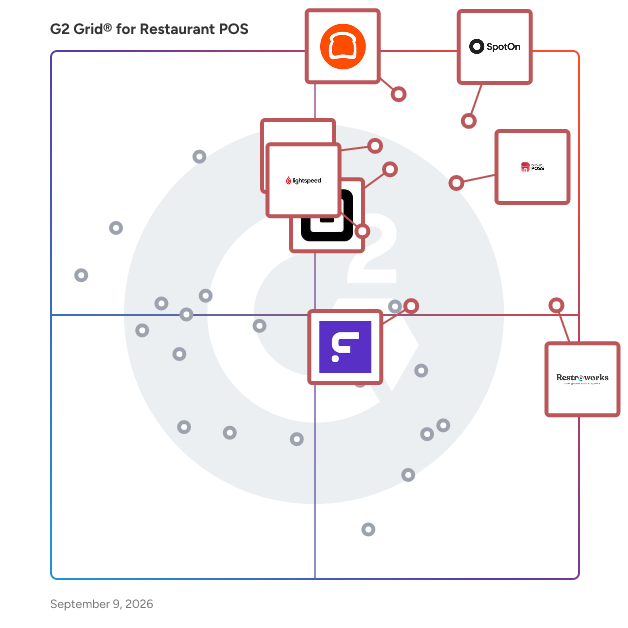



---
## Frequently Asked Questions

### How does pricing vary among different Restaurant POS solutions?

Pricing for Restaurant POS solutions varies significantly. For instance, Toast typically starts around $69 per month, while Square for Restaurants offers a free tier with additional features at $60 per month. Lightspeed Restaurant pricing begins at $69 per month, and TouchBistro starts at $69 per month as well. Other solutions like Clover and Revel Systems have more customized pricing based on features and business size, often requiring direct consultation for accurate quotes. Overall, the pricing structure reflects the range of features and services offered by each provider.


### How do Restaurant POS systems facilitate online ordering and delivery?

Restaurant POS systems enhance online ordering and delivery by integrating features such as mobile ordering, real-time inventory management, and customer relationship management. Products like Toast, Square for Restaurants, and TouchBistro offer seamless online ordering capabilities, allowing customers to place orders directly through the restaurant&#39;s website or app. These systems also facilitate efficient order processing and tracking, ensuring timely delivery. User reviews highlight the importance of user-friendly interfaces and reliable payment processing, which are critical for enhancing customer satisfaction and operational efficiency.


### How do Restaurant POS systems handle inventory management?

Restaurant POS systems typically manage inventory through features like real-time tracking, automated stock updates, and integration with suppliers. For instance, Toast offers comprehensive inventory management tools that allow users to monitor stock levels and receive alerts for low inventory. Square POS provides inventory tracking that syncs with sales data, ensuring accurate stock counts. Lightspeed POS includes advanced reporting features that help identify trends in inventory usage, while TouchBistro allows for ingredient-level tracking to optimize menu offerings. These functionalities enhance operational efficiency and reduce waste.


### How do Restaurant POS systems improve customer experience?

Restaurant POS systems enhance customer experience by streamlining order processing, reducing wait times, and improving order accuracy. Features like mobile ordering and table-side payment options allow for quicker service, which 78% of users find significantly enhances their dining experience. Additionally, integrated loyalty programs and personalized promotions help build customer relationships, with 65% of users noting increased customer satisfaction. Systems such as Toast, Square for Restaurants, and Lightspeed Restaurant are noted for their user-friendly interfaces and robust customer support, further contributing to a positive dining atmosphere.


### How scalable are Restaurant POS systems for growing businesses?

Restaurant POS systems are generally highly scalable, accommodating the needs of growing businesses. Many users report that systems like Toast, Square for Restaurants, and Lightspeed Restaurant offer features that support expansion, such as multi-location management and customizable integrations. For instance, Toast users highlight its ability to handle increased transaction volumes seamlessly, while Square for Restaurants is praised for its flexibility in adding new locations. Additionally, Lightspeed Restaurant&#39;s cloud-based architecture allows for easy updates and scalability, making it suitable for businesses of various sizes.


### How user-friendly are the top-rated Restaurant POS systems?

The top-rated Restaurant POS systems are generally considered user-friendly, with high ratings for ease of use. For instance, Toast POS has an average ease of use rating of 4.7 out of 5, while Square for Restaurants scores 4.6. Lightspeed Restaurant also receives a 4.5 rating, indicating that users find these systems intuitive and straightforward to navigate. Overall, the consensus among users highlights a strong emphasis on user-friendly interfaces across these leading solutions.


### What are common implementation challenges with Restaurant POS systems?

Common implementation challenges with Restaurant POS systems include integration issues with existing hardware and software, which can lead to operational disruptions. Users frequently report difficulties in training staff on new systems, resulting in a steep learning curve. Additionally, data migration from legacy systems often presents complications, causing delays. Some users also mention the need for ongoing technical support during the transition period, as well as concerns about system reliability and downtime affecting service. These challenges are consistently highlighted across various user reviews.


### What are the key features to look for in a Restaurant POS system?

Key features to look for in a Restaurant POS system include ease of use, which is highlighted by users who prioritize intuitive interfaces; robust reporting and analytics capabilities, essential for tracking sales and inventory; integration with payment processing systems for seamless transactions; and customer relationship management tools to enhance guest experiences. Additionally, mobile accessibility is increasingly valued, allowing staff to take orders and process payments on the go. Security features are also critical, ensuring customer data protection.


### What integrations should a Restaurant POS have for optimal performance?

For optimal performance, a Restaurant POS should integrate with payment processors, inventory management systems, employee scheduling tools, and customer relationship management (CRM) software. Key integrations frequently highlighted by users include Square, Toast, and Lightspeed, which enhance transaction efficiency, streamline inventory tracking, and improve staff management. Additionally, integration with delivery services like DoorDash and UberEats is crucial for expanding reach and improving customer service. These integrations collectively contribute to a more efficient and responsive restaurant operation.


### What reporting capabilities should I expect from a Restaurant POS?

Expect robust reporting capabilities from a Restaurant POS, including sales reports, inventory tracking, employee performance metrics, and customer analytics. Top products like Toast POS, Square for Restaurants, and Lightspeed Restaurant offer customizable reporting features, enabling users to generate detailed insights on sales trends, peak hours, and menu performance. Additionally, many systems provide real-time data visualization and integration with accounting software, enhancing operational efficiency and decision-making. User reviews highlight the importance of these features in optimizing restaurant management and improving profitability.


### What security features are essential in a Restaurant POS system?

Essential security features in a Restaurant POS system include end-to-end encryption for payment processing, user access controls to restrict sensitive data access, compliance with PCI DSS standards, and regular software updates to protect against vulnerabilities. Additionally, features like secure cloud backups and fraud detection mechanisms are highly valued by users. Systems such as Toast POS, Square for Restaurants, and Lightspeed Restaurant are noted for their robust security measures, ensuring data protection and compliance.


### What support options are typically available for Restaurant POS users?

Restaurant POS users typically have access to a variety of support options, including 24/7 customer support, online resources such as FAQs and knowledge bases, live chat assistance, and dedicated account managers. Many systems also offer training sessions and onboarding support to help users maximize their software&#39;s capabilities. For instance, products like Toast, Square for Restaurants, and Lightspeed Restaurant are noted for their comprehensive support services, with Toast receiving high ratings for its customer service responsiveness.


