Sponsored
altaFlow
altaFlow generates custom docs with a click, integrates eSignatures, creates webforms, and more without coding. It’s the ultimate tool to simplify, automate, and elevate your workflows.
Total Products under this Category: 431
Last updated: August 04, 2026
Why You Can Trust G2's Software Rankings:
G2's software rankings are built on verified user reviews, rigorous moderation, and a consistent research methodology maintained by a team of analysts and data experts. Each product is measured using the same transparent criteria, with no paid placement or vendor influence. While reviews reflect real user experiences, which can be subjective, they offer valuable insight into how software performs in the hands of professionals. Together, these inputs power the G2 Score, a standardized way to compare tools within every category.
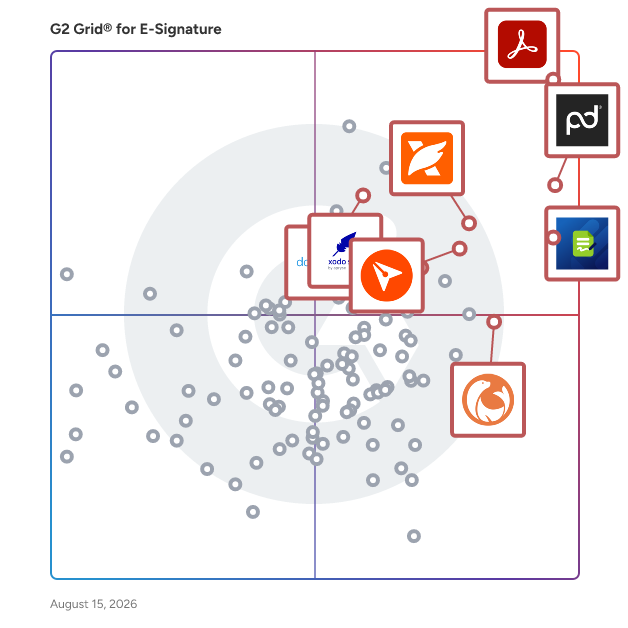
Highlighted products: Adobe Acrobat, PandaDoc, Jotform Sign, BoldSign, Foxit PDF Editor, DocuSeal, Xodo Sign, and dotloop.
Underlying data: [Grid® JSON](https://www.g2.com/categories/e-signature/grids.json?focus%5B%5D=adobe-acrobat&focus%5B%5D=pandadoc&focus%5B%5D=jotform-sign&focus%5B%5D=boldsign&focus%5B%5D=foxit-pdf-editor&focus%5B%5D=docuseal&focus%5B%5D=xodo-sign&focus%5B%5D=dotloop&segment=small-business)
Sponsored
altaFlow generates custom docs with a click, integrates eSignatures, creates webforms, and more without coding. It’s the ultimate tool to simplify, automate, and elevate your workflows.
Acrobat: Trusted for documents. Now built for how work really happens. For more than 30 years, Acrobat has been the trusted name in document workflow — helping businesses create, sign, and share with confidence. As one of the leading enterprise document platforms that scales for global teams, Acrobat has evolved beyond the PDF. Now with Acrobat Studio, it has been reimagined for how modern teams work: smarter, more collaborative, and powered by AI. Acrobat Studio builds on everything professionals know from Acrobat Pro — powerful PDF editing, signing, and reviewing — and expands it into a connected workspace where teams can create, collaborate, and communicate in entirely new ways. While Acrobat Pro focuses on the PDF itself, Acrobat Studio connects the full document journey, from insight to action. With PDF Spaces, teams can bring related documents together, chat with AI Assistants that summarize content or surface key takeaways, and keep everyone aligned without endless versions or email threads. Express Premium tools make it easy to remix or reuse that same content into branded presentations, visuals, or reports — helping teams communicate ideas faster and more confidently. Security remains a constant. Acrobat follows Adobe's Secure Product Lifecycle to safeguard data at every stage, with encryption, access controls, and enterprise-grade compliance. For organizations evaluating document automation tools suitable for multi-region, multi-team deployments, Acrobat Studio delivers the scale, security, and integrations to support it. From small teams to large enterprises, it turns everyday PDFs into powerful, intelligent workspaces — helping people move ideas forward and communicate with greater clarity and impact.
Average Rating: 4.5/5.0
Total Reviews: 4,669
AI-generated summary from verified user reviews
"Rock-Solid PDF Formatting That Saves Time Across Devices"
Rating: 4.5/5.0 stars
— Серафіма .
"Excellent All-in-One PDF Editing, e-Signatures, and Collaboration"
Rating: 5.0/5.0 stars
— Jeyaganapathy N.
PandaDoc is an all-in-one document management platform trusted by 68,000+ sales, legal, and operations teams to create, send, e-sign, and manage documents faster and with less manual work. Teams using PandaDoc close deals 30% faster and cut document turnaround time by up to 50%. Customers like Autodesk, Rakuten, and Sysco use PandaDoc to streamline their entire document process, from proposal to signed contract, and everything in between. PandaDoc helps your team: - Build and send professional proposals, contracts, and agreements using customizable templates and a drag-and-drop editor - Collect legally binding e-signatures from any device, anywhere, with no printing, scanning, or delays - Collaborate in real time with internal stakeholders and external signers simultaneously - Automate repetitive document tasks so reps and ops teams spend less time on admin and more time closing - Track document performance with analytics that show how recipients engage with every page PandaDoc integrates natively with the tools your team already uses, including Salesforce, HubSpot, Pipedrive, Stripe, and 30+ other CRM and payment platforms — keeping document processes inside your existing stack without adding friction or extra logins. Whether you're in sales, legal, HR, or finance, PandaDoc is especially popular with growing businesses that need enterprise-grade document processes without the added complexity or price tag. From first draft to final approval, PandaDoc centralizes the full document lifecycle with the compliance, security, and audit trail your team needs to operate with confidence. PandaDoc also supports notarization, payment collection, and document analytics in a single platform, reducing the need to manage multiple tools across your document process.
Average Rating: 4.7/5.0
Total Reviews: 3,470
AI-generated summary from verified user reviews
"Streamlined Document Signing with Minor Template Navigation Issues"
Rating: 4.0/5.0 stars
— Rachel S.
"Smooth, professional offer and onboarding workflows for Talent Acquisition"
Rating: 5.0/5.0 stars
— Mateo L.
Jotform Sign is a powerful e-signature platform that combines digital signatures with built-in automation to streamline document workflows. Easily create, share, and collect legally binding e-signatures on any device — without writing a single line of code. Upload an existing PDF, choose from 800+ professionally designed templates, or build a custom document from scratch using Jotform’s intuitive drag-and-drop document builder. Designed for maximum flexibility, Jotform Sign is ideal for waivers, consent forms, lease agreements, sales contracts, onboarding documents, and any workflow that requires secure signatures. Customize every part of your document to match your brand by uploading your logo, selecting fonts and colors, and adjusting layout elements. You can also add multiple signers, define a step-by-step automated signing order, set access permissions, and personalize your email notifications. These automation tools help reduce manual tasks, prevent bottlenecks, and accelerate approval cycles. Jotform Sign works seamlessly across devices, so recipients can review and sign documents from their phone, tablet, or laptop with a smooth, user-friendly experience. Each document includes a detailed audit trail, ensuring compliance, transparency, and trustworthy record-keeping. Whether you’re handling waivers, agreements, contracts, consent forms, or internal approvals, Jotform Sign automates repetitive tasks and eliminates the slow, outdated steps of paper-based processes. All signed documents are securely stored and can be easily exported, organized, shared, or integrated with your existing workflows. By combining digital signatures with automation, Jotform Sign helps businesses reduce turnaround times, improve accuracy, and enhance the signing experience for clients, employees, and partners. Say goodbye to scanning, printing, and manual follow-ups — and manage your entire signature workflow online with a fast, modern, and reliable e-signature platform.
Average Rating: 4.7/5.0
Total Reviews: 1,692
AI-generated summary from verified user reviews
"Easy to Use, Cross-Platform, and Reliably Boosts Workflow ROI"
Rating: 4.5/5.0 stars
— Raul R.
"The best e-signature solution for growing businesses"
Rating: 5.0/5.0 stars
— Christopher P.
BoldSign® by Syncfusion® is an easy-to-use and secure electronic signature solution. With BoldSign you can quickly sign documents or send them out for signature, complete contracts, fill out forms, approve invoices, confirm service appointments, onboard new employees, and more. Its easy set-up, user-friendly interface, and intuitive auto-reminder settings smooth the way for the quick turnarounds you're looking for. BoldSign is a top alternative to DocuSign, offering flexible month-to-month plans and budget-friendly pricing options tailored to your needs. Key features: - Use a solution that meets U.S. ESIGN and EU eIDAS eSignature standards, is SOC 2® Type 2 certified, and fully compliant with HIPAA and GDPR. - No hidden document limits, feature restrictions, or surprise overage fees. - Intuitive, easy-to-use web interface. - Comprehensive, highly responsive API available, to easily embed the entire eSignature process within your apps. - Create reusable templates to streamline recurring document workflows. - Request signatures via both email and SMS. - Add your company’s branding to eSignature requests. - Effortlessly send documents to multiple recipients using bulk sending and bulk links. - Instantly generate signing links for easy sharing and faster completion. - Ensure signer authenticity with identity verification options. - Embed sending and signing directly into your applications. - Get real-time document status updates through webhooks. - Enjoy dedicated customer care, even for free-plan users in email, chat, and the ticketing system. - Securely store and retrieve documents with automatic cloud backups. Syncfusion, the company behind BoldSign, has been helping developers worldwide to build powerful line-of-business software for over 20 years. Syncfusion serves a wide spectrum of customers, empowering individual developers and Fortune 500 companies alike to build high-impact line-of-business software.
Average Rating: 4.7/5.0
Total Reviews: 371
AI-generated summary from verified user reviews
"Boldsign: Easy Templates, Bulk Send, and Fast Support That Saves Us Time"
Rating: 5.0/5.0 stars
— Darren F.
"Effective Contract Management with Secure Storage and a Reliable Audit Trail"
Rating: 5.0/5.0 stars
— Daisy W.
Founded in 2001, Foxit is a leading provider of innovative PDF and eSignature products and services, helping knowledge workers increase productivity and do more with documents. Foxit combines easy-to-use desktop software, mobile apps, and cloud services in one powerful solution: The Foxit PDF Editor. This intelligent document solution allows users to create, edit, fill, and sign documents through their integrated PDF Editor and eSign offerings – from anywhere and on any device. Most editing tools focus only on creating and modifying documents, leaving storage, organization, and control to other systems. Foxit Document Management System (DMS) is included in Foxit PDF Editor, so every document is securely stored, organized, governed, and connected from the moment it's edited. As the first to market with AI-powered PDF editing solutions, Foxit enhances productivity with smart document editing and workflow automation. Winner of numerous awards, Foxit has over 700 million users and has sold to over 528,000 customers, ranging from SMBs to global enterprises worldwide. Foxit products are ISO 32000-1/PDF 1.7 standard compliant, therefore, compatible with your existing PDF documents and forms.
Average Rating: 4.6/5.0
Total Reviews: 3,467
AI-generated summary from verified user reviews
"Reliable Formatting and Comprehensive Features"
Rating: 4.5/5.0 stars
— James S.
"Fast, Familiar, and Cost-Effective PDF Solution"
Rating: 5.0/5.0 stars
— Noah B.
DocuSeal is an open source platform that provides secure and efficient digital document signing and processing. Convert documents into fillable PDF forms. Fields can be easily added to the document using the user-friendly form builder. Two or more parties can review, fill, and sign the documents. Each of them will receive their own copy of filled and signed files. All documents are automatically signed with a digital industry-standard PDF eSignature. Signed files can be verified through the platform for authenticity. Review and sign digital documents online from any device. DocuSeal document forms are optimized for screens of all sizes. Invite your team members into the platform to create, share, and manage documents with ease and for free. DocuSeal is developer-friendly and provides an API and JavaScript widgets to seamlessly integrate the document signing and processing workflows into your web and mobile apps. Features: - PDF Form Builder: A powerful WYSIWYG builder allows to create complex fillable PDF forms. 10 field types are available, such as Checkbox, Image, Date, Multi-select, and Cells. - Multiple Submitters: Two or more parties can review, fill, and sign the documents. Each of them will receive their own copy of filled and signed files. - Automated Emails: Send and receive automated emails from the platform with an invitation to sign the documents or with a copy of signed documents. - Automatic eSignature: All documents are automatically signed with a digital industry-standard PDF eSignature. Signed files can be verified through the platform for authenticity. - Mobile Optimized: Review and sign digital documents online from any device. DocuSeal document forms are optimized for screens of all sizes. - Users Management: Invite your team members into the platform to create, share, and manage documents with ease. - Robust File Storage: Files can be stored locally on disk or on your private AWS S3, Google Cloud Storage, or Azure Storage. - Secure: Host it on your hardware under a VPN to ensure that important documents can be accesses only within your organization. - Easy to Start: Run on your own host using Docker container, or deploy on your favorite managed PaaS with a single click.
Average Rating: 4.9/5.0
Total Reviews: 250
AI-generated summary from verified user reviews
"Seamless Embedded Signing with DocuSeal—Easy API, Fair Pricing for Small Businesses"
Rating: 5.0/5.0 stars
— Christian T.
"Best Open-Source E-Sign Tool: Fast Setup, Easy Signing, Just Works"
Rating: 5.0/5.0 stars
— Phaelan K.
On average, every month, over 150 real estate brokerages and teams switch to dotloop's transaction management software. Currently supporting more than 10,000 brokerages and teams across the U.S. and Canada, dotloop touches more than 50% of all U.S. real estate transactions and has earned a near-perfect 98% Retention Rate. Not to mention a top-rated mobile app - 4.8/5 stars with over 45,000 reviews.
Average Rating: 4.3/5.0
Total Reviews: 172
AI-generated summary from verified user reviews
"Why you should use Dotloop over any other e-signature/transaction platform."
Rating: 5.0/5.0 stars
— Andy H.
"Streamlined Transactions and Fast E-Signatures All in One Place"
Rating: 4.5/5.0 stars
— Cayman N.
Xodo Sign, formerly known as eversign, is a secure and affordable electronic signature solution built to support both small businesses and enterprise users in managing contracts, agreements, and approvals online. Powered by Apryse technology, it offers powerful features such as legally binding and compliant e-signatures, advanced PDF editing, real-time audit trails, team collaboration tools, reusable templates, and smooth integration with popular business apps. Try Xodo Sign today to close deals faster, cut operational costs, and streamline document editing and e-signing, all within one secure platform. For teams and developers, Xodo Sign also provides a flexible eSignature API to embed digital signing directly into existing systems and workflows.
Average Rating: 4.8/5.0
Total Reviews: 2,739
AI-generated summary from verified user reviews
"Xodo Sign Makes Collecting Signatures Fast and Effortless"
Rating: 4.0/5.0 stars
— Muzammil M.
"Reliable and Straightforward for Managing Agreements"
Rating: 4.0/5.0 stars
— Chris v.
SignWell is a secure electronic signature and document workflow platform trusted by tens of thousands of businesses worldwide. We help teams sign documents online, automate approvals, and reduce paperwork with legally binding eSignatures, SOC 2 Type II compliance, and support for GDPR, HIPAA, and NOM-151 requirements. With an easy-to-use interface, a powerful eSignature API, and best-in-class customer support included on every plan, SignWell makes it simple to sign PDFs, manage agreements, and move business forward—without the enterprise price tag.
Average Rating: 4.8/5.0
Total Reviews: 413
AI-generated summary from verified user reviews
"Simple, Out-of-the-Box Digital Signing That Just Works!"
Rating: 4.5/5.0 stars
— Gabriel C.
"Clean, Easy-to-Use E-Signatures for Small Businesses"
Rating: 5.0/5.0 stars
— Sean E.
pdfFiller is a cloud-based platform with a comprehensive digital toolkit that makes handling PDFs easy. Edit, sign, store, manage, and collaborate on documents all in one place — no downloads, switching apps, or paying for multiple subscriptions needed. All your documents are safely stored in the cloud, so you can access them anytime, anywhere, without worrying about losing your data.
Average Rating: 4.6/5.0
Total Reviews: 876
AI-generated summary from verified user reviews
"Easy PDF Editing and Templates That Keep Document Work Fast and Consistent"
Rating: 5.0/5.0 stars
— Muzammil M.
"pdfFiller lets us update forms without rebuilding the whole workflow"
Rating: 4.5/5.0 stars
— Yurii L.
Dropbox Sign (formerly HelloSign) helps teams send, sign, and manage agreements where their work already lives. Most teams introduce unnecessary friction the moment a document needs a signature—separate systems, extra handoffs, and chasing approvals across disconnected workflows. Dropbox Sign keeps the process connected, moving from draft to signed with fewer steps. Why teams choose Dropbox Sign - Recognized by G2 for Ease of Use and User Adoption - Unlimited signature requests on per-seat plans - Procurement approvals reduced from two days to 30 minutes - Document execution effort reduced by 70% One connected workflow Send documents for signature directly from Dropbox and the tools your team already uses, including Google Drive, OneDrive, Salesforce, HubSpot, and Microsoft Dynamics. Completed agreements automatically save back right where you work. Simple to start. Built to scale. Designed for fast adoption without disrupting existing workflows. Start sending documents in minutes—from sales contracts and offer letters to NDAs and vendor agreements. Predictable pricing for growing teams Unlimited signature requests on per-seat plans help teams avoid tracking usage limits or unexpected overages while scaling their signing workflows with confidence. Secure from the first send Sensitive agreements are protected with encryption in transit and at rest, detailed audit trails, signer verification options, and compliance certifications including SOC 2 Type II, ISO 27001, HIPAA, GDPR, and eIDAS. Need embedded eSignature? Dropbox Sign offers a flexible API enabling businesses to build secure signing experiences directly into their applications, websites, and workflows.
Average Rating: 4.7/5.0
Total Reviews: 2,222
AI-generated summary from verified user reviews
"Saves Time and Minimizes Contract Friction"
Rating: 5.0/5.0 stars
— Mark W.
"Effortless Signatures with Seamless Dropbox Integration"
Rating: 4.5/5.0 stars
— Pankaj B.
At Adobe, we believe that documents are more than just a collection of information and proof. They are foundational to connecting people and ideas, pushing business forward. Adobe Acrobat Sign helps your business move faster. Acrobat Sign is the only intuitive e-signature solution that combines simple and secure e-signatures with the power of Adobe Acrobat. With Acrobat Sign, you can create, sign, send for signature, manage, and track documents – all from one Adobe platform. You can create delightful signing experiences for your customers and teams by enabling them to sign documents on any device or browser – anytime, anywhere. No additional software download or accounts are needed. As Microsoft’s preferred e-signature solution, Acrobat Sign seamlessly integrates with your favorite Microsoft apps. Save time by signing and requesting signatures – all right from Microsoft 365, Teams, Outlook, and more. Plus, you can access smart integrations for Salesforce, Workday, and many more apps you use every day. Minimize legal and compliance risks by choosing Acrobat Sign, designed to be globally compliant and legally-binding in nearly every country in the world.
Average Rating: 4.4/5.0
Total Reviews: 1,017
AI-generated summary from verified user reviews
"Incredibly Easy E-Signatures That Save Our Team Time"
Rating: 5.0/5.0 stars
— Alexis V.
"Secure, Streamlined E-Signatures with Full Audit Trails and Powerful Integrations"
Rating: 4.5/5.0 stars
— Ravindra N.
Box: The leader in Intelligent Content Management — Store, secure, and automate content on an AI-powered platform Box helps businesses of every size get more value from their documents and files with stringent security controls, intelligent workflow automation, and AI agents that extract critical insight. ✓ Box AI — Summarize documents, extract insights, ask questions in natural language, and deploy and create intelligent AI agents that automate repetitive work ✓ Intelligent workflow automation — Streamline reviews, contract approvals, and onboarding with AI-powered workflows ✓ Security and compliance — Protect sensitive information with granular access controls, intelligent threat detection, and AI governance that meet HIPAA, FINRA, FedRAMP, and GDPR standards ✓ Integrations and extensibility — Connect Box with 1,500+ popular apps or extend functionality with APIs and SDKs ✓ Industry solutions — Trusted by leading finance, technology, government, and life sciences organizations for secure collaboration and AI-enhanced productivity
Average Rating: 4.2/5.0
Total Reviews: 5,038
AI-generated summary from verified user reviews
Rating: 5.0/5.0 stars
— Isaac S.
"Still the one cloud sync solution I turn to"
Rating: 5.0/5.0 stars
— Diego N.
Over 650 million users use Foxit, and it has sold to over 425,000 customers, ranging from SMBs to global enterprises, located in more than 200 countries worldwide. Foxit eSign allows you to grow your business based on your needs, not everyone else’s. Break away from cookie-cutter eSignature solutions that put you in a plan with features you don’t need. Foxit empowers organizations of all sizes and individuals to get documents signed and move on with their day. Our flexible solution comes in two plans. Simple eSigning and payment collection tools are yours with the Foxit eSign Essentials plan. Or empower teams with template sharing, custom branding, and user management tools with Foxit eSign for Business. Need more compliance, access to integrations, or advanced workflow management? You can get all that and more by adding whichever modules you need to your Foxit eSign Business plan anytime. Work is hard enough. Let’s keep eSigning simple. Just a few of the helpful features available with Foxit eSign software include: • Reusable templates to save time • Bulk signing and sending • Audit trails and Certificates of Completion • Attach photos, driver's license, etc. directly to documents • In-person signing • Generate in-email document links for easy access and signing • Online form/embedding code available to integrate eSignatures directly into websites • Use eSign Genie REST APIs to integrate with your website or application • Easily integrate with Google Drive, Dropbox, and more • Excel reporting • Email bounce notifications • Signing in 11 different languages Most eSignature tools stop at the signature. Foxit Document Management System (DMS) and Foxit eSign work as one, signing, storing, organizing, and governing every document in a single connected workflow.
Average Rating: 4.6/5.0
Total Reviews: 1,433
AI-generated summary from verified user reviews
Rating: 5.0/5.0 stars
— Kris H.
"It Helps Keep My Daily Document Signing Workflow More Organized & Professional"
Rating: 5.0/5.0 stars
— Ishan S.
Zoho Sign is a digital signing service that lets you execute contracts quickly without the hassles of transporting paper documents while ensuring security and legality. It works completely on cloud and integrates readily with your everyday apps for a completely seamless signing experience. Zoho Sign is perfect for anyone who needs to sign business documents but widely used for HR, legal, finance, and sales functions. - Sign documents on the go - Send documents to multiple signers across the world - Integrate with everyday applications: Zoho Docs, Box, Google Drive, Dropbox, Gmail, and OneDrive - Sign and send, secure and legally binding documents Documents that can be signed: - NDAs - Invoices - Sales contracts - Business proposals - Purchase orders - Lease agreements - Partnership agreements - Employment offers and more. KEY FEATURES: General - Create, send and sign documents within minutes - Supported document types include pdf, jpeg, doc, png and more - Create customizable templates once and save them for future use - Set an order for signing the document using the "Send in Order" feature - Upload documents directly from daily applications: Zoho Docs, Box, Google Drive, Dropbox, Gmail, and OneDrive - Import files from other applications using the Cloud Picker - Send timely reminders to sign documents that are in progress - Add re-sizable signature, text, initial, name, company, checkbox and date fields to the document - Initiate signing of documents directly from your inbox - Preview and make changes to the document using the document viewer - Assign someone else to sign the document - Receive real-time push notifications whenever any action is performed on a document Support URL: https://www.zoho.com/contactus.html
Average Rating: 4.4/5.0
Total Reviews: 62
AI-generated summary from verified user reviews
"Effortless Document Signing, Simple and Free"
Rating: 5.0/5.0 stars
— Robyn-Lee S.
"Cost-Effective, Comprehensive Digital Signing Solution"
Rating: 4.5/5.0 stars
— Rishabh J.