Best Email Signature Manager

Last updated: November 14, 2026

How Many Email Signature Software Products Does G2 Track?

Total Products under this Category: 118

Category Stats (Nov 2026)

  • Average Rating: 4.5/5 (↓0.01 vs Oct 2026) The average rating of products in this category, based on all submitted ratings
  • Top Trending Product: HiHello (+0.26%) - Among all products in this category, HiHello recorded the largest rating increase compared to last month

Last updated: November 12, 2026

How Does G2 Rank Email Signature Software Products?

Why You Can Trust G2's Software Rankings:

  • 30 Analysts and Data Experts
  • 19,100+ Authentic Reviews
  • 118+ Products
  • Unbiased Rankings

G2's software rankings are built on verified user reviews, rigorous moderation, and a consistent research methodology maintained by a team of analysts and data experts. Each product is measured using the same transparent criteria, with no paid placement or vendor influence. While reviews reflect real user experiences, which can be subjective, they offer valuable insight into how software performs in the hands of professionals. Together, these inputs power the G2 Score, a standardized way to compare tools within every category.

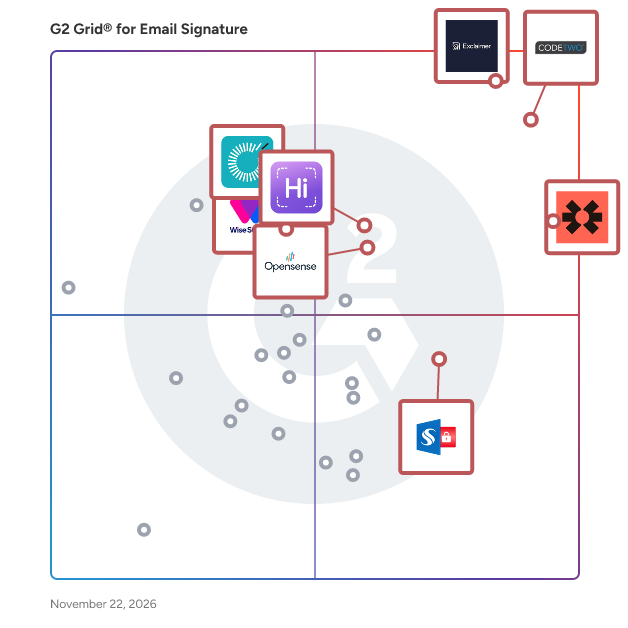
G2 Grid® for Email Signature Software

G2 Grid® for Email Signature Software plotting products by satisfaction and market presence

Highlighted products: Exclaimer, CodeTwo Email Signatures 365, Blinq, WiseStamp, HiHello, Opensense Email Signatures, Sigsync, and Rocketseed.

Underlying data: [Grid® JSON](https://www.g2.com/categories/email-signature/grids.json?focus%5B%5D=exclaimer&focus%5B%5D=codetwo-email-signatures-365&focus%5B%5D=blinq-me&focus%5B%5D=wisestamp&focus%5B%5D=hihello&focus%5B%5D=opensense-email-signatures&focus%5B%5D=sigsync&focus%5B%5D=rocketseed)

Exclaimer

Exclaimer is the global leader in email signature management for Microsoft 365 and Google Workspace. Its cloud platform enables organizations to centrally manage and automate email signatures and video meeting branding, ensuring consistent corporate identity, reducing brand and compliance risk, and meeting regulatory requirements across everyday business communications. Built for IT and valued by Marketing and Compliance teams, Exclaimer eliminates manual updates, enforces brand governance, and gives organizations greater control over their most critical business communication channels. As organizations grow, managing email signatures manually can become increasingly challenging. Exclaimer addresses this issue by integrating directly with Microsoft 365, Google Workspace, and on-premises Microsoft Exchange. The platform automatically syncs with the organization's directory, ensuring that email signatures are updated seamlessly when employees join, leave, or change roles. This automation eliminates the need for manual updates, significantly reducing inconsistencies across the organization. Signatures are applied server-side via Microsoft Azure before emails are sent, which means users do not need to take any action. Additionally, an optional Outlook Add-In allows employees to view their email signature while composing messages, without altering how signatures are applied. Exclaimer offers role-based access controls (RBAC), enabling IT departments to delegate management of campaigns and banners to other departments, such as marketing or HR, while retaining control over the core signature template. This functionality minimizes support requests and reduces dependency on a central team for every update. Employees can also update their personal details, including contact information and working hours, through a self-service portal, further streamlining the process and reducing the burden on IT. For marketing teams, Exclaimer transforms every email into a potential marketing touchpoint. Users can create and manage signature campaigns that feature rotating banners and tailored messages for different employee groups, utilizing attributes pulled from the organization's CRM or directory. Built-in analytics provide insights into campaign performance at the email signature level, facilitating A/B testing of creative elements and calls to action. Integration with popular CRM platforms, such as Salesforce and HubSpot, allows engagement data to be incorporated into the organization's broader reporting framework. Moreover, Exclaimer ensures automated compliance by applying legal disclaimers and compliance statements according to predefined rules. This guarantees that every outbound email meets legal requirements, regardless of the sender's device or personal settings, thereby aligning legal and IT departments without the need for manual oversight. Beyond email signatures, Exclaimer also manages video meeting backgrounds for Microsoft Teams and Zoom, applying on-brand visuals to video calls from the same platform. With over 25 years of experience in email signature management, Exclaimer is trusted by more than 80,000 organizations across 150+ countries, offering governance controls, compliance tooling, and a robust support model that caters to both small teams and large enterprises.

Average Rating: 4.5/5.0

Total Reviews: 1,544

How Do G2 Users Rate Exclaimer?

  • Has the product been a good partner in doing business?: 9.1/10 (Category avg: 9.2/10)
  • Email Software Integrations: 8.8/10 (Category avg: 8.9/10)
  • Email Distribution: 8.9/10 (Category avg: 9.0/10)
  • Account-Based Marketing: 8.2/10 (Category avg: 8.5/10)

Who Is the Company Behind Exclaimer?

  • Seller: Exclaimer
  • Company Website:
  • Year Founded: 2001
  • HQ Location: Farnborough, England
  • LinkedIn® Page: www.linkedin.com
    324 employees on LinkedIn®

Who Uses This Product?

  • Who Uses This: IT Manager, Marketing Manager
  • Top Industries: Information Technology and Services, Construction
  • Company Size: 55% Medium, 37% Small

What Do G2 Reviewers Say About Exclaimer?

AI-generated summary from verified user reviews

Pros
  • Users value the ease of use in Exclaimer, appreciating its seamless management and consistent email formatting.
  • Users enjoy the high signature quality of Exclaimer, appreciating its automatic formatting and seamless email management.
  • Users appreciate the easy setup of Exclaimer, praising its seamless integration and user-friendly interface for email signature management.
  • Users love the effortless management of Exclaimer, making email signature workflows quick and hassle-free for all.
  • Users commend Exclaimer for its responsive customer support, providing quick answers and effective solutions to their queries.
Cons
  • Users experience signature issues with Exclaimer, particularly with Outlook sync and some bugs in Microsoft 365.
  • Users find Exclaimer not user-friendly due to ongoing sync issues, despite improvements in the interface and functionality.
  • Users express frustration with poor customer support, which complicates navigation and problem resolution for Exclaimer.
  • Users experience setup difficulties with Exclaimer, finding the initial installation process time-consuming and occasionally frustrating.
  • Users experience occasional sync issues with Exclaimer, which can lead to frustrating delays in performance.

What Are Recent G2 Reviews of Exclaimer?

What Are G2 Users Discussing About Exclaimer?

CodeTwo Email Signatures 365

CodeTwo Email Signatures 365 is a cloud-based email signature & disclaimer service that lets you design and centrally manage company-wide email signatures for all users, devices and email apps in your Microsoft 365 tenant. It’s the only email signature service which also lets you run targeted email campaigns, measure & analyze customer feedback via one-click surveys, and manage automatic replies (including out of office messages).

Average Rating: 4.8/5.0

Total Reviews: 1,857

How Do G2 Users Rate CodeTwo Email Signatures 365?

  • Has the product been a good partner in doing business?: 9.6/10 (Category avg: 9.2/10)
  • Email Software Integrations: 9.3/10 (Category avg: 8.9/10)
  • Email Distribution: 9.4/10 (Category avg: 9.0/10)
  • Account-Based Marketing: 8.8/10 (Category avg: 8.5/10)

Who Is the Company Behind CodeTwo Email Signatures 365?

  • Seller: CodeTwo
  • Company Website:
  • Year Founded: 2007
  • HQ Location: Jelenia Gora
  • LinkedIn® Page: www.linkedin.com
    83 employees on LinkedIn®

Who Uses This Product?

  • Who Uses This: IT Manager, System Administrator
  • Top Industries: Information Technology and Services, Computer & Network Security
  • Company Size: 61% Medium, 33% Small

What Do G2 Reviewers Say About CodeTwo Email Signatures 365?

AI-generated summary from verified user reviews

Pros
  • Users appreciate the ease of use of CodeTwo Email Signatures 365 with its intuitive interface and excellent support.
  • Users praise the fantastic customer support for its responsiveness and professionalism, enhancing the overall experience with CodeTwo Email Signatures 365.
  • Users find the easy setup of CodeTwo Email Signatures 365 to be seamless and intuitive, enhancing efficiency.
  • Users value the friendly and quick customer support from CodeTwo, enhancing their overall experience and satisfaction.
  • Users value the reliable centralized signature management of CodeTwo Email Signatures 365 across multiple platforms.
Cons
  • Users experience signature issues with DKIM, integration, and editor difficulties, impacting email signature consistency.
  • Users experience setup difficulties with templates and shared mailboxes, but support resources help mitigate these challenges.
  • Users experience Outlook integration issues that limit functionality and support for CodeTwo Email Signatures 365.
  • Users face a learning difficulty, requiring prior knowledge of Exchange for effective setup and management.
  • Users report email issues with inconsistent image rendering and loading delays across different clients, impacting overall usability.

What Are Recent G2 Reviews of CodeTwo Email Signatures 365?

What Are G2 Users Discussing About CodeTwo Email Signatures 365?

Blinq

Blinq is a digital business card and lead capture platform that transforms professional networking and maximises the value of in-person connections. Over 4 million professionals at 93% of the Fortune 500 use Blinq to share who they are, capture contacts at events, add context with AI notes and enriched contact data, turning conversations into pipeline. Share your identity seamlessly through digital business cards via QR code, smart watch or NFC. Scan event badges or paper business cards with Blinq’s universal badge scanner to instantly capture leads. Blinq’s AI enrichment will automatically fill in emails, phone numbers, LinkedIn profiles and more, so you spend less time on manual data entry. With Blinq’s AI Notetaker, conversation notes and context can be captured in the moment and attached to each contact, syncing directly into CRMs such as Salesforce and HubSpot to enable faster, relevant follow-ups. Business & enterprise features include team management, consistent branding, automated provisioning, event attribution, and ROI insights, with SSO, GDPR compliance, and SOC 2 Type II certification. Rated 4.9 with over 150,000 reviews across all major review platforms, Blinq turns relationships into measurable business growth.

Average Rating: 4.8/5.0

Total Reviews: 9,889

How Do G2 Users Rate Blinq?

  • Has the product been a good partner in doing business?: 9.4/10 (Category avg: 9.2/10)
  • Email Software Integrations: 8.3/10 (Category avg: 8.9/10)
  • Email Distribution: 8.7/10 (Category avg: 9.0/10)
  • Account-Based Marketing: 8.1/10 (Category avg: 8.5/10)

Who Is the Company Behind Blinq?

  • Seller: Blinq
  • Company Website:
  • Year Founded: 2017
  • HQ Location: Melbourne, AU
  • LinkedIn® Page: www.linkedin.com
    90 employees on LinkedIn®

Who Uses This Product?

  • Who Uses This: Realtor, Owner
  • Top Industries: Real Estate, Non-Profit Organization Management
  • Company Size: 75% Small, 13% Medium

What Do G2 Reviewers Say About Blinq?

AI-generated summary from verified user reviews

Pros
  • Users highlight the phenomenal ease of use of Blinq, allowing seamless sharing and quick updates for networking.
  • Users love the convenience of Blinq, allowing instant information sharing anytime, anywhere without the hassle of physical cards.
  • Users appreciate the sharing ease of Blinq, effortlessly connecting with others anytime and anywhere without physical cards.
  • Users love the easy sharing feature of Blinq, allowing quick access to contact info anytime and anywhere.
  • Users appreciate the seamless contact management of Blinq, enhancing networking efficiency and eliminating the need for physical cards.
Cons
  • Users face QR code issues such as freezing widgets and difficulty in automatic info addition, complicating usage.
  • Users experience sharing issues when contacts struggle to locate sharing options after scanning the code.
  • Users desire more customization options in Blinq, such as logos in QR codes and support for multiple media files.
  • Users face saving issues with Blinq, finding the process confusing and often requiring additional guidance from others.
  • Users miss having a physical card for entering raffles and feel it's an essential feature for the experience.

What Are Recent G2 Reviews of Blinq?

AI can help you find the answers. G2 helps you trust them.

Connect G2 to Claude or ChatGPT for answers grounded in G2's trusted reviews, comparisons, and pricing from real user insights.

How it works

WiseStamp

WiseStamp is an award-winning, enterprise-grade email signature management platform designed to scale with the needs of market-leading organizations. Trusted by over 1.5 million customers worldwide, WiseStamp enables businesses to centrally create, manage, and deploy professional, on-brand email signatures effortlessly. WiseStamp turns every email into a powerful brand asset, enabling enterprises to maintain brand consistency, enhance engagement, and drive business impact at scale. WiseStamp also works seamlessly with all email platforms - no coding needed! Turn every email into an opportunity. Make it count.

Average Rating: 4.6/5.0

Total Reviews: 590

How Do G2 Users Rate WiseStamp?

  • Has the product been a good partner in doing business?: 9.1/10 (Category avg: 9.2/10)
  • Email Software Integrations: 8.6/10 (Category avg: 8.9/10)
  • Email Distribution: 8.9/10 (Category avg: 9.0/10)
  • Account-Based Marketing: 8.3/10 (Category avg: 8.5/10)

Who Is the Company Behind WiseStamp?

  • Seller: WiseStamp
  • Company Website:
  • Year Founded: 2008
  • HQ Location: New York, NY
  • LinkedIn® Page: www.linkedin.com
    80 employees on LinkedIn®

Who Uses This Product?

  • Who Uses This: Owner, Founder
  • Top Industries: Marketing and Advertising, Real Estate
  • Company Size: 65% Small, 30% Medium

What Do G2 Reviewers Say About WiseStamp?

AI-generated summary from verified user reviews

Pros
  • Users highlight the ease of use of WiseStamp, making email signature adjustments straightforward and efficient.
  • Users value the signature quality of WiseStamp, enhancing professionalism and consistency across all email communications.
  • Users appreciate the easy setup of WiseStamp, making email signature adjustments straightforward and efficient for all levels.
  • Users praise the fantastic and speedy customer support of WiseStamp, enhancing their overall experience significantly.
  • Users value the seamless integrations of WiseStamp, streamlining email signature management and enhancing overall functionality.
Cons
  • Users report signature issues like disappearing signatures and lack of dark mode support, affecting usability and consistency.
  • Users desire more limited customization options in WiseStamp, restricting their ability to tailor email signatures effectively.
  • Users often face sync issues with WiseStamp, requiring manual workarounds and occasional restarts for resolution.
  • Users find WiseStamp's pricing expensive, with complications in managing aliases leading to potential additional costs.
  • Users report experiencing poor customer support, with unresolved issues and lack of timely communication after incidents.

What Are Recent G2 Reviews of WiseStamp?

What Are G2 Users Discussing About WiseStamp?

HiHello

HiHello is a Professional Presence Platform built for enterprise marketing leaders. Every email your team sends, every meeting they join, every card they share at an event is a brand moment. HiHello makes sure each one reflects the brand, captures the lead, and generates data worth acting on. Three touchpoints every employee uses every day: their business card, their email signature, and their virtual background. HiHello generates all three from one source of truth, governed by marketing and approved by IT. Update a title, swap a logo, launch a campaign, and the change rolls out across every inbox, every meeting, and every event in minutes. No shadow tools. No IT tickets to refresh a banner. No third-party servers routing your email. What HiHello powers for enterprise teams: - Digital Business Cards: branded templates with field-level edit controls, customizable card URLs, branded QR codes, profile video, and embedded YouTube/Vimeo. Share via QR, NFC, AirDrop, direct link, text, email, Apple Wallet, Google Wallet, iOS/Android widgets, Apple Watch, and Quick Connect. - Email Signature Manager: automated signature deployment across Google Workspace and Microsoft Outlook, with clickable HTML signatures, bulk distribution, status tracking, locked templates, banners, CTAs, and disclaimers. - HiHello Events: badge and business card scanning, AI-powered Contact Enrichment, team event analytics, and direct sync to Salesforce, HubSpot, and Microsoft Dynamics 365. - Virtual Backgrounds: branded backgrounds for Zoom, Microsoft Teams, Google Meet, Webex, Vimeo, Zoho Meeting, and Twitch, with locked brand packs to enforce visual standards. - Business Contact Manager: company-wide directory, custom lead capture forms, custom contact exchange and consent flows, AI Contact Enrichment, direct CRM sync, and data export controls. - Business Card Scanner: AI-powered scanning of paper cards, digital cards, NFC cards, event badges, and documents into clean, enriched digital contacts. Built for enterprise security, identity, and integration: - SOC 2 Type II certified - Compliant with GDPR, UK GDPR, CCPA, the Australian Privacy Act, and the EU-US Data Privacy Framework - HiHello never sells user data - SSO via Microsoft, Google, Okta, Entra ID, and other major SAML providers - SCIM provisioning and directory sync for automated user lifecycle management - HRIS integrations including Workday - Native CRM integrations with Salesforce, HubSpot, and Microsoft Dynamics 365 - Google Analytics support where configured - Zapier connection at the individual user level for additional workflows Every interaction is a brand moment. HiHello makes sure each one reflects the brand, captures the lead, and generates data worth acting on, across every employee, every channel, and every stage of the connection.

Average Rating: 4.6/5.0

Total Reviews: 1,258

How Do G2 Users Rate HiHello?

  • Has the product been a good partner in doing business?: 9.3/10 (Category avg: 9.2/10)
  • Email Software Integrations: 8.3/10 (Category avg: 8.9/10)
  • Email Distribution: 8.5/10 (Category avg: 9.0/10)
  • Account-Based Marketing: 7.5/10 (Category avg: 8.5/10)

Who Is the Company Behind HiHello?

  • Seller: HiHello, Inc.
  • Company Website:
  • Year Founded: 2018
  • HQ Location: Palo Alto, California
  • LinkedIn® Page: www.linkedin.com
    96 employees on LinkedIn®

Who Uses This Product?

  • Who Uses This: Owner, Founder
  • Top Industries: Consulting, Real Estate
  • Company Size: 56% Small, 17% Medium

What Do G2 Reviewers Say About HiHello?

AI-generated summary from verified user reviews

Pros
  • Users find HiHello's ease of use invaluable for organizing and sharing contacts efficiently across platforms.
  • Users find HiHello's convenience unparalleled, streamlining contact sharing and keeping information easily accessible and updated.
  • Users praise HiHello for its easy sharing of contact information, making networking and updates effortless and accessible.
  • Users love the ease of sharing contact information with HiHello, appreciating its versatility for digital networking.
  • Users love the ease of sharing digital business cards with HiHello, enhancing networking and eliminating the hassle of paper cards.
Cons
  • Users note the limited customization options in HiHello, wishing for more features without needing to upgrade.
  • Users find HiHello lacks essential features like better scanning, duplication prevention, and seamless synchronization with contacts.
  • Users find the QR code sharing process inconvenient, preferring simpler alternatives for exchanging business information.
  • Users find HiHello to be expensive, especially for nonprofits, and are frustrated by forced advertisements on shared contacts.
  • Users encounter persistent issues with saving contact card information, complicating synchronization and organization on devices.

What Are Recent G2 Reviews of HiHello?

Opensense Email Signatures

Turn brand moments into business outcomes. Every email, every handshake, every follow-up shapes how people see your brand. Opensense helps you take control of those everyday interactions by transforming employee email, digital business cards, and sales outreach into consistent, measurable brand moments. No inconsistencies. No missed opportunities. Just smarter ways to engage, build trust, and drive pipeline. With Opensense, your communication becomes a brand channel: - Beautiful email signatures that are always on-brand. - Targeted ad banners in every inbox to promote campaigns and events. - Digital business cards that make networking trackable and scalable. - Real-time buyer intent signals that help sales follow up at the right moment. - Centralized compliance controls that keep IT confident and in control. We work seamlessly with Microsoft 365, Google Workspace, and Exchange, and integrate natively with Salesforce, HubSpot, Marketo, Eloqua, Pardot, and Microsoft Dynamics. That’s why leading brands like G2, Salesforce, and Adobe, trust Opensense to stay on brand, build trust, and transform everyday communication into measurable growth.

Average Rating: 4.7/5.0

Total Reviews: 422

How Do G2 Users Rate Opensense Email Signatures?

  • Has the product been a good partner in doing business?: 9.7/10 (Category avg: 9.2/10)
  • Email Software Integrations: 8.8/10 (Category avg: 8.9/10)
  • Email Distribution: 9.1/10 (Category avg: 9.0/10)
  • Account-Based Marketing: 8.6/10 (Category avg: 8.5/10)

Who Is the Company Behind Opensense Email Signatures?

  • Seller: Opensense
  • Company Website:
  • Year Founded: 2013
  • HQ Location: San Francisco, CA
  • LinkedIn® Page: www.linkedin.com
    45 employees on LinkedIn®

Who Uses This Product?

  • Who Uses This: Marketing Coordinator, Marketing Manager
  • Top Industries: Computer Software, Financial Services
  • Company Size: 70% Medium, 17% Large

What Do G2 Reviewers Say About Opensense Email Signatures?

AI-generated summary from verified user reviews

Pros
  • Users praise the responsive customer support of Opensense, making it easy to manage email signatures efficiently.
  • Users enjoy the easy signature customization with help from a supportive team, enhancing branding and user experience.
  • Users praise the ease of use of Opensense, highlighting excellent support that makes management effortless.
  • Users value the flexibility and reliability of Opensense Email Signatures, ensuring consistent branding across all email communications.
  • Users commend the implementation ease of Opensense Email Signatures, appreciating its seamless transition and flexibility across platforms.
Cons
  • Users report occasional signature visibility issues before sending emails, but content is always consistent upon delivery.
  • Users face a learning curve initially, as some features and settings can be challenging to navigate independently.
  • Users find the difficult setup process of Opensense Email Signatures challenging, especially for those less tech-savvy.
  • Users find the complexity of Opensense Email Signatures daunting, especially for those not tech-savvy and during initial setup.
  • Users find Opensense not user-friendly initially due to a learning curve and complicated interface.

What Are Recent G2 Reviews of Opensense Email Signatures?

What Are G2 Users Discussing About Opensense Email Signatures?

Sigsync

Sigsync is a secure, cloud-based email signature management solution for Microsoft 365 and Exchange. It enables businesses to centrally manage professional email signatures and disclaimers for all users, ensuring consistent branding, compliance, and communication across the organization. With Sigsync, you can design signatures using a drag-and-drop editor, add marketing banners, run campaigns, and track engagement with analytics. Signatures are applied server-side, guaranteeing uniformity across all devices and email clients.

Average Rating: 5.0/5.0

Total Reviews: 170

How Do G2 Users Rate Sigsync?

  • Has the product been a good partner in doing business?: 9.9/10 (Category avg: 9.2/10)
  • Email Software Integrations: 9.9/10 (Category avg: 8.9/10)
  • Email Distribution: 9.8/10 (Category avg: 9.0/10)
  • Account-Based Marketing: 10.0/10 (Category avg: 8.5/10)

Who Is the Company Behind Sigsync?

Who Uses This Product?

  • Who Uses This: Co-Founder, Owner
  • Top Industries: Computer Software, Design
  • Company Size: 55% Small, 18% Medium

What Do G2 Reviewers Say About Sigsync?

AI-generated summary from verified user reviews

Pros
  • Users find Sigsync's ease of use impressive, enabling seamless email signature management across all devices effortlessly.
  • Users commend the easy setup of Sigsync, allowing for quick and seamless integration with Office 365.
  • Users value Sigsync for its unmatched reliability and consistency in managing email signatures across Microsoft 365.
  • Users value the exceptional reliability of Sigsync, ensuring consistent email signatures across all devices and platforms effortlessly.
  • Users find Sigsync's initial setup speed impressive, enabling quick and effortless implementation for consistent email signatures.
Cons
  • Users find template limitations in Sigsync, suggesting more options and clearer guidance for easier customization.
  • Users find the initial setup challenging, requiring familiarity with Microsoft 365 and resulting in a learning curve.
  • Users find the lack of detailed reporting and API integration limits performance tracking and analysis capabilities.
  • Users find the initial setup challenging, requiring familiarity with Microsoft 365 and some trial and error.
  • Users find Sigsync's limited customization options hinder pixel-perfect designs and desire more templates and guidance.

What Are Recent G2 Reviews of Sigsync?

Rocketseed

Rocketseed is enterprise-grade email signature management software that helps mid-to-large organizations meet IT operational and compliance challenges, maintain company-wide signature brand consistency, and turn everyday emails into a measurable marketing channel. Trusted by thousands of users sending billions of emails globally, Rocketseed is compatible with all email clients - including Microsoft 365, Google Workspace and Exchange - with signatures displaying perfectly on all devices. Uniquely, Rocketseed also offers guided onboarding, dedicated account management, and 24/7 global IT support to ensure smooth deployment and ongoing success. Rocketseed enables IT teams to achieve time-saving, tamper-proof, directory-driven  control over email signatures at scale. Centralized control ensures all signatures are branded consistently with updates made instantly company-wide. User directory synchronization keeps signatures accurate as employees join, leave, or change roles, eliminating manual updates and reducing support tickets. Flexible deployment across cloud, on-premises, or hybrid environments. Enterprise-grade security, ISO 27001 certification, and GDPR compliance provide governance, reliability, and operational stability across 50 to 50,000 users and multiple domains. For Marketing teams, Rocketseed turns every email into a brand-aligned engagement channel. In addition to brand consistency, centralized management enables promotional banner campaigns to be launched, scheduled and targeted by department, region, role, or audience, with clickable calls-to-action driving traffic to relevant products, services, events, or offers. Advanced analytics track every recipient interaction, provide real-time click alerts, and support A/B testing. CRM and analytics integrations allow teams to monitor performance and optimize campaigns throughout the customer journey, delivering measurable marketing ROI without adding to IT workload. Key features include centralised company email signature management, campaign automation, signature design and disclaimers, real-time reporting, and CRM/analytics integrations. Rocketseed maintains consistent branding and compliance across complex enterprise environments, even during organizational change or large-scale migrations. With its service-first approach, Rocketseed combines enterprise-grade software with hands-on support: guided onboarding, training, dedicated account managers, and 24/7 human IT assistance. This ensures organizations maintain signature brand consistency and run effective campaigns without increasing operational burden. Also, Rocketseed’s partner program helps MSPs and digital marketing agencies generate recurring revenue, offering 25% commission on every deal from day one. It’s easy to sell, solves customers' email signature management and marketing challenges, and includes hands-on partner support throughout. Trusted by enterprises worldwide, Rocketseed’s enterprise email signature management software helps organizations reduce IT overhead, maintain consistent branding, and unlock the marketing potential of every email—simply, securely and at scale.

Average Rating: 4.6/5.0

Total Reviews: 96

How Do G2 Users Rate Rocketseed?

  • Has the product been a good partner in doing business?: 9.6/10 (Category avg: 9.2/10)
  • Email Software Integrations: 9.3/10 (Category avg: 8.9/10)
  • Email Distribution: 9.7/10 (Category avg: 9.0/10)
  • Account-Based Marketing: 9.8/10 (Category avg: 8.5/10)

Who Is the Company Behind Rocketseed?

  • Seller: Rocketseed
  • Company Website:
  • Year Founded: 2002
  • HQ Location: London
  • LinkedIn® Page: www.linkedin.com
    61 employees on LinkedIn®

Who Uses This Product?

  • Who Uses This: Marketing Manager
  • Top Industries: Financial Services, Information Technology and Services
  • Company Size: 48% Medium, 43% Small

What Do G2 Reviewers Say About Rocketseed?

AI-generated summary from verified user reviews

Pros
  • Users find Rocketseed's platform to be extremely user-friendly, simplifying email signature management and enhancing professionalism.
  • Users commend the modern and professional email signatures Rocketseed offers, enhancing brand visibility effortlessly.
  • Users praise Rocketseed for its exceptional customer support, highlighting responsive and knowledgeable assistance from the team.
  • Users praise Rocketseed for its exceptional response time, highlighting the helpfulness and quick assistance from their support team.
  • Users appreciate the professional branding Rocketseed provides, enhancing design and delivering clear messages effectively.
Cons
  • Users find the Rocketseed interface not user-friendly, which complicates navigation and overall usability.
  • Users suggest a need for clearer timeframes for signature changes to avoid issues during festive periods.

What Are Recent G2 Reviews of Rocketseed?

What Are G2 Users Discussing About Rocketseed?

Letsignit

Letsignit is a leading email signature management and marketing platform that helps organizations transform employee emails into powerful, branded communication touchpoints. Designed for both marketing and IT teams, Letsignit centralizes and automates email signature deployment to ensure every message reflects a unified, on-brand identity. Trusted by over 2,000,000 users worldwide and maintaining a 98% customer satisfaction rate, Letsignit empowers businesses of all sizes to optimize brand consistency, boost engagement, and turn everyday emails into measurable marketing opportunities. With its intuitive drag-and-drop signature designer, teams can easily create professional, personalized email signatures that include dynamic, trackable marketing banners: perfect for promoting events, sharing updates, or driving traffic to key campaigns. This agility enables marketing teams to adapt signatures in real time, keeping communications aligned with current initiatives while increasing visibility and click-through rates. For IT departments, Letsignit integrates seamlessly with systems such as Microsoft 365 and Active Directory, allowing quick and secure signature deployment across departments, regions, or subsidiaries. This reduces administrative workload while maintaining compliance and consistency. Built to meet strict global data protection standards, Letsignit is ISO/IEC 27001:2017 and ISO/IEC 27018:2019 certified, ensuring enterprise-grade security and privacy. With dedicated multilingual support in English, French, and Spanish, Letsignit combines reliable technology with human expertise, making it the preferred solution for organizations that want to elevate their email communications, strengthen their brand image, and engage audiences with every send.

Average Rating: 4.5/5.0

Total Reviews: 217

How Do G2 Users Rate Letsignit?

  • Has the product been a good partner in doing business?: 8.9/10 (Category avg: 9.2/10)
  • Email Software Integrations: 9.0/10 (Category avg: 8.9/10)
  • Email Distribution: 9.2/10 (Category avg: 9.0/10)
  • Account-Based Marketing: 8.8/10 (Category avg: 8.5/10)

Who Is the Company Behind Letsignit?

  • Seller: Letsignit
  • Company Website:
  • Year Founded: 2013
  • HQ Location: Marseille, Bouches-du-Rhône
  • LinkedIn® Page: www.linkedin.com
    102 employees on LinkedIn®

Who Uses This Product?

  • Who Uses This: Marketing Manager
  • Top Industries: Information Technology and Services, Computer Software
  • Company Size: 68% Medium, 26% Small

What Do G2 Reviewers Say About Letsignit?

AI-generated summary from verified user reviews

Pros
  • Users commend the excellent customer support of Letsignit, highlighting fast responses and professionalism.
  • Users appreciate the rapid response times of Letsignit, ensuring timely and effective customer support.
  • Users find Letsignit easy to use and implement, praising its quick support and streamlined signature building.
  • Users value the friendly support of Letsignit, appreciating their quick and professional assistance whenever needed.
  • Users value the seamless integrations of Letsignit, facilitating quick deployment and effective management of email signatures.
Cons
  • Users find the SMTP connector's configuration complex, leading to difficulties in initial setup and usage.
  • Users note a steep learning curve with Letsignit, but appreciate the helpful customer support available to assist.
  • Users face Outlook integration issues, demanding improved access to the Outlook add-in for better functionality.

What Are Recent G2 Reviews of Letsignit?

What Are G2 Users Discussing About Letsignit?

SIGNandGO

SIGNandGO provides a centralized email signature management to your company. A signature banner designed with SIGNandGO increases brand awareness. With custom signature designs, you get to have digital business cards that reflect your brand identity. With SIGNandGO, an email signature solution, signatures get to have a more professional look. SIGNandGO helps you organize your corporate e-mail management centrally and makes the follow-up of HR departments easier. Thus, the signatures of the employees are always up-to-date and have a perfect design. Offers a cloud-based and advanced enterprise signature management that is powered by OWA and provides compatibility with Office 365 email signature. This way, you get to have an easy corporate e-mail management and all your signatures get to be flawless.

Average Rating: 4.8/5.0

Total Reviews: 23

How Do G2 Users Rate SIGNandGO?

  • Has the product been a good partner in doing business?: 9.9/10 (Category avg: 9.2/10)
  • Email Software Integrations: 9.8/10 (Category avg: 8.9/10)
  • Email Distribution: 9.8/10 (Category avg: 9.0/10)
  • Account-Based Marketing: 9.6/10 (Category avg: 8.5/10)

Who Is the Company Behind SIGNandGO?

  • Seller: PEAKUP
  • Company Website:
  • Year Founded: 2012
  • HQ Location: Istanbul, TR
  • LinkedIn® Page: www.linkedin.com
    131 employees on LinkedIn®

Who Uses This Product?

  • Company Size: 61% Medium, 35% Large

What Do G2 Reviewers Say About SIGNandGO?

AI-generated summary from verified user reviews

Pros
  • Users appreciate the friendly support of SIGNandGO, benefiting from quick responses and a dedicated approach to problem-solving.
  • Users commend SIGNandGO for its brand integrity enhancement and seamless management, highlighting its significant impact in their operations.
  • Users appreciate the exceptional customer support of SIGNandGO, ensuring smooth and effective email signature management.
  • Users appreciate the ease of use of SIGNandGO, benefiting from its user-friendly interface for all levels.
  • Users appreciate the easy integrations with SIGNandGO, valuing their prompt support and commitment to customer success.

What Are Recent G2 Reviews of SIGNandGO?

Signature 365

Signature 365 is a modern cloud-based email signature solution for Microsoft 365. Create eye-catching email signatures, plan and run campaigns, boost brand awareness, get real-time insights and more all from one place: • Create and deploy beautiful email signatures to all your users • Extend email marketing campaigns to email signatures with tracking • Comply with legal requirements adding disclaimers to all email • Manage everything from the modern cloud dashboard • Use template library to get you started quickly • Works with all email clients on all devices • Automated setup wizard • And more... Signature 365 is hosted in secure ISO 27001 data centres in 6 regions around the world. SIGNATURE 365 ADVANTAGES • Very easy to use • 100% cloud-based • No servers required • No software to install or maintain • No requirement to route email via Signature 365 • Signatures on all email from all devices • Signatures visible in Outlook on Windows, Mac and Web (and soon iOS and Android) • Setup and configure everything in web portal • Visual and source template editor with preview • Default and additional signatures • Include campaign banners with tracking and analytics • Append legal disclaimers • Rules for new, reply, internal and external email • Manage images and banners in portal • Create custom fields with different types • Ability to allow users to edit specific fields • Invite additional admin and editor users • And more... SIGNATURE 365 SUBSCRIPTION BENEFITS • One subscription including all features • Technical support included • Based on number of users • No charge for secondary email addresses • No charge for multiple devices/email clients SIGNATURE 365 ADD-IN FEATURES • Add signatures to email • Preview signatures • Select additional signatures • Change default signatures • Edit user details • Manage settings

Average Rating: 4.7/5.0

Total Reviews: 337

How Do G2 Users Rate Signature 365?

  • Has the product been a good partner in doing business?: 9.4/10 (Category avg: 9.2/10)
  • Email Software Integrations: 9.0/10 (Category avg: 8.9/10)
  • Email Distribution: 9.0/10 (Category avg: 9.0/10)
  • Account-Based Marketing: 8.2/10 (Category avg: 8.5/10)

Who Is the Company Behind Signature 365?

  • Seller: Symprex
  • Company Website:
  • Year Founded: 1999
  • HQ Location: Guildford, England
  • LinkedIn® Page: www.linkedin.com
    9 employees on LinkedIn®

Who Uses This Product?

  • Who Uses This: IT Manager, System Administrator
  • Top Industries: Information Technology and Services, Legal Services
  • Company Size: 64% Medium, 21% Small

What Do G2 Reviewers Say About Signature 365?

AI-generated summary from verified user reviews

Pros
  • Users value the ease of use of Signature 365, appreciating its centralized control and straightforward management process.
  • Users love the easy setup of Signature 365, making migration and management of email signatures seamless.
  • Users highly value the seamless integration of Signature 365 with Microsoft 365, simplifying email signature management across the organization.
  • Users praise the exceptional customer support of Signature 365, noting its professionalism and helpfulness throughout the setup process.
  • Users value the signature design flexibility of Signature 365, enjoying brand consistency and easy management across teams.
Cons
  • Users notice formatting inconsistencies and complications with Azure user groups that hinder signature management.
  • Users face Outlook integration issues, including slow loading times and inconsistent formatting that disrupts productivity.
  • Users find the limited customization options frustrating, hindering advanced design and requiring excessive management of signatures.
  • Users face formatting issues that require extra effort for customization, making the experience less intuitive and more time-consuming.
  • Users experience setup difficulties with Signature 365, requiring extensive coding and IT support for effective implementation.

What Are Recent G2 Reviews of Signature 365?

Templafy

Templafy is the leading agentic document generation platform, enabling enterprise organizations to create accurate, compliant, and on-brand documents with maximum efficiency and control. Accessible directly within M365, Google Workspace, Salesforce, Claude or any AI agent Templafy simplifies document workflows through AI and automation, to reduce risk and boost productivity. Founded in 2014, Templafy is a global organization with offices across Europe and the US. Trusted by industry leaders like KPMG and BDO, Templafy saves teams over 30% of the time they typically spend on repetitive work like proposals, engagement letters, and audit reports, so they can focus on revenue-driving tasks instead. Join more than 4 million users worldwide who rely on Templafy to accelerate business content creation with AI.

Average Rating: 4.4/5.0

Total Reviews: 60

How Do G2 Users Rate Templafy?

  • Has the product been a good partner in doing business?: 9.3/10 (Category avg: 9.2/10)
  • Email Software Integrations: 6.9/10 (Category avg: 8.9/10)
  • Email Distribution: 8.0/10 (Category avg: 9.0/10)
  • Account-Based Marketing: 8.3/10 (Category avg: 8.5/10)

Who Is the Company Behind Templafy?

  • Seller: Templafy
  • Company Website:
  • HQ Location: New York, USA
  • LinkedIn® Page: www.linkedin.com
    186 employees on LinkedIn®

Who Uses This Product?

  • Top Industries: Accounting, Consulting
  • Company Size: 46% Large, 41% Medium

What Do G2 Reviewers Say About Templafy?

AI-generated summary from verified user reviews

Pros
  • Users find Templafy to be easy to use, streamlining document creation and ensuring brand consistency effortlessly.
  • Users appreciate the seamless integration and automated features of Templafy, enhancing efficiency and brand consistency.
  • Users value the template library of Templafy, which ensures brand consistency and ease of document creation.
  • Users value the time-saving features of Templafy, which streamline document creation and automate repetitive tasks effectively.
  • Users value Templafy's brand consistency and asset management, simplifying document creation while maintaining compliance and professionalism.
Cons
  • Users find the complex usability of Templafy frustrating due to integration issues and challenges with template creation.
  • Users find Templafy quite expensive, especially since many features can be replicated in Word.
  • Users find missing features in Templafy, including limited templates and frustrating file size constraints.
  • Users face technical issues with Templafy, dealing with bugs and integration challenges that hinder their experience.
  • Users find the difficult learning curve of Templafy challenging, especially for newcomers to the platform.

What Are Recent G2 Reviews of Templafy?

What Are G2 Users Discussing About Templafy?

Signitic

Signitic is an all-in-one tool that allows you to create, customize, and manage an unlimited number of email signatures, banners, and digital business cards effortlessly. With Signitic, take advantage of this often underutilized acquisition channel: your email signature. Easily schedule campaign banners according to your calendar and the needs of your company's various departments, and analyze the results. The time when you had to modify each signature of your colleagues one by one is over. With Signitic, users can ensure that their email signatures are always up to date, automatically reflecting new hires, departures, and role changes straight from your directory, with no IT involvement needed. Links, images, and campaign taglines stay current, enhancing your marketing efforts and professional image at the same time. Use our drag-and-drop editor to create a unique signature for your employees. Instead of manually editing signatures for each employee or campaign, you can make updates in one place, ensuring that all signatures are up to date and consistent. What's more, thanks to our Microsoft 365 and Google Workspace partnership, integrate your collaborators and share their signatures in less than five minutes. We've thought of everything so that you don't have to worry about your colleagues' e-mail signatures. Signitic also lets you go further than the signature itself: with our digital business cards, employees can share an always up-to-date professional profile via QR code or link, in a meeting or at an event, the same way their signature works in an email. Additionally, Signitic offers an analytics tool that enables users to track the performance of their email signatures, providing insights into how effectively they are driving traffic and engagement. Connected to your CRM and sales tools (HubSpot, Salesforce, Marketo, Dynamics 365, Pipedrive…), you can track all users' actions, such as whether they clicked on social media links, promotional banners, or dynamic content. For your IT and security teams, Signitic is ISO 27001 certified and GDPR compliant, with all data hosted in Europe and no transfers outside the EU. As an official Google and Microsoft partner, it fits into your existing environment without adding extra complexity. Overall, Signitic provides a comprehensive solution for email signature management, combining ease of use with powerful features that cater to the needs of modern businesses, on desktop or through our iOS and Android apps. By leveraging this tool, more than 5,000 companies have enhanced their email communications, maintained brand consistency, and ultimately driven better engagement with their audience.

Average Rating: 4.6/5.0

Total Reviews: 215

How Do G2 Users Rate Signitic?

  • Has the product been a good partner in doing business?: 8.6/10 (Category avg: 9.2/10)
  • Email Software Integrations: 8.8/10 (Category avg: 8.9/10)
  • Email Distribution: 8.8/10 (Category avg: 9.0/10)
  • Account-Based Marketing: 8.3/10 (Category avg: 8.5/10)

Who Is the Company Behind Signitic?

  • Seller: Signitic
  • Company Website:
  • Year Founded: 2018
  • HQ Location: Lyon, FR
  • LinkedIn® Page: www.linkedin.com
    44 employees on LinkedIn®

Who Uses This Product?

  • Who Uses This: CEO, CMO
  • Top Industries: Marketing and Advertising, Computer Software
  • Company Size: 65% Small, 27% Medium

What Do G2 Reviewers Say About Signitic?

AI-generated summary from verified user reviews

Pros
  • Users value the ease of use of Signitic, which simplifies email signature management and updates across teams.
  • Users praise the easy setup of Signitic, benefiting from its seamless integration and user-friendly interface.
  • Users appreciate the synchronized updates across platforms, saving time and simplifying email signature management effortlessly.
  • Users value the consistent email signatures Signitic provides, enhancing brand uniformity and simplifying marketing tasks.
  • Users appreciate the convenience of synchronized updates in Signitic, simplifying email signature management across platforms.
Cons
  • Users face technical issues with Signitic, including syncing problems and unexpected changes in email signatures, causing inconvenience.
  • Users find the learning difficulty challenging, especially with complex features and onboarding processes for new users.
  • Users find the limited features of Signitic hinder usability, especially for banner creation and template customization.
  • Users find the limited templates restrict creative designs and desire more customization flexibility for advanced needs.
  • Users find the missing features in Signitic, such as open statistics and clearer instructions, quite limiting.

What Are Recent G2 Reviews of Signitic?

What Are G2 Users Discussing About Signitic?

MySignature

MySignature helps create branded email signatures and digital business cards for professionals and teams. Build trust and showcase your expertise from the first email to real-life interactions. Our email signature generator helps you create professional and visually compelling email signatures for Gmail, Outlook, Apple Mail, Thunderbird, Office 365, and even email signature management for Google Workspace and Microsoft 365 - no technical background required. But that’s not all! MySignature goes beyond email signatures by offering powerful branding tools like: • Digital Business Cards – Easily share your contact details, social media profiles, and business information in a sleek, modern format. Perfect for networking and making lasting impressions. • Link in Bio Pages – A single, customizable landing page where you can showcase your website, social links, portfolio, and anything else that matters. Ideal for entrepreneurs, content creators, and businesses looking to maximize engagement. With MySignature, you get a seamless, all-in-one branding solution to maintain a professional image across email, social media, and beyond.

Average Rating: 4.7/5.0

Total Reviews: 195

How Do G2 Users Rate MySignature?

  • Has the product been a good partner in doing business?: 9.5/10 (Category avg: 9.2/10)
  • Email Software Integrations: 9.1/10 (Category avg: 8.9/10)
  • Email Distribution: 9.2/10 (Category avg: 9.0/10)
  • Account-Based Marketing: 8.7/10 (Category avg: 8.5/10)

Who Is the Company Behind MySignature?

Who Uses This Product?

  • Who Uses This: CEO, Director
  • Top Industries: Marketing and Advertising, Computer Software
  • Company Size: 89% Small, 10% Medium

What Do G2 Reviewers Say About MySignature?

AI-generated summary from verified user reviews

Pros
  • Users rave about the ease of use of MySignature, finding it intuitive and efficient for managing email signatures.
  • Users highlight the user-friendly interface and excellent branding support of MySignature, enhancing overall email professionalism.
  • Users love the quick and efficient customer support from MySignature, enhancing their experience with immediate solutions.
  • Users love the visual appeal and ease of use of MySignature, enhancing branding while simplifying email signatures.
  • Users highlight the easy setup of MySignature, appreciating its quick installation and intuitive customization options.
Cons
  • Users find the complex administration frustrating, as upgrading requires contacting support rather than being done online.
  • Users experience a steep learning curve when implementing MySignature, which can complicate initial usage.
  • Users feel that MySignature lacks adequate customization options, especially for those seeking advanced features.
  • Users notice that the slow performance during editing can be a minor inconvenience while using MySignature.

What Are Recent G2 Reviews of MySignature?

What Are G2 Users Discussing About MySignature?

CodeTwo Email Signatures On-prem

CodeTwo Email Signatures On-prem is the only email signature management tool that works with Exchange Server Subscription Edition and is installed locally. Based on technology developed and refined since 2007, it’s the new incarnation of CodeTwo Exchange Rules Pro and CodeTwo Email Signatures 365: award-winning, Microsoft-certified email signature and email flow management tools. This easy-to-use Exchange toolbox helps you create complex rules to centrally manage email flow and to unify the look of your corporate correspondence – all without touching end users' computers and mobile devices. With everything installed locally on your Exchange Server, you don’t need any additional cloud services to use the solution and maintain full control over your data.

Average Rating: 4.9/5.0

Total Reviews: 25

How Do G2 Users Rate CodeTwo Email Signatures On-prem?

  • Has the product been a good partner in doing business?: 9.7/10 (Category avg: 9.2/10)
  • Email Software Integrations: 9.6/10 (Category avg: 8.9/10)
  • Email Distribution: 9.2/10 (Category avg: 9.0/10)
  • Account-Based Marketing: 10.0/10 (Category avg: 8.5/10)

Who Is the Company Behind CodeTwo Email Signatures On-prem?

  • Seller: CodeTwo
  • Year Founded: 2007
  • HQ Location: Jelenia Gora
  • LinkedIn® Page: www.linkedin.com
    83 employees on LinkedIn®

Who Uses This Product?

  • Company Size: 57% Medium, 37% Small

What Are Recent G2 Reviews of CodeTwo Email Signatures On-prem?

What Are G2 Users Discussing About CodeTwo Email Signatures On-prem?

Reviews of Email Signature products
Yukta Rustagi
YR
Researched and written by Yukta Rustagi

Learn More About Email Signature Software

What is Email Signature Software?

Email signature software helps companies create, optimize, standardize, and measure email signatures. Companies use email signature software to improve their content marketing strategy by presenting information in targeted ways that engage email recipients. Email signature software helps companies centrally manage all email signatures and email campaigns, without the help of IT. These solutions help businesses resolve brand consistency issues, while allowing a bit of personalization. Email signature software is most often used in addition to standard email applications and CRM applications. Email signature software should not be confused with e-signature software, which gives users the ability to gather signatures on documents shared electronically, eliminating the need for physical documents to record signatures.

Key Benefits of Email Signature Software

  • Convert emails into a branding asset
  • Save time and protect a company’s brand from inconsistency
  • Enable brand updates without involving IT

Why Use Email Signature Software?

Companies use email signature software to improve their content marketing strategy by presenting information in targeted ways that engage email recipients. Employees send out countless emails and email signatures can help amplify a brand, advertise new products or services, and assist in launching a rebrand. Email generators can help businesses include important information like confidentiality statements, and privacy policies without employees having to waste time including this information manually in each email.

Professionalism and consistency — For larger companies, standardized email signatures is especially important since they help create professional and consistent branding in email communications. Without standardized email signatures, emails can have a negative impact on a company’s reputation.

Brand conformity — Email signature software helps companies conform to brand guidelines, including company logos, brand colors, and fonts. This ensures employees use a company’s brand guidelines correctly.

Brand awareness and recognition — This type of software helps companies raise their brand awareness through email signatures, increasing consumer’s brand recognition over time. Consumers are more likely to engage with emails that have consistent branding, increasing email engagement.

Email signature templates — Businesses can generate preset templates of different signatures with email signature software, giving employees a variety of options for dynamic email signatures.

Who Uses Email Signature Software?

B2B and B2C companies — Both B2B and B2C companies can benefit from using email signature software. Each department within a business has varying goals to address and different audiences to target. That being said, email signature software can help each department generate custom email signatures while still complying with a company’s brand guidelines. For example, if a marketing team is holding a company event, they can use email signatures to promote the event with details of when the event is taking place and how to register. Another example would be a technical support team including their operating hours in their email signature. Finally, employees at a B2C company, like a clothing retailer, could include sale or promotion details in their email signatures.

Email Signature Software Features

Email signature generator — Email signature software assists companies in generating a variety of brand-consistent email signatures. Users don’t need to have any design skills or technical knowledge to use this type of software.

Central management — This type of software helps teams centrally manage their email signatures in one place, which enables admins to edit and automatically insert signatures in their emails.

Template editor — This feature allows users to focus on the layout of email signatures, not on the actual HTML coding of signatures. With a template editor, users don’t have to build email signatures from scratch each time they send an email.

Email signature preview — A preview feature allows users to edit and view email signatures before actually inserting them in their emails.

Image editing tools — Ability to easily upload, crop, and edit images within email signatures, like logos and banners. This feature can also include the ability to insert and edit animated gifs as well.

Social media icons — This feature enables users to add social media icons into their email signatures, which can link to social media profiles like LinkedIn, Facebook, or Twitter.

Multiple languages — Email signature templates that can support multiple languages include templates that are UTF-8 character encoded, which enables the use of characters and letters from an abundance of languages.

Click tracking and reporting — This feature helps businesses track when consumers click on their email signature links and provides marketing campaign reporting through the use of email signatures.

Potential Issues with Email Signature Software

Updating email signatures — If a company updates any of their website URLs, it’s important to update the website URL in any email signature using that link. For example, if a marketing team is promoting an event through a banner image in an email signature, it’s important for teams to remember to either remove that template, or update it with an appropriate URL or image.