Best Quality Management Systems (QMS)

How Many Quality Management Systems (QMS) Products Does G2 Track?

Total Products under this Category: 395

Category Stats (Sep 2026)

  • Average Rating: 4.42/5 The average rating of products in this category, based on all submitted ratings
  • Top Trending Product: Momentum QMS (+5.88%) - Among all products in this category, Momentum QMS recorded the largest rating increase compared to last month

Last updated: September 15, 2026

How Does G2 Rank Quality Management Systems (QMS) Products?

Why You Can Trust G2's Software Rankings:

  • 30 Analysts and Data Experts
  • 9,700+ Authentic Reviews
  • 395+ Products
  • Unbiased Rankings

G2's software rankings are built on verified user reviews, rigorous moderation, and a consistent research methodology maintained by a team of analysts and data experts. Each product is measured using the same transparent criteria, with no paid placement or vendor influence. While reviews reflect real user experiences, which can be subjective, they offer valuable insight into how software performs in the hands of professionals. Together, these inputs power the G2 Score, a standardized way to compare tools within every category.

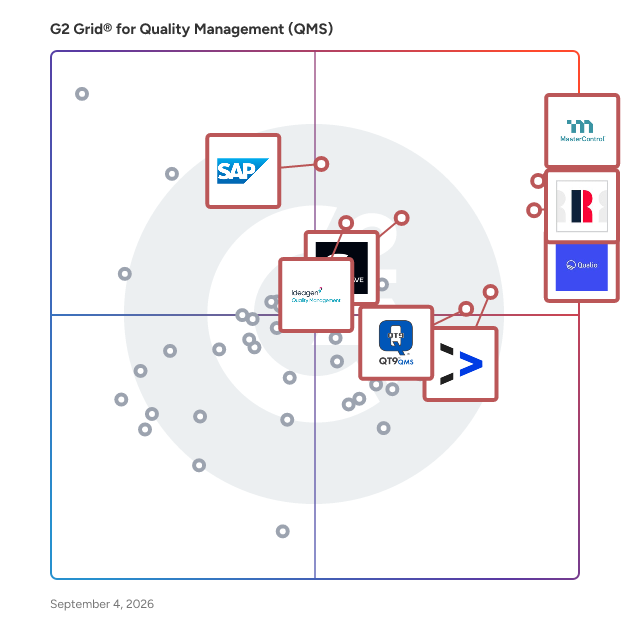
G2 Grid® for Quality Management Systems (QMS)

G2 Grid® for Quality Management Systems (QMS) plotting products by satisfaction and market presence

Highlighted products: MasterControl Quality Management System, Qualio, Redzone, EASE, Octave Reliance (ETQ Reliance), SAP Cloud ERP (SAP S/4HANA Cloud), QT9 QMS, and Ideagen Quality Management.

Underlying data: [Grid® JSON](https://www.g2.com/categories/quality-management-qms/grids.json?focus%5B%5D=mastercontrol-quality-management-system&focus%5B%5D=qualio&focus%5B%5D=qad-redzone&focus%5B%5D=ease-inc-ease&focus%5B%5D=octave-reliance-etq-reliance&focus%5B%5D=sap-cloud-erp-sap-s-4hana-cloud&focus%5B%5D=qt9-qms&focus%5B%5D=ideagen-quality-management)

MasterControl Quality Management System

MasterControl Quality Excellence (Qx) is the #1 Quality Management System (QMS) in life sciences. Built on an AI-driven platform, it enables life-sciences companies to enable flexible quality event management, simplified document management, and automated training management—that all work seamlessly together to close the loop on quality. Qx is trusted by more than 1,300 pharmaceutical, biotech, and medical device companies. Qx is an electronic quality management system (eQMS) purpose-built for regulated manufacturers that must comply with FDA 21 CFR Part 11, EU GMP Annex 11, ISO 13485, GxP, and other global quality requirements, including EMA, MHRA, Health Canada, TGA, and PMDA jurisdictions. Qx connects document control, change control, training, quality event management (including CAPA), audits, and risk in a single closed-loop system, so information moves automatically between processes instead of through manual handoffs. When a document changes, training assignments trigger automatically. When a quality event opens, related CAPAs launch with context already populated. Every action generates an immutable, audit-ready record — so instead of assembling evidence before an inspection, teams retrieve it in seconds. Qx's patented Validation Excellence Tool (VxT) and Validation on Demand (VoD) reduce computer system validation from a months-long project to a process measured in minutes, aligned with FDA Computer Software Assurance (CSA) guidance — more than 90% of VxT customers perform no additional formal testing. Compliant, purpose-built AI tools accelerate document review, exam creation, and quality event summarization while keeping humans in control. Used by pharmaceutical, biotech, and medical device manufacturers across North America, Europe, Asia-Pacific, and other global regulated markets, Qx scales from single-site startups to global, multi-site enterprises on one validated platform — no re-platforming required as organizations grow. Natively connected to MasterControl Manufacturing Excellence (Mx) and Asset Excellence (Ax), Qx extends quality directly to the shop floor and into asset management, creating one source of truth across the entire regulated operation.

Average Rating: 4.3/5.0

Total Reviews: 526

How Do G2 Users Rate MasterControl Quality Management System?

  • Has the product been a good partner in doing business?: 8.8/10 (Category avg: 9.1/10)
  • Corrective Actions: 7.5/10 (Category avg: 8.8/10)
  • Conformance Records: 7.6/10 (Category avg: 8.9/10)
  • Flexibility: 7.6/10 (Category avg: 8.6/10)

Who Is the Company Behind MasterControl Quality Management System?

  • Seller: MasterControl
  • Company Website:
  • Year Founded: 1993
  • HQ Location: Salt Lake City, UT
  • Twitter: @MCMasterControl
    6,258 Twitter followers
  • LinkedIn® Page: www.linkedin.com
    690 employees on LinkedIn®

Who Uses This Product?

  • Who Uses This: Quality Assurance Specialist, Quality Engineer
  • Top Industries: Pharmaceuticals, Medical Devices
  • Company Size: 64% Medium, 25% Large

What Do G2 Reviewers Say About MasterControl Quality Management System?

AI-generated summary from verified user reviews

Pros
  • Users highlight the user-friendly interface of MasterControl, which simplifies quality management and enhances operational efficiency.
  • Users appreciate the centralized document management of MasterControl, enhancing collaboration and streamlining compliance processes.
  • Users appreciate the user-friendly training system that integrates seamlessly with other quality management functions.
  • Users value the integration and efficiency of MasterControl's document control, enhancing compliance and process management.
  • Users value the consistency and ease of use of MasterControl, enhancing efficiency and adaptability for teams.
Cons
  • Users find MasterControl's interface not intuitive, as it can be complicated and intimidating for new users.
  • Users find a learning curve with MasterControl, requiring time to acclimate and fully utilize the system's features.
  • Users find difficult usability in MasterControl's Quality Management System, struggling with report creation and navigation.
  • Users find the MasterControl interface not user-friendly, especially for newcomers struggling with its complexity.
  • Users find the complex setup of MasterControl can lead to manual updates and training gaps for trainees.

What Are Recent G2 Reviews of MasterControl Quality Management System?

What Are G2 Users Discussing About MasterControl Quality Management System?

Qualio

Qualio is a quality management and compliance platform built exclusively for life sciences companies. It helps medical device, pharmaceutical, biotech, and digital health organizations accelerate regulatory approvals, stay audit-ready, and scale compliance operations without adding headcount. Our platform manages the full range of quality processes, including document control, training, CAPA, change control, supplier management, risk management, and design controls, all in one validated system, supporting FDA 21 CFR Part 11, ISO 13485, EU MDR, MDSAP, GxP, ICH Q10, and other life sciences requirements. Move faster without compliance as the bottleneck. Qualio connects regulatory affairs, quality, and R&D in one platform, with deep integrations into Jira, Azure DevOps, GitHub, Salesforce, and other tools teams already use, removing the handoffs and manual documentation that typically slow product development down. Get to market faster. Automated gap analysis and multi-framework compliance mapping cut audit preparation time by 80%. Reusing evidence across FDA, ISO, and EU submissions has helped customers shrink market entry timelines from 9 months to 3-4 months, while cross-mapped documentation accelerates 510(k) submissions, CE marking, and international expansion. Scale without growing your compliance overhead. Customers report a 99% reduction in quality administrative time and have eliminated $150K-$300K in annual consulting costs by replacing manual processes, driving 5X ROI within 2 months. See risk before it becomes a finding. End-to-end traceability connects requirements, risk assessments, CAPAs, and product changes, with risk-based alerting that flags gaps before they turn into FDA 483 observations, warning letters, or audit findings. Customers have passed ISO 13485 certifications and sponsor audits with zero major nonconformances using this always-on monitoring. Qualio serves life sciences companies from pre-market startups to established enterprises, with the SOC 2, HIPAA, and pharmacovigilance capabilities growth-stage companies need, deploying faster than legacy eQMS vendors while maintaining the validation rigor required for FDA inspections and notified body audits.

Average Rating: 4.4/5.0

Total Reviews: 775

How Do G2 Users Rate Qualio?

  • Has the product been a good partner in doing business?: 9.1/10 (Category avg: 9.1/10)
  • Corrective Actions: 8.5/10 (Category avg: 8.8/10)
  • Conformance Records: 8.7/10 (Category avg: 8.9/10)
  • Flexibility: 8.4/10 (Category avg: 8.6/10)

Who Is the Company Behind Qualio?

  • Seller: Qualio
  • Company Website:
  • Year Founded: 2012
  • HQ Location: San Francisco, California
  • Twitter: @qualiohq
    711 Twitter followers
  • LinkedIn® Page: www.linkedin.com
    124 employees on LinkedIn®

Who Uses This Product?

  • Who Uses This: Quality Manager, Clinical Data Associate
  • Top Industries: Medical Devices, Pharmaceuticals
  • Company Size: 52% Medium, 40% Small

What Do G2 Reviewers Say About Qualio?

AI-generated summary from verified user reviews

Pros
  • Users find Qualio to be incredibly easy to use, enhancing the training experience with its intuitive interface.
  • Users appreciate the user-friendly training modules of Qualio, which enhance efficiency and simplify tracking training progress.
  • Users value the extremely searchable document management system in Qualio, enhancing control and ease of use.
  • Users appreciate the efficient document control of Qualio, enhancing organization and simplifying the approval process.
  • Users love Qualio's intuitive interface, making it easy to navigate, learn, and improve collaboration effectively.
Cons
  • Users find document update triggers problematic due to multiple change requests, creating complexity in document management.
  • Users express frustration over feature limitations in Qualio, affecting access, updates, and overall experience.
  • Users find difficult usability in Qualio, particularly with editing older document versions and feedback on answers.
  • Users find Qualio's interface not user-friendly, citing rigidity and limited customization options that hinder their experience.
  • Users face editing difficulties with table formatting and lack timely notifications for overdue document reviews in Qualio.

What Are Recent G2 Reviews of Qualio?

What Are G2 Users Discussing About Qualio?

Redzone

Redzone is the #1 connected workforce solution on a mission to empower frontline teams with AI-powered manufacturing software. As a whole-plant solution, it digitizes and simplifies work for production, maintenance, and quality teams on a single platform, focusing on manufacturers' strategic goals for deployment. Factories using Redzone connect and engage the frontline, equipping them with communication, collaboration, and AI tools specifically designed for manufacturing. Redzone Productivity Solutions Redzone empowers manufacturers with a comprehensive suite designed to enhance efficiency through Champion AI. Our solutions include: * OEE Monitoring: Track and optimize Overall Equipment Effectiveness in real time * Real-Time Dashboards: Gain immediate visibility into operations * Communication Tools: Facilitate collaboration with chats, huddles, and collaboration, all with live translation capabilities * Action Management: Streamline task execution and follow-up * Continuous Improvement (CI) Routines: Foster ongoing operational enhancements By leveraging these tools, manufacturers can enhance processes, drive digital and lean transformations, enable paperless quality and compliance, execute Total Productive Maintenance (TPM) programs, and accelerate frontline training and onboarding. Key Benefits * 26% Productivity Improvement: Achieve this in just 90 days, with ROI in 3 to 6 months * 81% Increase in Frontline Engagement: Supported by our connected Learning Management System, along with a 35% reduction in employee turnover * 24% Reduction in Unplanned Downtime: Enabled by our connected Computerized Maintenance Management System (CMMS) * Stay Audit-Ready: Always prepared with our connected Quality Management System (QMS) Who We Serve Redzone supports over 2000 global manufacturers, enhancing engagement and purpose among hundreds of thousands of frontline workers across sectors, including Food & Beverage, CPG, Automotive, Pharmaceuticals, and Industrial. Platform Redzone is a mobile-first solution (iOS, Android, Google) designed for the plant floor, featuring TV display capabilities for real-time visibility. Reporting and administration are browser-based and accessible on any device. Integrations Redzone seamlessly integrates with ERP systems like SAP, S4Hana, Oracle, D365, Sage X3, and QAD, as well as CMMS, MES, EAM, and QMS platforms via standard API integration. Company Overview: Redzone, a subsidiary of QAD, is a privately held company headquartered in Miami, Florida. We serve manufacturers worldwide, providing innovative solutions to enhance operational efficiency and productivity.

Average Rating: 4.8/5.0

Total Reviews: 624

How Do G2 Users Rate Redzone?

  • Has the product been a good partner in doing business?: 9.6/10 (Category avg: 9.1/10)
  • Corrective Actions: 8.3/10 (Category avg: 8.8/10)
  • Conformance Records: 9.2/10 (Category avg: 8.9/10)
  • Flexibility: 9.4/10 (Category avg: 8.6/10)

Who Is the Company Behind Redzone?

  • Seller: QAD
  • Company Website:
  • Year Founded: 1979
  • HQ Location: Santa Barbara, CA
  • Twitter: @QAD_Community
    3,248 Twitter followers
  • LinkedIn® Page: www.linkedin.com
    1,563 employees on LinkedIn®

Who Uses This Product?

  • Who Uses This: Plant Manager, Continuous Improvement Manager
  • Top Industries: Food Production, Food & Beverages
  • Company Size: 79% Medium, 11% Large

What Do G2 Reviewers Say About Redzone?

AI-generated summary from verified user reviews

Pros
  • Users find RedZone's ease of use notable, facilitating quick onboarding and effective team communication.
  • Users value the effective plant-wide communication in Redzone, enhancing team support and operational efficiency.
  • Users praise the efficiency improvement with Redzone, noting quick processes and effective team communication.
  • Users value the expert coaching support provided by Redzone, ensuring quick adaptation and effective implementation for teams.
  • Users value the significant productivity improvement Redzone provides through real-time data and efficient communication tools.
Cons
  • Users find the learning curve steep, as mastering features and setup requires time and adjustments for optimal use.
  • Users struggle with the platform compatibility of Redzone, wishing for broader support beyond just iOS devices.
  • Users find the complex setup of RedZone to be time-consuming and frustrating, impacting overall usability.
  • Users find data management limitations in Redzone frustrating, as it complicates compliance and customization processes.
  • Users express frustration with limited features in Redzone, affecting functionality and integration with maintenance processes.

What Are Recent G2 Reviews of Redzone?

EASE

EASE is the AI-Powered Audit Management Platform for manufacturers. It's how plants catch, correct, and prevent execution drift, the gap between defined standards and what actually happens on the plant floor. Uncaught, that gap leads to non-conformances: scrap, escapes, customer complaints. Today, nearly 300,000 users across 3,500+ plants in 60 countries complete 6 million+ audits a year, and counting. Quality, EHS, and Operations leaders in automotive, aerospace, food and beverage, consumer goods, and industrial plants use EASE to run the audits that make sure what's supposed to happen actually does: layered process audits (LPAs), safety inspections, Gemba walks, 5S, quality checks. Scheduling and visibility keep programs built around IATF 16949, ISO 9001, AS9100, and ISO 45001 on cadence across shifts, lines, and sites. Most audit software does one job well: documenting what you found. Then the finding sits. Someone chases it. The same problem comes back next quarter on a different shift. EASE is built for what comes after the catch: the failed question becomes a finding with an owner the moment it happens, corrective action and root cause analysis follow, retraining is assigned straight from the finding, and validation confirms the fix held, so what gets found gets fixed, and stays fixed. One system. The whole loop. Day to day, that looks like: - Audit at the line, not at a desk later, with native iOS, Android, and Windows apps, offline included - Build your own audits from a shared question library, and change them yourself as your control plan and PFMEA evolve - Hold the LPA cadence with layer-based scheduling and reminders, so coverage stays visible, missed audits drop, and on-time completion climbs - Close every finding with owned corrective actions, root cause analysis, validation, and retraining assigned straight from the finding, AI-drafted from your own SOPs - Track leading indicators on real-time dashboards, with AI-summarized reports that flag patterns by auditor and location and recommend where to act - Drive adoption at scale: unlimited users at every tier, no email needed to log in, and AI translation across 29 languages, so the whole floor is in the system, not just the quality desk Turning audits into continuous improvement means big results. Dana cut internal defect PPM by 47%. Eaton cut customer escapes in half. One Tier 1 automotive supplier climbed from 40% to 91% audit completion after leaving a legacy LPA tool behind. And between audits, EASE IQ's AI camera vision monitors plant-floor conditions and routes what it detects into the same findings and corrective action workflows. The loop runs even when nobody is walking the line. With EASE, you get visibility. Visibility drives accountability. Accountability builds operational discipline. That is what EASE delivers.

Average Rating: 4.6/5.0

Total Reviews: 232

How Do G2 Users Rate EASE?

  • Has the product been a good partner in doing business?: 9.4/10 (Category avg: 9.1/10)
  • Corrective Actions: 8.8/10 (Category avg: 8.8/10)
  • Conformance Records: 9.1/10 (Category avg: 8.9/10)
  • Flexibility: 8.8/10 (Category avg: 8.6/10)

Who Is the Company Behind EASE?

  • Seller: Ease.io
  • Company Website:
  • Year Founded: 1986
  • HQ Location: Irvine, California
  • Twitter: @easeaudits
    1,043 Twitter followers
  • LinkedIn® Page: www.linkedin.com
    89 employees on LinkedIn®

Who Uses This Product?

  • Who Uses This: Quality Manager, Quality Engineer
  • Top Industries: Automotive, Manufacturing
  • Company Size: 61% Medium, 25% Large

What Do G2 Reviewers Say About EASE?

AI-generated summary from verified user reviews

Pros
  • Users find the ease of use in EASE exceptional, allowing for effortless scheduling and customization for their business needs.
  • Users find EASE to be easy to use, enjoying its intuitive design and efficient audit capabilities.
  • Users value the ease of creating and tracking audits, highlighting its straightforward implementation and user-friendly design.
  • Users find EASE to be intuitive and user-friendly, making it easy to document issues and customize features.
  • Users commend the ease of auditing with EASE, simplifying the process and enhancing customization for business needs.
Cons
  • Users find the inefficiency in workflows and report generation to be a significant drawback of EASE.
  • Users find the limited customization options in EASE restrict their experience and hinder overall efficiency.
  • Users find the limited options for workflow customization hinder efficient processes and complicate user experience.
  • Users find EASE not user-friendly, citing difficulties with login and confusing design features that hinder its usability.
  • Users experience inadequate reporting in EASE, finding it time-consuming and missing essential notes for audits.

What Are Recent G2 Reviews of EASE?

Octave Reliance (ETQ Reliance)

Octave Reliance® (formerly ETQ Reliance) is the leading provider of quality, EHS and compliance management software, trusted by the world’s strongest brands. More than 600 customers globally, spanning industries such as manufacturing, medical devices, electronics, heavy industry, food and beverage, pharmaceuticals and automotive, use Reliance to secure positive brand reputations, enable higher levels of customer loyalty and enhance profitability. Octave Reliance offers built-in best practices and powerful flexibility to drive business excellence through quality. Reliance QMS provides customers with a suite of fundamental capabilities and a set of core applications that optimize quality management programs: • Document Control • Change Management • Audit Management • Corrective Action (CAPA) • Insights Advanced Analytics • Training Management • Suppliers, Materials and Chemicals • And more Reliance customers have long relied on its comprehensive, cross-industry portfolio of QMS applications to advance their quality programs and meet critical business goals. With Reliance NXG, customers can now accelerate their quality journey into the resilient and adaptable world of cloud-native quality and safety management, advanced analytics, controlled ubiquitous access and enterprise digital transformation. Reliance NXG allows customers to effectively future-proof their quality management systems and provide a powerful catalyst to digital transformation in their organizations. The technological foundation of Reliance NXG is based on four value pillars: usability, flexibility, visibility and scalability, enabled by advanced cloud-native technologies and a transformational vision. • Usability: The solution’s new search capability enables users to quickly find anything within the system, with enhanced navigation to streamline the user experience from any device. • Flexibility: New integration features, built upon a multi-tenant architecture, allow customers to break down the barriers that limit collaboration and keep up with changes in their business. • Visibility: Digital transformation efforts will drive QMS solutions deeper into an organization’s enterprise technology stack. Powered by Insights analytics, workflows can be configured to automatically classify events, improving the speed and accuracy of decisions. Users are provided not just with better information, but also guidance that can be used to streamline investigations and root cause analyses. • Scalability: The cloud-native QMS enables enterprise-wide quality processes, providing support for any number of users, any volume of data and any configuration with a high availability architecture with no single point of failure. Customers in regulated markets can leverage expedited validation and risk-based verification in Reliance to reduce testing effort required. Octave Reliance was originally founded in 1992 as ETQ and has main offices located in the U.S. and Europe. To learn more about Octave Reliance and its various product offerings, visit https://www.octave.com/products/asset-performance-management/reliance.

Average Rating: 4.3/5.0

Total Reviews: 608

How Do G2 Users Rate Octave Reliance (ETQ Reliance)?

  • Has the product been a good partner in doing business?: 8.1/10 (Category avg: 9.1/10)
  • Corrective Actions: 8.4/10 (Category avg: 8.8/10)
  • Conformance Records: 8.3/10 (Category avg: 8.9/10)
  • Flexibility: 7.9/10 (Category avg: 8.6/10)

Who Is the Company Behind Octave Reliance (ETQ Reliance)?

  • Seller: Octave
  • Company Website:
  • HQ Location: Madison, US
  • LinkedIn® Page: www.linkedin.com
    3,835 employees on LinkedIn®

Who Uses This Product?

  • Who Uses This: Quality Manager, Quality Engineer
  • Top Industries: Medical Devices, Pharmaceuticals
  • Company Size: 50% Large, 41% Medium

What Do G2 Reviewers Say About Octave Reliance (ETQ Reliance)?

AI-generated summary from verified user reviews

Pros
  • Users appreciate the ease of use of Octave Reliance, highlighting simple workflows and effortless user integration.
  • Users value the ease of use and customizable features of ETQ Reliance, enhancing interaction and performance significantly.
  • Users value the customizability of ETQ Reliance, enabling tailored solutions for their unique organizational needs.
  • Users love the customization options with Octave Reliance, enhancing functionality and tailoring the system to their needs.
  • Users value the easy-to-use document management features of Octave Reliance, enhancing performance and interaction with the company.
Cons
  • Users are frustrated by missing features in Octave Reliance, particularly concerning mobile capabilities and access limitations.
  • Users experience feature limitations in ETQ Reliance, particularly with customization, mobile capabilities, and access issues.
  • Users face challenges with limited customization options in ETQ Reliance, making the onboarding and setup processes cumbersome.
  • Users express frustration over the missing functionality in Octave Reliance, impacting usability and training efficiency.
  • Users find the not user-friendly nature of ETQ Reliance frustrating, especially during employee onboarding and workflow setup.

What Are Recent G2 Reviews of Octave Reliance (ETQ Reliance)?

What Are G2 Users Discussing About Octave Reliance (ETQ Reliance)?

SAP Cloud ERP (SAP S/4HANA Cloud)

SAP Cloud ERP (S/4HANA Cloud) is a modular, cloud-based enterprise resource planning (ERP) solution that brings embedded AI into core business processes to help organizations of any size improve productivity, efficiency, and scalability. It supports critical business functions including finance, supply chain, human resources, and sales, while providing industry best-practice processes, predictable subscription-based costs, and the flexibility to add capabilities, users, and functionality as business needs evolve. With proven implementation tools and preconfigured processes, SAP Cloud ERP enables organizations to go live quickly and confidently while supporting ongoing growth and innovation. For midsize organizations who want to adopt SAP Cloud ERP the primary offering is SAP GROW, which combines SAP Cloud ERP with preconfigured best practices, implementation services, and adoption resources to help businesses achieve rapid, scalable cloud ERP deployment. For even quicker deployment, there’s SAP GROW Fast, a prepackaged offering delivered by SAP partners.

Average Rating: 4.4/5.0

Total Reviews: 946

How Do G2 Users Rate SAP Cloud ERP (SAP S/4HANA Cloud)?

  • Has the product been a good partner in doing business?: 8.7/10 (Category avg: 9.1/10)
  • Corrective Actions: 8.8/10 (Category avg: 8.8/10)
  • Conformance Records: 8.8/10 (Category avg: 8.9/10)
  • Flexibility: 8.9/10 (Category avg: 8.6/10)

Who Is the Company Behind SAP Cloud ERP (SAP S/4HANA Cloud)?

  • Seller: SAP
  • Company Website:
  • Year Founded: 1972
  • HQ Location: Walldorf
  • Twitter: @SAP
    297,052 Twitter followers
  • LinkedIn® Page: www.linkedin.com
    149,349 employees on LinkedIn®

Who Uses This Product?

  • Who Uses This: Consultant, Senior Consultant
  • Top Industries: Information Technology and Services, Accounting
  • Company Size: 48% Large, 35% Medium

What Do G2 Reviewers Say About SAP Cloud ERP (SAP S/4HANA Cloud)?

AI-generated summary from verified user reviews

Pros
  • Users appreciate the ease of use of SAP Cloud ERP, making it effective and time-saving for daily tasks.
  • Users appreciate the cloud-based architecture of SAP S/4HANA Cloud for its scalability and reduced IT overhead.
  • Users value the real-time processing and industry-specific functionalities of SAP S/4HANA Cloud for enhanced financial management.
  • Users appreciate the real-time efficiency of SAP S/4HANA Cloud, with instant access to reports and accurate data.
  • Users value the real-time data capabilities of SAP S/4HANA Cloud, enhancing decision-making with instant access to analytics.
Cons
  • Users find the complexity and restrictions of SAP Cloud ERP challenging, leading to costly implementations and training needs.
  • Users find the learning curve steep for SAP Cloud ERP, making initial understanding and training challenging.
  • Users find the learning difficulty significant, as the complex system necessitates extensive training for new users.
  • Users find the complex setup of SAP Cloud ERP challenging, often requiring extensive training and expert assistance.
  • Users find the limited customization of SAP Cloud ERP restrictive, hindering adaptation to unique business processes.

What Are Recent G2 Reviews of SAP Cloud ERP (SAP S/4HANA Cloud)?

What Are G2 Users Discussing About SAP Cloud ERP (SAP S/4HANA Cloud)?

QT9 QMS

QT9™ QMS is your all-in-one quality management software. Centralize more quality data metrics than any other platform standard. Easy-to-use & ready-to-go. Fully-validated. Start a trial. All-In-One QMS QT9 provides an integrated solution with 25+ quality modules that include Document Management, Maintenance, Product, Customer, Supplier, Employee Training, ISO, FDA and regulatory compliance automation. Be more efficient with electronic signature approvals, dashboards, automated reminders, multi-site ready, approval management, web portals, user to-do lists and more. Simplify Compliance Make audits easy with one central place to see real-time data for FDA 21 CFR Part 11, FDA 21 CFR Part 210/211, FDA 21 CFR Part 820, ISO 9001, ISO 13485, ISO 14001, ISO 17025, AS9100, HACCP and SQF. Ideal for Life Sciences, Biotechnology, Medical Device Manufacturers, Pharmaceutical Companies, Laboratories, Aerospace and Defense Companies and Foods. Easy-To-Use QT9 QMS is easy to setup and use. See a demo and get started with a free trial today. We offer lots of resources including: QT9 Help, Training Academy, Support Requests, Training Webinars, Content Customization, Free Maintenance, Unlimited Training and Unlimited Support. For more information, visit QT9software.com.

Average Rating: 4.8/5.0

Total Reviews: 125

How Do G2 Users Rate QT9 QMS?

  • Has the product been a good partner in doing business?: 9.6/10 (Category avg: 9.1/10)
  • Corrective Actions: 9.4/10 (Category avg: 8.8/10)
  • Conformance Records: 9.3/10 (Category avg: 8.9/10)
  • Flexibility: 9.0/10 (Category avg: 8.6/10)

Who Is the Company Behind QT9 QMS?

  • Seller: QT9 Software
  • Company Website:
  • Year Founded: 2005
  • HQ Location: Aurora, Illinois
  • Twitter: @Qt9Software
    26 Twitter followers
  • LinkedIn® Page: www.linkedin.com
    69 employees on LinkedIn®

Who Uses This Product?

  • Who Uses This: Quality Manager, Quality Assurance Manager
  • Top Industries: Medical Devices, Manufacturing
  • Company Size: 54% Medium, 45% Small

What Do G2 Reviewers Say About QT9 QMS?

AI-generated summary from verified user reviews

Pros
  • Users appreciate the intuitive interface of QT9 QMS, enabling quick team adoption and efficient project management.
  • Users praise QT9 QMS for its intuitive setup and task automation, making it ideal for quick implementation.
  • Users commend QT9 QMS for its outstanding customer support, highlighted by responsive and knowledgeable team members who assist promptly.
  • Users appreciate the modular integration of QT9 QMS, enhancing efficiency and supporting seamless quality management across teams.
  • Users value the ease of maintaining audit readiness with QT9, appreciating organized access to critical documents and records.
Cons
  • Users face challenges with setup pre-requisites and control issues, leading to incomplete module implementations in QT9 QMS.
  • Users find the complex setup of QT9 QMS challenging, often requiring extensive time and effort to configure.
  • Users find the difficult usability of QT9 QMS hinders their experience, with complex settings and limited calibration features.
  • Users report feature limitations in QT9 QMS, including restrictions on calibrations and insufficient search functions.
  • Users experience a steep learning curve with QT9 QMS, requiring time and support to navigate the interface effectively.

What Are Recent G2 Reviews of QT9 QMS?

What Are G2 Users Discussing About QT9 QMS?

Ideagen Quality Management

Ideagen Quality Management is a cloud-based quality management system (QMS) that enables quality and operations managers in regulated industries to manage compliance, CAPA workflows, audits, document control and supplier quality across multiple sites from one connected platform. Named a Leader in the Verdantix Green Quadrant 2026, an independent analysis of 14 QMS platforms serving life sciences, healthcare and manufacturing, Ideagen received perfect scores of 3.0/3.0 for AI operations and supplier quality management. AI is embedded into quality workflows from the ground up, not added as a feature layer. Ideagen Mazlan uses an organization's own QMS data to draft policies, guide investigations, flag compliance gaps ahead of audits and track regulatory changes across jurisdictions in real time. What previously took three days of investigation takes three hours. The platform is purpose-built for GxP and regulated environments and reaches 80%+ adoption on the floor. Most QMS failures trace back to the same causes: quality data fragmented across sites, CAPA processes managed in email chains and documentation that is out of date before it reaches the people who need it. Ideagen Quality Management addresses these directly by centralizing quality workflows and automating document version control and approvals, eliminating the manual overhead that creates compliance risk across sites. Core capabilities include: Non-conformance and CAPA management: capture every non-conformance, guide root cause analysis and track corrective actions through to verified closure so the same issue does not recur Document control: automated versioning, approval workflows and full audit trails ensure every site works from the current, controlled version Audit and inspection management: plan, manage and evidence every audit in one place, with AI-driven monitoring delivering 99%+ reduction in audit findings Supplier quality management: monitor supplier performance, manage non-conformances and coordinate corrective actions across the supply chain Training and competency management: track certifications, qualifications and completion status — new hire training time reduced by 40% Regulatory intelligence: multi-jurisdictional regulatory change monitoring with automated alerts and impact analysis Organizations using the platform report 25-40% improvements in compliance audit scores, 50% faster CAPA cycle times and 30-50% reductions in documentation time. Customers include Nuffield Health, Torbay Pharmaceuticals, Fresenius Kabi, Vector Aerospace and Whyte & Mackay. The platform integrates with ERP, PLM, MES and HR systems and is available in cloud and on-premise deployments. Ideagen Quality Management is well suited to mid-market and enterprise organizations in regulated industries managing quality across multiple sites or standards, where fragmented systems and manual processes create compliance and operational risk.

Average Rating: 4.0/5.0

Total Reviews: 494

How Do G2 Users Rate Ideagen Quality Management?

  • Has the product been a good partner in doing business?: 7.8/10 (Category avg: 9.1/10)
  • Corrective Actions: 7.8/10 (Category avg: 8.8/10)
  • Conformance Records: 8.0/10 (Category avg: 8.9/10)
  • Flexibility: 6.9/10 (Category avg: 8.6/10)

Who Is the Company Behind Ideagen Quality Management?

  • Seller: Ideagen
  • Company Website:
  • Year Founded: 2000
  • HQ Location: Ruddington, Nottingham
  • Twitter: @Ideagen_
    2,172 Twitter followers
  • LinkedIn® Page: www.linkedin.com
    1,386 employees on LinkedIn®

Who Uses This Product?

  • Who Uses This: Quality Manager, Quality Engineer
  • Top Industries: Hospital & Health Care, Manufacturing
  • Company Size: 55% Medium, 26% Small

What Do G2 Reviewers Say About Ideagen Quality Management?

AI-generated summary from verified user reviews

Pros
  • Users appreciate the ease of use of Ideagen Quality Management, finding it user-friendly for managing QMS activities.
  • Users value the intuitive and comprehensive QMS management that consolidates all activities in one user-friendly platform.
  • Users appreciate the improved customer service of Ideagen Quality Management, contributing to a better overall experience.
  • Users value the organized documentation and automated conformance features of Ideagen Quality Management, enhancing compliance and efficiency.
  • Users value the efficiency of document control in Ideagen Quality Management, streamlining supplier interactions and ensuring compliance.
Cons
  • Users find customer support inadequate, citing slow responses and a lack of competence in resolving issues promptly.
  • Users face difficult usability with Ideagen Quality Management, struggling with bugs and limited reporting capabilities.
  • Users note that the expensive licensing and support costs significantly impact the overall value of Ideagen Quality Management.
  • Users are frustrated with the slow performance of Ideagen Quality Management, causing significant work delays and inefficiencies.
  • Users report experiencing software bugs that cause crashes and technical errors, affecting the workflow and user satisfaction.

What Are Recent G2 Reviews of Ideagen Quality Management?

Qualityze EQMS

Qualityze EQMS refers to the enterprise-level quality management capabilities delivered through the Qualityze platform. It is essentially Qualityze’s comprehensive, cloud-based system that helps organizations manage and automate quality and compliance processes at scale. Qualityze EQMS enables companies—especially in Life Sciences and Manufacturing—to centralize key quality functions such as CAPA, nonconformance, audits, document control, training, supplier quality, and complaints within a single, connected environment. Built natively on Salesforce, it provides strong data visibility, workflow automation, traceability, and enterprise scalability. In simple terms, Qualityze EQMS is the full, enterprise-grade quality management environment within Qualityze that supports complex, multi-site, and highly regulated operations while helping teams stay audit-ready and compliant.

Average Rating: 5.0/5.0

Total Reviews: 12

How Do G2 Users Rate Qualityze EQMS?

  • Has the product been a good partner in doing business?: 10.0/10 (Category avg: 9.1/10)
  • Corrective Actions: 10.0/10 (Category avg: 8.8/10)
  • Conformance Records: 10.0/10 (Category avg: 8.9/10)
  • Flexibility: 10.0/10 (Category avg: 8.6/10)

Who Is the Company Behind Qualityze EQMS?

  • Seller: Qualityze
  • Year Founded: 2015
  • HQ Location: Tampa, US
  • Twitter: @qualityze
    236 Twitter followers
  • LinkedIn® Page: www.linkedin.com
    77 employees on LinkedIn®

Who Uses This Product?

  • Top Industries: Medical Devices
  • Company Size: 75% Medium, 17% Large

What Do G2 Reviewers Say About Qualityze EQMS?

AI-generated summary from verified user reviews

Pros
  • Users commend Qualityze for their responsive and helpful customer support, ensuring smooth project implementations and problem resolution.
  • Users value the customization capabilities of Qualityze EQMS, allowing tailored solutions that fit their unique organizational needs.
  • Users value the seamless integration of Qualityze EQMS, enhancing efficiency and customization for their quality management needs.
  • Users find the ease of use of Qualityze EQMS exceptional, complemented by supportive training from the Qualityze team.
  • Users value the flexibility of Qualityze EQMS, customizing workflows and solutions to meet specific needs effortlessly.

What Are Recent G2 Reviews of Qualityze EQMS?

Mitti (by SafetyCulture)

Mitti (by SafetyCulture) is the operations system for every site, shift and standard. Trusted by over 80,000 organisations, Mitti brings your people, training records and workflows into one operating picture. From the frontline to the boardroom, it gives everyone a clear understanding of who's trained and ready for the shift ahead, highlights what needs attention and recommends what to do next. Every course completed, skill verified and action taken becomes intelligence your teams can use to improve every day.

Average Rating: 4.6/5.0

Total Reviews: 472

How Do G2 Users Rate Mitti (by SafetyCulture)?

  • Has the product been a good partner in doing business?: 9.2/10 (Category avg: 9.1/10)
  • Corrective Actions: 8.4/10 (Category avg: 8.8/10)
  • Conformance Records: 8.4/10 (Category avg: 8.9/10)
  • Flexibility: 9.1/10 (Category avg: 8.6/10)

Who Is the Company Behind Mitti (by SafetyCulture)?

  • Seller: Mitti
  • Company Website:
  • Year Founded: 2004
  • HQ Location: Surry Hills, New South Wales
  • Twitter: @MittiHQ
    4,867 Twitter followers
  • LinkedIn® Page: www.linkedin.com
    428 employees on LinkedIn®

Who Uses This Product?

  • Who Uses This: Founder, Director
  • Top Industries: Construction, Manufacturing
  • Company Size: 44% Small, 41% Medium

What Do G2 Reviewers Say About Mitti (by SafetyCulture)?

AI-generated summary from verified user reviews

Pros
  • Users value the ease of use of Mitti, enabling quick surveys and reports from any mobile device.
  • Users commend Mitti for its efficiency improvement, significantly streamlining information flow and ensuring timely access to updates.
  • Users value the efficiency of Mitti for streamlining information flow and ensuring timely updates.
  • Users value the customization options of Mitti, enabling easy checklist creation and efficient project management.
  • Users find SafetyCulture's intuitive mobile app enhances usability, streamlining inspections and improving safety management effectively.
Cons
  • Users find missing features in Mitti, such as limited reports and clunky AI, hinder their overall experience.
  • Users find the limited customization in Mitti challenging, particularly with reports and dashboard flexibility.
  • Users struggle with a significant learning curve, finding the interface and AI functionality less intuitive and sometimes clunky.
  • Users express concerns about limited features such as clunky AI functionality and inadequate integration with other tools.
  • Users find the complexity of the interface challenging, leading to a steep learning curve and confusion over features.

What Are Recent G2 Reviews of Mitti (by SafetyCulture)?

What Are G2 Users Discussing About Mitti (by SafetyCulture)?

Plex Smart Manufacturing Platform

Plex, by Rockwell Automation is a leader in cloud-delivered smart manufacturing solutions, empowering the world's manufacturers to make awesome products. The Plex Smart Manufacturing Platform includes solutions for manufacturing execution (MES), ERP, quality, supply chain planning and management, asset performance management, production monitoring, process automation and analytics to connect people, systems, machines and supply chains, enabling them to lead with precision, efficiency and agility. Our platform gives manufacturers the ability to connect, automate, track, and analyze every aspect of their business to drive transformation.

Average Rating: 4.0/5.0

Total Reviews: 74

How Do G2 Users Rate Plex Smart Manufacturing Platform?

  • Has the product been a good partner in doing business?: 7.7/10 (Category avg: 9.1/10)
  • Corrective Actions: 8.5/10 (Category avg: 8.8/10)
  • Conformance Records: 8.5/10 (Category avg: 8.9/10)
  • Flexibility: 7.8/10 (Category avg: 8.6/10)

Who Is the Company Behind Plex Smart Manufacturing Platform?

  • Seller: Rockwell Automation
  • Year Founded: 1903
  • HQ Location: Milwaukee, WI
  • Twitter: @ROKAutomation
    44,405 Twitter followers
  • LinkedIn® Page: www.linkedin.com
    22,901 employees on LinkedIn®
  • Ownership: NYSE:ROK

Who Uses This Product?

  • Top Industries: Automotive, Food & Beverages
  • Company Size: 65% Medium, 23% Large

What Are Recent G2 Reviews of Plex Smart Manufacturing Platform?

What Are G2 Users Discussing About Plex Smart Manufacturing Platform?

Arena PLM & QMS

Arena by PTC is a cloud-native product lifecycle management (PLM) and quality management system (QMS) that unifies product and quality information in a secure, single source of truth. By hosting all electrical, mechanical, and software information in a centralized product record, Arena enables every participant throughout the entire product lifecycle to work together anytime and anywhere, increasing visibility and traceability. This accelerates new product development (NPD) and new product introduction (NPI) by streamlining processes, automating review cycles, and reducing errors. Arena PLM keeps internal teams and supply chain partners on the same page. Our scalable and collaborative platform streamlines engineering change reviews, simplifies bill of materials (BOM) management and document control, mitigates supply chain risk, and helps speed product launches. Arena QMS connects quality and product record information into a single, secure system. Easily traceable closed-loop quality and product processes help you introduce high-quality products to market while ensuring compliance with quality standards and regulations, such as FDA 21 CFR Part 820, FDA 21 CFR Part 11, ISO 13485, and AS 9100. Arena Supply Chain Intelligence (SCI) provides real-time electronic component risk and compliance information to reduce supply chain risk throughout NPI and NPD. With Arena SCI embedded within Arena PLM, you can proactively monitor the health of your BOM, identify component issues before they impact production, mitigate risks throughout the product lifecycle, and ensure electronic component compliance as regulatory requirements evolve. Arena’s AI capabilities create smarter, more personalized experiences that empower every customer while adhering to its responsible AI policies. Arena AI Assistant uses a conversational interface to help users navigate Arena with ease and reduce onboarding time, while Arena AI Engine drives faster document reviews and comparisons to further speed workflows. Arena continuously expands its AI capabilities to empower product teams to focus on innovation and execution. Arena supports more than 1,500 complex high-tech electronics, medical device, and aerospace/defense companies around the world. Using Arena’s proven cloud-native solutions, your internal teams and external partners can leverage the most comprehensive product development platform to accelerate product launches while reducing expenses, increasing profitability, and speeding time to market.

Average Rating: 4.2/5.0

Total Reviews: 456

How Do G2 Users Rate Arena PLM & QMS?

  • Has the product been a good partner in doing business?: 8.8/10 (Category avg: 9.1/10)
  • Corrective Actions: 8.3/10 (Category avg: 8.8/10)
  • Conformance Records: 8.3/10 (Category avg: 8.9/10)
  • Flexibility: 7.9/10 (Category avg: 8.6/10)

Who Is the Company Behind Arena PLM & QMS?

  • Seller: PTC
  • Company Website:
  • Year Founded: 1985
  • HQ Location: Boston, Massachusetts
  • Twitter: @PTC
    37,560 Twitter followers
  • LinkedIn® Page: www.linkedin.com
    8,226 employees on LinkedIn®

Who Uses This Product?

  • Who Uses This: Mechanical Engineer, Engineer
  • Top Industries: Medical Devices, Electrical/Electronic Manufacturing
  • Company Size: 57% Medium, 26% Small

What Do G2 Reviewers Say About Arena PLM & QMS?

AI-generated summary from verified user reviews

Pros
  • Users find Arena PLM & QMS to be user-friendly, with excellent support and seamless integration enhancing their experience.
  • Users value the structured document management in Arena PLM & QMS, enhancing efficiency and compliance in workflows.
  • Users find Arena PLM & QMS's document control system convenient and effective for compliance and workflow management.
  • Users value the ease of use of Arena PLM & QMS, highlighting seamless migrations and responsive support.
  • Users praise the excellent customer support of Arena PLM & QMS, appreciating quick and effective assistance at all times.
Cons
  • Users find feature limitations in Arena PLM & QMS, especially needing extra tools for better tracking and integration.
  • Users identify missing features like auto text and better template creation, hindering efficiency in project tracking.
  • Users find the difficult usability of Arena PLM & QMS frustrating, especially when transitioning from other systems.
  • Users experience limited functionality in Arena PLM & QMS, requiring additional software for effective production tracking.
  • Users find the non-intuitive interface of Arena PLM & QMS frustrating, complicating workflow and navigation.

What Are Recent G2 Reviews of Arena PLM & QMS?

What Are G2 Users Discussing About Arena PLM & QMS?

Greenlight Guru Quality Management System

Greenlight Guru is the #1 quality management system built exclusively for medical device companies. Not life sciences. Not pharma with a medtech configuration layer. Because we built exclusively for medical devices, ISO 13485, ISO 14971, and FDA QMSR aren't frameworks you configure after the fact. They're the foundation. Most quality teams manage compliance across systems that were never designed to talk to each other. A document control tool here, a spreadsheet for CAPAs there, a separate process for change control. In a regulated environment, that gap doesn't stay invisible, it shows up during audits. Greenlight Guru gives Quality and Product teams a single connected system where document control, training, CAPA, nonconformance, change control, supplier management, risk management, and design controls work together. When a change happens, it flows through the workflow. Meaning limited manual handoffs, and nothing falling through the cracks between teams. For Quality and Regulatory Affairs professionals, that means audit-ready workflows with automated routing, electronic signatures, and complete audit trails built in, including end-to-end traceability across design controls. No more chasing approvals or manually tracking compliance status. Teams that run on Greenlight Guru are 3.5x less likely to receive a major audit finding. For R&D and product teams, it means staying in the tools they already use, with changes automatically syncing to design controls so documentation builds itself as you work, not after the fact as a separate project. Greenlight Guru AI handles the repetitive work that slows teams down, and it was built with 15 years of medtech context behind it, not bolted on from a general-purpose model. AI-powered search finds answers across your QMS instantly. Chat analyzes system data to surface insights. Auto-generated summaries give immediate context on documents, suppliers, and quality events. For product teams, verifiability checks catch vague requirements before they become audit findings, suggested links close traceability gaps automatically, and AI brainstorming gets engineers moving faster. For quality teams, AI generates training quizzes and drafts change order summaries, so your team spends less time writing and more time on the work that actually requires their expertise. The platform is validated out of the box and aligned to FDA 21 CFR Part 820/QMSR, ISO 13485, ISO 14971, EU MDR, and FDA 21 CFR Part 11. Implementation is measured in weeks, not the quarters-long projects that come with legacy enterprise platforms. Backed by 80+ audit-tested, customizable templates and a team of experts who know medtech inside and out. You're not managing a separate validation project before you can go live. For 15 years and across more than 1,000 device companies worldwide, Greenlight Guru has been the QMS medical device teams trust to pass audits, bring products to market, and stay on the market longer.

Average Rating: 4.5/5.0

Total Reviews: 420

How Do G2 Users Rate Greenlight Guru Quality Management System?

  • Has the product been a good partner in doing business?: 9.3/10 (Category avg: 9.1/10)
  • Corrective Actions: 8.6/10 (Category avg: 8.8/10)
  • Conformance Records: 8.7/10 (Category avg: 8.9/10)
  • Flexibility: 8.0/10 (Category avg: 8.6/10)

Who Is the Company Behind Greenlight Guru Quality Management System?

  • Seller: Greenlight Guru
  • Company Website:
  • Year Founded: 2013
  • HQ Location: Indianapolis, IN
  • Twitter: @greenlightguru
    10,590 Twitter followers
  • LinkedIn® Page: www.linkedin.com
    135 employees on LinkedIn®

Who Uses This Product?

  • Who Uses This: Quality Manager, CEO
  • Top Industries: Medical Devices, Biotechnology
  • Company Size: 77% Small, 20% Medium

What Do G2 Reviewers Say About Greenlight Guru Quality Management System?

AI-generated summary from verified user reviews

Pros
  • Users highlight the ease of use of Greenlight Guru, appreciating its intuitive design and excellent support.
  • Users find Greenlight Guru's features enhance functionality, making compliance management streamlined and easy to use.
  • Users value the effective training tools provided by Greenlight Guru, facilitating quick and straightforward implementation.
  • Users appreciate the streamlined audit management in Greenlight Guru, facilitating compliance and organization effortlessly.
  • Users value the configurability of Greenlight Guru, enhancing compliance and streamlining quality management processes efficiently.
Cons
  • Users find the pricing to be uncompetitive, especially when faced with additional charges for extra projects.
  • Users find the feature limitations frustrating, particularly with inflexible quality events and costly additional projects.
  • Users find the search function inefficient, wishing for improvements like AI to enhance information retrieval.
  • Users find the inflexibility of quality events frustrating, though the system meets necessary CAPA requirements.
  • Users find analytics to be limited, which restricts valuable data insights and overall functionality.

What Are Recent G2 Reviews of Greenlight Guru Quality Management System?

What Are G2 Users Discussing About Greenlight Guru Quality Management System?

ZenQMS

ZenQMS was founded in 2009 by Life Sciences & quality management veterans with firsthand knowledge of the frustrations and dangers that come with using manual or home-grown systems to manage GxP compliance. As a result, we built software that's easier to use, designed for scale, and geared specifically for the complex and changing needs of Life Sciences companies, large and small. ZenQMS' approach to client engagement is a true outlier, particularly in terms of our pricing model and approach to support / implementation. Our annual fee schedule is totally transparent; it eliminates restrictive seat licenses and a la carte upselling in favor of providing access to ALL MODULES and services for ALL USERS from Day 1. These include connected modules for document control, training, issues, change control, and audits, as well as lifetime in-house support at no additional cost. You don't need an IT team or large QA team to purchase, implement, or manage ZenQMS. We do the heavy lifting with you. ZenQMS meets all 21 CFR Part 11/ Annex 11 and relevant GxP/ ISO requirements for small- and large-scale Life Sciences industries including: Biotech, pharmaceutical companies, CROs, CDMOs, Labs, Packaging and Logistics companies, and GxP Software developers, Commercial ventures/Spin-outs, and Consumer Products organizations. We have hundreds of clients with users in over 100 countries that span pre-clinical to commercial scale. Call us. We can help.

Average Rating: 4.7/5.0

Total Reviews: 122

How Do G2 Users Rate ZenQMS?

  • Has the product been a good partner in doing business?: 9.4/10 (Category avg: 9.1/10)
  • Corrective Actions: 8.4/10 (Category avg: 8.8/10)
  • Conformance Records: 9.1/10 (Category avg: 8.9/10)
  • Flexibility: 9.0/10 (Category avg: 8.6/10)

Who Is the Company Behind ZenQMS?

  • Seller: ZenQMS
  • Company Website:
  • Year Founded: 2010
  • HQ Location: Ardmore, Pennsylvania
  • Twitter: @ZenQMS
    122 Twitter followers
  • LinkedIn® Page: www.linkedin.com
    99 employees on LinkedIn®

Who Uses This Product?

  • Who Uses This: Quality Assurance Manager
  • Top Industries: Pharmaceuticals, Biotechnology
  • Company Size: 49% Medium, 38% Small

What Do G2 Reviewers Say About ZenQMS?

AI-generated summary from verified user reviews

Pros
  • Users commend the ease of use of ZenQMS, finding it intuitive and simple to implement across their organization.
  • Users commend ZenQMS for its responsive and knowledgeable customer support, enhancing confidence in compliance and usability.
  • Users praise the easy implementation of ZenQMS, allowing quick and smooth transitions from traditional systems.
  • Users value the flexibility and configurability of ZenQMS, allowing easy customization to suit specific organizational needs.
  • Users value the clear and organized design of ZenQMS, enhancing their daily Quality Assurance efforts seamlessly.
Cons
  • Users find access restrictions challenging, with difficulties in password recovery and frequent automatic logouts.
  • Users face formatting issues in ZenQMS, particularly with exported reports and online forms in PDFs.
  • Users find the learning curve steep for ZenQMS, needing time to become comfortable with its features.
  • Users find the documents module problematic due to slow support and issues with search and presentation of archived documents.
  • Users find ZenQMS to be not intuitive, struggling with document numbering and a cumbersome signature workflow.

What Are Recent G2 Reviews of ZenQMS?

What Are G2 Users Discussing About ZenQMS?

Tulip

Tulip is a composable platform that manufacturers use to build and connect apps, automations, and AI agents capable of running their operations, giving them a single governed system that can replace or extend legacy MES and other point solutions as their operations change. Core Value Proposition Tulip addresses three problems that come from fragmented operations software. Data and processes end up siloed across separate systems, AI tools lack manufacturing context or governance, and platforms force operations to conform to the software instead of the other way around. Tulip is built as a composable platform, meaning apps, AI agents, automations, connectors, and tables all share one data model and one set of permissions. A solution built for one process or site can be extended or connected to other systems later without being rebuilt. Key Capabilities Composable architecture: Apps, agents, automations, connectors, and tables share one data model and one set of permissions, so new capabilities can be added without rebuilding what's already deployed. Governance built into every solution: Access controls, approval workflows, and an audit trail apply to everything built and deployed, whether it was authored by a person or an AI agent. This supports use in regulated environments such as GxP and life sciences. AI embedded across operations: Tulip's AI agents can draft or update apps, answer questions about the operation, and take certain actions on their own. Customers configure which of those actions require human approval first. Native machine and device connectivity: Edge hardware and a library of device integrations connect directly to machines, PLCs, and sensors, so dashboards and automations reflect current floor conditions instead of a report from the day before. Tulip vs. Alternatives Legacy manufacturing systems such as MES, QMS, and CMMS platforms are typically built around separate functions, so data ends up siloed by software category and changes usually require a vendor or integrator. Tulip's composable architecture lets a company build and adapt its own systems, including systems that do the same job an MES would, without a new vendor project every time a process changes. General-purpose AI tools can generate software quickly, but they typically have no concept of a work order, batch record, or shift, and no governance model for what gets built. Tulip's AI agents work on the same governed data model and permissions as the rest of the platform, so anything they create or do is subject to the same access controls, approval workflows, and audit trail as work built by a person. Who Should Use Tulip Tulip is used by manufacturers in discrete manufacturing industries, including aerospace and defense, automotive, industrial equipment, and luxury goods, as well as life sciences companies producing pharmaceuticals and medical devices. Most customers are mid-market or enterprise manufacturers, often operating multiple plants or sites. Within a company, it typically draws interest from more than one group. Operations and plant managers focus on production issues, IT and compliance teams focus on governance, and executives focus on the cost of maintaining several separate systems. The Results Tulip customers report measurable results across a range of use cases and industries. Quality: VEKA, a manufacturer of fixtures and building materials, reduced quality escapes by 85% after digitizing its quality checks in Tulip. Production tracking: Avon Technologies, an aerospace and defense manufacturer, set up new production lines 3 times faster using Tulip. Compliance and traceability: Jazz Pharma, a pharmaceutical manufacturer, made logbook entries 58% more efficient after moving GMP documentation into Tulip. AI-assisted troubleshooting: Outset Medical, a medical device manufacturer, cut troubleshooting time in half using Tulip's AI-powered chat. Digital work instructions: Tiffany & Co, a luxury goods manufacturer, reduced training time by 80% using digital work instructions built in Tulip. Implementation speed: AstraZeneca, a pharmaceutical manufacturer, deployed more than 120 packing lines across 17 sites using Tulip in under three months.

Average Rating: 4.5/5.0

Total Reviews: 37

How Do G2 Users Rate Tulip?

  • Has the product been a good partner in doing business?: 9.3/10 (Category avg: 9.1/10)
  • Corrective Actions: 7.9/10 (Category avg: 8.8/10)
  • Conformance Records: 8.0/10 (Category avg: 8.9/10)
  • Flexibility: 9.2/10 (Category avg: 8.6/10)

Who Is the Company Behind Tulip?

  • Seller: Tulip Interfaces
  • Year Founded: 2012
  • HQ Location: Somerville, Massachusetts, United States
  • Twitter: @tulipinterfaces
    1,103 Twitter followers
  • LinkedIn® Page: www.linkedin.com
    401 employees on LinkedIn®

Who Uses This Product?

  • Top Industries: Manufacturing
  • Company Size: 43% Medium, 38% Large

What Do G2 Reviewers Say About Tulip?

AI-generated summary from verified user reviews

Pros
  • Users appreciate the ease of use of Tulip, finding its intuitive interface simplifies app development and maintenance.
  • Users value the ease of customization in Tulip, enabling smooth integration and effective application development.
  • Users appreciate the intuitive interface of Tulip, enabling easy application development and seamless integration with systems.
  • Users appreciate the time-saving capabilities of Tulip, enabling quick problem-solving and streamlined app development.
  • Users value the easy integrations of Tulip, enabling quick connections with various devices and services seamlessly.
Cons
  • Users find the limited features of Tulip restrictive, particularly with basic analytics and lack of batch tools.
  • Users note limited functionality in Tulip, mentioning basic analytics and a lack of advanced features for deeper insights.
  • Users find the complexity in expression handling cumbersome, suggesting improvements for better usability and robustness in Tulip Tables.
  • Users find the complex procedures in Tulip cumbersome, indicating a need for more user-friendly functionality and robustness.
  • Users find the complex setup of Tulip challenging, especially with expression handling and dataset management.

What Are Recent G2 Reviews of Tulip?

What Are G2 Users Discussing About Tulip?

Daniel Rivera
DR
Researched and written by Daniel Rivera
Updated October 3, 2024

Learn More About Quality Management Systems (QMS)

What is Quality Management Software?

A quality management system (QMS) streamlines the supply chain by maintaining the main components of quality assurance processes. These components include quality planning, quality control, quality assurance, and quality improvement. This allows businesses to improve the quality of business processes by providing a more efficient system for supply chain quality activities.

Quality management helps companies automate quality compliance processes and align them with industry standards, regulations, and customer requirements. While this type of software usually focuses on product quality, some vendors also provide features to automate quality control for professional services companies. 

What Does QMS Stand For?

QMS stands for quality management system, sometimes referred to as enterprise quality management software (EQMS).

What Types of Quality Management Software Exist?

Quality management software can be delivered as a standalone product or as a module of another software such as ERP systems or environmental, quality, and safety management. 

A QMS is used across various industries, including manufacturing, IT, automotive, medical, food, and various service industries. Each industry has a standard management system which signifies that a company maintains a quality standard for its industry. A few examples of industries with distinctive quality standards are:

Automotive: The international automotive task force has developed its own QMS that applies explicitly to the automotive industry. This QMS focuses on areas such as car safety, warranty management, and car material waste reduction.

Medical QMS: The healthcare industry developed a QMS that has standardized requirements for medical devices. This helps with the design, production, installation, and servicing of all medical devices.

Food: The food industry has developed a standardized QMS that attempts to combat food safety hazards within the food chain. Having a certified food QMS in place communicates to customers that the ingredients going into their food are safe and of a high quality. 

What are the Common Features of Quality Management Software?

The following quality management functionality can help users define, implement, and monitor total quality management activities:

Document control: Often, businesses need to maintain a repository of documents that house best practices and procedures. A QMS can help centralize important documentation that allows workers to access essential business processes and procedures. This helps to promote collaboration, improve decision making, and ultimately save workers' time.

Risk management: QMS allows users to evaluate risk by standardizing risk assessment documentation. This provides procedures, instructions, and records for any risk management.

Inspection management and internal audits: QMS allows businesses to conduct internal audits seamlessly. Within a QMS, users can schedule audits and alert the appropriate workers to complete audits promptly. A QMS can also store audit forms and create reports that analyze audit data.

Corrective and preventive action (CAPA): CAPAs can help provide a structure for what is at the core of a business' inefficiencies. A QMS helps manage and track CAPAs by automatically routing them to quality managers, who can quickly construct a workflow to promptly identify the issue's leading cause. Over time, data collected can be analyzed to determine process improvement areas, such as equipment or materials changes, process redesign, or safety initiatives.

Change management: Quality management software can make change management more efficient and streamlined within a company. With a change management feature, users can summarize what change is occurring within their business and then create the necessary action plans. This helps users determine the impact of a particular change and provides workflows for all teams that need to make necessary changes.

Compliance: Companies need to track regulatory compliance related to quality management for their business. Since regulatory requirements can vary by industry or location, businesses use quality management software to identify and monitor laws and standards applicable to their operations. There are also industry standards established by organizations such as the American Society for Quality, the International Organization for Standardization, or the Food and Drug Administration (FDA) agency in the US.

To ensure compliance with regulations and standards, QMS software includes features for:

  • A repository of compliance data that is updated regularly to provide the latest information and document changes 
  • Quality policy management defines and implements work procedures and processes compliant with standards and regulations
  • Auditing functionality to identify nonconformance or outdated policies and procedures for quality control

Other Features of Quality Management Systems (QMS): Assessments Capabilities, Certifications Capabilities, Supplier Evaluation Capabilities, Workflows Capabilities

What is the best quality management software for tech companies?

Based on expert G2 reviews, these are some of the best quality management software for tech companies:

These tools are designed to help tech companies maintain high standards, ensure compliance, and improve product quality.

What are the Benefits of Quality Management Software?

Implementing QMS is one of the best ways to ensure continuous improvement of the quality of a company's products and services. Users should think of a QMS as a one-stop shop for quality assurance resources and as a way to enable efficient reactions to any opportunities and obstacles that employees may encounter.

Improved documentation: One of the most significant benefits of implementing a QMS is improved documentation of all business processes and procedures. Having all the critical documents in one location enhances visibility and helps mitigate potential risk.

Unified procedures: Having a central location for quality management helps define company standards and establishes how each work process is performed to fit within the business's quality system. Since each company has its own set of documentation, values, and compliance, there must be one unified quality system that establishes how each action fits within the structure of the business.

Maintain strong customer relations: A QMS allows companies to update best business practices that directly correlate to customer demands. Whenever a business identifies consistent customer complaints, users can update procedures accordingly. This results in higher customer satisfaction and improved business retention.

Save time: Ultimately, a QMS is meant to maintain a consistent business practices approach across a company. This means maintaining consistency in project activities, which will improve the use of resources and time within the company. Quality management software can help companies save time on various activities such as new product development, manufacturing, and maintenance.

Who Uses Quality Management Software?

Quality management software is mostly beneficial to the following personas:

Quality control professionals: The quality assurance team members need QMS software to stay up to date with the latest changes in regulations and define and implement quality control processes. They also use QMS to track these processes' implementation in other departments, such as production and product development.

Production managers: This software type helps production managers implement and monitor quality procedures during all the manufacturing activities. Quality processes can vary significantly depending on the type of product.

Product development teams: QMS data can help develop new products and improve existing products. Historical data provides insights into a product's pros and cons from a quality perspective, which helps product managers develop better products.

What are the Alternatives to Quality Management Software?

Alternatives to quality management software can replace this type of software, either partially or entirely:

ERP systems: ERP systems can only replace quality management software when they provide all or most quality assurance features described above. ERP solutions that only include limited functionality, such as inspection management, cannot fully replace quality management software and should not be considered as alternatives. 

Environmental, quality, and safety management software: This type of software combines functionality for quality management and environmental, health, and safety (EHS) modules. 

Software Related to Quality Management Software

Related solutions that can be used together with quality management software include:

Product lifecycle management (PLM) software: PLM software manages data during the development of a product from inception through the manufacturing, servicing, and disposal process. In essence, a PLM is closely related to a QMS since both software deal with streamlining business processes and making the production process more efficient. While a PLM can help manage production data, a QMS can facilitate more corrective and preventive actions to ensure that the data is accurate and complies with standard requirements. Integrating the two can help improve the design and production monitoring.

GRC platforms: GRC platforms help companies ensure compliance with many regulations, standards, and internal policies. While this type of software can manage documentation on quality requirements, it does not provide the features to define and implement quality control activities such as inspection and corrective actions. 

ERP systems: Production planning and scheduling are done using ERP systems, but this software type doesn't always include functionality for quality control. Even when ERP provides quality management modules, they may not be enough for complex operations and highly regulated industries.

Manufacturing execution system (MES) software: MES helps manufacturers monitor quality on the shop floor. Manufacturers use QMS to define quality assurance procedures deployed on the shop floor using MES solutions. MES monitors production in real time and provides quality metrics used by quality managers to identify nonconformance.

Challenges with Quality Management Software

Quality management software can come with its own set of challenges. 

Over documenting: Many organizations that implement quality management software go overboard with documentation regarding best business practices and procedures. This leads to some QMS having multiple documents for one method, which can confuse employees and mislead them. To combat this issue, companies must make sure that the QMS is consistently checked for duplicate documentation.

Outdated documentation: Many organizations that implement a QMS don’t always update documentation regarding best business practices and procedures. This leads to some QMS having outdated quality data, which can be misleading for employees. To combat this issue, the QMS should be consistently checked for new changes to regulations and procedures.

Business process reengineering: A QMS cannot be very efficient unless users follow detailed and consistent business processes. Ideally, companies implementing quality management should review their operations to ensure that they are optimized to provide the best possible quality and comply with regulations. This requires extra effort and investment and may be overlooked by buyers, creating bottlenecks and inconsistencies that the software cannot solve. 

Which Companies Should Buy Quality Management Software?

Quality management is essential to all businesses but critical to the following types of companies:

Manufacturers: Product quality can be an essential competitive advantage in manufacturing, especially in industries like consumer goods, where many companies are making similar products. An increasing number of consumers prefer to pay more for better quality, and manufacturers need quality management software to meet their customers' expectations. Even companies that focus less on quality and more on cost reduction still need to comply with quality regulations to avoid fines or legal actions.

Heavily regulated businesses: Companies in some sectors face more stringent regulations because their activities may put at risk the health and safety of their employees, customers, and the public. A few examples are oil and gas, mining, construction, healthcare, chemicals, and food or beverage industries.

How to Buy Quality Management Software

Requirements Gathering (RFI/RFP) for Quality Management Software

Requirements for quality management should focus on each buyer's specificity, such as their industry or the type of product they manufacture. For example, food manufacturing requires advanced quality control because the wrong mix of ingredients may cause serious health issues. Quality requirements can also vary depending on the type of operations, such as product development, production, storage, and logistics. 

Global companies need to comply with regulations that apply to their locations and markets where they operate. While some industry standards are enforced globally, others are specific to a particular continent or country. 

Compare Quality Management Software Products

Create a long list

There are dozens of QMS solutions, and a long list can be created by eliminating those that are not a good fit for the buyer. For instance, a healthcare company won't benefit from QMS software that focuses on manufacturing or oil and gas. Other criteria to eliminate vendors from the selection process are their geographical presence or the software delivery model (cloud vs. on premises).

Create a short list

To create a shortlist, buyers need to eliminate more vendors from the long list, which requires further information. The requirements list mentioned above is usually sent to the vendors from the long list, who provide details on how they support each criterion. Vendor responses are compared by buyers, which allows them to choose the best options.

Companies must clearly understand how quality management functionality is delivered. Features can be included in the system, provided through integration with other solutions, or may require customization and changes to the software's source code. Critical functionality such as inspection management and corrective actions must be delivered out of the box (included in the system's standard version).

The cost of the software and related professional services can also be a criterion used to create a shortlist but should not be the most important. Buyers need to avoid sacrificing functionality or services to save money.

Conduct demos

The shortlist products usually provide similar features, and buyers need to see live demos of each product to validate each solution's capabilities. All demos should follow a predefined script that simulates the buyer's most important quality control activities. 

It is also essential to focus on regulations or standards critical to the company, such as FDA requirements for food processing companies or ISO 13485 for medical device manufacturers.

Selection of Quality Management Software

Choose a selection team

The selection team should include quality managers, compliance specialists, and product development team members. External consultants are often involved because of their expertise in a specific area or industry, such as manufacturing or supply chain. 

Negotiation

While software pricing is a vital negotiation factor, it is preferable to compare the costs and the benefits of the software. Instead of getting a discount on software licenses, buyers should negotiate for advanced features that are not included in the standard system, such as predictive quality analytics or extended services such as unlimited support and training. These will allow the company to better support its employees involved in the quality assurance processes and improve customer satisfaction by delivering better products and services.

Final decision

While executives often make the final decision, this should be a team effort, and managers need to make sure that the employees are aware of the software's pros and cons. User buy-in needs to be achieved before the final decision, not during the implementation.

What Does Quality Management Software Cost?

There are two types of costs related to quality management software:

Direct costs: This includes software licenses, training, implementation, and consulting services offered by the vendor. 

Indirect costs: These costs pertain to the costs involved in training employees to familiarize them with the regulations and standards that the company needs to comply with. Companies may also need to hire new employees with extensive experience using the software or a similar system.

Return on Investment (ROI)

The main benefits of using quality management software are twofold:

  • Savings realized by reducing defects and avoiding fines and penalties for nonconformance
  • Increased sales and customer retention by providing reliable products and services

To calculate the ROI of the software, buyers need to estimate the financial value of both costs and benefits. For instance, the cost of hiring a quality manager can be $100,000 per year. A company that manufactures goods worth $1,000,000 every month and reduces its defects by 5% will save $600,000 annually. 

To achieve positive ROI, the benefits' financial value should exceed the costs of using the QMS.

Implementation of Quality Management Software

How is Quality Management Software Implemented?

QMS implementation complexity varies depending on the company's size, industry, and the type of products and services it provides. Small businesses with standard quality control procedures tend to implement QMS themselves, with the vendor’s help. Medium and large companies are more likely to work with a dedicated project manager from the vendor, which may slow down the implementation process but increases its chances of success. 

Suppose the buyer is also replacing other related solutions like ERP. In that case, it is essential to synchronize both systems' implementation to ensure they are compatible and quality management processes are consistent across all systems.

Who is Responsible for Quality Management Software Implementation?

The implementation of QMS is planned and executed by the buyer with the vendor's support or one of its partners. Medium and large companies can benefit from having a dedicated project manager for the implementation and sometimes work with external consultants with extensive quality management experience.

The execution of the implementation plan involves all members of the quality control team and other departments that may benefit from using the system, such as production, logistics, and product development. The employees who were part of the selection process should also be involved in implementation since they are already somewhat familiar with the new system.

What Does the Implementation Process Look Like for Quality Management Software?

The implementation process should review and improve the processes and workflows related to quality assurance. This will impact all other phases of the implementation, as follows:

Data migration: Migration of data from legacy systems and other data sources should focus on the needed information for the new or improved processes. Outdated historical data and obsolete procedures should not be transferred to the new system.

System configuration: This is about adapting the QMS solution to the company's processes, not the other way around. While QMS provides standard features for functionality like inspection management, buyers often modify them based on their workflows.

Training: Training should not focus exclusively on features and how functionality helps users improve quality and collaborate with other departments such as sales. 

Go live: The go-live should not happen until all quality control processes have been clearly defined, and the system configured accordingly. 

When Should You Implement Quality Management Software?

There is no perfect timing for implementation, but buyers should avoid peak seasons when it may significantly disrupt their activities. Implementation should be planned months in advance to allow time for data migration, integration, and training. 

When buyers also plan to implement other related software such as ERP or EHS, it is preferable to implement all systems simultaneously. If this is not possible, companies should synchronize their plans to implement multiple software solutions and review business processes across multiple systems.