Best Construction ERP Software

How Many Construction ERP Software Products Does G2 Track?

Total Products under this Category: 144

Category Stats (Aug 2026)

  • Average Rating: 4.15/5 (↑0.01 vs Jul 2026) The average rating of products in this category, based on all submitted ratings
  • Top Trending Product: CMiC Platform (+2.21%) - Among all products in this category, CMiC Platform recorded the largest rating increase compared to last month

Last updated: August 07, 2026

How Does G2 Rank Construction ERP Software Products?

Why You Can Trust G2's Software Rankings:

  • 30 Analysts and Data Experts
  • 8,200+ Authentic Reviews
  • 144+ Products
  • Unbiased Rankings

G2's software rankings are built on verified user reviews, rigorous moderation, and a consistent research methodology maintained by a team of analysts and data experts. Each product is measured using the same transparent criteria, with no paid placement or vendor influence. While reviews reflect real user experiences, which can be subjective, they offer valuable insight into how software performs in the hands of professionals. Together, these inputs power the G2 Score, a standardized way to compare tools within every category.

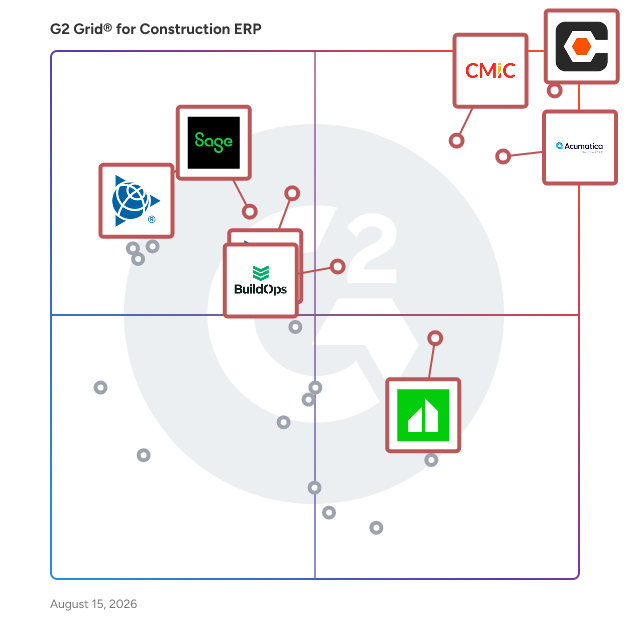
G2 Grid® for Construction ERP Software

G2 Grid® for Construction ERP Software plotting products by satisfaction and market presence

Highlighted products: Procore, Acumatica, CMiC Platform, Vista, Clearstory, BuildOps, Spectrum, and Sage 300 Construction and Real Estate.

Underlying data: [Grid® JSON](https://www.g2.com/categories/construction-erp/grids.json?focus%5B%5D=procore&focus%5B%5D=acumatica&focus%5B%5D=cmic-platform&focus%5B%5D=trimble-vista&focus%5B%5D=clearstory&focus%5B%5D=buildops&focus%5B%5D=trimble-spectrum&focus%5B%5D=sage-300-construction-and-real-estate)

Sponsored

Premier Construction Software

Premier Construction Software is a global, AI-powered construction ERP that helps growing general contractors control job costs, cash flow, and risk across every project in one easy-to-use cloud platform. Replace disconnected accounting, project management, and field tools with a single source of truth for WIP, change orders, and forecasting, so your team can shorten billing cycles and keep margins on track. How we're different: • Built for general contractors, owners, and land developers managing multi-project, multi-entity portfolios. • Advanced construction accounting with detailed job costing, real-time WIP reporting, and cash-flow forecasting to spot issues before they hit the P&L. • Project and field management with RFIs, subcontracts, drawings, and change orders tied directly to the budget and schedule. • Automated billing, approvals, and payroll to reduce manual entry and speed up collections. • Unlimited entities, consolidated reporting, and role-based dashboards.

Visit website

Procore

Procore construction software manages your construction projects, resources and financials from planning to closeout. The platform connects every project contributor to solutions built specifically for the industry for the owner, the general contractor and the specialty contractor. The ability to communicate across teams makes it easier to work together by establishing a single source of truth. This is how Procore gives your team easy access to everything they need to know to get the job done.

Average Rating: 4.6/5.0

Total Reviews: 4,204

How Do G2 Users Rate Procore?

  • Ease of Use: 8.6/10 (Category avg: 7.9/10)
  • Workforce Management: 8.1/10 (Category avg: 8.3/10)
  • Project Management: 9.1/10 (Category avg: 8.4/10)
  • Contractor Management: 8.7/10 (Category avg: 8.3/10)

Who Is the Company Behind Procore?

  • Seller: Procore Technologies
  • Company Website:
  • Year Founded: 2003
  • HQ Location: Carpinteria, CA
  • Twitter: @procoretech
    16,491 Twitter followers
  • LinkedIn® Page: www.linkedin.com
    4,788 employees on LinkedIn®

Who Uses This Product?

  • Who Uses This: Project Manager, Project Engineer
  • Top Industries: Construction, Architecture & Planning
  • Company Size: 48% Medium, 40% Small

What Do G2 Reviewers Say About Procore?

AI-generated summary from verified user reviews

Pros
  • Users value the ease of use in Procore, simplifying complex tasks and enhancing overall efficiency on construction sites.
  • Users find Procore to be an excellent tool for organized project management, keeping teams in sync and efficient.
  • Users value the centralization of project data in Procore, enhancing efficiency and reducing reliance on physical documents.
  • Users appreciate the intuitive design of Procore, enhancing collaboration and simplifying daily construction management tasks.
  • Users appreciate the effective organization of Procore, which keeps teams in sync and centralizes project data.
Cons
  • Users criticize Procore for its missing features, notably limited reporting flexibility and communication issues without internet access.
  • Users find the learning curve steep, particularly when importing budgets from Excel, which complicates the onboarding process.
  • Users find Procore's learning curve to be difficult, often feeling overwhelmed by its complexity and extensive features.
  • Users feel that Procore’s financial tools require improvement, lacking necessary features and timely updates for efficiency.
  • Users find Procore's interface to be complex and intimidating, particularly for new or small contractors trying to adapt.

What Are Recent G2 Reviews of Procore?

What Are G2 Users Discussing About Procore?

Acumatica

Acumatica Cloud ERP is an AI-enabled, cloud-based enterprise resource planning solution built for small and mid-sized businesses that want to grow on their own terms. It brings together a full suite of business management applications—covering finance, inventory, operations, project accounting, and customer management—so every team works from a single, connected platform. Growing businesses shouldn't have to wrestle with disconnected tools or rigid software that can't keep up. Acumatica is designed around real-world needs: the challenges of scaling operations, keeping data accurate across departments, and making confident decisions quickly. Key features and capabilities include: - AI-enabled workflows: Automation powered by artificial intelligence reduces manual tasks across finance, sales, inventory, and customer service, helping teams work more efficiently and consistently. - Open API architecture: Built-in open APIs allow rapid integrations with the software your business already relies on, breaking down data silos and connecting your entire operation. - Consumption-based licensing: Pricing is based on the computing resources you use, not the number of users. Your whole team can access the platform without adding to your licensing costs as you grow. - Remote and mobile access: Acumatica is a true cloud solution, giving employees, field teams, and leadership real-time visibility into operations from any device, anywhere. - Scalable, future-ready platform: The platform adapts as your business evolves, supporting new modules, additional complexity, and emerging technologies without requiring a system overhaul. Acumatica is a practical fit for mid-sized organizations that have moved beyond entry-level accounting tools and need a more adaptable, cost-effective alternative to large enterprise ERP solutions. Common use cases include multi-entity financial management, supply chain coordination, automated compliance reporting, and cross-department synchronization across sales, fulfillment, and customer service. The platform also addresses business resilience directly. Real-time data insights support faster, more informed decisions, while built-in security controls and financial audit capabilities help organizations meet compliance requirements, including SOX, tax, and data security standards. Acumatica is more than software; it is a platform built around the people who run and grow businesses every day. By connecting operations, enabling collaboration, and aligning costs with actual usage, it gives small and mid-sized businesses the tools they need to operate efficiently, adapt confidently, and build for what comes next.

Average Rating: 4.4/5.0

Total Reviews: 1,920

How Do G2 Users Rate Acumatica?

  • Ease of Use: 8.4/10 (Category avg: 7.9/10)
  • Workforce Management: 8.0/10 (Category avg: 8.3/10)
  • Project Management: 8.4/10 (Category avg: 8.4/10)
  • Contractor Management: 7.9/10 (Category avg: 8.3/10)

Who Is the Company Behind Acumatica?

  • Seller: Acumatica
  • Company Website:
  • Year Founded: 2008
  • HQ Location: Bellevue, WA
  • Twitter: @Acumatica
    28,250 Twitter followers
  • LinkedIn® Page: www.linkedin.com
    776 employees on LinkedIn®

Who Uses This Product?

  • Who Uses This: Controller, CFO
  • Top Industries: Construction, Manufacturing
  • Company Size: 49% Medium, 28% Small

What Do G2 Reviewers Say About Acumatica?

AI-generated summary from verified user reviews

Pros
  • Users praise the ease of use of Acumatica, quickly mastering the system and accessing project financials effortlessly.
  • Users value the customization capabilities of Acumatica, enhancing usability and adaptability for specific business needs.
  • Users value the customizability of Acumatica, enhancing usability for diverse business requirements and improving overall efficiency.
  • Users love the user-friendly features of Acumatica, enabling easy access to data and efficient business management.
  • Users value the extensive customization options of Acumatica, enabling tailored solutions for diverse business requirements.
Cons
  • Users find Acumatica's missing features problematic, especially with usability in accounting and inventory management.
  • Users find the learning curve steep with Acumatica, especially during initial setups and without adequate training.
  • Users report a difficult setup process for Acumatica, often facing challenges with various modules during implementation.
  • Users find the complex setup of Acumatica overwhelming, requiring extensive planning and still facing implementation challenges.
  • Users report that setup difficulties with Acumatica lead to a complicated and overwhelming experience during implementation.

What Are Recent G2 Reviews of Acumatica?

CMiC Platform

CMiC is the leading provider of an AI-powered, fully integrated construction ERP platform purpose-built for general contractors, specialty contractors, and civil/heavy-highway firms. Built on a Single Database Platformâ„¢, CMiC delivers a unified suite of Financials, Project Management, and Project Controls applications designed to manage the full complexity of construction operations. Core financial applications include Accounting, HR and Payroll, Opportunity Management (CRM), Resource Planning, and Inventory and Equipment Management. On the project management side, CMiC covers Bidding and Procurement, Drawing Management, and Project Management. Trusted by 1 in 5 General Contractors on Engineering News Record's Top 400, CMiC is an award-winning platform that enterprise construction firms rely on globally to drive financial control, operational efficiency, and project predictability. With a 25% market share among North America's top 400 contractors and a growing international footprint, some of the largest construction firms in the US have chosen CMiC as their long-term strategic ERP partner. CMiC's turnkey model means implementation, support, development, and customer success are all managed in-house, giving firms a single, accountable partner from initial deployment through long-term growth. With no middleware dependencies and over 50 integration partners, CMiC connects seamlessly with the tools and systems construction firms already rely on. CMiC's industry leadership has been consistently recognized by leading organizations. Deloitte has named CMiC a Best Managed Company for over seven years, a distinction it now holds at Platinum status. CMiC has also earned Construction Executive's Top Tech Award, BuildWorld's Preconstruction Tech Top 50, and Featured Customer's Market Leader Award. For more information, please visit www.cmicglobal.com.

Average Rating: 4.0/5.0

Total Reviews: 115

How Do G2 Users Rate CMiC Platform?

  • Ease of Use: 7.9/10 (Category avg: 7.9/10)
  • Workforce Management: 8.9/10 (Category avg: 8.3/10)
  • Project Management: 8.9/10 (Category avg: 8.4/10)
  • Contractor Management: 9.7/10 (Category avg: 8.3/10)

Who Is the Company Behind CMiC Platform?

  • Seller: CMiC
  • Company Website:
  • Year Founded: 1974
  • HQ Location: Toronto, Canada
  • Twitter: @cmicsoftware
    1,297 Twitter followers
  • LinkedIn® Page: www.linkedin.com
    707 employees on LinkedIn®

Who Uses This Product?

  • Who Uses This: Controller
  • Top Industries: Construction, Building Materials
  • Company Size: 66% Medium, 25% Small

What Are Recent G2 Reviews of CMiC Platform?

What Are G2 Users Discussing About CMiC Platform?

Vista

Comprehensive construction accounting and operations solution providing maximum configurability, scalability and reliability, while synchronizing your data across your entire enterprise. Vista™ by Viewpoint is a comprehensive software solution that helps contractors manage all areas of their operations. Featuring solutions for Accounting, Human Resources, Project Management, and Service Management, Vista is designed to synchronize all aspects of a construction business — helping contractors to better meet project profitability, delivery, and quality expectations. Vista is part of Viewpoint’s construction software suite providing contractors with insight into project revenue and cost management that is tightly integrated with accounting and project management — ensuring every project is under budget and profitable. With this software suite, contractors benefit from accounting and project management, document control and an easy-to-use mobile application that captures field observations from the job site anywhere, anytime.

Average Rating: 4.0/5.0

Total Reviews: 135

How Do G2 Users Rate Vista?

  • Ease of Use: 7.4/10 (Category avg: 7.9/10)
  • Workforce Management: 7.4/10 (Category avg: 8.3/10)
  • Project Management: 7.7/10 (Category avg: 8.4/10)
  • Contractor Management: 7.8/10 (Category avg: 8.3/10)

Who Is the Company Behind Vista?

  • Seller: Trimble
  • Year Founded: 1978
  • HQ Location: Sunnyvale, CA
  • Twitter: @TrimbleCorpNews
    12,061 Twitter followers
  • LinkedIn® Page: www.linkedin.com
    10,997 employees on LinkedIn®
  • Ownership: NASDAQ

Who Uses This Product?

  • Who Uses This: Controller, Accountant
  • Top Industries: Construction, Accounting
  • Company Size: 76% Medium, 17% Small

What Do G2 Reviewers Say About Vista?

AI-generated summary from verified user reviews

Pros
  • Users appreciate the customization features of Vista, enhancing flexibility and allowing tailored solutions for various needs.
  • Users appreciate the user-friendly interface of Vista System, making it accessible to those with limited technical experience.
  • Users value the budget management efficiency of Vista, simplifying financial oversight and streamlining workflows.
  • Users value the quick support and customization options with Vista, enhancing overall collaboration efficiency.
  • Users value the quick and responsive customer support of Vista, enhancing their overall experience and satisfaction.
Cons
  • Users note the high costs of Vista, comparing it unfavorably to cheaper alternatives with better ROI.
  • Users find Vista's pricing structure cumbersome and expensive, with a lack of value compared to cheaper alternatives.
  • Users desire improved customization options, particularly for font sizes and dashboard layouts, to enhance their experience.
  • Users find Vista to be silly expensive with inadequate ROI compared to cheaper alternatives and unfair pricing practices.
  • Users desire more customization options, especially for font sizes and dashboard layouts to enhance usability.

What Are Recent G2 Reviews of Vista?

What Are G2 Users Discussing About Vista?

Clearstory

Clearstory is the only purpose-built technology for managing Change Orders between construction stakeholders in real time, delivering unmatched transparency and speed. With all projects, trades, and Change Orders in one place, our cloud-based Change Order Request Log provides the visibility needed to reduce risk and foster trust. Designed for contractors of all types, Clearstory is easy to adopt, streamlines communication, and modernizes the T&M Tag and Change Order approach to simplify processes and save time and money.

Average Rating: 4.8/5.0

Total Reviews: 88

How Do G2 Users Rate Clearstory?

  • Ease of Use: 9.1/10 (Category avg: 7.9/10)
  • Workforce Management: 6.1/10 (Category avg: 8.3/10)
  • Project Management: 8.3/10 (Category avg: 8.4/10)
  • Contractor Management: 8.0/10 (Category avg: 8.3/10)

Who Is the Company Behind Clearstory?

  • Seller: Clearstory
  • Year Founded: 2018
  • HQ Location: San Francisco, CA
  • LinkedIn® Page: www.linkedin.com
    99 employees on LinkedIn®

Who Uses This Product?

  • Who Uses This: Project Manager, Project Engineer
  • Top Industries: Construction
  • Company Size: 45% Medium, 30% Small

What Do G2 Reviewers Say About Clearstory?

AI-generated summary from verified user reviews

Pros
  • Users find Clearstory incredibly easy to use, streamlining subcontractor cost management with intuitive, organized features.
  • Users appreciate the effective tracking of change orders with Clearstory, enhancing transparency and ease of project management.
  • Users love the efficient tracking capabilities of Clearstory, enhancing transparency and ease of managing change orders.
  • Users appreciate the efficiency improvement of Clearstory, which enhances accuracy and transparency in pricing and tracking.
  • Users emphasize that Clearstory enhances organization by centralizing all project documents and communications in one easy-to-navigate platform.
Cons
  • Users feel Clearstory is lacking essential features that could significantly enhance usability and efficiency.
  • Users find the difficult navigation of Clearstory frustrating, especially with its complicated T&M and search functionalities.
  • Users find difficult customization challenges in Clearstory, slowing down reports and complicating minor adjustments and updates.
  • Users find a difficult learning curve with Clearstory, hindering adoption and maximizing its features effectively.
  • Users find the difficult setup of Clearstory challenging, particularly with the initial configuration of rates and modules.

What Are Recent G2 Reviews of Clearstory?

BuildOps

BuildOps is an all-in-one operations platform for commercial MEP contractors—HVAC, mechanical, refrigeration, electrical, and plumbing—bringing dispatch, estimating, invoicing, service, projects, and reporting into one system. A single source of truth unifies office and field data, metrics, and work history. Projects flow seamlessly into service: as-built equipment becomes asset records that power service agreements, scheduling, dispatch, billing, and documentation. Smarter scheduling comes from a live planning board with technician skills, certifications, location, and availability—plus intelligent recommendations and drag-and-drop dispatch to handle emergencies, multi-day work, and long-term planning. Field teams stay audit-ready with photos, videos, and PDFs attached directly to quotes, invoices, and assets, while automated workflows keep work orders, customer data, and billing in sync across project and service. The result: predictable maintenance, stronger recurring revenue, protected margins, and a end-to-end support from the building phase to ongoing service.

Average Rating: 4.2/5.0

Total Reviews: 69

How Do G2 Users Rate BuildOps?

  • Ease of Use: 8.2/10 (Category avg: 7.9/10)
  • Workforce Management: 8.6/10 (Category avg: 8.3/10)
  • Project Management: 8.8/10 (Category avg: 8.4/10)
  • Contractor Management: 8.6/10 (Category avg: 8.3/10)

Who Is the Company Behind BuildOps?

  • Seller: BuildOps
  • Company Website:
  • Year Founded: 2018
  • HQ Location: Santa Monica, CA 90404, US
  • Twitter: @GoBuildOps
    502 Twitter followers
  • LinkedIn® Page: www.linkedin.com
    616 employees on LinkedIn®

Who Uses This Product?

  • Top Industries: Construction
  • Company Size: 48% Small, 41% Medium

What Do G2 Reviewers Say About BuildOps?

AI-generated summary from verified user reviews

Pros
  • Users commend BuildOps for its ease of use, significantly enhancing operational efficiency and field management.
  • Users highlight the extensive features of BuildOps that enhance workflow and improve team efficiency significantly.
  • Users appreciate the top-notch customer support from BuildOps, highlighting responsiveness and helpfulness in their service experience.
  • Users appreciate the centralization of BuildOps, streamlining operations and enhancing team collaboration effectively.
  • Users highlight BuildOps for its user-friendly interface, facilitating easy use for both office and field staff.
Cons
  • Users note the need for improvement in the PO module and audit/version control to better serve their needs.
  • Users criticize the update issues in BuildOps, citing unexpected changes and performance lags affecting their workflow.
  • Users find the learning curve steep, as navigating the platform can be unintuitive and confusing for non-techs.
  • Users find limited features in BuildOps, particularly in data inputs and integrations, hindering their business needs.
  • Users express concerns about limited customization, particularly in data integration and flexibility for specific needs.

What Are Recent G2 Reviews of BuildOps?

What Are G2 Users Discussing About BuildOps?

Spectrum

Spectrum® is a complete, web-based construction ERP solution with leading-edge tools for accounting, project management, equipment and materials management, service management, document control, HR and payroll, inventory, reporting and much more. Spectrum allows contractors to work in real time, no matter where work takes them. Spectrum Construction Software represents more than three decades of continuous innovation and investment in the latest technologies. We have done more than simply put Spectrum in the cloud—it is designed specifically for the cloud, providing an interface that allows you to work from just about any connected device, anywhere and anytime, by simply launching a web browser. Spectrum delivers the convenience of true cloud computing. Spectrum users enjoy the convenience of the cloud while still providing complete control over data security and user access. There is nothing easy about running a successful construction business. That’s why we designed Spectrum construction software to be as user friendly as possible—so you can spend time running the business, not figuring out how to run the software. With Spectrum construction management software, there are no complex menus to master and memorize. Start from the interactive Spectrum Dashboard that you customize to fit your needs, and dive into detailed information and the work you need to get done. As you work, a responsive InfoBar is always present, giving you one-click access to tasks and data related to what you are doing. All Spectrum applications work together seamlessly. Instead of opening several different applications to get one job done, simply start working and Spectrum gives you multiple ways to move forward with a single click, either through the intuitive InfoBar or through links directly from your data. And as you start new tasks, the web-based structure of Spectrum’s interface opens new work tabs. When you need to pick up where you left off on previous tasks, simply click on the tab you need. Spectrum construction management software gives you the tools you need to communicate, collaborate, and help everyone work better together Document Imaging Pane - Spectrum Construction Management SoftwareSpectrum is the first construction software to deliver fully-integrated web-based document management. Wherever work takes you, documents or images associated with your work are available through an image pane on the Spectrum desktop. View purchase orders, contracts, submittals, work orders, RFIs, job site photos—virtually any type of file associated with your task at hand. Adding a new document or image is as easy as dragging and dropping the file onto the image pane. The Spectrum Dashboard is an information portal for everyone in your company—not just licensed Spectrum users. Each person’s Dashboard can be customized with apps to fit the job they do. There is a growing selection of apps available and tools to help you build your own. Spectrum applications and mobile apps are completely integrated, giving you a complete view of your projects. Metrics such as Work In Progress, Cost to Complete, Over/Under Billing and Earned Revenue are available on a single screen. Spectrum also helps ensure that everyone you work with—owners, architects, subcontractors, vendors—all have access to the latest information. Spectrum’s Project Management Plan Room gives you a cloud-based platform to share documents, send, receive and track communications, and maintain an audit trail of all project activity and correspondence.

Average Rating: 4.2/5.0

Total Reviews: 133

How Do G2 Users Rate Spectrum?

  • Ease of Use: 8.0/10 (Category avg: 7.9/10)
  • Workforce Management: 7.8/10 (Category avg: 8.3/10)
  • Project Management: 7.6/10 (Category avg: 8.4/10)
  • Contractor Management: 7.8/10 (Category avg: 8.3/10)

Who Is the Company Behind Spectrum?

  • Seller: Trimble
  • Year Founded: 1978
  • HQ Location: Sunnyvale, CA
  • Twitter: @TrimbleCorpNews
    12,061 Twitter followers
  • LinkedIn® Page: www.linkedin.com
    10,997 employees on LinkedIn®
  • Ownership: NASDAQ

Who Uses This Product?

  • Who Uses This: Controller
  • Top Industries: Construction, Accounting
  • Company Size: 76% Medium, 19% Small

What Do G2 Reviewers Say About Spectrum?

AI-generated summary from verified user reviews

Pros
  • Users appreciate the ease of use in Spectrum, finding it intuitive and straightforward for quick mastery.
  • Users value the ease of use and integration capabilities in Spectrum, making tasks effortless and efficient.
  • Users appreciate the responsive customer support from Spectrum, which enhances their overall experience with the software.
  • Users commend the data organization of Spectrum, effectively consolidating information across all company sectors.
  • Users find Spectrum's ease of learning enhanced by its intuitive UI and helpful quick tricks for navigation.
Cons
  • Users experience poor customer support, struggling with unresolved issues and insufficient documentation for troubleshooting.
  • Users report poor support management, struggling with unresolved issues and a lack of adequate documentation for troubleshooting.
  • Users report significant bug issues with Spectrum, citing inadequate support and documentation for troubleshooting problems.
  • Users find the complex usability of Spectrum requires significant time and training to navigate effectively.
  • Users find Spectrum's interface difficult to learn, requiring significant time and training for those unfamiliar with its logic.

What Are Recent G2 Reviews of Spectrum?

Sage 300 Construction and Real Estate

Sage 300 Construction and Real Estate (CRE) is a comprehensive management solution tailored for the construction and real estate industries. It enables contractors, developers, and property managers to efficiently oversee projects and properties with precision and confidence. By integrating various facets of project management, accounting, and operations, Sage 300 CRE ensures streamlined workflows and enhanced collaboration across all project phases. Key Features and Functionality: - Project Management: Monitor project status, track costs, manage change orders, and ensure projects remain on schedule and within budget. - Accounting and Financials: Handle job costing, accounts payable and receivable, general ledger, and payroll, providing a solid financial foundation for your operations. - Document Management: Organize, store, and route essential documents such as contracts, invoices, and drawings, ensuring a clean audit trail and reducing risk. - Service Management: Optimize service dispatching, improve response times, and maintain tight control over service and preventive maintenance agreements. - Real Estate Management: Transform static lease documents into dynamic information sources, allowing for improved communication and flexible lease options. - Reporting and Analytics: Access over 1,400 prebuilt report formats and customizable reports to gain timely insights for better decision-making. Primary Value and Solutions Provided: Sage 300 CRE addresses the complexities inherent in construction and real estate management by offering an integrated platform that connects people, projects, processes, and properties. It enhances visibility into operations, mitigates risks associated with subcontractors and vendors, and facilitates real-time collaboration. By automating processes and providing accurate, up-to-date information, Sage 300 CRE empowers businesses to make informed decisions, improve efficiency, and maximize profitability.

Average Rating: 3.6/5.0

Total Reviews: 41

How Do G2 Users Rate Sage 300 Construction and Real Estate?

  • Ease of Use: 6.3/10 (Category avg: 7.9/10)
  • Workforce Management: 8.8/10 (Category avg: 8.3/10)
  • Project Management: 7.1/10 (Category avg: 8.4/10)
  • Contractor Management: 8.8/10 (Category avg: 8.3/10)

Who Is the Company Behind Sage 300 Construction and Real Estate?

  • Seller: Sage Software
  • Year Founded: 1981
  • HQ Location: Newcastle
  • LinkedIn® Page: www.linkedin.com
    15,579 employees on LinkedIn®
  • Ownership: SGE.L
  • Phone: +1 (866) 996-7243

Who Uses This Product?

  • Top Industries: Construction, Accounting
  • Company Size: 52% Medium, 43% Small

What Do G2 Reviewers Say About Sage 300 Construction and Real Estate?

AI-generated summary from verified user reviews

Pros
  • Users value the customizability of Sage 300 CRE, which enhances their experience and adapts to their needs.
  • Users find Sage 300 CRE's ease of use helpful, allowing quick learning and intuitive operation even for beginners.
  • Users find that Sage 300 CRE offers an intuitive learning experience, enabling quick adaptation and efficient usage.
  • Users value the vast range of capabilities in Sage 300 Construction and Real Estate for effective submittal management.
Cons
  • Users are frustrated with the poor customer support from Sage representatives who lack helpful solutions and guidance.

What Are Recent G2 Reviews of Sage 300 Construction and Real Estate?

What Are G2 Users Discussing About Sage 300 Construction and Real Estate?

Premier Construction Software

Premier Construction Software is a global, AI-powered construction ERP that helps growing general contractors control job costs, cash flow, and risk across every project in one easy-to-use cloud platform. Replace disconnected accounting, project management, and field tools with a single source of truth for WIP, change orders, and forecasting, so your team can shorten billing cycles and keep margins on track. How we're different: • Built for general contractors, owners, and land developers managing multi-project, multi-entity portfolios. • Advanced construction accounting with detailed job costing, real-time WIP reporting, and cash-flow forecasting to spot issues before they hit the P&L. • Project and field management with RFIs, subcontracts, drawings, and change orders tied directly to the budget and schedule. • Automated billing, approvals, and payroll to reduce manual entry and speed up collections. • Unlimited entities, consolidated reporting, and role-based dashboards.

Average Rating: 4.7/5.0

Total Reviews: 57

How Do G2 Users Rate Premier Construction Software?

  • Ease of Use: 9.2/10 (Category avg: 7.9/10)
  • Workforce Management: 10.0/10 (Category avg: 8.3/10)
  • Project Management: 9.8/10 (Category avg: 8.4/10)
  • Contractor Management: 10.0/10 (Category avg: 8.3/10)

Who Is the Company Behind Premier Construction Software?

Who Uses This Product?

  • Top Industries: Construction, Accounting
  • Company Size: 74% Small, 26% Medium

What Do G2 Reviewers Say About Premier Construction Software?

AI-generated summary from verified user reviews

Pros
  • Users praise the responsive support and efficiency of Premier Construction Software in managing projects and finances seamlessly.
  • Users value the responsive customer support from Premier Construction Software, enhancing their overall experience and productivity.
  • Users highlight the efficiency improvements from Premier, making training quicker and enhancing team collaboration significantly.
  • Users appreciate the seamless integrations of Premier Construction Software, enhancing team visibility and streamlining workflows effectively.
  • Users love the reporting capabilities of Premier Construction Software, especially for job costing and easy Excel exports.
Cons
  • Users find the learning curve challenging, yet acknowledge it is manageable with time and effort.
  • Users find the implementation difficulties inherent in Premier Construction Software to be challenging but expected with new systems.
  • Users find the limited functionality lacking a payroll processing system while appreciating Premier's overall value.
  • Users note the lack of a payroll processing system, requiring reliance on a third-party for payroll tasks.

What Are Recent G2 Reviews of Premier Construction Software?

UDA ConstructionOnline

ConstructionOnline is a cloud-based construction project management software developed by UDA Technologies. Founded in 1999, UDA Technologies has provided construction management solutions to residential builders, commercial contractors, multifamily developers, and specialty contractors for more than 25 years. Today, ConstructionOnline supports over 950,000 construction professionals worldwide, helping businesses of all sizes improve collaboration, control costs, and deliver successful projects. ConstructionOnline provides an all-in-one construction management platform designed to streamline the full project lifecycle. Contractors use the system to manage estimates, schedules, job costs, documents, and communication in a centralized environment. Available on the web and through mobile apps for iOS and Android, ConstructionOnline gives teams real-time visibility into project performance, financial health, and field progress across every phase of construction. Key features and functionality include: - Construction Estimating Software & Takeoff Tools: Create accurate cost estimates, perform digital takeoffs, manage budgets, and track job costs with integrated financial reporting. - Construction Scheduling Software: Build interactive Gantt charts, assign resources, track baselines, and monitor critical paths to keep projects on schedule. Includes advanced multi-project scheduling tools. - Document & File Management: Store and share drawings, specifications, RFIs, submittals, photos, and change orders in one secure, accessible platform. - Field-to-Office Communication: Streamline collaboration with daily logs, punch lists, client portals - including industry-leading client selections sheets, meeting minutes, and messaging tools that connect teams and stakeholders. - Integrations & Mobile Access: Connect with top platforms like QuickBooks, Docusign, Planswift, Dropbox, and Google Drive while extending access through iOS and Android mobile apps. The primary value of ConstructionOnline lies in its ability to help contractors organize their operations, reduce risk, and deliver projects more efficiently. By uniting financial data, schedules, and communication in one system, ConstructionOnline supports better collaboration among project managers, estimators, superintendents, and subcontractors. Users rely on the platform to improve accuracy in project estimates, maintain accountability across teams, and track profitability with greater clarity. With comprehensive reporting and real-time updates, ConstructionOnline equips construction businesses to make informed decisions, manage resources effectively, and complete projects on time and on budget.

Average Rating: 4.5/5.0

Total Reviews: 68

How Do G2 Users Rate UDA ConstructionOnline?

  • Ease of Use: 8.6/10 (Category avg: 7.9/10)
  • Workforce Management: 8.1/10 (Category avg: 8.3/10)
  • Project Management: 10.0/10 (Category avg: 8.4/10)
  • Contractor Management: 8.9/10 (Category avg: 8.3/10)

Who Is the Company Behind UDA ConstructionOnline?

  • Seller: UDA Technologies
  • Company Website:
  • Year Founded: 1999
  • HQ Location: Auburn, AL
  • Twitter: @UDATechnologies
    719 Twitter followers
  • LinkedIn® Page: www.linkedin.com
    65 employees on LinkedIn®

Who Uses This Product?

  • Top Industries: Construction
  • Company Size: 78% Small, 10% Medium

What Do G2 Reviewers Say About UDA ConstructionOnline?

AI-generated summary from verified user reviews

Pros
  • Users find UDA ConstructionOnline's ease of use beneficial for seamless project management and effective communication.
  • Users praise the exceptional customer support of UDA ConstructionOnline, highlighting quick responses and knowledgeable assistance.
  • Users find UDA ConstructionOnline to be a powerful project management tool that streamlines workflows and enhances organization.
  • Users value the effective project management capabilities of Construction Online, enhancing organization and workflow efficiency.
  • Users highlight the ease of use and integration of UDA ConstructionOnline, making project management smooth and efficient.
Cons
  • Users note that UDA ConstructionOnline is expensive, especially with conversion rates, despite its valuable features.
  • Users face a large learning curve with UDA ConstructionOnline, requiring time to adapt to new functionalities.
  • Users find update issues with UDA ConstructionOnline, as real-time information updates are lacking and challenging to manage.
  • Users express frustration over the lack of features in UDA ConstructionOnline compared to other platforms, hindering efficiency.
  • Users critique UDA ConstructionOnline for its limited features, causing inefficiencies in document uploads and billing processes.

What Are Recent G2 Reviews of UDA ConstructionOnline?

What Are G2 Users Discussing About UDA ConstructionOnline?
Buildxact

Never miss the right job opportunity again. AI-powered estimating built for the busy builder who does it all. Designed for residential builders and remodelers, Buildxact helps you manage every stage of your project with one simple, online platform. From takeoffs to quotes to scheduling to invoicing, everything works together to save you time and stress. Meet Blu - your digital building assistant. Blu uses real-world project data and AI to automate your estimating workflow — so you can get accurate estimates done faster, spot mistakes before they happen, and feel more confident from the start. Talk to Blu like you talk to your crew — it gets it. Here’s how Blu’s tools help you move faster: Assembly Assistant – Use real-time pricing and templates to build smarter estimates Estimate Reviewer – Catch missing items and common errors before they cost you Takeoff Assistant – Measure and scale digital plans in minutes Estimate Generator – Create full estimates from simple prompts With live supplier pricing, drag-and-drop scheduling, and a built-in Client Portal, Buildxact keeps your jobs running smoothly — on time, on budget, and in sync. 👉 Join thousands of builders worldwide using Buildxact to power their growth.

Average Rating: 4.3/5.0

Total Reviews: 65

How Do G2 Users Rate Buildxact?

  • Ease of Use: 8.3/10 (Category avg: 7.9/10)
  • Workforce Management: 8.8/10 (Category avg: 8.3/10)
  • Project Management: 9.2/10 (Category avg: 8.4/10)
  • Contractor Management: 9.6/10 (Category avg: 8.3/10)

Who Is the Company Behind Buildxact?

  • Seller: Buildxact
  • Company Website:
  • Year Founded: 2007
  • HQ Location: Melbourne, Australia
  • Twitter: @buildxact
    669 Twitter followers
  • LinkedIn® Page: www.linkedin.com
    86 employees on LinkedIn®

Who Uses This Product?

  • Who Uses This: Director
  • Top Industries: Construction
  • Company Size: 97% Small, 3% Large

What Do G2 Reviewers Say About Buildxact?

AI-generated summary from verified user reviews

Pros
  • Users appreciate the ease of use of Buildxact, keeping everything organized and reducing errors efficiently.
  • Users value the efficiency improvement of Buildxact, streamlining the entire project management process with ease.
  • Users value the organization capabilities of Buildxact, streamlining project and financial management in one platform.
  • Users love the ease of estimating with Buildxact, streamlining project management and enhancing collaboration among team members.
  • Users love the estimating tools in Buildxact for their ease and efficiency throughout the project lifecycle.
Cons
  • Users find the cost to be high, noting it has increased over time and is less competitive now.
  • Users feel that Buildxact needs improvement in mobile app usability and enhanced reporting features for complex projects.
  • Users find limitations in reporting features and mobile app experience, especially for larger, complex construction projects.
  • Users find that access limitations hinder Buildxact's effectiveness for larger projects, impacting reporting and mobile app usability.
  • Users find the business size limitations of Buildxact restrict its effectiveness for larger, more complex projects.

What Are Recent G2 Reviews of Buildxact?

What Are G2 Users Discussing About Buildxact?

Methvin

Construction estimators don't lose bids because they priced too high. They lose because their numbers weren't built on solid ground. Methvin is the only platform that calculates costs from first principles. While other tools rely on historical averages that no longer reflect the market, Methvin builds every figure from scratch, labor, plant, and materials. One miscalculation on a tight-margin project doesn't just hurt the job; it can wipe out the profit from three others. Stop guessing. Start winning bids you can actually deliver on. --- WHY TOP FIRMS CHOOSE METHVIN --- ACCURACY: Automate heavy lifting and turn around accurate tenders faster without cutting corners. SCALABILITY: From small fitouts to large civil infrastructure, the platform scales without breaking your process. FLEXIBILITY: Configure workflows to match how your team actually estimates. Methvin adapts to you, not the other way around. REAL-TIME COLLABORATION: Everyone works from the same numbers, from anywhere, in real time. --- THE FULL PROJECT LIFECYCLE --- Beyond estimating, Methvin handles the heavy lifting of project management: Takeoff tools to measure quantities directly from plans. Gantt scheduling to keep timelines and dependencies visible. Job costing to track spend as it happens. Cost-vs-Allowable reporting to flag variances before they become problems. --- THE INTELLIGENT RECORD --- Most platforms miss the biggest risk: the "he-said, she-said" of site disputes. Methvin’s Correspondence module brings every contract, RFI, site instruction, and variation into one place. You can ask it questions in plain language: "What was agreed on the structural steel spec?" or "Has the client signed off on the drainage scope?" The answer comes straight from your documents instantly. In construction, a missed instruction can cost more than the original estimate. An intelligent, searchable record isn't a luxury, it is how professional teams protect their margins. Methvin is purpose-built for construction. If your current tools feel like you're working around them, it's time to see what a platform built for this industry actually feels like.

Average Rating: 4.6/5.0

Total Reviews: 105

How Do G2 Users Rate Methvin?

  • Ease of Use: 9.7/10 (Category avg: 7.9/10)
  • Workforce Management: 9.8/10 (Category avg: 8.3/10)
  • Project Management: 9.8/10 (Category avg: 8.4/10)
  • Contractor Management: 9.8/10 (Category avg: 8.3/10)

Who Is the Company Behind Methvin?

  • Seller: Methvin
  • Company Website:
  • Year Founded: 2018
  • HQ Location: Albany, Auckland
  • Twitter: @Methvin
    15 Twitter followers
  • LinkedIn® Page: www.linkedin.com
    8 employees on LinkedIn®

Who Uses This Product?

  • Top Industries: Construction, Civil Engineering
  • Company Size: 57% Small, 30% Large

What Do G2 Reviewers Say About Methvin?

AI-generated summary from verified user reviews

Pros
  • Users value Methvin's first-principles estimating, enhancing accuracy and transparency, which builds client confidence effectively.
  • Users appreciate the ease of use of Methvin, enabling efficient collaboration and streamlined processes across teams.
  • Users value the first-principles estimating tool of Methvin, enhancing accuracy and client confidence in project budgeting.
  • Users value the time-saving project management features of Methvin, enhancing bid preparation and team coordination significantly.
  • Users commend strong collaboration features in Methvin, enabling real-time teamwork and seamless project management across departments.
Cons
  • Users find the learning curve steep, requiring significant training and setup time for effective use of Methvin.
  • Users find the steep learning curve of Methvin challenging, needing time and training to fully adapt.
  • Users find the difficult learning curve challenging, requiring significant training and setup time for effective usage.
  • Users find the interface dense and overwhelming initially, requiring time to adapt and fully utilize Methvin's capabilities.
  • Users find the difficult learning curve of Methvin challenging, requiring training for effective use and adaptation.

What Are Recent G2 Reviews of Methvin?

What Are G2 Users Discussing About Methvin?

Contractor+

Contractor+ is more than just software; it's a comprehensive operating system tailored specifically for home service contractors. At its core, Contractor+ is designed to be the digital backbone of a contracting business, enabling seamless operations and driving growth. Our platform provides an all-encompassing suite of tools that empowers contractors to unify their teams, ensuring everyone is aligned and working efficiently. With Contractor+, impressing clients becomes second nature, thanks to professional and precise estimating capabilities that utilize real-time, localized data for labor, materials, equipment, and assemblies. This ensures that quotes are not only competitive but also accurate, reducing overhead and increasing your margins on every job. But the benefits don't stop there. Our streamlined scheduling and followup reminders ensure that no job or appointment falls through the cracks, while our simplified invoicing system makes billing and payments a breeze. In essence, Contractor+ is more than just another CRM or app for contractors; it's a transformative solution that redefines how contractors operate, save time, and expand their businesses. It's the silent partner every home service contractor needs, offering unparalleled support, insights, and efficiency at every step - at a very fair price that won't break the bank.

Average Rating: 4.6/5.0

Total Reviews: 149

How Do G2 Users Rate Contractor+?

  • Ease of Use: 9.0/10 (Category avg: 7.9/10)
  • Workforce Management: 9.0/10 (Category avg: 8.3/10)
  • Project Management: 8.7/10 (Category avg: 8.4/10)
  • Contractor Management: 8.3/10 (Category avg: 8.3/10)

Who Is the Company Behind Contractor+?

  • Seller: Contractor Plus, Inc.
  • Year Founded: 2020
  • HQ Location: Orlando, US
  • Twitter: @cplusapp
    1,840 Twitter followers
  • LinkedIn® Page: linkedin.com
    665 employees on LinkedIn®

Who Uses This Product?

  • Who Uses This: Owner
  • Top Industries: Construction
  • Company Size: 91% Small

What Do G2 Reviewers Say About Contractor+?

AI-generated summary from verified user reviews

Pros
  • Users value the ease of use of Contractor+, appreciating its intuitive setup and integrated functionalities for project management.
  • Users appreciate the versatile features of Contractor+, enabling efficient project management and seamless invoicing.
  • Users find the easy setup of Contractor+ to be hassle-free, enhancing overall efficiency and management.
  • Users love the easy estimating process with Contractor+, which simplifies bidding and project management efficiently.
  • Users appreciate the professional invoicing feature of Contractor+, which simplifies payments and enhances business efficiency.
Cons
  • Users find that integration and pricing improvements are needed for a smoother transition and overall satisfaction.
  • Users feel that the cost of Contractor+ is high, especially for necessary upgrades and additional features.
  • Users find the pricing of Contractor+ a bit high and hope for improvements on upgrade costs.
  • Users find the learning curve steep initially, especially with many features, but it improves with practice.
  • Users express frustration over the feature limitations of Contractor+, noting the lack of essential integrations and functionalities.

What Are Recent G2 Reviews of Contractor+?

Trimble Unity Construct

e-Builder is the leading provider of fully-integrated, owner-centric, cloud-based construction software focused exclusively on meeting the needs of facility owners and construction professionals. The company’s research and development efforts are solely focused on clients' unique needs and challenges, and providing the lowest risk and fastest deployment option of any system on the market.

Average Rating: 3.7/5.0

Total Reviews: 16

How Do G2 Users Rate Trimble Unity Construct?

  • Ease of Use: 6.7/10 (Category avg: 7.9/10)
  • Workforce Management: 0.0/10 (Category avg: 8.3/10)
  • Project Management: 0.0/10 (Category avg: 8.4/10)
  • Contractor Management: 0.0/10 (Category avg: 8.3/10)

Who Is the Company Behind Trimble Unity Construct?

  • Seller: Trimble
  • Year Founded: 1978
  • HQ Location: Sunnyvale, CA
  • Twitter: @TrimbleCorpNews
    12,061 Twitter followers
  • LinkedIn® Page: www.linkedin.com
    10,997 employees on LinkedIn®
  • Ownership: NASDAQ

Who Uses This Product?

  • Top Industries: Construction, Higher Education
  • Company Size: 47% Large, 41% Medium

What Are Recent G2 Reviews of Trimble Unity Construct?

What Are G2 Users Discussing About Trimble Unity Construct?

Computer Guidance Corp

Computer Guidance Corporation delivers the leading construction enterprise resource planning (ERP) software solution including financial and project management, #1 business intelligence, mobile, and enterprise content management. Smarter Construction with Computer Guidance Construction ERP Software. eCMS is a comprehensive suite of software applications that helps any size and type of commercial contractor manage all aspects of their financials and operations. Therefore, our construction management software applications address all elements of business processes managing your projects from start to finish. Scalable, customizable, and cloud-hosted, CGC serves thousands throughout North America. Computer Guidance Corporation is part of the JDM Technology Group, a global construction-specific software conglomerate that serves more than 500,000+ in 40 countries and 6 continents.

Average Rating: 4.9/5.0

Total Reviews: 20

How Do G2 Users Rate Computer Guidance Corp?

  • Ease of Use: 8.8/10 (Category avg: 7.9/10)
  • Workforce Management: 9.4/10 (Category avg: 8.3/10)
  • Project Management: 9.2/10 (Category avg: 8.4/10)
  • Contractor Management: 8.8/10 (Category avg: 8.3/10)

Who Is the Company Behind Computer Guidance Corp?

  • Seller: Computer Guidance
  • Year Founded: 1981
  • HQ Location: Scottsdale, US
  • Twitter: @computerguidanc
    213 Twitter followers
  • LinkedIn® Page: www.linkedin.com
    63 employees on LinkedIn®

Who Uses This Product?

  • Top Industries: Construction
  • Company Size: 85% Medium, 15% Small

What Are Recent G2 Reviews of Computer Guidance Corp?

What Are G2 Users Discussing About Computer Guidance Corp?

Neya Kumaresan
NK
Researched and written by Neya Kumaresan
Updated October 3, 2024