Best OCR Software

Last updated: November 14, 2026

How Many OCR Software Products Does G2 Track?

Total Products under this Category: 513

Category Stats (Nov 2026)

  • Average Rating: 4.48/5 (↑0.02 vs Oct 2026) The average rating of products in this category, based on all submitted ratings
  • Top Trending Product: ECIT Digital (+12.5%) - Among all products in this category, ECIT Digital recorded the largest rating increase compared to last month

Last updated: November 24, 2026

How Does G2 Rank OCR Software Products?

Why You Can Trust G2's Software Rankings:

  • 30 Analysts and Data Experts
  • 12,600+ Authentic Reviews
  • 513+ Products
  • Unbiased Rankings

G2's software rankings are built on verified user reviews, rigorous moderation, and a consistent research methodology maintained by a team of analysts and data experts. Each product is measured using the same transparent criteria, with no paid placement or vendor influence. While reviews reflect real user experiences, which can be subjective, they offer valuable insight into how software performs in the hands of professionals. Together, these inputs power the G2 Score, a standardized way to compare tools within every category.

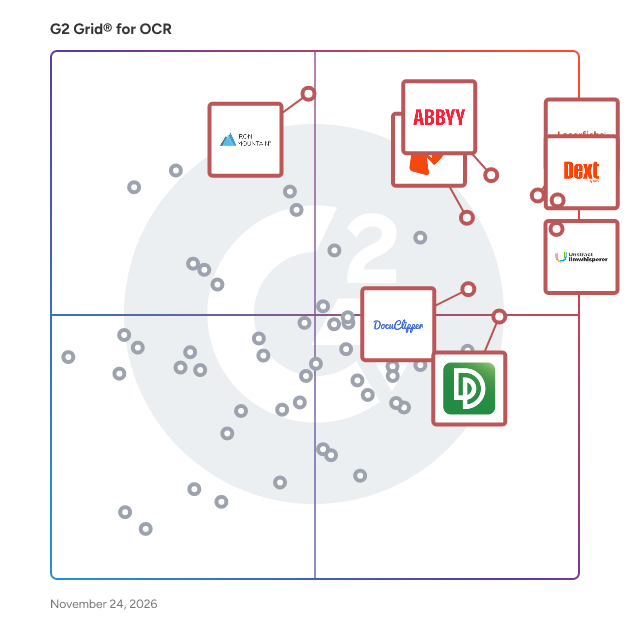
G2 Grid® for OCR Software

G2 Grid® for OCR Software plotting products by satisfaction and market presence

Highlighted products: Dext, Laserfiche, Unstract LLMWhisperer, ABBYY Intelligent Document Processing, Nitro PDF, Iron Mountain InSight DXP - Intelligent Document Processing, DocuPipe, and DocuClipper.

Underlying data: [Grid® JSON](https://www.g2.com/categories/ocr/grids.json?focus%5B%5D=dext&focus%5B%5D=laserfiche&focus%5B%5D=unstract-llmwhisperer&focus%5B%5D=abbyy-intelligent-document-processing&focus%5B%5D=nitro-pdf&focus%5B%5D=iron-mountain-insight-dxp-intelligent-document-processing&focus%5B%5D=docupipe&focus%5B%5D=docuclipper)

Dext

Automate bookkeeping with Dext, invoice to payment. AI captures, extracts & codes receipts/invoices, syncs to Xero, QBO & 36+ platforms. You stay in control. 12,000+ firms trust Dext. Manage your bookkeeping workflows from invoice to payment in one AI-powered platform. Our intelligent, cloud-based bookkeeping automation platform is built for accountants, bookkeepers, and growing businesses. It connects document capture, extraction, categorisation, approvals, expenses and payments in one workflow, powered by AI built specifically for bookkeeping, not generic AI, so your business gets accurate, real-time financial data with you in control. More than 700,000 businesses and 12,000+ accounting firms trust Dext. Each year, the platform processes over 350 million financial documents at over 99% extraction accuracy, and connects to more than 11,500 banks, platforms, and accounting systems worldwide. How Dext works 1. Capture invoices and receipts – Snap a photo, upload a PDF, forward by email or WhatsApp, or connect a data feed. 2. Extract key data with AI – Reads supplier, amount, tax, due date and more. 3. Categorise and enrich automatically – AI suggests categories, descriptions, and payment methods, learning from how your business or practice works. 4. Sync with accounting software – Send accurate data to Xero, QuickBooks, Sage, and 36+ platforms. 5. Approve and pay – Manage the full accounts payable workflow, with built-in approvals and security checks. 6. Reconcile transactions – Automatic matching keeps accounts accurate and up to date. Receipt capture and submission options: Capture data however you prefer: snap a photo, submit receipts individually or in bulk, calculate mileage using GPS, and manage expense claims from the mobile app, or send documents by email, WhatsApp, Dropbox, drag-and-drop, or direct bank feed. Bookkeeping automation, AI and accounts payable Supplier rules and smart splits automate categorisation and posting, while AI Assist, Dext's agentic AI, learns how you work and suggests smarter automations, transparent, optional and fully auditable. Nothing publishes without review and sign-off. Dext manages the rest of the accounts payable workflow too: approvals and supplier payments, with built-in security checks. Integrations and ecosystem Dext connects to more than 11,500 banks, e-commerce platforms and payment systems, syncing with 36+ accounting platforms including Xero, QuickBooks and Sage, plus Amazon, Shopify, Stripe and PayPal. This removes duplicate entry and supports every business type. Expense management Digital approval workflows and automated reimbursements simplify expense management for businesses and firms alike. Multi-level approvals, real-time spend visibility, multi-currency support and mileage tracking are all built in. Reliability and accuracy Dext matches transactions with bank feeds automatically, catching duplicates and flagging missing documents, delays and bottlenecks before they become problems, no spreadsheets or manual checks needed. Security and compliance All data is stored in the EU, encrypted at every stage, with least-privilege access. Dext is ISO/IEC 27001 certified and GDPR-compliant, with a live Trust Centre available anytime. Dext never sells customer data, every supplier is vetted, and the platform maintains over 99.99% uptime. Recognition and ratings - 30 G2 Leader Badges across six categories in the Fall 2026 Report: Expense Management, Invoice Management, OCR, Mileage Tracking, Accounting Practice Management, and Travel & Expense. - Xero App Partner of the Year (UK and US, 2024) - QuickBooks Developer Spotlight 2024 - SME News Best Cloud-Based Accounting Software 2023 - Rated 4.7 stars on Trustpilot, 4.8 stars on the App Store, and 4.5 stars on Google Play FAQs Does Dext integrate with accounting software? Yes. Dext integrates directly with Xero, QuickBooks, Sage, and 36+ accounting platforms, plus more than 11,500 banks, platforms, and systems worldwide. Is Dext just a receipt capture or OCR tool? No. Dext has evolved beyond receipt capture and OCR into a full intelligent bookkeeping automation platform, managing the complete workflow from invoice to payment, with AI at its core. Does Dext support e-invoicing? In France, Dext is one of the first government-certified Aggregated Platforms (PA) for e-invoicing, trusted by more than 2,000 accounting firms and 290,000 businesses, and has won five Gold Medals at France's Palmarès du Monde du Chiffre (a leading awards program for the French accounting industry). Start your 14-day free trial today and experience intelligent bookkeeping automation with Dext.

Average Rating: 4.6/5.0

Total Reviews: 388

How Do G2 Users Rate Dext?

  • Has the product been a good partner in doing business?: 9.2/10 (Category avg: 9.1/10)
  • File Conversion: 8.3/10 (Category avg: 8.5/10)
  • Data Extraction: 9.1/10 (Category avg: 9.0/10)
  • Intelligent Processing: 10.0/10 (Category avg: 8.8/10)

Who Is the Company Behind Dext?

  • Seller: IRIS Software Group
  • Company Website:
  • Year Founded: 1978
  • HQ Location: Slough, United Kingdom
  • LinkedIn® Page: www.linkedin.com
    3,115 employees on LinkedIn®

Who Uses This Product?

  • Who Uses This: Director, Owner
  • Top Industries: Accounting, Financial Services
  • Company Size: 87% Small, 11% Medium

What Do G2 Reviewers Say About Dext?

AI-generated summary from verified user reviews

Pros
  • Users appreciate the ease of use of Dext, which streamlines workflows and enhances efficiency in managing documents.
  • Users value the time-saving features of Dext, enhancing workflow efficiency and simplifying transaction management significantly.
  • Users appreciate the automation capabilities of Dext, significantly reducing manual work and enhancing workflow efficiency.
  • Users highlight the automation efficiency of Dext, significantly reducing manual work and streamlining financial processes.
  • Users value the speed and efficiency of Dext, enhancing workflow and simplifying transaction management significantly.
Cons
  • Users express concerns over pricing issues with Dext, citing unauthorized charges and costly plan changes without consent.
  • Users express frustration over billing issues with Dext, highlighting unauthorized charges and poor communication regarding plan changes.
  • Users often face slow processing times with Dext, leading to delays in document handling and data fetching.
  • Users express frustration over approval issues with Dext, noting complications in plan changes and billing practices.
  • Users are frustrated with Dext’s expensive practices, including unauthorized charges and misleading subscription changes.

What Are Recent G2 Reviews of Dext?

What Are G2 Users Discussing About Dext?

Laserfiche

Get work done faster with Laserfiche, the leading SaaS provider of AI-powered document management and process automation. Through powerful workflows, electronic forms, document management and analytics, Laserfiche accelerates processes across the enterprise. ✓ Organize Your Content with AI-Powered Document Management Optimize your operations and increase team productivity with AI-powered document management. Centralize your content, improve collaboration and maintain audit trails to support compliance needs. ✓ Boost Your Productivity with Intelligent Automation Increase efficiency by automating tasks with low-code process automation and prebuilt solution templates. Work smarter and shift your team’s focus to higher priority strategic goals. ✓ Unify Your Systems with Powerful Integrations Laserfiche is the backbone connecting hundreds of mission-critical applications. Users can access relevant documents from a single location, eliminating the need to search across multiple platforms. ✓ Elevate Your Work with Laserfiche AI Laserfiche AI enables organizations to simplify their work, take control of processes and supercharge productivity — all without losing sight of critical data privacy and security standards.

Average Rating: 4.7/5.0

Total Reviews: 1,209

How Do G2 Users Rate Laserfiche?

  • Has the product been a good partner in doing business?: 9.2/10 (Category avg: 9.1/10)
  • File Conversion: 8.6/10 (Category avg: 8.5/10)
  • Data Extraction: 8.7/10 (Category avg: 9.0/10)
  • Intelligent Processing: 8.5/10 (Category avg: 8.8/10)

Who Is the Company Behind Laserfiche?

  • Seller: Laserfiche
  • Company Website:
  • Year Founded: 1976
  • HQ Location: Long Beach, California
  • LinkedIn® Page: www.linkedin.com
    400 employees on LinkedIn®

Who Uses This Product?

  • Who Uses This: Deputy City Clerk, Business Systems Analyst
  • Top Industries: Government Administration, Education Management
  • Company Size: 60% Medium, 25% Large

What Do G2 Reviewers Say About Laserfiche?

AI-generated summary from verified user reviews

Pros
  • Users find Laserfiche's ease of use empowering, enabling self-service implementation and efficient process management.
  • Users value the easy process automation with Laserfiche, enhancing efficiency and reducing errors across departments.
  • Users appreciate the automation of form processes with Laserfiche, enhancing efficiency and document management.
  • Users value the robust and flexible workflow automation in Laserfiche, enhancing efficiency and integration with other systems.
  • Users commend the easy training and onboarding capabilities of Laserfiche, enhancing team efficiency and document management.
Cons
  • Users experience a challenging learning curve with Laserfiche, making initial navigation and feature usage difficult.
  • Users experience a small learning difficulty with Laserfiche, particularly when adapting to metadata fields and workflows.
  • Users find the missing features in Laserfiche hinder their experience and highlight the need for better resources.
  • Users express concern over update issues, highlighting difficulty in keeping up with the rapid growth of Laserfiche.
  • Users report performance issues with Laserfiche, including slow form builds and delayed feature implementations.

What Are Recent G2 Reviews of Laserfiche?

What Are G2 Users Discussing About Laserfiche?

Unstract LLMWhisperer

LLMWhisperer helps parse text from difficult documents like poor scans, PDFs, invoices, reports, and even handwriting. The output is layout-preserved, helping provide LLMs maximum context for QnAs, structured data extraction, and more. LLMWhisperer can deal with wide-ranging quality and formats of documents, preparing them for LLM consumption. Start with 100 pages per day for free. No credit card required. No strings attached. Key Features & Benefits - Layout-preserving output: Maintain the original layout of the document to ensure maximum context for LLMs. - Form element detection: Make data extraction from complex forms easy with checkbox and radio button identification. - Table border detection: Easily process dense tables and Excel spreadsheets with Table Border Detection that represents them with dashes in the output. - Extraction mode control: Ensure highly efficient, accurate, and cost-effective text extraction with different extraction modes: Native Text, Low Cost, High Quality, or Form. - Image pre-processing: Control API parameters like Median Filter or Gaussian Blur for high quality pre-processing. - API Integration: Seamlessly fit LLMWhisperer into your existing systems with Extraction, Status, Highlight, and Webhook Management RESTful APIs.

Average Rating: 4.5/5.0

Total Reviews: 111

How Do G2 Users Rate Unstract LLMWhisperer?

  • Has the product been a good partner in doing business?: 9.4/10 (Category avg: 9.1/10)
  • File Conversion: 8.1/10 (Category avg: 8.5/10)
  • Data Extraction: 9.2/10 (Category avg: 9.0/10)
  • Intelligent Processing: 9.0/10 (Category avg: 8.8/10)

Who Is the Company Behind Unstract LLMWhisperer?

Who Uses This Product?

  • Top Industries: Computer Software, Financial Services
  • Company Size: 67% Small, 23% Medium

What Do G2 Reviewers Say About Unstract LLMWhisperer?

AI-generated summary from verified user reviews

Pros
  • Users praise the 99% accuracy of LLMWhisperer in extracting text while retaining document structure, enhancing reliability.
  • Users praise LLMWhisperer's precise text extraction and accurate structural retention, enhancing reliability for complex documents.
  • Users praise the ease of use of LLM Whisperer, highlighting effortless configuration and precise data extraction.
  • Users value the easy integrations of Unstract LLMWhisperer, enhancing workflows with seamless API and documentation support.
  • Users value the accurate data extraction in LLMWhisperer, preserving document structure and minimizing errors for complex tasks.
Cons
  • Users experience OCR issues with Unstract LLMWhisperer, requiring extensive post-processing and validation for accurate results.
  • Users find the limited functionality of LLM Whisperer restrictive, especially for larger documents and specialized use cases.
  • Users note the missing features in LLMWhisperer, such as limited PDF range selection and lack of color coding recognition.
  • Users find the limited options of Unstract LLMWhisperer restrictive, particularly regarding usage limits and lack of open source access.
  • Users note the poor UI design makes navigation challenging, impacting the overall user experience with Unstract LLMWhisperer.

What Are Recent G2 Reviews of Unstract LLMWhisperer?

AI can help you find the answers. G2 helps you trust them.

Connect G2 to Claude or ChatGPT for answers grounded in G2's trusted reviews, comparisons, and pricing from real user insights.

How it works

ABBYY Intelligent Document Processing

ABBYY Vantage is a powerful low-code Intelligent Document Processing (IDP) platform that uses advanced AI and machine learning to simplify and automate document-heavy business processes. It helps organizations eliminate manual, error-prone work involved in capturing and extracting data from documents, ensuring that accurate, process-ready information flows directly into systems like RPA, BPM, and ERP. With pre-trained AI models that deliver up to 90 percent accuracy right from the start, businesses can quickly accelerate automation across teams and use cases. Built on ABBYY’s industry-leading OCR technology, Vantage also supports seamless integration with large language models and generative AI through Retrieval-Augmented Generation (RAG), enabling organizations to securely enhance their AI capabilities. By adopting ABBYY IDP, enterprises can achieve faster processing times, lower operational costs, and better decision-making across the board. Vantage is designed to work with any type of document, whether structured, semi-structured, or unstructured, and can easily handle elements like handwriting, barcodes, and checkboxes. It can capture documents from multiple sources such as emails, mobile devices, or shared file repositories, and automatically classify and process them using the right AI model for data extraction and validation. With access to over 150 pre-trained models available in the ABBYY Marketplace, companies can automate a wide range of document types including invoices, purchase orders, contracts, tax forms, and identity documents. For unique needs, users can design and train their own models using an intuitive, low-code interface. Vantage combines human-in-the-loop verification with continuous learning to deliver near-perfect accuracy, improving with every document processed. It also provides built-in analytics to monitor performance and enhance straight-through processing rates. The platform integrates effortlessly with leading automation tools such as UiPath, Blue Prism, Automation Anywhere, Microsoft Power Automate, and SharePoint, making it easy to fit into any existing workflow. Common applications include automating customer onboarding and KYC checks, streamlining insurance claims and loan processing, accelerating invoice handling, and digitizing logistics documents. Vantage can also transform large document repositories into searchable, indexed text, and prepare data for generative AI systems by converting it into structured formats compatible with platforms like LangChain. By digitizing and automating document workflows end to end, ABBYY Vantage empowers organizations to work smarter, stay compliant, and move confidently toward AI-driven operations. To explore available pre-trained and partner-developed models, visit the ABBYY Marketplace at abbyy.com/marketplace.

Average Rating: 4.3/5.0

Total Reviews: 91

How Do G2 Users Rate ABBYY Intelligent Document Processing?

  • Has the product been a good partner in doing business?: 8.6/10 (Category avg: 9.1/10)
  • File Conversion: 8.2/10 (Category avg: 8.5/10)
  • Data Extraction: 9.4/10 (Category avg: 9.0/10)
  • Intelligent Processing: 9.0/10 (Category avg: 8.8/10)

Who Is the Company Behind ABBYY Intelligent Document Processing?

  • Seller: ABBYY
  • Company Website:
  • Year Founded: 1989
  • HQ Location: Milpitas, CA
  • LinkedIn® Page: www.linkedin.com
    947 employees on LinkedIn®

Who Uses This Product?

  • Top Industries: Information Technology and Services, Computer Software
  • Company Size: 42% Small, 34% Medium

What Do G2 Reviewers Say About ABBYY Intelligent Document Processing?

AI-generated summary from verified user reviews

Pros
  • Users appreciate the user-friendly interface of ABBYY Intelligent Document Processing, making it easy to engage and navigate.
  • Users praise the high accuracy in data extraction and its effective handling of complex documents and workflows.
  • Users benefit from the easy integrations of ABBYY, enhancing development and minimizing deployment efforts effectively.
  • Users praise the high-accuracy data capture of ABBYY Intelligent Document Processing, significantly speeding up information extraction.
  • Users appreciate the ease of integration with various tools, streamlining workflows and enhancing overall efficiency.
Cons
  • Users find the initial setup complex and challenging, especially with various document types and configurations.
  • Users find the initial setup complex, often facing challenges in customization and advanced feature configuration.
  • Users report software bugs that hinder functionality and lead to frustrating manual corrections in document processing.
  • Users face significant OCR issues with ABBYY, leading to manual revisions and frustrations during complex setups.
  • Users find the complex workflows challenging to set up initially, often requiring IT support for customization.

What Are Recent G2 Reviews of ABBYY Intelligent Document Processing?

What Are G2 Users Discussing About ABBYY Intelligent Document Processing?

Nitro PDF

1. What is Nitro PDF? Nitro PDF is a full-featured PDF editor that enables you to create, edit, convert, sign, and secure PDF documents. It is designed for individuals, small businesses, and enterprises as a cost-effective alternative to Adobe Acrobat, combining powerful functionality with an intuitive interface that works across devices. 2. What are the main features of Nitro PDF? Nitro PDF is a comprehensive solution for creating, editing, and securing documents across Windows, Mac, iOS, and web browsers. It includes powerful AI productivity tools and is built with an intuitive interface mirroring the Microsoft Office and Apple toolbars. Key features of Nitro PDF include: • Core Editing: Tools to create, edit, convert, combine, and annotate PDFs, including advanced OCR and secure signing capabilities. • AI Smart Tools: Enhances productivity via smart data extraction, automated form creation, and intelligent document redaction. • Nitro Analytics: Real-time visibility into PDF usage, allowing organizations to measure productivity, prove ROI, and track sustainability. • Nitro Workspace: A centralized cloud hub for accessing PDF and eSign tools, AI assistants, and administration from any device. • Advanced Editing: Create PDFs from any file type and convert PDFs into editable Microsoft Word, Excel, and PowerPoint files while maintaining original layouts. • Powerful OCR (Optical Character Recognition): Turn scanned paper documents and images into fully searchable and editable PDFs with high-accuracy text recognition. Nitro PDF is available in multiple plans to suit different business needs. 3. What support options does Nitro offer? Whether you're a five-person team or a global enterprise, our dedicated support is available 24/7. • Human Support: Nitro offers dedicated customer support, including onboarding, training, and troubleshooting resources, to ensure a smooth experience for your team. • Knowledge Base and Guides: Access hundreds of detailed articles covering product features, integrations, workflows, and best practices. • Video Tutorials: Step-by-step walkthroughs and demonstrations to help you learn and master Nitro tools quickly. • Community Forum: Connect with other Nitro users, share feedback, ask questions, and discover tips and solutions. • Knowledge Assistant: A 24/7 in-app AI assistant providing instant, context-aware guidance on features, workflows, and troubleshooting. 4. Does Nitro PDF support integrations with other business tools? Yes. Nitro PDF integrates with software such as Microsoft Office suite, OneDrive, Dropbox, and other platforms. These integrations simplify document workflows and make it easy to create, edit, and share PDFs directly within your existing environment. 5. How does Nitro ensure document security and compliance? Nitro protects sensitive information with advanced encryption, password protection, granular access controls, and tamper-evident audit trails. Nitro's solutions are designed to meet enterprise and mid-market compliance requirements, including ISO 27001, SOC 2, HIPAA, GDPR, eIDAS, UETA, and the ESIGN Act.

Average Rating: 4.4/5.0

Total Reviews: 424

How Do G2 Users Rate Nitro PDF?

  • Has the product been a good partner in doing business?: 8.9/10 (Category avg: 9.1/10)
  • File Conversion: 10.0/10 (Category avg: 8.5/10)

Who Is the Company Behind Nitro PDF?

  • Seller: Nitro, Inc
  • Company Website:
  • Year Founded: 2005
  • HQ Location: San Francisco, CA
  • LinkedIn® Page: www.linkedin.com
    382 employees on LinkedIn®

Who Uses This Product?

  • Who Uses This: IT Manager
  • Top Industries: Information Technology and Services, Computer Software
  • Company Size: 49% Small, 35% Medium

What Do G2 Reviewers Say About Nitro PDF?

AI-generated summary from verified user reviews

Pros
  • Users love the intuitive ease of use of Nitro PDF, streamlining document management without a steep learning curve.
  • Users love the easy editing features of Nitro PDF, appreciating its intuitive interface and speed for seamless workflow.
  • Users admire Nitro PDF for its user-friendly features, versatile editing, and excellent customer support for seamless functionality.
  • Users admire the easy conversion capabilities of Nitro PDF, enabling smooth transitions between formats and enhancing productivity.
  • Users enjoy the intuitive and fast PDF editing in Nitro PDF, making document management seamless and efficient.
Cons
  • Users note that Nitro PDF has PDF issues, including slow performance on older systems and limited sharing options.
  • Users find the pricing of Nitro PDF to be high, especially for individuals and small teams needing basic features.
  • Users experience slow performance with Nitro PDF, particularly during compression and with large files, affecting usability.
  • Users find that some advanced features are limited, especially when handling complex documents, affecting their overall experience.
  • Users report performance issues with Nitro PDF, especially on slower machines and while handling large or complex files.

What Are Recent G2 Reviews of Nitro PDF?

What Are G2 Users Discussing About Nitro PDF?

Iron Mountain InSight DXP - Intelligent Document Processing

Turn complex documents into trusted data that accelerates decisions and transforms workflows Manual document processing drains team productivity and introduces costly errors across enterprise operations. Iron Mountain InSight® DXP is an AI-powered intelligent content platform that transforms complex, unstructured content—from contracts, forms, and emails to images, audio, and video—into structured, actionable data that accelerates decisions and workflows. Combining intelligent document processing, agentic AI automation, and human-in-the-loop verification, InSight DXP achieves up to ~99% data extraction accuracy across core workflows, including HR file management, invoice processing, insurance claims, and trade finance. This enables global organizations to scale operations, reduce cycle times, and feed high-quality, AI-ready data directly into downstream systems. Key features and benefits: Agentic AI and zero-shot processing: Reduce manual work and accelerate end-to-end document workflows with zero-shot processing that classifies multi-page documents and extracts complex data, including handwritten text and nested tables, without upfront training. Specialized AI agents cross-check discrepancies and execute tasks across systems, helping reduce processing time and manual intervention. Grounded AI with source verification: Help prevent AI hallucinations and maintain process transparency with explainable outputs. InSight DXP grounds outputs in your enterprise content, providing verifiable source citations, clear confidence scores, and self-improving feedback loops, so teams can validate AI outputs and maintain control over critical document workflows. Enterprise scale and accuracy: Scale high-volume document processing while maintaining strict quality and accuracy. By combining automated processing with human-in-the-loop review, InSight DXP delivers ~99% extraction accuracy across billions of pages annually. This enables organizations to dramatically increase processing capacity while maintaining quality control. Turnkey integrations: Accelerate downstream workflows by delivering extracted data directly into core business applications. Native MuleSoft integration provides secure connectivity to 300+ platforms, including Salesforce, Workday, SAP, and Oracle, reducing manual handoffs and accelerating business processes. Adaptive low-code studio: Build and adapt automated workflows faster using simple natural-language prompts and custom business logic, reducing reliance on data science and engineering resources. Enterprise security and compliance: Protect sensitive information and support compliance requirements with certifications like HITRUST and FedRAMP High Authorization, combined with automated PII (personally identifiable information) masking, helping organizations securely process documents in highly regulated environments. Flexible hybrid delivery: Scale document processing based on your business needs with flexible deployment across AWS, Google Cloud, and Azure. Whether managed entirely in-house or fully outsourced to Iron Mountain experts for high-volume processing and exception reviews, teams can scale capacity seamlessly without adding resources.

Average Rating: 4.0/5.0

Total Reviews: 33

How Do G2 Users Rate Iron Mountain InSight DXP - Intelligent Document Processing?

  • Has the product been a good partner in doing business?: 8.0/10 (Category avg: 9.1/10)
  • File Conversion: 5.0/10 (Category avg: 8.5/10)
  • Data Extraction: 9.7/10 (Category avg: 9.0/10)
  • Intelligent Processing: 9.8/10 (Category avg: 8.8/10)

Who Is the Company Behind Iron Mountain InSight DXP - Intelligent Document Processing?

  • Seller: Iron Mountain
  • Company Website:
  • Year Founded: 1951
  • HQ Location: Boston, Massachusetts
  • LinkedIn® Page: www.linkedin.com
    24,940 employees on LinkedIn®
  • Ownership: FRA:I5M

Who Uses This Product?

  • Company Size: 45% Medium, 33% Small

What Do G2 Reviewers Say About Iron Mountain InSight DXP - Intelligent Document Processing?

AI-generated summary from verified user reviews

Pros
  • Users commend the fast and reliable processing speed of Iron Mountain InSight IDP, enhancing their document handling efficiency.
  • Users appreciate the reliable automation of Iron Mountain InSight IDP, ensuring efficient and secure document processing.
  • Users value the speed and reliability of Iron Mountain InSight IDP, appreciating its efficient document handling and automation.
  • Users appreciate the accurate data extraction and classification of Iron Mountain InSight IDP, enhancing document handling efficiency.
  • Users value the reliable automation of Iron Mountain InSight IDP, enhancing efficiency and accuracy in document processing.
Cons
  • Users find the interface complex and require assistance for advanced workflows and custom extraction rules.
  • Users find the interface complexity challenging, particularly during advanced setup and configuration, requiring more guidance.
  • Users find the complex setup challenging, requiring time and guidance, especially for non-technical individuals.
  • Users find the complex workflows challenging, especially during the setup of advanced features and custom rules.
  • Users find the high complexity of Iron Mountain InSight IDP challenging, particularly in setup and customization processes.

What Are Recent G2 Reviews of Iron Mountain InSight DXP - Intelligent Document Processing?

FineReader PDF for Windows and Mac

FineReader is an all-in-one OCR and PDF software application designed to increase business productivity. It provides easy-to-use tools to access and modify information locked in paper-based documents and PDFs. ABBYY FineReader PDF 16 for Windows Digitize, retrieve, edit, protect, share, and collaborate on all kinds of documents in the same workflow. Edit digital and scanned PDFs with a newfound ease: correct whole sentences and paragraphs or even adjust the layout. Incorporate paper documents into a digital workplace with AI-based OCR technology to simplify daily work. ABBYY FineReader PDF for Mac® Manage your documents more easily and perform all document tasks quicker in digital workflows. Convert PDFs, document images and scans with unmatched accuracy Achieve new levels of productivity when converting documents with the latest OCR technology and view and reuse content from PDFs of any kind with ease. ABBYY FineReader PDF for iOS - The first smart AI-powered scanner that turns your mobile device into an all-purpose tool to quickly capture docs and books, create electronic copies in PDF and JPEG, and extract texts from scans for further editing and sharing.

Average Rating: 4.5/5.0

Total Reviews: 296

How Do G2 Users Rate FineReader PDF for Windows and Mac?

  • Has the product been a good partner in doing business?: 8.9/10 (Category avg: 9.1/10)
  • File Conversion: 9.1/10 (Category avg: 8.5/10)
  • Data Extraction: 8.9/10 (Category avg: 9.0/10)
  • Intelligent Processing: 8.7/10 (Category avg: 8.8/10)

Who Is the Company Behind FineReader PDF for Windows and Mac?

  • Seller: ABBYY
  • Company Website:
  • Year Founded: 1989
  • HQ Location: Milpitas, CA
  • LinkedIn® Page: www.linkedin.com
    947 employees on LinkedIn®

Who Uses This Product?

  • Who Uses This: President, Owner
  • Top Industries: Translation and Localization, Information Technology and Services
  • Company Size: 74% Small, 17% Medium

What Do G2 Reviewers Say About FineReader PDF for Windows and Mac?

AI-generated summary from verified user reviews

Pros
  • Users commend the ease of use of FineReader PDF, benefiting from its intuitive interface and efficient document handling.
  • Users commend the accurate document conversion capabilities of FineReader, making editing and management swiftly effective.
  • Users highlight the easy conversion features of FineReader PDF, enabling efficient document management and accuracy in edits.
  • Users are impressed by the exceptional accuracy of FineReader's OCR tools in converting scanned documents to editable text.
  • Users love the easy editing capabilities of FineReader PDF, making document management effortless and efficient.
Cons
  • Users consider the high price of FineReader PDF to be a significant drawback for small teams and occasional users.
  • Users find the learning curve steep, which can hinder the initial usability of FineReader PDF for Windows and Mac.
  • Users experience difficulty with OCR errors and a steep learning curve, especially when switching between Windows and Mac.
  • Users find missing features like poor OCR and limited cloud integration hinder usability in FineReader PDF.
  • Users face significant OCR issues with FineReader PDF, especially when handling unclear scanned documents on Mac.

What Are Recent G2 Reviews of FineReader PDF for Windows and Mac?

What Are G2 Users Discussing About FineReader PDF for Windows and Mac?

DocuPipe

DocuPipe is an AI document processing solution designed to help users efficiently extract and understand information from a wide variety of documents. This software employs advanced computer vision and large language model (LLM) orchestration to analyze documents even when they are long, vary in layout, and have complex tables or handwriting. DocuPipe lets your business easily define how you want to understand your specific document types. Automatically traige incoming documents and map them to right extracion, and get a reliable output every time - even if the document is long, scanned, or comes in at variable layout. Automate anything from invoice processing to patient intake checklist based on lab reports to utility bill understanding. A key feature of DocuPipe is its schema-first extraction capability. Users can just explain in plain English how they want a document to be understood, and the AI engine pores over thousands of documents to build a structure that makes sense given real life documents. This results in strongly typed and consistent outputs, ensuring that the extracted data is reliable and easily integrated with other systems. Unlike LLM-only solutions, DocuPipe is able to ground its predictions in physical text - yellow markering the evidence behind every number, date or conclusion it has drawn from a document. This lets you define review pipeliens for high-stakes processing, or when compliance requires a human in the loop. Focus valuable human attention on lower confidence fields, and unlock a 10x productivity growth for data entry operations. DocuPipe offers a numerous paths to integration. Send your data results to 5000+ destinations unlocked using no-code solutions such as Workato, Make, and n8n. Define workflows with a graphical interface, and hook up complex pipeliens using its extensively documented API.

Average Rating: 4.9/5.0

Total Reviews: 64

G2 Deal: DocuPipe Business

Get 40% off DocuPipe's Business plan for 12 months — over $475 in savings. Includes full API access, 2,500 credits/month, and pay-as-you-go overage billing.

Price: ~~$99/mo~~ → $59.40/mo

View this exclusive G2 deal

How Do G2 Users Rate DocuPipe?

  • Has the product been a good partner in doing business?: 9.4/10 (Category avg: 9.1/10)
  • File Conversion: 9.1/10 (Category avg: 8.5/10)
  • Data Extraction: 9.9/10 (Category avg: 9.0/10)
  • Intelligent Processing: 9.7/10 (Category avg: 8.8/10)

Who Is the Company Behind DocuPipe?

  • Seller: DocuPipe
  • Year Founded: 2023
  • HQ Location: New York City, US
  • LinkedIn® Page: www.linkedin.com
    5 employees on LinkedIn®

Who Uses This Product?

  • Top Industries: Information Technology and Services, Accounting
  • Company Size: 52% Small, 26% Medium

What Do G2 Reviewers Say About DocuPipe?

AI-generated summary from verified user reviews

Pros
  • Users appreciate the ease of use of DocuPipe, highlighting its clear UI and straightforward setup process.
  • Users praise the remarkably high accuracy of DocuPipe, highlighting its efficiency in adapting and reducing errors.
  • Users commend the fantastic and responsive customer support of DocuPipe, greatly enhancing their overall experience.
  • Users appreciate the efficient data extraction of DocuPipe, highlighting its reliability and user-friendly interface with minimal errors.
  • Users highlight the easy setup of DocuPipe, appreciating its user-friendly interface and effective training capabilities.
Cons
  • Users find the poor interface design of DocuPipe confusing, suggesting improvements for better navigation and clarity.
  • Users feel the poor UI design of DocuPipe complicates navigation, impacting overall usability and satisfaction.
  • Users find the cost high for DocuPipe, especially considering the additional expenses for schema errors and scaling teams.
  • Users believe the UI experience of DocuPipe could be improved, as it sometimes complicates user navigation and satisfaction.
  • Users find the difficult learning curve of DocuPipe challenging, needing better guidance to understand its features.

What Are Recent G2 Reviews of DocuPipe?

DocuClipper

DocuClipper is a leading financial automation platform that transforms how professionals handle financial documentation worldwide. Based in California, our cutting-edge technology specializes in three core solutions: bank statement converter, bank statement analyzer, and invoice OCR services. Our advanced bank statement converter transforms PDF statements from 10,000+ financial institutions into Excel, CSV, and QuickBooks (QBO) formats with 99.6% accuracy. Financial professionals can process hundreds of pages in seconds, eliminating manual data entry while ensuring perfect reconciliation. The AI-powered bank statement analyzer goes beyond conversion by detecting fraud patterns, verifying document authenticity, and providing comprehensive changes to the document. This powerful tool helps lenders, auditors, and legal professionals identify tampering, conduct regulatory compliance checks, and confidently assess financial health. For accounts payable workflows, our invoice OCR technology extracts critical data from invoices with 97.5% accuracy, supporting seamless integration with popular accounting platforms. The custom rules engine automates GL coding and vendor matching, reducing processing costs by 80%. Trusted by 10,000+ professionals, DocuClipper transforms complex financial workflows with enterprise-grade security, AI precision, and intuitive functionality. Try our 14-day free trial to see how our bank statement converter, bank statement analyzer, and invoice OCR solutions can revolutionize your financial documentation processes.

Average Rating: 4.6/5.0

Total Reviews: 126

How Do G2 Users Rate DocuClipper?

  • Has the product been a good partner in doing business?: 8.9/10 (Category avg: 9.1/10)
  • File Conversion: 9.5/10 (Category avg: 8.5/10)
  • Data Extraction: 9.0/10 (Category avg: 9.0/10)
  • Intelligent Processing: 8.8/10 (Category avg: 8.8/10)

Who Is the Company Behind DocuClipper?

Who Uses This Product?

  • Who Uses This: Owner, Accountant
  • Top Industries: Accounting, Legal Services
  • Company Size: 93% Small, 2% Medium

What Do G2 Reviewers Say About DocuClipper?

AI-generated summary from verified user reviews

Pros
  • Users value the ease of use of DocuClipper, highlighting its fast setup and efficient document processing.
  • Users appreciate the fast PDF to Excel conversion of DocuClipper, significantly streamlining their bookkeeping tasks.
  • Users love the time-saving benefits of DocuClipper, as it simplifies and accelerates bank statement conversions greatly.
  • Users appreciate the efficiency improvement of DocuClipper, drastically reducing time spent on manual document tasks.
  • Users praise the fast processing speed of DocuClipper, converting documents in less than a minute.
Cons
  • Users find DocuClipper to be expensive, feeling the pricing could be more flexible for occasional use.
  • Users report significant data inaccuracies in DocuClipper, including incorrect dates and missed entries, affecting reliability.
  • Users find the limited features of DocuClipper frustrating, particularly regarding accounting functions and data accuracy.
  • Users report limited functionality in DocuClipper, with many features not working as advertised and persistent glitches.
  • Users complain about poor customer support, experiencing long response times and ineffective assistance with issues.

What Are Recent G2 Reviews of DocuClipper?

Affinda

Affinda is an AI platform for document processing. It learns to process any document type in minutes, helping any organization quickly unlock cost savings and boost productivity by shifting teams away from manual data entry and toward more meaningful work. Our AI agents extract any data from any document with 99%+ accuracy, instantly learning from every interaction so you can achieve smarter automation without lengthy training cycles. More advanced than machine-learning IDP: Traditional ML approaches typically require lengthy training periods and ongoing maintenance. Affinda's architecture enables instant learning on new document types and schema changes, minimizing maintenance requirements and accelerating implementation. More complete than LLMs alone: Standard LLM implementations for document processing face limitations due to static prompt dependencies. Affinda addresses these challenges through a decade of development, resulting in an end-to-end platform that enhances LLM capabilities. Achieve 99%+ accuracy: Our model memory approach and technical architecture enable consistent high accuracy in data extraction. This level of accuracy supports straight-through processing capabilities, reducing the need for manual verification and allowing organizations to optimize resource allocation. Some of Affinda’s key features include: Splitting – automatically separates multi-page files into individual documents, streamlining batch processing and ensuring accurate document handling Classification – identifies and categorizes documents by type automatically, optimizing workflow routing and processing paths Cleanse and transform data – structures and standardizes extracted data to match your requirements, ensuring compatibility with downstream systems Apply business logic – implement custom validation rules using natural language instructions, allowing business users to define and maintain processing logic without coding Machine Validation – validates extracted data against your master data sources, enabling automatic matching and verification with existing systems of record Try Affinda for yourself with our 14-day free trial.

Average Rating: 4.9/5.0

Total Reviews: 26

How Do G2 Users Rate Affinda?

  • Has the product been a good partner in doing business?: 10.0/10 (Category avg: 9.1/10)
  • File Conversion: 9.2/10 (Category avg: 8.5/10)
  • Data Extraction: 9.9/10 (Category avg: 9.0/10)
  • Intelligent Processing: 9.9/10 (Category avg: 8.8/10)

Who Is the Company Behind Affinda?

  • Seller: Affinda
  • Year Founded: 2012
  • HQ Location: Melbourne, 3000
  • LinkedIn® Page: www.linkedin.com
    61 employees on LinkedIn®

Who Uses This Product?

  • Company Size: 50% Medium, 46% Small

What Do G2 Reviewers Say About Affinda?

AI-generated summary from verified user reviews

Pros
  • Users commend Affinda for its high accuracy, effectively handling complex document extraction and classification tasks.
  • Users appreciate the helpful customer support of Affinda, making implementation smooth and hassle-free.
  • Users praise the ease of use of Affinda, highlighting its intuitive setup and user-friendly interface.
  • Users commend the easy implementation of Affinda, highlighting excellent support that ensures a smooth transition.
  • Users value the automation capabilities of Affinda, significantly enhancing efficiency in document processing.
Cons
  • Users face integration issues due to lack of documentation and additional time required for setup.
  • Users find the difficult implementation requires significant development time, complicating the integration process with Affinda.
  • Users face documentation issues when trying to integrate specific applications, leading to frustrations and unmet needs.
  • Users still report some OCR issues, despite improvements, indicating room for further enhancement in accuracy.
  • Users face challenges due to poor documentation, making integration with specific applications difficult.

What Are Recent G2 Reviews of Affinda?

Rossum

Rossum is a market-leading Intelligent Document Processing solution combining the industry’s most advanced data extraction capabilities with a complete low-code platform that automates significant amounts of manual work. Our goal for every use case is, at minimum, a 90% document processing speed increase. Over 450 organizations across industries, including Bosch, Siemens, Panasonic, Flexport, Morton Salt, and The Master Trust Bank of Japan, use Rossum to reduce manual effort, improve turnaround times, and eliminate errors. Rossum automates document processing in four steps: receiving multi-channel documents, automated understanding, resolving exceptions with two-way communication, and using in-depth integrations to act on data. Our proprietary AI engine has been specifically designed from the ground up to deliver unparalleled accuracy when processing data from any type of document. Rossum cuts down on most maintenance efforts thanks to cloud hosting and automated self-learning AI engine. It takes care of the entire document lifecycle from receiving to internal IT systems posting. Rossum is ISO 27001 and SOC 2 Type II certified and HIPAA compliant. The cloud service has been specifically engineered for high availability, with enterprise-grade SLAs ranging up to a 99.9% uptime guarantee and 24/7 support. Try it for yourself with Rossum’s free trial.

Average Rating: 4.5/5.0

Total Reviews: 119

How Do G2 Users Rate Rossum?

  • Has the product been a good partner in doing business?: 9.3/10 (Category avg: 9.1/10)
  • File Conversion: 8.2/10 (Category avg: 8.5/10)
  • Data Extraction: 8.9/10 (Category avg: 9.0/10)
  • Intelligent Processing: 9.0/10 (Category avg: 8.8/10)

Who Is the Company Behind Rossum?

  • Seller: Rossum
  • Year Founded: 2017
  • HQ Location: London
  • LinkedIn® Page: www.linkedin.com
    175 employees on LinkedIn®

Who Uses This Product?

  • Top Industries: Accounting, Financial Services
  • Company Size: 43% Medium, 30% Small

What Do G2 Reviewers Say About Rossum?

AI-generated summary from verified user reviews

Pros
  • Users love the intuitive and easy-to-navigate interface of Rossum, enhancing their overall experience and adoption.
  • Users praise the excellent customer support from Rossum, highlighting the team's dedication and responsiveness to inquiries.
  • Users praise Rossum for its impressive AI-powered data extraction and seamless user interface, enhancing document processing efficiency.
  • Users praise the simple and intuitive user interface of Rossum, making navigation and document processing effortless.
  • Users commend Rossum for its high accuracy in document processing, providing confidence in its data extraction capabilities.
Cons
  • Users find the missing features of Rossum frustrating, particularly regarding document downloads and configuration intuitiveness.
  • Users notice a slow processing issue, particularly with larger invoices, affecting efficiency at month-end.
  • Users report software bugs in Rossum, causing concerns with automated data extraction and confidence inconsistencies.
  • Users criticize the limited functionality in dataset configuration and lack of mobile accessibility, hindering optimal use.
  • Users face OCR issues with Rossum, including low confidence scores and misidentification of simple data.

What Are Recent G2 Reviews of Rossum?

What Are G2 Users Discussing About Rossum?

Adobe Acrobat

Acrobat: Trusted for documents. Now built for how work really happens. For more than 30 years, Acrobat has been the trusted name in document workflow — helping businesses create, sign, and share with confidence. As one of the leading enterprise document platforms that scales for global teams, Acrobat has evolved beyond the PDF. Now with Acrobat Studio, it has been reimagined for how modern teams work: smarter, more collaborative, and powered by AI. Acrobat Studio builds on everything professionals know from Acrobat Pro — powerful PDF editing, signing, and reviewing — and expands it into a connected workspace where teams can create, collaborate, and communicate in entirely new ways. While Acrobat Pro focuses on the PDF itself, Acrobat Studio connects the full document journey, from insight to action. With PDF Spaces, teams can bring related documents together, chat with AI Assistants that summarize content or surface key takeaways, and keep everyone aligned without endless versions or email threads. Express Premium tools make it easy to remix or reuse that same content into branded presentations, visuals, or reports — helping teams communicate ideas faster and more confidently. Security remains a constant. Acrobat follows Adobe's Secure Product Lifecycle to safeguard data at every stage, with encryption, access controls, and enterprise-grade compliance. For organizations evaluating document automation tools suitable for multi-region, multi-team deployments, Acrobat Studio delivers the scale, security, and integrations to support it. From small teams to large enterprises, it turns everyday PDFs into powerful, intelligent workspaces — helping people move ideas forward and communicate with greater clarity and impact.

Average Rating: 4.5/5.0

Total Reviews: 4,989

How Do G2 Users Rate Adobe Acrobat?

  • Has the product been a good partner in doing business?: 8.9/10 (Category avg: 9.1/10)
  • Data Extraction: 6.7/10 (Category avg: 9.0/10)

Who Is the Company Behind Adobe Acrobat?

  • Seller: Adobe
  • Company Website:
  • Year Founded: 1982
  • HQ Location: San Jose, CA
  • LinkedIn® Page: www.linkedin.com
    42,975 employees on LinkedIn®
  • Ownership: NASDAQ:ADBE

Who Uses This Product?

  • Who Uses This: Graphic Designer, Software Engineer
  • Top Industries: Information Technology and Services, Computer Software
  • Company Size: 42% Small, 32% Medium

What Do G2 Reviewers Say About Adobe Acrobat?

AI-generated summary from verified user reviews

Pros
  • Users appreciate the ease of use of Adobe Acrobat, simplifying PDF management and enhancing productivity seamlessly.
  • Users appreciate the easy editing features of Adobe Acrobat, which streamline PDF handling and enhance productivity.
  • Users value the versatile PDF editing capabilities of Adobe Acrobat, making document management seamless and efficient.
  • Users value the robust editing capabilities of Adobe Acrobat, enhancing their efficiency in managing PDF documents.
  • Users value the centralized management of PDFs in Adobe Acrobat, appreciating its all-in-one platform for various tasks.
Cons
  • Users feel that Adobe Acrobat is expensive, particularly due to limited free features and a restrictive subscription model.
  • Users experience slow performance with Adobe Acrobat, noting lag and loading issues despite having high-end systems.
  • Users often face PDF issues with Acrobat, including difficulty compressing, slow performance, and challenging editing experiences.
  • Users find Adobe Acrobat not user friendly, especially when trying to navigate its complex features and tools.
  • Users find the learning curve steep, with advanced tools often overwhelming and hidden, causing initial difficulties in usage.

What Are Recent G2 Reviews of Adobe Acrobat?

What Are G2 Users Discussing About Adobe Acrobat?

UiPath Document Understanding

UiPath Document Understanding is an AI-powered solution that automates the extraction, classification, and validation of data from a wide range of document types, including structured, semi-structured, and unstructured formats. By integrating advanced machine learning models with robotic process automation (RPA), it enables organizations to process documents such as invoices, contracts, and compliance reports with increased speed and accuracy, reducing manual effort and minimizing errors. Key Features and Functionality: - AI-Powered Data Extraction: Utilizes machine learning models to accurately extract information from various document formats, including text, handwriting, tables, and checkboxes. - Pre-Trained and Custom Models: Offers pre-built models for common document types and the flexibility to train custom models tailored to specific business needs. - Human-in-the-Loop Validation: Incorporates human validation stations to review and correct extracted data, ensuring high accuracy and compliance. - Seamless Integration: Integrates with UiPath Studio and Orchestrator, allowing for the creation of end-to-end automation workflows that connect document processing with broader business processes. - Flexible Deployment Options: Supports both on-premises and cloud deployments to align with various IT infrastructures and compliance requirements. Primary Value and Problem Solved: UiPath Document Understanding addresses the challenges associated with manual document processing, such as time consumption, susceptibility to errors, and scalability limitations. By automating the extraction and processing of data from diverse document types, it enhances operational efficiency, reduces processing times, and improves data accuracy. This leads to better compliance, cost savings, and the ability to scale operations effectively, ultimately delivering a superior customer experience.

Average Rating: 4.6/5.0

Total Reviews: 21

How Do G2 Users Rate UiPath Document Understanding?

  • Has the product been a good partner in doing business?: 6.7/10 (Category avg: 9.1/10)
  • File Conversion: 8.5/10 (Category avg: 8.5/10)
  • Data Extraction: 9.8/10 (Category avg: 9.0/10)
  • Intelligent Processing: 8.5/10 (Category avg: 8.8/10)

Who Is the Company Behind UiPath Document Understanding?

  • Seller: UiPath
  • Year Founded: 2005
  • HQ Location: New York
  • LinkedIn® Page: www.linkedin.com
    5,142 employees on LinkedIn®
  • Ownership: NYSE: PATH

Who Uses This Product?

  • Company Size: 54% Small, 25% Large

What Do G2 Reviewers Say About UiPath Document Understanding?

AI-generated summary from verified user reviews

Pros
  • Users appreciate the easy extraction of data from unstructured documents, enhancing customization and automation in their processes.
  • Users praise the ease of use of UiPath Document Understanding, enabling non-experts to efficiently train models and automate processes.
  • Users value the active learning capability of UiPath Document Understanding, simplifying data extraction for non-ML experts.
  • Users value the active learning support in UiPath Document Understanding, making model training easier for non-experts.
  • Users value the advanced analytics capabilities of UiPath Document Understanding, streamlining data extraction from diverse document types.
Cons
  • Users experience limitations in machine learning, struggling with accuracy and data extraction due to small training datasets.
  • Users face automation challenges due to reliance on human input for low-confidence fields, impacting efficiency with critical documents.
  • Users face challenges due to dependency issues on human input, which hinder automation, particularly for crucial documents.
  • Users face limitations on document management that restrict their ability to customize data extraction areas effectively.
  • Users struggle with inaccuracy in data extraction due to challenges in training with smaller datasets.

What Are Recent G2 Reviews of UiPath Document Understanding?

CamScanner

CamScanner's Word to PDF converter is a free online tool designed to transform Word documents into high-quality PDF files swiftly and securely. With a simple drag-and-drop interface, users can convert their Word files to PDFs within seconds, eliminating the need for software installations or app downloads. This web-based service ensures accessibility from any device with an internet connection, making document conversion convenient whether you're at home, in the office, or on the go. Key Features and Functionality: - Quick and Easy Conversion: Effortlessly convert Word documents to PDFs by uploading your file to the platform; the conversion process is completed in moments. - Secure Processing: Utilizes 256-bit SSL encryption to protect your files during the conversion process, ensuring that your data remains private and is not accessed by unauthorized parties. - Online Accessibility: Operates entirely online, requiring no installations or downloads, and is compatible with any web browser, providing flexibility and ease of use. - Cloud-Based Service: Leverages multiple cloud servers dedicated to converting Word files to PDFs, ensuring efficient and reliable performance. Primary Value and User Solutions: CamScanner's Word to PDF converter addresses the need for a reliable, secure, and user-friendly solution for converting Word documents into PDFs. By offering a free, online service that requires no additional software, it simplifies the document conversion process, saving users time and effort. The tool's emphasis on security and privacy ensures that sensitive information remains protected during conversion. Its accessibility across various devices and platforms makes it an ideal choice for professionals, students, and anyone needing to convert documents efficiently without compromising quality or security.

Average Rating: 4.7/5.0

Total Reviews: 54

How Do G2 Users Rate CamScanner?

  • Has the product been a good partner in doing business?: 10.0/10 (Category avg: 9.1/10)
  • File Conversion: 8.8/10 (Category avg: 8.5/10)
  • Data Extraction: 9.3/10 (Category avg: 9.0/10)
  • Intelligent Processing: 9.4/10 (Category avg: 8.8/10)

Who Is the Company Behind CamScanner?

Who Uses This Product?

  • Top Industries: Computer Software, Information Technology and Services
  • Company Size: 57% Small, 33% Medium

What Do G2 Reviewers Say About CamScanner?

AI-generated summary from verified user reviews

Pros
  • Users love the scanning efficiency of CamScanner, making document capture as easy as taking a photo.
  • Users value the automatic detection feature for efficiently capturing documents during scanning with CamScanner.
  • Users find document conversion easy and effective with CamScanner, appreciating its clarity and format options.
  • Users appreciate the easy page management of CamScanner, which streamlines document scanning and enhances clarity effortlessly.
  • Users love the easy PDF management with CamScanner, effortlessly scanning and saving documents in various formats.
Cons
  • Users report frequent app instability, especially during continuous scanning, leading to frustrating disruptions.
  • Users experience slow processing as the app hangs when scanning multiple pages continuously, disrupting workflow.

What Are Recent G2 Reviews of CamScanner?

What Are G2 Users Discussing About CamScanner?

MyQ

MyQ develops print management solutions offering secure, user-friendly experience across two product lines. MyQ X is a robust, feature-rich solution for small to enterprise organizations in three editions: Smart, Enterprise, and Ultimate. MyQ Roger is a public cloud-based solution designed for cloud-first environment supporting hybrid and remote workplaces. MyQ saves time with personalized print solutions by improving efficiency, secure document digitization, and giving organizations full control over their print environments. This is achieved through easy-to-use, highly customizable solutions, powerful document workflows, and detailed accounting and reporting capabilities. About MyQ X MyQ X processes documents; be it scanning or printing with just one click. Along with end-to-end security and deployment within minutes, it monitors the printer's fleet to minimize environmental impact and drive efficient costs. MyQ X features a highly personalized printer panel while maintaining flexibility when it comes to mobile or BYOD printing. MyQ X main capabilities include: - Customizable printer panel for users, roles, and departments - Secure print release with user authentication, through embedded terminals on multi-vendor printers or a browser-based Release Station for devices without an embedded terminal. - Scanning workflows that send documents to email, folders, and cloud storage, with OCR, document separation, blank-page removal, and conversion to searchable PDF, PDF/A, and editable Office formats. - Printer Provisioning Profiles (3P), which captures the settings of a configured printer and deploys driver profiles to users by department or location. - Windows Protected Print support through a built-in IPPS driver that keeps finishing options such as stapling and hole punching. - Scan Review, a controlled process for reviewing, approving, signing, and auditing scanned documents before archiving, built in alignment with the EU eIDAS framework for regulated digitization - Accounting, quotas, and reporting on print costs and usage by user, department, or device. About MyQ Roger MyQ Roger is a public cloud solution designed for cloud-first workplaces. Featuring a 100% serverless public-cloud platform which is paired with a dedicated application that takes mobility to a higher level. Apart from offering seamless, intelligent and personalized workflows, MyQ Roger also offers secure user authentication along with end-to-end encryption. MyQ Roger main capabilities include: - Printing from desktop, mobile devices, and connected cloud storage services, at any time and from any location. - Browsing cloud storage directly from the mobile app or the printer panel to find, print, and store documents. - Customizable scanning workflows that route documents to selected destinations, with workflows that can be triggered by voice commands. - A mobile app that turns a smartphone into a portable digital office for printing, scanning, and document handling. - A public cloud architecture with high availability that scales with the organization and supports its digital transformation. Together, MyQ X and MyQ Roger allow organizations to choose the print management deployment model that fits their infrastructure, from on-premises and private cloud to fully cloud-based environments.

Average Rating: 4.7/5.0

Total Reviews: 121

How Do G2 Users Rate MyQ?

  • Has the product been a good partner in doing business?: 9.1/10 (Category avg: 9.1/10)
  • File Conversion: 9.3/10 (Category avg: 8.5/10)
  • Data Extraction: 8.8/10 (Category avg: 9.0/10)
  • Intelligent Processing: 9.6/10 (Category avg: 8.8/10)

Who Is the Company Behind MyQ?

  • Seller: MyQ
  • Company Website:
  • Year Founded: 2007
  • HQ Location: Praha 9, CZ
  • LinkedIn® Page: www.linkedin.com
    161 employees on LinkedIn®

Who Uses This Product?

  • Who Uses This: IT Manager
  • Top Industries: Information Technology and Services, Printing
  • Company Size: 65% Medium, 20% Small

What Do G2 Reviewers Say About MyQ?

AI-generated summary from verified user reviews

Pros
  • Users appreciate the ease of use in MyQ, finding configuration and management straightforward and efficient.
  • Users appreciate the ease of configuration and management in MyQ, along with its versatile customization options.
  • Users appreciate the easy setup of MyQ, finding it simple and efficient for use with various vendors.
  • Users find the simple and intuitive interface of MyQ X enhances their productivity and administration experience.
  • Users value the efficiency improvements of MyQ, successfully tracking and minimizing unnecessary printing in the office.
Cons
  • Users are frustrated by the missing features in MyQ, including lack of sFTP support and stable updates.
  • Users experience printing issues with MyQ, including delays and lack of support for certain printers.
  • Users face significant compatibility issues with MyQ, particularly regarding Konica Minolta integration and limited software support.
  • Users find limited customization options in MyQ, impacting their ability to tailor features to their needs.
  • Users note the limited reporting capabilities of MyQ, necessitating multiple reports to meet their needs.

What Are Recent G2 Reviews of MyQ?

Reviews of OCR products
Neeraja Prakash
NP
Researched and written by Neeraja Prakash