Best Server Backup Software

How Many Server Backup Software Products Does G2 Track?

Total Products under this Category: 202

Category Stats (Nov 2026)

  • Average Rating: 4.33/5 The average rating of products in this category, based on all submitted ratings
  • Top Trending Product: BMC AMI Data (+1.07%) - Among all products in this category, BMC AMI Data recorded the largest rating increase compared to last month

Last updated: November 01, 2026

How Does G2 Rank Server Backup Software Products?

Why You Can Trust G2's Software Rankings:

  • 30 Analysts and Data Experts
  • 20,000+ Authentic Reviews
  • 202+ Products
  • Unbiased Rankings

G2's software rankings are built on verified user reviews, rigorous moderation, and a consistent research methodology maintained by a team of analysts and data experts. Each product is measured using the same transparent criteria, with no paid placement or vendor influence. While reviews reflect real user experiences, which can be subjective, they offer valuable insight into how software performs in the hands of professionals. Together, these inputs power the G2 Score, a standardized way to compare tools within every category.

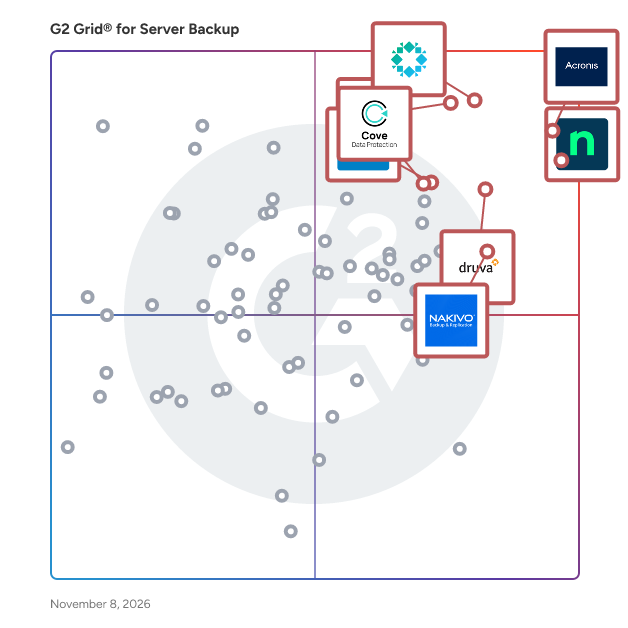
G2 Grid® for Server Backup Software

G2 Grid® for Server Backup Software plotting products by satisfaction and market presence

Highlighted products: Acronis Cyber Protect Cloud (now Acronis Cyber Platform), NinjaOne, Rubrik, Veeam Data Platform, Druva Data Security Cloud, Datto SIRIS, Cove Data Protection, and NAKIVO Backup & Replication.

Underlying data: [Grid® JSON](https://www.g2.com/categories/server-backup/grids.json?focus%5B%5D=acronis-cyber-protect-cloud-now-acronis-cyber-platform&focus%5B%5D=ninjaone&focus%5B%5D=rubrik&focus%5B%5D=veeam-data-platform&focus%5B%5D=druva-data-security-cloud&focus%5B%5D=kaseya-datto-siris&focus%5B%5D=cove-data-protection&focus%5B%5D=nakivo-backup-replication)

Acronis Cyber Protect Cloud (now Acronis Cyber Platform)

Acronis delivers the world’s most complete cyber resilience platform, combining backup, disaster recovery, cybersecurity, RMM, and business operations tools into a single, natively integrated solution. Built specifically for Managed Service Providers (MSPs) and IT teams, Acronis simplifies operations with one agent, one console, and one license model. Automation, AI-driven insights, and multi-tenant management ensure that fewer technicians can manage more clients at lower cost. With predictable pricing and transparent billing, Acronis enables partners and IT teams to scale efficiently, comply with regulations, and deliver unmatched resilience. No other vendor delivers this level of integration, efficiency, and MSP alignment. Acronis Cyber Protect Cloud (now Acronis Cyber Platform) unites backup and next-generation, AI-based anti-malware, antivirus, and endpoint protection management in one solution. Integration and automation provide unmatched ease for service providers — reducing complexity while increasing productivity and decreasing operating costs. Acronis Cyber Platform is the single service provider solution that combines backup, anti-malware (including anti-virus, anti-ransomware, and anti-cryptojacking) and security and management capabilities such as vulnerability assessments, patch management, URL filtering and more. Now, service providers can eliminate complexity and make security a centerpiece of their offerings while increasing SLAs, decreasing churn, and generating more recurring revenue. Get upgraded security with integrated AI-based defenses that protect clients from modern threats, make smarter use of resources so your team can focus on clients, and earn new recurring revenue and higher margins that strengthen your business. Enriched with next-gen, full-stack anti-malware protection and comprehensive yet simple management tools, built on top of our industry-leading backup and data recovery solution, Acronis Cyber Platform simplifies onboarding, daily operations, and reporting, and combats advanced attacks with new use cases enabled by integration. Acronis Cyber Platform makes it easy to deliver the modern cyber protection your clients seek. Acronis is majority-owned by EQT.

Average Rating: 4.7/5.0

Total Reviews: 1,467

How Do G2 Users Rate Acronis Cyber Protect Cloud (now Acronis Cyber Platform)?

  • Has the product been a good partner in doing business?: 9.3/10 (Category avg: 8.7/10)
  • Security Standards: 9.2/10 (Category avg: 8.7/10)
  • Disaster Recovery: 9.1/10 (Category avg: 8.6/10)
  • Activity Monitoring: 9.1/10 (Category avg: 8.6/10)

Who Is the Company Behind Acronis Cyber Protect Cloud (now Acronis Cyber Platform)?

  • Seller: Acronis
  • Company Website:
  • Year Founded: 2003
  • HQ Location: Schaffhausen
  • LinkedIn® Page: www.linkedin.com
    1,923 employees on LinkedIn®
  • Ownership: Acronis is majority-owned by EQT

Who Uses This Product?

  • Who Uses This: CEO, Director
  • Top Industries: Information Technology and Services, Computer & Network Security
  • Company Size: 69% Small, 27% Medium

What Do G2 Reviewers Say About Acronis Cyber Protect Cloud (now Acronis Cyber Platform)?

AI-generated summary from verified user reviews

Pros
  • Users appreciate the ease of use of Acronis Cyber Protect Cloud, enjoying centralized management of backups and protections.
  • Users appreciate the convenience of centralized backup management with Acronis Cyber Protect Cloud, streamlining tasks effectively.
  • Users value the ease of backup with Acronis Cyber Protect Cloud, appreciating its efficiency and straightforward training.
  • Users appreciate the easy management of backups and protection features in one console, enhancing efficiency and reliability.
  • Users value the comprehensive security offered by Acronis Cyber Protect Cloud, ensuring reliable data protection and quick recovery.
Cons
  • Users have noted a slow performance of Acronis Cyber Protect Cloud, particularly during peak usage and larger operations.
  • Users find the pricing relatively high, making it challenging to propose to customers in the African market.
  • Users find the setup and management complexity challenging, along with pricing that feels high compared to competitors.
  • Users often struggle with poor customer support, leading to confusion and frustration during setup and troubleshooting.
  • Users often face backup issues, including failures and unaccounted removals in the management portal, complicating their experience.

What Are Recent G2 Reviews of Acronis Cyber Protect Cloud (now Acronis Cyber Platform)?

What Are G2 Users Discussing About Acronis Cyber Protect Cloud (now Acronis Cyber Platform)?

NinjaOne

NinjaOne unifies IT to simplify work for 40,000 customers in 140+ countries. The NinjaOne Unified IT Operations Platform delivers endpoint management, autonomous patching, backup, and remote access in a single console to improve efficiency, increase resilience, and reduce spend. By automating IT and managing all endpoints, organizations give employees a great technology experience at work. The platform brings together the core work of modern IT operations: endpoint management, autonomous patch management, vulnerability management, endpoint and SaaS backup, remote access, and IT service desk. Teams monitor and control Windows, macOS, Linux, mobile, and virtual devices in one place, automate routine work with policy-based automation and human-centered AI, and cut the cost and risk that come from running many disconnected tools. NinjaOne has maintained a 98 percent customer satisfaction score for more than five years, backed by free unlimited onboarding and 24/7 support in seven languages. Organizations that move to NinjaOne report replacing four or more separate tools with the single platform. NinjaOne is FedRAMP Moderate Authorized and SOC 2 Type II and Type III compliant, and supports audit-ready compliance evidence across frameworks including CMMC, ISO 27001, and HIPAA. The mission behind the platform is simple: unify IT to simplify work, giving IT teams better tools and employees a great technology experience at work.

Average Rating: 4.7/5.0

Total Reviews: 5,783

How Do G2 Users Rate NinjaOne?

  • Has the product been a good partner in doing business?: 9.4/10 (Category avg: 8.7/10)
  • Security Standards: 8.8/10 (Category avg: 8.7/10)
  • Disaster Recovery: 8.4/10 (Category avg: 8.6/10)
  • Activity Monitoring: 9.3/10 (Category avg: 8.6/10)

Who Is the Company Behind NinjaOne?

  • Seller: NinjaOne
  • Company Website:
  • Year Founded: 2013
  • HQ Location: Austin, Texas
  • LinkedIn® Page: www.linkedin.com
    2,555 employees on LinkedIn®

Who Uses This Product?

  • Who Uses This: IT Manager, Owner
  • Top Industries: Information Technology and Services, Computer & Network Security
  • Company Size: 46% Small, 46% Medium

What Do G2 Reviewers Say About NinjaOne?

AI-generated summary from verified user reviews

Pros
  • Users find the interface intuitive and easy to navigate, making daily tasks straightforward.
  • Users value responsive, helpful support that quickly answers questions and helps resolve problems.
  • Users value fast, reliable remote access that makes it easy to connect to devices and resolve issues without being onsite.
  • Users appreciate the easy deployment and setup, which gets the platform running across devices with little effort.
  • Users value its broad, robust feature set and deep capabilities across RMM and IT management needs.
Cons
  • Users find navigation confusing and the interface dated, with settings and features sometimes difficult to locate.
  • Users find reporting limited in detail, available report types, and analytical depth.
  • Users find reporting inflexible and difficult to customize, configure, and tailor to complex needs.
  • Users find pricing steep for smaller teams and as endpoint counts grow, while add-ons and extra fees increase overall costs.
  • Users find integrations limited, less robust than desired, and sometimes difficult to configure or use with other systems.

What Are Recent G2 Reviews of NinjaOne?

What Are G2 Users Discussing About NinjaOne?

Rubrik

Rubrik is the leading cyber resilience and data protection company with a mission to secure the world’s data. Rubrik pioneered Zero Trust Data SecurityTM to help organizations achieve business resilience against cyberattacks, malicious insiders, and operational disruptions. Rubrik Security Cloud, built with a Zero Trust design and powered by machine learning, delivers complete cyber resilience in a single platform across enterprise, cloud, and SaaS. Rubrik’s platform automates data policy management and enforcement, safeguards sensitive data, delivers data threat analytics and response, and orchestrates rapid cyber and operational recovery.

Average Rating: 4.6/5.0

Total Reviews: 299

How Do G2 Users Rate Rubrik?

  • Has the product been a good partner in doing business?: 9.1/10 (Category avg: 8.7/10)
  • Security Standards: 9.2/10 (Category avg: 8.7/10)
  • Disaster Recovery: 9.3/10 (Category avg: 8.6/10)
  • Activity Monitoring: 9.2/10 (Category avg: 8.6/10)

Who Is the Company Behind Rubrik?

  • Seller: Rubrik
  • Company Website:
  • Year Founded: 2014
  • HQ Location: Palo Alto, California
  • LinkedIn® Page: www.linkedin.com
    5,167 employees on LinkedIn®

Who Uses This Product?

  • Who Uses This: Network Engineer, System Administrator
  • Top Industries: Information Technology and Services, Hospital & Health Care
  • Company Size: 46% Large, 35% Medium

What Do G2 Reviewers Say About Rubrik?

AI-generated summary from verified user reviews

Pros
  • Users find Rubrik to be incredibly easy to use, providing intuitive management and reliable backup solutions.
  • Users value Rubrik for its user-friendly backup solutions, ensuring reliable and secure data management with peace of mind.
  • Users appreciate the reliability of Rubrik, benefiting from consistent backups and unmatched peace of mind.
  • Users value the consistent and reliable backups of Rubrik, ensuring peace of mind and efficient data management.
  • Users appreciate the intuitive user interface of Rubrik, finding it easy to manage and secure their data.
Cons
  • Users find Rubrik's high cost challenging, especially for smaller teams and when scaling in hybrid environments.
  • Users express a need for more features and enhancements in Rubrik, indicating current offerings are insufficient.
  • Users find the complexity of Rubrik's installation and restore processes overwhelming, especially for beginners.
  • Users find it challenging to manage cost control with Rubrik, especially in larger multi-cloud environments.
  • Users find Rubrik lacking in missing features, wishing for more analytics and support for various databases.

What Are Recent G2 Reviews of Rubrik?

What Are G2 Users Discussing About Rubrik?

AI can help you find the answers. G2 helps you trust them.

Connect G2 to Claude or ChatGPT for answers grounded in G2's trusted reviews, comparisons, and pricing from real user insights.

How it works

Veeam Data Platform

Veeam’s premier product, Veeam Data Platform, is a unified solution that goes deeper on security, gets you back faster when it matters most, and expands workload protection across hypervisors and applications. Going beyond backup with best-in-class security, Veeam Data Platform is engineered to tackle the realities of today’s threat landscape. Deep threat detection backed by AI and a broad threat detection surface give your teams the business-critical tools they need to defend against evolving cyberattacks. With unmatched multicloud portability and expansive workload support, you gain the flexibility to move across hybrid and multicloud environments without disruption or lock-in. It’s protection for where you are, not where you were. For organizations looking to simplify deployment, Veeam Software Appliance gives you a pre-built, hardened, and highly available option that expands the strength of your team without adding headcount. These capabilities (and more) are what makes Veeam the #1 leader in data resilience, trusted by over 550,000 customers worldwide, including 82% of the Fortune 500.

Average Rating: 4.6/5.0

Total Reviews: 710

How Do G2 Users Rate Veeam Data Platform?

  • Has the product been a good partner in doing business?: 9.0/10 (Category avg: 8.7/10)
  • Security Standards: 9.1/10 (Category avg: 8.7/10)
  • Disaster Recovery: 9.3/10 (Category avg: 8.6/10)
  • Activity Monitoring: 8.9/10 (Category avg: 8.6/10)

Who Is the Company Behind Veeam Data Platform?

  • Seller: Veeam
  • Company Website:
  • Year Founded: 2006
  • HQ Location: Kirkland, WA
  • LinkedIn® Page: www.linkedin.com
    7,515 employees on LinkedIn®

Who Uses This Product?

  • Who Uses This: IT Manager, System Administrator
  • Top Industries: Information Technology and Services, Computer & Network Security
  • Company Size: 59% Medium, 23% Small

What Do G2 Reviewers Say About Veeam Data Platform?

AI-generated summary from verified user reviews

Pros
  • Users commend the ease of use of Veeam Data Platform, enhancing reliability and ensuring seamless operations.
  • Users value the reliability and comprehensiveness of Veeam Data Platform for efficient backup and recovery solutions.
  • Users value the reliability of Veeam Data Platform, ensuring consistent data protection and swift recovery in all environments.
  • Users value the frequent backup capabilities of Veeam Data Platform, allowing for quick recovery and data integrity.
  • Users praise the easy setup of Veeam Data Platform, facilitating quick onboarding and effective backups right from the start.
Cons
  • Users experience backup issues, particularly with Linux databases and advanced features, impacting overall reliability and efficiency.
  • Users find the pricing high for smaller teams, making it less accessible despite its capabilities.
  • Users find the licensing issues complex and opaque, complicating setups and potentially leading to unexpected costs.
  • Users find the complex setup of Veeam Data Platform challenging, often needing extensive research to navigate its features.
  • Users report backup problems with Veeam Data Platform, particularly with Linux databases and cloud management inconsistencies.

What Are Recent G2 Reviews of Veeam Data Platform?

What Are G2 Users Discussing About Veeam Data Platform?

Druva Data Security Cloud

Over the past decade, data risks have diversified, shifting data protection’s role from a passive last line of defense to an active data partner in responding to and recovering from diverse data risks. Traditionally, backup solutions aimed to secure against system risks such as hardware and application failures. However, with cloud making infrastructure redundant and applications becoming more resilient, risks have shifted from infrastructure to the data layer. While security tools play a critical role in creating defensive layers to secure the enterprise perimeter, some threats inevitably breach these defenses. Legacy backup approaches typically resorted to brute force recovery, but modern incident response demands a thorough analysis of the breach's scope, impact, and remediation strategies before recovery can occur. Data security is essential in this process, providing deep data insights that, when combined with perimeter security data, drive comprehensive and effective data-powered incident response. Druva bolsters enterprise data defense with the Data Security Cloud, a 100% SaaS, fully-managed platform that enhances protection, monitoring, and recovery. Druva ensures secure and clean recovery through air-gapped immutable backups, and advanced anomaly detection facilitates early threat identification. The platform's integrated response capabilities allow organizations to assess and address threats promptly, and bounce back to clean data without loss. By combining these features, Druva complements existing perimeter defenses, providing a seamless, comprehensive solution that simplifies the response and recovery process and ensures robust protection against modern threats. About Druva Druva is the leading provider of data security solutions, empowering customers to secure and recover their data from all threats. The Druva Data Security Cloud is a fully managed SaaS solution offering air-gapped and immutable data protection across cloud, on-premises, and edge environments. By centralizing data protection, Druva enhances traditional security measures and enables faster incident response, effective cyber remediation, and robust data governance. Trusted by over 7,500 customers, including 65 of the Fortune 500, Druva safeguards business data in an increasingly interconnected world.

Average Rating: 4.7/5.0

Total Reviews: 735

How Do G2 Users Rate Druva Data Security Cloud?

  • Has the product been a good partner in doing business?: 9.4/10 (Category avg: 8.7/10)
  • Security Standards: 9.6/10 (Category avg: 8.7/10)
  • Disaster Recovery: 9.5/10 (Category avg: 8.6/10)
  • Activity Monitoring: 9.4/10 (Category avg: 8.6/10)

Who Is the Company Behind Druva Data Security Cloud?

  • Seller: Druva
  • Company Website:
  • Year Founded: 2008
  • HQ Location: Sunnyvale, CA
  • LinkedIn® Page: www.linkedin.com
    1,372 employees on LinkedIn®

Who Uses This Product?

  • Who Uses This: IT Manager, System Administrator
  • Top Industries: Information Technology and Services, Computer Software
  • Company Size: 59% Medium, 34% Large

What Do G2 Reviewers Say About Druva Data Security Cloud?

AI-generated summary from verified user reviews

Pros
  • Users appreciate the ease of use of Druva Data Security Cloud, highlighting its simplicity and effective management.
  • Users appreciate the ease of use in Druva Data Security Cloud, valuing its simplicity and user-friendly interface.
  • Users appreciate the easy file-level restores with Druva, saving time and simplifying backup management significantly.
  • Users appreciate the professional and proactive support from Druva, enhancing their overall experience and system reliability.
  • Users value the consistent backup frequency of Druva Data Security Cloud, ensuring reliable data protection across systems.
Cons
  • Users experience occasional backup proxy failures initially, but overall stability improves after troubleshooting and support.
  • Users are frustrated by the storage limitations imposed on Druva Data Security Cloud compared to the initial unlimited storage offer.
  • Users find the costs of Druva Data Security Cloud can escalate rapidly due to its pricing model based on data volume.
  • Users often face slow performance during initial backups and restores, especially with large datasets, impacting efficiency.
  • Users are frustrated by the lack of backup options for Hyper-V, limiting functionality and integration with other platforms.

What Are Recent G2 Reviews of Druva Data Security Cloud?

What Are G2 Users Discussing About Druva Data Security Cloud?

Datto SIRIS

Datto SIRIS is an all-in-one BCDR solution built for MSPs to efficiently prevent data loss and minimize downtime. Utilizing a cloud-first approach, MSPs can offer their clients local backup and recovery with a secure, cloud-based repository and full disaster recovery in the cloud. All of this administered from a multi-tenant cloud portal that allows MSPs to view, manage and recover client data from a single interface. Simplicity is a guiding design principle for SIRIS. From deployment flexibility that spans a software-only implementation to hardened backup appliances, MSPs can implement the solution that fits their client’s requirements. SIRIS cross-platform support enables MSPs to protect their client’s data anywhere it lives, from physical servers to virtual machines running Windows Server or Linux. Innovative features include: • Inverse Chain Technology™ for reliable backup • Patented ransomware scanning • Patented Screenshot Verification for recovery assurance • Intuitive Recovery Launchpad for failproof recovery • Patented Fast Failback™ to primary system after a disaster • Instant virtualization recovery, local or in the cloud SIRIS Explainer: https://www.youtube.com/watch?v=C5We4VpRqOA

Average Rating: 4.5/5.0

Total Reviews: 285

How Do G2 Users Rate Datto SIRIS?

  • Has the product been a good partner in doing business?: 9.0/10 (Category avg: 8.7/10)
  • Security Standards: 9.2/10 (Category avg: 8.7/10)
  • Disaster Recovery: 9.7/10 (Category avg: 8.6/10)
  • Activity Monitoring: 8.9/10 (Category avg: 8.6/10)

Who Is the Company Behind Datto SIRIS?

  • Seller: Kaseya
  • Company Website:
  • Year Founded: 2000
  • HQ Location: Miami, FL
  • LinkedIn® Page: www.linkedin.com
    5,483 employees on LinkedIn®

Who Uses This Product?

  • Who Uses This: Owner, President
  • Top Industries: Information Technology and Services, Computer & Network Security
  • Company Size: 66% Small, 28% Medium

What Do G2 Reviewers Say About Datto SIRIS?

AI-generated summary from verified user reviews

Pros
  • Users appreciate the ease of use of Datto SIRIS, enjoying quick support and seamless disaster recovery processes.
  • Users appreciate the reliability of Datto SIRIS, benefiting from improved support and minimized verification errors.
  • Users highlight the easy recovery process with Datto SIRIS, appreciating its performance and user-friendly interface.
  • Users appreciate the reliable instant virtualization of Datto SIRIS, allowing for quick recovery and minimal downtime.
  • Users appreciate the responsive customer support of Datto SIRIS, enhancing their overall experience with the product.
Cons
  • Users often mention the high cost of Datto SIRIS, which can be prohibitive for smaller environments.
  • Users find poor customer support challenging, especially with response times and escalations during busy periods.
  • Users feel that Datto SIRIS has high pricing issues that may be a barrier for smaller environments needing storage.
  • Users often face restore issues with Datto SIRIS, particularly regarding speed and backup size complications.
  • Users often face storage issues with Datto SIRIS, citing slow backup speeds for large data amounts as problematic.

What Are Recent G2 Reviews of Datto SIRIS?

What Are G2 Users Discussing About Datto SIRIS?

Cove Data Protection

Cove Data Protection, from N-able, is a cloud-first backup and disaster recovery service for servers, workstations, and Microsoft 365™, all managed from a multitenant web-based dashboard. Cove was created and optimized for the cloud, so incremental backups are up to 60 times smaller than with traditional image backup products. This allows you to back up more often, and the SaaS delivery format reduces administrative time, lowering your cost of service delivery. Storage in our private cloud is included, with data centers worldwide.

Average Rating: 4.5/5.0

Total Reviews: 435

How Do G2 Users Rate Cove Data Protection?

  • Has the product been a good partner in doing business?: 8.9/10 (Category avg: 8.7/10)
  • Security Standards: 8.8/10 (Category avg: 8.7/10)
  • Disaster Recovery: 8.9/10 (Category avg: 8.6/10)
  • Activity Monitoring: 9.1/10 (Category avg: 8.6/10)

Who Is the Company Behind Cove Data Protection?

  • Seller: N-able
  • Company Website:
  • HQ Location: Morrisville, North Carolina
  • LinkedIn® Page: www.linkedin.com
    2,307 employees on LinkedIn®
  • Ownership: NYSE: NABL

Who Uses This Product?

  • Who Uses This: Owner, President
  • Top Industries: Information Technology and Services, Computer & Network Security
  • Company Size: 72% Small, 21% Medium

What Do G2 Reviewers Say About Cove Data Protection?

AI-generated summary from verified user reviews

Pros
  • Users find Cove Data Protection highly user-friendly, appreciating its intuitive dashboard and seamless backup management.
  • Users praise Cove Data Protection for its simple and reliable backup solutions, enhancing management with strong support.
  • Users appreciate the reliable performance of Cove Data Protection, ensuring smooth backups and effective data management.
  • Users value the automatic backup frequency of Cove Data Protection, ensuring seamless data management and peace of mind.
  • Users commend the easy setup of Cove Data Protection, enhanced by responsive support and seamless integration with existing tools.
Cons
  • Users experience backup issues during outages, with vague error messages and failed folder backups complicating recovery efforts.
  • Users experience backup failures during outages, vague error messages, and issues with restoring data effectively.
  • Users face challenges with restore issues during outages, leading to incomplete backups and vague error messages.
  • Users experience backup failures during internet outages, making data restoration difficult and creating vague error messages.
  • Users face restoration issues with Cove Data Protection, including slow recovery and unclear error messages during outages.

What Are Recent G2 Reviews of Cove Data Protection?

What Are G2 Users Discussing About Cove Data Protection?

Azure Backup

Azure Backup is a centralized cloud-based service designed to protect your data across various environments, including on-premises and cloud-based infrastructures. It offers enterprise-grade data protection, ensuring business continuity during outages and cyberattacks. Key Features and Functionality: - At-Scale Management: Monitor, operate, govern, and plan backups at scale with resiliency capabilities in Azure. - Ransomware Protection: Safeguard your backups from ransomware attacks with air-gapped vaults and features like immutability, soft-delete, and multiuser authorization (MUA). - Diverse Workload Protection: Protect a wide range of workloads, including databases like SQL Server, SAP HANA, PostgreSQL, and MySQL; storage solutions like Azure blobs and file shares; and containerized applications running in Azure Kubernetes Service (AKS) clusters. - Cost Optimization: Eliminate extra costs of additional backup infrastructure and overhead for scaling and managing storage. Primary Value and Solutions Provided: Azure Backup addresses the critical need for robust data protection by offering a scalable and secure solution that integrates seamlessly with Azure services. It simplifies backup management, enhances security against cyber threats, and supports a diverse range of workloads, thereby ensuring data integrity and availability for businesses of all sizes.

Average Rating: 4.4/5.0

Total Reviews: 76

How Do G2 Users Rate Azure Backup?

  • Has the product been a good partner in doing business?: 9.0/10 (Category avg: 8.7/10)
  • Security Standards: 8.8/10 (Category avg: 8.7/10)
  • Disaster Recovery: 9.0/10 (Category avg: 8.6/10)
  • Activity Monitoring: 8.9/10 (Category avg: 8.6/10)

Who Is the Company Behind Azure Backup?

  • Seller: Microsoft
  • Year Founded: 1975
  • HQ Location: Redmond, Washington
  • LinkedIn® Page: www.linkedin.com
    232,750 employees on LinkedIn®
  • Ownership: MSFT
  • Phone: +1 (877) 276-2464

Who Uses This Product?

  • Top Industries: Information Technology and Services, Computer Software
  • Company Size: 44% Medium, 30% Small

What Do G2 Reviewers Say About Azure Backup?

AI-generated summary from verified user reviews

Pros
  • Users praise the reliability of Azure Backup, noting its seamless integration and consistent performance across services.
  • Users value the ease of use of Azure Backup, making data management and backup straightforward and efficient.
  • Users value the easy setup of Azure Backup, enabling seamless transitions for effective data management and backup routines.
  • Users enjoy the management ease of Azure Backup, appreciating its seamless integration with various Azure services.
  • Users value the centralized management of Azure Backup, streamlining backup processes across Azure and on-premises resources.
Cons
  • Users find the pricing of Azure Backup to be complex and potentially high for long-term storage options.

What Are Recent G2 Reviews of Azure Backup?

What Are G2 Users Discussing About Azure Backup?

NAKIVO Backup & Replication

NAKIVO Backup & Replication provides an all-in-one data protection solution for backup, replication, recovery, ransomware resilience, and disaster recovery (DR). The feature set includes application-aware backups, instant recovery capabilities, Site Recovery for DR orchestration, encryption, federated repositories, immutability, and other security features. IT Monitoring for VMware vSphere is also available as a separately licensed capability. Supported Platforms: VMware vSphere, Microsoft Hyper-V, Nutanix AHV, Proxmox VE, Amazon EC2, Windows and Linux physical machines, Microsoft 365, NAS and file shares, and Oracle Database via RMAN.

Average Rating: 4.7/5.0

Total Reviews: 354

How Do G2 Users Rate NAKIVO Backup & Replication?

  • Has the product been a good partner in doing business?: 9.4/10 (Category avg: 8.7/10)
  • Security Standards: 9.1/10 (Category avg: 8.7/10)
  • Disaster Recovery: 9.4/10 (Category avg: 8.6/10)
  • Activity Monitoring: 9.2/10 (Category avg: 8.6/10)

Who Is the Company Behind NAKIVO Backup & Replication?

Who Uses This Product?

  • Who Uses This: IT Manager, Owner
  • Top Industries: Information Technology and Services, Computer & Network Security
  • Company Size: 59% Small, 35% Medium

What Do G2 Reviewers Say About NAKIVO Backup & Replication?

AI-generated summary from verified user reviews

Pros
  • Users value the ease of use of NAKIVO Backup & Replication, appreciating its straightforward interface and automation features.
  • Users value the seamless on-premises and cloud backup solutions of NAKIVO, ensuring data protection with minimal effort.
  • Users commend the exceptional customer support of NAKIVO, providing informative assistance that enhances the overall experience.
  • Users value the fast and automated backups of NAKIVO Backup & Replication, ensuring effortless data protection and recovery.
  • Users find NAKIVO Backup & Replication's easy setup enhances their experience, making backup management intuitive and efficient.
Cons
  • Users often face backup issues due to integration gaps and limitations with SQL Server log backups and unnecessary file backups.
  • Users face backup problems due to integration gaps with ITSM platforms and missing features compared to competitors.
  • Users face storage limitations in NAKIVO Backup & Replication, complicating backup processes with multiple repositories required.
  • Users are frustrated by the lack of backup options, missing critical features and integration with ITSM platforms.
  • Users note the limited features of NAKIVO Backup & Replication, particularly missing support for certain applications and platforms.

What Are Recent G2 Reviews of NAKIVO Backup & Replication?

What Are G2 Users Discussing About NAKIVO Backup & Replication?

IDrive Online and SaaS Backup, Object Storage e2

IDrive protects all your PCs, Macs, mobile devices, Servers, your Cloud Applications Data (SAAS) including Office 365, Google Workspace and more, and provides the best in class S3 compatible Object Storage service with IDrive e2. IDrive offers many different plans for cloud backup for your devices: -IDrive Personal -IDrive Team -IDrive Small Business -IDrive Enterprise - IDrive360 EndPoint IDrive provides Cloud Applications data (SAAS) Backup: - Microsoft Office 365 Backup - Google Workspace Backup - Dropbox and Box Backup - Salesforce Backup The company's services help over 4 million customers back up over 1 Exabyte of data

Average Rating: 4.4/5.0

Total Reviews: 2,068

How Do G2 Users Rate IDrive Online and SaaS Backup, Object Storage e2?

  • Has the product been a good partner in doing business?: 9.0/10 (Category avg: 8.7/10)
  • Security Standards: 9.0/10 (Category avg: 8.7/10)
  • Disaster Recovery: 9.2/10 (Category avg: 8.6/10)
  • Activity Monitoring: 8.6/10 (Category avg: 8.6/10)

Who Is the Company Behind IDrive Online and SaaS Backup, Object Storage e2?

  • Seller: IDrive
  • Year Founded: 2007
  • HQ Location: Calabasas, CA
  • LinkedIn® Page: www.linkedin.com
    135 employees on LinkedIn®

Who Uses This Product?

  • Who Uses This: Owner, President
  • Top Industries: Photography, Information Technology and Services
  • Company Size: 89% Small, 4% Medium

What Do G2 Reviewers Say About IDrive Online and SaaS Backup, Object Storage e2?

AI-generated summary from verified user reviews

Pros
  • Users value the ease of use of IDrive Online and SaaS Backup, enjoying seamless access and customization options.
  • Users value the affordable pricing of IDrive Online and SaaS Backup, providing excellent service and flexibility.
  • Users appreciate the flexible storage capacity of IDrive Online, allowing seamless backups and easy file access across devices.
  • Users find the setup process very easy, enhancing their overall experience with IDrive Online and SaaS Backup.
  • Users value the flexible backup frequency options of IDrive, making data management efficient and stress-free.
Cons
  • Users often face backup issues with IDrive, including slow speeds and challenges with syncing and uploading files.
  • Users feel that the poor interface design of IDrive Online hinders usability and complicates file management.
  • Users express frustration over backup failures, particularly with syncing deletions and scheduled backups not functioning properly.
  • Users report storage issues with iDrive, including sync failures and manual upload requirements that complicate the process.
  • Users experience slow backup speeds, especially with initial backups and large restores, affecting overall performance.

What Are Recent G2 Reviews of IDrive Online and SaaS Backup, Object Storage e2?

What Are G2 Users Discussing About IDrive Online and SaaS Backup, Object Storage e2?

CrashPlan Platform

CrashPlan delivers enterprise-grade backup, recovery, and archiving to protect the data organizations cannot afford to lose. Our cloud-native platform helps businesses secure Microsoft 365, Google Workspace, endpoint, and server data with scalable protection that reduces risk, supports compliance, and controls storage costs. Built for modern IT environments, CrashPlan enables fast, reliable recovery while supporting long-term retention, legal hold, and broader data governance needs. We help enterprises strengthen resilience and maintain continuity without added complexity.

Average Rating: 4.9/5.0

Total Reviews: 263

How Do G2 Users Rate CrashPlan Platform?

  • Has the product been a good partner in doing business?: 9.9/10 (Category avg: 8.7/10)

Who Is the Company Behind CrashPlan Platform?

  • Seller: CrashPlan
  • Company Website:
  • Year Founded: 2001
  • HQ Location: Minneapolis, MN
  • LinkedIn® Page: www.linkedin.com
    164 employees on LinkedIn®

Who Uses This Product?

  • Who Uses This: Administrator
  • Top Industries: Real Estate, Information Technology and Services
  • Company Size: 63% Medium, 36% Large

What Do G2 Reviewers Say About CrashPlan Platform?

AI-generated summary from verified user reviews

Pros
  • Users appreciate the lightning-speed backup frequency of CrashPlan Platform, which ensures minimal downtime during restores.
  • Users value the ease of use of CrashPlan, making backup management simple and efficient for admins.
  • Users highlight the excellent security features of CrashPlan Platform, ensuring protection against ransomware and compliance with regulations.
  • Users appreciate the quality customer support provided by CrashPlan Platform, enhancing their overall experience and satisfaction.
  • Users value the keen and clear reporting support of CrashPlan, enhancing admin efficiency in managing backups.
Cons
  • Users note that the UI could be more engaging and suggest simplifying log fetching for easier troubleshooting.
  • Users find the reporting inadequate, with unclear data and issues like mismatched reports and slow restore progress.
  • Users experience restoration issues with CrashPlan Platform, facing slow processes and mismatched report data during recovery.
  • Users experience slow performance with loading times, which can be frustrating despite excellent support from the team.
  • Users report backup issues that can be resource-intensive, especially on older hardware, affecting overall performance.

What Are Recent G2 Reviews of CrashPlan Platform?

What Are G2 Users Discussing About CrashPlan Platform?

HYCU

HYCU is the #1 AI Resilience Company. With one platform to backup and recover 100+ workloads across AI systems, SaaS applications, cloud environments, and on-premises infrastructure, HYCU eliminates the complexity and cost of out-of-phase data protection operations. With HYCU R-Cloud, organizations protect any workload, recover data to a location of their choice, and connect that data to streamline compliance and governance. When disruption strikes, they resume operations quickly and securely. Data anywhere, protected everywhere. What HYCU protects SaaS applications: Microsoft 365, iManage Cloud, Jira, Confluence, GitHub, Box, and 100+ additional applications. Identity & Access Management: Microsoft Entra ID, Okta, AWS IAM, and other IAM platforms. Cloud-native workloads: AWS, Google Cloud, and Microsoft Azure, including instances, storage buckets, databases, Amazon VPC, and AWS Route 53. On-premises and hybrid: Native, agentless protection for Nutanix, VMware, Dell, and NetApp with a software-only approach and complete storage flexibility. Core capabilities Backup and recovery · Disaster recovery · File-level and granular recovery · Data migration and mobility · Compliance and governance · SaaS data estate visualization Why HYCU 100% automated data protection, free from third-party risk. Competitive, transparent pricing with no lock-in. Trusted by thousands of enterprises and government agencies in 78 countries. 440+ partners worldwide.

Average Rating: 4.7/5.0

Total Reviews: 174

How Do G2 Users Rate HYCU?

  • Has the product been a good partner in doing business?: 9.6/10 (Category avg: 8.7/10)
  • Security Standards: 9.1/10 (Category avg: 8.7/10)
  • Disaster Recovery: 9.0/10 (Category avg: 8.6/10)
  • Activity Monitoring: 9.1/10 (Category avg: 8.6/10)

Who Is the Company Behind HYCU?

  • Seller: HYCU
  • Company Website:
  • Year Founded: 2018
  • HQ Location: Boston, US
  • LinkedIn® Page: www.linkedin.com
    249 employees on LinkedIn®

Who Uses This Product?

  • Who Uses This: System Administrator
  • Top Industries: Information Technology and Services, Computer & Network Security
  • Company Size: 53% Medium, 23% Small

What Do G2 Reviewers Say About HYCU?

AI-generated summary from verified user reviews

Pros
  • Users appreciate the ease of use of HYCU, highlighting its intuitive setup and seamless integration for effortless backups.
  • Users appreciate the streamlined upgrade process and the ability for granular restores in HYCU's backup solution.
  • Users highlight the excellent customer support from HYCU, ensuring quick responses and ongoing assistance during issues.
  • Users commend the ease of use and rapid recovery features of HYCU, appreciating its strong immutable backup solutions.
  • Users commend the easy and intuitive setup of HYCU, enhancing efficiency and reducing management overhead.
Cons
  • Users are disappointed with the limited features in HYCU, especially regarding scheduling and SaaS platform support.
  • Users express concern over storage limitations, wishing for more robust backup options within HYCU's policies.
  • Users express concerns over backup issues, citing a need for native features and improved support responsiveness.
  • Users face information deficiency with HYCU, relying heavily on limited resources and unclear error messages.
  • Users feel the product lacks essential features like summary emails and flexible job scheduling, impacting compliance.

What Are Recent G2 Reviews of HYCU?

Veeam Backup for AWS

Embrace secure data portability and leverage tools that go above native capabilities for AWS. With Veeam’s leading policy-based protection, you can reliably recover from accidental deletion, ransomware, and other data loss scenarios. Ensure resilient protection while freeing up valuable time and resources for your business. · Layered security: Secure access and data management to overcome ransomware and other cyberthreats. · Powerful recovery: Broad coverage of fast, reliable recovery options in and out of the cloud. · Cloud efficiency: Zero-fuss backups that meet compliance and budget requirements across the hybrid cloud. Learn more: https://www.veeam.com/aws-backup.html

Average Rating: 4.5/5.0

Total Reviews: 115

How Do G2 Users Rate Veeam Backup for AWS?

  • Has the product been a good partner in doing business?: 8.9/10 (Category avg: 8.7/10)
  • Security Standards: 9.4/10 (Category avg: 8.7/10)
  • Disaster Recovery: 9.3/10 (Category avg: 8.6/10)
  • Activity Monitoring: 9.1/10 (Category avg: 8.6/10)

Who Is the Company Behind Veeam Backup for AWS?

  • Seller: Veeam
  • Year Founded: 2006
  • HQ Location: Kirkland, WA
  • LinkedIn® Page: www.linkedin.com
    7,515 employees on LinkedIn®

Who Uses This Product?

  • Who Uses This: Software Engineer
  • Top Industries: Information Technology and Services, Computer Software
  • Company Size: 39% Medium, 32% Small

What Do G2 Reviewers Say About Veeam Backup for AWS?

AI-generated summary from verified user reviews

Pros
  • Users find Veeam Backup for AWS to be extremely competitively priced, making it an affordable solution for data protection.
  • Users find Veeam Backup for AWS offers seamless backup efficiency, making deployment and implementation incredibly straightforward.
  • Users praise the seamless integration of Veeam Backup for AWS, highlighting its simplicity and excellent support.
  • Users love the seamless cloud integration of Veeam Backup for AWS, making it feel like a native AWS solution.
  • Users praise the phenomenal customer support of Veeam Backup for AWS, enhancing their overall user experience.
Cons
  • Users often face technical difficulties when configuring complex AWS workloads, necessitating additional support to resolve issues.

What Are Recent G2 Reviews of Veeam Backup for AWS?

What Are G2 Users Discussing About Veeam Backup for AWS?

Cohesity

Cohesity protects, secures, and provides insights into the world’s data. As the leader in AI and data security, Cohesity helps organizations strengthen resilience, accelerate recovery, and reduce IT costs. The Cohesity Data Cloud helps organizations defend against cybersecurity threats with comprehensive data security and management capabilities, including immutable backup snapshots, AI-based threat detection, monitoring for malicious behavior, and rapid recovery at scale. Cohesity solutions can be delivered as a service, self-managed, or provided by a Cohesity-powered partner. Cohesity is headquartered in Santa Clara, CA and is trusted by customers in more than 140 countries, including two-thirds of the Global 500. Cohesity is also backed by industry leaders such as NVIDIA, Amazon, Google, IBM, Cisco, and HPE.

Average Rating: 4.2/5.0

Total Reviews: 214

How Do G2 Users Rate Cohesity?

  • Has the product been a good partner in doing business?: 8.7/10 (Category avg: 8.7/10)
  • Security Standards: 9.1/10 (Category avg: 8.7/10)
  • Disaster Recovery: 9.0/10 (Category avg: 8.6/10)
  • Activity Monitoring: 9.2/10 (Category avg: 8.6/10)

Who Is the Company Behind Cohesity?

  • Seller: Cohesity
  • Company Website:
  • Year Founded: 2013
  • HQ Location: Santa Clara, CA
  • LinkedIn® Page: www.linkedin.com
    7,808 employees on LinkedIn®

Who Uses This Product?

  • Who Uses This: Systems Administrator
  • Top Industries: Information Technology and Services, Computer Software
  • Company Size: 45% Large, 38% Medium

What Do G2 Reviewers Say About Cohesity?

AI-generated summary from verified user reviews

Pros
  • Users value the seamless integration of Cohesity with M365, enhancing their backup experience across all services.
  • Users value the backup frequency of Cohesity, ensuring timely and reliable data protection.
  • Users value the all-in-one backup solution of Cohesity, benefiting from a single point of contact for support.
  • Users appreciate the seamless cloud integration of Cohesity with M365, ensuring comprehensive backup and management.
  • Users value the seamless integration of Cohesity for easy backup and remote management across platforms.
Cons
  • Users are frustrated by the alert issues in Cohesity, requiring manual management of disabled user accounts.
  • Users express dissatisfaction with Cohesity's authentication issues, such as lack of automatic detection of disabled user accounts.
  • Users express frustration with backup failures caused by the inability to auto-remove disabled accounts from protection groups.
  • Users face backup issues due to manual intervention required for disabled accounts, complicating the backup process.
  • Users find the initial setup complex, necessitating careful planning to ensure a smooth implementation.

What Are Recent G2 Reviews of Cohesity?

What Are G2 Users Discussing About Cohesity?

Synology Data Protection Solutions

Synology ActiveProtect is a purpose-built backup appliance solution designed to centralize, protect, and recover enterprise data via a unified platform. Keep an eye on your backups no matter where you are. Synology ActiveProtect appliance comes with a built-in operating system called ActiveProtect Manager: Experience fast backups and maximize your capacity Safeguard backups, backup copies, and leverage data deduplication capabilities to maximize your overall storage capacity. Safeguard as many workloads as needed Protect a wide range of workloads from file servers, physical servers, databases, virtual machines, PCs and Macs, and Microsoft 365 data. Monitor your data with a single pane of glass Achieve data visibility by consolidating workloads on one centralized platform with ActiveProtect. View up to 150,000 workloads and monitor 2,500 sites via a unified console, including all backups, backup copies, and archived data across your backup infrastructure. Safeguard your data from ransomware Protect against unforeseen disasters such as ransomware attacks with access controls, immutability, and data isolation. Prevent unauthorized personnel from accessing your data by setting up MFA via Active Directory, LDAP, and SAML 2.0. Preserve clean copies of your data so that an untainted copy is always available for recovery. Meet and exceed long-term data retention needs Store long-term backups via on-prem or cloud backup repositories. Backups can be stored for as long as needed without taking up excess space or changing existing backup infrastructure to meet compliance, protect sensitive data, and ensure business continuity.

Average Rating: 4.5/5.0

Total Reviews: 36

How Do G2 Users Rate Synology Data Protection Solutions?

  • Has the product been a good partner in doing business?: 8.8/10 (Category avg: 8.7/10)
  • Security Standards: 9.3/10 (Category avg: 8.7/10)
  • Disaster Recovery: 8.9/10 (Category avg: 8.6/10)
  • Activity Monitoring: 8.8/10 (Category avg: 8.6/10)

Who Is the Company Behind Synology Data Protection Solutions?

Who Uses This Product?

  • Top Industries: Information Technology and Services
  • Company Size: 81% Small, 19% Medium

What Do G2 Reviewers Say About Synology Data Protection Solutions?

AI-generated summary from verified user reviews

Pros
  • Users find the easy-to-use interface of Synology Data Protection Solutions enhances their backup experience significantly.
  • Users find the setup ease of Synology Data Protection Solutions exceptional, enabling effortless backup for numerous accounts.
  • Users find the easy setup of Synology Data Protection Solutions perfect for managing diverse backup infrastructures effortlessly.
  • Users value the easy-to-use UI of Synology Data Protection Solutions, making backup effortless and efficient for all devices.
  • Users commend the easy-to-use UI and stable experience of Synology Data Protection Solutions for seamless backups.
Cons
  • Users often face backup issues with Synology Data Protection Solutions, leading to lost files and unreliable recovery options.
  • Users often experience backup failures with Synology Data Protection Solutions, leading to significant data loss and recovery challenges.
  • Users experience significant data deletion issues with Synology, facing challenges in restoring backups and reliability.
  • Users find the difficult learning curve in setting advanced backup rules can be confusing and challenging.
  • Users face significant restore issues with Synology, struggling with compatibility and backup failures, causing major downtime.

What Are Recent G2 Reviews of Synology Data Protection Solutions?

What Are G2 Users Discussing About Synology Data Protection Solutions?

Tian Lin
TL
Researched and written by Tian Lin
Updated October 3, 2024

Learn More About Server Backup Software

What is Server Backup Software?

As businesses go digital and build their digital presence, they increasingly rely on servers as a key part of daily function. Servers are, in essence, computers with massive storage and processing power that centralize data or computing resources. Businesses use servers to consolidate key data and information for both access and security reasons.

Imagine, though, that a business’ server—or one of their servers—crashes. A hard drive might fail. The entire stack could lose power. Worse, the server might get subjected to a power surge and fry the hardware. If that data wasn’t duplicated somewhere, it could be lost permanently, which could mean serious issues for the business.

Server backup tools are specifically designed for these situations. These solutions can back up all data and files that sit on a server, and some can even be used to directly restore that data to the server after an issue is resolved. At minimum, server backup solutions act as a safety net for businesses, giving them recovery options for their data after an issue occurs. Backups can be kept on a different server on premises or remotely; just don’t keep them on the same server you’re backing up.

Key Benefits of Server Backup Software

  • Copy and save key data
  • Manage backup scheduling at different levels
  • Scale with data requirements

Why Use Server Backup Software?

Have you ever worked on a project on your computer for hours, just to have the program or your computer crash and lose everything? Imagine that happening, but instead of just with that one project, it was with all of your business data.

Server backup—like any other kind of backup—is not valuable for when everything is working normally but, instead, for when something goes wrong. Server backup solutions help to ensure that even when your storage location fails, there’s another location that still has all the data you need. How much of that data is retained depends on how your backups are scheduled. There are valid arguments for making your backups incremental vs. differential, as well as for how often you choose to back your server up. Generally though, the more data you have, and the more important that data is, the more beneficial it is to back up your server as often as possible.

It’s important to note that server backups are different from server replication. Server replication is often constant and live, and can replicate to several servers simultaneously. Server backup, on the other hand, is typically scheduled, run manually or automatically, and goes to one place. Server replication is also built to be an immediate failover, whereas server backup software focuses more on recovering what might have been lost.

Given the benefits, let’s look at why businesses specifically use server backup tools.

Capacity — Other kinds of backup software aren’t built to handle the same volume of data as server backup software. Servers can potentially store hundreds of terabytes (hundreds of thousands of gigabytes) of data, while standard backup solutions cannot.

Peace of mind — It can be incredibly reassuring knowing your key business data is protected. Server backups are essentially a second copy of your servers, which means that as long as the server data was backed up, any of it can be recovered. Plus, with some server backup solutions capable of tracking the history of your backups, you may be able to recover your data to certain historical points beyond the most recent backup, just in case there was data in the most recent backup that is incorrect or could be problematic.

One important thing to note though, especially with server backups: Be aware of whose responsibility it is for the backups themselves. With a cloud backup where your business doesn’t own the server, the onus of responsibility will be on the backup server owner. However, if backing up to another one of your business’ own servers, the responsibility for your server backups is completely in your hands.

Who Uses Server Backup Software?

Any business with a server should be using server backup software for their data. That said, typically, server administrators will be the only ones interacting with the server backup software itself. Verifying server health is part of their daily workflow, and backing up server data is part of that process.

For especially large or complex companies, however, there may be a few more teams or people that would interact with server backup solutions. Some companies have dedicated data teams that might take the backup responsibility off the hands of server administrators as a part of their responsibility to the company’s data. It’s also possible that security teams might be involved with server backup solutions to safeguard the data being duplicated.


Kinds of Server Backup Software

The following are some ways that server backup software distinguish themselves from other solutions.

Free vs. paid — When dealing with server backup software, free backup software can be limited in functionality compared to its paid counterparts, or it might have more limitations around data handling than paid versions. Also, free versions of server backup solutions might be great for giving the software a try, but free versions often gate either the functionality or the data volume the software has available. If looking into a free server backup solution, be sure that it has the capabilities your business requires. Otherwise, look into paid options.

Local vs. cloud vs. hybrid — Server backup solutions are generally built for backing servers up to one of three places: a local server, a cloud server, or some combination thereof. Solutions focusing on one particular option—local or cloud—have been popular in the past, but it’s likely in the future that more products allow the option to back your server up to a mix of the two, as there can be value in balancing cloud and local resources. Some products already offer this functionality through their backup location selection.

Open-source vs. proprietary — Unlike proprietary server backup solutions, open-source server backup software can be modified at the code level to change the functionality of the solution. Open-source software can be stronger from a customization standpoint, but it may struggle in base functionality because it’s generally less expensive or free as compared to its proprietary counterparts. Be sure, if opting for an-open source solution, that any changes you might make don’t alter the security parameters of the solution as well. It would be worth consulting with your data security team when making code changes to the solution to make sure it doesn’t leave your data vulnerable to attacks or leaks.

Server Backup Software Features

While not an exhaustive list, the following are the features you will typically find in server backup software.

Diverse file type coverage — Server backup solutions should not exclude data from backup based on file type. Critical data can be a variety of types—documents, spreadsheets, and more—and an effective server backup solution can handle copying any file type.

Backup location determination — An important aspect of any backup is making sure your data will be preserved somewhere that best fits your company’s needs and security standards. Server backup solutions should allow your company to select their most suitable backup location.

Scheduling and automation — Manual backup can be nice in a pinch, but forgetting to run a backup can make a huge difference in the amount of critical data that is lost in a server failure. With scheduling and automation features, server backup solutions allow you to run your server backups automatically, whenever you need them.

Backup management — Server backup software should allow your business to manage the backups that have been made. While the software may not allow holding backups beyond a certain point, your business should still be able to manage any recent backups, either as reference points or to remove.

Partition selection — Partitions—isolated segmentations within a hard drive that can be independently managed—can be valuable assets for businesses. They help ensure that certain information or data can be separated from the rest to prevent corruption or other issues. Server backup solutions must be capable of handling backing up each distinct partition from a drive so that important data is not lost in a failure.

Data compression — As previously mentioned, servers can store huge quantities of data. Compressing that data while backing up your servers can help reduce the amount of storage space needed for the backup itself, which can potentially save your business money.

Backup type selection — Full backups are often time-consuming, which makes them impractical to run regularly. Server backup solutions should offer the capability to run both differential and incremental backups as ways to keep your data duplicated and safe, without needing numerous hours to run a full-out backup.

Scaling — Some businesses have more server data than others, and regardless of business size, the volume of data your servers have can change rapidly. Server backup solutions should scale with your data needs to ensure your data is always backed up.

Potential Issues with Server Backup Software

Security and encryption — Few server backup solutions come with active security features. When using a server backup software, be sure to work with your data security team to lock down your data backups as much—or more—than the server itself. You don’t want to leave your business’ data vulnerable and up for the taking.

Support — This issue may present itself more with free or open-source tools. When something goes wrong with a software product itself, it’s helpful to be able to reach out to a company’s support team for assistance. Many free or open-source products don’t offer the same kind of support structure as proprietary, paid solutions. Your business may end up consulting open forums of existing users for free or open-source solutions, whereas with proprietary, paid solutions, you’ll likely be consulting with a member of that software company’s support staff.