Best Project Management Software for Small Business - Page 5

How Many Project Management Software Products Does G2 Track?

Total Products under this Category: 1,376

Category Stats (Sep 2026)

  • Average Rating: 4.39/5 The average rating of products in this category, based on all submitted ratings
  • Top Trending Product: Workzone (+1.76%) - Among all products in this category, Workzone recorded the largest rating increase compared to last month

Last updated: September 01, 2026

How Does G2 Rank Project Management Software Products?

Why You Can Trust G2's Software Rankings:

  • 30 Analysts and Data Experts
  • 144,900+ Authentic Reviews
  • 1,376+ Products
  • Unbiased Rankings

G2's software rankings are built on verified user reviews, rigorous moderation, and a consistent research methodology maintained by a team of analysts and data experts. Each product is measured using the same transparent criteria, with no paid placement or vendor influence. While reviews reflect real user experiences, which can be subjective, they offer valuable insight into how software performs in the hands of professionals. Together, these inputs power the G2 Score, a standardized way to compare tools within every category.

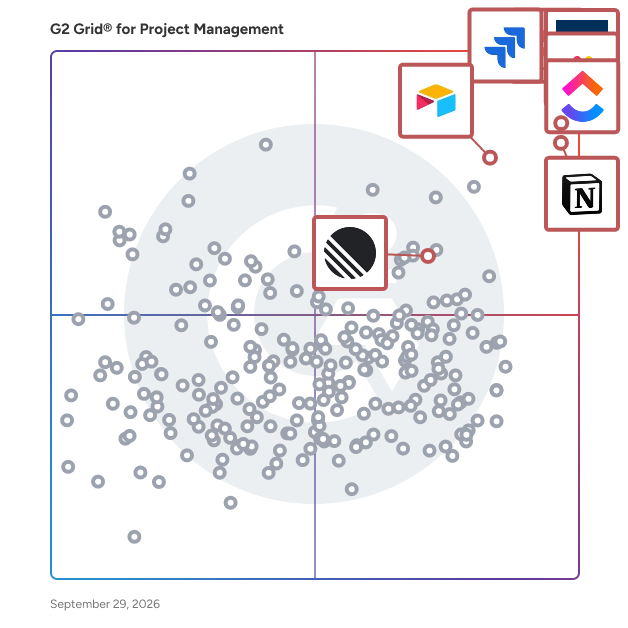
G2 Grid® for Project Management Software

G2 Grid® for Project Management Software plotting products by satisfaction and market presence

Highlighted products: Asana, ClickUp, monday AI Work Platform, Smartsheet, Notion, Jira, Airtable, and Linear.

Underlying data: [Grid® JSON](https://www.g2.com/categories/project-management/grids.json?focus%5B%5D=asana&focus%5B%5D=clickup&focus%5B%5D=monday-com&focus%5B%5D=smartsheet&focus%5B%5D=notion&focus%5B%5D=jira&focus%5B%5D=airtable&focus%5B%5D=linear&segment=small-business)

Prism PPM (formerly WorkOtter)

Prism PPM is a sophisticated Project Portfolio Management (PPM) solution designed to assist organizations in effectively managing their strategic projects. Recognized in the 2025 Gartner Magic Quadrant for Adaptive Project Management and Reporting, Prism PPM addresses the limitations of traditional spreadsheets and task management tools by providing a comprehensive platform that enhances project visibility, reporting accuracy, and overall portfolio management efficiency. Targeted at project management offices (PMOs), project managers, and organizational leaders, Prism PPM is particularly beneficial for those who oversee multiple projects and require a structured approach to resource allocation, capacity planning, and project intake processes. The solution is designed to facilitate informed decision-making by allowing users to prioritize projects that align with their business objectives and resource availability. This capability enables organizations to adapt to changes and understand the potential impacts on their project portfolio. One of the key features of Prism PPM is its robust project management capabilities grounded in PMBOK best practices. Users can efficiently manage resources and track project risks at both the project and portfolio levels. This functionality not only streamlines project execution but also enhances communication among stakeholders, ensuring that everyone is aligned on project goals and potential challenges. The platform’s advanced reporting and analytics dashboards provide critical insights into PPM KPIs, allowing organizations to monitor performance and make data-driven decisions. Prism PPM also emphasizes visibility across all project data. With the option to utilize embedded analytics or integrate with external tools like Power BI and Databricks, users can customize their reporting to meet specific needs. This flexibility ensures that stakeholders have access to relevant information, fostering transparency and accountability throughout the project lifecycle. To further enhance PMO and project governance, Prism PPM offers customizable templates and visual workflows that streamline processes. By establishing standards and feedback loops, organizations can ensure continuity across projects, leading to smoother operations and continuous process improvement. This structured approach not only supports project success but also empowers PMOs to drive strategic initiatives effectively. With a dedicated team of project management professionals available for implementation and support, Prism PPM is committed to helping organizations maximize the benefits of PPM software. Users can reach out for guidance on optimizing their PMO practices and leveraging the full potential of Prism PPM to achieve their project management goals.

Average Rating: 4.8/5.0

Total Reviews: 52

How Do G2 Users Rate Prism PPM (formerly WorkOtter)?

  • Has the product been a good partner in doing business?: 10.0/10 (Category avg: 8.9/10)
  • Planning: 9.9/10 (Category avg: 8.8/10)
  • Creation & Assignment: 9.7/10 (Category avg: 8.9/10)
  • Resource Allocation: 9.7/10 (Category avg: 8.4/10)

Who Is the Company Behind Prism PPM (formerly WorkOtter)?

Who Uses This Product?

  • Top Industries: Information Technology and Services
  • Company Size: 57% Small, 29% Medium

What Do G2 Reviewers Say About Prism PPM (formerly WorkOtter)?

AI-generated summary from verified user reviews

Pros
  • Users praise Prism PPM for its ease of use, making project management efficient and straightforward.
  • Users value the effective organization capabilities of Prism PPM, enhancing decision-making and project prioritization significantly.
  • Users value the streamlined resource management features of Prism PPM that enhance decision-making and project prioritization.
  • Users value the automation capabilities of Prism PPM, streamlining tasks and enhancing project management efficiency.
  • Users commend Prism PPM for its exceptional customer support and commitment to continuous improvement, enhancing overall experience.
Cons
  • Users find the limited features of Prism PPM restrict effective project management and hinder financial tracking capabilities.
  • Users face collaboration issues due to ineffective personalization and insufficient guidance, hindering team functionality and project tracking.
  • Users face feature issues with Prism PPM, finding personalization and tracking capabilities inadequate and user guides lacking depth.
  • Users express concerns about integration issues with Jira syncing, which limits advanced feature capabilities in projects.
  • Users find the learning curve steep, requiring time and training to become proficient with Prism PPM.

What Are Recent G2 Reviews of Prism PPM (formerly WorkOtter)?

What Are G2 Users Discussing About Prism PPM (formerly WorkOtter)?

TimeHero

TimeHero is an automated task and project planner for teams. It automatically schedules work around meetings, events, and appointments, so you don't need to spend time planning your day. Easily launch team-wide projects in seconds with TimeHero's built-in workflow automation. Timelines, timesheets, and Gantt charts are instantly updated, so you know when things are at risk before they ever get behind. Sign up for TimeHero today and become a more productive team with less effort.

Average Rating: 4.5/5.0

Total Reviews: 21

How Do G2 Users Rate TimeHero?

  • Has the product been a good partner in doing business?: 10.0/10 (Category avg: 8.9/10)
  • Planning: 9.2/10 (Category avg: 8.8/10)
  • Creation & Assignment: 9.1/10 (Category avg: 8.9/10)
  • Resource Allocation: 9.1/10 (Category avg: 8.4/10)

Who Is the Company Behind TimeHero?

  • Seller: TimeHero
  • Year Founded: 2015
  • HQ Location: Ontario, Canada
  • Twitter: @timehero
    310 Twitter followers
  • LinkedIn® Page: www.linkedin.com
    2 employees on LinkedIn®

Who Uses This Product?

  • Top Industries: Marketing and Advertising
  • Company Size: 65% Small, 30% Medium

What Do G2 Reviewers Say About TimeHero?

AI-generated summary from verified user reviews

Pros
  • Users appreciate the easy integration of TimeHero, enabling a smooth transition for managing their workloads effortlessly.
  • Users find TimeHero's progress tracking essential for effective planning and enhanced time-management capabilities.
  • Users value the team collaboration features in TimeHero, enhancing productivity and simplifying task management.
  • Users find TimeHero to be a valuable tool for planning and time management, effectively meeting their expectations.
  • Users appreciate the time-saving capabilities of TimeHero, enhancing their planning and time-management efficiency.
Cons
  • Users find the steep learning curve challenging, especially with customizable reports and platform glitches affecting usability.
  • Users note the limited features of TimeHero, which hinders functionality and makes the learning process challenging.
  • Users find the reporting issues challenging, with glitches and a steep learning curve affecting usability.

What Are Recent G2 Reviews of TimeHero?

What Are G2 Users Discussing About TimeHero?

Nifty

Nifty is the all-in-one workspace to keep people, projects, & functions aligned across your organization. With chat, tasks, goals, docs, and files all in one place — Nifty lets you focus on work instead of juggling tools. Nifty helps reduce project development cycles and improves team productivity by combining all of the important features of project management into one software. The end result is milestone-driven progress automation that keeps every stakeholder aligned, ensuring organizational goals remain on schedule. Nifty’s software allows you to manage tasks through Kanban, List, and Timeline views. Collaborating on Nifty is natural because each project has an individual discussion thread encouraging projects have a dedicated knowledge-hub. Nifty is built to encourage cross departmental collaboration like no other. With a built-in calendar, Nifty can be integrated with Google, Outlook as well as file and document sharing.

Average Rating: 4.7/5.0

Total Reviews: 425

How Do G2 Users Rate Nifty?

  • Has the product been a good partner in doing business?: 9.3/10 (Category avg: 8.9/10)
  • Planning: 9.2/10 (Category avg: 8.8/10)
  • Creation & Assignment: 9.4/10 (Category avg: 8.9/10)
  • Resource Allocation: 8.5/10 (Category avg: 8.4/10)

Who Is the Company Behind Nifty?

Who Uses This Product?

  • Who Uses This: Owner, CEO
  • Top Industries: Marketing and Advertising, Information Technology and Services
  • Company Size: 89% Small, 7% Medium

What Do G2 Reviewers Say About Nifty?

AI-generated summary from verified user reviews

Pros
  • Users value the efficient project management capabilities of Nifty, enhancing organization and productivity across teams.
  • Users love the handy task management features of Nifty, bringing all project needs together in one platform.
  • Users love the ease of use of Nifty, highlighting its intuitive interface and smooth team onboarding.
  • Users love the easy integration of Nifty, consolidating tasks and tools for seamless project management.
  • Users love the navigation ease of Nifty, finding it intuitive and effortless to manage multiple projects.
Cons
  • Users report that Nifty's app functionality is buggy, making it difficult to rely on for critical tasks.
  • Users find Nifty expensive due to additional costs for features like forms and poor support for lifetime deal customers.
  • Users feel that Nifty lacks important features like detailed budgeting tools and advanced reporting, impacting usability.
  • Users report severe billing issues with Nifty, facing unresponsive support and unfair charges for unnecessary seats.
  • Users express concern over the additional cost for forms that should be included in the business plan.

What Are Recent G2 Reviews of Nifty?

Moovila

Moovila Perfect Project is an AI-powered project management and automation platform developed by Moovila to help organizations plan, predict, and deliver projects with precision. Built for Managed Service Providers (MSPs), IT service firms, and other project-driven organizations, Moovila enables teams to manage complex, resource-dependent workflows while eliminating uncertainty in project timelines. Unlike traditional project management tools, the platform uses artificial intelligence to dynamically create and maintain optimized project schedules, ensuring that teams can adapt in real time while staying on track for on-time delivery. Moovila is designed for organizations that manage a high volume of concurrent projects, particularly MSPs, consulting firms, and professional services teams that rely on structured workflows and accurate resource planning. Its ideal users are teams working within PSA environments such as ConnectWise PSA, Autotask PSA, and HaloPSA, where alignment between sales, operations, and project delivery is critical. These organizations often face challenges such as missed deadlines, limited visibility into project health, and inefficient resource allocation, all of which Moovila is built to solve through automation and intelligent forecasting. What differentiates Moovila Perfect Project from other platforms is its focus on predictability and real-time intelligence rather than manual tracking. At the core of the platform is its AI-driven Critical Path Engine, which automatically maps task dependencies and continuously recalculates the most efficient path to project completion as conditions evolve. This is paired with real-time risk detection, which monitors projects for potential delays or bottlenecks and proactively alerts teams with recommended actions to mitigate those risks before they impact delivery timelines. Another key advantage of Moovila is its native bi-directional integration with major PSA systems, including ConnectWise PSA, Autotask PSA, and HaloPSA, allowing for seamless, real-time synchronization of project data without the need for middleware or manual data entry. This integration ensures that all teams are working from the same source of truth. In addition, Moovila has read-only integrations with Box, Dropbox, Google Drive, Microsoft OneDrive, Microsoft SharePoint, Google Calendar, Microsoft Outlook, Microsoft Teams, Cisco Webex, Salesforce, HubSpot, QuickBooks Online, Jira, Microsoft Excel, Microsoft 365, Microsoft Exchange Online, Visual Studio Team Services (Azure DevOps). The platform also features Smart Scheduling, which automatically generates and adjusts timelines based on real-time inputs, ensuring that project plans remain accurate without constant manual updates. Moovila supports structured, dependency-driven workflows through a waterfall methodology, with optional Gantt chart visualization for teams that require a visual representation of project timelines. Its Project Hub further enhances efficiency by providing a library of pre-built templates, enabling teams to quickly launch standardized, well-structured projects with confidence and consistency. Moovila Perfect Project is used across a variety of use cases, including client project delivery such as onboarding, migrations, and implementations, as well as internal operations management and cross-functional coordination. It is equally effective for both short-term initiatives and long-term strategic projects, making it a flexible solution for organizations that require both structure and adaptability. By automating scheduling, monitoring risks, and optimizing resources, Moovila helps teams stay aligned, accountable, and in control of even the most complex project environments. By combining automation, real-time intelligence, and seamless integration, Moovila Perfect Project enables organizations to move from simply managing projects to delivering them with consistency and precision.

Average Rating: 4.8/5.0

Total Reviews: 53

How Do G2 Users Rate Moovila?

  • Has the product been a good partner in doing business?: 9.9/10 (Category avg: 8.9/10)
  • Planning: 9.3/10 (Category avg: 8.8/10)
  • Creation & Assignment: 9.6/10 (Category avg: 8.9/10)
  • Resource Allocation: 9.3/10 (Category avg: 8.4/10)

Who Is the Company Behind Moovila?

  • Seller: Moovila
  • Company Website:
  • HQ Location: Mount Pleasant, South Carolina
  • Twitter: @Moovila_App
    767 Twitter followers
  • LinkedIn® Page: www.linkedin.com
    27 employees on LinkedIn®

Who Uses This Product?

  • Who Uses This: Project Manager
  • Top Industries: Information Technology and Services, Computer & Network Security
  • Company Size: 54% Small, 41% Medium

What Do G2 Reviewers Say About Moovila?

AI-generated summary from verified user reviews

Pros
  • Users commend Moovila for its user-friendly interface and efficient project management capabilities, facilitating seamless collaboration and organization.
  • Users value how Moovila's automation reduces human errors, significantly enhancing team efficiency and project management.
  • Users find Moovila's ease of use invaluable, simplifying project management with its friendly UI and dashboard customization.
  • Users value the effective project tracking features of Moovila, enhancing organization and resource planning significantly.
  • Users value the seamless team collaboration that Moovila provides through its solid integration with Connectwise Manage.
Cons
  • Users face integration issues with Moovila, finding discrepancies in functionality across different ticketing platforms.
  • Users note a significant lack of integration with PSA systems, leading to inconvenient application switching.
  • Users find the layout issues in Moovila's interface can be overwhelming and hinder customization for a better experience.
  • Users find the steep learning curve challenging, making it difficult to navigate and utilize the platform effectively.
  • Users find the limited customization options of Moovila frustrating, impacting ease of use and interface intuitiveness.

What Are Recent G2 Reviews of Moovila?

What Are G2 Users Discussing About Moovila?

Bonsai

Bonsai is a one-stop platform for agencies, consultancies and professional service providers. It is designed to provide businesses with a complete and real-time overview of their business. Simplify your business operations and consolidate your projects, clients and team into one integrated, easy-to-use platform. From contracts, proposals and project management to client billing, revenue tracking and resource management. Project Management: Assign projects & tasks to your team, prioritize your week and see exactly how your projects progress. Set project budgets & avoid unexpected costs. Gantt chart, Kanban view, integrated timer for easy billing, and collaboration with external partners for an efficient work. Team Time Tracking: Get an instant report of your team's tracked hours with accurate timesheets & see who's over capacity at a glance. Monitor your business's utilization & get clarity on your team's efficiency & profitability. Plan your resources in advance to keep your projects on track and on budget. CRM: Manage your clients and their projects in one place. Create unique client profiles with all your notes, contacts, rates and tags. Invite your clients to your branded Client Portal where they can access projects, documents and links you’ve shared with them.

Average Rating: 4.3/5.0

Total Reviews: 100

How Do G2 Users Rate Bonsai?

  • Has the product been a good partner in doing business?: 9.1/10 (Category avg: 8.9/10)

Who Is the Company Behind Bonsai?

  • Seller: Bonsai (YC W16)
  • Year Founded: 2015
  • HQ Location: San Francisco, California
  • Twitter: @bonsaiinc
    3,038 Twitter followers
  • LinkedIn® Page: www.linkedin.com
    42 employees on LinkedIn®

Who Uses This Product?

  • Who Uses This: Owner
  • Top Industries: Marketing and Advertising, Design
  • Company Size: 94% Small, 1% Medium

What Do G2 Reviewers Say About Bonsai?

AI-generated summary from verified user reviews

Pros
  • Users appreciate the ease of use of Bonsai, enjoying streamlined management of contracts, invoices, and services in one place.
  • Users value the all-in-one invoicing capabilities of Bonsai, simplifying their business management and enhancing productivity.
  • Users appreciate the comprehensive invoice management of Bonsai, streamlining business processes and enhancing productivity effortlessly.
  • Users love the time-saving features of Bonsai, streamlining proposal, invoicing, and project management effortlessly.
  • Users value the time tracking capabilities of Bonsai, enhancing project management and overall business efficiency.
Cons
  • Users note a lack of features like CSV export, mobile app, and satisfactory customer service in Bonsai.
  • Users find Bonsai expensive compared to alternatives, often paying for unnecessary features in a restrictive membership model.
  • Users experience integration issues with Bonsai, citing problems like timezone conflicts and inadequate calendar functionalities.
  • Users find the limited customization options restrictive, impacting their ability to tailor Bonsai to specific needs.
  • Users find Bonsai's features limited and restrictive, often feeling they pay for unnecessary functionalities.

What Are Recent G2 Reviews of Bonsai?

What Are G2 Users Discussing About Bonsai?

ProProfs Project

ProProfs Project is AI-powered project management software built for SMBs that need client invoicing, time tracking, and billing alongside their planning tools. Teams use it to run projects end-to-end, from task assignment and Gantt scheduling to time logs, billing, and invoicing, without reaching for a separate tool for client billing. Popular use cases: • Project planning and scheduling for small and mid-sized teams • Client work tracking with time logs, invoicing, and billing • Task and subtask management with dependencies • Team collaboration across departments and client projects • Portfolio-level tracking for agencies and consulting teams AI Project Manager: designs, tracks, and reports on projects • AI Project Designer: takes a project topic and builds the full structure, tasks, stages, and assignments, ready to go live in seconds • AI Project Assistant: stays active from kickoff to handover, checking task progress, adding tasks, and flagging blockers on request • AI Reports & Insights: scans live project data continuously and answers direct questions like which projects are overrunning • AI Report Summary: opens any report and surfaces what's on track, what's at risk, and where the team needs to focus Everything else you'd expect from a modern project management tool: • Multiple views, including Calendar, List, Gantt, and Kanban • Unlimited projects, automations, and activity logs • Client, time, and billing tools, including time tracking, timesheets, invoices, and estimates • Custom fields, statuses, workflows, and priorities •Roles and permissions for assignees, followers, and admins • API and Single Sign-On • White labeling and custom domains • 50+ ready-to-use project templates Whether the goal is keeping a small team's projects organized in one view or billing clients accurately without a separate invoicing tool, ProProfs Project brings planning, tracking, and billing together in one platform.

Average Rating: 4.4/5.0

Total Reviews: 32

How Do G2 Users Rate ProProfs Project?

  • Has the product been a good partner in doing business?: 9.6/10 (Category avg: 8.9/10)
  • Planning: 8.3/10 (Category avg: 8.8/10)
  • Creation & Assignment: 8.3/10 (Category avg: 8.9/10)
  • Resource Allocation: 8.6/10 (Category avg: 8.4/10)

Who Is the Company Behind ProProfs Project?

  • Seller: ProProfs
  • Year Founded: 2009
  • HQ Location: Los Angeles, CA
  • Twitter: @ProProfs
    4,731 Twitter followers
  • LinkedIn® Page: www.linkedin.com
    214 employees on LinkedIn®

Who Uses This Product?

  • Top Industries: Marketing and Advertising
  • Company Size: 48% Medium, 42% Small

What Are Recent G2 Reviews of ProProfs Project?

What Are G2 Users Discussing About ProProfs Project?

ONES.com

ONES.com builds up an all-in-one platform with software development management products designed for high performance and availability, which supports teams and companies from all over the world to release their software faster and better. ONES Project, ONES Wiki, and ONES TestCase cover the whole life cycle of software development to streamline projects, align the QA process, and manage team knowledge.

Average Rating: 4.5/5.0

Total Reviews: 13

How Do G2 Users Rate ONES.com?

  • Has the product been a good partner in doing business?: 10.0/10 (Category avg: 8.9/10)
  • Planning: 9.3/10 (Category avg: 8.8/10)
  • Creation & Assignment: 9.6/10 (Category avg: 8.9/10)
  • Resource Allocation: 9.4/10 (Category avg: 8.4/10)

Who Is the Company Behind ONES.com?

Who Uses This Product?

  • Top Industries: Marketing and Advertising
  • Company Size: 77% Small, 23% Medium

What Are Recent G2 Reviews of ONES.com?

Rocketlane

Rocketlane is the world’s first Agentic Professional Services Automation (PSA) platform, built to transform how professional services teams deliver value in the AI-first era. While traditional PSAs focus on recording work, Rocketlane accelerates it through a connected system that unifies the entire front and back office. The platform brings together project delivery, resource management, time tracking, billing, and financial operations alongside collaboration capabilities such as Spaces, real-time chat, a modern client portal, Sheets for structured data, and a powerful Custom Apps framework that lets teams model any workflow inside Rocketlane. Everything lives in a single ecosystem, eliminating tool sprawl and fragmented data that slows down services teams. At the core of this is Nitro, Rocketlane's agentic execution layer: a network of intelligent AI agents that execute real delivery tasks, automate setup, manage workflows, detect risks, enforce governance, and continuously learn from patterns across the organization. This shift unlocks faster go-lives, better utilization, proactive issue detection, consistent delivery quality, and a level of operational resilience that was previously impossible. Over 650 companies, including Retool, Coursera, Postman, Intercom, Glean, AuditBoard, Vercel, Sprinklr, Worldpay, Grafana, OpenGov, and Outreach trust Rocketlane to run their mission-critical delivery processes. Customers across SaaS, services, and consulting use Rocketlane to shorten onboarding timelines, reduce escalations, improve forecasting accuracy, and accelerate moving from booked to consumed revenue. Founded in 2020, headquartered in the US, and operating globally with teams across India and the UK, Rocketlane is backed by leading investors, including Nexus Venture Partners and 8VC. The company’s rapid growth reflects strong market confidence in its category-defining vision for Agentic PSA.

Average Rating: 4.7/5.0

Total Reviews: 844

How Do G2 Users Rate Rocketlane?

  • Has the product been a good partner in doing business?: 9.4/10 (Category avg: 8.9/10)
  • Planning: 9.3/10 (Category avg: 8.8/10)
  • Creation & Assignment: 9.4/10 (Category avg: 8.9/10)
  • Resource Allocation: 9.0/10 (Category avg: 8.4/10)

Who Is the Company Behind Rocketlane?

  • Seller: Rocketlane Corp
  • Company Website:
  • Year Founded: 2020
  • HQ Location: Walnut, US
  • Twitter: @RocketlaneHQ
    1,470 Twitter followers
  • LinkedIn® Page: www.linkedin.com
    310 employees on LinkedIn®

Who Uses This Product?

  • Who Uses This: Customer Success Manager, Software Engineer
  • Top Industries: Computer Software, Information Technology and Services
  • Company Size: 56% Medium, 27% Small

What Do G2 Reviewers Say About Rocketlane?

AI-generated summary from verified user reviews

Pros
  • Users appreciate the extensive features of Rocketlane, streamlining onboarding and implementation for effective project management.
  • Users find Rocketlane's interface to be extremely user-friendly, allowing for quick report generation and easy customization.
  • Users value the streamlined project management and client collaboration features of Rocketlane, enhancing organization and efficiency.
  • Users value the easy project tracking in Rocketlane, enhancing organization, visibility, and client collaboration effortlessly.
  • Users appreciate the effective task management in Rocketlane, enjoying seamless onboarding and streamlined project setups.
Cons
  • Users are frustrated by the missing features in Rocketlane, hindering effective customer health monitoring and experience.
  • Users experience slow performance with Rocketlane, especially as project complexity and data entry grow.
  • Users face significant filtering issues and bugs, complicating their experience with Rocketlane's project management capabilities.
  • Users find the learning curve steep, requiring dedicated resources and understanding for successful implementation and use.
  • Users find limited customization in reporting features, impacting their ability to adapt the tool to specific needs.

What Are Recent G2 Reviews of Rocketlane?

What Are G2 Users Discussing About Rocketlane?

ProjectManager

ProjectManager is a project and portfolio management software that offers unparalleled control, in-depth project data and the most comprehensive planning features on the market. With advanced scheduling, automated cost and time tracking, risk analysis and resource management, our platform ensures flawless execution while providing unbeatable insights at every stage. Trusted by thousands worldwide for seamless collaboration, ProjectManager empowers teams to deliver with precision.

Average Rating: 4.4/5.0

Total Reviews: 95

How Do G2 Users Rate ProjectManager?

  • Has the product been a good partner in doing business?: 8.7/10 (Category avg: 8.9/10)
  • Planning: 8.7/10 (Category avg: 8.8/10)
  • Creation & Assignment: 9.0/10 (Category avg: 8.9/10)
  • Resource Allocation: 8.4/10 (Category avg: 8.4/10)

Who Is the Company Behind ProjectManager?

  • Seller: ProjectManager
  • Year Founded: 2008
  • HQ Location: Austin, Texas
  • Twitter: @ProjectTips
    52,588 Twitter followers
  • LinkedIn® Page: www.linkedin.com
    103 employees on LinkedIn®

Who Uses This Product?

  • Who Uses This: Project Manager
  • Top Industries: Information Technology and Services, Construction
  • Company Size: 50% Small, 32% Medium

What Do G2 Reviewers Say About ProjectManager?

AI-generated summary from verified user reviews

Pros
  • Users praise ProjectManager for its ease of use, enabling smooth project management from start to finish.
  • Users appreciate the helpful support from the knowledgeable staff, enhancing their experience with ProjectManager.
  • Users value ProjectManager for its effortless planning and smart execution, enhancing project management from start to finish.
  • Users value the centralized information of ProjectManager, enhancing project organization and collaboration for smooth execution.
  • Users value ProjectManager for its effective communication, enhancing collaboration and coordination throughout the project lifecycle.
Cons
  • Users face challenges with frequent refreshing due to slow updates, complicating their project management experience.
  • Users often face app crashes, requiring browser refreshes that disrupt their workflow and experience with ProjectManager.
  • Users find the integration limitations of ProjectManager frustrating, negatively impacting their workflows with existing tools.
  • Users often face website errors, necessitating a browser refresh that disrupts their workflow.

What Are Recent G2 Reviews of ProjectManager?

What Are G2 Users Discussing About ProjectManager?

Taiga

Taiga is an easy and intuitive yet powerful project management tool for multi-functional agile teams. - Available in Scrum and Kanban - Backlog allows for easy sprint planning based on role specific estimations - Best-in-class Sprint task board - Possibility to switch over to Scrum and vice versa - Available in over 20 different languages. Taiga is the easy-to-use agile tool that helps you manage your projects effectively. Whether you're an expert at Agile or just beginning to learn about it, this tool will help you get through agile methodologies in the right way.

Average Rating: 4.4/5.0

Total Reviews: 74

How Do G2 Users Rate Taiga?

  • Has the product been a good partner in doing business?: 9.0/10 (Category avg: 8.9/10)
  • Planning: 7.7/10 (Category avg: 8.8/10)
  • Creation & Assignment: 7.5/10 (Category avg: 8.9/10)
  • Resource Allocation: 7.6/10 (Category avg: 8.4/10)

Who Is the Company Behind Taiga?

  • Seller: Taiga Agile
  • Year Founded: 2014
  • HQ Location: Madrid, Madrid
  • Twitter: @taigaio
    3,553 Twitter followers
  • LinkedIn® Page: www.linkedin.com
    1 employees on LinkedIn®

Who Uses This Product?

  • Top Industries: Information Technology and Services, Computer Software
  • Company Size: 51% Small, 36% Medium

What Do G2 Reviewers Say About Taiga?

AI-generated summary from verified user reviews

Pros
  • Users value the ease of use of Taiga, making it their preferred platform for daily Kanban Board tasks.
  • Users appreciate the effective communication capabilities within Taiga, enhancing collaboration and project management efficiency.
  • Users value the customizability of Taiga, enabling tailored modifications to fit specific project needs.
  • Users love the easy-to-use and customizable nature of Taiga, making it ideal for daily Kanban board management.
  • Users appreciate the easy collaboration features of Taiga, enhancing teamwork and project management efficiency.
Cons
  • Users find the integration difficulty with Taiga a challenge, especially due to limited third-party options.
  • Users note that the limited functionality of Taiga, particularly in reporting and integrations, hinders their overall experience.
  • Users find the reporting and analytics feature lacking, indicating a need for significant improvement and better integrations.
  • Users find that the reporting and analytics features of Taiga need significant improvement for better usability.
  • Users experience slow performance with Taiga, particularly evident on larger boards during regular use.

What Are Recent G2 Reviews of Taiga?

What Are G2 Users Discussing About Taiga?

Microsoft Project & Portfolio Management

Microsoft Project is a project management software that helps users plan, execute, and monitor projects effectively. It includes powerful features for managing tasks, allocating resources and budgeting, all presented in an easy-to-use interface. With seamless integration into Microsoft 365, it supports real-time collaboration and data sharing. The advanced reporting and analytics tools allow users to track progress and make data-driven decisions. Stay organized, focused, and in charge. With Microsoft Project, easily plan your projects with the power of dynamic scheduling based on effort needed, project duration, and allotted team members. Suitable for projects of any size, Microsoft Project offers flexible deployment options, both cloud-based and on-premises, catering to a wide range of organizational needs.

Average Rating: 4.0/5.0

Total Reviews: 1,578

How Do G2 Users Rate Microsoft Project & Portfolio Management?

  • Has the product been a good partner in doing business?: 7.9/10 (Category avg: 8.9/10)
  • Planning: 8.8/10 (Category avg: 8.8/10)
  • Creation & Assignment: 8.6/10 (Category avg: 8.9/10)
  • Resource Allocation: 8.4/10 (Category avg: 8.4/10)

Who Is the Company Behind Microsoft Project & Portfolio Management?

  • Seller: Microsoft
  • Year Founded: 1975
  • HQ Location: Redmond, Washington
  • Twitter: @microsoft
    13,091,739 Twitter followers
  • LinkedIn® Page: www.linkedin.com
    232,750 employees on LinkedIn®
  • Ownership: MSFT

Who Uses This Product?

  • Who Uses This: Project Manager, Program Manager
  • Top Industries: Information Technology and Services, Computer Software
  • Company Size: 47% Large, 29% Medium

What Do G2 Reviewers Say About Microsoft Project & Portfolio Management?

AI-generated summary from verified user reviews

Pros
  • Users appreciate the abundance of features in Microsoft Project, enhancing project planning, budgeting, and visualization.
  • Users praise the visualization and tracking capabilities of Microsoft Project, enhancing project planning and management efficiency.
  • Users find Microsoft Project & Portfolio Management to be easy to use, facilitating project planning and task completion efficiently.
  • Users value the easy integration of Microsoft Project & Portfolio Management with other Microsoft tools, enhancing collaboration and productivity.
  • Users love the comprehensive features of Microsoft Project & Portfolio Management for effective project planning and visualization.
Cons
  • Users find limited customization options hinder adaptability, especially for smaller projects requiring integration with various tools.
  • Users find the high complexity of Microsoft PPM challenging for small projects, requiring time to adapt and learn.
  • Users find the steep learning curve of Microsoft Project & Portfolio Management challenging, complicating effective use of its features.
  • Users find budgeting and accounting issues to be a challenge, noting complexity and integration limitations hinder effectiveness.
  • Users face integration issues with Microsoft Project & Portfolio Management, complicating its compatibility with other systems.

What Are Recent G2 Reviews of Microsoft Project & Portfolio Management?

What Are G2 Users Discussing About Microsoft Project & Portfolio Management?

IBM Targetprocess

IBM Targetprocess, is a platform for enterprise agile planning (EAP) and strategic portfolio management (SPM) solutions that allows business and technology planners at all levels to dynamically plan and manage work, resources, investments, programs, and portfolios while ensuring continuous alignment to the enterprise strategy in a single source of truth. IBM Targetprocess is a platform for enterprise agile planning (EAP) and strategic portfolio management (SPM) solutions that allows business and technology planners at all levels to dynamically plan and manage work, resources, investments, programs, and portfolios while ensuring continuous alignment to the enterprise strategy in a single source of truth. The combination of flexible architecture and Solutions Library helps to ensure the fastest time to value for every solution. IBM Targetprocess integrates directly with the financial management platform to provide financial insights into labor allocations, labor capitalization, and labor forecasts to improve how a company measures, plans, and invests in their workforce. Solutions: IBM Targetprocess' solutions-led strategy to make Enterprise Agile easier, allowing teams to take a building-block style approach to their agile transformation. Strategic planning solutions allow business leaders to capture strategy and OKRs in a single source of truth, and even update priorities with confidence that portfolio, product managers, and even autonomous Agile teams will see and align their work to the new priorities. Resource Management solutions allow portfolio and product teams to plan and forecast capacity and dynamically manage resources while minimizing risks and optimizing resource utilization. The Portfolio budgeting solutions enabled by IBM Targetprocess partners financial teams with product and portfolio managers to enable a shift to continuous product funding, and Program Management solutions ensure the successful execution of Agile programs across hybrid and strategic portfolios. Strategic Planning: Align work, labor, and investments to the strategic objectives of the business and maximize execution. • Capture and communicate corporate objectives in a persistent tool visible by the entire organization. • Link specific elements of execution to strategic objectives (i.e. initiatives, epics, features, teams, budgets, etc.). • View the split between Run-the-Business and Change-the-Business goals and pivot investments. • Easily track and view progress of strategic objectives. Portfolio Budgeting: Align with finance as you shift from annual funding of projects to continuous product funding. • View portfolio totals, actuals, OpEx, and CapEx, budgeted costs, and labor and non-labor costs in one place. • One source of truth to view portfolio budgets and their initiatives. • View the split between labor and non-labor actuals on a monthly basis. • Quickly change Funded costs and labor/non-labor costs in the initiative breakdown. Resource Management: Optimize resources, capacity, and demand to reduce risk and maximize utilization of headcount. • Monitor the impact of changes in real-time, with multiple views of reports to minimize inefficiency and overutilization. • Dashboards allow optimization of incoming demand against capacity. • Connect resource bill rates, team rates, and blended rates and utilization with automatic cost forecasting. Program Management: Digitize and automate quarterly business and program increment planning. • Seamlessly setup PI Planning with connected backlogs for Portfolio, Product, and Teams. • Visualize key metrics and flow of value with Flow metrics in a customizable dashboard. • Execute confidently by easily tracking progress in real-time, quickly identifying dependencies, and adapting to changes through the Program Board. Market Differentiators: - Flexible architecture: Targetprocess flexible architecture adapts to your organizations operating models – no matter how unique. - Time to value: Targetprocess Solutions Library minimizes administrative overhead and delivers rapid time to value for every solution. - Holistic financials: Targetprocess and IBM Apptio provide visibility to labor and non-labor costs for planning and managing investments.

Average Rating: 4.3/5.0

Total Reviews: 236

How Do G2 Users Rate IBM Targetprocess?

  • Has the product been a good partner in doing business?: 9.0/10 (Category avg: 8.9/10)
  • Planning: 7.6/10 (Category avg: 8.8/10)
  • Creation & Assignment: 8.5/10 (Category avg: 8.9/10)
  • Resource Allocation: 7.5/10 (Category avg: 8.4/10)

Who Is the Company Behind IBM Targetprocess?

Who Uses This Product?

  • Who Uses This: Software Developer
  • Top Industries: Computer Software, Information Technology and Services
  • Company Size: 42% Medium, 35% Small

What Do G2 Reviewers Say About IBM Targetprocess?

AI-generated summary from verified user reviews

Pros
  • Users value the clear visibility across all work and teams, facilitating better coordination and project management.
  • Users value the clear visibility across all work and teams, enhancing coordination and strategic decision-making.
  • Users value the clear visibility across all work and teams, enhancing coordination and project management efficiency.
  • Users value the collaboration ease of IBM Targetprocess, enhancing teamwork and visibility across projects and teams.
  • Users value the clear visibility across all work and teams, enhancing coordination and communication efficiently.
Cons
  • Users find the complexity of IBM Targetprocess challenging, particularly during setup and navigation in large implementations.
  • Users experience a challenging learning curve due to lack of clear documentation and insufficient training resources.
  • Users find the platform complicated to set up, particularly for those new to Agile or extensive customization.
  • Users find the difficult setup of IBM Targetprocess challenging, particularly for teams new to Agile frameworks.
  • Users face challenges due to limited email integration, necessitating manual data transfers for effective reporting.

What Are Recent G2 Reviews of IBM Targetprocess?

What Are G2 Users Discussing About IBM Targetprocess?

Ahsuite

Ahsuite lets you organize your client communication in an easy-to-use client portal so nothing gets missed or lost. It has a clean, minimalist design, with the focus on the work that you want to display: dashboards, Figma boards, slide decks, videos, reports, or anything else. If it can be embedded in an iframe, you can share it in a client portal. Our client portals are secure, organized, and self-service. Once you try Ahsuite, you’ll never go back to sending links over email. Ahsuite comes packed with a suite of powerful collaboration tools built specifically for digital agencies. That means you can say goodbye to Trello, Slack, DropBox, and LastPass, because Ahsuite lets you do it all with one login. With a Pro or Agency plan, you can also get access to our exclusive network of freelancers and agencies. So you can even use Ahsuite to build your team! The Starter plan comes with tasks, files, conversations, and up to ten portals for FREE!

Average Rating: 4.7/5.0

Total Reviews: 98

G2 Deal: Save 50% on Ahsuite

Get any Ahsuite subscription at half the price with this G2 exclusive discount!

Price: ~~$57 per month for the Agency tier, billed annually~~ → $28.50 per month for the Agency tier, billed annually

View this exclusive G2 deal

How Do G2 Users Rate Ahsuite?

  • Has the product been a good partner in doing business?: 9.6/10 (Category avg: 8.9/10)
  • Planning: 9.0/10 (Category avg: 8.8/10)
  • Creation & Assignment: 9.3/10 (Category avg: 8.9/10)
  • Resource Allocation: 7.5/10 (Category avg: 8.4/10)

Who Is the Company Behind Ahsuite?

  • Seller: Ahsuite Inc
  • Year Founded: 2021
  • HQ Location: Glendale, US
  • Twitter: @ahsuite
    20 Twitter followers
  • LinkedIn® Page: www.linkedin.com
    3 employees on LinkedIn®

Who Uses This Product?

  • Who Uses This: Owner, CEO
  • Top Industries: Marketing and Advertising, Consulting
  • Company Size: 97% Small, 1% Medium

What Do G2 Reviewers Say About Ahsuite?

AI-generated summary from verified user reviews

Pros
  • Users admire the user-friendly interface of Ahsuite, making it easy for all team members to utilize effectively.
  • Users find Ahsuite's ease of learning invaluable, making it accessible for all team members and projects.
  • Users enjoy easy sharing with Ahsuite, facilitating seamless client interaction and reducing confusion over tasks and files.
  • Users appreciate the customization options of Ahsuite, allowing tailored solutions that enhance client engagement and satisfaction.
  • Users love the intuitive interface of Ahsuite, making it easy for clients to navigate and engage effectively.
Cons
  • Users feel the lack of missing features like template editing and a mobile app limits Ahsuite's functionality.
  • Users desire a mobile app for real-time updates and better subfolder management in Ahsuite.
  • Users suggest adding more color customization options and graphic tools for calendars to enhance Ahsuite's functionality.
  • Users find the difficult customization of Ahsuite limits their ability to effectively edit and style page content.
  • Users struggle with editing issues when trying to modify templates in Ahsuite, leading to frustration.

What Are Recent G2 Reviews of Ahsuite?

What Are G2 Users Discussing About Ahsuite?

BQE CORE

BQE CORE is an all-in-one project management, time tracking, billing, CRM, and accounting platform for architecture and engineering firms. Most firms are stuck tracking the wrong metrics, or none at all, while the numbers that actually drive profitability stay buried in spreadsheets and disconnected systems. That gets harder to ignore once a firm has grown past a single office, brought on dedicated finance and operations staff, and started running several projects at once. CORE gives firm leaders one place to see the metrics that matter: billing multiplier, effective billing rate, utilization, and realization, in real time. The difference shows up in the numbers. In BQE's 2026 A&E Benchmarking Report, firms with the highest billing multiplier ran profit margins 7.5 points higher and grew revenue twice as fast as the rest of the industry. Thousands of A&E firms use CORE to run more efficient, more profitable practices, so their teams spend less time on manual tracking and more time on the design and engineering work they set out to do.

Average Rating: 4.3/5.0

Total Reviews: 441

How Do G2 Users Rate BQE CORE?

  • Has the product been a good partner in doing business?: 8.4/10 (Category avg: 8.9/10)
  • Planning: 8.3/10 (Category avg: 8.8/10)
  • Creation & Assignment: 8.5/10 (Category avg: 8.9/10)
  • Resource Allocation: 8.0/10 (Category avg: 8.4/10)

Who Is the Company Behind BQE CORE?

  • Seller: BQE Software, Inc.
  • Company Website:
  • Year Founded: 1995
  • HQ Location: Torrance, CA
  • Twitter: @bqesoftware
    3,923 Twitter followers
  • LinkedIn® Page: www.linkedin.com
    412 employees on LinkedIn®

Who Uses This Product?

  • Who Uses This: Office Manager, Architect
  • Top Industries: Architecture & Planning, Civil Engineering
  • Company Size: 79% Small, 19% Medium

What Do G2 Reviewers Say About BQE CORE?

AI-generated summary from verified user reviews

Pros
  • Users value the easy time tracking feature of BQE CORE, simplifying project management and enhancing usability.
  • Users appreciate the intuitive interface of BQE CORE, which enhances project management and reporting efficiency.
  • Users value the easy invoicing and expensing process in BQE CORE, enhancing overall efficiency and client communication.
  • Users appreciate the easy invoicing process in BQE CORE, enhancing efficiency and clarity in billing clients.
  • Users appreciate the ease of time tracking in BQE CORE, enhancing project management efficiency and accuracy.
Cons
  • Users experience slow loading times with BQE CORE, impacting workflow efficiency and user satisfaction.
  • Users notice slow performance in BQE CORE, experiencing lag and delays during page loads and submission processes.
  • Users find the learning difficulty of BQE CORE frustrating due to complicated navigation and cumbersome processes.
  • Users find the complex usability of BQE CORE challenging, especially during initial navigation and training scheduling.
  • Users find the learning curve steep, making initial navigation and training a challenge for new users.

What Are Recent G2 Reviews of BQE CORE?

What Are G2 Users Discussing About BQE CORE?

COR

Running an agency means juggling projects, people, and profit margins — all at once. Most tools help you track work. COR helps you protect your profitability. COR is the Profit Operating System for modern agencies. Built for the way agency teams actually operate, COR gives you real-time visibility into where your margins are going, before it's too late to act. What makes COR different: Profit-first, not just project-first. While other platforms focus on task management, COR tracks what actually matters: margin per project, per client, per team. Know your profitability at a glance — no spreadsheets, no surprises. AI governance that actually works. COR orchestrates humans and AI agents with the controls your agency needs — smart workload recommendations, automated time tracking, and predictive forecasting that tells you where you'll land before you get there. Benchmarks that give you an edge. COR's platform surfaces industry benchmarks so you know how your agency stacks up — and where your biggest opportunities for improvement are. Data-driven decisions, built into your daily workflow. Whether you're a 40-person agency or a 200-person network agency, COR gives you the clarity and confidence to scale profitably. Finally — one platform where your projects, your people, and your profits all live together.

Average Rating: 4.4/5.0

Total Reviews: 108

How Do G2 Users Rate COR?

  • Has the product been a good partner in doing business?: 8.7/10 (Category avg: 8.9/10)
  • Planning: 8.4/10 (Category avg: 8.8/10)
  • Creation & Assignment: 8.6/10 (Category avg: 8.9/10)
  • Resource Allocation: 8.3/10 (Category avg: 8.4/10)

Who Is the Company Behind COR?

  • Seller: COR
  • Company Website:
  • Year Founded: 2017
  • HQ Location: San Francisco, California
  • Twitter: @COR
    869 Twitter followers
  • LinkedIn® Page: www.linkedin.com
    317 employees on LinkedIn®

Who Uses This Product?

  • Top Industries: Marketing and Advertising, Public Relations and Communications
  • Company Size: 50% Medium, 48% Small

What Are Recent G2 Reviews of COR?

What Are G2 Users Discussing About COR?

Subhransu Sahu
SS
Researched and written by Subhransu Sahu
Updated