Best Knowledge Base Software - Page 3

How Many Knowledge Base Software Products Does G2 Track?

Total Products under this Category: 316

Category Stats (Oct 2026)

  • Average Rating: 4.49/5 (↑0.01 vs Sep 2026) The average rating of products in this category, based on all submitted ratings
  • Top Trending Product: Fluid Topics (+0.66%) - Among all products in this category, Fluid Topics recorded the largest rating increase compared to last month

Last updated: October 26, 2026

How Does G2 Rank Knowledge Base Software Products?

Why You Can Trust G2's Software Rankings:

  • 30 Analysts and Data Experts
  • 104,900+ Authentic Reviews
  • 316+ Products
  • Unbiased Rankings

G2's software rankings are built on verified user reviews, rigorous moderation, and a consistent research methodology maintained by a team of analysts and data experts. Each product is measured using the same transparent criteria, with no paid placement or vendor influence. While reviews reflect real user experiences, which can be subjective, they offer valuable insight into how software performs in the hands of professionals. Together, these inputs power the G2 Score, a standardized way to compare tools within every category.

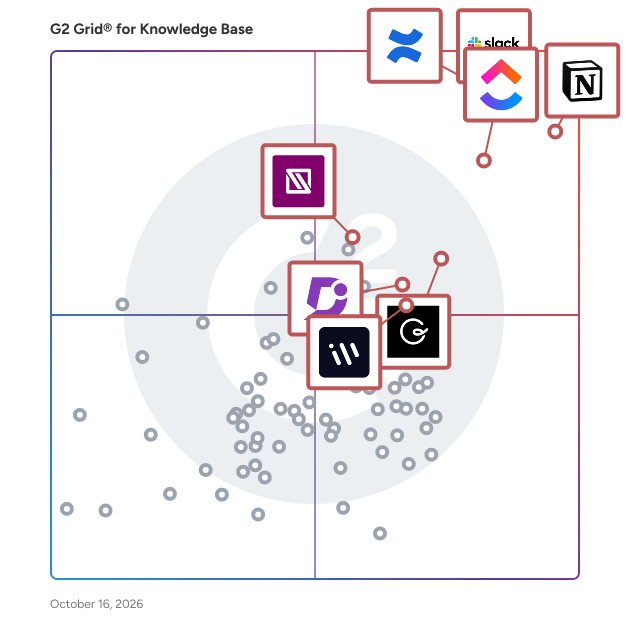
G2 Grid® for Knowledge Base Software

G2 Grid® for Knowledge Base Software plotting products by satisfaction and market presence

Highlighted products: Slack, Notion, Confluence, ClickUp, Guru, Document360, IT Glue, and Workvivo.

Underlying data: [Grid® JSON](https://www.g2.com/categories/knowledge-base-software/grids.json?focus%5B%5D=slack&focus%5B%5D=notion&focus%5B%5D=confluence&focus%5B%5D=clickup&focus%5B%5D=guru&focus%5B%5D=document360&focus%5B%5D=it-glue&focus%5B%5D=workvivo)

Tettra

Tettra is knowledge base software that organizes scattered company information to answer your team's repetitive questions right in Slack or our web app. It has a simple, user-friendly UI and integrates with Slack, Google Drive, Notion and more. Tettra also has a powerful context-driven search feature that lets you find any information in seconds. Many customer support and operations teams depend on Tettra for their internal documentation and answers. With Tettra, you'll get: • Q&A workflow to capture questions • Knowledge base to document answers • Knowledge management features to keep content up to date. • Integrations with chat tools to make sure your team actually uses Tettra Start your knowledge base today. Free for up to 10 users.

Average Rating: 4.7/5.0

Total Reviews: 159

How Do G2 Users Rate Tettra?

  • Has the product been a good partner in doing business?: 9.5/10 (Category avg: 9.0/10)
  • Quality of Support: 9.4/10 (Category avg: 8.9/10)
  • Other Integrations: 8.7/10 (Category avg: 8.3/10)
  • Ease of Use: 9.3/10 (Category avg: 8.8/10)

Who Is the Company Behind Tettra?

  • Seller: Tettra
  • Year Founded: 2015
  • HQ Location: Somerville, MA
  • Twitter: @tettra
    1,151 Twitter followers
  • LinkedIn® Page: www.linkedin.com
    11 employees on LinkedIn®

Who Uses This Product?

  • Who Uses This: Account Manager
  • Top Industries: Marketing and Advertising, Computer Software
  • Company Size: 50% Small, 42% Medium

What Do G2 Reviewers Say About Tettra?

AI-generated summary from verified user reviews

Pros
  • Users love the ease of use of Tettra, which simplifies document management and keeps information organized efficiently.
  • Users appreciate the organization of information in Tettra, allowing for quick access and efficient work processes.
  • Users love the centralized organization of Tettra, which simplifies access to essential team information and enhances efficiency.
  • Users love Tettra's intuitive interface, allowing easy contributions and quick access to organized team knowledge.
  • Users appreciate the easy access to organized information in Tettra, making their jobs more efficient and straightforward.
Cons
  • Users find the inefficient search functionality in Tettra makes locating information challenging, hindering overall usability.
  • Users find the limited formatting options in Tettra restricting, wishing for more diverse choices like graphics and graphs.
  • Users find Tettra's limited customization can hinder adaptability to specific team needs and preferences.
  • Users note that there is poor content management, which can hinder organization and scalability as documentation grows.
  • Users find difficult automation can hinder their ability to locate information efficiently in Tettra's structure.

What Are Recent G2 Reviews of Tettra?

What Are G2 Users Discussing About Tettra?

Knowmax

Knowmax is an AI knowledge management platform that helps enterprises deliver consistent, accurate, and high-quality customer experiences across all touchpoints. It ensures seamless knowledge flow across assisted channels such as contact centers, field service, and retail, as well as digital platforms like websites, mobile apps, and chatbots by using a single source of truth for an omni-channel experience. With Agentic AI capabilities, Knowmax enables intelligent, goal-oriented support by proactively surfacing the right information at the right time. This empowers agents to resolve queries faster while improving decision-making and operational efficiency. Knowmax is a multilingual platform, making it ideal for global organizations looking to deliver localized and inclusive support experiences. It also supports compliance standards such as SOC II, GDPR, ISO, HIPAA, ensuring data security and regulatory adherence for sensitive industries. The platform has native integrations with leading CRM, CCaaS, and enterprise systems, such as Genesys, Salesforce, SAP, Zendesk, and Freshworks, as well as WebHooks and APIs that help embed knowledge directly into existing workflows.

Average Rating: 4.6/5.0

Total Reviews: 32

How Do G2 Users Rate Knowmax?

  • Has the product been a good partner in doing business?: 9.8/10 (Category avg: 9.0/10)
  • Quality of Support: 9.2/10 (Category avg: 8.9/10)
  • Other Integrations: 7.7/10 (Category avg: 8.3/10)
  • Ease of Use: 9.2/10 (Category avg: 8.8/10)

Who Is the Company Behind Knowmax?

  • Seller: Knowmax
  • Year Founded: 2019
  • HQ Location: Gurgaon, Haryana
  • Twitter: @knowmax
    9 Twitter followers
  • LinkedIn® Page: www.linkedin.com
    33 employees on LinkedIn®

Who Uses This Product?

  • Top Industries: Telecommunications
  • Company Size: 56% Medium, 29% Large

What Do G2 Reviewers Say About Knowmax?

AI-generated summary from verified user reviews

Pros
  • Users appreciate the ease of use of Knowmax, enjoying quick access to reliable and well-organized information.
  • Users value the easy access of Knowmax, enhancing information retrieval and boosting overall efficiency for agents.
  • Users appreciate the intuitive interface of Knowmax, enhancing ease of use and improving overall efficiency.
  • Users value the intuitive knowledge management of Knowmax, enhancing agent productivity and customer service quality.
  • Users commend the intuitive user interface of Knowmax, making knowledge access quick and efficient for customer support.
Cons
  • Users find Knowmax has limited customization, which hinders flexibility and complicates content creation and reporting efforts.
  • Users note that the AI limitations hinder functionality, especially due to security restrictions on feature usage.
  • Users find the complex admin interface of Knowmax cumbersome, complicating workflow creation and navigation.
  • Users find the inefficient search functionality of Knowmax frustrating and seek improvements for better usability.
  • Users find that layout issues hinder navigation and customization, leading to a less efficient experience with Knowmax.

What Are Recent G2 Reviews of Knowmax?

What Are G2 Users Discussing About Knowmax?

Stonly

Stonly is the modern knowledge platform for customer service. We help companies drive fast, accurate resolutions with step-by-step guides, decision trees, AI answers, automations, walkthroughs, checklists, and knowledge bases for agents and customers. Unlike other knowledge platforms, Stonly’s knowledge is interactive (instead of static) and delivered when and where people need it. That means it gets used much more often and can handle every case that comes its way. Use AI to leverage your knowledge to respond to each request with the ideal solution—be it an easy answer or in-depth guidance. You can control the answers and handle every question well, even the most critical and complex ones. Easily create great knowledge content and keep it up to date and accurate. We’ll give you the tools to collect feedback, measure, and improve the impact of knowledge on your business. Integrate with all of your tools and processes, including Zendesk, Salesforce Service Cloud, Freshworks, HubSpot, and more. Learn how Stonly empowers thousands of companies to support millions of customers at https://stonly.com/

Average Rating: 4.8/5.0

Total Reviews: 131

How Do G2 Users Rate Stonly?

  • Has the product been a good partner in doing business?: 9.3/10 (Category avg: 9.0/10)
  • Quality of Support: 9.2/10 (Category avg: 8.9/10)
  • Other Integrations: 8.1/10 (Category avg: 8.3/10)
  • Ease of Use: 9.0/10 (Category avg: 8.8/10)

Who Is the Company Behind Stonly?

  • Seller: Stonly
  • Year Founded: 2018
  • HQ Location: Paris, FR
  • Twitter: @stonly
    3 Twitter followers
  • LinkedIn® Page: www.linkedin.com
    65 employees on LinkedIn®

Who Uses This Product?

  • Top Industries: Computer Software, Information Technology and Services
  • Company Size: 58% Small, 34% Medium

What Do G2 Reviewers Say About Stonly?

AI-generated summary from verified user reviews

Pros
  • Users praise Stonly for its incredibly user-friendly interface, making it easy to keep customers informed and engaged.
  • Users praise Stonly for its powerful and user-friendly features, along with exceptional support that enhances their experience.
  • Users appreciate the incredibly user-friendly nature of Stonly, making it easy to keep partners and customers informed.
  • Users find Stonly to be incredibly user-friendly, enhancing communication and simplifying updates for partners and customers.
  • Users value the easy implementation of Stonly, enabling swift setup and integration with existing systems.
Cons
  • Users note missing features like advanced widgets and multimedia support, though development is in progress.
  • Users note a lack of features, but find most needs met with ongoing development addressing the gaps.
  • Users find the time consumption in managing multiple widgets and requiring developer assistance frustratingly inefficient.
  • Users often face button issues that hinder functionality and usability in Stonly's interactive elements.
  • Users experience chatbot issues with Stonly, facing challenges in integration and functionality for improved support interaction.

What Are Recent G2 Reviews of Stonly?

What Are G2 Users Discussing About Stonly?

AI can help you find the answers. G2 helps you trust them.

Connect G2 to Claude or ChatGPT for answers grounded in G2's trusted reviews, comparisons, and pricing from real user insights.

How it works

Superhuman Docs

Superhuman Docs (formerly Coda) gets your team and AI on the same page. Most AI tools are built for solo work, so the work ends up trapped in chats. Docs brings your team and AI together in a familiar space, reimagining what a doc can do. Drafts happen faster, projects stay on task, and decisions don’t stall. Ask for what you need and Docs helps your team build and run with it. Docs is part of Superhuman, the AI productivity platform on a mission to unlock the superhuman potential in everyone. AI is everywhere, but what it creates stays disconnected from where your team actually works. Superhuman Docs fixes that. Instead of generating alone and copy-pasting results somewhere else, your whole team works with AI in one shared place—asking, editing, and building on one another’s work without context switching or silos. And you can create docs, trackers, and workflows in plain language. Just say what you need and Docs AI builds it with you. No code. No writing formulas. No learning curve. Superhuman Docs supports real-time multi-user collaboration, rich content editing, AI generation, and text summarization, so your team can ask for a first draft, meeting notes, or a project tracker and build on it together, instantly. Docs features templates, task creation and assignment mapping, GANTT charts, revision history, in-line comments, notifications, and knowledge sharing—all in one shared doc. No switching between tools to generate, organize, and move work forward. And since Docs connects to over 1,000 tools, including Slack, Jira, and Salesforce, you’ll always have access to the latest data so due dates for your team’s OKRs are always current.

Average Rating: 4.6/5.0

Total Reviews: 477

How Do G2 Users Rate Superhuman Docs?

  • Has the product been a good partner in doing business?: 9.3/10 (Category avg: 9.0/10)
  • Quality of Support: 9.1/10 (Category avg: 8.9/10)
  • Other Integrations: 7.7/10 (Category avg: 8.3/10)
  • Ease of Use: 8.5/10 (Category avg: 8.8/10)

Who Is the Company Behind Superhuman Docs?

  • Seller: Superhuman
  • Company Website:
  • HQ Location: San Francisco, California
  • LinkedIn® Page: www.linkedin.com
    7,182 employees on LinkedIn®

Who Uses This Product?

  • Who Uses This: Founder, CEO
  • Top Industries: Computer Software, Information Technology and Services
  • Company Size: 54% Small, 31% Medium

What Do G2 Reviewers Say About Superhuman Docs?

AI-generated summary from verified user reviews

Pros
  • Users love the ease of use of Superhuman Docs, making project management and collaboration effortless and efficient.
  • Users love the flexibility and efficiency of Superhuman Docs, seamlessly integrating docs, data, and workflows together.
  • Users value the flexibility of Superhuman Docs, appreciating its ability to customize and streamline various workflows effortlessly.
  • Users love the automation features of Superhuman Docs for efficient project management and task assignment.
  • Users love the customization options of Coda, allowing them to tailor the platform to meet their specific needs.
Cons
  • Users find the steep learning curve of Superhuman Docs challenging, feeling overwhelmed and needing more time to adapt.
  • Users note a steep learning curve with Superhuman Docs, especially when mastering advanced features and functionalities.
  • Users find the complexity of the authors system to be a learning curve, which can be frustrating.
  • Users find the limited and unattractive canvas layout options hinder usability and functionality in Superhuman Docs.
  • Users find the learning curve difficult, especially with complex features and initial intimidation affecting usability.

What Are Recent G2 Reviews of Superhuman Docs?

What Are G2 Users Discussing About Superhuman Docs?

Upland Panviva

Upland Panviva delivers AI-powered, expert-approved guidance and recommendations to build confidence and trust for contact center agents and customers. Panviva ensures complex organizations and their customer experience operations are compliant, competitive, and productive. Tailored for healthcare, health insurance, banking, utilities, and BPO organizations with large contact centers, Panviva offers flexible solutions that allow you to evolve at your own pace. From compliance-focused manual knowledge management to fully AI-powered, seamlessly integrated guidance across your contact center ecosystem, Panviva grows with you. Experience the productivity power of Panviva and transform your organization's knowledge delivery while maintaining strict compliance standards, all backed by deep industry expertise.

Average Rating: 4.6/5.0

Total Reviews: 93

How Do G2 Users Rate Upland Panviva?

  • Has the product been a good partner in doing business?: 9.1/10 (Category avg: 9.0/10)
  • Quality of Support: 9.1/10 (Category avg: 8.9/10)
  • Other Integrations: 6.7/10 (Category avg: 8.3/10)
  • Ease of Use: 9.1/10 (Category avg: 8.8/10)

Who Is the Company Behind Upland Panviva?

  • Seller: Upland Software
  • Company Website:
  • Year Founded: 2010
  • HQ Location: Austin, TX
  • LinkedIn® Page: www.linkedin.com
    802 employees on LinkedIn®
  • Ownership: NASDAQ:UPLD

Who Uses This Product?

  • Top Industries: Hospital & Health Care, Insurance
  • Company Size: 52% Medium, 41% Large

What Do G2 Reviewers Say About Upland Panviva?

AI-generated summary from verified user reviews

Pros
  • Users value the accuracy of Upland Panviva, noting its efficiency in streamlining information retrieval for critical tasks.
  • Users value the real-time analytics of Upland Panviva, enhancing efficiency in resource management and information retrieval.
  • Users enjoy the versatile daily use of Upland Panviva, finding it effective for both instructional and product materials.
  • Users find the ease of learning with Upland Panviva makes information access quick and efficient in demanding environments.
  • Users value the ease of use of Upland Panviva, benefiting from its versatile applications for various materials.
Cons
  • Users face customization issues with Upland Panviva, often needing to adapt to its framework instead of tailoring it.
  • Users experience occasional glitches with the system when managing images, though they are manageable.
  • Users experience integration issues with Upland Panviva, finding it challenging to customize for specific company needs.
  • Users find it difficult to integrate Upland Panviva with multi-platform systems, limiting customization to their specific needs.
  • Users face limited customization, often working within Upland Panviva's structure rather than adapting it to their needs.

What Are Recent G2 Reviews of Upland Panviva?

What Are G2 Users Discussing About Upland Panviva?

Featurebase

Featurebase is a modern customer support & product suite that combines AI-powered support, feedback collection, help docs, roadmaps, and changelogs into a single platform for startups. It's loved by thousands of fast-growing teams from companies like Lovable, Raycast, and n8n. 💫 Instead of having 5+ different tools, Featurebase offers everything in one place to help you build products your users love: - Support platform – Support your customers from anywhere with an omnichannel inbox and automate support with powerful AI agents. - Feedback collection & voting: Centralize feedback with in-app widgets, integrations, and a dedicated feedback forum. Let users vote on each other's feature ideas, see their total revenue, and focus on the most impactful features. Plus, all upvoters will automatically be notified when you ship their request. - Changelogs: Announce product changes and increase feature adoption with neat in-app popups, notification emails, and a standalone changelog page. - Help Center: Provide self-serve support with a beautiful knowledge base & bring help articles inside your product with a lightweight widget. - Surveys (NPS, CSAT, etc.): Create targeted in-app surveys to ask users anything and measure customer satisfaction.

Average Rating: 4.7/5.0

Total Reviews: 52

How Do G2 Users Rate Featurebase?

  • Has the product been a good partner in doing business?: 9.6/10 (Category avg: 9.0/10)
  • Quality of Support: 9.6/10 (Category avg: 8.9/10)
  • Other Integrations: 7.8/10 (Category avg: 8.3/10)
  • Ease of Use: 9.3/10 (Category avg: 8.8/10)

Who Is the Company Behind Featurebase?

  • Seller: Featurebase
  • Year Founded: 2021
  • HQ Location: Tallinn, EE
  • Twitter: @FeaturebaseHQ
    2,216 Twitter followers
  • LinkedIn® Page: www.linkedin.com
    8 employees on LinkedIn®

Who Uses This Product?

  • Who Uses This: Founder
  • Top Industries: Computer Software, Information Technology and Services
  • Company Size: 90% Small, 8% Medium

What Do G2 Reviewers Say About Featurebase?

AI-generated summary from verified user reviews

Pros
  • Users appreciate the intuitive and versatile features of Featurebase, enhancing usability and valuable feedback collection.
  • Users find Featurebase's ease of use enhances their experience, allowing quick setup and intuitive feedback collection.
  • Users appreciate the ease of use and extensive features of Featurebase, making it a powerful all-in-one solution.
  • Users praise the responsive customer support of Featurebase, noting helpfulness and effective communication throughout their experience.
  • Users value the intuitive feedback management of Featurebase, facilitating easy collection and prioritization of customer insights.
Cons
  • Users find missing features such as limited customization, basic analytics, and lack of mobile ticket responses frustrating.
  • Users face limited features in lower plans, restricting access to essential tools and scalability for startups.
  • Users face various limitations with Featurebase, including bugs, poor integration, and frustration over lack of prioritization options.
  • Users note the limited customization options for branding and workflows, affecting flexibility for specific needs.
  • Users find the limited functionality of Featurebase a drawback, lacking deeper insights and flexibility in automation.

What Are Recent G2 Reviews of Featurebase?

iSpring LMS

iSpring LMS is a feature-rich platform that helps companies accelerate their business momentum through ROI-efficient training. The LMS enables the entire training cycle with clarity and consistency, from structured onboarding to continuous employee development. It helps reduce employee turnover, improve performance, and ensure that teams stay aligned, skilled, and ready to support the company’s long-term growth. iSpring LMS gives managers and trainers a simple way to organize training, guide employees through skill-building, and see exactly how their learners are progressing. Employees get a clear path to follow, and leaders get the visibility they need to support growth, maintain standards, and keep performance on track. Here are the core capabilities that make this possible: - The mirrored organizational structure reflects how your company works, so training stays aligned with roles and teams. - Specified learning tracks guide learners step by step through required courses and programs. - Detailed reporting highlights progress, deadlines, and knowledge gaps with actionable insights. - The Supervisor Dashboard gives managers instant visibility into team performance without extra admin work. - Automated workflows handle enrollments, reminders, and assignments, saving time and reducing manual tasks. - The corporate portal and newsfeed centralize updates and announcements to keep everyone aligned. - 360-Degree Reviews gather well-rounded performance feedback from peers and supervisors. - On-The-Job Training validates real-world skills with structured checklists. - Knowledge Base gives employees quick access to SOPs, product info, and internal documentation. - Development Plans build personalized growth paths that connect training to long-term skill development.

Average Rating: 4.6/5.0

Total Reviews: 168

How Do G2 Users Rate iSpring LMS?

  • Has the product been a good partner in doing business?: 9.2/10 (Category avg: 9.0/10)
  • Quality of Support: 9.4/10 (Category avg: 8.9/10)
  • Other Integrations: 7.3/10 (Category avg: 8.3/10)
  • Ease of Use: 9.1/10 (Category avg: 8.8/10)

Who Is the Company Behind iSpring LMS?

  • Seller: iSpring
  • Company Website:
  • Year Founded: 2001
  • HQ Location: Alexandria, VA
  • Twitter: @iSpringPro
    6,522 Twitter followers
  • LinkedIn® Page: www.linkedin.com
    270 employees on LinkedIn®

Who Uses This Product?

  • Top Industries: E-Learning, Information Technology and Services
  • Company Size: 54% Medium, 38% Small

What Do G2 Reviewers Say About iSpring LMS?

AI-generated summary from verified user reviews

Pros
  • Users love the ease of use of iSpring LMS, streamlining training management with its intuitive features.
  • Users appreciate the simplicity and intuitiveness of iSpring LMS, making course creation and management effortless.
  • Users highlight the quick and helpful customer support of iSpring LMS, enhancing their overall training experience.
  • Users value the user-friendly features of iSpring LMS, enabling easy course creation, tracking, and reporting.
  • Users appreciate the user-friendly interface of iSpring LMS, making course creation and management a seamless experience.
Cons
  • Users note the limited features of iSpring LMS, particularly in feedback options and certain integrations.
  • Users express frustration with the limited customization in iSpring LMS, impacting their course creation flexibility and functionality.
  • Users note the missing features in iSpring LMS, particularly in feedback options and integrations, affecting usability.
  • Users find integration issues with iSpring LMS frustrating, lacking ease of use and support for more vendors.
  • Users face limitations with reporting capabilities, hindering effective tracking and making it difficult to consolidate data.

What Are Recent G2 Reviews of iSpring LMS?

Happeo

Happeo is a modern intranet solution that helps organizations centralize company information into one official place — so employees always know where to find what they need to get their work done. When knowledge is scattered across drives, email, and chat, people spend more time searching and asking around than actually getting work done. The same questions get asked repeatedly, new hires take too long to get up to speed, and no one can point to a single source of truth. At a certain point, the informal workarounds stop working — and the cost of scattered information becomes a real drag on execution. Happeo is built for desk-based teams that need a structured, searchable home for company knowledge — without a lengthy implementation or a dedicated intranet owner. It is particularly well-suited for organizations moving away from a patchwork of drives, email threads, and chat tools. New hires get a clear and consistent source of truth from day one, and teams stay aligned without relying on inboxes or chat to carry critical communication. Key features include pages that give teams a structured home for policies, processes, and resources; search that surfaces answers across company knowledge and connected tools; and channels that keep important company updates organized and visible so nothing gets buried in an overflowing inbox. AI-powered insights into missing, outdated, and incorrect content help teams keep their knowledge base accurate over time — not just at launch. The result is a trusted place for company knowledge that employees actually use — so less time is spent searching, and more time spent getting work done.

Average Rating: 4.5/5.0

Total Reviews: 151

How Do G2 Users Rate Happeo?

  • Has the product been a good partner in doing business?: 9.4/10 (Category avg: 9.0/10)
  • Quality of Support: 9.3/10 (Category avg: 8.9/10)
  • Other Integrations: 8.3/10 (Category avg: 8.3/10)
  • Ease of Use: 9.1/10 (Category avg: 8.8/10)

Who Is the Company Behind Happeo?

  • Seller: Happeo
  • Year Founded: 2017
  • HQ Location: Helsinki, Helsinki
  • Twitter: @happeoHQ
    1,844 Twitter followers
  • LinkedIn® Page: www.linkedin.com
    66 employees on LinkedIn®

Who Uses This Product?

  • Top Industries: Information Technology and Services, Computer Software
  • Company Size: 69% Medium, 17% Large

What Do G2 Reviewers Say About Happeo?

AI-generated summary from verified user reviews

Pros
  • Users find Happeo's ease of use remarkable, appreciating its intuitive design and seamless integration with existing tools.
  • Users love the easy integrations with Google and Microsoft, simplifying access to profiles and resources.
  • Users value the ease of integration with G-Suite and a user-friendly interface that enhances collaboration.
  • Users appreciate the easy integration of Happeo with Google and Microsoft, streamlining user access and team collaboration.
  • Users find Happeo to be intuitive and easy to use, enhancing communication and knowledge sharing across organizations.
Cons
  • Users find a lack of information in the support section, which hinders their ability to find helpful resources.
  • Users desire more options in Happeo, expressing the need for enhanced engagement features and improved functionality.
  • Users find the missing features such as polls, advanced analytics, and improved page editing limiting for engagement.
  • Users find the search functionality lacking, making it difficult to find supportive self-help information.
  • Users find search limitations in Happeo, desiring more informative support and advanced analytics features.

What Are Recent G2 Reviews of Happeo?

What Are G2 Users Discussing About Happeo?

Slab

Slab is a modern knowledge hub and wiki that helps teams unlock their full potential through shared learning and documentation. Slab features a beautiful, easy-to-use editor, dozens of integrations like Slack, GitHub and Google, and blazing-fast search, both across Slab and across your integrated apps. No matter where it lives, the knowledge you need to do your best work is just a click away!

Average Rating: 4.6/5.0

Total Reviews: 300

How Do G2 Users Rate Slab?

  • Has the product been a good partner in doing business?: 9.3/10 (Category avg: 9.0/10)
  • Quality of Support: 9.3/10 (Category avg: 8.9/10)
  • Other Integrations: 8.8/10 (Category avg: 8.3/10)
  • Ease of Use: 9.2/10 (Category avg: 8.8/10)

Who Is the Company Behind Slab?

  • Seller: Slab, Inc
  • Company Website:
  • Year Founded: 2016
  • HQ Location: San Francisco, California
  • Twitter: @SLAB
    1,250 Twitter followers
  • LinkedIn® Page: www.linkedin.com
    20 employees on LinkedIn®

Who Uses This Product?

  • Who Uses This: Account Manager, Software Engineer
  • Top Industries: Computer Software, Information Technology and Services
  • Company Size: 60% Small, 37% Medium

What Do G2 Reviewers Say About Slab?

AI-generated summary from verified user reviews

Pros
  • Users love the ease of use of Slab, appreciating its seamless integration and straightforward document sharing capabilities.
  • Users benefit from the advanced search functions of Slab, enhancing their daily workflows and access to information.
  • Users value the seamless integrations of Slab, enhancing collaboration and information sharing within their teams.
  • Users value the easy integrations of Slab, enhancing their workflow with seamless connections to essential tools like GitHub and Slack.
  • Users value the easy access and seamless integration of Slab, enhancing their information searching and sharing experience.
Cons
  • Users find the limited customization options in Slab can hinder consistency and detailed formatting across documentation.
  • Users find Slab has a steep learning curve due to its terminology and limited customization options.
  • Users find the limited functionality of Slab frustrating, especially regarding permissions and mobile experience.
  • Users find missing features in Slab, such as advanced image handling and mobile performance issues, quite frustrating.
  • Users find Slab's overwhelming interface challenging for new users, especially with extensive existing content.

What Are Recent G2 Reviews of Slab?

What Are G2 Users Discussing About Slab?

EngageBay

EngageBay is an all-in-one customer engagement platform designed for small and mid-sized businesses that want to manage marketing, sales, and support from a unified system. Positioned as a cost-conscious alternative to platforms like HubSpot and ActiveCampaign, it focuses on delivering essential CRM and automation capabilities without the overhead typically associated with enterprise software. The platform combines contact and deal management, marketing automation, email marketing, landing pages, forms, live chat, and help desk functionality within a single interface. By consolidating these functions, EngageBay provides teams with a centralized view of customer interactions across the lifecycle and reduces the need for multiple disconnected tools. EngageBay also incorporates AI-assisted features to streamline common tasks and improve productivity. These capabilities include AI-powered email and content generation, subject line suggestions, and workflow assistance that help teams create campaigns and communications more efficiently. The AI tools are designed to support everyday execution rather than replace core strategy, making them accessible to smaller teams that may not have dedicated automation specialists. On the marketing side, users can build email campaigns, design automation workflows, capture leads through forms and landing pages, and run A/B tests. The CRM module supports pipeline tracking, contact management, task automation, and appointment scheduling to help sales teams manage opportunities in a structured way. For post-purchase engagement, the service suite includes ticketing, knowledge base tools, and live chat to manage customer support conversations from one place. A key design principle of EngageBay is accessibility for growing businesses. The platform offers a free tier with core functionality and scales through bundled paid plans rather than numerous add-ons, helping teams adopt automation without significant upfront investment. EngageBay integrates with a range of third-party tools and provides reporting dashboards to monitor campaign performance, deal progress, and support activity. While it is not positioned as a deep enterprise platform, it is built to meet the day-to-day operational needs of SMB revenue teams looking for an integrated, AI-assisted, and budget-aware solution. The platform is built with a focus on simplicity and performance, integrating advanced marketing automation, sales CRM, and customer support software into one cohesive system. EngageBay leverages cutting-edge AI intelligence to enhance productivity and decision-making across various teams. This integration allows businesses to streamline their operations and improve customer interactions, making it an ideal choice for organizations that require a robust yet user-friendly solution. EngageBay's AI capabilities are particularly noteworthy, providing users with tools that help create content quickly, predict outcomes intelligently, and deliver personalized experiences at scale. The AI Email & Content Generator allows users to craft engaging emails and campaigns in seconds, while the AI Lead & Deal Scoring feature helps identify and prioritize leads most likely to convert. Additionally, AI Insights & Recommendations offer actionable suggestions to enhance engagement and productivity, making it easier for businesses to navigate their customer journeys effectively. The platform also boasts a suite of key features that add significant value to its users. EngageBay's marketing automation capabilities include email marketing workflows, landing page and form builders, and social media integration, which collectively enhance outreach efforts. The sales CRM component provides tools for contact and deal management, visual sales pipelines, and team collaboration, ensuring that sales processes are efficient and transparent. Furthermore, the customer support features, such as a helpdesk and ticketing system, live chat, and a unified customer view, facilitate seamless communication and service delivery. EngageBay is particularly well-suited for small to mid-sized businesses, startups, and growing teams that seek an affordable yet powerful alternative to fragmented tools. It is designed for organizations aiming to automate customer interactions, align marketing and sales efforts, and improve support efficiency through the use of AI. This comprehensive approach not only enhances operational efficiency but also positions businesses to compete effectively in their respective markets. What is this product? EngageBay is an all-in-one CRM software platform built for small and mid-sized businesses to manage marketing automation, sales pipelines, and customer support in a single system. It combines email marketing, marketing automation, landing pages, contact management, deal tracking, helpdesk, and live chat—eliminating the need for multiple disconnected tools. Designed as an affordable alternative to HubSpot and ActiveCampaign, EngageBay helps growing businesses attract leads, convert deals, and support customers without enterprise-level costs or complexity. It centralizes customer data, automates workflows, and improves visibility across the entire customer lifecycle.

Average Rating: 4.6/5.0

Total Reviews: 786

G2 Deal: 30% Off EngageBay

Marketing automation software to automate all your marketing & sales tasks, customer service workflows, lead generation & lead nurturing.

View this exclusive G2 deal

How Do G2 Users Rate EngageBay?

  • Has the product been a good partner in doing business?: 9.5/10 (Category avg: 9.0/10)
  • Quality of Support: 9.5/10 (Category avg: 8.9/10)
  • Ease of Use: 9.1/10 (Category avg: 8.8/10)

Who Is the Company Behind EngageBay?

  • Seller: EngageBay Inc
  • Company Website:
  • Year Founded: 2018
  • HQ Location: Wilmington, Delaware
  • Twitter: @engagebay
    16,866 Twitter followers
  • LinkedIn® Page: www.linkedin.com
    54 employees on LinkedIn®

Who Uses This Product?

  • Who Uses This: Marketing Manager, Marketing Analyst
  • Top Industries: Information Technology and Services, Staffing and Recruiting
  • Company Size: 71% Small, 30% Medium

What Do G2 Reviewers Say About EngageBay?

AI-generated summary from verified user reviews

Pros
  • Users appreciate the ease of use of EngageBay, which streamlines their workflow and enhances daily productivity.
  • Users value the time-saving automation of EngageBay, enhancing organization and streamlining workflow with integrated tools.
  • Users appreciate the amazing customer support of EngageBay, consistently receiving quick and helpful responses from the team.
  • Users appreciate the seamless integration of CRM, email, and automation features in EngageBay, enhancing their workflow significantly.
  • Users value the sophisticated automation features of EngageBay, enhancing workflow efficiency and simplifying daily operations.
Cons
  • Users find the missing features like email threading and advanced reporting options frustrating and limit usability.
  • Users experience limited features with EngageBay, feeling constraints in mobile functionality and essential support tools.
  • Users find the reporting features limited and lacking detail, affecting their ability to fully utilize EngageBay.
  • Users experience limited customization for key features like landing pages and workflows, hindering their effectiveness.
  • Users note poor reporting capabilities in EngageBay, hindering deeper analysis and advanced customization for specific needs.

What Are Recent G2 Reviews of EngageBay?

What Are G2 Users Discussing About EngageBay?
ReadMe

ReadMe is a documentation platform built around the full customer journey, not just content creation. Teams can sync their OpenAPI spec to auto-generate interactive API docs, publish guides and changelogs in a fully branded hub, and collaborate with branching workflows and bi-directional sync. Built-in AI features like Ask AI and an AI writing assistant help developers get answers faster and improve content quality, while real-time usage insights show how APIs are actually being used. Enterprise-ready controls including SSO, granular permissions, and audit logs ensure security and compliance at scale. Leading brands like NVIDIA, Amazon, and PagerDuty trust ReadMe to power their developer experience.

Average Rating: 4.5/5.0

Total Reviews: 45

How Do G2 Users Rate ReadMe?

  • Has the product been a good partner in doing business?: 9.2/10 (Category avg: 9.0/10)
  • Quality of Support: 8.6/10 (Category avg: 8.9/10)
  • Other Integrations: 6.7/10 (Category avg: 8.3/10)
  • Ease of Use: 9.0/10 (Category avg: 8.8/10)

Who Is the Company Behind ReadMe?

  • Seller: ReadMe
  • Company Website:
  • Year Founded: 2015
  • HQ Location: San Francisco, US
  • LinkedIn® Page: www.linkedin.com
    79 employees on LinkedIn®

Who Uses This Product?

  • Top Industries: Computer Software, Financial Services
  • Company Size: 57% Small, 39% Medium

What Do G2 Reviewers Say About ReadMe?

AI-generated summary from verified user reviews

Pros
  • Users find ReadMe to be super easy to use, allowing quick setup and seamless contributions from all team members.
  • Users love the ease of use and quick publishing capabilities of ReadMe, making documentation creation seamless.
  • Users love the theme customizations available in ReadMe, allowing for a personalized and engaging experience.
  • Users find the easy setup of ReadMe appealing, appreciating its clean design and straightforward branding.
  • Users find ReadMe exceptionally helpful for publishing clear docs and gaining valuable insights through analytics.
Cons
  • Users face billing issues due to limited finance team roles, leading to unnecessary contact and complications.
  • Users find the learning curve steep for deeper customizations, though support helps ease the process.
  • Users note the limited customization options, making it less flexible despite improvements in features over time.
  • Users face limited reporting capabilities with ReadMe, impacting their ability to analyze and track essential information.
  • Users note the limited features of ReadMe, though recent improvements show potential for future growth.

What Are Recent G2 Reviews of ReadMe?

Archbee

Archbee: Your All-in-One Documentation Platform Archbee is a complete documentation platform designed to help teams and customers quickly find the information they need. Whether it's developer guides, API references, or onboarding documentation, Archbee centralizes knowledge and provides instant, AI-powered answers to user queries. By unifying product, engineering, support, marketing, and sales documentation, Archbee streamlines workflows and enhances collaboration for teams of all sizes. With an intuitive interface and robust integrations, Archbee makes it easy to create, manage, and share documentation that drives productivity and customer success. What is Archbee? Archbee is the first complete documentation platform built for teams to consolidate all their knowledge in one place. It helps teams write and publish trusted documentation that serves as the single source of truth—whether it’s for internal use, customer support, or onboarding. Archbee also stands out by offering AI-driven instant answers, making it easier for users to find exactly what they need, right when they need it. Stop piecing together multiple tools—Archbee does it all. Who is Archbee For? • Product Teams creating user guides and product FAQs. • Developers writing API documentation and technical references. • Customer Support Teams providing in-app, contextual support with widgets. • HR & Operations Teams onboarding and training new hires. • Sales & Marketing Teams building knowledge portals for customer-facing needs. Why Choose Archbee? • Centralizes all documentation in one place, eliminating silos. • Enhances team collaboration with live editing and review systems. • Integrates with over 30 popular tools, including GitHub, Slack, Airtable, Figma, and Google Analytics. • Supports gated portals for private customer documentation. • Offers AI-powered search to deliver instant answers from your documentation. Use Cases: • Create stunning developer and API docs. • Build complete documentation sites. • Add real-time, in-app support with contextual widgets. • Standardize internal processes. • Simplify onboarding and training with easy-to-navigate resources. 300+ Happy Customers and Counting We work closely with our customers to continuously refine and improve the platform. By listening to feedback and implementing changes rapidly, we ensure Archbee is always optimized to meet your needs.

Average Rating: 4.6/5.0

Total Reviews: 112

How Do G2 Users Rate Archbee?

  • Has the product been a good partner in doing business?: 9.4/10 (Category avg: 9.0/10)
  • Quality of Support: 9.2/10 (Category avg: 8.9/10)
  • Other Integrations: 7.1/10 (Category avg: 8.3/10)
  • Ease of Use: 9.4/10 (Category avg: 8.8/10)

Who Is the Company Behind Archbee?

  • Seller: Archbee
  • Year Founded: 2019
  • HQ Location: N/A
  • Twitter: @AiurLabs
    10 Twitter followers
  • LinkedIn® Page: www.linkedin.com
    14 employees on LinkedIn®

Who Uses This Product?

  • Who Uses This: CEO, Founder
  • Top Industries: Computer Software, Marketing and Advertising
  • Company Size: 91% Small, 8% Medium

What Do G2 Reviewers Say About Archbee?

AI-generated summary from verified user reviews

Pros
  • Users value the ease of use of Archbee, appreciating its intuitive interface and fast, clean editing experience.
  • Users find Archbee to be a super easy and effective solution for their Knowledge Base needs.
  • Users appreciate the simplicity and powerful features of Archbee, enhancing their documentation experience effortlessly.
  • Users value the high customization options in Archbee, allowing for tailored documentation styles that enhance presentation.
  • Users find Archbee's easy setup and integration incredibly beneficial for both administration and content creation tasks.
Cons
  • Users face formatting issues with Archbee, particularly with page management and inconsistent results after edits.
  • Users experience occasional software bugs that can disrupt tasks like block creation and editing imported content.
  • Users find layout issues with Archbee, particularly regarding API access and documentation organization.
  • Users note the limited reporting capabilities in Archbee, impacting detailed analysis and insight generation.
  • Users note the missing features like basic API access and limitations in the Swagger API doc generator.

What Are Recent G2 Reviews of Archbee?

What Are G2 Users Discussing About Archbee?

Unily

Reimagine the employee experience with Unily — the AI-powered platform defining the future of work. Recognized as a global Leader across top analyst reports, Unily helps enterprises boost productivity, accelerate organizational velocity, and connect every employee through intelligent alignment, engagement, and collaboration.

Average Rating: 4.5/5.0

Total Reviews: 40

How Do G2 Users Rate Unily?

  • Has the product been a good partner in doing business?: 8.9/10 (Category avg: 9.0/10)
  • Quality of Support: 9.0/10 (Category avg: 8.9/10)
  • Other Integrations: 8.7/10 (Category avg: 8.3/10)
  • Ease of Use: 8.8/10 (Category avg: 8.8/10)

Who Is the Company Behind Unily?

  • Seller: Unily
  • Company Website:
  • Year Founded: 2005
  • HQ Location: London, GB
  • Twitter: @WeAreUnily
    1,488 Twitter followers
  • LinkedIn® Page: www.linkedin.com
    314 employees on LinkedIn®

Who Uses This Product?

  • Top Industries: Marketing and Advertising
  • Company Size: 61% Large, 17% Medium

What Do G2 Reviewers Say About Unily?

AI-generated summary from verified user reviews

Pros
  • Users love Unily's user-friendly interface, making it easy to navigate and enhancing overall employee engagement.
  • Users commend Unily for its exceptional customer support, highlighting dedicated managers and responsive technical assistance.
  • Users value Unily for its intuitive platform and extensive functionalities that enhance communication and employee engagement.
  • Users value Unily's centralized communication and user-friendly design, enhancing engagement and streamlining collaboration effectively.
  • Users value the seamless access and customization in Unily, enhancing engagement through tailored content and robust support.
Cons
  • Users find lack of customization in Unily, limiting flexibility in design and configuration of platform elements.
  • Users note a lack of reporting features in Unily, limiting detailed analytics for internal communications and engagement tracking.
  • Users find the limited customization of Unily's widgets restrictive, hindering flexibility and broader application integration.
  • Users find configuration complexity challenging, suggesting more guidance and intuitive controls for a better experience.
  • Users find the insufficient reporting capabilities of Unily a major limitation for effective internal communications.

What Are Recent G2 Reviews of Unily?

What Are G2 Users Discussing About Unily?

Flowlu

Flowlu is a cloud-based business management platform designed to help teams plan, track, and optimize their work in a single, centralized workspace. It provides a suite of tools for project management, CRM, task tracking, financial management, team collaboration, and knowledge sharing. Flowlu is built to streamline operations, improve productivity, and ensure seamless communication across teams, making it an ideal solution for businesses of all sizes, from startups to large enterprises. Flowlu supports organizations across various industries by offering tools to: Manage projects efficiently with task assignments, deadlines, progress tracking, and automated workflows. Streamline sales processes with an integrated CRM, pipeline management, and automated follow-ups. Optimize financial operations through invoicing, expense tracking, budgeting, and revenue forecasting. Enhance team collaboration with real-time communication, shared workspaces, and internal chat. Store and distribute knowledge with an internal and external knowledge base for easy access to critical information. Key Features & Benefits Project Management: Utilize Kanban boards, Gantt charts, and task dependencies for structured planning and execution. CRM & Sales Automation: Track leads, manage opportunities, and set up automated workflows for follow-ups and deal tracking. Financial Management: Create invoices, process payments, monitor expenses, and gain real-time insights into business profitability. Customization: Personalize workflows, dashboards, reports, and fields to fit specific business needs. Time Tracking & Workload Management: Monitor time spent on tasks and balance workloads to enhance team efficiency. Client Portal: Securely share project updates, invoices, and documents with clients for smooth communication. Who Can Benefit from Flowlu? Flowlu is designed for small to mid-sized businesses, agencies, freelancers, and enterprises that need an all-in-one platform to manage their projects, finances, and client relationships. It is particularly valuable for service-based businesses, consulting firms, IT companies, creative agencies, and product development teams looking to improve efficiency and organization. By centralizing essential business operations, Flowlu eliminates the need for multiple disconnected tools, enabling teams to stay organized, productive, and focused on achieving their goals.

Average Rating: 4.7/5.0

Total Reviews: 207

How Do G2 Users Rate Flowlu?

  • Has the product been a good partner in doing business?: 9.4/10 (Category avg: 9.0/10)
  • Quality of Support: 9.2/10 (Category avg: 8.9/10)
  • Other Integrations: 10.0/10 (Category avg: 8.3/10)
  • Ease of Use: 9.0/10 (Category avg: 8.8/10)

Who Is the Company Behind Flowlu?

  • Seller: Cloud22
  • Year Founded: 2016
  • HQ Location: Dubai
  • Twitter: @Flowlusoft
    194 Twitter followers
  • LinkedIn® Page: www.linkedin.com
    9 employees on LinkedIn®

Who Uses This Product?

  • Who Uses This: CEO, Owner
  • Top Industries: Marketing and Advertising, Information Technology and Services
  • Company Size: 90% Small, 9% Medium

What Do G2 Reviewers Say About Flowlu?

AI-generated summary from verified user reviews

Pros
  • Users value Flowlu's efficiency, benefiting from its all-in-one design that centralizes project management seamlessly.
  • Users love the intuitive interface of Flowlu, which simplifies project management and enhances team productivity.
  • Users praise Flowlu for its affordable pricing combined with excellent features, enhancing productivity and efficiency significantly.
  • Users love the harmonious functionality of Flowlu, appreciating its universal appeal and constant updates.
  • Users appreciate the automation capabilities of Flowlu, benefiting from its harmonious integration of multiple functions within one system.

What Are Recent G2 Reviews of Flowlu?

What Are G2 Users Discussing About Flowlu?

ScreenSteps

ScreenSteps is a knowledge ops solution that helps teams empower every employee to act and feel like an expert, regardless of their experience, background, or tenure. The solution is made up of three components: 1. Knowledge Ops Platform: a centralized knowledge hub for creating, managing, and accessing digital guides and training courses. 2. Find & Follow Framework: a methodology for improving training and operations by transferring knowledge more effectively. 3. Knowledge Coaching: one-on-one coaching with knowledge ops experts to ensure a successful knowledge implementation. The results? Faster training, fewer questions, and fewer mistakes.

Average Rating: 4.7/5.0

Total Reviews: 53

How Do G2 Users Rate ScreenSteps?

  • Has the product been a good partner in doing business?: 9.7/10 (Category avg: 9.0/10)
  • Quality of Support: 9.6/10 (Category avg: 8.9/10)
  • Ease of Use: 9.2/10 (Category avg: 8.8/10)

Who Is the Company Behind ScreenSteps?

  • Seller: ScreenSteps
  • Year Founded: 2009
  • HQ Location: United States
  • Twitter: @screensteps
    858 Twitter followers
  • LinkedIn® Page: www.linkedin.com
    23 employees on LinkedIn®

Who Uses This Product?

  • Top Industries: Computer Software
  • Company Size: 46% Medium, 43% Small

What Do G2 Reviewers Say About ScreenSteps?

AI-generated summary from verified user reviews

Pros
  • Users find ScreenSteps easy to use, with simple setup and helpful search functionality for manuals.
  • Users find the easy setup of ScreenSteps convenient, enhancing usability for internal and external documentation needs.
  • Users value the efficiency of ScreenSteps, finding it easy to use and beneficial for creating manuals.
  • Users value the ease of use of ScreenSteps, appreciating its quick setup and effective search functionality.
  • Users value the navigation ease of ScreenSteps, making information retrieval quick and efficient for manuals.
Cons
  • Users face formatting limits on ScreenSteps, yet manage to build a useful Knowledge Base nonetheless.
  • Users note some formatting limits that can hinder the full potential of their Knowledge Base in ScreenSteps.

What Are Recent G2 Reviews of ScreenSteps?

What Are G2 Users Discussing About ScreenSteps?

Neeraja Prakash
NP
Researched and written by Neeraja Prakash
Updated April 9, 2026