Best Enterprise Inspection Management Software

How Many Inspection Management Software Products Does G2 Track?

Total Products under this Category: 210

Category Stats (Aug 2026)

  • Average Rating: 4.5/5 The average rating of products in this category, based on all submitted ratings
  • Top Trending Product: Mitti (by SafetyCulture) (+1.6%) - Among all products in this category, Mitti (by SafetyCulture) recorded the largest rating increase compared to last month

Last updated: August 14, 2026

How Does G2 Rank Inspection Management Software Products?

Why You Can Trust G2's Software Rankings:

  • 30 Analysts and Data Experts
  • 4,100+ Authentic Reviews
  • 210+ Products
  • Unbiased Rankings

G2's software rankings are built on verified user reviews, rigorous moderation, and a consistent research methodology maintained by a team of analysts and data experts. Each product is measured using the same transparent criteria, with no paid placement or vendor influence. While reviews reflect real user experiences, which can be subjective, they offer valuable insight into how software performs in the hands of professionals. Together, these inputs power the G2 Score, a standardized way to compare tools within every category.

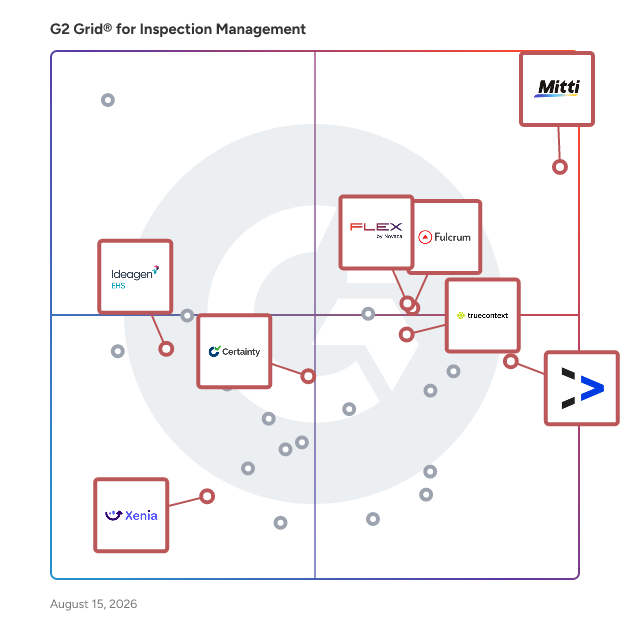
G2 Grid® for Inspection Management Software

G2 Grid® for Inspection Management Software plotting products by satisfaction and market presence

Highlighted products: Mitti (by SafetyCulture), Novara Flex, TrueContext, Fulcrum, EASE, Certainty Software, Ideagen EHS, and Xenia.

Underlying data: [Grid® JSON](https://www.g2.com/categories/inspection-management/grids.json?focus%5B%5D=safetyculturehq&focus%5B%5D=novara-flex&focus%5B%5D=truecontext&focus%5B%5D=fulcrum&focus%5B%5D=ease-inc-ease&focus%5B%5D=certainty-certainty-software&focus%5B%5D=ideagen-ehs&focus%5B%5D=xenia&segment=enterprise)

Sponsored

Novara Flex

Novara Flex — EHS & Operational Risk Management Software for Hazardous Industries What is Novara Flex? Novara Flex is a cloud-based EHS (Environmental, Health & Safety) and operational risk management software platform built for mid-market and SMB companies in regulated, hazardous industries. Flex is built for operations and safety teams that manage complex compliance requirements, replacing disconnected spreadsheets and manual processes with a single system of record. Flex gives safety teams one place to report incidents, run inspections and audits, manage corrective actions, track training and certifications, and produce the leading-indicator reporting leadership keeps asking for, whether on desktop, or in the field on mobile. Who is Novara Flex for? Flex is purpose-built for safety and operations teams in regulated, high-hazard verticals. Typical buyers are EHS Directors and Safety Managers who own TRIR, DART, recordables, and audit readiness, alongside operations and finance leaders who care about uptime, insurance cost (EMR), and risk exposure. - Manufacturing: OSHA recordkeeping, machine guarding, lockout/tagout (LOTO), near-miss programs - Construction: Multi-site inspections, JHAs/JSAs, subcontractor and contractor safety qualification, and EMR improvement to stay bid-ready - Oil & Gas: Process Safety Management (PSM), permits, and high-hazard work - Utilities: Field crew safety, contractor risk, and distributed-site compliance - Mining: MSHA compliance, inspections, and hazard tracking Flex is also a strong fit for transportation, agriculture, municipalities, and other operations that live with OSHA and EPA requirements. What can you do with Novara Flex? - Incident Management: Capture incidents, injuries, and near-misses as they happen, run root-cause investigations, and assign corrective and preventive actions (CAPA) to close the loop. Build and maintain OSHA 300, 300A, and 301 logs and meet electronic (ITA) submission requirements. - Inspections & Audits: Build custom mobile checklists and audit forms tailored to your sites. QR codes pull up equipment, employee, and inspection history on location. Schedule recurring inspections and track every finding to resolution. - Safety Training (LMS): Assign and track training and certifications, monitor completion and expirations, and build custom courses tied to the same system of record as your incidents and inspections. - Chemical & SDS Management: Maintain Safety Data Sheets (SDS) and chemical inventories, label compliantly, and give field crews mobile access to hazard information anywhere. - Contractor Risk: Prequalify and monitor third-party and contractor safety, which is essential for construction, utilities, and oil & gas. - Analytics & Reporting: Configurable dashboards turn raw safety data into the leading and lagging indicators leadership wants, TRIR, DART, near-miss rates, training completion, and open corrective actions. - ESG & Environmental Reporting: Track environmental and sustainability metrics for disclosure and permit reporting. How is Novara Flex different from other EHS software? Most EHS platforms are either enterprise suites that are slow and expensive to deploy, or training tools with thin operational features bolted on. Novara Flex is right-sized for 200–5,000-employee operators that need full EHS operations without a dedicated system administrator, making it a practical alternative for teams that have outgrown spreadsheets or find other platforms overbuilt for their scale. - Right-sized for mid-market and SMB: a practical alternative to enterprise suites that can feel overbuilt, slow to implement, or priced for the Fortune 500. - Built for field adoption: the number-one reason EHS software fails is that field crews won't use it. The Flex mobile app (GPS, camera, push notifications, and offline access) is built for the people actually doing the work. - Operational, not just compliance: Flex manages operational risk end to end, not just a compliance checklist. - Fast time-to-value: implementations measured in weeks, not quarters, with hands-on configuration and support. Most customers are fully configured and live within 4-8 weeks. What results do Novara Flex customers see? - Up to 86% reduction in recordable injuries - Lower workers' compensation and claims costs, with measurable EMR improvement - Faster, audit-ready reporting and stronger regulatory compliance - Higher field engagement and a more consistent safety culture across sites Why teams choose Novara - 40+ years of EHS expertise and in-house compliance specialists behind the platform - Highly configurable forms, workflows, and API integrations (including Procore), the system adapts to your processes, not the other way around - Enterprise-grade security: role-based permissions, audit trails, and automatic backups - Hands-on implementation plus the Novara Connect customer community for shared best practices Common questions about Novara Flex - Is Novara Flex good for OSHA compliance? Yes. Flex digitizes OSHA 300/300A/301 recordkeeping, incident investigations, inspections, and corrective actions, and supports electronic ITA submission. Safety teams can manage the full compliance lifecycle from an initial incident log through root-cause investigation and regulatory reporting in one platform. - Does Novara Flex have a mobile app for field crews? Yes, with offline access, photo capture, and GPS so crews can log incidents and inspections without connectivity. The app is designed for frontline workers in the field, not office users, and works with or without cell service, which is common in construction, oil and gas, and utilities environments. - What is a good EHS/Safety Management Software alternative for mid-market companies? Novara Flex is built specifically for mid-market and SMB operators that want full EHS functionality with faster deployment and stronger field adoption than enterprise suites. Unlike platforms scaled for Fortune 500 organizations, Flex is configured and live in weeks, with pricing and implementation support designed for teams without dedicated system administrators. - What industries use Novara Flex? Manufacturing, construction, oil & gas, utilities, mining, and other regulated, hazardous industries. Flex is also used in transportation, agriculture, and municipalities where OSHA and EPA requirements apply. See how Novara Flex fits your safety program — request a personalized demo.

Visit website

Mitti (by SafetyCulture)

Mitti (by SafetyCulture) is the operations system for every site, shift and standard. Trusted by over 80,000 organisations, Mitti brings your people, training records and workflows into one operating picture. From the frontline to the boardroom, it gives everyone a clear understanding of who's trained and ready for the shift ahead, highlights what needs attention and recommends what to do next. Every course completed, skill verified and action taken becomes intelligence your teams can use to improve every day.

Average Rating: 4.6/5.0

Total Reviews: 472

How Do G2 Users Rate Mitti (by SafetyCulture)?

  • Has the product been a good partner in doing business?: 9.2/10 (Category avg: 9.1/10)
  • Corrective and Preventive Actions (CAPA): 8.5/10 (Category avg: 8.6/10)
  • Data Capture: 9.1/10 (Category avg: 8.9/10)
  • Checklists: 8.9/10 (Category avg: 8.4/10)

Who Is the Company Behind Mitti (by SafetyCulture)?

  • Seller: Mitti
  • Company Website:
  • Year Founded: 2004
  • HQ Location: Surry Hills, New South Wales
  • Twitter: @MittiHQ
    4,867 Twitter followers
  • LinkedIn® Page: www.linkedin.com
    878 employees on LinkedIn®

Who Uses This Product?

  • Top Industries: Construction, Manufacturing
  • Company Size: 44% Small, 42% Medium

What Do G2 Reviewers Say About Mitti (by SafetyCulture)?

AI-generated summary from verified user reviews

Pros
  • Users appreciate the ease of use of SafetyCulture, allowing quick access and management from any mobile device.
  • Users commend SafetyCulture for its efficiency improvement, significantly streamlining information flow and enhancing productivity.
  • Users praise the efficiency of SafetyCulture for streamlining information flow and keeping updates readily available.
  • Users appreciate the ease of access and manageability of SafetyCulture, enhancing employee safety with quick surveys and reports.
  • Users value the high customizability of SafetyCulture, allowing easy creation and management of tailored checklists for projects.
Cons
  • Users find the missing features in SafetyCulture limiting, especially regarding advanced reporting and integration capabilities.
  • Users find the learning curve steep, particularly in customizing reports and navigating advanced features efficiently.
  • Users find limited customization options for reports and dashboards, which restrict flexibility for tailored needs.
  • Users experience a significant learning curve with SafetyCulture, finding it difficult to navigate its complex modules and features.
  • Users experience a significant learning curve with SafetyCulture, finding it challenging to master its features and interface.

What Are Recent G2 Reviews of Mitti (by SafetyCulture)?

What Are G2 Users Discussing About Mitti (by SafetyCulture)?

Novara Flex

Novara Flex — EHS & Operational Risk Management Software for Hazardous Industries What is Novara Flex? Novara Flex is a cloud-based EHS (Environmental, Health & Safety) and operational risk management software platform built for mid-market and SMB companies in regulated, hazardous industries. Flex is built for operations and safety teams that manage complex compliance requirements, replacing disconnected spreadsheets and manual processes with a single system of record. Flex gives safety teams one place to report incidents, run inspections and audits, manage corrective actions, track training and certifications, and produce the leading-indicator reporting leadership keeps asking for, whether on desktop, or in the field on mobile. Who is Novara Flex for? Flex is purpose-built for safety and operations teams in regulated, high-hazard verticals. Typical buyers are EHS Directors and Safety Managers who own TRIR, DART, recordables, and audit readiness, alongside operations and finance leaders who care about uptime, insurance cost (EMR), and risk exposure. - Manufacturing: OSHA recordkeeping, machine guarding, lockout/tagout (LOTO), near-miss programs - Construction: Multi-site inspections, JHAs/JSAs, subcontractor and contractor safety qualification, and EMR improvement to stay bid-ready - Oil & Gas: Process Safety Management (PSM), permits, and high-hazard work - Utilities: Field crew safety, contractor risk, and distributed-site compliance - Mining: MSHA compliance, inspections, and hazard tracking Flex is also a strong fit for transportation, agriculture, municipalities, and other operations that live with OSHA and EPA requirements. What can you do with Novara Flex? - Incident Management: Capture incidents, injuries, and near-misses as they happen, run root-cause investigations, and assign corrective and preventive actions (CAPA) to close the loop. Build and maintain OSHA 300, 300A, and 301 logs and meet electronic (ITA) submission requirements. - Inspections & Audits: Build custom mobile checklists and audit forms tailored to your sites. QR codes pull up equipment, employee, and inspection history on location. Schedule recurring inspections and track every finding to resolution. - Safety Training (LMS): Assign and track training and certifications, monitor completion and expirations, and build custom courses tied to the same system of record as your incidents and inspections. - Chemical & SDS Management: Maintain Safety Data Sheets (SDS) and chemical inventories, label compliantly, and give field crews mobile access to hazard information anywhere. - Contractor Risk: Prequalify and monitor third-party and contractor safety, which is essential for construction, utilities, and oil & gas. - Analytics & Reporting: Configurable dashboards turn raw safety data into the leading and lagging indicators leadership wants, TRIR, DART, near-miss rates, training completion, and open corrective actions. - ESG & Environmental Reporting: Track environmental and sustainability metrics for disclosure and permit reporting. How is Novara Flex different from other EHS software? Most EHS platforms are either enterprise suites that are slow and expensive to deploy, or training tools with thin operational features bolted on. Novara Flex is right-sized for 200–5,000-employee operators that need full EHS operations without a dedicated system administrator, making it a practical alternative for teams that have outgrown spreadsheets or find other platforms overbuilt for their scale. - Right-sized for mid-market and SMB: a practical alternative to enterprise suites that can feel overbuilt, slow to implement, or priced for the Fortune 500. - Built for field adoption: the number-one reason EHS software fails is that field crews won't use it. The Flex mobile app (GPS, camera, push notifications, and offline access) is built for the people actually doing the work. - Operational, not just compliance: Flex manages operational risk end to end, not just a compliance checklist. - Fast time-to-value: implementations measured in weeks, not quarters, with hands-on configuration and support. Most customers are fully configured and live within 4-8 weeks. What results do Novara Flex customers see? - Up to 86% reduction in recordable injuries - Lower workers' compensation and claims costs, with measurable EMR improvement - Faster, audit-ready reporting and stronger regulatory compliance - Higher field engagement and a more consistent safety culture across sites Why teams choose Novara - 40+ years of EHS expertise and in-house compliance specialists behind the platform - Highly configurable forms, workflows, and API integrations (including Procore), the system adapts to your processes, not the other way around - Enterprise-grade security: role-based permissions, audit trails, and automatic backups - Hands-on implementation plus the Novara Connect customer community for shared best practices Common questions about Novara Flex - Is Novara Flex good for OSHA compliance? Yes. Flex digitizes OSHA 300/300A/301 recordkeeping, incident investigations, inspections, and corrective actions, and supports electronic ITA submission. Safety teams can manage the full compliance lifecycle from an initial incident log through root-cause investigation and regulatory reporting in one platform. - Does Novara Flex have a mobile app for field crews? Yes, with offline access, photo capture, and GPS so crews can log incidents and inspections without connectivity. The app is designed for frontline workers in the field, not office users, and works with or without cell service, which is common in construction, oil and gas, and utilities environments. - What is a good EHS/Safety Management Software alternative for mid-market companies? Novara Flex is built specifically for mid-market and SMB operators that want full EHS functionality with faster deployment and stronger field adoption than enterprise suites. Unlike platforms scaled for Fortune 500 organizations, Flex is configured and live in weeks, with pricing and implementation support designed for teams without dedicated system administrators. - What industries use Novara Flex? Manufacturing, construction, oil & gas, utilities, mining, and other regulated, hazardous industries. Flex is also used in transportation, agriculture, and municipalities where OSHA and EPA requirements apply. See how Novara Flex fits your safety program — request a personalized demo.

Average Rating: 4.6/5.0

Total Reviews: 80

How Do G2 Users Rate Novara Flex?

  • Has the product been a good partner in doing business?: 9.4/10 (Category avg: 9.1/10)
  • Corrective and Preventive Actions (CAPA): 9.0/10 (Category avg: 8.6/10)
  • Data Capture: 9.1/10 (Category avg: 8.9/10)
  • Checklists: 9.3/10 (Category avg: 8.4/10)

Who Is the Company Behind Novara Flex?

  • Seller: Novara
  • Company Website:
  • HQ Location: N/A
  • LinkedIn® Page: www.linkedin.com
    152 employees on LinkedIn®

Who Uses This Product?

  • Top Industries: Oil & Energy, Construction
  • Company Size: 46% Medium, 43% Large

What Do G2 Reviewers Say About Novara Flex?

AI-generated summary from verified user reviews

Pros
  • Users find the ease of use of Novara Flex invaluable, allowing everyone to manage the system effortlessly.
  • Users commend the excellent customer support of Novara Flex, with timely responses and helpful assistance when needed.
  • Users appreciate the flexibility of Novara Flex, enabling tailored solutions that meet specific organizational and industry needs.
  • Users love the intuitive design of Novara Flex, making it easy for anyone to use and manage effectively.
  • Users value the excellent customization options of Novara Flex, enabling tailored training for specific business needs.
Cons
  • Users express frustration over limited customization options, particularly in functionalities like OSHA case management and form creation.
  • Users find the limited options for customization and reporting frustrating, impacting the overall user experience.
  • Users find the difficult learning curve of Novara Flex frustrating, especially due to vague navigation and limited training.
  • Users experience limited functionality with Novara Flex, particularly in form creation and training flexibility.
  • Users find the complex workflow challenging due to vague tooltips and difficulty in creating reports and forms.

What Are Recent G2 Reviews of Novara Flex?

What Are G2 Users Discussing About Novara Flex?

TrueContext

TrueContext is the field service workflow platform for today’s connected worker. It enables frontliners with smart, context-aware forms and AI-augmented mobile workflows, unlocking technician mastery and productivity at scale. The platform unifies people, processes, and data so technicians can focus on real work, not busywork — enabling data-driven field service without the data burden. Built for operational excellence, TrueContext transforms field action into strategic vision, turning every job into a source of real-time intelligence that compounds long-term success. Over 100,000 users in high-complexity, low-connectivity field environments use TrueContext every day to improve asset uptime, ensure safety and compliance, and deliver certainty to customers. --- KEY PRODUCT FEATURES Offline, cross-platform mobile forms that work anywhere, anytime TrueContext’s cross-platform mobile app delivers reliable performance in any environment. Offline capabilities let technicians access service history, go through workflows, and capture photos, signatures, and GPS coordinates without connectivity. Everything syncs automatically when your techs reconnect. Field service software needs to work where your teams work, including basements, oil rigs, and medical facilities. TrueContext stays productive regardless of location or network conditions. Build custom field service workflows without coding TrueContext’s low-code platform empowers operations teams to create, deploy, and modify guided workflows tailored to your field service needs. Operations teams can build adaptive forms with conditional logic and data validation that reduce errors and improve first-time fix rates, without IT dependencies or development time. Workflows guide technician behavior, reduce human error, and deliver audit-ready data back to enterprise systems. Operations teams control the process, and field teams get clear instructions that make complex jobs simpler. Automated field service reporting and documentation TrueContext eliminates manual paperwork by automatically generating custom reports in multiple formats (PDF, HTML, and Word) from completed forms. Reports are instantly distributed to stakeholders, customers, and back-office systems with timestamps, audit trails, and compliance-ready documentation. Administrative burden drops. Data accuracy improves. Workflow analytics show you where processes can be optimized, turning every completed job into insight that makes the next one better. Actionable, real-time analytics for field operations With configurable dashboards, you get immediate visibility into field performance metrics. Drill down into submission analytics by form, team, user, and location to identify trends and address issues before they escalate. Connect to your existing business intelligence tools for extended analysis. Add Birst integration to gain deeper insights into how field performance impacts your broader business goals.

Average Rating: 4.4/5.0

Total Reviews: 423

How Do G2 Users Rate TrueContext?

  • Has the product been a good partner in doing business?: 8.9/10 (Category avg: 9.1/10)
  • Corrective and Preventive Actions (CAPA): 7.9/10 (Category avg: 8.6/10)
  • Data Capture: 8.7/10 (Category avg: 8.9/10)
  • Checklists: 8.8/10 (Category avg: 8.4/10)

Who Is the Company Behind TrueContext?

  • Seller: TrueContext Incorporated
  • Company Website:
  • Year Founded: 2001
  • HQ Location: Ontario, Canada
  • Twitter: @TrueContext
    156 Twitter followers
  • LinkedIn® Page: linkedin.com
    106 employees on LinkedIn®

Who Uses This Product?

  • Who Uses This: IT Manager
  • Top Industries: Construction, Oil & Energy
  • Company Size: 38% Medium, 32% Large

What Do G2 Reviewers Say About TrueContext?

AI-generated summary from verified user reviews

Pros
  • Users highlight the ease of use of TrueContext, enabling efficient form management and user-friendly navigation.
  • Users appreciate the flexibility in form creation with TrueContext, enabling efficient and easy building and updating of forms.
  • Users appreciate the form customization options of TrueContext, enabling easy creation and updates for field technicians.
  • Users appreciate the high level of control and standardization from TrueContext, enhancing data accuracy and compliance.
  • Users value the customization capabilities of TrueContext, allowing tailored workflows and enhanced operational efficiency.
Cons
  • Users find the form design process complicated, particularly with large forms and advanced logic, leading to maintenance challenges.
  • Users find the steep learning curve for advanced features of TrueContext challenging, requiring significant time and expertise to master.
  • Users find the complexity of managing advanced forms and workflows can be time-consuming and challenging.
  • Users find limitations in submissions and complicated form designs, causing frustration with editing and navigation challenges.
  • Users find the limited features of TrueContext restricting, desiring more customization and template options.

What Are Recent G2 Reviews of TrueContext?

EASE

EASE is the leading mobile platform manufacturers rely on to administer, conduct and analyze plant floor audits and inspections. From Layered Process Audits (LPAs) to safety, Gemba Walks, 5S and more, EASE combines simplicity and efficiency with powerful insights to reveal the full picture. EASE delivers: • Significant reduction in audit labor time and cost • Unparalleled purpose-built user experience for plant floor audits • Innovative mobile app (iOS and Android) with robust offline support • Early risk identification leading to reduced scrap, rework, returns and increased safety • Recurring multi-layer audit scheduling and reminders • Issue tracking and management • And much more… EASE capabilities include: - Native Support for Layered Process Audits - Customized Audit Types - Mobile Auditing (iOS and Android) - Advanced Offline Mobile Audit Support - Customizable Dashboards and Reporting - Audit Scheduling (Including by Layer) - Question Library - Picture Annotations - Question Reference Images and Documents - Track Open Mitigations

Average Rating: 4.6/5.0

Total Reviews: 231

How Do G2 Users Rate EASE?

  • Has the product been a good partner in doing business?: 9.4/10 (Category avg: 9.1/10)
  • Corrective and Preventive Actions (CAPA): 8.7/10 (Category avg: 8.6/10)
  • Data Capture: 8.9/10 (Category avg: 8.9/10)
  • Checklists: 8.5/10 (Category avg: 8.4/10)

Who Is the Company Behind EASE?

  • Seller: Ease.io
  • Company Website:
  • Year Founded: 1986
  • HQ Location: Irvine, California
  • Twitter: @easeaudits
    1,043 Twitter followers
  • LinkedIn® Page: www.linkedin.com
    89 employees on LinkedIn®

Who Uses This Product?

  • Who Uses This: Quality Manager, Quality Engineer
  • Top Industries: Automotive, Manufacturing
  • Company Size: 61% Medium, 25% Large

What Do G2 Reviewers Say About EASE?

AI-generated summary from verified user reviews

Pros
  • Users find EASE's ease of use exceptional, simplifying scheduling and customization for their business needs.
  • Users appreciate the intuitive design of EASE, highlighting its simplicity and user-friendly experience for audits.
  • Users find EASE provides easy audit creation and tracking, enhancing the overall audit experience effectively.
  • Users admire the intuitive design of EASE, finding it easy to use and customize to their needs.
  • Users value the ease of auditing in EASE, benefiting from straightforward implementation and customizable features.
Cons
  • Users find the inefficiency in EASE due to multiple clicks and time-consuming report generation hindering smoother workflows.
  • Users find the limited customization options of EASE to be a downside affecting their overall efficiency.
  • Users find the limited options for document control and assignment cumbersome, hindering workflow efficiency.
  • Users find EASE not user-friendly, facing difficulties with graphics and login issues, impacting their overall experience.
  • Users find inadequate reporting in EASE, leading to time-consuming efforts to gather necessary data and details.

What Are Recent G2 Reviews of EASE?

Fulcrum

Fulcrum is a field-first SaaS platform designed to transform how organizations manage field operations management for mission-critical operations. Built specifically for the challenges of field teams, Fulcrum automates workflows, captures real-time location data, and integrates seamlessly with GIS and other systems to ensure a continuous, accurate flow of information before, during, and after inspections. With Fulcrum, organizations centralize their field operations on a single platform, standardizing field data collection and driving productivity gains. From utilities to construction, Fulcrum supports diverse industries by offering customizable workflows that adapt to evolving field conditions. Non-technical users can quickly build field apps, while enterprise clients enjoy advanced scalability to manage even the most complex processes. Fulcrum’s AI-powered tools extend the platform beyond standard field operations management. Audio FastFill automatically populates forms using information captured from voice input, photos, and text, reducing manual entry in the field. Insights transforms field data into instant charts, graphs, and maps by answering plain-language questions in seconds. Teams can also deploy custom AI models to support specialized workflows such as anomaly detection or vegetation management. Next, Fulcrum will introduce AI-driven photo recognition, followed by intelligent, in-the-moment guidance designed to assist field crews as they work. Thousands of organizations worldwide rely on Fulcrum to improve data accuracy, reduce operational inefficiencies, and drive digital transformation. By eliminating time-consuming manual processes, Fulcrum helps field teams work faster, smarter, and with greater confidence. Whether capturing inspection results, monitoring assets, or ensuring compliance, Fulcrum delivers the clarity and control needed to make better decisions in real time.

Average Rating: 4.6/5.0

Total Reviews: 245

How Do G2 Users Rate Fulcrum?

  • Has the product been a good partner in doing business?: 9.2/10 (Category avg: 9.1/10)
  • Corrective and Preventive Actions (CAPA): 8.4/10 (Category avg: 8.6/10)
  • Data Capture: 9.4/10 (Category avg: 8.9/10)
  • Checklists: 8.9/10 (Category avg: 8.4/10)

Who Is the Company Behind Fulcrum?

  • Seller: Fulcrum
  • Company Website:
  • Year Founded: 2011
  • HQ Location: San Francisco, California, United States
  • Twitter: @fulcrumapp
    2,743 Twitter followers
  • LinkedIn® Page: www.linkedin.com
    160 employees on LinkedIn®

Who Uses This Product?

  • Who Uses This: Project Manager
  • Top Industries: Environmental Services, Utilities
  • Company Size: 52% Small, 29% Medium

What Do G2 Reviewers Say About Fulcrum?

AI-generated summary from verified user reviews

Pros
  • Users find Fulcrum to be easy to use, allowing for quick and efficient completion of tasks.
  • Users appreciate the user-friendly design of Fulcrum, which simplifies app creation and enhances field operations.
  • Users appreciate the easy setup of Fulcrum, making their data collection and workflow management seamless and efficient.
  • Users praise Fulcrum's excellent customer support and technical assistance, enhancing their experience and productivity.
  • Users love the endless customization options of Fulcrum, enabling tailored apps that fit their unique business needs.
Cons
  • Users face editing issues after syncing data in Fulcrum, limiting their ability to make necessary corrections.
  • Users find the limited features of Fulcrum hinder their ability to create complex forms and reports efficiently.
  • Users find the user interface challenging and struggle with complex report customization despite a no-code promise.
  • Users find limited functionality in Fulcrum, struggling to create complex forms with tailored data aggregation.
  • Users find the form complexity in Fulcrum challenging, especially when customizing reports without coding knowledge.

What Are Recent G2 Reviews of Fulcrum?

What Are G2 Users Discussing About Fulcrum?

Certainty Software

Certainty Software is a comprehensive, enterprise-level inspection management solution designed to streamline data collection, reporting, and issue management for audits and inspections. This software caters to a diverse range of industries globally, enabling professionals to conduct millions of inspections annually. Its primary objective is to ensure compliance, mitigate risks, and enhance operational performance across various sectors. The platform is particularly beneficial for organizations that require a systematic approach to audits and inspections. Its intuitive, user-friendly interface allows users to create customizable forms tailored to their specific needs. This flexibility makes it suitable for a wide array of applications, including safety inspections, quality assurance audits, supplier compliance checks, ESG (Environmental, Social, Governance) assessments, or any other checklist-based need. By facilitating real-time reporting and comprehensive action management, Certainty empowers users to capture, track, and analyze accurate data efficiently. One of the key features of Certainty Software is its data-driven approach, which provides actionable insights that can significantly enhance business performance and sustainability. Users can easily identify trends, monitor compliance levels, and address potential issues before they escalate. The software’s robust reporting capabilities enable the generation of detailed reports that can be shared with stakeholders, ensuring transparency and accountability throughout the inspection process. This level of insight is crucial for organizations aiming to maintain high standards of compliance and operational excellence. New to the Certainty platform are AI-enhanced capabilities. Certainty Software's Vision, Insights, and Analytics bring the power of artificial intelligence directly to your audits and inspections. Whether you're seeking to streamline checklist completions or uncover strategic insights through deep data analysis, the automation features are designed to meet your needs. This integration of AI not only enhances operational intelligence but also supports improved decision-making and agility, allowing organizations to adapt swiftly to changing requirements. Certainty Software stands out in its category by offering a centralized platform for managing inspections and audits. This eliminates the need for disparate systems and manual processes, reducing the likelihood of errors and improving overall efficiency. The ability to integrate with other enterprise systems further enhances its value, allowing organizations to maintain a cohesive operational framework. By providing a comprehensive solution that combines ease of use with powerful data analytics, Certainty Software supports businesses in achieving their compliance goals while driving continuous improvement in their operational practices.

Average Rating: 4.4/5.0

Total Reviews: 33

How Do G2 Users Rate Certainty Software?

  • Has the product been a good partner in doing business?: 9.3/10 (Category avg: 9.1/10)
  • Corrective and Preventive Actions (CAPA): 9.4/10 (Category avg: 8.6/10)
  • Data Capture: 10.0/10 (Category avg: 8.9/10)
  • Checklists: 8.8/10 (Category avg: 8.4/10)

Who Is the Company Behind Certainty Software?

  • Seller: Certainty
  • Company Website:
  • Year Founded: 2010
  • HQ Location: Victoria, CA
  • LinkedIn® Page: www.linkedin.com
    11 employees on LinkedIn®

Who Uses This Product?

  • Company Size: 38% Large, 32% Medium

What Do G2 Reviewers Say About Certainty Software?

AI-generated summary from verified user reviews

Pros
  • Users appreciate the ease of use of Certainty Software, highlighting its friendly interface and seamless integration.
  • Users value the full customizability of Certainty Software, facilitating personalized checklists and forms with ease.
  • Users value the customization features of Certainty Software, facilitating personalized checklists and easy form adjustments.
  • Users love the fully customizable forms of Certainty Software, making checklist creation quick and easy.
  • Users praise the easy setup of Certainty Software, finding it intuitive and beneficial for diverse projects.
Cons
  • Users find it challenging to manage user deletions and limited dashboard customization, affecting overall usability and flexibility.
  • Users feel the need for better customization options in Certainty Software, which limits their ability to tailor features effectively.
  • Users find the inadequate reporting of Certainty Software limits their ability to track specific performance metrics effectively.
  • Users note the limited features of Certainty Software, particularly highlighting the need for improved analytics and customization.
  • Users feel the limited flexibility in analytics and reporting hinders their ability to track specific performance metrics.

What Are Recent G2 Reviews of Certainty Software?

Ideagen EHS

Ideagen EHS is an AI-first environmental health and safety solution that enables multi-site organizations in regulated industries to replace reactive incident management with proactive risk prevention, automated compliance and real-time safety visibility. Named a Leader in the Verdantix EHS Green Quadrant 2025 and a representative vendor in the Gartner Market Guide for EHS Software 2026, the solution consolidates incident management, risk assessment, audit readiness, environmental monitoring, chemical lifecycle governance and contractor compliance into a single system with a unified data layer. The core problem Ideagen EHS addresses is operational fragmentation: EHS teams running disconnected systems cannot surface risk patterns fast enough to prevent incidents or prepare for audits without significant manual effort. The solution addresses this through Mazlan, its embedded AI, which drafts incident investigations in hours rather than days, maps regulatory changes directly to operational policies and generates compliance reports ready for auditor review. Mazlan is built into the solution architecture, not sold as an add-on module. Organizations using Ideagen EHS report 50-70% faster incident response, 15-30% fewer incidents through predictive risk identification and 25-40% improvement in audit scores. Documentation time falls by 30-50% as AI handles investigation drafts, regulatory submissions and reporting workflows. Core capabilities delivered in a single deployment: Incident and near-miss management: AI-generated investigation drafts, corrective action tracking through to closure and cross-site incident pattern analytics Audit, inspection and compliance management: scheduled safety inspections and continuous regulatory coverage for OSHA, ISO 14001, ISO 45001, EPA, REACH and RoHS, with auditor-ready evidence accessible at any point in the compliance cycle Risk assessment and environmental monitoring: standardized hazard identification and risk scoring across every site, with real-time air quality, noise, dust, vibration and carbon tracking and 72-hour predictive dust event alerts Chemical lifecycle management: centralized SDS governance, rules-based procurement approval workflows and automated reporting for Tier II, TRI, PFAS and REACH Contractor and workforce compliance: automated credential verification and digital induction completion enforced before site access is granted The solution is built for multi-site regulated enterprises where EHS complexity scales with operational footprint. Role-specific interfaces support 80% or higher user adoption: 60-second reporting forms for operational contributors, real-time dashboards for safety teams and governance-level oversight for leadership. Native mobile applications with offline capability ensure data capture continues in environments without network connectivity. ERP and QMS integration is available via open APIs. Ideagen EHS is used by global manufacturers, chemical producers and consumer goods organizations including Johnson Controls (3,200 sites across 74 countries), Yokohama, Quaker Houghton, Dawn Foods, Scotts Miracle-Gro and Built. The solution is designed for regulated enterprises managing EHS operations across multiple sites, jurisdictions and regulatory frameworks.

Average Rating: 4.0/5.0

Total Reviews: 129

How Do G2 Users Rate Ideagen EHS?

  • Has the product been a good partner in doing business?: 8.2/10 (Category avg: 9.1/10)
  • Corrective and Preventive Actions (CAPA): 8.3/10 (Category avg: 8.6/10)
  • Data Capture: 8.1/10 (Category avg: 8.9/10)
  • Checklists: 7.9/10 (Category avg: 8.4/10)

Who Is the Company Behind Ideagen EHS?

  • Seller: Ideagen
  • Company Website:
  • Year Founded: 2000
  • HQ Location: Ruddington, Nottingham
  • Twitter: @Ideagen_
    2,172 Twitter followers
  • LinkedIn® Page: www.linkedin.com
    1,386 employees on LinkedIn®

Who Uses This Product?

  • Top Industries: Construction, Manufacturing
  • Company Size: 45% Large, 35% Medium

What Do G2 Reviewers Say About Ideagen EHS?

AI-generated summary from verified user reviews

Pros
  • Users value the customizable incident management module of Ideagen EHS, enhancing reporting and safety protocol adherence.
  • Users value the effective data tracking in Ideagen EHS, enhancing safety management and improving site security efficiently.
  • Users find that Ideagen EHS offers efficient tracking of metrics, enhancing safety management and operational visibility.
  • Users appreciate the excellent customer support of Ideagen EHS, highlighting responsive and knowledgeable team members.
  • Users find that Ideagen EHS provides effective problem solving with timely solutions and proactive alerts for safety compliance.
Cons
  • Users find Ideagen EHS to be not user-friendly, with a complicated setup and a cumbersome navigation experience.
  • Users find the complex workflow of Ideagen EHS challenging, hindering access to specific data and incident history.
  • Users experience limited customization in Ideagen EHS, making it difficult to adjust alerts and reporting options effectively.
  • Users report feeling frustrated with the limited functionality of Ideagen EHS, often struggling to access necessary features and reports.
  • Users are frustrated with the poor customer support, experiencing communication issues and lack of accountability in problem resolution.

What Are Recent G2 Reviews of Ideagen EHS?

What Are G2 Users Discussing About Ideagen EHS?

Xenia

Simplify Workforce Operations with one app to manage daily tasks, maintenance, safety compliance and quality assurance. Xenia has all the tools for one flat rate for your entire team. Workforce Operations with Xenia: - Operations Template Builder: Build process for every task with custom SOPs, checklists, inspections and logs powered with workflow automations. - Smart Inspections: Equip inspection steps with if/then logic to automate follow-ups, notify management and trigger corrective actions - Corrective Actions: Transform failed inspections into actionable steps, tracking progress from start to finish. - Task Management: Assign tasks and track progress in real-time, ensuring efficient operational execution. - Scheduled Work: Create recurring tasks with clear due dates and times, ensuring timely task completion. - Team Communication: Swap radios and emails for instant messaging, group collaboration, and company-wide announcements. - Work Order Management: Create work orders with priority, category, location and asset for clear assignment. - Preventive Maintenance: Centralize tasks in a digital calendar for precise planning across assets and locations. - Work Requests and Approvals: Centralize request management, expedite approvals, and monitor associated costs and resources. - Temperature Monitoring: Ensure continuous equipment monitoring with integrated LoRaWAN temperature and humidity sensors. - Asset Work History: Ensure optimal asset health with comprehensive work history, complete with cost tracking and images. - Analytics Reports: Optimize team and asset performance with comprehensive analytics, custom reports, and historical logs. - Multi-Location Management: Centralize compliance, standardized procedures, and daily operations across all locations with unified reporting. Xenia offers a free plan and premium plans for teams of 20 from $49- $99 per month. All plans start with a 14-day, risk-free trial with unlimited access to all core features. Xenia has fast onboarding and customer support to ensure your business hits the ground running on day 1.

Average Rating: 5.0/5.0

Total Reviews: 20

How Do G2 Users Rate Xenia?

  • Has the product been a good partner in doing business?: 10.0/10 (Category avg: 9.1/10)
  • Corrective and Preventive Actions (CAPA): 9.4/10 (Category avg: 8.6/10)
  • Data Capture: 9.7/10 (Category avg: 8.9/10)
  • Checklists: 9.1/10 (Category avg: 8.4/10)

Who Is the Company Behind Xenia?

  • Seller: Xenia
  • Year Founded: 2021
  • HQ Location: Miami, FL
  • LinkedIn® Page: www.linkedin.com
    77 employees on LinkedIn®

Who Uses This Product?

  • Top Industries: Education Management, E-Learning
  • Company Size: 60% Large, 25% Medium

What Do G2 Reviewers Say About Xenia?

AI-generated summary from verified user reviews

Pros
  • Users value the effective data tracking in Xenia, making performance and payment monitoring seamless.
  • Users value the payment tracking feature of Xenia, enhancing their ability to monitor performance and payments effectively.
  • Users praise Xenia for its effective tracking of performance and payments, enhancing their overall experience.

What Are Recent G2 Reviews of Xenia?

SciSure (formerly known as eLabNext and SciShield)

SciSure is a Scientific Management Platform (SMP) designed to unify research, safety, compliance, training, and lab operations in a single, integrated digital environment. Formed through the merger of eLabNext and SciShield, SciSure combines lab digitalization (ELN and LIMS) with Environmental Health & Safety (EHS) expertise to support modern scientific organizations. Many labs today rely on fragmented systems that manage different functions separately—creating inefficiencies, compliance risks, and data silos. SciSure addresses this by offering a centralized platform that bridges the gap between scientific workflows and operational oversight. SciSure is built for research institutions, biotech and pharmaceutical companies, academic labs, and government organizations. The platform supports collaboration across research, operations, and EHS teams by streamlining daily tasks and ensuring compliance with regulatory standards. Key platform capabilities include: - Laboratory inventory and sample management with full traceability - Protocol documentation, version control, and collaborative editing - Real-time safety and compliance tracking aligned with regulatory frameworks - Training management and role-based certification tracking - Configurable modules with flexible deployment (cloud, private cloud, or on-premises,) Key benefits of the platform include: - Reduction of manual processes and administrative burden - Improved cross-functional communication between research and EHS teams - Enhanced data accuracy and readiness for audits and inspections - Scalable architecture to meet the needs of growing lab environments - Integration with third-party instruments and software systems SciSure helps organizations standardize and centralize scientific operations without sacrificing flexibility or compliance. By supporting the full lifecycle of scientific activity—from bench to policy—it fosters operational resilience, safety, and scientific integrity.

Average Rating: 4.2/5.0

Total Reviews: 206

How Do G2 Users Rate SciSure (formerly known as eLabNext and SciShield)?

  • Has the product been a good partner in doing business?: 9.5/10 (Category avg: 9.1/10)
  • Corrective and Preventive Actions (CAPA): 8.3/10 (Category avg: 8.6/10)
  • Data Capture: 9.0/10 (Category avg: 8.9/10)
  • Checklists: 7.7/10 (Category avg: 8.4/10)

Who Is the Company Behind SciSure (formerly known as eLabNext and SciShield)?

  • Seller: SciSure
  • Company Website:
  • HQ Location: Boston, Massachusetts
  • LinkedIn® Page: www.linkedin.com
    99 employees on LinkedIn®

Who Uses This Product?

  • Who Uses This: Student, Research Associate
  • Top Industries: Biotechnology, Research
  • Company Size: 72% Small, 14% Medium

What Do G2 Reviewers Say About SciSure (formerly known as eLabNext and SciShield)?

AI-generated summary from verified user reviews

Pros
  • Users find SciSure's ease of use remarkable, appreciating its user-friendly design and comprehensive all-in-one platform.
  • Users value the organization efficiency of SciSure, as it simplifies tracking experiments and centralizes tools in one platform.
  • Users value the intuitive and accessible user interface of SciSure, enhancing organization and efficiency in their workflows.
  • Users value the ease of collaboration in SciSure, facilitating seamless sharing and communication within their teams.
  • Users value the intuitive organization of SciSure, enhancing efficiency and collaboration in lab management.
Cons
  • Users find difficult usability due to a complex interface, hindering collaboration and user experience during tasks.
  • Users find the UX cumbersome due to complex file uploading and a dated interface, impacting overall usability.
  • Users often face navigation issues that make it challenging to locate tabs and experiment plans effectively.
  • Users struggle with navigation difficulty, finding the interface counterintuitive and browsing experiments frustratingly complicated.
  • Users express frustration with data management issues, particularly with limited real-time collaboration and formatting inconsistencies.

What Are Recent G2 Reviews of SciSure (formerly known as eLabNext and SciShield)?

Appenate (formerly Forms On Fire)

Appenate – Build Powerful No-Code Apps & Forms That Work Anywhere. Appenate is the most flexible no-code platform for businesses needing mobile Forms and Apps built around their own processes. Whether it’s maintenance, field service, inspections, inventory management, or workflow automation, Appenate lets you build and deploy enterprise-grade apps in minutes - with no developers required. Why Teams Choose Appenate Unlike other no-code tools that limit customization, Appenate gives you complete control - from data capture and offline access to white-labelling, AI-assisted form creation, and deep integrations. Key Features & Benefits ✔️ Create & customize Forms in minutes with AI: Skip the blank canvas – just describe your form by text or voice, and AI creates a ready-to-use starting point with configured fields. ✔️ Fully Native Apps: Run faster and more reliably with true native performance on iOS, Android, and Windows. ✔️ Works Offline: Stay productive in the field - even with zero connectivity. Sync automatically when back online. ✔️ Powerful Integrations: Connect your data to Salesforce, SharePoint, Power BI, and hundreds more. ✔️ Full White-Label: Deliver a 100% branded experience with no trace of Appenate - perfect for internal rollouts or reselling. ✔️ Advanced Data Capture: Harness GPS, NFC, OCR, barcodes, photos, and contactless signatures for complete accuracy. ✔️ Role-Based Access: Manage users, teams, and permissions securely across your organization. ✔️ Automated Reports: Instantly convert captured data into Word, Excel, or PDF templates for client-ready reports. ✔️ Pre-Built App Templates: Get started fast with hundreds of ready-to-use apps that can be customized to your workflow. ✔️ Lifetime Support: Enjoy free onboarding, in-depth documentation, and customer support for life - no extra fees. Who Uses Appenate Appenate powers teams across industries like construction, logistics, manufacturing, field service, and facilities management - helping them digitize operations, stay compliant, and increase ROI without the need for developers. “Simply put, Appenate not only saves us time & money – it helps us stay compliant.” - Simon Ozanne, Alacon Aero “With Appenate, we get better quality data & have minimized our post-processing time.” - Project Manager, Amey Trusted by 80,000+ Users in 100+ Countries 🚀 Start your free trial today - build your first custom app in minutes, no credit card required.

Average Rating: 4.5/5.0

Total Reviews: 264

How Do G2 Users Rate Appenate (formerly Forms On Fire)?

  • Has the product been a good partner in doing business?: 9.4/10 (Category avg: 9.1/10)
  • Corrective and Preventive Actions (CAPA): 9.0/10 (Category avg: 8.6/10)
  • Data Capture: 9.3/10 (Category avg: 8.9/10)
  • Checklists: 9.2/10 (Category avg: 8.4/10)

Who Is the Company Behind Appenate (formerly Forms On Fire)?

  • Seller: Appenate (Pty) Ltd
  • Company Website:
  • Year Founded: 2011
  • HQ Location: Brisbane, Australia
  • Twitter: @appenate
    3,639 Twitter followers
  • LinkedIn® Page: www.linkedin.com
    46 employees on LinkedIn®

Who Uses This Product?

  • Top Industries: Construction, Information Technology and Services
  • Company Size: 55% Small, 36% Medium

What Do G2 Reviewers Say About Appenate (formerly Forms On Fire)?

AI-generated summary from verified user reviews

Pros
  • Users value the customization capabilities of Appenate, enhancing data collection and integrating seamlessly with existing workflows.
  • Users highlight the ease of use of Appenate, praising its intuitive design and excellent customer support.
  • Users appreciate the customization options in Appenate, enhancing data collection efficiency and integration with existing workflows.
  • Users value the easy form creation process of Appenate, enabling quick setup and effective data management without technical skills.
  • Users commend the exceptional customer support of Appenate, highlighting quick responses and reliable assistance throughout their experience.
Cons
  • Users find the initial learning curve for advanced features in Forms On Fire to be complex and overwhelming.
  • Users find the initial learning difficulty for advanced features to be complex and overwhelming, especially for beginners.
  • Users find the initial learning curve and navigation complexity of Forms On Fire challenging, especially for newcomers.
  • Users find the app suffers from performance issues, especially with slow sync and navigating complex forms.
  • Users often experience slow performance in Appenate, particularly with form submissions and syncing issues in the field.

What Are Recent G2 Reviews of Appenate (formerly Forms On Fire)?

What Are G2 Users Discussing About Appenate (formerly Forms On Fire)?