Best ERP Systems

How Many ERP Systems Products Does G2 Track?

Total Products under this Category: 1,535

Category Stats (Sep 2026)

  • Average Rating: 4.27/5 (↑0.01 vs Aug 2026) The average rating of products in this category, based on all submitted ratings
  • Top Trending Product: HashMicro ERP (+2.62%) - Among all products in this category, HashMicro ERP recorded the largest rating increase compared to last month

Last updated: September 01, 2026

How Does G2 Rank ERP Systems Products?

Why You Can Trust G2's Software Rankings:

  • 30 Analysts and Data Experts
  • 26,400+ Authentic Reviews
  • 1,535+ Products
  • Unbiased Rankings

G2's software rankings are built on verified user reviews, rigorous moderation, and a consistent research methodology maintained by a team of analysts and data experts. Each product is measured using the same transparent criteria, with no paid placement or vendor influence. While reviews reflect real user experiences, which can be subjective, they offer valuable insight into how software performs in the hands of professionals. Together, these inputs power the G2 Score, a standardized way to compare tools within every category.

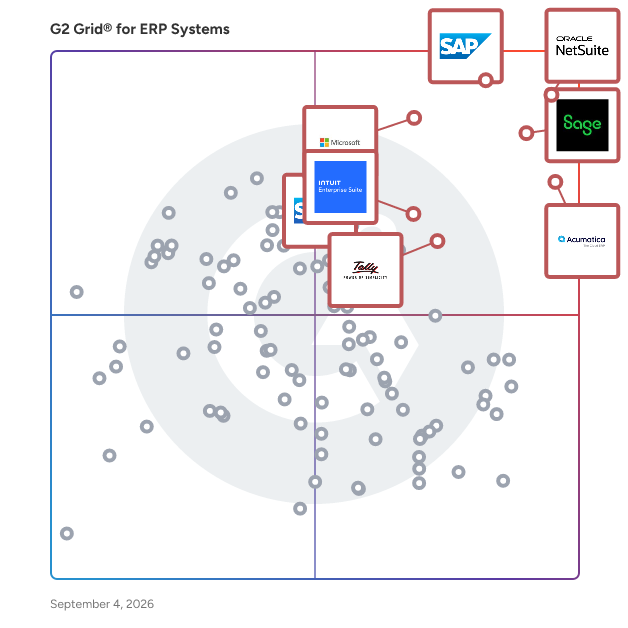
G2 Grid® for ERP Systems

G2 Grid® for ERP Systems plotting products by satisfaction and market presence

Highlighted products: NetSuite, SAP Cloud ERP (SAP S/4HANA Cloud), Sage Intacct, Acumatica, Microsoft Dynamics 365 Business Central, SAP ECC, TallyPrime, and Intuit Enterprise Suite.

Underlying data: [Grid® JSON](https://www.g2.com/categories/erp-systems/grids.json?focus%5B%5D=oracle-netsuite&focus%5B%5D=sap-cloud-erp-sap-s-4hana-cloud&focus%5B%5D=sage-intacct&focus%5B%5D=acumatica&focus%5B%5D=microsoft-microsoft-dynamics-365-business-central&focus%5B%5D=sap-ecc&focus%5B%5D=tallyprime&focus%5B%5D=intuit-intuit-enterprise-suite)

NetSuite

Como la solución ERP en la nube número 1 del mundo durante más de 25 años, NetSuite ha ayudado a las empresas a obtener la visibilidad, el control y la agilidad para construir y hacer crecer un negocio exitoso. Inicialmente centrados en finanzas y ERP, ahora ofrecemos un sistema integrado impulsado por IA que también incluye gestión de inventarios, recursos humanos, automatización de servicios profesionales y comercio, y es utilizado por más de 43,000 clientes en 220 países.

Average Rating: 4.1/5.0

Total Reviews: 4,789

How Do G2 Users Rate NetSuite?

  • ¿Ha sido the product un buen socio para hacer negocios?: 7.5/10 (Category avg: 8.6/10)
  • Asignación: 7.3/10 (Category avg: 8.0/10)
  • Capacidad de flujo de trabajo: 7.7/10 (Category avg: 8.3/10)
  • Presupuestación / Previsión: 7.0/10 (Category avg: 8.0/10)

Who Is the Company Behind NetSuite?

  • Vendedor: Oracle
  • Sitio web de la empresa:
  • Año de fundación: 1977
  • Ubicación de la sede: Austin, TX
  • Twitter: @Oracle
    827,997 seguidores en Twitter
  • Página de LinkedIn®: www.linkedin.com
    208,078 empleados en LinkedIn®

Who Uses This Product?

  • Who Uses This: Controlador, Gerente de Contabilidad
  • Top Industries: Software de Computadora, Contabilidad
  • Company Size: 57% Medium, 31% Small

What Do G2 Reviewers Say About NetSuite?

AI-generated summary from verified user reviews

Pros
  • Los usuarios aprecian la facilidad de uso de NetSuite, encontrándolo fluido y personalizable para sus necesidades.
  • Los usuarios valoran la personalización de NetSuite, lo que permite informes personalizados y una mejor gestión de inventario en varias ubicaciones.
  • Los usuarios aprecian la funcionalidad robusta de NetSuite, disfrutando de integraciones sin problemas y capacidades de informes personalizables.
  • Los usuarios valoran las extensas opciones de personalización de NetSuite, mejorando significativamente la adaptabilidad y eficiencia del negocio.
  • Los usuarios valoran las extensas opciones de personalización en NetSuite, mejorando sus procesos de negocio y la flexibilidad de los informes.
Cons
  • Los usuarios encuentran la curva de aprendizaje empinada, requiriendo tiempo y recursos significativos para navegar y personalizar de manera efectiva.
  • Los usuarios encuentran los informes complejos y la interfaz de NetSuite desafiantes, lo que lleva a una navegación y personalización que consume mucho tiempo.
  • Los usuarios encuentran características faltantes en NetSuite, como problemas de integración y funcionalidades de proyectos inadecuadas frustrantemente limitantes.
  • Los usuarios encuentran frustrantes las opciones limitadas de personalización de NetSuite, lo que dificulta su capacidad para adaptar el sistema de manera efectiva.
  • Los usuarios encuentran la interfaz de NetSuite no amigable para el usuario, con configuraciones complejas y un proceso de creación de informes desafiante.

What Are Recent G2 Reviews of NetSuite?

What Are G2 Users Discussing About NetSuite?

SAP Cloud ERP (SAP S/4HANA Cloud)

SAP Cloud ERP (S/4HANA Cloud) is a modular, cloud-based enterprise resource planning (ERP) solution that brings embedded AI into core business processes to help organizations of any size improve productivity, efficiency, and scalability. It supports critical business functions including finance, supply chain, human resources, and sales, while providing industry best-practice processes, predictable subscription-based costs, and the flexibility to add capabilities, users, and functionality as business needs evolve. With proven implementation tools and preconfigured processes, SAP Cloud ERP enables organizations to go live quickly and confidently while supporting ongoing growth and innovation. For midsize organizations who want to adopt SAP Cloud ERP the primary offering is SAP GROW, which combines SAP Cloud ERP with preconfigured best practices, implementation services, and adoption resources to help businesses achieve rapid, scalable cloud ERP deployment. For even quicker deployment, there’s SAP GROW Fast, a prepackaged offering delivered by SAP partners.

Average Rating: 4.4/5.0

Total Reviews: 945

How Do G2 Users Rate SAP Cloud ERP (SAP S/4HANA Cloud)?

  • Has the product been a good partner in doing business?: 8.7/10 (Category avg: 8.6/10)
  • Allocation: 8.4/10 (Category avg: 8.0/10)
  • Workflow Capability: 8.9/10 (Category avg: 8.3/10)
  • Budgeting / Forecasting: 8.4/10 (Category avg: 8.0/10)

Who Is the Company Behind SAP Cloud ERP (SAP S/4HANA Cloud)?

  • Seller: SAP
  • Company Website:
  • Year Founded: 1972
  • HQ Location: Walldorf
  • Twitter: @SAP
    297,052 Twitter followers
  • LinkedIn® Page: www.linkedin.com
    141,955 employees on LinkedIn®

Who Uses This Product?

  • Who Uses This: Consultant, Senior Consultant
  • Top Industries: Information Technology and Services, Accounting
  • Company Size: 48% Large, 35% Medium

What Do G2 Reviewers Say About SAP Cloud ERP (SAP S/4HANA Cloud)?

AI-generated summary from verified user reviews

Pros
  • Users appreciate the ease of use of SAP Cloud ERP, making it effective and time-saving for daily tasks.
  • Users appreciate the cloud-based architecture of SAP S/4HANA Cloud for its scalability and reduced IT overhead.
  • Users value the real-time processing and industry-specific functionalities of SAP S/4HANA Cloud for enhanced financial management.
  • Users appreciate the real-time efficiency of SAP S/4HANA Cloud, with instant access to reports and accurate data.
  • Users value the real-time data capabilities of SAP S/4HANA Cloud, enhancing decision-making with instant access to analytics.
Cons
  • Users find the complexity and restrictions of SAP Cloud ERP challenging, leading to costly implementations and training needs.
  • Users find the learning curve steep for SAP Cloud ERP, making initial understanding and training challenging.
  • Users find the learning difficulty significant, as the complex system necessitates extensive training for new users.
  • Users find the complex setup of SAP Cloud ERP challenging, often requiring extensive training and expert assistance.
  • Users find the limited customization of SAP Cloud ERP restrictive, hindering adaptation to unique business processes.

What Are Recent G2 Reviews of SAP Cloud ERP (SAP S/4HANA Cloud)?

What Are G2 Users Discussing About SAP Cloud ERP (SAP S/4HANA Cloud)?

Sage Intacct

Sage Intacct is the flexible and scalable financial platform that delivers deep accounting capabilities to thousands of businesses across the world. Sage Intacct delivers an array of core accounting applications such as a general ledger, accounts payable, accounts receivable, cash management, and order management to any accounting department or finance team. It also supports functionality for built-in dashboards, real time reporting, time and expense management, project accounting, revenue management, and global consolidations for multiple entities. The software can be used in a wide variety of industries as a horizontal accounting system, but also delivers specialized features for the following industries: Nonprofit, Software and SaaS, Professional Services, Financial Services, Healthcare, Hospitality, Wholesale Distribution, Construction and Real Estate.

Average Rating: 4.3/5.0

Total Reviews: 4,132

How Do G2 Users Rate Sage Intacct?

  • Has the product been a good partner in doing business?: 8.4/10 (Category avg: 8.6/10)
  • Allocation: 8.4/10 (Category avg: 8.0/10)
  • Workflow Capability: 8.4/10 (Category avg: 8.3/10)
  • Budgeting / Forecasting: 8.0/10 (Category avg: 8.0/10)

Who Is the Company Behind Sage Intacct?

  • Seller: Sage Software
  • Company Website:
  • Year Founded: 1981
  • HQ Location: Newcastle
  • LinkedIn® Page: www.linkedin.com
    15,579 employees on LinkedIn®
  • Ownership: SGE.L

Who Uses This Product?

  • Who Uses This: Controller, Senior Accountant
  • Top Industries: Accounting, Non-Profit Organization Management
  • Company Size: 58% Medium, 26% Small

What Do G2 Reviewers Say About Sage Intacct?

AI-generated summary from verified user reviews

Pros
  • Users find Sage Intacct's interface to be very user friendly, enhanced by numerous helpful tools for assistance.
  • Users find Sage Intacct intuitive and user-friendly, making navigation and finding tools a pleasant experience.
  • Users value Sage Intacct for its comprehensive reporting and dashboards, offering deep insights and enhanced financial transparency.
  • Users find Sage Intacct to be user-friendly, with a logical layout and numerous helpful tools for navigation.
  • Users highlight the efficiency of Sage Intacct, streamlining processes and enhancing real-time data access for better decision-making.
Cons
  • Users find the missing features limiting, feeling the platform lacks essential tools for effective use.
  • Users find the learning curve steep, struggling with setup, ticket help, and complex module interactions.
  • Users find access limitations frustrating, especially with overwhelming information and delayed approvals impacting timely actions.
  • Users find the limited functionality of Sage Intacct challenging, particularly with module integration and search features.
  • Users face a learning difficulty with Sage Intacct's extensive features, requiring time and guidance to navigate effectively.

What Are Recent G2 Reviews of Sage Intacct?

What Are G2 Users Discussing About Sage Intacct?

Acumatica

Acumatica Cloud ERP ist eine KI-gestützte, cloudbasierte Unternehmensressourcenplanungslösung, die für kleine und mittelständische Unternehmen entwickelt wurde, die auf ihre eigene Weise wachsen möchten. Es vereint eine vollständige Suite von Geschäftsverwaltungsanwendungen – einschließlich Finanzen, Inventar, Betrieb, Projektbuchhaltung und Kundenmanagement – sodass jedes Team von einer einzigen, vernetzten Plattform aus arbeitet. Wachsende Unternehmen sollten nicht mit getrennten Tools oder starrer Software kämpfen müssen, die nicht mithalten kann. Acumatica ist auf reale Bedürfnisse ausgelegt: die Herausforderungen der Skalierung von Operationen, der genauen Datenhaltung über Abteilungen hinweg und der schnellen, fundierten Entscheidungsfindung. Wichtige Funktionen und Fähigkeiten umfassen: - KI-gestützte Workflows: Automatisierung, die durch künstliche Intelligenz unterstützt wird, reduziert manuelle Aufgaben in den Bereichen Finanzen, Vertrieb, Inventar und Kundenservice und hilft Teams, effizienter und konsistenter zu arbeiten. - Offene API-Architektur: Eingebaute offene APIs ermöglichen schnelle Integrationen mit der Software, auf die Ihr Unternehmen bereits angewiesen ist, und beseitigen Datensilos, indem sie Ihren gesamten Betrieb verbinden. - Verbrauchsbasierte Lizenzierung: Die Preisgestaltung basiert auf den von Ihnen genutzten Rechenressourcen, nicht auf der Anzahl der Benutzer. Ihr gesamtes Team kann auf die Plattform zugreifen, ohne dass zusätzliche Lizenzkosten anfallen, wenn Sie wachsen. - Fern- und mobiler Zugriff: Acumatica ist eine echte Cloud-Lösung, die Mitarbeitern, Außenteams und Führungskräften Echtzeiteinblicke in den Betrieb von jedem Gerät und überall aus bietet. - Skalierbare, zukunftssichere Plattform: Die Plattform passt sich an, wenn Ihr Unternehmen sich weiterentwickelt, und unterstützt neue Module, zusätzliche Komplexität und aufkommende Technologien, ohne dass ein Systemüberholung erforderlich ist. Acumatica ist eine praktische Lösung für mittelständische Organisationen, die über Einstiegsbuchhaltungstools hinausgewachsen sind und eine anpassungsfähigere, kostengünstigere Alternative zu großen Unternehmens-ERP-Lösungen benötigen. Häufige Anwendungsfälle umfassen die Verwaltung von Finanzen in mehreren Einheiten, die Koordination der Lieferkette, die automatisierte Einhaltung von Berichterstattungsanforderungen und die Synchronisation über Abteilungen hinweg in den Bereichen Vertrieb, Erfüllung und Kundenservice. Die Plattform adressiert auch direkt die Widerstandsfähigkeit von Unternehmen. Echtzeit-Datenanalysen unterstützen schnellere, fundiertere Entscheidungen, während eingebaute Sicherheitskontrollen und finanzielle Prüfungsfähigkeiten Organisationen helfen, Compliance-Anforderungen zu erfüllen, einschließlich SOX, Steuer- und Datensicherheitsstandards. Acumatica ist mehr als nur Software; es ist eine Plattform, die um die Menschen herum aufgebaut ist, die täglich Unternehmen führen und wachsen lassen. Durch die Verbindung von Operationen, die Ermöglichung von Zusammenarbeit und die Ausrichtung der Kosten an der tatsächlichen Nutzung bietet es kleinen und mittelständischen Unternehmen die Werkzeuge, die sie benötigen, um effizient zu arbeiten, sich sicher anzupassen und für das, was als nächstes kommt, zu bauen.

Average Rating: 4.4/5.0

Total Reviews: 1,920

How Do G2 Users Rate Acumatica?

  • War the product ein guter Geschäftspartner?: 8.5/10 (Category avg: 8.6/10)
  • Zuteilung: 8.1/10 (Category avg: 8.0/10)
  • Workflow-Fähigkeit: 8.5/10 (Category avg: 8.3/10)
  • Budgetierung / Prognose: 8.0/10 (Category avg: 8.0/10)

Who Is the Company Behind Acumatica?

  • Verkäufer: Acumatica
  • Unternehmenswebsite:
  • Gründungsjahr: 2008
  • Hauptsitz: Bellevue, WA
  • Twitter: @Acumatica
    28,250 Twitter-Follower
  • LinkedIn®-Seite: www.linkedin.com
    776 Mitarbeiter*innen auf LinkedIn®

Who Uses This Product?

  • Who Uses This: Controller, Finanzvorstand
  • Top Industries: Bauwesen, Herstellung
  • Company Size: 49% Medium, 28% Small

What Do G2 Reviewers Say About Acumatica?

AI-generated summary from verified user reviews

Pros
  • Benutzer schätzen die Benutzerfreundlichkeit von Acumatica, erfassen schnell seine Funktionen und navigieren mühelos durch die Projektfinanzen.
  • Benutzer schätzen die Anpassungsoptionen von Acumatica, die maßgeschneiderte Lösungen für unterschiedliche Geschäftsanforderungen und verbesserte Effizienz ermöglichen.
  • Benutzer schätzen die Anpassungsfähigkeit von Acumatica, da sie es mühelos an ihre spezifischen Geschäftsanforderungen anpassen können.
  • Benutzer schätzen die benutzerfreundliche Oberfläche und umfangreichen Berichtsfunktionen von Acumatica, die den Datenzugriff mühelos machen.
  • Benutzer schätzen die umfangreichen Anpassungsoptionen in Acumatica, die maßgeschneiderte Lösungen für unterschiedliche Geschäftsanforderungen ermöglichen.
Cons
  • Benutzer finden die Software von Acumatica mangelhaft in kritischen Funktionen und Benutzerfreundlichkeit, was Aufgaben und Implementierungen erschwert.
  • Benutzer erleben eine steile Lernkurve mit Acumatica und finden die anfängliche Einrichtung und Schulung ziemlich überwältigend.
  • Benutzer erleben eine schwierige Einrichtung mit Acumatica und stehen vor Herausforderungen bei der Implementierung verschiedener wesentlicher Module.
  • Benutzer finden die komplexe Einrichtung von Acumatica überwältigend und zeitaufwendig, was den gesamten Implementierungsprozess kompliziert macht.
  • Benutzer finden die Einrichtungsprobleme von Acumatica überwältigend und stehen vor Herausforderungen bei der Implementierung und den verschiedenen Modulen.

What Are Recent G2 Reviews of Acumatica?

FAQs About ERP Systems

Generated using AI

Last updated: June 3, 2026

What's the best ERP software for service-based business

Based on G2 reviews, several ERP products are mentioned for service-focused financial, project, and operational workflows.

Most recommended ERP software for small businesses

Based on G2 reviews, these ERP products appear most relevant for buyers seeking usability, reporting, and business visibility.

Best ERP system for tech startups

According to verified users, ERP buyers often look for fast reporting, integrations, and one system that reduces manual work. In recent reviews, products most often connected to these needs include tools that centralize accounting, inventory, sales, and operational data while supporting automation and scalability. Users repeatedly highlight the value of having finance and operational workflows in one place, especially when teams want better visibility without relying on disconnected spreadsheets or separate systems. Review themes also show that implementation complexity and reporting setup can vary a lot, so startups should compare ease of use, workflow flexibility, and integration fit alongside core ERP functionality.

What are ERP systems

ERP systems are software platforms that bring core business processes into one connected system. In recent G2 reviews for this category, users consistently describe ERP systems as a way to unify functions like accounting, inventory, purchasing, sales, reporting, production, and project workflows in a single place. The main value is having shared data across departments instead of working across disconnected tools or spreadsheets. Reviewers also associate ERP systems with better visibility, fewer manual handoffs, improved process consistency, and easier reporting. In practice, buyers use ERP systems to manage day-to-day operations, track financial and operational activity, and create a more centralized source of truth for the business.

What features define modern ERP systems

According to verified users, modern ERP systems are defined by connected workflows, centralized data, and flexible reporting. Recent reviews repeatedly mention real-time visibility across finance, inventory, purchasing, sales, and operations as a core expectation. Buyers also look for automation in repetitive tasks like invoicing, reconciliations, approvals, and order processing. Customizable dashboards, reporting tools, and workflow configuration come up often, along with integrations that connect ERP data to other business systems. Reviewers also value inventory tracking, project or job visibility, multi-entity management, and support for team collaboration across departments. At the same time, many users note that strong functionality often comes with a learning curve, especially around setup, reporting, and customization.

Microsoft Dynamics 365 Business Central

Développez votre entreprise avec Microsoft Dynamics 365 Business Central—la première solution de gestion d'entreprise complète qui utilise Microsoft Copilot pour augmenter la productivité, stimuler la créativité et améliorer la performance de l'entreprise avec l'IA de nouvelle génération. Connectez les équipes de finance, de vente, de service et d'opérations au sein d'une application unique et facile à utiliser qui rationalise les processus et permet des décisions basées sur les données. Travaillez de manière transparente avec Microsoft 365, y compris Outlook, Excel et Teams, afin que les employés puissent obtenir les informations dont ils ont besoin sans changer d'application. Favorisez l'amélioration continue et l'innovation soutenues par la sécurité, la flexibilité et l'évolutivité de classe mondiale du cloud Microsoft. Rejoignez plus de 40 000 petites et moyennes entreprises qui sont passées au cloud avec Dynamics 365 Business Central pour travailler plus intelligemment, s'adapter plus rapidement et mieux performer.

Average Rating: 4.0/5.0

Total Reviews: 863

How Do G2 Users Rate Microsoft Dynamics 365 Business Central?

  • the product a-t-il été un bon partenaire commercial?: 7.8/10 (Category avg: 8.6/10)
  • Allocation: 8.5/10 (Category avg: 8.0/10)
  • Capacité de flux de travail: 8.5/10 (Category avg: 8.3/10)
  • Budgétisation / Prévisions: 8.2/10 (Category avg: 8.0/10)

Who Is the Company Behind Microsoft Dynamics 365 Business Central?

  • Vendeur: Microsoft
  • Année de fondation: 1975
  • Emplacement du siège social: Redmond, Washington
  • Twitter: @microsoft
    13,091,739 abonnés Twitter
  • Page LinkedIn®: www.linkedin.com
    231,632 employés sur LinkedIn®
  • Propriété: MSFT

Who Uses This Product?

  • Who Uses This: Contrôleur, Comptable
  • Top Industries: Technologie de l'information et services, Comptabilité
  • Company Size: 56% Medium, 24% Small

What Do G2 Reviewers Say About Microsoft Dynamics 365 Business Central?

AI-generated summary from verified user reviews

Pros
  • Les utilisateurs apprécient la facilité d'utilisation de Microsoft Dynamics 365 Business Central, le trouvant convivial et personnalisable.
  • Les utilisateurs apprécient l'intégration transparente avec les produits Microsoft et d'autres plateformes, améliorant ainsi l'efficacité globale et la satisfaction des clients.
  • Les utilisateurs soulignent l'efficacité et le contrôle financier complet offerts par Microsoft Dynamics 365 Business Central pour les processus comptables.
  • Les utilisateurs apprécient l'intégration transparente de Microsoft Dynamics 365 Business Central avec les produits Microsoft et les applications tierces.
  • Les utilisateurs apprécient les fonctionnalités d'intégration transparente de Microsoft Dynamics 365 Business Central, améliorant l'efficacité avec diverses applications.
Cons
  • Les utilisateurs sont souvent confrontés à une courbe d'apprentissage abrupte, nécessitant un temps et une formation significatifs pour naviguer efficacement dans le système.
  • Les utilisateurs trouvent que la difficulté d'apprentissage dans Microsoft Dynamics 365 Business Central est difficile et prend du temps.
  • Les utilisateurs rencontrent des défis avec des fonctionnalités manquantes, car les fonctionnalités avancées nécessitent souvent des applications tierces coûteuses et des personnalisations.
  • Les utilisateurs trouvent que les coûts élevés des licences sont lourds, affectant particulièrement les petites entreprises qui essaient de se développer.
  • Les utilisateurs ont du mal avec la personnalisation difficile de Microsoft Dynamics 365 Business Central, surtout lors de la configuration initiale et de l'intégration.

What Are Recent G2 Reviews of Microsoft Dynamics 365 Business Central?

What Are G2 Users Discussing About Microsoft Dynamics 365 Business Central?

SAP ECC

Exploitez un logiciel ERP de classe mondiale. Affinez votre avantage concurrentiel et stimulez la croissance avec la planification des ressources d'entreprise de SAP. Avec plus de 40 ans d'expérience et près de 50 000 clients, notre logiciel de planification des ressources d'entreprise (ERP) leader sur le marché est une base éprouvée et fiable conçue pour soutenir les plus grandes organisations mondiales ainsi que les petites et moyennes entreprises dans 25 industries différentes. Exploitez l'accès basé sur les rôles aux données critiques, aux applications et aux outils analytiques et rationalisez vos processus dans l'approvisionnement, la fabrication, le service, les ventes, la finance et les ressources humaines.

Average Rating: 4.2/5.0

Total Reviews: 864

How Do G2 Users Rate SAP ECC?

  • the product a-t-il été un bon partenaire commercial?: 8.0/10 (Category avg: 8.6/10)
  • Allocation: 8.3/10 (Category avg: 8.0/10)
  • Capacité de flux de travail: 8.4/10 (Category avg: 8.3/10)
  • Budgétisation / Prévisions: 8.2/10 (Category avg: 8.0/10)

Who Is the Company Behind SAP ECC?

  • Vendeur: SAP
  • Année de fondation: 1972
  • Emplacement du siège social: Walldorf
  • Twitter: @SAP
    297,052 abonnés Twitter
  • Page LinkedIn®: www.linkedin.com
    141,955 employés sur LinkedIn®
  • Propriété: NYSE:SAP

Who Uses This Product?

  • Who Uses This: Consultant, Directeur adjoint
  • Top Industries: Technologie de l'information et services, Comptabilité
  • Company Size: 64% Large, 29% Medium

What Do G2 Reviewers Say About SAP ECC?

AI-generated summary from verified user reviews

Pros
  • Les utilisateurs apprécient l'intégration transparente des départements de SAP ECC, améliorant les opérations et simplifiant la gestion des données à travers les fonctions.
  • Les utilisateurs trouvent que SAP ECC est facile à utiliser, grâce à son interface de code de transaction intuitive et à la saisie de données détaillée.
  • Les utilisateurs apprécient l'intégration transparente de SAP ECC, qui améliore la collaboration et rationalise efficacement diverses fonctions commerciales.
  • Les utilisateurs apprécient l'intégration transparente entre les départements dans SAP ECC, améliorant l'efficacité opérationnelle et le flux de données.
  • Les utilisateurs apprécient les fonctionnalités d'intégration solides de SAP ECC, garantissant un flux de données fluide entre les départements pour des opérations rationalisées.
Cons
  • Les utilisateurs trouvent que le processus de mise en œuvre chronophage de SAP ECC est un fardeau important, affectant l'efficacité globale et la convivialité.
  • Les utilisateurs trouvent la configuration complexe de SAP ECC frustrante, nécessitant beaucoup de temps et de ressources pour une mise en œuvre efficace.
  • Les utilisateurs critiquent la courbe d'apprentissage abrupte de SAP ECC, citant son interface complexe et ses processus lourds comme des inconvénients majeurs.
  • Les utilisateurs trouvent que SAP ECC n'est pas convivial, citant sa courbe d'apprentissage abrupte et son interface obsolète comme des inconvénients majeurs.
  • Les utilisateurs trouvent SAP ECC peu convivial en raison de son interface complexe, nécessitant une formation approfondie et des ressources qualifiées.

What Are Recent G2 Reviews of SAP ECC?

What Are G2 Users Discussing About SAP ECC?

Intuit Enterprise Suite

Intuit Enterprise Suite ist eine moderne, intelligente ERP-Lösung, die für größere, wachsende Unternehmen entwickelt wurde, die über grundlegende Finanzwerkzeuge hinausgewachsen sind, aber nicht die Kosten, Komplexität oder Störungen traditioneller ERP-Systeme wünschen. Es ist eine All-in-One-Plattform, die über die grundlegende Buchhaltung hinausgeht und eine einheitliche Lösung bietet, die Abläufe optimieren und die Rentabilität verbessern kann. Im Gegensatz zu herkömmlichen ERPs, die oft schwer zu implementieren und zu warten sind, ist Intuit Enterprise Suite einfach zu bedienen und skalierbar. Es nutzt Intuits langjährige Erfahrung in Finanzwerkzeugen, wodurch der Übergang für Unternehmen, die bereits mit den Produkten des Unternehmens vertraut sind, wie eine natürliche Weiterentwicklung erscheint. Ein wesentlicher Unterschied der Intuit Enterprise Suite ist die Integration von künstlicher Intelligenz. Durch die Nutzung von KI, die auf jahrzehntelangen anonymisierten Finanzdaten basiert, bietet die Plattform automatisierte, "für Sie erledigte" Erlebnisse und intelligente Geschäftseinblicke. Dies hilft Unternehmen, sich von den fragmentierten und manuellen Arbeitsabläufen zu lösen, die oft das Wachstum behindern, und ermöglicht es ihnen, sich auf strategische Initiativen zu konzentrieren und klügere Entscheidungen zu treffen. Hauptmerkmale: - Eine verbundene Plattform: Die Lösung dient als einheitliche Plattform, die verschiedene Geschäftsbereiche konsolidiert, einschließlich Finanzmanagement, Lohnabrechnung, Zahlungen, Personal und Marketing. Dieser All-in-One-Ansatz hilft mittelständischen Unternehmen, die oft eine Sammlung von unterschiedlichen Anwendungen verwalten, was zu Datensilos und erhöhten Kosten führt. Durch die Zusammenführung aller Bereiche hilft die Intuit Enterprise Suite, die Gesamtkosten des Eigentums zu senken und Arbeitsabläufe zu optimieren. - Automatisierung und Intelligenz: Die tiefe Integration von künstlicher Intelligenz in das Produkt ist ein bedeutender Unterschied in den Bereichen Buchhaltung, Finanzplanung, Projektmanagement und Zahlungen. Basierend auf Intuits umfangreicher Grundlage von Finanzdaten gehen die KI-Fähigkeiten über einfache Automatisierung hinaus und bieten proaktive, "für Sie erledigte" Erlebnisse und intelligente Einblicke. - Verwaltung mehrerer Einheiten: Für Unternehmen mit mehreren Einheiten oder Tochtergesellschaften bietet die Intuit Enterprise Suite robuste Fähigkeiten zur Verwaltung mehrerer Einheiten. Dazu gehört die Möglichkeit, konzerninterne Transaktionen zu verwalten und konsolidierte Finanzberichte zu erstellen, was eine einzige Quelle der Wahrheit und einen umfassenden Überblick über die Leistung der gesamten Organisation bietet. - Einfach zu bedienen, skalierbar: Ein vertrautes, intuitives Design erleichtert die Einführung, während fortschrittliche Funktionen wie die Verwaltung mehrerer Einheiten und konsolidierte Berichterstattung den Unternehmen das Vertrauen geben, zu wachsen. QuickBooks-Kunden können nahtlos migrieren.

Average Rating: 4.6/5.0

Total Reviews: 43

How Do G2 Users Rate Intuit Enterprise Suite?

  • War the product ein guter Geschäftspartner?: 9.5/10 (Category avg: 8.6/10)
  • Workflow-Fähigkeit: 5.0/10 (Category avg: 8.3/10)
  • Budgetierung / Prognose: 10.0/10 (Category avg: 8.0/10)

Who Is the Company Behind Intuit Enterprise Suite?

  • Verkäufer: Intuit
  • Unternehmenswebsite:
  • Gründungsjahr: 1983
  • Hauptsitz: Mountain View, California
  • Twitter: @Intuit
    80,559 Twitter-Follower
  • LinkedIn®-Seite: www.linkedin.com
    18,185 Mitarbeiter*innen auf LinkedIn®

Who Uses This Product?

  • Who Uses This: Controller
  • Top Industries: Bauwesen
  • Company Size: 70% Small, 28% Medium

What Do G2 Reviewers Say About Intuit Enterprise Suite?

AI-generated summary from verified user reviews

Pros
  • Benutzer loben die Benutzerfreundlichkeit der Intuit Enterprise Suite, die Arbeitsabläufe erheblich vereinfacht und wertvolle Zeit spart.
  • Benutzer heben den optimierten Arbeitsablauf der Intuit Enterprise Suite hervor, der erheblich Zeit bei der Dateneingabe und -verwaltung spart.
  • Benutzer schätzen den einfachen Zugang, den die Intuit Enterprise Suite bietet, was den Arbeitsablauf verbessert und erheblich Zeit spart.
  • Benutzer heben die einfache Verwaltung der Intuit Enterprise Suite hervor und genießen optimierte Arbeitsabläufe sowie erhebliche Zeitersparnisse.
  • Benutzer schätzen die funktionsreichen Fähigkeiten der Intuit Enterprise Suite, die das Finanzmanagement und die Effizienz für mehrere Unternehmen verbessern.
Cons
  • Benutzer erleben lange Ladezeiten für Berichte, was die Aufgaben erschwert und zu Frustration mit der Systemleistung führt.
  • Benutzer finden die komplexen Funktionen manchmal überwältigend, besonders wenn sie einfache Aufgaben ausführen und auf das Laden von Berichten warten.
  • Benutzer finden die komplexe Benutzerfreundlichkeit überwältigend, insbesondere bei der Ausführung einfacher Aufgaben, mit langsamen Ladezeiten für Berichte.
  • Benutzer finden, dass die überwältigenden Funktionen der Intuit Enterprise Suite einfache Aufgaben verkomplizieren und das Laden von Berichten verlangsamen können.
  • Benutzer stehen vor frustrierenden Zusammenführungsproblemen bei der Verwaltung von Daten über mehrere Klassen hinweg, was zu Verzögerungen und Komplikationen führt.

What Are Recent G2 Reviews of Intuit Enterprise Suite?

TallyPrime

TallyPrime est une solution logicielle de gestion d'entreprise complète conçue pour aider les organisations à gérer efficacement leur facturation, comptabilité, inventaire, opérations bancaires, gestion de la trésorerie et du crédit, fiscalité, paie et gestion des coûts, entre autres fonctions essentielles. En consolidant plusieurs opérations commerciales sur une seule plateforme, TallyPrime vise à simplifier les processus complexes, permettant aux utilisateurs de se concentrer sur la croissance de l'entreprise plutôt que de se laisser submerger par les tâches administratives. Principalement destiné aux petites et moyennes entreprises, TallyPrime s'adresse à une gamme diversifiée d'industries, y compris le commerce de détail, la fabrication et les services. Son interface conviviale et son design intuitif facilitent la prise en main. Les entreprises peuvent tirer parti de TallyPrime pour rationaliser leurs opérations, en veillant à ce que tous les aspects financiers et opérationnels soient interconnectés et facilement gérables. Cette approche intégrée améliore non seulement l'efficacité mais favorise également une meilleure prise de décision et une planification stratégique. L'une des caractéristiques remarquables de TallyPrime est ses capacités de reporting étendues. Avec plus de 400 rapports d'affaires perspicaces, les utilisateurs peuvent obtenir une vue d'ensemble des performances de leur organisation. Ces rapports peuvent être générés rapidement, permettant une analyse en temps réel et une prise de décision éclairée. De plus, TallyPrime offre des options de personnalisation, permettant aux utilisateurs d'adapter les rapports à leurs besoins spécifiques. La possibilité d'accéder aux rapports sur mobile ou tout autre appareil garantit que les propriétaires et gestionnaires d'entreprise peuvent rester informés de leurs opérations de n'importe où, facilitant l'accès facile aux données à tout moment. En plus de ses fonctionnalités de reporting robustes, TallyPrime automatise les processus commerciaux critiques, réduisant considérablement le temps et les efforts nécessaires pour les tâches routinières. Cette automatisation améliore non seulement l'efficacité opérationnelle mais minimise également le risque d'erreur humaine, conduisant à des enregistrements financiers plus précis. Le logiciel fournit également des outils pour une gestion efficace de la trésorerie et du crédit, garantissant que les entreprises maintiennent des pratiques financières saines. Dans l'ensemble, TallyPrime se distingue dans la catégorie des logiciels de gestion d'entreprise en offrant une solution holistique qui intègre diverses fonctions sur une seule plateforme. Son accent sur l'automatisation, ses capacités de reporting étendues et son design convivial en font un outil inestimable pour les entreprises cherchant à optimiser leurs opérations et à atteindre une croissance durable.

Average Rating: 4.4/5.0

Total Reviews: 289

How Do G2 Users Rate TallyPrime?

  • the product a-t-il été un bon partenaire commercial?: 9.0/10 (Category avg: 8.6/10)
  • Allocation: 8.4/10 (Category avg: 8.0/10)
  • Capacité de flux de travail: 8.5/10 (Category avg: 8.3/10)
  • Budgétisation / Prévisions: 8.2/10 (Category avg: 8.0/10)

Who Is the Company Behind TallyPrime?

  • Vendeur: Tally Solutions
  • Site Web de l'entreprise:
  • Année de fondation: 1986
  • Emplacement du siège social: Bangalore
  • Twitter: @tallysolutions
    14,693 abonnés Twitter
  • Page LinkedIn®: www.linkedin.com
    4,945 employés sur LinkedIn®

Who Uses This Product?

  • Who Uses This: Comptable, Comptable senior
  • Top Industries: Comptabilité, Technologie de l'information et services
  • Company Size: 59% Small, 35% Medium

What Do G2 Reviewers Say About TallyPrime?

AI-generated summary from verified user reviews

Pros
  • Les utilisateurs apprécient la facilité d'utilisation de TallyPrime, louant son interface intuitive et sa fonctionnalité puissante pour une comptabilité efficace.
  • Les utilisateurs apprécient TallyPrime pour sa gestion comptable facile et fiable, garantissant des enregistrements financiers précis et la conformité à la GST.
  • Les utilisateurs apprécient l'efficacité comptable de TallyPrime, appréciant sa rapidité et sa fiabilité dans la gestion financière.
  • Les utilisateurs apprécient les fonctionnalités comptables fiables de TallyPrime, soulignant son efficacité et sa forte conformité à la GST.
  • Les utilisateurs apprécient les capacités de reporting efficaces de TallyPrime, rendant la gestion financière rationalisée et efficace.
Cons
  • Les utilisateurs trouvent que les fonctionnalités manquantes de TallyPrime, telles qu'une application mobile, entravent la fonctionnalité globale et la commodité.
  • Les utilisateurs notent les options de personnalisation limitées dans TallyPrime, ce qui entrave la flexibilité des rapports et des factures.
  • Les utilisateurs estiment que la conception de l'interface de TallyPrime est dépassée, ce qui nuit à l'utilisabilité et complique l'utilisation des fonctionnalités avancées.
  • Les utilisateurs trouvent TallyPrime peu convivial en raison de son interface utilisateur obsolète et de sa courbe d'apprentissage abrupte pour les fonctionnalités avancées.
  • Les utilisateurs trouvent la pour les nouveaux utilisateurs, en particulier ceux sans expérience préalable en comptabilité.

What Are Recent G2 Reviews of TallyPrime?

What Are G2 Users Discussing About TallyPrime?

Odoo ERP

Odoo est la suite d'applications d'affaires intégrées open source numéro 1. Les principales applications incluent CRM, Comptabilité, Gestion de Projet, Inventaire, Fabrication, Ressources Humaines, Marketing, Créateur de Site Web et eCommerce. Il y a une application pour tout ce dont vous avez besoin pour gérer votre entreprise, soutenue par le plus grand magasin d'applications d'affaires au monde (https://odoo.com/apps). Odoo prospère dans un écosystème unique combinant les ressources de sa communauté, son réseau de partenaires et son équipe de développeurs experts. Odoo est l'application d'affaires la plus installée dans le monde avec 3 000 installations par jour.

Average Rating: 4.2/5.0

Total Reviews: 316

How Do G2 Users Rate Odoo ERP?

  • the product a-t-il été un bon partenaire commercial?: 8.3/10 (Category avg: 8.6/10)
  • Allocation: 8.3/10 (Category avg: 8.0/10)
  • Capacité de flux de travail: 8.5/10 (Category avg: 8.3/10)
  • Budgétisation / Prévisions: 8.2/10 (Category avg: 8.0/10)

Who Is the Company Behind Odoo ERP?

  • Vendeur: Odoo
  • Site Web de l'entreprise:
  • Année de fondation: 2005
  • Emplacement du siège social: Brussels, Belgium
  • Twitter: @Odoo
    55,391 abonnés Twitter
  • Page LinkedIn®: www.linkedin.com
    8,815 employés sur LinkedIn®

Who Uses This Product?

  • Who Uses This: PDG, Analyste d'affaires
  • Top Industries: Technologie de l'information et services, Logiciels informatiques
  • Company Size: 67% Small, 26% Medium

What Do G2 Reviewers Say About Odoo ERP?

AI-generated summary from verified user reviews

Pros
  • Les utilisateurs trouvent que Odoo ERP est convivial, ce qui le rend facile à naviguer et à adopter pour divers besoins d'entreprise.
  • Les utilisateurs apprécient la facilité d'utilisation d'Odoo ERP, profitant de son intégration transparente et de son interface conviviale.
  • Les utilisateurs apprécient la personnalisation d'Odoo ERP, permettant des solutions sur mesure qui évoluent et s'adaptent à leurs besoins commerciaux.
  • Les utilisateurs apprécient la conception intuitive d'Odoo ERP, ce qui le rend facile à intégrer et à utiliser dès le départ.
  • Les utilisateurs apprécient l'intégration transparente d'Odoo ERP, rationalisant les opérations dans tous les départements au sein d'une seule plateforme.
Cons
  • Les utilisateurs trouvent que les fonctionnalités manquantes dans Odoo ERP sont problématiques, compliquant l'utilisation de base et nécessitant des personnalisations lourdes.
  • Les utilisateurs trouvent que l'ERP Odoo offre une personnalisation limitée, ce qui pose des défis pour les efforts de mise en œuvre et d'amélioration des fonctionnalités.
  • Les utilisateurs trouvent que la personnalisation difficile est nécessaire pour Odoo ERP, compliquant les expériences et nécessitant des ressources internes significatives pour une utilisation optimale.
  • Les utilisateurs notent qu'Odoo ERP peut être cher, surtout avec plusieurs applications et le besoin de support technique.
  • Les utilisateurs trouvent la courbe d'apprentissage abrupte, et l'utilisabilité initiale difficile sans orientation et soutien appropriés.

What Are Recent G2 Reviews of Odoo ERP?

What Are G2 Users Discussing About Odoo ERP?

Deltek Costpoint

Deltek Costpoint est une solution ERP et comptable pour les entrepreneurs gouvernementaux, avec 84 % des 25 plus grands GovCons faisant confiance à Costpoint pour la comptabilité de projet, la gestion des contrats, l'analyse en temps réel et les rapports. Costpoint offre un moyen de mettre en œuvre les réglementations fédérales sur les acquisitions (FAR) et les processus de comptabilité financière et d'approvisionnement conformes aux DFARS, y compris le soutien aux exigences MMAS et aux évaluations DPAS, garantissant des audits DCAA ou DCMA simplifiés. Deltek Costpoint GovCon Cloud Moderate (GCCM) prend en charge les exigences de conformité en matière de cybersécurité DFARS, telles que le CMMC, avec une sécurité intégrée validée par un évaluateur FedRAMP tiers. Avec une équipe expérimentée dans l'industrie, Deltek est un partenaire de confiance qui offre un support primé et une livraison de projet réussie.

Average Rating: 4.2/5.0

Total Reviews: 662

How Do G2 Users Rate Deltek Costpoint?

  • the product a-t-il été un bon partenaire commercial?: 8.4/10 (Category avg: 8.6/10)
  • Allocation: 7.9/10 (Category avg: 8.0/10)
  • Capacité de flux de travail: 6.8/10 (Category avg: 8.3/10)
  • Budgétisation / Prévisions: 6.7/10 (Category avg: 8.0/10)

Who Is the Company Behind Deltek Costpoint?

  • Vendeur: Deltek
  • Site Web de l'entreprise:
  • Année de fondation: 1983
  • Emplacement du siège social: Herndon, VA
  • Twitter: @Deltek
    6,574 abonnés Twitter
  • Page LinkedIn®: www.linkedin.com
    4,828 employés sur LinkedIn®

Who Uses This Product?

  • Who Uses This: Comptable, Contrôleur
  • Top Industries: Défense et espace, Comptabilité
  • Company Size: 51% Medium, 34% Large

What Do G2 Reviewers Say About Deltek Costpoint?

AI-generated summary from verified user reviews

Pros
  • Les utilisateurs apprécient la facilité d'utilisation de Deltek Costpoint, la trouvant utile pour la gestion du temps et la déclaration des dépenses.
  • Les utilisateurs trouvent Deltek Costpoint extrêmement convivial, rendant l'implémentation et la navigation simples pour tout le monde, même pour les débutants.
  • Les utilisateurs apprécient les capacités de reporting complètes de Deltek Costpoint, intégrant efficacement des données critiques pour une prise de décision éclairée.
  • Les utilisateurs adorent l'efficacité de Deltek Costpoint, bénéficiant d'une navigation fluide et de processus de planification rationalisés.
  • Les utilisateurs apprécient Deltek Costpoint pour sa gestion efficace des besoins spécialisés en matière de contrats gouvernementaux et ses capacités comptables robustes.
Cons
  • Les utilisateurs sont souvent confrontés à une manque de convivialité avec Deltek Costpoint en raison de son interface obsolète et de son processus de configuration déroutant.
  • Les utilisateurs notent les fonctionnalités manquantes dans Deltek Costpoint, notamment dans la planification, les feuilles de temps et les formules de facturation.
  • Les utilisateurs trouvent que l'interface de Deltek Costpoint est non intuitive, ce qui entraîne de la confusion et des défis lors de la configuration initiale et de l'utilisation.
  • Les utilisateurs trouvent que la , avec une documentation médiocre et une personnalisation écrasante compliquant leur expérience.
  • Les utilisateurs trouvent que Deltek Costpoint n'est pas convivial, luttant avec sa complexité et sa visibilité limitée pour les nouveaux venus.

What Are Recent G2 Reviews of Deltek Costpoint?

What Are G2 Users Discussing About Deltek Costpoint?

Rillet

Rillet est l'ERP natif de l'IA conçu pour l'équipe financière moderne. Automatisez le travail comptable manuel, clôturez plus rapidement et générez des rapports en temps réel — le tout depuis une seule plateforme. Rillet prend en charge les opérations multi-entités, multi-devises et multi-géographies, avec des intégrations natives à Salesforce, Stripe, Ramp, Brex, Rippling, et plus encore.

Average Rating: 5.0/5.0

Total Reviews: 83

How Do G2 Users Rate Rillet?

  • the product a-t-il été un bon partenaire commercial?: 10.0/10 (Category avg: 8.6/10)
  • Allocation: 9.2/10 (Category avg: 8.0/10)
  • Budgétisation / Prévisions: 10.0/10 (Category avg: 8.0/10)

Who Is the Company Behind Rillet?

  • Vendeur: Rillet
  • Année de fondation: 2021
  • Emplacement du siège social: New York, NY
  • Twitter: @RilletHQ
    817 abonnés Twitter
  • Page LinkedIn®: www.linkedin.com
    209 employés sur LinkedIn®

Who Uses This Product?

  • Who Uses This: Responsable Comptable, PDG
  • Top Industries: Logiciels informatiques, Comptabilité
  • Company Size: 52% Small, 48% Medium

What Do G2 Reviewers Say About Rillet?

AI-generated summary from verified user reviews

Pros
  • Les utilisateurs apprécient l'efficacité de l'automatisation de Rillet, réduisant considérablement le temps passé sur des tâches comptables complexes et des rapprochements.
  • Les utilisateurs trouvent la plateforme de Rillet extrêmement facile à utiliser, rationalisant les fonctions financières et améliorant l'expérience globale.
  • Les utilisateurs félicitent Rillet pour son support client exceptionnel, soulignant la réactivité de l'équipe et son engagement envers le succès.
  • Les utilisateurs apprécient les fonctionnalités de rapport détaillées de Rillet, améliorant l'efficacité dans l'analyse des revenus et les insights.
  • Les utilisateurs apprécient l'automatisation qui fait gagner du temps de Rillet, améliorant considérablement l'efficacité dans les tâches et opérations comptables.
Cons
  • Les utilisateurs estiment que les fonctionnalités manquantes entravent la fonctionnalité mais sont optimistes quant aux futures mises à jour et améliorations.
  • Les utilisateurs trouvent les problèmes d'intégration avec Rillet frustrants, car les connexions clés et l'automatisation font défaut.
  • Les utilisateurs trouvent que la gestion des données dans Rillet est insuffisante, notamment en ce qui concerne les intégrations et les fonctionnalités d'exportation.
  • Les utilisateurs rencontrent des problèmes d'exportation avec Rillet, en particulier lors de l'intégration de vues détaillées dans Excel, ce qui complique leur flux de travail.
  • Les utilisateurs trouvent que la dépendance externe aux intégrations comme Ramp est limitante, impactant leur flux de travail et leur efficacité.

What Are Recent G2 Reviews of Rillet?

Kinetic

Epicor Kinetic est un système de planification des ressources d'entreprise (ERP) axé sur le cloud, spécialement conçu pour les organisations manufacturières. Cette solution complète intègre des fonctions essentielles de l'entreprise telles que la finance, la gestion de la chaîne d'approvisionnement, la planification de la production, le contrôle de la qualité, le service et l'analyse dans une plateforme unifiée. En consolidant ces opérations clés, Kinetic permet aux équipes de gérer efficacement les données et les processus à travers divers départements, améliorant ainsi l'efficacité opérationnelle globale. Principalement ciblé sur les fabricants discrets, sur commande, sur ingénierie à la commande et en mode mixte, Kinetic répond aux défis uniques rencontrés par ces industries. Il est particulièrement bénéfique pour les organisations qui nécessitent une coordination fluide des opérations depuis les premières étapes de l'estimation et de l'achat jusqu'à la production, l'expédition et le reporting financier. La plateforme est équipée d'outils de fabrication et de planification qui facilitent la gestion de la production, la planification, les besoins en matériaux et la coordination de l'atelier, garantissant que tous les aspects du processus de fabrication sont rationalisés et transparents. Les capacités de Kinetic s'étendent à la gestion de la chaîne d'approvisionnement, des stocks et des entrepôts, qui soutiennent l'achat, la collaboration avec les fournisseurs et l'exécution des commandes. De plus, les fonctionnalités de gestion financière et d'analyse permettent aux utilisateurs de suivre les coûts, les marges et la performance opérationnelle dans un environnement unique, fournissant des informations précieuses sur les résultats commerciaux. L'inclusion de l'automatisation des flux de travail, des capacités d'IA intégrées et des outils d'extensibilité améliore encore l'expérience utilisateur en réduisant les tâches manuelles et en soutenant les processus basés sur les rôles, facilitant ainsi la concentration des équipes sur les initiatives stratégiques. La plateforme Kinetic est conçue pour une gamme diversifiée d'utilisateurs, y compris les responsables des opérations, les directeurs d'usine, les équipes de la chaîne d'approvisionnement, les planificateurs de production, les équipes financières, les parties prenantes informatiques et d'autres utilisateurs commerciaux qui nécessitent une visibilité partagée sur les processus de fabrication et commerciaux. Les cas d'utilisation courants englobent la planification de la production, la gestion des stocks et des matériaux, le suivi de la qualité, la configuration des produits, la fabrication basée sur des projets et la coordination multi-sites. Les organisations à la recherche d'une solution ERP qui soutient les opérations mondiales ou offre un accès basé sur un navigateur considèrent souvent Kinetic comme une option viable. Epicor Kinetic est utilisé dans divers secteurs, notamment les machines industrielles, les métaux fabriqués, l'électronique et la haute technologie, l'automobile, l'aérospatiale et la défense, les dispositifs médicaux et les plastiques. Avec ses capacités pilotées par l'IA, Kinetic soutient non seulement les activités ERP quotidiennes mais assiste également dans la prise de décision et la gestion des flux de travail, positionnant les fabricants pour une transformation commerciale et numérique prête pour l'avenir. Cette solution ERP unique est conçue pour s'adapter aux besoins évolutifs des fabricants, garantissant qu'ils restent compétitifs dans un paysage en rapide évolution.

Average Rating: 3.9/5.0

Total Reviews: 722

How Do G2 Users Rate Kinetic?

  • the product a-t-il été un bon partenaire commercial?: 7.2/10 (Category avg: 8.6/10)
  • Allocation: 5.6/10 (Category avg: 8.0/10)
  • Capacité de flux de travail: 6.8/10 (Category avg: 8.3/10)
  • Budgétisation / Prévisions: 6.3/10 (Category avg: 8.0/10)

Who Is the Company Behind Kinetic?

  • Vendeur: Epicor
  • Site Web de l'entreprise:
  • Année de fondation: 1972
  • Emplacement du siège social: Austin, TX
  • Twitter: @Epicor
    9,286 abonnés Twitter
  • Page LinkedIn®: www.linkedin.com
    6,174 employés sur LinkedIn®

Who Uses This Product?

  • Who Uses This: Contrôleur, Responsable informatique
  • Top Industries: Fabrication, Machinerie
  • Company Size: 79% Medium, 15% Small

What Do G2 Reviewers Say About Kinetic?

AI-generated summary from verified user reviews

Pros
  • Les utilisateurs trouvent Kinetic facile à naviguer, appréciant l'exécution fluide des requêtes et la création de tableaux de bord pour une meilleure visibilité.
  • Les utilisateurs apprécient les options de personnalisation flexibles de Kinetic, améliorant l'efficacité et la prise de décision grâce à des informations accessibles.
  • Les utilisateurs apprécient la grande personnalisation et flexibilité de Kinetic, permettant des solutions sur mesure pour des processus d'affaires uniques.
  • Les utilisateurs apprécient la facilité de personnalisation de Kinetic, l'adaptant sans effort à leurs besoins commerciaux uniques.
  • Les utilisateurs apprécient la flexibilité de personnalisation de Kinetic, permettant des ajustements faciles pour répondre à leurs besoins commerciaux spécifiques.
Cons
  • Les utilisateurs trouvent la , luttant avec des outils de reporting complexes et une documentation inadéquate pour une utilisation efficace.
  • Les utilisateurs ont du mal avec la convivialité, notant une navigation encombrante, une journalisation insuffisante et des processus d'installation fastidieux dans Kinetic.
  • Les utilisateurs trouvent la difficulté d'apprentissage de Kinetic difficile en raison de la navigation compliquée et des ajustements de tableau de bord qui prennent du temps.
  • Les utilisateurs trouvent que les fonctionnalités manquantes dans la partie finance de Kinetic sont inadéquates pour se conformer aux exigences spécifiques de certains pays.
  • Les utilisateurs trouvent la navigation difficile avec des panneaux maladroits et des vues de tableau de bord inefficaces, ce qui conduit à une expérience difficile.

What Are Recent G2 Reviews of Kinetic?

What Are G2 Users Discussing About Kinetic?

Fulcrum

Fulcrum remplace ERP, MRP, QMS et MES par une plateforme de logiciel de fabrication en tant que service (SaaS), permettant aux petits et moyens fabricants d'améliorer l'efficacité grâce à l'optimisation des flux de travail et à la collecte automatisée de données. Fulcrum offre de la valeur grâce à un flux de travail entièrement numérique et sans papier, exploitant l'apprentissage automatique, l'automatisation, l'analyse prédictive et les heuristiques avancées pour stimuler le rendement et la rentabilité. Les logiciels n'ont pas besoin d'être compliqués. Les logiciels que vous utilisez dans votre vie personnelle (Facebook, Uber, Amazon, etc.) sont intuitifs, et vous n'avez pas besoin de formation pour comprendre comment ils fonctionnent. Pourquoi votre logiciel professionnel devrait-il être différent ? Nous aidons les fabricants à passer à des logiciels de pointe et à l'épreuve du temps qui réduisent le stress des opérations quotidiennes, tirent le meilleur parti des bons employés difficiles à embaucher, automatisent les tâches fastidieuses et fonctionnent plus efficacement que ce qui existe aujourd'hui dans le domaine des logiciels de fabrication.

Average Rating: 4.9/5.0

Total Reviews: 31

How Do G2 Users Rate Fulcrum?

  • the product a-t-il été un bon partenaire commercial?: 9.9/10 (Category avg: 8.6/10)
  • Allocation: 7.2/10 (Category avg: 8.0/10)
  • Capacité de flux de travail: 9.3/10 (Category avg: 8.3/10)
  • Budgétisation / Prévisions: 7.6/10 (Category avg: 8.0/10)

Who Is the Company Behind Fulcrum?

  • Vendeur: Fulcrum
  • Année de fondation: 2015
  • Emplacement du siège social: Minneapolis, Minnesota
  • Twitter: @fulcrumhq
    255 abonnés Twitter
  • Page LinkedIn®: www.linkedin.com
    83 employés sur LinkedIn®

Who Uses This Product?

  • Top Industries: Fabrication
  • Company Size: 80% Small, 13% Medium

What Do G2 Reviewers Say About Fulcrum?

AI-generated summary from verified user reviews

Pros
  • Les utilisateurs trouvent l'aisance d'utilisation de Fulcrum exceptionnelle, améliorant considérablement l'efficacité opérationnelle et la collaboration d'équipe.
  • Les utilisateurs louent le support client exceptionnel de Fulcrum, notant leur réactivité et leur aide proactive pour maximiser les capacités du système.
  • Les utilisateurs louent le service client exceptionnel de Fulcrum, soulignant le support réactif et la mise en œuvre rapide des améliorations basées sur les retours d'expérience.
  • Les utilisateurs apprécient la conception intuitive et le support client exceptionnel qui améliorent leurs opérations de fabrication avec Fulcrum.
  • Les utilisateurs trouvent que Fulcrum est intuitif et convivial, améliorant grandement l'efficacité et la collaboration d'équipe dans leurs opérations.
Cons
  • Les utilisateurs trouvent une utilisabilité complexe dans Fulcrum en raison de la configuration étendue nécessaire pour la gestion des données et des défis d'intégration.
  • Les utilisateurs notent la fonctionnalité limitée dans la création de rapports et l'édition de tâches, bien que des améliorations soient en cours et prometteuses.
  • Les utilisateurs rencontrent occasionnellement des problèmes techniques lors des mises à jour, mais l'équipe de support résout les problèmes rapidement et efficacement.
  • Les utilisateurs trouvent que la complexité des rapports et de la planification avec Fulcrum peut entraver une gestion efficace et la lisibilité.
  • Les utilisateurs rencontrent un flux de travail inefficace en raison des exigences de configuration étendues et des défis d'intégration avec les systèmes existants.

What Are Recent G2 Reviews of Fulcrum?

What Are G2 Users Discussing About Fulcrum?

Plex Smart Manufacturing Platform

Plex, par Rockwell Automation, est un leader dans les solutions de fabrication intelligente en cloud, permettant aux fabricants du monde entier de créer des produits exceptionnels. La plateforme de fabrication intelligente Plex comprend des solutions pour l'exécution de la fabrication (MES), ERP, qualité, planification et gestion de la chaîne d'approvisionnement, gestion de la performance des actifs, surveillance de la production, automatisation des processus et analyses pour connecter les personnes, les systèmes, les machines et les chaînes d'approvisionnement, leur permettant de diriger avec précision, efficacité et agilité. Notre plateforme offre aux fabricants la capacité de connecter, automatiser, suivre et analyser chaque aspect de leur entreprise pour stimuler la transformation.

Average Rating: 4.0/5.0

Total Reviews: 74

How Do G2 Users Rate Plex Smart Manufacturing Platform?

  • the product a-t-il été un bon partenaire commercial?: 7.7/10 (Category avg: 8.6/10)
  • Allocation: 6.8/10 (Category avg: 8.0/10)
  • Capacité de flux de travail: 7.6/10 (Category avg: 8.3/10)
  • Budgétisation / Prévisions: 6.8/10 (Category avg: 8.0/10)

Who Is the Company Behind Plex Smart Manufacturing Platform?

  • Vendeur: Rockwell Automation
  • Année de fondation: 1903
  • Emplacement du siège social: Milwaukee, WI
  • Twitter: @ROKAutomation
    44,405 abonnés Twitter
  • Page LinkedIn®: www.linkedin.com
    22,408 employés sur LinkedIn®
  • Propriété: NYSE:ROK

Who Uses This Product?

  • Top Industries: Automobile, Alimentation et boissons
  • Company Size: 65% Medium, 23% Large

What Are Recent G2 Reviews of Plex Smart Manufacturing Platform?

What Are G2 Users Discussing About Plex Smart Manufacturing Platform?

Unit4 ERP

Unit4 ERP est une solution de planification des ressources d'entreprise basée sur le cloud et centrée sur les personnes, spécifiquement conçue pour les organisations orientées vers les services dans les secteurs public, des services professionnels, à but non lucratif et de l'enseignement supérieur. Contrairement aux systèmes ERP traditionnels qui se concentrent principalement sur la planification des ressources physiques, Unit4 ERP est adapté pour répondre aux besoins uniques des organisations qui privilégient les personnes, les connaissances et les relations. Cette approche permet aux équipes de la finance, des ressources humaines, des achats et de la planification d'améliorer leur agilité, stimulant ainsi la croissance, l'efficacité et l'innovation. La plateforme s'adresse à un public cible diversifié, y compris les institutions publiques, les entités éducatives et les organisations à but non lucratif, qui nécessitent toutes une solution ERP flexible et adaptable. Unit4 ERP est particulièrement bénéfique pour les organisations qui doivent gérer des flux de travail complexes et des équipes diversifiées tout en respectant diverses réglementations. En s'intégrant parfaitement à travers les départements, la solution fournit une source unique de vérité pour la gestion financière, la planification de projets, les fonctions RH, les processus source-to-pay et l'analyse, garantissant que toutes les parties prenantes ont accès à des informations précises et en temps opportun. Les fonctionnalités clés de Unit4 ERP incluent des capacités de gestion financière de base telles que le grand livre, les comptes fournisseurs et les comptes clients, ainsi que des outils robustes de gestion de projet et de ressources. La solution offre également le suivi du temps et des présences, la gestion des achats, la gestion des dépenses et des fonctionnalités complètes de gestion des ressources humaines. De plus, la gestion de la paie et le reporting de conformité sont des composants intégrés, permettant aux organisations de naviguer facilement dans les exigences réglementaires. L'inclusion d'analyses et de tableaux de bord améliore la visibilité des données, permettant une prise de décision éclairée. Unit4 ERP se concentre sur l'automatisation des processus soutenue par l'IA, ce qui réduit considérablement les charges administratives et rationalise les opérations. Cela permet aux équipes de se concentrer sur la prestation d'un service et d'une valeur exceptionnels plutôt que de se laisser submerger par des tâches répétitives. En outre, la plateforme prend en charge les opérations multi-entités et multi-devises, ainsi que la capacité de s'intégrer facilement avec des sources de données et des applications tierces, ce qui la rend adaptée aux organisations ayant des besoins complexes et mondiaux. Son design favorise la collaboration à distance, garantissant que les équipes peuvent travailler efficacement quel que soit leur emplacement, tout en s'adaptant aux flux de travail uniques de chaque organisation. Dans l'ensemble, Unit4 ERP est une solution complète qui non seulement répond aux besoins opérationnels des organisations centrées sur les services, mais favorise également une culture d'innovation et de réactivité. En tirant parti de la technologie avancée et d'une approche centrée sur les personnes, elle équipe les organisations des outils nécessaires pour prospérer.

Average Rating: 4.0/5.0

Total Reviews: 63

How Do G2 Users Rate Unit4 ERP?

  • the product a-t-il été un bon partenaire commercial?: 7.1/10 (Category avg: 8.6/10)
  • Allocation: 8.9/10 (Category avg: 8.0/10)
  • Capacité de flux de travail: 9.2/10 (Category avg: 8.3/10)
  • Budgétisation / Prévisions: 9.5/10 (Category avg: 8.0/10)

Who Is the Company Behind Unit4 ERP?

  • Vendeur: Unit4
  • Site Web de l'entreprise:
  • Année de fondation: 1980
  • Emplacement du siège social: Utrecht, Netherlands
  • Page LinkedIn®: www.linkedin.com
    3,429 employés sur LinkedIn®

Who Uses This Product?

  • Top Industries: Comptabilité
  • Company Size: 42% Medium, 25% Large

What Do G2 Reviewers Say About Unit4 ERP?

AI-generated summary from verified user reviews

Pros
  • Les utilisateurs apprécient l'interface intuitive de Unit4 ERP, qui simplifie les flux de travail complexes et améliore la productivité quotidienne.
  • Les utilisateurs apprécient l'efficacité de Unit4 ERP, qui rationalise les flux de travail et améliore la prise de décision grâce à des données accessibles.
  • Les utilisateurs apprécient les fonctionnalités de gestion de projet centralisée de Unit4 ERP, améliorant la visibilité et rationalisant les flux de travail entre les départements.
  • Les utilisateurs apprécient les intégrations centralisées de Unit4 ERP, améliorant l'efficacité du flux de travail et la clarté des données entre les départements.
  • Les utilisateurs apprécient la flexibilité exceptionnelle de Unit4 ERP, améliorant l'adaptabilité et la gestion des flux de travail dans divers départements.
Cons
  • Les utilisateurs rencontrent une avec Unit4 ERP, nécessitant du temps et de la formation pour naviguer efficacement.
  • Les utilisateurs trouvent l'interface non intuitive de Unit4 ERP difficile, en particulier pour ceux qui ne sont pas familiers avec la technologie.
  • Les utilisateurs trouvent la performance lente de Unit4 ERP frustrante, car elle impacte l'efficacité et la gestion des rapports de manière significative.
  • Les utilisateurs trouvent la complexité de Unit4 ERP accablante au début, nécessitant un apprentissage et une formation significatifs pour une utilisation efficace.
  • Les utilisateurs trouvent la complexité et le design non intuitif de Unit4 ERP difficiles, surtout pour les nouveaux venus et les utilisateurs non techniques.

What Are Recent G2 Reviews of Unit4 ERP?

What Are G2 Users Discussing About Unit4 ERP?

Nathan Calabrese
NC
Researched and written by Nathan Calabrese
Updated March 5, 2025

Learn More About ERP Systems

What are Enterprise Resource Planning (ERP) Systems?

Enterprise resource planning (ERP) evolved from materials requirements planning (MRP) software, which was created in the 1960s for large companies that needed to manage complex manufacturing operations. MRP was used mainly to identify, allocate, and track resources such as raw materials, parts, ingredients, and labor. As technology became more accessible, vendors added features for the back office (accounting and HR) and front office (sales and CRM). While initially, only enterprises could afford to invest in ERP, it is now more affordable and widely used by small and medium-sized businesses.

ERP evolved through organic development or mergers and acquisitions. The result was often a mix of multiple products that were more or less integrated and sold as a package or separately.

  • Organic development strategies were adopted by vendors who focused exclusively on creating and improving their offering. Some vendors focused on one product only, while others created multiple solutions and sometimes different editions of the same product for different purposes. For instance, an ERP solution can be delivered as a light version for small businesses and as an enterprise edition for large companies.
  • Acquisitions are the most common strategy vendors use to expand into new markets and deliver new features. The primary challenge with acquiring software is that it is difficult to integrate all products into a single offering. While some vendors combined multiple products into one, most ERP solutions acquired are still sold as standalone systems.
  • Mergers are rare in the ERP market, and they usually happen when two vendors join forces to complement each other’s offering. This can lead to a sophisticated package of multiple systems with overlapping functionality.
  • Partnerships allow vendors to offer additional functionality without investing in developing it. When vendors partner, they provide standard integration between their products, which makes it easier for companies to use them together.

What does ERP stand for? 

ERP stands for enterprise resource planning, which means it’s a tool that defines, schedules, and tracks current tasks and critical processes. It supports companies’ automation, manufacturing, production, supply chain, and distribution processes. 

Moreover, an ERP system integrates all the functional units of your organization into one. The software can be personalized based on departmental key performance indicators (KPIs) as well.

As discussed above, ERP systems typically include modules for finance, human resources, marketing and sales, accounting and bookkeeping, logistics and supply chain, and customer service. Its main goal is perfecting processes, improving efficiency, and helping maintain a repository of apps and workflows so teams can view progress, update goals, and keep productivity up.

What types of ERP systems exist? 

ERP systems differ based on the source code of the system and its availability to customers and partners. 

  • Software development: Depending on who develops and manages the system, some ERP vendors have full control of the product and only allow partners to create apps or extensions. Other ERP providers rely on resellers to add entire modules and change the source code.
  • General purpose ERP: These ERP systems are specific to a particular industry. They can be customized to suit the needs and use cases of various industries.
  • Industry-specific ERP: Also known as vertical ERP, these systems provide functionality to a limited number of industries. The vendors specialize because generic solutions do not apply to niche industries with specific challenges.
  • Small and mid-size business (SMB) ERP: Designed for smaller teams with renewable resources, these ERP systems offer basic workflow automation at an affordable price.
  • Cloud ERP: These solutions are hosted on the cloud so you can expand your business infrastructure to support growing volumes of data at a cost-effective price plan. It provides data storage, scalability, and reduced scope of vulnerabilities.
  • On-premises ERP: Traditional on-premise systems are installed locally on a business server. They’re set up to store, modify, and retrieve data for internal teams and their project input. Due to package deployment, this may incur higher upfront installation costs.
  • Open source ERP: Users can download these free ERP services from the internet or smartphone marketplaces like PlayStore or App Store. These solutions offer basic features that access and modify business workflows.
  • ERP for specific functions: These solutions trigger functionalities for departments like finance, human resources, or supply chain management. They are modular and can be integrated into broader ERP systems for businesses.
  • Mobile ERP:  Mobile ERP solutions enable geolocation tracking, data access, and management via mobiles and other gadgets. Leading ERP service vendors offer a mobile-compatible version of their desktop ERP software.

Which ERP platform is best for managing app development projects?

For app development projects requiring an ERP platform that can handle your business goals, like resource planning, team collaboration, project tracking, and more, G2 offers a list of options. Some options that could meet your project goals are:

  • NetSuite: ideal for mid-to-large enterprises, it offers comprehensive financial management, multi-language and currency support, and scalable services.
  • SAP Business One: offers tools for project planning, resource management, and budgeting. Its integration with financial and customer relationship management modules ensures cohesive project tracking and management
  • Microsoft Dynamics 365 Business Central: combines project management and financial management functionalities, providing tools for project planning, resource allocation, and cost tracking, essential for app development projects. 

ERP systems examples across industries 

Different ERP systems have different working mechanisms. Examples of some ERP systems deployed across various industries for process optimization and workflow management are below.

  • ERP for manufacturing: Manufacturing professionals choose their ERP systems based on the production types of the finished products and the way they’re made. Manufacturers can use discrete ERP software to learn about spare parts, raise raw material requests, and stay in contact with suppliers for any other needs. It helps maintain bills of materials (BOM), batch processing of orders, and details of stock-keeping units (SKUs).
  • Engineering-to-order ERP software: Engineering-to-order (ETO) manufacturers customize their products to create personalized work for a limited number of customers or sometimes even for individual customers. Standard products (like heavy equipment and fixed assets) can be sold without modifications, but you may need to customize them based on the customer's demand. These kinds of tools use proposal and project management and quote-to-order (QTO) to deliver elaborate projects and monitor production.
  • Distribution ERP software: The core of the distribution business is purchasing products, storage, and delivery from the supplier to the customers. While most ERP systems offer purchasing, inventory, and shipping features, that doesn’t necessarily make them a relevant choice for distribution companies. With distribution ERP systems, companies can buy products from manufacturers and resell them to other companies or consumers. These dedicated tools provide basic warehouse management, route planning, yard and dock management, and freight management.
  • Professional services automation software: Also known as ERP for professional services or PSA, this software is designed to address the specific needs of industries like consulting, design and architecture, IT services, legal and financial services, or training and development. These companies all rely extensively on specific knowledge and a professionalized workforce. PSAs help them manage project portfolios and front and back office work for sales, marketing, billing, and accounting.
  • Construction ERP software: Construction software handles projects for residential or industrial buildings and infrastructure. Typical construction software doesn’t always include back-office functions like accounting, so vendors created ERP systems for this industry. ERP for construction delivers all the modules needed to manage operations.
  • Education ERP software: Education ERP software helps manage student admissions, student journeys, and academic profiles. It is mostly used by educational institutions for K-12 or colleges and universities. The education ERP integrates with accounting software to support finances like school fee payments, course payments, and exam registration fee payments.
  • ERP for public sector undertaking (PSUs): Government or public sector software focuses on managing the services provided to citizens and on maintaining public infrastructure such as roads, buildings, airports, and so on. Since most point solutions for government agencies only cover some requirements, ERP vendors created specific products for this industry.
  • ERP for healthcare operations: Healthcare software can cover multiple requirements, like medical scheduling and billing, practice management, and electronic health records (EHR). ERP systems also cover the needs of specialists, such as optometrists, physical therapists, or chiropractors. All these products are usually sold separately and require integration with accounting or sales software, which is why vendors adapted their products for healthcare.

Benefits of ERP systems 

ERP systems help perfect business functions across all departments. Managers and executives use it to monitor essential projects in real-time, and all employees appreciate how easy it is to access important data. More advantages are detailed here. 

  • Single source of truth: ERP systems store all company information in one place to prevent duplication and inconsistency in data quality. A single data repository also ensures that users' changes are reflected in the database, and everyone in the company can find the most up-to-date information.
  • Visibility: Since all ERP users share the same system, they can access any data point that will support their productivity. Customer-facing employees can also retrieve details about orders, transactions, or inventory availability. Finally, accountants can track all data on costs and profitability for each team, business unit, and location.
  • Automation and productivity: ERP systems can replace multiple types of software, add-ons, point solutions, spreadsheets, or office tools used by company departments. This allows workers to spend less time switching between systems and focus more on operations. ERP also allows companies to define and implement business-wide processes, which increases productivity and helps address accountability issues.
  • Cost savings and resource optimization: By unifying key aspects of business, ERP software becomes a smart way to cut costs while retaining your ROI. The solution works with any operating system and can be adapted to any user interface.
  • Regulatory compliance and risk management: ERP systems comply with industry rules and regulations, local and federal laws, legal policies, and tax and compliance rules for any industry with a specific code of conduct.
  • Increased customer satisfaction: ERP systems provide a bird’s-eye view into your business goals, processes, tasks, and deadlines, which helps you stay aware of the smallest details and work toward raising your customer satisfaction score.

Features of ERP systems 

The following core features of ERP systems can help users manage customer relationships, plan operations, and monitor costs and profitability.

  • Accounting: ERP systems support all accounting processes, from creating a general ledger (GL) to automating payroll and making invoices. It also helps process payments, generate financial statements, and conduct financial close. Some ERP systems include advanced features such as multicurrency, foreign exchange, multi-entity management for global companies, project accounting for project-oriented firms, and fixed asset depreciation.
  • Front office management: While every ERP system has some sales and marketing features, the level of support for front office functionality varies significantly from one product to another. Some vendors develop modules for these features, while others prefer to integrate their ERP systems with CRM software and marketing automation software to ease the workload of sales and revenue teams.
  • Back office management: ERP also supervises payroll platforms, human resources (HR), maintenance, and regulatory compliance. These modules are delivered in multiple ways, such as standard functionality, add-ons, or integration. For instance, ERP systems include a module for workforce management and integration with recruitment software. Similarly, buyers must integrate ERP with computerized maintenance management systems (CMMS) or enterprise asset management (EAM) software to automate maintenance operations.
  • Logistics and supply chain support: These features help companies manage their raw materials, components, and finished goods. Manufacturers need to buy, store, and optimize the use of raw materials such as fabric for fashion or parts for equipment manufacturing. ERP systems help forecast demand and find the best price-to-quality ratio components. It also tracks shipping to customers, from suppliers, and between multiple warehouses or production facilities.
  • Production: Production management functionality is the core of any ERP system for manufacturing companies. This module covers bills of materials (BOM), material resource planning (MRP), master production schedules (MPS), work in process (WIP), and quality control. Production managers use these features to monitor all stages of the manufacturing cycle, identify defective products through inspections, and track the shop floor equipment and personnel's status.
  • Reporting and analytics: ERP reporting and analytics provide statistics on all activities managed using the system. When companies use separate human resource management software (HRMS), it needs to be pushed to ERP to transfer data between them. For instance, to estimate the demand for a job, recruiters need multiple data types from different systems, such as candidate history from HRMS, applications from job portals, and documents from document management systems
  • Integration: Even though all departments can use ERP, buyers prefer a comprehensive, standalone CRM system over a light module as a part of an ERP system. Therefore, integrating ERP and other software is essential for data consistency free of duplicated data entries.
  • Platform: The success of an ERP system depends on the technology used to create, store, and manage it. A service-oriented architecture offers more flexibility and allows buyers to customize the software. Similarly, the database that stores all business information should keep data secure, allow users to back up the data, and facilitate integration with other data sources.

Cost of ERP systems 

Choosing the right, affordable plan helps you maintain your return on investment (ROI). Most ERP systems follow a tiered package structure for small- and mid-size enterprise-level services. The tiered structure offers different functionalities at varying price points.

The cost of an ERP system depends on the software providers’ license and subscription plan. Vendors offer per-user licensing, flat-rate pricing, and subscription models. You can inquire about custom quotes through each provider’s website.

To negotiate the right cost, look out for the business infrastructure, number of users, customization, user support, and user adoption processes within your organization.

What's the best ERP software for service-based business?

When choosing, consider your specific requirements around project management, resource scheduling, time tracking, billing, and reporting. Explore some of these popular options: 

  • Sage Intacct - Provides deep accounting capabilities with applications such as general ledger, accounts payable, receivable, cash management, and order management. It supports a variety of industries.
  • SAP S/4HANA Cloud - Offers modular cloud ERP software powered by AI and analytics that supports real-time operations from any location.
  • Acumatica - Cloud ERP is designed for small and mid-sized businesses with open APIs for rapid integrations and resources-based licensing rather than user-based.