Top Free Document Generation Software - Page 2

How Many Document Generation Software Products Does G2 Track?

Total Products under this Category: 378

Category Stats (Oct 2026)

  • Average Rating: 4.56/5 (↑0.02 vs Sep 2026) The average rating of products in this category, based on all submitted ratings
  • Top Trending Product: Lasernet (+0.89%) - Among all products in this category, Lasernet recorded the largest rating increase compared to last month

Last updated: October 13, 2026

How Does G2 Rank Document Generation Software Products?

Why You Can Trust G2's Software Rankings:

  • 30 Analysts and Data Experts
  • 30,600+ Authentic Reviews
  • 378+ Products
  • Unbiased Rankings

G2's software rankings are built on verified user reviews, rigorous moderation, and a consistent research methodology maintained by a team of analysts and data experts. Each product is measured using the same transparent criteria, with no paid placement or vendor influence. While reviews reflect real user experiences, which can be subjective, they offer valuable insight into how software performs in the hands of professionals. Together, these inputs power the G2 Score, a standardized way to compare tools within every category.

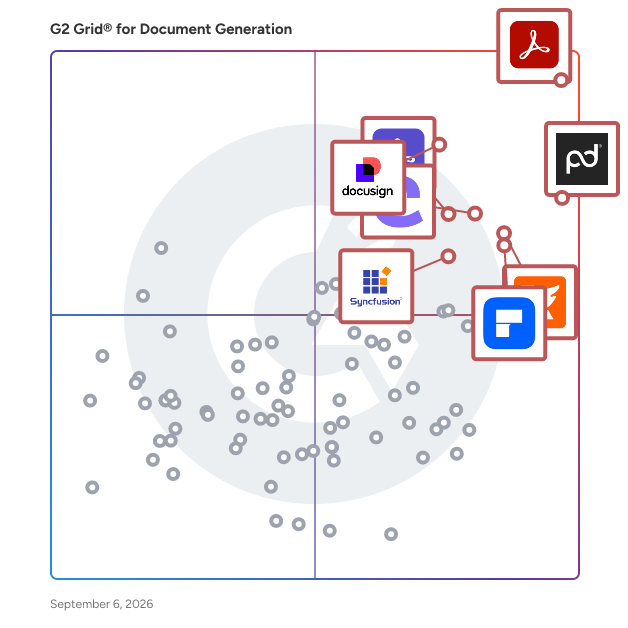
G2 Grid® for Document Generation Software

G2 Grid® for Document Generation Software plotting products by satisfaction and market presence

Highlighted products: Adobe Acrobat, PandaDoc, Docusign CLM, Foxit PDF Editor, Conga Composer, Wondershare PDFelement, Adobe Acrobat Sign, and Essential Studio.

Underlying data: [Grid® JSON](https://www.g2.com/categories/document-generation/grids.json?focus%5B%5D=adobe-acrobat&focus%5B%5D=pandadoc&focus%5B%5D=docusign-clm&focus%5B%5D=foxit-pdf-editor&focus%5B%5D=conga-composer&focus%5B%5D=wondershare-wondershare-pdfelement&focus%5B%5D=adobe-acrobat-sign&focus%5B%5D=essential-studio)

Carbone

Streamline your document generation with Carbone. Create templates using popular editors like Word, Excel, LibreOffice, or Google Docs, and provide data in JSON format. Carbone seamlessly merges your data into templates to generate professional reports. Supported documents: PDF, DOCX, XLSX, ODT, ODS, PPTX, ODP, XML, HTML, IDML, JPEG, PNG, EPUB, TXT and CSV 🎨 𝗗𝗲𝘀𝗶𝗴𝗻𝗶𝗻𝗴 𝗮 𝘁𝗲𝗺𝗽𝗹𝗮𝘁𝗲 Anyone can create and edit templates; you don't have to ask a developer to make a change. The template separates design and logic: - Add Carbone tags, a low-code templating language, to inject data dynamically, such as text, images, barcodes, charts, lists, HTML content, signatures, and colours. - Compute complex calculations with built-in aggregators. - Format any data with "formatters": numbers, currencies, strings, and lists. - Hide or print sections or elements conditionally - Translate documents into multiple languages - Anything related to styling, layouts, and paginations must be created with the power of your text editor. ⚡️ 𝗜𝗻𝘁𝗲𝗴𝗿𝗮𝘁𝗶𝗼𝗻 𝗮𝗻𝗱 𝗮𝘂𝘁𝗼𝗺𝗮𝘁𝗶𝗼𝗻 - Easily set up automation with pre-configured integrations for Salesforce, HubSpot, Airtable, Monday, Bubble, Zapier, Make, and N8N. - Developers can quickly get started with SDKs available in Node, Golang, PHP, Java, Python, Rust, and JavaScript. - We guarantee 99.999% availability. - An on-premise and private cloud version is available for offline or privacy requirements. ✅ 𝗦𝘂𝗽𝗽𝗼𝗿𝘁𝗲𝗱 𝘁𝗲𝘅𝘁 𝗲𝗱𝗶𝘁𝗼𝗿𝘀 - Microsoft Word / Excel / Powerpoint - LibreOffice Text / Spreadsheet / Presentation - Google Doc / Sheet - Apple Pages - WYSIWYG editor - Code Editor 🛟 𝗟𝗶𝘃𝗲 𝗖𝗵𝗮𝘁 𝗦𝘂𝗽𝗽𝗼𝗿𝘁 The engineering team is available on the live chat to solve your issues in a few minutes, help you design templates, or answer any questions related to Carbone. The support is available from 9 am to 6 pm, Monday to Friday (Europe/Paris UTC+2). 📍 𝗘𝘅𝗮𝗺𝗽𝗹𝗲 𝗼𝗳 𝗱𝗼𝗰𝘂𝗺𝗲𝗻𝘁𝘀 Automate Invoices, Contracts, Reports, Receipts, Agreements, Financial Statements, Budget Reports, Performance Reviews, Recruitment Reports, SOPs, Project Plans, Inventory Records, Purchase Orders, Policies, User Manuals, and more with Carbone. Try Carbone today to enhance your document workflow!

Average Rating: 4.7/5.0

Total Reviews: 91

How Do G2 Users Rate Carbone?

  • Has the product been a good partner in doing business?: 9.3/10 (Category avg: 9.3/10)
  • Documents: 9.1/10 (Category avg: 8.9/10)
  • Software: 8.9/10 (Category avg: 8.6/10)
  • Workflow: 8.6/10 (Category avg: 8.6/10)

Who Is the Company Behind Carbone?

  • Seller: CarboneIO
  • Company Website:
  • Year Founded: 2021
  • HQ Location: La Roche-sur-Yon, France
  • Twitter: @carbone_io
    88 Twitter followers
  • LinkedIn® Page: www.linkedin.com
    3 employees on LinkedIn®

Who Uses This Product?

  • Top Industries: Computer Software, Information Technology and Services
  • Company Size: 69% Small, 18% Medium

What Do G2 Reviewers Say About Carbone?

AI-generated summary from verified user reviews

Pros
  • Users commend Carbone for its responsive and supportive customer support, facilitating a smooth document generation experience.
  • Users value the ease of use of Carbone, enabling quick and straightforward document generation with impressive flexibility.
  • Users appreciate the robust templating system of Carbone for its flexibility and ease in document generation.
  • Users enjoy the impressive flexibility and ease of integration with Carbone, simplifying document generation across various systems.
  • Users commend the reliability of Carbone, highlighting its consistent performance and exceptional document generation speed.
Cons
  • Users find the poor documentation of Carbone challenging, hindering mastery of its advanced features and functionalities.
  • Users report a steep learning curve with Carbone, especially for advanced features, making initial setup challenging.
  • Users report that difficult editing challenges arise due to complex template logic and formatting issues with variable fonts.
  • Users find Carbone somewhat expensive at scale, especially for active business users needing upgrades from the free tier.
  • Users face challenges with the lack of integrations, especially with API limitations and difficulties in handling large datasets.

What Are Recent G2 Reviews of Carbone?

CloudFiles

CloudFiles is an all-in-one document operations platform for Salesforce and HubSpot that helps organizations manage, generate, process, share, and automate documents directly from their CRM. Built for document-intensive business processes, CloudFiles combines document management, AI-powered document processing, document generation, secure sharing, external storage integrations, and workflow automation into a single platform. Organizations use CloudFiles to connect Salesforce and HubSpot with SharePoint, Google Drive, OneDrive, Dropbox, Amazon S3, and other enterprise storage platforms while maintaining structured document organization, centralized visibility, and secure access across teams. With CloudFiles, teams can: • Manage files and folders directly inside Salesforce and HubSpot • Automate document generation for agreements, proposals, onboarding forms, financial documents, and client communications • Extract and process data from documents using AI • Build secure datarooms and external document-sharing workflows • Automate document-heavy processes like client onboarding, loan processing, document verification, intake forms, and operational workflows • Configure CRM-native automations using flows, widgets, and custom actions CloudFiles helps organizations reduce manual work, centralize document operations, streamline document-heavy workflows, and improve productivity without leaving Salesforce or HubSpot. CloudFiles supports enterprise security and compliance requirements with SOC 2, HIPAA, GDPR, and ISO 27001 aligned practices. Data residency is supported across the US, EU, UK, and AU, while files remain securely stored within customers’ external storage platforms and are never used to train AI models. Trusted by teams across financial services, healthcare, insurance, legal, real estate, technology, and professional services, CloudFiles enables businesses to modernize document workflows with enterprise-grade security, flexible storage integrations, and AI-powered automation.

Average Rating: 4.5/5.0

Total Reviews: 221

How Do G2 Users Rate CloudFiles?

  • Has the product been a good partner in doing business?: 8.8/10 (Category avg: 9.3/10)

Who Is the Company Behind CloudFiles?

  • Seller: CloudFiles
  • Year Founded: 2021
  • HQ Location: Fremont, US
  • Twitter: @cloudfilesapp
    54 Twitter followers
  • LinkedIn® Page: www.linkedin.com
    30 employees on LinkedIn®
  • Ownership: Venture-backed

Who Uses This Product?

  • Who Uses This: Manager
  • Top Industries: Information Technology and Services, Computer Software
  • Company Size: 44% Small, 29% Medium

What Do G2 Reviewers Say About CloudFiles?

AI-generated summary from verified user reviews

Pros
  • Users enjoy the ease of use of CloudFiles, praising its seamless setup and centralized file management.
  • Users value the robust security of CloudFiles, ensuring their sensitive files remain safe and compliant while being easily accessible.
  • Users value the efficient cloud storage of CloudFiles, allowing seamless access and management of documents across platforms.
  • Users love the easy access to files from anywhere with an internet connection, enhancing convenience and productivity.
  • Users appreciate the easy setup of CloudFiles, finding it user-friendly and efficient for daily file management.
Cons
  • Users have noted the slow loading times for downloads and uploads, impacting their overall experience with CloudFiles.
  • Users find that the training required for CloudFiles can slow down initial usage and frustrate new members.
  • Users desire limited customization options in CloudFiles, wishing for features like custom tags and color coding.
  • Users experience slow performance with CloudFiles, noting glitches and delays in response time during specific actions.
  • Users often face slow upload speeds with CloudFiles, leading to a frustrating and time-consuming experience.

What Are Recent G2 Reviews of CloudFiles?

What Are G2 Users Discussing About CloudFiles?

Nitro PDF

1. What is Nitro PDF? Nitro PDF is a full-featured PDF editor that enables you to create, edit, convert, sign, and secure PDF documents. It is designed for individuals, small businesses, and enterprises as a cost-effective alternative to Adobe Acrobat, combining powerful functionality with an intuitive interface that works across devices. 2. What are the main features of Nitro PDF? Nitro PDF is a comprehensive solution for creating, editing, and securing documents across Windows, Mac, iOS, and web browsers. It includes powerful AI productivity tools and is built with an intuitive interface mirroring the Microsoft Office and Apple toolbars. Key features of Nitro PDF include: • Core Editing: Tools to create, edit, convert, combine, and annotate PDFs, including advanced OCR and secure signing capabilities. • AI Smart Tools: Enhances productivity via smart data extraction, automated form creation, and intelligent document redaction. • Nitro Analytics: Real-time visibility into PDF usage, allowing organizations to measure productivity, prove ROI, and track sustainability. • Nitro Workspace: A centralized cloud hub for accessing PDF and eSign tools, AI assistants, and administration from any device. • Advanced Editing: Create PDFs from any file type and convert PDFs into editable Microsoft Word, Excel, and PowerPoint files while maintaining original layouts. • Powerful OCR (Optical Character Recognition): Turn scanned paper documents and images into fully searchable and editable PDFs with high-accuracy text recognition. Nitro PDF is available in multiple plans to suit different business needs. 3. What support options does Nitro offer? Whether you're a five-person team or a global enterprise, our dedicated support is available 24/7. • Human Support: Nitro offers dedicated customer support, including onboarding, training, and troubleshooting resources, to ensure a smooth experience for your team. • Knowledge Base and Guides: Access hundreds of detailed articles covering product features, integrations, workflows, and best practices. • Video Tutorials: Step-by-step walkthroughs and demonstrations to help you learn and master Nitro tools quickly. • Community Forum: Connect with other Nitro users, share feedback, ask questions, and discover tips and solutions. • Knowledge Assistant: A 24/7 in-app AI assistant providing instant, context-aware guidance on features, workflows, and troubleshooting. 4. Does Nitro PDF support integrations with other business tools? Yes. Nitro PDF integrates with software such as Microsoft Office suite, OneDrive, Dropbox, and other platforms. These integrations simplify document workflows and make it easy to create, edit, and share PDFs directly within your existing environment. 5. How does Nitro ensure document security and compliance? Nitro protects sensitive information with advanced encryption, password protection, granular access controls, and tamper-evident audit trails. Nitro's solutions are designed to meet enterprise and mid-market compliance requirements, including ISO 27001, SOC 2, HIPAA, GDPR, eIDAS, UETA, and the ESIGN Act.

Average Rating: 4.4/5.0

Total Reviews: 381

How Do G2 Users Rate Nitro PDF?

  • Has the product been a good partner in doing business?: 8.9/10 (Category avg: 9.3/10)

Who Is the Company Behind Nitro PDF?

  • Seller: Nitro, Inc
  • Company Website:
  • Year Founded: 2005
  • HQ Location: San Francisco, CA
  • LinkedIn® Page: www.linkedin.com
    382 employees on LinkedIn®

Who Uses This Product?

  • Who Uses This: IT Manager
  • Top Industries: Information Technology and Services, Construction
  • Company Size: 48% Small, 35% Medium

What Do G2 Reviewers Say About Nitro PDF?

AI-generated summary from verified user reviews

Pros
  • Users find Nitro PDF's ease of use remarkable, appreciating its intuitive interface and minimal learning curve.
  • Users love the easy editing features of Nitro PDF, ensuring quick and accurate document management for all skill levels.
  • Users praise Nitro PDF for its exceptional security features and comprehensive editing tools, enhancing overall productivity.
  • Users appreciate the easy conversion feature of Nitro PDF, enabling quick and accurate file management for everyone.
  • Users value the robust PDF processing capabilities of Nitro PDF, enhancing document management and streamlining workflows effectively.
Cons
  • Users report performance issues with Nitro PDF, facing slow processing and uninstallation problems with large documents.
  • Users find the pricing too high, making Nitro PDF less accessible for casual and individual users.
  • Users experience slow performance with Nitro PDF, especially when handling large documents, affecting overall efficiency.
  • Users note the limited features of Nitro PDF, particularly when compared to high-end PDF tools for complex tasks.
  • Users report significant performance issues with Nitro PDF, especially when handling large files or after updates.

What Are Recent G2 Reviews of Nitro PDF?

What Are G2 Users Discussing About Nitro PDF?

AI can help you find the answers. G2 helps you trust them.

Connect G2 to Claude or ChatGPT for answers grounded in G2's trusted reviews, comparisons, and pricing from real user insights.

How it works

Docubee

Docubee is a simple contract automation platform that makes it easy to securely gather information, generate documents, manage workflows, and collect legally binding eSignatures. Choose from pre-built templates or use the flexible workflow builder to automate your essential business agreements and cost-effectively scale your contract processes. Docubee seamlessly integrates with leading software tools to enhance productivity and features powerful API functionality that allows developers to incorporate contract automation capabilities into their applications. Built-in reminders, generative AI technology, and contract routing help you save time and eliminate errors so you can focus on growing your business.

Average Rating: 4.7/5.0

Total Reviews: 25

How Do G2 Users Rate Docubee?

  • Has the product been a good partner in doing business?: 9.9/10 (Category avg: 9.3/10)
  • Documents: 8.8/10 (Category avg: 8.9/10)
  • Software: 7.9/10 (Category avg: 8.6/10)
  • Workflow: 9.5/10 (Category avg: 8.6/10)

Who Is the Company Behind Docubee?

  • Seller: Apryse
  • Year Founded: 1998
  • HQ Location: Denver, CO
  • Twitter: @aprysesolutions
    381 Twitter followers
  • LinkedIn® Page: www.linkedin.com
    569 employees on LinkedIn®

Who Uses This Product?

  • Company Size: 56% Small, 36% Medium

What Do G2 Reviewers Say About Docubee?

AI-generated summary from verified user reviews

Pros
  • Users highlight the ease of use of Docubee, noting its seamless integration and user-friendly experience.
  • Users find Docubee to be affordable, making it a reliable and cost-effective choice for document management.
  • Users find Docubee to be a cost-effective solution that offers reliability and ease of use for multiple users.
  • Users value the easy integration of Docubee, enhancing efficiency and simplifying daily contract creation tasks.
  • Users appreciate the easy integrations of Docubee, streamlining their workflows and enhancing productivity with minimal support needed.
Cons
  • Users find the pricing unclear and desire more flexibility in advanced workflow options of Docubee.
  • Users face form management issues as changes can't be saved without Administrator privileges, causing delays in document handling.
  • Users find the limited customization options in Docubee restrict their ability to adapt workflows effectively.
  • Users face saving issues with Docubee, requiring administrator privileges to resend unacted documents, causing frustration.
  • Users wish for clearer pricing and more flexible advanced workflow options to enhance their experience with Docubee.

What Are Recent G2 Reviews of Docubee?

Apryse PDF SDK

Apryse: The Future of Document Intelligence Apryse (formerly PDFTron) empowers businesses and developers to handle complex document workflows with unmatched speed, precision, and security. Whether you are building for the browser or scaling enterprise-grade server infrastructure, Apryse delivers a frictionless document experience that keeps your data secure and your users productive. Leading organizations choose Apryse for several reasons. Best-in-class performance powers your applications with high-fidelity viewing, editing, and annotation capabilities that handle large files without the lag. Native React integration accelerates your development cycle with dedicated React-compatible components. Advanced OCR and data extraction turn static scans and image-based files into searchable, machine-readable documents, allowing you to extract text and data with high precision regardless of layout complexity. WebViewer UI is built with React PDF, providing a fully customizable, modular, and accessible document interface that integrates into your stack in minutes, not weeks. Security without compromise means you maintain complete control over your data, since our solutions run on your own infrastructure, ensuring you never rely on third-party cloud dependencies or external document processing services. Multi-format versatility takes you beyond PDF, empowering your users to view, edit, and collaborate on 160+ formats, including Microsoft Office (DOCX, XLSX, PPTX), CAD, images, and video, all within a single, consistent interface. Enterprise-ready compliance from redaction and digital signatures to ISO-compliant PDF/A conversion, provides the tools necessary to meet strict industry regulations and security standards. Trusted globally by Fortune 500 companies and innovative startups, Apryse transforms how the world works with documents. Learn more: https://bit.ly/46T0jCt

Average Rating: 4.2/5.0

Total Reviews: 138

How Do G2 Users Rate Apryse PDF SDK?

  • Has the product been a good partner in doing business?: 8.5/10 (Category avg: 9.3/10)
  • Documents: 8.8/10 (Category avg: 8.9/10)
  • Software: 8.5/10 (Category avg: 8.6/10)
  • Workflow: 8.6/10 (Category avg: 8.6/10)

Who Is the Company Behind Apryse PDF SDK?

  • Seller: Apryse
  • Company Website:
  • Year Founded: 1998
  • HQ Location: Denver, CO
  • Twitter: @aprysesolutions
    381 Twitter followers
  • LinkedIn® Page: www.linkedin.com
    569 employees on LinkedIn®

Who Uses This Product?

  • Who Uses This: CTO, Product Manager
  • Top Industries: Computer Software, Information Technology and Services
  • Company Size: 51% Small, 37% Medium

What Do G2 Reviewers Say About Apryse PDF SDK?

AI-generated summary from verified user reviews

Pros
  • Users find Apryse PDF SDK to be a user-friendly and easy-to-implement PDF solution with excellent customer support.
  • Users commend Apryse PDF SDK for its outstanding PDF editing capabilities, making document manipulation seamless and efficient.
  • Users highlight the versatility of Apryse PDF SDK, enjoying diverse options for various document generation needs.
  • Users commend the reliability of Apryse PDF SDK, seamlessly integrating and functioning well across platforms without issues.
  • Users commend the seamless compatibility of Apryse PDF SDK, enabling effortless integration across multiple platforms and environments.
Cons
  • Users find the learning curve steep for advanced features, but support assistance helps ease the process.
  • Users find the licensing options confusing and costly, especially for smaller projects, impacting their overall experience.
  • Users find the setup difficulty can be time-consuming, especially when aligning with brand styles and navigating license options.
  • Users find the licensing inflexibility and high costs challenging, especially when needing only specific SDK features.
  • Users find the poor documentation challenging, often requiring extra effort to navigate and troubleshoot issues effectively.

What Are Recent G2 Reviews of Apryse PDF SDK?

Collavate

Collavate is an easy to use document collaboration tool that helps make idea creation a reality. With security options, all the necessary document tools and features, Collavate meets your needs for simplified workflow automation and team member sharing. Easy to set up Google Docs and Drive Add-on makes document archiving applications easier than ever before in a safe environment perfect for any situation. It provides a secure, centralized place to manage documents and compliance workflow for Google Workspace. With industry experts working behind the scenes to bring you the most relevant features, you can trust Collavate to bring you the features you need without cramming in features you don’t. Plus, compliances such as ISO 9001 , GDPR, HIPAA, ISO 13485 are easy to achieve. We support the entire process of planning, brainstorming, drafting, reviewing, correcting and publishing documents. Group messaging lets you chat in an organized way with other team members while you’re working. You can share screenshots, links, videos, and more using the messenger feature. We have a wide range of collaboration capabilities for corporate documentation, including automated workflows, ledger, reminder/due-date for approval, audit trail, version control and document template options. Automate workflows and establish communication with Collavate with a variety of tasks that require document control, editing, and document collaboration. Issues or Questions: support@collavate.com

Average Rating: 4.8/5.0

Total Reviews: 58

How Do G2 Users Rate Collavate?

  • Has the product been a good partner in doing business?: 8.6/10 (Category avg: 9.3/10)
  • Documents: 9.8/10 (Category avg: 8.9/10)
  • Software: 9.9/10 (Category avg: 8.6/10)
  • Workflow: 9.8/10 (Category avg: 8.6/10)

Who Is the Company Behind Collavate?

  • Seller: Netkiller
  • Year Founded: 2005
  • HQ Location: Palo Alto, California
  • Twitter: @netkiller_cloud
    54 Twitter followers
  • LinkedIn® Page: www.linkedin.com
    32 employees on LinkedIn®

Who Uses This Product?

  • Top Industries: Automotive, Financial Services
  • Company Size: 42% Medium, 39% Large

What Are Recent G2 Reviews of Collavate?

What Are G2 Users Discussing About Collavate?

PDF-XChange Editor

Our business began in 1997 as ‘Tracker Software Products Ltd’ to develop document management and imaging-related software. These products included TIFF and PDF digital conversion utilities that enabled the conversion of many document formats to TIFF and PDF for subsequent archiving within document management products. These standalone conversion applications quickly proved their worth and we made the decision to concentrate on the development of these utilities for the end-user and third-party software developer markets. During the intervening years we have become a global leader in the PDF software market. Our offices are located in Canada, the U.K., Bulgaria and Ukraine. Our corporate headquarters relocated to Vancouver Island, British Columbia, in 2008. At 2016 we incorporated PDF-XChange Co Ltd in the U.K. to tie together all of our interests worldwide. In the coming months it is our intention to rebrand all of our sales and marketing under this one common brand worldwide. Our vision is to provide dynamic and powerful software for the creation, editing, manipulation and conversion of PDF documents, and our applications can convert a huge range of document formats to and from PDF. Our dedicated team of developers strive continually to improve the quality and functionality of our products. We aim to create applications that are flexible enough to meet the needs of all practitioners from novice users to professional document creators. Our software creates files that conform to the internationally-recognized ISO PDF standard, which means they are compatible with all major PDF document viewers/editors worldwide.

Average Rating: 4.6/5.0

Total Reviews: 149

How Do G2 Users Rate PDF-XChange Editor?

  • Has the product been a good partner in doing business?: 8.6/10 (Category avg: 9.3/10)
  • Documents: 8.8/10 (Category avg: 8.9/10)
  • Software: 9.4/10 (Category avg: 8.6/10)
  • Workflow: 8.5/10 (Category avg: 8.6/10)

Who Is the Company Behind PDF-XChange Editor?

Who Uses This Product?

  • Top Industries: Information Technology and Services, Accounting
  • Company Size: 38% Large, 36% Small

What Do G2 Reviewers Say About PDF-XChange Editor?

AI-generated summary from verified user reviews

Pros
  • Users praise the ease of use of PDF-XChange Editor, enabling smooth file viewing, editing, and collaboration effortlessly.
  • Users highlight the easy editing capabilities of PDF-XChange Editor, praising its intuitive tools and efficient workflow.
  • Users praise the document editing capabilities of PDF-XChange Editor for its smooth performance and powerful annotation tools.
  • Users find the easy conversion feature of PDF-XChange Editor to be highly beneficial for managing PDF documents.
  • Users commend the robust feature set of PDF-XChange Editor, facilitating easy editing, annotation, and integration with other tools.
Cons
  • Users find the interface not user friendly, noting it feels outdated and lacks modern design elements.
  • Users feel the UI design is outdated and would greatly benefit from a more modern and appealing interface.
  • Users find user adoption challenging, often requiring additional efforts to gain acceptance of PDF-XChange Editor.
  • Users express frustration over the lack of integration with cloud services, hindering seamless workflow and accessibility.
  • Users find the lack of integrations with popular cloud services limits their workflow and efficiency.

What Are Recent G2 Reviews of PDF-XChange Editor?

What Are G2 Users Discussing About PDF-XChange Editor?

BrandOffice

BrandOffice by BrandQuantum helps organizations keep the documents employees create every day consistent, current, and on brand. It gives users direct access to approved templates, content, brand standards, and tools within Microsoft Word, Excel, and PowerPoint, both on the desktop and in the browser. BrandOffice addresses one of the most difficult parts of brand management: turning brand guidelines into consistent everyday practice. Employees do not need to search for the latest template, copy content from an old document, or interpret a brand manual each time they start working. Brand, marketing, and technology teams manage resources centrally through a secure cloud platform, and updates synchronize automatically. Organizations can manage multiple brands, divisions, departments, regions, and user groups. This allows each employee to see the templates, tools, and content relevant to their work while the organization maintains central control. Centrally managed Word, Excel, and PowerPoint templates give users an approved starting point. Word and Excel style sets help employees apply the correct typography, colors, and formatting. Table templates provide consistent layouts for frequently used information, while chart templates can be applied to existing charts in Word, Excel, and PowerPoint. PowerPoint slide libraries give users quick access to approved slides, pitch decks, images, and icons. BrandOffice also manages the content used within documents. Employees can search for and insert approved text, images, resources, and other content without leaving the Microsoft applications in which they are working. Content can be locked, targeted to specific audiences, assigned an owner, updated centrally, or given an expiration date to reduce the risk of outdated information remaining in circulation. Brand Search makes approved resources easier to find. The staff biography feature allows users to search for current employee biographies and approved profile photographs, then insert them into Word documents and PowerPoint presentations. This is particularly useful for proposals, pitch documents, and other materials that regularly include employee profiles. Data Collections and Data Forms help organizations capture information in a structured way and use it to generate consistent documents. Administrators can also create, publish, and update fillable PDF forms, giving employees one place to access the latest approved version. Artificial intelligence assistance helps users draft and refine content using the organization’s defined brand voice. This connects language consistency with the visual standards already managed through BrandOffice. Reporting, analytics, and audit logs give administrators visibility into how templates and content are being used. By bringing approved standards, content, and tools into the applications employees already use, BrandOffice reduces rework, limits outdated or unauthorized content, and makes the correct way of working the easiest way. Targeted at businesses of all sizes, BrandOffice is particularly beneficial for marketing teams, corporate communications, and any employee who regularly generates content. The software addresses common challenges faced by organizations, such as inconsistent branding, outdated templates, and the risk of using incorrect logos or colors. With BrandOffice, companies can streamline their branding efforts, ensuring that all materials are not only visually appealing but also aligned with the latest brand guidelines. One of the key features of BrandOffice is its ability to provide users with pre-approved templates that are automatically updated as the brand evolves. This means that employees can create documents, PowerPoint presentations, and Excel reports without worrying about whether they are using the correct branding elements. The software also includes a centralized library of assets, such as logos, fonts, and color palettes, which are easily accessible to all users. This feature not only saves time but also reduces the likelihood of errors that can occur when employees attempt to source branding elements independently. BrandOffice adds significant value by enhancing collaboration within organizations. With its intuitive interface and easy-to-use tools, employees can work together on projects while ensuring that all outputs adhere to brand standards. Additionally, the software's integration with Microsoft Office means that users can leverage familiar applications to create branded content without needing to learn a new system. This familiarity helps to facilitate a smoother adoption process and encourages widespread use across the organization. Ultimately, BrandOffice stands out in its category by combining robust branding capabilities with the convenience of Microsoft Office integration. By empowering employees to create consistent and professional-looking documents, presentations, and reports, BrandOffice not only strengthens brand identity but also enhances overall productivity and efficiency within the organization.

Average Rating: 4.8/5.0

Total Reviews: 22

How Do G2 Users Rate BrandOffice?

  • Has the product been a good partner in doing business?: 10.0/10 (Category avg: 9.3/10)
  • Documents: 9.9/10 (Category avg: 8.9/10)
  • Software: 9.1/10 (Category avg: 8.6/10)
  • Workflow: 8.9/10 (Category avg: 8.6/10)

Who Is the Company Behind BrandOffice?

  • Seller: BrandQuantum
  • Company Website:
  • Year Founded: 2014
  • HQ Location: South Carolina, USA
  • Twitter: @BrandQuantum
    79 Twitter followers
  • LinkedIn® Page: www.linkedin.com
    15 employees on LinkedIn®

Who Uses This Product?

  • Top Industries: Financial Services
  • Company Size: 45% Large, 32% Medium

What Do G2 Reviewers Say About BrandOffice?

AI-generated summary from verified user reviews

Pros
  • Users highly value the customization features of BrandOffice, enabling seamless updates across all generated documents.
  • Users appreciate the seamless document editing capabilities of BrandOffice, enhancing efficiency with automatic updates for branding changes.
  • Users enjoy the ease of creation with BrandOffice, effortlessly updating images and text across all documents.
  • Users appreciate the ease of use of BrandOffice, finding it user-friendly and easy to maintain.
  • Users value the intuitive design of BrandOffice, making it user-friendly and easy to maintain.
Cons
  • Users find it frustrating that they must save multiple times before the style set appears in BrandOffice.

What Are Recent G2 Reviews of BrandOffice?

What Are G2 Users Discussing About BrandOffice?

Docupilot

Docupilot is a cloud-based document automation platform designed to help businesses streamline the creation of documents. This innovative solution enables users to design custom templates and automatically generate a variety of documents—such as contracts, invoices, reports, and letters—by merging these templates with data sourced from multiple origins. By leveraging technology, Docupilot simplifies the document generation process, making it accessible and efficient for organizations of all sizes. Targeted primarily at businesses and professionals who frequently handle documentation, Docupilot caters to a wide range of industries, including legal, finance, real estate, and marketing. The platform is particularly beneficial for teams that require consistent and accurate document creation, as it minimizes the manual effort involved in generating standard documents. Users can easily create templates that reflect their unique branding and requirements, ensuring that every document produced is not only functional but also visually aligned with the organization's identity. One of the standout features of Docupilot is its template design capability. Users can create and customize document templates using an intuitive editor, or they can upload existing formats from Word, PowerPoint, Excel, and fillable PDF forms. This flexibility allows businesses to maintain their preferred document styles while integrating automation into their workflows. Additionally, the data integration feature enables users to merge templates with information from various sources, such as spreadsheets, databases, and CRM systems, ensuring that documents are populated with accurate and up-to-date information. Docupilot also offers automated workflows, allowing users to set up triggers that generate and distribute documents based on specific events or schedules. This functionality is particularly useful for organizations that need to send out regular reports or invoices, as it reduces the time spent on repetitive tasks. Furthermore, the platform supports integrations with popular applications like Zapier, Salesforce, and Google Sheets, enhancing workflow efficiency and enabling seamless data transfer between systems. Collaboration is another key aspect of Docupilot, as it allows team members to share templates and work together on document creation. This feature fosters a collaborative environment, ensuring that input from various stakeholders can be incorporated into the final documents. By automating repetitive document creation tasks, Docupilot not only helps reduce errors but also saves time and improves overall productivity within an organization, making it a valuable tool for any business looking to optimize its document management processes.

Average Rating: 4.6/5.0

Total Reviews: 72

How Do G2 Users Rate Docupilot?

  • Has the product been a good partner in doing business?: 9.7/10 (Category avg: 9.3/10)
  • Documents: 9.4/10 (Category avg: 8.9/10)
  • Software: 8.2/10 (Category avg: 8.6/10)
  • Workflow: 8.7/10 (Category avg: 8.6/10)

Who Is the Company Behind Docupilot?

  • Seller: Docupilot, Inc.
  • Company Website:
  • Year Founded: 2018
  • HQ Location: Dover, US
  • Twitter: @docupilot
    34 Twitter followers
  • LinkedIn® Page: www.linkedin.com
    13 employees on LinkedIn®

Who Uses This Product?

  • Top Industries: Marketing and Advertising
  • Company Size: 56% Small, 23% Medium

What Do G2 Reviewers Say About Docupilot?

AI-generated summary from verified user reviews

Pros
  • Users find Docupilot easy to use, enabling quick navigation and seamless document creation integration with other systems.
  • Users appreciate the automations in Docupilot, enhancing document creation speed and collaboration while minimizing errors.
  • Users commend the efficient customer support of Docupilot, swiftly resolving issues and enhancing user experience.
  • Users value the intuitive features of Docupilot, enhancing document automation and streamlining workflows effectively.
  • Users appreciate the time-saving automations of Docupilot, making document creation faster and more efficient.
Cons
  • Users find the pricing to be high relative to the limited features and poor user experience offered by Docupilot.
  • Users find the template limitations occasionally frustrating, especially in niche variety and PDF upload capabilities.
  • Users find Docupilot difficult to use, with issues in support accessibility and complex document token syntax.
  • Users experience formatting issues with templates in Docupilot, requiring careful adjustments for optimal results.
  • Users find the learning curve challenging, though automation speed compensates for initial difficulties.

What Are Recent G2 Reviews of Docupilot?

Titan Docs

Titan Docs Suite is a no-code document generation solution built right inside Salesforce, designed to talk directly to your CRM. Trusted by thousands of businesses worldwide, Titan Docs lets you generate personalized documents, e-signatures, and proposals, while tracking everything in one place. Titan Docs integrates with Titan’s full suite of declarative tools to create any digital experience within Salesforce. With Titan Experience Studio and Forms, you can build personalized portals, single-page web apps, and forms. Titan Enterprise offers a fully integrated solution for large-scale operations, including contract lifecycle management. With HIPAA-compliant storage, all data kept securely in Salesforce, smart templates, and legally binding e-signatures, Titan Docs Suite has the tools your business needs to scale. Say goodbye to middlemen, second databases, and clunky tools—Titan Docs keeps everything streamlined and in one place.

Average Rating: 4.6/5.0

Total Reviews: 29

How Do G2 Users Rate Titan Docs?

  • Has the product been a good partner in doing business?: 8.9/10 (Category avg: 9.3/10)
  • Documents: 10.0/10 (Category avg: 8.9/10)
  • Software: 9.6/10 (Category avg: 8.6/10)
  • Workflow: 9.5/10 (Category avg: 8.6/10)

Who Is the Company Behind Titan Docs?

  • Seller: Titan
  • Company Website:
  • Year Founded: 2014
  • HQ Location: Tel Aviv, Israel
  • Twitter: @TitanDXP
    15 Twitter followers
  • LinkedIn® Page: www.linkedin.com
    208 employees on LinkedIn®

Who Uses This Product?

  • Top Industries: Non-Profit Organization Management
  • Company Size: 45% Medium, 35% Small

What Do G2 Reviewers Say About Titan Docs?

AI-generated summary from verified user reviews

Pros
  • Users appreciate the intuitive and user-friendly interface of Titan Docs, simplifying document generation and customization.
  • Users commend Titan Docs for its excellent customer support, highlighting quick responses and valuable resources for success.
  • Users value the easy setup of Titan Docs, ensuring smooth implementation and efficient workflow management.
  • Users appreciate the seamless Salesforce integration of Titan Docs, enhancing document generation and automation efficiently.
  • Users value the seamless integration with Salesforce in Titan Docs, enhancing document creation and automation effectiveness.
Cons
  • Users experience a steep learning curve with Titan Docs, requiring considerable effort to navigate its extensive options.
  • Users express frustration over missing features in Titan Docs, impacting efficiency and usability in document creation.
  • Users experience a steep learning curve with Titan Docs due to complex setup and extensive options, requiring frequent support.
  • Users experience a steep learning curve with Titan Docs, making initial setup and usage quite challenging and time-consuming.
  • Users find the steep learning curve of Titan Docs challenging, often requiring support for troubleshooting complex issues.

What Are Recent G2 Reviews of Titan Docs?

Proposify

Proposify is the online proposal software that gives you control and visibility into the most important stage of your sales process. The close. From deal design to sign-off, get the confidence and flexibility to dominate deals. Create impressive sales documents that stay consistent and error-free. Receive the insights to scale your process, make timely engagements, and accurately forecast. Deliver a seamless sign-off experience for your customers and prospects. Features include a flexible and user-friendly design editor, electronic signatures, CRM integrations, data-driven insights, interactive pricing, content management, approvals, and so much more. If you're ready to give your sales team the competitive edge, visit our website or book a demo at https://www.proposify.com.

Average Rating: 4.6/5.0

Total Reviews: 1,116

How Do G2 Users Rate Proposify?

  • Has the product been a good partner in doing business?: 9.4/10 (Category avg: 9.3/10)
  • Documents: 8.6/10 (Category avg: 8.9/10)
  • Software: 8.4/10 (Category avg: 8.6/10)
  • Workflow: 8.7/10 (Category avg: 8.6/10)

Who Is the Company Behind Proposify?

  • Seller: Proposify
  • Company Website:
  • Year Founded: 2012
  • HQ Location: Halifax
  • Twitter: @proposify
    4,207 Twitter followers
  • LinkedIn® Page: www.linkedin.com
    80 employees on LinkedIn®

Who Uses This Product?

  • Who Uses This: CEO, Owner
  • Top Industries: Marketing and Advertising, Information Technology and Services
  • Company Size: 84% Small, 15% Medium

What Do G2 Reviewers Say About Proposify?

AI-generated summary from verified user reviews

Pros
  • Users find Proposify's ease of use remarkable, enabling quick proposal setup and streamlined, professional communication.
  • Users value the large library of customizable templates in Proposify, enhancing proposal efficiency and consistency.
  • Users praise the easy creation of Proposify, appreciating its straightforward implementation and consistent, reliable results.
  • Users love the easy setup of Proposify, enabling quick and efficient proposal sending with a professional look.
  • Users appreciate the ease of template creation, enabling quick, customizable proposals for various services.
Cons
  • Users face limited customization options in Proposify, making it difficult to edit proposals to their liking.
  • Users find difficult editing in Proposify, as aligning multi-page content can be cumbersome and time-consuming.
  • Users find the editing difficulties in Proposify frustrating, hindering their ability to create polished proposals easily.
  • Users experience slow performance with Proposify, facing frustrating lags and delays during critical tasks.
  • Users find layout issues in Proposify cumbersome, particularly with template changes and awkward pricing tables.

What Are Recent G2 Reviews of Proposify?

What Are G2 Users Discussing About Proposify?

MyReport

Effortless Report Writing with AI-Powered Precision Creating reports, essays, and documents has never been easier. MyReport transforms the writing process by automating data collection, citation, and structuring—allowing you to focus on what truly matters. Whether you’re a student, researcher, entrepreneur, or business professional, this AI-powered tool ensures accuracy, efficiency, and professionalism in every piece you create. No More Tedious Writing—Just Describe, Review, and Submit Forget hours of research, formatting, and endless revisions. With MyReport, all you need to do is: 1️⃣ Describe your topic or requirements 2️⃣ Review the AI-generated draft 3️⃣ Submit and receive a fully polished report with citations, references, and visuals AI takes care of the hard work—pulling relevant data, organizing content, and ensuring a seamless, professional structure. Say goodbye to time-consuming research and manual citations! Plagiarism-Free, Well-Researched, and Professionally Structured MyReport guarantees original, plagiarism-free content by sourcing credible information, citing references accurately, and structuring your report for clarity and readability. Unlike generic AI-generated text, this tool searches the internet, evaluates multiple sources, and provides verifiable citations—ensuring every report is both reliable and well-referenced. Customizable, Secure, and Easy to Share Every report is unique, and MyReport adapts to your needs with customizable parameters. Whether you need a brief summary or an in-depth analysis, you can fine-tune the tool for precise, relevant results. 🔹 Custom input parameters for tailored reports 🔹 Secure and private—your data is protected 🔹 Easy sharing via link or local saving Collaboration is seamless, making it perfect for students, professionals, and teams who need efficient, high-quality content. Who Benefits from MyReport? 📌 Students & Researchers – Save time on data collection and citations 📌 Entrepreneurs & Business Professionals – Create well-structured reports effortlessly 📌 Content Creators – Generate high-quality, credible, and engaging content No matter your field, MyReport helps you meet deadlines with ease and focus on critical aspects of your work rather than getting lost in tedious writing tasks. Boost Productivity and Work Smarter Time is valuable—don’t waste it on manual research and formatting. With AI-powered automation, MyReport streamlines the entire process, allowing you to create top-quality reports in minutes instead of hours. Why struggle with traditional report writing when AI can handle it for you? Experience the future of effortless, professional writing today!

Average Rating: 5.0/5.0

Total Reviews: 10

How Do G2 Users Rate MyReport?

  • Documents: 9.8/10 (Category avg: 8.9/10)
  • Software: 8.3/10 (Category avg: 8.6/10)
  • Workflow: 8.3/10 (Category avg: 8.6/10)

Who Is the Company Behind MyReport?

  • Seller: MyReport
  • Year Founded: 2017
  • HQ Location: Madrid, ES
  • LinkedIn® Page: www.linkedin.com
    1 employees on LinkedIn®

Who Uses This Product?

  • Company Size: 70% Large, 20% Small

What Do G2 Reviewers Say About MyReport?

AI-generated summary from verified user reviews

Pros
  • Users value the effective SEO tools of MyReport, facilitating seamless reporting and collaboration across teams.
  • Users find MyReport to be very user friendly, enjoying intuitive navigation and efficient functionality throughout their experience.
  • Users enjoy the efficiency of MyReport, appreciating smooth navigation and effective report sharing across teams.
  • Users find MyReport super intuitive, enhancing their experience with easy navigation and great features.
  • Users value the navigation ease of MyReport, finding it intuitive and enhancing their overall experience significantly.
Cons
  • Users face significant conversion issues when transitioning from K2 on-premises to MyReport, leading to frustration and delays.
  • Users desire more integration options for MyReport, particularly with lesser-known and niche applications.
  • Users experience occasional slow performance with MyReport, leading to frustrating moments during use.
  • Users find that MyReport has a steep learning curve, making initial use overwhelming despite its valuable features.
  • Users find the limited pre-built templates in MyReport inconvenient, increasing the need for manual modifications.

What Are Recent G2 Reviews of MyReport?

DocsAutomator

DocsAutomator creates the documents that need a yes, and gets the yes. Quotes, proposals, contracts and other agreements are created from the data you already have, sent the moment a record changes, and come back signed or accepted. Invoices, reports, certificates and every other document work the same way. Set it up once: create a template in Word or Google Docs, or upload any PDF. Connect your data, or let the DocsAutomator AI Agent build the template and the automation for you. From then on, every record produces its document. DocsAutomator connects with Airtable, Glide, Notion, Google Sheets, SmartSuite, ClickUp, Softr, Noloco, Zapier, Make, n8n and a REST API. AI assistants such as Claude and ChatGPT can create and send documents through the DocsAutomator MCP server. More than 1,200 businesses pay for DocsAutomator and generate over 150,000 documents a month. Key features: **E-signing and acceptance, included in every plan** Send a document for a legally binding e-signature, or for one-click acceptance when a yes is enough. Any number of signers, in parallel or in sequence, with automatic reminders. No seats and no per-envelope fees. **The signed document goes back to your record** The signed PDF with its certificate, the signing link and the signer's values are written back to the record in Airtable, Notion or your own system, so the next step can start by itself. Every signed PDF is sealed and tamper-evident, with a full audit trail. **AI Agent that does the setup** Describe what you need. The agent designs the Word template, maps your fields and configures signing, and shows you a finished preview. **Word, Google Docs and PDF templates** Use the template you already have. Design control stays with you. **Line items and nested line items** Dynamic tables and repeating sections, nested up to 3 levels, for anything from invoices to multi-section reports. **Conditional content and styling** Show or hide values, paragraphs and whole sections, and style text based on your data. One template covers every case. **Dynamic images** Photos, logos and signatures from your records are placed and sized automatically. **Fast, at any length** Documents are ready in seconds, whether one page or two hundred. **Flexible delivery** Save to Google Drive, OneDrive or Dropbox, send by email (from your own Gmail or Outlook address on Business and Scale), deliver to a webhook, or merge with existing PDFs. **Unlimited free testing** Build and test with unlimited test documents, with no credit card. You pay only when you go live.

Average Rating: 4.9/5.0

Total Reviews: 16

How Do G2 Users Rate DocsAutomator?

  • Has the product been a good partner in doing business?: 9.8/10 (Category avg: 9.3/10)

Who Is the Company Behind DocsAutomator?

Who Uses This Product?

  • Company Size: 88% Small, 13% Medium

What Are Recent G2 Reviews of DocsAutomator?

Docmosis

Fast, reliable, scalable template-based document generation software, available as SaaS or self-hosted, allowing organizations to choose the deployment option that best meets security, compliance, and architectural needs. The Docmosis service has been designed to efficiently perform transactional requests, generating single-page documents sub-second, or to meet large batch processing requirements and is capable of generating hundreds-of-thousands of documents-per-hour. Create templates using MS Word or LibreOffice. Add plain-text placeholders to control: the insertion of text/images/tables; conditionally add/remove any content; perform calculations; loop over repeating data; format data/numbers and much more. Templates enable anyone, from developers to business teams or end users, to easily make changes to the content and layout of generated documents. Integrate with custom-built software applications, third-party apps or add to your business workflows using automations platforms like Zapier, N8N or Make. Applications send JSON or XML data, to the Docmosis API. Docmosis merges the data with the specified template to generate documents in PDF, DOCX, ODT, or TXT formats and returns them to the calling application. Template-based document generation allows document teams to create and maintain content independently of software development cycles. Changes to document layout or logic can be made without requiring workflow updates, reducing reliance on developer resources. Used by customers in Finance, Health, Legal, Education, Government, HR, Insurance, Logistics, and Manufacturing to generate customized letters, invoices, proposals, contracts, statements, reports and more. Docmosis prioritizes data security and reliability. The architecture is designed so that all Personal Data and generated documents are delivered, then immediately and automatically deleted, ensuring maximum data privacy and that sensitive information never persists on servers. Docmosis has achieved SOC 2 Type II compliance, confirming rigorous controls around security, availability, and confidentiality are independently assessed.

Average Rating: 4.6/5.0

Total Reviews: 17

How Do G2 Users Rate Docmosis?

  • Has the product been a good partner in doing business?: 10.0/10 (Category avg: 9.3/10)
  • Documents: 9.3/10 (Category avg: 8.9/10)
  • Software: 9.5/10 (Category avg: 8.6/10)
  • Workflow: 9.3/10 (Category avg: 8.6/10)

Who Is the Company Behind Docmosis?

  • Seller: Docmosis
  • Company Website:
  • Year Founded: 2013
  • HQ Location: Osborne Park, Western Australia
  • Twitter: @DocmosisPtyLtd
    143 Twitter followers
  • LinkedIn® Page: www.linkedin.com
    7 employees on LinkedIn®

Who Uses This Product?

  • Company Size: 42% Small, 26% Large

What Do G2 Reviewers Say About Docmosis?

AI-generated summary from verified user reviews

Pros
  • Users value the ease of creation with Docmosis, thanks to its straightforward setup and flexible deployment options.
  • Users appreciate the easy integrations of Docmosis, enabling seamless connectivity with third-party systems and custom applications.
  • Users value the ability to create professional document templates with Docmosis, streamlining automated document generation effortlessly.
  • Users highlight the reliability of Docmosis, appreciating its fast performance and capability to handle high-volume document creation.
  • Users value the flexibility and ease of setup with Docmosis, making it an ideal choice for self-hosted document generation.
Cons
  • Users note some limitations of PDF templates in Docmosis compared to other applications, but adaptability is appreciated.

What Are Recent G2 Reviews of Docmosis?

What Are G2 Users Discussing About Docmosis?

Formstack Documents

Formstack Documents is the only document generation solution you need to save time, put a stop to manual entry, and streamline your paperwork process. With Formstack Documents, you can upload, merge, and deliver smart documents in a snap. Start from scratch or upload your own fillable PDF or Word document. Our app allows you to easily customize your document and merge it with data. Once you've created your document, it's time to figure out where you'll be sending it. From emails to Google Drive to a third-party integration via Webhooks, Formstack Documents gives you the control to send your merged files wherever you want. Formstack Documents integrates with over 150 different products, ensuring you'll easily be able to upload, merge, and deliver your documents, no matter what products you're using.

Average Rating: 4.5/5.0

Total Reviews: 148

How Do G2 Users Rate Formstack Documents?

  • Has the product been a good partner in doing business?: 9.0/10 (Category avg: 9.3/10)
  • Documents: 8.4/10 (Category avg: 8.9/10)
  • Software: 8.1/10 (Category avg: 8.6/10)
  • Workflow: 8.4/10 (Category avg: 8.6/10)

Who Is the Company Behind Formstack Documents?

  • Seller: Formstack, LLC
  • Company Website:
  • Year Founded: 2006
  • HQ Location: Fishers, IN
  • Twitter: @Formstack
    6,392 Twitter followers
  • LinkedIn® Page: www.linkedin.com
    219 employees on LinkedIn®

Who Uses This Product?

  • Who Uses This: Owner
  • Top Industries: Computer Software, Non-Profit Organization Management
  • Company Size: 59% Small, 33% Medium

What Do G2 Reviewers Say About Formstack Documents?

AI-generated summary from verified user reviews

Pros
  • Users value the seamless integration of Formstack Documents, enhancing workflows and saving time across various platforms.
  • Users find automation features in Formstack Documents incredibly time-saving, enhancing overall workflow efficiency and ease of use.
  • Users find Formstack Documents to be very user-friendly, significantly streamlining their document generation process with ease.
  • Users value the easy integrations of Formstack Documents, which streamline workflows and enhance productivity across various platforms.
  • Users love how Formstack Documents provides time-saving automation for document generation, enhancing efficiency and reducing errors.
Cons
  • Users find the learning curve steep for complex document merges, though the new builder simplifies the process.
  • Users find bug issues with Formstack Documents occasionally disrupt their experience, though most are easily resolved.
  • Users find the user interface clunky, leading to a less intuitive experience despite its robust capabilities.
  • Users find the poor documentation inadequate for advanced scenarios, hindering their overall experience with Formstack Documents.
  • Users find the setup difficulty of Formstack Documents challenging initially, but it becomes user-friendly after configuration.

What Are Recent G2 Reviews of Formstack Documents?

What Are G2 Users Discussing About Formstack Documents?

Neeraja Prakash
NP
Researched and written by Neeraja Prakash
Updated October 3, 2024