Top Free Document Generation Software - Page 5

How Many Document Generation Software Products Does G2 Track?

Total Products under this Category: 378

Category Stats (Oct 2026)

  • Average Rating: 4.56/5 (↑0.02 vs Sep 2026) The average rating of products in this category, based on all submitted ratings
  • Top Trending Product: Lasernet (+0.89%) - Among all products in this category, Lasernet recorded the largest rating increase compared to last month

Last updated: October 13, 2026

How Does G2 Rank Document Generation Software Products?

Why You Can Trust G2's Software Rankings:

  • 30 Analysts and Data Experts
  • 30,600+ Authentic Reviews
  • 378+ Products
  • Unbiased Rankings

G2's software rankings are built on verified user reviews, rigorous moderation, and a consistent research methodology maintained by a team of analysts and data experts. Each product is measured using the same transparent criteria, with no paid placement or vendor influence. While reviews reflect real user experiences, which can be subjective, they offer valuable insight into how software performs in the hands of professionals. Together, these inputs power the G2 Score, a standardized way to compare tools within every category.

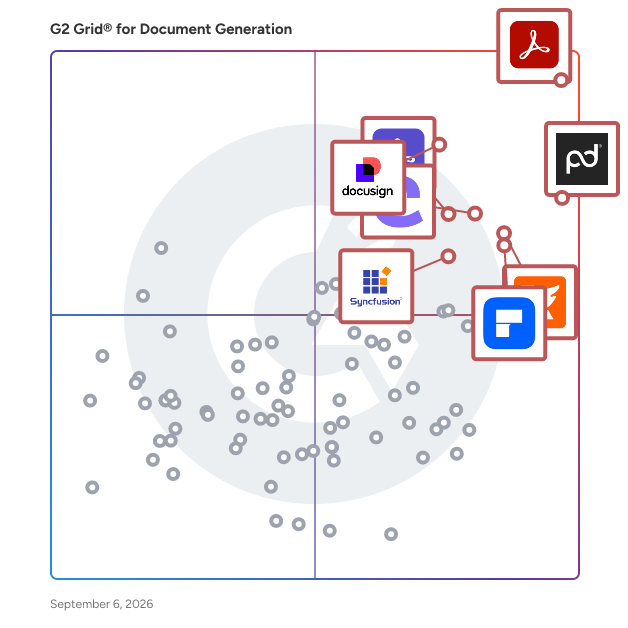
G2 Grid® for Document Generation Software

G2 Grid® for Document Generation Software plotting products by satisfaction and market presence

Highlighted products: Adobe Acrobat, PandaDoc, Docusign CLM, Foxit PDF Editor, Conga Composer, Wondershare PDFelement, Adobe Acrobat Sign, and Essential Studio.

Underlying data: [Grid® JSON](https://www.g2.com/categories/document-generation/grids.json?focus%5B%5D=adobe-acrobat&focus%5B%5D=pandadoc&focus%5B%5D=docusign-clm&focus%5B%5D=foxit-pdf-editor&focus%5B%5D=conga-composer&focus%5B%5D=wondershare-wondershare-pdfelement&focus%5B%5D=adobe-acrobat-sign&focus%5B%5D=essential-studio)

Documentero

Introducing: Documentero, a cloud-based documents service that helps you with document automation. Generate Word, Excel & PDF documents from custom templates using API, Shareable Forms, Spreadsheets or AI Integrations with 5000+ Apps using Zapier, Make, n8n, Power Automate, Webflow, Bubble.io and more Supports a variety of template features like dynamic fields, formulas, conditional sections, images, html - Create a template online or upload it from a computer (.docx, .xlsx) - Supports Word (.docx), Excel(.xlsx) & PDF output format - Best in-market PDF/Word parser under the hood -- create consistent documents - Easy to use & set up -- no coding required Additional features: - Bulk document generation from spreadsheet data (copy from CSV, Excel, Google Sheets) - Embed a document generation form into your website. - Ability to pass HTML or Markdown formatted fields to document - More than 1000+ template examples ready to use

Average Rating: 4.5/5.0

Total Reviews: 12

How Do G2 Users Rate Documentero?

  • Has the product been a good partner in doing business?: 10.0/10 (Category avg: 9.3/10)

Who Is the Company Behind Documentero?

Who Uses This Product?

  • Company Size: 92% Small, 8% Large

What Do G2 Reviewers Say About Documentero?

AI-generated summary from verified user reviews

Pros
  • Users find Documentero's ease of use exceptional, allowing efficient and automated document creation seamlessly integrated into workflows.
  • Users highlight Documentero's seamless integration and powerful automation that significantly saves time in document creation processes.
  • Users value the advanced template capabilities of Documentero, streamlining report generation and enhancing productivity significantly.
  • Users appreciate the easy integrations of Documentero, enhancing automation and streamlining document creation across workflows.
  • Users value the time-saving automated reporting of Documentero, making document creation efficient and professional with ease.
Cons
  • Users note the missing features in Documentero, hindering functionality and limiting design flexibility within workflows.
  • Users often find Documentero difficult to navigate due to basic tools and poorly structured documentation.
  • Users find email functionality lacking, with issues in usability and documentation hindering efficient communication.
  • Users note a learning curve for uploading documents and marking fields, but find the process straightforward after getting started.

What Are Recent G2 Reviews of Documentero?

EasyAutofill

EasyAutofill (EA) is an AI-powered Bid and Tender Response Management platform that helps businesses win more opportunities by responding to RFPs, Tenders, and Security Questionnaires faster and with greater accuracy. Managing complex submissions is time-consuming and error-prone. EA eliminates the grunt work — connecting directly to your existing content repositories (Google Drive, SharePoint, OneDrive) to autofill new responses using your historical submissions and company documents. Generative AI surfaces the most relevant, evidence-backed answers automatically, so your team spends time refining responses, not hunting for information. What sets EA apart: Broader than RFPs — handles Tenders, Security Questionnaires, ISO, CDP, InfoSec, Due Diligence, and other certifications and standards from a single platform Built for every team size — flexible enough for large enterprises and SMEs alike Real collaboration, built in — real-time teamwork tools, reminder notifications, and role-based workflows keep everyone aligned and on deadline Multi-language support — receive and respond in the language of the inquiry, with on-demand translation Fast document generation — single-click questionnaire completion and AI-assisted drafting cut response time dramatically EA's intuitive interface, dynamic project dashboards, and automation-first design mean less time on admin and more time focused on winning. A 7-day free trial and flexible pricing make it accessible to organisations at any stage. Work smarter. Respond faster. Win more.

Average Rating: 5.0/5.0

Total Reviews: 5

How Do G2 Users Rate EasyAutofill?

  • Has the product been a good partner in doing business?: 10.0/10 (Category avg: 9.3/10)
  • Documents: 10.0/10 (Category avg: 8.9/10)
  • Software: 9.2/10 (Category avg: 8.6/10)
  • Workflow: 9.2/10 (Category avg: 8.6/10)

Who Is the Company Behind EasyAutofill?

  • Seller: EA
  • Year Founded: 2020
  • HQ Location: Newport, Wales, United Kingdom
  • LinkedIn® Page: www.linkedin.com
    18 employees on LinkedIn®

Who Uses This Product?

  • Company Size: 100% Small

What Do G2 Reviewers Say About EasyAutofill?

AI-generated summary from verified user reviews

Pros
  • Users value the intuitive and user-friendly design of EasyAutofill, simplifying complex documentation management for B Corp certification.
  • Users praise the intuitive design of EasyAutofill, making complex tasks manageable and user-friendly for everyone.
  • Users benefit greatly from time-saving features in EasyAutofill, simplifying complex tasks and streamlining document processes.
  • Users value the time-saving efficiency of EasyAutofill, simplifying complex tasks and reducing workload significantly.
  • Users love the intuitive content library of EasyAutofill, ensuring accurate answers and streamlined document integration.
Cons
  • Users note the need for inadequate documentation regarding the upload and download process, despite helpful support.
  • Users notice layout issues that can affect usability, but many can overlook them for the product's benefits.
  • Users find the platform lacks advanced features, limiting its versatility and potential for broader tasks.
  • Users note that documentation is lacking, making it hard to navigate the upload and download process effectively.

What Are Recent G2 Reviews of EasyAutofill?

Nomia

Our suite of document automation solutions scale effortlessly—from small businesses to large enterprises. Fully document- and industry-agnostic, our products integrate seamlessly with your existing business processes and systems. It’s the simplest way to create, manage, and sign documents—so you and your team can focus on what matters most. For more information please visit: https://nomiadocs.com/ or https://app.nomiadocs.com/ or https://e-sign.nomiadocs.com/signup

Average Rating: 5.0/5.0

Total Reviews: 5

How Do G2 Users Rate Nomia?

  • Has the product been a good partner in doing business?: 9.4/10 (Category avg: 9.3/10)
  • Documents: 9.2/10 (Category avg: 8.9/10)
  • Software: 10.0/10 (Category avg: 8.6/10)
  • Workflow: 7.5/10 (Category avg: 8.6/10)

Who Is the Company Behind Nomia?

  • Seller: Nomia
  • Year Founded: 2022
  • HQ Location: Johannesburg, ZA
  • LinkedIn® Page: www.linkedin.com
    3 employees on LinkedIn®

Who Uses This Product?

  • Company Size: 67% Small, 33% Medium

What Do G2 Reviewers Say About Nomia?

AI-generated summary from verified user reviews

Pros
  • Users value the ease of use of Nomia, enabling seamless document creation and efficient retrieval without complexity.
  • Users value the seamless document management of Nomia, streamlining the process and saving time effectively.
  • Users value the time-saving templates of Nomia, which streamline document management and ensure consistency.
  • Users value the efficient content management in Nomia, allowing seamless document creation and effortless updates across libraries.
  • Users value the ease of creation in Nomia, facilitating seamless document generation and efficient content management.
Cons
  • Users experience a steep learning curve with Nomia, requiring time to adapt to its unique user interface.
  • Users find the difficult setup process of Nomia to be technical and time-consuming at the beginning.
  • Users face a learning curve and formatting issues when importing modified documents, impacting usability and experience.
  • Users note a learning curve and formatting issues with Nomia, making document imports less seamless than expected.
  • Users face a steep learning curve and import issues with poorly formatted documents, impacting usability and functionality.

What Are Recent G2 Reviews of Nomia?

AI can help you find the answers. G2 helps you trust them.

Connect G2 to Claude or ChatGPT for answers grounded in G2's trusted reviews, comparisons, and pricing from real user insights.

How it works

PDF Generator API

Generate PDF documents from templates and JSON data. Enable your users to create PDFs and manage document templates using a browser-based drag-and-drop editor! Easily generate PDF documents from pre-defined PDF templates with JSON data. Enable your users to create PDFs and manage their document templates using a browser-based drag-and-drop PDF editor to reduce development and support costs.

Average Rating: 4.7/5.0

Total Reviews: 5

Who Is the Company Behind PDF Generator API?

Who Uses This Product?

  • Company Size: 60% Large, 20% Medium

What Are Recent G2 Reviews of PDF Generator API?

Unlayer

Unlayer is an embeddable drag-and-drop content builder designed to help businesses create visually appealing emails, landing pages, documents, and popups without the need for any coding. This innovative solution is backed by Y Combinator and has gained the trust of Fortune 500 companies such as Fidelity, Bank of America, as well as leading SaaS platforms like Keap and Hive. Unlayer empowers developers to integrate powerful, white-label design tools directly into their applications, thereby transforming the way teams design and collaborate on content. Unlayer provides an intuitive visual content editor that allows users to maintain full control over branding, data, and user experience. Whether you are developing a customer relationship management (CRM) system, a marketing automation platform, or a customer portal, Unlayer simplifies the embedding of a rich editing experience, enabling dev teams to launch features in days rather than months. This capability is particularly valuable for organizations looking to enhance user engagement and streamline the content creation processes. Key features of Unlayer include an intuitive user interface that facilitates easy content creation, along with white-label customization options that allow businesses to tailor the editing experience to their brand. The platform also incorporates AI-powered design tools that generate smart text, images, and headings, making it easier for users to create compelling content. With over 2,000 prebuilt templates and the ability to create custom tools and blocks, Unlayer caters to diverse content needs. Additionally, advanced roles and permissions ensure secure collaboration and approval workflows, while integrations with 28 platforms enhance its versatility. Unlayer stands out in the market by helping SaaS companies and enterprises reduce development costs and accelerate their time to market. Its developer-friendly SDK, comprehensive documentation, and robust API facilitate seamless integration into existing systems. The platform's focus on AI enhancements, real-time collaboration, and design consistency further enhances its value proposition. With features such as dynamic content personalization, team collaboration tools, and enterprise-grade security, Unlayer provides a comprehensive solution that scales with the evolving needs of businesses.

Average Rating: 4.4/5.0

Total Reviews: 57

How Do G2 Users Rate Unlayer?

  • Has the product been a good partner in doing business?: 8.2/10 (Category avg: 9.3/10)
  • Documents: 5.0/10 (Category avg: 8.9/10)
  • Software: 5.0/10 (Category avg: 8.6/10)
  • Workflow: 0.0/10 (Category avg: 8.6/10)

Who Is the Company Behind Unlayer?

  • Seller: Unlayer
  • HQ Location: San Francisco, US
  • Twitter: @unlayerapp
    341 Twitter followers
  • LinkedIn® Page: www.linkedin.com
    21 employees on LinkedIn®

Who Uses This Product?

  • Top Industries: Health, Wellness and Fitness, Computer Software
  • Company Size: 56% Small, 32% Medium

What Do G2 Reviewers Say About Unlayer?

AI-generated summary from verified user reviews

Pros
  • Users love the ease of use of Unlayer, enabling quick design of professional emails effortlessly.
  • Users love the easy-to-use templates of Unlayer, enabling quick and professional email designs without coding.
  • Users love the easy and fast email creation with Unlayer, enjoying the intuitive drag-and-drop builder.
  • Users love the easy-to-use drag and drop editor of Unlayer, making email design fast and enjoyable.
  • Users appreciate the ease of creation with Unlayer, finding it intuitive and efficient for designing emails quickly.
Cons
  • Users find the pricing of Unlayer steep, as essential features often require expensive paid plans to access.
  • Users note that the limited features in the free version can restrict customization and advanced functionality.
  • Users find the limited customization options a drawback, wishing for more flexibility to enhance their designs.
  • Users find missing features and rounded corner support lacking, complicating the design process and version management.
  • Users find the add-on costs of Unlayer high, especially given limited benefits and required additional payments for essential features.

What Are Recent G2 Reviews of Unlayer?

What Are G2 Users Discussing About Unlayer?

Zenphi

Zenphi is an enterprise-grade, no-code automation platform built to deploy, monitor, and manage AI workflows and AI agents natively within Google Workspace. Zenphi transforms the Google ecosystem into a high-integrity orchestration layer, enabling organizations to embed AI into their core operations while maintaining full control and predictability. Accelerate Deployment with ZAIA: Zenphi AI Assistant (ZAIA) allows teams to build workflows from plain English prompts or uploaded flow charts, ensuring maximum productivity and fast deployments of any workflow. Design and deploy governed AI agents with conversational interfaces like Google Chat in minutes (AI Studio): Zenphi allows teams to create agents fully governed on behavioral and data level and deploy them in conversational interfaces like Google Chat in minutes. Just log into AI Studio, connect it to your workflows, set up the guardrails on the data level — and let your employees not only get answers to their questions, but also trigger workflows, approve requests and assign tasks. All through the conversational interface. Zenphi's solutions — Intelligent Invoice Processing: Build workflows that capture, extract, and verify invoice data against POs, triggering human review only for discrepancies. — Automated Document Validation: Instantly verify the integrity, completeness, and compliance of contracts or onboarding files directly within Google Drive. — Document Workflows: Zenphi automates document generation and assembly, using Google Doc and Word templates, while offering AI-driven document generation wherever needed. It also automates everything what happens to a document after it created or arrived — reading it, routing it, getting it approved, and storing it. — Approval Workflows: Zenphi allows teams to automate sequential and parallel approvals. Supports conditional routing based on amount, type, department, or any field. Flexible setup for automatic escalation if approval isn't received by deadline Google Workspace Administration: Automate user onboarding on Google Workspace, offboarding, data archiving, drive audits, Group creation, license management and all IT Service delivery tasks without Apps Script. Being native to Google Workspace, Zenphi offers the widest range of Google admin actions and first-class actions, and helps teams automate Google Workspace administrations tasks in hours vs weeks or months. Why Choose Zenphi? Deterministic Execution: Build AI agents that follow strict business rules and logic, providing consistent, auditable outcomes at scale. Governance & Compliance: As an ISO 27001-certified and HIPAA-compliant platform, Zenphi provides centralized monitoring and full audit trails for every automated action. Native Google Orchestration: Manage Google Workspace Admin tasks—user provisioning, license audits, and access management—without leaving your secure ecosystem. Scalable pricing: Zenphi doesn't chatge per user, per seat or per flow run. Pricing is predictable and scalable, based on the operations you need to automate. Use cases IT & Ops: Google Workspace administration, role-based access control, and security policy enforcement. Finance: Accounts payable automation, expense management, and 3-way invoice matching. HR: CV screening, employee agreement signing, and automated onboarding/offboarding workflows. Legal & Sales: Contract lifecycle management, automated quote generation, and compliance validation.

Average Rating: 4.8/5.0

Total Reviews: 16

How Do G2 Users Rate Zenphi?

  • Has the product been a good partner in doing business?: 7.5/10 (Category avg: 9.3/10)
  • Documents: 9.6/10 (Category avg: 8.9/10)
  • Software: 9.6/10 (Category avg: 8.6/10)
  • Workflow: 10.0/10 (Category avg: 8.6/10)

Who Is the Company Behind Zenphi?

Who Uses This Product?

  • Company Size: 50% Small, 31% Medium

What Do G2 Reviewers Say About Zenphi?

AI-generated summary from verified user reviews

Pros
  • Users value the automation capabilities of Zenphi, significantly enhancing efficiency and minimizing errors in project management.
  • Users value the improved work efficiency with Zenphi, streamlining tasks and allowing focus on priority projects.
  • Users appreciate the ease of use of Zenphi, making workflow management and diagram creation seamless and efficient.
  • Users value the efficiency of Zenphi, enjoying streamlined workflows that save time and reduce errors.
  • Users appreciate the user-friendly interface of Zenphi, making it easy for beginners to navigate and utilize effectively.
Cons
  • Users find that the customization difficulty of Zenphi limits their ability to tailor solutions effectively.
  • Users find the difficult setup challenging, especially if they lack familiarity with the tool and its features.
  • Users find Zenphi's interface not intuitive for non-IT users, making it hard for novices to create complex workflows.
  • Users find the documentation issues challenging, especially during setup and when accessing advanced features.
  • Users find functionality limitations in Zenphi, as it's not intuitive for novices and lacks timely support.

What Are Recent G2 Reviews of Zenphi?

Docsie

Docsie is an innovative documentation management tool designed for ease of use and efficiency. It stands out with its AI-powered features, enabling automated content creation and updates. Ideal for technical writers, product managers, and developers, Docsie supports multi-language documentation and integrates seamlessly into various workflows. It is particularly popular in the manufacturing sector for its ability to handle extensive product manuals and technical documents. With Docsie, businesses can significantly streamline their documentation processes, improving overall productivity and user experience. You can access Docsie through a SaaS web application to create and edit documentation from any location. Then, you can publish content to a dynamic knowledge portal that end-users and employees can access whenever they need information! Docsie offers a range of powerful business-grade features to help you write and manage product documentation with ease. Onboarding Service: • Free onboarding with Docsie Pilot to import your content and help you get the most value from the platform. • Get help with custom portal design, and an optional training session so your employees can maximize their productivity in Docsie. Knowledge Base and Documentation Portal: • Internal knowledge portals to share self-service knowledge with employees. • External customer knowledge bases to share self-service help documentation and reduce customer support workloads. • Built-in knowledge base statistics and documentation feedback surveys with Docsie Vocally. • Use the default Docsie portal design or deploy a custom knowledge base design based on your brand style and image. • A free custom domain on the free plan for everyone, with additional domains available on paid plans. • Deploy knowledge portals using Docsie hosting, custom deployments, or on-premise instances (Organization plan) Documents and Content Editor: • Support for Markdown syntax and import or export Markdown content. • Docsie Editor allows you to create content in a WYSIWYG editor that supports rich text formatting, emoji symbols, section headers, tables and lists, image and video, iFrame embedded content, tooltip callouts, code snippets, URL hyperlinks • Grammar or spell checking with a configurable rule-based content linter. • Create API documentation, standard operating procedures (SOPs), and technical documents from scratch or with built-in templates. • Create your own snippet and fragment templates to reuse content across your documents with one click. Help Centers and In-App Help Interfaces: • Deploy help centers and in-app support interfaces to share contextual point-in-time help documentation with end-users using a HTML footer script. • Create product and software guided tours to walk end-users through step-by-step workflows. • Add in-app help interfaces to your web application so users can access documentation on the same page. Languages, Versions, and Translations: • Version management allows end-users to view historical documentation in your knowledge base via canonical URLs rather than duplicate pages. • Language management and extended localization helps you automate the deployment of multilingual content without the need for professional translators. • Ghost AI language translation converts source documents automatically to the target language. Docsie AI translation supports these languages: English, French, Spanish, German, Dutch, Norwegian, Portuguese, Danish, Swedish, Arabic, Chinese, and Japanese. Collaboration and Project Management: • Create workspaces for each team, business department, or product and service in your portfolio and organize your content. • Add comments, notes, and tasks to documents and tag team members to assign tasks. • Project management tools based on Agile working methodologies, with Kanban style status indicators for Draft-Review-Approval, per task user assignment, due dates and timelines, and target document or topic selection. • Webhook support enables you to share updates when content is created, edited, deleted, and published in Slack, Mattermost and other business IM tools. Security, Compliance, User Roles, and Data Protection: • Role-based access controls (RBAC) and granular permissions for each workspace. • JWT token authentication with strict and lax options. • Temporary passwords to enable access for contractors and freelancers. • Single sign on via corporate SSO, Google, LinkedIn, or Microsoft logins.

Average Rating: 4.8/5.0

Total Reviews: 115

How Do G2 Users Rate Docsie?

  • Has the product been a good partner in doing business?: 9.7/10 (Category avg: 9.3/10)
  • Documents: 10.0/10 (Category avg: 8.9/10)
  • Software: 10.0/10 (Category avg: 8.6/10)
  • Workflow: 10.0/10 (Category avg: 8.6/10)

Who Is the Company Behind Docsie?

  • Seller: Docsie
  • Company Website:
  • Year Founded: 2020
  • HQ Location: Austin, US
  • Twitter: @likalo_llc
    18,887 Twitter followers
  • LinkedIn® Page: www.linkedin.com
    17 employees on LinkedIn®

Who Uses This Product?

  • Who Uses This: Technical Writer, Project Manager
  • Top Industries: Information Technology and Services, Management Consulting
  • Company Size: 78% Small, 19% Large

What Do G2 Reviewers Say About Docsie?

AI-generated summary from verified user reviews

Pros
  • Users value the centralization of documentation in Docsie, enhancing collaboration and management for all team members.
  • Users value the collaboration features of Docsie, enabling simultaneous work and seamless version control for all team members.
  • Users appreciate the centralized documentation management of Docsie, making collaboration and version control seamless for all teams.
  • Users appreciate the centralized documentation management of Docsie, enjoying its intuitive interface and collaboration features.
  • Users love the ease of use of Docsie, enjoying its intuitive interface for seamless documentation collaboration.
Cons
  • Users face integration issues with Docsie, longing for better compatibility with popular tools and smoother experience.
  • Users find the lack of integrations with popular tools limits their workflow and overall productivity in Docsie.
  • Users find a steep learning curve with Docsie, particularly regarding advanced features and intuitive UI elements.
  • Users face a learning difficulty with Docsie, particularly regarding advanced features and UI intuitiveness.
  • Users experience a steep learning curve with Docsie, especially for advanced features and UI intuitiveness.

What Are Recent G2 Reviews of Docsie?

What Are G2 Users Discussing About Docsie?
DocuGenerate

DocuGenerate is a powerful and scalable platform for generating high-quality PDF documents from Word templates and JSON data. Automate the creation of various documents, including contracts, invoices, agreements, proposals, letters, certificates, and more. Developers can leverage our REST API to add document generation to their apps, while non-developers can effortlessly use our no-code integrations with Zapier, Make, n8n, Pipedream, Bubble, Coda, Power Apps, Xano and Backendless. This flexibility allows developers to focus on core application development without the complexities of document generation, while also empowering non-developers with robust automation capabilities.

Average Rating: 5.0/5.0

Total Reviews: 3

How Do G2 Users Rate DocuGenerate?

  • Documents: 10.0/10 (Category avg: 8.9/10)
  • Software: 5.0/10 (Category avg: 8.6/10)

Who Is the Company Behind DocuGenerate?

Who Uses This Product?

  • Company Size: 67% Small, 33% Medium

What Do G2 Reviewers Say About DocuGenerate?

AI-generated summary from verified user reviews

Pros
  • Users commend the excellent customer support of DocuGenerate for their quick and helpful responses to queries.
  • Users appreciate the ease of use of DocuGenerate, finding it simple to automate and edit their systems.
  • Users love the easy editing features of DocuGenerate, enhancing their daily automation with great efficiency.
  • Users appreciate the ease of use and automation features of DocuGenerate, which streamline daily tasks effectively.
  • Users find batch processing with DocuGenerate to be an incredible time saver for repetitive document creation.
Cons
  • Users wish for the ability to edit templates directly in DocuGenerate's UI, although this is seen as a minor issue.

What Are Recent G2 Reviews of DocuGenerate?

FlowForma Process Automation

FlowForma is a type of process automation solution designed to help users digitize, automate, and optimize business processes across various complexities. This enterprise-grade platform leverages AI technology to provide a no-code environment, allowing users, regardless of their technical expertise, to create and manage automated workflows efficiently. By integrating intelligent automation into everyday operations, FlowForma addresses the growing need for organizations to enhance productivity and streamline processes. The target audience for FlowForma includes business leaders, IT professionals, and organizations of all sizes seeking to improve their operational efficiency. With its user-friendly interface, FlowForma caters to both small businesses and large enterprises, making it an adaptable solution for diverse industries. Specific use cases range from automating simple tasks, such as data entry and approvals, to managing complex workflows that require intricate decision-making and collaboration among multiple stakeholders. Key features of FlowForma include its agentic AI capabilities, which allow users to design and optimize processes with the assistance of AI as an active collaborator. This functionality not only enhances the automation experience but also enables users to evolve their processes intelligently over time. The platform is built to be scalable and secure, ensuring that organizations can grow and adapt their automation strategies without compromising data integrity or system performance. FlowForma stands out in the process automation category by making automation accessible and affordable. With over 300,000 users worldwide, the platform has proven its effectiveness in delivering measurable results. Users benefit from the ability to streamline operations, reduce manual errors, and enhance overall productivity. The no-code aspect of FlowForma empowers individuals to take control of their automation needs without relying heavily on IT resources, fostering a culture of innovation and agility within organizations. In addition to its robust features, FlowForma offers a free trial, allowing potential users to experience the platform's capabilities firsthand. This trial period provides an opportunity for organizations to evaluate how FlowForma can transform their processes and drive efficiency, ultimately leading to improved business outcomes.

Average Rating: 4.5/5.0

Total Reviews: 98

How Do G2 Users Rate FlowForma Process Automation?

  • Has the product been a good partner in doing business?: 9.3/10 (Category avg: 9.3/10)
  • Documents: 10.0/10 (Category avg: 8.9/10)
  • Software: 10.0/10 (Category avg: 8.6/10)
  • Workflow: 10.0/10 (Category avg: 8.6/10)

Who Is the Company Behind FlowForma Process Automation?

  • Seller: FlowForma
  • Company Website:
  • Year Founded: 2012
  • HQ Location: Dublin
  • Twitter: @FlowForma
    493 Twitter followers
  • LinkedIn® Page: www.linkedin.com
    24 employees on LinkedIn®

Who Uses This Product?

  • Top Industries: Construction, Information Technology and Services
  • Company Size: 64% Medium, 26% Small

What Do G2 Reviewers Say About FlowForma Process Automation?

AI-generated summary from verified user reviews

Pros
  • Users appreciate the user-friendly interface of FlowForma, making automation simple and efficient for all involved.
  • Users love the efficiency and automation FlowForma brings, enhancing productivity and streamlining healthcare access processes.
  • Users appreciate the efficiency of FlowForma Process Automation, streamlining operations and reducing manual efforts significantly.
  • Users appreciate the automation efficiency of FlowForma, enhancing productivity and reducing manual processing in their workflows.
  • Users value the efficiency and user-friendliness of FlowForma, significantly enhancing their productivity in automating processes.
Cons
  • Users note a steep learning curve that requires time and structured thinking to master FlowForma effectively.
  • Users find the difficult learning curve challenging, requiring structured thinking and better navigation for effective use.
  • Users are frustrated by the lack of customization options in FlowForma, affecting the visual coherence of their processes.
  • Users note a steep learning curve with FlowForma, requiring time and effort to fully navigate the system.
  • Users find the complexity of FlowForma's automation challenging, citing slow loading and difficult navigation in the interface.

What Are Recent G2 Reviews of FlowForma Process Automation?

What Are G2 Users Discussing About FlowForma Process Automation?

Foxit Document Workflow APIs

Foxit offers a comprehensive suite of cloud native APIs designed to automate, secure, and modernize every stage of the document lifecycle. Built on scalable REST architecture, these APIs give developers and enterprise teams the tools to generate, transform, sign, and display documents directly within their applications, eliminating manual processes and ensuring fast, consistent digital workflows. The Foxit PDF Services API delivers high performance automation for PDF creation, conversion, extraction, and optimization at scale. Ideal for operations teams handling bulk document tasks, it supports everything from large volume report generation to precise data extraction and certified redaction. With encryption in transit and at rest, role-based access, PDF/A export, and infrastructure that meets SOC 2 Type II and HIPAA-ready requirements, the API enables secure deployment in even the most regulated environments. For organizations that rely on consistent and personalized document output, the Foxit Document Generation API streamlines the production of professional PDFs and DOCX files using dynamic templates. Real time data from CRMs, ERPs, or online forms flows seamlessly into branded layouts built in Word or HTML. Developers use this API to automate quotes, contracts, disclosures, onboarding forms, and other documents where accuracy and compliance are essential. Enterprise-grade security—including TLS 1.2+, AES-256 encryption, and SOC 2 Type II–certified infrastructure—ensures protected, standards-aligned document creation. The Foxit eSign API embeds fully auditable, legally binding eSignature workflows directly into applications and business systems. It offers complete control over signer flows, authentication, approvals, and audit trails, enabling teams to power customer facing signing experiences or large scale internal approval processes. Supporting HIPAA, SOC 2, eIDAS, ESIGN, and 21 CFR Part 11 compliance, the API helps organizations accelerate agreements without sacrificing security or regulatory alignment. Rounding out the platform, the Foxit PDF Embed API provides seamless, customizable in-app PDF viewing with support for annotations, form filling, and secure access controls. With lightweight JavaScript integration and options for modifying toolbars, permissions, and themes, developers can deliver a fully branded document experience. The API is built for secure environments requiring password protection, RBAC, SAML-based SSO, PDF/A output, and HIPAA-ready deployment. Together, Foxit’s APIs equip organizations with a powerful, secure, and flexible foundation for end-to-end document automation and digital transformation.

Average Rating: 4.2/5.0

Total Reviews: 3

Who Is the Company Behind Foxit Document Workflow APIs?

  • Seller: Foxit
  • Company Website:
  • Year Founded: 2001
  • HQ Location: Fremont, CA
  • Twitter: @foxitsoftware
    6,226 Twitter followers
  • LinkedIn® Page: www.linkedin.com
    590 employees on LinkedIn®

Who Uses This Product?

  • Company Size: 80% Small, 20% Medium

What Are Recent G2 Reviews of Foxit Document Workflow APIs?

MailMergic

MailMergic is mail merge software for documents, not just letters. Upload a PDF, Word, Excel, or image template, connect a spreadsheet from Excel or Google Sheets, and MailMergic generates one personalized document for every row, then emails each one to the right recipient. A 500-row spreadsheet becomes 500 finished, individually addressed documents in a single click. HOW IT WORKS 1. Upload your template and your spreadsheet. 2. Position your data fields visually on the template, or describe what you need in plain language and let the AI assistant build the mail merge for you. 3. Generate. Download the batch, or send every document straight to its recipient by email. WHAT YOU GET - PDF, Word, Excel, and PNG/JPG output from one workflow, covering both flat documents and fillable PDF forms - Email delivery from your own address, with delivery, bounce, and open tracking in one dashboard - AI error detection that flags mismatched, missing, or badly formatted data before it reaches your documents - Dynamic images, logos, and signatures placed per row - Digital signatures for signing contracts at scale - Per-recipient PDF password protection - Custom file names built from your spreadsheet data - One file per row or a single combined document, your choice - Custom brand fonts, plus barcodes and QR codes in Word templates - Conditional content that changes per recipient - Team collaboration with shared templates and history - Public REST API and Zapier integration for 8,000+ apps - A dedicated account manager on every paid plan WHO USES IT Education teams issuing certificates, diplomas, and transcripts. Finance teams filling 1095-C, W-2, and 1099 forms and sending client statements. Legal teams producing engagement letters, NDAs, and contracts. Real estate teams generating leases, disclosures, and closing packets. HR, healthcare, event, and professional services teams that send the same document to hundreds of people with different details in each one. SECURITY AND COMPLIANCE MailMergic runs on Google Cloud in the European Union and is GDPR and CCPA compliant. Files are encrypted in transit and at rest, and both uploads and generated documents are deleted automatically after 7 days. For work that cannot touch the cloud at all, the MailMergic Offline App for macOS and Windows processes everything locally on your own computer, which suits HIPAA and PCI-regulated workflows. GETTING STARTED Start on the Always-Free plan with no credit card, or try it without signing up at all. Paid plans start at $39 per month billed annually and carry a 30-day money-back guarantee.

Average Rating: 4.7/5.0

Total Reviews: 3

How Do G2 Users Rate MailMergic?

  • Has the product been a good partner in doing business?: 10.0/10 (Category avg: 9.3/10)
  • Documents: 10.0/10 (Category avg: 8.9/10)
  • Software: 10.0/10 (Category avg: 8.6/10)

Who Is the Company Behind MailMergic?

Who Uses This Product?

  • Company Size: 100% Small

What Do G2 Reviewers Say About MailMergic?

AI-generated summary from verified user reviews

Pros
  • Users find MailMergic's ease of use enhances workflow efficiency and accelerates reaching more candidates quickly.
  • Users find MailMergic's easy conversion feature invaluable for efficiently running business campaigns and reaching candidates quickly.
  • Users find that MailMergic greatly enhances efficiency improvement for running business campaigns and reaching candidates quickly.
  • Users enjoy the navigation ease of MailMergic, praising its clear instructions and customizable options throughout the process.
  • Users value the time-saving capabilities of MailMergic, enabling efficient business campaigns and broader candidate outreach.
Cons
  • Users face limitations with PDF mail merge functionality, as it doesn't adjust commas based on text width.

What Are Recent G2 Reviews of MailMergic?

XfilesPro

Managing documents in Salesforce shouldn’t be challenging - it should be seamless, scalable, and efficient. Yet, many businesses struggle with limited storage, scattered file management, slow document workflows, and security concerns. That’s why 1,000+ Salesforce customers across multiple industries trust XfilesPro to revolutionize their document management. With an advanced document management platform, XfilesPro solves complex document challenges in Salesforce, including storage, collaboration, security, and lifecycle management. Salesforce File Storage Management: Free up Salesforce file storage space by automatically moving files to SharePoint, OneDrive, Google Drive, and AWS S3 - without losing accessibility. Document Security & Collaboration: Secure all your business documents with role-based access controls, audit logs, and sharing restrictions. Enhance document collaboration & accessibility with document folders, easy sharing, syncing, tagging, versioning, etc. Effortless Document Generation: Automate document creation within Salesforce along with complete lifecycle management, ensuring faster processing, accuracy, and consistency. With AI-powered capabilities, feature-rich applications, and top-tier customer support, XfilesPro ensures that your document management isn’t just efficient - it’s a competitive advantage. Let’s transform how you handle documents in Salesforce. XfilesPro isn’t just about documents - we offer a complete data management suite for Salesforce and other AI-powered applications. Explore other XfilesPro products: ✔ DataArchiva Archive - Compliant & cost-effective data archiving (native & external cloud) ✔ DataArchiva Backup - Automated data, metadata, file backup (external cloud) ✔ Xmailbox - Virtual mailbox for Salesforce, powered by AI ✔ Xtract - Effortless data extraction & OCR app, powered by AI More info: www.xfilespro.com

Average Rating: 4.8/5.0

Total Reviews: 72

How Do G2 Users Rate XfilesPro?

  • Has the product been a good partner in doing business?: 9.7/10 (Category avg: 9.3/10)
  • Documents: 10.0/10 (Category avg: 8.9/10)
  • Software: 10.0/10 (Category avg: 8.6/10)
  • Workflow: 9.4/10 (Category avg: 8.6/10)

Who Is the Company Behind XfilesPro?

  • Seller: XfilesPro Labs
  • Company Website:
  • Year Founded: 2010
  • HQ Location: Bangalore, IN
  • Twitter: @xfiles_pro
    709 Twitter followers
  • LinkedIn® Page: www.linkedin.com
    68 employees on LinkedIn®

Who Uses This Product?

  • Top Industries: Financial Services, Insurance
  • Company Size: 31% Small, 21% Medium

What Do G2 Reviewers Say About XfilesPro?

AI-generated summary from verified user reviews

Pros
  • Users commend the instantly responsive customer support of XfilesPro, enhancing their implementation and overall user experience.
  • Users find XfilesPro to be user-friendly and straightforward, allowing quick file access and seamless integration with Salesforce.
  • Users appreciate the easy setup of XfilesPro, making it quick and hassle-free to integrate with systems.
  • Users appreciate the easy integration of XFilesPro with Salesforce and Sharepoint, enhancing their document management experience.
  • Users highlight the reliability of XfilesPro, consistently praising its efficient performance and excellent support team.
Cons
  • Users face access limitations due to Salesforce's storage restrictions, making third-party products necessary for smoother operations.
  • Users face difficult editing due to access limitations, requiring them to switch between Salesforce and SharePoint.
  • Users find the difficult setup challenging without IT experience, though support helps mitigate the issues.
  • Users find the documentation hard to access and suggest improvements for better usability and online availability.
  • Users find the lack of guidance challenging, especially regarding setup and Azure permissions without IT expertise.

What Are Recent G2 Reviews of XfilesPro?

What Are G2 Users Discussing About XfilesPro?

Nutrient SDK

Nutrient SDK (formerly PSPDFKit and ORPALIS) is a document SDK that provides developers with a set out-of-the-box tools to add advanced functionality like PDF viewing, annotation, signing, form fill, and more to their applications. 1. PDF SDK PRODUCTS Our SDK lets you focus on shipping features and not on building PDF software. Accelerate product innovation by integrating prebuilt solutions like PDF viewing, signing, annotating, and editing directly in your web, mobile or desktop app. 2. PDF SERVER PRODUCTS Embed PDF processing capabilities into your server to redact, fill forms, edit PDFs, convert documents, and more. Choose between a .NET or Java PDF library or add a plug and play headless document processor that integrates into any server environment. 3. AI DOCUMENT PROCESSING XtractFlow combines generative AI with Nutrient's machine vision technology to automatically identify, extract, and process data in unstructured documents. 4. PDF API Use hosted PDF API to generate, convert, and modify PDF documents in your workflows. We manage the development and server administration, letting you focus on what you do best.

Average Rating: 4.7/5.0

Total Reviews: 68

How Do G2 Users Rate Nutrient SDK?

  • Has the product been a good partner in doing business?: 9.4/10 (Category avg: 9.3/10)
  • Documents: 10.0/10 (Category avg: 8.9/10)
  • Software: 10.0/10 (Category avg: 8.6/10)
  • Workflow: 10.0/10 (Category avg: 8.6/10)

Who Is the Company Behind Nutrient SDK?

  • Seller: Nutrient
  • Company Website:
  • Year Founded: 2011
  • HQ Location: Raleigh, North Carolina USA
  • Twitter: @nutrientdocs
    4,183 Twitter followers
  • LinkedIn® Page: www.linkedin.com
    144 employees on LinkedIn®

Who Uses This Product?

  • Top Industries: Computer Software, Information Technology and Services
  • Company Size: 54% Small, 40% Medium

What Do G2 Reviewers Say About Nutrient SDK?

AI-generated summary from verified user reviews

Pros
  • Users appreciate the ease of use of Nutrient SDK, enjoying seamless integration and excellent support throughout the process.
  • Users value the exceptional reliability of Nutrient SDK, ensuring seamless PDF integration and outstanding support throughout.
  • Users praise the outstanding customer support of Nutrient SDK, noting their attentiveness and problem-solving skills.
  • Users value the exceptional PDF viewing experience and seamless integration of Nutrient SDK across platforms.
  • Users value the intuitive integration of Nutrient SDK, enhancing their PDF viewing and annotating experience effortlessly.
Cons
  • Users note the high cost of Nutrient SDK, making it challenging for smaller teams and budget-conscious projects.
  • Users find the pricing high, which can be a barrier for smaller teams and budget-sensitive projects.
  • Users express concerns about high pricing, which may be prohibitive for smaller teams or budget-conscious projects.
  • Users find the initial learning curve of Nutrient SDK challenging, requiring significant time investment for effective usage.
  • Users feel that while the HTML quality is high, there are still accessibility issues that need addressing.

What Are Recent G2 Reviews of Nutrient SDK?

What Are G2 Users Discussing About Nutrient SDK?

SourceToDocs

SourceToDocs is a document automation platform that generates formatted documents and presentations from structured data. Users connect a data source (Airtable, Google Sheets, a SQL database, a CSV file, or the REST API) and bind it to a template built in Google Docs or Google Slides. The platform populates the template and outputs Google Docs, Google Slides, or PDF files, preserving the original design. The platform supports repeating tables and line items, conditional logic, dynamic image placeholders, and filtered data subsets. Documents can be generated on demand, on a schedule, or via API and webhook, enabling integration with workflow tools such as n8n, Make, and Zapier. Output can be delivered by webhook on completion. SourceToDocs is used for recurring document workflows including client reports, proposals, quotes, certificates, investor updates, and event programs. It is aimed at agencies, operations teams, and businesses that produce the same document repeatedly with changing data.

Average Rating: 5.0/5.0

Total Reviews: 2

How Do G2 Users Rate SourceToDocs?

  • Has the product been a good partner in doing business?: 10.0/10 (Category avg: 9.3/10)
  • Documents: 10.0/10 (Category avg: 8.9/10)
  • Software: 10.0/10 (Category avg: 8.6/10)

Who Is the Company Behind SourceToDocs?

Who Uses This Product?

  • Company Size: 100% Small

What Are Recent G2 Reviews of SourceToDocs?

Wizard

Automatically Create Data Rich, Personalized Dynamic Documents and Presentations. Enable Everyone to Simply Create Documents and Presentations that are Personalized Across Microsoft 365! Does creating personalized, compliant, and consistent documents and presentations across seem like a daunting task for your organization? Is it difficult to retrieve real-time data into documents and presentations? The Wizard is designed to boost productivity for every employee in your organization. It empowers users to personalize documents swiftly with a few clicks, simplifying the document customization process. This ensures consistency, adherence to design standards, and legal compliance across all documents. This product allows users to easily choose specific personal and organizational data within Microsoft Word and PowerPoint. Through intelligent placeholders then automatically apply this data throughout the document, including updating headers and footers, streamlining the creation of various documents such as letters, contracts, reports, and more, making the process more efficient and user-friendly. Key Benefits - Effortless Customization: Streamline personalization and customization in Word and PowerPoint, saving time and effort. - Organizational Compliance: Ensure every document and presentation meets your organization's standards for consistency, design, and legal compliance. - Multilingual Support: Personalize entire documents and presentations in multiple languages with ease. With the Wizard, personalizing documents and presentations to fit your organization's specific needs becomes an easier, quicker task. This means employees can focus more on their core work, with confidence that their documents are consistent, compliant, and in line with your organization’s branded communication guidelines.

Average Rating: 4.5/5.0

Total Reviews: 2

Who Is the Company Behind Wizard?

  • Seller: officeatwork
  • Year Founded: 1975
  • HQ Location: Zug, CH
  • Twitter: @officeatwork365
    62 Twitter followers
  • LinkedIn® Page: www.linkedin.com
    14 employees on LinkedIn®
  • Ownership: Martin S. Seifert

Who Uses This Product?

  • Company Size: 100% Medium

What Do G2 Reviewers Say About Wizard?

AI-generated summary from verified user reviews

Pros
  • Users value the authentication capability of e-signatures, enhancing security in instrument purchasing activities.
  • Users praise the tracking features of Wizard for their efficiency in managing drug shipment details to patients.
Cons
  • Users report slow performance with Wizard when overloaded with tasks, affecting access time and efficiency.

What Are Recent G2 Reviews of Wizard?

Neeraja Prakash
NP
Researched and written by Neeraja Prakash
Updated October 3, 2024