Top Free Document Generation Software - Page 3

How Many Document Generation Software Products Does G2 Track?

Total Products under this Category: 378

Category Stats (Oct 2026)

  • Average Rating: 4.56/5 (↑0.02 vs Sep 2026) The average rating of products in this category, based on all submitted ratings
  • Top Trending Product: Lasernet (+0.89%) - Among all products in this category, Lasernet recorded the largest rating increase compared to last month

Last updated: October 13, 2026

How Does G2 Rank Document Generation Software Products?

Why You Can Trust G2's Software Rankings:

  • 30 Analysts and Data Experts
  • 30,600+ Authentic Reviews
  • 378+ Products
  • Unbiased Rankings

G2's software rankings are built on verified user reviews, rigorous moderation, and a consistent research methodology maintained by a team of analysts and data experts. Each product is measured using the same transparent criteria, with no paid placement or vendor influence. While reviews reflect real user experiences, which can be subjective, they offer valuable insight into how software performs in the hands of professionals. Together, these inputs power the G2 Score, a standardized way to compare tools within every category.

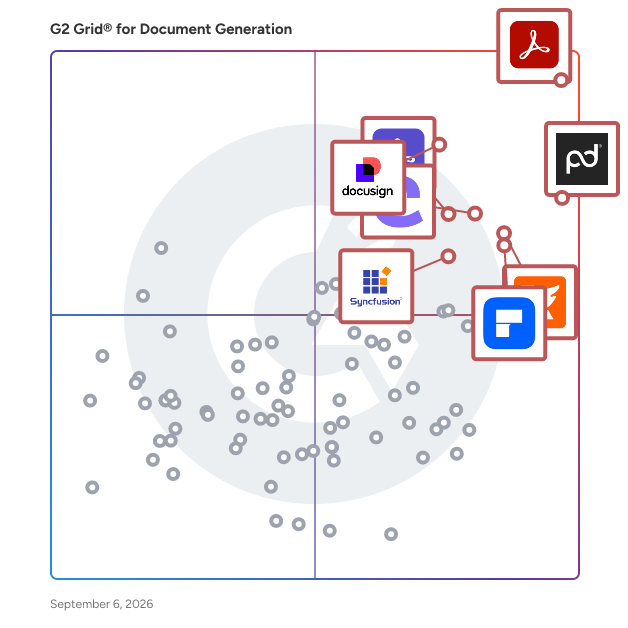
G2 Grid® for Document Generation Software

G2 Grid® for Document Generation Software plotting products by satisfaction and market presence

Highlighted products: Adobe Acrobat, PandaDoc, Docusign CLM, Foxit PDF Editor, Conga Composer, Wondershare PDFelement, Adobe Acrobat Sign, and Essential Studio.

Underlying data: [Grid® JSON](https://www.g2.com/categories/document-generation/grids.json?focus%5B%5D=adobe-acrobat&focus%5B%5D=pandadoc&focus%5B%5D=docusign-clm&focus%5B%5D=foxit-pdf-editor&focus%5B%5D=conga-composer&focus%5B%5D=wondershare-wondershare-pdfelement&focus%5B%5D=adobe-acrobat-sign&focus%5B%5D=essential-studio)

doppio.sh

Generate PDFs and screenshots from HTML with just a few lines of code! Doppio is an API service, that provides the world best rendering engine to convert HTML to PDF or take screenshots. At scale, without compromising your security. With Doppio you just need an API call to generate huge amounts of file (sync or async rendering). You can even store files directly in your own S3 bucket without compromising privacy. Doppio is free to use up to 400 docs per month. We provide pricing plans offering higher volumes and additional features.

Average Rating: 4.5/5.0

Total Reviews: 12

How Do G2 Users Rate doppio.sh?

  • Documents: 9.0/10 (Category avg: 8.9/10)
  • Software: 8.6/10 (Category avg: 8.6/10)
  • Workflow: 7.8/10 (Category avg: 8.6/10)

Who Is the Company Behind doppio.sh?

Who Uses This Product?

  • Company Size: 58% Small, 25% Large

What Do G2 Reviewers Say About doppio.sh?

AI-generated summary from verified user reviews

Pros
  • Users praise the excellent customer support provided by doppio.sh, enhancing their overall experience with the product.
  • Users commend the excellent documentation, appreciating the clarity and relevance of examples provided.
  • Users appreciate the ease of use of doppio.sh, citing easy set-up and helpful documentation.
  • Users praise the easy setup of doppio.sh, complemented by helpful documentation and excellent customer support.
Cons
  • Users find the storage limitations on the basic plan unsatisfactory, wanting longer availability for their screenshots.

What Are Recent G2 Reviews of doppio.sh?

Lumin

Lumin is a document and agreement workflow solution trusted by more than 100 million people worldwide. Create, edit and collaborate on documents with AI assistance, then send them for signing, all in one place. Standardize how agreements get done, close them faster and keep the work inside the systems your team already uses. Create and collaborate - Generate documents from reusable templates, populated with data from your existing systems or CRM - Describe the agreement you need in plain language and generate it with an AI assistant, then refine it by continuing the conversation or editing the document directly - Draft together in real time, comment, tag teammates and resolve feedback without leaving the document Work with PDFs - Edit PDF text, images and pages directly and annotate with highlights, comments, shapes and images, no conversion or re-uploading - Flexible PDF management, including merging, splitting, compressing and reordering pages - Share PDFs with colleagues for review, with comments and mentions keeping feedback attached to the document Send and sign - Send for legally binding eSignatures and follow progress from sent to signed - Every request carries a full audit trail covering who opened it, who signed and when - Verified Digital Signing adds an extra layer of security by confirming each signer's identity before they sign, so the signature is tied to a verified person rather than an email address Integrations - Work directly from the storage you already use, including Google Drive, Microsoft OneDrive and Dropbox - Connect Lumin to Salesforce, HubSpot, Slack and Claude to keep documents moving with the rest of your work - API and SDKs for teams building Lumin into their own products Lumin is free to start, with Business and Enterprise plans that scale with your team. Available in the browser, on desktop and on mobile.

Average Rating: 4.5/5.0

Total Reviews: 772

How Do G2 Users Rate Lumin?

  • Has the product been a good partner in doing business?: 9.1/10 (Category avg: 9.3/10)
  • Documents: 9.7/10 (Category avg: 8.9/10)
  • Software: 9.5/10 (Category avg: 8.6/10)
  • Workflow: 9.6/10 (Category avg: 8.6/10)

Who Is the Company Behind Lumin?

  • Seller: Lumin PDF
  • Company Website:
  • Year Founded: 2014
  • HQ Location: Christchurch, Canterbury
  • Twitter: @LuminPdf
    1,249 Twitter followers
  • LinkedIn® Page: www.linkedin.com
    61 employees on LinkedIn®

Who Uses This Product?

  • Who Uses This: Student, Teacher
  • Top Industries: Primary/Secondary Education, Higher Education
  • Company Size: 59% Small, 26% Medium

What Do G2 Reviewers Say About Lumin?

AI-generated summary from verified user reviews

Pros
  • Users find Lumin for G Suite to have a clear and easy layout, making document management a breeze.
  • Users find Lumin PDF's easy editing features perfect for quick and efficient office tasks, enhancing their productivity.
  • Users love the ease of use of Lumin for G Suite, making document editing a simple and familiar experience.
  • Users appreciate the easy-to-use editing capabilities of Lumin for G Suite, making it ideal for office tasks.
  • Users appreciate the convenience of sending faxes from anywhere, making work on-the-go easy and efficient.
Cons
  • Users find the learning curve somewhat steep, requiring time to adapt compared to other PDF editors.
  • Users experience editing difficulties with lag on large files, making small layout changes less smooth.
  • Users experience difficult editing, as large files open slowly and text editing features can glitch and frustrate efficiency.
  • Users experience editing issues with Lumin for G Suite, affecting efficiency and the document's professional appearance.
  • Users find the limited editing options in Lumin for G Suite frustrating, affecting efficiency and document quality.

What Are Recent G2 Reviews of Lumin?

What Are G2 Users Discussing About Lumin?

empower

The empower® Suite is a software solution integrated into Microsoft 365 that simplifies the creation of presentations, charts, documents, and emails while ensuring consistency and efficiency. It enables companies to produce professional, brand-compliant content with significantly reduced effort. The suite consists of three modules that can be used individually or together. empower® Slide Generation combines artificial intelligence, templates, automation, and shared corporate content to create professional PowerPoint presentations in minutes rather than hours. It eliminates manual formatting and ensures full compliance with corporate design standards. empower® Chart Creation is designed specifically for building complex business charts in PowerPoint and is ideal for data-driven, professional presentations. With more than 40 chart types, including waterfall, Mekko, and Gantt charts, as well as Excel linking, intelligent add-on elements, and automatic layout adjustments, users can create and edit charts approximately 50 percent faster than with standard PowerPoint features. In addition, empower® Chart Creation makes adoption and transition easy. Existing PowerPoint charts and charts from other PowerPoint charting add-ins can be converted into fully editable empower® charts with a single click. empower® Template Management centrally provides up-to-date Office templates, automatically applies them across PowerPoint, Word, Excel, and Outlook, and helps ensure brand and legal compliance in significantly less time.

Average Rating: 4.6/5.0

Total Reviews: 29

How Do G2 Users Rate empower?

  • Has the product been a good partner in doing business?: 8.7/10 (Category avg: 9.3/10)
  • Documents: 7.5/10 (Category avg: 8.9/10)
  • Software: 6.7/10 (Category avg: 8.6/10)
  • Workflow: 4.2/10 (Category avg: 8.6/10)

Who Is the Company Behind empower?

  • Seller: empower
  • Year Founded: 2005
  • HQ Location: Cologne, DE
  • Twitter: @empower_suite
    37 Twitter followers
  • LinkedIn® Page: www.linkedin.com
    103 employees on LinkedIn®

Who Uses This Product?

  • Company Size: 41% Large, 31% Small

What Do G2 Reviewers Say About empower?

AI-generated summary from verified user reviews

Pros
  • Users love the time-saving tools and seamless integration with PowerPoint, enhancing their productivity and creativity.
  • Users highlight the time-saving tools of Empower, which simplify tasks and enhance productivity significantly.
  • Users love the flexible customization options, easily adapting templates and charts to fit their unique branding needs.
  • Users find Empower's efficiency remarkable, significantly reducing time spent on creating and managing compliant materials.
  • Users value the exceptional customer support from empower, enhancing their experience and optimizing their presentations.
Cons
  • Users experience poor customer support with Empower, facing issues like failed updates and upload errors needing assistance.
  • Users face update issues with Empower, often requiring manual intervention and support for automatic updates.
  • Users occasionally face API issues that can complicate content management and lead to potential overwrites.
  • Users experience error handling issues, particularly with bulk uploads, affecting the overall usability of Empower.
  • Users face challenges with hidden features, as some options require customer support for access and uploads may fail.

What Are Recent G2 Reviews of empower?

AI can help you find the answers. G2 helps you trust them.

Connect G2 to Claude or ChatGPT for answers grounded in G2's trusted reviews, comparisons, and pricing from real user insights.

How it works

DevExpress

DevExpress engineers feature-complete Presentation Controls, IDE Productivity Tools, Business Application Frameworks, and Reporting / Dashboard Systems for Visual Studio, Delphi, HTML5 or iOS & Android development. Our product line includes UI components and libraries for desktop and mobile development (WinForms / WPF / WinUI / MAUI / Xamarin / VCL), the web (ASP.NET Core / Blazor / Web Forms / MVC / JavaScript: Angular, React, Vue, jQuery), Office File API, .NET Application Frameworks, ORM Tools, and End-to-End Web Testing.

Average Rating: 4.8/5.0

Total Reviews: 112

How Do G2 Users Rate DevExpress?

  • Has the product been a good partner in doing business?: 9.8/10 (Category avg: 9.3/10)
  • Documents: 9.3/10 (Category avg: 8.9/10)
  • Software: 9.4/10 (Category avg: 8.6/10)
  • Workflow: 6.7/10 (Category avg: 8.6/10)

Who Is the Company Behind DevExpress?

  • Seller: DevExpress
  • Year Founded: 1998
  • HQ Location: Glendale, CA
  • Twitter: @DevExpress
    8,517 Twitter followers
  • LinkedIn® Page: www.linkedin.com
    193 employees on LinkedIn®

Who Uses This Product?

  • Top Industries: Computer Software, Information Technology and Services
  • Company Size: 70% Small, 16% Medium

What Do G2 Reviewers Say About DevExpress?

AI-generated summary from verified user reviews

Pros
  • Users praise DevExpress for their responsive customer support, which consistently delivers effective solutions quickly and professionally.
  • Users value the responsive tech support and the high quality features and documentation of DevExpress.
  • Users appreciate the superior product quality of DevExpress, consistently outperforming alternatives with excellent code and features.
  • Users appreciate the high-quality code editing features of DevExpress, consistently surpassing other component suites in performance.
  • Users highlight the excellent documentation of DevExpress, making it easier to utilize its Angular features.
Cons
  • Users note a lack of features in DevExpress, though improvements are being made over time.
  • Users often face navigation issues with DevExpress, finding the user experience challenging and frustrating.
  • Users find the user experience not intuitive, making it challenging to navigate DevExpress effectively.
  • Users experience performance issues with DevExpress, finding the interface challenging and not user-friendly.
  • Users experience poor customer support, often facing unhelpful responses that detract from their overall satisfaction.

What Are Recent G2 Reviews of DevExpress?

What Are G2 Users Discussing About DevExpress?

TypeFlow

TypeFlow is a document automation platform that generates professional PDFs directly from Airtable data. Designed for operations teams, TypeFlow transforms Airtable records into invoices, contracts, certificates, reports, and other business documents without manual copy-paste work. How TypeFlow Works: 1. Connect your Airtable base via OAuth 2. Design templates using Google Docs or the visual Template Builder 3. Map Airtable fields to template variables 4. Generate PDFs on-demand or via Airtable Automations Key Capabilities: • Multi-page documents: Unlike Page Designer, TypeFlow supports unlimited pages with automatic pagination • Dynamic line items: Loop through linked records for invoices, quotes, and orders • Built-in e-signature: Send documents for signing directly from Airtable without third-party tools • Automatic email delivery: Send generated PDFs to recipients without leaving Airtable • Attachment storage: Save PDFs directly to Airtable attachment fields • Template Builder: Visual drag-and-drop editor, no Google account required • PDF form filling Who Uses TypeFlow: • Operations teams generating 500-5,000+ documents monthly • Property managers creating lease agreements • Manufacturers producing certificates of conformity and QC reports • Logistics companies generating shipping documents and bills of lading • Professional services firms creating contracts and proposals Integration: TypeFlow integrates natively with Airtable via extension and automation scripts. No Zapier or Make required for core functionality. Works with Airtable Automations for fully automated workflows. Pricing: Plans start at $17.60/month (billed annually) for 2,400 documents/year. Free trial includes 20 documents. Unlimited e-signature on all plans. No per-seat fees.

Average Rating: 4.9/5.0

Total Reviews: 13

How Do G2 Users Rate TypeFlow?

  • Has the product been a good partner in doing business?: 10.0/10 (Category avg: 9.3/10)
  • Documents: 10.0/10 (Category avg: 8.9/10)
  • Software: 10.0/10 (Category avg: 8.6/10)
  • Workflow: 10.0/10 (Category avg: 8.6/10)

Who Is the Company Behind TypeFlow?

  • Seller: TypeFlow
  • Year Founded: 2008
  • HQ Location: Bethel, US
  • LinkedIn® Page: www.linkedin.com
    1 employees on LinkedIn®

Who Uses This Product?

  • Company Size: 69% Small, 31% Medium

What Do G2 Reviewers Say About TypeFlow?

AI-generated summary from verified user reviews

Pros
  • Users praise TypeFlow for its ease of use, enabling effortless document generation and a user-friendly experience.
  • Users commend the responsive customer support of TypeFlow, highlighting quick fixes and new features based on feedback.
  • Users commend incredible support and the founder's engagement, contributing to TypeFlow’s quick enhancements and user-friendly experience.
  • Users value the cost-effective solution of TypeFlow, enabling efficient document generation without breaking the bank.
  • Users praise TypeFlow for its excellent customer satisfaction, highlighting the intuitive design and responsive support from the founder.

What Are Recent G2 Reviews of TypeFlow?

ONLYOFFICE Docs

ONLYOFFICE Docs is an open-source online office suite that brings document editing and real-time collaboration into the business platforms you already use, e.g. DMS, CMS, e-learning systems, CRMs, intranets and file storage solutions. Using it, you can view, edit and co-author text documents, spreadsheets, presentations, digital forms, diagrams and PDF files directly in your browser. ONLYOFFICE Docs is built for seamless integration in any business environment: · 40+ official connectors for popular platforms, including Nextcloud, ownCloud, Moodle, SuiteCRM, Redmine, Alfresco, Confluence, WordPress, Drupal, Odoo, Jira, Mattermost, HumHub, Plone, Pipedrive, SharePoint, Strapi and more. · An open API and WOPI compatibility, making it easy to embed into virtually any web-based application. ONLYOFFICE Docs works well for teams and organizations of any size, but it’s also a strong option for software developers and SaaS providers. You can integrate it into your own product and deliver document editing and collaboration to customers—including the ability to offer it under your brand. When integrated with your platform, ONLYOFFICE Docs allows you to: · Create and edit documents, spreadsheets and presentations with professional formatting tools; · Create and fill PDF forms with interactive fields; · Edit, annotate, redact and co-author PDF files; · Open Visio diagrams for viewing; · Collaborate in real time with two co-editing modes, comments, @mentions, Track Changes, version history and document comparison; · Enable audio/video conferencing via the Jitsi plugin and communicate in the built-in chat while editing; · Extend functionality with plugins, such as Google Translate/DeepL translation, text-to-speech, Zotero/Mendeley bibliographies, and LanguageTool proofreading. One of the key features of the suite is its flexible AI integration. Unlike other popular office tools, ONLYOFFICE doesn’t provide any predefined AI assistant. Users can connect their favourite AI services (e.g., ChatGPT, DeepSeek, Mistral, Google Gemini or even local AI models via Ollama) and use multiple assistants at once for tasks like content generation, summarization, translation and grammar correction in documents, data analysis in spreadsheets, slide generation in presentations and OCR in PDFs. ONLYOFFICE Docs natively supports Microsoft Office formats—DOCX, XLSX, PPTX—so teams can work with Word, Excel, and PowerPoint files without compatibility issues. It can also open Apple iWork formats (Pages, Keynote, Numbers) for viewing and convert them to DOCX/PPTX/XLSX for editing. In total, it supports 60+ file formats. Before using ONLYOFFICE Docs in your team, you can choose what fits your needs: · Self-hosted on Linux or Windows servers for full control over your data; · Cloud-based ONLYOFFICE Docs Cloud for an out-of-the-box option ready for integration. ONLYOFFICE also offers free desktop apps (Windows, Linux, macOS) for offline editing and free mobile apps (Android, iOS) for working on the go.

Average Rating: 4.6/5.0

Total Reviews: 25

How Do G2 Users Rate ONLYOFFICE Docs?

  • Documents: 10.0/10 (Category avg: 8.9/10)
  • Software: 10.0/10 (Category avg: 8.6/10)
  • Workflow: 10.0/10 (Category avg: 8.6/10)

Who Is the Company Behind ONLYOFFICE Docs?

  • Seller: Ascensio System
  • Company Website:
  • Year Founded: 2008
  • HQ Location: Riga, LV
  • Twitter: @only_office
    6,700 Twitter followers
  • LinkedIn® Page: www.linkedin.com
    119 employees on LinkedIn®

Who Uses This Product?

  • Company Size: 69% Small, 23% Medium

What Do G2 Reviewers Say About ONLYOFFICE Docs?

AI-generated summary from verified user reviews

Pros
  • Users appreciate the convenient tab features of ONLYOFFICE Docs, enhancing their overall office suite experience.
  • Users love the comprehensive office suite features of ONLYOFFICE Docs, especially the convenience of tabbed functionality.
Cons
  • Users often experience formatting issues when working with files downloaded from Google Docs in ONLYOFFICE Docs.
  • Users experience formatting issues with downloaded files from Google Docs, leading to inconsistent document presentation.
What Are Recent G2 Reviews of ONLYOFFICE Docs?

BRYTER

BRYTER enables expert teams like Legal and Compliance to make their knowledge available digitally. BRYTER applications collect the relevant information, process it intelligently, and provide the answers, decisions, and documents business partners need, transforming experts into business enablers. Global enterprises like McDonalds and ING, Law Firms like Linklaters and DLA Piper, and professional service firms like Deloitte, PwC, and KPMG, use BRYTER’s no-code platform to build applications that reduce repetitive tasks for experts, mitigate risk, and accelerate business outcomes. BRYTER is a remote-first company with offices in New York, London, Frankfurt and Berlin. www.bryter.com

Average Rating: 4.7/5.0

Total Reviews: 66

How Do G2 Users Rate BRYTER?

  • Has the product been a good partner in doing business?: 9.6/10 (Category avg: 9.3/10)
  • Documents: 9.0/10 (Category avg: 8.9/10)
  • Software: 7.8/10 (Category avg: 8.6/10)
  • Workflow: 9.3/10 (Category avg: 8.6/10)

Who Is the Company Behind BRYTER?

  • Seller: BRYTER
  • Year Founded: 2018
  • HQ Location: New York
  • Twitter: @BRYTER_io
    1,030 Twitter followers
  • LinkedIn® Page: www.linkedin.com
    90 employees on LinkedIn®

Who Uses This Product?

  • Top Industries: Legal Services
  • Company Size: 42% Small, 38% Large

What Do G2 Reviewers Say About BRYTER?

AI-generated summary from verified user reviews

Pros
  • Users find BRYTER's AI features effortless, making documentation automation accessible for non-technical professionals.
  • Users find the automation features of BRYTER easy to use, streamlining documentation for non-technical professionals.
  • Users find the automation efficiency of BRYTER exceptional, streamlining documentation for non-technical professionals like lawyers.
  • Users find BRYTER's interface extremely user-friendly, making it accessible even for non-technical professionals.
  • Users value the time-saving AI features of BRYTER, simplifying documentation for non-technical professionals.
Cons
  • Users find the dashboard lacking in detail and desire improved reporting features for better functionality.
  • Users find difficult learning due to limited dashboard details and challenging integration processes in BRYTER.
  • Users find the feature issues with BRYTER's dashboard and reporting capabilities limit their overall experience and efficiency.
  • Users note functionality limitations with BRYTER, citing a lack of detailed dashboards and challenging integration processes.
  • Users find integration to be difficult, impacting their ability to utilize BRYTER's full functionalities effectively.

What Are Recent G2 Reviews of BRYTER?

What Are G2 Users Discussing About BRYTER?

Templafy

Templafy is the leading agentic document generation platform, enabling enterprise organizations to create accurate, compliant, and on-brand documents with maximum efficiency and control. Accessible directly within M365, Google Workspace, Salesforce, Claude or any AI agent Templafy simplifies document workflows through AI and automation, to reduce risk and boost productivity. Founded in 2014, Templafy is a global organization with offices across Europe and the US. Trusted by industry leaders like KPMG and BDO, Templafy saves teams over 30% of the time they typically spend on repetitive work like proposals, engagement letters, and audit reports, so they can focus on revenue-driving tasks instead. Join more than 4 million users worldwide who rely on Templafy to accelerate business content creation with AI.

Average Rating: 4.4/5.0

Total Reviews: 59

How Do G2 Users Rate Templafy?

  • Has the product been a good partner in doing business?: 9.3/10 (Category avg: 9.3/10)
  • Documents: 8.3/10 (Category avg: 8.9/10)
  • Software: 6.8/10 (Category avg: 8.6/10)
  • Workflow: 7.9/10 (Category avg: 8.6/10)

Who Is the Company Behind Templafy?

  • Seller: Templafy
  • Company Website:
  • HQ Location: New York, USA
  • Twitter: @Templafy
    1,082 Twitter followers
  • LinkedIn® Page: www.linkedin.com
    186 employees on LinkedIn®

Who Uses This Product?

  • Top Industries: Consulting, Accounting
  • Company Size: 47% Large, 40% Medium

What Do G2 Reviewers Say About Templafy?

AI-generated summary from verified user reviews

Pros
  • Users find Templafy to be easy to use, streamlining document creation and ensuring brand consistency effortlessly.
  • Users appreciate the seamless integration and automated features of Templafy, enhancing efficiency and brand consistency.
  • Users appreciate the ease of use and integration of Templafy's templates, enhancing efficiency and brand consistency.
  • Users value the time-saving features of Templafy, enabling faster document creation and enhanced productivity.
  • Users appreciate the seamless branding integration in Templafy, ensuring consistency and efficiency across documents and proposals.
Cons
  • Users find the complex usability of Templafy frustrating due to integration issues and challenges with template creation.
  • Users find Templafy quite expensive, especially since many features can be replicated in Word.
  • Users find missing features in Templafy, including limited templates and frustrating file size constraints.
  • Users face technical issues with Templafy, dealing with bugs and integration challenges that hinder their experience.
  • Users find Templafy has adifficult learning curve, especially for newcomers, making full utilization challenging.

What Are Recent G2 Reviews of Templafy?

What Are G2 Users Discussing About Templafy?

Macabacus

Macabacus is the world's leading suite of M365 productivity tools, used by thousands of professionals and teams in investment banking, corporate finance, private equity, and other finance capacities to prepare financial models and presentations with the highest levels of accuracy, efficiency and brand consistency.

Average Rating: 4.7/5.0

Total Reviews: 93

How Do G2 Users Rate Macabacus?

  • Has the product been a good partner in doing business?: 9.0/10 (Category avg: 9.3/10)
  • Documents: 7.5/10 (Category avg: 8.9/10)
  • Software: 8.2/10 (Category avg: 8.6/10)
  • Workflow: 7.5/10 (Category avg: 8.6/10)

Who Is the Company Behind Macabacus?

  • Seller: Macabacus
  • Company Website:
  • Year Founded: 2008
  • HQ Location: New York, New York, United States
  • Twitter: @macabacus
    374 Twitter followers
  • LinkedIn® Page: www.linkedin.com
    39 employees on LinkedIn®

Who Uses This Product?

  • Who Uses This: Associate
  • Top Industries: Financial Services, Venture Capital & Private Equity
  • Company Size: 51% Small, 26% Medium

What Do G2 Reviewers Say About Macabacus?

AI-generated summary from verified user reviews

Pros
  • Users find Macabacus to be easy to use, significantly enhancing efficiency and productivity in their daily work.
  • Users appreciate the plethora of functions in Macabacus, which significantly enhances efficiency in daily tasks.
  • Users value the time-saving features of Macabacus, significantly enhancing efficiency in Excel and PowerPoint tasks.
  • Users love the time-saving features of Macabacus, enhancing formatting and usability across MS Office applications.
  • Users love the easy editing features of Macabacus, which significantly save time in financial tasks.
Cons
  • Users face challenges with update issues, leading to outdated software and slow performance during updates in PowerPoint.
  • Users report persistent bug issues with Macabacus, including crashes and unresponsive features that hinder usability.
  • Users report several editing issues with Macabacus, including problematic undo functionality and chart pasting errors.
  • Users struggle with difficult editing, especially with unreliable undo functionality and challenges when pasting into PowerPoint.
  • Users find the difficulty in mastering Macabacus due to its complex features and shortcuts, causing initial confusion.

What Are Recent G2 Reviews of Macabacus?

DocuGen

Generate documents and send for signature. Over 34,000 installs and 4.6 ⭐ (160+ reviews) on the monday.com Marketplace: https://monday.com/marketplace/12 We just launched DocuGen for HubSpot: https://ecosystem.hubspot.com/marketplace/listing/docugen DocuGen is a packed with features: - Manual or automated document generation - Use your own templates - Save as Microsoft Word, Excel, or PDF - Use your own Microsoft Word documents as templates

Average Rating: 4.8/5.0

Total Reviews: 57

How Do G2 Users Rate DocuGen?

  • Has the product been a good partner in doing business?: 9.3/10 (Category avg: 9.3/10)
  • Documents: 9.1/10 (Category avg: 8.9/10)
  • Software: 8.9/10 (Category avg: 8.6/10)
  • Workflow: 8.8/10 (Category avg: 8.6/10)

Who Is the Company Behind DocuGen?

Who Uses This Product?

  • Top Industries: Information Technology and Services, Computer Software
  • Company Size: 77% Small, 19% Medium

What Are Recent G2 Reviews of DocuGen?

What Are G2 Users Discussing About DocuGen?

Gavel

Gavel (formerly Documate) is easy to use legal automation software with powerful document automation for Word, PDF, or other .docx documents. Easily collect client intake, set up robust nested conditional logic, numerical and date calculations, and collect and populate lists. Grow your practice by building legal products. Make your Gavel workflows client-facing to collect client intake data. For the legal tech entrepreneurs, go a step further by building a "TurboTax" for any area of law to sell legal documents to the public. Payment integrations, file uploads, videos, and whitelabeling are also supported.

Average Rating: 5.0/5.0

Total Reviews: 11

How Do G2 Users Rate Gavel?

  • Has the product been a good partner in doing business?: 10.0/10 (Category avg: 9.3/10)
  • Documents: 10.0/10 (Category avg: 8.9/10)
  • Software: 10.0/10 (Category avg: 8.6/10)
  • Workflow: 10.0/10 (Category avg: 8.6/10)

Who Is the Company Behind Gavel?

  • Seller: Gavel
  • Year Founded: 2018
  • HQ Location: Los Angeles, US
  • Twitter: @Gavel_io
    2,687 Twitter followers
  • LinkedIn® Page: www.linkedin.com
    26 employees on LinkedIn®

Who Uses This Product?

  • Company Size: 82% Small, 18% Medium

What Are Recent G2 Reviews of Gavel?

What Are G2 Users Discussing About Gavel?

Floik

Floik is an AI-powered platform that turns real workflows into interactive step-by-step guides, and interactive videos. Record a process once with Floik. AI captures the workflow, writes clear instructions, helps generate narration and translations, and lets you publish the same knowledge in multiple formats and in multiple languages. Teams use Floik for → Standard operating procedures and process documentation → Employee onboarding and any software training → Customer support and self-service education → Product education and feature adoption → Feature showcases on websites and documentation sites → External and Internal knowledge sharing Floik content can be shared by URL, embedded into knowledge bases and websites, or exported in formats such as PDF, HTML, Markdown, MP4, and GIF. The result: less time documenting processes, clearer instructions, and one workflow that can be reused across multiple teams and channels.

Average Rating: 4.7/5.0

Total Reviews: 46

How Do G2 Users Rate Floik?

  • Has the product been a good partner in doing business?: 9.7/10 (Category avg: 9.3/10)
  • Documents: 7.5/10 (Category avg: 8.9/10)
  • Software: 9.6/10 (Category avg: 8.6/10)
  • Workflow: 9.6/10 (Category avg: 8.6/10)

Who Is the Company Behind Floik?

  • Seller: Floik
  • HQ Location: San Francisco
  • Twitter: @getfloik
    124 Twitter followers
  • LinkedIn® Page: www.linkedin.com
    7 employees on LinkedIn®

Who Uses This Product?

  • Top Industries: Computer Software, Financial Services
  • Company Size: 79% Small, 21% Medium

What Do G2 Reviewers Say About Floik?

AI-generated summary from verified user reviews

Pros
  • Users love the all-in-one content creation capabilities of Floik, streamlining guide, video, and demo production efficiently.
  • Users love the all-in-one course creation platform of Floik, which streamlines the process and saves time and money.
  • Users love the easy editing feature of Floik, which streamlines creating guides, videos, and interactive demos.
  • Users value the easy sharing capabilities of Floik, enhancing collaboration and simplifying the distribution of resources.
  • Users highlight the all-in-one platform of Floik, simplifying the creation of guides, videos, and demos efficiently.

What Are Recent G2 Reviews of Floik?

Excel-to-Word Document Automation

The Excel-to-Word Document Automation Add-in easily links/updates Word and PowerPoint content (text, tables, and charts) based on Excel data and calculations. Update text, tables, charts, and lists in any new or existing Word or PowerPoint document from any new or existing Excel workbook. Improve productivity of recurring reports that need to be customized multiple times. Save time and improve accuracy. The Excel-to-Word Document Automation add-in is Microsoft 365 Certified. Microsoft has reviewed the app and confirmed that it has passed industry standards for security, compliance, and data handling practices. Free forever version and paid subscription options available. Requires Office 365 or Office Online via OneDrive

Average Rating: 4.4/5.0

Total Reviews: 48

How Do G2 Users Rate Excel-to-Word Document Automation?

  • Has the product been a good partner in doing business?: 9.0/10 (Category avg: 9.3/10)
  • Documents: 8.9/10 (Category avg: 8.9/10)
  • Software: 8.5/10 (Category avg: 8.6/10)
  • Workflow: 8.5/10 (Category avg: 8.6/10)

Who Is the Company Behind Excel-to-Word Document Automation?

  • Seller: AnalysisPlace
  • Year Founded: 2010
  • HQ Location: Pittsburgh, PA
  • Twitter: @exceltoword
    51 Twitter followers
  • LinkedIn® Page: www.linkedin.com
    2 employees on LinkedIn®

Who Uses This Product?

  • Company Size: 48% Small, 32% Medium

What Do G2 Reviewers Say About Excel-to-Word Document Automation?

AI-generated summary from verified user reviews

Pros
  • Users value the easy customization of Excel-to-Word Document Automation, enhancing efficiency and productivity in document creation.
  • Users value the efficiency of Excel-to-Word Document Automation, significantly reducing time and errors in document management.
  • Users value the time-saving automation of Excel-to-Word, enhancing accuracy and boosting productivity significantly.
  • Users value the consistency and efficiency in contract management provided by Excel-to-Word Document Automation.
  • Users find the cost-effective automation of Excel-to-Word Document Automation invaluable for efficient analysis.
Cons
  • Users find setup difficult due to complex configurations, inconsistent data, and time-consuming manual adjustments.
  • Users find formatting issues in Word challenging, often requiring manual adjustments for complex data from Excel.
  • Users find the poor documentation frustrating, making troubleshooting and setup challenging for complex data transfers.
  • Users experience slow performance during document generation, particularly with large batches, affecting efficiency and usability.

What Are Recent G2 Reviews of Excel-to-Word Document Automation?

What Are G2 Users Discussing About Excel-to-Word Document Automation?

S-Docs

S-Docs is a document operations platform designed to help users streamline their document creation and signing processes. This solution caters to a wide range of organizations, from small businesses to large global enterprises, enabling them to efficiently manage critical documents through intuitive automation and secure e-signature capabilities. By focusing on both ease of use and robust functionality, S-Docs empowers businesses to enhance their operational efficiency and transform their workflows. The platform is particularly valuable for organizations that handle a high volume of documents, such as contracts, invoices, and compliance forms. Its target audience includes industries like finance, healthcare, legal, and manufacturing, where accurate and timely document management is essential. S-Docs addresses the specific needs of these sectors by providing a comprehensive solution that not only simplifies document workflows but also ensures compliance with industry regulations. Key features of S-Docs include its user-friendly document automation tools, which allow users to create customized templates and generate documents quickly. The e-signature functionality further enhances the platform by enabling users to obtain signatures securely and efficiently, reducing the time spent on manual processes. Additionally, S-Docs integrates seamlessly with existing systems, ensuring that organizations can leverage their current technology investments while enhancing their document operations. The benefits of using S-Docs extend beyond mere efficiency. By automating document processes, organizations can reduce human error, improve accuracy, and accelerate turnaround times. The platform also supports collaboration among team members, allowing multiple users to work on documents simultaneously, which fosters a more agile working environment. Furthermore, S-Docs' commitment to security ensures that sensitive information is protected throughout the document lifecycle, giving users peace of mind. Overall, S-Docs stands out in the document operations category by offering a comprehensive solution that not only simplifies document workflows but also drives significant process transformation. Its focus on automation, security, and integration makes it a valuable tool for organizations looking to enhance their document management capabilities and achieve greater operational efficiency.

Average Rating: 4.7/5.0

Total Reviews: 122

How Do G2 Users Rate S-Docs?

  • Has the product been a good partner in doing business?: 9.4/10 (Category avg: 9.3/10)
  • Documents: 8.8/10 (Category avg: 8.9/10)
  • Software: 9.2/10 (Category avg: 8.6/10)
  • Workflow: 8.4/10 (Category avg: 8.6/10)

Who Is the Company Behind S-Docs?

  • Seller: S-Docs
  • Year Founded: 2010
  • HQ Location: New York, NY
  • LinkedIn® Page: www.linkedin.com
    53 employees on LinkedIn®

Who Uses This Product?

  • Who Uses This: Salesforce Administrator
  • Top Industries: Non-Profit Organization Management, Information Technology and Services
  • Company Size: 46% Small, 40% Medium

What Do G2 Reviewers Say About S-Docs?

AI-generated summary from verified user reviews

Pros
  • Users appreciate the ease of use of S-Docs, making document generation and e-signature fast and simple.
  • Users commend the excellent customer support of S-Docs, finding their assistance invaluable during technical issues.
  • Users appreciate the seamless integration of S-Docs with Salesforce, enhancing document generation and e-signature efficiency.
  • Users praise the seamless Salesforce integration of S-Docs, enhancing security and simplifying document generation processes.
  • Users value the ease of template creation with S-Docs, enhancing daily operations seamlessly within Salesforce.
Cons
  • Users find the learning curve steep, especially with complex templates and a non-intuitive interface, hindering effective use.
  • Users find the S-Docs interface not intuitive, noting a steep learning curve and complexity for less technical users.
  • Users express concerns about automation difficulty, noting that complex templates require time and troubleshooting expertise.
  • Users find S-Docs too expensive, especially after recent pricing changes and tiered minimum user requirements.
  • Users face formatting issues with S-Docs, including limitations in customization and troublesome DOCX output.

What Are Recent G2 Reviews of S-Docs?

SuiteFiles

SuiteFiles is an intelligent workspace solution specifically designed for professional service firms, aimed at streamlining the way teams manage their documents and client interactions. This comprehensive platform integrates essential functions such as document creation, review, approval, client collaboration, and digital signing into a single, cohesive system. By eliminating the need to juggle multiple folders, emails, and manual follow-ups, SuiteFiles provides a structured environment that enhances productivity and ensures efficient completion of work. The target audience for SuiteFiles encompasses a diverse range of professional service firms, including accounting firms, law firms, and consultancy agencies. These organizations often handle extensive documentation and require effective communication with clients. SuiteFiles addresses these challenges by creating a centralized workspace where all relevant documents, conversations, and approvals are easily accessible. This organization reduces the likelihood of important information being overlooked or lost, ultimately fostering better collaboration among team members and clients. Key features of SuiteFiles include seamless integration with widely-used tools such as Microsoft 365, Xero, Karbon, WorkflowMax, HubSpot, and QuickBooks Online. This compatibility allows firms to enhance their existing tech stack rather than complicate it with additional software. By connecting these tools, SuiteFiles helps create a more efficient workflow, enabling users to manage their tasks and client interactions without the hassle of switching between different applications. The platform’s ability to consolidate various functions into one interface simplifies the user experience and promotes a more streamlined approach to document management. The benefits of using SuiteFiles extend beyond mere organization; it empowers professional service firms to focus on their core competencies by minimizing busy work. With everything living in context, teams can spend less time chasing down documents or coordinating approvals and more time on delivering quality service to their clients. The platform promotes clarity and control, ensuring that all team members are aligned and that client confidence is maintained throughout the process. SuiteFiles is designed for firms that prioritize efficiency and client satisfaction. By providing an intelligent workspace that consolidates essential functions and integrates with existing tools, it enables professional service firms to work smarter, not harder, ultimately leading to more finished work and enhanced client relationships. This solution not only supports the operational needs of these firms but also contributes to a more collaborative and productive work environment.

Average Rating: 4.5/5.0

Total Reviews: 65

How Do G2 Users Rate SuiteFiles?

  • Has the product been a good partner in doing business?: 9.2/10 (Category avg: 9.3/10)
  • Documents: 8.3/10 (Category avg: 8.9/10)
  • Software: 8.7/10 (Category avg: 8.6/10)
  • Workflow: 7.5/10 (Category avg: 8.6/10)

Who Is the Company Behind SuiteFiles?

  • Seller: SuiteFiles
  • Company Website:
  • Year Founded: 2012
  • HQ Location: Wellington, NZ
  • Twitter: @SuiteFiles
    681 Twitter followers
  • LinkedIn® Page: www.linkedin.com
    28 employees on LinkedIn®

Who Uses This Product?

  • Who Uses This: Director
  • Top Industries: Accounting
  • Company Size: 94% Small, 6% Medium

What Do G2 Reviewers Say About SuiteFiles?

AI-generated summary from verified user reviews

Pros
  • Users find that SuiteFiles enhances document organization, streamlining collaboration and providing easy access to necessary information.
  • Users find SuiteFiles to be incredibly easy to use, streamlining workflows and enhancing collaboration effortlessly.
  • Users appreciate the centralization of documents in SuiteFiles, enhancing collaboration and efficiency for teams and clients.
  • Users value the efficient email filing in SuiteFiles, ensuring important communications are securely organized and easily accessible.
  • Users appreciate the quick and reliable customer support of SuiteFiles, enhancing their overall experience and efficiency.
Cons
  • Users find the accessibility issues of SuiteFiles can make document retrieval somewhat frustrating and cumbersome.
  • Users find the difficult learning curve challenging, impacting their ability to adapt quickly to SuiteFiles.
  • Users find the difficult navigation in SuiteFiles can be cumbersome when accessing documents, affecting overall efficiency.
  • Users find the document access to be a bit chunky, which can hinder their efficiency and ease of use.
  • Users find the access to documents can be a bit chunky, leading to a less smooth experience.

What Are Recent G2 Reviews of SuiteFiles?

Neeraja Prakash
NP
Researched and written by Neeraja Prakash
Updated October 3, 2024