Top Free Document Generation Software - Page 4

How Many Document Generation Software Products Does G2 Track?

Total Products under this Category: 378

Category Stats (Oct 2026)

  • Average Rating: 4.56/5 (↑0.02 vs Sep 2026) The average rating of products in this category, based on all submitted ratings
  • Top Trending Product: Lasernet (+0.89%) - Among all products in this category, Lasernet recorded the largest rating increase compared to last month

Last updated: October 13, 2026

How Does G2 Rank Document Generation Software Products?

Why You Can Trust G2's Software Rankings:

  • 30 Analysts and Data Experts
  • 30,600+ Authentic Reviews
  • 378+ Products
  • Unbiased Rankings

G2's software rankings are built on verified user reviews, rigorous moderation, and a consistent research methodology maintained by a team of analysts and data experts. Each product is measured using the same transparent criteria, with no paid placement or vendor influence. While reviews reflect real user experiences, which can be subjective, they offer valuable insight into how software performs in the hands of professionals. Together, these inputs power the G2 Score, a standardized way to compare tools within every category.

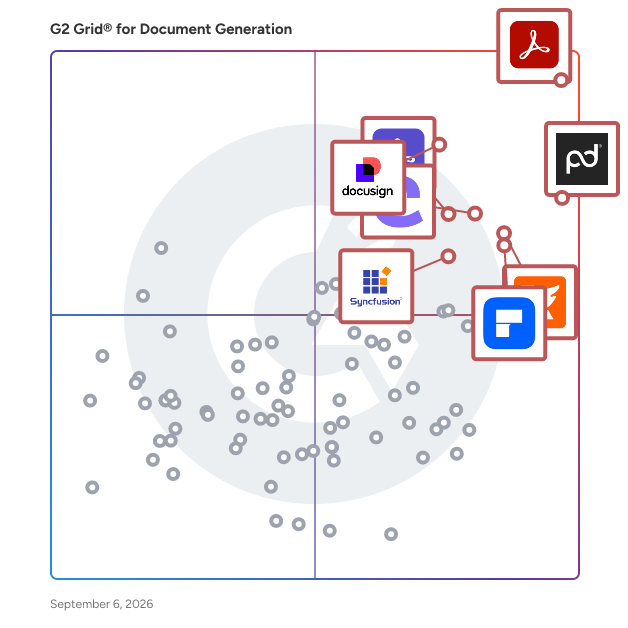
G2 Grid® for Document Generation Software

G2 Grid® for Document Generation Software plotting products by satisfaction and market presence

Highlighted products: Adobe Acrobat, PandaDoc, Docusign CLM, Foxit PDF Editor, Conga Composer, Wondershare PDFelement, Adobe Acrobat Sign, and Essential Studio.

Underlying data: [Grid® JSON](https://www.g2.com/categories/document-generation/grids.json?focus%5B%5D=adobe-acrobat&focus%5B%5D=pandadoc&focus%5B%5D=docusign-clm&focus%5B%5D=foxit-pdf-editor&focus%5B%5D=conga-composer&focus%5B%5D=wondershare-wondershare-pdfelement&focus%5B%5D=adobe-acrobat-sign&focus%5B%5D=essential-studio)

Legito

Processes. People. Documents. No code automation platform designed for compliance, HR, legal, operations, procurement, sales and sourcing teams. 400k users globally use Legito to create, perform, collaborate and execute their work. One integrated no-code solution. Including LexisNexis, PriceWaterhouseCoopers, Skoda Auto, and Societe Generale Group. Try our 30 Day Free Trial or Request a demo. No credit card required. For more information, including pricing and product features, visit us at www.legito.com.

Average Rating: 4.9/5.0

Total Reviews: 18

How Do G2 Users Rate Legito?

  • Has the product been a good partner in doing business?: 10.0/10 (Category avg: 9.3/10)
  • Documents: 9.6/10 (Category avg: 8.9/10)
  • Software: 10.0/10 (Category avg: 8.6/10)
  • Workflow: 9.6/10 (Category avg: 8.6/10)

Who Is the Company Behind Legito?

  • Seller: Legito
  • Year Founded: 2014
  • HQ Location: New York, New York
  • Twitter: @legitoCOM
    204 Twitter followers
  • LinkedIn® Page: www.linkedin.com
    45 employees on LinkedIn®

Who Uses This Product?

  • Top Industries: Legal Services
  • Company Size: 44% Medium, 39% Small

What Are Recent G2 Reviews of Legito?

What Are G2 Users Discussing About Legito?

Anvil

Anvil helps turn clunky paperwork processes into embeddable document workflows with document APIs for product teams. We work closely with HRtech, Insurtech, FinTech, Healthcare, Real Estate, and startup companies where paperwork, user experience, and data accessibility are considered "high-priority".

Average Rating: 4.7/5.0

Total Reviews: 32

How Do G2 Users Rate Anvil?

  • Has the product been a good partner in doing business?: 8.8/10 (Category avg: 9.3/10)
  • Documents: 8.3/10 (Category avg: 8.9/10)
  • Software: 6.7/10 (Category avg: 8.6/10)
  • Workflow: 7.9/10 (Category avg: 8.6/10)

Who Is the Company Behind Anvil?

Who Uses This Product?

  • Company Size: 64% Small, 25% Medium

What Do G2 Reviewers Say About Anvil?

AI-generated summary from verified user reviews

Pros
  • Users find Anvil's ease of use exceptional, praising its effortless implementation and outstanding support experience.
  • Users commend Anvil for its outstanding customer support, noting swift onboarding and superb assistance throughout setup.
  • Users praise Anvil's efficiency in connecting databases and APIs, streamlining app development for non-developers.
  • Users appreciate the effortless software integration of Anvil, making app development fast and accessible for everyone.
  • Users highlight the incredible ease of use of Anvil, appreciating its intuitive setup and seamless integration features.
Cons
  • Users find the navigation confusing, often losing their place in long documents despite robust documentation.
  • Users find the template builder complex and tedious, making the experience less user-friendly and efficient.
  • Users face implementation difficulties with Anvil, particularly in integrating APIs and navigating costly custom workflow options.
  • Users find the missing translation and document versioning features hinder their experience, leading to inaccuracies and inefficiencies.
  • Users find the poor documentation lacking in clear examples and tutorials, complicating the learning experience.

What Are Recent G2 Reviews of Anvil?

DocuSend

The DocuSend Cloud-Based Mailroom is a no-contract-required solution for mailing your customer invoices and documents . Send US Mail and Email from a Single Cloud-Based Platform- DocuSend. Upload PDF and Mail. No monthly minimums or contracts. QuickBooks Online users save 33% off first DocuSend upload. See website for details.

Average Rating: 4.5/5.0

Total Reviews: 13

How Do G2 Users Rate DocuSend?

  • Has the product been a good partner in doing business?: 9.4/10 (Category avg: 9.3/10)
  • Documents: 5.0/10 (Category avg: 8.9/10)
  • Software: 4.2/10 (Category avg: 8.6/10)
  • Workflow: 5.0/10 (Category avg: 8.6/10)

Who Is the Company Behind DocuSend?

  • Seller: DocuSend
  • Year Founded: 1991
  • HQ Location: Rochester, New York
  • Twitter: @DocuSendMail
    566 Twitter followers
  • LinkedIn® Page: www.linkedin.com
    18 employees on LinkedIn®

Who Uses This Product?

  • Company Size: 69% Small, 15% Large

What Are Recent G2 Reviews of DocuSend?

What Are G2 Users Discussing About DocuSend?

AI can help you find the answers. G2 helps you trust them.

Connect G2 to Claude or ChatGPT for answers grounded in G2's trusted reviews, comparisons, and pricing from real user insights.

How it works

Docomotion

Docomotion makes it easier to generate documents on Salesforce automatically. We have made it our mission to become the top-rated document generation app on Salesforce, a position we proudly hold thanks to a decade-long dedication to providing the industry's best product, service, and customer experience. GENERATE DOCUMENTS WITH A SINGLE CLICK Use a single button embedded in your Salesforce interface to generate rich and detailed documents populated with accurate customer data. DESIGN TEMPLATES WITH A VISUAL EDITOR Easily create and edit document templates using a drag & drop mechanism on Microsoft Word. You can use an existing template or start from scratch. MAKE LAST-MINUTE CHANGES Finalize the document output and edit any necessary information from your web or mobile device before sending it. RETRIEVE DATA FROM ANY OBJECT Incorporate Salesforce data of any type into your documents, including standard objects, customized objects, and complex content. SELECT FROM VERSATILE OUTPUT FORMATS Send your documents as PDF, Word, E-mail, or HTML5. You can also share the document via a link with a configurable expiration period. ADD EXTERNAL CONTENT Merge data from external sources, attach additional documents, or embed images and rich media from an external repository. COLLECT E-SIGNATURES NATIVELY Give your customers the ability to sign any document without having to integrate your platform with external signature solutions. ASK YOUR CUSTOMERS FOR INPUT Establish a bi-directional communication channel with your customers through interactive forms that gather important feedback and open the door for new business opportunities. SAVE CUSTOMER DATA INTO SALESFORCE Update data entered by your customers, such as satisfaction surveys, personal details, or cross-sell opportunities, directly into Salesforce. INTEGRATE WITH PROCESS BUILDER AND VISUAL FLOW Define automated document generation processes using Salesforce’s inherent automation tools that you’re already familiar with. IMPLEMENT YOUR BUSINESS LOGIC Generate separate documents from the same template with hidden/displayed sections, altered styling, and modified calculations according to predefined business rules. GENERATE THOUSANDS OF DOCUMENTS AT ONCE Send documents to multiple recipients with a single click, each populated with the relevant personal data sourced from its Salesforce record. ONBOARD QUICKLY AND EFFICIENTLY Easily set up and configure your account preferences, either by yourself or with the help of our support team, so you can start generating documents as soon as you wish. WORK FROM YOUR MOBILE DEVICE Enjoy all the features and benefits of the platform on the go, with comprehensive HTML5 compatibility that allows you to get things done anywhere and at any time. STAY 100% PROTECTED Rest assured that security, privacy, availability, redundancy, and other measures are thoroughly taken care of with the greatest attention at all times. Docomotion - Committed To Making Your Life Easier

Average Rating: 4.6/5.0

Total Reviews: 67

How Do G2 Users Rate Docomotion?

  • Has the product been a good partner in doing business?: 9.4/10 (Category avg: 9.3/10)
  • Documents: 8.8/10 (Category avg: 8.9/10)
  • Software: 8.3/10 (Category avg: 8.6/10)
  • Workflow: 8.4/10 (Category avg: 8.6/10)

Who Is the Company Behind Docomotion?

  • Seller: Docomotion
  • Year Founded: 2014
  • HQ Location: Netanya, IL
  • Twitter: @docomotion
    89 Twitter followers
  • LinkedIn® Page: www.linkedin.com
    16 employees on LinkedIn®

Who Uses This Product?

  • Top Industries: Computer Software, Information Technology and Services
  • Company Size: 44% Medium, 41% Small

What Do G2 Reviewers Say About Docomotion?

AI-generated summary from verified user reviews

Pros
  • Users appreciate the seamless Salesforce integration of Docomotion, enhancing efficiency and real-time tracking capabilities.
  • Users value the customization of templates in Docomotion, enhancing efficiency and ensuring document consistency.
  • Users value the easy integrations of Docomotion, enhancing efficiency and streamlining document generation with Salesforce.
  • Users love Docomotion's seamless automation with Salesforce, enhancing efficiency and consistency in document generation.
  • Users value the customizability of Docomotion, enhancing efficiency and ensuring consistency in document creation.
Cons
  • Users find Docomotion's difficult customization and overwhelming setup can hinder their initial experience with automation tools.
  • Users face integration issues with some third-party apps that hinder overall functionality and usability.
  • Users experience lack of integrations with third-party apps, limiting the overall effectiveness of Docomotion.
  • Users find the learning curve steep with Docomotion, making it challenging for newcomers to adapt quickly.
  • Users find the initial setup challenging, particularly new users, making it overwhelming to start with Docomotion.

What Are Recent G2 Reviews of Docomotion?

What Are G2 Users Discussing About Docomotion?

Crove

Say goodbye to manual and error-prone template editing. Simply create your repetitive word documents as intelligent templates in Crove and automate your documentation workflow without writing any code. Our App Provide Solutions for- 1. Contracts & Agreement 2. HR Documents 3. Purchase & Sales-Order 4. Health Care 5. Real Estate Contracts & Rentals 6. Marketing 7. Personalized Documents 8. Education

Average Rating: 4.7/5.0

Total Reviews: 10

How Do G2 Users Rate Crove?

  • Has the product been a good partner in doing business?: 10.0/10 (Category avg: 9.3/10)
  • Documents: 10.0/10 (Category avg: 8.9/10)
  • Software: 10.0/10 (Category avg: 8.6/10)
  • Workflow: 9.7/10 (Category avg: 8.6/10)

Who Is the Company Behind Crove?

  • Seller: Gourav Manchanda
  • Year Founded: 2017
  • HQ Location: Mohali, IN
  • Twitter: @rethink_ux
    27 Twitter followers
  • LinkedIn® Page: www.linkedin.com
    5 employees on LinkedIn®

Who Uses This Product?

  • Company Size: 100% Small

What Are Recent G2 Reviews of Crove?

What Are G2 Users Discussing About Crove?

Fluent by Apryse

Fluent by Apryse (previously Windward Studios) is a unique solution that simplifies the creation of reports and templates on a large scale with minimal coding required. The SDK and Microsoft Office plugin enable developers to meet reporting needs efficiently, while also empowering admins to design and populate data-driven documents from multiple data sources. Fluent offers unlimited formatting capabilities, catering to the diverse needs of multiple teams and end users. Set it and forget it. -Automate reporting with effortless template creation in Microsoft Office applications. -Free your backlog from internal reporting development with an automated solution for reporting and template creation. Empower your end users to independently manage and update their templates with ease. Create, Connect, and Manage Templates. Quick to deploy and flexible enough to meet the organization's needs by easily integrating any data source: -Don't wait on vendor integration to add a new data source or expose sensitive data to a SaaS application. -Make the logic as complex as you want – avoid the limits of off-the-shelf solutions. - Meet the brand compliance expectations for external communications. Infinite Scalability: Regulatory requirements seem to grow in volume and complexity each year. You won’t outgrow a solution built for the organization’s specific needs. -End users can upload or create new templates as requirements change -Quickly integrate new data sources as the business grows -Localize reports for audiences by region, culture, and language. Indisputable productivity impact: Workers spend precious time on manual, repetitive tasks, with email, data collection, and data entry. Apryse drastically reduces time spent on these tasks, minimizing errors and freeing up time for more valuable work. -Minimize the requirements gathering back-and-forth when you put the solution in the hands of the end user. -Say goodbye to the wasted time and errors that come from manual cut and paste For more information visit: https://bit.ly/3tDfzFl

Average Rating: 4.4/5.0

Total Reviews: 77

How Do G2 Users Rate Fluent by Apryse?

  • Has the product been a good partner in doing business?: 9.1/10 (Category avg: 9.3/10)
  • Documents: 7.3/10 (Category avg: 8.9/10)
  • Software: 8.0/10 (Category avg: 8.6/10)
  • Workflow: 6.8/10 (Category avg: 8.6/10)

Who Is the Company Behind Fluent by Apryse?

  • Seller: Apryse
  • Year Founded: 1998
  • HQ Location: Denver, CO
  • Twitter: @aprysesolutions
    381 Twitter followers
  • LinkedIn® Page: www.linkedin.com
    569 employees on LinkedIn®

Who Uses This Product?

  • Top Industries: Computer Software, Financial Services
  • Company Size: 52% Medium, 34% Small

What Do G2 Reviewers Say About Fluent by Apryse?

AI-generated summary from verified user reviews

Pros
  • Users value the automation capabilities of Fluent by Apryse, enhancing efficiency in both batch and ad hoc reporting.
  • Users value the easy integrations of Fluent by Apryse, enhancing flexibility and reliable performance in their systems.
  • Users commend the efficiency of Fluent by Apryse, highlighting its robust performance in handling high volumes flawlessly.
  • Users value the flexibility of Fluent by Apryse, allowing tailored solutions for diverse reporting needs.
  • Users value the easy integration of Fluent by Apryse, enhancing their report generation and workflow efficiency effortlessly.

What Are Recent G2 Reviews of Fluent by Apryse?

What Are G2 Users Discussing About Fluent by Apryse?

Lasernet

Lasernet is an end-to-end document management platform: giving you the ability to generate, design, distribute, archive, and retrieve documents within your ERP, core banking platform or other business systems. The platform has a built-in editor and design tool that gives you the ability to design business-ready, branded documents enriched with account specific information directly from your business systems. After your documents are created, by storing them in Lasernet’s archive you can retrieve and store your documents for a fraction of the price of traditional data storage.

Average Rating: 4.4/5.0

Total Reviews: 17

How Do G2 Users Rate Lasernet?

  • Has the product been a good partner in doing business?: 10.0/10 (Category avg: 9.3/10)
  • Documents: 6.7/10 (Category avg: 8.9/10)
  • Software: 9.1/10 (Category avg: 8.6/10)
  • Workflow: 9.8/10 (Category avg: 8.6/10)

Who Is the Company Behind Lasernet?

  • Seller: Lasernet Group
  • Company Website:
  • Year Founded: 2004
  • HQ Location: Stockholm, Sweden
  • Twitter: @lasernetgroup
    377 Twitter followers
  • LinkedIn® Page: www.linkedin.com
    42 employees on LinkedIn®

Who Uses This Product?

  • Company Size: 35% Large, 35% Small

What Are Recent G2 Reviews of Lasernet?

What Are G2 Users Discussing About Lasernet?

PDF Butler

Create & E-Sign proposals, quotes, contracts, reports and more with a click. Automate corporate document creation and delivery in seconds with the FASTEST solution on the Salesforce AppExchange.  Create documents via click, workflow or batch: ✔Proposals ✔Quotes ✔Invoices ✔Contracts ✔Reports ✔Bills ✔Payslips ✔Certificates BUSINESS EMPOWERED: We let business people make quick changes to templates. This allows them to respond to fast-changing markets. On top of that, you can easily use templates for other brands or translate existing templates to the language of choice. STAND OUT:PDF Butler gives you all the tools that you need to focus 100% on your job. By offering outstanding branding, personalization, structural and content options, we can ensure that you get the most out of Salesforce or any other external system. AUTOMATION:We help automate every single workflow towards, during and after the Document Creation process. Our goal is to produce as many 1-click-result actions as possible. When this is not feasible, we provide built-in collaboration solution flows. PDF Butler lets you create templates & produce consistent, on-brand documents automatically in one click, using ANY standard or custom Salesforce object. Automate via workflow, triggers or on a schedule. ✔ 100% NATIVE EXPERIENCE ✔ GENERATE ANY DOCUMENT IN MERE SECONDS ✔ 1-CLICK AUTOMATION ✔ CONFIGURATION ONLY ✔ POWERFUL TRANSACTIONAL & BULK FEATURES ✔ FLAT PRICING ✔ SHORT TIME TO MARKET (GO LIVE & content changes) ✔ HANDLES ALL COMPLEX DATA MODELS ✔ MS OFFICE AUTHORING ✔ ALLOWS STRONG BRAND REPRESENTATION o Great and strong brand message in every document and on any page o Can include dynamic personalized messages (i.e birthday wish, customized promotions, etc) o Helps you build your brand presence and carry your brand message ✔ PROVIDES A GREAT USER EXPERIENCE o Easily correct mistakes or apply changes in templates yourself o Constant improvement & new features added o Easily address clients in any foreign language & locale o Dynamic Content Structure  No conditional formatting white spaces  Clickable Content table and page numbering possible  Start & repeat on a new page (table headers)  Keep information together for an overview Integrations: Sign Butler COMPANY DESCRIPTION: CloudCrossing is a cloud-oriented company that focuses primarily on Salesforce customers to give them the best possible user experience possible. Currently, we have 2 products in our offering. PDF Butler, an innovative Document Generation solution, that solves all well known Document Generation pain points. More recently we added Sign Butler, a Digital Signature solution that integrates local e-Signature solutions flawlessly into PDF Butler. Our PDF Butler API is open, so other data sources and systems like CRM and ERP systems can be connected as well. PDF Butler provides a 100% native experience by allowing Salesforce users to create proposals, quotes, invoices, contracts, reports, bills, payslips, certificates, non-disclosure agreements (NDA), supplier contracts, employment contracts and more directly from the Salesforce platform. PDF Butler is hands down the fastest & most innovative document generation solution available for Salesforce (force.com). It’s easy to administer, feature-rich and very cost-effective. Most importantly PDF Butler makes it super easy for you as a user to make changes, which is essential in fast-changing times https://www.pdfbutler.com/

Average Rating: 4.1/5.0

Total Reviews: 23

How Do G2 Users Rate PDF Butler?

  • Has the product been a good partner in doing business?: 9.4/10 (Category avg: 9.3/10)
  • Documents: 7.6/10 (Category avg: 8.9/10)
  • Software: 7.2/10 (Category avg: 8.6/10)
  • Workflow: 7.6/10 (Category avg: 8.6/10)

Who Is the Company Behind PDF Butler?

Who Uses This Product?

  • Company Size: 57% Medium, 30% Small

What Do G2 Reviewers Say About PDF Butler?

AI-generated summary from verified user reviews

Pros
  • Users highlight the time-saving capabilities of PDF Butler, making document generation quick and hassle-free.
  • Users find PDF Butler's ease of use and customization options enhance their workflow and productivity.
  • Users find PDF Butler's easy editing features highly intuitive and customizable, enhancing their overall experience.
  • Users love the easy E-signature process, enabling a fully digital experience without the need for printing.
  • Users value the Salesforce integration of PDF Butler, ensuring security while generating documents quickly.
Cons
  • Users find the user interface lacking, suggesting it could be more streamlined and visually appealing.
  • Users feel that PDF Butler is expensive and suggest it should be more pocket-friendly for better accessibility.
  • Users are frustrated by the limited mobile access when trying to manage invoice information efficiently.

What Are Recent G2 Reviews of PDF Butler?

What Are G2 Users Discussing About PDF Butler?

Inkit

Scale your workflows with custom templates that auto-populate using your existing data sources. Generate Microsoft Word, PowerPoint, Excel, PDF, and HTML documents. Streamline agreements and close deals faster with secure digital signatures. Protect agreements with advanced encryption and authenticity certificates that ensure peace of mind. Automate records retention and compliance management to eliminate tedious task, reduce risk of incompliance, and boost your team’s productivity. Share documents internally and externally with minimal risk of leak. With Inkit, you can send Magic Links, document streaming (restricted downloads), and burn-after-reading documents that auto-expire after a certain duration or number of views. Connect seamlessly with your favorite apps to experience an all-in-one solution for document management and security. IL5+ Department of Defense authorization for maximum security. Inkit meets the highest standards for storing and processing sensitive information. For more information on Inkit’s solution suite, get in touch with us at www.inkit.com.

Average Rating: 4.4/5.0

Total Reviews: 21

How Do G2 Users Rate Inkit?

  • Has the product been a good partner in doing business?: 10.0/10 (Category avg: 9.3/10)
  • Documents: 8.3/10 (Category avg: 8.9/10)
  • Software: 8.1/10 (Category avg: 8.6/10)
  • Workflow: 8.6/10 (Category avg: 8.6/10)

Who Is the Company Behind Inkit?

  • Seller: Inkit
  • Year Founded: 2019
  • HQ Location: Remote, US
  • Twitter: @InkitHQ
    180 Twitter followers
  • LinkedIn® Page: www.linkedin.com
    57 employees on LinkedIn®

Who Uses This Product?

  • Company Size: 67% Small, 24% Medium

What Are Recent G2 Reviews of Inkit?

What Are G2 Users Discussing About Inkit?

Revv

Revv pushes the boundaries of document automation and workflows. Revv gives you the flexibility to create documents from its rich template library or upload and send external WORD/PDF documents for electronic signatures. Additionally, it offers various signature types to meet every possible eSignature scenario. Whether you want to generate bulk documents for electronic signatures or obtain signatures on fillable web forms, Revv makes everything possible. It provides instant notifications, document analytics, and audit trails to keep you updated. Revv doubles the protection of your eSigning process with email and SMS authentication. Revv offers a robust proof of eSignature with state-of-the-art evidence management. It also offers video authentication for clickwrap signatures. Integrate business apps with Revv to simplify complex tasks and run your document workflows seamlessly. Revv is an all-in-one, no-code document workflow automation platform to run your business anywhere, anytime, and from any device. Revv provides robust protection and operates in a secure environment with multiple levels of encryption and compliance with local laws. BENEFITS: BETTER GOVERNANCE AND COMPLIANCE - Revv complies with ESIGN Act, UETA, and eIDAS regulation, which makes all eSigned documents legally binding. Revv meets all the requirements of electronic signatures. - Intent to sign: Revv confirms the signers’ intent by requesting signers to submit the electronic signatures. - Consent to do business electronically: Revv meets the consent requirement by asking signers to confirm their signatures before submitting the document. Revv also gives recipients an option to decline the signature request. - Signature attribution: Build document control with a full audit trail of each transaction. Revv satisfies signature attribution by capturing and storing all actions with the date and time stamps, signers' details, and IP addresses. - Record retention: Revv automatically creates a copy of signed records and sends it to both the sender and the recipient to maintain their transaction proofs. POWERFUL FEATURES TO CREATE NEW POSSIBILITIES WITH ELECTRONIC SIGNATURES & MAXIMIZE THE BUSINESS BENEFITS - - Create dynamic fields as form fields in the template and speed up your document creation process. Use the chosen template, add custom details in the form fields, and send it to customers to fill in the required information, and eSign the documents. - Flexibility to upload & send your PDF or DOCX files, edit them, and send for electronic signatures. - Gather crucial data from the signers in the form of text or image using the ‘Fill and Sign’ feature. - Ready-to-use templates and a rich editor to instantly create and customize business documents and increase business conversion rates. - Automate sending a document to multiple recipients using the Bulk Send feature and increase your productivity. - Configure eSignature workflows by integrating your everyday business apps through Zapier, Retool, and Native APIs, and save more time, money, and resources. - Liberty to choose the signature type - click-to-sign, draw a signature, or click-to-initial. - Real-time tracking and analytics to intervene and engage customers at the right time. - Multiple choices to get documents signed online via email, shareable links, fillable web forms, or API integrations. UNPARALLELED SECURITY - - Compliance with global and local eSignature laws and latest industry standards. - Two-factor (SMS and email) authentication to guarantee the identity of the signers. - High-level security with AWS global cloud certification (CSA, SOC 1, SOC2, and ISO 27001) to protect your data at every step. - PCI DSS compliant payment gateways LIFE-TIME STORAGE - Revv provides cloud-based storage that keeps your records safe, organized, and easily accessible - forever. ENHANCED CUSTOMER EXPERIENCE - - Send documents instantly to mobile devices via SMS, and reduce customer drop-out rates. - Collaboration features to interact with customers and team members within the documents and accelerate the signing process. A DIY PLATFORM THAT REQUIRES NO CODING SKILLS - Revv is very simple to use and easy to navigate. Its intuitive interface requires no external help or special skills. A SUPPORT SYSTEM BUILT TO EMPOWER CUSTOMERS - - A customer support team of experts that go above and beyond to empower your business. - 24/7 chat support - Multi-language support for documents - Support for designing and creating templates - Help center, support articles, and videos to guide you throughout the process

Average Rating: 4.6/5.0

Total Reviews: 45

How Do G2 Users Rate Revv?

  • Has the product been a good partner in doing business?: 8.9/10 (Category avg: 9.3/10)
  • Documents: 9.4/10 (Category avg: 8.9/10)
  • Software: 9.0/10 (Category avg: 8.6/10)
  • Workflow: 8.6/10 (Category avg: 8.6/10)

Who Is the Company Behind Revv?

  • Seller: Revv
  • Year Founded: 2018
  • HQ Location: Walnut, California
  • Twitter: @REVV
    298 Twitter followers
  • LinkedIn® Page: www.linkedin.com
    11 employees on LinkedIn®

Who Uses This Product?

  • Top Industries: Computer Software, Information Technology and Services
  • Company Size: 60% Small, 24% Medium

What Are Recent G2 Reviews of Revv?

What Are G2 Users Discussing About Revv?

JPedal Java PDF Library

JPedal is a pure Java PDF library for extracting, manipulating, printing, rendering and viewing PDF files inside Java applications. It ships as a single JAR with no JNI, no native binaries and no third-party dependencies, and runs on any JVM (Java 17 and above), on-premises or in the cloud. IDRsolutions has developed it continuously since 1999, so it copes with malformed and legacy PDFs that break less mature libraries. Most integrations take two or three lines of code. Key features: - AcroForm and XFA support, with access to raw form and XFA data, the ability to add, delete, edit and read field values, and layer flattening. - Annotation handling for adding and editing the full range of PDF annotation types. - Content extraction for images, metadata, outlines, raw text and structured (marked) content, including text output as JSON. - Document processing to extract embedded files, merge, optimize by removing unused objects, and split. - Page manipulation to add, copy, delete, N-up and resize pages. PDF Inspector for debugging files at the object level: COS tree, decoded and raw stream data, object dictionaries, outlines and single-step debugging. - PDF/A-3 conversion for long-term archiving, with support for embedded files such as the XML invoice data used by ZUGFeRD and Factur-X. - Printing through Java Print Service, covering client and server printing, draft mode, multiple paper sizes, page ranges, and scaling and rotation. - Rasterization of PDF pages to AVIF, BufferedImage, HEIC, JPEG, JPEG2000, PNG, TIFF and WEBP. - Search for text strings, with wildcard and regular expression support. - Security operations including digital signing, encryption, redaction and sanitization. - Swing PDF viewer with a customizable UI and look and feel, localization support, a programmable API, search and navigation, and single and multi-page views. - Validation against the Arlington PDF Model (the PDF Association’s grammar for ISO 32000-2), flagging problems such as invalid values and missing indirect references. JPedal is typically three times faster than PDFBox on rendering and extraction workloads and is built for server-side batch processing. Licensing is a one-off server or OEM fee with published pricing, and an optional annual support and maintenance fee after the first 12 months. OEM customers get full source code alongside the binary jar. Support comes directly from the developers who write the library, including during the trial.

Average Rating: 4.9/5.0

Total Reviews: 10

How Do G2 Users Rate JPedal Java PDF Library?

  • Documents: 9.4/10 (Category avg: 8.9/10)
  • Software: 9.4/10 (Category avg: 8.6/10)
  • Workflow: 10.0/10 (Category avg: 8.6/10)

Who Is the Company Behind JPedal Java PDF Library?

  • Seller: IDRsolutions ltd
  • Year Founded: 1999
  • HQ Location: Kings Hill, GB
  • Twitter: @javapdf
    1,166 Twitter followers
  • LinkedIn® Page: www.linkedin.com
    12 employees on LinkedIn®

Who Uses This Product?

  • Company Size: 60% Small, 30% Large

What Are Recent G2 Reviews of JPedal Java PDF Library?

Able2Extract Professional

Able2Extract Professional is an all-in-one PDF converter designed for both business and individual users. Trusted by professionals in finance, accounting, legal, insurance, real estate, and banking industries, it is renowned for its PDF to Excel conversion accuracy and advanced data extraction capabilities. Available on Windows, macOS, and Linux, Able2Extract Professional offers enterprise-level PDF conversion and editing features including: • Selective conversions: convert a single paragraph, specific pages, or entire documents. • Batch upload and convert hundreds of PDF files at once. • Preview table output before converting PDF into XLSX. • Deploy advanced OCR on scanned PDF files and images. • Create custom conversion templates to save valuable time. • Advanced detection for merging Excel rows accurately. • Precise conversion capabilities with European continental settings. • Auto-rotate vertical text in Excel (column headers included). Additional features include PDF creation, electronic and digital signatures, PDF form handling, content editing, side-by-side document comparison, merging and splitting PDFs, secure data redaction, and much more.

Average Rating: 4.7/5.0

Total Reviews: 23

How Do G2 Users Rate Able2Extract Professional?

  • Has the product been a good partner in doing business?: 9.4/10 (Category avg: 9.3/10)
  • Documents: 9.4/10 (Category avg: 8.9/10)
  • Software: 9.4/10 (Category avg: 8.6/10)
  • Workflow: 10.0/10 (Category avg: 8.6/10)

Who Is the Company Behind Able2Extract Professional?

Who Uses This Product?

  • Company Size: 58% Small, 33% Medium

What Do G2 Reviewers Say About Able2Extract Professional?

AI-generated summary from verified user reviews

Pros
  • Users value the affordability of Able2Extract Professional, appreciating the one-time license without any monthly fees.
  • Users value the automation capabilities of Able2Extract Professional, significantly streamlining their conversion tasks and saving time.
  • Users commend Able2Extract Professional for its exceptional conversion efficiency, automating tasks and delivering precise Excel exports.
  • Users value the ease of use of Able2Extract Professional, appreciating its intuitive setup and seamless automation.
  • Users highly value the easy conversion capabilities of Able2Extract Professional, significantly saving time and effort in data tasks.

What Are Recent G2 Reviews of Able2Extract Professional?

What Are G2 Users Discussing About Able2Extract Professional?

Documint

Documint is a no-code document automation platform that transforms your data into professional, dynamic PDF documents. Design customizable templates, connect your data sources, and automatically generate documents like invoices, contracts, certificates, proposals, reports, and more.

Average Rating: 4.7/5.0

Total Reviews: 9

How Do G2 Users Rate Documint?

  • Has the product been a good partner in doing business?: 10.0/10 (Category avg: 9.3/10)
  • Documents: 10.0/10 (Category avg: 8.9/10)
  • Software: 9.5/10 (Category avg: 8.6/10)
  • Workflow: 8.9/10 (Category avg: 8.6/10)

Who Is the Company Behind Documint?

  • Seller: Documint
  • Year Founded: 2020
  • HQ Location: Austin, US
  • Twitter: @realDocumint
  • LinkedIn® Page: www.linkedin.com
    5 employees on LinkedIn®

Who Uses This Product?

  • Company Size: 89% Small, 11% Medium

What Do G2 Reviewers Say About Documint?

AI-generated summary from verified user reviews

Pros
  • Users praise Documint's exceptional support, particularly highlighting Rafaela's transformative guidance throughout the template setup process.
  • Users commend Documint's exceptional support team, highlighting their ability to transform frustrations into successful outcomes.
  • Users find Documint to have a straightforward interface, making navigation easy and efficient on the dashboard.
  • Users appreciate the navigation ease of Documint, noting a straightforward interface for effortless access.
  • Users appreciate the straightforward user interface of Documint, finding it easy to navigate and use.
Cons
  • Users find the difficult editing features of Documint, like drag and drop, inefficient and frustrating to use.
  • Users note a need for interface improvements, such as a dark theme and enhanced value adjustment options.

What Are Recent G2 Reviews of Documint?

Experlogix Document Automation

Experlogix Document Automation simplifies, optimizes, and automates consistent document processes, from creation to delivery to drive engagement and growth. Create simple or complex document templates and generate documents interactively in batches or through automated flows. Deliver professional detailed documents faster, resulting in improved communications, accelerated business processes, and increased productivity with reduced dependence on IT. Experlogix Document Automation software integrates with leading CRM platforms (Microsoft Dynamics 365, SugarCRM and Salesforce), business applications (Microsoft Power Platform), and enterprise core systems (ERP, CPQ, ECM, etc.), enabling you to leverage powerful document generation and automation capabilities from your environment. Visit https://www.experlogix.com/document-automation/ for a free trial.

Average Rating: 4.7/5.0

Total Reviews: 9

How Do G2 Users Rate Experlogix Document Automation?

  • Has the product been a good partner in doing business?: 9.2/10 (Category avg: 9.3/10)
  • Documents: 8.9/10 (Category avg: 8.9/10)
  • Software: 8.8/10 (Category avg: 8.6/10)
  • Workflow: 8.9/10 (Category avg: 8.6/10)

Who Is the Company Behind Experlogix Document Automation?

  • Seller: Experlogix
  • Year Founded: 2002
  • HQ Location: South Jordan, UT
  • Twitter: @experlogix
    490 Twitter followers
  • LinkedIn® Page: www.linkedin.com
    210 employees on LinkedIn®

Who Uses This Product?

  • Company Size: 45% Large, 36% Medium

What Do G2 Reviewers Say About Experlogix Document Automation?

AI-generated summary from verified user reviews

Pros
  • Users value the customizability of Experlogix Document Automation, enabling personalized content and seamless multi-entity management.
  • Users appreciate the user-friendly budget templates of Experlogix Document Automation, which enhance document management efficiency.
  • Users value the ease of creation with Experlogix Document Automation, enjoying user-friendly templates and integrated analytics.
  • Users value the user-friendly setup of Experlogix Document Automation, enhancing their document creation experience efficiently.
  • Users value the easy setup of Experlogix Document Automation, finding it user-friendly and efficient for their needs.
Cons
  • Users find the difficult customization process frustrating, as templates and editing options hinder efficient document creation.
  • Users feel that the form design is outdated and desire more flexibility for editing and adjustments.
  • Users find the outdated aspects of Experlogix Document Automation hinder usability and overall efficiency.
  • Users criticize the poor interface design of Experlogix Document Automation, finding it outdated and challenging to navigate.
  • Users find quoting issues cumbersome, wishing for easier edits instead of generating new versions each time.

What Are Recent G2 Reviews of Experlogix Document Automation?

What Are G2 Users Discussing About Experlogix Document Automation?

InterformNG2

InterformNG2 is an output management platform that helps organisations automate, control, and deliver business documents across their entire system landscape. It works across ERP, WMS, databases, and custom applications, giving you one platform to manage all output processes. Unlike ERP-native tools, InterformNG2 sits outside your systems. This means you can control templates, workflows, and delivery without customising your ERP. What you can do with InterformNG2 • Design and manage document templates without coding • Automate document workflows and routing • Ensure accurate, compliant output across all channels • Monitor and track output in real time • Maintain continuity during ERP upgrades or migrations Supports all key output types • Labels, including RFID and GS1 / SSCC • Business documents such as invoices, delivery notes, and confirmations • PDF and PDF/A archiving • E-invoicing formats including PEPPOL, XRechnung, and Factur-X • XML transformation and data enrichment • Email and digital delivery Works with your existing systems Interform integrates with major ERP platforms, including Infor (M3, LN, XA & CSI), Microsoft Dynamics 365, SAP, and Iptor, and connects to any system that produces data. Flexible deployment Available on-premise, in the cloud, or in hybrid environments. A reliable, long-term partner Interform has focused exclusively on output management since 1987. With 4,500+ installations and average customer relationships of 25+ years, we support organisations where output is business-critical.

Average Rating: 4.7/5.0

Total Reviews: 6

How Do G2 Users Rate InterformNG2?

  • Has the product been a good partner in doing business?: 8.3/10 (Category avg: 9.3/10)
  • Documents: 10.0/10 (Category avg: 8.9/10)
  • Software: 10.0/10 (Category avg: 8.6/10)
  • Workflow: 10.0/10 (Category avg: 8.6/10)

Who Is the Company Behind InterformNG2?

  • Seller: InterForm A/S
  • Year Founded: 1987
  • HQ Location: Birkeroed, Greater Copenhagen Area, DK
  • LinkedIn® Page: www.linkedin.com
    27 employees on LinkedIn®

Who Uses This Product?

  • Company Size: 83% Medium, 17% Small

What Are Recent G2 Reviews of InterformNG2?

Neeraja Prakash
NP
Researched and written by Neeraja Prakash
Updated October 3, 2024