Top Free Document Generation Software - Page 6

How Many Document Generation Software Products Does G2 Track?

Total Products under this Category: 378

Category Stats (Oct 2026)

  • Average Rating: 4.56/5 (↑0.02 vs Sep 2026) The average rating of products in this category, based on all submitted ratings
  • Top Trending Product: Lasernet (+0.89%) - Among all products in this category, Lasernet recorded the largest rating increase compared to last month

Last updated: October 13, 2026

How Does G2 Rank Document Generation Software Products?

Why You Can Trust G2's Software Rankings:

  • 30 Analysts and Data Experts
  • 30,600+ Authentic Reviews
  • 378+ Products
  • Unbiased Rankings

G2's software rankings are built on verified user reviews, rigorous moderation, and a consistent research methodology maintained by a team of analysts and data experts. Each product is measured using the same transparent criteria, with no paid placement or vendor influence. While reviews reflect real user experiences, which can be subjective, they offer valuable insight into how software performs in the hands of professionals. Together, these inputs power the G2 Score, a standardized way to compare tools within every category.

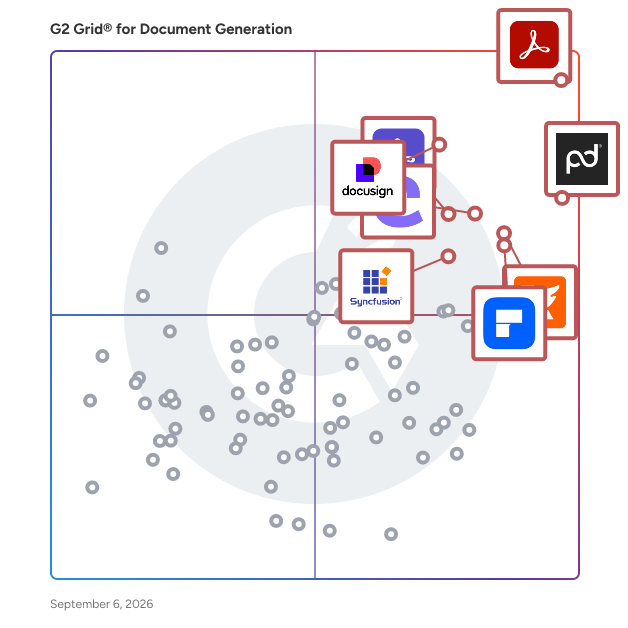
G2 Grid® for Document Generation Software

G2 Grid® for Document Generation Software plotting products by satisfaction and market presence

Highlighted products: Adobe Acrobat, PandaDoc, Docusign CLM, Foxit PDF Editor, Conga Composer, Wondershare PDFelement, Adobe Acrobat Sign, and Essential Studio.

Underlying data: [Grid® JSON](https://www.g2.com/categories/document-generation/grids.json?focus%5B%5D=adobe-acrobat&focus%5B%5D=pandadoc&focus%5B%5D=docusign-clm&focus%5B%5D=foxit-pdf-editor&focus%5B%5D=conga-composer&focus%5B%5D=wondershare-wondershare-pdfelement&focus%5B%5D=adobe-acrobat-sign&focus%5B%5D=essential-studio)

dox42

Unlock the full potential of your software systems with dox42—a powerful and user-friendly document generation solution that revolutionizes how you create and manage documents. Seamlessly integrating with industry-leading technologies such as Microsoft Word, Excel, PowerPoint, Dynamics 365, SharePoint, and many more, dox42 enables you to automate the creation of highly personalized documents, reports, and presentations. Easily pull data from any source, ensuring your team can produce consistent, accurate, and professional content in a fraction of the time, enhancing productivity and operational efficiency across your organization.

Average Rating: 4.5/5.0

Total Reviews: 1

Who Is the Company Behind dox42?

  • Seller: dox42
  • Year Founded: 2011
  • HQ Location: Vienna, AT
  • Twitter: @dox42
    1,542 Twitter followers
  • LinkedIn® Page: www.linkedin.com
    33 employees on LinkedIn®

Who Uses This Product?

  • Company Size: 100% Small

What Are Recent G2 Reviews of dox42?

What Are G2 Users Discussing About dox42?

ExactDocs

With ExactDocs, you can centralize and control all your document templates, ensuring perfectly compliant and accurate documents every time. This user-friendly solution seamlessly integrates with your Microsoft productivity tools, including SharePoint, OneDrive, Dynamics 365, Word, and more. As a versatile SaaS product, ExactDocs easily connects with third-party systems. When paired with Microsoft Power Automate and/or the InRule Decisions Platform, it can generate documents based on complex rule sets and workflows. Say goodbye to proposals with wrong amounts or customer names, agreements with incorrect terms and conditions, and employment contracts with outdated company policies. Ensure your brand remains consistent and professional by always providing the most up-to-date versions of your documents.

Average Rating: 5.0/5.0

Total Reviews: 1

How Do G2 Users Rate ExactDocs?

  • Has the product been a good partner in doing business?: 10.0/10 (Category avg: 9.3/10)
  • Documents: 10.0/10 (Category avg: 8.9/10)
  • Software: 10.0/10 (Category avg: 8.6/10)
  • Workflow: 10.0/10 (Category avg: 8.6/10)

Who Is the Company Behind ExactDocs?

  • Seller: ExactDocs
  • Year Founded: 2018
  • HQ Location: Darlinghurst, AU
  • LinkedIn® Page: www.linkedin.com
    2 employees on LinkedIn®

Who Uses This Product?

  • Company Size: 100% Medium

What Do G2 Reviewers Say About ExactDocs?

AI-generated summary from verified user reviews

Pros
  • Users value the automated document generation feature of ExactDocs, greatly enhancing efficiency and productivity.
  • Users value the reliable customer support of ExactDocs, enhancing their experience with prompt assistance and updates.
  • Users value the customization options of ExactDocs, enhancing branding and streamlining document generation efficiently.
  • Users appreciate the time-saving automated document generation of ExactDocs, which streamlines their workflow effectively.
  • Users appreciate the ease of use of ExactDocs, citing its intuitive interface and quick document generation capabilities.
Cons
  • Users find the lack of integrations limits functionality and requires manual input for updates, impacting efficiency.
  • Users face update issues due to manual input requirements and a lack of third-party platform integrations.

What Are Recent G2 Reviews of ExactDocs?

Flowlu

Flowlu is a cloud-based business management platform designed to help teams plan, track, and optimize their work in a single, centralized workspace. It provides a suite of tools for project management, CRM, task tracking, financial management, team collaboration, and knowledge sharing. Flowlu is built to streamline operations, improve productivity, and ensure seamless communication across teams, making it an ideal solution for businesses of all sizes, from startups to large enterprises. Flowlu supports organizations across various industries by offering tools to: Manage projects efficiently with task assignments, deadlines, progress tracking, and automated workflows. Streamline sales processes with an integrated CRM, pipeline management, and automated follow-ups. Optimize financial operations through invoicing, expense tracking, budgeting, and revenue forecasting. Enhance team collaboration with real-time communication, shared workspaces, and internal chat. Store and distribute knowledge with an internal and external knowledge base for easy access to critical information. Key Features & Benefits Project Management: Utilize Kanban boards, Gantt charts, and task dependencies for structured planning and execution. CRM & Sales Automation: Track leads, manage opportunities, and set up automated workflows for follow-ups and deal tracking. Financial Management: Create invoices, process payments, monitor expenses, and gain real-time insights into business profitability. Customization: Personalize workflows, dashboards, reports, and fields to fit specific business needs. Time Tracking & Workload Management: Monitor time spent on tasks and balance workloads to enhance team efficiency. Client Portal: Securely share project updates, invoices, and documents with clients for smooth communication. Who Can Benefit from Flowlu? Flowlu is designed for small to mid-sized businesses, agencies, freelancers, and enterprises that need an all-in-one platform to manage their projects, finances, and client relationships. It is particularly valuable for service-based businesses, consulting firms, IT companies, creative agencies, and product development teams looking to improve efficiency and organization. By centralizing essential business operations, Flowlu eliminates the need for multiple disconnected tools, enabling teams to stay organized, productive, and focused on achieving their goals.

Average Rating: 4.7/5.0

Total Reviews: 196

How Do G2 Users Rate Flowlu?

  • Has the product been a good partner in doing business?: 9.5/10 (Category avg: 9.3/10)
  • Documents: 10.0/10 (Category avg: 8.9/10)
  • Software: 10.0/10 (Category avg: 8.6/10)
  • Workflow: 10.0/10 (Category avg: 8.6/10)

Who Is the Company Behind Flowlu?

  • Seller: Cloud22
  • Year Founded: 2016
  • HQ Location: Dubai
  • Twitter: @Flowlusoft
    194 Twitter followers
  • LinkedIn® Page: www.linkedin.com
    9 employees on LinkedIn®

Who Uses This Product?

  • Who Uses This: CEO, Owner
  • Top Industries: Marketing and Advertising, Information Technology and Services
  • Company Size: 89% Small, 9% Medium

What Do G2 Reviewers Say About Flowlu?

AI-generated summary from verified user reviews

Pros
  • Users value Flowlu's efficiency, benefiting from its all-in-one design that centralizes project management seamlessly.
  • Users love the intuitive interface of Flowlu, which simplifies project management and enhances team productivity.
  • Users praise Flowlu for its affordable pricing combined with excellent features, enhancing productivity and efficiency significantly.
  • Users love the harmonious functionality of Flowlu, appreciating its universal appeal and constant updates.
  • Users appreciate the automation capabilities of Flowlu, benefiting from its harmonious integration of multiple functions within one system.

What Are Recent G2 Reviews of Flowlu?

What Are G2 Users Discussing About Flowlu?
AI can help you find the answers. G2 helps you trust them.

Connect G2 to Claude or ChatGPT for answers grounded in G2's trusted reviews, comparisons, and pricing from real user insights.

How it works

Pactly

Pactly is a contract management platform designed to streamline your contract lifecycle, from drafting to signing. Empower legal teams of all sizes to automate tasks, collaborate efficiently with business teams, and gain real-time visibility into contracts. With customizable templates, AI-assisted playbook reviews, and advanced workflows and analytics, Pactly saves time, reduces risk, and improves processes. Join the many small and large teams using Pactly to revolutionize contract management.

Average Rating: 5.0/5.0

Total Reviews: 2

How Do G2 Users Rate Pactly?

  • Documents: 10.0/10 (Category avg: 8.9/10)
  • Software: 10.0/10 (Category avg: 8.6/10)
  • Workflow: 10.0/10 (Category avg: 8.6/10)

Who Is the Company Behind Pactly?

Who Uses This Product?

  • Company Size: 50% Medium, 50% Small

What Are Recent G2 Reviews of Pactly?

Pitchly Documents

Pitchly helps organizations put their data to work. With a focus on automated data-to-document-generation, our platform and apps have been developed around the mission of making every decision and activity data-driven. Pitchly makes it easy to activate your data into content in a matter of seconds - eliminating the burden of repetitive tasks and increasing the quality of your documents.

Average Rating: 4.5/5.0

Total Reviews: 1

How Do G2 Users Rate Pitchly Documents?

  • Documents: 8.3/10 (Category avg: 8.9/10)
  • Workflow: 8.3/10 (Category avg: 8.6/10)

Who Is the Company Behind Pitchly Documents?

  • Seller: Pitchly
  • Year Founded: 2014
  • HQ Location: Des Moines, US
  • Twitter: @pitchlyinc
    456 Twitter followers
  • LinkedIn® Page: www.linkedin.com
    12 employees on LinkedIn®

Who Uses This Product?

  • Company Size: 100% Medium

What Are Recent G2 Reviews of Pitchly Documents?

What Are G2 Users Discussing About Pitchly Documents?

Sendabrief

Sendabrief turns the process knowledge you already have into structured, approved SOPs. Click through a process once in your browser and the Chrome extension captures every click as a numbered step with an annotated screenshot. Or talk it through, upload the PDF, Word doc or deck, paste a meeting transcript, upload the recording and let Sendabrief transcribe it, or write it by hand. Whichever way you start, you get a numbered SOP with steps, roles, and if/then decision branches in seconds, not a blank template. Built for operations managers, chiefs of staff, and heads of people at growing companies. Features include a step editor with rich text, callouts, inline screenshots and decision branches; PDF and Word export; share links and embeds; an approval gate before anything goes live; scheduled review cycles so SOPs get re-confirmed instead of quietly going stale; read acknowledgements tracked per version; view and search analytics; version history; duplicate detection; teams, roles and per-SOP access; guest task assignment by magic link with no login; translations; a branded client portal; plus API and webhooks.

Average Rating: 5.0/5.0

Total Reviews: 1

How Do G2 Users Rate Sendabrief?

  • Documents: 10.0/10 (Category avg: 8.9/10)
  • Workflow: 10.0/10 (Category avg: 8.6/10)

Who Is the Company Behind Sendabrief?

  • Seller: Sendabrief
  • Year Founded: 2026
  • HQ Location: Amman, Tariq 11731, Jordan
  • Twitter: @sendabrief
  • LinkedIn® Page: www.linkedin.com
    1 employees on LinkedIn®

Who Uses This Product?

  • Company Size: 100% Small

What Are Recent G2 Reviews of Sendabrief?

ActiveMerge

ActiveMerge is a document generation and automation platform that helps businesses create personalized Word, PDF and PowerPoint documents from templates and structured data. Users can turn repetitive document workflows into automated processes for contracts, certificates, employee documents, offers, reports, invoices and other business documents. ActiveMerge supports dynamic templates with merge fields, repeating data, bulk document generation and multiple output formats. Documents can be generated from spreadsheets, business applications, forms or API-driven workflows. The web forms can be used to collect data and also generate documents on demand. The platform also includes electronic signatures,allowing businesses to generate, send and collect signed documents without using a separate document-generation and e-signature system. ActiveMerge is designed for teams that need to generate documents repeatedly from business data, including HR teams, schools, professional services companies, operations teams and software developers. Common workflows include generating documents from Excel or Google Sheets data, creating certificates in bulk, producing contracts automatically, generating Word or PDF files through an API, and creating PowerPoint presentations from structured data.

Who Is the Company Behind ActiveMerge?

Athento

Athento is a versatile, powerful, and smart content platform that enables a truly digital workplace for businesses by integrating processes, documents, and data. And the best is you can do it yourself. Grow your digital transformation without the pain of complicated development projects and avoid digital obsolescence. There is no need for coding, to automate your business.

Average Rating: 3.5/5.0

Total Reviews: 1

Who Is the Company Behind Athento?

  • Seller: Athento
  • Year Founded: 2005
  • HQ Location: Málaga, ES
  • Twitter: @athento
    549 Twitter followers
  • LinkedIn® Page: www.linkedin.com
    22 employees on LinkedIn®

Who Uses This Product?

  • Company Size: 100% Large

Continia Document Output

Continia Document Output improves the outgoing document management by automating the entire distribution process directly inside Microsoft Business Central. Instead of manually sending invoices, remittance advices, and statements one by one, you set up smart email templates once, and Document Output handles the rest. Templates are fully customizable per recipient type, language, or dimension, and AI-powered translation means reaching international customers no longer requires a separate process. PDFs can be password-protected, digitally signed, watermarked, and eIDAS eSeal certified to prevent tampering and keep your documents compliant. For more information or to book a free demo, visit: https://www.continia.com/solutions/document-output/

Who Is the Company Behind Continia Document Output?

DocCourier

DocCourier lets finance and operations teams design and change the business documents their ERP sends, without a developer or an ERP change. That covers invoices, statements, quotes, purchase orders, remittance advices, packing slips and labels. Your ERP keeps doing what it does. DocCourier takes the XML or JSON it already exports, through a REST API or a watched folder on your own server (the DocCourier Folder Agent for Windows and Linux). You map the fields once, then build as many document designs as you need in a drag-and-drop designer, previewing each with real data. Documents are rendered to PDF, emailed and archived, with a tamper-evident record of every send and one-click resend. It works with any ERP that can export XML or JSON, including SAP, Microsoft Dynamics 365 Business Central, NetSuite, MYOB Advanced, Pronto Xi and Epicor. Because the templates live outside the ERP, they stay yours when you upgrade or change systems. Built in Brisbane, Australia. Plans from AUD $129 a month, with a 30-day free trial. See a real invoice change in under a minute: doccourier.com.au/demo

Who Is the Company Behind DocCourier?

Docentric AX

In Dynamics 365 Finance and Supply Chain implementations, clients often need to customize documents and reports. SSRS and Electronic Reporting are time-consuming and developer-resource-intensive. These methods often delay implementation schedules and increase costs. Docentric offers a streamlined alternative, fully integrated into D365FO, avoiding the complexity of SSRS&ER or risks of external connectors. Design templates up to 10x faster: Docentric uses Microsoft Word, enhanced with the Docentric Add-In, to enable you to easily design professional transactional documents. This approach leverages the familiarity, usability, and comprehensive formatting features of Word, making it a much better choice compared to proprietary editors. Familiar and intuitive user interface allows both technical and non-technical users to create high-quality report templates with ease. The Docentric Report Generation Engine runs inside D365FO, acting as a native part of the system. It does not require additional servers and connectors to send data to an external service. This approach reduces setup and configuration time, lowers infrastructure costs, is secure and scales with D365FO without additional costs. Docentric enhances document distribution in D365FO by building on the existing SSRS pipeline. This integration allows you to continue using the familiar D365FO functionality while benefiting from additional features that improve flexibility and efficiency.

Who Is the Company Behind Docentric AX?

doctagd

Here's a "What is doctagd?" description that follows G2's rules: 250–500 words, opens with an objective dictionary-style sentence, stays informative rather than promotional, and breaks into bullets for features and benefits. No em dashes. doctagd is a document generation solution that helps teams turn structured spreadsheet data into finished Word and PDF documents in bulk. Users upload an Excel file, optionally pair it with a Word template, and doctagd produces one populated document per row of data, delivered as a single downloadable file. The product is built for high-volume, low-variability document work, where the same type of document is produced repeatedly from changing data. Common use cases include service agreements, non-disclosure agreements, employment paperwork, IT access requests, certificates, quotes, packing slips, and standard notices. Typical users include small and medium business operators, legal operations and in-house legal teams, HR, procurement, and technical users building automated workflows. doctagd offers two ways to generate documents. In Mapped mode, the user uploads an Excel file together with a Word template, and the product detects the placeholders in the template and matches them to spreadsheet columns. The user confirms or adjusts the mapping, then generates a branded document for every row. In Quick mode, the user uploads an Excel file with no template, and doctagd builds a clean, form-style document from the column headers and values. Both modes support reusable saved configurations, so a setup created once can be re-run against new data without repeating the mapping step. The product also connects to external systems through an API, allowing saved configurations to be triggered from automation platforms such as Zapier, n8n, and Make. This supports hands-off workflows, for example generating documents automatically from new rows in a connected spreadsheet. Key features and capabilities include: Two generation modes, covering both template-based output and template-free form-style documents Bulk generation of up to 500 documents per run, delivered as a single zipped file Saved configurations that store mappings and formatting for repeated reuse Automatic pattern detection that identifies delimited, grouped, and repeated data and suggests how to format it Drift detection that flags missing columns when source data changes and allows remapping before generation PDF export on paid plans, with Word output available on all plans An API for programmatic generation and integration with Zapier, n8n, and Make doctagd is available on Free, Pro, and Business plans, with monthly document allowances and saved-configuration limits that scale by plan. The Free plan supports light or occasional use, while the paid plans add higher volume limits, PDF export, API access, and shared team licenses.

Who Is the Company Behind doctagd?

Document Generator

The Document Generator Add-On is a powerful automation tool that streamlines document creation directly within Google Sheets. Designed for businesses, organizations, and institutes, this add-on eliminates manual effort by auto-generating invoices, certificates, reports, proposals, and other documents in just a few clicks. Key Features: ✅ Automated Document Creation – Generate multiple documents in Google Docs, Sheets, Slides, Word, Excel, PowerPoint, and PDF formats. ✅ Custom Templates – Use placeholders to personalize documents dynamically with data from Google Sheets. ✅ Google Forms Integration – Automatically create documents when a Google Form response is submitted. ✅ Organized Output – Store generated files in structured subfolders within Google Drive. ✅ Email Integration – Send documents directly via email with personalized messages. ✅ Auto-Run in Background – Enable auto-generation for new form responses without manual intervention. With an easy-to-use interface and seamless Google Workspace integration, the Document Generator Add-On saves time, enhances productivity, and ensures consistency in document formatting. Whether you're creating bulk invoices, contracts, or reports, this tool makes document automation effortless.

Who Is the Company Behind Document Generator?

DocumentsCorePack

Whether you're in the manufacturing industry or the finance department, our solution is designed to help you achieve your document requirements and goals, while enabling you to focus on growing your business. From creation to electronic signature, and even complex document requirements. With its user-friendly and powerful features, DocumentsCorePack simplifies, optimizes, and automates all your document processes. Suitable for every industry and department, our solution guarantees streamlined and professional document processes and improved efficiency.

Who Is the Company Behind DocumentsCorePack?

docuWeaver

docuWeaver is a Salesforce document management, document generation, and e-signature solution that enables organizations to manage the complete document lifecycle directly within Salesforce. It allows users to generate documents using Salesforce and external data, store files in Salesforce or external storage systems, send documents for signature using preferred e-signature platforms, and access all documents within Salesforce. docuWeaver is categorized as Salesforce document management software and Salesforce document generation software. It is designed for teams that rely on Salesforce as their system of record and require secure, scalable, and automated document workflows across sales, operations, finance, legal, and service functions. 1. Document Generation The Document Generation module automates document creation using Salesforce and external data sources. Key capabilities: - Create datasets using Salesforce standard and custom objects and external data sources - Generate documents in Word and PDF formats - Support for Salesforce PDF generation -Template-based document creation along with template versioning - Fully automated document generation in Salesforce - Trigger document generation via Salesforce flows - Send automated emails after document generation - Configure reusable email templates 2. E-Signature The E-Signature module enables flexible and automated signing workflows within Salesforce. Key capabilities: - Integrate with multiple Salesforce e-signature platforms - Support for multiple recipients and signing sequences - Track signing status within Salesforce - Automate e-signature workflows as part of document generation 3. Document Management The Document Management module provides centralized control over files while removing Salesforce storage limitations. Key capabilities: - Store documents in Salesforce or any external storage server - Access externally stored files directly within Salesforce - Organize documents using folders and structured hierarchies - Store files based on data residency requirements - Upload any file type and file size - Maintain document versions and revision history - Perform bulk file uploads - Search documents by file name, folder, or content - Control access using Salesforce permissions End-to-End Automation docuWeaver allows organizations to automate the full document lifecycle within a single Salesforce platform: from document generation to e-signature and final storage. Once documents are signed, they can be automatically stored in the preferred storage location and remain accessible within Salesforce records.

Average Rating: 4.5/5.0

Total Reviews: 1

Who Is the Company Behind docuWeaver?

  • Seller: Enzigma
  • Year Founded: 2002
  • HQ Location: Pune, IN
  • Twitter: @enzigma
    294 Twitter followers
  • LinkedIn® Page: www.linkedin.com
    118 employees on LinkedIn®

What Do G2 Reviewers Say About docuWeaver?

AI-generated summary from verified user reviews

Pros
  • Users value the ease of use of docuWeaver, enjoying its intuitive design and straightforward setup process for efficient file management.
  • Users value the ease of setup with docuWeaver, appreciating its straightforward installation and user-friendly interface.
  • Users appreciate the automation features of DocuWeaver, streamlining workflows and significantly reducing manual efforts and costs.
  • Users highlight the intuitive folder structure of docuWeaver, enhancing organization and file management efficiency significantly.
  • Users appreciate the user-friendly document management of DocuWeaver, which simplifies processes and integrates seamlessly with other tools.

What Are Recent G2 Reviews of docuWeaver?

Neeraja Prakash
NP
Researched and written by Neeraja Prakash
Updated October 3, 2024