Introducing G2.ai, the future of software buying.Try now

Best Data Loss Prevention (DLP) Software for Small Business

Lauren Worth
LW
Researched and written by Lauren Worth

Products classified in the overall Data Loss Prevention (DLP) category are similar in many regards and help companies of all sizes solve their business problems. However, small business features, pricing, setup, and installation differ from businesses of other sizes, which is why we match buyers to the right Small Business Data Loss Prevention (DLP) to fit their needs. Compare product ratings based on reviews from enterprise users or connect with one of G2's buying advisors to find the right solutions within the Small Business Data Loss Prevention (DLP) category.

In addition to qualifying for inclusion in the Data Loss Prevention (DLP) Software category, to qualify for inclusion in the Small Business Data Loss Prevention (DLP) Software category, a product must have at least 10 reviews left by a reviewer from a small business.

Show More
Show Less

G2 takes pride in showing unbiased reviews on user satisfaction in our ratings and reports. We do not allow paid placements in any of our ratings, rankings, or reports. Learn about our scoring methodologies.

Coming Soon
Get Trending Data Loss Prevention (DLP) Products in Your Inbox

A weekly snapshot of rising stars, new launches, and what everyone's buzzing about.

Sample Trending Products Newsletter
1 filter applied
Clear All

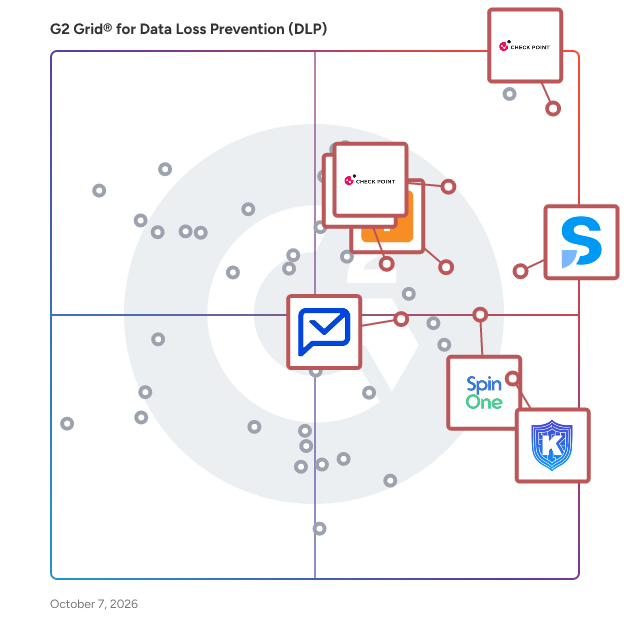
17 Listings in Small Business Data Loss Prevention (DLP) Available

(566)4.5 out of 5
7th Easiest To Use in Data Loss Prevention (DLP) software
View top Consulting Services for Check Point Next Generation Firewalls (NGFWs)
Save to My Lists
  • Overview
    Expand/Collapse Overview
  • Product Description
    How are these determined?Information
    This description is provided by the seller.

    Strengthen Your Security with Check Point Gateways and Firewalls Check Point Hybrid Mesh Network Security is a comprehensive cybersecurity solution designed to protect networks from sophisticated

    Users
    • Network Security Engineer
    • Network Engineer
    Industries
    • Computer & Network Security
    • Information Technology and Services
    Market Segment
    • 44% Mid-Market
    • 43% Enterprise
  • Pros and Cons
    Expand/Collapse Pros and Cons
  • Check Point Next Generation Firewalls (NGFWs) Pros and Cons
    How are these determined?Information
    Pros and Cons are compiled from review feedback and grouped into themes to provide an easy-to-understand summary of user reviews.
    Pros
    Cybersecurity
    91
    Features
    80
    Threat Detection
    77
    Network Security
    71
    Centralized Management
    60
    Cons
    Expensive
    69
    Complexity
    48
    Complex Setup
    42
    Slow Performance
    41
    Learning Curve
    36
  • User Satisfaction
    Expand/Collapse User Satisfaction
  • Check Point Next Generation Firewalls (NGFWs) features and usability ratings that predict user satisfaction
    8.6
    Ease of Use
    Average: 8.9
    8.8
    Access Control
    Average: 8.6
    8.8
    Compliance
    Average: 9.0
    8.6
    Data Visibility
    Average: 8.8
  • Seller Details
    Expand/Collapse Seller Details
  • Seller Details
    Company Website
    Year Founded
    1993
    HQ Location
    San Carlos, CA
    Twitter
    @CheckPointSW
    70,953 Twitter followers
    LinkedIn® Page
    www.linkedin.com
    8,323 employees on LinkedIn®
Product Description
How are these determined?Information
This description is provided by the seller.

Strengthen Your Security with Check Point Gateways and Firewalls Check Point Hybrid Mesh Network Security is a comprehensive cybersecurity solution designed to protect networks from sophisticated

Users
  • Network Security Engineer
  • Network Engineer
Industries
  • Computer & Network Security
  • Information Technology and Services
Market Segment
  • 44% Mid-Market
  • 43% Enterprise
Check Point Next Generation Firewalls (NGFWs) Pros and Cons
How are these determined?Information
Pros and Cons are compiled from review feedback and grouped into themes to provide an easy-to-understand summary of user reviews.
Pros
Cybersecurity
91
Features
80
Threat Detection
77
Network Security
71
Centralized Management
60
Cons
Expensive
69
Complexity
48
Complex Setup
42
Slow Performance
41
Learning Curve
36
Check Point Next Generation Firewalls (NGFWs) features and usability ratings that predict user satisfaction
8.6
Ease of Use
Average: 8.9
8.8
Access Control
Average: 8.6
8.8
Compliance
Average: 9.0
8.6
Data Visibility
Average: 8.8
Seller Details
Company Website
Year Founded
1993
HQ Location
San Carlos, CA
Twitter
@CheckPointSW
70,953 Twitter followers
LinkedIn® Page
www.linkedin.com
8,323 employees on LinkedIn®
(188)4.5 out of 5
Optimized for quick response
1st Easiest To Use in Data Loss Prevention (DLP) software
Save to My Lists
Entry Level Price:Free
  • Overview
    Expand/Collapse Overview
  • Product Description
    How are these determined?Information
    This description is provided by the seller.

    Safetica’s Intelligent Data Security protects sensitive data where teams work, using powerful AI to deliver contextual awareness, reduce false positives, and stop real threats without disrupting produ

    Users
    • IT Manager
    Industries
    • Information Technology and Services
    • Computer & Network Security
    Market Segment
    • 60% Mid-Market
    • 37% Small-Business
    User Sentiment
    How are these determined?Information
    These insights, currently in beta, are compiled from user reviews and grouped to display a high-level overview of the software.
    • Safetica is a data protection and insider threat prevention software that provides visibility into sensitive information usage across organizations and includes features such as detailed reporting, customizable policies, and user-friendly interface.
    • Reviewers frequently mention the comprehensive approach to data protection, easy deployment, clear visibility into sensitive information usage, detailed reporting, customizable policies, and an intuitive user interface as key benefits of Safetica.
    • Users experienced issues such as complex advanced configuration options, occasional system performance impact during intensive monitoring, slower updates, less seamless integration with certain third-party tools, and lack of visibility in web Outlook.
  • Pros and Cons
    Expand/Collapse Pros and Cons
  • Safetica Pros and Cons
    How are these determined?Information
    Pros and Cons are compiled from review feedback and grouped into themes to provide an easy-to-understand summary of user reviews.
    Pros
    Ease of Use
    27
    Features
    22
    Security
    22
    Data Protection
    20
    Implementation Ease
    16
    Cons
    Slow Performance
    11
    Performance Issues
    9
    Integration Issues
    7
    Limited Features
    6
    Access Limitations
    5
  • User Satisfaction
    Expand/Collapse User Satisfaction
  • Safetica features and usability ratings that predict user satisfaction
    9.0
    Ease of Use
    Average: 9.0
    9.0
    Access Control
    Average: 8.6
    9.1
    Compliance
    Average: 9.0
    9.1
    Data Visibility
    Average: 8.8
  • Seller Details
    Expand/Collapse Seller Details
  • Seller Details
    Seller
    Safetica
    Company Website
    Year Founded
    2011
    HQ Location
    San Jose, California, United States
    Twitter
    @Safetica
    670 Twitter followers
    LinkedIn® Page
    www.linkedin.com
    108 employees on LinkedIn®
Product Description
How are these determined?Information
This description is provided by the seller.

Safetica’s Intelligent Data Security protects sensitive data where teams work, using powerful AI to deliver contextual awareness, reduce false positives, and stop real threats without disrupting produ

Users
  • IT Manager
Industries
  • Information Technology and Services
  • Computer & Network Security
Market Segment
  • 60% Mid-Market
  • 37% Small-Business
User Sentiment
How are these determined?Information
These insights, currently in beta, are compiled from user reviews and grouped to display a high-level overview of the software.
  • Safetica is a data protection and insider threat prevention software that provides visibility into sensitive information usage across organizations and includes features such as detailed reporting, customizable policies, and user-friendly interface.
  • Reviewers frequently mention the comprehensive approach to data protection, easy deployment, clear visibility into sensitive information usage, detailed reporting, customizable policies, and an intuitive user interface as key benefits of Safetica.
  • Users experienced issues such as complex advanced configuration options, occasional system performance impact during intensive monitoring, slower updates, less seamless integration with certain third-party tools, and lack of visibility in web Outlook.
Safetica Pros and Cons
How are these determined?Information
Pros and Cons are compiled from review feedback and grouped into themes to provide an easy-to-understand summary of user reviews.
Pros
Ease of Use
27
Features
22
Security
22
Data Protection
20
Implementation Ease
16
Cons
Slow Performance
11
Performance Issues
9
Integration Issues
7
Limited Features
6
Access Limitations
5
Safetica features and usability ratings that predict user satisfaction
9.0
Ease of Use
Average: 9.0
9.0
Access Control
Average: 8.6
9.1
Compliance
Average: 9.0
9.1
Data Visibility
Average: 8.8
Seller Details
Seller
Safetica
Company Website
Year Founded
2011
HQ Location
San Jose, California, United States
Twitter
@Safetica
670 Twitter followers
LinkedIn® Page
www.linkedin.com
108 employees on LinkedIn®

This is how G2 Deals can help you:

  • Easily shop for curated – and trusted – software
  • Own your own software buying journey
  • Discover exclusive deals on software
  • Overview
    Expand/Collapse Overview
  • Product Description
    How are these determined?Information
    This description is provided by the seller.

    AvePoint is the global leader in data security, governance, and resilience, going beyond traditional solutions to ensure a robust data foundation and enable organizations everywhere to collaborate wit

    Users
    No information available
    Industries
    • Information Technology and Services
    • Computer Software
    Market Segment
    • 44% Mid-Market
    • 34% Small-Business
  • Pros and Cons
    Expand/Collapse Pros and Cons
  • AvePoint Confidence Platform Pros and Cons
    How are these determined?Information
    Pros and Cons are compiled from review feedback and grouped into themes to provide an easy-to-understand summary of user reviews.
    Pros
    Ease of Use
    40
    Cloud Backup
    26
    Backup Frequency
    22
    Cloud Computing
    18
    Cloud Services
    16
    Cons
    Expensive
    10
    Backup Issues
    6
    Learning Curve
    5
    Poor Customer Support
    5
    Integration Issues
    4
  • User Satisfaction
    Expand/Collapse User Satisfaction
  • AvePoint Confidence Platform features and usability ratings that predict user satisfaction
    9.1
    Ease of Use
    Average: 8.9
    0.0
    No information available
    0.0
    No information available
    0.0
    No information available
  • Seller Details
    Expand/Collapse Seller Details
  • Seller Details
    Seller
    AvePoint
    Company Website
    Year Founded
    2001
    HQ Location
    Jersey City, NJ
    Twitter
    @AvePoint
    9,818 Twitter followers
    LinkedIn® Page
    www.linkedin.com
    2,309 employees on LinkedIn®
Product Description
How are these determined?Information
This description is provided by the seller.

AvePoint is the global leader in data security, governance, and resilience, going beyond traditional solutions to ensure a robust data foundation and enable organizations everywhere to collaborate wit

Users
No information available
Industries
  • Information Technology and Services
  • Computer Software
Market Segment
  • 44% Mid-Market
  • 34% Small-Business
AvePoint Confidence Platform Pros and Cons
How are these determined?Information
Pros and Cons are compiled from review feedback and grouped into themes to provide an easy-to-understand summary of user reviews.
Pros
Ease of Use
40
Cloud Backup
26
Backup Frequency
22
Cloud Computing
18
Cloud Services
16
Cons
Expensive
10
Backup Issues
6
Learning Curve
5
Poor Customer Support
5
Integration Issues
4
AvePoint Confidence Platform features and usability ratings that predict user satisfaction
9.1
Ease of Use
Average: 8.9
0.0
No information available
0.0
No information available
0.0
No information available
Seller Details
Seller
AvePoint
Company Website
Year Founded
2001
HQ Location
Jersey City, NJ
Twitter
@AvePoint
9,818 Twitter followers
LinkedIn® Page
www.linkedin.com
2,309 employees on LinkedIn®
(120)4.8 out of 5
Optimized for quick response
5th Easiest To Use in Data Loss Prevention (DLP) software
Save to My Lists
$500 Off
  • Overview
    Expand/Collapse Overview
  • Product Description
    How are these determined?Information
    This description is provided by the seller.

    SpinOne is an all-in-one SaaS security platform that protects your mission critical SaaS environments including Google Workplace, Microsoft 365, Salesforce, Slack – and now we've added 50+ more SaaS a

    Users
    • IT Director
    • CEO
    Industries
    • Marketing and Advertising
    • Non-Profit Organization Management
    Market Segment
    • 50% Mid-Market
    • 42% Small-Business
    User Sentiment
    How are these determined?Information
    These insights, currently in beta, are compiled from user reviews and grouped to display a high-level overview of the software.
    • SpinOne is a platform designed to provide data security, backup, and recovery for Google Workspace and Microsoft 365, with features such as ransomware detection and response, data leak prevention, and security posture management.
    • Reviewers like the ease of use, reliable backup, granular data control, and the ability to monitor and manage security risks, with many praising the responsive and helpful support team.
    • Reviewers experienced issues with granular data retention, slow data refreshing from Google Workspace, limited functionality on certain plans, lack of advanced backup management features, and difficulties with the user interface.
  • Pros and Cons
    Expand/Collapse Pros and Cons
  • SpinOne Pros and Cons
    How are these determined?Information
    Pros and Cons are compiled from review feedback and grouped into themes to provide an easy-to-understand summary of user reviews.
    Pros
    Ease of Use
    33
    Customer Support
    31
    Backup Ease
    25
    Reliability
    24
    Backup Features
    20
    Cons
    Backup Issues
    9
    Expensive
    8
    Poor Interface Design
    8
    Lack of Backup
    5
    Pricing Issues
    4
  • User Satisfaction
    Expand/Collapse User Satisfaction
  • SpinOne features and usability ratings that predict user satisfaction
    9.1
    Ease of Use
    Average: 9.0
    9.0
    Access Control
    Average: 8.6
    9.1
    Compliance
    Average: 9.0
    9.0
    Data Visibility
    Average: 8.8
  • Seller Details
    Expand/Collapse Seller Details
  • Seller Details
    Seller
    SpinAI
    Company Website
    Year Founded
    2017
    HQ Location
    Palo Alto, California
    Twitter
    @spintechinc
    765 Twitter followers
    LinkedIn® Page
    www.linkedin.com
    85 employees on LinkedIn®
Product Description
How are these determined?Information
This description is provided by the seller.

SpinOne is an all-in-one SaaS security platform that protects your mission critical SaaS environments including Google Workplace, Microsoft 365, Salesforce, Slack – and now we've added 50+ more SaaS a

Users
  • IT Director
  • CEO
Industries
  • Marketing and Advertising
  • Non-Profit Organization Management
Market Segment
  • 50% Mid-Market
  • 42% Small-Business
User Sentiment
How are these determined?Information
These insights, currently in beta, are compiled from user reviews and grouped to display a high-level overview of the software.
  • SpinOne is a platform designed to provide data security, backup, and recovery for Google Workspace and Microsoft 365, with features such as ransomware detection and response, data leak prevention, and security posture management.
  • Reviewers like the ease of use, reliable backup, granular data control, and the ability to monitor and manage security risks, with many praising the responsive and helpful support team.
  • Reviewers experienced issues with granular data retention, slow data refreshing from Google Workspace, limited functionality on certain plans, lack of advanced backup management features, and difficulties with the user interface.
SpinOne Pros and Cons
How are these determined?Information
Pros and Cons are compiled from review feedback and grouped into themes to provide an easy-to-understand summary of user reviews.
Pros
Ease of Use
33
Customer Support
31
Backup Ease
25
Reliability
24
Backup Features
20
Cons
Backup Issues
9
Expensive
8
Poor Interface Design
8
Lack of Backup
5
Pricing Issues
4
SpinOne features and usability ratings that predict user satisfaction
9.1
Ease of Use
Average: 9.0
9.0
Access Control
Average: 8.6
9.1
Compliance
Average: 9.0
9.0
Data Visibility
Average: 8.8
Seller Details
Seller
SpinAI
Company Website
Year Founded
2017
HQ Location
Palo Alto, California
Twitter
@spintechinc
765 Twitter followers
LinkedIn® Page
www.linkedin.com
85 employees on LinkedIn®
(217)4.7 out of 5
Optimized for quick response
2nd Easiest To Use in Data Loss Prevention (DLP) software
Save to My Lists
Entry Level Price:Starting at $9.50
  • Overview
    Expand/Collapse Overview
  • Product Description
    How are these determined?Information
    This description is provided by the seller.

    Coro is the easy cybersecurity company. We designed an all-in-one platform that every lean IT team will master. While other solutions scare people into buying complicated, confusing products, we lead

    Users
    • IT Manager
    • IT Director
    Industries
    • Non-Profit Organization Management
    • Financial Services
    Market Segment
    • 58% Mid-Market
    • 37% Small-Business
    User Sentiment
    How are these determined?Information
    These insights, currently in beta, are compiled from user reviews and grouped to display a high-level overview of the software.
    • Coro is a cybersecurity product that provides protection for small businesses, with features such as flagging potential spam and phishing, and offering a dashboard for easy administration.
    • Reviewers appreciate the product's high success rate in capturing threats, its intuitive platform, and the responsive and helpful support team that makes the onboarding process easy.
    • Users experienced issues with the product being particular about the version of Outlook for the Coro add-in, the inability to interact directly with the Bitdefender agent on local machines, and unclear instructions on how to resolve errors.
  • Pros and Cons
    Expand/Collapse Pros and Cons
  • Coro Cybersecurity Pros and Cons
    How are these determined?Information
    Pros and Cons are compiled from review feedback and grouped into themes to provide an easy-to-understand summary of user reviews.
    Pros
    Ease of Use
    88
    Customer Support
    63
    Security
    62
    Protection
    50
    Easy Setup
    45
    Cons
    Performance Issues
    31
    Improvements Needed
    19
    False Positives
    15
    Inaccuracy
    15
    Missing Features
    14
  • User Satisfaction
    Expand/Collapse User Satisfaction
  • Coro Cybersecurity features and usability ratings that predict user satisfaction
    9.5
    Ease of Use
    Average: 9.0
    8.7
    Access Control
    Average: 8.6
    9.3
    Compliance
    Average: 9.0
    9.2
    Data Visibility
    Average: 8.8
  • Seller Details
    Expand/Collapse Seller Details
  • Seller Details
    Seller
    Coronet
    Company Website
    Year Founded
    2014
    HQ Location
    Chicago, IL
    Twitter
    @coro_cyber
    1,913 Twitter followers
    LinkedIn® Page
    www.linkedin.com
    324 employees on LinkedIn®
Product Description
How are these determined?Information
This description is provided by the seller.

Coro is the easy cybersecurity company. We designed an all-in-one platform that every lean IT team will master. While other solutions scare people into buying complicated, confusing products, we lead

Users
  • IT Manager
  • IT Director
Industries
  • Non-Profit Organization Management
  • Financial Services
Market Segment
  • 58% Mid-Market
  • 37% Small-Business
User Sentiment
How are these determined?Information
These insights, currently in beta, are compiled from user reviews and grouped to display a high-level overview of the software.
  • Coro is a cybersecurity product that provides protection for small businesses, with features such as flagging potential spam and phishing, and offering a dashboard for easy administration.
  • Reviewers appreciate the product's high success rate in capturing threats, its intuitive platform, and the responsive and helpful support team that makes the onboarding process easy.
  • Users experienced issues with the product being particular about the version of Outlook for the Coro add-in, the inability to interact directly with the Bitdefender agent on local machines, and unclear instructions on how to resolve errors.
Coro Cybersecurity Pros and Cons
How are these determined?Information
Pros and Cons are compiled from review feedback and grouped into themes to provide an easy-to-understand summary of user reviews.
Pros
Ease of Use
88
Customer Support
63
Security
62
Protection
50
Easy Setup
45
Cons
Performance Issues
31
Improvements Needed
19
False Positives
15
Inaccuracy
15
Missing Features
14
Coro Cybersecurity features and usability ratings that predict user satisfaction
9.5
Ease of Use
Average: 9.0
8.7
Access Control
Average: 8.6
9.3
Compliance
Average: 9.0
9.2
Data Visibility
Average: 8.8
Seller Details
Seller
Coronet
Company Website
Year Founded
2014
HQ Location
Chicago, IL
Twitter
@coro_cyber
1,913 Twitter followers
LinkedIn® Page
www.linkedin.com
324 employees on LinkedIn®
(159)4.5 out of 5
7th Easiest To Use in Data Loss Prevention (DLP) software
Save to My Lists
  • Overview
    Expand/Collapse Overview
  • Product Description
    How are these determined?Information
    This description is provided by the seller.

    Netwrix Endpoint Protector is a sophisticated multi-OS endpoint Data Loss Prevention (DLP) solution designed to provide comprehensive real-time data protection across various operating systems, includ

    Users
    No information available
    Industries
    • Information Technology and Services
    • Computer & Network Security
    Market Segment
    • 55% Mid-Market
    • 23% Enterprise
    User Sentiment
    How are these determined?Information
    These insights, currently in beta, are compiled from user reviews and grouped to display a high-level overview of the software.
    • Netwrix Endpoint Protector is a data loss prevention solution that requires minimal third-party server support and provides functionalities such as USB enable/disable, data encryption, and device control across multiple operating systems.
    • Reviewers appreciate the software's ability to secure endpoint assets and cloud servers, its support for major operating systems, its effective customer support, and its smart rules that go beyond simple blocking.
    • Reviewers mentioned that the deep packet inspection feature can sometimes block all internet traffic, the user interface feels dated and is not very smooth to navigate, and the initial setup and policy implementation can be time-consuming and complex for beginners.
  • Pros and Cons
    Expand/Collapse Pros and Cons
  • Netwrix Endpoint Protector Pros and Cons
    How are these determined?Information
    Pros and Cons are compiled from review feedback and grouped into themes to provide an easy-to-understand summary of user reviews.
    Pros
    Customer Support
    4
    Data Protection
    3
    Deployment Ease
    2
    Ease of Use
    2
    Solution Providing
    2
    Cons
    Lack of Linux Support
    2
    Slow Performance
    2
    Complexity
    1
    High Resource Consumption
    1
    Inadequate Reporting
    1
  • User Satisfaction
    Expand/Collapse User Satisfaction
  • Netwrix Endpoint Protector features and usability ratings that predict user satisfaction
    9.1
    Ease of Use
    Average: 8.9
    7.7
    Access Control
    Average: 8.6
    9.1
    Compliance
    Average: 9.0
    9.0
    Data Visibility
    Average: 8.8
  • Seller Details
    Expand/Collapse Seller Details
  • Seller Details
    Seller
    Netwrix
    HQ Location
    Irvine, CA
    Twitter
    @Netwrix
    2,932 Twitter followers
    LinkedIn® Page
    www.linkedin.com
    708 employees on LinkedIn®
Product Description
How are these determined?Information
This description is provided by the seller.

Netwrix Endpoint Protector is a sophisticated multi-OS endpoint Data Loss Prevention (DLP) solution designed to provide comprehensive real-time data protection across various operating systems, includ

Users
No information available
Industries
  • Information Technology and Services
  • Computer & Network Security
Market Segment
  • 55% Mid-Market
  • 23% Enterprise
User Sentiment
How are these determined?Information
These insights, currently in beta, are compiled from user reviews and grouped to display a high-level overview of the software.
  • Netwrix Endpoint Protector is a data loss prevention solution that requires minimal third-party server support and provides functionalities such as USB enable/disable, data encryption, and device control across multiple operating systems.
  • Reviewers appreciate the software's ability to secure endpoint assets and cloud servers, its support for major operating systems, its effective customer support, and its smart rules that go beyond simple blocking.
  • Reviewers mentioned that the deep packet inspection feature can sometimes block all internet traffic, the user interface feels dated and is not very smooth to navigate, and the initial setup and policy implementation can be time-consuming and complex for beginners.
Netwrix Endpoint Protector Pros and Cons
How are these determined?Information
Pros and Cons are compiled from review feedback and grouped into themes to provide an easy-to-understand summary of user reviews.
Pros
Customer Support
4
Data Protection
3
Deployment Ease
2
Ease of Use
2
Solution Providing
2
Cons
Lack of Linux Support
2
Slow Performance
2
Complexity
1
High Resource Consumption
1
Inadequate Reporting
1
Netwrix Endpoint Protector features and usability ratings that predict user satisfaction
9.1
Ease of Use
Average: 8.9
7.7
Access Control
Average: 8.6
9.1
Compliance
Average: 9.0
9.0
Data Visibility
Average: 8.8
Seller Details
Seller
Netwrix
HQ Location
Irvine, CA
Twitter
@Netwrix
2,932 Twitter followers
LinkedIn® Page
www.linkedin.com
708 employees on LinkedIn®
  • Overview
    Expand/Collapse Overview
  • Product Description
    How are these determined?Information
    This description is provided by the seller.

    Check Point Harmony Email & Collaboration, protects enterprise data by preventing targeted attacks on SaaS applications and cloud-based email.

    Users
    • IT Manager
    • Systems Administrator
    Industries
    • Information Technology and Services
    • Computer & Network Security
    Market Segment
    • 59% Mid-Market
    • 24% Enterprise
  • Pros and Cons
    Expand/Collapse Pros and Cons
  • Check Point Harmony Email & Collaboration Pros and Cons
    How are these determined?Information
    Pros and Cons are compiled from review feedback and grouped into themes to provide an easy-to-understand summary of user reviews.
    Pros
    Security
    23
    Threat Detection
    21
    Email Security
    20
    Protection
    20
    Easy Integrations
    14
    Cons
    False Positives
    12
    Inefficient Alert System
    6
    Complexity
    5
    Difficult Learning
    5
    Integration Issues
    5
  • User Satisfaction
    Expand/Collapse User Satisfaction
  • Check Point Harmony Email & Collaboration features and usability ratings that predict user satisfaction
    9.1
    Ease of Use
    Average: 8.9
    9.0
    Access Control
    Average: 8.6
    9.2
    Compliance
    Average: 9.0
    9.1
    Data Visibility
    Average: 8.8
  • Seller Details
    Expand/Collapse Seller Details
  • Seller Details
    Year Founded
    1993
    HQ Location
    San Carlos, CA
    Twitter
    @CheckPointSW
    70,953 Twitter followers
    LinkedIn® Page
    www.linkedin.com
    8,323 employees on LinkedIn®
    Ownership
    NASDAQ:CHKP
Product Description
How are these determined?Information
This description is provided by the seller.

Check Point Harmony Email & Collaboration, protects enterprise data by preventing targeted attacks on SaaS applications and cloud-based email.

Users
  • IT Manager
  • Systems Administrator
Industries
  • Information Technology and Services
  • Computer & Network Security
Market Segment
  • 59% Mid-Market
  • 24% Enterprise
Check Point Harmony Email & Collaboration Pros and Cons
How are these determined?Information
Pros and Cons are compiled from review feedback and grouped into themes to provide an easy-to-understand summary of user reviews.
Pros
Security
23
Threat Detection
21
Email Security
20
Protection
20
Easy Integrations
14
Cons
False Positives
12
Inefficient Alert System
6
Complexity
5
Difficult Learning
5
Integration Issues
5
Check Point Harmony Email & Collaboration features and usability ratings that predict user satisfaction
9.1
Ease of Use
Average: 8.9
9.0
Access Control
Average: 8.6
9.2
Compliance
Average: 9.0
9.1
Data Visibility
Average: 8.8
Seller Details
Year Founded
1993
HQ Location
San Carlos, CA
Twitter
@CheckPointSW
70,953 Twitter followers
LinkedIn® Page
www.linkedin.com
8,323 employees on LinkedIn®
Ownership
NASDAQ:CHKP
  • Overview
    Expand/Collapse Overview
  • Product Description
    How are these determined?Information
    This description is provided by the seller.

    Trellix Data Security protects sensitive and proprietary information shared on endpoints, networks, email, the web, and within databases — as well as provides encryption protection for devices and dat

    Users
    No information available
    Industries
    • Information Technology and Services
    • Computer & Network Security
    Market Segment
    • 42% Small-Business
    • 31% Mid-Market
  • Pros and Cons
    Expand/Collapse Pros and Cons
  • Trellix Data Loss Prevention Pros and Cons
    How are these determined?Information
    Pros and Cons are compiled from review feedback and grouped into themes to provide an easy-to-understand summary of user reviews.
    Pros
    Security
    11
    Data Protection
    8
    Ease of Use
    6
    Protection
    5
    Integrations
    4
    Cons
    Performance Issues
    6
    Complex Configuration
    3
    Expensive
    3
    Slow Performance
    3
    False Positives
    2
  • User Satisfaction
    Expand/Collapse User Satisfaction
  • Trellix Data Loss Prevention features and usability ratings that predict user satisfaction
    8.5
    Ease of Use
    Average: 8.9
    8.7
    Access Control
    Average: 8.6
    8.9
    Compliance
    Average: 9.0
    8.9
    Data Visibility
    Average: 8.8
  • Seller Details
    Expand/Collapse Seller Details
  • Seller Details
    Seller
    Trellix
    Year Founded
    2004
    HQ Location
    Milpitas, CA
    Twitter
    @Trellix
    242,591 Twitter followers
    LinkedIn® Page
    www.linkedin.com
    768 employees on LinkedIn®
Product Description
How are these determined?Information
This description is provided by the seller.

Trellix Data Security protects sensitive and proprietary information shared on endpoints, networks, email, the web, and within databases — as well as provides encryption protection for devices and dat

Users
No information available
Industries
  • Information Technology and Services
  • Computer & Network Security
Market Segment
  • 42% Small-Business
  • 31% Mid-Market
Trellix Data Loss Prevention Pros and Cons
How are these determined?Information
Pros and Cons are compiled from review feedback and grouped into themes to provide an easy-to-understand summary of user reviews.
Pros
Security
11
Data Protection
8
Ease of Use
6
Protection
5
Integrations
4
Cons
Performance Issues
6
Complex Configuration
3
Expensive
3
Slow Performance
3
False Positives
2
Trellix Data Loss Prevention features and usability ratings that predict user satisfaction
8.5
Ease of Use
Average: 8.9
8.7
Access Control
Average: 8.6
8.9
Compliance
Average: 9.0
8.9
Data Visibility
Average: 8.8
Seller Details
Seller
Trellix
Year Founded
2004
HQ Location
Milpitas, CA
Twitter
@Trellix
242,591 Twitter followers
LinkedIn® Page
www.linkedin.com
768 employees on LinkedIn®
  • Overview
    Expand/Collapse Overview
  • Product Description
    How are these determined?Information
    This description is provided by the seller.

    Zscaler Internet Access™ (ZIA) is the world’s leading cloud-native secure access solution that protects users, devices, and data by securing all internet traffic, regardless of location. Leveragin

    Users
    No information available
    Industries
    • Information Technology and Services
    • Computer Software
    Market Segment
    • 51% Enterprise
    • 26% Mid-Market
    User Sentiment
    How are these determined?Information
    These insights, currently in beta, are compiled from user reviews and grouped to display a high-level overview of the software.
    • Zscaler Internet Access is a cloud-based security tool that aims to secure and control internet traffic, eliminating security risks from web and cloud traffic.
    • Reviewers like the consistent performance, cloud-native security, and the robust security features of Zscaler Internet Access, which provide a seamless internet access experience and enhance their day-to-day internet activities.
    • Reviewers experienced slow performance and delays in internet access when starting their computers or waking them from sleep mode, and found the initial setup process not straightforward, which disrupts their workflow.
  • Pros and Cons
    Expand/Collapse Pros and Cons
  • Zscaler Internet Access Pros and Cons
    How are these determined?Information
    Pros and Cons are compiled from review feedback and grouped into themes to provide an easy-to-understand summary of user reviews.
    Pros
    Security
    35
    Internet Security
    33
    Protection
    29
    Ease of Use
    20
    Email Security
    19
    Cons
    Slow Performance
    20
    Connection Issues
    19
    Internet Connectivity
    16
    Complex Implementation
    15
    Complex Configuration
    14
  • User Satisfaction
    Expand/Collapse User Satisfaction
  • Zscaler Internet Access features and usability ratings that predict user satisfaction
    8.7
    Ease of Use
    Average: 8.9
    9.3
    Access Control
    Average: 8.6
    9.2
    Compliance
    Average: 9.0
    9.1
    Data Visibility
    Average: 8.8
  • Seller Details
    Expand/Collapse Seller Details
  • Seller Details
    Seller
    Zscaler
    Company Website
    Year Founded
    2008
    HQ Location
    San Jose, California
    Twitter
    @zscaler
    17,122 Twitter followers
    LinkedIn® Page
    www.linkedin.com
    9,410 employees on LinkedIn®
Product Description
How are these determined?Information
This description is provided by the seller.

Zscaler Internet Access™ (ZIA) is the world’s leading cloud-native secure access solution that protects users, devices, and data by securing all internet traffic, regardless of location. Leveragin

Users
No information available
Industries
  • Information Technology and Services
  • Computer Software
Market Segment
  • 51% Enterprise
  • 26% Mid-Market
User Sentiment
How are these determined?Information
These insights, currently in beta, are compiled from user reviews and grouped to display a high-level overview of the software.
  • Zscaler Internet Access is a cloud-based security tool that aims to secure and control internet traffic, eliminating security risks from web and cloud traffic.
  • Reviewers like the consistent performance, cloud-native security, and the robust security features of Zscaler Internet Access, which provide a seamless internet access experience and enhance their day-to-day internet activities.
  • Reviewers experienced slow performance and delays in internet access when starting their computers or waking them from sleep mode, and found the initial setup process not straightforward, which disrupts their workflow.
Zscaler Internet Access Pros and Cons
How are these determined?Information
Pros and Cons are compiled from review feedback and grouped into themes to provide an easy-to-understand summary of user reviews.
Pros
Security
35
Internet Security
33
Protection
29
Ease of Use
20
Email Security
19
Cons
Slow Performance
20
Connection Issues
19
Internet Connectivity
16
Complex Implementation
15
Complex Configuration
14
Zscaler Internet Access features and usability ratings that predict user satisfaction
8.7
Ease of Use
Average: 8.9
9.3
Access Control
Average: 8.6
9.2
Compliance
Average: 9.0
9.1
Data Visibility
Average: 8.8
Seller Details
Seller
Zscaler
Company Website
Year Founded
2008
HQ Location
San Jose, California
Twitter
@zscaler
17,122 Twitter followers
LinkedIn® Page
www.linkedin.com
9,410 employees on LinkedIn®
(103)4.6 out of 5
View top Consulting Services for Cloudflare SSE & SASE Platform
Save to My Lists
Entry Level Price:Contact Us
  • Overview
    Expand/Collapse Overview
  • Product Description
    How are these determined?Information
    This description is provided by the seller.

    Cloudflare Area 1 is a cloud-native email security platform that identifies and blocks attacks before they hit user inboxes, enabling more effective protection against spear phishing, Business Email C

    Users
    No information available
    Industries
    • Information Technology and Services
    • Computer & Network Security
    Market Segment
    • 37% Small-Business
    • 34% Mid-Market
  • Pros and Cons
    Expand/Collapse Pros and Cons
  • Cloudflare SSE & SASE Platform Pros and Cons
    How are these determined?Information
    Pros and Cons are compiled from review feedback and grouped into themes to provide an easy-to-understand summary of user reviews.
    Pros
    Ease of Use
    8
    Protection
    7
    Reliability
    7
    Security
    7
    User Interface
    6
    Cons
    Steep Learning Curve
    5
    Complexity
    4
    Difficult Learning
    4
    Difficult Learning Curve
    4
    Difficult Setup
    4
  • User Satisfaction
    Expand/Collapse User Satisfaction
  • Cloudflare SSE & SASE Platform features and usability ratings that predict user satisfaction
    9.1
    Ease of Use
    Average: 8.9
    8.3
    Access Control
    Average: 8.6
    8.3
    Compliance
    Average: 9.0
    7.8
    Data Visibility
    Average: 8.8
  • Seller Details
    Expand/Collapse Seller Details
  • Seller Details
    Year Founded
    2009
    HQ Location
    San Francisco, California
    Twitter
    @Cloudflare
    256,991 Twitter followers
    LinkedIn® Page
    www.linkedin.com
    6,320 employees on LinkedIn®
    Ownership
    NYSE: NET
Product Description
How are these determined?Information
This description is provided by the seller.

Cloudflare Area 1 is a cloud-native email security platform that identifies and blocks attacks before they hit user inboxes, enabling more effective protection against spear phishing, Business Email C

Users
No information available
Industries
  • Information Technology and Services
  • Computer & Network Security
Market Segment
  • 37% Small-Business
  • 34% Mid-Market
Cloudflare SSE & SASE Platform Pros and Cons
How are these determined?Information
Pros and Cons are compiled from review feedback and grouped into themes to provide an easy-to-understand summary of user reviews.
Pros
Ease of Use
8
Protection
7
Reliability
7
Security
7
User Interface
6
Cons
Steep Learning Curve
5
Complexity
4
Difficult Learning
4
Difficult Learning Curve
4
Difficult Setup
4
Cloudflare SSE & SASE Platform features and usability ratings that predict user satisfaction
9.1
Ease of Use
Average: 8.9
8.3
Access Control
Average: 8.6
8.3
Compliance
Average: 9.0
7.8
Data Visibility
Average: 8.8
Seller Details
Year Founded
2009
HQ Location
San Francisco, California
Twitter
@Cloudflare
256,991 Twitter followers
LinkedIn® Page
www.linkedin.com
6,320 employees on LinkedIn®
Ownership
NYSE: NET
(149)4.6 out of 5
Optimized for quick response
12th Easiest To Use in Data Loss Prevention (DLP) software
Save to My Lists
Entry Level Price:$15.00
  • Overview
    Expand/Collapse Overview
  • Product Description
    How are these determined?Information
    This description is provided by the seller.

    Teramind is a unified workforce intelligence and cybersecurity platform that provides organizations with comprehensive visibility into employee activity, data movement, and insider risk across endpoin

    Users
    • IT Manager
    Industries
    • Information Technology and Services
    • Computer Software
    Market Segment
    • 54% Small-Business
    • 39% Mid-Market
    User Sentiment
    How are these determined?Information
    These insights, currently in beta, are compiled from user reviews and grouped to display a high-level overview of the software.
    • Teramind is a platform that allows companies to track progress, improve consistency, and enhance productivity by monitoring employee activities.
    • Users frequently mention the platform's excellent visibility, detailed analytics, behavior alerts, customizable policies, and the ability to monitor remote employees as key benefits.
    • Reviewers noted that the user interface can be difficult to navigate, especially for new administrators, and that setting time-based filters specifically associated with application execution could be improved.
  • Pros and Cons
    Expand/Collapse Pros and Cons
  • Teramind Pros and Cons
    How are these determined?Information
    Pros and Cons are compiled from review feedback and grouped into themes to provide an easy-to-understand summary of user reviews.
    Pros
    Customer Support
    9
    Monitoring
    8
    Ease of Use
    7
    Employee Monitoring
    6
    Remote Management
    6
    Cons
    Complexity
    3
    Difficult Setup
    3
    Dashboard Issues
    2
    Difficult Navigation
    2
    Inadequate Monitoring
    2
  • User Satisfaction
    Expand/Collapse User Satisfaction
  • Teramind features and usability ratings that predict user satisfaction
    8.9
    Ease of Use
    Average: 9.0
    8.9
    Access Control
    Average: 8.6
    8.9
    Compliance
    Average: 9.0
    9.2
    Data Visibility
    Average: 8.8
  • Seller Details
    Expand/Collapse Seller Details
  • Seller Details
    Seller
    Teramind
    Company Website
    Year Founded
    2014
    HQ Location
    Aventura, FL
    Twitter
    @teramindco
    870 Twitter followers
    LinkedIn® Page
    www.linkedin.com
    188 employees on LinkedIn®
Product Description
How are these determined?Information
This description is provided by the seller.

Teramind is a unified workforce intelligence and cybersecurity platform that provides organizations with comprehensive visibility into employee activity, data movement, and insider risk across endpoin

Users
  • IT Manager
Industries
  • Information Technology and Services
  • Computer Software
Market Segment
  • 54% Small-Business
  • 39% Mid-Market
User Sentiment
How are these determined?Information
These insights, currently in beta, are compiled from user reviews and grouped to display a high-level overview of the software.
  • Teramind is a platform that allows companies to track progress, improve consistency, and enhance productivity by monitoring employee activities.
  • Users frequently mention the platform's excellent visibility, detailed analytics, behavior alerts, customizable policies, and the ability to monitor remote employees as key benefits.
  • Reviewers noted that the user interface can be difficult to navigate, especially for new administrators, and that setting time-based filters specifically associated with application execution could be improved.
Teramind Pros and Cons
How are these determined?Information
Pros and Cons are compiled from review feedback and grouped into themes to provide an easy-to-understand summary of user reviews.
Pros
Customer Support
9
Monitoring
8
Ease of Use
7
Employee Monitoring
6
Remote Management
6
Cons
Complexity
3
Difficult Setup
3
Dashboard Issues
2
Difficult Navigation
2
Inadequate Monitoring
2
Teramind features and usability ratings that predict user satisfaction
8.9
Ease of Use
Average: 9.0
8.9
Access Control
Average: 8.6
8.9
Compliance
Average: 9.0
9.2
Data Visibility
Average: 8.8
Seller Details
Seller
Teramind
Company Website
Year Founded
2014
HQ Location
Aventura, FL
Twitter
@teramindco
870 Twitter followers
LinkedIn® Page
www.linkedin.com
188 employees on LinkedIn®
  • Overview
    Expand/Collapse Overview
  • Product Description
    How are these determined?Information
    This description is provided by the seller.

    Symantec’s Data Loss Prevention (DLP) solution discovers, monitors, and protects sensitive data wherever it goes – across cloud apps, endpoints, networks and data centers. With DLP, businesses are abl

    Users
    No information available
    Industries
    • Information Technology and Services
    • Computer & Network Security
    Market Segment
    • 43% Mid-Market
    • 43% Enterprise
  • Pros and Cons
    Expand/Collapse Pros and Cons
  • Symantec Data Loss Prevention Pros and Cons
    How are these determined?Information
    Pros and Cons are compiled from review feedback and grouped into themes to provide an easy-to-understand summary of user reviews.
    Pros
    Data Protection
    1
    Protection
    1
    Cons
    Complex Configuration
    1
    False Positives
    1
    Poor Customer Support
    1
  • User Satisfaction
    Expand/Collapse User Satisfaction
  • Symantec Data Loss Prevention features and usability ratings that predict user satisfaction
    8.4
    Ease of Use
    Average: 8.9
    8.8
    Access Control
    Average: 8.6
    9.1
    Compliance
    Average: 9.0
    9.3
    Data Visibility
    Average: 8.8
  • Seller Details
    Expand/Collapse Seller Details
  • Seller Details
    Seller
    Broadcom
    Year Founded
    1991
    HQ Location
    San Jose, CA
    Twitter
    @broadcom
    61,734 Twitter followers
    LinkedIn® Page
    www.linkedin.com
    56,584 employees on LinkedIn®
    Ownership
    NASDAQ: CA
Product Description
How are these determined?Information
This description is provided by the seller.

Symantec’s Data Loss Prevention (DLP) solution discovers, monitors, and protects sensitive data wherever it goes – across cloud apps, endpoints, networks and data centers. With DLP, businesses are abl

Users
No information available
Industries
  • Information Technology and Services
  • Computer & Network Security
Market Segment
  • 43% Mid-Market
  • 43% Enterprise
Symantec Data Loss Prevention Pros and Cons
How are these determined?Information
Pros and Cons are compiled from review feedback and grouped into themes to provide an easy-to-understand summary of user reviews.
Pros
Data Protection
1
Protection
1
Cons
Complex Configuration
1
False Positives
1
Poor Customer Support
1
Symantec Data Loss Prevention features and usability ratings that predict user satisfaction
8.4
Ease of Use
Average: 8.9
8.8
Access Control
Average: 8.6
9.1
Compliance
Average: 9.0
9.3
Data Visibility
Average: 8.8
Seller Details
Seller
Broadcom
Year Founded
1991
HQ Location
San Jose, CA
Twitter
@broadcom
61,734 Twitter followers
LinkedIn® Page
www.linkedin.com
56,584 employees on LinkedIn®
Ownership
NASDAQ: CA
(98)4.6 out of 5
13th Easiest To Use in Data Loss Prevention (DLP) software
Save to My Lists
  • Overview
    Expand/Collapse Overview
  • Product Description
    How are these determined?Information
    This description is provided by the seller.

    Nightfall AI is the leader in cloud data loss prevention (DLP) for generative AI (GenAI) tools, SaaS apps, and custom apps. Download our Chrome browser plugin or integrate via APIs to protect PII, PHI

    Users
    • Security Engineer
    Industries
    • Financial Services
    • Hospital & Health Care
    Market Segment
    • 66% Mid-Market
    • 18% Enterprise
  • Pros and Cons
    Expand/Collapse Pros and Cons
  • Nightfall AI Pros and Cons
    How are these determined?Information
    Pros and Cons are compiled from review feedback and grouped into themes to provide an easy-to-understand summary of user reviews.
    Pros
    Ease of Use
    15
    Integrations
    9
    Easy Setup
    8
    Setup Ease
    8
    Customer Support
    7
    Cons
    Limited Features
    4
    Poor Customer Support
    3
    Alert Issues
    2
    Improvement Needed
    2
    Unclear Guidance
    2
  • User Satisfaction
    Expand/Collapse User Satisfaction
  • Nightfall AI features and usability ratings that predict user satisfaction
    9.2
    Ease of Use
    Average: 8.9
    7.4
    Access Control
    Average: 8.6
    9.2
    Compliance
    Average: 9.0
    8.9
    Data Visibility
    Average: 8.8
  • Seller Details
    Expand/Collapse Seller Details
  • Seller Details
    Year Founded
    2018
    HQ Location
    San Francisco, CA
    Twitter
    @NightfallAI
    287 Twitter followers
    LinkedIn® Page
    www.linkedin.com
    95 employees on LinkedIn®
Product Description
How are these determined?Information
This description is provided by the seller.

Nightfall AI is the leader in cloud data loss prevention (DLP) for generative AI (GenAI) tools, SaaS apps, and custom apps. Download our Chrome browser plugin or integrate via APIs to protect PII, PHI

Users
  • Security Engineer
Industries
  • Financial Services
  • Hospital & Health Care
Market Segment
  • 66% Mid-Market
  • 18% Enterprise
Nightfall AI Pros and Cons
How are these determined?Information
Pros and Cons are compiled from review feedback and grouped into themes to provide an easy-to-understand summary of user reviews.
Pros
Ease of Use
15
Integrations
9
Easy Setup
8
Setup Ease
8
Customer Support
7
Cons
Limited Features
4
Poor Customer Support
3
Alert Issues
2
Improvement Needed
2
Unclear Guidance
2
Nightfall AI features and usability ratings that predict user satisfaction
9.2
Ease of Use
Average: 8.9
7.4
Access Control
Average: 8.6
9.2
Compliance
Average: 9.0
8.9
Data Visibility
Average: 8.8
Seller Details
Year Founded
2018
HQ Location
San Francisco, CA
Twitter
@NightfallAI
287 Twitter followers
LinkedIn® Page
www.linkedin.com
95 employees on LinkedIn®
  • Overview
    Expand/Collapse Overview
  • Product Description
    How are these determined?Information
    This description is provided by the seller.

    VIPRE SafeSend is a simple Microsoft Outlook add-on that is used to prevent misaddressed email or inadvertent autocomplete email mistakes by requiring the sender to confirm external recipients and fil

    Users
    No information available
    Industries
    • Information Technology and Services
    Market Segment
    • 50% Mid-Market
    • 26% Enterprise
  • User Satisfaction
    Expand/Collapse User Satisfaction
  • VIPRE SafeSend features and usability ratings that predict user satisfaction
    9.4
    Ease of Use
    Average: 8.9
    7.5
    Access Control
    Average: 8.6
    8.6
    Compliance
    Average: 9.0
    8.1
    Data Visibility
    Average: 8.8
  • Seller Details
    Expand/Collapse Seller Details
  • Seller Details
    Year Founded
    1994
    HQ Location
    Clearwater, FL
    Twitter
    @VIPRESecurity
    8,335 Twitter followers
    LinkedIn® Page
    www.linkedin.com
    225 employees on LinkedIn®
Product Description
How are these determined?Information
This description is provided by the seller.

VIPRE SafeSend is a simple Microsoft Outlook add-on that is used to prevent misaddressed email or inadvertent autocomplete email mistakes by requiring the sender to confirm external recipients and fil

Users
No information available
Industries
  • Information Technology and Services
Market Segment
  • 50% Mid-Market
  • 26% Enterprise
VIPRE SafeSend features and usability ratings that predict user satisfaction
9.4
Ease of Use
Average: 8.9
7.5
Access Control
Average: 8.6
8.6
Compliance
Average: 9.0
8.1
Data Visibility
Average: 8.8
Seller Details
Year Founded
1994
HQ Location
Clearwater, FL
Twitter
@VIPRESecurity
8,335 Twitter followers
LinkedIn® Page
www.linkedin.com
225 employees on LinkedIn®
(38)4.2 out of 5
Optimized for quick response
Save to My Lists
  • Overview
    Expand/Collapse Overview
  • Product Description
    How are these determined?Information
    This description is provided by the seller.

    Code42 insider risk detection and response for the collaborative and remote enterprise. Code42 speeds the time it takes to detect and respond to data risk from insider threats. We help to stop inside

    Users
    No information available
    Industries
    • Higher Education
    • Computer Software
    Market Segment
    • 45% Enterprise
    • 39% Small-Business
  • User Satisfaction
    Expand/Collapse User Satisfaction
  • Incydr features and usability ratings that predict user satisfaction
    9.0
    Ease of Use
    Average: 8.9
    8.3
    Access Control
    Average: 8.6
    10.0
    Compliance
    Average: 9.0
    10.0
    Data Visibility
    Average: 8.8
  • Seller Details
    Expand/Collapse Seller Details
  • Seller Details
    Seller
    Code42
    Company Website
    Year Founded
    2001
    HQ Location
    Minneapolis, MN
    Twitter
    @code42
    5,622 Twitter followers
    LinkedIn® Page
    www.linkedin.com
    111 employees on LinkedIn®
Product Description
How are these determined?Information
This description is provided by the seller.

Code42 insider risk detection and response for the collaborative and remote enterprise. Code42 speeds the time it takes to detect and respond to data risk from insider threats. We help to stop inside

Users
No information available
Industries
  • Higher Education
  • Computer Software
Market Segment
  • 45% Enterprise
  • 39% Small-Business
Incydr features and usability ratings that predict user satisfaction
9.0
Ease of Use
Average: 8.9
8.3
Access Control
Average: 8.6
10.0
Compliance
Average: 9.0
10.0
Data Visibility
Average: 8.8
Seller Details
Seller
Code42
Company Website
Year Founded
2001
HQ Location
Minneapolis, MN
Twitter
@code42
5,622 Twitter followers
LinkedIn® Page
www.linkedin.com
111 employees on LinkedIn®