2026 Best Software Awards are here!See the list

Best Enterprise Course Authoring Software

Grace Savides
GS
Researched and written by Grace Savides

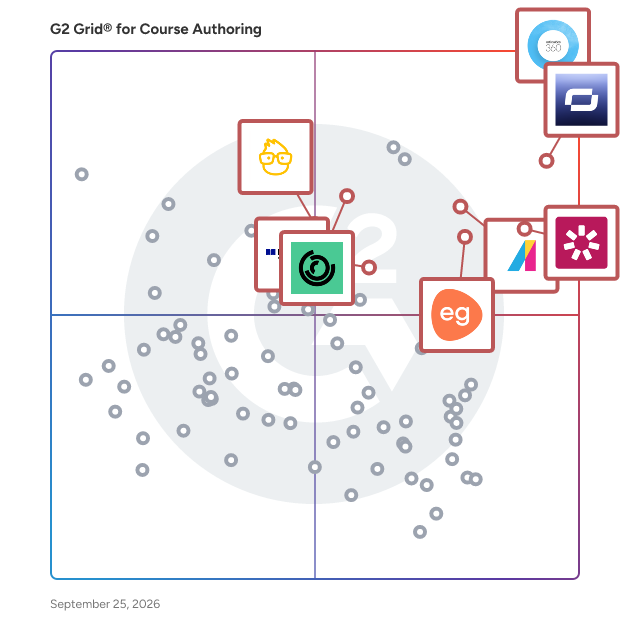
Products classified in the overall Course Authoring category are similar in many regards and help companies of all sizes solve their business problems. However, enterprise business features, pricing, setup, and installation differ from businesses of other sizes, which is why we match buyers to the right Enterprise Business Course Authoring to fit their needs. Compare product ratings based on reviews from enterprise users or connect with one of G2's buying advisors to find the right solutions within the Enterprise Business Course Authoring category.

In addition to qualifying for inclusion in the Course Authoring Software category, to qualify for inclusion in the Enterprise Business Course Authoring Software category, a product must have at least 10 reviews left by a reviewer from an enterprise business.

Show More
Show Less

Featured Course Authoring Software At A Glance

Free Plan Available:
360Learning
Sponsored
Best for Small Businesses:
Best for Mid-Market:
Highest User Satisfaction:
Best Free Software:
Show LessShow More
Best for Mid-Market:
Highest User Satisfaction:
Best Free Software:

G2 takes pride in showing unbiased reviews on user satisfaction in our ratings and reports. We do not allow paid placements in any of our ratings, rankings, or reports. Learn about our scoring methodologies.

1 filter applied
Clear All

33 Listings in Enterprise Course Authoring Software Available

(619)4.7 out of 5
2nd Easiest To Use in Course Authoring software
View top Consulting Services for Articulate 360
Entry Level Price:$1,199.00
  • Overview
    Expand/Collapse Overview
  • Product Description
    How are these determined?Information
    This description is provided by the seller.

    Articulate 360 is the #1 e-learning platform for creating workplace training. - Build engaging courses with secure, AI-enhanced authoring tools. - Streamline collaboration and approvals with integ

    Users
    • Instructional Designer
    • Senior Instructional Designer
    Industries
    • E-Learning
    • Hospital & Health Care
    Market Segment
    • 45% Enterprise
    • 24% Mid-Market
  • Pros and Cons
    Expand/Collapse Pros and Cons
  • Articulate 360 Pros and Cons
    How are these determined?Information
    Pros and Cons are compiled from review feedback and grouped into themes to provide an easy-to-understand summary of user reviews.
    Pros
    Ease of Use
    211
    Courses
    109
    Interactive Content
    74
    Course Creation
    73
    Intuitive
    63
    Cons
    Bug Issues
    30
    Learning Curve
    24
    Limited Customization
    21
    Limited Options
    21
    Pricing Issues
    20
  • User Satisfaction
    Expand/Collapse User Satisfaction
  • Articulate 360 features and usability ratings that predict user satisfaction
    8.9
    Has the product been a good partner in doing business?
    Average: 9.2
    9.2
    Content Creation
    Average: 8.9
    8.9
    Quality of Support
    Average: 9.0
    7.9
    Content Libraries
    Average: 8.1
  • Seller Details
    Expand/Collapse Seller Details
  • Seller Details
    Company Website
    Year Founded
    2002
    HQ Location
    New York, NY
    Twitter
    @Articulate
    21,626 Twitter followers
    LinkedIn® Page
    www.linkedin.com
    650 employees on LinkedIn®
Product Description
How are these determined?Information
This description is provided by the seller.

Articulate 360 is the #1 e-learning platform for creating workplace training. - Build engaging courses with secure, AI-enhanced authoring tools. - Streamline collaboration and approvals with integ

Users
  • Instructional Designer
  • Senior Instructional Designer
Industries
  • E-Learning
  • Hospital & Health Care
Market Segment
  • 45% Enterprise
  • 24% Mid-Market
Articulate 360 Pros and Cons
How are these determined?Information
Pros and Cons are compiled from review feedback and grouped into themes to provide an easy-to-understand summary of user reviews.
Pros
Ease of Use
211
Courses
109
Interactive Content
74
Course Creation
73
Intuitive
63
Cons
Bug Issues
30
Learning Curve
24
Limited Customization
21
Limited Options
21
Pricing Issues
20
Articulate 360 features and usability ratings that predict user satisfaction
8.9
Has the product been a good partner in doing business?
Average: 9.2
9.2
Content Creation
Average: 8.9
8.9
Quality of Support
Average: 9.0
7.9
Content Libraries
Average: 8.1
Seller Details
Company Website
Year Founded
2002
HQ Location
New York, NY
Twitter
@Articulate
21,626 Twitter followers
LinkedIn® Page
www.linkedin.com
650 employees on LinkedIn®
(835)4.6 out of 5
Optimized for quick response
5th Easiest To Use in Course Authoring software
Entry Level Price:Contact Us
  • Overview
    Expand/Collapse Overview
  • Product Description
    How are these determined?Information
    This description is provided by the seller.

    Absorb LMS is a market-leading AI-powered strategic learning system designed to deliver results for all learners—employees, partners, and customers alike. Built to simplify learning management while a

    Users
    • Instructional Designer
    • LMS Administrator
    Industries
    • Hospital & Health Care
    • Non-Profit Organization Management
    Market Segment
    • 44% Mid-Market
    • 38% Enterprise
    User Sentiment
    How are these determined?Information
    These insights, currently in beta, are compiled from user reviews and grouped to display a high-level overview of the software.
    • Absorb LMS is a learning management system that offers course creation, enrollment modification, email notifications, document uploads, and user group management.
    • Reviewers like the user-friendly interface, robust admin features, AI support, and the ability to create and modify courses according to specific needs.
    • Reviewers mentioned difficulties in understanding some features, limitations with the Analyze tool, issues with third-party authoring software compatibility, and challenges with the initial setup and integration with other systems.
  • Pros and Cons
    Expand/Collapse Pros and Cons
  • Absorb LMS Pros and Cons
    How are these determined?Information
    Pros and Cons are compiled from review feedback and grouped into themes to provide an easy-to-understand summary of user reviews.
    Pros
    Ease of Use
    264
    Customer Support
    206
    User-Friendly
    155
    Helpful
    154
    Intuitive
    134
    Cons
    Limited Features
    102
    Limited Customization
    80
    Missing Features
    65
    Reporting Issues
    58
    Inadequate Reporting
    52
  • User Satisfaction
    Expand/Collapse User Satisfaction
  • Absorb LMS features and usability ratings that predict user satisfaction
    9.4
    Has the product been a good partner in doing business?
    Average: 9.2
    8.4
    Content Creation
    Average: 8.9
    9.5
    Quality of Support
    Average: 9.0
    8.2
    Content Libraries
    Average: 8.1
  • Seller Details
    Expand/Collapse Seller Details
  • Seller Details
    Company Website
    Year Founded
    2003
    HQ Location
    Calgary
    Twitter
    @AbsorbLMS
    1,469 Twitter followers
    LinkedIn® Page
    www.linkedin.com
    658 employees on LinkedIn®
Product Description
How are these determined?Information
This description is provided by the seller.

Absorb LMS is a market-leading AI-powered strategic learning system designed to deliver results for all learners—employees, partners, and customers alike. Built to simplify learning management while a

Users
  • Instructional Designer
  • LMS Administrator
Industries
  • Hospital & Health Care
  • Non-Profit Organization Management
Market Segment
  • 44% Mid-Market
  • 38% Enterprise
User Sentiment
How are these determined?Information
These insights, currently in beta, are compiled from user reviews and grouped to display a high-level overview of the software.
  • Absorb LMS is a learning management system that offers course creation, enrollment modification, email notifications, document uploads, and user group management.
  • Reviewers like the user-friendly interface, robust admin features, AI support, and the ability to create and modify courses according to specific needs.
  • Reviewers mentioned difficulties in understanding some features, limitations with the Analyze tool, issues with third-party authoring software compatibility, and challenges with the initial setup and integration with other systems.
Absorb LMS Pros and Cons
How are these determined?Information
Pros and Cons are compiled from review feedback and grouped into themes to provide an easy-to-understand summary of user reviews.
Pros
Ease of Use
264
Customer Support
206
User-Friendly
155
Helpful
154
Intuitive
134
Cons
Limited Features
102
Limited Customization
80
Missing Features
65
Reporting Issues
58
Inadequate Reporting
52
Absorb LMS features and usability ratings that predict user satisfaction
9.4
Has the product been a good partner in doing business?
Average: 9.2
8.4
Content Creation
Average: 8.9
9.5
Quality of Support
Average: 9.0
8.2
Content Libraries
Average: 8.1
Seller Details
Company Website
Year Founded
2003
HQ Location
Calgary
Twitter
@AbsorbLMS
1,469 Twitter followers
LinkedIn® Page
www.linkedin.com
658 employees on LinkedIn®
G2 Advertising
Sponsored
G2 Advertising
Get 2x conversion than Google Ads with G2 Advertising!
G2 Advertising places your product in premium positions on high-traffic pages and on targeted competitor pages to reach buyers at key comparison moments.
Entry Level Price:Free
  • Overview
    Expand/Collapse Overview
  • Product Description
    How are these determined?Information
    This description is provided by the seller.

    Synthesia is the best AI video generation platform for business. By turning text into professional AI-generated videos in minutes, Synthesia replaces static documents and slide decks with dynamic,

    Users
    • CEO
    • Founder
    Industries
    • Computer Software
    • E-Learning
    Market Segment
    • 69% Small-Business
    • 17% Mid-Market
    User Sentiment
    How are these determined?Information
    These insights, currently in beta, are compiled from user reviews and grouped to display a high-level overview of the software.
    • Synthesia is a software tool designed to create professional and personalized videos for various purposes such as training, marketing, and content creation.
    • Reviewers like the ease of use, the variety of avatars, the ability to translate content into multiple languages, and the time-saving aspect of creating videos with Synthesia.
    • Reviewers noted issues with the accuracy of the AI's pronunciation and voice inflection, the high cost of the service, the limited control over avatar movements, and the inconsistency in the appearance of avatars.
  • Pros and Cons
    Expand/Collapse Pros and Cons
  • Synthesia Pros and Cons
    How are these determined?Information
    Pros and Cons are compiled from review feedback and grouped into themes to provide an easy-to-understand summary of user reviews.
    Pros
    Ease of Use
    1,261
    Quality
    787
    Realistic Avatars
    769
    Easy Creation
    724
    Video Creation
    641
    Cons
    Avatar Limitations
    431
    Limited Avatars
    374
    AI Limitations
    352
    Avatar Quality
    349
    Limited Customization
    298
  • User Satisfaction
    Expand/Collapse User Satisfaction
  • Synthesia features and usability ratings that predict user satisfaction
    8.9
    Has the product been a good partner in doing business?
    Average: 9.2
    9.2
    Content Creation
    Average: 8.9
    8.9
    Quality of Support
    Average: 9.0
    7.4
    Content Libraries
    Average: 8.1
  • Seller Details
    Expand/Collapse Seller Details
  • Seller Details
    Seller
    Synthesia
    Company Website
    Year Founded
    2017
    HQ Location
    London
    Twitter
    @synthesiaIO
    28,071 Twitter followers
    LinkedIn® Page
    www.linkedin.com
    662 employees on LinkedIn®
Product Description
How are these determined?Information
This description is provided by the seller.

Synthesia is the best AI video generation platform for business. By turning text into professional AI-generated videos in minutes, Synthesia replaces static documents and slide decks with dynamic,

Users
  • CEO
  • Founder
Industries
  • Computer Software
  • E-Learning
Market Segment
  • 69% Small-Business
  • 17% Mid-Market
User Sentiment
How are these determined?Information
These insights, currently in beta, are compiled from user reviews and grouped to display a high-level overview of the software.
  • Synthesia is a software tool designed to create professional and personalized videos for various purposes such as training, marketing, and content creation.
  • Reviewers like the ease of use, the variety of avatars, the ability to translate content into multiple languages, and the time-saving aspect of creating videos with Synthesia.
  • Reviewers noted issues with the accuracy of the AI's pronunciation and voice inflection, the high cost of the service, the limited control over avatar movements, and the inconsistency in the appearance of avatars.
Synthesia Pros and Cons
How are these determined?Information
Pros and Cons are compiled from review feedback and grouped into themes to provide an easy-to-understand summary of user reviews.
Pros
Ease of Use
1,261
Quality
787
Realistic Avatars
769
Easy Creation
724
Video Creation
641
Cons
Avatar Limitations
431
Limited Avatars
374
AI Limitations
352
Avatar Quality
349
Limited Customization
298
Synthesia features and usability ratings that predict user satisfaction
8.9
Has the product been a good partner in doing business?
Average: 9.2
9.2
Content Creation
Average: 8.9
8.9
Quality of Support
Average: 9.0
7.4
Content Libraries
Average: 8.1
Seller Details
Seller
Synthesia
Company Website
Year Founded
2017
HQ Location
London
Twitter
@synthesiaIO
28,071 Twitter followers
LinkedIn® Page
www.linkedin.com
662 employees on LinkedIn®
Entry Level Price:$720.00
  • Overview
    Expand/Collapse Overview
  • Product Description
    How are these determined?Information
    This description is provided by the seller.

    iSpring Suite is the most intuitive PowerPoint-based authoring tool for creating professional eLearning. It allows teams to quickly turn existing slides into interactive courses, reducing both the tim

    Users
    • Director
    • President
    Industries
    • E-Learning
    • Higher Education
    Market Segment
    • 45% Small-Business
    • 32% Mid-Market
    User Sentiment
    How are these determined?Information
    These insights, currently in beta, are compiled from user reviews and grouped to display a high-level overview of the software.
    • iSpring Suite is a tool integrated into PowerPoint, designed to enhance the creation of e-learning content, including courses, quizzes, and interactive materials.
    • Users like the seamless integration with PowerPoint, the ease of use, the variety of interactive features, and the responsive and knowledgeable support team.
    • Reviewers noted that iSpring Suite has limitations with complex content, accessibility issues, limited customization options, and compatibility issues with Mac and certain LMS platforms.
  • Pros and Cons
    Expand/Collapse Pros and Cons
  • iSpring Suite Pros and Cons
    How are these determined?Information
    Pros and Cons are compiled from review feedback and grouped into themes to provide an easy-to-understand summary of user reviews.
    Pros
    Ease of Use
    189
    Features
    129
    PowerPoint Integration
    112
    Easy Creation
    107
    Ease of Learning
    92
    Cons
    Limited Features
    52
    Technical Issues
    37
    Learning Curve
    34
    Limited Customization
    34
    Feature Issues
    31
  • User Satisfaction
    Expand/Collapse User Satisfaction
  • iSpring Suite features and usability ratings that predict user satisfaction
    9.4
    Has the product been a good partner in doing business?
    Average: 9.2
    9.1
    Content Creation
    Average: 8.9
    9.5
    Quality of Support
    Average: 9.0
    8.1
    Content Libraries
    Average: 8.1
  • Seller Details
    Expand/Collapse Seller Details
  • Seller Details
    Seller
    iSpring
    Company Website
    Year Founded
    2001
    HQ Location
    Alexandria, VA
    Twitter
    @iSpringPro
    6,534 Twitter followers
    LinkedIn® Page
    www.linkedin.com
    260 employees on LinkedIn®
Product Description
How are these determined?Information
This description is provided by the seller.

iSpring Suite is the most intuitive PowerPoint-based authoring tool for creating professional eLearning. It allows teams to quickly turn existing slides into interactive courses, reducing both the tim

Users
  • Director
  • President
Industries
  • E-Learning
  • Higher Education
Market Segment
  • 45% Small-Business
  • 32% Mid-Market
User Sentiment
How are these determined?Information
These insights, currently in beta, are compiled from user reviews and grouped to display a high-level overview of the software.
  • iSpring Suite is a tool integrated into PowerPoint, designed to enhance the creation of e-learning content, including courses, quizzes, and interactive materials.
  • Users like the seamless integration with PowerPoint, the ease of use, the variety of interactive features, and the responsive and knowledgeable support team.
  • Reviewers noted that iSpring Suite has limitations with complex content, accessibility issues, limited customization options, and compatibility issues with Mac and certain LMS platforms.
iSpring Suite Pros and Cons
How are these determined?Information
Pros and Cons are compiled from review feedback and grouped into themes to provide an easy-to-understand summary of user reviews.
Pros
Ease of Use
189
Features
129
PowerPoint Integration
112
Easy Creation
107
Ease of Learning
92
Cons
Limited Features
52
Technical Issues
37
Learning Curve
34
Limited Customization
34
Feature Issues
31
iSpring Suite features and usability ratings that predict user satisfaction
9.4
Has the product been a good partner in doing business?
Average: 9.2
9.1
Content Creation
Average: 8.9
9.5
Quality of Support
Average: 9.0
8.1
Content Libraries
Average: 8.1
Seller Details
Seller
iSpring
Company Website
Year Founded
2001
HQ Location
Alexandria, VA
Twitter
@iSpringPro
6,534 Twitter followers
LinkedIn® Page
www.linkedin.com
260 employees on LinkedIn®
(696)4.3 out of 5
Optimized for quick response
11th Easiest To Use in Course Authoring software
  • Overview
    Expand/Collapse Overview
  • Product Description
    How are these determined?Information
    This description is provided by the seller.

    Litmos develops eLearning solutions for top-performing companies. An established leader in the market since 2007, Litmos offers the world’s easiest-to-use LMS and a comprehensive learning content libr

    Users
    • Training Manager
    • Training Coordinator
    Industries
    • Computer Software
    • Information Technology and Services
    Market Segment
    • 51% Mid-Market
    • 34% Enterprise
    User Sentiment
    How are these determined?Information
    These insights, currently in beta, are compiled from user reviews and grouped to display a high-level overview of the software.
    • Litmos is a learning management system that provides a platform for creating, assigning, and tracking learning content.
    • Reviewers like the user-friendly interface, the ease of content creation, the robust reporting capabilities, and the excellent customer support provided by Litmos.
    • Users mentioned issues with limited customization, difficulties with certain integrations, challenges with bulk updates, and occasional glitches with advanced functionalities.
  • Pros and Cons
    Expand/Collapse Pros and Cons
  • Litmos Pros and Cons
    How are these determined?Information
    Pros and Cons are compiled from review feedback and grouped into themes to provide an easy-to-understand summary of user reviews.
    Pros
    Ease of Use
    95
    Customer Support
    59
    Features
    53
    Course Creation
    45
    Courses
    37
    Cons
    Poor Reporting
    36
    Reporting Issues
    36
    Inadequate Reporting
    29
    Limited Features
    24
    Limited Customization
    23
  • User Satisfaction
    Expand/Collapse User Satisfaction
  • Litmos features and usability ratings that predict user satisfaction
    8.6
    Has the product been a good partner in doing business?
    Average: 9.2
    8.0
    Content Creation
    Average: 8.9
    8.3
    Quality of Support
    Average: 9.0
    8.1
    Content Libraries
    Average: 8.1
  • Seller Details
    Expand/Collapse Seller Details
  • Seller Details
    Seller
    Litmos
    Company Website
    Year Founded
    2007
    HQ Location
    San Ramon, California
    Twitter
    @Litmos
    7,898 Twitter followers
    LinkedIn® Page
    www.linkedin.com
    223 employees on LinkedIn®
Product Description
How are these determined?Information
This description is provided by the seller.

Litmos develops eLearning solutions for top-performing companies. An established leader in the market since 2007, Litmos offers the world’s easiest-to-use LMS and a comprehensive learning content libr

Users
  • Training Manager
  • Training Coordinator
Industries
  • Computer Software
  • Information Technology and Services
Market Segment
  • 51% Mid-Market
  • 34% Enterprise
User Sentiment
How are these determined?Information
These insights, currently in beta, are compiled from user reviews and grouped to display a high-level overview of the software.
  • Litmos is a learning management system that provides a platform for creating, assigning, and tracking learning content.
  • Reviewers like the user-friendly interface, the ease of content creation, the robust reporting capabilities, and the excellent customer support provided by Litmos.
  • Users mentioned issues with limited customization, difficulties with certain integrations, challenges with bulk updates, and occasional glitches with advanced functionalities.
Litmos Pros and Cons
How are these determined?Information
Pros and Cons are compiled from review feedback and grouped into themes to provide an easy-to-understand summary of user reviews.
Pros
Ease of Use
95
Customer Support
59
Features
53
Course Creation
45
Courses
37
Cons
Poor Reporting
36
Reporting Issues
36
Inadequate Reporting
29
Limited Features
24
Limited Customization
23
Litmos features and usability ratings that predict user satisfaction
8.6
Has the product been a good partner in doing business?
Average: 9.2
8.0
Content Creation
Average: 8.9
8.3
Quality of Support
Average: 9.0
8.1
Content Libraries
Average: 8.1
Seller Details
Seller
Litmos
Company Website
Year Founded
2007
HQ Location
San Ramon, California
Twitter
@Litmos
7,898 Twitter followers
LinkedIn® Page
www.linkedin.com
223 employees on LinkedIn®
Entry Level Price:$116.00
  • Overview
    Expand/Collapse Overview
  • Product Description
    How are these determined?Information
    This description is provided by the seller.

    Easygenerator is an award-winning e-learning authoring solution that simplifies and accelerates your organization’s learning development. We are proud to provide our software to over 50,000 users in m

    Users
    No information available
    Industries
    • Hospital & Health Care
    • Construction
    Market Segment
    • 47% Mid-Market
    • 35% Enterprise
  • Pros and Cons
    Expand/Collapse Pros and Cons
  • Easygenerator Pros and Cons
    How are these determined?Information
    Pros and Cons are compiled from review feedback and grouped into themes to provide an easy-to-understand summary of user reviews.
    Pros
    Ease of Use
    26
    Courses
    15
    Customer Support
    15
    Intuitive
    15
    Interactive Content
    8
    Cons
    Limited Customization
    5
    Not Intuitive
    5
    Limited Editing
    4
    Limited Flexibility
    4
    Formatting Issues
    2
  • User Satisfaction
    Expand/Collapse User Satisfaction
  • Easygenerator features and usability ratings that predict user satisfaction
    9.4
    Has the product been a good partner in doing business?
    Average: 9.2
    9.3
    Content Creation
    Average: 8.9
    9.7
    Quality of Support
    Average: 9.0
    8.0
    Content Libraries
    Average: 8.1
  • Seller Details
    Expand/Collapse Seller Details
  • Seller Details
    Company Website
    Year Founded
    2013
    HQ Location
    Rotterdam, Netherlands
    Twitter
    @easygenerator
    1,468 Twitter followers
    LinkedIn® Page
    www.linkedin.com
    224 employees on LinkedIn®
Product Description
How are these determined?Information
This description is provided by the seller.

Easygenerator is an award-winning e-learning authoring solution that simplifies and accelerates your organization’s learning development. We are proud to provide our software to over 50,000 users in m

Users
No information available
Industries
  • Hospital & Health Care
  • Construction
Market Segment
  • 47% Mid-Market
  • 35% Enterprise
Easygenerator Pros and Cons
How are these determined?Information
Pros and Cons are compiled from review feedback and grouped into themes to provide an easy-to-understand summary of user reviews.
Pros
Ease of Use
26
Courses
15
Customer Support
15
Intuitive
15
Interactive Content
8
Cons
Limited Customization
5
Not Intuitive
5
Limited Editing
4
Limited Flexibility
4
Formatting Issues
2
Easygenerator features and usability ratings that predict user satisfaction
9.4
Has the product been a good partner in doing business?
Average: 9.2
9.3
Content Creation
Average: 8.9
9.7
Quality of Support
Average: 9.0
8.0
Content Libraries
Average: 8.1
Seller Details
Company Website
Year Founded
2013
HQ Location
Rotterdam, Netherlands
Twitter
@easygenerator
1,468 Twitter followers
LinkedIn® Page
www.linkedin.com
224 employees on LinkedIn®
  • Overview
    Expand/Collapse Overview
  • Product Description
    How are these determined?Information
    This description is provided by the seller.

    Kaltura provides both live and on-demand video solutions that boost engagement, maximize ROI, and foster closer connections between brands and audiences. From virtual and hybrid events to webinars and

    Users
    No information available
    Industries
    • Higher Education
    • Education Management
    Market Segment
    • 42% Mid-Market
    • 32% Enterprise
    User Sentiment
    How are these determined?Information
    These insights, currently in beta, are compiled from user reviews and grouped to display a high-level overview of the software.
    • Kaltura Video is a software that provides video support, including screen recording, live streaming, editing workflows, and video management and distribution for communication purposes.
    • Reviewers appreciate Kaltura Video's high device compatibility, user-friendly interface, detailed engagement metrics, and its flexibility in various uses such as training and marketing.
    • Reviewers noted performance defects in Kaltura Video, particularly in uploading files and buffering during live streaming, and also mentioned that the software requires high network speed and bandwidth which may not always be available.
  • Pros and Cons
    Expand/Collapse Pros and Cons
  • Kaltura Video Cloud Pros and Cons
    How are these determined?Information
    Pros and Cons are compiled from review feedback and grouped into themes to provide an easy-to-understand summary of user reviews.
    Pros
    Ease of Use
    18
    Features
    17
    Integrations
    12
    Quality
    11
    Intuitive
    10
    Cons
    Technical Issues
    8
    Integration Issues
    6
    Missing Features
    6
    Difficult Setup
    5
    Improvement Needed
    5
  • User Satisfaction
    Expand/Collapse User Satisfaction
  • Kaltura Video Cloud features and usability ratings that predict user satisfaction
    8.7
    Has the product been a good partner in doing business?
    Average: 9.2
    8.8
    Content Creation
    Average: 8.9
    8.2
    Quality of Support
    Average: 9.0
    8.3
    Content Libraries
    Average: 8.1
  • Seller Details
    Expand/Collapse Seller Details
  • Seller Details
    Seller
    Kaltura
    Company Website
    Year Founded
    2006
    HQ Location
    New York, NY
    Twitter
    @Kaltura
    8,981 Twitter followers
    LinkedIn® Page
    www.linkedin.com
    719 employees on LinkedIn®
Product Description
How are these determined?Information
This description is provided by the seller.

Kaltura provides both live and on-demand video solutions that boost engagement, maximize ROI, and foster closer connections between brands and audiences. From virtual and hybrid events to webinars and

Users
No information available
Industries
  • Higher Education
  • Education Management
Market Segment
  • 42% Mid-Market
  • 32% Enterprise
User Sentiment
How are these determined?Information
These insights, currently in beta, are compiled from user reviews and grouped to display a high-level overview of the software.
  • Kaltura Video is a software that provides video support, including screen recording, live streaming, editing workflows, and video management and distribution for communication purposes.
  • Reviewers appreciate Kaltura Video's high device compatibility, user-friendly interface, detailed engagement metrics, and its flexibility in various uses such as training and marketing.
  • Reviewers noted performance defects in Kaltura Video, particularly in uploading files and buffering during live streaming, and also mentioned that the software requires high network speed and bandwidth which may not always be available.
Kaltura Video Cloud Pros and Cons
How are these determined?Information
Pros and Cons are compiled from review feedback and grouped into themes to provide an easy-to-understand summary of user reviews.
Pros
Ease of Use
18
Features
17
Integrations
12
Quality
11
Intuitive
10
Cons
Technical Issues
8
Integration Issues
6
Missing Features
6
Difficult Setup
5
Improvement Needed
5
Kaltura Video Cloud features and usability ratings that predict user satisfaction
8.7
Has the product been a good partner in doing business?
Average: 9.2
8.8
Content Creation
Average: 8.9
8.2
Quality of Support
Average: 9.0
8.3
Content Libraries
Average: 8.1
Seller Details
Seller
Kaltura
Company Website
Year Founded
2006
HQ Location
New York, NY
Twitter
@Kaltura
8,981 Twitter followers
LinkedIn® Page
www.linkedin.com
719 employees on LinkedIn®
(571)4.6 out of 5
Optimized for quick response
9th Easiest To Use in Course Authoring software
  • Overview
    Expand/Collapse Overview
  • Product Description
    How are these determined?Information
    This description is provided by the seller.

    360Learning is the AI-powered learning platform that combines LMS and LXP capabilities to drive onboarding, employee development, and customer training at scale. L&D teams—from solo practitioners

    Users
    • Responsable formation
    • CEO
    Industries
    • Information Technology and Services
    • Computer Software
    Market Segment
    • 53% Mid-Market
    • 29% Enterprise
    User Sentiment
    How are these determined?Information
    These insights, currently in beta, are compiled from user reviews and grouped to display a high-level overview of the software.
    • 360Learning is a learning management system that provides a platform for creating, managing, and tracking training courses.
    • Users frequently mention the ease of use, intuitive design, collaborative authoring, and the AI-assisted content creation as standout features of 360Learning.
    • Users reported issues with complex account management, limited customization options, frequent updates that are hard to follow, and occasional slow loading times.
  • Pros and Cons
    Expand/Collapse Pros and Cons
  • 360Learning Pros and Cons
    How are these determined?Information
    Pros and Cons are compiled from review feedback and grouped into themes to provide an easy-to-understand summary of user reviews.
    Pros
    Ease of Use
    131
    Customer Support
    75
    Course Creation
    73
    Engagement
    55
    Helpful
    52
    Cons
    Limited Features
    40
    Learning Curve
    38
    Limited Customization
    34
    Missing Features
    32
    Difficulty
    20
  • User Satisfaction
    Expand/Collapse User Satisfaction
  • 360Learning features and usability ratings that predict user satisfaction
    9.2
    Has the product been a good partner in doing business?
    Average: 9.2
    8.9
    Content Creation
    Average: 8.9
    9.4
    Quality of Support
    Average: 9.0
    8.1
    Content Libraries
    Average: 8.1
  • Seller Details
    Expand/Collapse Seller Details
  • Seller Details
    Company Website
    Year Founded
    2013
    HQ Location
    New York
    Twitter
    @360Learning
    10,812 Twitter followers
    LinkedIn® Page
    www.linkedin.com
    472 employees on LinkedIn®
Product Description
How are these determined?Information
This description is provided by the seller.

360Learning is the AI-powered learning platform that combines LMS and LXP capabilities to drive onboarding, employee development, and customer training at scale. L&D teams—from solo practitioners

Users
  • Responsable formation
  • CEO
Industries
  • Information Technology and Services
  • Computer Software
Market Segment
  • 53% Mid-Market
  • 29% Enterprise
User Sentiment
How are these determined?Information
These insights, currently in beta, are compiled from user reviews and grouped to display a high-level overview of the software.
  • 360Learning is a learning management system that provides a platform for creating, managing, and tracking training courses.
  • Users frequently mention the ease of use, intuitive design, collaborative authoring, and the AI-assisted content creation as standout features of 360Learning.
  • Users reported issues with complex account management, limited customization options, frequent updates that are hard to follow, and occasional slow loading times.
360Learning Pros and Cons
How are these determined?Information
Pros and Cons are compiled from review feedback and grouped into themes to provide an easy-to-understand summary of user reviews.
Pros
Ease of Use
131
Customer Support
75
Course Creation
73
Engagement
55
Helpful
52
Cons
Limited Features
40
Learning Curve
38
Limited Customization
34
Missing Features
32
Difficulty
20
360Learning features and usability ratings that predict user satisfaction
9.2
Has the product been a good partner in doing business?
Average: 9.2
8.9
Content Creation
Average: 8.9
9.4
Quality of Support
Average: 9.0
8.1
Content Libraries
Average: 8.1
Seller Details
Company Website
Year Founded
2013
HQ Location
New York
Twitter
@360Learning
10,812 Twitter followers
LinkedIn® Page
www.linkedin.com
472 employees on LinkedIn®
  • Overview
    Expand/Collapse Overview
  • Product Description
    How are these determined?Information
    This description is provided by the seller.

    Brainshark is Bigtincan's AI-powered Readiness solution designed to help businesses in IT, manufacturing, insurance, banking and other sectors create learning and coaching content to prepare customer-

    Users
    • Account Executive
    Industries
    • Computer Software
    • Information Technology and Services
    Market Segment
    • 47% Enterprise
    • 40% Mid-Market
  • Pros and Cons
    Expand/Collapse Pros and Cons
  • Bigtincan Readiness (formerly Brainshark) Pros and Cons
    How are these determined?Information
    Pros and Cons are compiled from review feedback and grouped into themes to provide an easy-to-understand summary of user reviews.
    Pros
    Ease of Use
    33
    Course Creation
    13
    Ease of Learning
    12
    Intuitive
    12
    Courses
    10
    Cons
    Learning Curve
    10
    Missing Features
    10
    Not Intuitive
    10
    Not User-Friendly
    6
    Complex Features
    4
  • User Satisfaction
    Expand/Collapse User Satisfaction
  • Bigtincan Readiness (formerly Brainshark) features and usability ratings that predict user satisfaction
    9.1
    Has the product been a good partner in doing business?
    Average: 9.2
    8.8
    Content Creation
    Average: 8.9
    9.0
    Quality of Support
    Average: 9.0
    8.5
    Content Libraries
    Average: 8.1
  • Seller Details
    Expand/Collapse Seller Details
  • Seller Details
    Seller
    Bigtincan
    Year Founded
    2011
    HQ Location
    Waltham, MA
    Twitter
    @bigtincan
    2,257 Twitter followers
    LinkedIn® Page
    www.linkedin.com
    237 employees on LinkedIn®
    Phone
    781-405-2376
Product Description
How are these determined?Information
This description is provided by the seller.

Brainshark is Bigtincan's AI-powered Readiness solution designed to help businesses in IT, manufacturing, insurance, banking and other sectors create learning and coaching content to prepare customer-

Users
  • Account Executive
Industries
  • Computer Software
  • Information Technology and Services
Market Segment
  • 47% Enterprise
  • 40% Mid-Market
Bigtincan Readiness (formerly Brainshark) Pros and Cons
How are these determined?Information
Pros and Cons are compiled from review feedback and grouped into themes to provide an easy-to-understand summary of user reviews.
Pros
Ease of Use
33
Course Creation
13
Ease of Learning
12
Intuitive
12
Courses
10
Cons
Learning Curve
10
Missing Features
10
Not Intuitive
10
Not User-Friendly
6
Complex Features
4
Bigtincan Readiness (formerly Brainshark) features and usability ratings that predict user satisfaction
9.1
Has the product been a good partner in doing business?
Average: 9.2
8.8
Content Creation
Average: 8.9
9.0
Quality of Support
Average: 9.0
8.5
Content Libraries
Average: 8.1
Seller Details
Seller
Bigtincan
Year Founded
2011
HQ Location
Waltham, MA
Twitter
@bigtincan
2,257 Twitter followers
LinkedIn® Page
www.linkedin.com
237 employees on LinkedIn®
Phone
781-405-2376
  • Overview
    Expand/Collapse Overview
  • Product Description
    How are these determined?Information
    This description is provided by the seller.

    Udemy is an AI-powered skills acceleration platform transforming how companies and individuals across the world build the capabilities needed to thrive in a rapidly evolving workplace. By combining on

    Users
    • Software Engineer
    • Software Developer
    Industries
    • Information Technology and Services
    • Computer Software
    Market Segment
    • 36% Enterprise
    • 32% Mid-Market
    User Sentiment
    How are these determined?Information
    These insights, currently in beta, are compiled from user reviews and grouped to display a high-level overview of the software.
    • Udemy Business is an online learning platform that offers a wide range of courses for professional development and skill enhancement.
    • Reviewers like the vast course library, the ability to learn at their own pace, and the regular addition of new, industry-relevant courses.
    • Reviewers mentioned inconsistencies in course quality, difficulties in course selection due to the large catalog, and occasional network issues affecting video clarity.
  • Pros and Cons
    Expand/Collapse Pros and Cons
  • Udemy Business Pros and Cons
    How are these determined?Information
    Pros and Cons are compiled from review feedback and grouped into themes to provide an easy-to-understand summary of user reviews.
    Pros
    Courses
    45
    Ease of Use
    38
    Content Diversity
    31
    Educational Resources
    29
    Variety
    29
    Cons
    Course Quality
    18
    Limited Course Variety
    18
    Content Quality
    13
    Limited Courses
    13
    Outdated Content
    10
  • User Satisfaction
    Expand/Collapse User Satisfaction
  • Udemy Business features and usability ratings that predict user satisfaction
    9.2
    Has the product been a good partner in doing business?
    Average: 9.2
    8.5
    Content Creation
    Average: 8.9
    8.7
    Quality of Support
    Average: 9.0
    8.9
    Content Libraries
    Average: 8.1
  • Seller Details
    Expand/Collapse Seller Details
  • Seller Details
    Company Website
    Year Founded
    2010
    HQ Location
    San Francisco, CA
    Twitter
    @udemy
    292,023 Twitter followers
    LinkedIn® Page
    www.linkedin.com
    9,085 employees on LinkedIn®
Product Description
How are these determined?Information
This description is provided by the seller.

Udemy is an AI-powered skills acceleration platform transforming how companies and individuals across the world build the capabilities needed to thrive in a rapidly evolving workplace. By combining on

Users
  • Software Engineer
  • Software Developer
Industries
  • Information Technology and Services
  • Computer Software
Market Segment
  • 36% Enterprise
  • 32% Mid-Market
User Sentiment
How are these determined?Information
These insights, currently in beta, are compiled from user reviews and grouped to display a high-level overview of the software.
  • Udemy Business is an online learning platform that offers a wide range of courses for professional development and skill enhancement.
  • Reviewers like the vast course library, the ability to learn at their own pace, and the regular addition of new, industry-relevant courses.
  • Reviewers mentioned inconsistencies in course quality, difficulties in course selection due to the large catalog, and occasional network issues affecting video clarity.
Udemy Business Pros and Cons
How are these determined?Information
Pros and Cons are compiled from review feedback and grouped into themes to provide an easy-to-understand summary of user reviews.
Pros
Courses
45
Ease of Use
38
Content Diversity
31
Educational Resources
29
Variety
29
Cons
Course Quality
18
Limited Course Variety
18
Content Quality
13
Limited Courses
13
Outdated Content
10
Udemy Business features and usability ratings that predict user satisfaction
9.2
Has the product been a good partner in doing business?
Average: 9.2
8.5
Content Creation
Average: 8.9
8.7
Quality of Support
Average: 9.0
8.9
Content Libraries
Average: 8.1
Seller Details
Company Website
Year Founded
2010
HQ Location
San Francisco, CA
Twitter
@udemy
292,023 Twitter followers
LinkedIn® Page
www.linkedin.com
9,085 employees on LinkedIn®
Entry Level Price:Free
  • Overview
    Expand/Collapse Overview
  • Product Description
    How are these determined?Information
    This description is provided by the seller.

    7taps is the fastest way to turn knowledge into on the job action. It helps organizations cut through L&D complexity and deliver focused, timely microlearning that actually changes how people

    Users
    • Instructional Designer
    • Founder
    Industries
    • E-Learning
    • Higher Education
    Market Segment
    • 46% Small-Business
    • 29% Mid-Market
    User Sentiment
    How are these determined?Information
    These insights, currently in beta, are compiled from user reviews and grouped to display a high-level overview of the software.
    • 7taps Microlearning is a tool used to create simple and effective teaching moments, with features such as AI video components and the ability to build in questions with minimal input.
    • Users like the ease of use, the ability to quickly create and share content, the AI features that make the learning process engaging, and the robust reporting that provides meaningful data on its effectiveness.
    • Users experienced challenges with the lack of customization options, the inability to replicate organizational structures within the platform, the absence of a review feature, and the difficulty in integrating with existing Learning Management Systems.
  • Pros and Cons
    Expand/Collapse Pros and Cons
  • 7taps Microlearning Pros and Cons
    How are these determined?Information
    Pros and Cons are compiled from review feedback and grouped into themes to provide an easy-to-understand summary of user reviews.
    Pros
    Ease of Use
    42
    Intuitive
    24
    Courses
    23
    Features
    22
    Ease of Creation
    21
    Cons
    Limited Features
    12
    Missing Features
    8
    Limited Customization
    7
    Audio Issues
    5
    Course Management
    4
  • User Satisfaction
    Expand/Collapse User Satisfaction
  • 7taps Microlearning features and usability ratings that predict user satisfaction
    9.8
    Has the product been a good partner in doing business?
    Average: 9.2
    8.9
    Content Creation
    Average: 8.9
    9.7
    Quality of Support
    Average: 9.0
    7.8
    Content Libraries
    Average: 8.1
  • Seller Details
    Expand/Collapse Seller Details
  • Seller Details
    Seller
    7taps Inc
    Company Website
    Year Founded
    2020
    HQ Location
    Delray Beach, US
    Twitter
    @7tapshq
    626 Twitter followers
    LinkedIn® Page
    www.linkedin.com
    44 employees on LinkedIn®
Product Description
How are these determined?Information
This description is provided by the seller.

7taps is the fastest way to turn knowledge into on the job action. It helps organizations cut through L&D complexity and deliver focused, timely microlearning that actually changes how people

Users
  • Instructional Designer
  • Founder
Industries
  • E-Learning
  • Higher Education
Market Segment
  • 46% Small-Business
  • 29% Mid-Market
User Sentiment
How are these determined?Information
These insights, currently in beta, are compiled from user reviews and grouped to display a high-level overview of the software.
  • 7taps Microlearning is a tool used to create simple and effective teaching moments, with features such as AI video components and the ability to build in questions with minimal input.
  • Users like the ease of use, the ability to quickly create and share content, the AI features that make the learning process engaging, and the robust reporting that provides meaningful data on its effectiveness.
  • Users experienced challenges with the lack of customization options, the inability to replicate organizational structures within the platform, the absence of a review feature, and the difficulty in integrating with existing Learning Management Systems.
7taps Microlearning Pros and Cons
How are these determined?Information
Pros and Cons are compiled from review feedback and grouped into themes to provide an easy-to-understand summary of user reviews.
Pros
Ease of Use
42
Intuitive
24
Courses
23
Features
22
Ease of Creation
21
Cons
Limited Features
12
Missing Features
8
Limited Customization
7
Audio Issues
5
Course Management
4
7taps Microlearning features and usability ratings that predict user satisfaction
9.8
Has the product been a good partner in doing business?
Average: 9.2
8.9
Content Creation
Average: 8.9
9.7
Quality of Support
Average: 9.0
7.8
Content Libraries
Average: 8.1
Seller Details
Seller
7taps Inc
Company Website
Year Founded
2020
HQ Location
Delray Beach, US
Twitter
@7tapshq
626 Twitter followers
LinkedIn® Page
www.linkedin.com
44 employees on LinkedIn®
  • Overview
    Expand/Collapse Overview
  • Product Description
    How are these determined?Information
    This description is provided by the seller.

    Spice up your learning content with EdApp. And deliver the learning experience your team deserves. No matter the device, location, or internet connection. At EdApp, we’re on a mission to change the

    Users
    • Founder
    • CEO
    Industries
    • Construction
    • E-Learning
    Market Segment
    • 50% Small-Business
    • 37% Mid-Market
  • Pros and Cons
    Expand/Collapse Pros and Cons
  • SC Training (Formerly EdApp) Pros and Cons
    How are these determined?Information
    Pros and Cons are compiled from review feedback and grouped into themes to provide an easy-to-understand summary of user reviews.
    Pros
    Ease of Use
    3
    Intuitive
    3
    Course Creation
    2
    Ease of Learning
    2
    Easy Creation
    2
    Cons
    Course Management
    2
    Formatting Limitations
    2
    Complex Usability
    1
    Cumbersome Interface
    1
    Design Limitations
    1
  • User Satisfaction
    Expand/Collapse User Satisfaction
  • SC Training (Formerly EdApp) features and usability ratings that predict user satisfaction
    9.4
    Has the product been a good partner in doing business?
    Average: 9.2
    8.9
    Content Creation
    Average: 8.9
    9.4
    Quality of Support
    Average: 9.0
    8.3
    Content Libraries
    Average: 8.1
  • Seller Details
    Expand/Collapse Seller Details
  • Seller Details
    Year Founded
    2004
    HQ Location
    Surry Hills, New South Wales
    Twitter
    @SafetyCultureHQ
    4,857 Twitter followers
    LinkedIn® Page
    www.linkedin.com
    851 employees on LinkedIn®
Product Description
How are these determined?Information
This description is provided by the seller.

Spice up your learning content with EdApp. And deliver the learning experience your team deserves. No matter the device, location, or internet connection. At EdApp, we’re on a mission to change the

Users
  • Founder
  • CEO
Industries
  • Construction
  • E-Learning
Market Segment
  • 50% Small-Business
  • 37% Mid-Market
SC Training (Formerly EdApp) Pros and Cons
How are these determined?Information
Pros and Cons are compiled from review feedback and grouped into themes to provide an easy-to-understand summary of user reviews.
Pros
Ease of Use
3
Intuitive
3
Course Creation
2
Ease of Learning
2
Easy Creation
2
Cons
Course Management
2
Formatting Limitations
2
Complex Usability
1
Cumbersome Interface
1
Design Limitations
1
SC Training (Formerly EdApp) features and usability ratings that predict user satisfaction
9.4
Has the product been a good partner in doing business?
Average: 9.2
8.9
Content Creation
Average: 8.9
9.4
Quality of Support
Average: 9.0
8.3
Content Libraries
Average: 8.1
Seller Details
Year Founded
2004
HQ Location
Surry Hills, New South Wales
Twitter
@SafetyCultureHQ
4,857 Twitter followers
LinkedIn® Page
www.linkedin.com
851 employees on LinkedIn®
(184)4.4 out of 5
Optimized for quick response
Entry Level Price:Contact Us
  • Overview
    Expand/Collapse Overview
  • Product Description
    How are these determined?Information
    This description is provided by the seller.

    Elucidat, a Learning Pool company, is the elearning platform built for teams who want to move faster, reach further, and make learning that truly makes an impact. Built for the real challenges lear

    Users
    • Instructional Designer
    Industries
    • E-Learning
    • Retail
    Market Segment
    • 51% Enterprise
    • 32% Mid-Market
  • Pros and Cons
    Expand/Collapse Pros and Cons
  • Elucidat Pros and Cons
    How are these determined?Information
    Pros and Cons are compiled from review feedback and grouped into themes to provide an easy-to-understand summary of user reviews.
    Pros
    Ease of Use
    33
    Customer Support
    16
    Templates
    15
    Course Creation
    11
    Courses
    10
    Cons
    Not Intuitive
    10
    Slow Performance
    8
    Limited Options
    7
    Limited Editing
    6
    Limited Customization
    5
  • User Satisfaction
    Expand/Collapse User Satisfaction
  • Elucidat features and usability ratings that predict user satisfaction
    9.1
    Has the product been a good partner in doing business?
    Average: 9.2
    8.8
    Content Creation
    Average: 8.9
    9.2
    Quality of Support
    Average: 9.0
    7.6
    Content Libraries
    Average: 8.1
  • Seller Details
    Expand/Collapse Seller Details
  • Seller Details
    Company Website
    Year Founded
    2006
    HQ Location
    Derry, IE
    Twitter
    @LearningPool
    6,619 Twitter followers
    LinkedIn® Page
    www.linkedin.com
    414 employees on LinkedIn®
Product Description
How are these determined?Information
This description is provided by the seller.

Elucidat, a Learning Pool company, is the elearning platform built for teams who want to move faster, reach further, and make learning that truly makes an impact. Built for the real challenges lear

Users
  • Instructional Designer
Industries
  • E-Learning
  • Retail
Market Segment
  • 51% Enterprise
  • 32% Mid-Market
Elucidat Pros and Cons
How are these determined?Information
Pros and Cons are compiled from review feedback and grouped into themes to provide an easy-to-understand summary of user reviews.
Pros
Ease of Use
33
Customer Support
16
Templates
15
Course Creation
11
Courses
10
Cons
Not Intuitive
10
Slow Performance
8
Limited Options
7
Limited Editing
6
Limited Customization
5
Elucidat features and usability ratings that predict user satisfaction
9.1
Has the product been a good partner in doing business?
Average: 9.2
8.8
Content Creation
Average: 8.9
9.2
Quality of Support
Average: 9.0
7.6
Content Libraries
Average: 8.1
Seller Details
Company Website
Year Founded
2006
HQ Location
Derry, IE
Twitter
@LearningPool
6,619 Twitter followers
LinkedIn® Page
www.linkedin.com
414 employees on LinkedIn®
  • Overview
    Expand/Collapse Overview
  • Product Description
    How are these determined?Information
    This description is provided by the seller.

    TalentLMS is the LMS built for training success. Designed to get a “yes” from everyone, it’s where great teams, and companies, go to grow. With an experience that’s fully customizable, easy to manage,

    Users
    • CEO
    • Director
    Industries
    • E-Learning
    • Education Management
    Market Segment
    • 49% Small-Business
    • 40% Mid-Market
    User Sentiment
    How are these determined?Information
    These insights, currently in beta, are compiled from user reviews and grouped to display a high-level overview of the software.
    • TalentLMS is a platform for e-learning management that allows course instructors to develop content in various formats and manage enrollments.
    • Reviewers frequently mention the ease of creating courses, delivering training content, and the ability to use AI to design and develop modules, along with the flexibility of enabling course instructors to quickly develop content in various formats such as video, text and presentation files.
    • Reviewers noted issues with proprietary modules making it difficult to export or download content, a dramatic price increase, and difficulties with customer service, including issues with refunds and response times.
  • Pros and Cons
    Expand/Collapse Pros and Cons
  • TalentLMS Pros and Cons
    How are these determined?Information
    Pros and Cons are compiled from review feedback and grouped into themes to provide an easy-to-understand summary of user reviews.
    Pros
    Ease of Use
    117
    Course Creation
    62
    Features
    51
    Customer Support
    48
    Easy Setup
    45
    Cons
    Limited Features
    45
    Missing Features
    39
    Limited Customization
    32
    Feature Issues
    19
    Reporting Issues
    19
  • User Satisfaction
    Expand/Collapse User Satisfaction
  • TalentLMS features and usability ratings that predict user satisfaction
    9.2
    Has the product been a good partner in doing business?
    Average: 9.2
    8.6
    Content Creation
    Average: 8.9
    8.9
    Quality of Support
    Average: 9.0
    7.9
    Content Libraries
    Average: 8.1
  • Seller Details
    Expand/Collapse Seller Details
  • Seller Details
    Company Website
    Year Founded
    2012
    HQ Location
    San Francisco, California
    Twitter
    @TalentLMS
    44,435 Twitter followers
    LinkedIn® Page
    www.linkedin.com
    262 employees on LinkedIn®
Product Description
How are these determined?Information
This description is provided by the seller.

TalentLMS is the LMS built for training success. Designed to get a “yes” from everyone, it’s where great teams, and companies, go to grow. With an experience that’s fully customizable, easy to manage,

Users
  • CEO
  • Director
Industries
  • E-Learning
  • Education Management
Market Segment
  • 49% Small-Business
  • 40% Mid-Market
User Sentiment
How are these determined?Information
These insights, currently in beta, are compiled from user reviews and grouped to display a high-level overview of the software.
  • TalentLMS is a platform for e-learning management that allows course instructors to develop content in various formats and manage enrollments.
  • Reviewers frequently mention the ease of creating courses, delivering training content, and the ability to use AI to design and develop modules, along with the flexibility of enabling course instructors to quickly develop content in various formats such as video, text and presentation files.
  • Reviewers noted issues with proprietary modules making it difficult to export or download content, a dramatic price increase, and difficulties with customer service, including issues with refunds and response times.
TalentLMS Pros and Cons
How are these determined?Information
Pros and Cons are compiled from review feedback and grouped into themes to provide an easy-to-understand summary of user reviews.
Pros
Ease of Use
117
Course Creation
62
Features
51
Customer Support
48
Easy Setup
45
Cons
Limited Features
45
Missing Features
39
Limited Customization
32
Feature Issues
19
Reporting Issues
19
TalentLMS features and usability ratings that predict user satisfaction
9.2
Has the product been a good partner in doing business?
Average: 9.2
8.6
Content Creation
Average: 8.9
8.9
Quality of Support
Average: 9.0
7.9
Content Libraries
Average: 8.1
Seller Details
Company Website
Year Founded
2012
HQ Location
San Francisco, California
Twitter
@TalentLMS
44,435 Twitter followers
LinkedIn® Page
www.linkedin.com
262 employees on LinkedIn®
  • Overview
    Expand/Collapse Overview
  • Product Description
    How are these determined?Information
    This description is provided by the seller.

    LearnUpon helps businesses deliver training that performs fast, focused, and built for impact. L&D teams rely on our tightly integrated LMS to deliver learning that sticks, upskills teams, and dri

    Users
    No information available
    Industries
    • E-Learning
    • Computer Software
    Market Segment
    • 44% Mid-Market
    • 24% Enterprise
    User Sentiment
    How are these determined?Information
    These insights, currently in beta, are compiled from user reviews and grouped to display a high-level overview of the software.
    • LearnUpon LMS is a learning management system that provides a platform for setting up learning courses, sending reminders, and collecting feedback.
    • Users frequently mention the user-friendly interface, the ease of setting up learning courses, and the helpful integration with Google Meet and Google Calendar.
    • Users mentioned issues with the need for workarounds for certain functionalities, limitations in customization of learner dashboards, and challenges with the live learning feature.
  • Pros and Cons
    Expand/Collapse Pros and Cons
  • LearnUpon LMS Pros and Cons
    How are these determined?Information
    Pros and Cons are compiled from review feedback and grouped into themes to provide an easy-to-understand summary of user reviews.
    Pros
    Ease of Use
    69
    Customer Support
    58
    Intuitive
    40
    Helpful
    39
    Course Creation
    34
    Cons
    Limited Features
    23
    Limited Customization
    22
    Missing Features
    17
    Navigation Difficulties
    17
    Course Management
    10
  • User Satisfaction
    Expand/Collapse User Satisfaction
  • LearnUpon LMS features and usability ratings that predict user satisfaction
    9.6
    Has the product been a good partner in doing business?
    Average: 9.2
    8.0
    Content Creation
    Average: 8.9
    9.4
    Quality of Support
    Average: 9.0
    7.4
    Content Libraries
    Average: 8.1
  • Seller Details
    Expand/Collapse Seller Details
  • Seller Details
    Seller
    LearnUpon
    Company Website
    Year Founded
    2012
    HQ Location
    Dublin , Ireland
    Twitter
    @learnupon
    2,450 Twitter followers
    LinkedIn® Page
    www.linkedin.com
    325 employees on LinkedIn®
Product Description
How are these determined?Information
This description is provided by the seller.

LearnUpon helps businesses deliver training that performs fast, focused, and built for impact. L&D teams rely on our tightly integrated LMS to deliver learning that sticks, upskills teams, and dri

Users
No information available
Industries
  • E-Learning
  • Computer Software
Market Segment
  • 44% Mid-Market
  • 24% Enterprise
User Sentiment
How are these determined?Information
These insights, currently in beta, are compiled from user reviews and grouped to display a high-level overview of the software.
  • LearnUpon LMS is a learning management system that provides a platform for setting up learning courses, sending reminders, and collecting feedback.
  • Users frequently mention the user-friendly interface, the ease of setting up learning courses, and the helpful integration with Google Meet and Google Calendar.
  • Users mentioned issues with the need for workarounds for certain functionalities, limitations in customization of learner dashboards, and challenges with the live learning feature.
LearnUpon LMS Pros and Cons
How are these determined?Information
Pros and Cons are compiled from review feedback and grouped into themes to provide an easy-to-understand summary of user reviews.
Pros
Ease of Use
69
Customer Support
58
Intuitive
40
Helpful
39
Course Creation
34
Cons
Limited Features
23
Limited Customization
22
Missing Features
17
Navigation Difficulties
17
Course Management
10
LearnUpon LMS features and usability ratings that predict user satisfaction
9.6
Has the product been a good partner in doing business?
Average: 9.2
8.0
Content Creation
Average: 8.9
9.4
Quality of Support
Average: 9.0
7.4
Content Libraries
Average: 8.1
Seller Details
Seller
LearnUpon
Company Website
Year Founded
2012
HQ Location
Dublin , Ireland
Twitter
@learnupon
2,450 Twitter followers
LinkedIn® Page
www.linkedin.com
325 employees on LinkedIn®