Sponsored
altaFlow
altaFlow generates custom docs with a click, integrates eSignatures, creates webforms, and more without coding. It’s the ultimate tool to simplify, automate, and elevate your workflows.
Total Products under this Category: 230
Last updated: August 12, 2026
Why You Can Trust G2's Software Rankings:
G2's software rankings are built on verified user reviews, rigorous moderation, and a consistent research methodology maintained by a team of analysts and data experts. Each product is measured using the same transparent criteria, with no paid placement or vendor influence. While reviews reflect real user experiences, which can be subjective, they offer valuable insight into how software performs in the hands of professionals. Together, these inputs power the G2 Score, a standardized way to compare tools within every category.
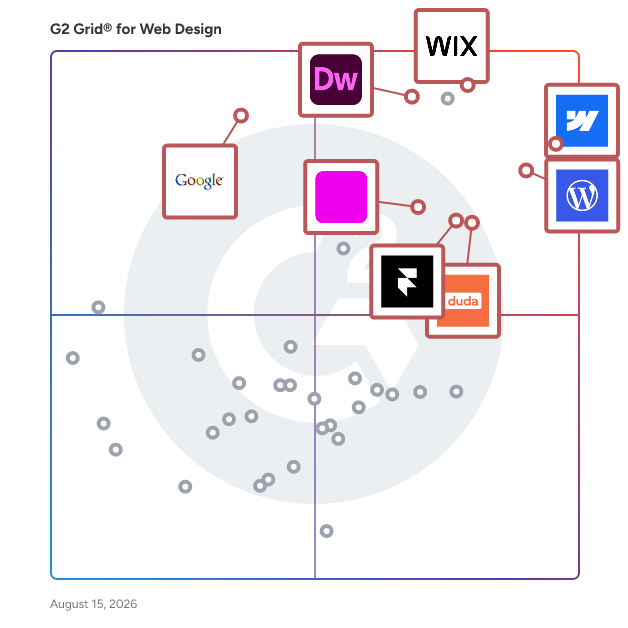
Highlighted products: Webflow, Adobe Dreamweaver, WordPress.com, Framer, Wix, Duda, Google Web Designer, and Elementor.
Underlying data: [Grid® JSON](https://www.g2.com/categories/web-design/grids.json?focus%5B%5D=webflow&focus%5B%5D=adobe-dreamweaver&focus%5B%5D=wordpress-com&focus%5B%5D=framer&focus%5B%5D=wix&focus%5B%5D=duda&focus%5B%5D=google-web-designer&focus%5B%5D=elementor&segment=mid-market)
Sponsored
altaFlow generates custom docs with a click, integrates eSignatures, creates webforms, and more without coding. It’s the ultimate tool to simplify, automate, and elevate your workflows.
Webflow is the agentic web marketing platform for high-performing teams. Marketers, designers, and developers collaborate in Webflow to build distinctive web experiences that grow their brand, rank in AI search, and drive real revenue, all without the complexity of a Frankenstack or the cost of constant replatforming. Built-in AI accelerates creation, optimization, and automation, while audit trails and permissions ensure teams stay in control. Over 300,000 companies and 2,000+ Certified Partners trust Webflow to power enterprise-grade web experiences worldwide.
Average Rating: 4.4/5.0
Total Reviews: 981
AI-generated summary from verified user reviews
"Best webdesign building platform"
Rating: 4.5/5.0 stars
— Richard D.
"Exceptional deep-dive technical support and a highly robust visual architecture platform"
Rating: 5.0/5.0 stars
— Mario B.
Adobe Dreamweaver is a comprehensive web design and development tool that enables users to create, code, and manage dynamic websites efficiently. It supports a wide range of web technologies, including HTML, CSS, JavaScript, and more, making it suitable for both beginners and experienced developers. With its intuitive interface and powerful features, Dreamweaver simplifies the process of building responsive websites that adapt seamlessly to various devices and screen sizes. Key Features and Functionality: - Fast, Flexible Coding: Dreamweaver offers a smart coding engine with code hints and visual aids, allowing users to write clean and efficient code quickly. This feature supports various web standards, enhancing productivity and reducing errors. - Responsive Design: The software provides starter templates for creating responsive websites, including HTML emails, blogs, e-commerce pages, and portfolios. These templates are customizable, enabling users to build sites that look great on any device. - Seamless Live View Editing: Users can edit text and image properties directly in Live View, with changes previewed instantly. This eliminates the need to switch between different editing modes, streamlining the design process. - Multi-Monitor Support: For Windows users, Dreamweaver supports multi-monitor setups, allowing for an expanded workspace and improved workflow management. - Modern User Interface: The redesigned, clutter-free interface lets users customize their workspace, displaying only the tools needed for coding, which enhances focus and efficiency. - Git Integration: Dreamweaver includes Git support, enabling users to manage source code and perform common operations directly within the application, facilitating collaboration and version control. Primary Value and User Solutions: Adobe Dreamweaver addresses the challenges of web design and development by providing an all-in-one solution that combines visual design capabilities with robust coding tools. Its support for modern web workflows, such as CSS preprocessors and integration with frameworks like Bootstrap, allows users to build responsive and visually appealing websites efficiently. By offering features like Live View editing and Git integration, Dreamweaver streamlines the development process, reduces the learning curve for beginners, and enhances productivity for experienced developers. This comprehensive approach ensures that users can create professional-quality websites that meet current web standards and perform optimally across various platforms and devices.
Average Rating: 4.1/5.0
Total Reviews: 2,800
AI-generated summary from verified user reviews
"Dreamweaver Makes Website Design Easy with Live Preview and Drag-and-Drop"
Rating: 4.0/5.0 stars
— ChAnDrAsHeKaR N.
"A Friendly Middle Ground Between Visual Editing and Clean Code"
Rating: 4.5/5.0 stars
— Jyotishman G.
WordPress.com offers everything you need to build and grow any website–all in one place. See why more than 160 million websites trust WordPress.com to be their home on the web.
Average Rating: 4.4/5.0
Total Reviews: 2,680
AI-generated summary from verified user reviews
"Easy Blog Creation and Editing with Elementor Integration"
Rating: 4.5/5.0 stars
— Matthew W.
"Simplifies Blogging with Ease, Despite Some Hiccups"
Rating: 4.0/5.0 stars
— Lovepreet S.
Teams use Framer as an AI website builder and no-code web design platform for launching responsive marketing websites, landing pages, blogs, portfolios, and resource hubs. Designers, marketers, agencies, startups, and enterprise teams use Framer to design on a visual canvas, manage content with a built-in CMS, publish to custom domains, and improve SEO from one workspace. Framer includes AI agents that help teams design, update, and improve websites. Teams can ask agents to update site copy, restructure pages, change layouts, apply brand colors and typography, create new sections, build new pages from prompts or references, migrate sites from tools like WordPress or Webflow, and make pages responsive across desktop, tablet, and mobile. Framer agents also help with CMS workflows, custom components, SEO, analytics, accessibility, and site QA. Teams can use agents to create CMS collections, update fields, import content, add metadata, write alt text, fix broken links, check heading structure, improve accessibility, and audit design consistency. Framer also supports external agents such as Claude, Cursor, and Codex so teams can connect AI-assisted workflows to their website projects. Framer fits teams that want a fast website builder with professional design control, AI-assisted site creation, CMS workflows, SEO tools, and scalable publishing.
Average Rating: 4.5/5.0
Total Reviews: 144
AI-generated summary from verified user reviews
"Designer-Friendly with Efficient Tool Integrations"
Rating: 5.0/5.0 stars
— Rolf T.
"The fastest way from idea to live site"
Rating: 5.0/5.0 stars
— Abhijeet S.
Wix is a website builder that lets any business or individual build their own professional website. By combining design tools and business solutions in one AI-powered platform, Wix makes it easy for anyone to create without limits and scale confidently online. Whether it’s a personal portfolio, blog, service business or eCommerce store, Wix has a solution for you. You can get started by vibe coding a website with Wix Harmony, or choosing a designer-made template for something more structured. Either way, your site can then be easily customized with a smart drag and drop editor. Every site includes multi-cloud hosting, lightning-fast web performance and enterprise grade security. Wix goes beyond basic website creation with built-in tools and AI features to support your full online journey. You can generate content using AI in the same brand voice across your entire site, as well as images, SEO tags, marketing materials and much more. You can also use Wix to search for and register a custom domain with access to 400+ TLD options, set up a professional business email and use advanced branding features. Wix also has website analytics and a mobile app, so you can monitor and manage your site from anywhere. No matter your website or business, Wix combines everything you need into one intuitive platform used by millions worldwide. What are the main features of Wix? • AI website builder that can create a site for any industry • Smart drag and drop editor to intuitively edit your site • Professionally designed website templates • Ability to search for and register a custom domain • Multi-cloud web hosting with fast performance and built-in security • Advanced marketing tools including SEO and LLM optimization • eCommerce solutions equipped with multi-channel sales • Online scheduling software for service-based businesses • Blogging and portfolio capabilities to grow and monetize your audience • Full-stack web dev tools for advanced customization
Average Rating: 4.2/5.0
Total Reviews: 1,824
AI-generated summary from verified user reviews
"Did Wix reach the peak of the mountain?"
Rating: 4.5/5.0 stars
— Francisco V.
"Creative way to have a beautiful website."
Rating: 4.5/5.0 stars
— Deinilys T.
Duda is the leading website development platform empowering digital marketing agencies and SaaS companies to build and manage their customers' digital presence. Duda’s award-winning low-code no-code platform enables agencies and SaaS companies to reach higher productivity and unprecedented growth with an extensive range of capabilities spanning ecommerce, client management, SEO, automation, and white labeling.
Average Rating: 4.6/5.0
Total Reviews: 749
AI-generated summary from verified user reviews
"Duda Streamlines Idea-to-Website Delivery with an Easy Editor and All-in-One Tools"
Rating: 5.0/5.0 stars
— Daniel S.
"Duda Streamlined My Workflow with Responsive Design and Built-In Speed Optimization"
Rating: 5.0/5.0 stars
— Noël M.
Google Web Designer is a free, professional-grade tool developed by Google for creating interactive HTML5-based designs and motion graphics that can run seamlessly across various devices. It empowers users to design and build engaging content, such as advertisements and web pages, without requiring extensive coding knowledge. The platform offers a user-friendly interface that combines visual design tools with the flexibility to edit HTML, CSS, and JavaScript directly, catering to both designers and developers. Key Features and Functionality: - Animation Tools: Users can create animations using two modes: Quick mode for scene-based animations and Advanced mode for timeline-based animations with layers. Motion paths and custom easing provide precise control over animations. - 3D Content Creation: The tool supports the creation and manipulation of 3D content using CSS3, allowing for the rotation and transformation of objects along any axis. - Responsive Design: Google Web Designer enables the creation of responsive ads and web content that adapt to different screen sizes and orientations, ensuring a consistent user experience across devices. - Interactive Components: The platform includes a variety of built-in components, such as image galleries, video players, and maps, which can be easily integrated to enhance interactivity. - Google Integrations: Seamless integration with other Google products, including Google Ads, Display & Video 360, and Google Drive, facilitates efficient workflows and direct publishing of content. - Code Editing: For users with coding expertise, the Code View allows direct editing of HTML, CSS, and JavaScript, with features like syntax highlighting and code autocompletion to streamline the coding process. Primary Value and User Solutions: Google Web Designer addresses the need for a versatile and accessible tool to create rich, interactive web content without the steep learning curve associated with traditional coding. By offering a blend of visual design capabilities and code editing flexibility, it caters to both designers seeking intuitive design tools and developers requiring precise control over code. The platform's support for responsive design ensures that content is optimized for various devices, enhancing user engagement. Additionally, its integration with Google's advertising and cloud services streamlines the creation, management, and deployment of digital marketing materials, making it a valuable asset for businesses aiming to produce high-quality, interactive web content efficiently.
Average Rating: 3.8/5.0
Total Reviews: 274
AI-generated summary from verified user reviews
Rating: 5.0/5.0 stars
— Jeffery D.
"Time-Saving Templates and Advanced Animation—A Designer’s Free Gem"
Rating: 4.5/5.0 stars
— Aishee B.
THE #1 NO CODE DRAG & DROP WORDPRESS WEBSITE BUILDER POWERING 22M+ WEBSITES WORLDWIDE, NOW WITH AI. Elementor, the leading WordPress website creation platform, empowers you to build professional, pixel-perfect websites seamlessly with its no-code, drag-and-drop Atomic Editor. Supporting the full website lifecycle, Elementor enables you to confidently build, optimize, and manage your website with extended capabilities such as AI-powered creation, image optimization, transactional email delivery, accessibility tools, performance boosters, and more. Now in version 4 – the Atomic Editor! Introducing a new generation of performance-first atomic building blocks that allow you to control every atomic part with no limits or locked layouts. Define your global design systems and reusable components once, and they apply everywhere instantly – turning hours or even days of work into single clicks. Unlock all features with Elementor One. Need fast and secure cloud hosting for your Elementor site? Try out Elementor Host Powered by Google Cloud & Cloudflare. 4.9/5 TrustPilot score. 🌟 Create Professional Stunning Websites Intuitive Drag & Drop Builder: Build any website with our no-code, drag-and-drop Editor. Achieve design precision with full control over layout and style. Pixel-Perfect Design Tools: Upload SVGs, apply masks, gradients, box shadows, headline effects, shape dividers, and use built-in CSS controls for advanced customization. Template Library: Apply complete website kits for instant setups, or choose from a vast library of single pages, blocks, and pop-up templates. Advanced Widgets: Access over 40 FREE widgets, including heading, image, text editor, video, button, gallery, carousels, and more. AI Capabilities: Revolutionize your design and content creation process with native AI integration. Instantly create sections, text, code, and images. 🗝️ Key features: Design System: Use Variables and Classes for consistent colors, typography, and design elements, ensuring a cohesive, professional look that updates everywhere globally. Responsive Design: Optimize your design for every device with custom breakpoints, ensuring a seamless desktop, tablet, and mobile experience. Mask Shapes: Turning any element, like an image or video, into whatever shape you desire to create standout designs. CSS Transform: Use CSS Transform to rotate, scale, and skew elements, adding dynamic styling to your site. Entrance Animations: Add entrance animations to elements to create engaging and interactive user experiences. Revision History: Elementor’s Revision History feature enables users to track and revert to previous versions of their designs, providing peace of mind and flexibility during the creative process. Developer-Friendly: Equipped with extensive documentation, API, developer tools, and custom code areas, Elementor offers a conducive environment for developers to extend its capabilities and create custom solutions. Floating Buttons: Enhance user interaction with customizable, floating action buttons that stay in view as users scroll. Components [Pro]: Reuse the same building blocks across pages and sites, and update them everywhere they appear. Including controlled content editing, allowing collaborators and clients to update only exposed content properties without breaking layout or styling. Theme Builder [Pro]: Design every part of your site—headers, footers, posts, and archives—for complete control over appearance. Popup Builder [Pro]: Create eye-catching popups with Elementor’s Popup Builder, equipped with advanced targeting and triggering options to optimize user engagement and conversions. Forms [Pro]: Design and integrate custom forms, utilizing advanced features and integrations to capture and manage submissions effectively. WooCommerce Builder [Pro]: Integrate Elementor with WooCommerce to design custom product pages, shop layouts, archives, carts, checkout pages, my account, and more, enhancing your store’s visual appeal and functionality. Dynamic Content [Pro]: Leverage dynamic content capabilities to create personalized and interactive web experiences by connecting your designs to various data sources. Notes [Pro]: Enhance team collaboration by using Elementor’s Notes feature to leave feedback and comments directly on the design interface. Custom Code [Pro]: Insert custom code to extend the functionality of your site, offering flexibility for advanced customizations. Custom CSS [Pro]: Apply Custom CSS to fine-tune the styling of elements, ensuring precise control over the design aspects. Motion Effects [Pro]: Add advanced motion effects to elements for a more dynamic and engaging user experience. Custom Fonts & Icons [Pro]: Upload and use custom fonts and icons to match your brand’s identity. 😍 Elementor FREE widgets Unlock the potential of Elementor with our comprehensive suite of free widgets and tools, designed to empower your website creation process and elevate your design capabilities: Heading. Add eye-catching headlines. Image. Control the size, opacity and more. Text Editor. Just like the WordPress text editor. Video. Add YouTube, Vimeo, VideoPress, Dailymotion or self-hosted videos. Button. Create interactive buttons. Link in Bio. Build link in bio components to promote your business / services. Image Box. A box with image, headline and text. Testimonials. Customer testimonials. Icon. Place one or more of 600+ icons available. Icon Box. An icon, headline, and text with one widget. Social Icons. Link to your social pages with the Facebook/X (formerly Twitter) icons. Image Gallery. Display your images in a grid. Image Carousel. Create rotating carousels or sliders for chosen images. Icon List. Use any icon to create a bullet list. Counter. Show numbers in an escalating manner. Progress Bar. Include an escalating progress bar. Nested Tabs. Display content in vertical or horizontal tabs. Nested Accordion. Display any type of content in collapsible sections. Rating. Display how many stars (or another icon) other visitors gave. Alert. Include a colored alert box to draw visitor’s attention. HTML. Insert code into the page. Shortcode. Insert shortcodes from any plugin into the page. Menu Anchor. Link any menu to this anchor. Read More. Set the Read More cut-off for the excerpt in archive pages. Sidebar. Add sidebars onto the page. Google Maps. Embed maps into the page. SoundCloud. Add SoundCloud audio bits. Divider. Separate content with a designed divider. Spacer. Add space between elements. Text Path. Attach your text to a path. And counting… 🚀 Enhance Your Website Website performance impacts your visitor’s experience and search result ranking. Elementor, in partnership with Google Chrome, continuously enhances performance without compromising design. Key features include: - Reduced DOM Output: Streamlined HTML structure for faster rendering. Improved Media File Loading: Optimized loading of images, videos, and other media assets. - Reduced CSS and JS Files: Minimized stylesheets and scripts individually loaded only on demand for quicker loading times. - Lazy Loading: Deferred loading of non-critical resources to improve initial page load speed. - Faster Font Loading: Efficient delivery of web fonts to enhance text rendering speed. - Optimized Front-End Asset Loading: Efficient loading of assets like JavaScript and CSS to minimize render-blocking. - Element Caching: Cache frequently accessed design elements to reduce server response time and enhance overall performance. 🔥 Elementor Editor Pro Features Create unparalleled websites while saving time, money and resources with Elementor Editor Pro’s full website builder. Get access to 100+ professional widgets, features, and tools. Editor Pro Design Widgets: - Posts: Display your blog posts with customizable layouts and styles. - Share Buttons: Allow visitors to easily share your content on various social media platforms. - Portfolio: Showcase your work or projects with stunning portfolio layouts. - Slides: Create dynamic slideshows with custom animations and transitions. - Form: Design and customize advanced forms for user interaction and data collection. - Login: Add a login form or user registration module to your website. - Nav Menu: Customize and style your website’s navigation menu for better user experience. - Animated Headline: Create attention-grabbing headlines with animated effects. - Price Table: Display pricing plans or packages in a structured and visually appealing format. - Price List: Showcase a list of prices or services with customizable styling options. - Gallery: Create beautiful image galleries with various layout options and lightbox support. - Flip Box: Add interactive flip animations to highlight content or features. - Call to Action: Encourage user interaction and conversions with compelling call-to-action sections. - Media Carousel: Showcase a carousel of media files such as images or videos. - Testimonial Carousel: Display client testimonials in a carousel format for social proof. - Nested Carousel: Create nested carousels for more complex content organization. - Loop Carousel: Display content in a looped carousel for continuous viewing. - Table Of Content: Generate a table of contents for longer articles or guides to improve navigation. - Countdown: Add countdown timers to create urgency for promotions or events. - Facebook Page: Embed your Facebook page feed or content onto your website. - Blockquote: Highlight quotes or testimonials with stylish formatting options. - Template: Save and reuse design templates for consistent branding and layout. - Reviews: Showcase customer reviews and ratings to build trust and credibility. - Facebook Button: Add buttons to promote interactions with your Facebook page or content. - Facebook Embed: Embed Facebook posts or content onto your website. - Facebook Comments: Enable Facebook comments on your website’s pages or posts. - PayPal Button: Integrate PayPal buttons for easy online payments. - Stripe Button: Integrate Stripe payment buttons to facilitate secure online transactions. - Lottie Widget: Add Lottie animations to enhance visual appeal and engagement. - Code Highlight: Display code snippets with syntax highlighting for better readability. - Video Playlist: Create and customize playlists for video content on your website. - Mega Menu: Customize advanced menus for better navigation and displaying complex content. - Off Canvas: Create off-canvas areas that slide in to show extra info or menus without cluttering the main layout. Editor Pro Theme Widgets: Build and customize all the key parts of your website including headers, footers, 404 page, global archives, and more… - Post Title: Customize the title of individual blog posts or pages. - Post Excerpt: Display a brief summary or teaser of your blog posts. - Post Content: Customize the main content area of your blog posts or pages. - Featured Image: Set and customize featured images for blog posts or pages. - Author Box: Display author information and bios on blog posts. - Post Comments: Customize the appearance and functionality of comments sections on your website. - Post Navigation: Add navigation links to adjacent posts for easy browsing. - Post Info: Display additional information about blog posts, such as author and date. - Site Logo: Upload and customize your website’s logo for branding purposes. - Site Title: Customize the title of your website. - Page Title: Customize the title of individual pages. - Search Bar: Add a search bar to allow users to search your website’s content. - Breadcrumbs: Display hierarchical navigation paths for better user navigation. - Sitemap: Generate a sitemap for better search engine indexing and user navigation. - Loop Grid: Design and customize grid layouts for blog post archives or product listings. Editor Pro WooCommerce Widgets: Design and customize a complete online shopping experience across your entire website. - Product: Display individual products with customizable layouts and styles. - Breadcrumbs: Display hierarchical navigation paths for better user navigation within your store. - Product Title: Customize the title of individual products. - Product Images: Set and customize images for product listings. - Product Price: Display the price of individual products. - Add To Cart: Add customizable add to cart buttons for easy purchasing. - Product Rating: Display ratings and reviews for products. - Product Stock: Display stock availability for products. - Product Meta: Display additional information about products, such as SKU and categories. - Product Content: Customize the main content area of product descriptions. - Short Description: Display brief summaries or teasers of products. - Product Data Tabs: Organize product information into tabbed sections for better organization. - Additional Information: Display additional details about products, such as dimensions and weight. - Product Related: Showcase related products to encourage additional purchases. - Upsells: Promote upsell products to increase average order value. - Products: Display a grid or list of products with customizable settings. - Custom Add To Cart: Customize the add to cart button for specific products. - WooCommerce Pages: Design and customize WooCommerce-specific pages, such as the cart and checkout pages. - Product Categories: Display product categories for easy navigation within your store. - Menu Cart: Display a cart icon in your navigation menu for easy access to the shopping cart. - Cart: Customize the appearance and functionality of the shopping cart page. - Checkout: Customize the appearance and functionality of the checkout page. - My Account: Customize the appearance and functionality of the customer account area. - Purchase Summary: Display a summary of purchases during the checkout process. - WooCommerce Notices: Customize the appearance and functionality of WooCommerce notices, such as order confirmation messages. Build professional websites with Elementor Editor Pro! 🔒 SECURITY AND COMPLIANCE Elementor places a paramount focus on security, evident through our acquisition of industry certifications such as ISO/IEC 27001, ISO/IEC 27017, ISO/IEC 27018, ISO/IEC 27701, and SOC 2 Type II. These certifications underscore our commitment to implementing robust security measures, and highlight our dedication to adhering to recognized industry standards. We encourage ethical security research through our Bug Bounty program. We collaborate with leading bug bounty services to provide opportunities for researchers to report vulnerabilities in our services. Our bounty programs include a triage team available 24/7/365. For more information: Trust Center. ♿ Accessibility Best Practices Elementor offers accessibility tools and enhancements to help you provide a better experience for all users. Including HTML 5 semantic, full keyboard navigation menu, ongoing improvement of features, widget, and more. 🌐 Translated to 63+ languages, includes RTL support Elementor supports multiple languages, typographies, and RTL, with editor translations in over 63 languages. It’s also compatible with WPML, Polylang, TranslatePress, Weglot, and more. To contribute, add a new language via translate.wordpress.org. See our guide on how to translate and localize the plugin.
Average Rating: 4.4/5.0
Total Reviews: 411
AI-generated summary from verified user reviews
"The Website Builder That Transformed My Workflow"
Rating: 5.0/5.0 stars
— Imran S.
"Beginner-Friendly Interface That Makes Blogging in Elementor Easy"
Rating: 4.5/5.0 stars
— Matthew W.
Ceros is the creative platform marketing and design teams use to build interactive web experiences that drive real engagement and pipeline. AI lives inside the canvas to spark ideas, build first drafts, and handle the production work designers don't miss doing. The world's leading brands, including Fortune 500 companies, use Ceros to break free from static PDFs and templated landing pages and create interactive content that actually gets discovered, engaged with, and remembered. Teams at Mastercard, Pepsi, and Morgan Stanley design, build, and ship interactive websites, landing pages, microsites, reports, ebooks, infographics, product demos, and full campaigns in Ceros every day, without developers, without compromise, and without delay. You bring the vision. Ceros ships it, beautifully, everywhere. Here's what you get with Ceros: A fully flexible, freeform creative canvas. Start with a blank canvas, a fully editable template, or AI to accelerate time to launch. Designers fine-tune no-code animations and interactions to the pixel. Marketers ship interactive campaigns without filing a single dev ticket. The result: better content, faster, in one place. AI built into the canvas, not bolted on top. Ceros's AI is canvas-aware and context-driven, so everything it creates fits the design system you're already working in. That's the structural difference between Ceros and standalone AI generators (Lovable, Bolt, Replit) or AI features tacked onto traditional design tools (Figma, Canva). Everything AI creates lands as a fully editable layer on the canvas: no black box, no forced reprompting. The human always keeps creative control. Brand governance and enterprise-grade scale. Brand kits keep every experience on-brand by default. A shared asset library puts the right files one click away. SSO, SOC 2, ISO 27001, WCAG 2.2 accessibility, and Lighthouse 95+ performance come standard. Built-in analytics and deep integrations. Track engagement and prove ROI on every interactive experience with built-in analytics, alongside native integrations with the tools your team already uses (HubSpot, Marketo, Google Analytics, Adobe Analytics, and more). Ceros stays CMS agnostic, so your content embeds cleanly into Adobe Experience Manager, Contentful, WordPress, or anywhere else your audience lives. One platform for the full content lifecycle. From campaign landing pages and microsites to interactive sales proposals, investor reports, and product demos, Ceros gives marketing and design teams a single home for every kind of interactive content they ship. One canvas, one design system, one source of truth for the brand. The interactive content platform that drives measurable results. "Ceros allows us to tell the story of our brand in a way that actually connects, and brings the human element into what we do." — Meredith Burall, Creative Services Director, BDO Customers using Ceros see real, measurable wins: 80% longer dwell times, 10x higher click-through rates, 95+ Lighthouse scores, and up to 2x higher conversion rates. Join the marketing and design teams using Ceros to turn static content into interactive web experiences that win attention, build pipeline, and prove their value.
Average Rating: 4.1/5.0
Total Reviews: 113
AI-generated summary from verified user reviews
"Ceros Makes Interactive Content Easy—with Outstanding Support"
Rating: 4.5/5.0 stars
— Jason Z.
"Ceros Makes Interactive Content Creation Easy—No Developers Needed"
Rating: 4.0/5.0 stars
— Kiera K.
Vev is the AI-powered visual editor for enterprise teams. Build and publish interactive content that drives real engagement, not just impressions. Build fast, reduce bottlenecks, and maintain full creative control.
Average Rating: 4.3/5.0
Total Reviews: 135
AI-generated summary from verified user reviews
"A one stop platform that has it all"
Rating: 5.0/5.0 stars
— Jonas W.
"Makes Presentations Interactive and More Memorable"
Rating: 4.5/5.0 stars
— Abdul A.
H5P is a free and open-source platform that allows you to create interactive content for your website or learning management system. Whether you are an educator, trainer, or website owner, H5P provides a wide range of interactive content types, such as quizzes, presentations, games, and more. With H5P, you don't need any programming knowledge or design skills to create stunning and engaging content. The platform provides a user-friendly interface with a drag-and-drop editor, making it easy to create and customize interactive content in minutes. You can also choose from various pre-built templates to jump-start your content creation process. One of the critical advantages of H5P is its compatibility with a wide range of platforms and content management systems, such as WordPress, Moodle, Drupal, and more. This means that you can easily integrate your H5P content into your existing website or learning management system, allowing you to provide a more interactive and engaging learning experience for your audience. In addition to its ease of use and compatibility, H5P also provides powerful analytics and reporting features that allow you to track your learners' progress and engagement with your interactive content. This data can help you identify areas for improvement and optimize your content to meet your learners' needs better. Overall, H5P is a versatile and user-friendly platform that can help you easily create and share engaging and interactive content. Whether you are an educator, trainer, or website owner, H5P can help you enhance your learners' experience and improve their engagement with your content.
Average Rating: 4.5/5.0
Total Reviews: 45
AI-generated summary from verified user reviews
"Easy for New Users with a Low Learning Curve"
Rating: 4.0/5.0 stars
— Verified User in Higher Education
"Wide Range of Activities Makes It a Great Choice"
Rating: 4.0/5.0 stars
— Verified User in Higher Education
Bluefish is a robust, open-source text editor tailored for programmers and web developers, offering a versatile platform for creating websites, scripts, and code across various programming and markup languages. Designed to bridge the gap between simple text editors and full-fledged integrated development environments (IDEs), Bluefish provides a lightweight yet feature-rich environment that is both fast and easy to learn. Key Features and Functionality: - Multi-Language Support: Bluefish offers syntax highlighting and auto-completion for 47 different programming and markup languages, including HTML, CSS, JavaScript, PHP, Python, and C. - Advanced Editing Tools: Features such as code folding, auto-recovery, and a code-aware spell-checker enhance the coding experience. - Project Management: Supports multiple projects with the ability to open multiple files simultaneously, facilitating efficient workflow management. - Remote File Access: Integrates with GNOME Virtual File System (GVfs) to enable seamless editing of files over FTP, SFTP, WebDAV, and more. - Customizable Interface: Offers a user-friendly interface with configurable toolbars and dialogs, allowing users to tailor the environment to their preferences. Primary Value and User Solutions: Bluefish addresses the needs of developers seeking a powerful yet lightweight editor that supports a wide range of programming and markup languages. Its extensive feature set, including advanced editing tools and project management capabilities, streamlines the development process, enhancing productivity. The ability to access and edit remote files directly within the editor simplifies workflows for developers working on web projects. By providing a customizable and efficient coding environment, Bluefish empowers developers to focus on writing quality code without the overhead of more complex IDEs.
Average Rating: 4.1/5.0
Total Reviews: 49
AI-generated summary from verified user reviews
"Bluefish: A Versatile & Solid Open Language Editor"
Rating: 4.5/5.0 stars
— Salini K.
"It’s a very helpful app for side earnings"
Rating: 4.0/5.0 stars
— Srijita J.
Semantic UI is a comprehensive front-end development framework that enables developers to create responsive, user-friendly websites and applications using human-readable HTML. By integrating principles from natural language, it simplifies the design process, allowing for intuitive and efficient development. Key Features and Functionality: - Extensive UI Components: Offers over 50 UI elements, including buttons, menus, and forms, facilitating rapid development. - Theming Capabilities: Provides more than 3,000 CSS variables and a robust theming system, allowing for extensive customization and consistent design across projects. - Responsive Design: Built with EM values and Flexbox, ensuring designs are adaptable to various screen sizes and devices. - Framework Compatibility: Seamlessly integrates with popular frameworks like React, Angular, Meteor, and Ember, enhancing flexibility in application development. - Simplified Debugging: Features performance logging and real-time debugging tools, streamlining the development and troubleshooting process. Primary Value and User Solutions: Semantic UI addresses the challenges of front-end development by offering a structured, intuitive framework that accelerates the creation of aesthetically pleasing and responsive web interfaces. Its natural language conventions reduce the learning curve, making it accessible for developers of varying expertise. The extensive theming options and responsive design principles ensure that applications are both visually appealing and functional across different devices. By supporting integration with multiple frameworks, Semantic UI provides the flexibility needed for diverse project requirements, ultimately enhancing productivity and the quality of web development projects.
Average Rating: 4.1/5.0
Total Reviews: 27
AI-generated summary from verified user reviews
Rating: 4.5/5.0 stars
— UTSAV S.
"Easy to use, clean design framework!"
Rating: 4.0/5.0 stars
— Verified User in Information Technology and Services