# Best Prototyping Software

## How Many Prototyping Software Products Does G2 Track?

**Total Products under this Category:** 75

### Category Stats (Aug 2026)

- **Average Rating:** 4.37/5 The average rating of products in this category, based on all submitted ratings
- **Top Trending Product:** Visily (+0.41%) - Among all products in this category, Visily recorded the largest rating increase compared to last month

_Last updated: August 21, 2026_

## How Does G2 Rank Prototyping Software Products?

**Why You Can Trust G2's Software Rankings:**

- 30 Analysts and Data Experts
- 19,800+ Authentic Reviews
- 75+ Products
- Unbiased Rankings

G2's software rankings are built on verified user reviews, rigorous moderation, and a consistent research methodology maintained by a team of analysts and data experts. Each product is measured using the same transparent criteria, with no paid placement or vendor influence. While reviews reflect real user experiences, which can be subjective, they offer valuable insight into how software performs in the hands of professionals. Together, these inputs power the G2 Score, a standardized way to compare tools within every category.

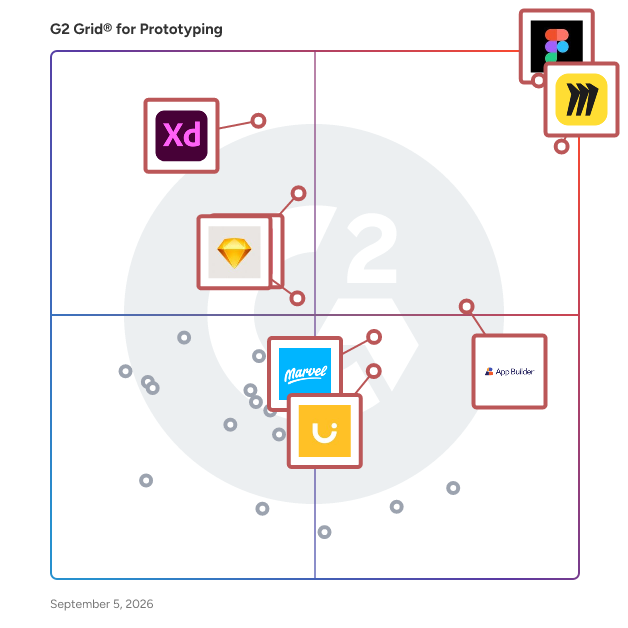
## G2 Grid® for Prototyping Software
 ![G2 Grid® for Prototyping Software plotting products by satisfaction and market presence](https://www.g2.com/categories/prototyping/grids.png?focus%5B%5D=25680&focus%5B%5D=42445&focus%5B%5D=17136&focus%5B%5D=52159&focus%5B%5D=3896&focus%5B%5D=17399&focus%5B%5D=92971&focus%5B%5D=15705)

Highlighted products: Figma, Miro, App Builder, Adobe XD, InVision, Marvel, Uizard, and Sketch.

Underlying data: [Grid® JSON](https://www.g2.com/categories/prototyping/grids.json?focus%5B%5D=figma&focus%5B%5D=miro&focus%5B%5D=appbuilder&focus%5B%5D=adobe-xd&focus%5B%5D=invision&focus%5B%5D=marvel&focus%5B%5D=uizard&focus%5B%5D=sketch)

### [Figma](https://www.g2.com/products/figma/reviews)

Figma is a design platform for teams who build products together. Born on the Web, Figma helps the entire product team create, test, and ship better designs, faster.

**Average Rating:** 4.7/5.0

**Total Reviews:** 1,566

#### How Do G2 Users Rate Figma?

- **Has the product been a good partner in doing business?:** 8.9/10 (Category avg: 8.9/10)
- **Editing Tools:** 9.2/10 (Category avg: 8.6/10)
- **Framework Libraries:** 8.8/10 (Category avg: 8.0/10)
- **Modeling Tools:** 8.9/10 (Category avg: 8.5/10)

#### Who Is the Company Behind Figma?

- **Seller:** [Figma](https://www.g2.com/sellers/figma)
- **Year Founded:** 2012
- **HQ Location:** San Francisco, California
- **Twitter:** @figma  
560,699 Twitter followers
- **LinkedIn® Page:** [www.linkedin.com](https://www.g2.com/external_clickthroughs/record?secure%5Bsource_type%5D=product_profile&secure%5Btoken%5D=09c397bcaf19682871f25a6c06b4a58facbe2b286d5372458c3845c1e1c0f585&secure%5Burl%5D=https%3A%2F%2Fwww.linkedin.com%2Fcompany%2F3650502%2F&secure%5Burl_type%5D=linkedin_company_website)  
3,110 employees on LinkedIn®

#### Who Uses This Product?

- **Who Uses This:** Product Designer, Product Manager
- **Top Industries:** Computer Software, Information Technology and Services
- **Company Size:** 57% Small, 31% Medium

#### What Do G2 Reviewers Say About Figma?

_AI-generated summary from verified user reviews_

##### Pros

- Users appreciate the **ease of use** in Figma, making design collaboration effortless and efficient for all involved.
- Users love the **real-time collaboration** in Figma, enabling seamless teamwork and quick feedback for efficient design processes.
- Users value the **real-time collaboration** features of Figma, enhancing teamwork and streamlining design processes effectively.
- Users value Figma's **real-time collaboration and intuitive interface** , enhancing efficiency and consistency in design projects.
- Users value the **real-time collaboration** in Figma, streamlining teamwork and enhancing the design process significantly.

##### Cons

- Users often experience **slow performance** with large files in Figma, impacting workflow during daily usage.
- Users experience **performance issues** with large files or complex designs, affecting efficiency and responsiveness.
- Users experience **slow loading** issues with Figma, particularly with large files or complex design systems affecting performance.
- Users experience **slow performance with large files** in Figma, making complex projects challenging to manage effectively.
- Users struggle with **internet dependency** , experiencing performance issues and slow loading times for large files.

#### What Are Recent G2 Reviews of Figma?

**["Figma Makes UI/UX Design and Team Collaboration Easier"](https://www.g2.com/survey_responses/figma-review-13270765)**

**Rating:** 4.0/5.0 stars

_— Manish R._

[Read full review](https://www.g2.com/survey_responses/figma-review-13270765)

**["Essential for Multi-Language, Multi-Surface UI Design and Dev Collaboration"](https://www.g2.com/survey_responses/figma-review-13223547)**

**Rating:** 4.0/5.0 stars

_— Muhammed A._

[Read full review](https://www.g2.com/survey_responses/figma-review-13223547)

#### What Are G2 Users Discussing About Figma?

- [What is Figma used for?](https://www.g2.com/discussions/what-is-figma-used-for) - 8 comments
- [Should I use Figma?](https://www.g2.com/discussions/should-i-use-figma) - 6 comments, 5 upvotes
- [Is Figma a free software?](https://www.g2.com/discussions/is-figma-a-free-software) - 7 comments
- [What can Figma do?](https://www.g2.com/discussions/what-can-figma-do) - 3 comments, 1 upvote
- [What is Figma built with?](https://www.g2.com/discussions/what-is-figma-built-with) - 2 comments

### [Miro](https://www.g2.com/products/miro/reviews)

Miro is the collaborative workspace where agents and teams converge to think, decide, and build together. As AI accelerates work, the challenge for organizations isn't doing more; it's turning individual output into scaled impact. Serving more than 100 million users across 250,000 customers, Miro’s shared, secure canvas surfaces the context that empowers teams to solve harder problems, make better decisions, and move work forward faster. Founded in 2011, Miro currently employs 1,600 people in 13 hubs around the world. To learn more, visit miro.com Key AI capabilities include Flows, which are visual AI workflows that automate multi-step processes while empowering teams with full visibility and control at every step; Sidekicks, which are conversational AI co-creators with expertise on specific tasks, jobs, or processes that move work forward; and Your AI and Knowledge, a collaborative integration layer that connects and enhances existing enterprise AI capabilities without leaving the platform. The Model Context Protocol (MCP) extends the ecosystem by accelerating agentic code, leveraging context from Miro to generate code in agents powered by Miro’s own MCP server. Miro for Product Acceleration is a comprehensive solution of integrated AI-first products designed to help product teams make smarter decisions about what to build and move faster. All of these capabilities are built on one platform with a shared data model, advanced security and compliance controls, and responsible AI certification at the forefront. By embedding AI where teamwork happens, Miro keeps teams in the flow of work, accelerates processes, and ultimately transforms organizations.

**Average Rating:** 4.6/5.0

**Total Reviews:** 13,415

#### How Do G2 Users Rate Miro?

- **Has the product been a good partner in doing business?:** 9.0/10 (Category avg: 8.9/10)
- **Editing Tools:** 8.2/10 (Category avg: 8.6/10)
- **Framework Libraries:** 8.0/10 (Category avg: 8.0/10)
- **Modeling Tools:** 8.1/10 (Category avg: 8.5/10)

#### Who Is the Company Behind Miro?

- **Seller:** [Miro](https://www.g2.com/sellers/miro)
- **Company Website:** miro.com
- **Year Founded:** 2011
- **HQ Location:** San Francisco, California
- **Twitter:** @MiroHQ  
38,406 Twitter followers
- **LinkedIn® Page:** [www.linkedin.com](https://www.g2.com/external_clickthroughs/record?secure%5Bsource_type%5D=product_profile&secure%5Btoken%5D=f57ac7919e85e990749a7e280ff060714aa191b894eb78b9d1e3aaf8a9dc519a&secure%5Burl%5D=https%3A%2F%2Fwww.linkedin.com%2Fcompany%2Fmirohq%2F&secure%5Burl_type%5D=linkedin_company_website)  
2,840 employees on LinkedIn®

#### Who Uses This Product?

- **Who Uses This:** Product Manager, Project Manager
- **Top Industries:** Computer Software, Information Technology and Services
- **Company Size:** 39% Small, 29% Medium

#### What Do G2 Reviewers Say About Miro?

_AI-generated summary from verified user reviews_

##### Pros

- Users praise Miro for its **ease of use** , making collaboration and idea sharing straightforward and efficient.
- Users value the **effortless collaboration** Miro offers, facilitating seamless teamwork and idea management in one visual space.
- Users value Miro's **intuitive features** and flexibility, enhancing productivity and creativity with seamless visualizations.
- Users love the **real-time collaboration** feature of Miro, enabling effortless teamwork and idea sharing in a visual space.
- Users love the **real-time collaboration** in Miro, enhancing teamwork and idea sharing seamlessly across projects.

##### Cons

- Users express a need for **missing features** , particularly for a unified overview and better control on boards.
- Users find that Miro's **embedding in Confluence pages appears cluttered** , detracting from the overall presentation quality.
- Users find Miro's **limited features** restrictive, especially on the free plan and for larger teams, increasing costs significantly.
- Users face a **steep learning curve** with Miro, making initial usage challenging despite its powerful functionality.
- Users report **slow loading** times and inefficiencies when navigating large boards and documents in Miro.

#### What Are Recent G2 Reviews of Miro?

**["Miro: Powerful, Collaborative, and Intuitive"](https://www.g2.com/survey_responses/miro-review-13351715)**

**Rating:** 5.0/5.0 stars

_— Ayan G._

[Read full review](https://www.g2.com/survey_responses/miro-review-13351715)

**["A Powerful Visual Tool for Engineering Collaboration and System Design"](https://www.g2.com/survey_responses/miro-review-13349623)**

**Rating:** 4.5/5.0 stars

_— Jayesh W._

[Read full review](https://www.g2.com/survey_responses/miro-review-13349623)

#### What Are G2 Users Discussing About Miro?

- [How are teams using Miro to enhance collaboration and brainstorming in a virtual environment?](https://www.g2.com/discussions/miro-how-are-teams-using-miro-to-enhance-collaboration-and-brainstorming-in-a-virtual-environment) - 4 comments, 6 upvotes
- [How are teams using Miro to enhance collaboration and brainstorming in a virtual environment?](https://www.g2.com/discussions/how-are-teams-using-miro-to-enhance-collaboration-and-brainstorming-in-a-virtual-environment) - 1 comment, 2 upvotes
- [What is Miro used for?](https://www.g2.com/discussions/what-is-miro-used-for) - 4 comments, 1 upvote
- [What is InVision Freehand used for?](https://www.g2.com/discussions/what-is-invision-freehand-used-for) - 1 comment, 2 upvotes
- [Is mural or Miro better?](https://www.g2.com/discussions/is-mural-or-miro-better) - 2 comments, 1 upvote

### [App Builder](https://www.g2.com/products/appbuilder/reviews)

App Builder™ is a low-code tool that enables teams to create high-functioning applications with ease using a drag-and-drop WYSIWYG interface. Then generate clean, pixel-perfect code for Angular, React, Web Components, and Blazor. It enables you to start an app from scratch choose from a library of pre-built templates or responsive screen layouts, or import your Figma designs and then customize them with a toolbox of 60+ UI controls.

**Average Rating:** 4.5/5.0

**Total Reviews:** 45

#### How Do G2 Users Rate App Builder?

- **Has the product been a good partner in doing business?:** 9.0/10 (Category avg: 8.9/10)
- **Editing Tools:** 9.7/10 (Category avg: 8.6/10)
- **Framework Libraries:** 10.0/10 (Category avg: 8.0/10)
- **Modeling Tools:** 9.7/10 (Category avg: 8.5/10)

#### Who Is the Company Behind App Builder?

- **Seller:** [Infragistics](https://www.g2.com/sellers/infragistics)
- **Year Founded:** 1989
- **HQ Location:** Cranbury, NJ
- **Twitter:** @infragistics  
36,861 Twitter followers
- **LinkedIn® Page:** [www.linkedin.com](https://www.g2.com/external_clickthroughs/record?secure%5Bsource_type%5D=product_profile&secure%5Btoken%5D=c2809c8bbed8769da1ef9f9ed90d00489a04aded2b61f06fd445132137fc4794&secure%5Burl%5D=https%3A%2F%2Fwww.linkedin.com%2Fcompany%2F16069%2F&secure%5Burl_type%5D=linkedin_company_website)  
184 employees on LinkedIn®

#### Who Uses This Product?

- **Top Industries:** Computer Software, Information Technology and Services
- **Company Size:** 65% Small, 20% Large

#### What Do G2 Reviewers Say About App Builder?

_AI-generated summary from verified user reviews_

##### Pros

- Users appreciate the **intuitive drag-and-drop interface** of App Builder, enabling quick and easy app development for everyone.
- Users love the **intuitive drag-and-drop interface** that accelerates app development and enhances usability for everyone.
- Users love the **comprehensive low-code features** of App Builder, enabling rapid and intuitive app development.
- Users value the **intuitive drag-and-drop interface** for quick app creation without needing extensive coding skills.
- Users love the **easy creation** process of App Builder, enjoying quick results and minimal coding requirements.

##### Cons

- Users find **customization issues** arise with App Builder, often requiring developer involvement for specialized integrations.
- Users find **integration issues** arise with complex requirements, often requiring developer assistance for advanced customizations.
- Users are disappointed by the **lack of features** in App Builder, wishing for more advanced customization and visualization options.
- Users find **limited customization** in App Builder, often requiring developers for niche or advanced integrations.
- Users find that **prototyping limitations** hinder deeper backend integration and complex custom logic in App Builder.

#### What Are Recent G2 Reviews of App Builder?

**["Super Balanced AI-Assisted App Builder"](https://www.g2.com/survey_responses/app-builder-review-12123570)**

**Rating:** 5.0/5.0 stars

_— Richard W._

[Read full review](https://www.g2.com/survey_responses/app-builder-review-12123570)

**["Secure, Behind-the-Firewall App Building for Regulated Industries"](https://www.g2.com/survey_responses/app-builder-review-11581066)**

**Rating:** 5.0/5.0 stars

_— tori k._

[Read full review](https://www.g2.com/survey_responses/app-builder-review-11581066)

#### What Are G2 Users Discussing About App Builder?

- [What is App Builder used for?](https://www.g2.com/discussions/what-is-app-builder-used-for) - 2 comments

### [Adobe XD](https://www.g2.com/products/adobe-xd/reviews)

Adobe XD is a vector-based design and prototyping tool developed by Adobe Inc., tailored for creating user experiences for web and mobile applications. It enables designers to craft intricate wireframes, detailed mockups, and interactive prototypes, streamlining the design process from concept to final product. Key Features and Functionality: - Design Tools: Provides a comprehensive set of tools for wireframing, visual design, and creating production-ready artwork. - Prototyping and Animation: Allows for the creation of animated prototypes by linking artboards, which can be previewed on supported mobile devices. - Repeat Grid: Facilitates the creation of grids of repeating items, such as lists and photo galleries, enhancing design efficiency. - Interoperability: Supports and can open files from Illustrator, Photoshop, Sketch, and After Effects, and integrates with tools like Slack and Microsoft Teams for collaboration. - Responsive Resize: Automatically adjusts and sizes images and other objects on artboards, ensuring designs adapt seamlessly to different screen sizes. - Voice Design: Enables the design of applications using voice commands, allowing for the creation and preview of voice interfaces. - Plugins: Compatible with custom plugins that add additional features and functionalities, ranging from design enhancements to automation and animation. Primary Value and User Solutions: Adobe XD streamlines the UX design process by integrating design, prototyping, and collaboration tools into a single platform. This consolidation reduces the need for multiple applications, enhancing workflow efficiency. Its real-time collaboration features and cross-platform support enable teams to work cohesively, regardless of location. By offering a comprehensive suite of tools, Adobe XD empowers designers to create engaging and responsive user experiences effectively.

**Average Rating:** 4.2/5.0

**Total Reviews:** 505

#### How Do G2 Users Rate Adobe XD?

- **Has the product been a good partner in doing business?:** 8.2/10 (Category avg: 8.9/10)
- **Editing Tools:** 8.1/10 (Category avg: 8.6/10)
- **Framework Libraries:** 7.3/10 (Category avg: 8.0/10)
- **Modeling Tools:** 8.2/10 (Category avg: 8.5/10)

#### Who Is the Company Behind Adobe XD?

- **Seller:** [Adobe](https://www.g2.com/sellers/adobe)
- **Year Founded:** 1982
- **HQ Location:** San Jose, CA
- **Twitter:** @Adobe  
956,842 Twitter followers
- **LinkedIn® Page:** [www.linkedin.com](https://www.g2.com/external_clickthroughs/record?secure%5Bsource_type%5D=product_profile&secure%5Btoken%5D=4bd838466d461c6fe81e09c861e82adaaf56d5a567f856b855f9808677f90560&secure%5Burl%5D=https%3A%2F%2Fwww.linkedin.com%2Fcompany%2F1480%2F&secure%5Burl_type%5D=linkedin_company_website)  
42,087 employees on LinkedIn®
- **Ownership:** NASDAQ:ADBE

#### Who Uses This Product?

- **Who Uses This:** Graphic Designer, Designer
- **Top Industries:** Design, Computer Software
- **Company Size:** 63% Small, 25% Medium

#### What Do G2 Reviewers Say About Adobe XD?

_AI-generated summary from verified user reviews_

##### Pros

- Users appreciate the **no-nonsense interface** of Adobe XD, finding it fast and minimal for design tasks.
- Users appreciate the **seamless integration** of Adobe XD with other Adobe apps, enhancing their design workflow efficiently.
- Users love Adobe XD for its **fast, minimal interface** that streamlines UI design tasks effortlessly and efficiently.
- Users appreciate the **fast, lightweight interface** of Adobe XD, enhancing productivity for UI/UX design and prototyping.
- Users value Adobe XD for its **efficient prototyping capabilities** , enabling fast and seamless UI design experiences.

##### Cons

- Users are frustrated by the **lack of updates** for Adobe XD, impacting functionality and feature development.
- Users note a significant **lack of advanced features** in Adobe XD compared to its competitors, impacting usability and collaboration.
- Users find Adobe XD's **limited features** hinder collaboration and usability compared to competing design tools like Figma.
- Users feel Adobe XD is **lacking essential features** and updates compared to competitors like Figma, impacting usability.
- Users experience **slow performance** in Adobe XD, especially during collaboration, hindering usability and efficiency.

#### What Are Recent G2 Reviews of Adobe XD?

**["Intuitive, Stable, and Seamlessly Integrated—Adobe XD Makes Design Easy"](https://www.g2.com/survey_responses/adobe-xd-review-12879370)**

**Rating:** 4.5/5.0 stars

_— Moeketsi Eric M._

[Read full review](https://www.g2.com/survey_responses/adobe-xd-review-12879370)

**["Adobe XD Makes UI/UX Prototyping Straightforward"](https://www.g2.com/survey_responses/adobe-xd-review-13275769)**

**Rating:** 4.0/5.0 stars

_— Manish R._

[Read full review](https://www.g2.com/survey_responses/adobe-xd-review-13275769)

#### What Are G2 Users Discussing About Adobe XD?

- [What is Adobe XD used for?](https://www.g2.com/discussions/what-is-adobe-xd-used-for) - 2 comments, 1 upvote
- [Can you build an app with Adobe XD?](https://www.g2.com/discussions/can-you-build-an-app-with-adobe-xd) - 1 comment, 1 upvote
- [Can I use Adobe XD for free?](https://www.g2.com/discussions/can-i-use-adobe-xd-for-free) - 2 comments
- [What is Adobe XD use for?](https://www.g2.com/discussions/what-is-adobe-xd-use-for) - 2 comments
- [What are the features of Adobe XD?](https://www.g2.com/discussions/what-are-the-features-of-adobe-xd) - 2 comments

### [InVision](https://www.g2.com/products/invision/reviews)

InVision is the visual collaboration platform powering the world’s smartest companies. We exist to make every kind of work more collaborative, inclusive and impactful. Between our platform, our practices, and our community, we enable tens of thousands of organizations to improve their processes and workflows so they can get the most out of their most valuable asset: their people. Sign up for a free trial at invisionapp.com and begin streamlining your digital product workflow.

**Average Rating:** 4.4/5.0

**Total Reviews:** 680

#### How Do G2 Users Rate InVision?

- **Has the product been a good partner in doing business?:** 8.8/10 (Category avg: 8.9/10)
- **Editing Tools:** 8.3/10 (Category avg: 8.6/10)
- **Framework Libraries:** 7.5/10 (Category avg: 8.0/10)
- **Modeling Tools:** 8.1/10 (Category avg: 8.5/10)

#### Who Is the Company Behind InVision?

- **Seller:** [InVision](https://www.g2.com/sellers/invision)
- **Year Founded:** 2011
- **HQ Location:** N/A
- **Twitter:** @freehandapp  
50 Twitter followers
- **LinkedIn® Page:** [www.linkedin.com](https://www.g2.com/external_clickthroughs/record?secure%5Bsource_type%5D=product_profile&secure%5Btoken%5D=802c6e57e90ab76b2f34997623842909d6300e3b45c4d7d95d6b029caa6e4b49&secure%5Burl%5D=https%3A%2F%2Fwww.linkedin.com%2Fcompany%2Ffreehandapp%2F&secure%5Burl_type%5D=linkedin_company_website)  
1 employees on LinkedIn®

#### Who Uses This Product?

- **Who Uses This:** UX Designer, Designer
- **Top Industries:** Design, Marketing and Advertising
- **Company Size:** 50% Small, 33% Medium

#### What Do G2 Reviewers Say About InVision?

_AI-generated summary from verified user reviews_

##### Pros

- Users love the **intuitive animation tools** in InVision, enhancing creativity and collaboration in their design process.
- Users love the **effortless navigation** of InVision's Auto Layout, enhancing collaboration and design efficiency significantly.
- Users value the **collaboration features** of InVision, enhancing teamwork with real-time comments and easy access to designs.
- Users love the **creativity tools** in InVision, enhancing collaboration and making design processes more dynamic and engaging.
- Users find InVision's **ease of use** invaluable for navigating mockups and collaborating seamlessly on projects.

##### Cons

- Users find **comment management inadequate** , making it difficult to follow conversations and context effectively.
- Users face challenges with **commenting difficulty** as scattered threads make it hard to track conversations and context.
- Users find **comment management challenging** as scattered threads make it hard to track conversations and context.
- Users struggle with **poor organization** in InVision, causing difficulties in managing comments and following conversation threads.

#### What Are Recent G2 Reviews of InVision?

**["Very handy tool to make prototype live"](https://www.g2.com/survey_responses/invision-review-9423525)**

**Rating:** 5.0/5.0 stars

_— Maria S._

[Read full review](https://www.g2.com/survey_responses/invision-review-9423525)

**["InVision Made Prototype Sharing and Feedback Effortless"](https://www.g2.com/survey_responses/invision-review-12922833)**

**Rating:** 4.0/5.0 stars

_— Luca P._

[Read full review](https://www.g2.com/survey_responses/invision-review-12922833)

#### What Are G2 Users Discussing About InVision?

- [Is Figma better than InVision?](https://www.g2.com/discussions/is-figma-better-than-invision) - 1 upvote
- [Is InVision really free?](https://www.g2.com/discussions/is-invision-really-free)
- [What are some things you would use InVision to do?](https://www.g2.com/discussions/what-are-some-things-you-would-use-invision-to-do)
- [What does InVision software do?](https://www.g2.com/discussions/what-does-invision-software-do)

### [Marvel](https://www.g2.com/products/marvel/reviews)

Marvel is a comprehensive design platform that empowers teams to create, prototype, and collaborate on digital products seamlessly. It offers an intuitive interface that allows users to design wireframes, mockups, and interactive prototypes directly from their browser, facilitating a streamlined workflow from concept to development. Key Features and Functionality: - Design and Wireframing: Create beautiful wireframes and mockups for any device, utilizing millions of assets, stock photos, and icons available within the platform. - Prototyping: Transform static designs into interactive, tappable prototypes without any coding, enabling realistic demonstrations of user journeys and site hierarchies. - User Testing: Validate designs quickly by gathering feedback through user testing, ensuring the product meets user expectations and needs. - Developer Handoff: Automatically generate design specifications and assets, including CSS, Swift, and Android XML code, to streamline the transition from design to development. - Collaboration: Facilitate cross-company collaboration by providing a centralized space for teams to work together, leave feedback through comments and annotations, and maintain full visibility across projects. - Integrations: Enhance workflows by integrating with favorite tools, ensuring a cohesive and efficient design process. Primary Value and Solutions: Marvel simplifies the design process by consolidating essential tools into a single platform, reducing the need for multiple applications and minimizing workflow disruptions. It democratizes design collaboration, making it more inclusive and innovative, and accelerates the development cycle by providing automated design specs and facilitating effective communication between designers and developers. By offering a user-friendly environment, Marvel enables teams to bring ideas to life efficiently, ensuring that digital products are both functional and user-centric.

**Average Rating:** 4.4/5.0

**Total Reviews:** 221

#### How Do G2 Users Rate Marvel?

- **Has the product been a good partner in doing business?:** 9.5/10 (Category avg: 8.9/10)
- **Editing Tools:** 7.2/10 (Category avg: 8.6/10)
- **Framework Libraries:** 4.2/10 (Category avg: 8.0/10)
- **Modeling Tools:** 6.7/10 (Category avg: 8.5/10)

#### Who Is the Company Behind Marvel?

- **Seller:** [Marvel App](https://www.g2.com/sellers/marvel-app)
- **Year Founded:** 2013
- **HQ Location:** London, United Kingdom
- **Twitter:** @marvelapp  
34,592 Twitter followers
- **LinkedIn® Page:** [www.linkedin.com](https://www.g2.com/external_clickthroughs/record?secure%5Bsource_type%5D=product_profile&secure%5Btoken%5D=6299d06cb56191be0971c4876bf3963aac03736f162752864fd0ac7682f09085&secure%5Burl%5D=https%3A%2F%2Fwww.linkedin.com%2Fcompany%2F3488686%2F&secure%5Burl_type%5D=linkedin_company_website)  
31 employees on LinkedIn®

#### Who Uses This Product?

- **Who Uses This:** Product Designer, UX Designer
- **Top Industries:** Design, Computer Software
- **Company Size:** 60% Small, 26% Medium

#### What Do G2 Reviewers Say About Marvel?

_AI-generated summary from verified user reviews_

##### Pros

- Users value the **seamless collaboration tools** in Marvel, enhancing project sharing and stakeholder engagement effortlessly.
- Users appreciate the **creativity** fostered by Marvel's elegant design and seamless project management features for efficient collaboration.
- Users find Marvel's **elegant interface design** and project management features invaluable for efficient collaboration and reviews.
- Users find **easy sharing** of prototypes with stakeholders to be a highly beneficial feature of Marvel.
- Users appreciate Marvel's **elegant interface and project management features** , enhancing collaboration and easing review processes.

##### Cons

- Users note a **slight learning curve** with Marvel, but find navigation straightforward and features well-organized.

#### What Are Recent G2 Reviews of Marvel?

**["Organization and design in perfect harmony : MARVEL"](https://www.g2.com/survey_responses/marvel-review-10718535)**

**Rating:** 5.0/5.0 stars

_— Verified User in Media Production_

[Read full review](https://www.g2.com/survey_responses/marvel-review-10718535)

**["Marvel Review"](https://www.g2.com/survey_responses/marvel-review-9574400)**

**Rating:** 4.5/5.0 stars

_— Naufil S._

[Read full review](https://www.g2.com/survey_responses/marvel-review-9574400)

#### What Are G2 Users Discussing About Marvel?

- [What is Marvel used for?](https://www.g2.com/discussions/what-is-marvel-used-for)
- [What is InVision used for?](https://www.g2.com/discussions/what-is-invision-used-for)
- [Is Marvel app free?](https://www.g2.com/discussions/is-marvel-app-free)
- [What is Marvel app used for?](https://www.g2.com/discussions/what-is-marvel-app-used-for)
- [What is Marvel tool?](https://www.g2.com/discussions/what-is-marvel-tool)

### [Uizard](https://www.g2.com/products/uizard/reviews)

Uizard is a rapid, AI-powered UI design tool used for designing wireframes, mockups, and prototypes in minutes. Uizard's AI features allow users to generate UI designs from text prompts, convert hand-drawn sketches into wireframes, and transform screenshots into editable designs. Uizard has a whole host of pre-made design templates and UI components to support rapid and collaborative ideation and iteration.

**Average Rating:** 4.5/5.0

**Total Reviews:** 44

#### How Do G2 Users Rate Uizard?

- **Has the product been a good partner in doing business?:** 8.5/10 (Category avg: 8.9/10)
- **Editing Tools:** 8.1/10 (Category avg: 8.6/10)
- **Framework Libraries:** 8.7/10 (Category avg: 8.0/10)
- **Modeling Tools:** 8.5/10 (Category avg: 8.5/10)

#### Who Is the Company Behind Uizard?

- **Seller:** [Miro](https://www.g2.com/sellers/miro)
- **Year Founded:** 2011
- **HQ Location:** San Francisco, California
- **Twitter:** @MiroHQ  
38,406 Twitter followers
- **LinkedIn® Page:** [www.linkedin.com](https://www.g2.com/external_clickthroughs/record?secure%5Bsource_type%5D=product_profile&secure%5Btoken%5D=f57ac7919e85e990749a7e280ff060714aa191b894eb78b9d1e3aaf8a9dc519a&secure%5Burl%5D=https%3A%2F%2Fwww.linkedin.com%2Fcompany%2Fmirohq%2F&secure%5Burl_type%5D=linkedin_company_website)  
2,840 employees on LinkedIn®

#### Who Uses This Product?

- **Top Industries:** Information Technology and Services, Computer Software
- **Company Size:** 85% Small, 15% Medium

#### What Do G2 Reviewers Say About Uizard?

_AI-generated summary from verified user reviews_

##### Pros

- Users praise Uizard for its **ease of learning** , noting a quick and efficient onboarding experience.
- Users find Uizard to be **easy and efficient** , praising its fast learning curve and powerful UI.
- Users find Uizard to be **extremely efficient** , appreciating its fast learning curve and powerful interface.
- Users love the **ease of use** and fast learning curve of Uizard's powerful UI tool.
- Users appreciate the **easy and efficient interface design** of Uizard, highlighting its fast learning curve and powerful features.

#### What Are Recent G2 Reviews of Uizard?

**["Phenomenal Company with an Incredible Tools"](https://www.g2.com/survey_responses/uizard-review-11199237)**

**Rating:** 5.0/5.0 stars

_— Michael Brandon L._

[Read full review](https://www.g2.com/survey_responses/uizard-review-11199237)

**["Fast, Easy Prototyping with Uizard’s Helpful AI Features"](https://www.g2.com/survey_responses/uizard-review-13178236)**

**Rating:** 4.0/5.0 stars

_— Muzammil M._

[Read full review](https://www.g2.com/survey_responses/uizard-review-13178236)

#### What Are G2 Users Discussing About Uizard?

- [What does Uizard do?](https://www.g2.com/discussions/what-does-uizard-do)
- [What are wireframes used for?](https://www.g2.com/discussions/what-are-wireframes-used-for) - 1 comment
- [How do you use Uizard?](https://www.g2.com/discussions/how-do-you-use-uizard) - 1 comment

### [Sketch](https://www.g2.com/products/sketch/reviews)

Sketch puts the focus back on you and your work. We’re not a do-everything product. We’re a toolkit for design, prototyping, and collaboration — made by designers, for designers. Create, prototype, collaborate and turn your ideas into incredible products with the definitive platform for digital design. Over one million designers — from freelancers, to some of the largest companies in the world — use Sketch to transform their ideas into incredible products, every day. With a powerful vector editor, built-in prototyping and more, Sketch makes it easier than ever to take your designs from ideation through to realization. And, with Workspaces you can take collaboration to the next level. Share designs and prototypes, provide feedback and collaborate with your whole team in a single space.

**Average Rating:** 4.5/5.0

**Total Reviews:** 1,210

#### How Do G2 Users Rate Sketch?

- **Has the product been a good partner in doing business?:** 9.0/10 (Category avg: 8.9/10)
- **Editing Tools:** 9.2/10 (Category avg: 8.6/10)
- **Framework Libraries:** 8.6/10 (Category avg: 8.0/10)
- **Modeling Tools:** 9.0/10 (Category avg: 8.5/10)

#### Who Is the Company Behind Sketch?

- **Seller:** [Sketch B.V.](https://www.g2.com/sellers/sketch-b-v)
- **Year Founded:** 2008
- **HQ Location:** Eindhoven, Netherlands
- **Twitter:** @sketch  
161,170 Twitter followers
- **LinkedIn® Page:** [www.linkedin.com](https://www.g2.com/external_clickthroughs/record?secure%5Bsource_type%5D=product_profile&secure%5Btoken%5D=dc800dc9e74f5d61a9f008c40f1b113d9fef7e95fadb61a500ffde6e054211b9&secure%5Burl%5D=https%3A%2F%2Fwww.linkedin.com%2Fcompany%2Fsketchbv%2Fabout&secure%5Burl_type%5D=linkedin_company_website)  
250 employees on LinkedIn®

#### Who Uses This Product?

- **Who Uses This:** Product Designer, Graphic Designer
- **Top Industries:** Design, Computer Software
- **Company Size:** 53% Small, 29% Medium

#### What Do G2 Reviewers Say About Sketch?

_AI-generated summary from verified user reviews_

##### Pros

- Users love the **user-friendly design** of Sketch, as it offers a seamless and enjoyable workflow for creativity.
- Users love the **fast, lightweight performance** of Sketch, enjoying a seamless and enjoyable design experience.
- Users love the **clean, distraction-free interface** of Sketch, enabling a seamless and enjoyable design experience.
- Users appreciate the **ease of organizing components** in Sketch, enhancing their overall design workflow effortlessly.
- Users value the **easy creation** process in Sketch, enabling quick and professional UI design without unnecessary complexity.

##### Cons

- Users find the **macOS exclusivity** of Sketch limits collaboration and accessibility for cross-platform teammates.
- Users find **poor collaboration** with Sketch due to macOS exclusivity and challenges in working with non-users.
- Users report significant **compatibility issues** with Sketch, particularly due to its macOS exclusivity limiting collaborative efforts with Windows users.
- Users struggle with **sharing issues** due to Sketch's macOS exclusivity, hindering collaboration with cross-platform teams.
- Users experience **incompatibility issues** with Sketch due to its macOS exclusivity, hindering cross-platform collaboration.

#### What Are Recent G2 Reviews of Sketch?

**["Focused UI Design with Powerful Symbols and Reusable Components"](https://www.g2.com/survey_responses/sketch-review-13324770)**

**Rating:** 4.0/5.0 stars

_— Muzammil M._

[Read full review](https://www.g2.com/survey_responses/sketch-review-13324770)

**["Sketch Powers Scalable Brand Systems with Reliable Libraries and Components"](https://www.g2.com/survey_responses/sketch-review-12707283)**

**Rating:** 5.0/5.0 stars

_— Miguel J._

[Read full review](https://www.g2.com/survey_responses/sketch-review-12707283)

#### What Are G2 Users Discussing About Sketch?

- [What is Sketch used for?](https://www.g2.com/discussions/what-is-sketch-used-for) - 2 comments
- [What does Sketch do?](https://www.g2.com/discussions/what-does-sketch-do) - 1 comment
- [Is sketch software free?](https://www.g2.com/discussions/is-sketch-software-free) - 2 comments, 1 upvote
- [What is sketch design tool?](https://www.g2.com/discussions/what-is-sketch-design-tool) - 1 comment
- [What is sketch software used for?](https://www.g2.com/discussions/what-is-sketch-software-used-for) - 2 comments

### [Wondershare Mockitt](https://www.g2.com/products/wondershare-mockitt/reviews)

Mockitt is an online prototyping and collaboration tool to empower your design journey, present your idea, validate your concept and implement the design. With Mockitt you can: -Designing interactive and animated prototypes -Turn provocative designs magically into rich and interactive prototypes without any coding whatsoever—prototype UI designs anywhere: on the web, PC, Mac, or mobile. -Use plentiful assets and templates -View and collaboratively edit with multiple people on the same project.

**Average Rating:** 4.5/5.0

**Total Reviews:** 16

#### How Do G2 Users Rate Wondershare Mockitt?

- **Editing Tools:** 9.4/10 (Category avg: 8.6/10)
- **Framework Libraries:** 8.8/10 (Category avg: 8.0/10)
- **Modeling Tools:** 9.5/10 (Category avg: 8.5/10)

#### Who Is the Company Behind Wondershare Mockitt?

- **Seller:** [Wondershare](https://www.g2.com/sellers/wondershare)
- **Year Founded:** 2003
- **HQ Location:** Shenzen, CN
- **Twitter:** @Wondershare  
14,154 Twitter followers
- **LinkedIn® Page:** [www.linkedin.com](https://www.g2.com/external_clickthroughs/record?secure%5Bsource_type%5D=product_profile&secure%5Btoken%5D=42a8a1c3cd18c714b0cd5cd2449a17e67c0c07eae232ab173d3127cb34a22eea&secure%5Burl%5D=https%3A%2F%2Fwww.linkedin.com%2Fcompany%2Fwondershare-technology&secure%5Burl_type%5D=linkedin_company_website)  
644 employees on LinkedIn®
- **Ownership:** SHE: 300624

#### Who Uses This Product?

- **Top Industries:** Manufacturing
- **Company Size:** 44% Medium, 31% Small

#### What Are Recent G2 Reviews of Wondershare Mockitt?

**["Fast, Easy Wireframes and Interactive Prototypes with Wondershare Mockitt"](https://www.g2.com/survey_responses/wondershare-mockitt-review-13165921)**

**Rating:** 4.5/5.0 stars

_— Muzammil M._

[Read full review](https://www.g2.com/survey_responses/wondershare-mockitt-review-13165921)

**["mockitt is leading the world in the UI design tools"](https://www.g2.com/survey_responses/wondershare-mockitt-review-8750710)**

**Rating:** 5.0/5.0 stars

_— manuel c._

[Read full review](https://www.g2.com/survey_responses/wondershare-mockitt-review-8750710)

### [InTab](https://www.g2.com/products/intab/reviews)

Visually style any website in any browser without code. Turn any design into a responsive prototype with an easy-to-use visual editor. Works with Chrome, Firefox, Edge and Opera

**Average Rating:** 4.6/5.0

**Total Reviews:** 21

#### How Do G2 Users Rate InTab?

- **Has the product been a good partner in doing business?:** 9.0/10 (Category avg: 8.9/10)
- **Editing Tools:** 10.0/10 (Category avg: 8.6/10)
- **Framework Libraries:** 10.0/10 (Category avg: 8.0/10)
- **Modeling Tools:** 10.0/10 (Category avg: 8.5/10)

#### Who Is the Company Behind InTab?

- **Seller:** [InTab](https://www.g2.com/sellers/intab)
- **Year Founded:** 1975
- **HQ Location:** Stenkullen, SE
- **Twitter:** @intabHQ  
30 Twitter followers
- **LinkedIn® Page:** [www.linkedin.com](https://www.g2.com/external_clickthroughs/record?secure%5Bsource_type%5D=product_profile&secure%5Btoken%5D=9fdeb55c5749a3063ed2fd8d9bb0cd534b1bfbc136c43e7c804bcab0e190e337&secure%5Burl%5D=https%3A%2F%2Fwww.linkedin.com%2Fcompany%2Fintab-interface-teknik-ab%2F&secure%5Burl_type%5D=linkedin_company_website)  
11 employees on LinkedIn®

#### Who Uses This Product?

- **Top Industries:** Marketing and Advertising
- **Company Size:** 90% Small, 5% Large

#### What Do G2 Reviewers Say About InTab?

_AI-generated summary from verified user reviews_

##### Pros

- Users find InTab incredibly **easy to use** , allowing real-time edits without complicated tools, saving time on website updates.
- Users admire the **real-time editing features** of InTab, which streamline website updates without switching between tools.
- Users find the **real-time collaboration** in InTab invaluable, streamlining website edits and significantly saving time.
- Users find InTab a **time-saving tool** , allowing real-time website edits without switching between different platforms.
- Users love the **real-time editing interface** of InTab, which simplifies website updates and saves time.

#### What Are Recent G2 Reviews of InTab?

**["Intabio Makes Website Editing a Breeze"](https://www.g2.com/survey_responses/intab-review-10343922)**

**Rating:** 5.0/5.0 stars

_— Verified User in Retail_

[Read full review](https://www.g2.com/survey_responses/intab-review-10343922)

**["Very good plugin"](https://www.g2.com/survey_responses/intab-review-9345710)**

**Rating:** 5.0/5.0 stars

_— Michael B._

[Read full review](https://www.g2.com/survey_responses/intab-review-9345710)

#### What Are G2 Users Discussing About InTab?

- [What is InTab used for?](https://www.g2.com/discussions/what-is-intab-used-for)

### [Moqups](https://www.g2.com/products/moqups/reviews)

What is Moqups? Launched in 2012 as an online wireframing app, Moqups has evolved into a versatile tool for product and project management. With a single subscription, teams can wireframe, diagram, whiteboard, and prototype. Moqups is fast, lightweight and easy-to-learn, yet robust enough for even the most complex projects.  Moqups is used worldwide by over 2 million product managers, business analysts, UX professionals, founders, and agencies, and information technology companies. Who is Moqups for? Teams use Moqups to capture, explore and implement ideas. Made for both designers and non-designers, Moqups is the perfect collaboration tool for cross-functional teams. The app makes it easy to sketch out early-stage concepts, and then move seamlessly from lo-fi to hi-fi as projects evolve. A simple app for complex projects, Moqups is a perfect fit for teams that design and build software in health, energy, government, aerospace, logistics, finance, and industry. What can you build? You can build wireframes, flowcharts, whiteboards, mockups, timelines, dashboards, ERD and UML diagrams. Moqups is also great for annotation and documentation, whether you're specifying data, technical or UX requirements. It's the perfect app for getting ideas out of your head, giving them shape, and sharing them with stakeholders. What are the benefits of Moqups? Get going fast: Moqups is quick-to-learn, easy to use, and simple to share. Include everyone: Every member of the team can use Moqups, unlike complicated design tools like Figma. Consolidate tools: Why use different tools for wireframing, diagramming, whiteboarding? Moqups does it all. No limits workflow: With Moqups you can take your projects from low to high-fidelity, unlike narrow wireframing tools like Balsamiq. Collaborate sync or async: With commenting, annotations, and live editing, Moqups is the perfect tool for discussions and decisions. Single source of truth: With Moqups, all your brainstorming, ideation, wireframes, diagrams, mockups and prototypes can live in one project.

**Average Rating:** 4.2/5.0

**Total Reviews:** 92

#### How Do G2 Users Rate Moqups?

- **Has the product been a good partner in doing business?:** 9.1/10 (Category avg: 8.9/10)

#### Who Is the Company Behind Moqups?

- **Seller:** [Moqups](https://www.g2.com/sellers/moqups)
- **Year Founded:** 2012
- **HQ Location:** Cluj, Romania
- **Twitter:** @moqups  
3,980 Twitter followers
- **LinkedIn® Page:** [www.linkedin.com](https://www.g2.com/external_clickthroughs/record?secure%5Bsource_type%5D=product_profile&secure%5Btoken%5D=3dc4d401a2bfa5f72050313fb1c1611bb9f8c0a6fc9830ca4ded7228915a2529&secure%5Burl%5D=https%3A%2F%2Fwww.linkedin.com%2Fcompany%2F2993311%2F&secure%5Burl_type%5D=linkedin_company_website)  
9 employees on LinkedIn®

#### Who Uses This Product?

- **Top Industries:** Computer Software, Information Technology and Services
- **Company Size:** 58% Small, 29% Medium

#### What Are Recent G2 Reviews of Moqups?

**["Fast, Intuitive Wireframing with Easy Sharing"](https://www.g2.com/survey_responses/moqups-review-13178271)**

**Rating:** 4.0/5.0 stars

_— Muzammil M._

[Read full review](https://www.g2.com/survey_responses/moqups-review-13178271)

**["Easy to use for non designers"](https://www.g2.com/survey_responses/moqups-review-6793306)**

**Rating:** 4.5/5.0 stars

_— Edoardo B._

[Read full review](https://www.g2.com/survey_responses/moqups-review-6793306)

#### What Are G2 Users Discussing About Moqups?

- [What is your primary use case for Moqups, and how has it enhanced your design collaboration?](https://www.g2.com/discussions/what-is-your-primary-use-case-for-moqups-and-how-has-it-enhanced-your-design-collaboration)
- [What is Moqups used for?](https://www.g2.com/discussions/what-is-moqups-used-for)

### [Visily](https://www.g2.com/products/visily/reviews)

Visily is AI design software that enables anyone to create and collaborate on product UI designs. Visily's AI helps generate diagrams, high-fidelity wireframes, and prototypes while giving users a drag-and-drop canvas to make any adjustments they wish. Visily has helped millions of non-designers such as founders, product managers, business analysts, and software developers quickly iterate and validate their ideas.

**Average Rating:** 4.4/5.0

**Total Reviews:** 37

#### How Do G2 Users Rate Visily?

- **Has the product been a good partner in doing business?:** 10.0/10 (Category avg: 8.9/10)
- **Editing Tools:** 8.8/10 (Category avg: 8.6/10)
- **Framework Libraries:** 8.3/10 (Category avg: 8.0/10)
- **Modeling Tools:** 8.7/10 (Category avg: 8.5/10)

#### Who Is the Company Behind Visily?

- **Seller:** [Visily](https://www.g2.com/sellers/visily)
- **HQ Location:** Atlanta, US
- **Twitter:** @visilyai  
2,852 Twitter followers
- **LinkedIn® Page:** [www.linkedin.com](https://www.g2.com/external_clickthroughs/record?secure%5Bsource_type%5D=product_profile&secure%5Btoken%5D=b17243b6e2e0e68255488eaef56cec9e1c878055aa664fef765ed620588c6919&secure%5Burl%5D=https%3A%2F%2Fwww.linkedin.com%2Fcompany%2Fvisilyai%2F&secure%5Burl_type%5D=linkedin_company_website)  
20 employees on LinkedIn®

#### Who Uses This Product?

- **Top Industries:** Information Technology and Services, Computer Software
- **Company Size:** 51% Small, 35% Medium

#### What Do G2 Reviewers Say About Visily?

_AI-generated summary from verified user reviews_

##### Pros

- Users appreciate the **ease of use** of Visily, finding its intuitive design tools and collaboration features extremely helpful.
- Users love the **intuitive design interface** of Visily, making UI creation accessible for all skill levels.
- Users praise Visily for its **intuitive drag and drop interface** and excellent collaboration tools, enhancing design efficiency.
- Users love Visily's **intuitive AI features** that simplify UI design, enabling quick visualization and collaboration.
- Users love the **time-saving features** of Visily, allowing quick visualization and collaboration without extensive design skills.

##### Cons

- Users find the **pricing high** for the value offered, making it less cost-effective compared to alternatives.
- Users find Visily's **lack of features** limiting for complex designs, struggling with advanced control and integrations.
- Users feel **limited features** hinder advanced design capabilities, impacting the overall effectiveness for complex projects.
- Users find Visily **limited in functionality** , especially for advanced designs and complex prototyping requirements.
- Users find Visily offers **design limitations** that hinder complex prototyping and advanced animations needed for professional projects.

#### What Are Recent G2 Reviews of Visily?

**["Visily Speeds Up UI/UX Ideation with Helpful AI Suggestions and Components"](https://www.g2.com/survey_responses/visily-review-13228046)**

**Rating:** 5.0/5.0 stars

_— Muzammil M._

[Read full review](https://www.g2.com/survey_responses/visily-review-13228046)

**["Visily Makes Mockups Fast and Accessible for Non-Designers"](https://www.g2.com/survey_responses/visily-review-12729752)**

**Rating:** 5.0/5.0 stars

_— Morgan S._

[Read full review](https://www.g2.com/survey_responses/visily-review-12729752)

### [Balsamiq](https://www.g2.com/products/balsamiq/reviews)

Balsamiq is the AI-powered wireframing and prototyping tool that helps you build the right thing. And you don't need to be a designer to use it. Sketch it, make it interactive, get everyone aligned. Then hand off to your people or use our MCP server to connect your coding agents, and build it right the first time. Watch this short video to learn more: https://www.youtube.com/watch?v=olqwsRAGWwY We're a bootstrapped, fully remote team, working across the US and Europe to serve tens of thousands of users in dozens of countries. Since 2008, we've been helping teams get unstuck, move faster, and make better products together. Please consider that we don’t reply to G2Crowd requests for support. We're happy to help you via email: https://balsamiq.com/support/#send-us-a-message-and-well-get-back-to-you

**Average Rating:** 4.2/5.0

**Total Reviews:** 495

#### How Do G2 Users Rate Balsamiq?

- **Has the product been a good partner in doing business?:** 8.7/10 (Category avg: 8.9/10)
- **Editing Tools:** 10.0/10 (Category avg: 8.6/10)
- **Framework Libraries:** 8.3/10 (Category avg: 8.0/10)
- **Modeling Tools:** 10.0/10 (Category avg: 8.5/10)

#### Who Is the Company Behind Balsamiq?

- **Seller:** [Balsamiq](https://www.g2.com/sellers/balsamiq)
- **Year Founded:** 2008
- **HQ Location:** Sacramento, CA
- **Twitter:** @balsamiq  
16,649 Twitter followers
- **LinkedIn® Page:** [www.linkedin.com](https://www.g2.com/external_clickthroughs/record?secure%5Bsource_type%5D=product_profile&secure%5Btoken%5D=ede5c3ccd54e12123cd0cc4bce414af733a1328eb4de6094b8e2795fd56a6c81&secure%5Burl%5D=https%3A%2F%2Fwww.linkedin.com%2Fcompany%2F297475%2F&secure%5Burl_type%5D=linkedin_company_website)  
30 employees on LinkedIn®

#### Who Uses This Product?

- **Who Uses This:** Product Manager, UX Designer
- **Top Industries:** Computer Software, Information Technology and Services
- **Company Size:** 48% Small, 33% Medium

#### What Do G2 Reviewers Say About Balsamiq?

_AI-generated summary from verified user reviews_

##### Pros

- Users find Balsamiq to be **exceptionally easy to use** , thanks to its intuitive drag-and-drop features and simple setup.
- Users find Balsamiq's **easy drag-and-drop features** highly beneficial for creating wireframes quickly and intuitively.
- Users love the **variety of shapes** in Balsamiq, enhancing their wireframing experience with diverse options and ease.
- Users find **easy creation** in Balsamiq ideal for quickly building wireframes and prototypes without complex software.
- Users love Balsamiq's **clean and intuitive user interface** , which enhances collaboration and accelerates wireframing processes.

##### Cons

- Users note the **limited capabilities** of Balsamiq in producing high-fidelity designs, hindering intricate project needs.
- Users find the **learning curve steep** , requiring time to master Balsamiq's features and functionalities effectively.
- Users find **limited free access** to Balsamiq restrictive, lacking essential features for a more customized experience.
- Users find the **initial complexity** of Balsamiq to be a hurdle for first-time users, impacting their experience.
- Users find the lack of **freehand drawing tools** limit the creativity and functionality of Balsamiq.

#### What Are Recent G2 Reviews of Balsamiq?

**["Best-in class tool for wireframing."](https://www.g2.com/survey_responses/balsamiq-review-9209604)**

**Rating:** 5.0/5.0 stars

_— Apoorv Y._

[Read full review](https://www.g2.com/survey_responses/balsamiq-review-9209604)

**["Great Wireframing Tool for Business Analysts"](https://www.g2.com/survey_responses/balsamiq-review-4815257)**

**Rating:** 4.5/5.0 stars

_— Teja T._

[Read full review](https://www.g2.com/survey_responses/balsamiq-review-4815257)

#### What Are G2 Users Discussing About Balsamiq?

- [What is Balsamiq used for?](https://www.g2.com/discussions/what-is-balsamiq-used-for) - 1 comment
- [Is balsamiq open source?](https://www.g2.com/discussions/is-balsamiq-open-source)
- [What is Wireframing software?](https://www.g2.com/discussions/what-is-wireframing-software)
- [How much does balsamiq cost?](https://www.g2.com/discussions/how-much-does-balsamiq-cost)
- [What is balsamiq software?](https://www.g2.com/discussions/what-is-balsamiq-software) - 2 comments

### [UXPin](https://www.g2.com/products/uxpin/reviews)

UXPin is the design tool ideal for interactive prototyping, design systems and documentation. Some of our latest features include: Variables, conditional interactions, expressions, interactive states, data generator (integrated with Unsplash to get their free stock photos directly in UXPin!). And much more! No extensive training is required to start designing in UXPin. Our modern and intuitive editor lets you quickly create the perfect user experience from start to finish without leaving the app. Unlike in other image-based design tools, anything you create in UXPin is based on html, css and js code. Since it's the same technology developers will work with, their code will match your design perfectly always. Why code-based design? Since 2010, UXPin has been on a mission to enable the best user experiences by merging design and engineering into one world of better, faster product development. Try UXPin yourself with a free trial: https://goo.gl/zfM6yL

**Average Rating:** 4.2/5.0

**Total Reviews:** 116

#### How Do G2 Users Rate UXPin?

- **Has the product been a good partner in doing business?:** 8.6/10 (Category avg: 8.9/10)
- **Editing Tools:** 10.0/10 (Category avg: 8.6/10)
- **Framework Libraries:** 10.0/10 (Category avg: 8.0/10)
- **Modeling Tools:** 10.0/10 (Category avg: 8.5/10)

#### Who Is the Company Behind UXPin?

- **Seller:** [UXPin](https://www.g2.com/sellers/uxpin)
- **Year Founded:** 2010
- **HQ Location:** Gdansk, Poland
- **Twitter:** @uxpin  
39,059 Twitter followers
- **LinkedIn® Page:** [www.linkedin.com](https://www.g2.com/external_clickthroughs/record?secure%5Bsource_type%5D=product_profile&secure%5Btoken%5D=37f76d64c2c24ff404841eddcb9f0bf821493fd4275e7e0e647e98ec5d7f78bd&secure%5Burl%5D=https%3A%2F%2Fwww.linkedin.com%2Fcompany%2F2653454%2F&secure%5Burl_type%5D=linkedin_company_website)  
9 employees on LinkedIn®

#### Who Uses This Product?

- **Who Uses This:** UX Designer, Product Manager
- **Top Industries:** Computer Software, Information Technology and Services
- **Company Size:** 49% Small, 41% Medium

#### What Are Recent G2 Reviews of UXPin?

**["UXPin - The next generation UX design tool"](https://www.g2.com/survey_responses/uxpin-review-5000461)**

**Rating:** 5.0/5.0 stars

_— Verified User in Information Technology and Services_

[Read full review](https://www.g2.com/survey_responses/uxpin-review-5000461)

**["Great tool to design, prototype and presents products!"](https://www.g2.com/survey_responses/uxpin-review-5015267)**

**Rating:** 5.0/5.0 stars

_— Ola K._

[Read full review](https://www.g2.com/survey_responses/uxpin-review-5015267)

#### What Are G2 Users Discussing About UXPin?

- [What is UXPin used for?](https://www.g2.com/discussions/uxpin-what-is-uxpin-used-for)
- [Can I use Adobe XD online?](https://www.g2.com/discussions/can-i-use-adobe-xd-online)
- [Which is the best prototyping tool?](https://www.g2.com/discussions/which-is-the-best-prototyping-tool)
- [What tools do UI Designers use?](https://www.g2.com/discussions/what-tools-do-ui-designers-use) - 1 comment
- [What is UXPin used for?](https://www.g2.com/discussions/what-is-uxpin-used-for)

### [Justinmind](https://www.g2.com/products/justinmind/reviews)

Build realistic prototypes of web and mobile apps without coding

**Average Rating:** 4.0/5.0

**Total Reviews:** 55

#### How Do G2 Users Rate Justinmind?

- **Has the product been a good partner in doing business?:** 8.8/10 (Category avg: 8.9/10)
- **Editing Tools:** 9.2/10 (Category avg: 8.6/10)
- **Framework Libraries:** 6.7/10 (Category avg: 8.0/10)
- **Modeling Tools:** 10.0/10 (Category avg: 8.5/10)

#### Who Is the Company Behind Justinmind?

- **Seller:** [Justinmind](https://www.g2.com/sellers/justinmind)
- **Year Founded:** 2005
- **HQ Location:** San Francisco, CA
- **Twitter:** @just\_in\_mind  
5,102 Twitter followers
- **LinkedIn® Page:** [www.linkedin.com](https://www.g2.com/external_clickthroughs/record?secure%5Bsource_type%5D=product_profile&secure%5Btoken%5D=b8bdb68f3626edbb7b72622047210150a522c445049799a460959532516f33f8&secure%5Burl%5D=https%3A%2F%2Fwww.linkedin.com%2Fcompany%2F356195%2F&secure%5Burl_type%5D=linkedin_company_website)  
10 employees on LinkedIn®

#### Who Uses This Product?

- **Top Industries:** Computer Software, Information Technology and Services
- **Company Size:** 58% Small, 31% Medium

#### What Are Recent G2 Reviews of Justinmind?

**["Perfect for UI designer"](https://www.g2.com/survey_responses/justinmind-review-9454492)**

**Rating:** 4.5/5.0 stars

_— Verified User in Design_

[Read full review](https://www.g2.com/survey_responses/justinmind-review-9454492)

**["Nice experience with this alternative competitive design tool with stable main desktop tool"](https://www.g2.com/survey_responses/justinmind-review-5273838)**

**Rating:** 4.0/5.0 stars

_— David R._

[Read full review](https://www.g2.com/survey_responses/justinmind-review-5273838)

#### What Are G2 Users Discussing About Justinmind?

- [How do I make a prototype for my website?](https://www.g2.com/discussions/justinmind-how-do-i-make-a-prototype-for-my-website)
- [Is just in mind free?](https://www.g2.com/discussions/is-just-in-mind-free)
- [How do I use justinmind prototyper?](https://www.g2.com/discussions/how-do-i-use-justinmind-prototyper)
- [What is justinmind tool?](https://www.g2.com/discussions/what-is-justinmind-tool)

- &lsaquo; Prev ‹ Prev
- 1
- [2](/categories/prototyping?order=g2_score&page=2#product-list)
- [3](/categories/prototyping?order=g2_score&page=3#product-list)
- [4](/categories/prototyping?order=g2_score&page=4#product-list)
- [5](/categories/prototyping?order=g2_score&page=5#product-list)
- [Next &rsaquo; Next ›](/categories/prototyping?order=g2_score&page=2#product-list)

Spotlight Categories

[Contract Management Software](https://www.g2.com/categories/contract-management)

[CMMS Software](https://www.g2.com/categories/cmms)

[Network Monitoring Software](https://www.g2.com/categories/network-monitoring)

[Digital Experience Platforms (DXP)](https://www.g2.com/categories/digital-experience-platforms-dxp)

[Payroll Software](https://www.g2.com/categories/payroll)

Similar Categories

- [Software Design Platforms](/categories/software-design-platforms)

- [Web Design](/categories/web-design)

- [Wireframing](/categories/wireframing)

[Browse Prototyping Themes](/categories/prototyping/themes)

 ![Neeraja Prakash](/assets/transparent-ad5be28fbcd25b7b08d2cebe1d957125437fb5407d75ee717965ad22c8808791.gif "Neeraja Prakash")
NP

Researched and written by [Neeraja Prakash](https://research.g2.com/insights/author/neeraja-prakash)

Updated October 3, 2024

Prototyping software is used to create preliminary versions of web pages and applications. These tools build off of wireframes and add brand and design elements, interactions, and animations in order to simulate the final product. Prototypes help UI/UX designers to test page layouts, document errors, and iterate on drafts. UI/UX design teams use prototyping tools to increase the speed at which they build and improve their website and application drafts without the need of developers. Prototyping software helps save hefty development time and costs by allowing the testing and iteration process to occur prior to development.

There may be overlap in functionality between prototyping software products and [wireframing software](https://www.g2.com/categories/wireframing) products. In the process of web or app development, wireframing takes place first, followed by prototyping. Wireframes are low-fidelity skeletons of a digital product with low functionality, while prototypes are high-fidelity visual representations of the end product. Wireframing products may have some prototyping functionality, and vice versa.

To qualify for inclusion in the Prototyping category, a product must:

- Provide a drag-and-drop interface to create interactive models of final applications
- Offer customizable templates to build prototypes
- Provide a library of UI components and icons
- Provide library of interactions and animations, such as touch events, gestures, and screen transitions
- Allow users to adjust fonts, colors, and sizing
- Offer collaboration tools to allow users to leave comments and annotations
- Enable exporting or sharing of prototypes

Show More

### Prototyping Topics

- [What is Prototyping Software?](#what-is-prototyping-software)
- [What are the Common Features of Prototyping Software?](#what-are-the-common-features-of-prototyping-software)
- [What are the Benefits of Prototyping Software?](#what-are-the-benefits-of-prototyping-software)
- [Who Uses Prototyping Software?](#who-uses-prototyping-software)
- [Challenges with Prototyping Software](#challenges-with-prototyping-software)
- [How to Buy Prototyping Software](#how-to-buy-prototyping-software)
- [Prototyping Software Trends](#prototyping-software-trends)

[
### Prototyping Topics
 Expand/Collapse ](#)
- [What is Prototyping Software?](#what-is-prototyping-software)
- [What are the Common Features of Prototyping Software?](#what-are-the-common-features-of-prototyping-software)
- [What are the Benefits of Prototyping Software?](#what-are-the-benefits-of-prototyping-software)
- [Who Uses Prototyping Software?](#who-uses-prototyping-software)
- [Challenges with Prototyping Software](#challenges-with-prototyping-software)
- [How to Buy Prototyping Software](#how-to-buy-prototyping-software)
- [Prototyping Software Trends](#prototyping-software-trends)

## Learn More About Prototyping Software

### What is Prototyping Software?
 

Prototyping software enables designers and developers to simulate how a finished digital product, such as a web page or application, will look and function before it is fully developed. These tools are often used in the development process to get early feedback, make changes, and test functionality.&nbsp;


Prototyping tools build off wireframes, allowing users to add branding and design elements, interactions, and animations to simulate the final product. This is beneficial because it can help save time and resources by identifying and fixing issues early on.

 
#### What Types of Prototyping Software Exist?
 

There are various prototyping solutions for different steps in the design process or for creating different types of prototypes.


**Static prototyping tools**


Static prototypes are simple mockups of a system interface. These tools will create simple mockups that include images or wireframes. However, they do not include any interactive elements, meaning the mockups don’t have any functionality.


**Dynamic prototyping tools**


These tools allow users to create designs with interactions, animations, and functionality. They also offer advanced visual design elements like buttons, forms, sliders, etc. They are great for creating interactive prototypes.


**High-fidelity prototyping tools**


With high-fidelity prototyping tools, users can create nearly complete versions of their product, allowing user testing of the interface and the interactions. These prototypes look and behave as closely as possible to the final product.


### What are the Common Features of Prototyping Software?
 

The following are some core features within prototyping software that can help users create, design, test, and share prototypes:


**Design interface:** This is where the actual designs are created. These interfaces will include libraries with templates and predefined elements that users can select to design their products.&nbsp;


**Interactions:** This prototyping feature allows users to connect the various parts of their mockup by adding interactive elements, such as click, drag, hover, swipe, etc., to their designs.


**Conditional logic:** Users can set multiple actions and conditionals to handle different outcomes with the same interaction.


**Animations:** Users can create and fine-tune animations on their designs and manage transitions between different stages or screens.


**Dynamic overlays:** Users can create multiple layers of interactive content to make their designs organized and visually appealing.


**Design assets:** A brand asset library will store the brand’s guidelines, logos, and fonts. This makes it easier for designers to use the correct brand assets.&nbsp;


**Collaboration:** Many prototyping tools will include features allowing team collaboration, where multiple users can work on the same project simultaneously. They can also share comments and feedback.&nbsp;


**User testing and feedback:** These tools often include an integrated feature that allows users to gather real-time feedback from end users and stakeholders.


**Version control:** The tool will document version history and allow users to go back to previous versions of the design.


### What are the Benefits of Prototyping Software?
 

Prototyping tools provide several benefits during the design and development process:


**User feedback:** Prototypes are useful for gathering feedback from end users and stakeholders before the development begins. This feedback helps refine and improve the final product, ensuring it meets user expectations and requirements.


**Cost efficiency:** Receiving feedback and addressing issues in the early stages of development is less costly than making changes later in the process. Prototyping software helps to catch design flaws before they become expensive to fix.


**Improved user experience:** Prototyping leads to user-centric design by focusing on user interactions. These tools allow users to keep the user journey in mind while designing the interfaces, which helps to create a product that closely aligns with user needs and preferences.


**Collaboration and understanding:** Prototyping software allows multiple designers and project stakeholders to collaborate, fostering better communication. This results in a more cohesive and efficient design and development process.&nbsp;


### Who Uses Prototyping Software?

**UX/UI designers:** The most common users of prototyping tools are designers who create interactive and visual presentations of the user interface and user experience design. These tools help them refine the design, test usability, and ensure the final product meets the design specifications.

**Product managers:** Prototypes help product managers communicate the product vision and requirements to the development team. They will create these prototypes themselves using the software, or they will work together with designers to bring the vision to life.&nbsp;

**Front-end developers:** Developers will use prototyping software to understand the visual requirements of the product they are building. Looking at a prototype, a developer gets a better understanding of what the look and feel of the end product should be.

**Marketing teams:** Marketing teams may use prototypes to create marketing materials, including product demos and promotional videos, to generate interest in the software among potential users or investors.

#### Software Related to Prototyping Software

Related solutions that can be used together with prototyping software include:

[Wireframing software](https://www.g2.com/categories/wireframing) **:** Wireframing software is often used before prototyping tools in the design process. Wireframes are low-fidelity skeletons of a digital product with low functionality, while prototypes are high-fidelity visual representations of the end product. Wireframing products may have some prototyping functionality and vice versa.

[Web design software](https://www.g2.com/categories/web-design) **:** While prototyping software is primarily used to create interactive and visual representations of the design of a website or web application, web design software is used to create and edit the actual design elements of a website or web application. It focuses on graphic design, layout, and other visual elements of web design.

### Challenges with Prototyping Software

Prototyping solutions can come with their own set of challenges.&nbsp;

**Limited functionality:** Prototypes focus on visually representing user experience and user interface design. However, sometimes, these tools don’t allow users to incorporate more complex functionality, such as back-end logic or database interactions. These product details need to be communicated in another way to the developers building the product.&nbsp;

**Scope creep:** When several stakeholders collaborate on one prototype, their feedback may lead to a prototype with much more functionality than the original requirements list intended. It’s essential to communicate the prototype's purpose and limitations to avoid misunderstandings.

**Balancing detail:** Balancing how much detail should go into a prototype can be challenging. Providing too much detail can lead to an overemphasis on aesthetics, while a lack of detail may result in an unrealistic and unintuitive user experience.&nbsp;

**Feedback interpretation:** Interpreting feedback from users may be difficult because they may not understand they are interacting with a prototype and may provide feedback based on expectations for a fully completed product. It’s important to communicate these expectations before receiving feedback.

### How to Buy Prototyping Software

#### Requirements Gathering (RFI/RFP) for Prototyping Software

When choosing prototyping software for your project, it's essential to consider your specific needs and preferences. Here is a general list of requirements and features to look for when evaluating prototyping software:

**Ease of use:** The software’s ease of use level should align with the team’s expertise and knowledge. It’s important to consider everyone using this product, from developers to marketers to product managers, and choose the product that everyone can quickly learn to use.

**Compatibility and integration:** The product should be compatible with the buyer's operating system and be able to be integrated with the existing design and development tools.

**Types of prototypes:** The buyer must ensure that the product can create the type of prototypes teams require, including wireframes, mockups, interactive prototypes, and high-fidelity prototypes.

**Real data integration:** Products should have support for importing real data to create realistic prototypes and test data-driven scenarios.

**Testing and analytics:** Buyers should check the user testing and feedback features to ensure they can receive the amount and type of feedback required to improve the prototype.

**Accessibility testing:** The product must have accessibility testing features to ensure that the end product can be used by all audiences, including those with disabilities.

**Customer support:** The buyers should ensure that the vendors on their long list can provide customer support, documentation, and a user community for assistance and troubleshooting to meet the needs of your team.

**Learning resources:** Buyers can also check for the availability of tutorials, video guides, and training materials to help users get started and improve their skills.

#### Compare Prototyping Software Products

**Create a long list**

After writing down requirements, buyers can browse products at a high level to make a long list. These products won’t necessarily meet every need of the buyer. They can visit G2’s category for prototyping software to add products to their “My List” within g2.com.

**Create a short list**

Once buyers have created a short list, they can further sort their options by checking the product’s ratings on the G2 Grid® and reading user reviews to understand their peers’ experience with the software. This way, buyers can find the best software for their needs.

**Conduct demos**

After narrowing down the selection, buyers should contact the vendors to schedule demonstrations of the solution. Businesses can contact many vendors directly on g2.com to request demos by selecting the “Get a Quote” button. At each demo, buyers must be sure to ask the same questions and use case scenarios to best evaluate each product.

#### Selection of Prototyping Software

**Choose a selection team**

The primary users of the product should be on the selection team. This includes designers, front-end developers, and possibly product managers.

**Final decision**

The selection team should make the final decision by considering which products meet the requirements, fit the budget, and will most seamlessly integrate with the existing tools.

### Prototyping Software Trends

**Real data integrations**

The market is seeing prototyping tools increasingly allow designers to integrate real data into their prototypes instead of using fictitious content. Real, logical, and relevant data enables more realistic testing scenarios and user interactions. This data includes profile photos, street addresses, weather forecasts, transaction information, etc.

**Accessibility testing**

Prototyping tools are beginning to incorporate accessibility testing features, which helps designers ensure that their prototypes meet accessibility standards.