  # Best Software Design Platforms

  *By [Adam Crivello](https://research.g2.com/insights/author/adam-crivello)*

   Software design platforms allow users to diagram and create the blueprints of web pages or applications and then create incomplete or preliminary versions of that software. These platforms offer the capabilities of both [wireframing software](https://www.g2.com/categories/wireframing) and [prototyping software](https://www.g2.com/categories/prototyping) to handle the complete preliminary creation process.

The wireframes created using software design platforms range from simple sketches and page layouts to realistic and moderately responsive representations of a developing web page or application. These platforms also offer prototypes to simulate the final product in order to test, document errors, and deliver feedback.

Development teams use software design platforms to allocate resources and requirements as they design the look and feel of applications with wireframing tools. They can then use prototyping tools to increase the speed at which they build, test, and iterate their program.

To qualify for inclusion in the Software Design category, a product must:

- Provide tools for outlining the structure and content for applications in development
- Possess tools for exporting or sharing wireframes
- Offer tools for creating both low-fidelity mockups and interactive models of final applications
- Have libraries with frameworks, structures, outlines, workflow templates, and symbols
- Include interface creating and editing tools
- Possess requirements management tools
- Offer feedback and communication components


  ## How Many Software Design Platforms Products Does G2 Track?
**Total Products under this Category:** 27

  
## How Does G2 Rank Software Design Platforms Products?

**Why You Can Trust G2's Software Rankings:**

- 30 Analysts and Data Experts
- 5,100+ Authentic Reviews
- 27+ Products
- Unbiased Rankings

G2's software rankings are built on verified user reviews, rigorous moderation, and a consistent research methodology maintained by a team of analysts and data experts. Each product is measured using the same transparent criteria, with no paid placement or vendor influence. While reviews reflect real user experiences, which can be subjective, they offer valuable insight into how software performs in the hands of professionals. Together, these inputs power the G2 Score, a standardized way to compare tools within every category.

  
## Which Software Design Platforms Is Best for Your Use Case?

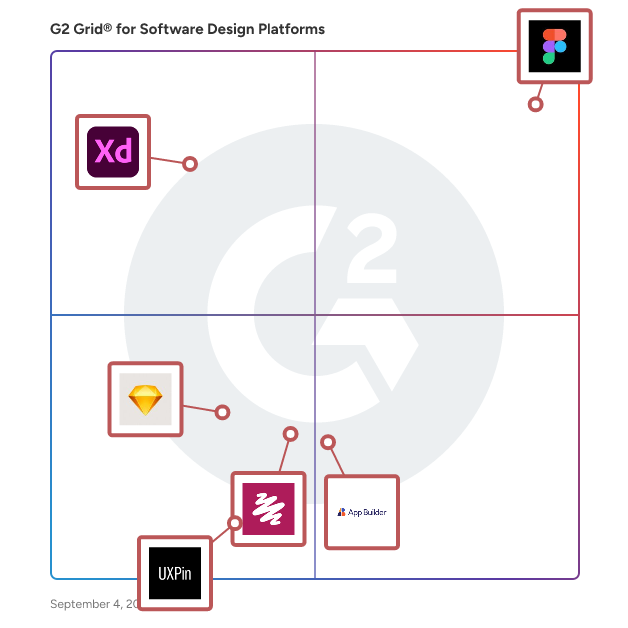
- **Leader:** [Figma](https://www.g2.com/products/figma/reviews)
- **Highest Performer:** [App Builder](https://www.g2.com/products/appbuilder/reviews)
- **Easiest to Use:** [Figma](https://www.g2.com/products/figma/reviews)
- **Top Trending:** [Figma](https://www.g2.com/products/figma/reviews)
- **Best Free Software:** [Balsamiq](https://www.g2.com/products/balsamiq/reviews)

  
---

**Sponsored**

### Anima

Anima is an AI-powered design-to-code platform that brings vibe coding to product teams. It transforms Figma designs, text prompts, or even live websites into clean, production-ready code, instantly. With Anima, you can: \*Turn designs into code: Export responsive HTML, React, Vue, or Tailwind directly from your designs. \*Vibe code on-brand: Start from your existing product or site and remix it with AI while keeping your brand’s design system intact. \*Prototype in real code: Go beyond static mockups and test interactive flows powered by working code. \*Scale with API &amp; integrations: Connect Anima into enterprise workflows for speed and consistency. Trusted by over 1.5M users, including leading product teams and vibe coding agent, Anima bridges design and engineering, making it faster and easier to ship beautiful, on-brand digital products.


[Visit website](https://www.g2.com/external_clickthroughs/record?secure%5Bad_program%5D=ppc&amp;secure%5Bad_slot%5D=category_product_list&amp;secure%5Bcategory_id%5D=2739&amp;secure%5Bdisplayable_resource_id%5D=571&amp;secure%5Bdisplayable_resource_type%5D=Category&amp;secure%5Bmedium%5D=sponsored&amp;secure%5Bplacement_reason%5D=neighbor_category&amp;secure%5Bplacement_resource_ids%5D%5B%5D=569&amp;secure%5Bprioritized%5D=false&amp;secure%5Bproduct_id%5D=100524&amp;secure%5Bresource_id%5D=2739&amp;secure%5Bresource_type%5D=Category&amp;secure%5Bsource_type%5D=category_page&amp;secure%5Bsource_url%5D=https%3A%2F%2Fwww.g2.com%2Fcategories%2Fsoftware-design-platforms&amp;secure%5Btoken%5D=39a82747ef0c77f04c47d22a9e43d659e21fd88776176aeff983de2ebd69eb01&amp;secure%5Burl%5D=https%3A%2F%2Fwww.animaapp.com%2F&amp;secure%5Burl_type%5D=company_website)

---

  ## What Are the Top-Rated Software Design Platforms Products in 2026?
### 1. [Figma](https://www.g2.com/products/figma/reviews)
  Figma is a design platform for teams who build products together. Born on the Web, Figma helps the entire product team create, test, and ship better designs, faster.


  **Average Rating:** 4.7/5.0
  **Total Reviews:** 1,500

**Who Is the Company Behind Figma?**

- **Seller:** [Figma](https://www.g2.com/sellers/figma)
- **Year Founded:** 2012
- **HQ Location:** San Francisco, California
- **Twitter:** @figma (554,630 Twitter followers)
- **LinkedIn® Page:** https://www.linkedin.com/company/3650502/ (2,756 employees on LinkedIn®)

**Who Uses This Product?**
  - **Who Uses This:** Product Designer, Software Engineer
  - **Top Industries:** Computer Software, Information Technology and Services
  - **Company Size:** 57% Small-Business, 31% Mid-Market


#### What Are Figma's Pros and Cons?

**Pros:**

- Ease of Use (180 reviews)
- Real-time Collaboration (115 reviews)
- Team Collaboration (114 reviews)
- Features (109 reviews)
- Collaboration (96 reviews)

**Cons:**

- Slow Performance (71 reviews)
- Performance Issues (63 reviews)
- Slow Loading (57 reviews)
- Large File Handling (40 reviews)
- Internet Dependency (39 reviews)

### 2. [Adobe XD](https://www.g2.com/products/adobe-xd/reviews)
  Adobe XD is a vector-based design and prototyping tool developed by Adobe Inc., tailored for creating user experiences for web and mobile applications. It enables designers to craft intricate wireframes, detailed mockups, and interactive prototypes, streamlining the design process from concept to final product. Key Features and Functionality: - Design Tools: Provides a comprehensive set of tools for wireframing, visual design, and creating production-ready artwork. - Prototyping and Animation: Allows for the creation of animated prototypes by linking artboards, which can be previewed on supported mobile devices. - Repeat Grid: Facilitates the creation of grids of repeating items, such as lists and photo galleries, enhancing design efficiency. - Interoperability: Supports and can open files from Illustrator, Photoshop, Sketch, and After Effects, and integrates with tools like Slack and Microsoft Teams for collaboration. - Responsive Resize: Automatically adjusts and sizes images and other objects on artboards, ensuring designs adapt seamlessly to different screen sizes. - Voice Design: Enables the design of applications using voice commands, allowing for the creation and preview of voice interfaces. - Plugins: Compatible with custom plugins that add additional features and functionalities, ranging from design enhancements to automation and animation. Primary Value and User Solutions: Adobe XD streamlines the UX design process by integrating design, prototyping, and collaboration tools into a single platform. This consolidation reduces the need for multiple applications, enhancing workflow efficiency. Its real-time collaboration features and cross-platform support enable teams to work cohesively, regardless of location. By offering a comprehensive suite of tools, Adobe XD empowers designers to create engaging and responsive user experiences effectively.


  **Average Rating:** 4.3/5.0
  **Total Reviews:** 497

**Who Is the Company Behind Adobe XD?**

- **Seller:** [Adobe](https://www.g2.com/sellers/adobe)
- **Year Founded:** 1982
- **HQ Location:** San Jose, CA
- **Twitter:** @Adobe (959,186 Twitter followers)
- **LinkedIn® Page:** https://www.linkedin.com/company/1480/ (41,539 employees on LinkedIn®)
- **Ownership:** NASDAQ:ADBE

**Who Uses This Product?**
  - **Who Uses This:** Graphic Designer, Designer
  - **Top Industries:** Design, Computer Software
  - **Company Size:** 63% Small-Business, 25% Mid-Market


#### What Are Adobe XD's Pros and Cons?

**Pros:**

- Ease of Use (10 reviews)
- Integrations (6 reviews)
- Prototyping (5 reviews)
- User Interface (5 reviews)
- Easy Integrations (4 reviews)

**Cons:**

- Lack of Features (5 reviews)
- Limited Features (5 reviews)
- Update Issues (5 reviews)
- Missing Features (3 reviews)
- Plugin Issues (3 reviews)

### 3. [App Builder](https://www.g2.com/products/appbuilder/reviews)
  App Builder™ is a low-code tool that enables teams to create high-functioning applications with ease using a drag-and-drop WYSIWYG interface. Then generate clean, pixel-perfect code for Angular, React, Web Components, and Blazor. It enables you to start an app from scratch choose from a library of pre-built templates or responsive screen layouts, or import your Figma designs and then customize them with a toolbox of 60+ UI controls.


  **Average Rating:** 4.5/5.0
  **Total Reviews:** 45

**Who Is the Company Behind App Builder?**

- **Seller:** [Infragistics](https://www.g2.com/sellers/infragistics)
- **Company Website:** https://www.infragistics.com/
- **Year Founded:** 1989
- **HQ Location:** Cranbury, NJ
- **Twitter:** @infragistics (36,926 Twitter followers)
- **LinkedIn® Page:** https://www.linkedin.com/company/16069/ (195 employees on LinkedIn®)

**Who Uses This Product?**
  - **Top Industries:** Computer Software, Information Technology and Services
  - **Company Size:** 65% Small-Business, 20% Enterprise


#### What Are App Builder's Pros and Cons?

**Pros:**

- Ease of Use (12 reviews)
- Drag (8 reviews)
- Features (8 reviews)
- Drag and Drop (7 reviews)
- Easy Creation (7 reviews)

**Cons:**

- Customization Issues (3 reviews)
- Integration Issues (3 reviews)
- Lack of Features (3 reviews)
- Limited Customization (3 reviews)
- Prototyping Limitations (3 reviews)

### 4. [Balsamiq](https://www.g2.com/products/balsamiq/reviews)
  Balsamiq is the wireframing tool that helps lean product teams turn early ideas into clear, actionable direction—fast. And you don&#39;t need to be a designer to use it. Tens of thousands of product managers, founders, and engineers worldwide rely on Balsamiq to share concepts quickly, reduce rework, and build better products. Watch this short video: https://www.youtube.com/watch?v=CibKG2nZzOw We&#39;re a bootstrapped, fully remote team, working across the US and Europe to serve tens of thousands of users in dozens of countries. Since 2008, we&#39;ve been helping teams get unstuck, move faster, and make better products together. Please consider that we don’t reply to G2Crowd requests for contact. Here’s how and where you can find us: https://balsamiq.com/support/#send-us-a-message-and-well-get-back-to-you


  **Average Rating:** 4.2/5.0
  **Total Reviews:** 494

**Who Is the Company Behind Balsamiq?**

- **Seller:** [Balsamiq](https://www.g2.com/sellers/balsamiq)
- **Year Founded:** 2008
- **HQ Location:** Sacramento, CA
- **Twitter:** @balsamiq (16,670 Twitter followers)
- **LinkedIn® Page:** https://www.linkedin.com/company/297475/ (30 employees on LinkedIn®)

**Who Uses This Product?**
  - **Who Uses This:** Product Manager, UX Designer
  - **Top Industries:** Computer Software, Information Technology and Services
  - **Company Size:** 48% Small-Business, 33% Mid-Market


#### What Are Balsamiq's Pros and Cons?

**Pros:**

- Ease of Use (9 reviews)
- Drag (5 reviews)
- Shapes Variety (5 reviews)
- Easy Creation (4 reviews)
- User Interface (4 reviews)

**Cons:**

- Limited Capabilities (3 reviews)
- Learning Curve (2 reviews)
- Limited Free Access (2 reviews)
- Complexity (1 reviews)
- Drawing Tools (1 reviews)

### 5. [Sketch](https://www.g2.com/products/sketch/reviews)
  Sketch puts the focus back on you and your work. We’re not a do-everything product. We’re a toolkit for design, prototyping, and collaboration — made by designers, for designers. Create, prototype, collaborate and turn your ideas into incredible products with the definitive platform for digital design. Over one million designers — from freelancers, to some of the largest companies in the world — use Sketch to transform their ideas into incredible products, every day. With a powerful vector editor, built-in prototyping and more, Sketch makes it easier than ever to take your designs from ideation through to realization. And, with Workspaces you can take collaboration to the next level. Share designs and prototypes, provide feedback and collaborate with your whole team in a single space.


  **Average Rating:** 4.5/5.0
  **Total Reviews:** 1,209

**Who Is the Company Behind Sketch?**

- **Seller:** [Sketch B.V.](https://www.g2.com/sellers/sketch-b-v)
- **Year Founded:** 2008
- **HQ Location:** Eindhoven, Netherlands
- **Twitter:** @sketch (161,499 Twitter followers)
- **LinkedIn® Page:** https://www.linkedin.com/company/sketchbv/about (245 employees on LinkedIn®)

**Who Uses This Product?**
  - **Who Uses This:** Product Designer, Graphic Designer
  - **Top Industries:** Design, Computer Software
  - **Company Size:** 53% Small-Business, 29% Mid-Market


#### What Are Sketch's Pros and Cons?

**Pros:**

- Ease of Use (13 reviews)
- Features (7 reviews)
- User Experience (7 reviews)
- Useful (6 reviews)
- Easy Creation (5 reviews)

**Cons:**

- Platform Exclusivity (6 reviews)
- Poor Collaboration (6 reviews)
- Compatibility Issues (5 reviews)
- Sharing Issues (5 reviews)
- Incompatibility Issues (4 reviews)

### 6. [UXPin](https://www.g2.com/products/uxpin/reviews)
  UXPin is the design tool ideal for interactive prototyping, design systems and documentation. Some of our latest features include: Variables, conditional interactions, expressions, interactive states, data generator (integrated with Unsplash to get their free stock photos directly in UXPin!). And much more! No extensive training is required to start designing in UXPin. Our modern and intuitive editor lets you quickly create the perfect user experience from start to finish without leaving the app. Unlike in other image-based design tools, anything you create in UXPin is based on html, css and js code. Since it&#39;s the same technology developers will work with, their code will match your design perfectly always. Why code-based design? Since 2010, UXPin has been on a mission to enable the best user experiences by merging design and engineering into one world of better, faster product development. Try UXPin yourself with a free trial: https://goo.gl/zfM6yL


  **Average Rating:** 4.2/5.0
  **Total Reviews:** 116

**Who Is the Company Behind UXPin?**

- **Seller:** [UXPin](https://www.g2.com/sellers/uxpin)
- **Year Founded:** 2010
- **HQ Location:** Gdansk, Poland
- **Twitter:** @uxpin (39,105 Twitter followers)
- **LinkedIn® Page:** https://www.linkedin.com/company/2653454/ (10 employees on LinkedIn®)

**Who Uses This Product?**
  - **Who Uses This:** UX Designer, Product Manager
  - **Top Industries:** Computer Software, Information Technology and Services
  - **Company Size:** 49% Small-Business, 41% Mid-Market


### 7. [Uizard](https://www.g2.com/products/uizard/reviews)
  Uizard is a rapid, AI-powered UI design tool used for designing wireframes, mockups, and prototypes in minutes. Uizard&#39;s AI features allow users to generate UI designs from text prompts, convert hand-drawn sketches into wireframes, and transform screenshots into editable designs. Uizard has a whole host of pre-made design templates and UI components to support rapid and collaborative ideation and iteration.


  **Average Rating:** 4.5/5.0
  **Total Reviews:** 43

**Who Is the Company Behind Uizard?**

- **Seller:** [Miro](https://www.g2.com/sellers/miro)
- **Year Founded:** 2011
- **HQ Location:** San Francisco, California
- **Twitter:** @MiroHQ (38,423 Twitter followers)
- **LinkedIn® Page:** https://www.linkedin.com/company/mirohq/ (2,511 employees on LinkedIn®)

**Who Uses This Product?**
  - **Top Industries:** Information Technology and Services, Computer Software
  - **Company Size:** 84% Small-Business, 16% Mid-Market


#### What Are Uizard's Pros and Cons?

**Pros:**

- Ease of Learning (1 reviews)
- Ease of Use (1 reviews)
- Efficiency (1 reviews)
- Interactive Prototyping (1 reviews)
- Interface Design (1 reviews)


### 8. [zeroheight](https://www.g2.com/products/zeroheight/reviews)
  zeroheight helps teams create, manage and maintain their design systems. Using zeroheight, designers, engineers, and product teams can collaborate and build design systems that can be easily shared across teams. Create a centralized repository of styles, tokens, guidelines, code, components, and patterns, integrated and synced between the tools you already use. zeroheight makes maintaining consistency across different products easier and reduces the time and effort needed to stand up new brands and products confidently. We offer features that suit teams from startup to enterprise, from governance to analytics to automation. Key Features: Design Integrations: Bring in design assets from the tools your team is already using, including Figma, Sketch, and Adobe XD. Ensure proper usage with annotations, do’s and don’ts, and easy-to-read usage guidelines. Code Integrations: Display live code blocks from ten different languages, including React, Angular, and Vue. Embed stories with the Storybook integration. And, sync markdown from GitHub. Analytics: Measure design system adoption with in-app analytics. Or, dive deeper with robust integrations with Google Analytics and Hotjar, including events for viewing styleguides, downloading assets, and copying code. No-Code Editor: Our WYSIWYG editor makes keeping documentation up to date seamless. Plus, easily create tables, callouts, and more. Governance: Share feedback on pages before they’re published with in-line commenting. Solicit ideas from multiple stakeholders with Reviewer seats. And, use Releases to launch styleguides when you’re ready. Security: A variety of options for styleguide security to ensure your work remains safe, including SSO, password protection, and trusted IP range.


  **Average Rating:** 4.3/5.0
  **Total Reviews:** 21

**Who Is the Company Behind zeroheight?**

- **Seller:** [zeroheight](https://www.g2.com/sellers/zeroheight)
- **Year Founded:** 2015
- **HQ Location:** London, GB
- **Twitter:** @zeroheight (2,532 Twitter followers)
- **LinkedIn® Page:** https://www.linkedin.com/company/zero-height (58 employees on LinkedIn®)

**Who Uses This Product?**
  - **Company Size:** 76% Enterprise, 19% Mid-Market


#### What Are zeroheight's Pros and Cons?

**Pros:**

- Ease of Use (11 reviews)
- Features (7 reviews)
- Customer Support (5 reviews)
- Design Quality (4 reviews)
- Documentation (4 reviews)

**Cons:**

- Limited Features (4 reviews)
- Performance Issues (4 reviews)
- Limited Functionality (3 reviews)
- Missing Features (3 reviews)
- Complexity (2 reviews)

### 9. [Axure Cloud](https://www.g2.com/products/axure-cloud/reviews)
  Build, Publish and Inspect Prototypes In The Cloud‎.


  **Average Rating:** 4.3/5.0
  **Total Reviews:** 10

**Who Is the Company Behind Axure Cloud?**

- **Seller:** [Axure](https://www.g2.com/sellers/axure)
- **Year Founded:** 2002
- **HQ Location:** San Diego, CA
- **Twitter:** @axurerp (11,046 Twitter followers)
- **LinkedIn® Page:** https://www.linkedin.com/company/1529335/ (21 employees on LinkedIn®)

**Who Uses This Product?**
  - **Company Size:** 60% Enterprise, 30% Small-Business


### 10. [InVision](https://www.g2.com/products/invision/reviews)
  InVision is the visual collaboration platform powering the world’s smartest companies. We exist to make every kind of work more collaborative, inclusive and impactful. Between our platform, our practices, and our community, we enable tens of thousands of organizations to improve their processes and workflows so they can get the most out of their most valuable asset: their people. Sign up for a free trial at invisionapp.com and begin streamlining your digital product workflow.


  **Average Rating:** 4.4/5.0
  **Total Reviews:** 678

**Who Is the Company Behind InVision?**

- **Seller:** [InVision](https://www.g2.com/sellers/invision)
- **Year Founded:** 2011
- **HQ Location:** N/A
- **Twitter:** @freehandapp (50 Twitter followers)
- **LinkedIn® Page:** https://www.linkedin.com/company/freehandapp/ (1 employees on LinkedIn®)

**Who Uses This Product?**
  - **Who Uses This:** UX Designer, Designer
  - **Top Industries:** Design, Marketing and Advertising
  - **Company Size:** 50% Small-Business, 33% Mid-Market


### 11. [MockFrame](https://www.g2.com/products/500apps-com-mockframe/reviews)
  MockFrame by 500apps is a wireframe tool to create visual mockups, UI/UX prototypes, and wireframes that turn your ideas into reality. Features: UI Prototyping - Create highly interactive prototypes for mobile apps on any device easily. MockFrame enables you to develop prototypes in no time and without coding. UX Prototyping - You can prototype quicker, mockup more designs, and digitize your workflow with Mockframe. Design UI UX - Without coding, create the user interface and user experience mockups in minutes. Image Library - This allows customers to select perfect photos from the library to enhance the appearance of their project. Project Management - Easily organize and monitor all of your software project prototypes. It enables you to keep track of all of your project files in one place. Real-Time Updates - Stay connected and consistent across all of your projects to avoid falling behind or losing track of your work. Get access to 50 apps with MockFrame for $14.99 per user


  **Average Rating:** 4.7/5.0
  **Total Reviews:** 5

**Who Is the Company Behind MockFrame?**

- **Seller:** [500apps.com](https://www.g2.com/sellers/500apps-com)
- **Year Founded:** 2018
- **HQ Location:** New York, US
- **Twitter:** @Outreachwriter (35 Twitter followers)
- **LinkedIn® Page:** https://www.linkedin.com/company/89489331

**Who Uses This Product?**
  - **Company Size:** 40% Small-Business, 40% Mid-Market


### 12. [Penpot](https://www.g2.com/products/penpot/reviews)
  Penpot is the open-source design platform for teams that build digital products at scale. Available in the browser or self-hosted, Penpot helps product teams connect design, code, and AI workflows in one open, interoperable platform. Built on web standards such as SVG, CSS, HTML, and JSON, Penpot gives teams more control over their design infrastructure, avoids vendor lock-in, and makes design work easier to integrate with development workflows. Penpot is built for teams working across complex products, design systems, and cross-functional workflows. Designers can create UI designs, responsive layouts, interactive prototypes, and scalable design systems with native Design Tokens, Components, and Variants. Developers can inspect designs and access ready-to-use SVG, CSS, and HTML, making the handoff process clearer and faster. Key capabilities - Open-source design platform - Web-based or self-hosted deployment - Design systems at scale Create and manage scalable design systems with the only native Design Tokens followig 3WC standards, reusable Components, and Variants. - Responsive UI design with CSS standards Design responsive interfaces using layout features based on real web standards, including CSS Grid and Flex Layout. - Advanced prototyping and collaboration - Developer-friendly handoff Because Penpot is based on open standards, designs are easier to understand, reuse, and translate into production workflows. - AI-ready workflows with Penpot MCP - Open API and plugin system - No vendor lock-in - Global community and accessibility


  **Average Rating:** 4.5/5.0
  **Total Reviews:** 10

**Who Is the Company Behind Penpot?**

- **Seller:** [Kaleidos](https://www.g2.com/sellers/kaleidos)
- **Year Founded:** 2011
- **HQ Location:** Madrid, ES
- **Twitter:** @kaleidosnet (3,367 Twitter followers)
- **LinkedIn® Page:** https://www.linkedin.com/company/kaleidos-open-source (45 employees on LinkedIn®)

**Who Uses This Product?**
  - **Company Size:** 60% Small-Business, 30% Mid-Market


#### What Are Penpot's Pros and Cons?

**Pros:**

- Team Collaboration (3 reviews)
- Collaboration (2 reviews)
- Ease of Use (2 reviews)
- Prototyping (2 reviews)
- Real-time Collaboration (2 reviews)

**Cons:**

- Lack of Guidance (1 reviews)
- Limited Options (1 reviews)
- Poor Customer Support (1 reviews)
- Poor Documentation (1 reviews)
- Poor Interface Design (1 reviews)

### 13. [Marvel](https://www.g2.com/products/marvel/reviews)
  Marvel is a comprehensive design platform that empowers teams to create, prototype, and collaborate on digital products seamlessly. It offers an intuitive interface that allows users to design wireframes, mockups, and interactive prototypes directly from their browser, facilitating a streamlined workflow from concept to development. Key Features and Functionality: - Design and Wireframing: Create beautiful wireframes and mockups for any device, utilizing millions of assets, stock photos, and icons available within the platform. - Prototyping: Transform static designs into interactive, tappable prototypes without any coding, enabling realistic demonstrations of user journeys and site hierarchies. - User Testing: Validate designs quickly by gathering feedback through user testing, ensuring the product meets user expectations and needs. - Developer Handoff: Automatically generate design specifications and assets, including CSS, Swift, and Android XML code, to streamline the transition from design to development. - Collaboration: Facilitate cross-company collaboration by providing a centralized space for teams to work together, leave feedback through comments and annotations, and maintain full visibility across projects. - Integrations: Enhance workflows by integrating with favorite tools, ensuring a cohesive and efficient design process. Primary Value and Solutions: Marvel simplifies the design process by consolidating essential tools into a single platform, reducing the need for multiple applications and minimizing workflow disruptions. It democratizes design collaboration, making it more inclusive and innovative, and accelerates the development cycle by providing automated design specs and facilitating effective communication between designers and developers. By offering a user-friendly environment, Marvel enables teams to bring ideas to life efficiently, ensuring that digital products are both functional and user-centric.


  **Average Rating:** 4.4/5.0
  **Total Reviews:** 221

**Who Is the Company Behind Marvel?**

- **Seller:** [Marvel App](https://www.g2.com/sellers/marvel-app)
- **Year Founded:** 2013
- **HQ Location:** London, United Kingdom
- **Twitter:** @marvelapp (34,673 Twitter followers)
- **LinkedIn® Page:** https://www.linkedin.com/company/3488686/ (32 employees on LinkedIn®)

**Who Uses This Product?**
  - **Who Uses This:** Product Designer, UX Designer
  - **Top Industries:** Design, Computer Software
  - **Company Size:** 60% Small-Business, 26% Mid-Market


#### What Are Marvel's Pros and Cons?

**Pros:**

- Collaboration (1 reviews)
- Creativity (1 reviews)
- Designing Ease (1 reviews)
- Easy Sharing (1 reviews)
- Features (1 reviews)

**Cons:**

- Learning Curve (1 reviews)

### 14. [ProtoShare](https://www.g2.com/products/protoshare/reviews)
  ProtoShare is a collaborative, web-based prototyping tool that reduces interactive project rework while increasing profits.


  **Average Rating:** 4.2/5.0
  **Total Reviews:** 5

**Who Is the Company Behind ProtoShare?**

- **Seller:** [Site9](https://www.g2.com/sellers/site9)
- **Year Founded:** 1999
- **HQ Location:** Portland, US
- **Twitter:** @ProtoShare (1,262 Twitter followers)
- **LinkedIn® Page:** https://www.linkedin.com/company/61076 (3 employees on LinkedIn®)

**Who Uses This Product?**
  - **Company Size:** 50% Small-Business, 33% Enterprise


### 15. [antoant so](https://www.g2.com/products/antoant-so/reviews)
  Antoant is an AI tool built to generate system architecture, backend structure, and scalable design decisions—helping developers and founders move from idea to implementation faster


**Who Is the Company Behind antoant so?**

- **Seller:** [antoant](https://www.g2.com/sellers/antoant)
- **HQ Location:** Bengaluru, IN
- **LinkedIn® Page:** https://www.linkedin.com/company/antoant/ (1 employees on LinkedIn®)


### 16. [Bit (bit.cloud)](https://www.g2.com/products/bit-bit-cloud/reviews)
  Bit is the platform for reusable components. It helps developers and organizations to build and reuse components such as UIs, features, and user-experiences across projects and products. With Bit, development becomes faster, more consistent and efficient with every component you create and share. Bit drives digital development for dozens of Fortune 500 organizations and over 250,000 developers around the world. Learn more:https://bit.cloud/


**Who Is the Company Behind Bit (bit.cloud)?**

- **Seller:** [Bit](https://www.g2.com/sellers/bit)
- **Year Founded:** 2015
- **HQ Location:** Fully remote and distributed, AQ
- **LinkedIn® Page:** https://www.linkedin.com/company/bit-dev/ (161 employees on LinkedIn®)

**Who Uses This Product?**
  - **Company Size:** 100% Mid-Market


### 17. [FlairBuilder](https://www.g2.com/products/flairbuilder/reviews)
  FlairBuilder is a tool that helps designers create interactive wireframes for websites and mobile apps.


  **Average Rating:** 3.4/5.0
  **Total Reviews:** 4

**Who Is the Company Behind FlairBuilder?**

- **Seller:** [FlairBuilder](https://www.g2.com/sellers/flairbuilder)
- **Year Founded:** 2009
- **HQ Location:** N/A
- **Twitter:** @flairbuilder (668 Twitter followers)
- **LinkedIn® Page:** https://www.linkedin.com/company/flairbuilder/ (1 employees on LinkedIn®)

**Who Uses This Product?**
  - **Company Size:** 50% Enterprise, 50% Mid-Market


### 18. [Flowstep](https://www.g2.com/products/flowstep-38e2db16-2bbd-4132-98fd-a1e4160a3272/reviews)
  Flowstep turns simple prompts into UI designs. Product managers, designers, engineers, and developers use Flowstep to visualise ideas quickly, test them, and ship faster. Users can update designs using AI or make tweaks manually. Flowstep creates up to 10 different screens from a single prompt. Users can add product requirement documents, images, or website links for reference. Flowstep generates clean code in React, TypeScript, and Tailwind CSS.


**Who Is the Company Behind Flowstep?**

- **Seller:** [Flowstep](https://www.g2.com/sellers/flowstep-c782ee56-1766-47d1-b83b-12f6a6ad4e53)
- **Year Founded:** 2023
- **HQ Location:** Tallinn, EE
- **LinkedIn® Page:** https://www.linkedin.com/company/flowstep-ai/ (13 employees on LinkedIn®)

**Who Uses This Product?**
  - **Company Size:** 100% Small-Business


### 19. [HotGloo](https://www.g2.com/products/hotgloo/reviews)
  HotGloo is a UX, wireframe and prototyping tool designed to build wireframes for web, mobile and wearables. HotGloo helps to visualize planning processes, build and test drive interactions very easily. Create and share fully interactive prototypes with your team and clients and gather feedback on the process. From prototypes of the next award winning app to huge e-commerce wireframe shop solutions, HotGloo is the perfect match for every web worker.


  **Average Rating:** 4.2/5.0
  **Total Reviews:** 28

**Who Is the Company Behind HotGloo?**

- **Seller:** [HotGloo](https://www.g2.com/sellers/hotgloo)
- **Year Founded:** 2009
- **HQ Location:** Hamburg, Germany
- **Twitter:** @HotGloo (1,103 Twitter followers)
- **LinkedIn® Page:** https://www.linkedin.com/company/884171/ (1 employees on LinkedIn®)

**Who Uses This Product?**
  - **Top Industries:** Banking
  - **Company Size:** 61% Small-Business, 36% Mid-Market


### 20. [Justinmind](https://www.g2.com/products/justinmind/reviews)
  Build realistic prototypes of web and mobile apps without coding


  **Average Rating:** 4.0/5.0
  **Total Reviews:** 55

**Who Is the Company Behind Justinmind?**

- **Seller:** [Justinmind](https://www.g2.com/sellers/justinmind)
- **Year Founded:** 2005
- **HQ Location:** San Francisco, CA
- **Twitter:** @just_in_mind (5,111 Twitter followers)
- **LinkedIn® Page:** https://www.linkedin.com/company/356195/ (10 employees on LinkedIn®)

**Who Uses This Product?**
  - **Top Industries:** Computer Software, Information Technology and Services
  - **Company Size:** 58% Small-Business, 31% Mid-Market


### 21. [Moqups](https://www.g2.com/products/moqups/reviews)
  What is Moqups? Launched in 2012 as an online wireframing app, Moqups has evolved into a versatile tool for product and project management. With a single subscription, teams can wireframe, diagram, whiteboard, and prototype. Moqups is fast, lightweight and easy-to-learn, yet robust enough for even the most complex projects.  Moqups is used worldwide by over 2 million product managers, business analysts, UX professionals, founders, and agencies, and information technology companies. Who is Moqups for? Teams use Moqups to capture, explore and implement ideas. Made for both designers and non-designers, Moqups is the perfect collaboration tool for cross-functional teams. The app makes it easy to sketch out early-stage concepts, and then move seamlessly from lo-fi to hi-fi as projects evolve. A simple app for complex projects, Moqups is a perfect fit for teams that design and build software in health, energy, government, aerospace, logistics, finance, and industry. What can you build? You can build wireframes, flowcharts, whiteboards, mockups, timelines, dashboards, ERD and UML diagrams. Moqups is also great for annotation and documentation, whether you&#39;re specifying data, technical or UX requirements. It&#39;s the perfect app for getting ideas out of your head, giving them shape, and sharing them with stakeholders. What are the benefits of Moqups? Get going fast: Moqups is quick-to-learn, easy to use, and simple to share. Include everyone: Every member of the team can use Moqups, unlike complicated design tools like Figma. Consolidate tools: Why use different tools for wireframing, diagramming, whiteboarding? Moqups does it all. No limits workflow: With Moqups you can take your projects from low to high-fidelity, unlike narrow wireframing tools like Balsamiq. Collaborate sync or async: With commenting, annotations, and live editing, Moqups is the perfect tool for discussions and decisions. Single source of truth: With Moqups, all your brainstorming, ideation, wireframes, diagrams, mockups and prototypes can live in one project.


  **Average Rating:** 4.2/5.0
  **Total Reviews:** 91

**Who Is the Company Behind Moqups?**

- **Seller:** [Moqups](https://www.g2.com/sellers/moqups)
- **Year Founded:** 2012
- **HQ Location:** Cluj, Romania
- **Twitter:** @moqups (3,986 Twitter followers)
- **LinkedIn® Page:** https://www.linkedin.com/company/2993311/ (9 employees on LinkedIn®)

**Who Uses This Product?**
  - **Top Industries:** Computer Software, Information Technology and Services
  - **Company Size:** 57% Small-Business, 30% Mid-Market


### 22. [PandaSuite](https://www.g2.com/products/pandasuite/reviews)
  The most interactive no code builder. Developed by a Parisian team and launched in 2015, PandaSuite is a simple &amp; creative SaaS platform to build applications and interactive experiences without a line of code. Create visually using PandaSuite Studio: design your screens, play with +40 components and create animations. Deploy as a web app, native app for mobile/tablet (iOS, Android) and desktop (MacOS, Windows). Start for free and deploy from 79/month/app.


  **Average Rating:** 4.6/5.0
  **Total Reviews:** 14

**Who Is the Company Behind PandaSuite?**

- **Seller:** [PandaSuite](https://www.g2.com/sellers/pandasuite)
- **Year Founded:** 2008
- **HQ Location:** Paris, FR
- **Twitter:** @pandasuite (1,024 Twitter followers)
- **LinkedIn® Page:** https://www.linkedin.com/company/pandasuite/ (4 employees on LinkedIn®)

**Who Uses This Product?**
  - **Company Size:** 80% Small-Business, 13% Mid-Market


#### What Are PandaSuite's Pros and Cons?

**Pros:**

- Customer Support (4 reviews)
- Ease of Use (4 reviews)
- Simple (3 reviews)
- Support Responsiveness (3 reviews)
- Beginner Support (2 reviews)

**Cons:**

- Inadequate Tutorials (2 reviews)
- Insufficient Learning Resources (2 reviews)
- Insufficient Tutorials (2 reviews)
- Lack of Guidance (2 reviews)
- Learning Curve (2 reviews)

### 23. [Pidoco](https://www.g2.com/products/pidoco/reviews)
  Pidoco is a powerful prototyping software for rapidly creating clickable wireframes, mockups and interactive UX prototypes for web, mobile and enterprise applications.


  **Average Rating:** 4.1/5.0
  **Total Reviews:** 28

**Who Is the Company Behind Pidoco?**

- **Seller:** [Pidoco](https://www.g2.com/sellers/pidoco)
- **HQ Location:** Berlin, Germany
- **Twitter:** @pidoco (1,002 Twitter followers)
- **LinkedIn® Page:** https://www.linkedin.com/company/470143 (1 employees on LinkedIn®)

**Who Uses This Product?**
  - **Top Industries:** Design
  - **Company Size:** 72% Small-Business, 34% Mid-Market


### 24. [Prott](https://www.g2.com/products/prott/reviews)
  A playground for digital product teams.


  **Average Rating:** 4.3/5.0
  **Total Reviews:** 2

**Who Is the Company Behind Prott?**

- **Seller:** [Goodpatch](https://www.g2.com/sellers/goodpatch)
- **HQ Location:** N/A
- **LinkedIn® Page:** https://www.linkedin.com/company/No-Linkedin-Presence-Added-Intentionally-By-DataOps (1 employees on LinkedIn®)

**Who Uses This Product?**
  - **Company Size:** 100% Small-Business


### 25. [Software Development and Team Augmentation Services](https://www.g2.com/products/software-development-and-team-augmentation-services/reviews)
  Intelia is a leading software development and team augmentation agency located in Lagos Nigeria. With over 5 decades of cumulative experience, Intelia ranks at the topmost level in the tech industry. We pride ourselves in applying best practices and methods, and in using current tools, to build the best software possible for our clients. Our talent pool which boasts of the brightest minds in sub-sahara Africa, and indeed the world, make us the best choice for your team augmentation needs. Having worked with a plethora of top organizations, including Sony, Pepsi, and Nintendo; and currently partnered with Nasdaq, you can be sure you have the people with the best experience handling your needs. Welcome to our world of perfect builds.


**Who Is the Company Behind Software Development and Team Augmentation Services?**

- **Seller:** [Intelia](https://www.g2.com/sellers/intelia)
- **HQ Location:** Lekki Phase 1, NG
- **LinkedIn® Page:** http://www.linkedin.com/company/tryintelia (10 employees on LinkedIn®)


    ## What Is Software Design Platforms?
  [Software Design Software](https://www.g2.com/categories/software-design)
  ## What Software Categories Are Similar to Software Design Platforms?
    - [Wireframing Software](https://www.g2.com/categories/wireframing)
    - [Prototyping Software](https://www.g2.com/categories/prototyping)


