# Best Text Editor Software

*By [Adam Crivello](https://research.g2.com/insights/author/adam-crivello)*


Text editors are specialized software applications designed for creating and modifying text files. These editors support plain text and can interpret various forms of text, including markup languages for rich text formatting. This type of software is a simplified alternative to [integrated development environments](https://www.g2.com/categories/integrated-development-environment-ide) (IDE). They cater to programmers and developers engaged in tasks like modifying plain text source code, editing configuration files, and reviewing error logs.

When a full-fledged IDE is unnecessary or too confining, developers often choose text editors for increased flexibility and coding freedom, allowing them to step outside conventional development methods. Particularly beneficial for beginners, free text editor tools offer a user-friendly space for learning and experimentation.

The [best text editors](https://learn.g2.com/best-text-editor) seamlessly integrate with [source code management software](https://www.g2.com/categories/source-code-management) and build automation tools through customizable plugins to support a smooth development workflow. These editors excel at handling a modest number of text files and offer essential features like regular expression search and replace, syntax highlighting, autocompletion, and support for multiple tabs or window panes.

Text editors balance simplicity and functionality, serving as valuable tools for developers seeking a lightweight yet effective solution for their coding tasks.

To qualify for inclusion in the Text Editor category, a product must:

- View and edit plain text documents
- Offer minimal platform integration features and not offer all the features of an IDE, unless added with a plugin


## How Many Text Editor Software Products Does G2 Track?
**Total Products under this Category:** 76

### Category Stats (Jun 2026)
- **Average Rating**: 4.23/5 The average rating of products in this category, based on all submitted ratings

*Last updated: June 24, 2026*


## How Does G2 Rank Text Editor Software Products?

**Why You Can Trust G2's Software Rankings:**

- 30 Analysts and Data Experts
- 9,500+ Authentic Reviews
- 76+ Products
- Unbiased Rankings

G2's software rankings are built on verified user reviews, rigorous moderation, and a consistent research methodology maintained by a team of analysts and data experts. Each product is measured using the same transparent criteria, with no paid placement or vendor influence. While reviews reflect real user experiences, which can be subjective, they offer valuable insight into how software performs in the hands of professionals. Together, these inputs power the G2 Score, a standardized way to compare tools within every category.


## Which Text Editor Software Is Best for Your Use Case?

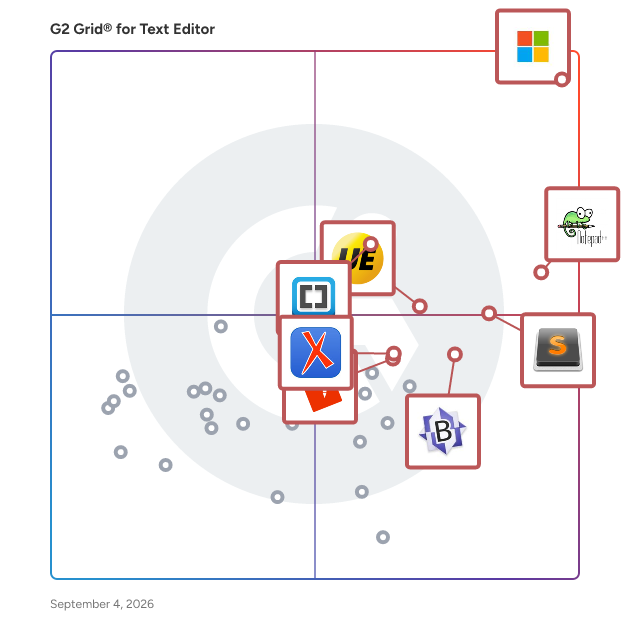
- **Leader:** [Visual Studio Code](https://www.g2.com/products/visual-studio-code/reviews)
- **Highest Performer:** [BBEdit](https://www.g2.com/products/bbedit/reviews)
- **Easiest to Use:** [Notepad++](https://www.g2.com/products/notepad/reviews)
- **Top Trending:** [Visual Studio Code](https://www.g2.com/products/visual-studio-code/reviews)
- **Best Free Software:** [UltraEdit](https://www.g2.com/products/ultraedit/reviews)


## What Are the Top-Rated Text Editor Software Products in 2026?
### 1. [Visual Studio Code](https://www.g2.com/products/visual-studio-code/reviews)
Visual Studio Code (VS Code) is a free, lightweight, and powerful source code editor developed by Microsoft, compatible with Windows, macOS, and Linux. It offers a rich set of features, including debugging support, syntax highlighting, intelligent code completion, snippets, code refactoring, and built-in Git integration. Users can customize the editor by changing themes, keyboard shortcuts, and preferences, as well as by installing extensions to enhance functionality. VS Code supports a wide range of programming languages and frameworks, making it a versatile tool for developers. Key Features and Functionality: - Debugging: Built-in debugger with support for various programming languages, allowing developers to set breakpoints, inspect variables, and step through code. - Syntax Highlighting and IntelliSense: Provides syntax highlighting and intelligent code completion for numerous languages, enhancing code readability and productivity. - Integrated Git Control: Seamless Git integration enables users to manage version control directly within the editor. - Extensions and Customization: A vast marketplace of extensions allows users to add new languages, debuggers, and tools, tailoring the editor to their specific needs. - Integrated Terminal: Built-in terminal supports various shells, enabling command-line operations without leaving the editor. Primary Value and User Solutions: Visual Studio Code streamlines the development process by combining a robust set of features with a user-friendly interface. Its cross-platform compatibility and extensive extension ecosystem cater to a diverse developer community, supporting a wide array of programming languages and frameworks. By integrating essential tools like debugging, version control, and terminal access into a single environment, VS Code enhances productivity and efficiency, reducing the need to switch between multiple applications. Its customizable nature allows developers to tailor the editor to their workflows, addressing the unique challenges they face in software development.


**Average Rating:** 4.7/5.0
**Total Reviews:** 2,632
**How Do G2 Users Rate Visual Studio Code?**

- **Has the product been a good partner in doing business?:** 9.2/10 (Category avg: 8.4/10)
- **Extensibility:** 9.3/10 (Category avg: 8.2/10)
- **Syntax highlighting:** 9.5/10 (Category avg: 8.4/10)
- **Code folding:** 9.1/10 (Category avg: 7.9/10)

**Who Is the Company Behind Visual Studio Code?**

- **Seller:** [Microsoft](https://www.g2.com/sellers/microsoft)
- **Year Founded:** 1975
- **HQ Location:** Redmond, Washington
- **Twitter:** @microsoft (13,091,739 Twitter followers)
- **LinkedIn® Page:** https://www.linkedin.com/company/microsoft/ (231,632 employees on LinkedIn®)
- **Ownership:** MSFT

**Who Uses This Product?**
- **Who Uses This:** Software Engineer, Software Developer
- **Top Industries:** Computer Software, Information Technology and Services
- **Company Size:** 45% Small-Business, 31% Mid-Market


#### What Are Visual Studio Code's Pros and Cons?

**Pros:**

- Ease of Use (122 reviews)
- Extensions (95 reviews)
- Git Integration (80 reviews)
- Productivity Improvement (77 reviews)
- Features (74 reviews)

**Cons:**

- Extension Issues (67 reviews)
- Slow Performance (41 reviews)
- Performance Issues (34 reviews)
- Plugin Issues (33 reviews)
- Complexity (28 reviews)


### What Do G2 Reviewers Say About Visual Studio Code?
*AI-generated summary from verified user reviews*

**Pros:**

- Users love the **ease of use** in Visual Studio Code, making coding accessible for beginners and efficient for pros.
- Users love the **vast library of extensions** in Visual Studio Code, enhancing customization and integration for all programming needs.
- Users appreciate the **seamless Git integration** in Visual Studio Code, enhancing their development workflow significantly.
- Users value the **productivity improvement** offered by VS Code, enhancing their coding experience with powerful tools and integrations.
- Users love the **extensive customization options** of Visual Studio Code, enhancing their coding experience significantly.

**Cons:**

- Users face **extension issues** with performance slowdowns and conflicts, especially on older PCs or with many extensions installed.
- Users experience **slow performance** due to conflicting extensions, high memory usage, and occasional lag with large repositories.
- Users experience **performance issues** with Visual Studio Code, particularly when handling large codebases or numerous extensions.
- Users report experiencing **plugin issues** that lead to slow performance and conflicts in Visual Studio Code.
- Users find the **complexity of settings** in Visual Studio Code daunting, especially newcomers facing overwhelming options.

#### What Are Recent G2 Reviews of Visual Studio Code?

**"[Versatile Code Editor, Perfect for Full-Stack Developers](https://www.g2.com/survey_responses/visual-studio-code-review-12929535)"**

**Rating:** 5.0/5.0 stars
*— Sanjivani B.*

[Read full review](https://www.g2.com/survey_responses/visual-studio-code-review-12929535)

---

**"[Lightweight Editor with Powerful Development Features](https://www.g2.com/survey_responses/visual-studio-code-review-12976150)"**

**Rating:** 5.0/5.0 stars
*— Nishanth J J.*

[Read full review](https://www.g2.com/survey_responses/visual-studio-code-review-12976150)

---


#### What Are G2 Users Discussing About Visual Studio Code?

- [How do developers leverage the features of Visual Studio Code to enhance their programming efficiency?](https://www.g2.com/discussions/how-do-developers-leverage-the-features-of-visual-studio-code-to-enhance-their-programming-efficiency) - 6 comments, 6 upvotes
- [What is Visual Studio Code used for?](https://www.g2.com/discussions/what-is-visual-studio-code-used-for) - 8 comments, 3 upvotes
- [Why is Visual Studio code so popular?](https://www.g2.com/discussions/why-is-visual-studio-code-so-popular) - 7 comments, 1 upvote
- [What are the features of Visual Studio?](https://www.g2.com/discussions/visual-studio-code-what-are-the-features-of-visual-studio) - 3 comments
- [Is Visual Studio code an IDE?](https://www.g2.com/discussions/is-visual-studio-code-an-ide) - 13 comments, 2 upvotes

### 2. [Notepad++](https://www.g2.com/products/notepad/reviews)
Notepad++ is a free, open-source text and source code editor for Windows, designed to provide a lightweight yet powerful alternative to the standard Notepad. Developed in C++ and utilizing the Scintilla editing component, it offers enhanced performance and a wide array of features tailored for developers and general users alike. Key Features and Functionality: - Syntax Highlighting and Folding: Supports over 70 programming, scripting, and markup languages, including C, C++, Java, HTML, XML, and Python, facilitating easier code reading and organization. - Tabbed Document Interface: Allows users to work with multiple open files within a single window, enhancing productivity and ease of navigation. - Auto-Completion: Provides suggestions for code completion, reducing typing effort and minimizing errors. - Search and Replace with Regular Expressions: Enables powerful text manipulation capabilities across multiple documents. - Multi-View and Multi-Edit: Supports split-screen editing and synchronized scrolling, allowing simultaneous editing of different parts of a document or multiple documents. - Macro Recording and Playback: Automates repetitive tasks by recording sequences of actions for later use. - Plugin Support: Extensible through a robust plugin architecture, with over 140 plugins available to add functionalities such as FTP support, spell checking, and more. Primary Value and User Solutions: Notepad++ addresses the need for a versatile and efficient text editor that caters to both simple text editing and complex coding tasks. Its lightweight design ensures quick startup and responsiveness, while the extensive feature set supports a wide range of programming and scripting needs. By offering a customizable interface, support for numerous languages, and the ability to handle large files, Notepad++ enhances productivity and streamlines the development process for programmers, web developers, and general users seeking an advanced text editing solution.


**Average Rating:** 4.6/5.0
**Total Reviews:** 2,411
**How Do G2 Users Rate Notepad++?**

- **Has the product been a good partner in doing business?:** 8.9/10 (Category avg: 8.4/10)
- **Extensibility:** 8.7/10 (Category avg: 8.2/10)
- **Syntax highlighting:** 9.1/10 (Category avg: 8.4/10)
- **Code folding:** 8.8/10 (Category avg: 7.9/10)

**Who Is the Company Behind Notepad++?**

- **Seller:** [Notepad++](https://www.g2.com/sellers/notepad)
- **Year Founded:** 2017
- **HQ Location:** Birmingham
- **Twitter:** @notepadstudio (650 Twitter followers)
- **LinkedIn® Page:** https://www.linkedin.com/company/27015180/ (17 employees on LinkedIn®)

**Who Uses This Product?**
- **Who Uses This:** Software Engineer, Software Developer
- **Top Industries:** Information Technology and Services, Computer Software
- **Company Size:** 38% Enterprise, 34% Mid-Market


#### What Are Notepad++'s Pros and Cons?

**Pros:**

- Ease of Use (48 reviews)
- Lightweight (33 reviews)
- Speed (29 reviews)
- Language Support (23 reviews)
- Syntax Highlighting (22 reviews)

**Cons:**

- Outdated Interface (36 reviews)
- Limited Compatibility (21 reviews)
- Lack of IDE Features (12 reviews)
- Lack of Features (10 reviews)
- Lack of Cloud Integration (8 reviews)


### What Do G2 Reviewers Say About Notepad++?
*AI-generated summary from verified user reviews*

**Pros:**

- Users appreciate the **ease of use** of Notepad++, making text editing and reviewing fast and efficient.
- Users love the **lightweight design** of Notepad++, appreciating its speed and efficiency for various editing tasks.
- Users love the **speed and efficiency** of Notepad++, allowing for quick access and functionality while coding.
- Users appreciate the **language support** in Notepad++, enhancing their ability to edit various programming languages efficiently.
- Users love the **syntax highlighting** in Notepad++, which simplifies coding and enhances readability in various languages.

**Cons:**

- Users find the **interface outdated** compared to modern editors, limiting its appeal despite functional performance.
- Users find the **limited compatibility** of Notepad++ restrictive, as it only runs on Windows, impacting cross-platform use.
- Users note the **lack of IDE features** in Notepad++, affecting its usability for complex development tasks.
- Users find Notepad++ has a **lack of advanced features** , making it less competitive with modern code editors.
- Users are frustrated by the **lack of cloud integration** , making file access and storage difficult across devices.

#### What Are Recent G2 Reviews of Notepad++?

**"[Simple, Lightweight Notepad with Clean UI, Customization, and Great Code Formatting](https://www.g2.com/survey_responses/notepad-review-12975771)"**

**Rating:** 5.0/5.0 stars
*— shweta s.*

[Read full review](https://www.g2.com/survey_responses/notepad-review-12975771)

---

**"[Lightweight, Fast, and Feature-Packed Coding with Notepad++](https://www.g2.com/survey_responses/notepad-review-12888463)"**

**Rating:** 5.0/5.0 stars
*— DATA  S.*

[Read full review](https://www.g2.com/survey_responses/notepad-review-12888463)

---


#### What Are G2 Users Discussing About Notepad++?

- [How is Notepad++ catering to the needs of developers and programmers in terms of efficiency and functionality?](https://www.g2.com/discussions/how-is-notepad-catering-to-the-needs-of-developers-and-programmers-in-terms-of-efficiency-and-functionality) - 1 comment
- [What is Notepad++ used for?](https://www.g2.com/discussions/what-is-notepad-used-for) - 4 comments
- [What are the components of Notepad window?](https://www.g2.com/discussions/what-are-the-components-of-notepad-window) - 1 comment
- [How do I use Notepad?](https://www.g2.com/discussions/how-do-i-use-notepad) - 3 comments
- [What is a Notepad file?](https://www.g2.com/discussions/what-is-a-notepad-file) - 2 comments

### 3. [Sublime Text](https://www.g2.com/products/sublime-text/reviews)
Sublime Text is a sophisticated, cross-platform text and source code editor renowned for its speed, efficiency, and extensive customization options. Designed for developers and writers alike, it offers a clean interface with powerful features that enhance productivity and streamline workflows. Key Features and Functionality: - Multiple Selections: Allows users to make multiple changes simultaneously, enhancing editing efficiency. - Command Palette: Provides quick access to commands, reducing the need for complex menu navigation. - Split Editing: Enables side-by-side editing of files, facilitating comparison and multitasking. - Instant Project Switch: Allows seamless switching between projects without saving prompts, maintaining context and workflow continuity. - Customization: Offers extensive customization through JSON settings files, including key bindings, menus, and snippets. - Plugin API: Supports a robust Python-based API, allowing users to extend functionality with plugins. - Cross-Platform Support: Available on Windows, macOS, and Linux, ensuring a consistent experience across different operating systems. Primary Value and User Solutions: Sublime Text addresses the need for a fast, reliable, and highly customizable text editor that caters to the diverse requirements of developers and writers. Its lightweight design ensures quick startup times and responsiveness, even with large files. The editor&#39;s flexibility allows users to tailor the environment to their specific needs, enhancing productivity. Features like multiple selections and split editing streamline complex editing tasks, while the extensive plugin ecosystem enables the addition of specialized functionalities. By providing a distraction-free interface combined with powerful tools, Sublime Text empowers users to focus on their work and achieve optimal results.


**Average Rating:** 4.5/5.0
**Total Reviews:** 1,747
**How Do G2 Users Rate Sublime Text?**

- **Has the product been a good partner in doing business?:** 8.9/10 (Category avg: 8.4/10)
- **Extensibility:** 8.7/10 (Category avg: 8.2/10)
- **Syntax highlighting:** 9.2/10 (Category avg: 8.4/10)
- **Code folding:** 8.8/10 (Category avg: 7.9/10)

**Who Is the Company Behind Sublime Text?**

- **Seller:** [Sublime HQ](https://www.g2.com/sellers/sublime-hq)
- **Year Founded:** 2004
- **HQ Location:** Bondi Junction, New South Wales
- **Twitter:** @sublimehq (53,344 Twitter followers)
- **LinkedIn® Page:** https://www.linkedin.com/company/sublimehq/people (4 employees on LinkedIn®)

**Who Uses This Product?**
- **Who Uses This:** Software Engineer, Web Developer
- **Top Industries:** Computer Software, Information Technology and Services
- **Company Size:** 44% Small-Business, 36% Mid-Market


#### What Are Sublime Text's Pros and Cons?

**Pros:**

- Ease of Use (32 reviews)
- Speed (22 reviews)
- Performance Speed (16 reviews)
- Language Support (14 reviews)
- Features (10 reviews)

**Cons:**

- Lack of Features (8 reviews)
- Lack of IDE Features (7 reviews)
- Plugin Issues (7 reviews)
- Cost (5 reviews)
- Debugging Issues (5 reviews)


### What Do G2 Reviewers Say About Sublime Text?
*AI-generated summary from verified user reviews*

**Pros:**

- Users appreciate the **ease of use** of Sublime Text, enjoying its simplicity and efficiency for various coding tasks.
- Users love the **speed and lightweight design** of Sublime Text, enhancing their coding efficiency and experience.
- Users love Sublime Text for its **fast and lightweight performance** , excelling in handling large files without lag.
- Users value the **comprehensive language support** of Sublime Text, facilitating seamless development across multiple programming languages.
- Users value the **fast and lightweight performance** of Sublime Text, enhancing productivity and focus while writing.

**Cons:**

- Users note the **lack of features** in Sublime Text compared to modern IDEs, limiting its competitiveness.
- Users are frustrated by the **lack of IDE features** , relying on plugins for essential tools and support.
- Users often face **plugin issues** in Sublime Text, feeling it lacks essential built-in functionalities compared to other editors.
- Users find the **cost and frequent premium prompts** to be frustrating and detracting from the overall experience.
- Users often find the lack of **built-in debugging features** in Sublime Text limits its overall functionality and integration.

#### What Are Recent G2 Reviews of Sublime Text?

**"[Empower Developers with speed, power, simplicity, and versatility](https://www.g2.com/survey_responses/sublime-text-review-9111257)"**

**Rating:** 5.0/5.0 stars
*— Swapnil T.*

[Read full review](https://www.g2.com/survey_responses/sublime-text-review-9111257)

---

**"[Fast and simple editor for writing blog and website drafts and notes](https://www.g2.com/survey_responses/sublime-text-review-12388459)"**

**Rating:** 4.5/5.0 stars
*— Ishan S.*

[Read full review](https://www.g2.com/survey_responses/sublime-text-review-12388459)

---


#### What Are G2 Users Discussing About Sublime Text?

- [How can I use Sublime Text for free?](https://www.g2.com/discussions/how-can-i-use-sublime-text-for-free) - 2 comments
- [Is Sublime Text an IDE?](https://www.g2.com/discussions/is-sublime-text-an-ide) - 4 comments, 1 upvote
- [What do you use Sublime Text for?](https://www.g2.com/discussions/what-do-you-use-sublime-text-for) - 2 comments

### 4. [UltraEdit](https://www.g2.com/products/ultraedit/reviews)
UltraEdit is a text and code editor built for work that general-purpose editors often struggle with: large files, complex data manipulation, and security-sensitive workflows. It has been in the market for more than 30 years, is used by over 4 million users worldwide, and is trusted by enterprise customers across the Fortune 100, 500, and 1000. Individual users choose UltraEdit when everyday editors start to hit their limits. Common use cases include working with very large files, running advanced search and replace, using column and block editing, and handling more complex text and data manipulation. Organizations choose UltraEdit when they need a more secure and supportable editor behind sensitive workflows. That includes teams in banking, insurance, healthcare, government, and other regulated or risk-sensitive environments where unsupported tools can create too much uncertainty. Key capabilities: - Performance under heavy tasks, including support for files above 4 GB - Advanced search and replace - Column and block editing for structured data tasks - Complex text and data manipulation - Offline activation for restricted environments - Commercial support with priority handling for critical concerns Often called the &quot;Swiss army knife&quot; of text editors, UltraEdit is a tool that no IT professional should be without. From programming and project management to large file manipulation, from data sorting and text record formatting to remote (FTP/SFTP) file operations, from advanced file searching and text data reformatting, there&#39;s almost no problem that UltraEdit can&#39;t solve in the world of text editing. UltraEdit is available for Windows, Mac, and Linux and is backed by a professional development team and support staff.


**Average Rating:** 4.7/5.0
**Total Reviews:** 1,103
**How Do G2 Users Rate UltraEdit?**

- **Has the product been a good partner in doing business?:** 9.5/10 (Category avg: 8.4/10)
- **Extensibility:** 8.9/10 (Category avg: 8.2/10)
- **Syntax highlighting:** 9.4/10 (Category avg: 8.4/10)
- **Code folding:** 9.1/10 (Category avg: 7.9/10)

**Who Is the Company Behind UltraEdit?**

- **Seller:** [Idera, Inc.](https://www.g2.com/sellers/idera-inc-6c9eda01-43cf-4bd5-b70c-70f59610d9a0)
- **Year Founded:** 1999
- **HQ Location:** Houston, TX
- **Twitter:** @MigrationWiz (482 Twitter followers)
- **LinkedIn® Page:** https://www.linkedin.com/company/bittitan (73 employees on LinkedIn®)

**Who Uses This Product?**
- **Who Uses This:** Owner, Software Engineer
- **Top Industries:** Information Technology and Services, Computer Software
- **Company Size:** 39% Small-Business, 36% Enterprise


#### What Are UltraEdit's Pros and Cons?

**Pros:**

- Easy Integrations (2 reviews)
- Editing Ease (2 reviews)
- Language Support (2 reviews)
- Large File Handling (2 reviews)
- Speed (2 reviews)

**Cons:**

- Expensive (1 reviews)
- Frequent Updates (1 reviews)
- Learning Difficulty (1 reviews)
- Poor Customer Support (1 reviews)


### What Do G2 Reviewers Say About UltraEdit?
*AI-generated summary from verified user reviews*

**Pros:**

- Users appreciate the **seamless plugins integration** in UltraEdit, enhancing functionality for various project needs effortlessly.
- Users appreciate the **editing ease** of UltraEdit, especially for handling large files and collaborating seamlessly.
- Users value the **true multi-language support** of UltraEdit, enabling seamless coding across various programming languages.
- Users love how UltraEdit provides **effortless large file handling** , enhancing productivity and stability for complex projects.
- Users admire the **fast loading and speed** of UltraEdit, enhancing their editing and debugging experience significantly.

**Cons:**

- Users find UltraEdit to be **expensive** , with intrusive notifications that disrupt their workflow and experience.
- Users find the **frequent notifications from updates** to be somewhat annoying and disruptive to their workflow.
- Users note a **learning difficulty** that can hinder fully utilizing UltraEdit&#39;s capabilities despite its initial accessibility.
- Users report **poor customer support** , struggling with refund issues that diminish their overall satisfaction with UltraEdit.

#### What Are Recent G2 Reviews of UltraEdit?

**"[A reliable, purpose-built editor that gets the job done](https://www.g2.com/survey_responses/ultraedit-review-11337756)"**

**Rating:** 5.0/5.0 stars
*— Verified User in Computer Software*

[Read full review](https://www.g2.com/survey_responses/ultraedit-review-11337756)

---

**"[Great IDE!](https://www.g2.com/survey_responses/ultraedit-review-10585976)"**

**Rating:** 4.0/5.0 stars
*— Fernando F.*

[Read full review](https://www.g2.com/survey_responses/ultraedit-review-10585976)

---


#### What Are G2 Users Discussing About UltraEdit?

- [What is UltraEdit used for?](https://www.g2.com/discussions/ultraedit-what-is-ultraedit-used-for) - 1 comment
- [What is IDM UltraEdit?](https://www.g2.com/discussions/ultraedit-what-is-idm-ultraedit)
- [How much does UltraEdit cost?](https://www.g2.com/discussions/how-much-does-ultraedit-cost) - 1 comment
- [Is UltraEdit safe?](https://www.g2.com/discussions/is-ultraedit-safe)
- [What is UltraEdit used for?](https://www.g2.com/discussions/what-is-ultraedit-used-for) - 2 comments

### 5. [Brackets](https://www.g2.com/products/brackets/reviews)
Brackets is a modern, open-source code editor specifically designed for web development, focusing on HTML, CSS, and JavaScript. Developed by Adobe and released in 2014, Brackets is built using web technologies, making it lightweight and highly extensible. It is cross-platform, supporting macOS, Windows, and Linux operating systems. Brackets offers a range of features tailored to enhance the web development workflow. Key Features and Functionality: - Inline Editors: Brackets allows developers to open a window into the code they care about most, enabling quick edits without switching between file tabs. - Live Preview: This feature provides a real-time connection to the browser, allowing developers to see changes to CSS and HTML instantly on screen. - Preprocessor Support: Brackets offers support for preprocessors, facilitating a more efficient workflow for developers who use them. - Extensibility: Being open-source, Brackets supports a wide range of extensions that add functionality such as Git integration, Emmet for high-speed HTML and CSS workflow, and more. Primary Value and User Solutions: Brackets addresses the needs of web developers by providing a streamlined, efficient coding environment that integrates visual tools directly into the editor. Features like Live Preview and Inline Editors reduce the need to switch between different applications, thereby enhancing productivity. Its open-source nature and extensibility allow developers to customize the editor to fit their specific workflow, making it a versatile tool for modern web development.


**Average Rating:** 4.4/5.0
**Total Reviews:** 259
**How Do G2 Users Rate Brackets?**

- **Has the product been a good partner in doing business?:** 8.6/10 (Category avg: 8.4/10)
- **Extensibility:** 8.2/10 (Category avg: 8.2/10)
- **Syntax highlighting:** 9.2/10 (Category avg: 8.4/10)
- **Code folding:** 8.6/10 (Category avg: 7.9/10)

**Who Is the Company Behind Brackets?**

- **Seller:** [Adobe](https://www.g2.com/sellers/adobe)
- **Year Founded:** 1982
- **HQ Location:** San Jose, CA
- **Twitter:** @Adobe (956,842 Twitter followers)
- **LinkedIn® Page:** https://www.linkedin.com/company/1480/ (42,087 employees on LinkedIn®)
- **Ownership:** NASDAQ:ADBE

**Who Uses This Product?**
- **Who Uses This:** Software Engineer
- **Top Industries:** Computer Software, Information Technology and Services
- **Company Size:** 68% Small-Business, 21% Mid-Market


#### What Are Brackets's Pros and Cons?

**Pros:**

- Ease of Use (3 reviews)
- Live Preview (3 reviews)
- Easy Integrations (2 reviews)
- Productivity Improvement (2 reviews)
- User Interface (2 reviews)

**Cons:**

- Plugin Issues (2 reviews)
- Crashes (1 reviews)
- Lack of IDE Features (1 reviews)
- Poor Interface Design (1 reviews)
- Software Reliability (1 reviews)


### What Do G2 Reviewers Say About Brackets?
*AI-generated summary from verified user reviews*

**Pros:**

- Users value the **ease of use** of Brackets, thanks to its intuitive interface and powerful live preview feature.
- Users value the **Live Preview** feature of Brackets, facilitating real-time editing and enhancing coding efficiency.
- Users appreciate the **easy integrations** of Brackets, enhancing efficiency and improving their web development experience.
- Users value the **productivity improvement** from Brackets’ features, experiencing faster development and efficient coding workflows.
- Users enjoy the **intuitive user interface** of Brackets, enhancing their coding experience with ease and efficiency.

**Cons:**

- Users find the **plugin issues** challenging, with navigation difficulties and concerns about compatibility and security.
- Users experience **crashes in Live Preview** and note a decline in support and updates for the editor.
- Users find the **lack of IDE features** in Brackets limits functionality and stability, especially for modern frameworks.
- Users find the **poor interface design** makes navigating plugins and extensions challenging and cluttered.
- Users express concerns over **software reliability** , noting that support for Brackets appears to have been discontinued.

#### What Are Recent G2 Reviews of Brackets?

**"[Brackets Made Front-End Work Effortless with Live Preview and Quick Edit](https://www.g2.com/survey_responses/brackets-review-12975899)"**

**Rating:** 4.0/5.0 stars
*— Luca P.*

[Read full review](https://www.g2.com/survey_responses/brackets-review-12975899)

---

**"[Clear Syntax Highlighting Makes Editing a Breeze](https://www.g2.com/survey_responses/brackets-review-11999150)"**

**Rating:** 4.5/5.0 stars
*— Adam M.*

[Read full review](https://www.g2.com/survey_responses/brackets-review-11999150)

---


#### What Are G2 Users Discussing About Brackets?

- [What is Brackets used for?](https://www.g2.com/discussions/what-is-brackets-used-for)

### 6. [BBEdit](https://www.g2.com/products/bbedit/reviews)
BBEdit is a professional HTML and text editor for Macintosh that provides features for editing, searching, and minipulation of text for web authors and software developers.


**Average Rating:** 4.5/5.0
**Total Reviews:** 64
**How Do G2 Users Rate BBEdit?**

- **Has the product been a good partner in doing business?:** 8.7/10 (Category avg: 8.4/10)
- **Extensibility:** 7.7/10 (Category avg: 8.2/10)
- **Syntax highlighting:** 8.6/10 (Category avg: 8.4/10)
- **Code folding:** 8.6/10 (Category avg: 7.9/10)

**Who Is the Company Behind BBEdit?**

- **Seller:** [Bare Bones](https://www.g2.com/sellers/bare-bones)
- **HQ Location:** NORTH CHELMSFORD, Massachusetts
- **Twitter:** @bbedit (3,876 Twitter followers)
- **LinkedIn® Page:** https://www.linkedin.com/company/15528631/ (4 employees on LinkedIn®)

**Who Uses This Product?**
- **Top Industries:** Information Technology and Services, Computer Software
- **Company Size:** 52% Small-Business, 23% Enterprise


#### What Are Recent G2 Reviews of BBEdit?

**"[BBedit is best notepad for Mac users](https://www.g2.com/survey_responses/bbedit-review-9652585)"**

**Rating:** 5.0/5.0 stars
*— Omkar M.*

[Read full review](https://www.g2.com/survey_responses/bbedit-review-9652585)

---

**"[Smart Document Detection That Makes Editing Easy](https://www.g2.com/survey_responses/bbedit-review-12953546)"**

**Rating:** 4.0/5.0 stars
*— Mukund R.*

[Read full review](https://www.g2.com/survey_responses/bbedit-review-12953546)

---


#### What Are G2 Users Discussing About BBEdit?

- [What language does BBEdit use?](https://www.g2.com/discussions/what-language-does-bbedit-use)
- [What is BBEdit app used for?](https://www.g2.com/discussions/what-is-bbedit-app-used-for)
- [What can you do with BBEdit?](https://www.g2.com/discussions/what-can-you-do-with-bbedit)
- [What are BBEdit advanced features?](https://www.g2.com/discussions/what-are-bbedit-advanced-features)

### 7. [EmEditor](https://www.g2.com/products/emeditor/reviews)
EmEditor is a text editor for Windows that supplies larger files and Unicode, macros, plug-ins and more.


**Average Rating:** 4.4/5.0
**Total Reviews:** 27
**How Do G2 Users Rate EmEditor?**

- **Has the product been a good partner in doing business?:** 8.6/10 (Category avg: 8.4/10)
- **Extensibility:** 8.5/10 (Category avg: 8.2/10)
- **Syntax highlighting:** 8.5/10 (Category avg: 8.4/10)
- **Code folding:** 9.1/10 (Category avg: 7.9/10)

**Who Is the Company Behind EmEditor?**

- **Seller:** [Emurasoft](https://www.g2.com/sellers/emurasoft)
- **HQ Location:** Redmond, WA
- **Twitter:** @Emurasoft (401 Twitter followers)
- **LinkedIn® Page:** https://www.linkedin.com/company/8741747/ (3 employees on LinkedIn®)

**Who Uses This Product?**
- **Top Industries:** Computer Software
- **Company Size:** 70% Small-Business, 19% Enterprise


#### What Are EmEditor's Pros and Cons?

**Pros:**

- Language Support (1 reviews)
- Large File Handling (1 reviews)
- Performance Speed (1 reviews)
- Search (1 reviews)


### What Do G2 Reviewers Say About EmEditor?
*AI-generated summary from verified user reviews*

**Pros:**

- Users value the **extensive language support** in EmEditor, enhancing their coding and editing experiences effectively.
- Users commend EmEditor for its **fast large file handling** , efficiently managing massive CSV files and versatile search options.
- Users appreciate the **impressive performance speed** of EmEditor, enabling rapid handling of large files and efficient searches.
- Users value the **quick and powerful search** capabilities of EmEditor, enhancing productivity and efficiency.


#### What Are Recent G2 Reviews of EmEditor?

**"[loads a csv very quick / use RegEx for extracting or searching in multiple files](https://www.g2.com/survey_responses/emeditor-review-10281970)"**

**Rating:** 5.0/5.0 stars
*— Verified User in Financial Services*

[Read full review](https://www.g2.com/survey_responses/emeditor-review-10281970)

---

**"[Objectively the best all-purpose text editor / programming editor on Windows](https://www.g2.com/survey_responses/emeditor-review-8016196)"**

**Rating:** 5.0/5.0 stars
*— Charles S.*

[Read full review](https://www.g2.com/survey_responses/emeditor-review-8016196)

---


### 8. [EditPlus](https://www.g2.com/products/editplus/reviews)
Advanced text editor with FTP, FTPS and sftp capabilities from ES-Computing.


**Average Rating:** 4.4/5.0
**Total Reviews:** 96
**How Do G2 Users Rate EditPlus?**

- **Has the product been a good partner in doing business?:** 8.5/10 (Category avg: 8.4/10)
- **Extensibility:** 8.5/10 (Category avg: 8.2/10)
- **Syntax highlighting:** 9.1/10 (Category avg: 8.4/10)
- **Code folding:** 8.8/10 (Category avg: 7.9/10)

**Who Is the Company Behind EditPlus?**

- **Seller:** [Edit Plus Limited](https://www.g2.com/sellers/edit-plus-limited)
- **HQ Location:** Lothian, United Kingdom
- **Twitter:** @EditPlusTweets (555 Twitter followers)
- **LinkedIn® Page:** https://www.linkedin.com/company/6294037/ (11 employees on LinkedIn®)

**Who Uses This Product?**
- **Who Uses This:** Software Engineer
- **Top Industries:** Computer Software, Information Technology and Services
- **Company Size:** 37% Small-Business, 33% Mid-Market


#### What Are Recent G2 Reviews of EditPlus?

**"[Editplus](https://www.g2.com/survey_responses/editplus-review-8595298)"**

**Rating:** 5.0/5.0 stars
*— Vijendra P.*

[Read full review](https://www.g2.com/survey_responses/editplus-review-8595298)

---

**"[Powerful and user-friendly text editor](https://www.g2.com/survey_responses/editplus-review-8764664)"**

**Rating:** 4.0/5.0 stars
*— Lamija D.*

[Read full review](https://www.g2.com/survey_responses/editplus-review-8764664)

---


#### What Are G2 Users Discussing About EditPlus?

- [What is Edit+ used for?](https://www.g2.com/discussions/what-is-edit-used-for)
- [What is the easiest video editing software?](https://www.g2.com/discussions/what-is-the-easiest-video-editing-software)
- [What are the features of video editing?](https://www.g2.com/discussions/what-are-the-features-of-video-editing)
- [What software do Youtubers use to edit?](https://www.g2.com/discussions/edit-what-software-do-youtubers-use-to-edit)
- [What software do movie editors use?](https://www.g2.com/discussions/what-software-do-movie-editors-use)

### 9. [Oxygen XML Editor](https://www.g2.com/products/oxygen-xml-editor/reviews)
Oxygen XML Editor is the premier tool for XML authoring and development. Tailored for all users (from beginners to experts), it is versatile, cross-platform, and available as both a standalone application and Eclipse plugin. Boasting robust support for XML technologies, it offers tools for easy content creation, editing, and publishing. It can be further enhanced by using the Oxygen AI Positron Assistant plugin to add AI capabilities for creating and rewriting content while keeping the user in full control.


**Average Rating:** 4.5/5.0
**Total Reviews:** 35
**How Do G2 Users Rate Oxygen XML Editor?**

- **Has the product been a good partner in doing business?:** 9.3/10 (Category avg: 8.4/10)
- **Extensibility:** 7.0/10 (Category avg: 8.2/10)
- **Syntax highlighting:** 9.1/10 (Category avg: 8.4/10)
- **Code folding:** 8.0/10 (Category avg: 7.9/10)

**Who Is the Company Behind Oxygen XML Editor?**

- **Seller:** [Syncro Soft](https://www.g2.com/sellers/syncro-soft)
- **Year Founded:** 1998
- **HQ Location:** Craiova
- **Twitter:** @oxygenxml (1,744 Twitter followers)
- **LinkedIn® Page:** https://www.linkedin.com/company/syncro-soft/ (42 employees on LinkedIn®)

**Who Uses This Product?**
- **Top Industries:** Computer Software, Information Technology and Services
- **Company Size:** 49% Enterprise, 23% Mid-Market


#### What Are Oxygen XML Editor's Pros and Cons?

**Pros:**

- Ease of Use (1 reviews)
- Efficiency (1 reviews)
- Installation Ease (1 reviews)
- Integrations (1 reviews)
- Search (1 reviews)

**Cons:**

- Slow Performance (1 reviews)
- Software Reliability (1 reviews)


### What Do G2 Reviewers Say About Oxygen XML Editor?
*AI-generated summary from verified user reviews*

**Pros:**

- Users value the **user-friendly interface** of Oxygen XML Editor, enhancing editing efficiency and workflow significantly.
- Users find the **efficiency** of Oxygen XML Editor enhances workflow and simplifies PDF output review and content updates.
- Users commend the **easy and seamless installation** of Oxygen XML Editor, fostering effortless integration with their CMS.
- Users value the **seamless integrations** of Oxygen XML Editor, enhancing their workflow and simplifying connections to other systems.
- Users benefit from the **powerful search functionality** of Oxygen XML Editor, streamlining updates across entire books efficiently.

**Cons:**

- Users report **slow performance** during PDF publishing in Oxygen XML Editor, complicating the troubleshooting process.
- Users experience delays in PDF publishing and encounter **unclear error displays** , complicating the troubleshooting process.

#### What Are Recent G2 Reviews of Oxygen XML Editor?

**"[A good but complex editor for XML](https://www.g2.com/survey_responses/oxygen-xml-editor-review-9844051)"**

**Rating:** 4.0/5.0 stars
*— Prashil S.*

[Read full review](https://www.g2.com/survey_responses/oxygen-xml-editor-review-9844051)

---

**"[Effortless Migration with Stellar Editing Features](https://www.g2.com/survey_responses/oxygen-xml-editor-review-12001561)"**

**Rating:** 5.0/5.0 stars
*— Chaya H.*

[Read full review](https://www.g2.com/survey_responses/oxygen-xml-editor-review-12001561)

---


#### What Are G2 Users Discussing About Oxygen XML Editor?

- [What are the XML Editor explain?](https://www.g2.com/discussions/what-are-the-xml-editor-explain)
- [Is Oxygen XML Editor Free?](https://www.g2.com/discussions/is-oxygen-xml-editor-free) - 1 comment
- [Is Oxygen XML Editor open source?](https://www.g2.com/discussions/is-oxygen-xml-editor-open-source) - 1 comment
- [What is oxygen tool used for?](https://www.g2.com/discussions/what-is-oxygen-tool-used-for)

### 10. [typora](https://www.g2.com/products/typora/reviews)
Typora is a minimalist Markdown editor designed to provide a seamless and distraction-free writing experience. By integrating real-time live preview with editing, it eliminates the need for separate preview windows or mode switching, allowing writers to focus solely on their content. This approach ensures that users can see the formatted output as they type, enhancing productivity and reducing interruptions. Key Features and Functionality: - Live Preview: Offers a real-time display of Markdown syntax, enabling users to see the formatted result instantly. - Minimalist Interface: Provides a clean, distraction-free environment that emphasizes content creation without unnecessary clutter. - Customizable Themes: Allows users to personalize the editor&#39;s appearance through various themes or by creating their own using CSS. - Cross-Platform Compatibility: Available on Windows, macOS, and Linux, ensuring a consistent experience across different operating systems. - Support for Multiple File Formats: Enables exporting to various formats such as PDF, Word, HTML, and LaTeX, catering to diverse documentation needs. - Integrated File Management: Features a file tree panel and article side panel for efficient organization and navigation of documents. - Advanced Markdown Support: Includes features like tables, code fences with syntax highlighting for over 100 languages, mathematical expressions using LaTeX, and diagram creation with Mermaid and Flowchart. - Focus and Typewriter Modes: Offers modes that help maintain concentration by highlighting the current line or keeping it centered on the screen. Primary Value and User Solutions: Typora addresses the common challenges writers face with traditional Markdown editors by merging the editing and previewing processes into a single, unified interface. This &quot;What You See Is What You Mean&quot; approach eliminates the distraction of toggling between edit and preview modes, allowing users to concentrate fully on their writing. Its support for various Markdown features, coupled with customization options and cross-platform availability, makes Typora a versatile tool suitable for authors, bloggers, and technical writers seeking an efficient and user-friendly writing environment.


**Average Rating:** 4.3/5.0
**Total Reviews:** 11
**How Do G2 Users Rate typora?**

- **Has the product been a good partner in doing business?:** 6.7/10 (Category avg: 8.4/10)
- **Extensibility:** 8.0/10 (Category avg: 8.2/10)
- **Syntax highlighting:** 8.8/10 (Category avg: 8.4/10)
- **Code folding:** 7.3/10 (Category avg: 7.9/10)

**Who Is the Company Behind typora?**

- **Seller:** [typora](https://www.g2.com/sellers/typora)
- **HQ Location:** N/A
- **Twitter:** @Typora (10,114 Twitter followers)
- **LinkedIn® Page:** https://www.linkedin.com/company/No-Linkedin-Presence-Added-Intentionally-By-DataOps (1 employees on LinkedIn®)

**Who Uses This Product?**
- **Top Industries:** Computer Software
- **Company Size:** 73% Small-Business, 18% Enterprise


#### What Are typora's Pros and Cons?

**Pros:**

- Ease of Use (2 reviews)
- Editing Ease (1 reviews)
- File Compatibility (1 reviews)
- Installation Ease (1 reviews)
- Large File Handling (1 reviews)

**Cons:**

- Cost (1 reviews)
- Lack of Features (1 reviews)
- Limited Customization (1 reviews)


### What Do G2 Reviewers Say About typora?
*AI-generated summary from verified user reviews*

**Pros:**

- Users value the **ease of use** in Typora, enjoying a smooth and distraction-free writing experience.
- Users value the **editing ease** of Typora, enjoying its clean design and efficient formatting capabilities for seamless writing.
- Users appreciate the **file compatibility** of Typora, allowing effortless export to various formats for sharing and reporting.
- Users enjoy the **installation ease** of Typora, appreciating its quick startup and user-friendly design.
- Users value the **large file handling** capabilities of Typora, allowing for efficient management of extensive documents.

**Cons:**

- Users find the **cost prohibitive** as it lacks advanced features and updates compared to competitors, affecting usability.
- Users find the **lack of advanced features** in Typora limits customization and affects overall usability.
- Users find the **limited customization options** of Typora restrictive, missing advanced features present in competitors.

#### What Are Recent G2 Reviews of typora?

**"[Smooth, Distraction-Free Writing—But Missing Advanced Features](https://www.g2.com/survey_responses/typora-review-11907122)"**

**Rating:** 4.5/5.0 stars
*— Verified User in Higher Education*

[Read full review](https://www.g2.com/survey_responses/typora-review-11907122)

---

**"[The convenience and smooth experience I’ve found using Typora](https://www.g2.com/survey_responses/typora-review-11316479)"**

**Rating:** 5.0/5.0 stars
*— Verified User in Higher Education*

[Read full review](https://www.g2.com/survey_responses/typora-review-11316479)

---


#### What Are G2 Users Discussing About typora?

- [What is typora used for?](https://www.g2.com/discussions/what-is-typora-used-for)

### 11. [NoteTab](https://www.g2.com/products/notetab/reviews)
NoteTab Pro is currently the world’s most awarded text and HTML editor. It has won awards from PC Magazine, PC World, WUGNET, the Shareware Industry Awards and the People’s Choice Awards. For some NoteTab is simply the best Notepad replacement out there. For webmasters it’s the fastest HTML editor. For others it’s the most versatile text editor. For power users it’s a unique text-processing work horse.


**Average Rating:** 4.7/5.0
**Total Reviews:** 24
**How Do G2 Users Rate NoteTab?**

- **Has the product been a good partner in doing business?:** 8.9/10 (Category avg: 8.4/10)
- **Extensibility:** 8.8/10 (Category avg: 8.2/10)
- **Syntax highlighting:** 9.2/10 (Category avg: 8.4/10)
- **Code folding:** 8.3/10 (Category avg: 7.9/10)

**Who Is the Company Behind NoteTab?**

- **Seller:** [Fookes Software Ltd](https://www.g2.com/sellers/fookes-software-ltd)
- **Year Founded:** 1996
- **HQ Location:** Charmey, Fribourg
- **Twitter:** @FookesSoftware (467 Twitter followers)
- **LinkedIn® Page:** https://www.linkedin.com/company/fookes-software (2 employees on LinkedIn®)

**Who Uses This Product?**
- **Company Size:** 68% Small-Business, 24% Mid-Market


#### What Are Recent G2 Reviews of NoteTab?

**"[It is a feature really easy to use](https://www.g2.com/survey_responses/notetab-review-9112663)"**

**Rating:** 5.0/5.0 stars
*— Anelle P.*

[Read full review](https://www.g2.com/survey_responses/notetab-review-9112663)

---

**"[An editor with good design, easy to use and multifunctional](https://www.g2.com/survey_responses/notetab-review-3565323)"**

**Rating:** 4.5/5.0 stars
*— Victor A.*

[Read full review](https://www.g2.com/survey_responses/notetab-review-3565323)

---


### 12. [PSPad](https://www.g2.com/products/pspad/reviews)
PSPad is a, free text and source code editor tailored for developers and programmers working on the Windows platform. Since its initial release in 2001, PSPad has been recognized for its comprehensive feature set that supports a wide array of programming languages and development tasks. Its lightweight design, combined with powerful functionalities, makes it an ideal choice for both novice and experienced developers seeking an efficient and customizable editing environment. Key Features and Functionality: - Syntax Highlighting: Supports over 70 programming languages, including HTML, CSS, JavaScript, PHP, C++, and Python, enhancing code readability and reducing errors. - Multiple Document Interface (MDI): Allows simultaneous editing of multiple files through a tabbed interface, facilitating efficient code comparison and management. - Integrated Tools: Includes a HEX editor, FTP client for direct web file editing, macro recorder for automating repetitive tasks, and a spell checker to ensure error-free writing. - Project Management: Enables organization and handling of multiple files within projects, streamlining development workflows. - Code Folding and Auto-Completion: Offers code folding for better navigation and auto-completion to speed up coding tasks. - Customizable Templates and Snippets: Allows creation and use of code templates and snippets, saving time and reducing repetitive coding. Primary Value and User Solutions: PSPad addresses the need for a robust yet lightweight code editor that combines essential development tools into a single, user-friendly interface. By supporting a vast range of programming languages and providing features like syntax highlighting, project management, and integrated FTP capabilities, PSPad enhances productivity and code quality. Its free availability makes it accessible to individual developers, small teams, and organizations, offering a cost-effective solution without compromising on functionality. Whether for web development, software programming, or general text editing, PSPad delivers a comprehensive environment that adapts to various development needs.


**Average Rating:** 4.3/5.0
**Total Reviews:** 20
**How Do G2 Users Rate PSPad?**

- **Extensibility:** 7.8/10 (Category avg: 8.2/10)
- **Syntax highlighting:** 8.2/10 (Category avg: 8.4/10)
- **Code folding:** 7.9/10 (Category avg: 7.9/10)

**Who Is the Company Behind PSPad?**

- **Seller:** [PSPad](https://www.g2.com/sellers/pspad)
- **HQ Location:** N/A
- **Twitter:** @PSpad (2 Twitter followers)
- **LinkedIn® Page:** https://www.linkedin.com/company/No-Linkedin-Presence-Added-Intentionally-By-DataOps (1 employees on LinkedIn®)

**Who Uses This Product?**
- **Company Size:** 50% Small-Business, 30% Enterprise


#### What Are Recent G2 Reviews of PSPad?

**"[Fast opening and efficient refactoring](https://www.g2.com/survey_responses/pspad-review-11403393)"**

**Rating:** 5.0/5.0 stars
*— Verified User in Computer Software*

[Read full review](https://www.g2.com/survey_responses/pspad-review-11403393)

---

**"[Text editor](https://www.g2.com/survey_responses/pspad-review-8251741)"**

**Rating:** 4.5/5.0 stars
*— varun b.*

[Read full review](https://www.g2.com/survey_responses/pspad-review-8251741)

---


#### What Are G2 Users Discussing About PSPad?

- [What does Pspad do?](https://www.g2.com/discussions/what-does-pspad-do)
- [Is PSPad free?](https://www.g2.com/discussions/is-pspad-free)
- [How do I use PSPad editor?](https://www.g2.com/discussions/how-do-i-use-pspad-editor)
- [Is PSPad good?](https://www.g2.com/discussions/is-pspad-good)

### 13. [GNU Emacs](https://www.g2.com/products/gnu-emacs/reviews)
GNU Emacs is a customizable text editor that is an interpreter and dialect with extension to support text editing with content-sensitive editing modes, built-in documentation, Unicode support, and more.


**Average Rating:** 4.5/5.0
**Total Reviews:** 84
**How Do G2 Users Rate GNU Emacs?**

- **Has the product been a good partner in doing business?:** 7.8/10 (Category avg: 8.4/10)
- **Extensibility:** 9.6/10 (Category avg: 8.2/10)
- **Syntax highlighting:** 9.0/10 (Category avg: 8.4/10)
- **Code folding:** 8.6/10 (Category avg: 7.9/10)

**Who Is the Company Behind GNU Emacs?**

- **Seller:** [FreeCAD](https://www.g2.com/sellers/freecad)
- **Year Founded:** 2021
- **HQ Location:** Brussels
- **LinkedIn® Page:** https://www.linkedin.com/company/freecad-project-association/ (10 employees on LinkedIn®)

**Who Uses This Product?**
- **Who Uses This:** Software Engineer, Senior Software Engineer
- **Top Industries:** Computer Software, Information Technology and Services
- **Company Size:** 46% Small-Business, 31% Mid-Market


#### What Are GNU Emacs's Pros and Cons?

**Pros:**

- Customizability (1 reviews)
- Customization (1 reviews)

**Cons:**

- Complexity (1 reviews)
- Learning Difficulty (1 reviews)


### What Do G2 Reviewers Say About GNU Emacs?
*AI-generated summary from verified user reviews*

**Pros:**

- Users love the **customizability** of GNU Emacs, enjoying the ability to tailor every aspect to their needs.
- Users love the **extensive customization** options in GNU Emacs, allowing for a tailored and personalized experience.

**Cons:**

- Users find the **complexity** of GNU Emacs overwhelming, often taking considerable time to understand its features.
- Users find the **learning difficulty** significant, with challenges in navigating and mastering GNU Emacs features.

#### What Are Recent G2 Reviews of GNU Emacs?

**"[Power and flexibility](https://www.g2.com/survey_responses/gnu-emacs-review-9875609)"**

**Rating:** 5.0/5.0 stars
*— Verified User in Banking*

[Read full review](https://www.g2.com/survey_responses/gnu-emacs-review-9875609)

---

**"[Highly Configurable and Extensible Platform](https://www.g2.com/survey_responses/gnu-emacs-review-9057125)"**

**Rating:** 5.0/5.0 stars
*— Ganesh G.*

[Read full review](https://www.g2.com/survey_responses/gnu-emacs-review-9057125)

---


#### What Are G2 Users Discussing About GNU Emacs?

- [What is GNU Emacs used for?](https://www.g2.com/discussions/what-is-gnu-emacs-used-for)
- [Is Emacs better than Vim?](https://www.g2.com/discussions/is-emacs-better-than-vim)
- [Is Emacs worth learning?](https://www.g2.com/discussions/is-emacs-worth-learning)
- [What&#39;s so great about Emacs?](https://www.g2.com/discussions/what-s-so-great-about-emacs)

### 14. [CodePen](https://www.g2.com/products/codepen/reviews)
CodePen is a social development environment for front-end designers and developers.


**Average Rating:** 4.6/5.0
**Total Reviews:** 95
**How Do G2 Users Rate CodePen?**

- **Has the product been a good partner in doing business?:** 9.2/10 (Category avg: 8.4/10)
- **Extensibility:** 8.3/10 (Category avg: 8.2/10)
- **Syntax highlighting:** 8.9/10 (Category avg: 8.4/10)
- **Code folding:** 8.1/10 (Category avg: 7.9/10)

**Who Is the Company Behind CodePen?**

- **Seller:** [CodePen](https://www.g2.com/sellers/codepen)
- **Year Founded:** 2012
- **HQ Location:** Bend, OR
- **Twitter:** @CodePen (203,705 Twitter followers)
- **LinkedIn® Page:** https://www.linkedin.com/company/9979351/ (26 employees on LinkedIn®)

**Who Uses This Product?**
- **Who Uses This:** Software Engineer
- **Top Industries:** Computer Software, Information Technology and Services
- **Company Size:** 60% Small-Business, 24% Mid-Market


#### What Are Recent G2 Reviews of CodePen?

**"[Codepen is an amazing tool for developers to showcase their small work at largescale!](https://www.g2.com/survey_responses/codepen-review-9512314)"**

**Rating:** 4.5/5.0 stars
*— Sameer C.*

[Read full review](https://www.g2.com/survey_responses/codepen-review-9512314)

---

**"[Inspiring Public Projects and a Polished JS/CSS/HTML Interface](https://www.g2.com/survey_responses/codepen-review-12840300)"**

**Rating:** 5.0/5.0 stars
*— Julian R.*

[Read full review](https://www.g2.com/survey_responses/codepen-review-12840300)

---


#### What Are G2 Users Discussing About CodePen?

- [What do you like most about CodePen for web development, and what features could be added?](https://www.g2.com/discussions/what-do-you-like-most-about-codepen-for-web-development-and-what-features-could-be-added)
- [What languages does CodePen support?](https://www.g2.com/discussions/what-languages-does-codepen-support) - 1 comment
- [Is CodePen good for web development?](https://www.g2.com/discussions/is-codepen-good-for-web-development) - 2 comments
- [Is CodePen a software?](https://www.g2.com/discussions/is-codepen-a-software) - 2 comments
- [What is CodePen used for?](https://www.g2.com/discussions/what-is-codepen-used-for) - 1 comment

### 15. [Kate](https://www.g2.com/products/kate/reviews)
Kate is an editor and programmer software.


**Average Rating:** 4.3/5.0
**Total Reviews:** 14
**How Do G2 Users Rate Kate?**

- **Has the product been a good partner in doing business?:** 7.5/10 (Category avg: 8.4/10)
- **Extensibility:** 9.0/10 (Category avg: 8.2/10)
- **Syntax highlighting:** 9.5/10 (Category avg: 8.4/10)
- **Code folding:** 9.1/10 (Category avg: 7.9/10)

**Who Is the Company Behind Kate?**

- **Seller:** [KDE](https://www.g2.com/sellers/kde)
- **Year Founded:** 1996
- **HQ Location:** World, DE
- **Twitter:** @kdecommunity (118,283 Twitter followers)
- **LinkedIn® Page:** https://www.linkedin.com/company/kde/ (301 employees on LinkedIn®)

**Who Uses This Product?**
- **Top Industries:** Computer Software
- **Company Size:** 64% Mid-Market, 36% Small-Business


#### What Are Recent G2 Reviews of Kate?

**"[Good text editor to accomplish small and medium tasks](https://www.g2.com/survey_responses/kate-review-6749553)"**

**Rating:** 4.5/5.0 stars
*— Devang S.*

[Read full review](https://www.g2.com/survey_responses/kate-review-6749553)

---

**"[Great Text Editor Kate](https://www.g2.com/survey_responses/kate-review-6789253)"**

**Rating:** 4.5/5.0 stars
*— Sanjay J.*

[Read full review](https://www.g2.com/survey_responses/kate-review-6789253)

---


#### What Are G2 Users Discussing About Kate?

- [How install Kate Linux?](https://www.g2.com/discussions/how-install-kate-linux)
- [What is Kate command?](https://www.g2.com/discussions/what-is-kate-command)
- [What is Kate Kubuntu?](https://www.g2.com/discussions/what-is-kate-kubuntu)
- [Is Kate a good IDE?](https://www.g2.com/discussions/is-kate-a-good-ide)

### 16. [TextPad](https://www.g2.com/products/textpad/reviews)
TextPad is a text editor for Windows, developed by Helios Software Solutions since 1992. It caters to both general text editing and programming needs, offering a robust set of features that enhance productivity and streamline complex tasks. With support for large files and multiple languages, TextPad is designed to meet the demands of both casual users and professional developers. Key Features and Functionality: - Large File Support: Capable of editing files up to the limits of virtual memory, making it suitable for handling extensive documents. - Syntax Highlighting: Provides customizable syntax highlighting for various programming languages, aiding in code readability and error detection. - Macro Recording: Allows users to record and replay sequences of commands, facilitating repetitive tasks and complex text transformations. - Regular Expression Search and Replace: Supports advanced search and replace operations using regular expressions, including multiline patterns. - Block Selection and Editing: Enables column-based text selection and editing, useful for modifying structured data. - Integration with External Tools: Can call external programs, such as compilers, and integrates seamlessly with Java JDK if installed. - Multi-Document Interface: Supports editing multiple files simultaneously with tabbed document selection and synchronized scrolling. - Clip Libraries: Offers snippet management for reusable text portions, enhancing efficiency in code and text editing. - Multi-Language Support: User interface available in multiple languages, with spelling dictionaries in ten languages. Primary Value and User Solutions: TextPad addresses the need for a powerful yet user-friendly text editor that bridges the gap between simple text editing and complex programming environments. Its extensive feature set, including large file handling, syntax highlighting, and macro capabilities, empowers users to efficiently manage and edit text and code. By integrating with external tools and supporting multiple languages, TextPad enhances productivity and adaptability, making it a valuable tool for developers, writers, and anyone requiring a reliable text editing solution.


**Average Rating:** 4.4/5.0
**Total Reviews:** 139
**How Do G2 Users Rate TextPad?**

- **Has the product been a good partner in doing business?:** 8.1/10 (Category avg: 8.4/10)
- **Extensibility:** 8.1/10 (Category avg: 8.2/10)
- **Syntax highlighting:** 8.2/10 (Category avg: 8.4/10)
- **Code folding:** 8.0/10 (Category avg: 7.9/10)

**Who Is the Company Behind TextPad?**

- **Seller:** [Helios Software Solutions](https://www.g2.com/sellers/helios-software-solutions)
- **HQ Location:** Longridge, United Kingdom
- **Twitter:** @Helios_Solution (552 Twitter followers)
- **LinkedIn® Page:** https://www.linkedin.com/company/19839660/

**Who Uses This Product?**
- **Top Industries:** Information Technology and Services, Computer Software
- **Company Size:** 40% Small-Business, 35% Enterprise


#### What Are TextPad's Pros and Cons?

**Pros:**

- Cross-Platform (1 reviews)
- Ease of Use (1 reviews)
- Free (1 reviews)
- Language Support (1 reviews)
- Large File Handling (1 reviews)


### What Do G2 Reviewers Say About TextPad?
*AI-generated summary from verified user reviews*

**Pros:**

- Users appreciate the **cross-platform compatibility** of TextPad, enabling seamless editing and management of multiple projects effortlessly.
- Users find TextPad to be **easy to use** , facilitating fast editing and efficient file updates without complications.
- Users enjoy the **free and user-friendly** nature of TextPad, making it ideal for quick edits and note-taking.
- Users benefit from the **robust language support** in TextPad, enhancing their ability to manage multiple projects effortlessly.
- Users value the **efficient handling of large files** in TextPad, enhancing their editing experience and productivity.


#### What Are Recent G2 Reviews of TextPad?

**"[TextPad - A Powerful Text Editor](https://www.g2.com/survey_responses/textpad-review-9535578)"**

**Rating:** 4.5/5.0 stars
*— Pankaj Kumar S.*

[Read full review](https://www.g2.com/survey_responses/textpad-review-9535578)

---

**"[TextPad Review](https://www.g2.com/survey_responses/textpad-review-5408179)"**

**Rating:** 4.5/5.0 stars
*— Verified User in Computer Software*

[Read full review](https://www.g2.com/survey_responses/textpad-review-5408179)

---


#### What Are G2 Users Discussing About TextPad?

- [What is TextPad used for?](https://www.g2.com/discussions/textpad-what-is-textpad-used-for)
- [How do you compare TextPad?](https://www.g2.com/discussions/how-do-you-compare-textpad)
- [Can you highlight in TextPad?](https://www.g2.com/discussions/can-you-highlight-in-textpad)
- [Is TextPad an IDE?](https://www.g2.com/discussions/is-textpad-an-ide)
- [What is TextPad used for?](https://www.g2.com/discussions/what-is-textpad-used-for)

### 17. [StackEdit](https://www.g2.com/products/stackedit/reviews)
StackEdit is an in-browser markdown editor.


**Average Rating:** 4.5/5.0
**Total Reviews:** 11
**How Do G2 Users Rate StackEdit?**

- **Has the product been a good partner in doing business?:** 9.4/10 (Category avg: 8.4/10)
- **Extensibility:** 7.5/10 (Category avg: 8.2/10)
- **Syntax highlighting:** 9.2/10 (Category avg: 8.4/10)
- **Code folding:** 7.8/10 (Category avg: 7.9/10)

**Who Is the Company Behind StackEdit?**

- **Seller:** [StackEdit](https://www.g2.com/sellers/stackedit)
- **Year Founded:** 2013
- **HQ Location:** Dublin, IE
- **LinkedIn® Page:** https://www.linkedin.com/company/stackedit/

**Who Uses This Product?**
- **Top Industries:** Computer Software
- **Company Size:** 45% Mid-Market, 45% Small-Business


#### What Are Recent G2 Reviews of StackEdit?

**"[Significant and superior platform for editing markdown files](https://www.g2.com/survey_responses/stackedit-review-9424149)"**

**Rating:** 4.5/5.0 stars
*— Fatture L.*

[Read full review](https://www.g2.com/survey_responses/stackedit-review-9424149)

---

**"[Precision and a magnificent software that is the best editing tool on the browser](https://www.g2.com/survey_responses/stackedit-review-9392880)"**

**Rating:** 4.5/5.0 stars
*— Alessandro Z.*

[Read full review](https://www.g2.com/survey_responses/stackedit-review-9392880)

---


#### What Are G2 Users Discussing About StackEdit?

- [What is StackEdit used for?](https://www.g2.com/discussions/what-is-stackedit-used-for)

### 18. [Lightkey](https://www.g2.com/products/lightkey/reviews)
Lightkey is an AI-powered writing assistant for Windows, offering real-time text predictions, spelling &amp; grammar corrections while typing in MS Office and any Chrome or Edge web application, supporting 85 languages.


**Average Rating:** 4.9/5.0
**Total Reviews:** 18
**How Do G2 Users Rate Lightkey?**

- **Extensibility:** 5.0/10 (Category avg: 8.2/10)
- **Syntax highlighting:** 4.2/10 (Category avg: 8.4/10)
- **Code folding:** 3.3/10 (Category avg: 7.9/10)

**Who Is the Company Behind Lightkey?**

- **Seller:** [Lightkey Sources Ltd](https://www.g2.com/sellers/lightkey-sources-ltd)
- **Year Founded:** 2016
- **HQ Location:** Tel Aviv, Israel
- **LinkedIn® Page:** https://www.linkedin.com/company/lightkey-sources-ltd (2 employees on LinkedIn®)

**Who Uses This Product?**
- **Company Size:** 80% Small-Business, 15% Mid-Market


#### What Are Lightkey's Pros and Cons?

**Pros:**

- Accuracy (1 reviews)
- Customer Support (1 reviews)
- Daily Use (1 reviews)
- Ease of Use (1 reviews)
- Productivity Improvement (1 reviews)

**Cons:**

- Integration Issues (1 reviews)
- Limited Compatibility (1 reviews)
- Limited Templates (1 reviews)
- Plugin Issues (1 reviews)


### What Do G2 Reviewers Say About Lightkey?
*AI-generated summary from verified user reviews*

**Pros:**

- Users commend Lightkey for its **remarkably accurate predictive typing** , enhancing communication and accessibility for diverse needs.
- Users value the **friendly and fast tech support** of Lightkey, enhancing their writing experience significantly.
- Users find Lightkey to significantly enhance their writing speed, complemented by **friendly and fast tech support**.
- Users highlight the **ease of use** of Lightkey, facilitating fast writing and prompt tech support.
- Users benefit from the **significant productivity improvement** Lightkey offers, enhancing writing speed and support efficiency.

**Cons:**

- Users face **integration issues** with Lightkey due to limited browser and email program support, complicating their workflow.
- Users are frustrated by Lightkey&#39;s **limited compatibility** with browsers and email programs, restricting its overall usability.
- Users express disappointment over **limited templates** , feeling the need for more browser and email program support.
- Users express concerns about **limited plugin support** , wishing for more browser and email program compatibility.

#### What Are Recent G2 Reviews of Lightkey?

**"[I would never be without it!](https://www.g2.com/survey_responses/lightkey-review-11253852)"**

**Rating:** 5.0/5.0 stars
*— Deborah N.*

[Read full review](https://www.g2.com/survey_responses/lightkey-review-11253852)

---

**"[Can&#39;t live without it!](https://www.g2.com/survey_responses/lightkey-review-11473201)"**

**Rating:** 5.0/5.0 stars
*— Claudia J.*

[Read full review](https://www.g2.com/survey_responses/lightkey-review-11473201)

---


#### What Are G2 Users Discussing About Lightkey?

- [How do you control LightKey in Propresenter?](https://www.g2.com/discussions/lightkey-how-do-you-control-lightkey-in-propresenter-5372cd99-7cfc-46ed-aa67-3c82d82fb87d)
- [How do you control LightKey in Propresenter?](https://www.g2.com/discussions/lightkey-how-do-you-control-lightkey-in-propresenter-256271f4-2ff9-482a-8a37-10be7c12f502)
- [How do you control LightKey in Propresenter?](https://www.g2.com/discussions/lightkey-how-do-you-control-lightkey-in-propresenter)
- [How do you control LightKey in Propresenter?](https://www.g2.com/discussions/how-do-you-control-lightkey-in-propresenter)
- [Does LightKey work on PC?](https://www.g2.com/discussions/lightkey-does-lightkey-work-on-pc) - 1 comment

### 19. [Text Edit Plus](https://www.g2.com/products/vovsoft-text-edit-plus/reviews)
Text Edit Plus is a simple but powerful plain text editor with helpful features. It is a lightweight tool that enables users to easily create new text documents or modify existing ones. The application is designed as an alternative to Notepad, by offering a wider set of features. The software is a general-purpose editor and useful for anyone who regularly works with text documents. Its analysis module can be valuable when quick statistics on text documents are needed. The ability to compute word frequencies can allow users to easily spot and quantify repetitions. Text Edit Plus comes with a clean and simple interface that newcomers will find very easy to grasp. The application can load text files, such as TXTs, CSVs and HTMLs. It provides an arsenal of features for text manipulation. A lot of quick-edit functions can prove invaluable when small fine-tunes are needed.


**Average Rating:** 4.3/5.0
**Total Reviews:** 11
**How Do G2 Users Rate Text Edit Plus?**

- **Has the product been a good partner in doing business?:** 10.0/10 (Category avg: 8.4/10)
- **Extensibility:** 8.3/10 (Category avg: 8.2/10)
- **Syntax highlighting:** 8.0/10 (Category avg: 8.4/10)
- **Code folding:** 7.1/10 (Category avg: 7.9/10)

**Who Is the Company Behind Text Edit Plus?**

- **Seller:** [Vovsoft](https://www.g2.com/sellers/vovsoft)
- **Year Founded:** 2020
- **HQ Location:** Jakarta
- **Twitter:** @vovsoft (382 Twitter followers)
- **LinkedIn® Page:** https://www.linkedin.com/company/No-Linkedin-Presence-Added-Intentionally-By-DataOps (1 employees on LinkedIn®)

**Who Uses This Product?**
- **Company Size:** 55% Mid-Market, 36% Enterprise


#### What Are Recent G2 Reviews of Text Edit Plus?

**"[Super easy, super fast test edit tool...](https://www.g2.com/survey_responses/text-edit-plus-review-9154259)"**

**Rating:** 5.0/5.0 stars
*— Chinthaka J.*

[Read full review](https://www.g2.com/survey_responses/text-edit-plus-review-9154259)

---

**"[Best replacement of Notepad](https://www.g2.com/survey_responses/text-edit-plus-review-6477910)"**

**Rating:** 5.0/5.0 stars
*— prudhvi r.*

[Read full review](https://www.g2.com/survey_responses/text-edit-plus-review-6477910)

---


#### What Are G2 Users Discussing About Text Edit Plus?

- [Which software is best for text editing?](https://www.g2.com/discussions/text-edit-plus-which-software-is-best-for-text-editing)
- [Which software is best for text editing?](https://www.g2.com/discussions/which-software-is-best-for-text-editing)
- [What features do plain text editor support?](https://www.g2.com/discussions/what-features-do-plain-text-editor-support)
- [What does text editor software do?](https://www.g2.com/discussions/what-does-text-editor-software-do)
- [What are the features of text editing?](https://www.g2.com/discussions/what-are-the-features-of-text-editing)

### 20. [SubEthaEdit](https://www.g2.com/products/subethaedit/reviews)
SubEthaEdit is a collaborative text editor for macOS, renowned for its real-time, multi-user editing capabilities. It enables multiple users to simultaneously edit a document over a network, making it ideal for pair programming, team note-taking, and collaborative writing. Since its inception in 2003, SubEthaEdit has been recognized with awards such as the Apple Design Award for Best Student Product and the O&#39;Reilly Mac OS X Innovators Award. In 2018, it transitioned to a free and open-source model, allowing users to access its full capabilities without cost. Key Features and Functionality: - Real-Time Collaboration: Multiple users can edit the same document simultaneously, with changes appearing instantly for all participants. - Syntax Highlighting: Supports a wide range of programming languages, enhancing code readability and development efficiency. - Version Control Integration: Seamlessly integrates with version control systems, facilitating efficient code management. - Extensibility: Offers a plugin architecture, allowing users to customize and extend functionality to suit specific needs. - User-Friendly Interface: Designed with a clean and intuitive interface, ensuring ease of use for both novice and experienced users. Primary Value and User Solutions: SubEthaEdit addresses the need for efficient, real-time collaboration in text editing and coding environments. By enabling multiple users to work on the same document simultaneously, it eliminates the inefficiencies of traditional file-sharing methods and reduces the risk of version conflicts. Its support for various programming languages and integration with version control systems make it a versatile tool for developers. The open-source nature of SubEthaEdit encourages community contributions, fostering continuous improvement and adaptation to user needs.


**Average Rating:** 4.3/5.0
**Total Reviews:** 12
**How Do G2 Users Rate SubEthaEdit?**

- **Has the product been a good partner in doing business?:** 8.3/10 (Category avg: 8.4/10)
- **Extensibility:** 9.3/10 (Category avg: 8.2/10)
- **Syntax highlighting:** 9.5/10 (Category avg: 8.4/10)
- **Code folding:** 9.7/10 (Category avg: 7.9/10)

**Who Is the Company Behind SubEthaEdit?**

- **Seller:** [Coding Monkeys](https://www.g2.com/sellers/coding-monkeys)
- **Year Founded:** 2003
- **HQ Location:** Munich, Bavaria
- **Twitter:** @codingmonkeys (3,347 Twitter followers)
- **LinkedIn® Page:** https://www.linkedin.com/company/3257934/ (2 employees on LinkedIn®)

**Who Uses This Product?**
- **Company Size:** 42% Enterprise, 33% Small-Business


#### What Are SubEthaEdit's Pros and Cons?

**Pros:**

- Collaboration (1 reviews)
- Ease of Use (1 reviews)
- Efficiency (1 reviews)
- Language Support (1 reviews)
- Productivity Improvement (1 reviews)

**Cons:**

- Performance Issues (1 reviews)


### What Do G2 Reviewers Say About SubEthaEdit?
*AI-generated summary from verified user reviews*

**Pros:**

- Users value the **seamless collaboration** features of SubEthaEdit, enhancing communication and productivity in team projects.
- Users enjoy the **ease of use** of SubEthaEdit, benefiting from features like custom shortcuts and multilingual support.
- Users value the **efficiency** of SubEthaEdit, enjoying fast workflows and smooth collaboration on global projects.
- Users value the **multilingual support** in SubEthaEdit, enhancing collaboration on global projects effortlessly.
- Users benefit from **enhanced productivity** with custom shortcuts and multilingual support, streamlining collaborative workflows effectively.

**Cons:**

- Users experience **minor sync delays** with SubEthaEdit when many are connected, affecting collaborative code checks slightly.

#### What Are Recent G2 Reviews of SubEthaEdit?

**"[SubEthaEdit is Very Good Choice for Mac Text Editing](https://www.g2.com/survey_responses/subethaedit-review-9038570)"**

**Rating:** 4.5/5.0 stars
*— Jesse S.*

[Read full review](https://www.g2.com/survey_responses/subethaedit-review-9038570)

---

**"[SubEthaEdit brings remote collaboration within arm’s reach.](https://www.g2.com/survey_responses/subethaedit-review-11565559)"**

**Rating:** 4.5/5.0 stars
*— Verified User in Computer Software*

[Read full review](https://www.g2.com/survey_responses/subethaedit-review-11565559)

---


### 21. [jEdit](https://www.g2.com/products/jedit/reviews)
jEdit is a mature programmer&#39;s text editor with hundreds (counting the time developing plugins) of person-years of development behind it.


**Average Rating:** 4.6/5.0
**Total Reviews:** 13
**How Do G2 Users Rate jEdit?**

- **Extensibility:** 7.7/10 (Category avg: 8.2/10)
- **Syntax highlighting:** 8.6/10 (Category avg: 8.4/10)
- **Code folding:** 8.6/10 (Category avg: 7.9/10)

**Who Is the Company Behind jEdit?**

- **Seller:** [jEdit](https://www.g2.com/sellers/jedit)
- **Year Founded:** 2018
- **HQ Location:** La Hulpe, Region wallonne
- **Twitter:** @jedit (2 Twitter followers)
- **LinkedIn® Page:** https://www.linkedin.com/company/jedit/

**Who Uses This Product?**
- **Company Size:** 50% Mid-Market, 36% Small-Business


#### What Are Recent G2 Reviews of jEdit?

**"[Best and Compatiable tool for Every Language JEdit](https://www.g2.com/survey_responses/jedit-review-4220653)"**

**Rating:** 4.0/5.0 stars
*— Vishnu S.*

[Read full review](https://www.g2.com/survey_responses/jedit-review-4220653)

---

**"[organized text editor](https://www.g2.com/survey_responses/jedit-review-8658139)"**

**Rating:** 5.0/5.0 stars
*— Verified User in Computer &amp; Network Security*

[Read full review](https://www.g2.com/survey_responses/jedit-review-8658139)

---


#### What Are G2 Users Discussing About jEdit?

- [What is jEdit used for?](https://www.g2.com/discussions/what-is-jedit-used-for)

### 22. [Textadept](https://www.g2.com/products/textadept/reviews)
Textadept is a cross-platform text editor that runs on different types of platforms, that allows you control over the application using Lua programming language, as well as split veiws, code autocompletion, that is keyboard driven and self contained.


**Average Rating:** 4.6/5.0
**Total Reviews:** 12
**How Do G2 Users Rate Textadept?**

- **Extensibility:** 9.0/10 (Category avg: 8.2/10)
- **Syntax highlighting:** 8.3/10 (Category avg: 8.4/10)
- **Code folding:** 8.0/10 (Category avg: 7.9/10)

**Who Is the Company Behind Textadept?**

- **Seller:** [Foicica](https://www.g2.com/sellers/foicica)
- **HQ Location:** N/A
- **Twitter:** @textadept (90 Twitter followers)
- **LinkedIn® Page:** https://www.linkedin.com/company/No-Linkedin-Presence-Added-Intentionally-By-DataOps (1 employees on LinkedIn®)

**Who Uses This Product?**
- **Top Industries:** Computer Software, Information Technology and Services
- **Company Size:** 58% Small-Business, 25% Mid-Market


#### What Are Recent G2 Reviews of Textadept?

**"[Smooth and user friendly.](https://www.g2.com/survey_responses/textadept-review-7994971)"**

**Rating:** 5.0/5.0 stars
*— Ashmit M.*

[Read full review](https://www.g2.com/survey_responses/textadept-review-7994971)

---

**"[Light and easy to use.](https://www.g2.com/survey_responses/textadept-review-8003235)"**

**Rating:** 5.0/5.0 stars
*— Arushi M.*

[Read full review](https://www.g2.com/survey_responses/textadept-review-8003235)

---


#### What Are G2 Users Discussing About Textadept?

- [What is Textadept used for?](https://www.g2.com/discussions/what-is-textadept-used-for)

### 23. [Textmate](https://www.g2.com/products/textmate/reviews)
TextMate is a general-purpose GUI text editor for Mac OS X.


**Average Rating:** 4.4/5.0
**Total Reviews:** 26
**How Do G2 Users Rate Textmate?**

- **Has the product been a good partner in doing business?:** 10.0/10 (Category avg: 8.4/10)
- **Extensibility:** 8.7/10 (Category avg: 8.2/10)
- **Syntax highlighting:** 9.3/10 (Category avg: 8.4/10)
- **Code folding:** 9.2/10 (Category avg: 7.9/10)

**Who Is the Company Behind Textmate?**

- **Seller:** [MacroMates](https://www.g2.com/sellers/macromates)
- **HQ Location:** N/A
- **Twitter:** @macromates (3,057 Twitter followers)
- **LinkedIn® Page:** https://www.linkedin.com/company/No-Linkedin-Presence-Added-Intentionally-By-DataOps (1 employees on LinkedIn®)

**Who Uses This Product?**
- **Top Industries:** Computer Software
- **Company Size:** 56% Small-Business, 26% Mid-Market


#### What Are Recent G2 Reviews of Textmate?

**"[The only text editor you ever need](https://www.g2.com/survey_responses/textmate-review-7043939)"**

**Rating:** 5.0/5.0 stars
*— Alwin A.*

[Read full review](https://www.g2.com/survey_responses/textmate-review-7043939)

---

**"[Great, free feature-rich macOS text editor](https://www.g2.com/survey_responses/textmate-review-7927344)"**

**Rating:** 5.0/5.0 stars
*— David W.*

[Read full review](https://www.g2.com/survey_responses/textmate-review-7927344)

---


#### What Are G2 Users Discussing About Textmate?

- [What is TextMate Visual Studio?](https://www.g2.com/discussions/what-is-textmate-visual-studio)
- [How good is TextMate?](https://www.g2.com/discussions/how-good-is-textmate)
- [Is TextMate an open source software?](https://www.g2.com/discussions/is-textmate-an-open-source-software)
- [What does TextMate do?](https://www.g2.com/discussions/what-does-textmate-do)

### 24. [SciTE](https://www.g2.com/products/scite/reviews)
SciTE is a SCIntilla based Text Editor. Originally built to demonstrate Scintilla, it has grown to be a generally useful editor with facilities for building and running programs. It is best used for jobs with simple configurations - I use it for building test and demonstration programs as well as SciTE and Scintilla, themselves.


**Average Rating:** 4.1/5.0
**Total Reviews:** 10
**How Do G2 Users Rate SciTE?**

- **Extensibility:** 8.1/10 (Category avg: 8.2/10)
- **Syntax highlighting:** 8.3/10 (Category avg: 8.4/10)
- **Code folding:** 8.3/10 (Category avg: 7.9/10)

**Who Is the Company Behind SciTE?**

- **Seller:** [SciTE](https://www.g2.com/sellers/scite)
- **Year Founded:** 2018
- **HQ Location:** New York, US
- **Twitter:** @scite (9,779 Twitter followers)
- **LinkedIn® Page:** https://www.linkedin.com/company/No-Linkedin-Presence-Added-Intentionally-By-DataOps (5 employees on LinkedIn®)

**Who Uses This Product?**
- **Company Size:** 50% Mid-Market, 40% Small-Business


#### What Are Recent G2 Reviews of SciTE?

**"[Fast and efficient tool for web development](https://www.g2.com/survey_responses/scite-review-8624231)"**

**Rating:** 4.5/5.0 stars
*— Rohit K.*

[Read full review](https://www.g2.com/survey_responses/scite-review-8624231)

---

**"[Great Editor for AutoHotkey](https://www.g2.com/survey_responses/scite-review-8566278)"**

**Rating:** 4.0/5.0 stars
*— Jeff M.*

[Read full review](https://www.g2.com/survey_responses/scite-review-8566278)

---


### 25. [mousepad](https://www.g2.com/products/mousepad/reviews)
mousepad is a simple open source text editor for Xfce.


**Average Rating:** 4.4/5.0
**Total Reviews:** 11
**How Do G2 Users Rate mousepad?**

- **Has the product been a good partner in doing business?:** 6.7/10 (Category avg: 8.4/10)
- **Extensibility:** 8.3/10 (Category avg: 8.2/10)
- **Syntax highlighting:** 8.3/10 (Category avg: 8.4/10)
- **Code folding:** 8.3/10 (Category avg: 7.9/10)

**Who Is the Company Behind mousepad?**

- **Seller:** [Xfce](https://www.g2.com/sellers/xfce)
- **HQ Location:** N/A
- **Twitter:** @xfceofficial (18,379 Twitter followers)
- **LinkedIn® Page:** https://www.linkedin.com/company/xfce-desktop-environment (12 employees on LinkedIn®)

**Who Uses This Product?**
- **Top Industries:** Computer Software
- **Company Size:** 55% Mid-Market, 36% Small-Business


#### What Are Recent G2 Reviews of mousepad?

**"[Review on mousepad texteditor](https://www.g2.com/survey_responses/mousepad-review-8642890)"**

**Rating:** 5.0/5.0 stars
*— SUMEEHA V.*

[Read full review](https://www.g2.com/survey_responses/mousepad-review-8642890)

---

**"[Best Xfce Editor](https://www.g2.com/survey_responses/mousepad-review-8580780)"**

**Rating:** 4.5/5.0 stars
*— Tanay  S.*

[Read full review](https://www.g2.com/survey_responses/mousepad-review-8580780)

---


## What Is Text Editor Software?

[Editor Software](https://www.g2.com/categories/editor)


---

## How Do You Choose the Right Text Editor Software?

### What You Should Know About Text Editor Software

Suitable for beginners and developers, text editor software provides a simple and user-friendly environment for coding in plain text files. It includes handy features like search and replace, syntax highlighting, autocompletion, and syntax libraries.

The interface acts as a [document management solution](https://www.g2.com/software/document-management), making navigation easy, while the option to duplicate and move code proves helpful for managing larger files. Personalization is possible through plugins that facilitate interface adjustments and the addition of extra features.

Text editors typically come bundled with any computer or [operating system](https://www.g2.com/categories/operating-system) purchase. For small tasks, Notepad suffices, but its limitations become apparent when dealing with complex text editing.

### What are the common features of text editor software?

Text editors come with a wide range of different features that vary by tool and use case. Some core features of text editors include:

- **Syntax highlighting:** Distinguish code elements using a variety of colors or fonts that adjust dynamically based on the detected programming language.
- **Automatic indent:** Simplify your coding journey with automatic tab inclusion to improve readability and save valuable time throughout the coding process.
- **Find and replace:** Swiftly locate and replace code lines without extensive scrolling, resulting in a time-efficient, refined coding experience.
- **Autocompletion:** Elevate your coding speed and accuracy with real-time autocompletion to minimize typos for a smooth coding process.
- **Code folding:** Manage extensive code files by hiding specific sections to enhance navigation within the editor without sacrificing progress.
- **Compiler integration:** Use compiler integration to assist users unfamiliar with coding languages by translating and converting source code.
- **Cross-platform support:** Foster collaboration across diverse environments, [supporting various operating systems](https://www.g2.com/glossary/cross-browser-support-definition) and enhancing teamwork.
- **Extensibility:** Tailor your text editor without risking essential functionalities, whether through add-ons or open-source options.
- **Collaborative editing:** Promote teamwork with features that enable multiple developers to work simultaneously on the same file, ensuring work integrity and adherence to coding standards.

### What types of text editor software exist?

Various options exist within text editors, each presenting distinct advantages and disadvantages. Exploring these types allows companies to tailor their choices based on specific preferences and requirements.

- [Open-source text editors](https://www.g2.com/categories/text-editor/free) offer customization through source code modification with features and visual tweaks at no cost. While they may lack some built-in tools, the open-source community fosters support.
- **Proprietary text editors** do not offer the source code, often requiring a purchase license. Customization options are also comparatively limited compared to open-source alternatives, but they may offer additional features and professional support.
- **Line text editors** specialize in individual line modifications. They guarantee precise edits during sessions by recognizing end-of-line markers. Line text editors are suitable for focused, line-level changes in code or text.
- **Stream text editors** are versatile tools for handling large bodies of text. They excel at typing and editing paragraphs and are efficient for managing and manipulating text files. They offer powerful keyboard shortcuts for streamlined text editing.
- **Screen text editors** facilitate easy section editing within displayed documents. They enhance the overall editing experience with efficient navigation and are useful for focused edits within specific portions of text.
- **Structure text editors** are tailored for understanding document structure, especially in programming. They maintain the inherent structure using specialized tools, making them ideal for code-centric editing with features like syntax highlighting and auto-completion.
- **Full-screen text editors** provide a distraction-free environment, enhancing user concentration by eliminating external visual distractions. They are suitable for immersive, focused writing or coding sessions.
- **Multiple window text editors** facilitate seamless cut-and-paste actions between different documents. Users can work on multiple files concurrently, improving multitasking and productivity.
- **Online text editors** operate within [web browsers](https://www.g2.com/categories/browser), expediting the editing process. They allow real-time text editing through a web-based interface, providing flexibility and accessibility for collaborative work.

### What are the benefits of text editor software?

The benefits of using a text editor include:

- **Automation.** Text editors simplify developers&#39; tasks by automating repetitive actions to make the editing process faster and more efficient.
- **Real-time editing:** With real-time updates, these tools ensure swift and painless text edits so developers can make necessary changes promptly.
- **User versatility:** Text editors serve various purposes, from coding and scripting to writing and note-taking. Their flexibility extends beyond specific programming languages or file types.
- **Customization:** Highly customizable text editors let users adapt the interface to their preferences, altering themes, fonts, and keyboard shortcuts. This adaptability caters to a broad user base.
- **Portability:** Text editors are easily portable, facilitating installation across different operating systems. This flexibility benefits users working on multiple machines or across different platforms.

### Who uses text editor software?

The following professionals use text editor software most commonly.

- **Programmers and developers:** Designed for coding, text editors offer a simple environment for beginners and versatile features for experienced coders.
- **System administrators:** Valued for efficient server configuration and scripting tasks, text editors provide a quick and straightforward solution for editing files and managing server settings.
- **Web designers:** Crucial in web development for coding in HTML and CSS, the simplicity and focus of text editors complement other design tools.
- **Digital marketers:** Text editors are essential for making website coding adjustments, adding tracking tools, and optimizing SEO. They market a simple solution without requiring extensive IDE functionalities.
- **Data scientists and analysts:** They use text editors to write and edit code in languages such as Python, R, or SQL.
- **Educational institutions:** Universities and coding boot camps use text editors to teach coding and programming to students.

### Text editor software pricing

The cost of text editor software depends on factors like:

- **Licensing models:** Many text editors are available as free and open-source software. Users can download, use, and modify the software without licensing costs. Some text editors come with a commercial license, which means users must purchase a subscription to access premium features or receive official support.
- **Features and functionality:** A text editor&#39;s complexity and range of features affect its cost. Editors with advanced features, such as integrated development environment capabilities, collaboration tools, or advanced debugging, come with a higher price tag.
- **Customization and extensibility:** Highly customizable and extensible editors that let users add plugins or extensions may have varying costs depending on the level of modification.&amp;nbsp;

### Software related to text editor platforms&amp;nbsp;

Related solutions and services that can be used together with text editor software include:

- **Static code analysis tools.** These solutions are used for writing and editing text. While text editors offer basic search and replace functions, they lack dedicated debuggers. In contrast, [static code analysis tools](https://www.g2.com/categories/static-code-analysis) are designed to analyze extensive code without executing it.
- **Document creation software.** Text editors are optimized for coding but not typical formatting tools for readable writing. On the other hand, [document creation tools](https://www.g2.com/categories/document-creation) come with features for creating readable documents and basic visuals, making them suitable for writing projects with standard formatting.
- **Integrated Development Environments.** [IDEs](https://www.g2.com/categories/integrated-development-environments-ide) offer more features than basic text editors. They include code debugging, version control integration, project management, and advanced code completion, providing a comprehensive environment for software development.

### Challenges with text editor software

Some common challenges with text editor software are:

- **Programming language support.** Text editors commonly use markup languages like HTML and CSS. Some text editors allow users to download plugins for additional language support, yet support for every programming language is not guaranteed.
- **Limited rich text editing.** Basic text editors prioritize plain text and may lack the advanced formatting options typically found in word processors. This constraint can pose challenges when working on documents that demand a combination of plain and rich text features.
- **Lack of What You See Is What You Get (WYSIWYG) editing.** Most text editors do not offer the What You See Is What You Get (WYSIWYG) editing feature, whereby the on-screen display accurately represents the final output. This limitation may be a drawback for users who prefer a visual editing experience.
- **Less-than-ideal for non-text files.** While text editors are excellent for working with code and plain text, they may not be the best choice for handling complex file types, such as images, videos, or binary data.

### Which companies should buy text editor software?

Below are some examples of companies that should consider buying text editor software.

- [Software development companies](https://www.g2.com/categories/software-developer-services) **:** Software development organizations often require robust text editors for coding, scripting, and project management. Text editors with features like syntax highlighting and code completion are particularly useful.
- [Web development](https://www.g2.com/categories/web-developers) **agencies:** Web development agencies and professionals use text editors extensively for writing HTML, CSS, JavaScript, and other web-related languages. Professionals place value with editors that support web development workflows and integration with version control systems.
- **Startups and entrepreneurial ventures:** Small businesses may benefit from using text editors for various purposes, including software development, scripting, and documentation. Text editors offer a lightweight and cost-effective solution.
- **Educational institutions:** Educational institutions, including universities and coding boot camps, may use text editors to teach coding and programming. Free and open-source text editors are often favored in educational settings.

### How to choose text editor software

Choosing a text editor depends on your specific needs, preferences, and work. The following sections walk you through the step-by-step process buyers can use to find suitable text editor software.

#### Identify business needs and priorities

Start by understanding the business needs before exploring text editor software. Evaluate specific requirements like the nature of coding projects, preferred features, and customization. This lays the groundwork for a solution that aligns with organizational objectives.

#### Choose the necessary technology and features

Align the text editor choice with the company&#39;s tech goals. Whether opting for open-source or proprietary software, consider web frameworks, Application Programming Interface (APIs), and project scale.&amp;nbsp;

Evaluate essential features such as syntax highlighting, autocompletion, collaboration tools, and cross-platform support. Verifying that the chosen text editor meets these needs enhances the development experience.

#### Review vendor vision, roadmap, viability, and support

Think about the long-term viability of the chosen text editor by examining the vendor&#39;s vision and roadmap. Assess support levels, keeping in mind the team&#39;s skills and experience. Involve key stakeholders, including IT and finance, to understand technical capabilities, integration within the tech stack, and financial implications. A collaborative approach ensures a comprehensive evaluation.

#### Evaluate the deployment and purchasing model

Conduct product demos to understand the text editor platform, functionalities, and integration within existing frameworks. Pay attention to end users&#39; feedback on workflow, usability, and departmental requirements. Before finalizing deals, check that you clearly understand all costs to minimize the risk of unforeseen expenses.

#### Put it all together

The final decision involves consensus from the selection committee, including end users. This buy-in is crucial for a smooth implementation and successful solution adoption. By bringing in diverse perspectives and considering their feedback, your organization ensures your decision meets immediate needs and aligns with future goals.

### Text editor software trends

- **Cloud integration:** The prevalence of cloud-based solutions across industries extends to development software, including text editors. With their lightweight nature, text editors are accessible through web browsers. Cloud-based text editors empower developers to work on projects remotely, fostering easy collaboration. However, customization may pose a challenge as the source code resides within a web page accessible by multiple users.
- **Generative AI impact:** [Generative AI](https://www.g2.com/categories/generative-ai), like ChatGPT&#39;s Large Language Model in 2022, is revolutionizing rich text editors by generating human-like responses, suggesting improvements, and analyzing SEO practices. This transformative integration promises enhanced productivity in a future where automation blends with human creativity in text editing.
- **Integration with version control systems:** Tighter integration with version control systems (VCS) is becoming essential. Text editors incorporate features that connect with VCS platforms to facilitate version tracking, collaborative coding, and simplified code management.
- **Enhanced security measures:** With a growing focus on cybersecurity, text editors have begun incorporating extra security measures to protect sensitive code and data. Encryption, access controls, and secure collaboration functionalities are integral to a secure coding environment.

_Researched and written by_ [_Micheal Pigott_](https://research.g2.com/insights/author/michael-pigott)

_Reviewed and edited by_ [_Aisha West_](https://www.linkedin.com/in/westeawest/)


