Top Free Text Editor Software

How Many Text Editor Software Products Does G2 Track?

Total Products under this Category: 80

Category Stats (Oct 2026)

  • Average Rating: 4.22/5 (↓0.01 vs Sep 2026) The average rating of products in this category, based on all submitted ratings

Last updated: October 13, 2026

How Does G2 Rank Text Editor Software Products?

Why You Can Trust G2's Software Rankings:

  • 30 Analysts and Data Experts
  • 9,500+ Authentic Reviews
  • 80+ Products
  • Unbiased Rankings

G2's software rankings are built on verified user reviews, rigorous moderation, and a consistent research methodology maintained by a team of analysts and data experts. Each product is measured using the same transparent criteria, with no paid placement or vendor influence. While reviews reflect real user experiences, which can be subjective, they offer valuable insight into how software performs in the hands of professionals. Together, these inputs power the G2 Score, a standardized way to compare tools within every category.

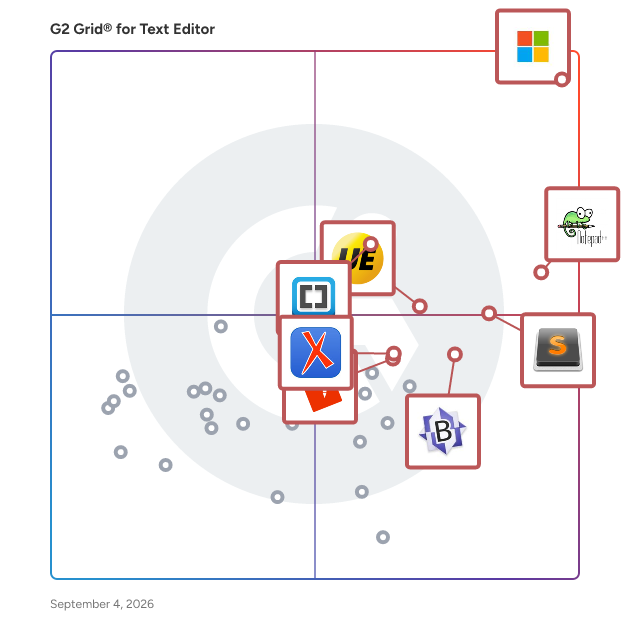
G2 Grid® for Text Editor Software

G2 Grid® for Text Editor Software plotting products by satisfaction and market presence

Highlighted products: Visual Studio Code, Notepad++, Sublime Text, Brackets, UltraEdit, BBEdit, Oxygen XML Editor, and EmEditor.

Underlying data: [Grid® JSON](https://www.g2.com/categories/text-editor/grids.json?focus%5B%5D=visual-studio-code&focus%5B%5D=notepad&focus%5B%5D=sublime-text&focus%5B%5D=brackets&focus%5B%5D=ultraedit&focus%5B%5D=bbedit&focus%5B%5D=oxygen-xml-editor&focus%5B%5D=emeditor)

UltraEdit

UltraEdit is a text and code editor built for work that general-purpose editors often struggle with: large files, complex data manipulation, and security-sensitive workflows. It has been in the market for more than 30 years, is used by over 4 million users worldwide, and is trusted by enterprise customers across the Fortune 500. Individual users choose UltraEdit when everyday editors start to hit their limits. Common use cases include working with very large files, running advanced search and replace, using column and block editing, and handling more complex text and data manipulation. Organizations choose UltraEdit when they need a more secure and supportable editor behind sensitive workflows. That includes teams in banking, insurance, healthcare, government, and other regulated or risk-sensitive environments where unsupported tools can create too much uncertainty. Key capabilities: - Performance under heavy tasks, including support for files above 4 GB - Advanced search and replace - Column and block editing for structured data tasks - Complex text and data manipulation - Offline activation for restricted environments - Commercial support with priority handling for critical concerns Often called the "Swiss army knife" of text editors, UltraEdit is a tool that no IT professional should be without. From programming and project management to large file manipulation, from data sorting and text record formatting to remote (FTP/SFTP) file operations, from advanced file searching and text data reformatting, there's almost no problem that UltraEdit can't solve in the world of text editing. UltraEdit is available for Windows, Mac, and Linux and is backed by a professional development team and support staff.

Average Rating: 4.7/5.0

Total Reviews: 1,104

How Do G2 Users Rate UltraEdit?

  • Has the product been a good partner in doing business?: 9.5/10 (Category avg: 8.4/10)
  • Extensibility: 8.9/10 (Category avg: 8.1/10)
  • Syntax highlighting: 9.4/10 (Category avg: 8.4/10)
  • Code folding: 9.1/10 (Category avg: 8.0/10)

Who Is the Company Behind UltraEdit?

  • Seller: Idera, Inc.
  • Year Founded: 2007
  • HQ Location: Austin, US
  • Twitter: @MigrationWiz
    482 Twitter followers
  • LinkedIn® Page: www.linkedin.com
    285 employees on LinkedIn®

Who Uses This Product?

  • Who Uses This: Owner, Software Engineer
  • Top Industries: Information Technology and Services, Computer Software
  • Company Size: 39% Small, 36% Large

What Do G2 Reviewers Say About UltraEdit?

AI-generated summary from verified user reviews

Pros
  • Users love the seamless plugin integrations in UltraEdit, enhancing functionality for various projects effortlessly.
  • Users appreciate the editing ease of UltraEdit, benefiting from features like code folding and multi-caret editing.
  • Users value the true multi-language support of UltraEdit, enabling smooth coding across various programming languages.
  • Users appreciate the seamless handling of large files in UltraEdit, enabling efficient code management and editing.
  • Users value the fast loading and speed of UltraEdit, enhancing their coding and debugging experience significantly.
Cons
  • Users find UltraEdit to be expensive and report frequent annoying notifications that disrupt their experience.
  • Users find the frequent updates to be somewhat annoying, disrupting their experience with persistent notifications.
  • Users note a learning difficulty in mastering UltraEdit, despite its initial ease of use for programming.
  • Users experience poor customer support, especially regarding refund issues, overshadowing the tool's usefulness.

What Are Recent G2 Reviews of UltraEdit?

What Are G2 Users Discussing About UltraEdit?

Lightkey

Lightkey is an AI-powered writing assistant for Windows, offering real-time text predictions, spelling & grammar corrections while typing in MS Office and any Chrome or Edge web application, supporting 85 languages.

Average Rating: 4.9/5.0

Total Reviews: 18

How Do G2 Users Rate Lightkey?

  • Extensibility: 5.0/10 (Category avg: 8.1/10)
  • Syntax highlighting: 4.2/10 (Category avg: 8.4/10)
  • Code folding: 3.3/10 (Category avg: 8.0/10)

Who Is the Company Behind Lightkey?

Who Uses This Product?

  • Company Size: 82% Small, 14% Medium

What Do G2 Reviewers Say About Lightkey?

AI-generated summary from verified user reviews

Pros
  • Users rely on Lightkey's accurate predictive typing, significantly enhancing typing speed and communication ease.
  • Users love the friendly and fast tech support from Lightkey, enhancing their writing experience significantly.
  • Users appreciate the speed and reliability of Lightkey, making daily writing tasks quicker and easier.
  • Users find Lightkey's ease of use enhances their writing speed, complemented by friendly and responsive tech support.
  • Users value the significant boost in writing speed provided by Lightkey, complemented by responsive tech support.
Cons
  • Users often face integration issues with Lightkey due to limited plugin support for browsers and email programs.
  • Users are frustrated with Lightkey's limited compatibility as it lacks support for various browsers and email programs.
  • Users express a desire for more browser and email program templates, limiting the versatility of Lightkey.
  • Users face plugin issues, needing to deactivate Lightkey for system restores and wanting broader browser and email support.

What Are Recent G2 Reviews of Lightkey?

What Are G2 Users Discussing About Lightkey?

Text Edit Plus

Text Edit Plus is a simple but powerful plain text editor with helpful features. It is a lightweight tool that enables users to easily create new text documents or modify existing ones. The application is designed as an alternative to Notepad, by offering a wider set of features. The software is a general-purpose editor and useful for anyone who regularly works with text documents. Its analysis module can be valuable when quick statistics on text documents are needed. The ability to compute word frequencies can allow users to easily spot and quantify repetitions. Text Edit Plus comes with a clean and simple interface that newcomers will find very easy to grasp. The application can load text files, such as TXTs, CSVs and HTMLs. It provides an arsenal of features for text manipulation. A lot of quick-edit functions can prove invaluable when small fine-tunes are needed.

Average Rating: 4.3/5.0

Total Reviews: 11

How Do G2 Users Rate Text Edit Plus?

  • Has the product been a good partner in doing business?: 10.0/10 (Category avg: 8.4/10)
  • Extensibility: 8.3/10 (Category avg: 8.1/10)
  • Syntax highlighting: 8.0/10 (Category avg: 8.4/10)
  • Code folding: 7.1/10 (Category avg: 8.0/10)

Who Is the Company Behind Text Edit Plus?

  • Seller: Vovsoft
  • Year Founded: 2020
  • HQ Location: Jakarta
  • Twitter: @vovsoft
    382 Twitter followers
  • LinkedIn® Page: www.linkedin.com
    1 employees on LinkedIn®

Who Uses This Product?

  • Company Size: 55% Medium, 36% Large

What Are Recent G2 Reviews of Text Edit Plus?

What Are G2 Users Discussing About Text Edit Plus?

AI can help you find the answers. G2 helps you trust them.

Connect G2 to Claude or ChatGPT for answers grounded in G2's trusted reviews, comparisons, and pricing from real user insights.

How it works

SlickEdit

SlickEdit provides software developers with the multi-language, multi-platform code-editing capabilities they need to write better code, faster.

Average Rating: 4.4/5.0

Total Reviews: 18

How Do G2 Users Rate SlickEdit?

  • Has the product been a good partner in doing business?: 8.7/10 (Category avg: 8.4/10)
  • Extensibility: 8.8/10 (Category avg: 8.1/10)
  • Syntax highlighting: 9.2/10 (Category avg: 8.4/10)
  • Code folding: 9.2/10 (Category avg: 8.0/10)

Who Is the Company Behind SlickEdit?

  • Seller: SlickEdit
  • Year Founded: 1988
  • HQ Location: Clayton, NC
  • Twitter: @SlickEdit
    227 Twitter followers
  • LinkedIn® Page: www.linkedin.com
    7 employees on LinkedIn®

Who Uses This Product?

  • Company Size: 53% Large, 32% Medium

What Are Recent G2 Reviews of SlickEdit?

What Are G2 Users Discussing About SlickEdit?

Inspire Writer

Inspire creates a distraction-free, light markdown writing environment that boosts your productivity. From quick notes to blog posts to great novels, you focus on the content, and Inspire helps with the rest. Instant auto-save, real-time cloud sync and flexible export formats make your writing of any kind pleasant and elegant. It comes with dark mode (theme), which makes it easier for you to stay focused on your work at night; touchscreen support which assures you with a smooth scrolling, dragging and dropping experience on devices such as Microsoft Surface products; cloud syncing groups and sheets among multiple PCs via cloud syncing services such as Dropbox and Google Drive... Whatever you need in a text editor, you can find it in Inspire.

Average Rating: 4.7/5.0

Total Reviews: 12

How Do G2 Users Rate Inspire Writer?

  • Has the product been a good partner in doing business?: 8.3/10 (Category avg: 8.4/10)
  • Syntax highlighting: 9.7/10 (Category avg: 8.4/10)

Who Is the Company Behind Inspire Writer?

  • Seller: Inspire Team
  • Year Founded: 2013
  • HQ Location: Cebu City, Cebu
  • Twitter: @InspireWriter
    5 Twitter followers
  • LinkedIn® Page: www.linkedin.com
    1 employees on LinkedIn®

Who Uses This Product?

  • Company Size: 75% Small, 17% Large

What Are Recent G2 Reviews of Inspire Writer?

What Are G2 Users Discussing About Inspire Writer?

Tex-Edit Plus

Trans-Tex Software Tex-Edit Plus is a scriptable, ASCII text editor that fills the gap between a Apple's bare-bones TextEdit and a full-featured word processor. It's fast, efficient, and has a clean, uncluttered interface. It's also great for cleaning up text which is transmitted over the Internet.

Average Rating: 4.2/5.0

Total Reviews: 18

How Do G2 Users Rate Tex-Edit Plus?

  • Has the product been a good partner in doing business?: 7.5/10 (Category avg: 8.4/10)
  • Extensibility: 10.0/10 (Category avg: 8.1/10)
  • Syntax highlighting: 6.7/10 (Category avg: 8.4/10)
  • Code folding: 8.3/10 (Category avg: 8.0/10)

Who Is the Company Behind Tex-Edit Plus?

Who Uses This Product?

  • Company Size: 56% Large, 28% Small

What Are Recent G2 Reviews of Tex-Edit Plus?

What Are G2 Users Discussing About Tex-Edit Plus?

HERO

HERO is a collaborative workspaces for serious work combining the flexibility of text, the structure of databases and the power of integrations. It can be found at https://www.myhero.so Think of it like Notion, but purpose-built for teams who write formal, structured documents like legal contracts, technical specs, SOPs, and policies. What makes it different? - Structural Hierarchy: Notion does pages within pages, HERO does sections within sections (sub/sections, sub/clauses, sub/paragraphs, schedules/appendices, etc.) to reflect the real structure of formal writing. - Dynamic Variables: Notion has pages and databases (sometimes a database within a page), HERO can embed specific data points within the text for powerful, fine-grained templating and dynamic content reusability. - Defined Terms & Acronyms: Reference and auto-manage key terms across large documents and projects. - Project-Based & Context-Aware: HERO can reference, update, and respond to changes across multiple files in real time for consistency, efficiency & accuracy. It turns static files into interconnected systems of living documents & records. - Footnotes & Cross-Referencing: Native support for citations and internal linking. - AI-Powered Workflows: Auto-draft clauses, explain sections, check for inconsistencies, and restructure content across multiple files simultaneously using integrated AI tools, much like in Cursor (coming soon). - Collaborative & Secure Workspaces: Organize your teams for collaborative & adversarial settings. It also supports: - Markdown - LaTeX/KaTeX - Charts & graphs - Code blocks (or inline) - Callouts - iFrames & Embeds - Footnotes - Tables & Columns - Math Blocks (or inline) - Images - Buttons - Quotes - Location, Date & Time - Signature Blocks Review all features here: https://www.myhero.so/features It's all about bridging the disconnect between transactional teams and operational ones.

Who Is the Company Behind HERO?

Rons Data Edit

Rons Data Edit is a professional CSV Editor for windows to edit and clean data. It is also a great CSV file viewer and converter. The application provides a wealth of tools and features designed to manipulate data in a flexible way. The interface is modern, clean, and user-friendly and the power and speed of the application allow to handle, or simply view, large files with ease. Unlike Excel, Rons Data Edit knows that your data is text and does not try to 'adjust' it" and to introduce workflow interruption with confusing errors. This makes Rons Data Edit a perfect alternative to Excel for handling CSV data files. A list of features can be found on the Rons Place Software (https://www.ronsplace.ca/Products/RonsDataEdit/Features).

Who Is the Company Behind Rons Data Edit?

Adam Crivello
AC
Researched and written by Adam Crivello
Updated March 7, 2025