Top Free Print Management Solutions

How Many Print Management Solutions Products Does G2 Track?

Total Products under this Category: 141

Category Stats (Sep 2026)

  • Average Rating: 4.18/5 The average rating of products in this category, based on all submitted ratings
  • Top Trending Product: ScrewDrivers (+0.13%) - Among all products in this category, ScrewDrivers recorded the largest rating increase compared to last month

Last updated: September 01, 2026

How Does G2 Rank Print Management Solutions Products?

Why You Can Trust G2's Software Rankings:

  • 30 Analysts and Data Experts
  • 1,500+ Authentic Reviews
  • 141+ Products
  • Unbiased Rankings

G2's software rankings are built on verified user reviews, rigorous moderation, and a consistent research methodology maintained by a team of analysts and data experts. Each product is measured using the same transparent criteria, with no paid placement or vendor influence. While reviews reflect real user experiences, which can be subjective, they offer valuable insight into how software performs in the hands of professionals. Together, these inputs power the G2 Score, a standardized way to compare tools within every category.

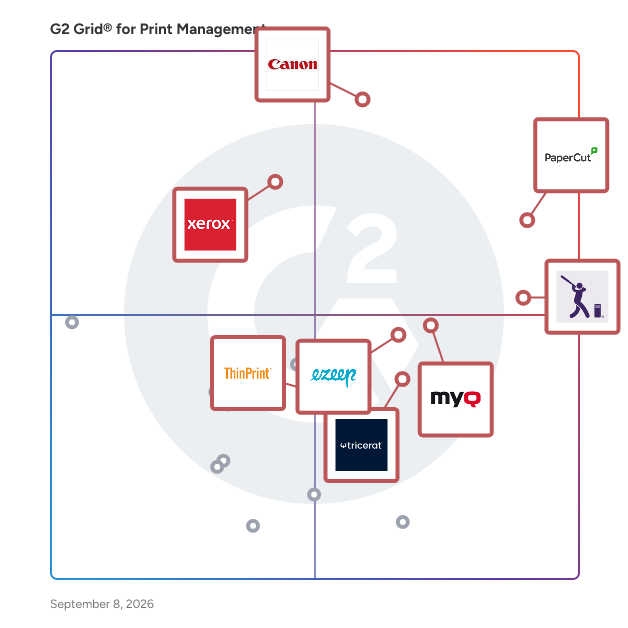
G2 Grid® for Print Management Solutions

G2 Grid® for Print Management Solutions plotting products by satisfaction and market presence

Highlighted products: PaperCut, uniFLOW, PrinterLogic, MyQ, Xerox FreeFlow Print Server, ezeep, ScrewDrivers, and ThinPrint.

Underlying data: [Grid® JSON](https://www.g2.com/categories/print-management/grids.json?focus%5B%5D=papercut-mf&focus%5B%5D=canon-uniflow&focus%5B%5D=printerlogic&focus%5B%5D=myq&focus%5B%5D=xerox-freeflow-print-server&focus%5B%5D=ezeep&focus%5B%5D=screwdrivers&focus%5B%5D=thinprint)

PaperCut

PaperCut Software is a type of print management software solution designed to help users optimize their printing processes while minimizing waste and costs. With over two decades of experience, PaperCut addresses the common challenge of excessive paper waste in various printing environments. It serves a diverse user base of more than 200 million individuals across 195 countries, including over 100,000 organizations, establishing itself as a leader in promoting sustainable printing practices. The primary target audience for PaperCut includes businesses, educational institutions, healthcare facilities, and organizations of all sizes that seek to enhance their printing efficiency and reduce their environmental footprint. This software is particularly beneficial for organizations with high print volumes that are looking to implement cost-saving measures. By providing detailed insights into printing habits, PaperCut empowers users to make informed decisions regarding their printing practices, ultimately fostering more sustainable behaviors and reducing unnecessary expenditures. Key features of PaperCut include robust tracking and reporting capabilities, which enable administrators to monitor print jobs, identify patterns of high usage, and set quotas or restrictions based on user roles. This level of visibility allows organizations to manage their printing resources effectively, leading to reduced costs and promoting responsible usage. Additionally, PaperCut supports a wide array of printers and operating systems, ensuring compatibility across diverse environments. Its user-friendly interface simplifies installation and operation, making it accessible for both technical and non-technical users alike. One of the notable benefits of PaperCut is its significant contribution to environmental sustainability. To date, the PaperCut community has collectively saved over 750 million sheets of paper, which is equivalent to preserving approximately 80,000 trees. This achievement highlights the software's effectiveness in reducing waste and resonates with organizations committed to enhancing their sustainability initiatives. By integrating PaperCut into their operations, users can actively contribute to a greener future while simultaneously realizing cost savings. PaperCut provides a comprehensive solution for organizations seeking to streamline their printing processes, enhance visibility, and promote sustainable practices. Its combination of powerful features, ease of use, and dedication to environmental responsibility positions it as a valuable tool for any organization aiming to improve its print management strategies. By adopting PaperCut, organizations can not only optimize their printing operations but also play a pivotal role in fostering a more sustainable environment.

Average Rating: 4.5/5.0

Total Reviews: 534

How Do G2 Users Rate PaperCut?

  • Compliance: 9.0/10 (Category avg: 8.5/10)
  • Print Jobs: 9.1/10 (Category avg: 8.8/10)
  • New Printers: 9.0/10 (Category avg: 8.5/10)
  • Ease of Use: 9.0/10 (Category avg: 8.5/10)

Who Is the Company Behind PaperCut?

  • Seller: PaperCut Software Pty Ltd
  • Company Website:
  • Year Founded: 1998
  • HQ Location: Camberwell, Victoria, Australia
  • Twitter: @papercutdev
    3,519 Twitter followers
  • LinkedIn® Page: www.linkedin.com
    267 employees on LinkedIn®

Who Uses This Product?

  • Who Uses This: IT Manager, Student
  • Top Industries: Education Management, Primary/Secondary Education
  • Company Size: 56% Medium, 25% Small

What Do G2 Reviewers Say About PaperCut?

AI-generated summary from verified user reviews

Pros
  • Users appreciate the ease of use of PaperCut, finding the interface clear and setup straightforward.
  • Users appreciate the easy network management of PaperCut, enhancing print security and tracking while reducing costs.
  • Users commend PaperCut for its waste reduction capabilities, streamlining printing processes and minimizing unnecessary print jobs.
  • Users find the easy setup of PaperCut highly beneficial for integrating and managing printing effortlessly.
  • Users appreciate the clear and easy-to-use interface of PaperCut, enhancing their overall experience and efficiency.
Cons
  • Users report printing issues that lead to confusion and delays, impacting the overall user experience with PaperCut.
  • Users experience poor customer support, facing unhelpful responses and delays that hinder effective use of PaperCut.
  • Users find the configuration difficult, noting it requires advanced technical knowledge and can be quite intricate.
  • Users feel that there is limited customization in PaperCut, especially for job ticketing and AD fields.
  • Users report update issues with PaperCut, citing slow large updates and lack of client version visibility.

What Are Recent G2 Reviews of PaperCut?

What Are G2 Users Discussing About PaperCut?

PrinterLogic

PrinterLogic is a serverless print management solution built for IT teams tired of fragile print servers, messy GPOs, and help desk tickets that never stop. Using PrinterLogic, you can replace legacy infrastructure with centrally managed Direct IP printing, delivering smarter, faster, and more secure printing across your organization without a single server in the stack. Why PrinterLogic: Eliminate Print Servers for Good: Direct IP printing removes every single point of failure. No crashes, no spooler vulnerabilities, no costly hardware to maintain. Reduce Helpdesk Tickets by Up to 90%: Self-service printer installation with visual floor maps puts users in control and gets IT out of the queue business. Centralize Everything in One Console: Deploy printers, manage drivers, enforce policies, and view usage reports across every location. No scripts, no GPOs, no manual intervention. Secure Every Print Job: Zero Trust authentication, end-to-end encryption, and native IdP integrations (Okta, Entra ID, PingFederate) ensure only authorized users print. FedRAMP High authorized for the most security-sensitive environments. Print Across Any Environment: Native IPP support for Windows, Mac, and Linux. Works with any printer manufacturer, driver type, MFD, mobile device, tablet, or label printer. Agnostic by design. Gain Full Print Visibility: Real-time analytics and automated reporting show who is printing, how much, and at what cost — with policy controls to cut waste and reduce spending. Modernize Without Disruption: A low-friction migration path moves organizations from legacy infrastructure to IPP-native printing. Mac/Linux IPP Support, HP Direct Authentication at the MFP panel, Imprivata Integration for healthcare, Scan to Network Personal, Searchable PDF, UNIFI interface upgrade.

Average Rating: 4.6/5.0

Total Reviews: 407

How Do G2 Users Rate PrinterLogic?

  • Compliance: 8.9/10 (Category avg: 8.5/10)
  • Print Jobs: 9.2/10 (Category avg: 8.8/10)
  • New Printers: 9.4/10 (Category avg: 8.5/10)
  • Ease of Use: 9.3/10 (Category avg: 8.5/10)

Who Is the Company Behind PrinterLogic?

  • Seller: Vasion
  • Company Website:
  • Year Founded: 2008
  • HQ Location: St. George, Utah
  • Twitter: @VasionSoftware
    66 Twitter followers
  • LinkedIn® Page: www.linkedin.com
    540 employees on LinkedIn®

Who Uses This Product?

  • Who Uses This: Systems Engineer, Network Administrator
  • Top Industries: Hospital & Health Care, Primary/Secondary Education
  • Company Size: 52% Medium, 42% Large

What Do G2 Reviewers Say About PrinterLogic?

AI-generated summary from verified user reviews

Pros
  • Users value the ease of use of PrinterLogic, making printer setup effortless for both IT and end users.
  • Users praise the easy setup of PrinterLogic, streamlining deployment and reducing the need for IT support.
  • Users laud Printer Management in PrinterLogic for effortless, centralized control and remote printing capabilities across multiple locations.
  • Users rave about the excellent customer support provided by PrinterLogic, enhancing their overall experience.
  • Users love the centralized management of PrinterLogic, simplifying device monitoring and control across multiple locations and systems.
Cons
  • Users find that driver compatibility issues hinder flexibility and complicate the management of printer connections.
  • Users face configuration difficulties during setup, particularly with older systems and driver uploads, complicating user experience.
  • Users often face printing issues with driver management and slow performance when handling large documents in PrinterLogic.
  • Users experience integration issues with third-party tools and limited driver support, affecting migration from physical print servers.
  • Users experience browser issues, including frequent disruptions and the need for reconfiguration, affecting convenience.

What Are Recent G2 Reviews of PrinterLogic?

What Are G2 Users Discussing About PrinterLogic?

MyQ

MyQ develops print management solutions designed to make printing personalized, secure, and cost-effective. MyQ X features an intuitive user interface that supports deep personalization, allowing users to complete everyday tasks quickly through one-click actions. Powerful document workflows streamline scanning through smart automation, while advanced accounting and reporting tools provide clear insight into print costs and usage. MyQ Roger, a public cloud solution, allows users to browse cloud storages, print documents anytime from anywhere, and create customized scanning workflows that can even be triggered by voice commands. MyQ Roger turns a smartphone into a portable digital office, enabling documents handling from anywhere with an internet connection. Built on a public cloud architecture, MyQ Roger always delivers high availability and supports organizations of any size on their digital transformation journey.

Average Rating: 4.7/5.0

Total Reviews: 120

How Do G2 Users Rate MyQ?

  • Compliance: 9.3/10 (Category avg: 8.5/10)
  • Print Jobs: 9.0/10 (Category avg: 8.8/10)
  • New Printers: 9.2/10 (Category avg: 8.5/10)
  • Ease of Use: 9.3/10 (Category avg: 8.5/10)

Who Is the Company Behind MyQ?

  • Seller: MyQ
  • Company Website:
  • Year Founded: 2007
  • HQ Location: Praha 9, CZ
  • LinkedIn® Page: www.linkedin.com
    161 employees on LinkedIn®

Who Uses This Product?

  • Who Uses This: IT Manager
  • Top Industries: Information Technology and Services, Printing
  • Company Size: 65% Medium, 21% Small

What Do G2 Reviewers Say About MyQ?

AI-generated summary from verified user reviews

Pros
  • Users appreciate the simplicity of use with MyQ, enjoying easy access and seamless integration features.
  • Users value the flexibility and user-friendly interface of MyQ, enhancing their printing experience with diverse options.
  • Users find the easy setup of MyQ simple and efficient, enhancing user experience and administration.
  • Users enjoy the user-friendly interface of MyQ, which simplifies administration and enhances overall experience.
  • Users value the efficiency improvement of MyQ, highlighting its simple installation and real-time printer management capabilities.
Cons
  • Users are frustrated by the missing features in MyQ, such as Linux support and document encryption options.
  • Users experience printing issues with MyQ, notably delays and unnecessary group imports affecting print efficiency.
  • Users face compatibility issues with MyQ, especially in mixed print environments, leading to frustrating errors.
  • Users express a desire for more customization options in MyQ, particularly for non-Windows server installations.
  • Users find the limited reporting capabilities of MyQ inadequate, requiring multiple reports for their needs.

What Are Recent G2 Reviews of MyQ?

ezeep

Printing You Don't Have to Think About: ezeep keeps critical print workflows running seamlessly across enterprises, coworking spaces, schools, logistics operations and beyond. Secure, low-maintenance and cost-efficient, without the usual IT headaches. ezeep: Cloud Printing That Just Works: Labels, invoices, contracts and marketing materials. Print is still how the physical and digital worlds connect. And when it works, nobody notices. That's exactly the point. Our cloud-based print management platform requires no print servers, no VPNs and no drivers. Just printing that works, wherever your teams are. Cut costs and complexity by eliminating print servers and VPNs, and watch your print management overhead drop Print securely with zero trust and follow-me printing that keeps sensitive documents in the right hands Connect any device, anywhere from mobile phones and label printers to thin clients, Macs and MFDs, whether at the office, home, a hot desk or a remote warehouse Integrate with everything using an open API and seamless app integrations so print workflows run from all your systems, including specialty printers and virtual desktop environments like Citrix and Azure Sustainable by Design: ezeep helps you reduce print waste and meet your ESG goals, without sacrificing the workflows your business depends on. Backed by Decades of Expertise: ezeep is powered by ThinPrint, a globally renowned leader in print management with decades of experience and deployments of up to 250,000 users worldwide.

Average Rating: 4.4/5.0

Total Reviews: 52

How Do G2 Users Rate ezeep?

  • Compliance: 8.3/10 (Category avg: 8.5/10)
  • Print Jobs: 8.5/10 (Category avg: 8.8/10)
  • New Printers: 9.1/10 (Category avg: 8.5/10)
  • Ease of Use: 8.8/10 (Category avg: 8.5/10)

Who Is the Company Behind ezeep?

  • Seller: ezeep
  • Year Founded: 2013
  • HQ Location: Denver, USA
  • Twitter: @ezeep
    2,167 Twitter followers
  • LinkedIn® Page: www.linkedin.com
    19 employees on LinkedIn®

Who Uses This Product?

  • Top Industries: Commercial Real Estate, Executive Office
  • Company Size: 63% Small, 27% Medium

What Do G2 Reviewers Say About ezeep?

AI-generated summary from verified user reviews

Pros
  • Users value ezeep's responsive customer support, noting quick and helpful assistance that enhances their overall experience.
  • Users appreciate ezeep for its ease of use, enjoying simple setup and quick, seamless printing experiences.
  • Users highlight the easy setup of ezeep, noting a straightforward installation and a user-friendly interface.
  • Users appreciate the easy-to-use interface of ezeep, enhancing printing efficiency and tracking capabilities for their businesses.
  • Users appreciate the efficiency of ezeep, simplifying printing and saving valuable time on setup and troubleshooting.
Cons
  • Users experience connectivity issues with ezeep, facing disconnections and a troublesome transition to ezeep Blue.
  • Users are frustrated with integration issues that disrupt workflows and limit functionality, affecting overall satisfaction.
  • Users experience printing issues with lags and missing features in Ezeep Blue, leading to frustration and potential platform change.
  • Users find the lengthy setup process for Ezeep to be complicated, though support is helpful in overcoming challenges.
  • Users express frustration over limited customization in ezeep, highlighting issues with print defaults and missing features.

What Are Recent G2 Reviews of ezeep?

What Are G2 Users Discussing About ezeep?

ScrewDrivers

In today’s complex enterprise, one-size-fits-all print management is a myth. ScrewDrivers® is the industry’s only Hybrid Print Architecture (HPA) solution, providing a single, cohesive platform that delivers adaptive, unified control across the hybrid enterprise. At its core, ScrewDrivers® unifies every print workflow—centralized, direct IP, and cloud—into a single, secure infrastructure. The platform consists of three strategic pillars: Fortified Print Servers: Tricerat reduces the attack surface by consolidating legacy print servers into an efficient fleet of fortified print servers. These hardened environments are designed for mission-critical, high-availability workloads requiring <30s failover and redundancy. Direct Print Zones: These allow for serverless simplicity in distributed branch offices or for remote workers, enabling direct workstation-to-printer communication without losing centralized management. A Unified Control Plane: This is the strategic layer that connects your entire environment, providing the C-Suite with a single point of truth for policy enforcement, granular audit logs, and security monitoring. ScrewDrivers® is natively compatible with Citrix, Omnissa, Microsoft Azure (AVD), and Linux, making it the de facto choice for organizations where lives, revenue, or compliance are at stake. By virtualizing print drivers through a patented universal driver, ScrewDrivers® eliminates "driver hell" and slashes print-related support tickets by up to 75%. Whether your organization is consolidating servers or expanding into the cloud, ScrewDrivers® provides the architectural flexibility to run any workflow, on any device, anywhere—safely and efficiently.

Average Rating: 4.7/5.0

Total Reviews: 49

How Do G2 Users Rate ScrewDrivers?

  • Compliance: 9.1/10 (Category avg: 8.5/10)
  • Print Jobs: 9.1/10 (Category avg: 8.8/10)
  • New Printers: 9.4/10 (Category avg: 8.5/10)
  • Ease of Use: 9.4/10 (Category avg: 8.5/10)

Who Is the Company Behind ScrewDrivers?

  • Seller: Tricerat
  • Company Website:
  • Year Founded: 1997
  • HQ Location: Baltimore, Maryland
  • Twitter: @Tricerat
    1,196 Twitter followers
  • LinkedIn® Page: www.linkedin.com
    29 employees on LinkedIn®

Who Uses This Product?

  • Company Size: 43% Medium, 29% Small

What Do G2 Reviewers Say About ScrewDrivers?

AI-generated summary from verified user reviews

Pros
  • Users praise the ease of use of ScrewDrivers, highlighting its simple setup and effective printer management.
  • Users find the easy management features of ScrewDrivers essential for efficient IT operations and printer control.
  • Users appreciate the incredibly easy setup of ScrewDrivers, enjoying a seamless experience right out of the box.
  • Users praise the excellent customer support from ScrewDrivers, making transitions smooth and stress-free during upgrades.
  • Users value the easy printing solution of ScrewDrivers, enhancing management and simplifying remote printing across devices.
Cons
  • Users often face installation issues, needing to uninstall and reinstall ScrewDrivers for proper functionality on PCs.
  • Users find the license renewal process cumbersome, desiring better notifications and automation for improved convenience.

What Are Recent G2 Reviews of ScrewDrivers?

What Are G2 Users Discussing About ScrewDrivers?

ThinPrint

ThinPrint technology is based upon more than a decade of experience and has proven itself with tens of thousands of companies – regardless of their sector, size, region, or even their existing IT infrastructure. ThinPrint significantly eases the strain on the IT department and considerably increases performance, optimally supports printing, and enables lucrative cost savings in any environment. Features include: - High availability printing thanks to load balancing and failover - Radical reduction in print data volumes - Secure printing – even without VPN - Tracking and reporting print volumes - Driver Free Printing, including - Advanced printing options for driverless and native printing - Automatic printer mapping - IT administration-free branch offices with the ThinPrint Hub - High-performance batch printing for host systems - Convenient printer self-service for end-users - Mobile printing from remote and virtual desktop sessions Printing has always been both a business-critical, yet problematic IT service. Especially the constant evolution of the way we work and the variety of the devices and programs used present new challenges for IT departments. That's why ThinPrint delivers secure, fast, and reliable printing at all times. ThinPrint also reduces the burden placed on your IT resources as well as the number of helpdesk requests.

Average Rating: 4.6/5.0

Total Reviews: 18

How Do G2 Users Rate ThinPrint?

  • Compliance: 8.7/10 (Category avg: 8.5/10)
  • Print Jobs: 9.3/10 (Category avg: 8.8/10)
  • New Printers: 9.3/10 (Category avg: 8.5/10)
  • Ease of Use: 8.8/10 (Category avg: 8.5/10)

Who Is the Company Behind ThinPrint?

  • Seller: ThinPrint
  • Year Founded: 2015
  • HQ Location: Berlin, Berlin
  • Twitter: @ThinPrint
    2,691 Twitter followers
  • LinkedIn® Page: www.linkedin.com
    43 employees on LinkedIn®

Who Uses This Product?

  • Company Size: 61% Medium, 28% Large

What Do G2 Reviewers Say About ThinPrint?

AI-generated summary from verified user reviews

Pros
  • Users highlight the ease of use of ThinPrint, enjoying its reliability for administrators and users alike.
  • Users value the reliability of ThinPrint, appreciating its consistent performance without frequent support needs.
  • Users value the professional and efficient customer support of ThinPrint, enhancing their overall experience with the product.
  • Users value the efficiency of ThinPrint, ensuring seamless printer provisioning for thousands of users effortlessly.
  • Users find Printer Management in ThinPrint reliable and user-friendly, simplifying printing across numerous locations.
Cons
  • Users find the lengthy setup process of ThinPrint to be complicated and time-consuming at first.

What Are Recent G2 Reviews of ThinPrint?

directprint.io

Print management for cloud-first organizations. directprint.io is a cost-effective, feature-rich, software-as-a-service (SaaS) print management solution that allows IT teams to quickly and effectively deploy, secure, control, and track print in the cloud.

Average Rating: 4.7/5.0

Total Reviews: 11

How Do G2 Users Rate directprint.io?

  • Compliance: 9.5/10 (Category avg: 8.5/10)
  • Print Jobs: 9.2/10 (Category avg: 8.8/10)
  • New Printers: 9.7/10 (Category avg: 8.5/10)
  • Ease of Use: 9.4/10 (Category avg: 8.5/10)

Who Is the Company Behind directprint.io?

  • Seller: directprint.io
  • Year Founded: 2016
  • HQ Location: Cardiff, GB
  • Twitter: @directprint_io
    58 Twitter followers
  • LinkedIn® Page: www.linkedin.com
    10 employees on LinkedIn®

Who Uses This Product?

  • Company Size: 45% Large, 27% Medium

What Do G2 Reviewers Say About directprint.io?

AI-generated summary from verified user reviews

Pros
  • Users praise the broad compatibility of directprint.io with various printers, enhancing ease of use and integration.
  • Users love the versatile connectivity of directprint.io, easily integrating with various printers and Google Workspace.
  • Users find directprint.io incredibly easy to use, thanks to its intuitive setup and excellent compatibility with printers.
  • Users value the easy integrations with various printers and Google Workspace, making setup a breeze.
  • Users value the easy setup of directprint.io, noting its compatibility and intuitive integration with Google Workspace.

What Are Recent G2 Reviews of directprint.io?

YSoft SAFEQ

YSoft SAFEQ reduces overall print services infrastructure and operating costs, increases document security, and improves workflow productivity. Highlights include user authentication, pull-printing, comprehensive reporting, automated scan workflows with optical character recognition, mobile printing and rules-based printing. YSoft SAFEQ is offered as software suites or individual modules ensuring customers pay only for what is needed with the ability to add features in the future. Started in 2000, Y Soft has offices in more than 15 countries and prides itself on outstanding, local support. More than 400 employees strong, our goal is helping customers build smart businesses.

Average Rating: 3.9/5.0

Total Reviews: 13

How Do G2 Users Rate YSoft SAFEQ?

  • Compliance: 7.1/10 (Category avg: 8.5/10)
  • Print Jobs: 7.7/10 (Category avg: 8.8/10)
  • New Printers: 7.9/10 (Category avg: 8.5/10)
  • Ease of Use: 7.9/10 (Category avg: 8.5/10)

Who Is the Company Behind YSoft SAFEQ?

  • Seller: Y Soft
  • Year Founded: 2000
  • HQ Location: Brno
  • Twitter: @YSoft
    1,570 Twitter followers
  • LinkedIn® Page: www.linkedin.com
    396 employees on LinkedIn®

Who Uses This Product?

  • Company Size: 56% Large, 31% Medium

What Are Recent G2 Reviews of YSoft SAFEQ?

What Are G2 Users Discussing About YSoft SAFEQ?

Printix

Printix offers a modern print experience for EDU, SMB, and Enterprises who are moving to the cloud. Eliminating print servers, Printix integrates seamlessly with Microsoft Azure AD and Google Workspace to bring modern printing to the cloud quickly, efficiently and inexpensively. With Printix's cloud-based print management service, you will significantly reduce the cost of print operations and relieve IT burden. Printix is a trusted ISV and Microsoft co-sell ready partner. It runs its infrastructure on Microsoft Azure public cloud. Print vendor-agnostic and scalable by design, the platform can handle any number of users and printers. Printix was founded in Denmark in 2014 by a group of experienced print management software entrepreneurs and IT developers. Our mission is to rethink the market for print management by offering the first cloud-based print management SaaS platform, meeting customers rising demand for flexible and scalable solutions. In August 2021, Kofax®, a leading supplier of Intelligent Automation software for digital workflow transformation, acquired Printix. Modern Printing - Print anytime, anywhere from any device to any printer - Direct & mobile print supported on Windows, Mac, Chromebook, iOS & Android - Home office printing to manage employee printing when working from home - Secure print release of confidential documents via smartphone authentication - Secure print release with PIN code or proximity ID card - Scan & Capture to Email, OneDrive & SharePoint Modern Print Management - Automatically installs print drivers and creates print queues - Automatic location and group policy installed print environment - Easy client deployment through Microsoft Endpoint Manager - Data analytics and insights with Printix Power BI reports - Integrates and extends Microsoft Universal Print

Average Rating: 4.2/5.0

Total Reviews: 13

How Do G2 Users Rate Printix?

  • Compliance: 8.8/10 (Category avg: 8.5/10)
  • Print Jobs: 8.8/10 (Category avg: 8.8/10)
  • New Printers: 8.9/10 (Category avg: 8.5/10)
  • Ease of Use: 8.5/10 (Category avg: 8.5/10)

Who Is the Company Behind Printix?

  • Seller: Printix
  • Year Founded: 2014
  • HQ Location: Herlev, DK
  • Twitter: @printix
    1 Twitter followers
  • LinkedIn® Page: www.linkedin.com
    12 employees on LinkedIn®

Who Uses This Product?

  • Company Size: 38% Small, 31% Large

What Are Recent G2 Reviews of Printix?

What Are G2 Users Discussing About Printix?

Princh

Princh is a user-friendly, cloud-based solution designed to make printing, copying, scanning and payment simple for everyone. We are the first software company in the printing and payment industry to be ISO 27001:2022 certified, which is considered the "gold standard" in information security. We are proud to have set a new benchmark for security in the industry for your users and your organization. Our products do not require mobile apps, user accounts, usernames or passwords. Users can simply print, copy, scan and pay electronically by following an intuitive flow. Our process is fast, easy and requires no staff involvement. Users can pay using their preferred payment method, including Apple Pay, Google Pay, bank cards, mobile payment apps, and cash. Integrated payment is included in all Princh products, meaning users must complete payment before receiving their document(s).

Average Rating: 4.0/5.0

Total Reviews: 1

How Do G2 Users Rate Princh?

  • Compliance: 10.0/10 (Category avg: 8.5/10)
  • Print Jobs: 10.0/10 (Category avg: 8.8/10)
  • New Printers: 10.0/10 (Category avg: 8.5/10)
  • Ease of Use: 6.7/10 (Category avg: 8.5/10)

Who Is the Company Behind Princh?

  • Seller: Princh
  • Year Founded: 2015
  • HQ Location: Viby J, DK
  • LinkedIn® Page: www.linkedin.com
    23 employees on LinkedIn®

Who Uses This Product?

  • Company Size: 100% Small

What Are Recent G2 Reviews of Princh?

What Are G2 Users Discussing About Princh?

PrintPLANR

PrintPLANR, a cloud-based Print MIS system, works for printing, promotional, signage industries, & print brokers. We have integrated Print MIS, Print Estimating Software, & Web2Print into one solution.

Average Rating: 5.0/5.0

Total Reviews: 1

How Do G2 Users Rate PrintPLANR?

  • Ease of Use: 10.0/10 (Category avg: 8.5/10)

Who Is the Company Behind PrintPLANR?

  • Seller: PrintPLANR
  • Year Founded: 2011
  • HQ Location: Mysore, IN
  • Twitter: @PrintPlanr
    32 Twitter followers
  • LinkedIn® Page: www.linkedin.com
    2 employees on LinkedIn®

Who Uses This Product?

  • Company Size: 100% Medium

What Are Recent G2 Reviews of PrintPLANR?

ChequeSystem Cheque Printing & Management Software

ChequeSystem streamlines your cheque issuing process. Effortlessly print cheques with all necessary details (payee, date, amount, etc.). Compatible with laser, inkjet, and dot-matrix printers, ChequeSystem guarantees crisp, legible results every time. Batch printing and duplex printing options significantly increase efficiency.

Who Is the Company Behind ChequeSystem Cheque Printing & Management Software?

Fasoo Smart Print

Fasoo Smart Print (FSP) is a print security solution that helps organizations prevent data exposure by monitoring, controlling, and auditing document output. It enhances visibility into print activities and applies dynamic security measures to ensure sensitive information is not exposed through printed materials. The solution supports print watermarking, allowing organizations to add visible identifiers - such as user information, date, and time - to printed documents. These watermarks serve as a deterrent to unauthorized distribution and help trace the source of any leaks. With automatic data masking, FSP redacts sensitive content such as personal information, financial details, or confidential fields before documents are printed, reducing the risk of unintentional data exposure. The print control feature includes policies such as pull-printing, which holds print jobs until the authorized user authenticates through the mobile application. This minimizes the chance of documents being left unattended or picked up by the wrong person. Organizations can also apply print restrictions based on user roles, departments, or document sensitivity levels. As audit trail logs all print activity in detail - who printed what, when, and where - providing administrators with full oversight. This helps organizations detect unusual behaviors, enforce accountability, and maintain compliance with internal policies and regulations. Fasoo Smart Print is suitable for enterprises that need to protect printed data without disrupting user workflows. It integrates with existing print infrastructure and supports hybrid work environments, ensuring consistent data protection across all endpoints.

Who Is the Company Behind Fasoo Smart Print?

  • Seller: Fasoo AI
  • Year Founded: 2000
  • HQ Location: Darien, US
  • Twitter: @Fasoocom
    235 Twitter followers
  • LinkedIn® Page: www.linkedin.com
    129 employees on LinkedIn®
  • Ownership: 150900 (KOSDAQ)

FreeCheckPrint - Online Check Printing

FreeCheckPrint.com is a free online template tool for printing bank-compatible business checks from your own printer, with no software to install, no signup, no account, and no subscription required. Small businesses, freelancers, startups, and home-based businesses can enter check details directly in the browser, preview the finished check, and print on plain paper or blank check stock using a standard inkjet or laser printer. The tool is built for occasional, on-demand check printing when you need to pay a vendor, contractor, supplier, landlord, or service provider without waiting for pre-printed checks to arrive or buying dedicated check-printing software. FreeCheckPrint.com focuses on simplicity, privacy, and cost savings. The normal check-creation workflow runs locally in the browser, so check details such as routing numbers, account numbers, payees, amounts, and business information are not stored on FreeCheckPrint.com servers. The generated checks use standard check dimensions, MICR positioning, and bank-compatible formatting, and printed checks are formatted to fit standard #8 check envelopes after printing and signing. Users can print a single check when needed or print multiple checks without setup fees, monthly subscriptions, order minimums, or a credit card. The service is especially useful for small businesses that only write a few checks per month and do not want the expense or complexity of traditional check ordering, desktop check software, or accounting-system check modules. FreeCheckPrint.com gives users a fast way to create professional-looking checks with equipment they already have, while still allowing them to choose between regular printer paper for occasional use and blank check stock for a more polished result. It is designed to be practical, lightweight, and easy enough for anyone who has filled out a paper check before.

Who Is the Company Behind FreeCheckPrint - Online Check Printing?

IDpack Cloud

IDpack Cloud helps organizations control their security requirements with access control cards, membership cards, price tags, convention badges, student ID cards, event passes, and other types of ID cards. IDpack Cloud supports all card printers like Evolis, HID Fargo, Zebra, and Magicard. Choose from four plans to suit your needs and budget from IDC Element plan with up to 600 records, single-side printing, and one user to IDC Enterprise plan with up to 6,000 records, double-side printing, and unlimited users. Each organization gets a unique encryption key, and all sensitive data is encrypted in our database using that key for maximum security. Unlock the power of your ID card printer with IDpack Cloud. IDpack has been the number one choice of event organizers, trade associations, and corporations of all types since 1999. IDpack Cloud is the result of 25 years of passionate dedication and experience.

Who Is the Company Behind IDpack Cloud?

  • Seller: Aptika
  • Year Founded: 2000
  • HQ Location: Montreal, CA
  • LinkedIn® Page: www.linkedin.com
    9 employees on LinkedIn®