# Best Mobile Crash Reporting Software for Small Business

  *By [Adam Crivello](https://research.g2.com/insights/author/adam-crivello)*

   Products classified in the overall Mobile Crash Reporting category are similar in many regards and help companies of all sizes solve their business problems. However, small business features, pricing, setup, and installation differ from businesses of other sizes, which is why we match buyers to the right Small Business Mobile Crash Reporting to fit their needs. Compare product ratings based on reviews from enterprise users or connect with one of G2&#39;s buying advisors to find the right solutions within the Small Business Mobile Crash Reporting category.

In addition to qualifying for inclusion in the Mobile Crash Reporting Software category, to qualify for inclusion in the Small Business Mobile Crash Reporting Software category, a product must have at least 10 reviews left by a reviewer from a small business.


## Category Overview

**Total Products under this Category:** 21


## Trust & Credibility Stats

**Why You Can Trust G2's Software Rankings:**

- 30 Analysts and Data Experts
- 1,300+ Authentic Reviews
- 21+ Products
- Unbiased Rankings

G2's software rankings are built on verified user reviews, rigorous moderation, and a consistent research methodology maintained by a team of analysts and data experts. Each product is measured using the same transparent criteria, with no paid placement or vendor influence. While reviews reflect real user experiences, which can be subjective, they offer valuable insight into how software performs in the hands of professionals. Together, these inputs power the G2 Score, a standardized way to compare tools within every category.


---

**Sponsored**

### Sentry

Sentry is an application monitoring and error tracking platform that helps developers identify, debug, and resolve software issues in production environments across web, mobile, desktop, game, and AI-powered applications. The platform captures errors, crashes, and performance problems in real time, providing developers with stack traces, user context, and diagnostic data needed to reproduce and fix bugs. Sentry supports over 100 programming languages and frameworks, including JavaScript, Python, Java, Ruby, PHP, Go, React, Django, and mobile platforms like iOS and Android. Core monitoring capabilities: - Error tracking groups similar errors into issues, showing frequency, affected users, and the exact code location where problems occur - Performance monitoring traces requests through distributed systems to identify slow database queries, API bottlenecks, and code-level performance problems - Session Replay records user interactions leading up to errors, capturing clicks, network activity, and console logs for easier reproduction - Logs captures structured log data from your applications alongside errors and traces, enabling search and filtering by message content, severity level, and custom attributes - AI observability provides visibility into LLM applications, AI agents, and Model Context Protocol servers, tracking prompts, model calls, tool usage, and token consumption Developers integrate Sentry by installing an SDK and adding a few lines of code to their application. The platform automatically captures unhandled exceptions, while developers can manually track custom errors and performance metrics. Sentry processes events in real time, sending alerts through Slack, email, PagerDuty, or other notification channels when issues occur. Additional features and capabilities: - AI-powered debugging through Seer, which analyzes errors to identify root causes and suggest code fixes with high accuracy - Distributed tracing that follows requests across microservices, serverless functions, and third-party APIs to pinpoint failure points - Custom dashboards and alerts for monitoring specific metrics, error rates, or performance thresholds important to each team - Profiling tools that provide code-level visibility into where time is being spent in production, identifying slow functions, call stacks, and performance regressions across backend services and frontend/mobile user flows - Workflow integrations with GitHub, Jira, GitLab, Azure DevOps, and other development tools to create tickets or link errors to commits automatically The platform serves development teams at organizations ranging from individual developers to large enterprises. More than 100,000 organizations use Sentry, processing billions of error events daily. Sentry offers both cloud-hosted and self-hosted deployment options, with pricing tiers based on event volume. A free tier supports small projects and individual developers.


[Visit website](https://www.g2.com/external_clickthroughs/record?secure%5Bad_program%5D=ppc&amp;secure%5Bad_slot%5D=category_product_list&amp;secure%5Bcategory_id%5D=535&amp;secure%5Bdisplayable_resource_id%5D=535&amp;secure%5Bdisplayable_resource_type%5D=Category&amp;secure%5Bmedium%5D=sponsored&amp;secure%5Bplacement_reason%5D=page_category&amp;secure%5Bplacement_resource_ids%5D%5B%5D=535&amp;secure%5Bprioritized%5D=false&amp;secure%5Bproduct_id%5D=17313&amp;secure%5Bresource_id%5D=535&amp;secure%5Bresource_type%5D=Category&amp;secure%5Bsource_type%5D=category_page&amp;secure%5Bsource_url%5D=https%3A%2F%2Fwww.g2.com%2Fcategories%2Fmobile-crash-reporting%2Fsmall-business&amp;secure%5Btoken%5D=333ef7134880f2b94235f8698f15a53577764236954ccc67ef3a2b454396c929&amp;secure%5Burl%5D=https%3A%2F%2Fsentry.io%2Flp%2Fmobile-developers%2F%3Futm_source%3Dg2%26utm_medium%3Dreview-site%26utm_campaign%3Dmobile-fy27q1-evergreen%26utm_content%3Dstatic-ad-mobile-crash-reporting-trysentry&amp;secure%5Burl_type%5D=custom_url)

---

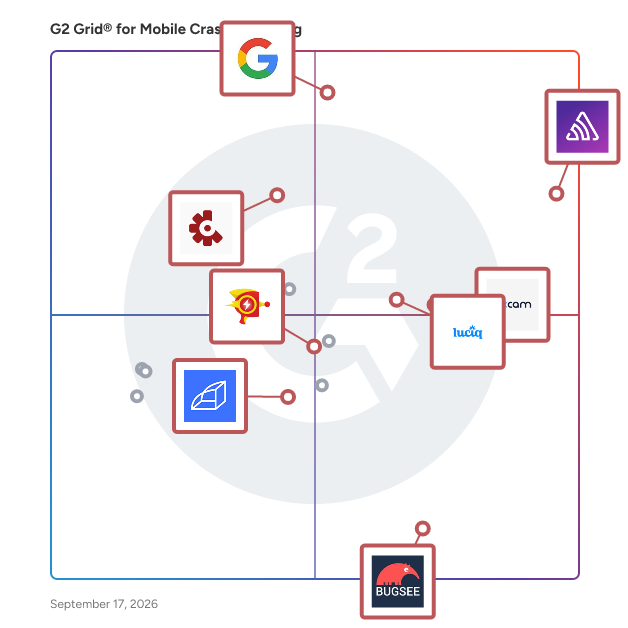
## Top-Rated Products (Ranked by G2 Score)
### 1. [Sentry](https://www.g2.com/products/sentry/reviews)
  Sentry is an application monitoring and error tracking platform that helps developers identify, debug, and resolve software issues in production environments across web, mobile, desktop, game, and AI-powered applications. The platform captures errors, crashes, and performance problems in real time, providing developers with stack traces, user context, and diagnostic data needed to reproduce and fix bugs. Sentry supports over 100 programming languages and frameworks, including JavaScript, Python, Java, Ruby, PHP, Go, React, Django, and mobile platforms like iOS and Android. Core monitoring capabilities: - Error tracking groups similar errors into issues, showing frequency, affected users, and the exact code location where problems occur - Performance monitoring traces requests through distributed systems to identify slow database queries, API bottlenecks, and code-level performance problems - Session Replay records user interactions leading up to errors, capturing clicks, network activity, and console logs for easier reproduction - Logs captures structured log data from your applications alongside errors and traces, enabling search and filtering by message content, severity level, and custom attributes - AI observability provides visibility into LLM applications, AI agents, and Model Context Protocol servers, tracking prompts, model calls, tool usage, and token consumption Developers integrate Sentry by installing an SDK and adding a few lines of code to their application. The platform automatically captures unhandled exceptions, while developers can manually track custom errors and performance metrics. Sentry processes events in real time, sending alerts through Slack, email, PagerDuty, or other notification channels when issues occur. Additional features and capabilities: - AI-powered debugging through Seer, which analyzes errors to identify root causes and suggest code fixes with high accuracy - Distributed tracing that follows requests across microservices, serverless functions, and third-party APIs to pinpoint failure points - Custom dashboards and alerts for monitoring specific metrics, error rates, or performance thresholds important to each team - Profiling tools that provide code-level visibility into where time is being spent in production, identifying slow functions, call stacks, and performance regressions across backend services and frontend/mobile user flows - Workflow integrations with GitHub, Jira, GitLab, Azure DevOps, and other development tools to create tickets or link errors to commits automatically The platform serves development teams at organizations ranging from individual developers to large enterprises. More than 100,000 organizations use Sentry, processing billions of error events daily. Sentry offers both cloud-hosted and self-hosted deployment options, with pricing tiers based on event volume. A free tier supports small projects and individual developers.


  **Average Rating:** 4.5/5.0
  **Total Reviews:** 196

**User Satisfaction Scores:**

- **Return:** 6.7/10 (Category avg: 8.0/10)
- **Retention:** 7.8/10 (Category avg: 8.0/10)
- **Engagement:** 7.3/10 (Category avg: 7.9/10)
- **Has the product been a good partner in doing business?:** 9.0/10 (Category avg: 8.6/10)


**Seller Details:**

- **Seller:** [Sentry](https://www.g2.com/sellers/sentry)
- **Company Website:** https://sentry.io/
- **Year Founded:** 2011
- **HQ Location:** San Francisco, CA
- **Twitter:** @getsentry (262 Twitter followers)
- **LinkedIn® Page:** https://www.linkedin.com/company/getsentry/ (424 employees on LinkedIn®)

**Reviewer Demographics:**
  - **Who Uses This:** Software Engineer
  - **Top Industries:** Computer Software, Information Technology and Services
  - **Company Size:** 58% Small-Business, 30% Mid-Market


#### Pros & Cons

**Pros:**

- Ease of Use (21 reviews)
- Error Tracking (21 reviews)
- Debugging (13 reviews)
- Monitoring (13 reviews)
- Features (11 reviews)

**Cons:**

- Pricing Issues (7 reviews)
- Error Handling (6 reviews)
- Expensive (6 reviews)
- Complex Configuration (5 reviews)
- Poor UI (5 reviews)

### 2. [Google Firebase Crashlytics](https://www.g2.com/products/google-firebase-crashlytics/reviews)
  Firebase Crashlytics is a real-time crash reporting tool designed to help developers track, prioritize, and resolve stability issues in mobile applications. By automatically capturing and grouping crashes based on their impact on real users, Crashlytics enables teams to quickly identify and address the most critical issues, enhancing app quality and user experience. Key Features and Functionality: - Automatic Crash Reporting: Captures crashes immediately upon integration, providing real-time insights into app stability. - Intelligent Issue Grouping: Aggregates similar crashes into manageable issues, allowing developers to focus on the most impactful problems first. - AI-Powered Insights: Utilizes Gemini in Firebase to offer actionable insights and troubleshooting tips, accelerating the identification of root causes. - Seamless Integration: Works with industry-standard tools like Jira, Slack, BigQuery, and integrates directly into Android Studio, enabling developers to debug crashes without leaving their development environment. - Contextual Information: Provides detailed timelines and visualizations of events leading up to crashes, aiding in reproducing bugs and uncovering root causes. - Real-Time Release Monitoring: Tracks new release adoption and stability in real-time, allowing teams to address emerging issues before they affect a large user base. - Custom Logging and Breadcrumbs: Allows instrumentation of logs, keys, non-fatal events, and custom events to gather additional context on crashes. - Real-Time Alerts: Notifies teams of new, regressed, or escalating issues, ensuring critical crashes are addressed promptly. Primary Value and User Solutions: Firebase Crashlytics empowers development teams to maintain high app quality by providing comprehensive, real-time insights into app crashes and errors. By automating crash detection and offering intelligent analysis, it reduces the time spent on troubleshooting, allowing developers to focus on building new features and improving user experience. The integration with existing workflows and tools ensures a seamless debugging process, while real-time monitoring and alerts help in proactively managing app stability. Ultimately, Crashlytics aids in delivering a more reliable and robust application to end-users.


  **Average Rating:** 4.4/5.0
  **Total Reviews:** 32

**User Satisfaction Scores:**

- **Return:** 8.9/10 (Category avg: 8.0/10)
- **Retention:** 8.9/10 (Category avg: 8.0/10)
- **Engagement:** 9.2/10 (Category avg: 7.9/10)
- **Has the product been a good partner in doing business?:** 7.9/10 (Category avg: 8.6/10)


**Seller Details:**

- **Seller:** [Google](https://www.g2.com/sellers/google)
- **Year Founded:** 1998
- **HQ Location:** Mountain View, CA
- **Twitter:** @google (31,910,461 Twitter followers)
- **LinkedIn® Page:** https://www.linkedin.com/company/1441/ (336,169 employees on LinkedIn®)
- **Ownership:** NASDAQ:GOOG

**Reviewer Demographics:**
  - **Top Industries:** Computer Software, Information Technology and Services
  - **Company Size:** 66% Small-Business, 19% Enterprise


#### Pros & Cons

**Pros:**

- Application Development (1 reviews)
- Free Credits (1 reviews)

**Cons:**

- Complexity (1 reviews)
- Learning Difficulty (1 reviews)
- Poor Documentation (1 reviews)

### 3. [Luciq](https://www.g2.com/products/luciq/reviews)
  Luciq is the Agentic Observability Platform for Mobile, purpose-built to help enterprise teams deliver flawless app experiences at scale. Powered by autonomous AI agents, Luciq detects anomalies, prioritizes critical issues, and resolves them automatically, before users ever notice. This agentic system shifts observability from passive monitoring to proactive action, helping teams fix nothing and build what matters. Luciq’s lightweight SDK integrates in minutes and unlocks deep visibility into app health, including performance anomalies, user signals, and session replays. Features like SmartResolve automate root cause analysis and generate actionable fixes, dramatically reducing debugging time. Teams monitor real-time experience metrics and correlate app performance with retention, revenue, and growth through Luciq’s Business Impact Dashboard. Built for enterprise workflows, Luciq ensures insights and fixes reach the right teams automatically. Native integrations with GitHub, Jira, Slack, Zendesk, and more streamline collaboration, while enterprise-grade compliance (SOC 2, HIPAA, GDPR) keeps data secure. Trusted by global mobile leaders, Luciq helps teams ship faster, reduce churn, and consistently deliver experiences that delight users and protect revenue.


  **Average Rating:** 4.3/5.0
  **Total Reviews:** 231

**User Satisfaction Scores:**

- **Return:** 8.3/10 (Category avg: 8.0/10)
- **Retention:** 8.0/10 (Category avg: 8.0/10)
- **Engagement:** 8.2/10 (Category avg: 7.9/10)
- **Has the product been a good partner in doing business?:** 8.7/10 (Category avg: 8.6/10)


**Seller Details:**

- **Seller:** [Luciq](https://www.g2.com/sellers/luciq)
- **Company Website:** https://www.luciq.ai/
- **Year Founded:** 2014
- **HQ Location:** California, USA
- **LinkedIn® Page:** https://www.linkedin.com/company/luciq/ (265 employees on LinkedIn®)

**Reviewer Demographics:**
  - **Who Uses This:** Software Engineer, Android Developer
  - **Top Industries:** Computer Software, Information Technology and Services
  - **Company Size:** 61% Small-Business, 27% Mid-Market


#### Pros & Cons

**Pros:**

- Ease of Use (6 reviews)
- Insights (3 reviews)
- Bug Detection (2 reviews)
- Efficiency (2 reviews)
- Error Identification (2 reviews)

**Cons:**

- Missing Features (3 reviews)
- Expensive (2 reviews)
- Lack of Tools (2 reviews)
- Bug Management (1 reviews)
- Delays (1 reviews)

### 4. [Crashlytics](https://www.g2.com/products/crashlytics/reviews)
  Powerful, yet light weight mobile app crash reporting solution.


  **Average Rating:** 4.5/5.0
  **Total Reviews:** 68

**User Satisfaction Scores:**

- **Has the product been a good partner in doing business?:** 9.2/10 (Category avg: 8.6/10)


**Seller Details:**

- **Seller:** [Twitter](https://www.g2.com/sellers/twitter)
- **Year Founded:** 2006
- **HQ Location:** San Francisco, CA
- **LinkedIn® Page:** https://www.linkedin.com/company/96622/ (1,004 employees on LinkedIn®)
- **Ownership:** NYSE: TWTR
- **Total Revenue (USD mm):** $3,716

**Reviewer Demographics:**
  - **Who Uses This:** Software Engineer
  - **Top Industries:** Computer Software, Information Technology and Services
  - **Company Size:** 51% Small-Business, 35% Enterprise


### 5. [UXCam](https://www.g2.com/products/uxcam/reviews)
  UXCam is a product analytics platform with integrated AI analyst, for mobile apps and websites. The company serves companies in 50+ countries and processes 100B+ data points every month. With UXCam, you can create funnels, retention charts, and dashboards to see what percentage of people are dropping off at each stage. Once you see a drop-off, you can zoom in and look at the recordings and heatmaps to understand why it happened. Book a free &amp; quick demo on the UXCam website to learn more.


  **Average Rating:** 4.6/5.0
  **Total Reviews:** 209

**User Satisfaction Scores:**

- **Return:** 8.2/10 (Category avg: 8.0/10)
- **Retention:** 8.2/10 (Category avg: 8.0/10)
- **Engagement:** 8.7/10 (Category avg: 7.9/10)
- **Has the product been a good partner in doing business?:** 9.2/10 (Category avg: 8.6/10)


**Seller Details:**

- **Seller:** [UXCam](https://www.g2.com/sellers/uxcam)
- **Year Founded:** 2014
- **HQ Location:** San Francisco, California
- **Twitter:** @uxcam (2,147 Twitter followers)
- **LinkedIn® Page:** https://www.linkedin.com/company/ux-cam/ (80 employees on LinkedIn®)

**Reviewer Demographics:**
  - **Who Uses This:** CEO, Product Manager
  - **Top Industries:** Financial Services, Computer Software
  - **Company Size:** 56% Small-Business, 29% Mid-Market


#### Pros & Cons

**Pros:**

- Session Replay (8 reviews)
- Customer Support (6 reviews)
- Error Tracking (6 reviews)
- User Behavior Tracking (6 reviews)
- Heatmaps (5 reviews)

**Cons:**

- Dashboard Issues (3 reviews)
- Search Difficulty (3 reviews)
- Cluttered Interface (2 reviews)
- Data Overload (2 reviews)
- Filtering Issues (2 reviews)

### 6. [Rollbar](https://www.g2.com/products/rollbar/reviews)
  Go beyond crash reporting, error tracking, logging and error monitoring. Get instant and accurate alerts — plus a real-time feed — of all errors, including unhandled exceptions. Our automation-grade grouping uses machine learning to reduce noise and gives you error signals you can trust.


  **Average Rating:** 4.5/5.0
  **Total Reviews:** 165

**User Satisfaction Scores:**

- **Return:** 5.6/10 (Category avg: 8.0/10)
- **Retention:** 5.3/10 (Category avg: 8.0/10)
- **Engagement:** 6.1/10 (Category avg: 7.9/10)
- **Has the product been a good partner in doing business?:** 9.5/10 (Category avg: 8.6/10)


**Seller Details:**

- **Seller:** [Rollbar](https://www.g2.com/sellers/rollbar)
- **Year Founded:** 2012
- **HQ Location:** San Francisco, CA
- **Twitter:** @rollbar (3,923 Twitter followers)
- **LinkedIn® Page:** https://www.linkedin.com/company/3073979/ (30 employees on LinkedIn®)

**Reviewer Demographics:**
  - **Who Uses This:** Software Engineer, Senior Software Engineer
  - **Top Industries:** Computer Software, Information Technology and Services
  - **Company Size:** 62% Small-Business, 26% Mid-Market


#### Pros & Cons

**Pros:**

- Easy Setup (1 reviews)
- Setup Ease (1 reviews)
- Simple (1 reviews)

**Cons:**

- Error Handling (1 reviews)

### 7. [Bugsee](https://www.g2.com/products/bugsee/reviews)
  Bugsee is a bug and crash reporting tool for iOS and Android apps. Like a black box on an airplane, Bugsee locally records everything that the app is doing. Whenever a bug occurs, everything that led to it has already been recorded: - Video of user’s actions + touches (including in live apps) - All Network traffic - Console logs and more Also, recently, an independent benchmark for mobile crash reporters  named Bugsee as the #1 crash reporter for iOS — http://www.crashprobe.com/ios/ You can see a fully functional demo at bugsee.com/demo or watch the 100 seconds video - https://www.youtube.com/watch?v=0eChRvIm2qc


  **Average Rating:** 4.9/5.0
  **Total Reviews:** 18

**User Satisfaction Scores:**

- **Has the product been a good partner in doing business?:** 9.3/10 (Category avg: 8.6/10)


**Seller Details:**

- **Seller:** [Bugsee](https://www.g2.com/sellers/bugsee)
- **Year Founded:** 2016
- **HQ Location:** San Jose, CA
- **Twitter:** @BugseeHQ (4,287 Twitter followers)
- **LinkedIn® Page:** https://www.linkedin.com/company/7576297/ (4 employees on LinkedIn®)

**Reviewer Demographics:**
  - **Top Industries:** Information Technology and Services
  - **Company Size:** 83% Small-Business, 11% Mid-Market


### 8. [Raygun](https://www.g2.com/products/raygun/reviews)
  Get instant visibility into the health of your software to proactively identify and resolve issues before they impact your customers. Raygun&#39;s suite of digital experience monitoring tools surfaces actionable, customer-centric insights across your entire tech stack. Monitor and improve software quality and performance to deliver fast, error-free experiences that delight your customers and grow your business. Raygun&#39;s products cover three main areas, all fully integrated with each other to unlock deeply powerful insights, unlike anything your team has experienced before. Crash Reporting - Fix bugs with greater speed and accuracy. Go straight to the root cause of crashes and errors with granular diagnostics right down to the line of code. Replicate and resolve issues faster, improve reliability, and free up time for more meaningful work. Real User Monitoring - Deliver flawless software experiences. Understand your customer&#39;s digital experience with real-user insights you can trust across every user, session, and device. Monitor error and performance trends in real-time and proactively address business-critical issues before they impact your customers — and your revenue. APM - Out of this world application performance monitoring. Get unrivaled visibility into server-side performance. Uncover detailed, code-level insights into server-side performance with a comprehensive session trace breakdown that tells you exactly how your code executed, down to the millisecond. Raygun is the fastest way to improve your customers&#39; digital experience. Try it for free today!


  **Average Rating:** 4.3/5.0
  **Total Reviews:** 122

**User Satisfaction Scores:**

- **Return:** 9.2/10 (Category avg: 8.0/10)
- **Retention:** 8.7/10 (Category avg: 8.0/10)
- **Engagement:** 8.1/10 (Category avg: 7.9/10)
- **Has the product been a good partner in doing business?:** 8.5/10 (Category avg: 8.6/10)


**Seller Details:**

- **Seller:** [Raygun](https://www.g2.com/sellers/raygun)
- **Year Founded:** 2007
- **HQ Location:** Wellington, New Zealand
- **Twitter:** @raygunio (2,883 Twitter followers)
- **LinkedIn® Page:** https://www.linkedin.com/company/2545833/ (20 employees on LinkedIn®)

**Reviewer Demographics:**
  - **Who Uses This:** Software Engineer, Senior Software Engineer
  - **Top Industries:** Computer Software, Information Technology and Services
  - **Company Size:** 55% Small-Business, 37% Mid-Market


#### Pros & Cons

**Pros:**

- Ease of Use (2 reviews)
- Issue Detection (1 reviews)
- Issue Identification (1 reviews)
- Navigation Ease (1 reviews)
- Problem Solving (1 reviews)

**Cons:**

- Error Handling (1 reviews)
- Error Management (1 reviews)
- Filtering Issues (1 reviews)
- Inefficient Search Functionality (1 reviews)
- Search Difficulty (1 reviews)

### 9. [Sauce Labs](https://www.g2.com/products/sauce-labs/reviews)
  In a world that relies on code, Sauce Labs strives to make it work for everyone, everywhere and every time. This is digital confidence. Sauce Labs is the leading provider of continuous test and error reporting solutions that gives companies confidence to deliver a trusted digital brand experience to their customers. The Sauce Labs Continuous Testing Cloud identifies quality signals in development and production, accelerating the ability to release and update web and mobile applications that look, function and perform exactly as they should on every browser, operating system and device, every single time. For more information, please visit https://saucelabs.com.


  **Average Rating:** 4.3/5.0
  **Total Reviews:** 164

**User Satisfaction Scores:**

- **Return:** 7.5/10 (Category avg: 8.0/10)
- **Retention:** 7.5/10 (Category avg: 8.0/10)
- **Engagement:** 8.3/10 (Category avg: 7.9/10)
- **Has the product been a good partner in doing business?:** 8.4/10 (Category avg: 8.6/10)


**Seller Details:**

- **Seller:** [Sauce Labs](https://www.g2.com/sellers/sauce-labs)
- **Year Founded:** 2008
- **HQ Location:** San Francisco, CA
- **Twitter:** @saucelabs (12,611 Twitter followers)
- **LinkedIn® Page:** https://www.linkedin.com/company/891955/ (332 employees on LinkedIn®)

**Reviewer Demographics:**
  - **Who Uses This:** Software Engineer, Senior Software Engineer
  - **Top Industries:** Information Technology and Services, Computer Software
  - **Company Size:** 49% Enterprise, 39% Mid-Market


#### Pros & Cons

**Pros:**

- Ease of Use (8 reviews)
- Automation (7 reviews)
- Cross-Browser Testing (7 reviews)
- Real-time Testing (6 reviews)
- Real Devices (5 reviews)

**Cons:**

- Learning Curve (4 reviews)
- Complexity (2 reviews)
- Difficult Setup (2 reviews)
- Expensive (2 reviews)
- Learning Difficulty (2 reviews)

### 10. [Countly](https://www.g2.com/products/countly/reviews)
  Countly is a first-party digital analytics and customer engagement platform that gives organizations complete ownership of their data and product intelligence - across every device, channel, and deployment model. Built for teams that value privacy, autonomy, and long-term trust, Countly lets you capture, analyze, and act on behavioral data in real time, without the compromises of black-box SaaS tools and shared-clouds. With Countly, you control what’s tracked, where it’s stored, and how it’s used - whether on-premises or in your private cloud.


  **Average Rating:** 4.1/5.0
  **Total Reviews:** 20

**User Satisfaction Scores:**

- **Has the product been a good partner in doing business?:** 7.5/10 (Category avg: 8.6/10)


**Seller Details:**

- **Seller:** [Countly](https://www.g2.com/sellers/countly)
- **Year Founded:** 2013
- **HQ Location:** London, United Kingdom
- **Twitter:** @gocountly (6,773 Twitter followers)
- **LinkedIn® Page:** https://www.linkedin.com/company/countly/ (40 employees on LinkedIn®)

**Reviewer Demographics:**
  - **Top Industries:** Information Technology and Services
  - **Company Size:** 55% Small-Business, 45% Enterprise


#### Pros & Cons

**Pros:**

- Ease of Use (1 reviews)

**Cons:**

- Lack of Recommendations (1 reviews)
- Limitations (1 reviews)
- Limited Features (1 reviews)
- Missing Features (1 reviews)


## Parent Category

[Mobile Analytics Software](https://www.g2.com/categories/mobile-analytics)


## Related Categories

- [Application Performance Monitoring (APM) Tools](https://www.g2.com/categories/application-performance-monitoring-apm)
- [Bug Tracking Software](https://www.g2.com/categories/bug-tracking)


