Best Legal Document Drafting Software for Small Business

How Many Legal Document Drafting Software Products Does G2 Track?

Total Products under this Category: 210

Category Stats (Nov 2026)

  • Average Rating: 4.48/5 (↓0.02 vs Oct 2026) The average rating of products in this category, based on all submitted ratings
  • Top Trending Product: eimmigration by Cerenade (+0.19%) - Among all products in this category, eimmigration by Cerenade recorded the largest rating increase compared to last month

Last updated: November 01, 2026

How Does G2 Rank Legal Document Drafting Software Products?

Why You Can Trust G2's Software Rankings:

  • 30 Analysts and Data Experts
  • 3,700+ Authentic Reviews
  • 210+ Products
  • Unbiased Rankings

G2's software rankings are built on verified user reviews, rigorous moderation, and a consistent research methodology maintained by a team of analysts and data experts. Each product is measured using the same transparent criteria, with no paid placement or vendor influence. While reviews reflect real user experiences, which can be subjective, they offer valuable insight into how software performs in the hands of professionals. Together, these inputs power the G2 Score, a standardized way to compare tools within every category.

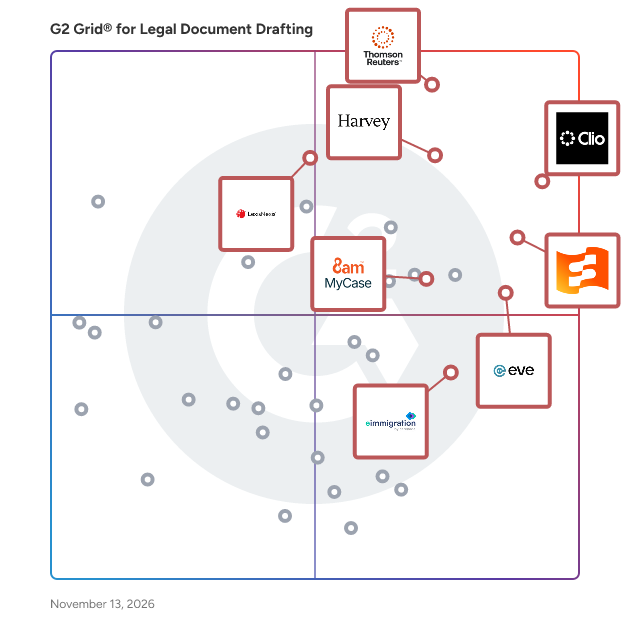
G2 Grid® for Legal Document Drafting Software

G2 Grid® for Legal Document Drafting Software plotting products by satisfaction and market presence

Highlighted products: Clio Manage, CoCounsel Legal, Smokeball, Eve Legal, Harvey AI, 8am MyCase, LexisNexis Lexis for Microsoft Office, and eimmigration by Cerenade.

Underlying data: [Grid® JSON](https://www.g2.com/categories/legal-document-drafting/grids.json?focus%5B%5D=clio-clio-manage&focus%5B%5D=cocounsel-legal&focus%5B%5D=smokeball&focus%5B%5D=eve-legal&focus%5B%5D=harvey-ai&focus%5B%5D=8am-mycase&focus%5B%5D=lexisnexis-lexis-for-microsoft-office&focus%5B%5D=eimmigration-by-cerenade&segment=small-business)

Clio Manage

Clio is the legal AI platform for running your law firm and doing the legal work. Ranked #1, with the most 5-star reviews, and 400,000+ legal professionals in 130+ countries work in it. Practice management is the foundation, and Clio builds on it: matters, documents, and calendars sit alongside intake, billing, payments, accounting, and legal research with authoritative law built in. Because that work is connected, Clio’s AI can flag what needs attention and prepare the next step for you to review. You keep control of the judgment and the final work. Clio has served law firms since 2008 and works with 100+ bar associations across all 50 states. Firms get 300+ integrations, free data migration, and 24/5 support. Clio works across practice areas including personal injury, family law, criminal defense, real estate, immigration, civil litigation, and estate planning.

Average Rating: 4.6/5.0

Total Reviews: 1,152

How Do G2 Users Rate Clio Manage?

  • Has the product been a good partner in doing business?: 9.1/10 (Category avg: 9.3/10)
  • E-Signature: 8.9/10 (Category avg: 7.8/10)
  • Interoperability: 8.6/10 (Category avg: 8.1/10)
  • Content Library: 7.3/10 (Category avg: 8.6/10)

Who Is the Company Behind Clio Manage?

  • Seller: Clio
  • Company Website:
  • Year Founded: 2008
  • HQ Location: Burnaby, BC
  • LinkedIn® Page: www.linkedin.com
    2,722 employees on LinkedIn®

Who Uses This Product?

  • Who Uses This: Attorney, Paralegal
  • Top Industries: Law Practice, Legal Services
  • Company Size: 92% Small, 5% Medium

What Do G2 Reviewers Say About Clio Manage?

AI-generated summary from verified user reviews

Pros
  • Users find Clio Manage to be extremely easy to use, simplifying task management and enhancing overall productivity.
  • Users find Clio Manage's document management features essential for maintaining organization and efficiency in their law practice.
  • Users value the time-saving automations of Clio Manage, enhancing efficiency and streamlining law practice operations.
  • Users value the smoother billing process in Clio Manage, which simplifies collections and enhances practice organization.
  • Users celebrate the extensive features of Clio Manage, enhancing organization and streamlining billing for legal practices.
Cons
  • Users find missing features like automatic retainer payments and cheque writing hinder Clio Manage's efficiency and usability.
  • Users note Clio's feature limitations hinder productivity, leading to frustration and inefficiencies in daily operations.
  • Users note that initial setup is challenging with data migration issues and limited features in the document management system.
  • Users find the billing issues frustrating, especially regarding invoice splitting and additional charges for features.
  • Users express a desire for more customization options in Clio Manage to tailor the software to their needs.

What Are Recent G2 Reviews of Clio Manage?

What Are G2 Users Discussing About Clio Manage?

CoCounsel Legal

Thomson Reuters CoCounsel Legal is the only AI that reasons from authoritative Westlaw content, trusted Practical Law guidance, and your organization’s own knowledge. Built with practicing in-house and law firm lawyers and designed to meet the standard the profession demands, CoCounsel Legal delivers Fiduciary-Grade AI™ to stake your professional reputation on. Simply describe what you need in plain language — whether it's preparing for a deposition or drafting an acquisition agreement — and CoCounsel Legal delivers a polished draft. No prompt engineering, no skill selecting, no switching between tools. CoCounsel Legal is purpose-built for the law and designed to work through a legal problem the way an attorney would -- forming an approach, pursuing the right inquiry, and arriving at a conclusion -- while offering full transparency and citation-backed answers.

Average Rating: 4.7/5.0

Total Reviews: 115

How Do G2 Users Rate CoCounsel Legal?

  • Has the product been a good partner in doing business?: 9.6/10 (Category avg: 9.3/10)
  • E-Signature: 10.0/10 (Category avg: 7.8/10)
  • Interoperability: 10.0/10 (Category avg: 8.1/10)
  • Content Library: 9.2/10 (Category avg: 8.6/10)

Who Is the Company Behind CoCounsel Legal?

  • Seller: Thomson Reuters
  • Company Website:
  • Year Founded: 2008
  • HQ Location: Toronto, CA
  • LinkedIn® Page: www.linkedin.com
    36,803 employees on LinkedIn®
  • Ownership: NYSE:TRI

Who Uses This Product?

  • Who Uses This: Attorney, Owner
  • Top Industries: Law Practice, Legal Services
  • Company Size: 80% Small, 14% Medium

What Are Recent G2 Reviews of CoCounsel Legal?

What Are G2 Users Discussing About CoCounsel Legal?

Smokeball

Smokeball is powering people-law. Our legal practice management software lightens the administrative burden, so legal professionals have more time to serve the people who need them most. With automatic time tracking, tailored workflows, and rapid innovation through AI, Smokeball is the industry standard in people-law. Key features include: • 200+ pre-built matter types for different areas of law • Integrated Archie AI with full matter context • Easy-to-review automatic time tracking • Robust Document automation • Email and document management through Microsoft Office • Firm insights and reporting capabilities • Access to 20,000+ federal and local court forms • Comprehensive onboarding and ongoing training Smokeball’s practice management software and award-winning client support help legal professionals capture more billable hours without working more and regain peace of mind.

Average Rating: 4.7/5.0

Total Reviews: 387

How Do G2 Users Rate Smokeball?

  • Has the product been a good partner in doing business?: 9.5/10 (Category avg: 9.3/10)
  • E-Signature: 7.7/10 (Category avg: 7.8/10)
  • Interoperability: 8.6/10 (Category avg: 8.1/10)
  • Content Library: 8.7/10 (Category avg: 8.6/10)

Who Is the Company Behind Smokeball?

  • Seller: Smokeball
  • Company Website:
  • Year Founded: 2011
  • HQ Location: Chicago, IL
  • LinkedIn® Page: www.linkedin.com
    166 employees on LinkedIn®

Who Uses This Product?

  • Who Uses This: Paralegal, Attorney
  • Top Industries: Law Practice, Legal Services
  • Company Size: 97% Small, 1% Medium

What Do G2 Reviewers Say About Smokeball?

AI-generated summary from verified user reviews

Pros
  • Users find Smokeball to be extremely easy to use, facilitating quick organization and efficient document management.
  • Users praise the efficiency of Smokeball, highlighting its ease of use and quick document organization capabilities.
  • Users value the ease of organizing documents in Smokeball, enjoying effortless search capabilities and efficient case management.
  • Users appreciate the organization features of Smokeball, making document management and collaboration seamless and efficient.
  • Users admire the exceptional tracking features of Smokeball, enhancing productivity and efficiency in legal case management.
Cons
  • Users express concerns about missing features in Smokeball, such as limited reporting and lack of healthcare options.
  • Users face significant billing issues with Smokeball, lacking essential reporting features and responsiveness from support.
  • Users find the document management limitations of Smokeball frustrating, particularly with its online and mobile functionalities.
  • Users experience slow performance with Smokeball, encountering lags that hinder their overall efficiency and productivity.
  • Users experience issues with software bugs that disrupt tagging and reliability, impacting communication efforts significantly.

What Are Recent G2 Reviews of Smokeball?

What Are G2 Users Discussing About Smokeball?

AI can help you find the answers. G2 helps you trust them.

Connect G2 to Claude or ChatGPT for answers grounded in G2's trusted reviews, comparisons, and pricing from real user insights.

How it works

Eve Legal

Eve is the AI operating system for plaintiff law firms, connecting intake, casework, and firm-wide intelligence so teams can handle more cases without compromising quality. Built for attorneys, paralegals, intake teams, and firm leaders, Eve reduces repetitive work while attorneys stay in control of legal strategy and decisions. Trusted by 1,800+ firms across personal injury, medical malpractice, labor & employment, workers’ compensation, and SSDI. Key capabilities - AI intake: Turn more calls into signed clients. Eve Intake answers 24/7, qualifies leads against your firm’s criteria, and can complete retainer signing right on the call. - Casework agents: Move cases forward. Eve Agents build medical chronologies and draft demands, pleadings, and other case documents for attorney review, using your firm’s custom instructions and style and running on defined triggers. Communication agents handle routine outbound calls, including treatment check-ins. - Legal research: Build stronger arguments without switching tools. Eve Research finds and analyzes case law and trusted web sources alongside your casework, with citations attorneys can review and verify. - Case file automation: Keep case facts current with far less data entry. Eve Atlas extracts and organizes facts from records, bills, calls, and documents. - Nightly case review: Catch overlooked value and risk every night. Eve Auditor reviews across your matters for medical issues, case-value opportunities, and cases needing attention. - Firm analytics: See where your firm needs to act. Eve Analyst answers plain-English questions across matters to uncover caseload patterns, approaching deadlines, and business insights. - Integrations: Put your existing case data to work. Eve connects with Clio, SmartAdvocate, Litify, MyCase, CASEpeer, and Smokeball, plus document storage including Google Drive and Microsoft OneDrive. API access is available for eligible firms. Eve works as one system, not a set of separate tools: records inform the casework, case

Average Rating: 4.9/5.0

Total Reviews: 54

How Do G2 Users Rate Eve Legal?

  • Has the product been a good partner in doing business?: 10.0/10 (Category avg: 9.3/10)
  • E-Signature: 4.2/10 (Category avg: 7.8/10)
  • Interoperability: 7.2/10 (Category avg: 8.1/10)
  • Content Library: 8.3/10 (Category avg: 8.6/10)

Who Is the Company Behind Eve Legal?

Who Uses This Product?

  • Who Uses This: Attorney
  • Top Industries: Law Practice, Legal Services
  • Company Size: 91% Small, 7% Medium

What Do G2 Reviewers Say About Eve Legal?

AI-generated summary from verified user reviews

Pros
  • Users praise the ease of use of Eve Legal, finding it intuitive and straightforward for efficient legal practice management.
  • Users value the efficiency of document management in Eve Legal, enhancing productivity while maintaining quality.
  • Users find Eve Legal's interface to be intuitive and straightforward, greatly enhancing efficiency and workload management.
  • Users value the ease of use and rapid drafting capabilities of Eve Legal for various legal documents.
  • Users enjoy the accessible and user-friendly design of Eve Legal, making it easy to draft documents efficiently.

What Are Recent G2 Reviews of Eve Legal?

Harvey AI

A suite of products for all practice areas. Augment all of your workflows on one integrated, secure platform.

Average Rating: 4.2/5.0

Total Reviews: 35

How Do G2 Users Rate Harvey AI?

  • Has the product been a good partner in doing business?: 8.3/10 (Category avg: 9.3/10)
  • Interoperability: 10.0/10 (Category avg: 8.1/10)
  • Content Library: 10.0/10 (Category avg: 8.6/10)

Who Is the Company Behind Harvey AI?

  • Seller: Harvey AI
  • Company Website:
  • Year Founded: 2022
  • HQ Location: United States
  • LinkedIn® Page: www.linkedin.com
    1,668 employees on LinkedIn®

Who Uses This Product?

  • Top Industries: Legal Services
  • Company Size: 46% Small, 46% Medium

What Are Recent G2 Reviews of Harvey AI?

8am MyCase

8am MyCase is a legal practice management solution built for attorneys and legal professionals at small to mid-sized law firms in the US and Canada. MyCase helps you run your firm as a business, not just manage cases. Cases, documents, deadlines, and client communication are all stored in one place, so you and your team stay aligned without chasing updates. You can automate workflows, assign tasks, and stay on top of court deadlines with built-in calendaring. Clients get a simple, professional experience from intake to payment. Online intake forms and built-in eSignature get matters started quickly, while a secure client portal allows you to collect documents, share updates, and send reminders to keep the matter moving. Secure, IOLTA-compliant, online payments are powered by LawPay. Flexible payment options and automated invoice reminders make it easier for clients to pay, so you get paid faster and spend less time on follow-up. Firm-wide reporting gives you real-time visibility into revenue, expenses, and performance so you always know exactly where your business stands. And with 8am IQ embedded directly into MyCase, AI becomes a natural part of how you work helping you automate repetitive tasks and reduce administrative tasks, freeing up more time for meaningful legal work.

Average Rating: 4.5/5.0

Total Reviews: 426

How Do G2 Users Rate 8am MyCase?

  • Has the product been a good partner in doing business?: 8.6/10 (Category avg: 9.3/10)
  • E-Signature: 8.9/10 (Category avg: 7.8/10)
  • Interoperability: 7.9/10 (Category avg: 8.1/10)
  • Content Library: 7.6/10 (Category avg: 8.6/10)

Who Is the Company Behind 8am MyCase?

  • Seller: 8am
  • Company Website:
  • Year Founded: 2005
  • HQ Location: N/A
  • LinkedIn® Page: www.linkedin.com
    741 employees on LinkedIn®

Who Uses This Product?

  • Who Uses This: Attorney, Paralegal
  • Top Industries: Law Practice, Legal Services
  • Company Size: 98% Small, 2% Medium

What Do G2 Reviewers Say About 8am MyCase?

AI-generated summary from verified user reviews

Pros
  • Users praise the ease of use of 8am MyCase, highlighting its straightforward implementation and responsive customer service.
  • Users value the intuitive case management of 8am MyCase, facilitating easy navigation and effective collaboration within their firm.
  • Users value the ease of use and wealth of features in 8am MyCase, enhancing their overall experience.
  • Users value the organized document management of 8am MyCase, enhancing efficiency and keeping everything easily accessible.
  • Users appreciate the efficient billing system of MyCase, enhancing timely payments and improved account management.
Cons
  • Users find missing features in 8am MyCase, such as customizable dashboards and pipeline flexibility, frustrating.
  • Users dislike the limited document upload options and wish for more comprehensive document management features.
  • Users experience billing issues with MyCase, as clients often struggle to understand their bills and features are lacking.
  • Users report user interface issues with dashboards and layout, impacting their overall experience with 8am MyCase.
  • Users highlight document management limitations and lack of integration, making the system feel restrictive and costly.

What Are Recent G2 Reviews of 8am MyCase?

LexisNexis Lexis for Microsoft Office

A comprehensive legal drafting and review tool right within the programs you use every day to save time and be more productive.

Average Rating: 4.4/5.0

Total Reviews: 36

How Do G2 Users Rate LexisNexis Lexis for Microsoft Office?

  • Has the product been a good partner in doing business?: 9.4/10 (Category avg: 9.3/10)
  • E-Signature: 6.7/10 (Category avg: 7.8/10)
  • Interoperability: 8.3/10 (Category avg: 8.1/10)
  • Content Library: 7.1/10 (Category avg: 8.6/10)

Who Is the Company Behind LexisNexis Lexis for Microsoft Office?

Who Uses This Product?

  • Top Industries: Law Practice, Legal Services
  • Company Size: 56% Small, 25% Medium

What Do G2 Reviewers Say About LexisNexis Lexis for Microsoft Office?

AI-generated summary from verified user reviews

Pros
  • Users praise the document management for legal content in Lexis for Microsoft Office, especially for drafting and citations.
  • Users find the legal content integration in MS Word invaluable, especially for drafting lengthy documents and citations.
Cons
  • Users often face challenges with retrieving large documents, impacting their overall experience with Lexis for Microsoft Office.
  • Users note the lack of comprehensive local legal databases, limiting coverage of state and municipal law references.

What Are Recent G2 Reviews of LexisNexis Lexis for Microsoft Office?

What Are G2 Users Discussing About LexisNexis Lexis for Microsoft Office?

eimmigration by Cerenade

eimmigration is case management software that helps law practices and non-profits simplify immigration casework. 17,000+ immigration attorneys, paralegals, caseworkers, and operations leaders choose it to: - Get back 2 days every week - Prepare accurate petitions 4x faster - Complete intakes 10 days sooner - Keep clients informed 24/7 - Boost practice growth & profitability This all-in-one system includes everything you need to manage your cases, clients, forms, and firm. Immigration case management tools A secure caseworker portal that’s accessible from anywhere; 120+ immigration-specific case process templates; end-to-end workflow automation; real-time USCIS case status tracking; automatic document expiration tracking. Immigration forms management tools A library of 300+ always up-to-date immigration forms available in 13 languages; automatic form population; e-signature tool; direct e-filing to USCIS, DOS, and DOL websites. Immigration client management tools Multilingual intake questionnaires; centralized communications dashboard for emails, SMS messages, and WhatsApp messages; interactive client portal for uploading documents; communicating with the legal team, and tracking case status. Immigration practice management tools Practice command center that tracks activity across the practice; case-level, client-level, and staff-level reports to monitor caseloads and staff performance; billing, payment processing, and trust accounting. Ready-to-go and fully customizable eimmigration is designed to meet teams where they are. Solo practitioners and small teams implementing software for the first time get a ready-to-go system they can use from day 1. Bigger organizations that have established processes are met with a fully customizable admin portal so they can configure eimmigration to work their way. The team behind eimmigration have been building digital tools that drive efficiency in immigration law for 30 years. The company is rooted in a single mission—to make casework easier for immigration law professionals.

Average Rating: 4.8/5.0

Total Reviews: 55

How Do G2 Users Rate eimmigration by Cerenade?

  • Has the product been a good partner in doing business?: 9.7/10 (Category avg: 9.3/10)
  • E-Signature: 5.6/10 (Category avg: 7.8/10)
  • Interoperability: 7.5/10 (Category avg: 8.1/10)
  • Content Library: 6.7/10 (Category avg: 8.6/10)

Who Is the Company Behind eimmigration by Cerenade?

  • Seller: Cerenade
  • Company Website:
  • Year Founded: 1992
  • HQ Location: Los Angeles, California
  • LinkedIn® Page: www.linkedin.com
    31 employees on LinkedIn®

Who Uses This Product?

  • Top Industries: Legal Services, Law Practice
  • Company Size: 84% Small, 15% Medium

What Do G2 Reviewers Say About eimmigration by Cerenade?

AI-generated summary from verified user reviews

Pros
  • Users value the form automation of eimmigration, significantly enhancing efficiency and streamlining workflow for their teams.
  • Users find eimmigration by Cerenade to be user-friendly, significantly enhancing workflow efficiency and case management clarity.
  • Users value the time-saving automation of eimmigration by Cerenade, streamlining form completion and enhancing workflow efficiency.
  • Users appreciate the user-friendly case management of eImmigration, which streamlines workflows and enhances productivity.
  • Users appreciate the automation features of eimmigration by Cerenade, significantly reducing bottlenecks and enhancing productivity.
Cons
  • Users find a lack of customization in eimmigration, with features needing more streamlined setups and configurations.
  • Users find limited customization options can be slow to configure, complicating the user experience and task completion.
  • Users face update issues as manual updates are needed for certain information, impacting efficiency when managing case notes.
  • Users express concerns about manual updates needed for incomplete information in the eimmigration system.
  • Users find the complexity of features can complicate tasks and prolong the onboarding process for new users.

What Are Recent G2 Reviews of eimmigration by Cerenade?

What Are G2 Users Discussing About eimmigration by Cerenade?

Solve Intelligence Patent Copilot

Join thousands of legal professionals around the world using Solve Intelligence for patent application drafting, prosecution, claim charting, patent litigation, portfolio management & analysis, and more. Built for all technology areas and IP practice groups, all in one platform. Solve Intelligence provides patent professionals with purpose-built workflows, patent office connections, and comprehensive databases covering patent and non-patent literature, case law, standards, and more. With integrations with existing tools, IP professionals can access AI-powered capabilities without changing how they work, all within a single, secure platform. Trusted by 700+ in-house IP teams and law firms across the globe. Customers report 50%+ efficiency and quality improvements.

Average Rating: 4.9/5.0

Total Reviews: 17

How Do G2 Users Rate Solve Intelligence Patent Copilot?

  • E-Signature: 3.6/10 (Category avg: 7.8/10)
  • Interoperability: 7.3/10 (Category avg: 8.1/10)
  • Content Library: 8.0/10 (Category avg: 8.6/10)

Who Is the Company Behind Solve Intelligence Patent Copilot?

  • Seller: Solve Intelligence
  • Company Website:
  • Year Founded: 2023
  • HQ Location: United States, San Francisco.
  • LinkedIn® Page: www.linkedin.com
    61 employees on LinkedIn®

Who Uses This Product?

  • Top Industries: Legal Services, Law Practice
  • Company Size: 82% Small, 18% Medium

What Do G2 Reviewers Say About Solve Intelligence Patent Copilot?

AI-generated summary from verified user reviews

Pros
  • Users appreciate the time-saving capabilities of Solve Intelligence, drastically reducing drafting and editing hours for patent applications.
  • Users find Solve Intelligence Patent Copilot to have a user-friendly interface, simplifying complex patent drafting and prosecution tasks.
  • Users commend the enhanced efficiency of Solve Intelligence Patent Copilot, transforming their patent drafting process remarkably.
  • Users highlight the innovative AI capabilities of Solve Intelligence Patent Copilot, enhancing efficiency and drafting quality significantly.
  • Users commend the efficient drafting capabilities of Solve Intelligence, significantly streamlining the patent application process.
Cons
  • Users find a fair learning curve with Solve Intelligence Patent Copilot, suggesting a need for clearer guidance and tools.
  • Users experience inefficient workflows with mechanical patents, needing extensive manual input and time for accurate specifications.
  • Users find a steep learning curve with Solve Intelligence Patent Copilot, wishing for better guidance and additional features.
  • Users find the software offers great features, but slow performance can make drawing generation quite time-consuming.
  • Users find the speed of updates challenging, making it difficult to keep up with the changes in Solve's Copilot.

What Are Recent G2 Reviews of Solve Intelligence Patent Copilot?

LawDepot

LawDepot is the most advanced publisher of do-it-yourself legal documents. Using a unique step by step method, LawDepot simplifies the process of creating a customized legal document. LawDepot products cover all facets of the legal industry including: • Estate Planning • Family Law • Real Estate • Business • Financial Established in 2001, LawDepot is a leading publisher of do-it-yourself legal documents around the world. Our mission is to modernize the legal experience for everyday people with efficient, credible, and simple solutions

Average Rating: 2.8/5.0

Total Reviews: 29

How Do G2 Users Rate LawDepot?

  • Has the product been a good partner in doing business?: 6.9/10 (Category avg: 9.3/10)
  • E-Signature: 7.9/10 (Category avg: 7.8/10)
  • Interoperability: 6.1/10 (Category avg: 8.1/10)
  • Content Library: 7.7/10 (Category avg: 8.6/10)

Who Is the Company Behind LawDepot?

  • Seller: LawDepot
  • Year Founded: 2002
  • HQ Location: Edmonton, Alberta
  • LinkedIn® Page: www.linkedin.com
    196 employees on LinkedIn®

Who Uses This Product?

  • Company Size: 86% Small, 17% Medium

What Do G2 Reviewers Say About LawDepot?

AI-generated summary from verified user reviews

Pros
  • Users find LawDepot extremely easy to use, benefiting from quick document creation and clear guidance throughout.
  • Users appreciate the easy navigation and quick document creation that LawDepot offers for legal services.
  • Users value the quick and user-friendly billing process of LawDepot, enhancing their overall experience.
  • Users appreciate the ease of navigation and quick contract generation of LawDepot, ensuring legal compliance effortlessly.
  • Users commend the helpful and prompt customer support from LawDepot, enhancing their overall experience with the product.
Cons
  • Users warn about billing issues, facing unexpected charges and difficulties in cancellation, leading to frustration and dissatisfaction.
  • Users warn about subscription issues, being charged unfairly and facing difficulties in cancellation and refunds.
  • Users warn about the expensive subscription fees and difficulty in cancelling, leading to unexpected charges.
  • Users report frustrating add-on costs, facing unexpected subscription charges despite efforts to cancel their accounts.
  • Users report serious access issues with LawDepot, including unexpected recurring charges and unresponsive customer service on cancellations.

What Are Recent G2 Reviews of LawDepot?

What Are G2 Users Discussing About LawDepot?

LEAP

LEAP Legal Software combines case management, document automation, legal accounting, billing, and AI into a single platform. Designed to help maximize law firm efficiency, LEAP’s award-winning technology helps legal professionals enhance organization, accelerate document creation, reduce manual work, and improve client services. Explore how LEAP’s award-winning solution supports law firms: - Practice Management: A unified system keeps teams connected and cases organized while providing a single source of truth. - Advanced Automation: Reduce repetitive tasks and speed up processes, from document drafting to billing. - AI Tools: Boost efficiency with legal AI that assists in research, drafting, document analysis, and more. - App Integrations: Access Microsoft 365, WealthCounsel, LawConnect, Power BI, QuickBooks, Xero, InfoTrack, DecisionVault, and more—all from LEAP's platform. Learn more at www.leap.us.

Average Rating: 3.6/5.0

Total Reviews: 38

How Do G2 Users Rate LEAP?

  • Has the product been a good partner in doing business?: 6.8/10 (Category avg: 9.3/10)

Who Is the Company Behind LEAP?

  • Seller: LEAP
  • Year Founded: 1992
  • HQ Location: Jersey City, NJ
  • LinkedIn® Page: www.linkedin.com
    124 employees on LinkedIn®

Who Uses This Product?

  • Top Industries: Law Practice, Legal Services
  • Company Size: 98% Small

What Do G2 Reviewers Say About LEAP?

AI-generated summary from verified user reviews

Pros
  • Users value the effective document management in LEAP, enhancing productivity with seamless software connections and support.
  • Users value the ease of use of LEAP, enhanced by tutorials, personal support, and streamlined invoicing.
  • Users value LEAP's comprehensive accounting management that enhances firm efficiency with centralized document and client management.
  • Users appreciate the document sharing capabilities of LEAP, benefiting from seamless integration and robust management features.
  • Users value the effective communication tools in LEAP, enhancing collaboration and simplifying client interactions seamlessly.
Cons
  • Users experience poor customer support with LEAP, facing installation nightmares and a lack of effective assistance.
  • Users report significant billing issues with Leap, complicating invoicing and making it frustrating to manage client accounts.
  • Users face a difficult setup process with LEAP, finding it complex and time-consuming without adequate support.
  • Users find the difficult training for LEAP burdensome, requiring significant time and effort to understand the system.
  • Users find LEAP to be expensive and frustrating, hindering productivity with its clunky interface and integration issues.

What Are Recent G2 Reviews of LEAP?

What Are G2 Users Discussing About LEAP?

Zeal

Zeal, a leading provider of modern contract lifecycle management (CLM), helps clients take control of critical Legal Ops processes with its AI-backed platform. Zeal optimizes all aspects of your company's contract workflow, covering creation, administration, and storage. Zeal’s collaborative contract management system empowers companies to easily automate contract functions, analyze contract data and build workflows that enhance compliance and efficiency. Procurement, Sales and Legal teams use Zeal to gain actionable insights from the data within their contract repositories and achieve desired results ranging from risk mitigation to sales acceleration. Zeal is a venture-scale startup backed by tier one VC’s (including AngelPad), and was recently named a High Performer in G2's Spring and Summer 2024 report: www.g2.com/products/zeal-g2. Zeal integrates with some of the world’s most popular tools, like Salesforce and JobDiva. Start your own 30 day no-risk trial today at www.zealdocs.com/free-trial/.

Average Rating: 4.6/5.0

Total Reviews: 86

How Do G2 Users Rate Zeal?

  • Has the product been a good partner in doing business?: 9.4/10 (Category avg: 9.3/10)
  • E-Signature: 9.5/10 (Category avg: 7.8/10)
  • Interoperability: 8.5/10 (Category avg: 8.1/10)
  • Content Library: 8.8/10 (Category avg: 8.6/10)

Who Is the Company Behind Zeal?

  • Seller: Zeal
  • Year Founded: 2019
  • HQ Location: New York, US
  • LinkedIn® Page: www.linkedin.com
    25 employees on LinkedIn®

Who Uses This Product?

  • Who Uses This: Project Manager
  • Top Industries: Computer Software, Information Technology and Services
  • Company Size: 73% Small, 20% Medium

What Do G2 Reviewers Say About Zeal?

AI-generated summary from verified user reviews

Pros
  • Users laud the ease of use of Zeal, praising its intuitive interface and seamless integration capabilities.
  • Users find Zeal's intuitive interface enhances collaboration and eases navigation, making contract management efficient and straightforward.
  • Users praise Zeal for its intuitive document management, streamlining processes with customizable templates and user-friendly organization.
  • Users appreciate the efficiency of Zeal for streamlining contract creation and enhancing productivity through templates and analytics.
  • Users appreciate the user-friendly interface of Zeal, enhancing collaboration and contract management efficiency.
Cons
  • Users face user interface issues with Zeal, hindering usability and requiring technical support for basic tasks.
  • Users find the document creation structure unfriendly, causing confusion compared to familiar tools like Word or Google Docs.
  • Users indicate that improvement is needed in Zeal's reporting tools and usability for a better overall experience.
  • Users report integration issues with Zeal, highlighting a need for better connectivity to various platforms and data sources.
  • Users find limited customization in Zeal restrictive, hindering tailored workflows and specific user needs.

What Are Recent G2 Reviews of Zeal?

Zegal

Zegal is a comprehensive, user-friendly CLM platform to streamline contract creation, negotiation, and execution. Users can effortlessly collaborate with team members and external parties, while customisable templates and a centralised repository make managing contracts a breeze. Since our launch, we have helped more than 20,000 companies close commercial contracts, run leaner HR teams, and enter new markets. You can use Zegal for your company in the UK, Australia and across Asia. Need legal? Click Zegal.

Average Rating: 4.6/5.0

Total Reviews: 11

How Do G2 Users Rate Zegal?

  • Has the product been a good partner in doing business?: 10.0/10 (Category avg: 9.3/10)

Who Is the Company Behind Zegal?

  • Seller: Zegal
  • Year Founded: 2013
  • HQ Location: Causeway Bay, HK
  • LinkedIn® Page: www.linkedin.com
    46 employees on LinkedIn®

Who Uses This Product?

  • Company Size: 100% Small

What Are Recent G2 Reviews of Zegal?

What Are G2 Users Discussing About Zegal?

Leaflet

In-house, outside, or outsourced. At their desks or on the go. Any place lawyers work with legal documents, Leaflet helps them work better.

Average Rating: 4.3/5.0

Total Reviews: 15

How Do G2 Users Rate Leaflet?

  • Has the product been a good partner in doing business?: 8.3/10 (Category avg: 9.3/10)
  • E-Signature: 10.0/10 (Category avg: 7.8/10)
  • Interoperability: 8.3/10 (Category avg: 8.1/10)
  • Content Library: 9.6/10 (Category avg: 8.6/10)

Who Is the Company Behind Leaflet?

  • Seller: Leaflet
  • Year Founded: 2014
  • HQ Location: Westwood, MA
  • LinkedIn® Page: www.linkedin.com
    25 employees on LinkedIn®

Who Uses This Product?

  • Company Size: 73% Small, 33% Medium

What Are Recent G2 Reviews of Leaflet?

What Are G2 Users Discussing About Leaflet?

Westlaw

Thomson Reuters Westlaw is the trusted legal research platform for lawyers and legal professionals worldwide. It provides unmatched access to authoritative legal content — case law, statutes, regulations, secondary sources, briefs, trial court documents, public records, expert materials, and more — so you can be confident that what you find is complete and reliable. Westlaw Advantage is the top of three Westlaw plans, and it adds agentic AI built for the way attorneys practice. Deep Research works the way an experienced researcher does. It formulates and executes a multistep research plan across your question, then returns a step-by-step report linked to authoritative sources, covering supporting authority, contrary authority, and the reasoning between them. Deep Research Enhance lets you refine and extend that report. Deep Research Verify checks the citations and propositions in it against Westlaw content and lays the results out in a report view you can work through, and Explore More takes you deeper into the authority behind any finding. The tools show their work. You keep the judgment. Litigation Document Analyzer reads a full document instead of checking citations in isolation. It identifies the key components of a complaint, flags language that mischaracterizes the law, catches hallucinated cases, surfaces the arguments on the other side along with supporting authority, and condenses long complaints into something you can act on. Westlaw Brief Builder gives litigators a controlled drafting workflow grounded in Westlaw and Practical Law. It verifies output against the law and the facts while you stay in charge of strategy and arguments. *(requires additional CoCounsel subscription) Smart Browse takes you directly to the sections of a statute, regulation, or case that address your research question, and persistent context keeps that question attached as you move from document to document. The guidance follows your whole line of inquiry, so you spend less time reading material that does not bear on what you need. Additional AI tools sharpen the work further. Claims Explorer takes the facts of your case and returns a list of relevant claims, with a link to search possible defenses. AI Jurisdictional Surveys build a comprehensive, current survey of the law across multiple jurisdictions, up to all 50 states, from a targeted query. Precision Research reveals case attributes for the topics in your plan, so you can narrow results by legal issue, fact pattern, cause of action, motion type, party type, and area of law. You can also get a simplified view of a lengthy docket, a summary of the negative KeyCite treatments of a case, and search and summarize specific secondary source content sets. KeyCite verifies whether a case, statute, regulation, or administrative decision is still good law. KeyCite Cited With surfaces cases that are frequently cited together even when neither cites the other, which makes it easier to see how the law has developed. KeyCite Overruled in Part pinpoints the specific part of a case that has been invalidated, so the points that remain valid are not lost with it. KeyCite Overruling Risk warns you when a point of law in your case has been implicitly undermined by its reliance on an overruled or otherwise invalid prior decision. Every capability draws on content Thomson Reuters publishes and edits, cited so you can open the source and read it yourself, rather than pulled from the open web. You stay in control of the analysis. For legal professionals who cannot afford to miss something, that is the difference.

Average Rating: 4.3/5.0

Total Reviews: 198

How Do G2 Users Rate Westlaw?

  • Has the product been a good partner in doing business?: 7.2/10 (Category avg: 9.3/10)
  • E-Signature: 8.5/10 (Category avg: 7.8/10)
  • Interoperability: 8.4/10 (Category avg: 8.1/10)
  • Content Library: 9.0/10 (Category avg: 8.6/10)

Who Is the Company Behind Westlaw?

  • Seller: Thomson Reuters
  • Company Website:
  • Year Founded: 2008
  • HQ Location: Toronto, CA
  • LinkedIn® Page: www.linkedin.com
    36,803 employees on LinkedIn®
  • Ownership: NYSE:TRI

Who Uses This Product?

  • Who Uses This: Attorney, Paralegal
  • Top Industries: Law Practice, Legal Services
  • Company Size: 58% Small, 32% Medium

What Do G2 Reviewers Say About Westlaw?

AI-generated summary from verified user reviews

Pros
  • Users value the centralized management of Westlaw, enhancing their legal research efficiency and effectiveness.
  • Users find Westlaw’s AI suite very helpful, providing good answers to complex legal questions in everyday language.
  • Users highlight Westlaw's effective AI suite, providing helpful answers to complex legal questions in everyday language.
  • Users find Westlaw's AI capabilities and deep research tools empowering for complex legal inquiries and effective work verification.
Cons
  • Users note the imperfect document generation in Westlaw, requiring attorney review for specific details.

What Are Recent G2 Reviews of Westlaw?

What Are G2 Users Discussing About Westlaw?

Neya Kumaresan
NK
Researched and written by Neya Kumaresan
Updated
Reviews & FAQs

Reviews Summary: The Best Legal Document Drafting Software for Small-Business Businesses

Thanks to 3449 Legal Document Drafting software reviews and associated data from users working for small-sized companies, at G2 we have some of the most definitive data on the best Legal Document Drafting software for the smaller space. We have identified 18 individual Legal Document Drafting products offering the features, pricing and support that Small-Business companies look for when comparing Legal Document Drafting software and solutions. These reviews are generated using the qualitative and quantitative feedback from G2 members working in small-sized companies and who have used these Legal Document Drafting software products.

When G2 reviewers submit their Legal Document Drafting software reviews, they often provide information on the type of company they work for and what market segment they belong to. We break these different market segments into three distinct groups:

  • Small Business Legal Document Drafting Software Reviews (< 50 employees)
  • smaller Legal Document Drafting Software Reviews (51-1,000 employees)
  • Enterprise Legal Document Drafting Software Reviews (1,001+ employees)

smaller businesses have their own unique requirements when it comes to Legal Document Drafting software compared to small or enterprise companies. That is why these individual small-sized company Legal Document Drafting software reviews are especially helpful when comparing product set up, ease of use and overall cost.

Below you will find FAQs and review snippets for Legal Document Drafting software products that work well in smaller environments. These reviews are written by real G2 users working for these Small-Business companies who have real-world experience with these Legal Document Drafting software products.

FAQs About Legal Document Drafting Software for Small-Business Businesses

Q. What are the best Legal Document Drafting software products for small-sized businesses, according to G2 reviewers?
  • Clio Manage - 4.7-stars, 156 reviews (96% from smaller reviewers)
  • Smokeball - 4.8-stars, 272 reviews (99% from smaller reviewers)
  • CoCounsel Legal - 4.8-stars, 66 reviews (84% from smaller reviewers)
  • Eve Legal - 4.9-stars, 34 reviews (89% from smaller reviewers)
  • 8am MyCase - 4.4-stars, 92 reviews (99% from smaller reviewers)
Q. What are the least-liked Legal Document Drafting software products for professionals at small-sized companies, based on the overall G2 rating?
  • US Legal Forms - 4.5-stars, 14 reviews (93% from smaller reviewers)
  • LollyLaw - 4.5-stars, 63 reviews (90% from smaller reviewers)
  • Leaflet - 4.3-stars, 11 reviews (73% from smaller reviewers)
  • Wealth Docx® - 4.4-stars, 56 reviews (95% from smaller reviewers)
  • Mitratech HotDocs - 4.4-stars, 52 reviews (67% from smaller reviewers)
Q. What are the highest-rated Legal Document Drafting software tool features according to employees at Small-Business companies?
  • Dashboard - 4.4-stars
  • Cloud - 4.4-stars
  • File Sharing - 4.4-stars
Q. What are the features that are rated lowest by employees at Small-Business companies?
  • Cross-system Integration - 3.2-stars
  • Multi-step Planning - 3.7-stars
  • Adaptive Learning - 3.7-stars
Q. How many Legal Document Drafting software reviews are from users working in smaller companies?

940 out of all Legal Document Drafting software reviews on G2 are from users working in Small-Business companies (27%).

Here's What Reviewers Working at smaller Businesses Have to Say About Legal Document Drafting Software

What Small-Business Professionals Liked What Small-Business Professionals Disliked

Clio Manage: “The task system makes it much easier to keep track of all open matters. Support is easy to reach and communicate with, and the overall performance of the Clio system—along with integrations like the Outlook add-on—has been helpful for staying on top of client communication.”

Read Review

LawDepot: “Awful experience, they are clearly making money out of they're supposed to be "7 days free trial". I took the subscription for the free 7 days period on their website, during the 7 days I remember having cancelled the service online but during 2 months those swindlers still took money from my bank account. When I called customer service they said they can't see that I've canceled my subscription (obviously I didn't have any proof) and that they won't reimburse even if I never connected on their website after the trial. This is the first time I'm being robbed like this, stay away unless you want to give them free money”

Read Review

Clio Manage: “Clio Manage makes the entire management of a case from start to finish significantly more efficient. We found initial setup fairly easy, especially with the help of a data migration company, and customizing the platform for our firm's specific needs has been very straightforward. The resource section is quite helpful when we aren't sure how to do something, but overall the platform is very user-friendly and straightforward.”

Read Review

8am MyCase: “Waste hours monotonously clicking your mouse on each client, one at a time, to send bill "funds requests". I literally have to use a calculator because Mycase won't do the math automatically. You can't generate documents with a variable footer.”

Read Review

Mitratech HotDocs: “It enables the creation of templates that create complex or simple documents. The coding capabilities allow for very complex document and data creation for legal matters that come before us.”

Read Review

Smokeball: “Reliability Issues: We encountered a significant disruption when the software became non-functional for an extended period of nearly three months. This had a substantial impact on our operations, causing delays and inefficiencies. We had to find an alternative to Smokeball because of these technical issues. Customer Service Concerns: Despite the software's prolonged downtime, our requests for early contract termination were denied. The company's decision to prioritize a relatively small amount over our long-standing business relationship was disheartening. It raised concerns about the company's priorities and its approach to customer satisfaction. Trustworthiness: Given the challenges, our trust in the software's reliability and the company's commitment to its customers has been eroded. It would be ill-advised for us to return to using Smokeball in the future. Windows Only: It is PC only unless you use a virtual machine like Parallels to have Windows running inside your Mac. I understand why they do it because of the tight integration with MS Office and auto time tracking, but it would be great if they could figure out a way to get it done for Mac. I prefer a Mac but am a PC/Mac office because of Smokeball. This reliance on Windows caused additional headaches because we couldn't use our Macs to access the case files. Smokeball had to provide our data so we could use non-practice management software to run our cases. It was incredibly frustrating and inefficient.”

Read Review

Recommendations To Others Problems Solved & Benefits

Smokeball: “Don't think twice - order it!”

Read Review

8am MyCase: “8am MyCase simplifies opening and closing files and helps me keep up with my tasks efficiently.”

Read Review

Clio Manage: “great and easy to use! Best product out there!”

Read Review

8am MyCase: “MyCase is a big time saver for multiple reasons - the document templates save time and the several methods in which we can contact clients saves time and keeps us off the phone as much.”

Read Review

8am MyCase: “Not a great choice if you run your practice on Macs. Despite being in the Cloud, MyCase is not agnostic. Most of their integrations require a Windows desktop.”

Read Review

eimmigration by Cerenade: “We needed to make case filing easier in 2024, and eimmigration delivered exactly that. Our team can now file cases more quickly and with fewer bottlenecks. The ease of use means less time spent troubleshooting and more time getting work done.”

Read Review