Best Learning Management Systems with Cloud Capabilities
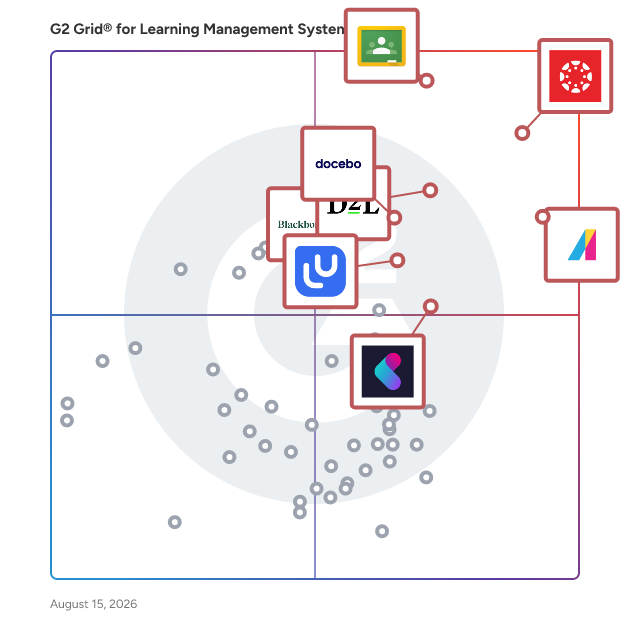
Below are the top-rated Learning Management Systems with Cloud capabilities, as verified by G2’s Research team. Real users have identified Cloud as an important function of Learning Management Systems. Compare different products that offer this feature so you can decide which is best for your business needs.
G2 takes pride in showing unbiased reviews on user satisfaction in our ratings and reports. We do not allow paid placements in any of our ratings, rankings, or reports. Learn about our scoring methodologies.
Canvas by Instructure is a versatile, cloud-based learning management system (LMS) designed to transform online learning across every stage of education. Since its launch in 2011, Canvas has become th
Users frequently mention the software's ability to keep all course-related information in one place, its user-friendly interface, and its features for tracking assignments, grades, and deadlines. Reviewers noted that the user interface could be improved, the software has limited customization, and it can be confusing to navigate due to the variability in how instructors set up their courses.
Google Classroom is a free, web-based platform developed by Google to streamline educational processes and enhance communication between teachers and students. Launched in 2014, it integrates seamless
Google Classroom features and usability ratings that predict user satisfaction
9.0
Ease of Use
Average: 8.7
8.9
Has the product been a good partner in doing business?
Average: 9.1
8.7
Quality of Support
Average: 8.8
8.9
Ease of Admin
Average: 8.7
Seller Details
Year Founded
1998
HQ Location
Mountain View, CA
Company Website
https://cloud.google.com/
Twitter
@google
LinkedIn® Page
https://www.linkedin.com/company/1441/
Ownership
NASDAQ:GOOG
Phone
+1 (650) 253-0000
Sponsored
G2 Advertising
Get 2x conversion than Google Ads with G2 Advertising!
G2 Advertising places your product in premium positions on high-traffic pages and on targeted competitor pages to reach buyers at key comparison moments.
Absorb LMS is a market-leading AI-powered strategic learning system designed to deliver results for all learners—employees, partners, and customers alike. Built to simplify learning management while a
Reviewers like the user-friendly interface, the ability to create and add training courses, the robust reporting features, and the excellent customer support provided by Absorb LMS. Reviewers noted issues with the integration with other systems, limitations with the Analyze tool, the complexity of the admin side, and the lack of interactive features.
Every day, millions of students around the world learn, collaborate, and grow with Blackboard. More than an LMS, Blackboard is where learning comes to life—where students build skills, gain confidence
Reviewers frequently mention the system's ability to integrate course materials, record class sessions, customize content, and provide a consistent digital classroom for both instructors and students. Users reported issues with the user interface, lack of support for all types of integrations, difficulty in marking attendance for past classes, and the platform being slow or glitchy at times.
Learning That Transforms Lives
D2L Brightspace is a powerful, flexible learning platform designed to put learners first. Whether you’re supporting students, employees, or members, Brightspace helps y
Reviewers appreciate the clean interface, straightforward navigation, customizable features, and the supportive implementation team that eases the transition and integration process. Reviewers mentioned that the administration of the D2L platform can be burdensome with many differentiated parts, and finding settings on the admin side can be challenging.
Docebo is an AI-powered learning platform designed to support continuous learning across employees, partners, and customers. More than 3,900 organizations use Docebo to deliver onboarding, enablement,
Users: Instructional Designer, Training Manager · Industries: Information Technology and Services, Computer Software · Market Segment: 44% Enterprise, 43% Mid-Market
User Sentiment
Users like Docebo's flexibility and scalability, its intuitive user experience, advanced customization, strong reporting, seamless integrations, and its ability to offer a content creation system without having to purchase a separate product. Users reported that Docebo can feel complex to configure, especially when managing advanced settings or automations, and that some of its AI features are half baked and seem mostly a rush to market instead of actually adding any real world benefits.
LearnUpon helps businesses deliver training that performs fast, focused, and built for impact. L&D teams rely on our tightly integrated LMS to deliver learning that sticks, upskills teams, and dri
Reviewers like the user-friendly interface, the ability to customize the learner's experience, the reporting features, and the central location for learning resources and development provided by LearnUpon LMS. Users mentioned issues with the need for workarounds due to certain missing functionalities, limitations in customization of learner dashboards, expensive pricing, and challenges with the live learning updates.
ProProfs Training Maker is a LMS that is specially designed for businesses, corporate trainers and educational institutions. The sole objective of this unique software is to help users create engaging
Industries: Information Technology and Services, Marketing and Advertising · Market Segment: 50% Small-Business, 45% Mid-Market
User Sentiment
Reviewers frequently mention the tool's intuitive interface, robust reliability, and the measurable improvements in knowledge retention and job performance after rolling out courses. Reviewers mentioned issues such as the lack of industry-specific templates, slow course loading with large video files, a slightly dated user interface, and rigid branding and course template options.
CYPHER Learning exists to give learners the power to succeed in a rapidly changing world. Trainers, learning and development (L&D) pros, HR pros, and educators get everything they need in one plat
Users frequently mention the platform's versatility in the teaching realm, its intuitive design, and the variety of features that support lesson planning, student engagement, and progress tracking. Users experienced issues such as the platform being expensive, cumbersome, having an old-fashioned interface, lack of transparency in company communication, and occasional difficulties with assignments loading and mobile device compatibility.
WorkRamp, a Learning Pool company, is the AI-first LMS built for the modern enterprise. Through self-guided learning modules, interactive coaching functionalities, and robust certification paths, Work
Reviewers appreciate the platform's user-friendly interface, its ability to centralize and structure content, and the ease with which they can track course completion and progress. Users mentioned that the platform can be complex to set up initially, the customization options can feel somewhat limited, and some content management workflows can feel manual and time-consuming.
Moodle is an open source, feature-rich, secure and scalable learning management system that integrates seamlessly with other platforms and can be customised for any teaching or training method you cho
Reviewers appreciate Moodle's ability to help with time management, share learning materials, check student's marks and remarks, and its flexibility and customization options that allow for more control over course design. Users mentioned that Moodle can feel slow or cluttered, especially when managing multiple courses, and its user interface often necessitates an excessive number of clicks and time investment to complete simple administrative tasks.
Schoology Learning, the leading K-12 learning management system (LMS), is part of the PowerSchool Unified Classroom solution. The system is designed to help schools and districts improve student perfo
GoSkills is a leading online learning platform dedicated to delivering interactive, personalized, and irresistible learning experiences.
By combining a powerful Learning Management System (LMS) wit
Industries: Accounting, Hospital & Health Care · Market Segment: 60% Small-Business, 25% Mid-Market
User Sentiment
Reviewers like the intuitive setup process, the well-designed reports and layout, the option to learn alongside the instructor, the flexibility in use of licenses, and the pre-prepared Microsoft Office courses. Users reported limited control for administrators, a desire for more courses in other fields, lack of course certifications for career advancement, difficulty in navigation between users and managers, and inability to change the language to Australian English.
The Edsby® digital learning platform for K-12 is built specifically for school districts, regional governments and independent schools. They love Edsby for its modern, pedagogically sound K-12 assessm
iSpring LMS is a feature-rich platform that helps companies accelerate their business momentum through ROI-efficient training. The LMS enables the entire training cycle with clarity and consistency, f
Reviewers like the ease of use, customizable features, comprehensive analytics, and the ability to create interactive training modules, with many praising the platform's user-friendly interface, efficient customer support, and the variety of options for executing training. Reviewers experienced issues with the platform's limited customization options, confusing date formats, rigid content management, lack of mobile administration, and gaps in integration with other systems, with some users also finding certain features difficult to understand.
Frequently asked questions about Learning Management Systems
Generated using AI
LMS vendors prioritize data security and privacy compliance by implementing robust encryption protocols, regular security audits, and adherence to regulations such as GDPR and FERPA. For instance, platforms like Moodle and Canvas emphasize user data protection through customizable privacy settings and secure access controls. Additionally, many vendors offer features like single sign-on (SSO) and two-factor authentication to enhance security. User reviews highlight the importance of these features, with many users noting their satisfaction with the security measures in place, which fosters trust in the platform.
The total cost of ownership for an LMS is influenced by several factors, including subscription fees, implementation costs, training expenses, and ongoing support. User reviews indicate that platforms like Moodle and TalentLMS are often praised for their affordability, while others like Blackboard and Canvas may incur higher costs due to extensive features and support services. Additionally, customization and scalability can significantly impact overall expenses, as noted by users who emphasize the importance of aligning LMS capabilities with organizational needs.
To evaluate the reporting and analytics capabilities of an LMS, consider user feedback on features like customizable reports, real-time data tracking, and user engagement metrics. Products such as Moodle, TalentLMS, and Docebo are noted for their robust analytics, with users highlighting the importance of visual dashboards and detailed performance insights. Look for systems that allow integration with other tools for enhanced data analysis, as this is frequently mentioned in reviews. Additionally, assess user satisfaction ratings specifically related to reporting features to gauge effectiveness.
Cloud-based LMS solutions, such as TalentLMS and Docebo, offer flexibility, automatic updates, and lower upfront costs, making them ideal for remote access and scalability. In contrast, on-premise LMS like Moodle and SAP Litmos provide greater control over data security and customization but require significant initial investment and ongoing maintenance. Users often cite ease of use and integration capabilities as advantages of cloud-based systems, while on-premise solutions are preferred for organizations with strict compliance requirements.
LMS platforms typically offer robust compliance and certification tracking features, allowing organizations to monitor employee progress and ensure adherence to regulatory requirements. For instance, platforms like TalentLMS and Docebo provide automated reminders for certification renewals and detailed reporting capabilities to track compliance status. Additionally, systems such as Cornerstone OnDemand and SAP Litmos enable users to create custom compliance courses and maintain records of completed certifications, ensuring that organizations can easily manage their compliance obligations.
Common use cases for implementing a Learning Management System (LMS) include employee onboarding, where organizations streamline training processes; compliance training, ensuring staff meet regulatory requirements; and ongoing professional development, allowing users to access courses and resources for skill enhancement. Additionally, LMS platforms are utilized for tracking learner progress and performance analytics, which help organizations assess training effectiveness. Popular LMS solutions like Moodle, TalentLMS, and Docebo are frequently highlighted for their robust features supporting these use cases.
Most LMS solutions are designed to be highly scalable, accommodating the needs of growing organizations. For instance, platforms like Moodle and TalentLMS are frequently praised for their ability to handle increasing user loads without performance degradation. Users report that systems such as Docebo and Cornerstone OnDemand offer robust features that support scalability, including customizable user roles and extensive integrations. Additionally, platforms like SAP Litmos and Absorb LMS are noted for their flexibility in managing large volumes of learners and content, making them suitable for organizations anticipating growth.
Common support options available with LMS providers include 24/7 customer support, live chat, email support, and extensive knowledge bases. Many platforms also offer onboarding assistance and training resources. For instance, platforms like Moodle and TalentLMS are noted for their comprehensive support documentation, while platforms such as Docebo and Cornerstone OnDemand provide dedicated account managers and personalized training sessions. User reviews highlight the importance of responsive support teams, with many users emphasizing the value of timely assistance in resolving technical issues.
To assess the user experience of different LMS options, consider analyzing user reviews focusing on ease of use, customer support, and feature satisfaction. For instance, platforms like Moodle and Canvas are often praised for their user-friendly interfaces, while Blackboard is noted for its robust support. Look at ratings for mobile accessibility and integration capabilities, as these factors significantly impact user experience. Additionally, comparing user feedback on specific features such as reporting tools and customization options can provide deeper insights into overall satisfaction.
When selecting an LMS, consider integrations with tools like Zoom for virtual classrooms, Salesforce for CRM capabilities, Google Workspace for collaboration, and Microsoft Teams for communication. Additionally, look for compatibility with content creation tools such as Articulate and Adobe Captivate, as well as assessment platforms like ProProfs and SurveyMonkey. These integrations enhance functionality and user experience, as highlighted by user reviews that emphasize the importance of seamless connectivity with existing tools.
LMS pricing models typically include subscription-based, per-user, and tiered pricing structures. Subscription-based models are prevalent, with monthly or annual fees that can range from $5 to $20 per user, depending on features. Per-user pricing is common among platforms like Moodle and TalentLMS, where costs increase with the number of users. Tiered pricing is also seen, offering different feature sets at varying price points, which allows organizations to choose plans that best fit their needs. Overall, flexibility in pricing is a key trend, accommodating various organizational sizes and budgets.
Key features to look for in a Learning Management System include user-friendly interface, mobile accessibility, robust reporting and analytics, integration capabilities with other tools, customizable learning paths, and strong customer support. High user ratings highlight the importance of mobile access and reporting features, with many users emphasizing the need for seamless integration with existing systems. Additionally, customizable options are frequently mentioned as essential for tailoring the learning experience to specific organizational needs.
Hunting for software insights?
With over 3 million reviews, we can provide the specific details that help you make an informed software buying decision for your business. Finding the right product is important, let us help.