Best FP&A (Financial Planning & Analysis) for Small Business

How Many FP&A (Financial Planning & Analysis) Products Does G2 Track?

Total Products under this Category: 297

Category Stats (Nov 2026)

  • Average Rating: 4.46/5 The average rating of products in this category, based on all submitted ratings
  • Top Trending Product: Centage (+0.76%) - Among all products in this category, Centage recorded the largest rating increase compared to last month

Last updated: November 01, 2026

How Does G2 Rank FP&A (Financial Planning & Analysis) Products?

Why You Can Trust G2's Software Rankings:

  • 30 Analysts and Data Experts
  • 16,000+ Authentic Reviews
  • 297+ Products
  • Unbiased Rankings

G2's software rankings are built on verified user reviews, rigorous moderation, and a consistent research methodology maintained by a team of analysts and data experts. Each product is measured using the same transparent criteria, with no paid placement or vendor influence. While reviews reflect real user experiences, which can be subjective, they offer valuable insight into how software performs in the hands of professionals. Together, these inputs power the G2 Score, a standardized way to compare tools within every category.

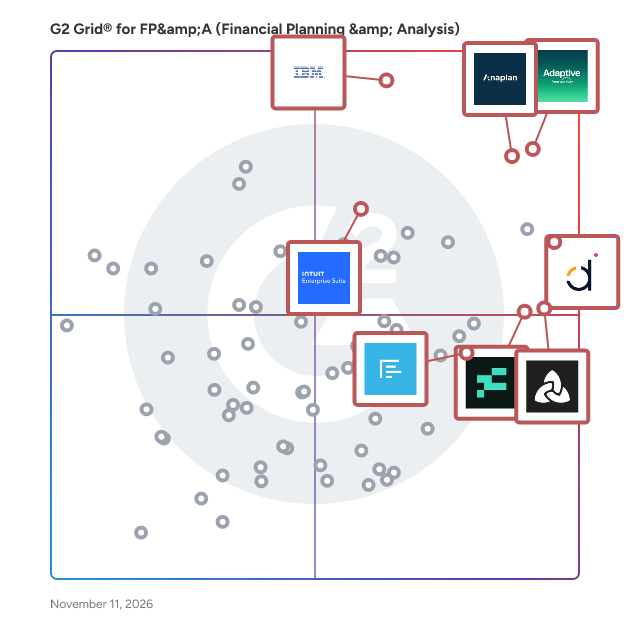
G2 Grid® for FP&A (Financial Planning & Analysis)

G2 Grid® for FP&A (Financial Planning & Analysis) plotting products by satisfaction and market presence

Highlighted products: Fathom, Adaptive from Workday, Datarails, Intuit Enterprise Suite, Reach Reporting, IBM Planning Analytics, Aleph, and Anaplan.

Underlying data: [Grid® JSON](https://www.g2.com/categories/fp-a-financial-planning-analysis/grids.json?focus%5B%5D=fathom&focus%5B%5D=adaptive-from-workday&focus%5B%5D=datarails&focus%5B%5D=intuit-intuit-enterprise-suite&focus%5B%5D=reach-reporting&focus%5B%5D=ibm-planning-analytics&focus%5B%5D=getaleph&focus%5B%5D=anaplan&segment=small-business)

Fathom

Fathom provides a suite of in-depth analysis tools and metrics which help you see exactly how well your business is performing. These tools and metrics help to assess profitability, cash flow, growth and other key performance indicators (KPIs). Fathom seamlessly integrates with Xero, QuickBooks Online/Desktop, Sage and MYOB; or import data via Excel & Google Sheets. Create beautiful reports and dashboards: Whether presenting to a client, reporting to investors, or updating your management team, you'll always be prepared with Fathom. Confidently plan with Cash Flow Forecasting: Fathom combines business planning with powerfully simple three-way cash flow forecasting software. Consolidated reporting... made easy: Fathom enables you to group your related companies together to create consolidated reports for an organisation. In addition to reporting for an individual company, you can easily track and monitor the performance of a group to which a company belongs. On-the-fly benchmarking: Fathom helps you easily compare, rank and benchmark your companies, clients or franchisees. Get a clear view with the Insights Dashboard: If you're managing a portfolio of clients or multiple business entities, the Insights Dashboard comprises key financial metrics to help you monitor performance and spot opportunities at a glance.

Average Rating: 4.6/5.0

Total Reviews: 173

How Do G2 Users Rate Fathom?

  • Reporting: 8.7/10 (Category avg: 8.8/10)
  • Has the product been a good partner in doing business?: 9.3/10 (Category avg: 9.2/10)
  • Custom Reporting: 8.8/10 (Category avg: 8.6/10)
  • Extended Planning: 7.5/10 (Category avg: 8.5/10)

Who Is the Company Behind Fathom?

Who Uses This Product?

  • Who Uses This: Accountant, Controller
  • Top Industries: Accounting, Information Technology and Services
  • Company Size: 64% Small, 28% Medium

What Do G2 Reviewers Say About Fathom?

AI-generated summary from verified user reviews

Pros
  • Users value the extensive automation features of Fathom, which significantly enhance efficiency and reduce errors.
  • Users appreciate the versatile reporting features of Fathom, enhancing their regular reporting cycles significantly.
  • Users praise the intuitive ease of use of Fathom, finding it highly efficient and user-friendly for reporting.
  • Users appreciate the reporting efficiency of Fathom, highlighting its intuitive automation and detailed customizable reports.
  • Users value the prompt and helpful customer support of Fathom, ensuring assistance is readily available when needed.
Cons
  • Users find the missing features in Fathom, struggling with rigid templates and insufficient customization options for reporting.
  • Users face upload issues with Fathom, finding the Excel format cumbersome and desiring a more seamless process.
  • Users find customization difficulties with Fathom, wishing for more flexibility in reporting and data presentation.
  • Users face import issues, struggling with seamless data uploads and integration with MYOB EXO, adding unnecessary steps.
  • Users feel improvements are needed in Fathom's handling of accruals and reporting customization for better usability.

What Are Recent G2 Reviews of Fathom?

Adaptive from Workday

Adaptive from Workday gives finance and business leaders limitless decision intelligence with AI‑powered planning, forecasting, and reporting. The platform connects live data from any combination of ERP, HR, CRM, operational systems, and cloud data platforms—whether or not they run on Workday—into a single planning model, so organizations can see the impact of decisions across the business before they commit. Patented Elastic Hypercube Technology (EHT) powers a high‑performance in‑memory engine that calculates complex, high‑dimensional scenarios in real time, while Decision Intelligence enables boundless exploration across all data sources. It all happens within a responsible AI framework, zero‑retention approach, and enterprise‑grade security.

Average Rating: 4.3/5.0

Total Reviews: 451

How Do G2 Users Rate Adaptive from Workday?

  • Reporting: 8.1/10 (Category avg: 8.8/10)
  • Has the product been a good partner in doing business?: 8.5/10 (Category avg: 9.2/10)
  • Custom Reporting: 7.9/10 (Category avg: 8.6/10)
  • Extended Planning: 8.2/10 (Category avg: 8.5/10)

Who Is the Company Behind Adaptive from Workday?

  • Seller: Workday
  • Company Website:
  • Year Founded: 2005
  • HQ Location: Pleasanton, CA
  • LinkedIn® Page: www.linkedin.com
    25,204 employees on LinkedIn®
  • Ownership: NYSE: WDAY

Who Uses This Product?

  • Who Uses This: Financial Analyst, Senior Financial Analyst
  • Top Industries: Computer Software, Information Technology and Services
  • Company Size: 51% Medium, 36% Large

What Do G2 Reviewers Say About Adaptive from Workday?

AI-generated summary from verified user reviews

Pros
  • Users appreciate the user-friendly interface of Workday Adaptive Planning, making budgeting and forecasting accessible for everyone.
  • Users value the efficiency of Workday Adaptive Planning, enhancing collaboration and streamlining financial planning and forecasting processes.
  • Users value the flexibility and real-time collaboration of Workday Adaptive Planning, enhancing financial planning and decision-making.
  • Users appreciate the flexibility and user-friendliness of Workday Adaptive Planning, enhancing financial planning and collaboration significantly.
  • Users appreciate the structure, flexibility, and transparency provided by Workday Adaptive Planning for financial planning and forecasting.
Cons
  • Users find the learning curve and complexity of Workday Adaptive Planning challenging, requiring significant training and system knowledge.
  • Users often face complex setup challenges with Workday Adaptive Planning, requiring professional help and extensive training for effective use.
  • Users find a steep learning curve with Workday Adaptive Planning, requiring significant training to navigate effectively.
  • Users note a steep learning curve with Workday Adaptive Planning, requiring extensive training to navigate effectively.
  • Users find the difficult customization in Workday Adaptive Planning to be time-consuming and complex, especially for unique needs.

What Are Recent G2 Reviews of Adaptive from Workday?

What Are G2 Users Discussing About Adaptive from Workday?

Datarails

Datarails is the AI finance operating system for the CFO's office, an Excel-connected platform that brings FP&A, cash management, spend control, and month-end close into one flexible, governed workspace. With 600+ integrations across accounting, ERP, CRM, banking, and HRIS systems, it consolidates data into a single source of truth, so finance teams spend less time collecting numbers and more time analyzing it. At the core of the platform is FinanceOS, which consolidates your sources, maps your data, and applies your own metric definitions and governance to create a single, trusted version of your numbers. That clean, governed data is then connected to the AI tools finance teams already use, so every answer is grounded in finance-adjusted data you can act on, and reports built once become repeatable processes that run the same way every month. Easy to use and built to fit the way finance teams already work, Datarails supports existing Excel and Google Sheets workflows while strengthening visibility, controls, and collaboration. By removing manual tasks and unifying financial operations, it helps finance deliver faster reporting, more accurate insights, and confident, data-driven decisions.

Average Rating: 4.6/5.0

Total Reviews: 394

How Do G2 Users Rate Datarails?

  • Reporting: 8.8/10 (Category avg: 8.8/10)
  • Has the product been a good partner in doing business?: 9.2/10 (Category avg: 9.2/10)
  • Custom Reporting: 9.2/10 (Category avg: 8.6/10)
  • Extended Planning: 8.0/10 (Category avg: 8.5/10)

Who Is the Company Behind Datarails?

  • Seller: Datarails
  • Company Website:
  • Year Founded: 2015
  • HQ Location: New York
  • LinkedIn® Page: www.linkedin.com
    405 employees on LinkedIn®

Who Uses This Product?

  • Who Uses This: CFO, Chief Financial Officer
  • Top Industries: Financial Services, Hospital & Health Care
  • Company Size: 70% Medium, 22% Small

What Do G2 Reviewers Say About Datarails?

AI-generated summary from verified user reviews

Pros
  • Users love the ease of use of Datarails, appreciating its efficiency and seamless integration with Excel.
  • Users value the reporting efficiency of Datarails, as it saves time and produces clear, accurate reports.
  • Users appreciate the seamless Excel integration of Datarails, enhancing their data management experience with familiar tools.
  • Users value Datarails for its centralized data management, enhancing reporting and integrating seamlessly with Excel.
  • Users value the efficiency of Datarails, as it simplifies reporting and significantly reduces time spent on financial tasks.
Cons
  • Users find the learning difficulty of Datarails challenging, requiring significant time to master its features and functions.
  • Users often struggle with a steep learning curve and find the platform challenging, especially for non-tech-savvy individuals.
  • Users express frustration over missing features like consistent formulas and case sensitivity issues, complicating their workflow.
  • Users face a steep learning curve with Datarails, requiring significant time to master complex features and reports.
  • Users find Datarails' interface difficult to understand, especially for those less tech-savvy, complicating their experience.

What Are Recent G2 Reviews of Datarails?

What Are G2 Users Discussing About Datarails?

AI can help you find the answers. G2 helps you trust them.

Connect G2 to Claude or ChatGPT for answers grounded in G2's trusted reviews, comparisons, and pricing from real user insights.

How it works

Intuit Enterprise Suite

Intuit Enterprise Suite is a modern, intelligent ERP designed for larger, growing companies that have outgrown basic financial tools but don’t want the cost, complexity, or disruption of traditional ERP systems. It's an all-in-one platform that goes beyond basic accounting, offering a unified solution that can streamline operations and improve profitability. Unlike legacy ERPs that are often difficult to implement and maintain, Intuit Enterprise Suite is is simple to use and built to scale. It leverages Intuit's long-standing legacy in financial tools, making the transition feel like a natural evolution for businesses already familiar with the company's products. A key differentiator for Intuit Enterprise Suite is its integration of artificial intelligence. By using AI built on decades of anonymized financial data, the platform provides automated, "done-for-you" experiences and intelligent business insights. This helps businesses move away from the fragmented and manual workflows that often hinder growth, allowing them to focus on strategic initiatives and make smarter decisions. Key Features: - One connected platform: The solution serves as a unified platform that consolidates various business functions, including financial management, payroll, payments, workforce, and marketing. This all-in-one approach helps mid-market businesses that are often managing a collection of disparate applications, leading to data silos and increased costs. By bringing everything together, Intuit Enterprise Suite helps reduce the total cost of ownership and streamlines workflows. - Automation and intelligence: The product’s deep integration of artificial intelligence is a significant differentiator across accounting, financial planning, project management, and payments. Built on Intuit's extensive foundation of financial data, the AI capabilities go beyond simple automation, providing proactive, "done-for-you" experiences and intelligent insights. - Multi-entity management: For businesses with multiple entities or subsidiaries, the Intuit Enterprise Suite offers robust multi-entity management capabilities. This includes the ability to manage inter-company transactions and generate consolidated financial reports, providing a single source of truth and a comprehensive view of the entire organization's performance. - Simple to use, built to scale: A familiar, intuitive design makes adoption easy, while advanced capabilities like multi-entity management and consolidated reporting give businesses the confidence to grow. QuickBooks customers can migrate seamlessly.

Average Rating: 4.5/5.0

Total Reviews: 68

How Do G2 Users Rate Intuit Enterprise Suite?

  • Has the product been a good partner in doing business?: 9.3/10 (Category avg: 9.2/10)
  • Custom Reporting: 5.0/10 (Category avg: 8.6/10)

Who Is the Company Behind Intuit Enterprise Suite?

  • Seller: Intuit
  • Company Website:
  • Year Founded: 1983
  • HQ Location: Mountain View, California
  • LinkedIn® Page: www.linkedin.com
    15,963 employees on LinkedIn®
  • Ownership: VIE:INTU

Who Uses This Product?

  • Who Uses This: Controller, CFO
  • Top Industries: Construction, Accounting
  • Company Size: 66% Small, 31% Medium

What Do G2 Reviewers Say About Intuit Enterprise Suite?

AI-generated summary from verified user reviews

Pros
  • Users praise the ease of use of Intuit Enterprise Suite, significantly streamlining workflows and saving valuable time.
  • Users highlight the streamlined workflow of Intuit Enterprise Suite, saving significant time on data entry and management.
  • Users appreciate the easy access Intuit Enterprise Suite offers, enhancing workflow and saving significant time.
  • Users highlight the easy management of Intuit Enterprise Suite, enjoying streamlined workflows and significant time savings.
  • Users value the feature-rich capabilities of Intuit Enterprise Suite, enhancing financial management and efficiency for multiple businesses.
Cons
  • Users experience slow loading times for reports, complicating tasks and leading to frustration with the system's performance.
  • Users find the complex features overwhelming at times, especially when performing simple tasks and waiting for reports to load.
  • Users find the complex usability overwhelming, especially when attempting simple tasks, with slow report loading times.
  • Users find the overwhelming features of Intuit Enterprise Suite can complicate simple tasks and slow report loading.
  • Users face frustrating merge issues when managing data across multiple classes, leading to delays and complications.

What Are Recent G2 Reviews of Intuit Enterprise Suite?

Reach Reporting

Upgrade to Reach Reporting. AI-Enhanced Financial Reporting Automated reports, deep analysis, and visualized data in seconds, making you indispensable. Data auto-updates to deliver insights instantly. Simplify complex analysis with AI-enhanced reporting. 3-Way Budgeting & Forecasting Our familiar spreadsheet environment lets you easily create budgets & forecasts with minimal learning curve. Leverage automatic Balance Sheet & Cash Flow projections with our 3-Way FP&A feature. Consolidation & Currency Conversion Save time with automated multi-company & multi-currency consolidation. Easy eliminations deliver professional insights at a consolidated level. Filter by company, class, or department. Financial managers, accountants, and advisors estimate that 48% of their time is spent preparing financial reports and dashboards. Reports and dashboards dynamically update as data flows through each month. Visualize data in just a few clicks.

Average Rating: 4.8/5.0

Total Reviews: 62

How Do G2 Users Rate Reach Reporting?

  • Has the product been a good partner in doing business?: 9.5/10 (Category avg: 9.2/10)

Who Is the Company Behind Reach Reporting?

  • Seller: Reach Reporting
  • Company Website:
  • Year Founded: 2015
  • HQ Location: Springville, US
  • LinkedIn® Page: www.linkedin.com
    26 employees on LinkedIn®

Who Uses This Product?

  • Who Uses This: CFO
  • Top Industries: Accounting, Financial Services
  • Company Size: 75% Small, 20% Medium

What Do G2 Reviewers Say About Reach Reporting?

AI-generated summary from verified user reviews

Pros
  • Users value the ease of use of Reach Reporting, significantly simplifying month-end reporting and data presentation.
  • Users find reporting tasks significantly easier with Reach Reporting, saving time and effort with efficient templates.
  • Users appreciate the reporting efficiency of Reach Reporting, streamlining month-end tasks and automating financial reports effectively.
  • Users value the time-saving automation of Reach Reporting, simplifying financial reporting and decision-making processes.
  • Users praise the responsive customer support of Reach Reporting, highlighting its efficiency in resolving issues swiftly.
Cons
  • Users desire additional missing features like improved forecasting capabilities and enhanced budget builder functionalities.
  • Users find Reach Reporting's system to be initially complex, needing time to learn and navigate effectively.
  • Users experience connectivity issues with Reach Reporting, noting slow syncing and limitations on multiple system connections.
  • Users find the dashboard limitations frustrating, wishing for better organization and improved forecasting functionalities.
  • Users find implementation issues with Reach Reporting, particularly in merging data smoothly and using the budget builder.

What Are Recent G2 Reviews of Reach Reporting?

IBM Planning Analytics

IBM Planning Analytics is an AI-powered integrated planning solution that automates your planning, budgeting, and forecasting processes, enabling real-time analysis on a single governed platform. Eliminate manual models, spot risks sooner, and make decisions that keep your numbers ahead of the trends. Designed for finance and business operations leaders across Finance, Supply Chain, HR, Marketing, Sales, and beyond, IBM Planning Analytics helps eliminate inefficient and error-prone planning processes by connecting financial and operational plans. Automate data integration, analysis, and collaboration for greater agility across the business. Key Capabilities: Integrated Planning: Connect financial and operational plans using a governed source of truth under a single license, unifying teams and accelerating planning cycles. Performance Tracking: Monitor, analyze, and communicate performance with interactive dashboards, personalized reports, and a native spreadsheet experience for trusted, real-time insights. AI-Powered Forecasting: Improve speed and accuracy of forecasts with built-in AI, enabling smarter scenario modeling and predictive insights. Collaborative Decision-Making: Increase participation and streamline workflows by lowering the skill barrier with a generative AI assistant, driving faster, more informed decisions. Bring collaborative, AI-powered business planning to your organization starting at $825/month for 5 users.

Average Rating: 4.4/5.0

Total Reviews: 248

How Do G2 Users Rate IBM Planning Analytics?

  • Reporting: 8.9/10 (Category avg: 8.8/10)
  • Has the product been a good partner in doing business?: 8.4/10 (Category avg: 9.2/10)
  • Custom Reporting: 8.5/10 (Category avg: 8.6/10)
  • Extended Planning: 9.1/10 (Category avg: 8.5/10)

Who Is the Company Behind IBM Planning Analytics?

  • Seller: IBM
  • Company Website:
  • Year Founded: 1911
  • HQ Location: Armonk, New York, United States
  • LinkedIn® Page: www.linkedin.com
    344,328 employees on LinkedIn®
  • Ownership: SWX:IBM

Who Uses This Product?

  • Who Uses This: Financial Analyst
  • Top Industries: Information Technology and Services, Financial Services
  • Company Size: 48% Large, 36% Medium

What Do G2 Reviewers Say About IBM Planning Analytics?

AI-generated summary from verified user reviews

Pros
  • Users praise IBM Planning Analytics for its high efficiency in managing data and automating tasks seamlessly.
  • Users value the planning efficiency of IBM Planning Analytics, effectively transforming chaos into structured, actionable insights.
  • Users value the speed and clarity of IBM Planning Analytics, enabling rapid modeling and insightful decision-making.
  • Users praise the ease of use of IBM Planning Analytics, enabling seamless planning and engagement with advanced insights.
  • Users appreciate the high accuracy of forecasting in IBM Planning Analytics, enabling efficient data handling and real-time insights.
Cons
  • Users find the learning curve challenging, especially for teams unfamiliar with analytics tools, requiring time and patience.
  • Users find the learning difficulty in IBM Planning Analytics can be challenging, especially for those unfamiliar with analytics tools.
  • Users find the user difficulty steep, requiring time and expertise, which may intimidate those unfamiliar with analytics tools.
  • Users find the difficult learning curve challenging, especially for teams unfamiliar with analytics tools and complex workflows.
  • Users find the complexity of IBM Planning Analytics challenging, necessitating technical expertise and patience during onboarding.

What Are Recent G2 Reviews of IBM Planning Analytics?

What Are G2 Users Discussing About IBM Planning Analytics?

Anaplan

Anaplan is a leading AI-driven scenario planning and analysis platform designed to optimize decision-making in today’s complex business environment so that enterprises can outpace their competition and the market. By building connections and collaboration across organizational silos, the platform intelligently surfaces key insights — so businesses can make the right decisions, right now. More than 2,800 global brands plan with Anaplan. G2 categories include: Corporate Performance Management, Budgeting & Forecasting, Compensation Management, Financial Close, Sales & Ops Planning, Sales Performance Management, Sales Planning, Supply Chain Planning, and Workforce Management.

Average Rating: 4.6/5.0

Total Reviews: 429

How Do G2 Users Rate Anaplan?

  • Reporting: 8.2/10 (Category avg: 8.8/10)
  • Has the product been a good partner in doing business?: 8.5/10 (Category avg: 9.2/10)
  • Custom Reporting: 7.8/10 (Category avg: 8.6/10)
  • Extended Planning: 9.1/10 (Category avg: 8.5/10)

Who Is the Company Behind Anaplan?

  • Seller: Anaplan
  • Company Website:
  • Year Founded: 2006
  • HQ Location: Miami, FL
  • LinkedIn® Page: www.linkedin.com
    3,020 employees on LinkedIn®

Who Uses This Product?

  • Who Uses This: Manager, Senior Consultant
  • Top Industries: Information Technology and Services, Financial Services
  • Company Size: 52% Large, 34% Medium

What Do G2 Reviewers Say About Anaplan?

AI-generated summary from verified user reviews

Pros
  • Users praise Anaplan for its user-friendly interface, allowing easy model building and navigation without technical skills.
  • Users commend Anaplan for its flexibility, allowing easy customization to meet specific business needs effectively.
  • Users value Anaplan for its real-time updates and flexibility, enhancing collaboration and simplifying complex planning processes.
  • Users value the efficiency of Anaplan for instant calculations and seamless what-if analysis across the platform.
  • Users appreciate the real-time data updates in Anaplan, enhancing planning efficiency and collaborative decision-making.
Cons
  • Users experience performance slowdowns with large models and face challenges in debugging and connectivity, impacting usability.
  • Users find missing features in Anaplan, leading to slow performance and complex, time-consuming implementations.
  • Users report a steep learning curve with Anaplan, making initial adoption challenging for new users.
  • Users report performance issues with Anaplan, including slowdowns during peak usage and challenges with model design.
  • Users find a lack of features in Anaplan, impacting functionality and user flexibility significantly.

What Are Recent G2 Reviews of Anaplan?

What Are G2 Users Discussing About Anaplan?

Aleph

Aleph is an AI-native Financial Planning and Analysis (FP&A) platform designed to enhance real-time data access and automation for finance teams. This innovative solution streamlines the way finance professionals manage, consolidate, and analyze data across various systems, making it an essential tool for organizations looking to improve their financial operations. The platform is equipped with over 150 data connectors and bi-directional spreadsheet integrations, enabling finance teams to maintain full control over their data processes. Users can seamlessly work with data from multiple sources using familiar tools such as Excel, Google Sheets, and web-based dashboards. This flexibility caters to a wide range of users, from small businesses to large enterprises, ensuring that finance teams can adapt the platform to their specific needs and workflows. Aleph's no-code tools significantly reduce the time spent on repetitive tasks, eliminating up to 90% of the time-consuming and error-prone busywork typically associated with financial reporting and analysis. By automating these processes, finance teams can redirect their focus towards more strategic initiatives, such as forecasting, budgeting, and performance analysis. This shift not only enhances productivity but also empowers finance professionals to provide deeper insights and make informed decisions that drive business growth. Key features of Aleph include its robust data integration capabilities, user-friendly interface, and powerful analytics tools. The platform's ability to consolidate data from various sources ensures that finance teams have access to accurate and up-to-date information, which is crucial for effective decision-making. Additionally, the intuitive design allows users to create customized reports and dashboards without requiring extensive technical expertise, further enhancing the platform's accessibility. Aleph stands out in the FP&A category by combining advanced AI technology with a user-centric approach, making it a valuable asset for organizations seeking to optimize their financial processes. With hundreds of businesses already relying on Aleph for faster reporting and better insights, the platform continues to demonstrate its effectiveness in transforming the way finance teams operate, ultimately leading to improved decision-making and enhanced organizational performance.

Average Rating: 4.9/5.0

Total Reviews: 150

How Do G2 Users Rate Aleph?

  • Reporting: 9.4/10 (Category avg: 8.8/10)
  • Has the product been a good partner in doing business?: 9.9/10 (Category avg: 9.2/10)
  • Custom Reporting: 9.4/10 (Category avg: 8.6/10)
  • Extended Planning: 8.5/10 (Category avg: 8.5/10)

Who Is the Company Behind Aleph?

  • Seller: Aleph
  • Company Website:
  • Year Founded: 2020
  • HQ Location: New York, US
  • LinkedIn® Page: www.linkedin.com
    105 employees on LinkedIn®

Who Uses This Product?

  • Who Uses This: Senior Financial Analyst, FP&A Manager
  • Top Industries: Computer Software, Financial Services
  • Company Size: 76% Medium, 16% Small

What Do G2 Reviewers Say About Aleph?

AI-generated summary from verified user reviews

Pros
  • Users find Aleph to have a user-friendly interface that simplifies data visualization and overall data management.
  • Users appreciate the helpful customer support from Aleph, enhancing their overall experience with the platform.
  • Users value Aleph's seamless integrations, enabling streamlined communication across systems and enhancing data usability and analysis.
  • Users value the implementation ease of Aleph, praising its quick setup and seamless integration into workflows.
  • Users find Aleph's ease of implementation invaluable, allowing them to quickly integrate it into their workflows.
Cons
  • Users note the missing features in Aleph, impacting its functionality compared to more established alternatives.
  • Users report encountering occasional bugs with Aleph, but the team promptly addresses these issues with quick resolutions.
  • Users experience Excel integration issues with Aleph, finding it harder to set up than expected and inconsistent with Google Sheets.
  • Users experience slow performance with Aleph, citing long load times and frequent timeouts affecting usability.
  • Users experience software bugs, particularly with integrations, although the team addresses issues promptly and effectively.

What Are Recent G2 Reviews of Aleph?

LiveFlow

LiveFlow is the FP&A and AI connection layer for QuickBooks Online. Connect your QuickBooks files once. Then pull any report, balance or transaction into your AI assistant, or keep it live in Excel and Google Sheets. No exports, no copy and paste, no broken formulas. LiveFlow MCP: QuickBooks data in your AI assistant. Use the LiveFlow MCP to bring QuickBooks Online data into Claude, ChatGPT or Grok. Ask for a client's Q3 net income by month and get the answer from live QuickBooks data. Coming soon: AI agents that push data into QuickBooks. Live Sync for Google Sheets and Excel. Sync QuickBooks reports into Google Sheets and Excel in real time, and refresh them right from your workbook. New GL accounts are picked up automatically, so models never break. Teams can see financials in a spreadsheet without logging into QuickBooks. Consolidation. Consolidate QuickBooks companies with intelligent account mapping, 160+ currencies (built-in or custom FX rates), one-click intercompany eliminations, and partial ownership by percentage and date. Slice results by class, region or department. Dashboards. Build charts without formulas, share real-time dashboards or freeze the numbers with snapshots, and drill from high-level numbers down to individual transactions. FinanceIQ: department budgeting. Assign accounts to departments, let department heads upload budgets from the spreadsheets they already use, approve values before they roll into the master budget, and give every department its own budget vs. actuals. Built for accounting firms and multi-entity finance teams. Build a report once and roll it out to every client, so the tenth report takes as long as the first. SOC 2 Type II. Support responds in 30 seconds, 7 days a week, by live chat, video and phone.

Average Rating: 4.9/5.0

Total Reviews: 332

How Do G2 Users Rate LiveFlow?

  • Reporting: 9.2/10 (Category avg: 8.8/10)
  • Has the product been a good partner in doing business?: 9.6/10 (Category avg: 9.2/10)
  • Custom Reporting: 9.3/10 (Category avg: 8.6/10)
  • Extended Planning: 9.8/10 (Category avg: 8.5/10)

Who Is the Company Behind LiveFlow?

  • Seller: LiveFlow
  • Company Website:
  • Year Founded: 2021
  • HQ Location: New York, US
  • LinkedIn® Page: www.linkedin.com
    42 employees on LinkedIn®

Who Uses This Product?

  • Who Uses This: Accounting Manager, CEO
  • Top Industries: Accounting, Financial Services
  • Company Size: 75% Small, 20% Medium

What Do G2 Reviewers Say About LiveFlow?

AI-generated summary from verified user reviews

Pros
  • Users find LiveFlow to be incredibly easy to use, enjoying quick setup and intuitive navigation for reporting.
  • Users value the time-saving capabilities of LiveFlow, significantly reducing the effort needed for financial reporting.
  • Users value the time-saving capabilities of LiveFlow, significantly reducing effort in monthly reporting and financial consolidation.
  • Users value the reporting efficiency of LiveFlow, enhancing productivity and simplifying communication with funders and clients.
  • Users praise LiveFlow for its efficiency and automation, significantly enhancing productivity and streamlining reporting processes.
Cons
  • Users desire more customization options and advanced reporting features in LiveFlow for better usability.
  • Users desire more customization options for dashboards and reports to better fit their specific business needs.
  • Users find the inefficient reporting system cumbersome, lacking essential features for streamlined financial analysis.
  • Users find LiveFlow's pricing high for limited feature usage, affecting its overall value perception.
  • Users express a desire for limited reporting options in LiveFlow, seeking more customization and advanced reporting capabilities.

What Are Recent G2 Reviews of LiveFlow?

What Are G2 Users Discussing About LiveFlow?

Martus

Martus Solutions is a cloud-based financial management and budgeting software designed to help organizations streamline budgeting, forecasting, and reporting with greater speed, accuracy, and collaboration. Built to replace complex, disconnected and error-prone spreadsheets, Martus enables finance teams to collaboratively create, manage, and analyze budgets in up to 50% less time, while improving visibility into real-time financial performance. Purpose-built for scaling organizations like nonprofits, churches and faith-based organizations, and small to mid-sized businesses that need a more efficient and collaborative budgeting process. The platform supports multi-user budget creation with role-based permissions, structured approval workflows, and centralized data all designed to make it easier for finance leaders and department managers to work together with confidence. Martus offers seamless integration with leading ERP and accounting systems, including Sage Intacct, QuickBooks, Blackbaud Financial Edge, Microsoft Dynamics 365 Business Central, Acumatica, Xero, NetSuite, MIP, and more, plus legacy systems including Sage 100, 200, 300, Great Plains, and Aplos. These integrations reduce manual data entry, improve data accuracy, and ensure budgets and forecasts are always aligned with actuals from your core financial systems. Organizations using Martus report faster budgeting cycles, improved forecasting accuracy, and real-time budget-to-actual reporting that supports informed decision-making. Built-in scenario planning and forecasting tools allow teams to model multiple financial outcomes, helping organizations plan proactively for growth, uncertainty, and changing funding conditions. Martus is known for its rapid implementation and fast time to value. Customers can begin using the platform in as little as one hour, with full implementation typically completed in approximately three weeks. Martus also provides best-in-class customer support, including hands-on onboarding, on-demand training resources, live webinars, and ongoing education to ensure long-term success. As a modern budget management solution, Martus empowers organizations to move beyond spreadsheets, improve collaboration across teams, and gain the financial clarity needed achieve their mission.

Average Rating: 4.7/5.0

Total Reviews: 107

How Do G2 Users Rate Martus?

  • Reporting: 10.0/10 (Category avg: 8.8/10)
  • Has the product been a good partner in doing business?: 9.8/10 (Category avg: 9.2/10)
  • Custom Reporting: 8.3/10 (Category avg: 8.6/10)

Who Is the Company Behind Martus?

  • Seller: Martus Solutions
  • Company Website:
  • Year Founded: 2008
  • HQ Location: Greenville, US
  • LinkedIn® Page: www.linkedin.com
    49 employees on LinkedIn®

Who Uses This Product?

  • Who Uses This: Controller
  • Top Industries: Non-Profit Organization Management, Religious Institutions
  • Company Size: 51% Medium, 31% Small

What Do G2 Reviewers Say About Martus?

AI-generated summary from verified user reviews

Pros
  • Users find Martus intuitive and easy to use, quickly appreciating its efficient setup and exceptional support services.
  • Users commend Martus for its exceptional customer support, with quick responses and effective solutions to issues.
  • Users value the seamless integrations of Martus, enhancing financial management and improving data accuracy across departments.
  • Users love the real-time financial data availability of Martus, making budgeting efficient and error-free for departments.
  • Users appreciate the budgeting efficiency of Martus, enjoying real-time data and streamlined processes that save time.
Cons
  • Users find the lengthy learning curve challenging, particularly with software terminology and configuration options.
  • Users find the steep learning curve challenging, particularly with software terminology and various configurations and reports.
  • Users find Martus to have complexity issues, particularly for non-accountants and small educational institutions.
  • Users find the confusing interface of Martus hinders their experience, especially with navigation and shared budgets.
  • Users find that there is a lengthy learning curve for mastering Martus, particularly regarding data configuration and reporting.

What Are Recent G2 Reviews of Martus?

What Are G2 Users Discussing About Martus?

Acterys

Acterys is a cloud or on-premise based service for data discovery and planning. It enables business users to generate professional data models that integrate all your relevant data sources with connectors to a variety of accounting systems and other sources. Supported by a wide variety of templates (Cost Center, Management Consolidation, HR, CAPEX, Cash Flow, etc.) users can build effective xP&A (Extended Planning & Analytics) and performance management processes in Power BI, Excel, web browser and mobile devices the quickest way.

Average Rating: 4.8/5.0

Total Reviews: 59

How Do G2 Users Rate Acterys?

  • Reporting: 9.7/10 (Category avg: 8.8/10)
  • Has the product been a good partner in doing business?: 9.9/10 (Category avg: 9.2/10)
  • Custom Reporting: 9.6/10 (Category avg: 8.6/10)
  • Extended Planning: 9.6/10 (Category avg: 8.5/10)

Who Is the Company Behind Acterys?

  • Seller: Vena Solutions
  • Company Website:
  • Year Founded: 2011
  • HQ Location: Toronto
  • LinkedIn® Page: www.linkedin.com
    721 employees on LinkedIn®

Who Uses This Product?

  • Top Industries: Accounting, Information Technology and Services
  • Company Size: 66% Small, 29% Medium

What Do G2 Reviewers Say About Acterys?

AI-generated summary from verified user reviews

Pros
  • Users value the automation capabilities of Acterys, simplifying data integration and enhancing efficiency for finance and data teams.
  • Users value the seamless connectivity of Acterys, allowing easy integration with various data sources and tools.
  • Users value the easy integrations of Acterys, enhancing collaboration for finance and data teams with seamless connections.
  • Users value the intuitive integration and functionality of Acterys, enhancing data management for finance and development teams.
  • Users value the seamless integrations of Acterys, enhancing efficiency and collaboration for finance and data teams.

What Are Recent G2 Reviews of Acterys?

What Are G2 Users Discussing About Acterys?

Drivetrain

Drivetrain is an AI-native business planning platform that does the work. Mid-market and enterprise finance teams choose Drivetrain when they need a financial planning and analysis software that scales with complexity while remaining intuitive for users. Finance teams use Drivetrain to support core FP&A workflows such as 3-statement modeling, board and investor reporting, headcount and workforce planning, sales planning, cash flow and revenue forecasting, scenario modeling, budgeting, and variance analysis. By unifying these use cases into a single platform, finance leaders plan with greater accuracy, collaborate more effectively, and deliver timely insights for better decision-making. Drivetrain natively integrates with 800+ business systems including Salesforce, NetSuite, QuickBooks, Xero, Hubspot, Salesforce, Rippling, Excel and Looker. These integrations create a single source of truth that reduces manual data preparation and reconciliation. The platform supports flexible, multi-dimensional modeling. And, these models can be built using plain-English formulas, allowing finance teams to handle complexity without relying on rigid templates or specialized technical expertise. Drivetrain also has intuitive reporting and visualization capabilities, combining drag-and-drop report building with charts and dashboards for clear communication of performance. Robust role-based access controls allow finance leaders to manage permissions at a granular level, ensuring stakeholders receive secure, relevant access to metrics, models, and reports. AI is embedded throughout the platform to support data transformation, anomaly detection, model building, insight generation, and more. These capabilities help automate manual work so that finance teams can focus on analysis and decision-making. Finance teams in more than 20 countries and 13 verticals use Drivetrain for their FP&A needs. Customers include category-leading companies such as Postman, Javvy Coffee, Graham Allen, Matillion, Spinnaker Support, and Jumia Group.

Average Rating: 4.7/5.0

Total Reviews: 147

How Do G2 Users Rate Drivetrain?

  • Reporting: 9.6/10 (Category avg: 8.8/10)
  • Has the product been a good partner in doing business?: 9.7/10 (Category avg: 9.2/10)
  • Custom Reporting: 9.2/10 (Category avg: 8.6/10)
  • Extended Planning: 9.4/10 (Category avg: 8.5/10)

Who Is the Company Behind Drivetrain?

  • Seller: Drivetrain
  • Company Website:
  • Year Founded: 2021
  • HQ Location: Sunnyvale, US
  • LinkedIn® Page: in.linkedin.com
    110 employees on LinkedIn®

Who Uses This Product?

  • Who Uses This: CFO, Finance Manager
  • Top Industries: Computer Software, Information Technology and Services
  • Company Size: 79% Medium, 18% Small

What Do G2 Reviewers Say About Drivetrain?

AI-generated summary from verified user reviews

Pros
  • Users find Drivetrain exceptionally easy to use, with intuitive features that streamline workflows and enhance collaboration.
  • Users find Drivetrain's report creation capabilities essential for streamlining financial reporting and enhancing collaboration.
  • Users appreciate the reporting efficiency of Drivetrain, streamlining financial processes and enhancing productivity significantly.
  • Users commend the exceptional customer support and expertise of Drivetrain's team, ensuring smooth implementation and ongoing assistance.
  • Users value the easy integrations of Drivetrain, enabling seamless connections with various systems for real-time insights.
Cons
  • Users note a significant learning curve with Drivetrain, making model building more complex than traditional spreadsheets.
  • Users note the lack of advanced modeling features and poor documentation, leading to a challenging learning experience.
  • Users face a notable learning difficulty due to the different logic in building models compared to traditional spreadsheets.
  • Users face a steep learning curve with Drivetrain, complicating model structuring compared to traditional spreadsheets.
  • Users face a difficult learning curve with Drivetrain's advanced features, requiring time and guidance for effective use.

What Are Recent G2 Reviews of Drivetrain?

Joiin

Joiin is award-winning financial consolidation, group accounting and reporting cloud-based software for businesses, CFOs, finance teams and accountancy practices. It automates multi-entity consolidation, multi-currency reporting, FX, intercompany eliminations, management accounts and financial reporting, without replacing existing accounting systems. Joiin connects to Xero, QuickBooks Online, Advance, Intuit Enterprise Suite, Sage, FreeAgent, Zoho Books, Pennylane, Puzzle, Fortnox, MYOB and spreadsheets, bringing financial data from different companies and accounting platforms into one reporting environment. Finance teams can create consolidated Profit & Loss, Balance Sheet, Cash Flow and management reports in minutes, with dashboards, KPIs, forecasts and presentation-ready report packs. Joiin supports both single-entity reporting and complex multi-entity group consolidation. Who Joiin Is For Multi-Entity Businesses & Finance Teams: CFOs, Finance Directors and Group Financial Controllers managing multiple companies, subsidiaries, currencies and accounting systems. Accountants, CPAs & Advisory Firms: Practices delivering consolidated management accounts, outsourced CFO services, multi-client reporting and financial advisory. International Groups, Holding Companies & Franchises: Organisations that need group-wide reporting, intercompany eliminations, multi-currency consolidation and reporting across different local accounting systems. Top 3 Key Benefits 1. Automate Financial Consolidation & Group Reporting Replace manual spreadsheets with automated financial consolidation and reporting. Combine companies, currencies and accounting systems, align charts of accounts, apply intercompany eliminations and produce consolidated financial statements in minutes. 2. Bring Financial & Operational Performance Together Go beyond financial statements. Combine accounting data with operational KPIs, non-financial metrics and data from systems such as Stripe. Create dashboards, customised management accounts, board packs and three-way financial forecasts for a clearer picture of business performance. 3. AI-Powered Reporting with Joiin Intelligence Joiin Intelligence brings AI into financial reporting. Ask questions in any language, automate report commentary, create report packs and use AI agents to assist with intercompany eliminations and chart of accounts management. Joiin also offers an MCP server, REST API and Microsoft Excel Add-in, connecting structured financial data to AI assistants, business intelligence tools and existing finance workflows. Awards & Trusted Credentials Joiin is a 5 star rated Intuit QuickBooks Platinum App Partner, Xero App Award winner, ICB Accredited software provider and winner of Best Financial Reporting & Consolidation Software 2026 and 2025. Trusted by 65,000+ organisations worldwide, Joiin combines powerful consolidation capabilities with straightforward setup in minutes, flexible reporting and unlimited users, clients and reports. Start a free 14-day trial with no credit card required. Create your first report in minutes at joiin.co.

Average Rating: 4.7/5.0

Total Reviews: 87

How Do G2 Users Rate Joiin?

  • Reporting: 8.0/10 (Category avg: 8.8/10)
  • Has the product been a good partner in doing business?: 9.5/10 (Category avg: 9.2/10)
  • Custom Reporting: 8.9/10 (Category avg: 8.6/10)

Who Is the Company Behind Joiin?

  • Seller: Joiin
  • Company Website:
  • Year Founded: 2018
  • HQ Location: Exeter, UK
  • LinkedIn® Page: www.linkedin.com
    16 employees on LinkedIn®

Who Uses This Product?

  • Who Uses This: CFO, Finance Director
  • Top Industries: Accounting, Computer Software
  • Company Size: 61% Small, 36% Medium

What Do G2 Reviewers Say About Joiin?

AI-generated summary from verified user reviews

Pros
  • Users highlight the ease of use of Joiin, enjoying its intuitive navigation and streamlined reporting features.
  • Users value the ease of consolidation reporting with Joiin, significantly enhancing their management account preparation and efficiency.
  • Users appreciate the reporting efficiency of Joiin, saving time and simplifying multi-entity report preparation.
  • Users praise the excellent customer support of Joiin, noting fast responses and knowledgeable assistance whenever needed.
  • Users value the ease of report creation, praising its efficiency and user-friendly interface for customized reporting.
Cons
  • Users find inefficient reporting in Joiin, leading them to export data to Google Sheets for better formatting and updates.
  • Users find the reporting and charting features limited, necessitating external tools for effective data presentation.
  • Users find the reporting issues in Joiin frustrating, often resorting to other tools for finalizing accounts.
  • Users find the limited reporting functionality of Joiin inadequate, often needing external tools for better results.
  • Users find formatting issues in reports and exports that require additional cleanup for optimal presentation.

What Are Recent G2 Reviews of Joiin?

What Are G2 Users Discussing About Joiin?

SAP Analytics Cloud

With the SAP Analytics Cloud solution, you can bring together analytics and planning with unique integration to SAP applications and smooth access to heterogenous data sources. As the analytics and planning solution within SAP Business Technology Platform, SAP Analytics Cloud supports trusted insights and integrated planning processes enterprise-wide to help you make decisions without doubt.

Average Rating: 4.2/5.0

Total Reviews: 763

How Do G2 Users Rate SAP Analytics Cloud?

  • Reporting: 8.6/10 (Category avg: 8.8/10)
  • Has the product been a good partner in doing business?: 8.3/10 (Category avg: 9.2/10)
  • Custom Reporting: 8.6/10 (Category avg: 8.6/10)
  • Extended Planning: 8.4/10 (Category avg: 8.5/10)

Who Is the Company Behind SAP Analytics Cloud?

  • Seller: SAP
  • Year Founded: 1972
  • HQ Location: Walldorf
  • LinkedIn® Page: www.linkedin.com
    149,349 employees on LinkedIn®
  • Ownership: NYSE:SAP
  • Phone: +1 (800) 872-1727

Who Uses This Product?

  • Who Uses This: Senior Consultant, Consultant
  • Top Industries: Information Technology and Services, Computer Software
  • Company Size: 48% Large, 28% Medium

What Do G2 Reviewers Say About SAP Analytics Cloud?

AI-generated summary from verified user reviews

Pros
  • Users value the ease of use of SAP Analytics Cloud, facilitating smooth training and effective data management.
  • Users value the integrated data analysis capabilities of SAP Analytics Cloud for seamless reporting and real-time insights.
  • Users appreciate the clean and effective data visualizations in SAP Analytics Cloud that enhance storytelling and reporting.
  • Users value the easy integrations of SAP Analytics Cloud, enhancing data flow and streamlining dashboard creation across teams.
  • Users value the integrated platform of SAP Analytics Cloud, combining BI, planning, and predictive analytics seamlessly.
Cons
  • Users experience slow performance during uploads and when handling large datasets, affecting usability and efficiency.
  • Users find the learning curve steep for SAP Analytics Cloud, particularly for non-technical users needing extra training.
  • Users find the learning difficulty high for SAP Analytics Cloud, requiring technical knowledge and external support for setup.
  • Users often experience performance issues, particularly with slow load times and complexity when handling large datasets.
  • Users often face performance lags with large datasets, making their experience less efficient and frustrating.

What Are Recent G2 Reviews of SAP Analytics Cloud?

What Are G2 Users Discussing About SAP Analytics Cloud?

Vena

Vena is an agentic AI-powered Complete FP&A platform that fully amplifies the Microsoft technology ecosystem with native integrations and product innovation to make it easy for anyone to independently access FP&A capabilities, expertise and insights within their natural flow of work. Over 2,000 companies of all sizes use Vena's award-winning platform to accelerate budget cycles, planning processes, financial and business-wide reporting and more. Vena is perfect for finance and accounting teams looking for flexible and easy-to-use Excel-based FP&A platform that can be implemented quickly. Try an interactive product tour: https://www.venasolutions.com/product-tours-hub Get a free demo: https://www.venasolutions.com/request-a-demo G2 categories include: Corporate Performance Management (CPM) Software, Budgeting and Forecasting Software, Financial Close Software, Sales Performance Management Software and more.

Average Rating: 4.5/5.0

Total Reviews: 476

How Do G2 Users Rate Vena?

  • Reporting: 9.1/10 (Category avg: 8.8/10)
  • Has the product been a good partner in doing business?: 9.1/10 (Category avg: 9.2/10)
  • Custom Reporting: 8.9/10 (Category avg: 8.6/10)
  • Extended Planning: 8.8/10 (Category avg: 8.5/10)

Who Is the Company Behind Vena?

  • Seller: Vena Solutions
  • Company Website:
  • Year Founded: 2011
  • HQ Location: Toronto
  • LinkedIn® Page: www.linkedin.com
    721 employees on LinkedIn®

Who Uses This Product?

  • Who Uses This: Senior Financial Analyst, Financial Analyst
  • Top Industries: Information Technology and Services, Accounting
  • Company Size: 64% Medium, 20% Large

What Do G2 Reviewers Say About Vena?

AI-generated summary from verified user reviews

Pros
  • Users commend the ease of use of Vena, seamlessly integrating with Excel for efficient finance management.
  • Users value the Excel integration of Vena, enabling effortless collaboration and efficiency for finance teams.
  • Users appreciate Vena's ability to combine Excel flexibility with robust controls, enhancing collaboration and data integrity during planning.
  • Users find Vena's user-friendly interface enhances collaboration and centralizes financial planning, making workflows more efficient.
  • Users commend Vena for its efficient report generation and seamless integrations, enhancing daily operational productivity.
Cons
  • Users face a learning difficulty with Vena due to its reliance on Excel and complex setup requirements.
  • Users experience a learning curve for non-finance roles, requiring strong Excel skills for effective use of Vena.
  • Users face a steep learning curve with Vena, particularly for those unfamiliar with Excel and complex modeling.
  • Users face a notable learning curve with Vena, impacting new users' ability to utilize its capabilities effectively.
  • Users find the setup difficult, requiring extensive tutorials and support to navigate the complex interface initially.

What Are Recent G2 Reviews of Vena?

Nathan Calabrese
NC
Researched and written by Nathan Calabrese
Updated