Best E-Signature Software - Page 2

How Many E-Signature Software Products Does G2 Track?

Total Products under this Category: 431

Category Stats (Aug 2026)

  • Average Rating: 4.59/5 (↑0.01 vs Jul 2026) The average rating of products in this category, based on all submitted ratings
  • Top Trending Product: Kinective SignPlus (+8.33%) - Among all products in this category, Kinective SignPlus recorded the largest rating increase compared to last month

Last updated: August 04, 2026

How Does G2 Rank E-Signature Software Products?

Why You Can Trust G2's Software Rankings:

  • 30 Analysts and Data Experts
  • 56,200+ Authentic Reviews
  • 431+ Products
  • Unbiased Rankings

G2's software rankings are built on verified user reviews, rigorous moderation, and a consistent research methodology maintained by a team of analysts and data experts. Each product is measured using the same transparent criteria, with no paid placement or vendor influence. While reviews reflect real user experiences, which can be subjective, they offer valuable insight into how software performs in the hands of professionals. Together, these inputs power the G2 Score, a standardized way to compare tools within every category.
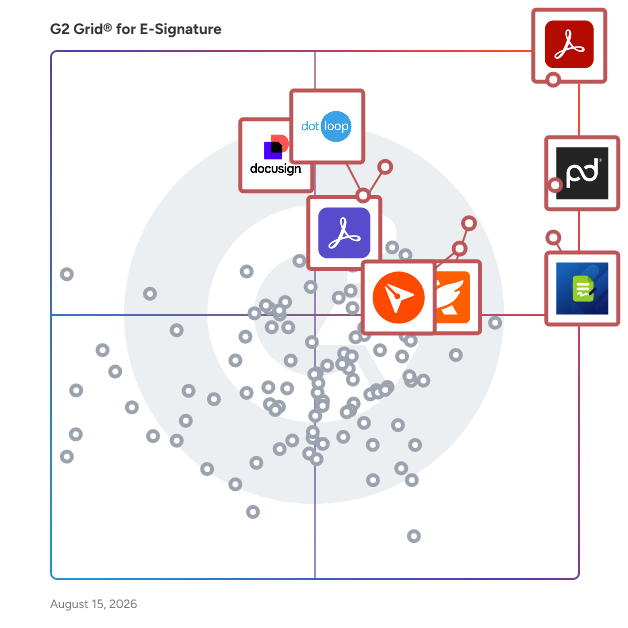
G2 Grid® for E-Signature Software

G2 Grid® for E-Signature Software plotting products by satisfaction and market presence

Highlighted products: Adobe Acrobat, PandaDoc, Jotform Sign, Foxit PDF Editor, Docusign, Adobe Acrobat Sign, BoldSign, and dotloop.

Underlying data: [Grid® JSON](https://www.g2.com/categories/e-signature/grids.json?focus%5B%5D=adobe-acrobat&focus%5B%5D=pandadoc&focus%5B%5D=jotform-sign&focus%5B%5D=foxit-pdf-editor&focus%5B%5D=docusign&focus%5B%5D=adobe-acrobat-sign&focus%5B%5D=boldsign&focus%5B%5D=dotloop)

Sponsored

altaFlow

altaFlow generates custom docs with a click, integrates eSignatures, creates webforms, and more without coding. It’s the ultimate tool to simplify, automate, and elevate your workflows.

Visit website

Dropbox Sign (formerly HelloSign)

Dropbox Sign (formerly HelloSign) helps teams send, sign, and manage agreements where their work already lives. Most teams introduce unnecessary friction the moment a document needs a signature—separate systems, extra handoffs, and chasing approvals across disconnected workflows. Dropbox Sign keeps the process connected, moving from draft to signed with fewer steps. Why teams choose Dropbox Sign - Recognized by G2 for Ease of Use and User Adoption - Unlimited signature requests on per-seat plans - Procurement approvals reduced from two days to 30 minutes - Document execution effort reduced by 70% One connected workflow Send documents for signature directly from Dropbox and the tools your team already uses, including Google Drive, OneDrive, Salesforce, HubSpot, and Microsoft Dynamics. Completed agreements automatically save back right where you work. Simple to start. Built to scale. Designed for fast adoption without disrupting existing workflows. Start sending documents in minutes—from sales contracts and offer letters to NDAs and vendor agreements. Predictable pricing for growing teams Unlimited signature requests on per-seat plans help teams avoid tracking usage limits or unexpected overages while scaling their signing workflows with confidence. Secure from the first send Sensitive agreements are protected with encryption in transit and at rest, detailed audit trails, signer verification options, and compliance certifications including SOC 2 Type II, ISO 27001, HIPAA, GDPR, and eIDAS. Need embedded eSignature? Dropbox Sign offers a flexible API enabling businesses to build secure signing experiences directly into their applications, websites, and workflows.

Average Rating: 4.7/5.0

Total Reviews: 2,222

How Do G2 Users Rate Dropbox Sign (formerly HelloSign)?

  • Has the product been a good partner in doing business?: 9.4/10 (Category avg: 9.2/10)
  • Performance and Reliability: 9.3/10 (Category avg: 9.0/10)
  • Enterprise Scalability: 9.1/10 (Category avg: 8.9/10)
  • Signature Document Creation: 9.1/10 (Category avg: 9.1/10)

Who Is the Company Behind Dropbox Sign (formerly HelloSign)?

  • Seller: Dropbox
  • Company Website:
  • Year Founded: 2007
  • HQ Location: San Francisco, California
  • Twitter: @Dropbox
    3,279,477 Twitter followers
  • LinkedIn® Page: www.linkedin.com
    4,149 employees on LinkedIn®

Who Uses This Product?

  • Who Uses This: Owner, CEO
  • Top Industries: Marketing and Advertising, Computer Software
  • Company Size: 80% Small, 17% Medium

What Do G2 Reviewers Say About Dropbox Sign (formerly HelloSign)?

AI-generated summary from verified user reviews

Pros
  • Users praise the ease of use of Dropbox Sign, streamlining document signing and management for efficient workflows.
  • Users value the time-saving efficiency of Dropbox Sign, simplifying document signing without the hassle of printing or scanning.
  • Users appreciate the tracking features of Dropbox Sign, ensuring clarity on signer actions and improving document management.
  • Users praise the easy integration of Dropbox Sign, enhancing their workflow and development processes effectively.
  • Users appreciate the easy sharing capabilities of Dropbox Sign, enhancing collaboration and document security for teams.
Cons
  • Users struggle with document management due to a lack of clear steps and limited options for customization.
  • Users experience frustrating email issues, including delays and signatures landing in spam folders, affecting overall utility.
  • Users find Dropbox Sign's limited customization hampers efficiency when managing multiple documents and branding needs.
  • Users struggle with signature tracking difficulties, finding it hard to monitor who has signed and who hasn't.
  • Users find it difficult to edit and track signatures, leading to frustration in monitoring progress effectively.

What Are Recent G2 Reviews of Dropbox Sign (formerly HelloSign)?

What Are G2 Users Discussing About Dropbox Sign (formerly HelloSign)?

Zoho Sign

Zoho Sign is a digital signing service that lets you execute contracts quickly without the hassles of transporting paper documents while ensuring security and legality. It works completely on cloud and integrates readily with your everyday apps for a completely seamless signing experience. Zoho Sign is perfect for anyone who needs to sign business documents but widely used for HR, legal, finance, and sales functions. - Sign documents on the go - Send documents to multiple signers across the world - Integrate with everyday applications: Zoho Docs, Box, Google Drive, Dropbox, Gmail, and OneDrive - Sign and send, secure and legally binding documents Documents that can be signed: - NDAs - Invoices - Sales contracts - Business proposals - Purchase orders - Lease agreements - Partnership agreements - Employment offers and more. KEY FEATURES: General - Create, send and sign documents within minutes - Supported document types include pdf, jpeg, doc, png and more - Create customizable templates once and save them for future use - Set an order for signing the document using the "Send in Order" feature - Upload documents directly from daily applications: Zoho Docs, Box, Google Drive, Dropbox, Gmail, and OneDrive - Import files from other applications using the Cloud Picker - Send timely reminders to sign documents that are in progress - Add re-sizable signature, text, initial, name, company, checkbox and date fields to the document - Initiate signing of documents directly from your inbox - Preview and make changes to the document using the document viewer - Assign someone else to sign the document - Receive real-time push notifications whenever any action is performed on a document Support URL: https://www.zoho.com/contactus.html

Average Rating: 4.4/5.0

Total Reviews: 62

How Do G2 Users Rate Zoho Sign?

  • Has the product been a good partner in doing business?: 9.5/10 (Category avg: 9.2/10)
  • Performance and Reliability: 9.1/10 (Category avg: 9.0/10)
  • Enterprise Scalability: 8.2/10 (Category avg: 8.9/10)
  • Signature Document Creation: 8.3/10 (Category avg: 9.1/10)

Who Is the Company Behind Zoho Sign?

  • Seller: Zoho
  • Year Founded: 1996
  • HQ Location: Austin, TX
  • Twitter: @Zoho
    137,880 Twitter followers
  • LinkedIn® Page: www.linkedin.com
    30,766 employees on LinkedIn®
  • Phone: +1 (888) 900-9646

Who Uses This Product?

  • Top Industries: Information Technology and Services, Computer Software
  • Company Size: 59% Small, 30% Medium

What Do G2 Reviewers Say About Zoho Sign?

AI-generated summary from verified user reviews

Pros
  • Users enjoy the ease of use of Zoho Sign, finding it simple and reliable for their signing needs.
  • Users value the affordability of Zoho Sign, finding it easy to use and manage with professional support.
  • Users value the simplicity of Zoho Sign, finding it easy to manage and stress-free for their needs.
  • Users appreciate the customizability of Zoho Sign, allowing for tailored forms with various design options.
  • Users love the impressive customization options in Zoho Sign, especially for editing forms and defining styles.
Cons
  • Users find the difficult editing process of Zoho Sign frustrating, wishing for more intuitive options for templates.
  • Users find the editing process unintuitive, wishing for more options to streamline template modifications.
  • Users often face email issues with Zoho Sign, affecting the reliability of communication and document handling.
  • Users find the limited features of Zoho Sign restrictive and desire more customizable options in the user interface.

What Are Recent G2 Reviews of Zoho Sign?

What Are G2 Users Discussing About Zoho Sign?

Signify

Signify is a digital contracting platform that helps teams manage, automate, and track documents in one place. From sending and signing to organizing and archiving, it supports the full document workflow. Signify combines e-signatures, workflow automation, a team workspace, and a searchable archive. Set signing order and recipient roles, assign documents to folders with team-based permissions, and use structured templates to keep processes consistent across the company. You can see exactly what’s signed, pending, or in progress - and who’s involved. Permissions are clear, templates are shared with built-in rules, and folder access is controlled by team roles. Over 4.5 million documents have been sent through Signify, with 80% finalized in under 24 hours. Signify is built to support both the people who manage documents and those who sign them - making the entire process simple and efficient.

Average Rating: 4.9/5.0

Total Reviews: 116

How Do G2 Users Rate Signify?

  • Has the product been a good partner in doing business?: 10.0/10 (Category avg: 9.2/10)
  • Performance and Reliability: 9.6/10 (Category avg: 9.0/10)
  • Enterprise Scalability: 9.5/10 (Category avg: 8.9/10)
  • Signature Document Creation: 9.6/10 (Category avg: 9.1/10)

Who Is the Company Behind Signify?

  • Seller: Signify
  • Company Website:
  • Year Founded: 2021
  • HQ Location: Tbilisi, GE
  • LinkedIn® Page: www.linkedin.com
    36 employees on LinkedIn®

Who Uses This Product?

  • Who Uses This: Lawyer
  • Top Industries: Computer Software, Banking
  • Company Size: 41% Medium, 33% Small

What Do G2 Reviewers Say About Signify?

AI-generated summary from verified user reviews

Pros
  • Users find Signify to be exceptionally user-friendly and intuitive, significantly enhancing their workflow and document management.
  • Users love how Signify offers time-saving features, making document management quick and efficient for their workflow.
  • Users appreciate the time-saving features of Signify, enhancing their document management efficiency and workflow integration.
  • Users appreciate the convenience of Signify, which centralizes document management and simplifies the onboarding process.
  • Users value the efficient document management of Signify, fostering seamless workflows and reducing paperwork stress.
Cons
  • Users face challenges with document visibility and limitations on commenting and resubmitting rejected documents.
  • Users experience slow loading times that hinder efficiency, particularly with document opening and file uploads.
  • Users experience slow performance with Signify, noting delays in navigation and document access that hinder workflow.
  • Users express frustration over difficult editing, wishing for more flexibility to modify documents post-upload.
  • Users face challenges with signature process limitations, including difficulties with document uploads and recipient email updates.

What Are Recent G2 Reviews of Signify?

DottedSign

DottedSign is a trusted, seamless, and flexible eSignature solution designed to enhance operational effectiveness for organizations. Offering accessible SaaS, API, and self-hosted deployment , DottedSign enables secure online signing, ensuring regulatory compliance. Try out DottedSign Business Plan FREE for 14-days: https://www.dottedsign.com/ Review DottedSign to get US$20 now: https://reurl.cc/1bnD0G KEY FEATURES GET SIGNATURE FROM MULTIPLE SIGNERS ● Invite signers by adding them straight from your contact list or entering their emails (Google Contact supported) ● Remote signing - Assign signature, initial, date and text fields to signers in a designated order. Advanced field settings are available including checkbox, radio button, image and hyperlink fields. ● Bulk send - Send a single document to multiple groups of signers ● Public form - Create an on-demand, self-service document signing link on your website ● Front desk signing - For face-to-face signing scenarios ● Color-coded fields to navigate your signers where to fill in ● Save tasks as reusable templates, or create standardized document templates ● Modify documents - Merge, replace, add, or remove documents in tasks or templates ● Field conditional rule - Dynamic field filling setup for signers' smooth signing completion ● Assign editors to handle the signing process, simplifying it for the sender ● Set document viewing permissions for each recipient SIGN DOCUMENTS YOURSELF & PERSONALIZE YOUR SIGNATURES ● Add your eSignature by hand, by the mobile panel, or by typing ● Click signature - Add your last-used signature by clicking the field, and it will apply automatically ● Make stamps by using your camera or photos ● Pre-fill your personal information and drag and drop it to the document ● Add signatures, initials, texts, and dates to documents ● Adjust the font size and text alignment to your liking ● Remove backgrounds for signature stamps MANAGE SIGNATURE TASKS ● Visual progress bar - Monitor signature tasks by intuitively checking all signers’ status ● Timeline of Personal Activities - Display and record activities of all your personal tasks ● Void signature requests - Cancel signature tasks with one tap ● Search - Find your documents easily by searching with signer names, documents, or field search key ● Custom message - Leave messages to all recipients before and after completion ● Auto reminder & expiry date setting - Automatically send reminders to notify anyone who has not signed documents yet ● Change signer – Replace a recipient of a sent document with another one; recipient can send change requests to the sender ● Decline to sign or edit recipient permissions– Sender can manage the recipient’s permission to decline the request in case the document requires further amendment EXPAND YOUR TEAM CAPACITY WITH ADVANCED SECURITY AND CONTROLS ● Create your Admin Console and invite team members ● Template sharing across the team ● Team management reporting - Show insights based on the team performance ● Set up your logo, profile and name when sending the signature request email ● Member permission control across files and relevant data access under the Admin Console IMPORT, EXPORT AND SHARE DOCUMENTS WITH EASE ● Get documents from camera, photos, the iOS file app, email attachments and the web ● Import documents from cloud services, including Google Drive, OneDrive, Dropbox and KDAN Cloud ● Export completed documents to cloud services, including Google Drive and OneDrive ● Share the document via a file link to open the file directly on the web browser SECURITY AND LEGALITY ● Digital audit trails - Record every change made to the document for evidence ● Protected signing process - Ensure confidentiality of paperless signing, encrypted by TLS/SSL, AES-256 and RSA-2048 ● Email & SMS secure password to identify signer identity before accessing the task OR before completing the task ● Digital certificates issued by Adobe Approved Trust List (AATL) certified CA INTEGRATIONS ● Top-tier integrations - Google Drive, Gmail, Salesforce, Microsoft Teams, Zapier, and more ● DottedSign API - Automate the signing flow in your system ● Embedded signing - Quickly integrate eSignature into your web applications

Average Rating: 4.7/5.0

Total Reviews: 235

How Do G2 Users Rate DottedSign?

  • Has the product been a good partner in doing business?: 9.6/10 (Category avg: 9.2/10)
  • Performance and Reliability: 9.0/10 (Category avg: 9.0/10)
  • Enterprise Scalability: 9.0/10 (Category avg: 8.9/10)
  • Signature Document Creation: 9.3/10 (Category avg: 9.1/10)

Who Is the Company Behind DottedSign?

  • Seller: KDAN
  • Year Founded: 2009
  • HQ Location: Irvine, California
  • LinkedIn® Page: www.linkedin.com
    233 employees on LinkedIn®

Who Uses This Product?

  • Who Uses This: CEO, SDET
  • Top Industries: Information Technology and Services, Marketing and Advertising
  • Company Size: 74% Small, 24% Medium

What Do G2 Reviewers Say About DottedSign?

AI-generated summary from verified user reviews

Pros
  • Users commend the ease of use of DottedSign, finding the interface intuitive and efficient for signing documents.
  • Users value the time-saving convenience of DottedSign, enabling efficient task completion and easy management of documents.
  • Users find DottedSign to be intuitive and easy to use, enhancing their document signing experience significantly.
  • Users love the helpful signature guidance of DottedSign, making it easy to gather multiple signatures efficiently.
  • Users appreciate the clear tracking features of DottedSign, making document signing and follow-ups straightforward and efficient.
Cons
  • Users face challenges with limited customization, impacting branding and document tailoring for their specific needs.
  • Users find the pricing of DottedSign to be expensive, particularly with significant fee increases affecting small businesses.
  • Users find the signature requirement for recipients inconvenient and say field adjustments could be more intuitive.
  • Users experience slow performance on DottedSign, often needing multiple refreshes for files and facing delays with larger documents.
  • Users find app limitations hinder bulk handling and advanced automation, lacking features compared to other platforms.

What Are Recent G2 Reviews of DottedSign?

Signeasy

Signeasy is an eSignature and Intelligent Contract Management platform for every team that works with contracts. Finance, HR, Sales, Operations, IT, Legal Ops, and Supply Chain teams across 48,000+ businesses in 100+ countries use Signeasy to manage contracts from the first request to renewal. Signeasy has everything your team needs to manage contracts end to end: - eSignatures - Secure contract repository - Approval workflows - AI-powered contract insights and summary - Key term extraction - Renewal reminders - Downloadable reports - Team workspaces with Role-based access control - Search that lets you go deep into your contracts - AI answer engine that helps you get information from your contracts Signeasy is built for every team that touches contracts. Its AI tells you what's inside every contract, team workspaces show what's pending, and renewal tracking surfaces insights you can act on — all inside one platform. Signeasy easily integrates with the tools your team already uses: Google Workspace, Microsoft 365, HubSpot, SharePoint, Salesforce, and more. With over 100 million contracts processed, every feature is built to ensure your contracts are secure and compliant with SOC 2, GDPR, HIPAA, 21 CFR Part 11 and eIDAS — with audit trails, 2FA, SSO, and tamper-proof trust seals built in. Signeasy focuses on user experience and is a Google recommended App and is designed for a mobile workforce in the SMB and mid-market segment. Signeasy is reputed for its high-touch human support team. Customers report saving dozens of hours a month, eliminating manual follow-ups, and processing contracts significantly faster on Signeasy. Hear it directly from our customers: https://signeasy.com/case-study

Average Rating: 4.7/5.0

Total Reviews: 743

How Do G2 Users Rate Signeasy?

  • Has the product been a good partner in doing business?: 9.3/10 (Category avg: 9.2/10)
  • Performance and Reliability: 9.0/10 (Category avg: 9.0/10)
  • Enterprise Scalability: 8.6/10 (Category avg: 8.9/10)
  • Signature Document Creation: 8.8/10 (Category avg: 9.1/10)

Who Is the Company Behind Signeasy?

  • Seller: Signeasy
  • Company Website:
  • Year Founded: 2010
  • HQ Location: Dallas, Texas
  • Twitter: @getsigneasy
    1,685 Twitter followers
  • LinkedIn® Page: www.linkedin.com
    62 employees on LinkedIn®

Who Uses This Product?

  • Who Uses This: Owner, CEO
  • Top Industries: Real Estate, Financial Services
  • Company Size: 68% Small, 20% Medium

What Do G2 Reviewers Say About Signeasy?

AI-generated summary from verified user reviews

Pros
  • Users value the ease of use of Signeasy, appreciating its user-friendly interface and seamless document signing process.
  • Users praise the helpful customer support of Signeasy, enhancing their overall experience with the app's ease of use.
  • Users find Signeasy's easy setup helpful, making document signing quick and straightforward across devices.
  • Users love the user-friendly interface of Signeasy, appreciating its simplicity and ease of use.
  • Users find Signeasy's ease of use for signing documents outstanding, enhancing organization and workflow efficiency.
Cons
  • Users find the pricing unaffordable for small businesses, suggesting it needs to be adjusted to be more competitive.
  • Users find difficult editing of forms frustrating, especially when storage limits restrict their ability to make changes.
  • Users face editing limitations due to storage restrictions, hindering their ability to make necessary changes effectively.
  • Users find the pricing illogical for sporadic use, suggesting a need for a pay-as-you-go model.
  • Users find the limited customization of Signeasy restricting and wish for more tailored options to fit their needs.

What Are Recent G2 Reviews of Signeasy?

What Are G2 Users Discussing About Signeasy?

SignNow

signNow is an electronic signature that enables business to be conducted anywhere, anytime and on any device. signNow offers the best ROI for SBM and mid-market thanks to its intuitive UI, transparent pricing, flexible configuration and the ease of API integrations. All paid plans of airSlate SignNow include unlimited number of users.

Average Rating: 4.6/5.0

Total Reviews: 1,731

How Do G2 Users Rate SignNow?

  • Has the product been a good partner in doing business?: 9.1/10 (Category avg: 9.2/10)
  • Performance and Reliability: 9.1/10 (Category avg: 9.0/10)
  • Enterprise Scalability: 9.0/10 (Category avg: 8.9/10)
  • Signature Document Creation: 8.9/10 (Category avg: 9.1/10)

Who Is the Company Behind SignNow?

  • Seller: airSlate
  • Company Website:
  • Year Founded: 2006
  • HQ Location: Brookline, Massachusetts
  • Twitter: @airSlate
    1,234 Twitter followers
  • LinkedIn® Page: www.linkedin.com
    798 employees on LinkedIn®

Who Uses This Product?

  • Who Uses This: Owner, CEO
  • Top Industries: Real Estate, Insurance
  • Company Size: 72% Small, 22% Medium

What Do G2 Reviewers Say About SignNow?

AI-generated summary from verified user reviews

Pros
  • Users highlight the ease of use of SignNow, making document management and signing a seamless experience.
  • Users appreciate the intuitive design of SignNow, finding it easy to manage and sign documents effortlessly.
  • Users value the ease of use of SignNow, allowing quick signatures and reducing the need for paper documents.
  • Users find SignNow's user-friendly signature solutions invaluable for contactless document signing, with excellent support available.
  • Users value the time-saving features of SignNow, enabling quick and efficient processing of waivers and templates.
Cons
  • Users find the lack of synchronization between devices frustrating, complicating document management and template reuse.
  • Users find SignNow to be expensive, believing it could be more affordable despite its useful features.
  • Users find that there is a steep learning curve for advanced features, making onboarding challenging for new team members.
  • Users find the signature issues frustrating, especially with confusing UI and auto-detection of fields that can't be disabled.
  • Users find difficult navigation in SignNow, especially with advanced settings and UI changes affecting usability.

What Are Recent G2 Reviews of SignNow?

What Are G2 Users Discussing About SignNow?

Mekari Sign

Mekari Sign is a provider of electronic signature (eSignature) and electronic seal (eMeterai), based in Indonesia. Built on a SaaS model, Mekari Sign helps businesses to create, sign, seal, and manage electronic documents easily through any device. We offer an end-to-end solution for electronic document signing, allowing businesses to sign their documents anytime and anywhere digitally without the hassle of direct appointments. With a centralized cloud-based platform, Mekari Sign gives businesses the ability to share documents in seconds, sign them in a few clicks, and monitor every stage of the signing process with the audit trails feature. Mekari Sign helps businesses to: - Speed up business process: Easily send, sign, and monitor the signing process. - Reduce administrative time, costs, and mobility: Purchase eMeterai online, anytime 24/7. - Categorize documents based on their purpose: Organize contracts and agreements. - Prevent missing or damaged documents: Store any documents in a cloud-based system. With AATL (Adobe Approved Trust List), Global Sign CA (Certification Authority), and in compliance with the Indonesian Ministry of Communication and Informatics, Mekari Sign is trusted by businesses across Indonesia and worldwide to simplify their business process. Accelerate your business administrative process now.

Average Rating: 4.7/5.0

Total Reviews: 29

How Do G2 Users Rate Mekari Sign?

  • Has the product been a good partner in doing business?: 9.6/10 (Category avg: 9.2/10)
  • Performance and Reliability: 9.3/10 (Category avg: 9.0/10)
  • Enterprise Scalability: 9.3/10 (Category avg: 8.9/10)
  • Signature Document Creation: 9.6/10 (Category avg: 9.1/10)

Who Is the Company Behind Mekari Sign?

  • Seller: Mekari
  • Year Founded: 2015
  • HQ Location: Jakarta Pusat, ID
  • Twitter: @mekaricom
    168 Twitter followers
  • LinkedIn® Page: www.linkedin.com
    1,688 employees on LinkedIn®

Who Uses This Product?

  • Company Size: 60% Medium, 27% Small

What Do G2 Reviewers Say About Mekari Sign?

AI-generated summary from verified user reviews

Pros
  • Users value the ease of use of Mekari Sign, enhancing document processing and inter-department collaboration seamlessly.
  • Users value the flexible e-signature workflow that streamlines approvals across multiple teams and locations.
  • Users value the time-saving onboarding process of Mekari Sign, making digital agreements fast and efficient to implement.
  • Users highlight Mekari Sign's efficiency in digital signing, streamlining processes and enhancing client onboarding effortlessly.
  • Users value the flexibility of Mekari Sign, which enhances collaboration across various teams and streamlines processes.
Cons
  • Users experience email issues with Mekari Sign, including undelivered notifications and confusion over document actions.
  • Users find the limited customization of Mekari Sign frustrating, wishing for a more flexible UI and integration options.
  • Users face mobile issues with Mekari Sign, such as limited functionality and email delivery problems that hinder signing.
  • Users desire more advanced settings on mobile, such as editing signer roles and adjusting fields for better functionality.
  • Users often face slow performance, especially during peak times, impacting their document preparation efficiency.

What Are Recent G2 Reviews of Mekari Sign?

OneSpan Sign

OneSpan Sign is a modern, secure, and enterprise-grade eSignature solution designed to help organizations streamline document signing workflows and enhance customer experiences. This innovative platform addresses the growing need for efficient and reliable electronic signature processes, particularly in industries where compliance and security are paramount. By leveraging advanced technology, OneSpan Sign empowers businesses to manage their document signing needs effectively while reducing turnaround times and improving overall operational efficiency. Targeted primarily at enterprises and organizations that require robust eSignature capabilities, OneSpan Sign caters to a wide range of industries, including finance, insurance, government, public sector, healthcare, technology, and business services. These sectors often face stringent regulatory requirements and high stakes when it comes to document security and integrity. OneSpan Sign provides a comprehensive solution that not only meets these demands but also offers a user-friendly interface that simplifies the signing process for both senders and signers. This ease of use is crucial in fostering positive customer interactions and ensuring that agreements are completed swiftly. One of the key features of OneSpan Sign is its high level of customization, which allows organizations to fully tailor the signing experience to align with their brand identity. This includes the ability to incorporate logos, colors, and personalized messaging, ensuring that the eSignature process feels cohesive and familiar to users. Unlike other eSignature solutions that prioritize their own branding, OneSpan Sign’s white-labeling capabilities keep your brand front and center, leading to higher adoption and a seamless user experience. Security is a cornerstone of OneSpan Sign, which offers advanced identity proofing, authentication methods, and encryption protocols to protect sensitive information. This focus on security not only helps organizations safeguard their data but also builds trust with customers who are increasingly concerned about privacy and fraud. Furthermore, OneSpan Sign is recognized for its exceptional customer support, ranked #1 in customer satisfaction according to G2 Quality of Support. This commitment to responsive and expert assistance ensures seamless implementation and ongoing success for users. Another significant advantage of OneSpan Sign is its cost-effectiveness compared to traditional eSignature solutions. Many organizations struggle with the high costs associated with scaling eSignature capabilities, but OneSpan Sign offers one of the most flexible and competitive pricing models on the market. This makes it an attractive option for businesses looking to enhance their document signing processes without incurring prohibitive expenses, ultimately leading to improved operational efficiency and customer satisfaction.

Average Rating: 4.7/5.0

Total Reviews: 735

How Do G2 Users Rate OneSpan Sign?

  • Has the product been a good partner in doing business?: 9.4/10 (Category avg: 9.2/10)
  • Performance and Reliability: 9.2/10 (Category avg: 9.0/10)
  • Enterprise Scalability: 9.3/10 (Category avg: 8.9/10)
  • Signature Document Creation: 9.1/10 (Category avg: 9.1/10)

Who Is the Company Behind OneSpan Sign?

  • Seller: OneSpan
  • Company Website:
  • Year Founded: 1991
  • HQ Location: Boston, MA
  • Twitter: @OneSpan
    3,374 Twitter followers
  • LinkedIn® Page: www.linkedin.com
    665 employees on LinkedIn®

Who Uses This Product?

  • Who Uses This: CEO, President
  • Top Industries: Information Technology and Services, Financial Services
  • Company Size: 34% Small, 26% Medium

What Do G2 Reviewers Say About OneSpan Sign?

AI-generated summary from verified user reviews

Pros
  • Users find OneSpan Sign to be user-friendly and intuitive, simplifying processes and enhancing overall efficiency.
  • Users praise the intuitive interface of OneSpan Sign, highlighting its easy setup and seamless usability.
  • Users praise OneSpan Sign for its simple and reliable electronic signing, enhancing efficiency and promoting eco-friendly operations.
  • Users value the seamless organizational integration of OneSpan Sign, enhancing efficiency across devices and processes.
  • Users value the reliability of OneSpan Sign for simplifying the e-signature process across all devices.
Cons
  • Users find the usability confusing, struggling with simple tasks and unclear error messages in OneSpan Sign.
  • Users find the interface usability complex, making simple tasks and error details difficult to manage.
  • Users note the limited customization options for branding in OneSpan Sign, affecting overall flexibility and adaptability.
  • Users feel that OneSpan Sign lacks intuitive form development and flexible reporting features, impacting overall usability.
  • Users find OneSpan Sign not user-friendly, struggling with complexity and unclear documentation for basic tasks.

What Are Recent G2 Reviews of OneSpan Sign?

What Are G2 Users Discussing About OneSpan Sign?

DocHub

DocHub offers a comprehensive online solution to streamline and enhance your document workflows. With DocHub, you can effortlessly edit, sign, fill out, and share documents or forms from anywhere, making it perfect for work, school, or everyday tasks. With seamless Google integrations, you can manage your documents directly from your favorite apps—no hassle, no downloads, just productivity.

Average Rating: 4.6/5.0

Total Reviews: 272

How Do G2 Users Rate DocHub?

  • Has the product been a good partner in doing business?: 9.2/10 (Category avg: 9.2/10)
  • Performance and Reliability: 9.0/10 (Category avg: 9.0/10)
  • Enterprise Scalability: 8.3/10 (Category avg: 8.9/10)
  • Signature Document Creation: 8.7/10 (Category avg: 9.1/10)

Who Is the Company Behind DocHub?

  • Seller: airSlate
  • Company Website:
  • Year Founded: 2006
  • HQ Location: Brookline, Massachusetts
  • Twitter: @airSlate
    1,234 Twitter followers
  • LinkedIn® Page: www.linkedin.com
    798 employees on LinkedIn®

Who Uses This Product?

  • Who Uses This: Owner, President
  • Top Industries: Real Estate, Construction
  • Company Size: 80% Small, 16% Medium

What Do G2 Reviewers Say About DocHub?

AI-generated summary from verified user reviews

Pros
  • Users love the ease of use of DocHub, finding it simple for document editing and signing.
  • Users appreciate the signature functionality of DocHub, praising its ease of use for signing and editing PDFs.
  • Users love the simplicity and straightforwardness of DocHub, making document editing and e-signatures effortless.
  • Users value the signature features of DocHub, praising its ease of use and seamless performance for document management.
  • Users find DocHub's intuitive interface incredibly straightforward, enabling efficient editing and signing of PDFs without complications.
Cons
  • Users find signature issues inconvenient, as documents can't be edited once sent for signature, causing workflow disruptions.
  • Users find the missing features in DocHub limiting, especially for advanced editing and document management.
  • Users find DocHub not user-friendly, especially on handheld devices, making document management cumbersome on the go.
  • Users find difficult editing of documents frustrating, especially when needing to make changes after sending them out.
  • Users find DocHub not user-friendly, particularly on mobile devices, leading to a frustrating experience while navigating.

What Are Recent G2 Reviews of DocHub?

What Are G2 Users Discussing About DocHub?

Signaturely

Signaturely is a free electronic signature software to get documents signed online. Work smarter & faster by moving into the digital age with esignatures. Signing documents by hand, scanning them, and emailing them is a headache, wouldn’t you agree? Signaturely eliminates the headache and moves you into the digital age.

Average Rating: 4.8/5.0

Total Reviews: 565

How Do G2 Users Rate Signaturely?

  • Has the product been a good partner in doing business?: 9.5/10 (Category avg: 9.2/10)
  • Performance and Reliability: 9.5/10 (Category avg: 9.0/10)
  • Enterprise Scalability: 8.9/10 (Category avg: 8.9/10)
  • Signature Document Creation: 9.3/10 (Category avg: 9.1/10)

Who Is the Company Behind Signaturely?

  • Seller: Signaturely
  • Year Founded: 2020
  • HQ Location: Walnut, California
  • Twitter: @Signaturely
    9 Twitter followers
  • LinkedIn® Page: www.linkedin.com
    3 employees on LinkedIn®

Who Uses This Product?

  • Who Uses This: Founder, CEO
  • Top Industries: Marketing and Advertising, Information Technology and Services
  • Company Size: 92% Small, 6% Medium

What Do G2 Reviewers Say About Signaturely?

AI-generated summary from verified user reviews

Pros
  • Users commend Signaturely for its ease of use and quick signature gathering, making their workflow seamless and efficient.
  • Users appreciate the ease of use of Signaturely, finding document management and setup straightforward and intuitive.
  • Users value the time-saving features of Signaturely, enabling quick document signing and completion, enhancing efficiency.
  • Users appreciate Signaturely's user-friendly interface, making document signing seamless and intuitive for all.
  • Users love the easy document signing process with Signaturely, enhancing efficiency and comfort in managing signatures.
Cons
  • Users face difficult editing challenges, experiencing website freezes and complicated template setups that hinder productivity.
  • Users face download issues with Signaturely, including website freezes and difficulties in saving signed documents efficiently.
  • Users feel that Signaturely offers limited customization for documents, which restricts their ability to tailor the platform.
  • Users miss the limited signature options under the free tier and seek more streamlined field addition processes.
  • Users find Signaturely's interface confusing, struggling with unclear "Me" fields and complicated document handling.

What Are Recent G2 Reviews of Signaturely?

What Are G2 Users Discussing About Signaturely?

Yoti Sign

We are a tech company disrupting the e-signing market with competitive pricing, biometric verification and a user-friendly product. Many businesses are making the switch to Yoti, saving them money and making the process of sending, signing and managing documents so much easier. Thanks to the advanced encryption used, it is the safest way to get any contract or agreement signed from anywhere in the world and on any device. Our team has analysed the market and products available and developed an e-signing platform that is seamless for users. Features like templates, check boxes, editable text fields and signing order allow you to adjust documents to your needs. Embedded in the platform, biometric verification is the powerful option to carry out client onboarding, KYC or authenticate a signee. Our e-signing platform is a tool for both small and large businesses that are looking to speed up their sales processes and improve customer service. We have onboarded a significant number of customers across many sectors such as tech, property, legal, financial and recruitment. Our clients have reviewed us with an average score of 9.6/10, with a particular emphasis towards the customer service and integration support the team are offering.

Average Rating: 4.9/5.0

Total Reviews: 24

How Do G2 Users Rate Yoti Sign?

  • Has the product been a good partner in doing business?: 9.8/10 (Category avg: 9.2/10)
  • Performance and Reliability: 10.0/10 (Category avg: 9.0/10)
  • Enterprise Scalability: 9.8/10 (Category avg: 8.9/10)
  • Signature Document Creation: 9.8/10 (Category avg: 9.1/10)

Who Is the Company Behind Yoti Sign?

  • Seller: Yoti
  • Year Founded: 2014
  • HQ Location: London, England
  • Twitter: @getyoti
    6,944 Twitter followers
  • LinkedIn® Page: www.linkedin.com
    466 employees on LinkedIn®

Who Uses This Product?

  • Company Size: 79% Small, 21% Medium

What Are Recent G2 Reviews of Yoti Sign?

What Are G2 Users Discussing About Yoti Sign?

Ignition

From lead to cash, Ignition transforms your sales, billing and payments process with seamless automation. Over 8,500 service-based businesses, including accounting, agencies, consulting and financial services, trust Ignition to sell, bill and get paid. ✓ Capture leads and manage your sales pipeline ✓ Fast track revenue with branded online proposals ✓ Get paid on time with automated invoicing and payments ✓ Reduce business risk with templated contracts ✓ Automate data collection with online forms ✓ Centralize and manage client billing in one place ✓ Keep track of projected revenue and cash flow ✓ Seamlessly increase pricing and renew proposals in bulk ✓ Connect apps to automate workflows

Average Rating: 4.7/5.0

Total Reviews: 122

How Do G2 Users Rate Ignition?

  • Has the product been a good partner in doing business?: 9.6/10 (Category avg: 9.2/10)
  • Performance and Reliability: 9.6/10 (Category avg: 9.0/10)
  • Enterprise Scalability: 9.3/10 (Category avg: 8.9/10)
  • Signature Document Creation: 8.8/10 (Category avg: 9.1/10)

Who Is the Company Behind Ignition?

  • Seller: Ignition
  • Company Website:
  • Year Founded: 2013
  • HQ Location: Chippendale, Australia
  • Twitter: @ignitionapp
    11,259 Twitter followers
  • LinkedIn® Page: www.linkedin.com
    345 employees on LinkedIn®

Who Uses This Product?

  • Who Uses This: Owner, Director
  • Top Industries: Accounting, Marketing and Advertising
  • Company Size: 89% Small, 3% Medium

What Do G2 Reviewers Say About Ignition?

AI-generated summary from verified user reviews

Pros
  • Users value the ease of use of Ignition, citing its intuitive interface and seamless client interactions.
  • Users praise the first-rate customer support of Ignition, appreciating its helpfulness and availability for urgent inquiries.
  • Users find the easy setup of Ignition seamless, enhancing their experience and streamlining client engagement.
  • Users find Ignition to be a time-saving solution, streamlining proposals, invoicing, and client interactions effortlessly.
  • Users praise Ignition for its efficiency in streamlining operations, significantly enhancing their onboarding and client engagement processes.
Cons
  • Users find Ignition to be extremely expensive, making it a financial challenge despite its positive impact on their business.
  • Users note a significant learning curve for Ignition, requiring time and experience to master its functionalities.
  • Users desire more customization options in pricing and forms, limiting flexibility for unique client requests.
  • Users note a lack of customization features in Ignition, limiting their ability to efficiently send checklists to clients.
  • Users find payment issues challenging, including high fees and limited refund options impacting efficiency and cost management.

What Are Recent G2 Reviews of Ignition?

What Are G2 Users Discussing About Ignition?

emSigner

emSigner is an enterprise-grade eSignature and document workflow automation platform from eMudhra — one of the world's few WebTrust-audited Certifying Authorities and a member of Adobe AATL, the Microsoft Root Program, and the Apple Root Program. That trust foundation matters: every signature on emSigner is legally binding, tamper-evident, and globally verifiable. Built for organizations of all sizes, emSigner helps teams sign, send, track, and archive documents in minutes — not days. It supports the full spectrum of signature types, including electronic, digital, biometric, Aadhaar eSign, and eIDAS-qualified signatures, so businesses can meet the legal and regulatory requirements of every market they operate in. Drag-and-drop workflow design, role-based routing, conditional logic, real-time tracking, and a complete audit trail make it easy to automate everything from simple single-signer documents to complex, multi-party approval processes across departments and geographies. emSigner integrates natively with the tools your teams already use — SAP, Salesforce, Microsoft 365, Workday, ServiceNow, Oracle, and more — and offers a robust REST API for custom integrations. It can be deployed on the cloud, on-premise, or in a hybrid model, giving compliance, IT, and business teams one platform to go fully paperless without compromising on security, data sovereignty, or scalability. Trusted by banks, insurers, governments, telecom operators, and enterprises in 120+ countries, emSigner is the choice for regulated industries that need to digitize high-value transactions with confidence — securely, auditably, and at global scale.

Average Rating: 4.6/5.0

Total Reviews: 101

How Do G2 Users Rate emSigner?

  • Has the product been a good partner in doing business?: 9.2/10 (Category avg: 9.2/10)
  • Performance and Reliability: 9.0/10 (Category avg: 9.0/10)
  • Enterprise Scalability: 9.2/10 (Category avg: 8.9/10)
  • Signature Document Creation: 9.2/10 (Category avg: 9.1/10)

Who Is the Company Behind emSigner?

  • Seller: emudhra
  • Year Founded: 2008
  • HQ Location: Bangalore, Karnataka
  • Twitter: @eMudhra
    3,560 Twitter followers
  • LinkedIn® Page: www.linkedin.com
    926 employees on LinkedIn®

Who Uses This Product?

  • Who Uses This: Security Solutions Engineer
  • Top Industries: Information Technology and Services, Financial Services
  • Company Size: 45% Medium, 44% Small

What Do G2 Reviewers Say About emSigner?

AI-generated summary from verified user reviews

Pros
  • Users find emSigner to be very simple and easy to use, streamlining the document signing process efficiently.
  • Users appreciate the intuitive electronic signing of emSigner, streamlining the document signing process without the need for pen or paper.
  • Users value the high security of emSigner, enhancing document workflows and ensuring compliance seamlessly.
  • Users find emSigner to be very simple and easy to use, streamlining the document signing process effectively.
  • Users highlight the easy integration of emSigner, making signing documents a straightforward and efficient process.
Cons
  • Users face numerous bug issues with emSigner, including reliability problems and limitations on workflow signing.
  • Users face access limitations with emSigner, impacting workflow signing and overall document management efficiency.
  • Users experience a lack of features in emSigner, facing workflow limitations and difficulties with document management.
  • Users face missing features in emSigner, hindering workflow efficiency and document management capabilities.
  • Users face network issues with emSigner, impacting functionality and work efficiency, especially in areas with poor connectivity.

What Are Recent G2 Reviews of emSigner?

What Are G2 Users Discussing About emSigner?

Juro

Juro embeds AI contract automation in the tools business teams use every day, so they can agree and manage contracts end-to-end - while legal stays in control. Collaborative, flexible and data-rich, Juro works with some of the world's leading companies like Deliveroo, Pfizer, and Trustpilot to accelerate legal workflow, automate routine contract tasks and gain better visibility into contract data. Juro is backed with $32m in venture capital from Fidelity, USV and the founders of Indeed, Wise and Gumtree.

Average Rating: 4.5/5.0

Total Reviews: 242

How Do G2 Users Rate Juro?

  • Has the product been a good partner in doing business?: 9.4/10 (Category avg: 9.2/10)
  • Performance and Reliability: 8.9/10 (Category avg: 9.0/10)
  • Enterprise Scalability: 8.9/10 (Category avg: 8.9/10)
  • Signature Document Creation: 8.7/10 (Category avg: 9.1/10)

Who Is the Company Behind Juro?

  • Seller: Juro
  • Company Website:
  • Year Founded: 2016
  • HQ Location: London, United Kingdom
  • Twitter: @GetJuro
    1,854 Twitter followers
  • LinkedIn® Page: www.linkedin.com
    120 employees on LinkedIn®

Who Uses This Product?

  • Who Uses This: Legal Counsel, Head of Legal
  • Top Industries: Computer Software, Information Technology and Services
  • Company Size: 77% Medium, 18% Small

What Do G2 Reviewers Say About Juro?

AI-generated summary from verified user reviews

Pros
  • Users highlight the ease of use of Juro, appreciating its intuitive interface for contract management.
  • Users find excellent customer support invaluable for efficiently managing contracts and utilizing features effectively.
  • Users find Juro's intuitive interface enhances usability, driving adoption and collaboration across various departments seamlessly.
  • Users appreciate the easy setup of Juro, making contract management efficient and seamless across teams.
  • Users highlight the powerful template functionality of Juro, which streamlines contract management and enhances team collaboration.
Cons
  • Users find Juro's user-friendliness lacking, with limited redlining options and unclear negotiation flows hindering efficiency.
  • Users find Juro's missing advanced features limits their capability compared to traditional document platforms.
  • Users find document management limitations in Juro, including issues with approvals and notification responses.
  • Users find template limitations in Juro frustrating, particularly with time-consuming updates and lack of search functionality for clauses.
  • Users find improvement needed in Juro's auto-numbering, editing features, and integration reliability, impacting their workflow efficiency.

What Are Recent G2 Reviews of Juro?

What Are G2 Users Discussing About Juro?

DocSend

Dropbox DocSend helps business professionals like you to securely share and control the content that drives your business forward. Dropbox DocSend's powerful link-based system makes it easy to set security preferences for each stakeholder, receive notifications each time someone views your file, analyze content performance on a page-by-page basis, and create modern virtual deal rooms. With DocSend, business can offload administrative burdens and securely share the most impactful proprietary information faster. DocSend’s Virtual Data Rooms manage sensitive documents securely and gets team real-time deal insights, simplying the entire deal process from initial pitch to final signature. Join over 34,000 companies that rely on Dropbox DocSend to share and manage sensitive information.

Average Rating: 4.6/5.0

Total Reviews: 561

How Do G2 Users Rate DocSend?

  • Has the product been a good partner in doing business?: 8.7/10 (Category avg: 9.2/10)
  • Performance and Reliability: 9.1/10 (Category avg: 9.0/10)
  • Enterprise Scalability: 9.0/10 (Category avg: 8.9/10)
  • Signature Document Creation: 8.4/10 (Category avg: 9.1/10)

Who Is the Company Behind DocSend?

  • Seller: Dropbox
  • Company Website:
  • Year Founded: 2007
  • HQ Location: San Francisco, California
  • Twitter: @Dropbox
    3,279,477 Twitter followers
  • LinkedIn® Page: www.linkedin.com
    4,149 employees on LinkedIn®

Who Uses This Product?

  • Who Uses This: CEO, Founder
  • Top Industries: Computer Software, Information Technology and Services
  • Company Size: 75% Small, 21% Medium

What Do G2 Reviewers Say About DocSend?

AI-generated summary from verified user reviews

Pros
  • Users appreciate the ease of use of DocSend, enjoying seamless document sharing and tracking for enhanced engagement.
  • Users appreciate the visibility and tracking DocSend provides, enhancing their document sharing and decision-making processes.
  • Users value the real-time analytics and professional sharing options of DocSend, enhancing content sharing and collaboration.
  • Users value the top-notch security of DocSend, ensuring safe document sharing with detailed engagement insights.
  • Users value the easy sharing of DocSend, gaining insights and control over document engagement in a professional manner.
Cons
  • Users highlight the high pricing of DocSend, making it less accessible for those managing multiple clients.
  • Users face challenges with limited app functionality, including slow loading, integration issues, and mobile optimization concerns.
  • Users express frustration with lacking features on DocSend, especially regarding analytics and mobile optimization for smaller teams.
  • Users note the need for more flexible customization in DocSend to better suit dynamic marketing and collaboration processes.
  • Users express pricing concerns regarding DocSend, noting frequent changes and high costs for multiple user seats.

What Are Recent G2 Reviews of DocSend?

What Are G2 Users Discussing About DocSend?

Julie Jung
JJ
Researched and written by Julie Jung
Updated April 9, 2026