Best E-Signature Software for Medium-Sized Businesses - Page 2

How Many E-Signature Software Products Does G2 Track?

Total Products under this Category: 434

Category Stats (Aug 2026)

  • Average Rating: 4.59/5 (↑0.01 vs Jul 2026) The average rating of products in this category, based on all submitted ratings
  • Top Trending Product: Kinective SignPlus (+8.33%) - Among all products in this category, Kinective SignPlus recorded the largest rating increase compared to last month

Last updated: August 04, 2026

How Does G2 Rank E-Signature Software Products?

Why You Can Trust G2's Software Rankings:

  • 30 Analysts and Data Experts
  • 56,500+ Authentic Reviews
  • 434+ Products
  • Unbiased Rankings

G2's software rankings are built on verified user reviews, rigorous moderation, and a consistent research methodology maintained by a team of analysts and data experts. Each product is measured using the same transparent criteria, with no paid placement or vendor influence. While reviews reflect real user experiences, which can be subjective, they offer valuable insight into how software performs in the hands of professionals. Together, these inputs power the G2 Score, a standardized way to compare tools within every category.

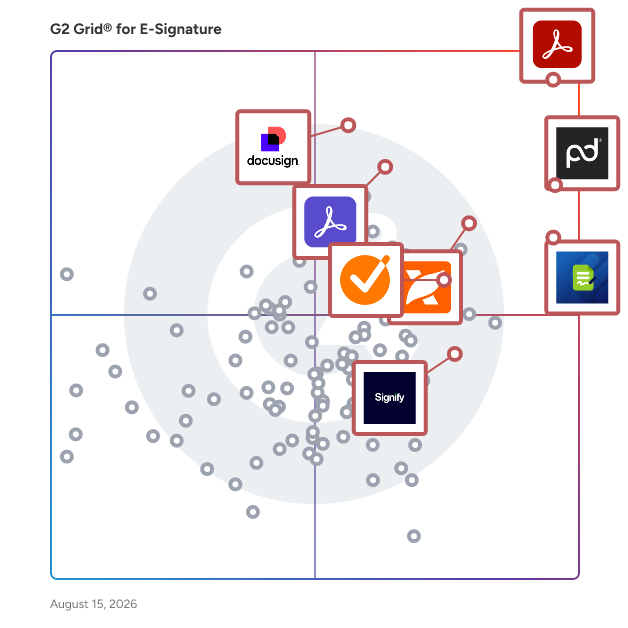
G2 Grid® for E-Signature Software

G2 Grid® for E-Signature Software plotting products by satisfaction and market presence

Highlighted products: Adobe Acrobat, PandaDoc, Docusign, Adobe Acrobat Sign, GetAccept, Jotform Sign, Foxit PDF Editor, and Signify.

Underlying data: [Grid® JSON](https://www.g2.com/categories/e-signature/grids.json?focus%5B%5D=adobe-acrobat&focus%5B%5D=pandadoc&focus%5B%5D=docusign&focus%5B%5D=adobe-acrobat-sign&focus%5B%5D=getaccept&focus%5B%5D=jotform-sign&focus%5B%5D=foxit-pdf-editor&focus%5B%5D=signify-signify&segment=mid-market)

Sponsored

Signify

Signify is a digital contracting platform that helps teams manage, automate, and track documents in one place. From sending and signing to organizing and archiving, it supports the full document workflow. Signify combines e-signatures, workflow automation, a team workspace, and a searchable archive. Set signing order and recipient roles, assign documents to folders with team-based permissions, and use structured templates to keep processes consistent across the company. You can see exactly what’s signed, pending, or in progress - and who’s involved. Permissions are clear, templates are shared with built-in rules, and folder access is controlled by team roles. Over 4.5 million documents have been sent through Signify, with 80% finalized in under 24 hours. Signify is built to support both the people who manage documents and those who sign them - making the entire process simple and efficient.

Visit website

Foxit eSign

Over 650 million users use Foxit, and it has sold to over 425,000 customers, ranging from SMBs to global enterprises, located in more than 200 countries worldwide. Foxit eSign allows you to grow your business based on your needs, not everyone else’s. Break away from cookie-cutter eSignature solutions that put you in a plan with features you don’t need. Foxit empowers organizations of all sizes and individuals to get documents signed and move on with their day. Our flexible solution comes in two plans. Simple eSigning and payment collection tools are yours with the Foxit eSign Essentials plan. Or empower teams with template sharing, custom branding, and user management tools with Foxit eSign for Business. Need more compliance, access to integrations, or advanced workflow management? You can get all that and more by adding whichever modules you need to your Foxit eSign Business plan anytime. Work is hard enough. Let’s keep eSigning simple. Just a few of the helpful features available with Foxit eSign software include: • Reusable templates to save time • Bulk signing and sending • Audit trails and Certificates of Completion • Attach photos, driver's license, etc. directly to documents • In-person signing • Generate in-email document links for easy access and signing • Online form/embedding code available to integrate eSignatures directly into websites • Use eSign Genie REST APIs to integrate with your website or application • Easily integrate with Google Drive, Dropbox, and more • Excel reporting • Email bounce notifications • Signing in 11 different languages Most eSignature tools stop at the signature. Foxit Document Management System (DMS) and Foxit eSign work as one, signing, storing, organizing, and governing every document in a single connected workflow.

Average Rating: 4.6/5.0

Total Reviews: 1,433

How Do G2 Users Rate Foxit eSign?

  • Has the product been a good partner in doing business?: 9.3/10 (Category avg: 9.2/10)
  • Performance and Reliability: 9.1/10 (Category avg: 9.0/10)
  • Enterprise Scalability: 8.9/10 (Category avg: 8.9/10)
  • Signature Document Creation: 9.0/10 (Category avg: 9.1/10)

Who Is the Company Behind Foxit eSign?

  • Seller: Foxit
  • Company Website:
  • Year Founded: 2001
  • HQ Location: Fremont, CA
  • Twitter: @foxitsoftware
    6,226 Twitter followers
  • LinkedIn® Page: www.linkedin.com
    569 employees on LinkedIn®

Who Uses This Product?

  • Who Uses This: Owner, CEO
  • Top Industries: Higher Education, Information Technology and Services
  • Company Size: 68% Small, 22% Medium

What Do G2 Reviewers Say About Foxit eSign?

AI-generated summary from verified user reviews

Pros
  • Users appreciate the ease of use of Foxit eSign, seamlessly integrating with their existing PDF software for efficient contract management.
  • Users enjoy the eSignature functionality of Foxit eSign, appreciating its ease of use and efficiency for sending agreements.
  • Users praise the quick and easy document signature process of Foxit eSign, enhancing their workflow efficiency.
  • Users value the easy setup of Foxit eSign, enabling quick integration and efficient document management.
  • Users love the easy signing process of Foxit eSign, making document signature management quick and efficient.
Cons
  • Users find the limited features of Foxit eSign lacking compared to larger competitors, affecting usability and integration.
  • Users find limited customization options in Foxit eSign, affecting the ability to tailor documents to unique needs.
  • Users find the signature process confusing, requiring assistance and causing delays in sending important documents.
  • Users find e-signature issues frustrating, particularly regarding signature placement, flexibility, and document uploading difficulties.
  • Users find missing features in Foxit eSign limit personalization options and hinder overall usability during document management.

What Are Recent G2 Reviews of Foxit eSign?

What Are G2 Users Discussing About Foxit eSign?

OneSpan Sign

OneSpan Sign is a modern, secure, and enterprise-grade eSignature solution designed to help organizations streamline document signing workflows and enhance customer experiences. This innovative platform addresses the growing need for efficient and reliable electronic signature processes, particularly in industries where compliance and security are paramount. By leveraging advanced technology, OneSpan Sign empowers businesses to manage their document signing needs effectively while reducing turnaround times and improving overall operational efficiency. Targeted primarily at enterprises and organizations that require robust eSignature capabilities, OneSpan Sign caters to a wide range of industries, including finance, insurance, government, public sector, healthcare, technology, and business services. These sectors often face stringent regulatory requirements and high stakes when it comes to document security and integrity. OneSpan Sign provides a comprehensive solution that not only meets these demands but also offers a user-friendly interface that simplifies the signing process for both senders and signers. This ease of use is crucial in fostering positive customer interactions and ensuring that agreements are completed swiftly. One of the key features of OneSpan Sign is its high level of customization, which allows organizations to fully tailor the signing experience to align with their brand identity. This includes the ability to incorporate logos, colors, and personalized messaging, ensuring that the eSignature process feels cohesive and familiar to users. Unlike other eSignature solutions that prioritize their own branding, OneSpan Sign’s white-labeling capabilities keep your brand front and center, leading to higher adoption and a seamless user experience. Security is a cornerstone of OneSpan Sign, which offers advanced identity proofing, authentication methods, and encryption protocols to protect sensitive information. This focus on security not only helps organizations safeguard their data but also builds trust with customers who are increasingly concerned about privacy and fraud. Furthermore, OneSpan Sign is recognized for its exceptional customer support, ranked #1 in customer satisfaction according to G2 Quality of Support. This commitment to responsive and expert assistance ensures seamless implementation and ongoing success for users. Another significant advantage of OneSpan Sign is its cost-effectiveness compared to traditional eSignature solutions. Many organizations struggle with the high costs associated with scaling eSignature capabilities, but OneSpan Sign offers one of the most flexible and competitive pricing models on the market. This makes it an attractive option for businesses looking to enhance their document signing processes without incurring prohibitive expenses, ultimately leading to improved operational efficiency and customer satisfaction.

Average Rating: 4.7/5.0

Total Reviews: 736

How Do G2 Users Rate OneSpan Sign?

  • Has the product been a good partner in doing business?: 9.4/10 (Category avg: 9.2/10)
  • Performance and Reliability: 9.2/10 (Category avg: 9.0/10)
  • Enterprise Scalability: 9.3/10 (Category avg: 8.9/10)
  • Signature Document Creation: 9.1/10 (Category avg: 9.1/10)

Who Is the Company Behind OneSpan Sign?

  • Seller: OneSpan
  • Company Website:
  • Year Founded: 1991
  • HQ Location: Boston, MA
  • Twitter: @OneSpan
    3,374 Twitter followers
  • LinkedIn® Page: www.linkedin.com
    665 employees on LinkedIn®

Who Uses This Product?

  • Who Uses This: President, CEO
  • Top Industries: Information Technology and Services, Financial Services
  • Company Size: 34% Small, 27% Medium

What Do G2 Reviewers Say About OneSpan Sign?

AI-generated summary from verified user reviews

Pros
  • Users find OneSpan Sign to be user-friendly and intuitive, simplifying processes and enhancing overall efficiency.
  • Users praise the intuitive interface of OneSpan Sign, highlighting its easy setup and seamless usability.
  • Users praise OneSpan Sign for its simple and reliable electronic signing, enhancing efficiency and promoting eco-friendly operations.
  • Users value the seamless organizational integration of OneSpan Sign, enhancing efficiency across devices and processes.
  • Users value the reliability of OneSpan Sign for simplifying the e-signature process across all devices.
Cons
  • Users find the usability confusing, struggling with simple tasks and unclear error messages in OneSpan Sign.
  • Users find the interface usability complex, making simple tasks and error details difficult to manage.
  • Users note the limited customization options for branding in OneSpan Sign, affecting overall flexibility and adaptability.
  • Users feel that OneSpan Sign lacks intuitive form development and flexible reporting features, impacting overall usability.
  • Users find OneSpan Sign not user-friendly, struggling with complexity and unclear documentation for basic tasks.

What Are Recent G2 Reviews of OneSpan Sign?

What Are G2 Users Discussing About OneSpan Sign?

DocuSeal

DocuSeal is an open source platform that provides secure and efficient digital document signing and processing. Convert documents into fillable PDF forms. Fields can be easily added to the document using the user-friendly form builder. Two or more parties can review, fill, and sign the documents. Each of them will receive their own copy of filled and signed files. All documents are automatically signed with a digital industry-standard PDF eSignature. Signed files can be verified through the platform for authenticity. Review and sign digital documents online from any device. DocuSeal document forms are optimized for screens of all sizes. Invite your team members into the platform to create, share, and manage documents with ease and for free. DocuSeal is developer-friendly and provides an API and JavaScript widgets to seamlessly integrate the document signing and processing workflows into your web and mobile apps. Features: - PDF Form Builder: A powerful WYSIWYG builder allows to create complex fillable PDF forms. 10 field types are available, such as Checkbox, Image, Date, Multi-select, and Cells. - Multiple Submitters: Two or more parties can review, fill, and sign the documents. Each of them will receive their own copy of filled and signed files. - Automated Emails: Send and receive automated emails from the platform with an invitation to sign the documents or with a copy of signed documents. - Automatic eSignature: All documents are automatically signed with a digital industry-standard PDF eSignature. Signed files can be verified through the platform for authenticity. - Mobile Optimized: Review and sign digital documents online from any device. DocuSeal document forms are optimized for screens of all sizes. - Users Management: Invite your team members into the platform to create, share, and manage documents with ease. - Robust File Storage: Files can be stored locally on disk or on your private AWS S3, Google Cloud Storage, or Azure Storage. - Secure: Host it on your hardware under a VPN to ensure that important documents can be accesses only within your organization. - Easy to Start: Run on your own host using Docker container, or deploy on your favorite managed PaaS with a single click.

Average Rating: 4.9/5.0

Total Reviews: 250

How Do G2 Users Rate DocuSeal?

  • Has the product been a good partner in doing business?: 9.7/10 (Category avg: 9.2/10)
  • Performance and Reliability: 9.6/10 (Category avg: 9.0/10)
  • Enterprise Scalability: 9.0/10 (Category avg: 8.9/10)
  • Signature Document Creation: 9.6/10 (Category avg: 9.1/10)

Who Is the Company Behind DocuSeal?

Who Uses This Product?

  • Who Uses This: CEO, Founder
  • Top Industries: Computer Software, Real Estate
  • Company Size: 92% Small, 7% Medium

What Do G2 Reviewers Say About DocuSeal?

AI-generated summary from verified user reviews

Pros
  • Users find DocuSeal super easy and intuitive, making document signing and storage a hassle-free experience.
  • Users highlight the intuitive design of DocuSeal, making document management quick and effortless without complications.
  • Users value the time-saving efficiency of DocuSeal, enabling effortless document signing and quick setup for regular tasks.
  • Users love DocuSeal for its ease of use, making legal document handling quick and efficient.
  • Users love the user-friendly interface of DocuSeal, finding it simple and efficient for all tech levels.
Cons
  • Users wish for more template customization options in DocuSeal to better accommodate their unique business needs.
  • Users struggle with signature positioning, requiring multiple attempts, and find the interface less user-friendly for document management.
  • Users note the limited features of DocuSeal, lacking essential tools and customization options compared to competitors.
  • Users feel the interface usability of DocuSeal is confusing and could benefit from a more modern design.
  • Users experience email issues with DocuSeal, including template limitations and problems with spam filters affecting communication.

What Are Recent G2 Reviews of DocuSeal?

DottedSign

DottedSign is a trusted, seamless, and flexible eSignature solution designed to enhance operational effectiveness for organizations. Offering accessible SaaS, API, and self-hosted deployment , DottedSign enables secure online signing, ensuring regulatory compliance. Try out DottedSign Business Plan FREE for 14-days: https://www.dottedsign.com/ Review DottedSign to get US$20 now: https://reurl.cc/1bnD0G KEY FEATURES GET SIGNATURE FROM MULTIPLE SIGNERS ● Invite signers by adding them straight from your contact list or entering their emails (Google Contact supported) ● Remote signing - Assign signature, initial, date and text fields to signers in a designated order. Advanced field settings are available including checkbox, radio button, image and hyperlink fields. ● Bulk send - Send a single document to multiple groups of signers ● Public form - Create an on-demand, self-service document signing link on your website ● Front desk signing - For face-to-face signing scenarios ● Color-coded fields to navigate your signers where to fill in ● Save tasks as reusable templates, or create standardized document templates ● Modify documents - Merge, replace, add, or remove documents in tasks or templates ● Field conditional rule - Dynamic field filling setup for signers' smooth signing completion ● Assign editors to handle the signing process, simplifying it for the sender ● Set document viewing permissions for each recipient SIGN DOCUMENTS YOURSELF & PERSONALIZE YOUR SIGNATURES ● Add your eSignature by hand, by the mobile panel, or by typing ● Click signature - Add your last-used signature by clicking the field, and it will apply automatically ● Make stamps by using your camera or photos ● Pre-fill your personal information and drag and drop it to the document ● Add signatures, initials, texts, and dates to documents ● Adjust the font size and text alignment to your liking ● Remove backgrounds for signature stamps MANAGE SIGNATURE TASKS ● Visual progress bar - Monitor signature tasks by intuitively checking all signers’ status ● Timeline of Personal Activities - Display and record activities of all your personal tasks ● Void signature requests - Cancel signature tasks with one tap ● Search - Find your documents easily by searching with signer names, documents, or field search key ● Custom message - Leave messages to all recipients before and after completion ● Auto reminder & expiry date setting - Automatically send reminders to notify anyone who has not signed documents yet ● Change signer – Replace a recipient of a sent document with another one; recipient can send change requests to the sender ● Decline to sign or edit recipient permissions– Sender can manage the recipient’s permission to decline the request in case the document requires further amendment EXPAND YOUR TEAM CAPACITY WITH ADVANCED SECURITY AND CONTROLS ● Create your Admin Console and invite team members ● Template sharing across the team ● Team management reporting - Show insights based on the team performance ● Set up your logo, profile and name when sending the signature request email ● Member permission control across files and relevant data access under the Admin Console IMPORT, EXPORT AND SHARE DOCUMENTS WITH EASE ● Get documents from camera, photos, the iOS file app, email attachments and the web ● Import documents from cloud services, including Google Drive, OneDrive, Dropbox and KDAN Cloud ● Export completed documents to cloud services, including Google Drive and OneDrive ● Share the document via a file link to open the file directly on the web browser SECURITY AND LEGALITY ● Digital audit trails - Record every change made to the document for evidence ● Protected signing process - Ensure confidentiality of paperless signing, encrypted by TLS/SSL, AES-256 and RSA-2048 ● Email & SMS secure password to identify signer identity before accessing the task OR before completing the task ● Digital certificates issued by Adobe Approved Trust List (AATL) certified CA INTEGRATIONS ● Top-tier integrations - Google Drive, Gmail, Salesforce, Microsoft Teams, Zapier, and more ● DottedSign API - Automate the signing flow in your system ● Embedded signing - Quickly integrate eSignature into your web applications

Average Rating: 4.7/5.0

Total Reviews: 235

How Do G2 Users Rate DottedSign?

  • Has the product been a good partner in doing business?: 9.6/10 (Category avg: 9.2/10)
  • Performance and Reliability: 9.0/10 (Category avg: 9.0/10)
  • Enterprise Scalability: 9.0/10 (Category avg: 8.9/10)
  • Signature Document Creation: 9.3/10 (Category avg: 9.1/10)

Who Is the Company Behind DottedSign?

  • Seller: KDAN
  • Year Founded: 2009
  • HQ Location: Irvine, California
  • LinkedIn® Page: www.linkedin.com
    233 employees on LinkedIn®

Who Uses This Product?

  • Who Uses This: CEO, SDET
  • Top Industries: Information Technology and Services, Marketing and Advertising
  • Company Size: 74% Small, 24% Medium

What Do G2 Reviewers Say About DottedSign?

AI-generated summary from verified user reviews

Pros
  • Users commend the ease of use of DottedSign, finding the interface intuitive and efficient for signing documents.
  • Users value the time-saving convenience of DottedSign, enabling efficient task completion and easy management of documents.
  • Users find DottedSign to be intuitive and easy to use, enhancing their document signing experience significantly.
  • Users love the helpful signature guidance of DottedSign, making it easy to gather multiple signatures efficiently.
  • Users appreciate the clear tracking features of DottedSign, making document signing and follow-ups straightforward and efficient.
Cons
  • Users face challenges with limited customization, impacting branding and document tailoring for their specific needs.
  • Users find the pricing of DottedSign to be expensive, particularly with significant fee increases affecting small businesses.
  • Users find the signature requirement for recipients inconvenient and say field adjustments could be more intuitive.
  • Users experience slow performance on DottedSign, often needing multiple refreshes for files and facing delays with larger documents.
  • Users find app limitations hinder bulk handling and advanced automation, lacking features compared to other platforms.
What Are Recent G2 Reviews of DottedSign?

Signeasy

Signeasy is an eSignature and Intelligent Contract Management platform for every team that works with contracts. Finance, HR, Sales, Operations, IT, Legal Ops, and Supply Chain teams across 48,000+ businesses in 100+ countries use Signeasy to manage contracts from the first request to renewal. Signeasy has everything your team needs to manage contracts end to end: - eSignatures - Secure contract repository - Approval workflows - AI-powered contract insights and summary - Key term extraction - Renewal reminders - Downloadable reports - Team workspaces with Role-based access control - Search that lets you go deep into your contracts - AI answer engine that helps you get information from your contracts Signeasy is built for every team that touches contracts. Its AI tells you what's inside every contract, team workspaces show what's pending, and renewal tracking surfaces insights you can act on — all inside one platform. Signeasy easily integrates with the tools your team already uses: Google Workspace, Microsoft 365, HubSpot, SharePoint, Salesforce, and more. With over 100 million contracts processed, every feature is built to ensure your contracts are secure and compliant with SOC 2, GDPR, HIPAA, 21 CFR Part 11 and eIDAS — with audit trails, 2FA, SSO, and tamper-proof trust seals built in. Signeasy focuses on user experience and is a Google recommended App and is designed for a mobile workforce in the SMB and mid-market segment. Signeasy is reputed for its high-touch human support team. Customers report saving dozens of hours a month, eliminating manual follow-ups, and processing contracts significantly faster on Signeasy. Hear it directly from our customers: https://signeasy.com/case-study

Average Rating: 4.7/5.0

Total Reviews: 743

How Do G2 Users Rate Signeasy?

  • Has the product been a good partner in doing business?: 9.3/10 (Category avg: 9.2/10)
  • Performance and Reliability: 9.0/10 (Category avg: 9.0/10)
  • Enterprise Scalability: 8.6/10 (Category avg: 8.9/10)
  • Signature Document Creation: 8.8/10 (Category avg: 9.1/10)

Who Is the Company Behind Signeasy?

  • Seller: Signeasy
  • Company Website:
  • Year Founded: 2010
  • HQ Location: Dallas, Texas
  • Twitter: @getsigneasy
    1,685 Twitter followers
  • LinkedIn® Page: www.linkedin.com
    62 employees on LinkedIn®

Who Uses This Product?

  • Who Uses This: Owner, CEO
  • Top Industries: Real Estate, Financial Services
  • Company Size: 68% Small, 20% Medium

What Do G2 Reviewers Say About Signeasy?

AI-generated summary from verified user reviews

Pros
  • Users value the ease of use of Signeasy, appreciating its user-friendly interface and seamless document signing process.
  • Users praise the helpful customer support of Signeasy, enhancing their overall experience with the app's ease of use.
  • Users find Signeasy's easy setup helpful, making document signing quick and straightforward across devices.
  • Users love the user-friendly interface of Signeasy, appreciating its simplicity and ease of use.
  • Users find Signeasy's ease of use for signing documents outstanding, enhancing organization and workflow efficiency.
Cons
  • Users find the pricing unaffordable for small businesses, suggesting it needs to be adjusted to be more competitive.
  • Users find difficult editing of forms frustrating, especially when storage limits restrict their ability to make changes.
  • Users face editing limitations due to storage restrictions, hindering their ability to make necessary changes effectively.
  • Users find the pricing illogical for sporadic use, suggesting a need for a pay-as-you-go model.
  • Users find the limited customization of Signeasy restricting and wish for more tailored options to fit their needs.

What Are Recent G2 Reviews of Signeasy?

What Are G2 Users Discussing About Signeasy?

emSigner

emSigner is an enterprise-grade eSignature and document workflow automation platform from eMudhra — one of the world's few WebTrust-audited Certifying Authorities and a member of Adobe AATL, the Microsoft Root Program, and the Apple Root Program. That trust foundation matters: every signature on emSigner is legally binding, tamper-evident, and globally verifiable. Built for organizations of all sizes, emSigner helps teams sign, send, track, and archive documents in minutes — not days. It supports the full spectrum of signature types, including electronic, digital, biometric, Aadhaar eSign, and eIDAS-qualified signatures, so businesses can meet the legal and regulatory requirements of every market they operate in. Drag-and-drop workflow design, role-based routing, conditional logic, real-time tracking, and a complete audit trail make it easy to automate everything from simple single-signer documents to complex, multi-party approval processes across departments and geographies. emSigner integrates natively with the tools your teams already use — SAP, Salesforce, Microsoft 365, Workday, ServiceNow, Oracle, and more — and offers a robust REST API for custom integrations. It can be deployed on the cloud, on-premise, or in a hybrid model, giving compliance, IT, and business teams one platform to go fully paperless without compromising on security, data sovereignty, or scalability. Trusted by banks, insurers, governments, telecom operators, and enterprises in 120+ countries, emSigner is the choice for regulated industries that need to digitize high-value transactions with confidence — securely, auditably, and at global scale.

Average Rating: 4.6/5.0

Total Reviews: 101

How Do G2 Users Rate emSigner?

  • Has the product been a good partner in doing business?: 9.2/10 (Category avg: 9.2/10)
  • Performance and Reliability: 9.0/10 (Category avg: 9.0/10)
  • Enterprise Scalability: 9.2/10 (Category avg: 8.9/10)
  • Signature Document Creation: 9.2/10 (Category avg: 9.1/10)

Who Is the Company Behind emSigner?

  • Seller: emudhra
  • Year Founded: 2008
  • HQ Location: Bangalore, Karnataka
  • Twitter: @eMudhra
    3,560 Twitter followers
  • LinkedIn® Page: www.linkedin.com
    926 employees on LinkedIn®

Who Uses This Product?

  • Who Uses This: Security Solutions Engineer
  • Top Industries: Information Technology and Services, Financial Services
  • Company Size: 45% Medium, 44% Small

What Do G2 Reviewers Say About emSigner?

AI-generated summary from verified user reviews

Pros
  • Users find emSigner to be very simple and easy to use, streamlining the document signing process efficiently.
  • Users appreciate the intuitive electronic signing of emSigner, streamlining the document signing process without the need for pen or paper.
  • Users value the high security of emSigner, enhancing document workflows and ensuring compliance seamlessly.
  • Users find emSigner to be very simple and easy to use, streamlining the document signing process effectively.
  • Users highlight the easy integration of emSigner, making signing documents a straightforward and efficient process.
Cons
  • Users face numerous bug issues with emSigner, including reliability problems and limitations on workflow signing.
  • Users face access limitations with emSigner, impacting workflow signing and overall document management efficiency.
  • Users experience a lack of features in emSigner, facing workflow limitations and difficulties with document management.
  • Users face missing features in emSigner, hindering workflow efficiency and document management capabilities.
  • Users face network issues with emSigner, impacting functionality and work efficiency, especially in areas with poor connectivity.

What Are Recent G2 Reviews of emSigner?

What Are G2 Users Discussing About emSigner?

Scrive

Founded in 2010 in Sweden, Scrive offers an omnichannel solution, automating agreement-based business processes with electronic signature and identity verification. Ease of use and robust security measures are key reasons why organisations of all sizes, including enterprises in highly regulated industries, rely on Scrive solutions to drive internal efficiency, compliance and customer satisfaction. As a Qualified Trust Service Provider (QTSP) for Qualified Electronic Signatures (QES), Scrive ensures the highest level of trust and legal validity for digital transactions in accordance with EU eIDAS regulations. eSign, Scrive’s agreement signing platform, is available out of the box with pricing plans and feature packages to suit any business, or as an API integration. Key benefits include: - Sign on any device - Authenticate and onboard users with eIDs - Track and monitor the status of your agreements - Solutions built for EU compliance - Detailed audit log/legal evidence - Secure, tamper-proof documents

Average Rating: 4.5/5.0

Total Reviews: 197

How Do G2 Users Rate Scrive?

  • Has the product been a good partner in doing business?: 9.4/10 (Category avg: 9.2/10)
  • Performance and Reliability: 9.4/10 (Category avg: 9.0/10)
  • Enterprise Scalability: 9.0/10 (Category avg: 8.9/10)
  • Signature Document Creation: 8.8/10 (Category avg: 9.1/10)

Who Is the Company Behind Scrive?

  • Seller: Scrive
  • Company Website:
  • Year Founded: 2010
  • HQ Location: Stockholm
  • Twitter: @scrive
    476 Twitter followers
  • LinkedIn® Page: www.linkedin.com
    265 employees on LinkedIn®

Who Uses This Product?

  • Top Industries: Information Technology and Services, Financial Services
  • Company Size: 38% Medium, 33% Small

What Do G2 Reviewers Say About Scrive?

AI-generated summary from verified user reviews

Pros
  • Users appreciate the ease of use of Scrive, finding it intuitive and efficient for creating professional documents.
  • Users value the easy setup of Scrive, allowing for a hassle-free start to contract management.
  • Users appreciate the fast and helpful customer support of Scrive, enhancing their overall experience and efficiency.
  • Users love Scrive's intuitive interface, making form creation seamless and accessible for all employees.
  • Users value the high level of security in Scrive, ensuring safe document transactions in their workflow.
Cons
  • Users report poor customer support, citing issues with ticket management and unhelpful assistance from the support team.
  • Users face signature issues with Scrive, experiencing inflexibility, tedious setups, and difficulties with plugins and document handling.
  • Users experience connectivity issues with integrations and SMS delivery, impacting usability in some regions.
  • Users find Scrive expensive, especially for startups, and suggest shorter license periods for better affordability.
  • Users report insufficient tutorials that hinder effective use of Scrive, leading to confusion and frustrating experiences.

What Are Recent G2 Reviews of Scrive?

What Are G2 Users Discussing About Scrive?

fynk

fynk is more than just contract management. Built with powerful AI at its core, it seamlessly imports and integrates your existing and external contracts into powerful workflows: create, automate, manage, collaborate, and sign - all in one platform!

Average Rating: 4.9/5.0

Total Reviews: 44

How Do G2 Users Rate fynk?

  • Has the product been a good partner in doing business?: 9.7/10 (Category avg: 9.2/10)
  • Performance and Reliability: 10.0/10 (Category avg: 9.0/10)
  • Enterprise Scalability: 10.0/10 (Category avg: 8.9/10)
  • Signature Document Creation: 9.9/10 (Category avg: 9.1/10)

Who Is the Company Behind fynk?

Who Uses This Product?

  • Who Uses This: Head of Finance
  • Top Industries: Financial Services, Information Technology and Services
  • Company Size: 76% Medium, 17% Small

What Do G2 Reviewers Say About fynk?

AI-generated summary from verified user reviews

Pros
  • Users value the ease of use offered by fynk, simplifying contract management and enhancing overall workflow efficiency.
  • Users value the centralized contract management of fynk, enhancing oversight and streamlining processes across their operations.
  • Users value the efficiency of streamlined contract management, enhancing oversight and collaboration across all agreements.
  • Users value the automated workflows in fynk, streamlining contract management and enhancing efficiency across collaborations.
  • Users value the time efficiency of fynk, streamlining contract management and accelerating product development significantly.
Cons
  • Users find the analytics reporting insufficient, lacking depth for complex analysis and requiring external tools for extensive insights.
  • Users find the limited reporting capabilities of Fynk inadequate for in-depth financial analysis and insights.
  • Users find the reporting inadequate, lacking depth for complex analysis and essential product-centric insights.
  • Users note the insufficient content management in Fynk, particularly related to basic reporting and analytics capabilities.
  • Users report insufficient dashboard features in Fynk, hindering advanced analytics and necessitating data export to other tools.

What Are Recent G2 Reviews of fynk?

Box

Box: The leader in Intelligent Content Management — Store, secure, and automate content on an AI-powered platform Box helps businesses of every size get more value from their documents and files with stringent security controls, intelligent workflow automation, and AI agents that extract critical insight. ✓ Box AI — Summarize documents, extract insights, ask questions in natural language, and deploy and create intelligent AI agents that automate repetitive work ✓ Intelligent workflow automation — Streamline reviews, contract approvals, and onboarding with AI-powered workflows ✓ Security and compliance — Protect sensitive information with granular access controls, intelligent threat detection, and AI governance that meet HIPAA, FINRA, FedRAMP, and GDPR standards ✓ Integrations and extensibility — Connect Box with 1,500+ popular apps or extend functionality with APIs and SDKs ✓ Industry solutions — Trusted by leading finance, technology, government, and life sciences organizations for secure collaboration and AI-enhanced productivity

Average Rating: 4.2/5.0

Total Reviews: 5,038

How Do G2 Users Rate Box?

  • Has the product been a good partner in doing business?: 8.7/10 (Category avg: 9.2/10)
  • Performance and Reliability: 9.3/10 (Category avg: 9.0/10)
  • Enterprise Scalability: 9.2/10 (Category avg: 8.9/10)
  • Signature Document Creation: 9.3/10 (Category avg: 9.1/10)

Who Is the Company Behind Box?

  • Seller: Box
  • Company Website:
  • Year Founded: 1998
  • HQ Location: Redwood City, CA
  • Twitter: @Box
    78,537 Twitter followers
  • LinkedIn® Page: www.linkedin.com
    4,311 employees on LinkedIn®

Who Uses This Product?

  • Who Uses This: Project Manager, Consultant
  • Top Industries: Higher Education, Information Technology and Services
  • Company Size: 41% Large, 32% Medium

What Do G2 Reviewers Say About Box?

AI-generated summary from verified user reviews

Pros
  • Users find Box extremely easy to use, appreciating its intuitive design and minimal training requirements.
  • Users value the robust security measures of Box, ensuring safe storage and sharing of sensitive documents seamlessly.
  • Users love the simplicity of sharing and collaborating with Box, enhancing productivity and peace of mind in managing files.
  • Users appreciate the easy sharing capabilities of Box, enabling secure, organized collaboration from any device.
  • Users value the seamless integration of Box, enhancing collaboration and simplifying file management across platforms.
Cons
  • Users often experience slow performance with Box, especially during file syncing and mobile app usage.
  • Users feel that Box is expensive, especially for smaller teams compared to other storage options available.
  • Users find the storage limitations of Box frustrating, particularly due to costs and inadequate organizing options.
  • Users find Box lacking advanced features, making it challenging for newcomers to utilize its capabilities effectively.
  • Users report performance issues with Box, including slow uploads, downloads, and syncing that hinder productivity.

What Are Recent G2 Reviews of Box?

What Are G2 Users Discussing About Box?

Dropbox Sign (formerly HelloSign)

Dropbox Sign (formerly HelloSign) helps teams send, sign, and manage agreements where their work already lives. Most teams introduce unnecessary friction the moment a document needs a signature—separate systems, extra handoffs, and chasing approvals across disconnected workflows. Dropbox Sign keeps the process connected, moving from draft to signed with fewer steps. Why teams choose Dropbox Sign - Recognized by G2 for Ease of Use and User Adoption - Unlimited signature requests on per-seat plans - Procurement approvals reduced from two days to 30 minutes - Document execution effort reduced by 70% One connected workflow Send documents for signature directly from Dropbox and the tools your team already uses, including Google Drive, OneDrive, Salesforce, HubSpot, and Microsoft Dynamics. Completed agreements automatically save back right where you work. Simple to start. Built to scale. Designed for fast adoption without disrupting existing workflows. Start sending documents in minutes—from sales contracts and offer letters to NDAs and vendor agreements. Predictable pricing for growing teams Unlimited signature requests on per-seat plans help teams avoid tracking usage limits or unexpected overages while scaling their signing workflows with confidence. Secure from the first send Sensitive agreements are protected with encryption in transit and at rest, detailed audit trails, signer verification options, and compliance certifications including SOC 2 Type II, ISO 27001, HIPAA, GDPR, and eIDAS. Need embedded eSignature? Dropbox Sign offers a flexible API enabling businesses to build secure signing experiences directly into their applications, websites, and workflows.

Average Rating: 4.7/5.0

Total Reviews: 2,222

How Do G2 Users Rate Dropbox Sign (formerly HelloSign)?

  • Has the product been a good partner in doing business?: 9.4/10 (Category avg: 9.2/10)
  • Performance and Reliability: 9.3/10 (Category avg: 9.0/10)
  • Enterprise Scalability: 9.1/10 (Category avg: 8.9/10)
  • Signature Document Creation: 9.1/10 (Category avg: 9.1/10)

Who Is the Company Behind Dropbox Sign (formerly HelloSign)?

  • Seller: Dropbox
  • Company Website:
  • Year Founded: 2007
  • HQ Location: San Francisco, California
  • Twitter: @Dropbox
    3,279,477 Twitter followers
  • LinkedIn® Page: www.linkedin.com
    4,149 employees on LinkedIn®

Who Uses This Product?

  • Who Uses This: Owner, CEO
  • Top Industries: Marketing and Advertising, Computer Software
  • Company Size: 80% Small, 17% Medium

What Do G2 Reviewers Say About Dropbox Sign (formerly HelloSign)?

AI-generated summary from verified user reviews

Pros
  • Users praise the ease of use of Dropbox Sign, streamlining document signing and management for efficient workflows.
  • Users value the time-saving efficiency of Dropbox Sign, simplifying document signing without the hassle of printing or scanning.
  • Users appreciate the tracking features of Dropbox Sign, ensuring clarity on signer actions and improving document management.
  • Users praise the easy integration of Dropbox Sign, enhancing their workflow and development processes effectively.
  • Users appreciate the easy sharing capabilities of Dropbox Sign, enhancing collaboration and document security for teams.
Cons
  • Users struggle with document management due to a lack of clear steps and limited options for customization.
  • Users experience frustrating email issues, including delays and signatures landing in spam folders, affecting overall utility.
  • Users find Dropbox Sign's limited customization hampers efficiency when managing multiple documents and branding needs.
  • Users struggle with signature tracking difficulties, finding it hard to monitor who has signed and who hasn't.
  • Users find it difficult to edit and track signatures, leading to frustration in monitoring progress effectively.

What Are Recent G2 Reviews of Dropbox Sign (formerly HelloSign)?

What Are G2 Users Discussing About Dropbox Sign (formerly HelloSign)?

Lightico

Lightico is an AI-powered platform for end-to-end customer journey orchestration, built to help regulated enterprises in financial services, energy, and telecoms run compliant digital journeys across every channel. Manual paperwork, fragmented systems, and compliance checks slow down decisions and frustrate customers at the moments that matter most. Lightico closes that gap: customers complete documents, verify identity, sign, and pay from a single link sent by text or email, without downloading an app or paying a per-envelope fee. Teams reduce manual processing and reallocate staff time to higher-value work as a result. Key capabilities: 1. AI-Powered Intelligent Document Processing (IDP): classifies, reads and validates documents automatically, cutting manual review at every step. 2. Journey Orchestration & No-Code Design: business teams design and launch compliant customer journeys without long IT cycles. 3. eSignature & Digital Consent: customers sign contracts and approve terms and conditions instantly, with clickwrap consent captured and audit-ready. 4. ID Verification (IDV): verifies identity in real time to fight fraud without adding friction. 5. Document Collection & eForms: collects and organizes customer data and documents in one flow. 6. Case Management: streamlines documents, tasks, updates, and approvals into one connected case, in any channel. Compliance, operations, and CX teams use Lightico to run high-stakes, regulated interactions across contact centers, retail, and digital channels, layering on top of existing software and core systems. Lightico's customers, including HSBC, VodafoneThree, GM Financial, and EE, have seen results such as same-day loan processing, a 30% compliance lift, a 13-point NPS increase, and a £120 million revenue uplift with transactions completed 7 minutes faster. Lightico delivers a documented 5:1 ROI, typically recovered within 3 to 6 months. Lightico works through an API, native MCP (Model Context Protocol) connectivity for AI agents, or standalone, and integrates with systems like Salesforce. It runs on SOC 2, ISO 27001, PCI-DSS, HIPAA, eIDAS, and ESIGN Act controls. Visit lightico.com to request a demo and see how Lightico cuts compliance risk and speeds up customer journeys.

Average Rating: 4.8/5.0

Total Reviews: 322

How Do G2 Users Rate Lightico?

  • Has the product been a good partner in doing business?: 9.5/10 (Category avg: 9.2/10)
  • Performance and Reliability: 9.4/10 (Category avg: 9.0/10)
  • Enterprise Scalability: 9.6/10 (Category avg: 8.9/10)
  • Signature Document Creation: 9.5/10 (Category avg: 9.1/10)

Who Is the Company Behind Lightico?

  • Seller: Lightico
  • Year Founded: 2014
  • HQ Location: New York, NY
  • Twitter: @lightico
    2,735 Twitter followers
  • LinkedIn® Page: www.linkedin.com
    129 employees on LinkedIn®

Who Uses This Product?

  • Who Uses This: sales advisor, sales
  • Top Industries: Telecommunications, Financial Services
  • Company Size: 61% Large, 26% Medium

What Are Recent G2 Reviews of Lightico?

What Are G2 Users Discussing About Lightico?

Qwilr

Make your competitors’ proposals look primitive with Qwilr. Send proposals, generate quotes, collect sign-off, and get paid – all in one place. Trusted by 5,000+ organizations including OpenTable, Thomson Reuters, Drata, Yale University and more, Qwilr helps sales teams close deals faster by turning static proposals and quotes into interactive, trackable web pages. With Qwilr, you can… Create impressive, interactive proposals: Engage buyers with dynamic proposals featuring videos, interactive pricing, calendar links and more Get deals closed faster: Get deals signed with legally-compliant e-signatures and collect payments instantly with our integrated payments solution, QwilrPay Track buyer engagement: See what your buyers view and click on, and use this to tailor your follow-ups. Get real-time alerts via Slack or email when buyers take action Keep every page consistently branded: Standardize your proposals, automatically applying your fonts and colors to every page Scale your process with automation: Connect Qwilr to Salesforce, HubSpot, Pipedrive or Zoho and automate proposal creation. Improve team efficiency: Create reusable templates and content blocks, so that reps never start from scratch Thousands of sales teams use Qwilr to modernize their proposal process, impress buyers, and close deals faster. Try Qwilr free for 14 days: https://qwilr.com/

Average Rating: 4.6/5.0

Total Reviews: 901

How Do G2 Users Rate Qwilr?

  • Has the product been a good partner in doing business?: 9.3/10 (Category avg: 9.2/10)
  • Performance and Reliability: 9.1/10 (Category avg: 9.0/10)
  • Enterprise Scalability: 8.6/10 (Category avg: 8.9/10)
  • Signature Document Creation: 8.9/10 (Category avg: 9.1/10)

Who Is the Company Behind Qwilr?

  • Seller: Qwilr
  • Company Website:
  • Year Founded: 2014
  • HQ Location: Redfern, New South Wales
  • Twitter: @Qwilr
    2,506 Twitter followers
  • LinkedIn® Page: www.linkedin.com
    104 employees on LinkedIn®

Who Uses This Product?

  • Who Uses This: Account Executive, CEO
  • Top Industries: Marketing and Advertising, Computer Software
  • Company Size: 80% Small, 16% Medium

What Do G2 Reviewers Say About Qwilr?

AI-generated summary from verified user reviews

Pros
  • Users appreciate the ease of use of Qwilr, finding the interface simple and customization quick and effective.
  • Users love Qwilr's customizable templates, enhancing their proposals with a professional touch and intuitive interface.
  • Users find the easy setup of Qwilr intuitive, allowing effortless creation of proposals without needing support.
  • Users praise Qwilr for its simplicity and efficiency, enhancing workflow and collaboration across teams effortlessly.
  • Users value the excellent customer support from Qwilr, enhancing their experience with responsive assistance and guidance.
Cons
  • Users feel that Qwilr has limited customization options, making it difficult to achieve desired edits and layouts.
  • Users are frustrated with integration issues, particularly with QuickBooks and payment options, impacting overall satisfaction.
  • Users note missing features, such as CMS-like design tools and better integrations, affecting their overall experience.
  • Users struggle with difficult editing, often feeling limited in formatting control and facing cumbersome customization challenges.
  • Users find the limited features of Qwilr restrict usability, especially with content arrangement and integrated scheduling tools.

What Are Recent G2 Reviews of Qwilr?

What Are G2 Users Discussing About Qwilr?

Proposify

Proposify is the online proposal software that gives you control and visibility into the most important stage of your sales process. The close. From deal design to sign-off, get the confidence and flexibility to dominate deals. Create impressive sales documents that stay consistent and error-free. Receive the insights to scale your process, make timely engagements, and accurately forecast. Deliver a seamless sign-off experience for your customers and prospects. Features include a flexible and user-friendly design editor, electronic signatures, CRM integrations, data-driven insights, interactive pricing, content management, approvals, and so much more. If you're ready to give your sales team the competitive edge, visit our website or book a demo at https://www.proposify.com.

Average Rating: 4.6/5.0

Total Reviews: 1,116

How Do G2 Users Rate Proposify?

  • Has the product been a good partner in doing business?: 9.4/10 (Category avg: 9.2/10)
  • Performance and Reliability: 8.8/10 (Category avg: 9.0/10)
  • Enterprise Scalability: 8.8/10 (Category avg: 8.9/10)
  • Signature Document Creation: 9.1/10 (Category avg: 9.1/10)

Who Is the Company Behind Proposify?

  • Seller: Proposify
  • Company Website:
  • Year Founded: 2012
  • HQ Location: Halifax
  • Twitter: @proposify
    4,207 Twitter followers
  • LinkedIn® Page: www.linkedin.com
    79 employees on LinkedIn®

Who Uses This Product?

  • Who Uses This: CEO, Owner
  • Top Industries: Marketing and Advertising, Information Technology and Services
  • Company Size: 84% Small, 15% Medium

What Do G2 Reviewers Say About Proposify?

AI-generated summary from verified user reviews

Pros
  • Users love the ease of use of Proposify, enabling quick setup and efficient proposal sending.
  • Users value the extensive template library in Proposify, enhancing proposal creation speed and flexibility.
  • Users find Proposify's easy creation of proposals invaluable, fostering consistency and improving collaboration among teams.
  • Users find Easy Setup with Proposify allows for quick, professional proposals, saving time and streamlining processes.
  • Users value the ease of template creation in Proposify, allowing quick customization for professional proposals.
Cons
  • Users find the limited customization options in Proposify make it cumbersome to edit proposals effectively.
  • Users find difficult editing in Proposify frustrating, as the page editor lacks refinement and alignment can be tricky.
  • Users find editing difficult, with issues in alignment and refinement that complicate proposal customization.
  • Users experience slow performance with Proposify, facing lag and frustrating delays during editing and proposal updates.
  • Users find layout issues in Proposify, as template changes and managing pricing tables can be cumbersome.

What Are Recent G2 Reviews of Proposify?

What Are G2 Users Discussing About Proposify?

SignNow

signNow is an electronic signature that enables business to be conducted anywhere, anytime and on any device. signNow offers the best ROI for SBM and mid-market thanks to its intuitive UI, transparent pricing, flexible configuration and the ease of API integrations. All paid plans of airSlate SignNow include unlimited number of users.

Average Rating: 4.6/5.0

Total Reviews: 1,731

How Do G2 Users Rate SignNow?

  • Has the product been a good partner in doing business?: 9.1/10 (Category avg: 9.2/10)
  • Performance and Reliability: 9.1/10 (Category avg: 9.0/10)
  • Enterprise Scalability: 9.0/10 (Category avg: 8.9/10)
  • Signature Document Creation: 8.9/10 (Category avg: 9.1/10)

Who Is the Company Behind SignNow?

  • Seller: airSlate
  • Company Website:
  • Year Founded: 2006
  • HQ Location: Brookline, Massachusetts
  • Twitter: @airSlate
    1,234 Twitter followers
  • LinkedIn® Page: www.linkedin.com
    798 employees on LinkedIn®

Who Uses This Product?

  • Who Uses This: Owner, CEO
  • Top Industries: Real Estate, Insurance
  • Company Size: 72% Small, 22% Medium

What Do G2 Reviewers Say About SignNow?

AI-generated summary from verified user reviews

Pros
  • Users highlight the ease of use of SignNow, making document management and signing a seamless experience.
  • Users appreciate the intuitive design of SignNow, finding it easy to manage and sign documents effortlessly.
  • Users value the ease of use of SignNow, allowing quick signatures and reducing the need for paper documents.
  • Users find SignNow's user-friendly signature solutions invaluable for contactless document signing, with excellent support available.
  • Users value the time-saving features of SignNow, enabling quick and efficient processing of waivers and templates.
Cons
  • Users find the lack of synchronization between devices frustrating, complicating document management and template reuse.
  • Users find SignNow to be expensive, believing it could be more affordable despite its useful features.
  • Users find that there is a steep learning curve for advanced features, making onboarding challenging for new team members.
  • Users find the signature issues frustrating, especially with confusing UI and auto-detection of fields that can't be disabled.
  • Users find difficult navigation in SignNow, especially with advanced settings and UI changes affecting usability.

What Are Recent G2 Reviews of SignNow?

What Are G2 Users Discussing About SignNow?

Sertifi

Sertifi provides a complete contracting, payment, and authorization platform for the hospitality and travel industry. Brands like Marriott, Topgolf, and AEG Worldwide trust Sertifi to efficiently and securely finalize event and travel bookings with their guests. Sertifi’s easy-to-use platform helps tens of thousands of businesses in more than 135 countries, with more than $5 billion in payment requests being sent through the system annually. With decades of experience in hospitality and travel, Sertifi is building a network that gives guests and travelers across the globe a great experience from the start. Sertifi for e-Signatures Send and sign fully branded agreements – anytime, anywhere, from any device. Give your guests a convenient, digital experience and see completed contracts flow in 90% faster. Sertifi for Payments Avoid delays and get paid 2.5x faster by sending payment and signature requests together. Behind the scenes, Sertifi captures and processes your payments as one PCI-compliant solution. SertifiPay Get paid even faster with our proprietary payment processor, available worldwide and powered by Stripe. In less than 10 minutes, you can sign up to accept payments directly in Sertifi – one account, one complete workflow. Sertifi for Digital Authorizations Digitize payment authorizations to keep your guest’s information secure with PCI compliance and receive completed forms 5x faster. Eliminate chargebacks with advanced fraud tools that instantly verify cards and detect fraud early. Enjoy seamless B2B payment delivery between travel companies - such as travel management companies and virtual card providers - and travel suppliers, particularly hotels. It's a convenient, secure alternative to faxes. Contact us directly at corp.sertifi.com.

Average Rating: 4.8/5.0

Total Reviews: 133

How Do G2 Users Rate Sertifi?

  • Has the product been a good partner in doing business?: 9.6/10 (Category avg: 9.2/10)
  • Performance and Reliability: 9.5/10 (Category avg: 9.0/10)
  • Enterprise Scalability: 9.7/10 (Category avg: 8.9/10)
  • Signature Document Creation: 9.4/10 (Category avg: 9.1/10)

Who Is the Company Behind Sertifi?

  • Seller: Flywire
  • HQ Location: Boston, MA
  • Twitter: @Flywire
    4,578 Twitter followers
  • LinkedIn® Page: www.linkedin.com
    1,309 employees on LinkedIn®
  • Ownership: NASDAQ: FLYW

Who Uses This Product?

  • Who Uses This: President, Carrier Development Specialist
  • Top Industries: Computer Software, Hospitality
  • Company Size: 36% Medium, 26% Large

What Are Recent G2 Reviews of Sertifi?