Sponsored
altaFlow
altaFlow generates custom docs with a click, integrates eSignatures, creates webforms, and more without coding. It’s the ultimate tool to simplify, automate, and elevate your workflows.
Total Products under this Category: 431
Last updated: August 04, 2026
Why You Can Trust G2's Software Rankings:
G2's software rankings are built on verified user reviews, rigorous moderation, and a consistent research methodology maintained by a team of analysts and data experts. Each product is measured using the same transparent criteria, with no paid placement or vendor influence. While reviews reflect real user experiences, which can be subjective, they offer valuable insight into how software performs in the hands of professionals. Together, these inputs power the G2 Score, a standardized way to compare tools within every category.
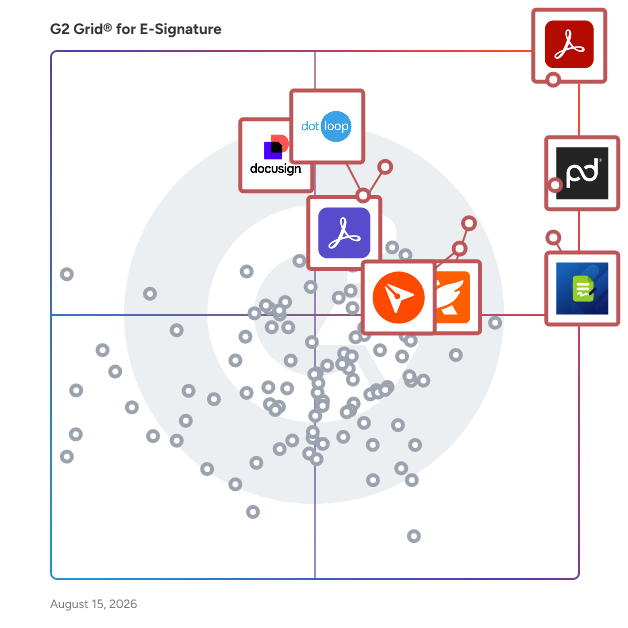
Highlighted products: Adobe Acrobat, PandaDoc, Jotform Sign, Foxit PDF Editor, Docusign, Adobe Acrobat Sign, BoldSign, and dotloop.
Underlying data: [Grid® JSON](https://www.g2.com/categories/e-signature/grids.json?focus%5B%5D=adobe-acrobat&focus%5B%5D=pandadoc&focus%5B%5D=jotform-sign&focus%5B%5D=foxit-pdf-editor&focus%5B%5D=docusign&focus%5B%5D=adobe-acrobat-sign&focus%5B%5D=boldsign&focus%5B%5D=dotloop)
Sponsored
altaFlow generates custom docs with a click, integrates eSignatures, creates webforms, and more without coding. It’s the ultimate tool to simplify, automate, and elevate your workflows.
Clientary is a full-suite app for your team to manage projects, hours, proposals, leads, invoices, payments, staff, and clients. Stop wrestling with one-off doc files, templates, and disconnected apps. Clientary helps you streamline client lifecycles from proposals and estimates, to time tracking, invoices and payments so you and your team have everything you need in one place. Clientary also includes a branded client portal to help you look professional to clients and prospects.
Average Rating: 4.7/5.0
Total Reviews: 45
"Perfectly Merged into our Brand's Aesthetics & Needs"
Rating: 4.5/5.0 stars
— Jay S.
"Easy to Use, Responsive Support, and Constant Improvements"
Rating: 4.5/5.0 stars
— Ethan H.
Progress® ShareFile® AI-powered document collaboration platform is designed to help businesses run client work from start to finish—securely, efficiently and with less friction. Built for organizations that handle sensitive information—such as accounting, legal and financial services—ShareFile software goes beyond traditional file transfer tools to support a more connected, end-to-end client experience. From document collection and collaboration to approvals, e-signatures and secure storage, ShareFile unifies key stages of client work in a single, secure platform. With ShareFile, teams can securely share files, manage document workflows and collaborate with clients through branded client portals—while helping maintain visibility into documents, requests and client interactions. Instead of juggling disconnected tools, businesses can streamline processes, reduce manual work and create more consistent, professional client experiences. ShareFile combines secure file transfer, client portals, document workflow automation and e-signature capabilities into one solution, helping teams move work faster, while helping organizations manage sensitive data. Key capabilities include: • Secure file sharing and large file transfer with encrypted email and attachments • Client portals for structured, branded collaboration and document exchange • Document workflow automation for intake, approvals, onboarding and repeatable processes • Built-in e-signature, forms and approvals to help complete work without switching tools • AI-powered document automation, including intake, summarization and instant Q&A • Granular permissions, audit trails and governance controls to help improve visibility and support compliance efforts • Advanced security features, including encryption in transit and at rest, plus tools that support secure client interactions By unifying people, processes and data into a single platform, ShareFile helps reduce tool sprawl and enables teams to scale client work without increasing complexity. Benefits can include improved efficiency, more consistent client experiences and stronger operational outcomes. ShareFile is a modern alternative to legacy FTP systems and basic file-sharing tools—purpose-built to help organizations run client work end-to-end, improve client experiences and operate with greater confidence.
Average Rating: 4.2/5.0
Total Reviews: 1,477
AI-generated summary from verified user reviews
"It's a lot more than just cloud storage"
Rating: 5.0/5.0 stars
— Yaroslav B.
"Secure, Efficient File Sharing with Minor Hurdles"
Rating: 4.5/5.0 stars
— Mahlogonolo M.
Docupilot is a cloud-based document automation platform designed to help businesses streamline the creation of documents. This innovative solution enables users to design custom templates and automatically generate a variety of documents—such as contracts, invoices, reports, and letters—by merging these templates with data sourced from multiple origins. By leveraging technology, Docupilot simplifies the document generation process, making it accessible and efficient for organizations of all sizes. Targeted primarily at businesses and professionals who frequently handle documentation, Docupilot caters to a wide range of industries, including legal, finance, real estate, and marketing. The platform is particularly beneficial for teams that require consistent and accurate document creation, as it minimizes the manual effort involved in generating standard documents. Users can easily create templates that reflect their unique branding and requirements, ensuring that every document produced is not only functional but also visually aligned with the organization's identity. One of the standout features of Docupilot is its template design capability. Users can create and customize document templates using an intuitive editor, or they can upload existing formats from Word, PowerPoint, Excel, and fillable PDF forms. This flexibility allows businesses to maintain their preferred document styles while integrating automation into their workflows. Additionally, the data integration feature enables users to merge templates with information from various sources, such as spreadsheets, databases, and CRM systems, ensuring that documents are populated with accurate and up-to-date information. Docupilot also offers automated workflows, allowing users to set up triggers that generate and distribute documents based on specific events or schedules. This functionality is particularly useful for organizations that need to send out regular reports or invoices, as it reduces the time spent on repetitive tasks. Furthermore, the platform supports integrations with popular applications like Zapier, Salesforce, and Google Sheets, enhancing workflow efficiency and enabling seamless data transfer between systems. Collaboration is another key aspect of Docupilot, as it allows team members to share templates and work together on document creation. This feature fosters a collaborative environment, ensuring that input from various stakeholders can be incorporated into the final documents. By automating repetitive document creation tasks, Docupilot not only helps reduce errors but also saves time and improves overall productivity within an organization, making it a valuable tool for any business looking to optimize its document management processes.
Average Rating: 4.6/5.0
Total Reviews: 73
AI-generated summary from verified user reviews
"User-Friendly Document Automation With Powerful Integrations"
Rating: 4.5/5.0 stars
— Konjengbam M.
"Docupilot: Effortless, Reliable Contract Generation from Airtable"
Rating: 5.0/5.0 stars
— Julia H.
BunnyDoc is a digital signature app that helps you sign and store documents online, generate agreements, and negotiate contracts with legally-binding eSignatures efficiently.
Average Rating: 4.8/5.0
Total Reviews: 14
AI-generated summary from verified user reviews
Rating: 5.0/5.0 stars
— Carlos R.
"Pricing Wins, Yet Needs Faster Contract Processing"
Rating: 4.0/5.0 stars
— Subhash S.
Yousign is the easy-to-use, legally binding eSignature, and contract automation solution that is helping more than 13 000 SMBs power their agreements. Our platform streamlines your approval workflows, secures your agreements, and enables you to offer a top-notch experience to your customers, partners, and teams. We deliver a seamless and personalized signing experience with compliance at its core. As a trusted third party, certification authority, and eIDAS-certified solution, we always ensure the legal validity of your signatures. Yousign enables your business to: Be productive - Approve, send, and sign all documents in just a few clicks from anywhere - Automate tracking and speed up signatures - Easily integrate with your existing solutions Be secure - Strengthen data security and traceability - Provide centralized legally binding signatures Be collaborative - Ensure immediate adoption and better collaboration - Streamline and standardize processes Be unique - Offer a high-quality signing experience to both users and end-users - Enhance the brand image and ensure consistency
Average Rating: 4.3/5.0
Total Reviews: 91
AI-generated summary from verified user reviews
Rating: 5.0/5.0 stars
— Clément J.
Rating: 4.0/5.0 stars
— Hélène L.
What if your end user only had to fill out the same information once? If Salesforce is at the center of how your organization operates, you can build more efficient, streamlined processes with Formstack for Salesforce, a modular platform for data collection, automated document generation, digital signature and workflows where you can use prefill alongside your data to power end user experiences Formstack for Salesforce is a set of dynamic, customizable modules that allow Salesforce customers to digitize processes at scale, in and around their Salesforce org.
Average Rating: 4.1/5.0
Total Reviews: 33
AI-generated summary from verified user reviews
"Hassle free data collection and integration"
Rating: 4.0/5.0 stars
— Eslam E.
"Easy to use but lacks some options to customize"
Rating: 4.0/5.0 stars
— Verified User in Non-Profit Organization Management
Precisely is a contract lifecycle management software that helps legal departments focus on the work that truly matters. Through automated contract drafting, approval workflows, eSigning, smart archiving and monitoring, Precisely enables legal to bring structure and real business value to their organisations. Our enterprise-focused functionalities include complex contract automation and generation, allow you to set up sophisticated approval workflows, send your contracts for review and eSigning, and archive all your contracts in one place. Precisely becomes your single source of truth. Our solution is trusted by legal and loved by business teams at Red Bull, Orange, Adverity, Engel & Völkers AG, Mærsk Mc-Kinney Møller Center for Zero Carbon Shipping, and more.
Average Rating: 4.2/5.0
Total Reviews: 22
"An amazing customer service for a platform that is continuously improving and innovating"
Rating: 5.0/5.0 stars
— Fabrice R.
"We went from chaos to transparency"
Rating: 5.0/5.0 stars
— Niels F.
SignHouse is a free, modern, and simple eSignature solution. Aside from the free plan, we're running a lifetime deal offer, which sets us apart from over 90% of the other electronic signature apps. Instead of paying monthly fees for an outdated app like DocuSign, you can pay just one time forever for SignHouse and join a community of people like you.
Average Rating: 4.7/5.0
Total Reviews: 60
AI-generated summary from verified user reviews
Rating: 4.0/5.0 stars
— Anthony S.
Rating: 5.0/5.0 stars
— Traci A.
SuiteFiles is an intelligent workspace solution specifically designed for professional service firms, aimed at streamlining the way teams manage their documents and client interactions. This comprehensive platform integrates essential functions such as document creation, review, approval, client collaboration, and digital signing into a single, cohesive system. By eliminating the need to juggle multiple folders, emails, and manual follow-ups, SuiteFiles provides a structured environment that enhances productivity and ensures efficient completion of work. The target audience for SuiteFiles encompasses a diverse range of professional service firms, including law offices, accounting firms, and consultancy agencies. These organizations often handle extensive documentation and require effective communication with clients. SuiteFiles addresses these challenges by creating a centralized workspace where all relevant documents, conversations, and approvals are easily accessible. This organization reduces the likelihood of important information being overlooked or lost, ultimately fostering better collaboration among team members and clients. Key features of SuiteFiles include seamless integration with widely-used tools such as Microsoft 365, Xero, Karbon, WorkflowMax, HubSpot, and QuickBooks Online. This compatibility allows firms to enhance their existing tech stack rather than complicate it with additional software. By connecting these tools, SuiteFiles helps create a more efficient workflow, enabling users to manage their tasks and client interactions without the hassle of switching between different applications. The platform’s ability to consolidate various functions into one interface simplifies the user experience and promotes a more streamlined approach to document management. The benefits of using SuiteFiles extend beyond mere organization; it empowers professional service firms to focus on their core competencies by minimizing busy work. With everything living in context, teams can spend less time chasing down documents or coordinating approvals and more time on delivering quality service to their clients. The platform promotes clarity and control, ensuring that all team members are aligned and that client confidence is maintained throughout the process. SuiteFiles is designed for firms that prioritize efficiency and client satisfaction. By providing an intelligent workspace that consolidates essential functions and integrates with existing tools, it enables professional service firms to work smarter, not harder, ultimately leading to more finished work and enhanced client relationships. This solution not only supports the operational needs of these firms but also contributes to a more collaborative and productive work environment.
Average Rating: 4.5/5.0
Total Reviews: 59
AI-generated summary from verified user reviews
"System that's easy to use and improves efficiencies!"
Rating: 5.0/5.0 stars
— Sue T.
"Easy to onboard, friendly assistance from staff, a great solution to our needs"
Rating: 4.0/5.0 stars
— Valerie O.
Use Your WordPress Website to Sign Documents (No Monthly Fees)
WP E-Signature is a powerful eSignature WordPress plugin that makes it easy to send, track, and eSign documents using your website (not somebody else’s).
• No Monthly Fees
• UETA & ESIGN Compliant
• Legally Binding
• Money Back Guarantee
Avoid Contract Abandonment Syndrome
Convenience is king. Customers sign documents at the most sensitive part of the interaction - right before or after the sale. And “Contract Abandonment Syndrome” is on the rise. No one wants to be forced to go to another website to create an account, have to remember another password, or use a scanner just to finish their document. If you want more sales, you want ZERO resistance between your customer taking action.
Avoid Paying Monthly Fees Per User
Most signature software requires you to pay monthly fees. And what’s worse, most make you pay not just by month… but also by user! When you multiply monthly fees by users, it adds up fast. (Check out how much you can save on our website.)
Avoid Legally Sketchy Form-Based Signature Add-Ons
Amazingly, almost all basic sigpad + forms that sites like those offered by Gravity Forms offer have the legal standing of a limp handshake. While we love form plugins, they simply don’t do the job when it comes to online contracts. That’s why we’ve spent thousands of hours to keep you and your customers protected online.
Avoid Putting You and Your Customer’s Info At Risk
You’d be surprised what goes into good security. It takes a lot of work if you want your signatures and documents to be encrypted and stored on your own servers (not anyone else’s). Or if you want tamper-proof contracts that automatically disappear from view if an unauthorized user attempts to alter them. Or if you want an automated trail of edits and amendments, so that there are no surprise additions to a big contract…
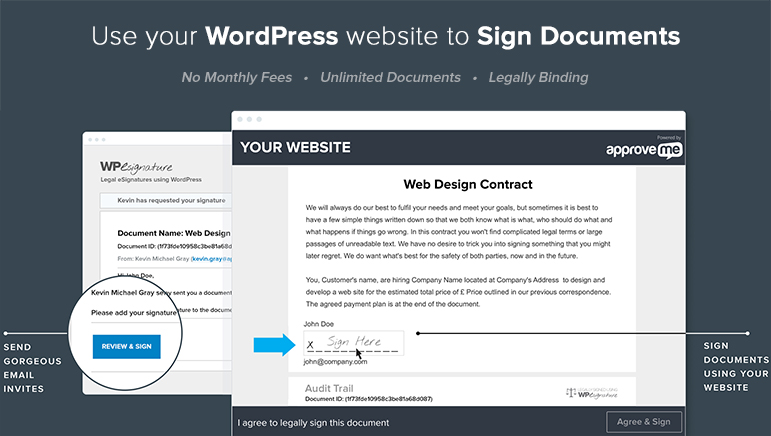 BUILT FOR SMALL BUSINESSES, FREELANCERS AND WEB DESIGN AGENCIES
At ApproveMe, we create no-hassle plugins that work right within your WordPress dashboard.
We keep our products drop-dead simple to use… and back them up with below-the-hood sophistication that keeps your information secure.
Here’s what we’ve done to make sure WP e-Signature upholds the ApproveMe values:
No Monthly Payments, Ever (Save Yourself Four Figures a Year, with Unlimited Documents and Signers)
Pay for the plugin once and then for an optional license renewal once a year. No surprises.
Most enterprise software charges you not only big monthly fees, but multiply that by user. The math speaks for itself…
BUILT FOR SMALL BUSINESSES, FREELANCERS AND WEB DESIGN AGENCIES
At ApproveMe, we create no-hassle plugins that work right within your WordPress dashboard.
We keep our products drop-dead simple to use… and back them up with below-the-hood sophistication that keeps your information secure.
Here’s what we’ve done to make sure WP e-Signature upholds the ApproveMe values:
No Monthly Payments, Ever (Save Yourself Four Figures a Year, with Unlimited Documents and Signers)
Pay for the plugin once and then for an optional license renewal once a year. No surprises.
Most enterprise software charges you not only big monthly fees, but multiply that by user. The math speaks for itself…
 WP eSignature is a powerful eSignature WordPress plugin that makes it easy to send, track, and eSign contracts online using your website (not somebody else’s). No Monthly Fees. Send Unlimited Documents. UETA/ESIGN Compliant. Try a free demo today!
Average Rating: 2.6/5.0
Total Reviews: 11
AI-generated summary from verified user reviews
"Great for WordPress Site management of e-signatures."
Rating: 4.5/5.0 stars
— Nancy S.
"Great automated online contract signing"
Rating: 5.0/5.0 stars
— Dawson B.
MyDocSafe is a secure client and employee onboarding platform for all size of business. We empower companies to design, deploy and manage bespoke onboarding and hiring processes that combine secure e-forms, identity verification, electronic signature and payment processing. We save more than 50% of time and cost of those processes while improving service quality.
Average Rating: 3.9/5.0
Total Reviews: 15
Rating: 5.0/5.0 stars
— Pawel r.
Rating: 4.5/5.0 stars
— ahmedi b.
Prime Document Sign is web-based e-signature software for freelancers, agencies, and small businesses that need to send agreements and collect signatures online without printing, scanning, or faxing. It is operated by PrimeSquad and built on Google Firebase and Google Cloud: sessions use HTTPS (TLS), and data is stored on Google-managed services with encryption at rest consistent with Google Cloud’s standard protections. Senders authenticate with Firebase Authentication; Firestore security rules scope each customer’s documents, templates, and email activity to their own account. The workflow is intentionally straightforward: compose agreement text or work from PDFs on eligible plans, use starter templates where available, place signature and field blocks, email a unique signing link (or copy the link), optionally schedule reminder emails on supported plans, and download a signed PDF after completion. Recipients can sign in the browser on desktop or mobile without creating an account unless you enable stricter recipient verification on supported tiers (options such as email confirmation or one-time passcode–style checks where available). When signing completes, Prime Document Sign stores completion records for the document owner, sends confirmation notifications, and retains audit-friendly metadata such as signing timestamp, IP address when obtainable from the client, browser user agent, device timezone, and a SHA-256 fingerprint computed from a canonical string of the agreement content and captured signer field values. That combination supports everyday evidence of who agreed and when. Signed PDFs are produced by rendering the agreement and signing capture into a portable document; they are suitable for many routine B2B and B2C contracts, but they are not EU qualified electronic signatures (QES), embedded PAdES/PDF digital signatures, or a substitute for legal advice. Requirements for regulated industries, specific countries, or high-assurance identity should be validated with qualified counsel. Privacy Policy and Terms of Service describe how personal data is handled, limitations of retention and availability, and user responsibilities including downloading and retaining signed documents within the timeframes described in those terms. Regulated organisations should complete their own compliance review. Published FAQ content on primedocumentsign.com explains how electronic signatures differ by region and when to choose specialised vendors. Pricing is published (from $2/month) with a free first send where offered and pay-per-send options for occasional users. Prime Document Sign focuses on honest positioning: practical signing, verifiable completion details, infrastructure-backed security, and clear published policies, so teams get a credible, affordable alternative to heavyweight enterprise suites without overclaiming formal attestations (such as SOC 2 or ISO 27001 reports) or guaranteed legal outcomes in every jurisdiction.
Average Rating: 5.0/5.0
Total Reviews: 15
"Streamlines Document Signing with Ease"
Rating: 5.0/5.0 stars
— Abdul A.
"Fast and Affordable E-Signature Solution"
Rating: 5.0/5.0 stars
— Sayma F.
CocoDoc is a cutting-edge online PDF editor. Our interactive interface makes it easier for users to utilize the different tools and features available, therefore increasing efficiency and chopping off time. With our secure gateways, users can enjoy the peace of mind that their documents are safe and private.
Average Rating: 4.8/5.0
Total Reviews: 14
AI-generated summary from verified user reviews
"User-Friendly PDF Editor with Powerful Organizing, Conversion, and E-Sign Tools"
Rating: 4.5/5.0 stars
— Konjengbam M.
"It's easy to convert and organize document files with CocoDoc"
Rating: 5.0/5.0 stars
— Verified User in Marketing and Advertising
GleanQuote CPQ helps complex product manufacturers and sellers that have configuration, pricing and proposal generation challenges. Our CPQ software is easy to implement and even easier to use and integrates seamlessly with the most popular CRMs. Your team will be able to create, send and close even the most complex quotes and proposals in minutes. Everything that goes out to your customer will be compelling, accurate, mistake-proofed and management-approved. Sales and margins will go up. Wasted time and mistakes will go down.
Average Rating: 4.6/5.0
Total Reviews: 17
AI-generated summary from verified user reviews
Rating: 4.5/5.0 stars
— Verified User in Telecommunications
"Excellent Visibility and Margin Tracking for Quoting"
Rating: 5.0/5.0 stars
— Cesar a.
PDCflow is an esignature, digital communication and payment platform that empowers businesses to collect esignatures, securely manage document workflows, and streamline payments. Combine signature capture with payment processing to send contracts, manage payments, and simplify sending compliance documents. The flexible templates make it easier for companies to reduce follow-up time and boost cash flow. With an omni-channel approach, robust security features, and customizable workflows, PDCflow supports all types of small businesses to enhance customer experiences and operational efficiency.
Average Rating: 4.5/5.0
Total Reviews: 65
AI-generated summary from verified user reviews
Rating: 4.0/5.0 stars
— Kelsey W.
"Fast payment and e-sign solution"
Rating: 5.0/5.0 stars
— Atul B.