Best Data Visualization Tools - Page 8

How Many Data Visualization Tools Products Does G2 Track?

Total Products under this Category: 759

Category Stats (Nov 2026)

  • Average Rating: 4.44/5 The average rating of products in this category, based on all submitted ratings
  • Top Trending Product: Upsolve AI (+1.75%) - Among all products in this category, Upsolve AI recorded the largest rating increase compared to last month

Last updated: November 01, 2026

How Does G2 Rank Data Visualization Tools Products?

Why You Can Trust G2's Software Rankings:

  • 30 Analysts and Data Experts
  • 41,800+ Authentic Reviews
  • 759+ Products
  • Unbiased Rankings

G2's software rankings are built on verified user reviews, rigorous moderation, and a consistent research methodology maintained by a team of analysts and data experts. Each product is measured using the same transparent criteria, with no paid placement or vendor influence. While reviews reflect real user experiences, which can be subjective, they offer valuable insight into how software performs in the hands of professionals. Together, these inputs power the G2 Score, a standardized way to compare tools within every category.

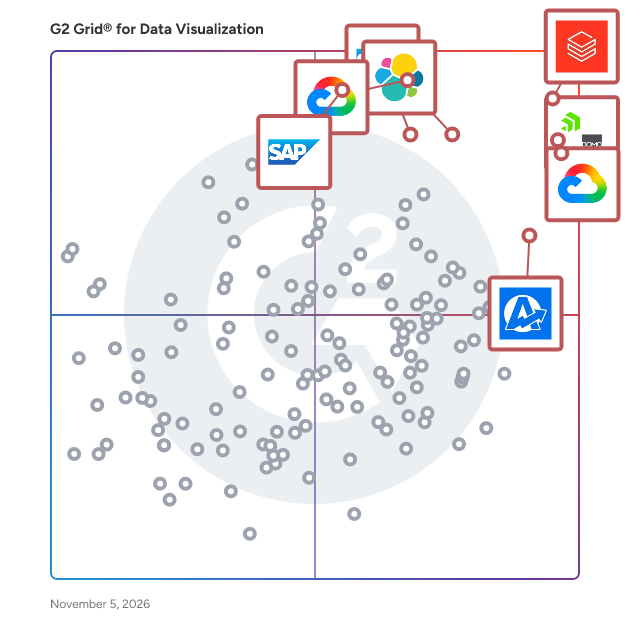
G2 Grid® for Data Visualization Tools

G2 Grid® for Data Visualization Tools plotting products by satisfaction and market presence

Highlighted products: Databricks, Domo, Looker, Data Studio, Elastic Stack, AgencyAnalytics, SAP HANA Cloud, and SAP Analytics Cloud.

Underlying data: [Grid® JSON](https://www.g2.com/categories/data-visualization-tools/grids.json?focus%5B%5D=databricks&focus%5B%5D=domo&focus%5B%5D=looker&focus%5B%5D=data-studio&focus%5B%5D=elastic-stack&focus%5B%5D=agencyanalytics&focus%5B%5D=sap-hana-cloud-2025-10-01&focus%5B%5D=sap-analytics-cloud)

DataLion

DataLion is a web-based software that takes data-driven decisions in your company to the next level. Whether you’re working with marketing, HR, consumer or finance data, DataLion enables you to create powerful interactive dashboards within minutes. To make working with data simple, we have developed AI algorithms to understand and analyze your data. No more emailing of xls. files. Just set up your data workflow in DataLion, create your reports per drag & drop, and boost your creativity with hundreds of visualization widgets. You can export presentations with embedded data, using your own template. The award-winning DataLion software is already used by a large number of companies from retail, telecoms, finance and automotive.

Average Rating: 4.5/5.0

Total Reviews: 16

How Do G2 Users Rate DataLion?

  • Has the product been a good partner in doing business?: 9.6/10 (Category avg: 9.0/10)
  • Dashboards: 9.0/10 (Category avg: 9.0/10)
  • Steps to Answer: 9.2/10 (Category avg: 8.6/10)
  • Formats: 8.9/10 (Category avg: 8.6/10)

Who Is the Company Behind DataLion?

  • Seller: DataLion
  • Year Founded: 2014
  • HQ Location: Munich, Bavaria
  • LinkedIn® Page: www.linkedin.com
    3 employees on LinkedIn®

Who Uses This Product?

  • Top Industries: Market Research
  • Company Size: 56% Small, 44% Medium

What Do G2 Reviewers Say About DataLion?

AI-generated summary from verified user reviews

Pros
  • Users commend the excellent customer support of DataLion, highlighting real people dedicated to assisting them effectively.
  • Users value the ease of use of DataLion, highlighting its straightforward design and excellent support team.

What Are Recent G2 Reviews of DataLion?

What Are G2 Users Discussing About DataLion?

Calculator Studio

Calculator Studio lets you create and publish interactive website calculators using familiar spreadsheet logic. There's no need to code—just build using the skills you already have! Simply connect your existing spreadsheets or create from scratch, and turn your data into stylish, functional tools that engage your audience. Whether it's helping users explore pricing models or showing savings or ROI calculations, Calculator Studio makes it easy. You can also integrate these calculators into your lead-generation process, capture user inputs, and send the results to your CRM. Empower your audience with smart tools that educate and drive conversions.

Average Rating: 4.6/5.0

Total Reviews: 15

How Do G2 Users Rate Calculator Studio?

  • Has the product been a good partner in doing business?: 8.9/10 (Category avg: 9.0/10)
  • Dashboards: 8.7/10 (Category avg: 9.0/10)
  • Steps to Answer: 9.3/10 (Category avg: 8.6/10)
  • Formats: 7.8/10 (Category avg: 8.6/10)

Who Is the Company Behind Calculator Studio?

Who Uses This Product?

  • Company Size: 47% Small, 40% Medium

What Do G2 Reviewers Say About Calculator Studio?

AI-generated summary from verified user reviews

Pros
  • Users love the ease of use of Calculator Studio, making complex calculations accessible for everyone.
  • Users love the ease of use of Calculator Studio, allowing quick access to a variety of calculation tools.
  • Users love the simplicity of Calculator Studio, finding it easy to use with various functionality integrated seamlessly.
  • Users love the speed and accuracy of Calculator Studio, making calculations quick and effortless across all devices.
  • Users value the time-saving capabilities of Calculator Studio, allowing for quick and efficient calculations across various needs.
Cons
  • Users find the steep learning curve for advanced features challenging, particularly those without a data background.
  • Users find the complex setup of Calculator Studio daunting, particularly regarding advanced calculation menus for beginners.
  • Users find the difficult navigation in Calculator Studio intimidating, especially for those new to the software.
  • Users find the difficult setup challenging, especially those not familiar with software installation.
  • Users find the installation challenging, especially those without a software background, despite the product's overall quality.

What Are Recent G2 Reviews of Calculator Studio?

amCharts

amCharts is a set of programming libraries and tools for all your data visualization needs on the web. amCharts JavaScript product lineup includes classic charts like Line, Area, Column, Bar, Pie, XY, Scatter, Candlestick and OHLC as well as more “exotic” ones like Gauges, Funnels, GANTT, Stock Chart to display large amounts of financial and other date-based data, and fully interactive adaptive world or local country maps. Fully functional products are available for free (with a small backlink) for any type of use, as well as in paid commercial form for all kinds of usage scenarios.

Average Rating: 4.4/5.0

Total Reviews: 13

How Do G2 Users Rate amCharts?

  • Has the product been a good partner in doing business?: 8.8/10 (Category avg: 9.0/10)
  • Dashboards: 10.0/10 (Category avg: 9.0/10)
  • Steps to Answer: 8.3/10 (Category avg: 8.6/10)
  • Formats: 9.2/10 (Category avg: 8.6/10)

Who Is the Company Behind amCharts?

  • Seller: amCharts
  • Year Founded: 2007
  • HQ Location: Vilnius, Lithuania
  • LinkedIn® Page: www.linkedin.com
    1 employees on LinkedIn®

Who Uses This Product?

  • Company Size: 54% Small, 31% Medium

What Are Recent G2 Reviews of amCharts?

What Are G2 Users Discussing About amCharts?

AI can help you find the answers. G2 helps you trust them.

Connect G2 to Claude or ChatGPT for answers grounded in G2's trusted reviews, comparisons, and pricing from real user insights.

How it works

NVivo

NVivo is the leading qualitative and mixed-methods analysis solution, available in two offerings: NVivo AI Cloud is the new AI-native, cloud-based solution powered by AURA (AI Unified Research Assistant). It guides researchers through project setup, literature search, AI-assisted coding, and grounded analysis—weaving AI assistance into the core workflow from the start. Every AI-generated insight includes a transparent audit trail linking back to source data with human approval gates, ensuring findings are defensible and withstand peer review. NVivo Desktop has supported scholars, teams, and institutions across social sciences, education, health, and public policy for over 30 years. It enables researchers to organize and interpret interviews, focus groups, and surveys; compare findings across cases and themes; and visualize results. Both offerings turn unstructured data into evidence-based insights through unified coding, querying, and analysis capabilities. The most cited QDA software in academic publications worldwide (Scopus, 2010–2025), NVivo gives researchers the rigor required for publications, evaluations, and grant proposals.

Average Rating: 4.0/5.0

Total Reviews: 142

How Do G2 Users Rate NVivo?

  • Has the product been a good partner in doing business?: 7.4/10 (Category avg: 9.0/10)
  • Dashboards: 5.6/10 (Category avg: 9.0/10)
  • Steps to Answer: 7.0/10 (Category avg: 8.6/10)
  • Formats: 5.6/10 (Category avg: 8.6/10)

Who Is the Company Behind NVivo?

  • Seller: Lumivero
  • Company Website:
  • Year Founded: 1995
  • HQ Location: Denver, CO
  • LinkedIn® Page: www.linkedin.com
    296 employees on LinkedIn®

Who Uses This Product?

  • Who Uses This: Research Assistant, Student
  • Top Industries: Higher Education, Research
  • Company Size: 47% Small, 33% Large

What Do G2 Reviewers Say About NVivo?

AI-generated summary from verified user reviews

Pros
  • Users find NVivo to be an easy-to-use and efficient system, greatly enhancing qualitative research organization and analysis.
  • Users commend NVivo for its efficiency improvements, facilitating seamless organization and analysis of qualitative research data.
  • Users commend NVivo for its seamless organization and analysis features, which elevate the quality of qualitative research.
  • Users appreciate the analysis accuracy of NVivo, which significantly enhances the depth and clarity of research outcomes.
  • Users appreciate the insightful analytics from NVivo, enhancing their qualitative research with visual and organizational tools.
Cons
  • Users find NVivo to be not user-friendly, citing a confusing interface and frustrating collaborative workflows.
  • Users report significant frustration with NVivo's poor customer support, citing slow responses and lack of timely assistance.
  • Users often experience slow performance with NVivo, leading to frustration and hindering research productivity.
  • Users face significant compatibility issues between Windows and iOS versions, complicating collaboration and user experience.
  • Users find NVivo's interface navigation confusing, complicating the usability and overall effectiveness of the research tool.

What Are Recent G2 Reviews of NVivo?

What Are G2 Users Discussing About NVivo?

Oracle Business Intelligence Mobile

The only mobile app that gives you a full range of BI functionally, from interactive dashboards to location intelligence, and lets you initiate business processes right from your mobile device.

Average Rating: 3.3/5.0

Total Reviews: 11

How Do G2 Users Rate Oracle Business Intelligence Mobile?

  • Has the product been a good partner in doing business?: 6.7/10 (Category avg: 9.0/10)

Who Is the Company Behind Oracle Business Intelligence Mobile?

  • Seller: Oracle
  • Year Founded: 1977
  • HQ Location: Austin, TX
  • LinkedIn® Page: www.linkedin.com
    207,576 employees on LinkedIn®
  • Ownership: NYSE:ORCL
  • Phone: +1 (650) 506-7000

Who Uses This Product?

  • Company Size: 55% Large, 36% Medium

What Are Recent G2 Reviews of Oracle Business Intelligence Mobile?

CentriQS

CentriQS offers small business management software and custom database solutions for small and medium enterprise businesses. Centralize all the data across your entire company.

Average Rating: 3.7/5.0

Total Reviews: 11

How Do G2 Users Rate CentriQS?

  • Has the product been a good partner in doing business?: 10.0/10 (Category avg: 9.0/10)
  • Dashboards: 8.1/10 (Category avg: 9.0/10)
  • Steps to Answer: 8.0/10 (Category avg: 8.6/10)
  • Formats: 8.5/10 (Category avg: 8.6/10)

Who Is the Company Behind CentriQS?

Who Uses This Product?

  • Company Size: 55% Small, 27% Medium

What Are Recent G2 Reviews of CentriQS?

Supersimple

Supersimple is an AI-native business intelligence platform that answers questions using both your data and your company's knowledge: metrics, tables, and documents, all at once. It connects to your data warehouse, data and code context (dbt, GitHub) and to the tools where your knowledge lives (Slack, Notion, Google Drive, Confluence, and more). Every answer is grounded with citations and no-code steps, instead of difficult-to-read code & queries. Governed semantic data models create a single source of truth, while ensuring flexible and reliable self-service.

Average Rating: 4.4/5.0

Total Reviews: 15

How Do G2 Users Rate Supersimple?

  • Has the product been a good partner in doing business?: 8.3/10 (Category avg: 9.0/10)
  • Dashboards: 9.4/10 (Category avg: 9.0/10)
  • Steps to Answer: 8.8/10 (Category avg: 8.6/10)
  • Formats: 9.1/10 (Category avg: 8.6/10)

Who Is the Company Behind Supersimple?

Who Uses This Product?

  • Company Size: 73% Small, 20% Medium

What Do G2 Reviewers Say About Supersimple?

AI-generated summary from verified user reviews

Pros
  • Users find Supersimple exceptionally easy to use, highlighting its amazing features and user-friendly design.
  • Users love the ease of use of Supersimple, praising its amazing features that enhance their experience.
  • Users find it easy to create insightful dashboards with Supersimple's intuitive tools, enhancing data visualization and analysis.
  • Users highlight the seamless AI integration of Supersimple, enhancing analytics and usability for effortless management.
  • Users value the easy implementation of Supersimple, enhancing usability and integration for frequent use.
Cons
  • Users find the pricing too high, particularly challenging for startups, affecting overall value perception.
  • Users feel the product is expensive, making it challenging for startups to adopt it early on.
  • Users find the learning curve somewhat demanding, especially for those without prior experience in data analysis tools.
  • Users find the initial setup and learning difficulty of Supersimple somewhat demanding, especially for beginners.
  • Users feel limited by the restricted functionality of the Pro version, reducing the overall usability of Supersimple.

What Are Recent G2 Reviews of Supersimple?

Node

Discover our innovative approach to the cloud, designed to deliver an optimal online business management experience. Our secure, scalable, and powerful platform gives you real-time access to your data and management tools, wherever you are and on all your devices. Redefine the limits of collaborative work.

Average Rating: 4.2/5.0

Total Reviews: 27

How Do G2 Users Rate Node?

  • Has the product been a good partner in doing business?: 8.0/10 (Category avg: 9.0/10)
  • Dashboards: 8.8/10 (Category avg: 9.0/10)
  • Steps to Answer: 8.1/10 (Category avg: 8.6/10)
  • Formats: 8.4/10 (Category avg: 8.6/10)

Who Is the Company Behind Node?

Who Uses This Product?

  • Top Industries: Computer Software
  • Company Size: 41% Small, 30% Large

What Are Recent G2 Reviews of Node?

Colabo

Colabo is a sales acceleration platform that harnesses next-generation engagement channels like LinkedIn, Twitter and Meetup for prospecting and engaging new leads. Sales Representatives can create customized messages that resonate, and achieve increased response rates. Sales Teams have access to live accurate data and the ability to engage with prospects through modern channels and Sales Team Managers have a view into their teams social prospecting activities.

Average Rating: 4.5/5.0

Total Reviews: 15

How Do G2 Users Rate Colabo?

  • Has the product been a good partner in doing business?: 9.2/10 (Category avg: 9.0/10)
  • Dashboards: 10.0/10 (Category avg: 9.0/10)
  • Steps to Answer: 10.0/10 (Category avg: 8.6/10)
  • Formats: 10.0/10 (Category avg: 8.6/10)

Who Is the Company Behind Colabo?

  • Seller: Colabo
  • Year Founded: 2010
  • HQ Location: San Carlos, California
  • LinkedIn® Page: www.linkedin.com
    10 employees on LinkedIn®

Who Uses This Product?

  • Top Industries: Computer Software
  • Company Size: 40% Small, 33% Large

What Are Recent G2 Reviews of Colabo?

What Are G2 Users Discussing About Colabo?

Data Display Debugger

GNU DDD is a graphical front-end for command-line debuggers such as GDB, DBX, WDB, Ladebug, JDB, XDB, the Perl debugger, the bash debugger bashdb, the GNU Make debugger remake, or the Python debugger pydb. Besides ``usual'' front-end features such as viewing source texts, DDD has become famous through its interactive graphical data display, where data structures are displayed as graphs.

Average Rating: 4.0/5.0

Total Reviews: 11

How Do G2 Users Rate Data Display Debugger?

  • Has the product been a good partner in doing business?: 7.5/10 (Category avg: 9.0/10)
  • Dashboards: 7.9/10 (Category avg: 9.0/10)
  • Steps to Answer: 8.3/10 (Category avg: 8.6/10)
  • Formats: 8.3/10 (Category avg: 8.6/10)

Who Is the Company Behind Data Display Debugger?

Who Uses This Product?

  • Company Size: 58% Small, 25% Large

What Are Recent G2 Reviews of Data Display Debugger?

What Are G2 Users Discussing About Data Display Debugger?

Sourcetable — AI spreadsheet & data analyst

Sourcetable is an AI spreadsheet and data platform that helps you do better, faster work. It's great for analyzing files, cleaning or enriching data, research, data visualizations, reporting, business intelligence, and much more. Sourcetable is a new kind of spreadsheet with all the same formulas and functions as Excel or Google sheets, as well as data connections to 100+ databases and applications, and helps you pair with the latest AI models to become more productive and data driven.

Average Rating: 4.5/5.0

Total Reviews: 11

How Do G2 Users Rate Sourcetable — AI spreadsheet & data analyst?

  • Has the product been a good partner in doing business?: 10.0/10 (Category avg: 9.0/10)

Who Is the Company Behind Sourcetable — AI spreadsheet & data analyst?

Who Uses This Product?

  • Company Size: 58% Medium, 25% Small

What Do G2 Reviewers Say About Sourcetable — AI spreadsheet & data analyst?

AI-generated summary from verified user reviews

Pros
  • Users find Sourcetable's ease of use remarkable, allowing for intuitive data organization and visualization without technical expertise.
  • Users appreciate the user-friendly interface of Sourcetable, enabling effortless data organization, analysis, and visualization.
  • Users love the powerful data visualization features of Sourcetable, enabling easy chart creation and insightful analysis.
  • Users love the AI capabilities of Sourcetable, enhancing data analysis and visualization effortlessly.
  • Users love the real-time collaboration feature of Sourcetable, enabling easy data analysis and visualization without technical skills.
Cons
  • Users find the limited customization options of Sourcetable restrict their ability to tailor the software to their needs.
  • Users note the limited features in the starter plan, feeling a lack of advanced customization options for their needs.
  • Users find limited flexibility in customization and advanced features, impacting their ability to analyze complex data effectively.
  • Users find the limited customization options in Sourcetable's visualizations to be a drawback in their experience.
  • Users find feeding dynamic data challenging, which complicates the overall experience with Sourcetable.

What Are Recent G2 Reviews of Sourcetable — AI spreadsheet & data analyst?

Powerslide

Simplify the analysis and communication of your data, with a simple, interactive and efficient platform. Both intuitive and design, thanks to Powerslide, you can create your KPIs and data visualization in just a few clicks to stage them through a report, a dashboard, or an infographic to make them easier to understand. Powerslide is a: - An intuitive interface designed for business - A wide choice of data visualisations - A collaborative mode - Automated updates - Several connectors: CSV, Excel, Denodo, Snowflake, Google Sheets, API Rest, Zapier, Oracle, SQL Server, PostgreSQL, MySQL, Clickhouse…

Average Rating: 4.6/5.0

Total Reviews: 26

How Do G2 Users Rate Powerslide?

  • Has the product been a good partner in doing business?: 8.6/10 (Category avg: 9.0/10)
  • Dashboards: 8.7/10 (Category avg: 9.0/10)
  • Steps to Answer: 8.8/10 (Category avg: 8.6/10)
  • Formats: 8.3/10 (Category avg: 8.6/10)

Who Is the Company Behind Powerslide?

  • Seller: Datarocks
  • Year Founded: 2014
  • HQ Location: Saint-Denis, RE
  • LinkedIn® Page: www.linkedin.com
    1 employees on LinkedIn®

Who Uses This Product?

  • Top Industries: Marketing and Advertising
  • Company Size: 44% Medium, 37% Small

What Are Recent G2 Reviews of Powerslide?

What Are G2 Users Discussing About Powerslide?

Displayr

Displayr is an all-in-one analysis and reporting software designed to help market researchers quickly find and share powerful data stories. 1. Quicker project completion. 2. Handle tasks in-house that you'd typically outsource. 3. Simplified generation of engaging, auto-updating reports and dashboards. 4. Enhanced quality control. With Displayr, you have a singular platform for analysis, visualization, reporting, and dashboarding. Whether it's MaxDiff, Conjoint, Market Segmentation, Customer Feedback, Brand Research, or advanced features like auto-updating, interactive dashboards, and cutting-edge machine learning and text coding, Displayr has it all.

Average Rating: 4.2/5.0

Total Reviews: 11

How Do G2 Users Rate Displayr?

  • Has the product been a good partner in doing business?: 10.0/10 (Category avg: 9.0/10)
  • Dashboards: 8.3/10 (Category avg: 9.0/10)
  • Steps to Answer: 7.8/10 (Category avg: 8.6/10)
  • Formats: 7.6/10 (Category avg: 8.6/10)

Who Is the Company Behind Displayr?

Who Uses This Product?

  • Company Size: 55% Small, 27% Medium

What Are Recent G2 Reviews of Displayr?

What Are G2 Users Discussing About Displayr?

Blastpoint

Acquire more customers within your service area and make smarter data-driven site selection decisions for optimal market penetration. Increase sales by finding and targeting potential customers that fit your ideal profile. Heatmap any number of custom factors to find optimal markets for your brand. Generate comparative reports for any territories easily and in seconds.

Average Rating: 4.5/5.0

Total Reviews: 12

How Do G2 Users Rate Blastpoint?

  • Has the product been a good partner in doing business?: 10.0/10 (Category avg: 9.0/10)
  • Dashboards: 9.4/10 (Category avg: 9.0/10)
  • Steps to Answer: 8.1/10 (Category avg: 8.6/10)
  • Formats: 8.8/10 (Category avg: 8.6/10)

Who Is the Company Behind Blastpoint?

  • Seller: BlastPoint
  • Year Founded: 2016
  • HQ Location: Pittsburgh, Pennsylvania
  • LinkedIn® Page: www.linkedin.com
    67 employees on LinkedIn®

Who Uses This Product?

  • Company Size: 58% Medium, 33% Small

What Do G2 Reviewers Say About Blastpoint?

AI-generated summary from verified user reviews

Pros
  • Users appreciate the helpful customer support of Blastpoint, making it accessible for everyone regardless of expertise.
  • Users appreciate the ease of use of BlastPoint, allowing quick engagement even without data expertise.
  • Users appreciate the flexibility of Blastpoint, allowing both novices and experts to utilize its powerful features effectively.
  • Users appreciate the balance of simplicity and power in Blastpoint, making data accessible while offering advanced features.
  • Users value the time-saving features of BlastPoint, enabling quick access to powerful insights without data expertise.
Cons
  • Users find BlastPoint to be relatively expensive, particularly challenging for smaller businesses or startups with tight budgets.

What Are Recent G2 Reviews of Blastpoint?

Custom Charts for Jira and Confluence Reporting

Customised Jira Reporting A consistent display makes at a glance data visualization with Jira reports easy. Want your RAG status charts to actually be red, amber, and green? Choose the colors you need for every segment of your Jira reports. Reorder your reports however makes sense to you. Merge and hide segments with a simple click and drag interface to make the charts you need. Whether you’re keeping on brand or supporting your colorblind teammate, everyone can now easily make great looking Jira Reports with a few simple clicks (no coding, nor training required). Powerful Jira Dashboard Gadgets Use saved filters, standard or advanced custom Jira Query Language (JQL), or the simple click and drag interface to make the charts you need. ​ Custom Tables, Pie Charts, Bar Charts​ and 2-Dimensional Stacked and Grouped Charts work with all the standard and custom fields in your Jira (including Status, Priority, and Assignee). Chart by Issues, Story Points, and Time Estimated, Remaining or Spent, as well as any calculated scripted number fields. Real-Time Jira Visualization Get immediate updates with real-time data reporting on Jira Dashboards or Confluence Pages. Avoid exporting data to third-party servers, and avoid another silo by letting everyone work and share real-time updates in the tools they’re already working in. Custom Charts for Jira and Confluence Reports is powerful and easy enough for everyone to want to use. Make Jira the reporting dashboard for every team.

Average Rating: 4.5/5.0

Total Reviews: 13

How Do G2 Users Rate Custom Charts for Jira and Confluence Reporting?

  • Has the product been a good partner in doing business?: 10.0/10 (Category avg: 9.0/10)
  • Dashboards: 8.1/10 (Category avg: 9.0/10)
  • Steps to Answer: 7.1/10 (Category avg: 8.6/10)
  • Formats: 7.9/10 (Category avg: 8.6/10)

Who Is the Company Behind Custom Charts for Jira and Confluence Reporting?

Who Uses This Product?

  • Company Size: 46% Small, 31% Large

What Are Recent G2 Reviews of Custom Charts for Jira and Confluence Reporting?

Bijou Barry
BB
Researched and written by Bijou Barry
Updated June 24, 2026