Best Data Visualization Tools for Small Business - Page 2

How Many Data Visualization Tools Products Does G2 Track?

Total Products under this Category: 697

Category Stats (Nov 2026)

  • Average Rating: 4.44/5 The average rating of products in this category, based on all submitted ratings
  • Top Trending Product: Upsolve AI (+1.75%) - Among all products in this category, Upsolve AI recorded the largest rating increase compared to last month

Last updated: November 01, 2026

How Does G2 Rank Data Visualization Tools Products?

Why You Can Trust G2's Software Rankings:

  • 30 Analysts and Data Experts
  • 20,400+ Authentic Reviews
  • 697+ Products
  • Unbiased Rankings

G2's software rankings are built on verified user reviews, rigorous moderation, and a consistent research methodology maintained by a team of analysts and data experts. Each product is measured using the same transparent criteria, with no paid placement or vendor influence. While reviews reflect real user experiences, which can be subjective, they offer valuable insight into how software performs in the hands of professionals. Together, these inputs power the G2 Score, a standardized way to compare tools within every category.

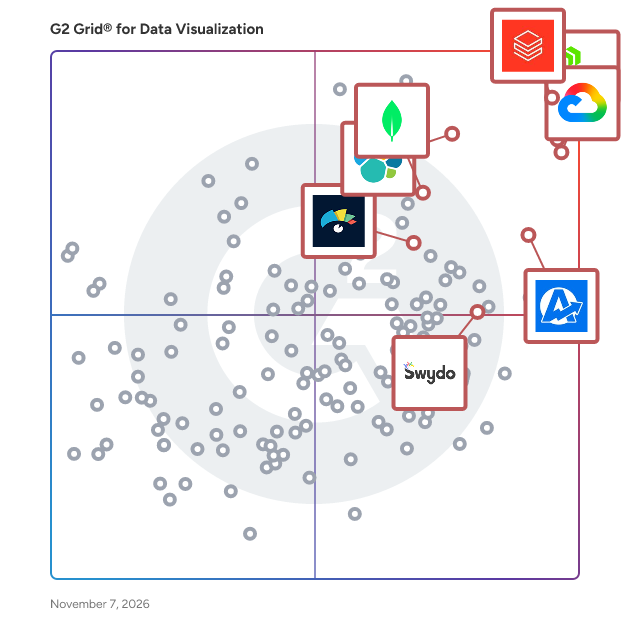
G2 Grid® for Data Visualization Tools

G2 Grid® for Data Visualization Tools plotting products by satisfaction and market presence

Highlighted products: Looker, AgencyAnalytics, Databricks, MongoDB Atlas, Visme, Domo, Elastic Stack, and Swydo.

Underlying data: [Grid® JSON](https://www.g2.com/categories/data-visualization-tools/grids.json?focus%5B%5D=looker&focus%5B%5D=agencyanalytics&focus%5B%5D=databricks&focus%5B%5D=mongodb-atlas&focus%5B%5D=visme&focus%5B%5D=domo&focus%5B%5D=elastic-stack&focus%5B%5D=swydo&segment=small-business)

SAP Crystal Reports

SAP Crystal Reports software is the worldwide de facto standard in desktop reporting. With SAP Crystal Reports, you can create powerful, richly formatted, dynamic reports from virtually any data source – delivered in dozens of formats, in up to 24 languages. A robust production reporting tool, SAP Crystal Reports turns almost any data source into interactive, actionable information that can be accessed offline or online, from applications, portals and mobile devices. SAP Crystal Server enables self-service access to reports, dashboards, and data exploration within a secure infrastructure.

Average Rating: 4.2/5.0

Total Reviews: 202

How Do G2 Users Rate SAP Crystal Reports?

  • Has the product been a good partner in doing business?: 7.8/10 (Category avg: 9.0/10)
  • Dashboards: 8.6/10 (Category avg: 9.0/10)
  • Steps to Answer: 8.3/10 (Category avg: 8.6/10)
  • Formats: 8.1/10 (Category avg: 8.6/10)

Who Is the Company Behind SAP Crystal Reports?

  • Seller: SAP
  • Year Founded: 1972
  • HQ Location: Walldorf
  • LinkedIn® Page: www.linkedin.com
    149,349 employees on LinkedIn®
  • Ownership: NYSE:SAP
  • Phone: +1 (800) 872-1727

Who Uses This Product?

  • Who Uses This: President
  • Top Industries: Information Technology and Services, Computer Software
  • Company Size: 39% Medium, 33% Large

What Do G2 Reviewers Say About SAP Crystal Reports?

AI-generated summary from verified user reviews

Pros
  • Users value the clear and interactive data visualizations of SAP Crystal Reports, enhancing their reporting experience significantly.
  • Users value the ease of use of SAP Crystal Reports, enjoying clear, interactive reports with a friendly GUI.
  • Users value the easy integrations of SAP Crystal Reports, allowing access to multiple databases seamlessly.
  • Users value the endless reporting capabilities and numerous integrations of SAP Crystal Reports for diverse needs.
  • Users find the intuitive design of SAP Crystal Reports enhances their reporting experience across multiple databases.
Cons
  • Users face compatibility issues with version requirements and platform limitations, complicating the deployment process of SAP Crystal Reports.
  • Users find the software has a steep learning curve, requiring additional training to master its features.
  • Users find SAP Crystal Reports to have a learning difficulty, requiring additional training for effective use.
  • Users find the limited customization in SAP Crystal Reports restricts their ability to modify and personalize reports effectively.
  • Users find the limited options of SAP Crystal Reports restrict their ability to customize and edit reports effectively.

What Are Recent G2 Reviews of SAP Crystal Reports?

What Are G2 Users Discussing About SAP Crystal Reports?

Prodoscore

Prodoscore™ is a workforce intelligence platform that gives organizations accurate, objective visibility into employee productivity and team performance. By analyzing daily activity data across the business applications employees already use, Prodoscore generates a single, comprehensive productivity score that reflects real work output rather than time spent online. The result is a dataset that helps leaders coach more effectively, allocate resources with confidence, and build a culture grounded in visibility and trust. Prodoscore is designed for businesses of all sizes, with particular value for HR leaders, operations executives, and front-line managers who need to understand workforce performance across distributed or hybrid teams. The platform is especially relevant for organizations that rely on remote workforce management and need reliable productivity analytics to inform staffing, performance reviews, and workforce planning. A core component of the Prodoscore platform is its integration ecosystem. Prodoscore connects with Google Workspace, Microsoft 365, CRM systems, UCaaS platforms, and other cloud-based business tools through secure, API-based data collection. For organizations with employees who work primarily on desktop applications or in offline environments, Desktop Connect extends that same productivity visibility to non-cloud workflows, capturing activity data from locally installed software and ensuring no part of the workforce is left out of the picture. This makes Prodoscore one of the few workforce analytics solutions capable of delivering complete coverage across both cloud and desktop environments. ProdoAI Chat adds a conversational intelligence layer to the platform, enabling managers and HR leaders to query workforce data in natural language. Rather than running manual reports or waiting on analyst support, leaders can ask direct questions about team performance, productivity trends, or individual coaching opportunities and receive immediate, AI-generated insights drawn from real-time data. This combination of automated scoring and conversational AI analytics positions Prodoscore as a forward-looking solution for organizations investing in AI-powered HR technology. Setup takes less than 15 minutes and requires no changes to how employees work. The platform is designed to be transparent and unobtrusive, with deployment that does not impact end users. Organizations can begin seeing meaningful workforce intelligence almost immediately after installation, making Prodoscore a practical option for businesses that want fast time-to-value without a complex implementation process. Prodoscore provides a measurable, employee-centric approach to workforce performance that prioritizes coaching over surveillance and clarity over assumption. For organizations looking to get more from their people analytics investment, it delivers the visibility, data integrity, and AI-driven insight needed to make better workforce decisions every day.

Average Rating: 4.6/5.0

Total Reviews: 68

How Do G2 Users Rate Prodoscore?

  • Has the product been a good partner in doing business?: 9.7/10 (Category avg: 9.0/10)
  • Dashboards: 9.1/10 (Category avg: 9.0/10)
  • Steps to Answer: 8.1/10 (Category avg: 8.6/10)
  • Formats: 6.9/10 (Category avg: 8.6/10)

Who Is the Company Behind Prodoscore?

  • Seller: Prodoscore
  • Company Website:
  • Year Founded: 2018
  • HQ Location: Los Angeles, CA
  • LinkedIn® Page: www.linkedin.com
    31 employees on LinkedIn®

Who Uses This Product?

  • Top Industries: Telecommunications, Computer Software
  • Company Size: 47% Medium, 31% Small

What Do G2 Reviewers Say About Prodoscore?

AI-generated summary from verified user reviews

Pros
  • Users rave about the ease of setup and intuitive functionality of Prodoscore, enhancing their overall experience.
  • Users commend Prodoscore for its helpful insights into employee productivity and efficient support during setup.
  • Users value Prodoscore for its insights into employee productivity, providing clear visibility without intruding on privacy.
  • Users value the insightful productivity analytics of Prodoscore, enhancing understanding of employee performance and workload management.
  • Users commend Prodoscore for its user-friendly dashboard, which enhances productivity tracking and management across teams.
Cons
  • Users face challenges with missing features, including an unintuitive UI and non-interactive graphs hindering analysis.
  • Users experience insufficient data from Prodoscore, lacking detailed reports on individual website usage and time tracking.
  • Users find Prodoscore lacking features, particularly in usability and detailed reporting capabilities, affecting overall effectiveness.
  • Users find difficult navigation in Prodoscore hinders usability and complicates accessing important information effectively.
  • Users note the limited features of Prodoscore, citing a lack of detailed reporting and restricted platform tracking.

What Are Recent G2 Reviews of Prodoscore?

What Are G2 Users Discussing About Prodoscore?

SAP Analytics Cloud

With the SAP Analytics Cloud solution, you can bring together analytics and planning with unique integration to SAP applications and smooth access to heterogenous data sources. As the analytics and planning solution within SAP Business Technology Platform, SAP Analytics Cloud supports trusted insights and integrated planning processes enterprise-wide to help you make decisions without doubt.

Average Rating: 4.2/5.0

Total Reviews: 756

How Do G2 Users Rate SAP Analytics Cloud?

  • Has the product been a good partner in doing business?: 8.3/10 (Category avg: 9.0/10)
  • Dashboards: 8.7/10 (Category avg: 9.0/10)
  • Steps to Answer: 7.9/10 (Category avg: 8.6/10)
  • Formats: 8.7/10 (Category avg: 8.6/10)

Who Is the Company Behind SAP Analytics Cloud?

  • Seller: SAP
  • Year Founded: 1972
  • HQ Location: Walldorf
  • LinkedIn® Page: www.linkedin.com
    149,349 employees on LinkedIn®
  • Ownership: NYSE:SAP
  • Phone: +1 (800) 872-1727

Who Uses This Product?

  • Who Uses This: Senior Consultant, Consultant
  • Top Industries: Information Technology and Services, Computer Software
  • Company Size: 48% Large, 28% Medium

What Do G2 Reviewers Say About SAP Analytics Cloud?

AI-generated summary from verified user reviews

Pros
  • Users value the ease of use of SAP Analytics Cloud, facilitating smooth training and effective data management.
  • Users value the integrated data analysis capabilities of SAP Analytics Cloud for seamless reporting and real-time insights.
  • Users appreciate the clean and effective data visualizations in SAP Analytics Cloud that enhance storytelling and reporting.
  • Users value the easy integrations of SAP Analytics Cloud, enhancing data flow and streamlining dashboard creation across teams.
  • Users value the integrated platform of SAP Analytics Cloud, combining BI, planning, and predictive analytics seamlessly.
Cons
  • Users experience slow performance during uploads and when handling large datasets, affecting usability and efficiency.
  • Users find the learning curve steep for SAP Analytics Cloud, particularly for non-technical users needing extra training.
  • Users find the learning difficulty high for SAP Analytics Cloud, requiring technical knowledge and external support for setup.
  • Users often experience performance issues, particularly with slow load times and complexity when handling large datasets.
  • Users often face performance lags with large datasets, making their experience less efficient and frustrating.

What Are Recent G2 Reviews of SAP Analytics Cloud?

What Are G2 Users Discussing About SAP Analytics Cloud?

AI can help you find the answers. G2 helps you trust them.

Connect G2 to Claude or ChatGPT for answers grounded in G2's trusted reviews, comparisons, and pricing from real user insights.

How it works

DashThis

DashThis is a marketing reporting platform that turns multi-platform data into client-ready dashboards automatically. Instead of copy-pasting screenshots and manually pulling numbers from a dozen tools, you connect your data sources once and let DashThis handle the rest. The result: polished, up-to-date reports your clients can actually understand, without the hours of manual work. Built for marketing agencies, consultants, and in-house teams managing multiple clients or campaigns, DashThis connects to 30+ platforms natively, including Google Analytics 4, Meta Ads, Google Ads, TikTok Ads, LinkedIn, Instagram, YouTube, HubSpot, Klaviyo, Ahrefs, and Google My Business. Need to pull in data that isn't covered by a native integration? A flexible CSV import system lets you include any custom or proprietary metrics so every number you track ends up in one place. Smarter reporting with AI Insights DashThis goes beyond aggregating data. With AI Insights, your dashboards automatically generate plain-language analysis of your marketing performance, surfacing trends, anomalies, and key takeaways directly inside your reports. Instead of spending time writing commentary for every client, AI Insights does the heavy lifting, so you can focus on strategy. It's the difference between handing a client a pile of numbers and handing them a story they can act on. Built for agencies that need to move fast Creating a new client report takes minutes, not hours. Choose from 50+ preset templates and 1,000+ widget templates, or save any of your own dashboards as reusable templates. One-click cloning lets you replicate an existing report structure for a new client or campaign instantly. For client-facing work, DashThis offers full white-label capabilities. Apply your own domain, logo, brand colors, and remove all DashThis branding so every report looks like it came straight from your agency. Share reports via custom URL, scheduled email with PDF attachment, or on-demand download. Automated recurring email delivery means reports go out on schedule without anyone having to remember to hit send. DashThis is how agencies scale their reporting without scaling their headcount and how they use AI to deliver sharper insights to every client, every month.

Average Rating: 4.7/5.0

Total Reviews: 94

How Do G2 Users Rate DashThis?

  • Has the product been a good partner in doing business?: 9.7/10 (Category avg: 9.0/10)
  • Dashboards: 9.5/10 (Category avg: 9.0/10)
  • Steps to Answer: 9.2/10 (Category avg: 8.6/10)
  • Formats: 9.2/10 (Category avg: 8.6/10)

Who Is the Company Behind DashThis?

  • Seller: DashThis
  • Company Website:
  • Year Founded: 2011
  • HQ Location: Quebec, Canada
  • LinkedIn® Page: www.linkedin.com
    24 employees on LinkedIn®

Who Uses This Product?

  • Top Industries: Marketing and Advertising, Internet
  • Company Size: 81% Small, 17% Medium

What Do G2 Reviewers Say About DashThis?

AI-generated summary from verified user reviews

Pros
  • Users find DashThis extremely easy to use, appreciating its customizable dashboard and seamless integration with platforms.
  • Users appreciate the 30+ integrations of DashThis, enabling seamless data syncing across various platforms.
  • Users find DashThis intuitive and easy to use, enabling hassle-free access and customization of metrics and analytics.
  • Users praise the ease of reviewing analytics with DashThis, enjoying the seamless integration and user-friendly interface.
  • Users love the customization options in DashThis, making analytics review seamless and visually appealing.
Cons
  • Users find DashThis's complex usage challenging, especially for those unfamiliar with the integrated programs.
  • Users find DashThis to be expensive, especially for individuals and smaller teams on tight budgets.
  • Users find inadequate reporting metrics in DashThis, making access to tailored dashboards challenging and requiring extensive knowledge.
  • Users face reporting issues with DashThis, finding it challenging to customize dashboards without proper program knowledge.
  • Users find the access limitations challenging as essential reporting metrics and client dashboard access can be restricted.

What Are Recent G2 Reviews of DashThis?

What Are G2 Users Discussing About DashThis?

Drivetrain

Drivetrain is an AI-native business planning platform that does the work. Mid-market and enterprise finance teams choose Drivetrain when they need a financial planning and analysis software that scales with complexity while remaining intuitive for users. Finance teams use Drivetrain to support core FP&A workflows such as 3-statement modeling, board and investor reporting, headcount and workforce planning, sales planning, cash flow and revenue forecasting, scenario modeling, budgeting, and variance analysis. By unifying these use cases into a single platform, finance leaders plan with greater accuracy, collaborate more effectively, and deliver timely insights for better decision-making. Drivetrain natively integrates with 800+ business systems including Salesforce, NetSuite, QuickBooks, Xero, Hubspot, Salesforce, Rippling, Excel and Looker. These integrations create a single source of truth that reduces manual data preparation and reconciliation. The platform supports flexible, multi-dimensional modeling. And, these models can be built using plain-English formulas, allowing finance teams to handle complexity without relying on rigid templates or specialized technical expertise. Drivetrain also has intuitive reporting and visualization capabilities, combining drag-and-drop report building with charts and dashboards for clear communication of performance. Robust role-based access controls allow finance leaders to manage permissions at a granular level, ensuring stakeholders receive secure, relevant access to metrics, models, and reports. AI is embedded throughout the platform to support data transformation, anomaly detection, model building, insight generation, and more. These capabilities help automate manual work so that finance teams can focus on analysis and decision-making. Finance teams in more than 20 countries and 13 verticals use Drivetrain for their FP&A needs. Customers include category-leading companies such as Postman, Javvy Coffee, Graham Allen, Matillion, Spinnaker Support, and Jumia Group.

Average Rating: 4.7/5.0

Total Reviews: 146

How Do G2 Users Rate Drivetrain?

  • Has the product been a good partner in doing business?: 9.7/10 (Category avg: 9.0/10)
  • Dashboards: 10.0/10 (Category avg: 9.0/10)
  • Steps to Answer: 10.0/10 (Category avg: 8.6/10)
  • Formats: 10.0/10 (Category avg: 8.6/10)

Who Is the Company Behind Drivetrain?

  • Seller: Drivetrain
  • Company Website:
  • Year Founded: 2021
  • HQ Location: Sunnyvale, US
  • LinkedIn® Page: in.linkedin.com
    110 employees on LinkedIn®

Who Uses This Product?

  • Who Uses This: CFO, Finance Manager
  • Top Industries: Computer Software, Information Technology and Services
  • Company Size: 79% Medium, 18% Small

What Do G2 Reviewers Say About Drivetrain?

AI-generated summary from verified user reviews

Pros
  • Users find Drivetrain exceptionally easy to use, with intuitive features that streamline workflows and enhance collaboration.
  • Users find Drivetrain's report creation capabilities essential for streamlining financial reporting and enhancing collaboration.
  • Users appreciate the reporting efficiency of Drivetrain, streamlining financial processes and enhancing productivity significantly.
  • Users commend the exceptional customer support and expertise of Drivetrain's team, ensuring smooth implementation and ongoing assistance.
  • Users value the easy integrations of Drivetrain, enabling seamless connections with various systems for real-time insights.
Cons
  • Users note a significant learning curve with Drivetrain, making model building more complex than traditional spreadsheets.
  • Users note the lack of advanced modeling features and poor documentation, leading to a challenging learning experience.
  • Users face a notable learning difficulty due to the different logic in building models compared to traditional spreadsheets.
  • Users face a steep learning curve with Drivetrain, complicating model structuring compared to traditional spreadsheets.
  • Users face a difficult learning curve with Drivetrain's advanced features, requiring time and guidance for effective use.

What Are Recent G2 Reviews of Drivetrain?

Infogram

Infogram is a data visualization company that helps people create infographics, reports, dashboards, maps, charts and social media assets. We show people how to communicate with data in a clear and engaging way. Launched in 2012, Infogram rapidly became the web’s favorite data visualization tool thanks to its simplicity, functionality and strong design aesthetic. We serve a wide range of customers including marketers, educators, journalists, consultants, and business professionals. We support people who see data as a powerful communication tool when visualized effectively. Infogram is used and loved by millions of people around the globe

Average Rating: 4.7/5.0

Total Reviews: 178

How Do G2 Users Rate Infogram?

  • Has the product been a good partner in doing business?: 9.0/10 (Category avg: 9.0/10)
  • Dashboards: 9.2/10 (Category avg: 9.0/10)
  • Steps to Answer: 8.4/10 (Category avg: 8.6/10)
  • Formats: 9.3/10 (Category avg: 8.6/10)

Who Is the Company Behind Infogram?

  • Seller: Prezi
  • Year Founded: 2009
  • HQ Location: Oakland, California
  • LinkedIn® Page: www.linkedin.com
    202 employees on LinkedIn®

Who Uses This Product?

  • Top Industries: Education Management, Marketing and Advertising
  • Company Size: 51% Small, 31% Medium

What Do G2 Reviewers Say About Infogram?

AI-generated summary from verified user reviews

Pros
  • Users appreciate the ease of use of Infogram, making data visualization quick and efficient for various tasks.
  • Users commend the easy visualization and variety of graph types in Infogram, enhancing their interactive graphic creation experience.
  • Users value the AI integration in Infogram, finding data upload and chart suggestions highly beneficial for efficiency.
  • Users find automation features in Infogram to significantly enhance their productivity and streamline data-related tasks.
  • Users appreciate the exceptional customer satisfaction with Infogram, highlighting efficient support and smooth payment processes.
Cons
  • Users experience poor visualization with Infogram, noting occasional glitches and inconsistent AI graph outputs.
  • Users desire more free templates in Infogram, feeling limited by the current selection available.

What Are Recent G2 Reviews of Infogram?

What Are G2 Users Discussing About Infogram?

Runway Financial

Runway is the modern and intuitive way to model, plan, and align your business for everyone on your team. High-growth companies, including Superhuman, AngelList, and 818 Tequila trust Runway to manage their financial operations and drive strategic decision-making with confidence.

Average Rating: 4.8/5.0

Total Reviews: 38

How Do G2 Users Rate Runway Financial?

  • Has the product been a good partner in doing business?: 9.8/10 (Category avg: 9.0/10)
  • Dashboards: 9.0/10 (Category avg: 9.0/10)
  • Steps to Answer: 8.3/10 (Category avg: 8.6/10)
  • Formats: 8.8/10 (Category avg: 8.6/10)

Who Is the Company Behind Runway Financial?

  • Seller: Runway Financial
  • Company Website:
  • Year Founded: 2020
  • HQ Location: San Francisco, CA
  • LinkedIn® Page: www.linkedin.com
    61 employees on LinkedIn®

Who Uses This Product?

  • Top Industries: Computer Software, Information Technology and Services
  • Company Size: 53% Small, 47% Medium

What Do G2 Reviewers Say About Runway Financial?

AI-generated summary from verified user reviews

Pros
  • Users appreciate the ease of use of Runway Financial, enjoying its intuitive design and seamless integrations.
  • Users value the helpful and responsive support from Runway Financial, enhancing onboarding and integration experiences.
  • Users highly value the easy integrations of Runway Financial, providing seamless connections to various systems for real-time insights.
  • Users value the ease of planning and real-time financial analysis provided by Runway Financial, enhancing their business strategies.
  • Users love the automation capabilities of Runway Financial, enhancing efficiency and speeding up financial processes.
Cons
  • Users find the difficult learning curve challenging, especially without support or automation for better usability.
  • Users note a steep learning curve with Runway Financial, requiring familiarity with terminology and SQL for effective use.
  • Users find Runway Financial has a steep learning curve, particularly for those unfamiliar with SQL and financial terminology.
  • Users find the complexity of Runway Financial increases the learning curve and requires significant support for setup and customization.
  • Users experience a steep learning curve with Runway Financial, especially without prior knowledge of SQL or FP&A tools.

What Are Recent G2 Reviews of Runway Financial?

Brightmetrics

Brightmetrics is a robust analytics platform designed to elevate contact center performance through actionable insights. Our solution simplifies data extraction and visualization, enabling businesses to make informed decisions quickly, improving customer experiences, and driving ROI. The Brightmetrics Difference: Key Features User-Friendly Interface: Ensures easy adoption across all skill levels Rapid Deployment: Minimizes downtime for quick value realization Real-Time & Historical Analytics: Customizable dashboards and in-depth reports for comprehensive performance tracking Advanced Analytics Tools: Analyze call patterns, agent performance, and customer interactions Omnichannel Integration: Seamlessly connects with leading contact center platforms Brightmetrics empowers contact centers to make data-driven decisions, enhancing agent performance and customer satisfaction while streamlining operations. Our quick implementation and user-friendly design ensure rapid benefits realization, leading to significant cost savings and revenue growth. By optimizing resources and improving efficiency, Brightmetrics delivers a swift return on investment, enabling contact centers to handle higher volumes and operate at peak performance.

Average Rating: 4.9/5.0

Total Reviews: 135

How Do G2 Users Rate Brightmetrics?

  • Has the product been a good partner in doing business?: 9.6/10 (Category avg: 9.0/10)
  • Dashboards: 9.5/10 (Category avg: 9.0/10)
  • Steps to Answer: 8.9/10 (Category avg: 8.6/10)
  • Formats: 9.1/10 (Category avg: 8.6/10)

Who Is the Company Behind Brightmetrics?

Who Uses This Product?

  • Top Industries: Hospital & Health Care, Banking
  • Company Size: 55% Medium, 24% Small

What Do G2 Reviewers Say About Brightmetrics?

AI-generated summary from verified user reviews

Pros
  • Users appreciate the ease of customization in Brightmetrics, allowing for intuitive reports and quick insights without IT help.
  • Users appreciate the ease of use of Brightmetrics, benefiting from intuitive dashboards and customizable reports.
  • Users value the intuitive dashboards of Brightmetrics, enabling quick insights and easy report customization for effective decision-making.
  • Users appreciate the intuitive dashboards of Brightmetrics, enjoying easy access to clear insights and customizable reports.
  • Users value the intuitive dashboards and user-friendly customization that facilitate quick and informed decision-making.
Cons
  • Users find the difficult learning curve challenging, especially with advanced features and initial setup for Brightmetrics.
  • Users find the difficult setup of Brightmetrics overwhelming, especially when trying to grasp advanced features.
  • Users find the learning curve steep for advanced features and initial setup, especially if unfamiliar with analytics tools.

What Are Recent G2 Reviews of Brightmetrics?

What Are G2 Users Discussing About Brightmetrics?

Hurree

Hurree is an AI-powered platform that consolidates all your reporting data into a single, easy-to-use command centre. It connects with over 70 popular tools, giving you a single, reliable view of performance across your business. With fully customizable dashboards, Hurree makes it simple for any team to track KPIs, monitor trends, and measure success with no technical skills required. At the heart of the platform is Riva, Hurree's built-in AI assistant. Riva doesn't just show you the numbers; it explains them. From instant summaries to predictive insights and actionable recommendations, Riva helps you understand what’s happening and what to do next. Hurree is built for teams who want better visibility, clearer reporting, and data they can actually use, without the complexity.

Average Rating: 4.8/5.0

Total Reviews: 73

How Do G2 Users Rate Hurree?

  • Has the product been a good partner in doing business?: 9.0/10 (Category avg: 9.0/10)
  • Dashboards: 9.7/10 (Category avg: 9.0/10)
  • Steps to Answer: 9.1/10 (Category avg: 8.6/10)
  • Formats: 8.5/10 (Category avg: 8.6/10)

Who Is the Company Behind Hurree?

  • Seller: Hurree
  • Year Founded: 2018
  • HQ Location: Belfast, Antrim
  • LinkedIn® Page: www.linkedin.com
    52 employees on LinkedIn®

Who Uses This Product?

  • Top Industries: Computer Software, Marketing and Advertising
  • Company Size: 59% Small, 42% Medium

What Do G2 Reviewers Say About Hurree?

AI-generated summary from verified user reviews

Pros
  • Users value the ease of use of Hurree, with intuitive dashboards that simplify data understanding for the entire team.
  • Users value the clarity and stability of Hurree's analytics, enabling efficient reporting and insightful performance visualizations.
  • Users appreciate the clarity in data visualization of Hurree, making performance tracking and analysis straightforward and effective.
  • Users value the efficiency of Hurree in consolidating analytics, enabling quick decision-making without technical hurdles.
  • Users appreciate the AI-driven insights of Hurree, which streamline reporting and enhance decision-making across customer interactions.
Cons
  • Users face a steep learning curve with Hurree, requiring extra effort to configure dashboards and understand features.
  • Users feel that limited customization restricts their ability to tailor analytics to specific reporting needs.
  • Users feel that Hurree has limited options for customization and advanced integrations, affecting its flexibility and power.
  • Users note that the missing features in Hurree limit customization, advanced analytics, and integration options.
  • Users face learning difficulties with advanced features on Hurree, leading to challenges in fully utilizing the platform.

What Are Recent G2 Reviews of Hurree?

Omni Analytics

Omni is the AI analytics platform that helps Condé Nast, Guitar Center, and dbt Labs accelerate AI adoption, improve self-service, and embed AI analytics into their products. Powered by a governed semantic layer, Omni grounds AI in your business metrics and logic to deliver accurate, contextual insights. Users explore data with AI, spreadsheets, SQL, or a point-and-click UI to receive trustworthy, enterprise-grade intelligence across workflows. Every team moves faster: analysts focus on strategy, stakeholders get reliable answers, and product teams build smarter applications. We build our product fast and in the open, with new features releasing every week. You can follow along by watching our public engineering demos at: omni.co/demos To learn more about how companies like BuzzFeed, Synthesia, and Heidi use Omni, check out: omni.co/customer-case-studies

Average Rating: 4.8/5.0

Total Reviews: 74

How Do G2 Users Rate Omni Analytics?

  • Has the product been a good partner in doing business?: 9.9/10 (Category avg: 9.0/10)
  • Dashboards: 9.0/10 (Category avg: 9.0/10)
  • Steps to Answer: 8.9/10 (Category avg: 8.6/10)
  • Formats: 8.8/10 (Category avg: 8.6/10)

Who Is the Company Behind Omni Analytics?

Who Uses This Product?

  • Top Industries: Computer Software, Information Technology and Services
  • Company Size: 45% Medium, 41% Small

What Do G2 Reviewers Say About Omni Analytics?

AI-generated summary from verified user reviews

Pros
  • Users value the ease of use of Omni Analytics, facilitating quick data exploration and dashboard creation for everyone.
  • Users value the responsive and helpful customer support from Omni Analytics, enhancing their overall experience and efficiency.
  • Users value the easy integrations of Omni Analytics, facilitating quick connections with the entire modern data stack.
  • Users praise the innovation in Omni Analytics, highlighting its user-friendly design and rapid insights delivery.
  • Users love the intuitive data visualization features of Omni Analytics, making dashboard creation and data exploration effortless.
Cons
  • Users identify the need for missing features in Omni Analytics, particularly in topic setup and scheduling enhancements.
  • Users find a small learning curve with Omni Analytics, particularly regarding the complexity of topics and documentation.
  • Users note the limited features of Omni Analytics compared to established tools, affecting overall satisfaction.
  • Users note that complex data modeling in Omni Analytics can be improved for better navigation and stability.
  • Users find the difficult setup of topics in Omni Analytics challenging, impacting their overall user experience.

What Are Recent G2 Reviews of Omni Analytics?

MapBusinessOnline

MapBusinessOnline is a mapping software for business intelligence. Thousands of businesses choose MapBusinessOnline to generate insightful maps, manage territories, perform market analysis, optimize logistics, and more. Designed for general business users, it addresses all business mapping needs in one easy-to-use application. MapBusinessOnline contains commercial-grade data, including ZIP codes, street-level maps, demographic data, and business listings. Capable of handling small and large datasets, MapBusinessOnline is a proven solution for increasing business efficiency. Choose from three location-based mapping product options: MapBusinessOnline Pro for advanced territory management, driving time, and distances queries, and for maximum demographic analysis capabilities. MapBusinessOnline Standard for affordable territory management and excellent map visualizations. MapBusinessOnline Starter for beginners and basic map visualizations. All advanced products include the features of lower-priced options.

Average Rating: 4.5/5.0

Total Reviews: 52

How Do G2 Users Rate MapBusinessOnline?

  • Has the product been a good partner in doing business?: 8.8/10 (Category avg: 9.0/10)
  • Dashboards: 7.0/10 (Category avg: 9.0/10)
  • Steps to Answer: 7.1/10 (Category avg: 8.6/10)
  • Formats: 7.5/10 (Category avg: 8.6/10)

Who Is the Company Behind MapBusinessOnline?

Who Uses This Product?

  • Top Industries: Manufacturing
  • Company Size: 46% Medium, 40% Small

What Do G2 Reviewers Say About MapBusinessOnline?

AI-generated summary from verified user reviews

Pros
  • Users find MapBusinessOnline to be easy to set up, allowing quick integration and effective use in daily operations.
  • Users value the mapping features of MapBusinessOnline for their ability to visualize data effectively and support strategic decisions.
  • Users find easy integrations with MapBusinessOnline, allowing seamless setup and efficient data handling for their teams.
  • Users value the comprehensive features of MapBusinessOnline, enhancing their ability to visualize and manage specific regions efficiently.
  • Users value the comprehensive features and intuitive design of MapBusinessOnline, enhancing daily operations with powerful mapping capabilities.
Cons
  • Users experience a steep learning curve that may complicate initial setup and usage of MapBusinessOnline.
  • Users experience learning difficulties due to setup complexity and quirks, making initial use less intuitive.
  • Users encounter big data issues due to limits and quirks that complicate usage and require regular management.
  • Users experience data issues due to quick limits, requiring regular maintenance and better warnings to avoid problems.
  • Users find the data management process time-consuming, often needing to create and format multiple files for each map.

What Are Recent G2 Reviews of MapBusinessOnline?

What Are G2 Users Discussing About MapBusinessOnline?

Embeddable

A developer toolkit for building beautiful, interactive customer-facing dashboards — native, fast, fully white-labelled, with unlimited usage and fixed monthly pricing. Get a quick demo today. Embeddable's built from the ground up for product engineering teams to deliver remarkable charts and dashboards in their customer-facing software applications. With it, you can embed in minutes, load in milliseconds and extend infinitely. ⭐️ Why teams choose Embeddable: • Feels 100% native in your UI/UX • Blazingly-fast performance • Build and iterate in hours, not sprints • Developers genuinely love building with it ⭐️ How it works: • Save sprints of engineering time by building, managing and updating your customer-facing charts and dashboards in a no-code platform. • Easily ship more value to customers with built in features like localisation, exporting options, and enabling your customers to build custom dashboard views. • Take complete control of your frontend UX and UI in code, by extending and theming charts in code — you can even import your own charts from any React charting library. • Load dashboards at speed and at scale with a lightning-fast data service and multiple layers of configurable cache. Charts are rendered via a lightweight, secure and performant web component or native React/Vue embed (no iframes!). • Keep your developers happy with intuitive SDKs and APIs, CI/CD, version control, and secure deployments (to QA, staging and production). • Connect with any stack- connects to all major databases, works with multi-tenant or single-tenant apps, embeds in any frontend. Unlike BI platforms designed for internal reporting, Embeddable helps product and engineering teams ship dashboards that look and feel like part of their product — fast, customizable, and enterprise-ready. ⭐️ Who is Embeddable for? • Product and engineering teams building charts and dashboards into SaaS applications. • Teams looking to reduce development costs and complexity of managing a custom in-house build. • Teams looking to get faster loading speeds and more control of their UX/UI than their legacy embedded analytics tool affords them. • We work with companies of all sizes, from startups to enterprises (check our website!) • SaaS applications with either single tenant or multi-tenant database architectures. With Embeddable, teams deliver production-ready dashboards in 10% of the time, reduce ongoing maintenance, and create customer experiences that drive adoption, retention, and revenue. Want to run a proof of concept? Head over to our website 👇

Average Rating: 4.7/5.0

Total Reviews: 17

How Do G2 Users Rate Embeddable?

  • Has the product been a good partner in doing business?: 9.4/10 (Category avg: 9.0/10)
  • Dashboards: 8.7/10 (Category avg: 9.0/10)
  • Steps to Answer: 8.7/10 (Category avg: 8.6/10)
  • Formats: 8.5/10 (Category avg: 8.6/10)

Who Is the Company Behind Embeddable?

  • Seller: Trevor
  • Company Website:
  • HQ Location: N/A
  • LinkedIn® Page: www.linkedin.com
    1 employees on LinkedIn®

Who Uses This Product?

  • Top Industries: Computer Software
  • Company Size: 65% Small, 35% Medium

What Do G2 Reviewers Say About Embeddable?

AI-generated summary from verified user reviews

Pros
  • Users love the developer-centric design of Embeddable, enabling seamless integration and customization of analytics components.
  • Users love the ease of use in building analytics seamlessly embedded into their products with full control.
  • Users love the developer-centric embedding features of Embeddable, enabling seamless integration and enhanced customization for analytics.
  • Users love the customizable components in Embeddable, enabling seamless integration of analytics into their products.
  • Users value the developer-centric dashboard design of Embeddable, allowing seamless integration and customizability for analytics.
Cons
  • Users note the complexity for non-technical users, highlighting challenges with the learning curve and setup processes.
  • Users note a steep learning curve for non-technical users, hindering accessibility and ease of use.
  • Users find the complex usage of Embeddable challenging, especially those without technical or SQL experience.
  • Users find the expertise required for Embeddable challenging, especially without a technical background or developer support.
  • Users note the initial difficulty in navigating the platform, especially for non-technical individuals.

What Are Recent G2 Reviews of Embeddable?

Reportz

Reportz is a white-label KPIs reporting software solution that helps digital marketing professionals automate and streamline client reporting processes through customizable dashboards. Reportz serves as a comprehensive reporting platform for digital marketing agencies, freelancers, and in-house marketing teams to create, manage, and deliver client-facing performance reports. It belongs to the category of marketing analytics tools specifically designed for automated reporting and data visualization. Key features and benefits include: • Customizable dashboards: Allows users to create tailored reports with relevant KPIs for each client • White-label functionality: Enables branding of reports with agency logos and color schemes • Data integration: Connects with multiple marketing platforms to aggregate data in one place • Automated reporting: Generates and sends reports on a scheduled basis without manual intervention • Client access portal: Provides clients with direct access to their live performance dashboards Reportz addresses several common challenges faced by digital marketing professionals: 1. Time-consuming manual report creation 2. Difficulty in presenting data from multiple sources cohesively 3. Lack of real-time reporting capabilities 4. Need for branded, professional-looking reports 5. Inefficient communication of marketing performance to clients The software is designed to integrate with a wide range of digital marketing tools and platforms, offering compatibility with popular analytics, advertising, and social media services. It provides a user-friendly interface that allows for quick setup and easy maintenance of client reports. Users can expect to benefit from: • Significant time savings through automated report generation • Enhanced client satisfaction with transparent, real-time reporting • Improved data visualization and storytelling capabilities • Consistent branding across all client communications • Scalability to handle reporting for multiple clients or campaigns Reportz offers flexibility in its pricing model, with plans that accommodate various team sizes and reporting needs. The platform supports unlimited users and KPIs within dashboards, allowing for comprehensive reporting without artificial limitations. By centralizing the reporting process and offering extensive customization options, Reportz enables digital marketing professionals to focus more on strategy and less on routine reporting tasks. The tool aims to streamline client communications, demonstrate marketing ROI more effectively, and provide a professional, branded reporting experience for agencies of all sizes.

Average Rating: 4.8/5.0

Total Reviews: 18

How Do G2 Users Rate Reportz?

  • Has the product been a good partner in doing business?: 10.0/10 (Category avg: 9.0/10)
  • Dashboards: 10.0/10 (Category avg: 9.0/10)
  • Steps to Answer: 10.0/10 (Category avg: 8.6/10)

Who Is the Company Behind Reportz?

  • Seller: Reportz
  • Year Founded: 2017
  • HQ Location: New York City, US
  • LinkedIn® Page: www.linkedin.com
    2 employees on LinkedIn®

Who Uses This Product?

  • Top Industries: Marketing and Advertising
  • Company Size: 100% Small

What Do G2 Reviewers Say About Reportz?

AI-generated summary from verified user reviews

Pros
  • Users appreciate the efficient customer dashboards of Reportz, enhancing workflow and professionalism in reporting.
  • Users appreciate the ease of use of Reportz, enjoying its efficient and user-friendly reporting capabilities.
  • Users value the performance efficiency of Reportz for its flawless dashboards and streamlined reporting capabilities.
  • Users value the efficient and user-friendly customer dashboards in Reportz, enhancing their reporting and client communication.
  • Users value the efficient and user-friendly dashboards of Reportz, enhancing workflow and professional reporting capabilities.

What Are Recent G2 Reviews of Reportz?

What Are G2 Users Discussing About Reportz?

OriginPro

Origin is a user-friendly and easy-to-learn software application that provides data analysis and publication-quality graphing capabilities tailored to the needs of scientists and engineers. OriginPro offers extended analysis tools for Peak Fitting, Surface Fitting, Statistics, Signal Processing and Image Handling. Along with general statistical tools such as descriptive statistics, T-tests, ANOVA, and survival analysis, OriginPro also offers advanced Time Series analysis and Quality Improvement tools including DOE, SPC, and MSA. Users can customize operations such as importing, graphing and analysis, all from the GUI. Graphs, analysis results and reports update automatically when data or parameters change. This allows for batch analysis of multiple files or data sets without the need for programming.

Average Rating: 4.7/5.0

Total Reviews: 139

How Do G2 Users Rate OriginPro?

  • Has the product been a good partner in doing business?: 9.4/10 (Category avg: 9.0/10)
  • Dashboards: 7.7/10 (Category avg: 9.0/10)
  • Steps to Answer: 6.7/10 (Category avg: 8.6/10)
  • Formats: 8.7/10 (Category avg: 8.6/10)

Who Is the Company Behind OriginPro?

  • Seller: OriginLab Corp.
  • Company Website:
  • Year Founded: 1992
  • HQ Location: Northampton, MA
  • LinkedIn® Page: www.linkedin.com
    33 employees on LinkedIn®

Who Uses This Product?

  • Who Uses This: Research Scientist
  • Top Industries: Research, Higher Education
  • Company Size: 45% Large, 34% Small

What Do G2 Reviewers Say About OriginPro?

AI-generated summary from verified user reviews

Pros
  • Users value the versatile tools for data analysis and visualization that enhance interaction with research results in OriginPro.
  • Users highlight the versatile data analysis capabilities of OriginPro, making it ideal for presentations and publications.
  • Users highlight the ease of use of OriginPro, valuing its intuitive GUI and straightforward analysis capabilities.
  • Users love the dynamic visualization capabilities of OriginPro, enhancing their data analysis and presentation experiences.
  • Users value the intuitive graphical visualization in OriginPro, enhancing their analysis experience without coding requirements.
Cons
  • Users face a steep learning curve with OriginPro, noting challenges in navigation and interface familiarity.
  • Users find the interface not user-friendly, struggling with column manipulation and features, especially on Mac systems.
  • Users find the complexity of column manipulation in OriginPro can hinder a smooth data analysis experience.
  • Users find the subscription expensive and note high maintenance costs for the premium features of OriginPro.
  • Users cite limited flexibility in graphing speed and formula functionality, hindering their overall experience with OriginPro.

What Are Recent G2 Reviews of OriginPro?

What Are G2 Users Discussing About OriginPro?

JMP

JMP, data analysis software for Mac and Windows, combines the strength of interactive visualization with powerful statistics. Importing and processing data is easy. The drag-and-drop interface, dynamically linked graphs, libraries of advanced analytic functionality, scripting language and ways of sharing findings with others, allows users to dig deeply into their data, with greater ease and speed. Originally developed in the 1980’s to capture the new value in GUI for personal computers, JMP remains dedicated to adding cutting-edge statistical methods and special analysis techniques from a variety of industries to the software’s functionality with each release. The organization's founder, John Sall, still serves as Chief Architect. To see a full list of data connectors please visit https://www.jmp.com/en/software/analytic-workflow/data-connectors

Average Rating: 4.5/5.0

Total Reviews: 206

How Do G2 Users Rate JMP?

  • Has the product been a good partner in doing business?: 8.9/10 (Category avg: 9.0/10)
  • Dashboards: 8.4/10 (Category avg: 9.0/10)
  • Steps to Answer: 8.4/10 (Category avg: 8.6/10)
  • Formats: 8.1/10 (Category avg: 8.6/10)

Who Is the Company Behind JMP?

Who Uses This Product?

  • Who Uses This: Student
  • Top Industries: Higher Education, Information Technology and Services
  • Company Size: 42% Large, 33% Small

What Do G2 Reviewers Say About JMP?

AI-generated summary from verified user reviews

Pros
  • Users praise JMP for its ease of use, enabling effortless data exploration and visualization without complicated coding.
  • Users appreciate the ease of data visualization in JMP, facilitating clear insights and effective analysis without coding.
  • Users appreciate the ease of statistical analysis with JMP, allowing straightforward exploration and visualization of data.
  • Users appreciate the intuitive data visualization in JMP, allowing easy exploration and insight without complex coding.
  • Users praise the intuitive and interactive user interface of JMP, making data analysis and visualization effortless.
Cons
  • Users find JMP to be expensive, making it a challenge for individuals and small organizations with tight budgets.
  • Users find the learning curve steep, especially those less familiar with statistical analysis or coding-based tools.
  • Users find JMP offers limited flexibility in integrations and available models, restricting their analytical capabilities.
  • Users find JMP has a steep learning difficulty, requiring time and effort to master its advanced features.
  • Users experience limitations in storage with JMP, facing challenges in model availability and integration with other tools.

What Are Recent G2 Reviews of JMP?

What Are G2 Users Discussing About JMP?

Bijou Barry
BB
Researched and written by Bijou Barry
Updated