# Best Course Authoring Software for Small Business - Page 2

*By [Grace Savides](https://research.g2.com/insights/author/grace-savides)*


Products classified in the overall Course Authoring category are similar in many regards and help companies of all sizes solve their business problems. However, small business features, pricing, setup, and installation differ from businesses of other sizes, which is why we match buyers to the right Small Business Course Authoring to fit their needs. Compare product ratings based on reviews from enterprise users or connect with one of G2&#39;s buying advisors to find the right solutions within the Small Business Course Authoring category.

In addition to qualifying for inclusion in the Course Authoring Software category, to qualify for inclusion in the Small Business Course Authoring Software category, a product must have at least 10 reviews left by a reviewer from a small business.


## Top Course Authoring Software at a Glance
| # | Product | Rating | Best For | What Users Say |
|---|---------|--------|----------|----------------|
| 1 | [Articulate 360](https://www.g2.com/products/articulate-360/reviews) | 4.7/5.0 (776 reviews) | Rapid interactive eLearning authoring with SCORM publishing | "[Stable, reliable with a clean UI](https://www.g2.com/survey_responses/articulate-360-review-12958476)" |
| 2 | [Synthesia](https://www.g2.com/products/synthesia/reviews) | 4.6/5.0 (2,754 reviews) | Script-to-avatar training video authoring | "[Effortless Video Creation with AI Precision](https://www.g2.com/survey_responses/synthesia-review-8930334)" |
| 3 | [iSpring Suite](https://www.g2.com/products/ispring-suite/reviews) | 4.6/5.0 (823 reviews) | PowerPoint-native SCORM course authoring | "[Engaging PowerPoint Integration for Fast, Great-Looking Courses](https://www.g2.com/survey_responses/ispring-suite-review-13067643)" |
| 4 | [D2L Brightspace](https://www.g2.com/products/d2l-brightspace/reviews) | 4.4/5.0 (665 reviews) | — | "[Brightspace Makes the Learning Experience Brighter](https://www.g2.com/survey_responses/d2l-brightspace-review-13051089)" |
| 5 | [Absorb LMS](https://www.g2.com/products/absorb-software-absorb-lms/reviews) | 4.6/5.0 (932 reviews) | AI-assisted in-LMS course authoring | "[Absorb: Always Improvi, User-Friendly Platform for Company-Wide Trainingng](https://www.g2.com/survey_responses/absorb-lms-review-13049265)" |
| 6 | [Easygenerator](https://www.g2.com/products/easygenerator/reviews) | 4.7/5.0 (174 reviews) | SME-authored e-learning with AI-assisted creation | "[Affordable, Easy-to-Use Course Builder with Fast, Responsive Support](https://www.g2.com/survey_responses/easygenerator-review-12991319)" |
| 7 | [Paycom](https://www.g2.com/products/paycom/reviews) | 4.5/5.0 (4,607 reviews) | Employee training inside unified HRIS workflows | "[Paycom Review 06.26.2026](https://www.g2.com/survey_responses/paycom-review-13036323)" |
| 8 | [360Learning](https://www.g2.com/products/360learning/reviews) | 4.6/5.0 (585 reviews) | Collaborative SME-driven course authoring | "[A practical tool for a network of stores](https://www.g2.com/survey_responses/360learning-review-12906216)" |
| 9 | [Litmos](https://www.g2.com/products/litmos/reviews) | 4.3/5.0 (680 reviews) | Built-in course authoring with compliance tracking | "[Litmos: Innovative and Intuitive](https://www.g2.com/survey_responses/litmos-review-9763823)" |
| 10 | [Intrepid by VitalSource](https://www.g2.com/products/intrepid-by-vitalsource/reviews) | 4.5/5.0 (18 reviews) | Cohort-based applied learning content authoring | "[Innovative Learning Platform with Room for Customization](https://www.g2.com/survey_responses/intrepid-by-vitalsource-review-12545300)" |

---
## What Are the Most Common Questions About Course Authoring Software?
*AI-generated · Last updated: May 26, 2026*
### Which course authoring tool offers the best template library?
Based on G2 reviews, Articulate 360 stands out in this category because verified users repeatedly describe its large template and asset library as a major advantage for faster course creation. According to verified users, the platform helps teams create professional-looking courses quickly, reuse slides and shared assets, and maintain consistency across projects. G2 reviewers mention that built-in templates reduce manual work, speed up drafts, and support responsive learning design. Reviewers also note that the wider suite helps with collaboration and review workflows, although some mention limitations around customization in certain parts of the product. For buyers prioritizing ready-made assets and fast production, this pattern appears most often in recent feedback.


### Best platforms for integrating course authoring with LMS?
Based on G2 reviews, buyers looking for strong LMS integration often mention tools that make publishing and transferring content straightforward. According to verified users, Articulate 360 is frequently praised for SCORM packaging, LMS compatibility, and smooth transfers between systems. G2 reviewers mention iSpring Suite for its PowerPoint-based workflow and reliable LMS publishing, while Synthesia is noted for SCORM support and sharing learning videos into broader training workflows. Across recent reviews, the most common buyer priorities are easy publishing, fewer compatibility issues, and simpler updates after course changes. The best fit depends on whether your team is focused on interactive modules, PowerPoint-based authoring, or video-first learning content.

**Here are some of the top-rated products on G2:**

- [Articulate 360](https://www.g2.com/products/articulate-360/reviews) – often used for SCORM-ready eLearning that works across LMS environments and review workflows
- [iSpring Suite](https://www.g2.com/products/ispring-suite/reviews) – well suited for PowerPoint-based course creation with straightforward LMS publishing
- [Synthesia](https://www.g2.com/products/synthesia/reviews) – useful for video-based training content with SCORM export and LMS sharing options


### Which is the best course authoring tool for eLearning developers?
Based on G2 reviews, Articulate 360 appears most often as the strongest fit for eLearning developers because users describe it as combining rapid authoring with deeper control over interactions. According to verified users, it supports interactive course design, branching, triggers, variables, templates, and responsive outputs in one ecosystem. G2 reviewers mention that developers use it to build engaging modules quickly while still having enough flexibility for more advanced learning experiences. Reviewers also note that it can take time to master the larger toolset, especially for more complex builds, but they consistently highlight the balance of usability and power. That combination makes it the most commonly supported choice in recent review data.


### Best tools for collaborative course development?
Based on G2 reviews, collaboration is a recurring strength in several course authoring products, especially where review cycles and shared workflows matter. According to verified users, Articulate 360 is often mentioned for shared libraries, templates, and review tools that help designers and subject matter experts stay aligned. G2 reviewers also describe 360Learning as useful for team-based content creation, with feedback and comments built into the learning workflow. Reviewers of Synthesia mention supportive staff, team collaboration on video content, and helpful training resources. Across recent feedback, buyers appear to value faster review cycles, shared editing processes, and easier feedback collection more than highly technical co-authoring features alone.

**Here are some of the top-rated products on G2:**

- [Articulate 360](https://www.g2.com/products/articulate-360/reviews) – commonly used for shared templates, content libraries, and structured review workflows
- [360Learning](https://www.g2.com/products/360learning/reviews) – designed for collaborative content creation with peer feedback and team contributions
- [Synthesia](https://www.g2.com/products/synthesia/reviews) – supports collaborative video creation with team editing and helpful enablement resources


### Top tools for creating interactive online courses?
Based on G2 reviews, interactive course creation is one of the most common themes in this category. According to verified users, Articulate 360 is frequently used for branching, triggers, layers, and scenario-based learning. G2 reviewers mention iSpring Suite for quizzes, role plays, dialogue simulations, and assessments that help make content more engaging. Reviewers also highlight Synthesia for interactive video-based learning experiences, especially when teams want more dynamic visual content rather than text-heavy materials. Across recent reviews, buyers looking for interactivity often prioritize fast creation, learner engagement, and a mix of media, assessments, and scenario-based elements. The right option depends on whether your courses are more module-driven, assessment-heavy, or video-led.

**Here are some of the top-rated products on G2:**

- [Articulate 360](https://www.g2.com/products/articulate-360/reviews) – often chosen for branching scenarios, triggers, layers, and interactive course elements
- [iSpring Suite](https://www.g2.com/products/ispring-suite/reviews) – strong for quizzes, role plays, dialogue simulations, and assessment-driven learning
- [Synthesia](https://www.g2.com/products/synthesia/reviews) – useful for engaging video-led learning with avatars, narration, and interactive content updates


### Which course authoring software supports SCORM and xAPI?
Based on G2 reviews, SCORM support is clearly mentioned across several course authoring products, while xAPI support is not directly stated in the recent review set. According to verified users, Articulate 360, iSpring Suite, and Synthesia are all repeatedly described as supporting SCORM publishing or SCORM file workflows for LMS delivery. G2 reviewers mention straightforward LMS transfers, SCORM exports, and reliable publishing as meaningful strengths. Because the source reviews do not explicitly mention xAPI, it would be safer for buyers to validate that requirement directly during evaluation. Recent feedback strongly supports SCORM readiness, but the available review evidence does not fully confirm xAPI across shortlisted products.


### Top-rated course authoring platforms for corporate training?
Based on G2 reviews, corporate training teams often favor tools that shorten development time, support compliance and onboarding, and work well for repeatable learning programs. According to verified users, Articulate 360 is widely used for professional eLearning, onboarding, internal training, and accessible course delivery. G2 reviewers mention iSpring Suite for corporate training built from PowerPoint, especially when teams need quizzes, SCORM publishing, and easier adoption for non-technical contributors. Reviewers also describe Synthesia as effective for training videos, multilingual content, and fast updates without needing to reshoot material. Across recent reviews, strong buyer signals center on speed, usability, LMS compatibility, and support for scaling training across teams.

**Here are some of the top-rated products on G2:**

- [Articulate 360](https://www.g2.com/products/articulate-360/reviews) – often used for onboarding, internal training, and scalable interactive eLearning
- [iSpring Suite](https://www.g2.com/products/ispring-suite/reviews) – a strong fit for corporate teams building training from familiar PowerPoint workflows
- [Synthesia](https://www.g2.com/products/synthesia/reviews) – well suited for corporate video training, walkthroughs, and multilingual employee learning


### Which platform offers AI-powered content creation for courses?
Based on G2 reviews, Articulate 360 is the most consistently referenced product for AI-powered course creation in the recent dataset. According to verified users, reviewers call out AI-assisted storyboard creation, text-to-voice, translation, captions, draft generation, and faster production workflows. G2 reviewers mention that these AI features help reduce manual effort, speed up module creation, and support accessibility-focused content work. Some users also note that generated output still benefits from refinement, especially for specialized content, but recent feedback still positions it as the most commonly cited option for AI-enabled authoring. Other tools in the category also mention AI, yet Articulate 360 appears most frequently and with the broadest range of course-creation use cases.


### Best software for creating multi-language courses?
Based on G2 reviews, multi-language course creation is a clear strength for buyers who need fast localization and updates across regions. According to verified users, Synthesia is often praised for translating content into multiple languages, updating training without reshoots, and supporting global teams with localized videos. G2 reviewers also mention Articulate 360 for multilingual course scaling and translation support, though some users describe localization workflows as less seamless in more complex projects. Reviewers of iSpring Suite highlight translation support and narration across languages in PowerPoint-based workflows. Across recent reviews, the key buyer patterns are ease of updates, multilingual reach, and reduced dependence on manual rework when adapting training for different audiences.

**Here are some of the top-rated products on G2:**

- [Synthesia](https://www.g2.com/products/synthesia/reviews) – widely used for multilingual video creation and fast localization updates
- [Articulate 360](https://www.g2.com/products/articulate-360/reviews) – useful for multilingual training at scale with translation-related authoring workflows
- [iSpring Suite](https://www.g2.com/products/ispring-suite/reviews) – a fit for translated courses and multilingual narration within familiar authoring processes


### Top platforms for rapid course authoring?
Based on G2 reviews, rapid authoring is one of the most repeated themes across the category. According to verified users, Articulate 360 is frequently mentioned for speeding up development through templates, blocks, AI assistance, and browser-based responsive tools. G2 reviewers mention iSpring Suite for fast PowerPoint-based production that lowers the learning curve and helps teams move quickly from deck to LMS-ready course. Reviewers also describe Synthesia as a rapid option for video-based training because scripts can be updated without re-recording and videos can be produced quickly. Recent feedback suggests buyers prioritize quick setup, reusable assets, easier publishing, and less technical overhead when evaluating rapid course authoring software.

**Here are some of the top-rated products on G2:**

- [Articulate 360](https://www.g2.com/products/articulate-360/reviews) – popular for fast authoring with templates, responsive blocks, and AI-assisted workflows
- [iSpring Suite](https://www.g2.com/products/ispring-suite/reviews) – ideal for rapid course creation from PowerPoint with quick LMS publishing
- [Synthesia](https://www.g2.com/products/synthesia/reviews) – effective for quickly producing and updating training videos without full reshoots


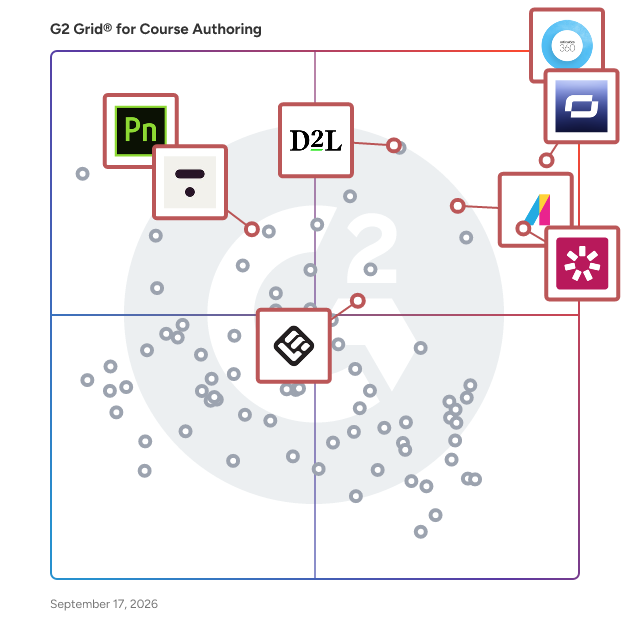
## G2 Grid® for Course Authoring Software
![G2 Grid® for Course Authoring Software plotting products by satisfaction and market presence](https://www.g2.com/categories/course-authoring/grids.png?focus%5B%5D=22491&focus%5B%5D=118455&focus%5B%5D=5799&focus%5B%5D=2319&focus%5B%5D=42248&focus%5B%5D=69081&focus%5B%5D=2232&focus%5B%5D=7530)
Highlighted products: Articulate 360, Synthesia, iSpring Suite, D2L Brightspace, Thinkific, SC Training (Formerly EdApp), Absorb LMS, and Adobe Presenter.
Underlying data: [Grid® JSON](https://www.g2.com/categories/course-authoring/grids.json?focus%5B%5D=articulate-360&amp;focus%5B%5D=synthesia&amp;focus%5B%5D=ispring-suite&amp;focus%5B%5D=d2l-brightspace&amp;focus%5B%5D=thinkific&amp;focus%5B%5D=sc-training-formerly-edapp&amp;focus%5B%5D=absorb-software-absorb-lms&amp;focus%5B%5D=adobe-presenter&amp;segment=small-business)


## How Many Course Authoring Software Products Does G2 Track?
**Total Products under this Category:** 277

### Category Stats (Jul 2026)
- **Average Rating**: 4.54/5 The average rating of products in this category, based on all submitted ratings
- **Top Trending Product**: Easy LMS (+4.24%) - Among all products in this category, Easy LMS recorded the largest rating increase compared to last month
*Last updated: July 16, 2026*


## How Does G2 Rank Course Authoring Software Products?

**Why You Can Trust G2's Software Rankings:**

- 30 Analysts and Data Experts
- 25,500+ Authentic Reviews
- 277+ Products
- Unbiased Rankings

G2's software rankings are built on verified user reviews, rigorous moderation, and a consistent research methodology maintained by a team of analysts and data experts. Each product is measured using the same transparent criteria, with no paid placement or vendor influence. While reviews reflect real user experiences, which can be subjective, they offer valuable insight into how software performs in the hands of professionals. Together, these inputs power the G2 Score, a standardized way to compare tools within every category.


## Which Course Authoring Software Is Best for Your Use Case?

- **Best for Small Businesses:** [Articulate 360](https://www.g2.com/products/articulate-360/reviews)
- **Best for Mid-Market:** [Articulate 360](https://www.g2.com/products/articulate-360/reviews)
- **Best for Enterprise:** [Articulate 360](https://www.g2.com/products/articulate-360/reviews)
- **Highest User Satisfaction:** [Articulate 360](https://www.g2.com/products/articulate-360/reviews)
- **Best Free Software:** [Synthesia](https://www.g2.com/products/synthesia/reviews)


---

**Sponsored**

### GetResponse

GetResponse is a lifecycle automation platform for businesses that want to drive more consistent, repeatable revenue across the entire customer journey. We help you move customers from first touch to first purchase, repeat purchase, and reactivation - using email, SMS, push notifications, and lifecycle automation across every stage of the customer journey With built-in deliverability, behavioral triggers, and deep integrations, you can launch faster, reduce manual work, and turn your lifecycle into a predictable revenue system. No disconnected tools. No campaign chaos. Just one system designed to move customers forward.


[Visit website](https://www.g2.com/external_clickthroughs/record?secure%5Bad_program%5D=ppc&amp;secure%5Bad_slot%5D=category_product_list&amp;secure%5Bcategory_id%5D=324&amp;secure%5Bchosen_at%5D=2026-07-16T12%3A13%3A51Z&amp;secure%5Bdisplayable_resource_id%5D=324&amp;secure%5Bdisplayable_resource_type%5D=Category&amp;secure%5Bmedium%5D=sponsored&amp;secure%5Bplacement_reason%5D=page_category&amp;secure%5Bplacement_resource_ids%5D%5B%5D=324&amp;secure%5Bprioritized%5D=false&amp;secure%5Bproduct_id%5D=2621&amp;secure%5Bresource_id%5D=324&amp;secure%5Bresource_type%5D=Category&amp;secure%5Bsource_type%5D=category_page&amp;secure%5Bsource_url%5D=https%3A%2F%2Fwww.g2.com%2Fcategories%2Fcourse-authoring%2Fsmall-business%3Fpage%3D2&amp;secure%5Btoken%5D=98a874c60fd2ef9e119ee12c326c5c1c4772fc6256ff1616946a729c636a4bab&amp;secure%5Burl%5D=https%3A%2F%2Fwww.getresponse.com%2Fmax%2Fbook-a-demo%3Futm_campaign%3DEU_EN_G2_Click_Campaign_GR_MAX_Only%26utm_medium%3Dcpc%26utm_source%3Dg2&amp;secure%5Burl_type%5D=book_demo)

---

## What Are the Top-Rated Course Authoring Software Products in 2026?
### 1. [7taps Microlearning](https://www.g2.com/products/7taps-microlearning/reviews)
Your LMS assigns training. 7taps delivers it. For the people who never log in like: warehouse teams, field technicians, store staff, contractors, that distinction is everything. 7taps sends training directly via email, SMS, Slack, Teams, WhatsApp, or QR code. No app. No login. Two minutes on their phone, and you can see exactly who finished. Intuit trained 4,000 people with no LMS logins. Wave Utilities hit 98% completion. Other teams cut course production time by 92%. Used at all top 5 Fortune 500 companies. Courses are short tap-through experiences that open instantly in any browser on any device. Courses can be built from scratch, generated by AI from a document, URL, or topic, or converted from existing SCORM content. 7taps Copilot drafts a structured course in minutes. AI video and audio generation produces narrated courses without a recording studio. Courses update live. Edit once, it&#39;s changed everywhere, for everyone. Courses can be grouped into Learning Paths with sequential unlocking, delays between steps, deadlines, and completion records. Learning Space gives every person one place to find all their assigned courses, accessible with just an email code, no account needed. Analytics track open rates, completion rates, quiz scores, and individual status across every delivery channel. Data exports as CSV or PDF. xAPI integration sends completion data to any external learning record store. For shared devices, Kiosk Mode resets between users. Connects to 40+ HR systems including Workday, Dayforce, BambooHR, Personio, and UKG for automatic roster sync. Single sign-on for both authors and learners. Custom domain, custom email sender, and custom fonts for white-labeled deployments. SOC 2 Type 2 and ISO certified.


**Average Rating:** 4.8/5.0
**Total Reviews:** 278
**How Do G2 Users Rate 7taps Microlearning?**

- **Has the product been a good partner in doing business?:** 9.8/10 (Category avg: 9.2/10)
- **Content Creation:** 9.0/10 (Category avg: 8.9/10)
- **Quality of Support:** 9.7/10 (Category avg: 9.0/10)
- **Content Libraries:** 7.8/10 (Category avg: 8.2/10)

**Who Is the Company Behind 7taps Microlearning?**

- **Seller:** [7taps Inc](https://www.g2.com/sellers/7taps-inc)
- **Company Website:** https://www.7taps.com/
- **Year Founded:** 2020
- **HQ Location:** West Palm Beach, US
- **Twitter:** @7tapshq (608 Twitter followers)
- **LinkedIn® Page:** https://www.linkedin.com/company/7tapshq/ (36 employees on LinkedIn®)

**Who Uses This Product?**
- **Who Uses This:** Instructional Designer, Founder
- **Top Industries:** E-Learning, Higher Education
- **Company Size:** 45% Small-Business, 30% Mid-Market


#### What Are 7taps Microlearning's Pros and Cons?

**Pros:**

- Ease of Use (38 reviews)
- Intuitive (21 reviews)
- Courses (19 reviews)
- Ease of Creation (19 reviews)
- Helpful (19 reviews)

**Cons:**

- Limited Features (9 reviews)
- Limited Customization (7 reviews)
- Audio Issues (5 reviews)
- Missing Features (5 reviews)
- Course Management (4 reviews)


### What Do G2 Reviewers Say About 7taps Microlearning?
*AI-generated summary from verified user reviews*

**Pros:**

- Users appreciate the **ease of use** of 7taps Microlearning, enabling quick learning and effective team engagement.
- Users appreciate the **intuitive design** of 7taps, making it easy for learners of all ages to engage.
- Users appreciate the **ease of course creation** with 7taps, enabling engaging and quick content development for learners.
- Users love the **ease of creation** with 7taps Microlearning, enabling efficient and impactful training development.
- Users appreciate the **helpful support** from 7taps, ensuring swift resolutions and continuous platform improvements.

**Cons:**

- Users find the **limited features** of 7taps Microlearning restrict their ability to organize and report effectively.
- Users find the **limited customization options** hinder their ability to tailor the platform to their organizational needs.
- Users express concern over **audio issues** , particularly with limited English accents and incorrect pronunciation by AI voices.
- Users are frustrated by **missing features** , unable to customize modules, manage limits, or effectively review work.
- Users find it challenging to **replicate organizational structures** in 7taps, impacting how they manage learners effectively.

#### What Are Recent G2 Reviews of 7taps Microlearning?

**"[7taps Microlearning: Fast, Flexible Training That Reaches Every Employee](https://www.g2.com/survey_responses/7taps-microlearning-review-12467024)"**

**Rating:** 5.0/5.0 stars
*— Beth F.*

[Read full review](https://www.g2.com/survey_responses/7taps-microlearning-review-12467024)

---

**"[Effortless AI-Powered Microlearning Platform](https://www.g2.com/survey_responses/7taps-microlearning-review-12579701)"**

**Rating:** 4.5/5.0 stars
*— Jaime L.*

[Read full review](https://www.g2.com/survey_responses/7taps-microlearning-review-12579701)

---


#### What Are G2 Users Discussing About 7taps Microlearning?

- [What is 7taps Microlearning used for?](https://www.g2.com/discussions/what-is-7taps-microlearning-used-for)

### 2. [Udemy Business](https://www.g2.com/products/udemy-business/reviews)
Udemy Business is the AI-powered skills acceleration platform designed for a future-ready workplace. By leveraging advanced technology and a vast library of on-demand content, we provide tailored learning experiences that cater to the diverse needs of users across various industries, job titles and skill levels. Our Udemy Business platform benefits organizations of any size seeking to upskill, reskill and close skill gaps. With a focus on both technical and soft skills, Udemy Business offers a comprehensive range of courses that address the evolving demands of the job market - like AI transformation, AI integration and more. This makes it an ideal solution for businesses looking to upskill their employees, as well as for professionals who wish to stay competitive and relevant in their fields. At the core of the Udemy experience is a suite of AI capabilities that go well beyond basic personalization. The Udemy AI Assistant acts as an always-on learning companion — answering questions in real time, simplifying complex concepts, and generating quizzes to reinforce retention. Skills Mapping and AI-powered learning paths turn business goals into customized training frameworks in minutes, with top-rated courses automatically matched to each path. AI Role Play gives learners access to 6,000+ instructor-built scenarios to practice real-world conversations and build confidence before applying skills on the job. Skills Assessments identify individual proficiency gaps and surface personalized content recommendations, ensuring learners focus on exactly what they need. And through AI integrations with tools like Claude and ChatGPT, learning happens seamlessly in the flow of work — without ever leaving the platforms employees already use. Key platform features also include multi-language support for global accessibility, real-time course innovation that keeps content aligned with the latest industry trends, and a flexible on-demand model that empowers users to learn at their own pace. Together, these capabilities make Udemy a robust, scalable solution for skills development — one that helps organizations build future-ready workforces while giving individuals the tools they need to grow and thrive in today&#39;s dynamic landscape.


**Average Rating:** 4.5/5.0
**Total Reviews:** 651
**How Do G2 Users Rate Udemy Business?**

- **Has the product been a good partner in doing business?:** 9.2/10 (Category avg: 9.2/10)
- **Content Creation:** 8.5/10 (Category avg: 8.9/10)
- **Quality of Support:** 8.6/10 (Category avg: 9.0/10)
- **Content Libraries:** 8.9/10 (Category avg: 8.2/10)

**Who Is the Company Behind Udemy Business?**

- **Seller:** [Udemy, Inc.](https://www.g2.com/sellers/udemy-inc)
- **Company Website:** https://www.udemy.com
- **Year Founded:** 2010
- **HQ Location:** San Francisco, CA
- **Twitter:** @udemy (290,256 Twitter followers)
- **LinkedIn® Page:** https://www.linkedin.com/company/822535/ (9,278 employees on LinkedIn®)

**Who Uses This Product?**
- **Who Uses This:** Software Engineer, Software Developer
- **Top Industries:** Information Technology and Services, Computer Software
- **Company Size:** 36% Enterprise, 32% Small-Business


#### What Are Udemy Business's Pros and Cons?

**Pros:**

- Courses (58 reviews)
- Ease of Use (49 reviews)
- Content Diversity (43 reviews)
- Variety (38 reviews)
- Educational Resources (37 reviews)

**Cons:**

- Limited Course Variety (23 reviews)
- Course Quality (22 reviews)
- Limited Courses (17 reviews)
- Content Quality (16 reviews)
- Poor Content Quality (14 reviews)


### What Do G2 Reviewers Say About Udemy Business?
*AI-generated summary from verified user reviews*

**Pros:**

- Users value the **extensive library of expert courses** available on Udemy Business, enhancing skills and tracking progress effectively.
- Users highlight the **ease of use** of Udemy Business, making learning straightforward and flexible for everyone.
- Users appreciate the **vast and diverse course library** of Udemy Business, enhancing both technical and soft skills effectively.
- Users appreciate the **variety of courses** on Udemy Business, making it ideal for learning at all levels.
- Users appreciate the **vast and updated course library** of Udemy Business, facilitating effective and diverse skill development.

**Cons:**

- Users express frustration over **limited course variety** , often encountering outdated content and difficulty finding relevant options.
- Users find the **variable course quality** on Udemy Business frustrating, with some content outdated or too basic for advanced learners.
- Users find the **course quality varies** significantly, making it hard to find consistently relevant options.
- Users note that **course quality varies** , with some content feeling outdated or overly simplistic for advanced learners.
- Users notice **inconsistent course quality** on Udemy Business, with some content being outdated or poorly structured.

#### What Are Recent G2 Reviews of Udemy Business?

**"[Effective Learning Platform](https://www.g2.com/survey_responses/udemy-business-review-12810882)"**

**Rating:** 4.0/5.0 stars
*— Noorain  F.*

[Read full review](https://www.g2.com/survey_responses/udemy-business-review-12810882)

---

**"[Udemy Business: Diverse Courses and Helpful Quizzes for PMP](https://www.g2.com/survey_responses/udemy-business-review-13074320)"**

**Rating:** 4.5/5.0 stars
*— Verified User in Music*

[Read full review](https://www.g2.com/survey_responses/udemy-business-review-13074320)

---


#### What Are G2 Users Discussing About Udemy Business?

- [What is Udemy Business used for?](https://www.g2.com/discussions/what-is-udemy-business-used-for) - 2 comments, 1 upvote
- [What platform does udemy use?](https://www.g2.com/discussions/what-platform-does-udemy-use) - 1 upvote
- [How does udemy for business work?](https://www.g2.com/discussions/how-does-udemy-for-business-work) - 1 comment
- [What is udemy business account?](https://www.g2.com/discussions/what-is-udemy-business-account) - 3 comments, 1 upvote

### 3. [Bigtincan Readiness (formerly Brainshark)](https://www.g2.com/products/bigtincan-readiness-formerly-brainshark/reviews)
Brainshark is Bigtincan&#39;s AI-powered Readiness solution designed to help businesses in IT, manufacturing, insurance, banking and other sectors create learning and coaching content to prepare customer-facing teams for any interaction while connecting training initiatives to revenue. With Bigtincan Readiness, companies can: enable sales teams with on-demand training that accelerates onboarding and keeps reps up-to-speed with product and company updates, validate readiness with sales coaching and practice that ensures reps master their delivery of your message, and empower teams with rich, dynamic learning content that can be created quickly, updated easily, and accessed anywhere. AI capabilities are threaded throughout Bigtincan Readiness that support: - Content creation - Voiceover generation - Voice cloning - Voiceover translation - Transcript, caption, and slide note generation -AI coaching and roleplays with objective feedback - AI roleplays and coaching activities as part of certification, onboarding, and continuous training programs


**Average Rating:** 4.4/5.0
**Total Reviews:** 595
**How Do G2 Users Rate Bigtincan Readiness (formerly Brainshark)?**

- **Has the product been a good partner in doing business?:** 9.1/10 (Category avg: 9.2/10)
- **Content Creation:** 8.8/10 (Category avg: 8.9/10)
- **Quality of Support:** 9.0/10 (Category avg: 9.0/10)
- **Content Libraries:** 8.5/10 (Category avg: 8.2/10)

**Who Is the Company Behind Bigtincan Readiness (formerly Brainshark)?**

- **Seller:** [Bigtincan](https://www.g2.com/sellers/bigtincan)
- **Year Founded:** 2011
- **HQ Location:** Waltham, MA
- **Twitter:** @bigtincan (2,236 Twitter followers)
- **LinkedIn® Page:** https://www.linkedin.com/company/bigtincan (184 employees on LinkedIn®)
- **Phone:** 781-405-2376

**Who Uses This Product?**
- **Who Uses This:** Account Executive
- **Top Industries:** Computer Software, Information Technology and Services
- **Company Size:** 47% Enterprise, 40% Mid-Market


#### What Are Bigtincan Readiness (formerly Brainshark)'s Pros and Cons?

**Pros:**

- Courses (10 reviews)
- Time-saving (9 reviews)
- Video Recording (9 reviews)
- Customizability (8 reviews)
- Customization (7 reviews)

**Cons:**

- Learning Curve (10 reviews)
- Missing Features (10 reviews)
- Not Intuitive (10 reviews)
- Not User-Friendly (6 reviews)
- Complex Features (4 reviews)


### What Do G2 Reviewers Say About Bigtincan Readiness (formerly Brainshark)?
*AI-generated summary from verified user reviews*

**Pros:**

- Users value the **ease of creating immersive courses** with Bigtincan Readiness, enhancing training experiences and engagement.
- Users value the **time-saving capabilities** of Bigtincan Readiness, enhancing efficiency in creating and managing training content.
- Users appreciate the **video recording capabilities** of Bigtincan, allowing seamless updates and easy information distribution.
- Users value the **high degree of customizability** in Bigtincan, enabling quick updates and enhanced training resources.
- Users appreciate the **customization capabilities** of Bigtincan, allowing for quick and effective changes to training materials.

**Cons:**

- Users find a **steep learning curve** with Bigtincan Readiness, making it challenging to navigate and utilize features effectively.
- Users note several **missing features** , such as limited customization and outdated interface hindering their experience on Bigtincan Readiness.
- Users find Bigtincan Readiness to be **not intuitive** , struggling with content search and overall navigation within the platform.
- Users find Bigtincan Readiness to be **not user-friendly** , struggling with confusing navigation and ineffective search capabilities.
- Users note a **steep learning curve for complex features** , making the platform less user-friendly and intuitive.

#### What Are Recent G2 Reviews of Bigtincan Readiness (formerly Brainshark)?

**"[Bigtincan Readiness (Formerly Brainshark) - Great User Experience for Creating Content](https://www.g2.com/survey_responses/bigtincan-readiness-formerly-brainshark-review-10327657)"**

**Rating:** 4.5/5.0 stars
*— Ryan D.*

[Read full review](https://www.g2.com/survey_responses/bigtincan-readiness-formerly-brainshark-review-10327657)

---

**"[This is a wonderful resource](https://www.g2.com/survey_responses/bigtincan-readiness-formerly-brainshark-review-11451205)"**

**Rating:** 4.5/5.0 stars
*— justin d.*

[Read full review](https://www.g2.com/survey_responses/bigtincan-readiness-formerly-brainshark-review-11451205)

---


#### What Are G2 Users Discussing About Bigtincan Readiness (formerly Brainshark)?

- [What is Brainshark used for?](https://www.g2.com/discussions/what-is-brainshark-used-for)
- [What is VoiceVibes used for?](https://www.g2.com/discussions/what-is-voicevibes-used-for)
- [What is Bigtincan Zunos used for?](https://www.g2.com/discussions/what-is-bigtincan-zunos-used-for)
- [How much does brainshark cost?](https://www.g2.com/discussions/how-much-does-brainshark-cost)
- [Is brainshark free?](https://www.g2.com/discussions/is-brainshark-free)

### 4. [Elucidat](https://www.g2.com/products/elucidat/reviews)
Elucidat, a Learning Pool company, is the elearning platform built for teams who want to move faster, reach further, and make learning that truly makes an impact. Built for the real challenges learning teams face, Elucidat blends ease of use with full-scale support and expert advice. It&#39;s the go-to for creating compelling content in multiple languages, tracking the success of your courses, and keeping everything looking sharp and brand-consistent. Elucidat offers two powerful authoring tools designed to fit every project and skill set. With Elucidat Create, anyone can produce high-quality content in record time. Elucidat Author gives learning teams the creative freedom and control to design tailored, impactful experiences. Together, they deliver the perfect balance of speed and sophistication, supported by built-in collaboration, translation, analytics, and seamless LMS integration for enterprise-scale success. Need to take your learning strategy further? Elucidat’s Learning Consultancy helps you optimize workflows, elevate content quality, and deliver measurable business results. From rapid course creation to personalized learning journeys, Elucidat gives you everything you need to deliver effective elearning at scale. Learn more about our tools: https://www.elucidat.com/platform/


**Average Rating:** 4.4/5.0
**Total Reviews:** 181
**How Do G2 Users Rate Elucidat?**

- **Has the product been a good partner in doing business?:** 9.1/10 (Category avg: 9.2/10)
- **Content Creation:** 8.8/10 (Category avg: 8.9/10)
- **Quality of Support:** 9.2/10 (Category avg: 9.0/10)
- **Content Libraries:** 7.6/10 (Category avg: 8.2/10)

**Who Is the Company Behind Elucidat?**

- **Seller:** [Learning Pool](https://www.g2.com/sellers/learning-pool)
- **Company Website:** https://learningpool.com/
- **Year Founded:** 2006
- **HQ Location:** Derry, IE
- **Twitter:** @LearningPool (6,570 Twitter followers)
- **LinkedIn® Page:** https://www.linkedin.com/company/learning-pool-ltd/ (445 employees on LinkedIn®)

**Who Uses This Product?**
- **Who Uses This:** Instructional Designer
- **Top Industries:** E-Learning, Retail
- **Company Size:** 51% Enterprise, 32% Mid-Market


#### What Are Elucidat's Pros and Cons?

**Pros:**

- Ease of Use (24 reviews)
- Templates (11 reviews)
- Course Creation (9 reviews)
- Customer Support (8 reviews)
- Courses (7 reviews)

**Cons:**

- Not Intuitive (6 reviews)
- Limited Editing (5 reviews)
- Slow Performance (5 reviews)
- Design Limitations (4 reviews)
- Limited Customization (4 reviews)


### What Do G2 Reviewers Say About Elucidat?
*AI-generated summary from verified user reviews*

**Pros:**

- Users find Elucidat to be **exceptionally easy to use** , enabling quick onboarding and seamless implementation for all experience levels.
- Users appreciate the **time-saving templates** in Elucidat, enabling quick course creation with a professional look.
- Users appreciate the **user-friendly course creation** of Elucidat, enabling quick development of professional e-learning content.
- Users highly value the **excellent customer support** of Elucidat, noting responsiveness and professionalism in problem-solving.
- Users value the **intuitive interface and interactive features** of Elucidat, enhancing both authoring and learner experiences.

**Cons:**

- Users find the **organization of files and editing functionality unintuitive** , leading to a more cumbersome experience with Elucidat.
- Users find the **limited editing options** frustrating, hindering creativity and making complex changes tedious.
- Users report **slow performance** in Elucidat, especially with large projects and multiple users, impacting overall productivity.
- Users find the **limited design flexibility** of Elucidat restricts creativity and complicates the editing process.
- Users find **limited customization** options in Elucidat, restricting creativity and advanced control over projects.

#### What Are Recent G2 Reviews of Elucidat?

**"[Intuitive and Powerful, but With Some Limitations](https://www.g2.com/survey_responses/elucidat-review-12258532)"**

**Rating:** 4.0/5.0 stars
*— Monica E.*

[Read full review](https://www.g2.com/survey_responses/elucidat-review-12258532)

---

**"[Polished Interactivity and Easy SCORM Updates, But Mobile Adaptation Needs Work](https://www.g2.com/survey_responses/elucidat-review-11856017)"**

**Rating:** 4.0/5.0 stars
*— Frédéric B.*

[Read full review](https://www.g2.com/survey_responses/elucidat-review-11856017)

---


#### What Are G2 Users Discussing About Elucidat?

- [What do you like most about Elucidat for creating e-learning content, and what could be improved?](https://www.g2.com/discussions/what-do-you-like-most-about-elucidat-for-creating-e-learning-content-and-what-could-be-improved)
- [What is Elucidat used for?](https://www.g2.com/discussions/what-is-elucidat-used-for)

### 5. [Tovuti LMS](https://www.g2.com/products/tovuti-lms/reviews)
Tovuti is an AI-powered learning management system (LMS) that helps organizations create, deliver, track, and manage training programs across multiple audiences. Teams use Tovuti for employee onboarding, employee training, compliance training, customer education, partner enablement, certification programs, and extended enterprise learning. The platform brings course creation, learning delivery, learner tracking, reporting, administration, and support into one system, helping organizations centralize training and manage scalable learning programs more efficiently. Tovuti is built for growing organizations with expanding training needs, including mid-market businesses, distributed teams, public-sector groups, and organizations training both internal and external audiences. Common users include L&amp;D teams, HR leaders, LMS administrators, compliance teams, customer education teams, and partner enablement teams. Tovuti supports organizations that are replacing a legacy LMS, centralizing training across departments, scaling programs for employees, customers, or partners, or managing compliance and certification requirements. One of Tovuti’s key capabilities is native AI course authoring, which helps users turn a topic, outline, or uploaded document into structured course content. Teams can generate learning outcomes, lessons, quizzes, flashcards, narration, final exams, and SCORM-ready course output. This helps reduce manual course production work and gives training teams a faster way to move from source material to learner-ready content while keeping content editable before publishing. Tovuti also includes LMS tools for building and managing learning programs across multiple use cases. Users can create learning paths, assign courses, manage users and permissions, customize the learner experience, issue certificates, track learner progress, and view reporting dashboards. The platform also supports mobile learning, branded portals, ecommerce tools, gamification, social learning features, SCORM/xAPI/cmi5 content, native integrations, API access, SSO, role-based access control, MFA, and accessibility-aligned learning experiences. For organizations that need additional operational support, Tovuti LMS-as-a-Service provides expert assistance with LMS administration, reporting, configuration, integrations, user workflows, launch support, and ongoing platform optimization. This service helps teams reduce the administrative burden of managing an LMS while maintaining visibility into learning activity, compliance progress, and program performance. Tovuti combines LMS software, native AI course creation, implementation support, customer success, and optional managed services for organizations that need scalable, multi-audience training with measurable outcomes.


**Average Rating:** 4.6/5.0
**Total Reviews:** 291
**How Do G2 Users Rate Tovuti LMS?**

- **Has the product been a good partner in doing business?:** 8.9/10 (Category avg: 9.2/10)
- **Content Creation:** 8.9/10 (Category avg: 8.9/10)
- **Quality of Support:** 9.2/10 (Category avg: 9.0/10)
- **Content Libraries:** 8.6/10 (Category avg: 8.2/10)

**Who Is the Company Behind Tovuti LMS?**

- **Seller:** [Tovuti Inc.](https://www.g2.com/sellers/tovuti-inc)
- **Company Website:** https://www.tovutilms.com/
- **Year Founded:** 2017
- **HQ Location:** Eagle, Idaho
- **Twitter:** @LearnTOVUTI (298 Twitter followers)
- **LinkedIn® Page:** https://www.linkedin.com/company/18192826/ (55 employees on LinkedIn®)

**Who Uses This Product?**
- **Who Uses This:** Software Engineer, Software Developer
- **Top Industries:** Information Technology and Services, Computer Software
- **Company Size:** 45% Mid-Market, 32% Small-Business


#### What Are Tovuti LMS's Pros and Cons?

**Pros:**

- Ease of Use (62 reviews)
- Features (42 reviews)
- Course Creation (41 reviews)
- Customer Support (38 reviews)
- Education Platform (34 reviews)

**Cons:**

- Not Intuitive (13 reviews)
- Navigation Difficulties (12 reviews)
- Not User-Friendly (12 reviews)
- Expensive (11 reviews)
- Limited Customization (11 reviews)


### What Do G2 Reviewers Say About Tovuti LMS?
*AI-generated summary from verified user reviews*

**Pros:**

- Users find Tovuti LMS to be **extremely user-friendly** , allowing easy navigation and quick course creation.
- Users praise Tovuti LMS for its **user-friendly interface and comprehensive features** , enhancing global training efficiency and effectiveness.
- Users appreciate the **easy and intuitive course creation** process in Tovuti LMS, enhancing the online learning experience significantly.
- Users commend Tovuti LMS for its **excellent customer support** , providing responsive and meaningful assistance quickly.
- Users find Tovuti LMS to be **extremely user-friendly and engaging** , facilitating interactive learning and efficient course creation.

**Cons:**

- Users find Tovuti LMS **not intuitive** , especially regarding course assignments and the overall interface usability.
- Users find **navigation difficulties** with Tovuti LMS, making it challenging to assign and view courses effectively.
- Users find Tovuti LMS **not user-friendly** , noting the interface can be clunky and counterintuitive for course assignments.
- Users find Tovuti LMS **expensive** , feeling it caters best to large or small organizations rather than mid-sized ones.
- Users express a need for **limited customization** options in Tovuti LMS, hindering their satisfaction and usability.

#### What Are Recent G2 Reviews of Tovuti LMS?

**"[Tovuti LMS: User-Friendly for Admins and Learners, with Stellar Staff Support](https://www.g2.com/survey_responses/tovuti-lms-review-12922247)"**

**Rating:** 5.0/5.0 stars
*— Heather M.*

[Read full review](https://www.g2.com/survey_responses/tovuti-lms-review-12922247)

---

**"[Effortless Setup and User-Friendly Interface](https://www.g2.com/survey_responses/tovuti-lms-review-12120269)"**

**Rating:** 4.0/5.0 stars
*— Jared E.*

[Read full review](https://www.g2.com/survey_responses/tovuti-lms-review-12120269)

---


#### What Are G2 Users Discussing About Tovuti LMS?

- [What is Tovuti LMS used for?](https://www.g2.com/discussions/what-is-tovuti-lms-used-for)
- [How much does Tovuti cost?](https://www.g2.com/discussions/how-much-does-tovuti-cost)
- [What should an LMS have?](https://www.g2.com/discussions/what-should-an-lms-have) - 1 comment
- [What is Tovuti?](https://www.g2.com/discussions/what-is-tovuti)
- [What are the features of LMS?](https://www.g2.com/discussions/what-are-the-features-of-lms)

### 6. [Powtoon](https://www.g2.com/products/powtoon/reviews)
Powtoon is the unified AI video platform that empowers you to easily create, scale, and share professional video content. Instantly deliver high-quality communications and knowledge engagement with complete creative freedom - all while enterprise-grade brand consistency, security, and compliance seamlessly fuel your AI transformation.


**Average Rating:** 4.4/5.0
**Total Reviews:** 281
**How Do G2 Users Rate Powtoon?**

- **Has the product been a good partner in doing business?:** 8.5/10 (Category avg: 9.2/10)
- **Content Creation:** 9.4/10 (Category avg: 8.9/10)
- **Quality of Support:** 8.5/10 (Category avg: 9.0/10)
- **Content Libraries:** 9.1/10 (Category avg: 8.2/10)

**Who Is the Company Behind Powtoon?**

- **Seller:** [Powtoon](https://www.g2.com/sellers/powtoon)
- **Year Founded:** 2011
- **HQ Location:** Stanmore, GB
- **Twitter:** @PowToon (43,801 Twitter followers)
- **LinkedIn® Page:** https://www.linkedin.com/company/2565844/ (154 employees on LinkedIn®)

**Who Uses This Product?**
- **Who Uses This:** Teacher, Project Manager
- **Top Industries:** E-Learning, Computer Software
- **Company Size:** 58% Small-Business, 27% Mid-Market


#### What Are Powtoon's Pros and Cons?

**Pros:**

- Ease of Use (10 reviews)
- Creativity (5 reviews)
- Quick Creation (5 reviews)
- Templates (5 reviews)
- Access Convenience (4 reviews)

**Cons:**

- Technical Issues (6 reviews)
- Missing Features (5 reviews)
- Limited Content (4 reviews)
- Limited Features (4 reviews)
- Limited Templates (4 reviews)


### What Do G2 Reviewers Say About Powtoon?
*AI-generated summary from verified user reviews*

**Pros:**

- Users find that Powtoon offers a **quick and intuitive video creation experience** with user-friendly templates and tools.
- Users value the **creativity offered** by Powtoon, making it easy for anyone to produce engaging animations and presentations.
- Users appreciate the **quick creation** capabilities of Powtoon, finding it easy and intuitive for video production.
- Users value the **variety of easy-to-use templates** in Powtoon, enhancing their video creation experience significantly.
- Users value the **access convenience** of Powtoon, as it simplifies video creation with everything readily available.

**Cons:**

- Users report frequent **technical issues** with Powtoon, including bugs, blurry images, and frustrating limitations on customization.
- Users express frustration with Powtoon due to **missing features** like uploading photos and limited animations.
- Users find the **limited content** in Powtoon frustrating, hindering creativity and customization in their projects.
- Users express frustration over **limited features** in Powtoon, hindering customization and complicating the user experience.
- Users criticize Powtoon for its **limited templates** , hindering creativity with insufficient variety and customization options.

#### What Are Recent G2 Reviews of Powtoon?

**"[Powtoon: Easy to Use, Seamless Templates, and Top-Notch Support](https://www.g2.com/survey_responses/powtoon-review-12693403)"**

**Rating:** 5.0/5.0 stars
*— patti p.*

[Read full review](https://www.g2.com/survey_responses/powtoon-review-12693403)

---

**"[AI-Powered Features Make Powtoon a Timesaver](https://www.g2.com/survey_responses/powtoon-review-12817228)"**

**Rating:** 4.0/5.0 stars
*— N J.*

[Read full review](https://www.g2.com/survey_responses/powtoon-review-12817228)

---


#### What Are G2 Users Discussing About Powtoon?

- [What is Powtoon used for?](https://www.g2.com/discussions/what-is-powtoon-used-for)
- [Can you use Powtoon for free?](https://www.g2.com/discussions/can-you-use-powtoon-for-free)
- [What is the purpose of Powtoon?](https://www.g2.com/discussions/what-is-the-purpose-of-powtoon)
- [What is Powtoon software?](https://www.g2.com/discussions/what-is-powtoon-software)

### 7. [dominKnow | ONE](https://www.g2.com/products/dominknow-one/reviews)
Create, organize, collaborate, publish &amp; update L&amp;D content - efficiently, at scale. dominKnow | ONE designed for teams producing high volumes of formal &amp; informal content. Seamlessly manage multiple authoring projects and content – for any type of learning! \*Robust Authoring Capabilities\* Unlock limitless creativity with extensive customization options, a rich selection of templates, and a unified interface for both fixed and responsive content creation, complemented by versatile software simulation tools. \*Streamlined Content Management\* Effortlessly create, publish, and refresh content across various platforms. This unified approach ensures consistency and eliminates redundant work, saving valuable time. \*One Piece – Multiple Outputs\* Generate diverse outputs, from formal courses to informal knowledge bases, with a single click from one source of content, ensuring easy updates and maintenance. \*Collaborative Workflow\* Transform project coordination with real-time co-authoring and peer review capabilities, accelerating project completion and elevating output quality. \*Master Project Management\* Maintain a comprehensive overview of content development activities with dominKnow|ONE’s centralized dashboard, enabling progress tracking and team performance monitoring. \*Accessibility for All\* Design learning experiences that meet all accessibility standards, ensuring inclusivity for every learner. \*Truly Responsive Design\* Create once and deliver across all devices with designs that adapt seamlessly, enhancing user interaction and engagement. \*Branch Out with Complex Learning\* Easily construct detailed branching scenarios and tailor learning paths to individual needs. \*Make Sense of Content, en Masse\* Manage extensive training libraries with ease, keeping content well-organized and readily available. \*Mass Convert Legacy Content\* Optimize existing courseware with straightforward conversion tools, allowing for simple editing, reusing, and repurposing. Translation and Localization Streamline the translation and localization process, ensuring quick turnaround times while preserving content quality and effectiveness with AI Translator.


**Average Rating:** 4.1/5.0
**Total Reviews:** 38
**How Do G2 Users Rate dominKnow | ONE?**

- **Has the product been a good partner in doing business?:** 9.1/10 (Category avg: 9.2/10)
- **Content Creation:** 8.2/10 (Category avg: 8.9/10)
- **Quality of Support:** 8.8/10 (Category avg: 9.0/10)
- **Content Libraries:** 7.2/10 (Category avg: 8.2/10)

**Who Is the Company Behind dominKnow | ONE?**

- **Seller:** [dominKnow](https://www.g2.com/sellers/dominknow)
- **Year Founded:** 1997
- **HQ Location:** Ottawa, Ontario, Canada
- **Twitter:** @dominKnow (1,285 Twitter followers)
- **LinkedIn® Page:** https://www.linkedin.com/company/dominknow-inc (35 employees on LinkedIn®)
- **Ownership:** Private

**Who Uses This Product?**
- **Top Industries:** E-Learning, Computer Software
- **Company Size:** 39% Enterprise, 32% Mid-Market


#### What Are dominKnow | ONE's Pros and Cons?

**Pros:**

- Customer Support (2 reviews)
- Course Creation (1 reviews)
- Courses (1 reviews)
- Customization (1 reviews)
- Ease of Use (1 reviews)

**Cons:**

- Difficult Learning Experience (1 reviews)
- Pricing Issues (1 reviews)


### What Do G2 Reviewers Say About dominKnow | ONE?
*AI-generated summary from verified user reviews*

**Pros:**

- Users commend the **top-notch customer support** of dominKnow | ONE, highlighting responsiveness and effective issue resolution.
- Users appreciate the **rich media capabilities** of dominKnow | ONE for creating engaging and interactive e-learning courses.
- Users appreciate the **rich media capabilities** of dominKnow | ONE, enhancing learning experiences across various devices.
- Users value the **extensive customization** options in dominKnow | ONE, finding it superior to other platforms like Rise.
- Users find dominKnow | ONE easy to use, appreciating its **seamless integration and intuitive design** across devices.

**Cons:**

- Users find the **difficult learning experience** of dominKnow | ONE may require additional support for effective use.
- Users find the **cost prohibitive** , limiting access to valuable classes and features in dominKnow | ONE.

#### What Are Recent G2 Reviews of dominKnow | ONE?

**"[Outstanding Cloud-Based E-Learning with Rich Media and Stellar Support](https://www.g2.com/survey_responses/dominknow-one-review-12067747)"**

**Rating:** 5.0/5.0 stars
*— Verified User in E-Learning*

[Read full review](https://www.g2.com/survey_responses/dominknow-one-review-12067747)

---

**"[dominKnow](https://www.g2.com/survey_responses/dominknow-one-review-8472199)"**

**Rating:** 5.0/5.0 stars
*— Verified User in Professional Training &amp; Coaching*

[Read full review](https://www.g2.com/survey_responses/dominknow-one-review-8472199)

---


#### What Are G2 Users Discussing About dominKnow | ONE?

- [What does Dominknow do?](https://www.g2.com/discussions/what-does-dominknow-do)
- [What is adapt authoring tool?](https://www.g2.com/discussions/what-is-adapt-authoring-tool)
- [What is lectora software?](https://www.g2.com/discussions/what-is-lectora-software)

### 8. [Thought Industries](https://www.g2.com/products/thought-industries/reviews)
Thought Industries is the world’s leading Enterprise Learning software platform, empowering businesses to create compelling learning experiences for customers, partners and professionals. These experiences help businesses grow revenue, increase customer loyalty, and ensure customer success across technology, manufacturing, healthcare and other industries with complex products and training requirements. Thought Industries was founded in 2013 around the core belief that online learning experiences should be modern, intuitive, engaging, and scalable. Headquartered in Boston, Thought Industries has offices across North America and Europe.


**Average Rating:** 4.1/5.0
**Total Reviews:** 158
**How Do G2 Users Rate Thought Industries?**

- **Has the product been a good partner in doing business?:** 8.6/10 (Category avg: 9.2/10)
- **Content Creation:** 8.1/10 (Category avg: 8.9/10)
- **Quality of Support:** 8.4/10 (Category avg: 9.0/10)
- **Content Libraries:** 7.8/10 (Category avg: 8.2/10)

**Who Is the Company Behind Thought Industries?**

- **Seller:** [Thought Industries](https://www.g2.com/sellers/thought-industries)
- **Company Website:** https://www.thoughtindustries.com
- **Year Founded:** 2012
- **HQ Location:** Boston, MA
- **Twitter:** @thoughtind (1,191 Twitter followers)
- **LinkedIn® Page:** https://www.linkedin.com/company/5138750/ (94 employees on LinkedIn®)

**Who Uses This Product?**
- **Top Industries:** Computer Software, Professional Training &amp; Coaching
- **Company Size:** 46% Mid-Market, 33% Small-Business


#### What Are Thought Industries's Pros and Cons?

**Pros:**

- Collaboration (1 reviews)
- Customer Success (1 reviews)
- Customer Support (1 reviews)
- Engagement (1 reviews)
- Helpful (1 reviews)

**Cons:**

- Feature Enhancement (1 reviews)
- Limited Customization (1 reviews)
- Time-Consuming (1 reviews)


### What Do G2 Reviewers Say About Thought Industries?
*AI-generated summary from verified user reviews*

**Pros:**

- Users highlight the **strong collaboration and community support** of Thought Industries, fostering an inclusive learning environment.
- Users value the **exceptional customer support** and community engagement that enhance their learning experience with Thought Industries.
- Users rave about the **exceptional customer support** that fosters community engagement and empowers their learning journey.
- Users value the **strong community engagement** and support, fostering an inclusive and empowering learning environment.
- Users value the **exceptional support and community engagement** provided by Thought Industries, enhancing the overall learning experience.

**Cons:**

- Users desire further **customization and analytics enhancements** for maximizing the platform&#39;s potential and effectiveness.
- Users note the **limited customization** options, expressing a desire for enhanced flexibility in the platform&#39;s features.
- Users find the **time-consuming setup** necessary to maximize Thought Industries&#39; potential can be challenging and demanding.

#### What Are Recent G2 Reviews of Thought Industries?

**"[Great platform for eLearning - especially with hands-on labs](https://www.g2.com/survey_responses/thought-industries-review-9315444)"**

**Rating:** 4.5/5.0 stars
*— Simon F.*

[Read full review](https://www.g2.com/survey_responses/thought-industries-review-9315444)

---

**"[A Customer Education Platform That Truly Puts Learners First](https://www.g2.com/survey_responses/thought-industries-review-11614419)"**

**Rating:** 4.5/5.0 stars
*— Damaris L.*

[Read full review](https://www.g2.com/survey_responses/thought-industries-review-11614419)

---


#### What Are G2 Users Discussing About Thought Industries?

- [How much does docebo cost?](https://www.g2.com/discussions/thought-industries-how-much-does-docebo-cost)
- [How many customers thought industries have?](https://www.g2.com/discussions/how-many-customers-thought-industries-have) - 1 comment
- [What is Thoughtindustries?](https://www.g2.com/discussions/what-is-thoughtindustries)
- [What does Thought Industries do?](https://www.g2.com/discussions/what-does-thought-industries-do)

### 9. [Auzmor Learn](https://www.g2.com/products/auzmor-learn/reviews)
Auzmor Learn is a robust learning management solution that lets you easily assign training and track employee progress. Its intuitive course builder simplifies content creation and a library of pre-built courses offers the training and upskilling your workforce needs. https://auzmor.com/


**Average Rating:** 4.8/5.0
**Total Reviews:** 117
**How Do G2 Users Rate Auzmor Learn?**

- **Has the product been a good partner in doing business?:** 9.8/10 (Category avg: 9.2/10)
- **Content Creation:** 9.2/10 (Category avg: 8.9/10)
- **Quality of Support:** 9.8/10 (Category avg: 9.0/10)
- **Content Libraries:** 9.4/10 (Category avg: 8.2/10)

**Who Is the Company Behind Auzmor Learn?**

- **Seller:** [Auzmor](https://www.g2.com/sellers/auzmor-af3ada3f-5eb8-4a06-a2a7-359a54acc520)
- **Year Founded:** 2017
- **HQ Location:** West Des Moines, Iowa
- **Twitter:** @Auzmor (51 Twitter followers)
- **LinkedIn® Page:** https://www.linkedin.com/company/22287607/ (60 employees on LinkedIn®)

**Who Uses This Product?**
- **Top Industries:** Information Technology and Services, Computer Software
- **Company Size:** 77% Mid-Market, 16% Small-Business


#### What Are Recent G2 Reviews of Auzmor Learn?

**"[The best LMS!](https://www.g2.com/survey_responses/auzmor-learn-review-4148052)"**

**Rating:** 5.0/5.0 stars
*— Grant H.*

[Read full review](https://www.g2.com/survey_responses/auzmor-learn-review-4148052)

---

**"[The product is easy to use and there is excellent customer support.](https://www.g2.com/survey_responses/auzmor-learn-review-7707943)"**

**Rating:** 5.0/5.0 stars
*— Erik K.*

[Read full review](https://www.g2.com/survey_responses/auzmor-learn-review-7707943)

---


#### What Are G2 Users Discussing About Auzmor Learn?

- [What is Auzmor Learn used for?](https://www.g2.com/discussions/what-is-auzmor-learn-used-for)

### 10. [Arlo Training Management Software](https://www.g2.com/products/arlo-training-management-software/reviews)
Arlo is training management software for instructor-led training providers who need more than an LMS. Manage public courses and private training for organisations in one platform — with everything you need to schedule, deliver, and coordinate training across in-person, live online, and blended formats. Join thousands of training providers using Arlo to improve commercial performance, run more efficient operations, and deliver consistent, professional training experiences. ✨ AI-powered course authoring with SCORM support ✨ Course scheduling and delivery across all formats ✨ Website integration with online bookings and payments ✨ Automated communications, reminders, and certificates ✨ Instructor app with session and learner visibility ✨ Reporting and CRM across courses and clients


**Average Rating:** 4.5/5.0
**Total Reviews:** 88
**How Do G2 Users Rate Arlo Training Management Software?**

- **Has the product been a good partner in doing business?:** 9.1/10 (Category avg: 9.2/10)
- **Content Creation:** 8.1/10 (Category avg: 8.9/10)
- **Quality of Support:** 9.2/10 (Category avg: 9.0/10)
- **Content Libraries:** 7.7/10 (Category avg: 8.2/10)

**Who Is the Company Behind Arlo Training Management Software?**

- **Seller:** [Arlo Training &amp; Event Software](https://www.g2.com/sellers/arlo-training-event-software)
- **Company Website:** https://www.arlo.co
- **Year Founded:** 2007
- **HQ Location:** London, England
- **Twitter:** @ArloSoftware (874 Twitter followers)
- **LinkedIn® Page:** https://www.linkedin.com/company/arlo/ (66 employees on LinkedIn®)

**Who Uses This Product?**
- **Top Industries:** Education Management, Professional Training &amp; Coaching
- **Company Size:** 57% Small-Business, 32% Mid-Market


#### What Are Arlo Training Management Software's Pros and Cons?

**Pros:**

- Ease of Use (13 reviews)
- Helpful (7 reviews)
- Comprehensive Features (5 reviews)
- Courses (5 reviews)
- Training (5 reviews)

**Cons:**

- Feature Issues (5 reviews)
- Limited Features (5 reviews)
- Complexity (3 reviews)
- Expensive (3 reviews)
- Missing Features (3 reviews)


### What Do G2 Reviewers Say About Arlo Training Management Software?
*AI-generated summary from verified user reviews*

**Pros:**

- Users find Arlo Training Management Software&#39;s **ease of use** greatly enhances efficiency and simplifies the training process.
- Users value the **relative ease of use** of Arlo, enjoying its well-thought-out features and responsive support.
- Users appreciate the **comprehensive features** of Arlo Training Management Software, enhancing their training and operational efficiency.
- Users appreciate the **integration of systems** in Arlo, ensuring a seamless experience from booking to course completion.
- Users find Arlo&#39;s **fully featured training management software** essential for scaling their training businesses effectively.

**Cons:**

- Users find the **feature issues** of Arlo frustrating, particularly with the email system and lack of LMS integration.
- Users find Arlo&#39;s **limited features** frustrating, particularly lacking a bilingual system and an integrated Learning Management System.
- Users find the **complexity** of Arlo Training Management Software challenging, especially with its navigation and reporting features.
- Users find Arlo&#39;s pricing **expensive** for smaller organizations and those with infrequent training needs.
- Users are disappointed by the **missing features** , particularly the lack of a native LMS and bilingual support.

#### What Are Recent G2 Reviews of Arlo Training Management Software?

**"[Seamless Integration, Stellar Onboarding Support](https://www.g2.com/survey_responses/arlo-training-management-software-review-12682681)"**

**Rating:** 4.5/5.0 stars
*— Fiona M.*

[Read full review](https://www.g2.com/survey_responses/arlo-training-management-software-review-12682681)

---

**"[Streamlined Course Management with Customizable API](https://www.g2.com/survey_responses/arlo-training-management-software-review-12685226)"**

**Rating:** 4.0/5.0 stars
*— Frank K.*

[Read full review](https://www.g2.com/survey_responses/arlo-training-management-software-review-12685226)

---


### 11. [GoSkills](https://www.g2.com/products/goskills/reviews)
GoSkills is a modern, AI-first Learning Management System (LMS) and Learning Experience Platform (LXP) that helps organizations create, deliver, track, and scale employee training quickly, easily, and affordably. The #1-rated LMS for growing startups, SMBs, and mid-market organizations that want to launch training fast, without the complexity of a traditional LMS. Easy to implement, easy to manage, and comes with a free plan and flexible pricing. Key capabilities • Built-in course library: 500+ expert-led courses in business, technology, software, soft skills, leadership, and professional development, continuously updated. • Gamified microlearning: 3–7 minute lessons with quizzes, exercises, and reference materials that drive engagement and retention. • Course builder: Build custom courses with an intuitive block-based editor; import SCORM, xAPI, AICC, and CMI5 content; export courses to other LMS platforms. • AI course creation (Genie AI): Generate full courses with a conversational AI assistant, or turn PDFs and PowerPoints into structured training in minutes, in multiple languages. • Learning paths: Curated sequences that take learners from novice to expert, or guide them through skills needed for career advancement and role transitions. • AI tutor and recommender: On-demand 24/7 learner support and personalized course suggestions based on goals. • Reporting and analytics: Granular tracking from learner progress to individual lesson level; identify and close skills gaps; collect feedback with customizable review forms. • Automated workflows: Manage learners by role or team, assign courses, set due dates, and schedule reminders. • Certification and compliance: Issue certificates on completion; log offline and live training; maintain audit-ready records. • Custom branding: Personalize your platform with custom logos, login pages, and certificates. • SSO and integrations: Google, Microsoft, and Okta SSO; SCIM 2.0; REST API and Zapier; SOC 2 compliant. Use cases Employee onboarding, upskilling and reskilling, leadership development, compliance training, and partner or customer training. Who GoSkills is for L&amp;D professionals, HR teams, operations managers, team managers, and company owners. Its intuitive design makes it easy for roles outside of L&amp;D to deploy and manage a successful training program. Used across technology, professional services, retail, construction, manufacturing, healthcare, nonprofits, government, and more. Problems GoSkills solves GoSkills replaces the fragmented combination of a learning library, authoring tool, and LMS with one intuitive platform launchable in minutes. Its microlearning format drives completion rates above 40% — more than 3x the industry average — tackling the engagement challenges most organizations face. Built-in AI tools and simple admin workflows significantly reduce course creation and management time. Why teams choose GoSkills GoSkills uniquely combines two essentials in one platform: a built-in library of 500+ expert-led courses, with a modern LMS for creating and managing custom training. Teams can get started fast with ready-made content, then build their own onboarding, compliance, SOP, customer education, and role-specific training in the same system. Unlike traditional LMS platforms, GoSkills is fast to set up, genuinely enjoyable to use, and priced for teams of any size, including small teams that other platforms won’t serve. Trusted by 10,000+ teams worldwide, GoSkills is consistently rated #1 on G2 for Ease of Use, Setup, and Support.


**Average Rating:** 4.7/5.0
**Total Reviews:** 304
**How Do G2 Users Rate GoSkills?**

- **Has the product been a good partner in doing business?:** 9.4/10 (Category avg: 9.2/10)
- **Content Creation:** 8.7/10 (Category avg: 8.9/10)
- **Quality of Support:** 9.4/10 (Category avg: 9.0/10)
- **Content Libraries:** 8.8/10 (Category avg: 8.2/10)

**Who Is the Company Behind GoSkills?**

- **Seller:** [GoSkills](https://www.g2.com/sellers/goskills)
- **Company Website:** https://www.goskills.com/
- **Year Founded:** 2013
- **HQ Location:** Palo Alto, CA
- **Twitter:** @getgoskills (4,128 Twitter followers)
- **LinkedIn® Page:** https://www.linkedin.com/company/3053820/ (24 employees on LinkedIn®)

**Who Uses This Product?**
- **Who Uses This:** Project Manager
- **Top Industries:** Accounting, Hospital &amp; Health Care
- **Company Size:** 61% Small-Business, 25% Mid-Market


#### What Are GoSkills's Pros and Cons?

**Pros:**

- Ease of Use (72 reviews)
- Courses (48 reviews)
- Content Quality (40 reviews)
- Ease of Learning (40 reviews)
- Course Quality (26 reviews)

**Cons:**

- Limited Courses (12 reviews)
- Limited Content (11 reviews)
- Limited Course Variety (8 reviews)
- Expensive (7 reviews)
- High Subscription Cost (6 reviews)


### What Do G2 Reviewers Say About GoSkills?
*AI-generated summary from verified user reviews*

**Pros:**

- Users value the **user-friendly interface** of GoSkills, facilitating easy navigation and a smooth learning experience.
- Users value the **easy-to-use, customizable training courses** of GoSkills, benefiting from concise lessons and certifications.
- Users value the **high-quality content** from GoSkills, praising its clarity, simplicity, and engaging presentation style.
- Users find the **ease of learning** with GoSkills invaluable, thanks to concise, organized courses that fit busy schedules.
- Users appreciate the **high-quality course presentation** with valuable and straightforward lessons that enhance learning experiences.

**Cons:**

- Users note the **limited course selection** , which hampers career advancement and the ability to cover niche skills.
- Users feel the **limited content** in GoSkills doesn&#39;t cover diverse skills or provide extensive course materials.
- Users express a desire for **more course offerings** on GoSkills, hoping for greater variety and depth in available courses.
- Users find GoSkills **expensive** , particularly when comparing it to cheaper alternatives like Udemy.
- Users find the **high subscription cost** of GoSkills a barrier compared to alternatives like Udemy.

#### What Are Recent G2 Reviews of GoSkills?

**"[Flexible, Easy Courses That Help Build My Resume](https://www.g2.com/survey_responses/goskills-review-13094627)"**

**Rating:** 5.0/5.0 stars
*— Kara T.*

[Read full review](https://www.g2.com/survey_responses/goskills-review-13094627)

---

**"[Specialist CPD Courses Taught by Certified Experts](https://www.g2.com/survey_responses/goskills-review-13095088)"**

**Rating:** 5.0/5.0 stars
*— Verified User in Retail*

[Read full review](https://www.g2.com/survey_responses/goskills-review-13095088)

---


#### What Are G2 Users Discussing About GoSkills?

- [What is GoSkills used for?](https://www.g2.com/discussions/what-is-goskills-used-for) - 1 comment

### 12. [Lectora](https://www.g2.com/products/lectora/reviews)
Lectora is a user-friendly, award-winning authoring tool available as both a cloud-based and desktop solution. Part of the eLearning Brothers Authoring Suites, Lectora empowers you to quickly create, WCAG-friendly interactive eLearning courses that achieve extraordinary results. Simply import your PowerPoint slides, add a screen or webcam recording, and then publish your courses to any LMS/LMR in any format. It&#39;s as simple or advanced as you need it to be! Launch a premium built-in template and add a simple assessment for rapid authoring. Or, dig deep into conditional branching for adaptive learning, while working alongside our authors in a collaborative, real-time environment. Offered in seven languages and used by the Global 2000s, including the US government, Lectora is the leader of accessibility and the most trusted authoring tool in the world. With affordable plan options that include the entire eLearning Brothers Asset Library and CenarioVR for immersive learning, it is the only comprehensive authoring tool set of its kind, all for an unbeatable price.


**Average Rating:** 4.1/5.0
**Total Reviews:** 54
**How Do G2 Users Rate Lectora?**

- **Has the product been a good partner in doing business?:** 6.5/10 (Category avg: 9.2/10)
- **Content Creation:** 8.3/10 (Category avg: 8.9/10)
- **Quality of Support:** 6.7/10 (Category avg: 9.0/10)
- **Content Libraries:** 8.0/10 (Category avg: 8.2/10)

**Who Is the Company Behind Lectora?**

- **Seller:** [eLearning Brothers](https://www.g2.com/sellers/elearning-brothers-d4434c7e-0d66-4ca9-b34c-f6cf105c394c)
- **Year Founded:** 2009
- **HQ Location:** American Fork, UT
- **Twitter:** @ELBlearning (13,181 Twitter followers)
- **LinkedIn® Page:** https://www.linkedin.com/company/230193/ (373 employees on LinkedIn®)

**Who Uses This Product?**
- **Top Industries:** E-Learning, Information Technology and Services
- **Company Size:** 49% Enterprise, 27% Mid-Market


#### What Are Lectora's Pros and Cons?

**Pros:**

- Collaboration (1 reviews)
- Content Creation (1 reviews)
- Course Creation (1 reviews)
- Courses (1 reviews)
- Customization (1 reviews)

**Cons:**

- App Performance (1 reviews)
- Bug Issues (1 reviews)
- Integration Issues (1 reviews)
- Learning Curve (1 reviews)
- Limited Content (1 reviews)


### What Do G2 Reviewers Say About Lectora?
*AI-generated summary from verified user reviews*

**Pros:**

- Users value the **collaboration features** of Lectora, enhancing their e-learning workflow and project efficiency.
- Users praise Lectora for its **powerful authoring tools** that facilitate interactive and engaging eLearning content creation.
- Users value Lectora&#39;s **flexibility and control** over course design, enabling the creation of interactive e-learning content effortlessly.
- Users value Lectora for its **flexibility and control over course design** , enabling the creation of interactive and compliant training content.
- Users appreciate the **flexibility and control** of Lectora, allowing for advanced customization in e-learning course design.

**Cons:**

- Users often face **app performance issues** with Lectora, including instability on mobile devices and slow resolution of glitches.
- Users often face **bug issues** with Lectora, leading to frustrations during updates and mobile usage.
- Users often face **integration issues** with LMS platforms when using Lectora, complicating the overall experience.
- Users find Lectora to have a **steeper learning curve** that can be challenging for beginners compared to newer tools.
- Users note **limited content** within Lectora, impacting their ability to create diverse learning materials effectively.

#### What Are Recent G2 Reviews of Lectora?

**"[Lectora - Powerful Tools for Interactive eLearning](https://www.g2.com/survey_responses/lectora-review-10287959)"**

**Rating:** 5.0/5.0 stars
*— Aenglan K.*

[Read full review](https://www.g2.com/survey_responses/lectora-review-10287959)

---

**"[Lectora Publisher](https://www.g2.com/survey_responses/lectora-review-824129)"**

**Rating:** 4.0/5.0 stars
*— Verified User in Higher Education*

[Read full review](https://www.g2.com/survey_responses/lectora-review-824129)

---


#### What Are G2 Users Discussing About Lectora?

- [What is Lectora used for?](https://www.g2.com/discussions/what-is-lectora-used-for)


## What Is Course Authoring Software?

[Training eLearning Software](https://www.g2.com/categories/training-elearning)

## What Software Categories Are Similar to Course Authoring Software?

- [Corporate Learning Management Systems](https://www.g2.com/categories/corporate-learning-management-systems)
- [Online Learning Platforms](https://www.g2.com/categories/online-learning-platform)
- [Training Management Software](https://www.g2.com/categories/training-management-systems)
- [Learning Experience Platforms (LXP)](https://www.g2.com/categories/learning-experience-platforms-lxp)
- [eLearning Content Software](https://www.g2.com/categories/elearning-content)
- [Sales Training and Onboarding Software](https://www.g2.com/categories/sales-training-and-onboarding)
- [Microlearning Platforms ](https://www.g2.com/categories/microlearning-platforms)


---

## How Do You Choose the Right Course Authoring Software?

### What You Should Know About Course Authoring Software

### What is Course Authoring Software?

For organizations that need to deliver training to their employees, there are numerous providers of premade online courses on common topics that managers could purchase and assign to their teams. But if a company has more specialized training needs, the ability to create a customized course from scratch is a better solution. Course authoring software enables eLearning professionals to build engaging courses incorporating a variety of interactive elements, then publish and distribute them to any number of learners. These products are used by companies for their training needs as well as in academia for professors who are delivering instruction remotely. Custom courses created using course authoring software ultimately helps organizations achieve their learning goals.

Key Benefits of Course Authoring Software

- Enables companies to efficiently create engaging courses
- Reduces the time it takes to create a complete course
- Self-paced training allows more flexibility
- Allows instructors to customize learning content

### Why Use Course Authoring Software?

**Create engaging courses —** Part of making learning “sticky&quot;—meaning the knowledge endures long after someone learns it—is making the process engaging. Course authoring tools offer numerous ways to make eLearning courses more interesting and interactive. Rather than creating courses that rely on slides with plain text and pictures, course developers incorporate video clips, animations, and audio files into a course. Quizzes are incorporated throughout a course to build in accountability for the material. Some platforms offer functionality for learners to navigate through branching scenarios, meaning the content differs depending on choices made by the user.

**Reduce course development time —** Course authoring platforms have built-in tools designed to maximize efficiency as developers make new courses. Content libraries in course authoring software contain a variety of premade elements that developers choose from, including slide templates, images, icons, buttons, and quiz questions. These libraries reduce the time instructors spend searching for elements to use in their courses, helping the course get completed more quickly. Some eLearning platforms also enable users to pre-existing presentation files and use those as a starting point for creating a course so that the developer doesn’t have to start from a blank template. Ultimately, these features make course creation less time-consuming.

**Increase training flexibility —** Digital courses created using course authoring software provide solutions to some of the inconveniences inherent in the in-person training. Courses are distributed using a learning management system (LMS), so learners in different locations can take the same course. The courses are also typically self-paced, so learners are able to complete them on their own schedule. Administrators review results for individual learners as they come in.

**Customize learning content —** One of the biggest benefits of course authoring tools is the ability to create exactly the course needed for a specific purpose. Rather than use an off-the-shelf eLearning course that may not target an organization’s needs, using course authoring software to build a course from the ground up ensures that it targets the exact objectives the instructor wants to cover. Courses are even customized for specific teams or roles, so that the employees get the exact training that they need. For universities, courses enable professors to teach the material in the way that they think works best. Collaboration tools built into course authoring software also allow multiple stakeholders to give feedback on a course before it is finalized to ensure it is customized to meet the needs of all parties involved.

### Who Uses Course Authoring Software?

Course authoring software is used by employees in government, education, and a range of businesses.

**Corporate trainers —** In-house trainers at companies use course authoring tools to create training courses for the business’s employees. Courses might cover HR issues related to compliance or they could be focused on information more specific to the company’s business, like sales enablement.

**Instructional designers and eLearning developers —** Companies that lack the HR personnel needed to develop their own custom courses in-house may turn to third-party instructional designers or eLearning developers, who use course authoring software to make courses for their clients. Typically, instructional designers communicate with their clients about the kind of course the company needs, then they build the course, get feedback on their work, and deliver a final product that is completed by employees. Universities also employ instructional designers to help professors develop materials for their courses, especially online courses.

### Kinds of Course Authoring Software

While most course authoring products have similar core functionality, some are sold as standalone products while others are integrated with an LMS. Using a course authoring tool that is integrated with an LMS means there is a built-in way to distribute the course to learners once it is finished, although those tools may have fewer course authoring features than standalone products that are solely dedicated to creating courses. Standalone products typically enable users to export content to a third-party LMS.

### Course Authoring Software Features

**Course templates —** Course authoring tools often come with included templates so course developers don’t have to start from a completely blank course. Templates include course modules with different layouts that allow developers to change text placeholders and add images, videos, or other elements to meet their needs.

**PowerPoint conversion —** Organizations that have pre-existing PowerPoint files that they have used in the past for training import those files into course authoring software and build an eLearning course using the old presentation as a template, helping save the time it would take to recreate the PowerPoint in the authoring tool.

**Asset library —** In addition to slide templates, course authoring tools often include an online library of elements that users can add to their presentations. These libraries sometimes contain thousands of different elements, including photos, videos, icons, and buttons.

**Quizzes —** Course authors are able to build in periodic quizzes at different points in a course to check the learner’s understanding of key concepts. If a learner answers incorrectly, courses are set up to have them go back and relearn the material, then have them try again to get the right answer before they are allowed to proceed.

**Feedback tools —** These features enable multiple stakeholders to leave comments on a course as it is being developed. Having feedback integrated directly into the authoring tool helps keep the comments organized so they are addressed before the course is published.

**Sharable content object reference model (SCORM) compatibility —** The industry standard for eLearning content is SCORM, a set of technical standards that ensure compatibility between a course and an LMS. Ensuring a course authoring platform is SCORM-compatible means its courses work with a variety of LMS vendors.

#### Additional Course Authoring Software Features

**Character images —** Some products have extensive “character&quot; image collections. These might include a variety of different models of different ages, genders, ethnicities, and professions, each with dozens of photos showing a variety of facial expressions, emotions, and body poses. These character images are used to tell a story within the course or as a visual aid to illustrate a scenario.

**Branching scenarios —** One feature some platforms have for making courses interactive is by the ability to include branching scenarios, in which the course is different depending on choices the learner makes. For example, in a course on workplace harassment, a user might be asked to choose from three options for responding to a coworker who made an inappropriate remark in a meeting. Depending on the option the learner picks, the course could show a different outcome of the situation. These role-play simulations helps learners apply skills and knowledge from earlier in the course to a real-world scenario.

**Video recording —** Built-in video recording functionality enables users to record themselves or their computer screen to add a visual element to their course. These platforms typically also allow users to import videos from other sources.

**Mobile compatibility —** Course materials are automatically reformatted to be compatible with mobile phones and tablets, ensuring that learners complete course modules from any device.

**Analytics —** Course authors track how learners are using the course or their performance on in-course assessments once the courses have been deployed.

### Trends Related to Course Authoring Software

**Remote work —** Companies were already looking for digital alternatives to in-person training before the coronavirus pandemic. The worldwide shift to remote work has only underscored the need for organizations to have robust eLearning programs that are completed anywhere and at any time. Course authoring software developers have increased their emphasis on the mobile device experience to ensure the courses reach people on the devices they use the most.

**Cloud platforms —** While some course authoring products still offer on-premises installations, many vendors have moved their offerings to the cloud. This approach enables vendors to push out frequent updates to their products, adding new features, and fixing security vulnerabilities. Some also offer online content libraries, so course developers have an ever-expanding range of elements to choose from. Courses that are distributed to learners via the cloud are also quickly updated and re-released so that employees have access to the latest material.

### Potential Issues with Course Authoring Software

**Resource investment —** Creating customized courses have benefits for an organization’s training program, but it also takes a substantial investment of resources. Depending on how lengthy or in depth the course needs to be, it may take weeks or months for a course to go from idea to finished product. That includes multiple course drafts and rounds of feedback from different stakeholders. Companies also need to decide whether they have the right people in-house to use course authoring software effectively or if it makes more sense to outsource the work to an eLearning development firm. Another option is using premade online courses, although organizations will have to decide whether those more generic courses will meet their training needs.

**Employee engagement —** The best digital courses are interesting and informative. They hold learners’ attention with animations, videos, and interactive elements. But using those elements well takes practice and the right tools. An authoring tool that lacks strong functionality for creating interactive courses could result in courses that don’t engage learners and fall short of their desired impact. Buyers should ensure an authoring solution has the ability to create engaging courses and that their course developers know how to use the tools to achieve those aims.

**Compliance —** A key part of many training programs is courses to ensure employers maintain compliance with laws and regulations on topics like safety, security, and privacy. Company leaders deploy off-the-shelf solutions, but some might want to develop their own compliance courses using course authoring software. For companies that are developing their own compliance courses, leaders must ensure the courses cover all the required information for a given topic. They should also confirm that the software they use to deploy the courses has adequate tracking and reporting capabilities so that, if necessary, they prove that employees went through the training.

### Software and Services Related to Course Authoring Software

[**Learning management systems**](https://www.g2.com/categories/learning-management-system-lms) **—** Integrations with an LMS is a crucial feature for course authoring products, as completed courses are typically delivered to users through an LMS. Course authoring tools integrate with both [corporate LMS products](https://www.g2.com/categories/corporate-lms) as well as education-focused LMS products.

[**Screen and video capture software**](https://www.g2.com/categories/screen-and-video-capture) **—** For course authoring tools that lack built-in video capture functionality, a screen and video capture product allows a course developer to integrate screencasts of their computer desktop for demonstrations and tutorials.

[**Training management systems**](https://www.g2.com/categories/training-management-systems) **—** Organizations use training management systems to distribute courses to employees and track training completion.


