Best Cloud Content Collaboration Software - Page 3

How Many Cloud Content Collaboration Software Products Does G2 Track?

Total Products under this Category: 308

Category Stats (Nov 2026)

  • Average Rating: 4.35/5 (↑0.01 vs Oct 2026) The average rating of products in this category, based on all submitted ratings
  • Top Trending Product: FileOrbis (+3.7%) - Among all products in this category, FileOrbis recorded the largest rating increase compared to last month

Last updated: November 01, 2026

How Does G2 Rank Cloud Content Collaboration Software Products?

Why You Can Trust G2's Software Rankings:

  • 30 Analysts and Data Experts
  • 124,000+ Authentic Reviews
  • 308+ Products
  • Unbiased Rankings

G2's software rankings are built on verified user reviews, rigorous moderation, and a consistent research methodology maintained by a team of analysts and data experts. Each product is measured using the same transparent criteria, with no paid placement or vendor influence. While reviews reflect real user experiences, which can be subjective, they offer valuable insight into how software performs in the hands of professionals. Together, these inputs power the G2 Score, a standardized way to compare tools within every category.

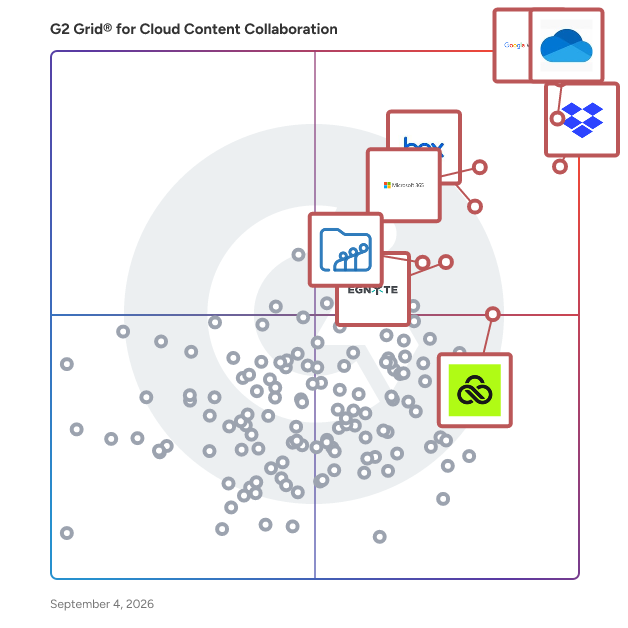
G2 Grid® for Cloud Content Collaboration Software

G2 Grid® for Cloud Content Collaboration Software plotting products by satisfaction and market presence

Highlighted products: Google Workspace, Microsoft OneDrive for Business, Dropbox, Microsoft 365, Box, Egnyte, LucidLink, and Zoho WorkDrive.

Underlying data: [Grid® JSON](https://www.g2.com/categories/cloud-content-collaboration/grids.json?focus%5B%5D=google-workspace&focus%5B%5D=microsoft-onedrive-for-business&focus%5B%5D=dropbox&focus%5B%5D=microsoft365&focus%5B%5D=box&focus%5B%5D=egnyte&focus%5B%5D=lucidlink&focus%5B%5D=zoho-workdrive)

Clinked

Clinked is a secure, cloud-based client portal and virtual data room that gives teams, clients, and external stakeholders one place to work together without relying on endless email chains, scattered file-sharing links, or disconnected tools. Instead of hunting through inboxes for the latest document, approval, or update, everyone works from the same branded workspace with access to the information relevant to them. Used by organisations across professional services, legal, finance, healthcare, government organisations and other high-trust industries, Clinked helps businesses manage sensitive documents, client communication, projects, and approvals in a secure environment. Whether you're onboarding clients, managing ongoing projects, coordinating due diligence, or sharing confidential information, Clinked brings files, conversations, tasks, and updates together in a single location. Organisations can choose from a range of solutions, including a branded client portal, a fully customised portal experience, or a virtual data room designed for confidential transactions and document-heavy projects. This flexibility allows teams to create an experience that matches both their workflow and their clients' expectations. One of Clinked's defining features is its extensive white-label capability. Businesses can customise portals with their own logos, colours, domains, email templates, and branding elements, creating an experience that feels like a natural extension of their company. Clients interact with your brand, not a third-party platform. Branded mobile apps for iOS and Android further extend that experience beyond the desktop. Clinked is built around reducing the friction that often comes with client work. Instead of sharing files through email, discussing them in separate chat tools, and tracking progress elsewhere, teams can manage documents, conversations, tasks, approvals, events, and project activity in one place. Activity feeds and dashboards provide visibility into what has changed, while task management tools help teams assign responsibilities, track progress, and keep projects moving forward. Document management is a core strength of the platform. Teams can organize files with granular permission controls, version tracking, audit trails, approvals, and secure sharing. Users can quickly find information through intelligent search tools and structured workspaces, while document previews, annotations, and comments make collaboration easier without requiring downloads or lengthy email exchanges. Security remains central to everything Clinked offers. The platform is ISO 27001 certified and protects data through bank-grade encryption, detailed permission controls, two-factor authentication, audit logs, and secure infrastructure. These safeguards make it well suited for organizations handling confidential information, regulated data, or client records where visibility and accountability matter. Clinked also connects with widely used business tools including Zapier, Google Workspace, Microsoft 365, DocuSign, Jotform, and many other third-party applications. Through integrations, APIs, and automation capabilities, organizations can connect Clinked to existing workflows while keeping client-facing collaboration in a secure, branded environment. For organizations looking to reduce email dependency, improve visibility across projects, and provide a more professional experience for clients, Clinked offers a practical alternative to juggling multiple systems. It combines secure document management, communication, project coordination, and branding flexibility in a single platform designed around how modern client work actually happens.

Average Rating: 4.8/5.0

Total Reviews: 145

G2 Deal: Exclusive G2 Offer: Unlock everlasting savings on Clinked's monthly subscription with code "g2offer10"!

Plus, get 20% off annually and 35% off 2-yearly, automatically applied at checkout. Additionally, take advantage of our highly competitive rates on custom packages tailored to your exact needs. Schedule a demo today to discover more!

Price: ~~$119.00 = 100 Users+Free Guests~~ → $107.10 = 100 Users+Free Guests

View this exclusive G2 deal

How Do G2 Users Rate Clinked?

  • Has the product been a good partner in doing business?: 9.7/10 (Category avg: 8.8/10)
  • Performance and Reliability: 9.6/10 (Category avg: 8.7/10)
  • File following: 9.6/10 (Category avg: 8.8/10)
  • Device Syncing: 9.6/10 (Category avg: 8.7/10)

Who Is the Company Behind Clinked?

  • Seller: Clinked
  • Company Website:
  • Year Founded: 2008
  • HQ Location: Cambridge, UK
  • LinkedIn® Page: www.linkedin.com
    17 employees on LinkedIn®

Who Uses This Product?

  • Top Industries: Computer Software, Marketing and Advertising
  • Company Size: 66% Small, 26% Medium

What Do G2 Reviewers Say About Clinked?

AI-generated summary from verified user reviews

Pros
  • Users appreciate the ease of use of Clinked, enjoying smooth navigation and effective collaboration in one place.
  • Users value the easy collaboration offered by Clinked, seamlessly managing tasks and communication in one secure platform.
  • Users value the seamless team collaboration Clinked offers, streamlining communication and document management in one secure platform.
  • Users appreciate the ease of sharing with Clinked, enhancing collaboration and organization in a central location.
  • Users value the secure and organized file sharing of Clinked, enhancing collaboration and efficiency for teams.
Cons
  • Users note the limited customization options in Clinked, which restrict flexibility and integration capabilities.
  • Users note integration issues with Clinked, seeking better customization options and more advanced reporting capabilities.
  • Users find the learning curve challenging, especially for less tech-savvy members, delaying initial setup and comfort with the platform.
  • Users find some missing features in Clinked, such as improved task management and file organization options.
  • Users find the slow performance of Clinked frustrating, impacting their overall experience and productivity.

What Are Recent G2 Reviews of Clinked?

What Are G2 Users Discussing About Clinked?

DocuWare

DocuWare: A New Era of Document Management DocuWare is a modern document management and workflow automation platform that centralizes all your business documents in one secure, organized environment — accessible from any device, anywhere. With a completely redesigned web and mobile experience, DocuWare makes it effortless to capture, process, and access the information your teams need, whether at a desk or on the go. What sets DocuWare apart is its built-in AI assistant, DocuWare Aura. Rather than forcing employees to dig through folders, file names, and metadata, Aura lets users ask questions in plain language and get trusted answers — drawn directly from the documents already stored in the platform. Find the right contract in seconds. Compare invoices against purchase orders automatically. Summarize a 40-page agreement into the key points that matter. Every answer links back to its original source document and page, so there's no guessing and no hallucinations — just reliable, verifiable business intelligence. DocuWare's Intelligent Document Processing (IDP) uses AI-powered capture, classification, and data extraction to eliminate the manual effort of sorting, indexing, and routing incoming documents. From invoices and contracts to HR records and compliance files, documents are processed and made actionable — automatically. The platform is purpose-built for organizations that handle large volumes of documents and need secure, compliant access to sensitive business information. Key capabilities include: AI-powered search and analysis — Ask questions in natural language across your entire document repository. Aura understands business context, not just keywords, and supports 120+ languages. Automated workflows — Design and deploy customizable processes tailored to your operations, reducing errors and accelerating approvals, reviews, and handoffs. Permission-based security — Aura and every feature within DocuWare respect your existing access controls. Users only see what they're authorized to see — security is built in, not bolted on. Enterprise-ready APIs — Extend DocuWare intelligence into Microsoft Copilot, SAP, ServiceNow, or custom applications. Bring document answers wherever work happens. Flexible deployment — Choose cloud-based or on-premises deployment to match your infrastructure and compliance requirements. DocuWare serves organizations across manufacturing, finance, education, government, construction, insurance, and more — from small businesses to large enterprises. With over 20,000 customers, 930,000+ users across 100+ countries, and a global network of 800+ partners, DocuWare is a proven, trusted platform for organizations ready to modernize how they manage documents and unlock the knowledge hidden inside them. DocuWare doesn't just store your documents — it makes them work for you. Welcome to a new era of document management.

Average Rating: 4.4/5.0

Total Reviews: 238

How Do G2 Users Rate DocuWare?

  • Has the product been a good partner in doing business?: 9.0/10 (Category avg: 8.8/10)
  • Performance and Reliability: 8.8/10 (Category avg: 8.7/10)
  • File following: 9.5/10 (Category avg: 8.8/10)
  • Device Syncing: 8.3/10 (Category avg: 8.7/10)

Who Is the Company Behind DocuWare?

  • Seller: DocuWare
  • Company Website:
  • Year Founded: 1988
  • HQ Location: Beacon, NY
  • LinkedIn® Page: www.linkedin.com
    656 employees on LinkedIn®

Who Uses This Product?

  • Who Uses This: Software Analyst
  • Top Industries: Information Technology and Services, Pharmaceuticals
  • Company Size: 47% Medium, 30% Large

What Do G2 Reviewers Say About DocuWare?

AI-generated summary from verified user reviews

Pros
  • Users love the ease of use of DocuWare, simplifying document management and streamlining workflows effortlessly.
  • Users value the seamless integrations of DocuWare, enhancing workflow efficiency and simplifying everyday document management tasks.
  • Users value the automation capabilities of DocuWare, significantly enhancing document management efficiency and reducing manual effort.
  • Users appreciate the simplified document management of DocuWare, enhancing organization and streamlining workflows effectively.
  • Users value the easy integrations of DocuWare, enhancing document management and streamlining workflows effortlessly.
Cons
  • Users experience a challenging learning curve with DocuWare, especially those unfamiliar with document management systems.
  • Users find the complexity of customization in DocuWare to be time-consuming and challenging to navigate.
  • Users note the missing features like limited offline functionality and less customizable reporting capabilities in DocuWare.
  • Users find the limited customization options restrict their ability to tailor DocuWare to their needs effectively.
  • Users find that training is required to navigate DocuWare's complex components and initial setup effectively.

What Are Recent G2 Reviews of DocuWare?

What Are G2 Users Discussing About DocuWare?

DiskStation

DiskStation Manager (DSM) is an intuitive web-based operating system for every Synology NAS, designed to help you manage your digital assets across home and office.

Average Rating: 4.6/5.0

Total Reviews: 90

How Do G2 Users Rate DiskStation?

  • Has the product been a good partner in doing business?: 9.2/10 (Category avg: 8.8/10)
  • Performance and Reliability: 9.2/10 (Category avg: 8.7/10)
  • File following: 8.8/10 (Category avg: 8.8/10)
  • Device Syncing: 9.1/10 (Category avg: 8.7/10)

Who Is the Company Behind DiskStation?

Who Uses This Product?

  • Top Industries: Information Technology and Services, Higher Education
  • Company Size: 64% Small, 31% Medium

What Do G2 Reviewers Say About DiskStation?

AI-generated summary from verified user reviews

Pros
  • Users appreciate the ease of use of DiskStation, noting its intuitive setup and smooth functionality.
  • Users highlight the easy setup of DiskStation, ensuring a smooth and hassle-free installation process.
  • Users value the reliability of DiskStation, appreciating its dependable performance and seamless integration into daily tasks.
  • Users love the backup ease of DiskStation, valuing its automatic data syncing and reliable data management capabilities.
  • Users value the easy access to their data and its seamless integration into daily routines with reliable performance.
Cons
  • Users find the DiskStation lacking advanced features, making setup challenging and limiting overall functionality.
  • Users find that the complexity of DiskStation's setup and features can hinder a smooth and intuitive experience.
  • Users experience slow performance in DiskStation, especially when multitasking or during multi-user access, impacting overall usability.
  • Users experience unclear guidance during setup and configuration, making the overall process challenging and frustrating.
  • Users find the high cost of DiskStation hardware to be a notable downside compared to simpler storage options.

What Are Recent G2 Reviews of DiskStation?

What Are G2 Users Discussing About DiskStation?

AI can help you find the answers. G2 helps you trust them.

Connect G2 to Claude or ChatGPT for answers grounded in G2's trusted reviews, comparisons, and pricing from real user insights.

How it works

Digital Pigeon

Share your businesses digital media with clients quickly, reliably and securely. Digital Pigeon is a large file delivery service for businesses working with large file sizes and volumes. You don't have time for failed or slow downloads. We partner with Amazon Web Services, one of the world’s biggest, most trusted cloud service providers to make sure your businesses work is delivered quickly and securely. Our technology means you'll never compete for bandwidth again when uploading files - and your clients won't, when downloading your files. With Digital Pigeon, you can: - present your work professionally (using your business's branding) - give clients the ability to preview your work online - without the need to download - get feedback from clients and collaborators quickly and easily, speeding up WIP - track when files have been accessed, previewed and downloaded - rest assured your valuable files and information are safe with our ISO-27001 certification Try us out today with a 14 day free trial.

Average Rating: 4.7/5.0

Total Reviews: 137

How Do G2 Users Rate Digital Pigeon?

  • Has the product been a good partner in doing business?: 9.4/10 (Category avg: 8.8/10)
  • Performance and Reliability: 9.1/10 (Category avg: 8.7/10)
  • File following: 9.0/10 (Category avg: 8.8/10)
  • Device Syncing: 8.8/10 (Category avg: 8.7/10)

Who Is the Company Behind Digital Pigeon?

Who Uses This Product?

  • Who Uses This: Director
  • Top Industries: Marketing and Advertising, Media Production
  • Company Size: 64% Small, 25% Medium

What Do G2 Reviewers Say About Digital Pigeon?

AI-generated summary from verified user reviews

Pros
  • Users appreciate the ease of use of Digital Pigeon, making secure file sharing quick and stress-free.
  • Users love the secure large file sharing capabilities of Digital Pigeon, ensuring a smooth and professional experience.
  • Users appreciate the reliability of Digital Pigeon, noting its smooth and secure file sharing capabilities.
  • Users commend the speed efficiency of Digital Pigeon, making file sharing fast and hassle-free for large uploads.
  • Users commend Digital Pigeon for its intuitive interface, making secure file sharing effortless and stress-free.
Cons
  • Users find the pricing prohibitive for smaller teams, making it difficult to justify the expense.
  • Users find the folder navigation cumbersome, suggesting improvements for easier file organization and management across clients.
  • Users find the inconvenience of delayed group assignments during invitation acceptance adds unnecessary steps to the setup process.
  • Users find the absence of collaboration features and limited advanced options frustrating in Digital Pigeon.
  • Users find the limited customization options of Digital Pigeon hinder file organization and branding adaptability.

What Are Recent G2 Reviews of Digital Pigeon?

What Are G2 Users Discussing About Digital Pigeon?

Stockpress

Stockpress is an affordable Digital Asset Management (DAM) software solution with unlimited users that helps marketing, creative, and content teams organize, find, and share digital assets across their organization. Stockpress is designed for teams managing growing volumes of files—such as images, videos, design files, and documents—who need a structured, searchable system without the complexity typically associated with enterprise DAM platforms. It combines elements of traditional file management systems with DAM-specific capabilities like metadata tagging, version control, and controlled sharing, enabling teams to maintain visibility and access across internal and external collaborators. The platform is commonly used by marketing, creative, and content teams to support workflows such as campaign execution, brand asset distribution, content production, and collaboration with partners or clients. It is structured to support both small teams and larger organizations by offering scalable access without per-user licensing constraints. Stockpress supports the full lifecycle of digital assets—from upload and organization to distribution and reuse—helping teams reduce time spent searching for files and improving consistency in how assets are used across channels. Key features and capabilities include: - Asset organization and search: AI-powered and manual tagging, collections, and filters to make files easier to locate and manage - Collaboration and sharing: Controlled access, share links, and guest upload functionality for internal teams and external contributors - Version control and duplication management: Track file updates and reduce redundant assets with duplicate detection - Integrations with creative tools: Connections with platforms such as Adobe, Canva, and web tools to support existing workflows - Flexible pricing model: Storage-based pricing with unlimited users, supporting broader team adoption without per-seat costs Stockpress is typically adopted by teams that have outgrown basic file storage tools but do not require the overhead of highly complex DAM implementations. It is used to improve asset accessibility, maintain organization as content scales, and enable more efficient collaboration across distributed teams.

Average Rating: 4.8/5.0

Total Reviews: 139

How Do G2 Users Rate Stockpress?

  • Has the product been a good partner in doing business?: 9.8/10 (Category avg: 8.8/10)
  • Performance and Reliability: 9.7/10 (Category avg: 8.7/10)
  • File following: 9.6/10 (Category avg: 8.8/10)
  • Device Syncing: 8.8/10 (Category avg: 8.7/10)

Who Is the Company Behind Stockpress?

  • Seller: Stockpress
  • Company Website:
  • Year Founded: 2018
  • HQ Location: Boston, US
  • LinkedIn® Page: www.linkedin.com
    13 employees on LinkedIn®

Who Uses This Product?

  • Top Industries: Marketing and Advertising, Non-Profit Organization Management
  • Company Size: 34% Small, 19% Medium

What Do G2 Reviewers Say About Stockpress?

AI-generated summary from verified user reviews

Pros
  • Users find Stockpress to be a straightforward and efficient tool for organizing and sharing company assets seamlessly.
  • Users praise the impressive customer support of Stockpress, noting quick responses and helpful assistance from the team.
  • Users appreciate the intuitive design of Stockpress, making their daily tasks smooth and user-friendly.
  • Users appreciate the easy organization and management of digital assets with Stockpress, making navigation a breeze.
  • Users value the easy organization of Stockpress, transforming messy data into a well-structured and searchable asset library.
Cons
  • Users report tagging issues that complicate organization and hinder efficient workflow in Stockpress.
  • Users find the folder navigation clunky and occasionally overwhelming, making data retrieval challenging.
  • Users note significant integration issues with Stockpress, particularly lacking connections to popular platforms like Google Drive and Canva.
  • Users find navigation difficult with Stockpress, often struggling to locate the necessary files and features.
  • Users find Stockpress expensive, though they recognize its enterprise-level quality justifying the cost despite some limitations.

What Are Recent G2 Reviews of Stockpress?

What Are G2 Users Discussing About Stockpress?

iManage Work

iManage Work is the industry’s leading document and email management application, empowering professionals to manage information more productively, securely, and seamlessly. We built iManage Work with a comprehensive focus on the user experience, bringing you and your knowledge workers agility, efficiency, and access across devices. Key Benefits - Work productively: Manage documents and emails more efficiently and intuitively - Work from anywhere: Mobile-first design lets users work remotely on any device - Work securely: Industry-leading security and governance ensures that iManage Work is the safest place to store information - Work seamlessly: Integrations with Office 365 enable users to do more from inside the familiar Office and Outlook interfaces - Find anything: Smart search cuts through clutter to deliver personalized results For professionals and organizations who need security, agility, and ease-of-use, iManage Work 10 provides a single-source-of-truth for documents and emails to simplify and streamline work. Used globally by leading corporations, law firms, and professional services firms — over 1 million professionals worldwide rely on iManage Work every day.

Average Rating: 4.4/5.0

Total Reviews: 357

How Do G2 Users Rate iManage Work?

  • Has the product been a good partner in doing business?: 8.8/10 (Category avg: 8.8/10)
  • Performance and Reliability: 8.2/10 (Category avg: 8.7/10)
  • File following: 10.0/10 (Category avg: 8.8/10)
  • Device Syncing: 9.2/10 (Category avg: 8.7/10)

Who Is the Company Behind iManage Work?

  • Seller: iManage
  • Company Website:
  • Year Founded: 2015
  • HQ Location: Chicago, Illinois
  • LinkedIn® Page: www.linkedin.com
    1,310 employees on LinkedIn®

Who Uses This Product?

  • Who Uses This: Associate, IT Director
  • Top Industries: Legal Services, Law Practice
  • Company Size: 50% Medium, 32% Large

What Do G2 Reviewers Say About iManage Work?

AI-generated summary from verified user reviews

Pros
  • Users appreciate the ease of use of iManage Work, benefiting from its intuitive interface and seamless integration.
  • Users appreciate the easy-to-use interface and seamless integration of iManage Work, enhancing their document management experience.
  • Users value the advanced search functionality of iManage Work, enhancing their efficiency and document management capabilities.
  • Users value the easy access to documents and emails in iManage Work, enhancing their organization and productivity.
  • Users appreciate the seamless integration of iManage Work with Microsoft tools, enhancing collaboration and efficiency in document management.
Cons
  • Users find that iManage Work has inconsistent responsiveness issues and requires manual adjustments, impacting user experience.
  • Users note performance lag during large matters and suggest improvements for integrations and UI to enhance usability.
  • Users face inconsistent responsiveness and maintenance downtime with iManage Work, impacting document access and functionality.
  • Users note that iManage Work has inconsistent responsiveness and issues with downtime and integration complexity, affecting usability.
  • Users experience performance issues with iManage Work, including slow file synchronization and inconsistent responsiveness after updates.

What Are Recent G2 Reviews of iManage Work?

What Are G2 Users Discussing About iManage Work?

Folderit Document Management

Folderit Document Management is a document management system (DMS) that helps organizations store, organize, control, and track business documents in a structured digital environment. It is designed for teams that need more control over document access, versioning, approvals, traceability, and retention than shared drives or basic file storage tools typically provide. Folderit is used by organizations that manage operational, compliance, quality, HR, finance, project, and governance-related documents and need a clear way to keep information organized, accessible, and up to date. The system supports both everyday document storage and more controlled document processes, including approval workflows, acknowledgement tracking, review cycles, and electronic signing. It can be used by small and mid-sized organizations as well as larger teams that need structured document control without relying on scattered folders, email-based approvals, or manual follow-up. The platform combines document storage with metadata, search, permissions, and workflow tools so users can find files more easily, define who can access them, and follow how documents change over time. Folderit also supports organizations that need a clear audit trail, structured records, and better accountability around document-related actions. Typical use cases include controlled documents, policies, procedures, contracts, project files, HR records, and other business-critical content that needs to remain organized, searchable, and traceable. Key product capabilities include: • Document storage with folder structure, metadata, document numbering, version control, and OCR search • Access management with user permissions, role-based visibility, and controlled sharing • Workflow tools for approval, acknowledgement, review, and electronic signing processes • Audit trail and activity tracking for document history, changes, and user actions • Retention, reminders, and structured document control features for compliance, quality management, and operational use

Average Rating: 4.3/5.0

Total Reviews: 49

How Do G2 Users Rate Folderit Document Management?

  • Has the product been a good partner in doing business?: 8.3/10 (Category avg: 8.8/10)
  • Performance and Reliability: 9.2/10 (Category avg: 8.7/10)
  • File following: 9.2/10 (Category avg: 8.8/10)
  • Device Syncing: 8.6/10 (Category avg: 8.7/10)

Who Is the Company Behind Folderit Document Management?

Who Uses This Product?

  • Top Industries: Computer Games
  • Company Size: 51% Small, 29% Large

What Do G2 Reviewers Say About Folderit Document Management?

AI-generated summary from verified user reviews

Pros
  • Users find cloud storage in Folderit essential for secure data sharing and access from multiple devices.
  • Users value the secure storage of Folderit, ensuring safe and permanent access to data across devices.
  • Users value the simple and secure data management of Folderit, enhancing document organization and access efficiency.
  • Users find Folderit Document Management to be easy to use, providing a simple and efficient document management experience.
  • Users enjoy the easy access to their documents from anywhere, facilitated by a user-friendly interface and centralized login.
Cons
  • Users find the limited file size a significant drawback, hindering efficient storage and access for larger documents.
  • Users find integration difficulty with Folderit due to lack of automated syncing with other essential tools.
  • Users find limited storage problematic, especially with slow uploads for large or multiple files and restricted space management.
  • Users find it challenging to locate files due to separate folder navigation, complicating access and organization.
  • Users find the inconvenience of transferring storage challenging, especially when an employee leaves the organization.

What Are Recent G2 Reviews of Folderit Document Management?

What Are G2 Users Discussing About Folderit Document Management?

GDocs

GDocs is a comprehensive Document Management System (DMS) designed to centralize and streamline document storage, retrieval, and management for organizations of all sizes. By providing a secure, hosted environment accessible anytime and anywhere, GDocs ensures that all documents are organized, easily retrievable, and managed efficiently, thereby saving time and resources. Key Features and Functionality: - Centralized Document Repository: Index and store all documents in a single, organized location. - Advanced Search Capabilities: Quickly locate documents using full-text search and metadata indexing. - Version Control: Maintain and track multiple versions of documents to ensure accuracy and compliance. - Access Control and Security: Implement multi-tier security with user hierarchy and access controls to protect sensitive information. - Audit Trails: Monitor document access and modifications with comprehensive logging. - Optical Character Recognition (OCR): Convert scanned documents into searchable and editable text. - Integration with Office Applications: Seamlessly integrate with applications like Microsoft Office, Open Office, and Outlook for efficient document handling. - Workflow Automation: Define and manage document workflows to streamline business processes. - Document Sharing and Collaboration: Share documents with individuals or groups, facilitating collaboration. Primary Value and Solutions Provided: GDocs addresses the challenges organizations face in managing vast amounts of documents by offering a tailored solution that enhances efficiency, security, and accessibility. It eliminates the inefficiencies of manual document handling, reduces the risk of data loss, and ensures compliance with regulatory requirements. By automating workflows and providing robust search capabilities, GDocs empowers users to focus on core business activities, thereby improving overall productivity and operational effectiveness.

Average Rating: 4.6/5.0

Total Reviews: 113

How Do G2 Users Rate GDocs?

  • Has the product been a good partner in doing business?: 9.6/10 (Category avg: 8.8/10)
  • Performance and Reliability: 9.0/10 (Category avg: 8.7/10)
  • File following: 9.1/10 (Category avg: 8.8/10)
  • Device Syncing: 9.2/10 (Category avg: 8.7/10)

Who Is the Company Behind GDocs?

Who Uses This Product?

  • Top Industries: Computer Software, Information Technology and Services
  • Company Size: 40% Small, 39% Medium

What Do G2 Reviewers Say About GDocs?

AI-generated summary from verified user reviews

Pros
  • Users appreciate the ease of use of GDocs, enjoying seamless real-time collaboration and accessibility from any device.
  • Users value the real-time collaboration feature in GDocs, making group projects efficient and seamless.
  • Users love the real-time cloud storage of GDocs, ensuring seamless and accessible collaboration from anywhere.
  • Users love the real-time collaboration capabilities of GDocs, enhancing teamwork and ensuring no work is lost.
  • Users love the cross-platform availability of GDocs, enabling effortless access and collaboration from any device.
Cons
  • Users face challenges with limited advanced formatting options, affecting their ability to create complex documents effectively.
  • Users find formatting issues with GDocs, especially limiting for complex documents and slow performance on large files.
  • Users find GDocs has limited advanced features compared to traditional desktop word processors and dedicated apps.
  • Users experience slow loading times, particularly when working with large documents, hindering productivity.
  • Users experience slow performance with GDocs, especially on large documents, affecting overall usability.

What Are Recent G2 Reviews of GDocs?

What Are G2 Users Discussing About GDocs?

Document Management System

Cordis' Document Management System (DMS) is a comprehensive digital solution designed to streamline the creation, storage, and management of business documents. By digitizing document handling processes, it reduces reliance on paper, minimizes costs, and enhances operational efficiency. The system ensures secure access to documents from any location, facilitating seamless collaboration and real-time updates. Key Features: - Version Control: Maintains and updates archive files, ensuring that the most recent versions are always accessible. - Electronic Signature: Enables users to sign documents electronically, allowing for approvals and authorizations from any location. - Data Security: Implements robust security measures to protect sensitive information, mitigating risks associated with digital operations. - Sharing and Collaboration: Facilitates effortless sharing of project files among team members, promoting collaborative work environments. - Scanning and OCR: Converts physical documents into digital formats using Optical Character Recognition, making archived materials easily searchable. - Workflow Automation: Automates document routing through organizational hierarchies, ensuring timely reviews and approvals. - Manage and Direct: Offers configurable options to organize documents into sections and folders, simplifying navigation for users. Primary Value and Solutions: The Document Management System addresses common challenges in document handling by digitizing and automating processes, leading to significant time and cost savings. It enhances productivity by reducing manual search efforts and streamlining workflows. The system's robust security features ensure data integrity, while its collaborative tools foster teamwork. By transitioning to a paperless environment, businesses can operate more efficiently and adapt to the fast-paced digital landscape.

Average Rating: 4.7/5.0

Total Reviews: 24

How Do G2 Users Rate Document Management System?

  • Has the product been a good partner in doing business?: 9.2/10 (Category avg: 8.8/10)
  • Performance and Reliability: 8.9/10 (Category avg: 8.7/10)
  • File following: 8.6/10 (Category avg: 8.8/10)
  • Device Syncing: 9.1/10 (Category avg: 8.7/10)

Who Is the Company Behind Document Management System?

Who Uses This Product?

  • Company Size: 38% Medium, 38% Small

What Do G2 Reviewers Say About Document Management System?

AI-generated summary from verified user reviews

Pros
  • Users appreciate the systematic document management that centralizes files, enhances searchability, and improves access control.
  • Users appreciate the ease of use of the Document Management System, enjoying access to all files in one place.
  • Users appreciate the systematic document management that keeps all files organized and easily accessible in one location.
  • Users benefit from the centralized storage of all documents, enhancing access and reducing search time significantly.
  • Users appreciate the easy access of the Document Management System, streamlining file management and enhancing collaboration.
Cons
  • Users experience slow upload speeds and delays with document previews, impacting overall efficiency and user satisfaction.
  • Users suggest that the cost issues need to be addressed for better accessibility and improved user experience.
  • Users find the difficult learning curve of the Document Management System challenging, especially for new users adapting to workflows.
  • Users often experience slow document previews and uploads, which can hinder efficiency and user satisfaction.
  • Users experience delays with large file uploads and previews, affecting the overall efficiency of the system.

What Are Recent G2 Reviews of Document Management System?

What Are G2 Users Discussing About Document Management System?

EasiShare

EasiShare is a secure enterprise file management solution designed to enable corporate users to send large files, back up desktop files, and share and sync contents across desktops, web and mobiles. EasiShare aims to provide corporate IT with the controls to manage users and devices without compromising data security.

Average Rating: 4.6/5.0

Total Reviews: 12

How Do G2 Users Rate EasiShare?

  • Has the product been a good partner in doing business?: 9.7/10 (Category avg: 8.8/10)
  • Performance and Reliability: 8.5/10 (Category avg: 8.7/10)
  • File following: 8.7/10 (Category avg: 8.8/10)
  • Device Syncing: 9.2/10 (Category avg: 8.7/10)

Who Is the Company Behind EasiShare?

  • Seller: EasiShare
  • Year Founded: 2000
  • HQ Location: Singapore, SG
  • LinkedIn® Page: www.linkedin.com
    62 employees on LinkedIn®

Who Uses This Product?

  • Company Size: 38% Medium, 38% Small

What Are Recent G2 Reviews of EasiShare?

Axcient x360Sync

Axcient x360Sync provides secure file sync and share (FSS) with always-on backup, meaning your endpoint devices, including PCs and Macs, are continuously backed up. x360Sync is a comprehensive sync and share solution with secure share links, local storage options, Microsoft 365 document editing, sophisticated file locking, and in-depth auditing and alerting – all with flat-fee pooled data storage and secure long-term retention.

Average Rating: 4.3/5.0

Total Reviews: 23

How Do G2 Users Rate Axcient x360Sync?

  • Has the product been a good partner in doing business?: 8.3/10 (Category avg: 8.8/10)
  • Performance and Reliability: 10.0/10 (Category avg: 8.7/10)
  • File following: 9.0/10 (Category avg: 8.8/10)
  • Device Syncing: 9.2/10 (Category avg: 8.7/10)

Who Is the Company Behind Axcient x360Sync?

  • Seller: ConnectWise
  • Year Founded: 1982
  • HQ Location: Tampa, FL
  • LinkedIn® Page: www.linkedin.com
    3,401 employees on LinkedIn®
  • Phone: 800-671-6898

Who Uses This Product?

  • Top Industries: Information Technology and Services
  • Company Size: 65% Small, 50% Medium

What Do G2 Reviewers Say About Axcient x360Sync?

AI-generated summary from verified user reviews

Pros
  • Users find Axcient x360Sync to be easy to use, facilitating quick setup and effective backup verification.
  • Users appreciate the unparalleled security of Axcient x360Sync, enhancing data protection against threats like ransomware.
  • Users praise the easy setup of Axcient x360Sync, finding it simple to use and verify backups.
  • Users value the continuous backup and version history of Axcient x360Sync, ensuring easy file recovery from deletions.
  • Users value the reliability of Axcient x360Sync for continuous backups and secure file restoration capabilities.
Cons
  • Users find the pricing high for small businesses, making it less accessible for startups and smaller teams.
  • Users find integration difficult, as the limited ecosystem impacts usability and collaboration across tools.
  • Users find Axcient x360Sync lacking features in the mobile app, making it less effective than the desktop version.
  • Users find that the limited customization options hinder flexibility and user experience in Axcient x360Sync.
  • Users feel that the pricing can be a bit high for small businesses, limiting accessibility and options.

What Are Recent G2 Reviews of Axcient x360Sync?

What Are G2 Users Discussing About Axcient x360Sync?

Progress ShareFile

Progress® ShareFile® AI-powered document collaboration platform is designed to help businesses run client work from start to finish—securely, efficiently and with less friction. Built for organizations that handle sensitive information—such as accounting, legal and financial services—ShareFile software goes beyond traditional file transfer tools to support a more connected, end-to-end client experience. From document collection and collaboration to approvals, e-signatures and secure storage, ShareFile unifies key stages of client work in a single, secure platform. With ShareFile, teams can securely share files, manage document workflows and collaborate with clients through branded client portals—while helping maintain visibility into documents, requests and client interactions. Instead of juggling disconnected tools, businesses can streamline processes, reduce manual work and create more consistent, professional client experiences. ShareFile combines secure file transfer, client portals, document workflow automation and e-signature capabilities into one solution, helping teams move work faster, while helping organizations manage sensitive data. Key capabilities include: • Secure file sharing and large file transfer with encrypted email and attachments • Client portals for structured, branded collaboration and document exchange • Document workflow automation for intake, approvals, onboarding and repeatable processes • Built-in e-signature, forms and approvals to help complete work without switching tools • AI-powered document automation, including intake, summarization and instant Q&A • Granular permissions, audit trails and governance controls to help improve visibility and support compliance efforts • Advanced security features, including encryption in transit and at rest, plus tools that support secure client interactions By unifying people, processes and data into a single platform, ShareFile helps reduce tool sprawl and enables teams to scale client work without increasing complexity. Benefits can include improved efficiency, more consistent client experiences and stronger operational outcomes. ShareFile is a modern alternative to legacy FTP systems and basic file-sharing tools—purpose-built to help organizations run client work end-to-end, improve client experiences and operate with greater confidence.

Average Rating: 4.2/5.0

Total Reviews: 1,483

How Do G2 Users Rate Progress ShareFile?

  • Has the product been a good partner in doing business?: 8.5/10 (Category avg: 8.8/10)
  • Performance and Reliability: 8.6/10 (Category avg: 8.7/10)
  • File following: 8.6/10 (Category avg: 8.8/10)
  • Device Syncing: 8.5/10 (Category avg: 8.7/10)

Who Is the Company Behind Progress ShareFile?

  • Seller: Progress Software
  • Company Website:
  • Year Founded: 1981
  • HQ Location: Burlington, MA.
  • LinkedIn® Page: www.linkedin.com
    4,242 employees on LinkedIn®
  • Ownership: NASDAQ:PRGS

Who Uses This Product?

  • Who Uses This: Owner, Office Manager
  • Top Industries: Accounting, Information Technology and Services
  • Company Size: 37% Small, 33% Medium

What Do G2 Reviewers Say About Progress ShareFile?

AI-generated summary from verified user reviews

Pros
  • Users appreciate the ease of use of Progress ShareFile, enjoying its clean interface and smooth file sharing process.
  • Users value the strong security measures of Progress ShareFile, ensuring safe and controlled file sharing without data leaks.
  • Users value the efficient file sharing capabilities of Progress ShareFile, appreciating its security and ease of use.
  • Users appreciate the smooth and secure sharing of files, making collaboration easy and efficient while ensuring data protection.
  • Users value the secure sharing capabilities of Progress ShareFile, enhancing trust and control over sensitive document access.
Cons
  • Users find it sometimes hard to access shared folders, which complicates the overall file management experience in ShareFile.
  • Users find the interface issues of Progress ShareFile limit customization and modern appeal, affecting overall usability.
  • Users often experience slow performance with Progress ShareFile, particularly when handling larger files or multiple updates.
  • Users find the pricing of ShareFile to be expensive, particularly for smaller teams and startups.
  • Users find the interface usability challenging, especially for new users needing simpler navigation and visibility of key actions.

What Are Recent G2 Reviews of Progress ShareFile?

What Are G2 Users Discussing About Progress ShareFile?

iManage Drive

iManage Drive empowers every knowledge worker with an intuitive, easy-to-use interface to the iManage platform that looks and feels like a shared network drive, so users can get started immediately with no training needed. Files can be taken offline and synced automatically on reconnection, making Drive ideal for remote workers, those in court, or anyone working in low-connectivity environments. All content saved through Drive is captured and secured within iManage, eliminating the risk of documents stored on unsecured local drives and ensuring the full security and governance of the iManage platform is applied to everything knowledge workers create.

Average Rating: 4.2/5.0

Total Reviews: 29

How Do G2 Users Rate iManage Drive?

  • Has the product been a good partner in doing business?: 8.0/10 (Category avg: 8.8/10)
  • Performance and Reliability: 9.1/10 (Category avg: 8.7/10)
  • File following: 8.8/10 (Category avg: 8.8/10)
  • Device Syncing: 8.6/10 (Category avg: 8.7/10)

Who Is the Company Behind iManage Drive?

  • Seller: iManage
  • Year Founded: 2015
  • HQ Location: Chicago, Illinois
  • LinkedIn® Page: www.linkedin.com
    1,310 employees on LinkedIn®

Who Uses This Product?

  • Company Size: 37% Medium, 30% Small

What Do G2 Reviewers Say About iManage Drive?

AI-generated summary from verified user reviews

Pros
  • Users value the ease of use of iManage Drive, simplifying document management and enhancing productivity seamlessly.
  • Users appreciate the seamless integration of iManage Drive, enhancing efficiency in document management and workflow processes.
  • Users appreciate the easy collaboration of iManage Drive, enhancing document management and productivity within teams effortlessly.
  • Users value the strong security features of iManage Drive, ensuring document protection and peace of mind.
  • Users value the excellent customer support provided by iManage Drive, simplifying the setup and enhancing their experience.
Cons
  • Users often experience syncing issues with iManage Drive, including delays and conflicts during collaborative editing.
  • Users find the lack of document activity sync to CRM problematic, causing compliance gaps and reliability issues.
  • Users often face slow performance with iManage Drive, particularly during file syncing and remote access, which hampers usability.
  • Users find the training required for iManage Drive can be challenging due to its complex features and setup.
  • Users face permission issues that hinder document saving and frequently require re-authentication, disrupting their workflow.

What Are Recent G2 Reviews of iManage Drive?

What Are G2 Users Discussing About iManage Drive?

MEGA

MEGA for Business is a secure cloud storage and collaboration platform tailored for organizations seeking robust data protection and efficient team communication. It offers end-to-end encryption, ensuring that only authorized users can access stored and shared files. The platform supports real-time synchronization across Windows, macOS, and Linux systems, facilitating seamless collaboration. Administrators have comprehensive control over user management, including the ability to add or remove team members, transfer user data for auditing purposes, and manage access permissions without data loss. Integrated communication tools such as MEGAchat provide encrypted text messaging and high-quality audio and video calls, enhancing team interaction while maintaining privacy. MEGA for Business is particularly beneficial for industries handling sensitive information, such as legal firms, architectural and engineering companies, security consultancies, and design studios, by offering a secure environment for storing and sharing large files. The service is available at a competitive rate, requiring a minimum of three users per account.

Average Rating: 4.3/5.0

Total Reviews: 47

How Do G2 Users Rate MEGA?

  • Has the product been a good partner in doing business?: 8.8/10 (Category avg: 8.8/10)
  • Performance and Reliability: 8.3/10 (Category avg: 8.7/10)
  • File following: 8.5/10 (Category avg: 8.8/10)
  • Device Syncing: 9.0/10 (Category avg: 8.7/10)

Who Is the Company Behind MEGA?

  • Seller: MEGA
  • Year Founded: 2013
  • HQ Location: Auckland, CBD
  • LinkedIn® Page: www.linkedin.com
    131 employees on LinkedIn®

Who Uses This Product?

  • Company Size: 63% Small, 20% Large

What Do G2 Reviewers Say About MEGA?

AI-generated summary from verified user reviews

Pros
  • Users value the secure and encrypted cloud storage of MEGA, ensuring their data remains safe and private.
  • Users value the easy and secure cloud storage of MEGA, enjoying large storage and robust encryption features.
  • Users find MEGA's interface incredibly user-friendly, making file management and navigation straightforward and efficient.
  • Users appreciate the superior security design of MEGA, ensuring robust protection for their data with end-to-end encryption.
  • Users love the easy setup of MEGA, enabling a smooth onboarding experience for secure storage solutions.
Cons
  • Users note the expensive pricing of MEGA, especially after the limited free plan runs out.
  • Users face inconvenience due to poor mobile app support, frequent crashes, and lack of passkey functionality.
  • Users note the lack of robust collaboration tools in MEGA, suggesting the need for improvements and special discounts.
  • Users note poor mobile app support in MEGA, leading to crashes and a frustrating user experience on phones.
  • Users find the subscription costs of MEGA to be high and the free plan too limited for team needs.

What Are Recent G2 Reviews of MEGA?

What Are G2 Users Discussing About MEGA?

Dataprius

Dataprius offers a different way to work with files in the Cloud. It is not just another virtual drive. This is a Cloud Storage Solution for Business. A Cloud Intranet that replaces traditional network file sharing systems. Maximum security and data protection since its inception. Maximum file protection against local threats. It allows you to work with company files without synchronizing, without conflicts, with multiple users connected at the same time. Set up instantly—just install the app and start sharing, saving, and collaborating on company files. It's easy to use, with minimal time needed to adapt and learn. Trusted by hundreds of companies worldwide. A system with multiple mechanisms to protect and prevent the loss of documents. Access permissions to folders are established for each work area in the company. It is immune to local viruses and Ransomware. All actions performed by users on the files and folders are registered. The final deletions can only be made by the administrator. Automatic copies of the edited documents are created. Complying with European Data Protection Law. Dataprius allows to organize the documents of the company in an accessible common place. No distribution of the information stored in the cloud in an uncontrolled number of computers, as Drive or Dropbox are doing. Dataprius centralizes the information. The files no longer reside in a specific local place. They are there when you need. Reduce the costs of traditional file storage. Replace local servers and hard drives effortlessly. Delegating maintenance, expanding features and adding management mechanisms.

Average Rating: 4.5/5.0

Total Reviews: 17

How Do G2 Users Rate Dataprius?

  • Has the product been a good partner in doing business?: 9.4/10 (Category avg: 8.8/10)
  • Performance and Reliability: 10.0/10 (Category avg: 8.7/10)
  • File following: 9.2/10 (Category avg: 8.8/10)
  • Device Syncing: 9.1/10 (Category avg: 8.7/10)

Who Is the Company Behind Dataprius?

Who Uses This Product?

  • Company Size: 78% Small, 22% Medium

What Do G2 Reviewers Say About Dataprius?

AI-generated summary from verified user reviews

Pros
  • Users appreciate the ease of use of Dataprius, enjoying simple file management and secure document sharing.
  • Users value the robust security of Dataprius, ensuring sensitive data is protected while enabling easy document access and sharing.
  • Users value the easy collaboration features of Dataprius, enabling seamless teamwork and secure document sharing.
  • Users enjoy the easy access to securely stored files on Dataprius, streamlining collaboration and document management seamlessly.
  • Users appreciate the secure cloud storage of Dataprius, simplifying access and organization of work documents for businesses.
Cons
  • Users find integration difficult with Dataprius, experiencing complications and rigidity that hinder smooth workflow integration.
  • Users find the limited functionality of Dataprius complicates simple tasks and hinders smooth workflow integration.
  • Users experience occasional slow syncing issues with Dataprius, impacting overall performance and efficiency.
  • Users feel that document transfer could be easier, as the current process may be cumbersome and inconvenient.
  • Users experience slower upload speeds for larger files, impacting workflow and productivity.

What Are Recent G2 Reviews of Dataprius?

What Are G2 Users Discussing About Dataprius?

Neeraja Prakash
NP
Researched and written by Neeraja Prakash
Updated July 20, 2025