# Best Enterprise Business Process Management Software - Page 2

*By [Bijou Barry](https://research.g2.com/insights/author/bijou-barry)*


Products classified in the overall Business Process Management category are similar in many regards and help companies of all sizes solve their business problems. However, enterprise business features, pricing, setup, and installation differ from businesses of other sizes, which is why we match buyers to the right Enterprise Business Business Process Management to fit their needs. Compare product ratings based on reviews from enterprise users or connect with one of G2&#39;s buying advisors to find the right solutions within the Enterprise Business Business Process Management category.

In addition to qualifying for inclusion in the Business Process Management Software category, to qualify for inclusion in the Enterprise Business Business Process Management Software category, a product must have at least 10 reviews left by a reviewer from an enterprise business.


## Top Business Process Management Software at a Glance
| # | Product | Rating | Best For | What Users Say |
|---|---------|--------|----------|----------------|
| 1 | [Microsoft Power Automate](https://www.g2.com/products/microsoft-power-automate/reviews) | 4.4/5.0 (1,042 reviews) | Microsoft 365 process automation | "[Efficient and easy-to-implement automation](https://www.g2.com/survey_responses/microsoft-power-automate-review-11356351)" |
| 2 | [Zapier](https://www.g2.com/products/zapier/reviews) | 4.5/5.0 (2,062 reviews) | — | "[Zapier has changed a lot recently!](https://www.g2.com/survey_responses/zapier-review-12997643)" |
| 3 | [Laserfiche](https://www.g2.com/products/laserfiche/reviews) | 4.7/5.0 (1,206 reviews) | Document-driven workflow automation | "[Robust and Reliable](https://www.g2.com/survey_responses/laserfiche-review-10968098)" |
| 4 | [Jotform Workflows](https://www.g2.com/products/jotform-workflows/reviews) | 4.5/5.0 (562 reviews) | Form-led approvals and task routing | "[Intuitive Tool for Faster Candidate Email Updates](https://www.g2.com/survey_responses/jotform-workflows-review-12956925)" |
| 5 | [Bizagi](https://www.g2.com/products/bizagi/reviews) | 4.6/5.0 (305 reviews) | Visual process modeling and workflow improvement | "[Bizagi Suite: Accelerating Process Automation with Low-Code Development](https://www.g2.com/survey_responses/bizagi-review-13050818)" |
| 6 | [AuraQuantic](https://www.g2.com/products/auraquantic/reviews) | 4.9/5.0 (66 reviews) | No-code process automation and visibility | "[Now we are more productive with AuraQuantic](https://www.g2.com/survey_responses/auraquantic-review-10247811)" |
| 7 | [Appian](https://www.g2.com/products/appian/reviews) | 4.5/5.0 (434 reviews) | Enterprise low-code process automation | "[Implementation and Costs: Major Challenges for Appian](https://www.g2.com/survey_responses/appian-review-12935187)" |
| 8 | [Quixy](https://www.g2.com/products/quixy/reviews) | 5.0/5.0 (129 reviews) | No-code workflow and app building | "[Quixy - The only destination for automating workflows](https://www.g2.com/survey_responses/quixy-review-10408888)" |
| 9 | [Camunda](https://www.g2.com/products/camunda/reviews) | 4.5/5.0 (317 reviews) | Developer-led process orchestration | "[Camunda: Scalable Flexibility with Some Adoption Challenges](https://www.g2.com/survey_responses/camunda-review-12624528)" |
| 10 | [Nintex](https://www.g2.com/products/nintex-nintex/reviews) | 4.3/5.0 (1,272 reviews) | Low-code workflow and document automation | "[Nintex - Best in Industry that provides Seamless SharePoint Integration That Speeds Up Workflow](https://www.g2.com/survey_responses/nintex-review-12729348)" |

---
## What Are the Most Common Questions About Business Process Management Software?
*AI-generated · Last updated: May 26, 2026*
### What&#39;s the leading BPM software for medium-sized companies?
Based on G2 reviews, [Microsoft Power Automate](https://www.g2.com/products/microsoft-power-automate/reviews) stands out most often for medium-sized teams that want to automate approvals, notifications, reporting, and data movement without deep coding. According to verified users, it is especially valued for its low-code builder, templates, and strong integrations with Outlook, Teams, SharePoint, Excel, and other Microsoft tools already used in day-to-day operations. G2 reviewers mention that it helps reduce repetitive work, improve consistency, and give business users more control over process changes. They also note tradeoffs: advanced workflows can become harder to troubleshoot, premium connectors can add complexity, and some teams report occasional delays or debugging challenges as automations scale.


### Best-rated BPM apps for improving workflow?
Based on G2 reviews, buyers looking to improve workflow commonly highlight products that reduce manual handoffs, standardize approvals, and make process steps easier to track. According to verified users, Microsoft Power Automate is frequently used for repetitive task automation inside Microsoft environments, while Laserfiche is often praised for forms, records management, and structured workflows. G2 reviewers also describe Bizagi as helpful for visualizing and standardizing workflows so teams can better understand ownership and bottlenecks. Across reviews, the main value comes from replacing email-driven or paper-based processes with clearer routing, better visibility, and more consistent execution. Common cautions include learning curves, debugging effort, and slower performance when workflows become larger or more complex.

**Here are some of the top-rated products on G2:**

- [Microsoft Power Automate](https://www.g2.com/products/microsoft-power-automate/reviews) – frequently used to automate approvals, notifications, file handling, and data updates across Microsoft tools
- [Laserfiche](https://www.g2.com/products/laserfiche/reviews) – often used for forms, document workflows, records management, and reducing paper-based processes
- [Bizagi](https://www.g2.com/products/bizagi/reviews) – commonly used to model workflows visually, standardize approvals, and improve process visibility across teams


### Best BPM system for integrating with existing business apps?
Based on G2 reviews, buyers evaluating integration capabilities often focus on how well a BPM platform connects existing systems without forcing major process redesign. According to verified users, Microsoft Power Automate is frequently praised for connecting Microsoft 365 apps, email, SharePoint, Power Apps, APIs, and many external services, which helps automate data movement and notifications across tools. G2 reviewers also mention Bizagi for API and external system connections, especially when teams need structured workflow orchestration, and Laserfiche for linking document processes and databases. Reviewers consistently say the strongest integration value comes from reducing manual re-entry and keeping information synchronized, though setup effort, premium connectors, and more advanced configurations can introduce complexity.

**Here are some of the top-rated products on G2:**

- [Microsoft Power Automate](https://www.g2.com/products/microsoft-power-automate/reviews) – often used to connect Microsoft 365, email, SharePoint, APIs, and third-party services for automated data flow
- [Bizagi](https://www.g2.com/products/bizagi/reviews) – used for workflow automation with API integrations and external system orchestration across departments
- [Laserfiche](https://www.g2.com/products/laserfiche/reviews) – supports document workflows, database connectivity, and process integration for records-heavy environments


### Top business process tools for efficient office work?
Based on G2 reviews, efficient office work usually means reducing repetitive admin, speeding approvals, and keeping documents and tasks from getting lost across inboxes and shared folders. According to verified users, Microsoft Power Automate is often used for approvals, notifications, file routing, and recurring reporting, especially in Microsoft-centered workplaces. G2 reviewers mention Laserfiche for replacing paper processes with forms, records management, and structured routing, while Jotform Workflows is often described as an easy option for form-based approvals and request tracking. Across these products, reviewers consistently point to better visibility, faster handoffs, and fewer manual follow-ups as the main benefits. They also note that more complex logic or workflow customization can require extra setup effort.

**Here are some of the top-rated products on G2:**

- [Microsoft Power Automate](https://www.g2.com/products/microsoft-power-automate/reviews) – helps automate approvals, recurring emails, file updates, and routine office tasks inside Microsoft 365
- [Laserfiche](https://www.g2.com/products/laserfiche/reviews) – supports office teams with digital forms, records management, and paperless process routing
- [Jotform Workflows](https://www.g2.com/products/jotform-workflows/reviews) – commonly used for form-driven approvals, request tracking, and reducing email-based coordination


### Premium business process management software with free trial?
Based on G2 reviews, users in this category frequently describe premium BPM products in terms of breadth, flexibility, and support rather than trial availability. According to verified users, products such as Appian, Camunda, SAP Signavio, and Nintex are often associated with enterprise-grade workflow automation, orchestration, or process visibility. G2 reviewers mention strengths like low-code development, business process modeling, approvals, integrations, and cross-team standardization. They also describe common tradeoffs, including steeper learning curves, more involved setup, and higher perceived cost for some environments. Because the recent G2 review data provided here does not consistently verify free-trial availability, buyers should treat trial status as needing direct confirmation from the vendor rather than as a review-grounded category conclusion.


### Best business management tool for large enterprises?
Based on G2 reviews, large enterprises tend to value platforms that support complex workflows, cross-department coordination, governance, and integration at scale. According to verified users, Microsoft Power Automate is widely used to automate approvals, notifications, and data movement across enterprise Microsoft environments, while SAP Signavio is often highlighted for process mapping, process mining, and identifying inefficiencies across large organizations. G2 reviewers also describe Bizagi as useful for standardized workflow modeling and enterprise collaboration. The common theme is visibility: teams want clearer ownership, fewer manual handoffs, and a more structured way to improve operations. Reviewers also note that complexity grows with scale, so onboarding, reporting setup, and advanced customization often require dedicated effort.

**Here are some of the top-rated products on G2:**

- [Microsoft Power Automate](https://www.g2.com/products/microsoft-power-automate/reviews) – well suited for large Microsoft-centric organizations automating approvals, reporting, and system-to-system tasks
- [SAP Signavio](https://www.g2.com/products/sap-signavio/reviews) – often used by enterprises for process mapping, mining, and standardizing operations across teams
- [Bizagi](https://www.g2.com/products/bizagi/reviews) – supports enterprise workflow standardization, process visibility, and structured collaboration between business and IT


### Most recommended business process management service for a tech firm?
Based on G2 reviews, tech-focused teams often favor BPM platforms that support APIs, automation logic, integrations, and visibility into multi-step processes. According to verified users, Bizagi is frequently described as useful for connecting workflows with APIs, external systems, and data-driven processes while keeping business and technical teams aligned through visual modeling. G2 reviewers also mention Microsoft Power Automate for connecting apps, APIs, and Microsoft services, and Camunda for process orchestration and developer-oriented workflow automation. Across the reviews, the strongest signals are around reducing manual handoffs, improving accountability, and making complex processes easier to monitor. Reviewers also caution that technical onboarding, documentation depth, and debugging can become bigger factors in advanced implementations.

**Here are some of the top-rated products on G2:**

- [Bizagi](https://www.g2.com/products/bizagi/reviews) – often used by technical teams for API-connected workflows, BPMN modeling, and cross-team process clarity
- [Microsoft Power Automate](https://www.g2.com/products/microsoft-power-automate/reviews) – helps tech teams automate integrations, API-driven tasks, and data movement across apps
- [Camunda](https://www.g2.com/products/camunda/reviews) – commonly used for orchestration, BPMN-based automation, and managing complex workflows across systems


### Best business process management software for a small startup?
Based on G2 reviews, small startups usually benefit most from BPM software that is easy to learn, quick to set up, and able to remove manual work without requiring a large technical team. According to verified users, Microsoft Power Automate is often praised for templates, drag-and-drop flow building, and automating routine tasks like emails, approvals, and file updates. G2 reviewers also describe Jotform Workflows as approachable for form-based approvals and request routing, and Laserfiche users highlight no-code forms and workflow structure for organizations digitizing paper-heavy processes. Across reviews, buyers should weigh usability and setup speed against the extra complexity that can appear once workflows become more advanced or highly customized.

**Here are some of the top-rated products on G2:**

- [Microsoft Power Automate](https://www.g2.com/products/microsoft-power-automate/reviews) – helps smaller teams automate recurring tasks, approvals, and updates without heavy coding
- [Jotform Workflows](https://www.g2.com/products/jotform-workflows/reviews) – useful for startups that need simple form routing, approvals, and centralized request handling
- [Laserfiche](https://www.g2.com/products/laserfiche/reviews) – supports startups digitizing forms and document-driven processes with strong workflow structure


### Which BPM software is best for reducing operational costs?
Based on G2 reviews, [Microsoft Power Automate](https://www.g2.com/products/microsoft-power-automate/reviews) is the most evident choice for reducing operational costs because reviewers repeatedly describe it replacing repetitive manual tasks, reducing data entry, minimizing errors, and freeing staff for higher-value work. According to verified users, it is used for approvals, automated emails, reporting, file handling, registration workflows, and syncing information across systems, which cuts down on routine administrative effort. G2 reviewers mention that its templates, low-code interface, and Microsoft integrations make it practical for many common business processes. They also note that costs can become less predictable when advanced workflows rely on premium connectors or more complex automation scenarios.


### Top-rated BPM solutions for automating tasks?
Based on G2 reviews, task automation buyers usually prioritize tools that can remove repetitive work, standardize approvals, and keep process status visible without constant follow-up. According to verified users, Microsoft Power Automate is widely used for automating emails, notifications, file updates, approvals, and data synchronization. G2 reviewers also highlight Bizagi for structured workflow automation and clear process visibility, while Jotform Workflows is often mentioned for automating form-based tasks, approvals, and routing. Across the category, reviewers consistently value easier handoffs, less manual coordination, and faster completion of recurring tasks. At the same time, they note that more advanced automation often brings tradeoffs like steeper learning curves, integration setup effort, or troubleshooting complexity.

**Here are some of the top-rated products on G2:**

- [Microsoft Power Automate](https://www.g2.com/products/microsoft-power-automate/reviews) – automates recurring business tasks such as approvals, file handling, notifications, and data syncing
- [Bizagi](https://www.g2.com/products/bizagi/reviews) – supports workflow automation with visual process design, task tracking, and approval routing
- [Jotform Workflows](https://www.g2.com/products/jotform-workflows/reviews) – helps automate submissions, approvals, and task routing for teams managing form-driven processes


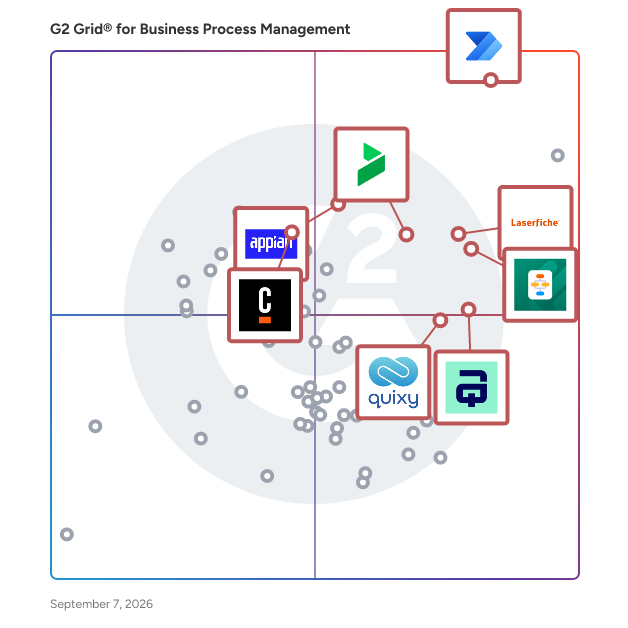
## G2 Grid® for Business Process Management Software
![G2 Grid® for Business Process Management Software plotting products by satisfaction and market presence](https://www.g2.com/categories/business-process-management/grids.png?focus%5B%5D=122375&focus%5B%5D=3066&focus%5B%5D=1507&focus%5B%5D=18747&focus%5B%5D=74308&focus%5B%5D=20785&focus%5B%5D=1402291&focus%5B%5D=114120)
Highlighted products: Microsoft Power Automate, Laserfiche, Appian, AuraQuantic, Camunda, Bizagi, Jotform Workflows, and Quixy.
Underlying data: [Grid® JSON](https://www.g2.com/categories/business-process-management/grids.json?focus%5B%5D=microsoft-power-automate&amp;focus%5B%5D=laserfiche&amp;focus%5B%5D=appian&amp;focus%5B%5D=auraquantic&amp;focus%5B%5D=camunda&amp;focus%5B%5D=bizagi&amp;focus%5B%5D=jotform-workflows&amp;focus%5B%5D=quixy&amp;segment=enterprise)


## How Many Business Process Management Software Products Does G2 Track?
**Total Products under this Category:** 192

### Category Stats (Jul 2026)
- **Average Rating**: 4.53/5 The average rating of products in this category, based on all submitted ratings
- **Top Trending Product**: HighGear (+1.06%) - Among all products in this category, HighGear recorded the largest rating increase compared to last month
*Last updated: July 18, 2026*


## How Does G2 Rank Business Process Management Software Products?

**Why You Can Trust G2's Software Rankings:**

- 30 Analysts and Data Experts
- 13,600+ Authentic Reviews
- 192+ Products
- Unbiased Rankings

G2's software rankings are built on verified user reviews, rigorous moderation, and a consistent research methodology maintained by a team of analysts and data experts. Each product is measured using the same transparent criteria, with no paid placement or vendor influence. While reviews reflect real user experiences, which can be subjective, they offer valuable insight into how software performs in the hands of professionals. Together, these inputs power the G2 Score, a standardized way to compare tools within every category.


---

**Sponsored**

### Smartsheet

Smartsheet is an Intelligent Work Management Platform that revolutionizes how you manage projects, portfolios, and processes. The Smartsheet AI-powered platform delivers adaptability, sophisticated experiences, and enterprise-grade rigor to support work across industries — from service delivery to construction, clinical trials, and marketing campaigns. Designed to meet demanding requirements, it helps organizations drive efficiency, accelerate innovation, and stay competitive. Over 85% of Fortune 500 companies trust Smartsheet to align their resources to improve efficiency, agility, and collaboration in today’s ever-changing world of work.


[Visit website](https://www.g2.com/external_clickthroughs/record?secure%5Bad_program%5D=ppc&amp;secure%5Bad_slot%5D=category_product_list&amp;secure%5Bcategory_id%5D=163&amp;secure%5Bchosen_at%5D=2026-07-19T21%3A37%3A36Z&amp;secure%5Bdisplayable_resource_id%5D=1698&amp;secure%5Bdisplayable_resource_type%5D=Category&amp;secure%5Bmedium%5D=sponsored&amp;secure%5Bplacement_reason%5D=neighbor_category&amp;secure%5Bplacement_resource_ids%5D%5B%5D=1698&amp;secure%5Bprioritized%5D=false&amp;secure%5Bproduct_id%5D=530&amp;secure%5Bresource_id%5D=163&amp;secure%5Bresource_type%5D=Category&amp;secure%5Bsource_type%5D=category_page&amp;secure%5Bsource_url%5D=https%3A%2F%2Fwww.g2.com%2Fcategories%2Fbusiness-process-management%2Fenterprise&amp;secure%5Btoken%5D=bbff214a0ebb431e31068999f481dcada33da8ba04e1d3f49a5f96fc7202924e&amp;secure%5Burl%5D=https%3A%2F%2Fwww.smartsheet.com%2Fs%2Fproject-portfolio-software%3Futm_source%3DG2%26utm_medium%3Daffiliate%26utm_campaign%3Daff-ppm-us-ca-g2&amp;secure%5Burl_type%5D=custom_url)

---


## Business Process Management Software Features & Capabilities

### What are the Best Business Process Management Software with No-Code App Development?
Provides drag and drop tools usable by admins with little to no coding experience in order to build applications which automate workflows and business processes.

**Top-rated Business Process Management Software for No-Code App Development:**
- [Microsoft Power Automate](https://www.g2.com/products/microsoft-power-automate/reviews)
- [Laserfiche](https://www.g2.com/products/laserfiche/reviews)
- [Jotform Workflows](https://www.g2.com/products/jotform-workflows/reviews)
[Explore Business Process Management Software with No-Code App Development](https://www.g2.com/categories/business-process-management/f/no-code-app-development)

### What are the Best Business Process Management Software with Low-Code App Development?
Provides development environments to allow users to develop applications which automate workflows and business processes with minimal coding.

**Top-rated Business Process Management Software for Low-Code App Development:**
- [Microsoft Power Automate](https://www.g2.com/products/microsoft-power-automate/reviews)
- [Laserfiche](https://www.g2.com/products/laserfiche/reviews)
- [Jotform Workflows](https://www.g2.com/products/jotform-workflows/reviews)
[Explore Business Process Management Software with Low-Code App Development](https://www.g2.com/categories/business-process-management/f/low-code-app-development)

### What are the Best Business Process Management Software with Process Analysis?
Delivers data points such as time and cost of a process on a dashboard to evaluate process efficacy.

**Top-rated Business Process Management Software for Process Analysis:**
- [Microsoft Power Automate](https://www.g2.com/products/microsoft-power-automate/reviews)
- [Laserfiche](https://www.g2.com/products/laserfiche/reviews)
- [Jotform Workflows](https://www.g2.com/products/jotform-workflows/reviews)
[Explore Business Process Management Software with Process Analysis](https://www.g2.com/categories/business-process-management/f/process-analysis)

### What are the Best Business Process Management Software with Document Generation?
Enables users to create documents for business processes and provides a wide array of templates which are customizable.

**Top-rated Business Process Management Software for Document Generation:**
- [Microsoft Power Automate](https://www.g2.com/products/microsoft-power-automate/reviews)
- [Laserfiche](https://www.g2.com/products/laserfiche/reviews)
- [Jotform Workflows](https://www.g2.com/products/jotform-workflows/reviews)
[Explore Business Process Management Software with Document Generation](https://www.g2.com/categories/business-process-management/f/document-generation)


## What Are the Top-Rated Business Process Management Software Products in 2026?
### 1. [Quixy](https://www.g2.com/products/quixy/reviews)
Quixy is a cloud-based, user-friendly platform that empowers users without coding skills to create enterprise-grade applications ten times faster using a simple drag-and-drop design. Built for today’s dynamic business environment, Quixy allows businesses to build and manage enterprise applications quickly and effortlessly, enhancing efficiency, transparency, and productivity across operations. With a wide range of pre-built solutions for various use cases such as CRM, Project Management, HRMS, and more. Quixy simplifies application development and helps organizations stay agile while meeting their unique needs. The platform also integrates a seamless cloud database, enterprise-grade security, regulatory compliance, and a scalable infrastructure to support global business operations. Schedule a Demo at https://quixy.com/get-demo/


**Average Rating:** 5.0/5.0
**Total Reviews:** 129
**How Do G2 Users Rate Quixy?**

- **Intelligence:** 9.8/10 (Category avg: 8.3/10)
- **Has the product been a good partner in doing business?:** 9.9/10 (Category avg: 9.1/10)
- **Process Overview:** 9.9/10 (Category avg: 8.9/10)
- **Process Analysis:** 9.8/10 (Category avg: 8.7/10)

**Who Is the Company Behind Quixy?**

- **Seller:** [Quixy](https://www.g2.com/sellers/quixy)
- **Year Founded:** 2019
- **HQ Location:** Hyderabad, Telangana
- **LinkedIn® Page:** https://www.linkedin.com/company/14492640/ (229 employees on LinkedIn®)

**Who Uses This Product?**
- **Who Uses This:** Senior Software Engineer, Associate Software Engineer
- **Top Industries:** Computer Software, Information Technology and Services
- **Company Size:** 62% Mid-Market, 23% Small-Business


#### What Are Quixy's Pros and Cons?

**Pros:**

- Automation (1 reviews)
- Automation Ease (1 reviews)
- Automation Excellence (1 reviews)
- Automation Focus (1 reviews)
- Capabilities (1 reviews)

**Cons:**

- Bugs (1 reviews)
- Communication Issues (1 reviews)
- Email Issues (1 reviews)
- Lagging Issues (1 reviews)
- Performance Issues (1 reviews)


### What Do G2 Reviewers Say About Quixy?
*AI-generated summary from verified user reviews*

**Pros:**

- Users value Quixy&#39;s **easy and fast automation** , effectively streamlining workflows and significantly reducing manual efforts.
- Users find **automation incredibly easy** with Quixy, streamlining workflows and saving time with its user-friendly platform.
- Users praise Quixy for its **easy and fast automation** , enhancing internal workflows and saving considerable time and effort.
- Users value the **ease of automation** Quixy offers, allowing seamless workflow management without coding skills.
- Users praise Quixy&#39;s **powerful workflow automation capabilities** , making complex processes easy and efficient without coding requirements.

**Cons:**

- Users experience **slow refresh speeds and buffering** , along with occasional missed notifications that disrupt their workflow.
- Users experience **communication issues** due to low refresh speeds and missed notifications, impacting overall efficiency.
- Users face **email issues** due to slow refresh speeds and missed notifications affecting user experience.
- Users experience **lagging issues** with slow refresh speeds and missed notifications, impacting their overall experience.
- Users experience **performance issues** like low refresh speed and missed notifications, impacting their workflow efficiency.

#### What Are Recent G2 Reviews of Quixy?

**"[Quixy - The only destination for automating workflows](https://www.g2.com/survey_responses/quixy-review-10408888)"**

**Rating:** 5.0/5.0 stars
*— Fojeme M.*

[Read full review](https://www.g2.com/survey_responses/quixy-review-10408888)

---

**"[Automated our workflow](https://www.g2.com/survey_responses/quixy-review-6873231)"**

**Rating:** 5.0/5.0 stars
*— Sanjiv K.*

[Read full review](https://www.g2.com/survey_responses/quixy-review-6873231)

---


#### What Are G2 Users Discussing About Quixy?

- [How do you use Quixy?](https://www.g2.com/discussions/how-do-you-use-quixy)
- [Who owns Quixy?](https://www.g2.com/discussions/who-owns-quixy)
- [How much does Quixy cost?](https://www.g2.com/discussions/how-much-does-quixy-cost)
- [What does Quixy do?](https://www.g2.com/discussions/what-does-quixy-do)

### 2. [Tungsten TotalAgility](https://www.g2.com/products/tungsten-totalagility/reviews)
The Industry’s Only Low‑Code, Integrated, End‑to‑End Intelligent Automation Solution Tungsten TotalAgility is a powerful all-in-one solution that combines document and process intelligence using the industry&#39;s leading capture, OCR, and process orchestration technology. Harness the Tungsten Intelligent Automation Platform, Tungsten TotalAgility, to go beyond AI-powered RPA by unlocking document intelligence, connecting disparate systems, and orchestrating human and digital workers to execute and automate workflows across your high-value business processes. • Document Intelligence: Apply cognitive capture and artificial intelligence to unstructured data to  automate and extract information and unlock data insights. • Process Orchestration: Orchestrate digital workflows in collaboration with users, systems , and data. • Connected Systems: Bring together your critical business systems— enterprise applications, legacy systems, mobile, chatbots, and more—across internal and external business processes. :: Successful Organizations Rely on TotalAgility :: Tungsten TotalAgility® streamlines building and deploying intelligent process automation so you can expand human and digital workforce capacity. Receive, execute, route, and report on workflow tasks from a single platform. Why customers choose TotalAgility? • Industry-leading document intelligence: Our intelligent document processing technology processes documents and data with the highest accuracy and speed. • Low-code automation: Powerful tools to build, deploy and accelerate enterprise automation. • End-to-end business process handling: A central intelligent automation platform to handle dynamic tasks, trigger automated rules and deploy on-demand workforce capacity. • Mobile engagement: Deliver enhanced customer experiences across any channel and any device.


**Average Rating:** 4.3/5.0
**Total Reviews:** 42
**How Do G2 Users Rate Tungsten TotalAgility?**

- **Intelligence:** 7.9/10 (Category avg: 8.3/10)
- **Has the product been a good partner in doing business?:** 8.6/10 (Category avg: 9.1/10)
- **Process Overview:** 8.6/10 (Category avg: 8.9/10)
- **Process Analysis:** 8.0/10 (Category avg: 8.7/10)

**Who Is the Company Behind Tungsten TotalAgility?**

- **Seller:** [Tungsten Automation](https://www.g2.com/sellers/tungsten-automation)
- **Year Founded:** 1985
- **HQ Location:** Denver, CO
- **Twitter:** @TungstenAI (6,445 Twitter followers)
- **LinkedIn® Page:** https://www.linkedin.com/company/tungstenautomation/ (1,564 employees on LinkedIn®)

**Who Uses This Product?**
- **Top Industries:** Banking, Information Technology and Services
- **Company Size:** 53% Enterprise, 31% Mid-Market


#### What Are Recent G2 Reviews of Tungsten TotalAgility?

**"[Automation with Kofax KTA](https://www.g2.com/survey_responses/tungsten-totalagility-review-8206333)"**

**Rating:** 4.5/5.0 stars
*— Shahir A.*

[Read full review](https://www.g2.com/survey_responses/tungsten-totalagility-review-8206333)

---

**"[Worked with KOFAX for Helba Investment project where extracted hand written data.](https://www.g2.com/survey_responses/tungsten-totalagility-review-9416972)"**

**Rating:** 4.5/5.0 stars
*— Dipen P.*

[Read full review](https://www.g2.com/survey_responses/tungsten-totalagility-review-9416972)

---


#### What Are G2 Users Discussing About Tungsten TotalAgility?

- [What is Kofax Transformation Module?](https://www.g2.com/discussions/what-is-kofax-transformation-module)
- [What is the Kofax system?](https://www.g2.com/discussions/what-is-the-kofax-system)
- [What is the use of Kofax?](https://www.g2.com/discussions/what-is-the-use-of-kofax)
- [What is Kofax TotalAgility?](https://www.g2.com/discussions/what-is-kofax-totalagility) - 1 comment

### 3. [FlowForma Process Automation](https://www.g2.com/products/flowforma-process-automation/reviews)
FlowForma is a type of process automation solution designed to help users digitize, automate, and optimize business processes across various complexities. This enterprise-grade platform leverages AI technology to provide a no-code environment, allowing users, regardless of their technical expertise, to create and manage automated workflows efficiently. By integrating intelligent automation into everyday operations, FlowForma addresses the growing need for organizations to enhance productivity and streamline processes. The target audience for FlowForma includes business leaders, IT professionals, and organizations of all sizes seeking to improve their operational efficiency. With its user-friendly interface, FlowForma caters to both small businesses and large enterprises, making it an adaptable solution for diverse industries. Specific use cases range from automating simple tasks, such as data entry and approvals, to managing complex workflows that require intricate decision-making and collaboration among multiple stakeholders. Key features of FlowForma include its agentic AI capabilities, which allow users to design and optimize processes with the assistance of AI as an active collaborator. This functionality not only enhances the automation experience but also enables users to evolve their processes intelligently over time. The platform is built to be scalable and secure, ensuring that organizations can grow and adapt their automation strategies without compromising data integrity or system performance. FlowForma stands out in the process automation category by making automation accessible and affordable. With over 300,000 users worldwide, the platform has proven its effectiveness in delivering measurable results. Users benefit from the ability to streamline operations, reduce manual errors, and enhance overall productivity. The no-code aspect of FlowForma empowers individuals to take control of their automation needs without relying heavily on IT resources, fostering a culture of innovation and agility within organizations. In addition to its robust features, FlowForma offers a free trial, allowing potential users to experience the platform&#39;s capabilities firsthand. This trial period provides an opportunity for organizations to evaluate how FlowForma can transform their processes and drive efficiency, ultimately leading to improved business outcomes.


**Average Rating:** 4.5/5.0
**Total Reviews:** 98
**How Do G2 Users Rate FlowForma Process Automation?**

- **Intelligence:** 8.6/10 (Category avg: 8.3/10)
- **Has the product been a good partner in doing business?:** 9.3/10 (Category avg: 9.1/10)
- **Process Overview:** 8.7/10 (Category avg: 8.9/10)
- **Process Analysis:** 8.3/10 (Category avg: 8.7/10)

**Who Is the Company Behind FlowForma Process Automation?**

- **Seller:** [FlowForma](https://www.g2.com/sellers/flowforma)
- **Company Website:** https://www.flowforma.com
- **Year Founded:** 2012
- **HQ Location:** Dublin
- **Twitter:** @FlowForma (493 Twitter followers)
- **LinkedIn® Page:** https://www.linkedin.com/company/10197246/ (26 employees on LinkedIn®)

**Who Uses This Product?**
- **Top Industries:** Construction, Information Technology and Services
- **Company Size:** 64% Mid-Market, 26% Small-Business


#### What Are FlowForma Process Automation's Pros and Cons?

**Pros:**

- Ease of Use (18 reviews)
- Automation (16 reviews)
- Efficiency (16 reviews)
- Automation Efficiency (10 reviews)
- Productivity Improvement (10 reviews)

**Cons:**

- Learning Curve (8 reviews)
- Difficult Learning (5 reviews)
- Missing Features (5 reviews)
- Learning Difficulty (4 reviews)
- Complexity (3 reviews)


### What Do G2 Reviewers Say About FlowForma Process Automation?
*AI-generated summary from verified user reviews*

**Pros:**

- Users find the **ease of use** in FlowForma Process Automation enhances efficiency and integration within their business.
- Users find **automation features** of FlowForma invaluable for enhancing efficiency and simplifying client data management.
- Users commend the **efficiency** of FlowForma, highlighting its ability to streamline workflows and reduce workload effectively.
- Users find **automation efficiency** in FlowForma Process Automation boosts productivity and simplifies data management seamlessly.
- Users value the **productivity improvement** FlowForma delivers, enhancing efficiency and reducing team workload significantly.

**Cons:**

- Users find the **learning curve steep** , requiring time and training to navigate FlowForma’s system effectively.
- Users find the **difficult learning curve** of FlowForma challenging, requiring time and training to navigate effectively.
- Users find the **missing features** in FlowForma Process Automation lead to customization and integration limitations.
- Users find that **learning difficulty** impacts their ability to navigate and manage complex tasks effectively in FlowForma.
- Users find the **complexity** of FlowForma challenging, hindering smooth navigation and efficient task management.

#### What Are Recent G2 Reviews of FlowForma Process Automation?

**"[Fast, Responsive Support That Resolves Tickets Quickly](https://www.g2.com/survey_responses/flowforma-process-automation-review-12376989)"**

**Rating:** 5.0/5.0 stars
*— Alex B.*

[Read full review](https://www.g2.com/survey_responses/flowforma-process-automation-review-12376989)

---

**"[FlowForma Makes Automating Forms and Document Generation a Breeze](https://www.g2.com/survey_responses/flowforma-process-automation-review-12473742)"**

**Rating:** 4.0/5.0 stars
*— Jolanta L.*

[Read full review](https://www.g2.com/survey_responses/flowforma-process-automation-review-12473742)

---


#### What Are G2 Users Discussing About FlowForma Process Automation?

- [What do you like most about FlowForma for process automation, and what could be improved?](https://www.g2.com/discussions/what-do-you-like-most-about-flowforma-for-process-automation-and-what-could-be-improved)
- [What is FlowForma Process Automation used for?](https://www.g2.com/discussions/what-is-flowforma-process-automation-used-for) - 1 comment

### 4. [BP Logix](https://www.g2.com/products/bp-logix/reviews)
BP Logix helps leaders in regulated industries transform the way they get work done. Our powerful low-code automation platform, Process Director, empowers citizen developers and IT teams alike to: ◾ Create custom, scalable business applications that automate their most complex processes. ◾ Conquer compliance gaps with 24/7 audit tracking, electronic signatures, user access permissions, and more. ◾ Reduce costs and knock out backlogs with an agile low-code platform that is 20x faster than custom coding.


**Average Rating:** 4.7/5.0
**Total Reviews:** 29
**How Do G2 Users Rate BP Logix?**

- **Intelligence:** 6.7/10 (Category avg: 8.3/10)
- **Has the product been a good partner in doing business?:** 9.3/10 (Category avg: 9.1/10)
- **Process Overview:** 8.0/10 (Category avg: 8.9/10)
- **Process Analysis:** 8.2/10 (Category avg: 8.7/10)

**Who Is the Company Behind BP Logix?**

- **Seller:** [BP Logix](https://www.g2.com/sellers/bp-logix)
- **Year Founded:** 1995
- **HQ Location:** Encinitas, CA
- **Twitter:** @bplogix (2,492 Twitter followers)
- **LinkedIn® Page:** https://www.linkedin.com/company/236159/ (30 employees on LinkedIn®)

**Who Uses This Product?**
- **Top Industries:** Higher Education
- **Company Size:** 52% Enterprise, 38% Mid-Market


#### What Are Recent G2 Reviews of BP Logix?

**"[Boost your business with BP Logix](https://www.g2.com/survey_responses/bp-logix-review-8255368)"**

**Rating:** 5.0/5.0 stars
*— Jan M.*

[Read full review](https://www.g2.com/survey_responses/bp-logix-review-8255368)

---

**"[Director, Enterprise Security](https://www.g2.com/survey_responses/bp-logix-review-8050473)"**

**Rating:** 4.0/5.0 stars
*— Verified User in Hospital &amp; Health Care*

[Read full review](https://www.g2.com/survey_responses/bp-logix-review-8050473)

---


#### What Are G2 Users Discussing About BP Logix?

- [What is BP Logix used for?](https://www.g2.com/discussions/what-is-bp-logix-used-for)

### 5. [Decisions](https://www.g2.com/products/decisions-decisions/reviews)
Decisions is an AI-powered process orchestration and automation platform used by enterprises to coordinate AI agents, systems, and people across complex, rules-driven processes—especially where governance, visibility, and accountability are critical. The platform combines visual workflow automation, an enterprise rules engine, AI orchestration, system integrations, forms, and dashboards into a unified control layer. Teams use Decisions to model decision logic, orchestrate work across systems, and govern AI behavior without siloing logic in code, agents, or disconnected tools. This approach allows organizations to coordinate end-to-end execution while keeping decisions explicit, testable, and easy to change as business and regulatory requirements evolve. Decisions is designed for collaboration between business and IT teams. Business users can define and manage process and decision logic visually, while IT maintains architectural oversight, security, and integrations. Logic that is often fragmented across application code, AI agents, spreadsheets, or manual processes can be centralized, governed, and reused—reducing inconsistency and operational risk as automation scales.


**Average Rating:** 4.6/5.0
**Total Reviews:** 40
**How Do G2 Users Rate Decisions?**

- **Intelligence:** 8.5/10 (Category avg: 8.3/10)
- **Has the product been a good partner in doing business?:** 9.6/10 (Category avg: 9.1/10)
- **Process Overview:** 8.9/10 (Category avg: 8.9/10)
- **Process Analysis:** 8.8/10 (Category avg: 8.7/10)

**Who Is the Company Behind Decisions?**

- **Seller:** [Decisions](https://www.g2.com/sellers/decisions)
- **Company Website:** https://www.decisions.com
- **Year Founded:** 2010
- **HQ Location:** Virginia Beach, Virginia
- **Twitter:** @decisions (466 Twitter followers)
- **LinkedIn® Page:** https://www.linkedin.com/company/2373238/ (322 employees on LinkedIn®)

**Who Uses This Product?**
- **Top Industries:** Financial Services
- **Company Size:** 44% Mid-Market, 37% Enterprise


#### What Are Decisions's Pros and Cons?

**Pros:**

- Customer Support (2 reviews)
- Customization (2 reviews)
- Easy Integrations (2 reviews)
- Integration (2 reviews)
- Integrations (2 reviews)

**Cons:**

- Learning Difficulty (2 reviews)
- Complexity (1 reviews)
- Database Limitations (1 reviews)
- Data Migration (1 reviews)
- Difficult Learning (1 reviews)


### What Do G2 Reviewers Say About Decisions?
*AI-generated summary from verified user reviews*

**Pros:**

- Users highlight the **excellent customer support** provided, enhancing their experience with quick and effective solutions.
- Users love the **customization options** in Decisions, finding it user-friendly and accessible even for non-coders.
- Users value the **easy integrations** offered by Decisions, enabling seamless connections with SQL and SAP systems.
- Users value the **seamless integration capabilities** of Decisions, enhancing efficient workflows and rapid development cycles.
- Users value the **many integrations** available in Decisions, enhancing development and reporting capabilities efficiently.

**Cons:**

- Users find the **learning difficulty** significant, with features requiring time and experience to master effectively.
- Users find the **complexity** of matching data types and building relationships frustrating during the integration process.
- Users face **database limitations** that complicate data matching and step management, impacting the overall ease of use.
- Users find **data migration challenging** due to lost IDs and complicated relationships during the process.
- Users find the **difficult learning curve** challenging, suggesting more examples or templates for better understanding.

#### What Are Recent G2 Reviews of Decisions?

**"[Excellent Low Code Tool](https://www.g2.com/survey_responses/decisions-review-11659105)"**

**Rating:** 5.0/5.0 stars
*— Manjot S.*

[Read full review](https://www.g2.com/survey_responses/decisions-review-11659105)

---

**"[Decisions is a great project!](https://www.g2.com/survey_responses/decisions-review-11420336)"**

**Rating:** 5.0/5.0 stars
*— Mel C.*

[Read full review](https://www.g2.com/survey_responses/decisions-review-11420336)

---


#### What Are G2 Users Discussing About Decisions?

- [What is Decisions used for?](https://www.g2.com/discussions/what-is-decisions-used-for)

### 6. [Cflow](https://www.g2.com/products/cflow/reviews)
Cflow is a leading AI-powered approval automation platform that empowers key decision makers with actionable data for making informed business decisions. Trusted by a 100,000+ user base spanning SMBs, mid-market, and Enterprise companies, Cflow is the highest-rated choice for unstoppable, no-code workflow automation. Complex workflows with multiple approval levels can be effectively automated within minutes using the visual workflow builder. Cflow takes paperless offices to the next level by providing intelligent document processing and document management features that include AI-powered OCR, Auto-classification, Fuzzy Search Mapping, Document Designer, Integrated electronic signatures, and role-based access control. SEYARC AI in Cflow turns data into decisions instantly by automating data entry, form filling, document reading, and insights. Cflow’s core value proposition lies in its ability to automate processes and deliver results in days, not months. Backed by SOC 2 Type 2, ISO 27001, GDPR, and HIPAA compliance, Cflow delivers enterprise-grade security that Global businesses require.


**Average Rating:** 4.7/5.0
**Total Reviews:** 185
**How Do G2 Users Rate Cflow?**

- **Intelligence:** 9.5/10 (Category avg: 8.3/10)
- **Has the product been a good partner in doing business?:** 9.6/10 (Category avg: 9.1/10)
- **Process Overview:** 9.5/10 (Category avg: 8.9/10)
- **Process Analysis:** 9.6/10 (Category avg: 8.7/10)

**Who Is the Company Behind Cflow?**

- **Seller:** [Cavintek Inc](https://www.g2.com/sellers/cavintek-inc)
- **Company Website:** https://www.cavintek.com
- **Year Founded:** 2011
- **HQ Location:** 4140 Via Candidiz UNIT 158, San Diego, CA 92130, United States
- **Twitter:** @cflowapps (828 Twitter followers)
- **LinkedIn® Page:** https://www.linkedin.com/company/cflowapps/ (26 employees on LinkedIn®)

**Who Uses This Product?**
- **Top Industries:** Marketing and Advertising, Information Technology and Services
- **Company Size:** 46% Mid-Market, 40% Small-Business


#### What Are Cflow's Pros and Cons?

**Pros:**

- Ease of Use (79 reviews)
- Automation (54 reviews)
- Workflow Management (51 reviews)
- Automation Efficiency (48 reviews)
- Process Automation (46 reviews)

**Cons:**

- Performance Issues (32 reviews)
- Slow Performance (28 reviews)
- Learning Curve (24 reviews)
- Limited Features (12 reviews)
- Slow Loading (12 reviews)


### What Do G2 Reviewers Say About Cflow?
*AI-generated summary from verified user reviews*

**Pros:**

- Users appreciate the **ease of use** of Cflow, enabling simple setup and management of workflows without coding.
- Users value Cflow&#39;s **automation capabilities** that streamline daily tasks, enhancing efficiency and organization in workflows.
- Users appreciate the **user-friendly workflow management** of Cflow, enhancing efficiency and supporting smooth operational processes.
- Users find Cflow&#39;s **automation efficiency** invaluable, streamlining tasks like onboarding and procurement with ease.
- Users appreciate how Cflow&#39;s **process automation** streamlines tasks like onboarding and approvals, greatly enhancing workflow efficiency.

**Cons:**

- Users experience **performance issues** with Cflow, including slow loading and delayed notifications on mobile.
- Users notice **slow performance** in Cflow, especially during data transfers and while editing workflows, impacting overall efficiency.
- Users find the **steep learning curve** of Cflow daunting, especially with its many features for new automation users.
- Users find the **limited features** of Cflow restrict their customization and efficiency, especially for new users.
- Users experience **slow loading** times, particularly when multiple workflows are active, affecting overall app performance.

#### What Are Recent G2 Reviews of Cflow?

**"[Cflow Streamlines Workflows with Clear Visibility and Easy Collaboration](https://www.g2.com/survey_responses/cflow-review-12913981)"**

**Rating:** 5.0/5.0 stars
*— Krishna Rahul B.*

[Read full review](https://www.g2.com/survey_responses/cflow-review-12913981)

---

**"[Cflow has been a great software solution for our team.](https://www.g2.com/survey_responses/cflow-review-13029422)"**

**Rating:** 5.0/5.0 stars

[Read full review](https://www.g2.com/survey_responses/cflow-review-13029422)

---


### 7. [Jotform Workflows](https://www.g2.com/products/jotform-workflows/reviews)
Jotform Workflows is a powerful no-code automation platform that makes it easy to streamline, manage, and optimize your business processes from end to end. Using an intuitive drag-and-drop builder, you can design custom workflows that match your exact needs — whether you’re routing approvals, collecting payments, assigning tasks, or automating repetitive steps across your organization. Jotform Workflows eliminates manual work, reduces errors, and helps teams move faster by keeping every process consistent, transparent, and fully automated. With 200+ professionally designed workflow templates, getting started is effortless. Choose a ready-made workflow for HR, finance, operations, customer service, education, healthcare, or any other use case, and customize it to fit your processes. Workflows can include conditional logic, automated notifications, role-based approvals, and dynamic routing rules that adapt to each form submission, ensuring the right steps happen at the right time. For organizations that rely on payments, Jotform Workflows supports automated payment collection and processing through 40+ trusted payment gateways, including PayPal, Square, and Stripe. You can trigger payments based on user selections, approval steps, or predefined conditions, helping you collect funds quickly and accurately without manual intervention. Seamless integration is at the heart of Jotform Workflows. Connect your workflows to 200+ popular apps — including Slack, Google Sheets, Airtable, HubSpot, Trello, and more — to automatically sync data, create tasks, notify team members, or update external systems in real time. This creates a fully connected ecosystem where every submission triggers the right actions across your tools. Jotform Workflows also includes powerful task management capabilities. Create tasks, assign them to team members, track progress, and automate follow-ups based on form responses or workflow conditions. This centralizes all activity into one organized workspace, giving teams full visibility into what needs to happen next. All workflow data is automatically stored and organized in Jotform Tables and Jotform Inbox. View submissions as spreadsheets, calendars, or cards, manage permissions for team members, and respond to approvals or requests quickly from any device. This ensures complete oversight and helps teams make informed decisions faster. With robust automation, deep integrations, secure data handling, and a no-code builder anyone can use, Jotform Workflows empowers organizations of all sizes to create efficient, scalable, and fully automated processes — without relying on developers or technical expertise.


**Average Rating:** 4.5/5.0
**Total Reviews:** 562
**How Do G2 Users Rate Jotform Workflows?**

- **Intelligence:** 8.3/10 (Category avg: 8.3/10)
- **Has the product been a good partner in doing business?:** 8.9/10 (Category avg: 9.1/10)
- **Process Overview:** 8.5/10 (Category avg: 8.9/10)
- **Process Analysis:** 8.4/10 (Category avg: 8.7/10)

**Who Is the Company Behind Jotform Workflows?**

- **Seller:** [Jotform](https://www.g2.com/sellers/jotform)
- **Company Website:** https://www.jotform.com/
- **Year Founded:** 2006
- **HQ Location:** San Francisco, California
- **Twitter:** @Jotform (39,289 Twitter followers)
- **LinkedIn® Page:** https://www.linkedin.com/company/3541463/ (901 employees on LinkedIn®)

**Who Uses This Product?**
- **Who Uses This:** Owner, CEO
- **Top Industries:** Non-Profit Organization Management, Hospital &amp; Health Care
- **Company Size:** 63% Small-Business, 29% Mid-Market


#### What Are Jotform Workflows's Pros and Cons?

**Pros:**

- Ease of Use (231 reviews)
- Automation (110 reviews)
- Form Creation (89 reviews)
- Easy Integrations (77 reviews)
- Customization (75 reviews)

**Cons:**

- Learning Curve (51 reviews)
- Complexity (40 reviews)
- Missing Features (40 reviews)
- Integration Issues (37 reviews)
- Form Issues (33 reviews)


### What Do G2 Reviewers Say About Jotform Workflows?
*AI-generated summary from verified user reviews*

**Pros:**

- Users appreciate the **ease of use** of Jotform Workflows, making setup and monitoring straightforward and efficient.
- Users love the **automation capabilities** of Jotform Workflows, greatly enhancing efficiency and streamlining processes effortlessly.
- Users appreciate the **easy-to-use form creation** in Jotform Workflows, enabling smooth workflows and customization options.
- Users value the **easy integrations** with platforms like Hubspot, enhancing their workflow efficiency significantly.
- Users love the **customization options** in Jotform Workflows, enabling seamless brand alignment and efficient form creation.

**Cons:**

- Users find the **steep learning curve** for advanced features challenging, making implementation difficult for newcomers.
- Users find the **navigational complexity** of Jotform Workflows time-consuming and challenging during setup and personalization.
- Users express frustration over the **missing features** , particularly lacking communication channels and intuitive project management tools.
- Users face **integration issues** with limited customizability, creating challenges for complex workflows and overall user experience.
- Users experience **form issues** like slow searches and incompatibility with encrypted forms, affecting workflow efficiency.

#### What Are Recent G2 Reviews of Jotform Workflows?

**"[Intuitive Tool for Faster Candidate Email Updates](https://www.g2.com/survey_responses/jotform-workflows-review-12956925)"**

**Rating:** 4.5/5.0 stars
*— Harold D.*

[Read full review](https://www.g2.com/survey_responses/jotform-workflows-review-12956925)

---

**"[Helps Me Keep Daily Consultation and Follow-up Work More Organized](https://www.g2.com/survey_responses/jotform-workflows-review-12723636)"**

**Rating:** 4.5/5.0 stars
*— Ishan S.*

[Read full review](https://www.g2.com/survey_responses/jotform-workflows-review-12723636)

---


## What Is Business Process Management Software?

[Process Automation Software](https://www.g2.com/categories/process-automation)

## What Software Categories Are Similar to Business Process Management Software?

- [No-Code Development Platforms](https://www.g2.com/categories/no-code-development-platforms)
- [Digital Process Automation (DPA) Software](https://www.g2.com/categories/digital-process-automation-dpa)
- [Workflow Management Software](https://www.g2.com/categories/workflow-management)


---

## How Do You Choose the Right Business Process Management Software?

### What You Should Know About Business Process Management Software

### What is Business Process Management (BPM) Software?

Business process management (BPM) is the practice of streamlining and improving business activities to more efficiently perform specific business actions. Often these business actions require cross-team collaboration and consist of many moving parts, whether they are software systems or human intervention. There are many BPM software products that can help companies achieve the ultimate goal of seamless workflow automation. BPM tools often provide process modeling, execution, and analysis functionality to help business managers ensure that the processes they need done are working efficiently and effectively. The possibilities are vast and varied: this software can be used for a host of different use cases, such as invoicing, marketing, and accounting.

With business process automation solutions, businesses are able to improve and increase collaboration and be on the road toward automation. Through detailed mappings of processes and tools for managing workflows, professionals can get a birds-eye view of their business operations and thereby have a clear understanding of how they can optimize them.&amp;nbsp;

#### What Types of Business Process Management (BPM) Software Exist?

There are a few different types and use cases of BPM software, but each helps an organization streamline workflows. Although all of these tools capture business processes and give users the ability to automate them, they differ in terms of their ability for users to create standalone applications on top of these processes.

**Standard BPM software**

With standard BPM software, users get full control over their business processes, providing them with tools for monitoring execution performance and analyzing their current goals, workflows, and more. It should be noted that BPM solutions do not exist in isolation from a company’s broader software stack. On the contrary, it is key for them to integrate into various other tools, such as [CRM software](https://www.g2.com/categories/crm) and [ERP software](https://www.g2.com/categories/erp). With proper integration, users are able to better understand the company’s manifold processes in order to optimize or automate them.&amp;nbsp;

**Digital process automation (DPA)**

DPA&amp;nbsp;is a subset of BPM and refers to those products which include all of the core functionality of BPM software, but also allow users to create standalone applications on top of business processes. For example, a retail company can use [digital process automation](https://www.g2.com/categories/business-process-management/f/digital-process-automation) to analyze how sales representatives are selling their products across various regions, such as how they input pipeline data into spreadsheets, send emails to prospects, and more. Then, an administrator can create an application which the salespeople can use to streamline and automate this process, helping them become more efficient.

### What are the Common Features of Business Process Management (BPM) Software?

The following are some core features within BPM software that can help companies in defining, automating, and reporting on processes that are intended to help optimize businesses to deliver on company goals.

**Real-time process monitoring:** Keeping track of the manifold processes a business has can be difficult, especially when doing so in real time across various systems. With properly deployed BPM software in place, users can monitor these processes in real time. This provides the benefit of being able to rigorously test variations and changes to these processes. For example, a business can test the effect of routing all of their support cases to a particular individual or system. If it is found that this is not working well, they can iterate and test different options, all while keeping a close eye on their BPM monitoring feature for insight.

**Document automation:** Forms and documents are ubiquitous across businesses, such as onboarding documents for new employees, contracts for customers or vendors, and surveys. Manually inputting and analyzing data from these sources can be time consuming and tedious. BPM software can assist in automating this process, whether that be in part or in total. For example, one can use BPM to automate inputting data from new employees’ personal documents onto the company’s [core HR software](https://www.g2.com/categories/core-hr).&amp;nbsp;

BPM tools will differ in regards to how much intelligence, or natural language understanding, they have built in. Thus, although most solutions will have optical character recognition (OCR) built-in, some will also provide the ability to understand documents. This would allow it to “read” documents and, for example, summarize the text therein or recognize key terms in order to input them into other documents or systems.

**Process automation:** Automating processes and workflows does not happen overnight. BPM software provides features for facilitating this automation through process design and execution. In other words, users can use this software to not just document processes, but to also create them ex nihilo and to automate them, often via a drag-and-drop interface.

In regards to how this is facilitated, many BPM products have a library in which to keep previously used or designed workflows for future use. In addition, some tools provide templates for common use cases, such as accounts payable, employee onboarding, and procurement. Users can adopt and adapt these templates for their particular needs and use case.

Other Features of Business Process Management Software: [Document generation](https://www.g2.com/categories/business-process-management/f/document-generation), [Finance](https://www.g2.com/categories/business-process-management/f/finance), [Low-code app development](https://www.g2.com/categories/business-process-management/f/low-code-app-development), [No-code app development](https://www.g2.com/categories/business-process-management/f/no-code-app-development), [Process analysis](https://www.g2.com/categories/business-process-management/f/process-analysis)

Specific Subject Matters: [Human resources](https://www.g2.com/categories/business-process-management/f/human-resources)

### What are the Benefits of Business Process Management (BPM) Software?

Companies purchase BPM software because they need to solve some type of operational objective in a streamlined and efficient way. BPM software allows users to easily build unique workflows, assess the necessary steps required to carry out the objective, and integrate all the different solutions involved in the process. The actions that need to be carried out are usually time consuming and complex, so finding a way to automate these business processes can be very beneficial to any company. Additionally, BPM solutions can provide insights into the efficiency of processes. BPM tools can help identify bottlenecks and unnecessary process steps, and they even help hold employees accountable for their actions.

**Increased efficiency:** Using BPM solutions ensures that tasks are carried out in the most efficient manner possible. The processes are set up in an optimal way so that businesses are not wasting resources and employees are not wasting time, steps are not being skipped, and all actions are being performed as they should be; therefore, all tasks are being performed to their fullest.

**Enhanced productivity:** If companies are properly taking advantage of BPM tools, that means that they are saving their employees’ time through automation. By streamlining and automating the tedious tasks, workers have more time to focus on business-critical tasks instead of working on the time-consuming ones.

**Improved collaboration:** Businesses can easily get siloed, with business units working on their own, focused on their own goals and metrics. Although they all strive to improve the broader business, collaboration between departments can be difficult. A key benefit for BPM software is providing a bird’s eye view of all of a company’s processes, across its departments. With one source of truth in place, interdepartmental conversations become easier and more fruitful.

### Who Uses Business Process Management (BPM) Software?

Traditionally, BPM tools are used by mid-market and enterprise-sized companies. Larger companies tend to have more siloed departments, and when business actions need to become integrated to be efficient, BPM software is an easy solution. It is much rarer for small businesses to need a dedicated tool for workflow management.

Within companies, BPM tools are frequently leveraged by operations and [IT administrators](https://www.g2.com/categories/business-process-management/f/it) but can expand to really any department that needs to automate business processes. Some companies may have dedicated business analysts or process directors who ensure that internal processes are as streamlined as possible. Here are some department-specific examples:

**Sales:** BPM software can help automate actions performed by a [sales team](https://www.g2.com/categories/business-process-management/f/sales), specifically when it comes to contract creation and approval. Many BPM tools offer document management features specifically built for contract creation. Once a sales representative convinces a prospect to buy, the next step in the workflow is to send a contract. Based on the particular specifications of the deal, a contract can be created using BPM tools.

**Supply chain:** Once a deal is finalized, the next step in a workflow may be to ship the goods purchased. If a document is signed, BPM software can help place the exact order bought by the customer. This is where the tool goes from working with a business’ CRM to working with their [supply chain software](https://www.g2.com/categories/business-process-management/f/supply-chain). The order is automatically entered into a company’s ERP system and the goods are manufactured and shipped.

**Accounting:** Now that the goods are shipped and received, the accounting department needs to note the exact exchange of goods (i.e., how much was shipped, how much did they pay for it, etc.). This information can be inputted into an [accounting system](https://www.g2.com/categories/accounting) using BPM software.

### What are the Alternatives to Business Process Management (BPM) Software?

Alternatives to BPM software can replace this type of software, either partially or completely:

[Workflow management software](https://www.g2.com/categories/workflow-management) **:** Businesses should have a clear idea regarding what they are trying to achieve to determine the type of software they are looking for. Thus, if a business is looking for a more lightweight solution for facilitating workflow, workflow management software might be the best fit. This software helps to define and manage sequences of business activities and tasks and is more beneficial for small and medium-sized businesses with a low to medium complexity level of their operations.

[Robotic process automation (RPA) software](https://www.g2.com/categories/robotic-process-automation-rpa) **:** If a business is looking to automate routine tasks, RPA might be a good option. RPA provides robots that mimic clicks and other activity on the computer screen and facilitates the automation of a host of tasks, such as invoicing and employee onboarding. These virtual agents perform actions following these workflows both with and without human supervision or intervention.

[Rapid application development (RAD) software](https://www.g2.com/categories/rapid-application-development-rad) **:** Businesses should understand that they can pursue different avenues to achieve automation. Instead of BPM or in addition to it, users should investigate RAD software, such as the form of [low-code](https://www.g2.com/categories/low-code-development-platforms)and [no-code](https://www.g2.com/categories/no-code-development-platforms) development platforms. With this software, businesses are able to develop software quickly with minimal coding, reducing the need for extensive coding experience. Some of these tools are purpose-built for process automation.&amp;nbsp;

#### Software Related to Business Process Management (BPM) Software

The following solutions can be used in conjunction with BPM tools to create end-to-end business process automation and further advance digital transformation:

[Robotic process automation (RPA) software](https://www.g2.com/categories/robotic-process-automation-rpa) **:** RPA software is somewhat of an automation advancement born from BPM. RPA software allows businesses to build and train bots to carry out tedious tasks. By providing both supervised and unsupervised automation, RPA software helps to take BPM one step further, in terms of seamless workflow automation and process execution. RPA tools may be used side by side or in lieu of BPM solutions.

[Process mining software](https://www.g2.com/categories/process-mining) **:** While BPM tools help to set up workflows and automation, process mining software helps to monitor the automation and ensure the processes are being carried out correctly. Process mining software helps find where processes are falling short, which steps are being skipped, and how effective the processes are to the overall business objective. These tools can monitor event logs to make sure that employees are following all of the necessary steps or if they are skipping certain tasks. With the help of machine learning, process mining software can often inform business analysts of unnecessary steps that can streamline business processes.

### Challenges with Business Process Management (BPM) Software

Software solutions can come with their own set of challenges.&amp;nbsp;Especially when it comes to BPM solutions, which integrates and connects to systems across the organization, it is important to pay attention to the following core issues:

**Return on investment (ROI):** The biggest issue with BPM software is understanding the ROI. It is hard to measure the exact level of productivity and efficiency gained from BPM tools, which can make gaining traction and internal adoption a struggle.

**Integration:** Integration is another concern, especially with the rapid frequency that companies add new software solutions. However, with SaaS products becoming the norm, the ease of integrating disparate software products across departments is becoming easier. If a business is using legacy, on-premises solutions, it can be challenging and expensive to make the theoretical processes work seamlessly in practice.

### Which Companies Should Buy Business Process Management (BPM) Software?

The implementation of artificial intelligence (AI) can have a positive impact on businesses across a host of different industries. Here are some examples:

**Financial services:** Within financial institutions, such as banks, brokerage firms, and credit unions, it is common for a host of different systems to be used. They can benefit from a BPM tool that can help them get a better understanding of their business processes and the use of these various systems across the business. As an industry that is heavily regulated, BPM can be particularly beneficial, since it can assist in auditing company processes.

**Healthcare:** For many healthcare-related organizations, software can help with processes such as inputting data related to new patients and processing insurance claims. This assists in analyzing the efficiency of current processes and improving them. Through the automation and streamlining of processes, healthcare companies can lower risk and costs, and make their billing and collections smarter.

**Government:** It is commonly said that governmental organizations are inefficient. This stereotype is attributed to the fact that these organizations might be using legacy technology, as well as disparate tools across departments. The effects of this inefficiency are not trivial. With BPM software, governmental organizations can streamline and automate their workflows.

### How to Buy Business Process Management (BPM) Software

#### Requirements Gathering (RFI/RFP) for Business Process Management (BPM) Software

When looking to deploy a BPM solution, it is important to start from the beginning. In other words, a business should begin by conducting an overview of business processes. If a company is just starting out and looking to purchase their first BPM software, or wherever a business is in its buying process, g2.com can help select the best option.

Taking a holistic overview of the business systems and processes will help businesses to identify pain points. This will help them to figure out which software to buy (e.g., if it can effectively handle the business’ processes) and to develop buying criteria. A carefully created checklist can help in determining the necessary and nice-to-have features, such as features, budget, integrations, number of users, security requirements, cloud or on-premises solutions, and more.

A request for information (RFI) can be useful, especially if the deployment is large in scale and scope. By producing this, a business can be well placed to gather information from sellers. Depending on the scope of the deployment, it might be helpful to produce an RFI, a one-page list with a few bullet points describing what is needed from a BPM software.

#### Compare Business Process Management (BPM) Software Products

**Create a long list**

Evaluating vendors should start with a long list, which will help to determine whether or not a given solution is a good fit. Buyers should create a broad list of tools that align with their business goals. So that there is a level playing field, it is important to ask the same set of questions to each seller.

**Create a short list**

Next, a whittling down should take place. Through pointed questions, demos, and trials, one can go from a long list to a short one. Although this will differ for each business and use case, three to five products are typically a good number. With this list in hand, businesses can produce a matrix to compare the features and pricing of the various solutions.

**Conduct demos**

To ensure the comparison is thoroughgoing, the user should demo each solution on the short list with the same use case and datasets. This will allow the business to evaluate like for like and see how each vendor stacks up against the competition.

#### Selection of Business Process Management (BPM) Software

**Choose a selection team**

Before getting started, it&#39;s crucial to create a winning team that will work together throughout the entire process, from identifying pain points to implementation. The software selection team should consist of members of the organization who have the right interest, skills, and time to participate in this process. A good starting point is to aim for three to five people who fill roles such as the main decision maker, project manager, process owner, system owner, or staffing subject matter expert, as well as a technical lead, IT administrator, or security administrator. In smaller companies, the vendor selection team may be smaller, with fewer participants multitasking and taking on more responsibilities.

**Negotiation**

Just because something is written on a company’s pricing page, does not mean it is fixed (although some companies will not budge). It is imperative to open up a conversation regarding pricing and licensing. For example, the vendor may be willing to give a discount for multi-year contracts or for recommending the product to others.

**Final decision**

After this stage, and before going all in, it is recommended to roll out a test run or pilot program to test adoption with a small sample size of users. If the tool is well used and well received, the buyer can be confident that the selection was correct. If not, it might be time to go back to the drawing board.

### Business Process Management (BPM) Software Trends

Digital transformation is working its way into every type of software, and BPM is no exception. AI and predictive analytics are two of the more powerful trends in the BPM space today.

**Machine learning**

By implementing machine learning functionality into BPM tools, these solutions can become more adaptive and predictive. If a BPM solution can learn what is working and what is not, and make changes autonomously that benefit the business, then it saves the company time, effort, and money. However, while truly intelligent BPM products are still years away, the logic is there and could impact the industry in massive ways.

**Analytics**

Analytics is a much more immediate trend for BPM tools. Being able to monitor and view the data that goes into each process is critical for businesses. It gives business users an understanding of exactly how effective and efficient each business process is and allows teams to adjust accordingly.


