Best AI Note-Taking Software - Page 2

How Many AI Note-Taking Software Products Does G2 Track?

Total Products under this Category: 527

Category Stats (Oct 2026)

  • Average Rating: 4.51/5 The average rating of products in this category, based on all submitted ratings
  • Top Trending Product: Recall (+1.46%) - Among all products in this category, Recall recorded the largest rating increase compared to last month

Last updated: October 22, 2026

How Does G2 Rank AI Note-Taking Software Products?

Why You Can Trust G2's Software Rankings:

  • 30 Analysts and Data Experts
  • 110,700+ Authentic Reviews
  • 527+ Products
  • Unbiased Rankings

G2's software rankings are built on verified user reviews, rigorous moderation, and a consistent research methodology maintained by a team of analysts and data experts. Each product is measured using the same transparent criteria, with no paid placement or vendor influence. While reviews reflect real user experiences, which can be subjective, they offer valuable insight into how software performs in the hands of professionals. Together, these inputs power the G2 Score, a standardized way to compare tools within every category.

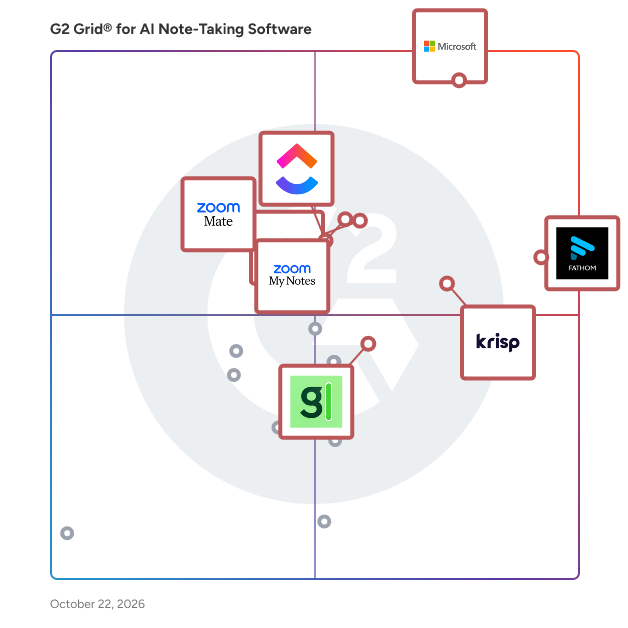
G2 Grid® for AI Note-Taking Software

G2 Grid® for AI Note-Taking Software plotting products by satisfaction and market presence

Highlighted products: Microsoft Teams, Fathom, Krisp, Slack, Zoom My Notes, ClickUp, Granola, and ZoomMate.

Underlying data: [Grid® JSON](https://www.g2.com/categories/ai-note-taking-software/grids.json?focus%5B%5D=microsoft-teams&focus%5B%5D=fathom-video&focus%5B%5D=krisp&focus%5B%5D=slack&focus%5B%5D=zoom-my-notes&focus%5B%5D=clickup&focus%5B%5D=granola&focus%5B%5D=zoommate)

Avoma

Avoma is the only AI-first Growth Acceleration Platform designed for customer-facing teams at startups and scaleups. By combining AI Meeting Assistance with Conversational Intelligence and Revenue Intelligence, Avoma empowers teams to streamline workflows, enhance customer interactions, and accelerate growth. With Avoma, you can automatically schedule and record meetings, receive full transcripts and AI-generated notes, and sync actionable insights directly to your CRM. Its AI-powered technology helps capture crucial customer information before, during, and after meetings—providing real-time insights and auto-scoring sales and customer calls with AI-powered scorecards. Avoma’s advanced Revenue Intelligence capabilities streamline forecasting and pipeline reviews with deal engagement activity, deal health and risk scores, and automated win/loss analysis. Built to empower both customer-facing reps and leaders, Avoma provides actionable insights at every stage of the customer journey. For more information, visit avoma.com.

Average Rating: 4.6/5.0

Total Reviews: 1,352

Who Is the Company Behind Avoma?

  • Seller: Avoma
  • Year Founded: 2017
  • HQ Location: Palo Alto, California
  • Twitter: @AvomaInc
    391 Twitter followers
  • LinkedIn® Page: www.linkedin.com
    66 employees on LinkedIn®

Who Uses This Product?

  • Who Uses This: Customer Success Manager, Account Executive
  • Top Industries: Computer Software, Marketing and Advertising
  • Company Size: 53% Small, 46% Medium

What Do G2 Reviewers Say About Avoma?

AI-generated summary from verified user reviews

Pros
  • Users find Avoma incredibly helpful for seamless call reviews, accurate transcriptions, and efficient note-taking.
  • Users value the seamless transcription of Avoma, enhancing reliability and simplifying review of sales calls and meetings.
  • Users appreciate the accuracy of transcriptions with Avoma, enhancing efficiency and streamlining their call review process.
  • Users value the seamless recording and transcription features of Avoma, enhancing meeting efficiency and context retention.
  • Users appreciate the efficient summarization capabilities of Avoma, simplifying meetings and enhancing follow-up insights.
Cons
  • Users experience recording issues with Avoma, including dropped connections and occasional transcription errors affecting usability.
  • Users report occasional AI transcription inaccuracies that can misinterpret voices and affect the overall effectiveness of the tool.
  • Users experience occasional accuracy issues with Avoma's transcriptions, requiring manual corrections to ensure reliability.
  • Users report occasional transcription errors with Avoma, affecting accuracy during meetings with background noise or multiple speakers.
  • Users note inaccurate transcripts from Avoma, leading to occasional misunderstandings and missed insights during meetings.

What Are Recent G2 Reviews of Avoma?

What Are G2 Users Discussing About Avoma?

Spiky

Spiky is an AI-powered conversation intelligence platform designed to help sales teams enhance their performance by analyzing customer interactions and providing real-time, actionable insights. This innovative solution focuses on optimizing every sales conversation, integrating seamlessly with popular tools to automate workflows and improve deal outcomes, ultimately driving revenue growth. Targeting sales professionals and teams, Spiky is particularly valuable for organizations that prioritize data-driven decision-making and seek to leverage technology to refine their communication strategies. The platform is well-suited for various use cases, including training new sales representatives, enhancing the performance of existing team members, and ensuring adherence to established sales methodologies. By providing insights that inform and guide sales tactics, Spiky helps teams become more effective during customer interactions. A key feature of Spiky is its real-time feedback mechanism, which delivers instant insights during meetings. Sales representatives benefit from immediate evaluations on critical aspects such as speaking pace, tone, talk-to-listen ratio, and overall engagement levels. This capability allows users to adapt their approach on the fly, maximizing the effectiveness of each call. Additionally, Spiky generates AI-driven summaries that capture essential discussion points and action items, significantly reducing the time spent on note-taking and facilitating quicker follow-ups. Spiky's seamless integration with popular Customer Relationship Management (CRM) systems, including Salesforce, HubSpot, and Zoho, ensures that customer data remains current and accurate. This connectivity minimizes the need for manual data entry, allowing sales teams to concentrate on building relationships rather than administrative tasks. Moreover, the platform supports adherence to established sales methodologies like MEDDPICC, analyzing conversations to identify any missing elements such as budget discussions, decision-makers, and next steps, thereby enhancing the overall sales process. To further support sales effectiveness, Spiky offers personalized AI coaching tailored to individual performance metrics. This feature empowers team members to improve their soft skills, objection handling, and overall sales techniques, fostering a culture of continuous improvement within the organization. By leveraging Spiky's comprehensive suite of tools, sales teams can enhance their performance and drive sustainable revenue growth, making it a valuable asset in today’s competitive sales landscape.

Average Rating: 4.8/5.0

Total Reviews: 140

Who Is the Company Behind Spiky?

  • Seller: Spiky.ai
  • Company Website:
  • Year Founded: 2020
  • HQ Location: Buffalo, New York
  • Twitter: @spikyAI
    238 Twitter followers
  • LinkedIn® Page: www.linkedin.com
    39 employees on LinkedIn®

Who Uses This Product?

  • Who Uses This: Founder, CEO
  • Top Industries: Information Technology and Services, Computer Software
  • Company Size: 67% Small, 28% Medium

What Do G2 Reviewers Say About Spiky?

AI-generated summary from verified user reviews

Pros
  • Users praise Spiky for its exceptional accuracy, delivering detailed results effortlessly from meetings with diverse accents.
  • Users find Spiky very helpful for live coaching and instant feedback, enhancing their meeting effectiveness and skills development.
  • Users value the real-time feedback from Spiky, enhancing their sales calls and team coaching effectively.
  • Users value the time-saving features of Spiky, as it automates notes and follow-ups efficiently during meetings.
  • Users value the effortless note-taking and action item generation by Spiky, enhancing productivity during meetings.
Cons
  • Users experience occasional accuracy issues with transcripts, but find them manageable in their international dealings.
  • Users face issues with AI inaccuracy in Spiky, particularly when multiple speakers are using a single microphone.
  • Users report call limitations with Spiky, including issues with long meeting transcriptions and lack of an Android app.
  • Users are concerned about integration issues with CRM applications, limiting synchronization to deals instead of person records.
  • Users find the missing synchronization features and variable AI summaries limiting for internal meetings and long transcripts.

What Are Recent G2 Reviews of Spiky?

Fireflies.ai

Fireflies is an AI voice assistant that helps transcribe, summarize take notes, and complete actions during meetings. Our AI assistant, Fred, integrates with all the leading web-conferencing platforms in the world like Zoom, Google Meet, Webex, & Microsoft Teams along with business applications like Hubspot, Slack, Trello, Asana, Salesforce, and more. Record: Instantly record meetings across all major web-conferencing platforms. Invite Fireflies or have it automatically capture them. Transcribe: Fireflies can transcribe live meetings or audio files that you upload. Skim the transcripts & listen to the audio simultaneously. Summarize: AI Super Summaries provides you with detailed meeting overviews, outlines, meeting notes, keywords and action items. Quickly track and skim through an entire meeting in 5 minutes! Collaborate: Add comments & flag important moments on calls for teammates to easily review. Search: Review an hour long call in less than 5 minutes. Filter to action items, dates, metrics, and other important topics. Integrate: Your meeting notes, transcripts, and recordings are more valuable when they are automatically synced with tools and platforms you already use. Log meeting notes, transcripts, and recordings in your CRM & collaboration apps like Salesforce, Hubspot, Slack, Zapier, and lots more. Analyze: Conversation Intelligence generates insights around talk time, topic trends, sentiment, and much more. The conversation intelligence suite allows you to identify what’s working and what is not on calls. Insights help you coach your sales team to close more deals. They help your recruiters hire top talent faster by identifying trends across candidate interviews. Your entire organization can build better products by tuning into the voice of your customer. Discover what messaging works and what doesn’t from customer and team interactions.

Average Rating: 4.7/5.0

Total Reviews: 752

Who Is the Company Behind Fireflies.ai?

  • Seller: Fireflies.ai
  • Year Founded: 2016
  • HQ Location: San Francisco, CA
  • Twitter: @firefliesai
    7,516 Twitter followers
  • LinkedIn® Page: www.linkedin.com
    137 employees on LinkedIn®

Who Uses This Product?

  • Who Uses This: CEO, Founder
  • Top Industries: Consulting, Marketing and Advertising
  • Company Size: 78% Small, 18% Medium

What Do G2 Reviewers Say About Fireflies.ai?

AI-generated summary from verified user reviews

Pros
  • Users find Fireflies.ai to be a game changer with its real-time transcription and efficient task management.
  • Users highlight the ease of use of Fireflies.ai, significantly improving their meeting efficiency and productivity.
  • Users appreciate the high accuracy of Fireflies.ai, noting it significantly outperforms competitors in transcribing audio files.
  • Users love Fireflies.ai for its time-saving capabilities, streamlining meeting notes and enhancing productivity effortlessly.
  • Users love the high accuracy of Fireflies.ai transcripts, achieving 95% correctness and improving workflow drastically.
Cons
  • Users note occasional AI inaccuracy in action items and live suggestions, but find overall performance satisfactory.
  • Users struggle with navigation and privacy concerns, finding it difficult to manage meeting invites and captured data effectively.
  • Users find Fireflies.ai to be somewhat expensive, especially for personal purchases and additional AI features.
  • Users express concerns about AI limitations regarding data privacy, storage, and the lack of streamlined features for meetings.
  • Users criticize the poor summarization which includes unnecessary details and complicates the editing process.

What Are Recent G2 Reviews of Fireflies.ai?

What Are G2 Users Discussing About Fireflies.ai?

AI can help you find the answers. G2 helps you trust them.

Connect G2 to Claude or ChatGPT for answers grounded in G2's trusted reviews, comparisons, and pricing from real user insights.

How it works

Tana

Tana is where your meetings produce finished work, not just notes. Most tools stop at the transcript. Tana keeps going. It joins your meeting, captures the conversation, and turns it into the things you actually needed: action items assigned, decisions logged, a summary written, issues filed in GitHub or Linear, a draft ready to send. Often before the call ends. Everything then connects into one workspace that gets smarter the more you use it. Behind the calls, Tana is a connected workspace for notes, tasks, projects, and AI. You start by writing, and structure shows up when you need it. The AI works across everything you've captured, so it answers from your context instead of guessing. What makes Tana different is simple: other tools give you better notes, Tana gives you the work. And because every meeting and decision feeds the same knowledge graph, your AI keeps getting better at your codebase, your roadmap, and how your team thinks. Key features 🎥 Meetings that ship work Start a call in Tana, or capture one from Zoom, Teams, or Google Meet with the Mac app. Tana transcribes in real time and identifies speakers. When the call ends, it writes the summary, pulls out action items and decisions, and assigns tasks to the right people. You leave with finished work instead of a wall of text to clean up later. 🤖 An AI agent that acts in your meetings Say "Hey Tana" to bring an AI agent into the call. Ask it to pull up context, draft a document, or capture a moment as a structured note while you keep talking. It only reads what everyone in the meeting can already see. 🔌 Push work straight to your tools Tana connects to GitHub, Linear, Jira, Slack, and HubSpot. File a bug with an annotated screenshot, open a ticket, log a decision, or send a Slack update from a conversation. Hand a document or chat to coding agents like Claude Code, Cursor, or Codex to keep building. Connect your own tools through custom integrations. 💬 Chat with leading AI models on your own notes Talk to models from OpenAI, Anthropic, and Google inside Tana, and switch between them whenever you want. Point the AI at specific notes, meetings, or projects so it answers from your real context. Every change the AI makes shows up as a proposal you review before anything sticks. 🛠️ Build your own AI agents Describe what you need and Tana scaffolds an agent: its instructions, the tools it can use, even its voice. Run it on a schedule or bring it into a call. Give each space its own agent that knows that team's context. 📐 Structure that emerges as you work Add fields, status, and links to any note with Types, so your tasks, projects, people, and meetings stay connected. You never design a database first. Start by writing, get organized later, and keep all the context along the way. 📅 Walk into every meeting prepared Connect Google Calendar or Outlook and every event shows up in your day, ready for talking points and a one-click join. Before the call, ask Tana to pull together what matters from past meetings, notes, and decisions, so you walk in with the full picture instead of hunting for context. The Mac app reminds you when a call is starting and lets you begin capturing in a click. 🌅 A clear start to every day Each day opens to your meetings, tasks, and priorities in one place, tied to the date so nothing slips. Plan your day and see how it connects to the bigger picture. 🕸️ A knowledge graph that connects everything Your notes aren't dead pages. Backlinks and meaning-based search surface how meetings, decisions, and ideas relate, so patterns show up across your work and nothing lives in a silo. 🎨 Turn conversations into artifacts Generate storyboards, customer journey maps, and slide decks straight from a meeting or chat. Edit them inline and share a link with anyone, no account required. 🤝 Real-time collaboration and spaces Work together with live cursors and presence. Organize by team, project, or client in spaces, each with its own access and AI context. Bring in guests by link. Switch on Off the record to pause transcription and capture for sensitive moments. 🔎 Find anything, fast Search by keyword or meaning across everything you've captured. Filter by people, type, space, or privacy, and browse your meetings, tasks, documents, and agents in one library. Who it's for Tana is built for teams who want to move fast without losing context. - Product and engineering teams turning reviews, standups, and discovery calls into filed issues, PRDs, and logged decisions. - Founders and executives who want follow-ups, memos, and next steps done before the next meeting starts. - Consultants and advisors who send a polished deliverable before they're back at their desk. - Knowledge workers and teams building a shared brain instead of scattered notes across a dozen apps. Why choose Tana - Meetings that produce finished work, not just transcripts. - An AI agent that acts in your calls and pushes results to GitHub, Linear, Jira, Slack, and HubSpot. - Your choice of OpenAI, Anthropic, and Google models, working on your own notes. - A connected workspace where structure emerges as you work, with no setup tax. - Real-time transcription with action items, decisions, and summaries on every call. - Calendar integration, a Mac desktop app, and full access in any browser, synced in real time. - A knowledge graph that makes your AI smarter about your team over time. - You review every AI change before it lands. Other tools give you better notes. Tana gives you finished work, and a workspace that remembers everything your team decides. Start your next meeting in Tana and walk out with the work already done.

Average Rating: 4.3/5.0

Total Reviews: 46

Who Is the Company Behind Tana?

  • Seller: Tana
  • Year Founded: 2021
  • HQ Location: Palo Alto, US
  • Twitter: @tana_inc
    15,322 Twitter followers
  • LinkedIn® Page: www.linkedin.com
    56 employees on LinkedIn®

Who Uses This Product?

  • Top Industries: Computer Software, Information Technology and Services
  • Company Size: 57% Small, 34% Medium

What Are Recent G2 Reviews of Tana?

Obsidian

Obsidian stores notes privately on your device, so you can access them quickly, even offline. No one else can read them, not even us.

Average Rating: 4.5/5.0

Total Reviews: 13

Who Is the Company Behind Obsidian?

  • Seller: Obsidian
  • Year Founded: 2020
  • HQ Location: Toronto, ON
  • LinkedIn® Page: www.linkedin.com
    35 employees on LinkedIn®

Who Uses This Product?

  • Company Size: 69% Small, 31% Medium

What Are Recent G2 Reviews of Obsidian?

MeetGeek

MeetGeek is an AI meeting automation platform that records, transcribes, and summarizes every conversation, then turns it into action automatically. Notes write themselves, so you stay in the conversation instead of typing through it. Summaries, action items, and highlights land in the tools you already use: CRM, ATS, Slack, Notion, ClickUp, or any of 10,000+ apps via Zapier, Make, and n8n. Nobody has to remember to check a separate tab. Record any conversation, any way your team works: • Meeting Agent joins Zoom, Google Meet, and Teams straight from your calendar, and assists live during the call • Mobile app captures in-person meetings, interviews, and phone calls • Chrome Extension records browser-based calls with no bot in the room • Desktop App records any videoconferencing call locally from your laptop Everything lands in one searchable repository in the same structured format, no matter how it was captured. From there, it goes further than notes: • AI Chat answers questions across every meeting you've ever recorded • AI Meeting Agents run on a schedule or trigger on a keyword, then deliver scores, rankings, reports, and alerts wherever you want them • AI Voice Agents handle routine inbound and outbound calls on their own — qualifying, scheduling, following up • Meeting analytics built from 100+ KPIs show where your meetings lose time, drillable by person, team, or company Teams using MeetGeek replace up to 60% of their status meetings with summaries. Trusted by 50,000+ teams in 100+ countries. 100+ languages with automatic detection. SOC 2 Type II, HIPAA, GDPR, and CCPA compliant, with EU and US data residency. 2-minute setup, free plan to start, paid from $9.99/user/month. Ideal for: → Sales & Account Management: Enrich your CRM with insights from every call and close deals faster. → Recruiting & HR: Focus on the candidate instead of your notes, and let agents score and rank interviews for you. → Consultants & Agencies: Run high-quality client sessions while every requirement and commitment is captured for you. → Customer Success: Surface feedback, requests, and risk signals across accounts without listening back. → Product & Marketing: Turn customer calls into a searchable research library your whole team can use. → Leadership & Ops: See how the organization actually spends its meeting time, and fix it with data.

Average Rating: 4.6/5.0

Total Reviews: 488

Who Is the Company Behind MeetGeek?

  • Seller: MeetGeek
  • Company Website:
  • Year Founded: 2020
  • HQ Location: EU, RO
  • Twitter: @MeetgeekA
    248 Twitter followers
  • LinkedIn® Page: www.linkedin.com
    29 employees on LinkedIn®

Who Uses This Product?

  • Who Uses This: CEO, Founder
  • Top Industries: Marketing and Advertising, Computer Software
  • Company Size: 78% Small, 20% Medium

What Do G2 Reviewers Say About MeetGeek?

AI-generated summary from verified user reviews

Pros
  • Users love the structured summaries and insights of MeetGeek, enhancing collaboration and meeting effectiveness.
  • Users find MeetGeek's ease of use exceptional, offering straightforward access and clear, detailed meeting notes.
  • Users highlight the accuracy of MeetGeek in organizing minutes and summarizing key ideas effectively.
  • Users appreciate the effectiveness in summarizing meetings and extracting action items, enhancing focus during conversations.
  • Users value the seamless integration and AI-driven summaries of MeetGeek, enhancing collaboration and tracking of important meetings.
Cons
  • Users experience meeting management issues, including echo problems and difficulty distinguishing relevant business discussions.
  • Users note the limited language support, wishing for options beyond just one preferred language for meetings.
  • Users find the AI inaccuracies in translation and transcription frustrating, affecting the overall meeting experience.
  • Users report accuracy issues with MeetGeek, particularly in translations and transcription of meeting details.
  • Users find inaccurate summarization of speakers' contexts at times, affecting the overall effectiveness of MeetGeek.

What Are Recent G2 Reviews of MeetGeek?

What Are G2 Users Discussing About MeetGeek?

Mina (AI Teammate)

Mina is an AI teammate that turns meetings into action. Unlike conventional AI meeting assistants that quietly record conversations and send notes afterward, Mina actively participates in meetings, responds when addressed, understands the evolving context and helps teams complete work while the conversation is still happening. Mina works across the entire meeting lifecycle: Before the meeting, Mina can prepare agendas, retrieve relevant information from connected tools and brief participants with the context they need. During the meeting, participants can say “Hey Mina” to ask questions, retrieve documents, track decisions, pull off presentations, identify action items, assign responsibilities, schedule follow-ups or execute tasks without interrupting the conversation. After the meeting, Mina creates role-specific summaries, organizes decisions and action items, and updates the tools where teams already work. With 40+ skills and 200+ integrations, Mina connects with popular platforms such as Slack, Salesforce, HubSpot, Jira, Asana, ClickUp, GitHub, Linear, Notion, Confluence, Gmail, Google Calendar, Google Sheets and Zapier. Teams can use specialized Mina assistants for different workflows, including: • Leadership and executive meetings • Sales calls • Scrum and agile meetings • Interviews and recruitment • Customer success conversations • General team meetings Organizations can also customize Mina’s personality, voice, knowledge, participation style, connected tools and executable skills to match their specific workflow. Mina helps teams: • Turn meeting decisions into assigned and trackable work • Reduce manual note-taking and post-meeting administration • Keep action items, owners and deadlines visible • Retrieve business information during live conversations • Update project-management and CRM tools • Schedule follow-ups and keep commitments moving • Preserve meeting context across teams and workflows • Spend less time chasing updates after meetings Mina supports Google Meet, Zoom and Microsoft Teams and can operate in passive or proactive participation modes based on the team’s preferences. Security and user control are fundamental to Mina. The platform uses secure OAuth authentication, 256-bit encryption and user-controlled meeting participation. Mina is SOC 2 Type II certified and GDPR-friendly. Mina does not delete emails or meetings without explicit user action, and teams control when Mina participates, speaks and executes actions. Mina is designed for founders, leadership teams, sales organizations, customer-success teams, recruiters, product teams and growing companies that want meetings to create measurable outcomes—not just transcripts. Mina doesn’t simply remember what was discussed. She helps teams act on it.

Average Rating: 5.0/5.0

Total Reviews: 16

Who Is the Company Behind Mina (AI Teammate)?

Who Uses This Product?

  • Top Industries: Computer Games
  • Company Size: 69% Medium, 31% Small

What Are Recent G2 Reviews of Mina (AI Teammate)?

CogniAIX - Conversation AI Productivity Tool

CogniAIX is a type of AI-powered conversation intelligence and meeting automation solution that helps professional teams capture spoken dialogue, extract actionable insights, and convert discussion outcomes into structured, trackable tasks — all within a single platform. Designed for organizations where meetings, interviews, and voice-based communication are central to daily operations, CogniAIX bridges the gap between what is said in a conversation and what actually gets executed afterward. The platform works by recording or accepting uploaded audio files (MP3, WAV, M4A, OGG, FLAC, AAC), then running them through its built-in AI agent, Cognia, which transcribes the audio in real time, identifies key decisions, flags action items, and generates structured meeting summaries. Users can convert flagged transcript lines directly into tasks with assigned owners, priority levels, and due dates — without switching to a separate project management tool. All transcripts, tasks, and meeting summaries are stored in a centralized Conversation Hub, which serves as a searchable knowledge base for the entire organization. CogniAIX is suited for a range of professional roles, including project managers, team leads, researchers, operations and HR personnel, marketing managers, and content creators or podcasters who need to organize and retrieve spoken content efficiently. Key features and capabilities include: Intelligent Transcription & Analysis: Converts live or uploaded audio into text in real time, using Natural Language Processing to identify decisions, action items, and key insights from within the conversation. Automated Task Management: Allows users to convert specific transcript lines into detailed tasks, complete with assignee, due date, priority level, and contextual notes, directly from the transcript view. Centralized Conversation Hub: Stores all meeting transcripts, summaries, and tasks in one searchable archive, enabling users to query past conversations and retrieve specific decisions or follow-ups on demand. Automated Distribution: Delivers AI-generated meeting summaries ("tidy minutes") via email immediately after a session ends, and supports PDF export and copy/paste for sharing content across other tools. Security & Data Sovereignty: Operates on a security-first architecture with cloud encryption, no third-party data sharing, user-controlled file scope, and a one-click deletion feature for searchable text. CogniAIX is accessible via web and mobile applications and supports both live recording and file upload workflows, making it usable across in-person meetings, remote calls, and asynchronous audio review scenarios.

Average Rating: 4.7/5.0

Total Reviews: 17

Who Is the Company Behind CogniAIX - Conversation AI Productivity Tool?

Who Uses This Product?

  • Company Size: 61% Medium, 33% Small

What Are Recent G2 Reviews of CogniAIX - Conversation AI Productivity Tool?

PLAUD AI

Plaud.AI is building the next generation of intelligence infrastructure and interface for real-life interactions of what you hear, say, and see. Its unified infrastructure seamlessly integrates hardware, software, cloud, and AI capabilities. Through three distinct interfaces—prosumer products, enterprise solutions, and an OS-level developer platform—Plaud.AI is transforming how the world captures, extracts, and utilizes intelligence from real-life interactions. For more information, visit the Plaud.AI website, or follow Plaud.AI on Facebook, LinkedIn, X, Instagram, Youtube.

Average Rating: 4.8/5.0

Total Reviews: 8

Who Is the Company Behind PLAUD AI?

  • Seller: PLAUD.AI
  • Year Founded: 2021
  • HQ Location: San Francisco, US
  • LinkedIn® Page: www.linkedin.com
    335 employees on LinkedIn®

Who Uses This Product?

  • Company Size: 75% Small, 13% Large

What Are Recent G2 Reviews of PLAUD AI?

Read AI

Read AI is an AI copilot for wherever you work, making your meetings, emails, and messages more productive with summaries, content discovery, and recommendations.

Average Rating: 4.0/5.0

Total Reviews: 42

Who Is the Company Behind Read AI?

  • Seller: Read AI
  • Year Founded: 2021
  • HQ Location: Seattle, US
  • LinkedIn® Page: www.linkedin.com
    118 employees on LinkedIn®

Who Uses This Product?

  • Top Industries: Information Technology and Services, Marketing and Advertising
  • Company Size: 65% Small, 40% Medium

What Do G2 Reviewers Say About Read AI?

AI-generated summary from verified user reviews

Pros
  • Users find the transcription feature invaluable for reviewing meeting notes and saving time on podcasts.
  • Users find Read AI's summarization and action item generation extremely useful for efficient meeting recap and follow-up.
  • Users find Read AI to be very user-friendly, streamlining tasks like note-taking and action item tracking effortlessly.
  • Users appreciate the automatic summaries and highlights from Read AI, enhancing meeting quality and follow-through effortlessly.
  • Users value the automatic summaries and highlights from Read AI, greatly enhancing productivity and accountability in meetings.
Cons
  • Users report persistent meeting management issues with Read AI, including difficulty in removing the application from meetings.
  • Users often face integration issues with Read AI, complicating setup and hindering overall effectiveness.
  • Users express frustration with poor customer support, citing slow response times and issues with account removal.
  • Users find Read AI to be expensive, particularly when scaling for multiple users and needing premium features.
  • Users find the inadequate summarization of Read AI can overlook key points, especially in fast-paced discussions.

What Are Recent G2 Reviews of Read AI?

Evernote

Evernote helps you capture and manage ideas, projects, memories, and to-do lists, so nothing gets missed. Write notes, attach documents, scan images, take voice memos or clip from the web. Organize everything from big projects to personal moments in a single place, accessible on your computer, tablet, or phone—even when offline. Quickly find the information you need with a powerful search that recognizes words in handwriting, images, and attachments. With Evernote, you can focus on what matters.

Average Rating: 4.3/5.0

Total Reviews: 2,023

Who Is the Company Behind Evernote?

  • Seller: Evernote
  • Year Founded: 2008
  • HQ Location: Redwood City, CA
  • Twitter: @evernote
    373,769 Twitter followers
  • LinkedIn® Page: www.linkedin.com
    175 employees on LinkedIn®

Who Uses This Product?

  • Who Uses This: Owner, Project Manager
  • Top Industries: Computer Software, Information Technology and Services
  • Company Size: 47% Small, 29% Medium

What Do G2 Reviewers Say About Evernote?

AI-generated summary from verified user reviews

Pros
  • Users appreciate the ease of use of Evernote, making note-taking and organization effortless across devices.
  • Users value Evernote for its quick and reliable note-taking, enjoying seamless syncing and user-friendly organization.
  • Users appreciate the organization features of Evernote, enhancing their productivity and note management across devices.
  • Users love the customization options in Evernote, allowing personalized organization and unique task displays tailored to their needs.
  • Users love the easy setup of Evernote, making it simple to start organizing notes quickly.
Cons
  • Users find the tool limitations of Evernote frustrating, especially with costly upgrades and device restrictions.
  • Users face connectivity issues with Evernote, making data migration and syncing frustrating and complex.
  • Users are frustrated by usage limitations in Evernote, particularly with unclear quotas and insufficient storage in the free version.
  • Users find data migration and interoperability challenging, feeling somewhat trapped and unable to easily transfer their information.
  • Users experience integration issues with Evernote, finding data migration to other apps like Notion frustrating and problematic.

What Are Recent G2 Reviews of Evernote?

What Are G2 Users Discussing About Evernote?

Recall

Recall is a self-organizing personal AI knowledge base that saves, summarizes, organizes, and lets you chat with your content, including articles, YouTube videos, podcasts, PDFs, and personal notes, all in one place. Recall gives you answers from your own knowledge, the open web, or both, using the AI model of your choice, including ChatGPT, Claude, and Gemini. Related ideas are automatically connected and visualized in a knowledge graph and resurface as you browse, helping you discover relationships in your knowledge you otherwise would have missed. Beyond analysis and understanding, Recall enhances long-term memory using active recall and spaced repetition quizzes, on a schedule optimized for retention. Used by over 500,000 people worldwide, including professionals at Bloomberg and Harvard, Recall is available on web, iOS, Android, Chrome, and Firefox. It combines Notion's editor, Obsidian's knowledge graph, NotebookLM's source-chat, and Perplexity's research depth, without the manual setup, source limits, or missing personal context. One product replacing many, grounded in your knowledge, with the most powerful AI models at your fingertips. Recall turns your knowledge into your edge.

Average Rating: 4.7/5.0

Total Reviews: 6

Who Is the Company Behind Recall?

  • Seller: Recall
  • Year Founded: 2022
  • HQ Location: Amsterdam, NL
  • LinkedIn® Page: www.linkedin.com
    11 employees on LinkedIn®

Who Uses This Product?

  • Company Size: 100% Small

What Are Recent G2 Reviews of Recall?

Oliv AI

Oliv is an AI-native platform for B2B revenue teams to transform their GTM motion and grow revenue without adding headcount. The AI Agent-suite covers the entire revenue lifecycle, from business development and sales to customer success, enablement, sales engineering, expansion, and RevOps. Specialist agents own specific roles, workflows, and use cases, while super agents coordinate context, priorities, and execution across agents, teams, and systems. Oliv consolidates first-party data from your revenue stack inclduing CRM, calls, emails, meetings, engagement tools, customer success platforms, and more, and maps it onto a GTM Context Graph. That context is processed by 100+ fine-tuned SLMs trained on revenue methodologies and best practices, giving every app and agent the shared understanding it needs to act. At the app layer, Oliv offers AI-native alternatives across Conversation Intelligence, Enablement, Sales Engagement, Forecasting, and Retention. Teams can replace the tools they already use today, while avoiding the cost, complexity, and reliability gaps of trying to build revenue agents from scratch on top of generic AI models. With Forward Deployed Engineers working alongside your team, Oliv helps every app and agent go live, get adopted, and turn AI transformation from a strategy deck into a working revenue motion. Book a 7-minute chat here: https://oliv.ai/book-a-demo

Average Rating: 4.7/5.0

Total Reviews: 10

Who Is the Company Behind Oliv AI?

  • Seller: Oliv.ai
  • Company Website:
  • Year Founded: 2023
  • HQ Location: San Francisco, US
  • Twitter: @tryolivai
    53 Twitter followers
  • LinkedIn® Page: www.linkedin.com
    51 employees on LinkedIn®

Who Uses This Product?

  • Company Size: 40% Medium, 40% Small

What Are Recent G2 Reviews of Oliv AI?

Olva

What is OLVA? OLVA is a bot-free, real-time AI meeting assistant that helps users during conversations and after they end. Unlike traditional AI note-taking tools that focus mainly on post-meeting summaries, OLVA provides assistance while the conversation is still happening. It can transcribe meetings live, detect questions automatically, generate context-aware answers, translate conversations in real time, surface insights, reference supporting documents, and preserve meeting context for future use. OLVA works alongside Zoom, Google Meet, Microsoft Teams, and other conversations without joining as a visible bot. It is available on Windows, macOS, iOS, and Android, so users can also use it for in-person meetings, conferences, phone conversations, and face-to-face discussions. OLVA Key Features Bot-Free Meeting Assistance OLVA does not join the meeting as another participant or add a bot to the attendee list. It works alongside the user’s conversation while keeping the meeting experience natural. Live Transcription Follow conversations in real time and review anything you may have missed without waiting for the meeting to end. Automatic Question Detection OLVA detects questions as they are asked during a conversation, without requiring users to manually copy or enter them. Context-Aware Answers OLVA can generate relevant answers using the active transcript and surrounding meeting context, helping users get more useful responses than from a standalone chatbot without meeting context. Reusable Meeting Contexts Create custom meeting contexts using notes and attached PDF, TXT, Markdown, DOCX, or PPTX files. Reuse them across meetings or assign them to folders so OLVA can provide more relevant, context-aware answers and insights. Live Q&A Users can ask OLVA questions during the conversation about what was discussed, customer concerns, terminology, risks, decisions, or relevant documents. Live Translation OLVA supports 87 languages and regional variants. Users can automatically translate meeting conversations into their preferred language or manually translate selected parts when they need extra clarity. Real-Time Insights OLVA can surface explanations, suggestions, risks, important signals, potential next steps, and relevant background information while the meeting is still happening. AI Coaching OLVA can provide contextual guidance, suggested follow-up questions, response ideas, and prompts to help users navigate conversations more effectively. Fact Checking and Opportunity Detection OLVA can help examine claims raised during meetings and surface potential opportunities, customer pain points, objections, risks, and unmet needs. Document-Aware Intelligence Users can provide PDFs, proposals, reports, product documents, and other supporting materials. OLVA can reference these documents together with the live meeting context when answering questions. Persistent Meeting Memory OLVA keeps previous meetings searchable and can use relevant context from past conversations to maintain continuity across customers, projects, teams, and follow-up meetings. Users can ask questions such as: What did the customer say about pricing? What did we decide in the previous meeting? Which actions were assigned to me? What concerns have appeared across recent calls? Post-Meeting Summaries and Action Items After a meeting, OLVA can generate structured summaries, key decisions, action items, follow-ups, and searchable meeting records. Chat With Past Meetings Users can return to completed meetings and ask questions instead of manually searching through transcripts. PowerPoint Slide Deck Generation OLVA can turn completed meetings into editable PowerPoint presentations. Users can create client follow-ups, project updates, sales recaps, executive summaries, training decks, and leadership briefings, then download the presentation as an editable .pptx file. Integrations OLVA supports workflows with Google Docs, Notion, Google Drive, and outbound webhooks, helping users move meeting content into the tools they already use. Who is OLVA For? OLVA is designed for professionals who spend significant time in meetings and need help understanding, responding, remembering, or acting on conversations. Typical users include: Sales and business development teams Account executives Customer success and account management teams Product, program, and project managers Consultants Founders and executives Technical teams Professionals working across multiple languages Teams that prefer a bot-free meeting workflow What Makes OLVA Different? OLVA’s main difference is that it is designed to provide value during the meeting, not only after it ends. It combines real-time transcription, automatic question detection, contextual answers, Live Translation, meeting intelligence, document-aware AI, persistent meeting memory, and post-meeting outputs in one bot-free platform. Instead of simply recording and summarizing conversations, OLVA helps users follow the discussion, access relevant information in real time, and turn completed meetings into searchable knowledge and reusable outputs. Supported Platforms OLVA is available on: Windows macOS iOS Android It can be used alongside: Zoom Google Meet Microsoft Teams In-person meetings Conferences Phone conversations Other spoken conversations where meeting audio is available Privacy and Responsible Use OLVA does not need to join a meeting as a visible bot. It does not record or store the user’s voice or voiceprint, and meeting content is not used to train AI models. Users can manage and delete their meeting content through their account. Users remain responsible for following applicable consent requirements, workplace policies, organizational rules, and local recording or transcription laws.

Average Rating: 5.0/5.0

Total Reviews: 4

Who Is the Company Behind Olva?

Who Uses This Product?

  • Company Size: 40% Small, 40% Large

What Are Recent G2 Reviews of Olva?

Caption.Ed

Caption.Ed is a live captioning, note-taking and AI-powered meeting assistant that helps organisations boost productivity, promote accessibility, and turn conversations into actionable insights. By automatically capturing and analysing spoken content, Caption.Ed ensures that no important detail is missed, enabling teams to focus on discussion rather than note-taking. Key features and benefits include: - Automatic transcription & summaries: Generate accurate transcripts and AI-powered summaries from calls, meetings, and webinars, ensuring clarity and accountability. - Real-time captions: Improve accessibility and engagement during live meetings, helping participants follow along and contribute effectively. - Actionable insights: Automatically highlight key discussion points, decisions, and action items to keep teams aligned and informed. - Seamless integrations: Works with Zoom, Microsoft Teams, Google Meet, and other collaboration tools. Enterprise-level security and single sign-on (SSO) make deployment easy and secure. - Time savings: Reduce hours spent on note-taking, follow-ups, and manual documentation. - Enhanced collaboration: Streamline communication, knowledge sharing, and team alignment across departments and remote teams. - Works in 55+ languages: Perfect for global organisations Who it’s for: - Professionals, students, and organisations needing accurate, actionable meeting insights. - Legal teams, healthcare consultants, sales leaders, financial advisors, and client-facing teams who rely on precise records and accountability. - HR, product, and executive teams looking to improve internal communication, collaboration, and productivity across distributed teams. Why Caption.Ed: Whether you’re a fast-growing startup, a college campus or an enterprise organisation, Caption.Ed provides a reliable, AI-driven solution to transform spoken conversations into actionable insights. Its intuitive interface, advanced AI capabilities, and seamless integrations make it a must-have tool for teams seeking to work smarter, stay organised, and maximise the value of every conversation.

Average Rating: 5.0/5.0

Total Reviews: 4

Who Is the Company Behind Caption.Ed?

Who Uses This Product?

  • Company Size: 50% Large, 25% Medium

What Do G2 Reviewers Say About Caption.Ed?

AI-generated summary from verified user reviews

Pros
  • Users praise the easy recording feature of Caption.Ed, enabling seamless participation in meetings and enhancing engagement.
  • Users appreciate the real-time accuracy of Caption.Ed, enhancing engagement in meetings and making content inclusive.
  • Users value the high accuracy of Caption.Ed, enhancing participation and comprehension during calls and meetings.
  • Users find the user-friendly interface of Caption.Ed allows for quick setup and efficient captioning during conversations.
  • Users find recording features invaluable for enhancing engagement and reviewing important discussion points during meetings.
Cons
  • Users experience integration issues with telephony software, which can complicate the use of Caption.Ed.

What Are Recent G2 Reviews of Caption.Ed?

Shalaka Joshi
SJ
Researched and written by Shalaka Joshi
Updated April 9, 2026