# Best Accounting Software for Small Business - Page 2

*By [Nathan Calabrese](https://research.g2.com/insights/author/nathan-calabrese)*


Products classified in the overall Accounting category are similar in many regards and help companies of all sizes solve their business problems. However, small business features, pricing, setup, and installation differ from businesses of other sizes, which is why we match buyers to the right Small Business Accounting to fit their needs. Compare product ratings based on reviews from enterprise users or connect with one of G2&#39;s buying advisors to find the right solutions within the Small Business Accounting category.

In addition to qualifying for inclusion in the Accounting Software category, to qualify for inclusion in the Small Business Accounting Software category, a product must have at least 10 reviews left by a reviewer from a small business.


## Top Accounting Software at a Glance
| # | Product | Rating | Best For | What Users Say |
|---|---------|--------|----------|----------------|
| 1 | [QuickBooks Online](https://www.g2.com/products/quickbooks-online/reviews) | 4.0/5.0 (3,752 reviews) | Browser-based small business accounting | "[QB Online Lets Me Work Anywhere, Anytime](https://www.g2.com/survey_responses/quickbooks-online-review-12994640)" |
| 2 | [Sage Intacct](https://www.g2.com/products/sage-intacct/reviews) | 4.3/5.0 (3,940 reviews) | Advanced financial reporting | "[User-Friendly ERP with Customizable Reports](https://www.g2.com/survey_responses/sage-intacct-review-11656889)" |
| 3 | [NetSuite](https://www.g2.com/products/oracle-netsuite/reviews) | 4.1/5.0 (4,715 reviews) | ERP-connected accounting operations | "[Real-Time Visibility Across Finance, Inventory, Purchasing, and Sales](https://www.g2.com/survey_responses/netsuite-review-12905951)" |
| 4 | [Xero](https://www.g2.com/products/xero/reviews) | 4.4/5.0 (1,668 reviews) | Cloud accounting with cash flow visibility | "[Beginner-Friendly Accounting with Fast Support, Helpful AI, and Smooth Hubdoc Uploads](https://www.g2.com/survey_responses/xero-review-13094370)" |
| 5 | [Acumatica](https://www.g2.com/products/acumatica/reviews) | 4.4/5.0 (1,916 reviews) | Business management accounting workflows | "[Still the Best ERP Decision We’ve Made for Our Construction Company](https://www.g2.com/survey_responses/acumatica-review-13031967)" |
| 6 | [QuickBooks Online Advanced](https://www.g2.com/products/quickbooks-online-advanced/reviews) | 4.4/5.0 (552 reviews) | Advanced cloud accounting controls | "[Affordable Software with Seamless Integrations and Helpful AI Support](https://www.g2.com/survey_responses/quickbooks-online-advanced-review-12966653)" |
| 7 | [Intuit QuickBooks](https://www.g2.com/products/intuit-quickbooks/reviews) | 4.4/5.0 (396 reviews) | Small business financial management | "[Intuitive, Dependable Accounting That Streamlines Bookkeeping](https://www.g2.com/survey_responses/intuit-quickbooks-review-13054420)" |
| 8 | [QuickBooks Desktop Enterprise](https://www.g2.com/products/quickbooks-desktop-enterprise/reviews) | 4.3/5.0 (1,033 reviews) | Large-file desktop accounting | "[Streamlined Accounting with Robust Connectivity](https://www.g2.com/survey_responses/quickbooks-desktop-enterprise-review-12737466)" |
| 9 | [Microsoft Dynamics 365 Business Central](https://www.g2.com/products/microsoft-microsoft-dynamics-365-business-central/reviews) | 4.0/5.0 (856 reviews) | Microsoft-connected financial management | "[A Complete All-in-One Solution for Managing Business Operations](https://www.g2.com/survey_responses/microsoft-dynamics-365-business-central-review-12910861)" |
| 10 | [FreshBooks](https://www.g2.com/products/freshbooks/reviews) | 4.5/5.0 (959 reviews) | Simple invoicing and billing | "[A great balance between invoicing, project tracking, and profitability](https://www.g2.com/survey_responses/freshbooks-review-13058067)" |


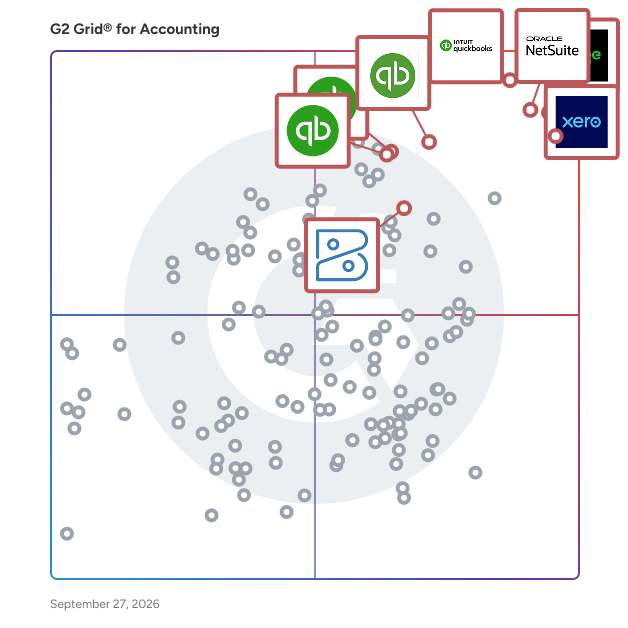
## G2 Grid® for Accounting Software
![G2 Grid® for Accounting Software plotting products by satisfaction and market presence](https://www.g2.com/categories/accounting/grids.png?focus%5B%5D=394&focus%5B%5D=1142&focus%5B%5D=390&focus%5B%5D=122647&focus%5B%5D=148997&focus%5B%5D=446&focus%5B%5D=4111&focus%5B%5D=1191)
Highlighted products: QuickBooks Online, Xero, Sage Intacct, QuickBooks Online Advanced, Intuit QuickBooks, NetSuite, QuickBooks Desktop Enterprise, and FreshBooks.
Underlying data: [Grid® JSON](https://www.g2.com/categories/accounting/grids.json?focus%5B%5D=quickbooks-online&amp;focus%5B%5D=xero&amp;focus%5B%5D=sage-intacct&amp;focus%5B%5D=quickbooks-online-advanced&amp;focus%5B%5D=intuit-quickbooks&amp;focus%5B%5D=oracle-netsuite&amp;focus%5B%5D=quickbooks-desktop-enterprise&amp;focus%5B%5D=freshbooks&amp;segment=small-business)


## How Many Accounting Software Products Does G2 Track?
**Total Products under this Category:** 663

### Category Stats (Jul 2026)
- **Average Rating**: 4.25/5 The average rating of products in this category, based on all submitted ratings
- **Top Trending Product**: Puzzle (+17.94%) - Among all products in this category, Puzzle recorded the largest rating increase compared to last month
*Last updated: July 16, 2026*


## How Does G2 Rank Accounting Software Products?

**Why You Can Trust G2's Software Rankings:**

- 30 Analysts and Data Experts
- 38,600+ Authentic Reviews
- 663+ Products
- Unbiased Rankings

G2's software rankings are built on verified user reviews, rigorous moderation, and a consistent research methodology maintained by a team of analysts and data experts. Each product is measured using the same transparent criteria, with no paid placement or vendor influence. While reviews reflect real user experiences, which can be subjective, they offer valuable insight into how software performs in the hands of professionals. Together, these inputs power the G2 Score, a standardized way to compare tools within every category.


---

**Sponsored**

### eWorkOrders CMMS

eWorkOrders CMMS is a powerful, affordable, and web-based Computerized Maintenance Management System (CMMS) that helps organizations streamline work orders, preventive maintenance, and asset management. Designed for maintenance teams of all sizes, eWorkOrders makes it simple to track assets, manage inventory, schedule maintenance, and generate detailed reports—all from any device, anywhere. Key features include: • Work Order Management – create, assign, and track tasks efficiently. • Preventive Maintenance (PMs) – plan and automate maintenance schedules. • Asset &amp; Inventory Management – keep assets and spare parts organized. • Employee &amp; Service Management – manage staff, contractors, and service requests. • Documentation &amp; Meter Tracking – record vital maintenance data and readings. • GIS Tracking &amp; Scheduling – optimize operations across multiple locations. • AI Assistant with Automatic Assignments, PM Recommendations, Work Orders Assist, Reporting &amp; Help Assistant. No software installation or hardware purchase required. Upgrades and technical support are included, so you can be up and running in a single day. Discover why eWorkOrders is consistently one of the highest-rated CMMS solutions. Request a live demo today by calling us at 888-333-4617 and learn how it can reduce downtime, improve compliance, and enhance asset reliability


[Visit website](https://www.g2.com/external_clickthroughs/record?secure%5Bad_program%5D=ppc&amp;secure%5Bad_slot%5D=category_product_list&amp;secure%5Bcategory_id%5D=65&amp;secure%5Bchosen_at%5D=2026-07-17T21%3A25%3A59Z&amp;secure%5Bdisplayable_resource_id%5D=431&amp;secure%5Bdisplayable_resource_type%5D=Category&amp;secure%5Bmedium%5D=sponsored&amp;secure%5Bplacement_reason%5D=retargeted_product&amp;secure%5Bplacement_resource_ids%5D%5B%5D=11966&amp;secure%5Bprioritized%5D=false&amp;secure%5Bproduct_id%5D=11966&amp;secure%5Bresource_id%5D=65&amp;secure%5Bresource_type%5D=Category&amp;secure%5Bsource_type%5D=category_page&amp;secure%5Bsource_url%5D=https%3A%2F%2Fwww.g2.com%2Fcategories%2Faccounting%2Fsmall-business%3Fpage%3D2&amp;secure%5Btoken%5D=8c26a193045d4a90a5cd510d48bd32b3bd24c8bcc334efdefd540c3e93388936&amp;secure%5Burl%5D=https%3A%2F%2Feworkorders.com%2FLandingPages.asp&amp;secure%5Burl_type%5D=product_website)

---


## Accounting Software Features & Capabilities

### What are the Best Accounting Software with Check/W-2 Printing?
Allows administrators to print valid paychecks and W-2 forms.

**Top-rated Accounting Software for Check/W-2 Printing:**
- [QuickBooks Online](https://www.g2.com/products/quickbooks-online/reviews)
- [NetSuite](https://www.g2.com/products/oracle-netsuite/reviews)
- [Xero](https://www.g2.com/products/xero/reviews)
[Explore Accounting Software with Check/W-2 Printing](https://www.g2.com/categories/accounting/f/check-w-2-printing)

### What are the Best Accounting Software with Workflow Capability?
Automates a process that requires a series of steps that typically require intervention by several different users. Administrators can write rules to determine who and when a user needs to complete a step. Also includes notification of users when they need to take action.

**Top-rated Accounting Software for Workflow Capability:**
- [QuickBooks Online](https://www.g2.com/products/quickbooks-online/reviews)
- [Sage Intacct](https://www.g2.com/products/sage-intacct/reviews)
- [NetSuite](https://www.g2.com/products/oracle-netsuite/reviews)
[Explore Accounting Software with Workflow Capability](https://www.g2.com/categories/accounting/f/workflow-capability)

### What are the Best Accounting Software with Internationalization?
Enables users to view and transact business with the same content in multiple languages and currencies.

**Top-rated Accounting Software for Internationalization:**
- [QuickBooks Online](https://www.g2.com/products/quickbooks-online/reviews)
- [Sage Intacct](https://www.g2.com/products/sage-intacct/reviews)
- [NetSuite](https://www.g2.com/products/oracle-netsuite/reviews)
[Explore Accounting Software with Internationalization](https://www.g2.com/categories/accounting/f/internationalization)

### What are the Best Accounting Software with Inventory Tracking / Ordering?
Real time inventory tracking. Maintains accurate &quot;On Hand&quot; infomation by matching reserved inventory requested on purchase and sales orders.

**Top-rated Accounting Software for Inventory Tracking / Ordering:**
- [QuickBooks Online](https://www.g2.com/products/quickbooks-online/reviews)
- [Sage Intacct](https://www.g2.com/products/sage-intacct/reviews)
- [NetSuite](https://www.g2.com/products/oracle-netsuite/reviews)
[Explore Accounting Software with Inventory Tracking / Ordering](https://www.g2.com/categories/accounting/f/inventory-tracking-ordering)

### What are the Best Accounting Software with Reporting and Dashboards?
Access pre-built and custom reports and dashboards to track payroll costs and for compliance purposes.

**Top-rated Accounting Software for Reporting and Dashboards:**
- [QuickBooks Online](https://www.g2.com/products/quickbooks-online/reviews)
- [Sage Intacct](https://www.g2.com/products/sage-intacct/reviews)
- [NetSuite](https://www.g2.com/products/oracle-netsuite/reviews)
[Explore Accounting Software with Reporting and Dashboards](https://www.g2.com/categories/accounting/f/reporting-and-dashboards)


## What Are the Top-Rated Accounting Software Products in 2026?
### 1. [FloQast](https://www.g2.com/products/floqast/reviews)
FloQast, an Accounting Transformation Platform created by accountants for accountants, enables organizations to automate a variety of accounting operations. Trusted by more than 3,000 global accounting teams – including Twilio, Los Angeles Lakers, Zoom, and Snowflake – FloQast enhances the way accounting teams work, enabling customers to automate close management, account reconciliations, accounting operations, and compliance activities. With FloQast, teams can utilize the latest advancements in AI technology to manage aspects of the close, reduce their compliance burden, stay audit-ready, and improve accuracy, visibility, and collaboration overall. FloQast is consistently rated #1 across all user review sites. Learn more at FloQast.com.


**Average Rating:** 4.6/5.0
**Total Reviews:** 1,394
**How Do G2 Users Rate FloQast?**

- **Has the product been a good partner in doing business?:** 9.6/10 (Category avg: 8.6/10)
- **Output Document Generation:** 7.7/10 (Category avg: 8.3/10)
- **Workflow Capability:** 8.5/10 (Category avg: 8.1/10)
- **Performance and Reliability:** 8.9/10 (Category avg: 8.4/10)

**Who Is the Company Behind FloQast?**

- **Seller:** [FloQast](https://www.g2.com/sellers/floqast)
- **Company Website:** https://www.floqast.com
- **Year Founded:** 2013
- **HQ Location:** Los Angeles, CA
- **Twitter:** @FloQast (1,578 Twitter followers)
- **LinkedIn® Page:** https://www.linkedin.com/company/3059072/ (867 employees on LinkedIn®)

**Who Uses This Product?**
- **Who Uses This:** Senior Accountant, Accounting Manager
- **Top Industries:** Accounting, Computer Software
- **Company Size:** 58% Mid-Market, 22% Enterprise


#### What Are FloQast's Pros and Cons?

**Pros:**

- Ease of Use (133 reviews)
- Organization (80 reviews)
- Task Management (80 reviews)
- Reconciliation (60 reviews)
- Efficiency (56 reviews)

**Cons:**

- Missing Features (34 reviews)
- Limited Functionality (26 reviews)
- Reconciliation Issues (20 reviews)
- Slow Loading (20 reviews)
- Limitations (19 reviews)


### What Do G2 Reviewers Say About FloQast?
*AI-generated summary from verified user reviews*

**Pros:**

- Users love the **user-friendly interface** of FloQast, appreciating its seamless setup and ease of learning.
- Users appreciate the **centralized organization** of FloQast, making it easy to track and manage financial processes.
- Users value the **centralized task management** of FloQast, streamlining month-end processes and enhancing productivity significantly.
- Users value FloQast for its **user-friendly interface** , simplifying month-end checklist and reconciliation tasks effectively.
- Users value the **efficiency** of FloQast, enjoying streamlined processes and reduced manual work for smoother operations.

**Cons:**

- Users note the **missing features** in FloQast, particularly in checklist handling and progress tracking limitations.
- Users find the **limited functionality** of FloQast restricts customization and complicates client management and balance verification.
- Users face frequent **reconciliation issues** , such as file attachment errors and difficulties navigating post-auto reconciliation.
- Users often face **slow loading times** , making it difficult to maintain productivity and causing frustration during tasks.
- Users find FloQast&#39;s interface **complex for newcomers** and wish for improved customization and reporting options.

#### What Are Recent G2 Reviews of FloQast?

**"[FloQast Streamlines Close with Intuitive Onboarding, Automation, and ERP Integrations](https://www.g2.com/survey_responses/floqast-review-12817485)"**

**Rating:** 4.5/5.0 stars
*— Rinalon E.*

[Read full review](https://www.g2.com/survey_responses/floqast-review-12817485)

---

**"[Streamlined Compliance with Powerful Audit Trails](https://www.g2.com/survey_responses/floqast-review-12969781)"**

**Rating:** 4.0/5.0 stars
*— Reena s.*

[Read full review](https://www.g2.com/survey_responses/floqast-review-12969781)

---


#### What Are G2 Users Discussing About FloQast?

- [What is FloQast used for?](https://www.g2.com/discussions/what-is-floqast-used-for) - 1 comment

### 2. [Finaloop](https://www.g2.com/products/finaloop/reviews)
Finaloop is an ecommerce accounting and financial operations platform built for DTC, ecommerce, and retail brands. Finaloop combines ecommerce accounting software, inventory management, and real-time financial reporting into one unified system- replacing traditional accounting software, disconnected inventory tools, and manual profit tracking spreadsheets. Brands use Finaloop to get fully reconciled, GAAP-ready financials with real-time visibility across Shopify, Amazon, TikTok Shop, and other sales channels. Automated payout reconciliation, accurate COGS calculation, and inventory accounting ensure clean books and reliable ecommerce financial reporting every month. Designed for growing consumer brands, Finaloop automates up to 90% of ecommerce bookkeeping and financial workflows, including bank reconciliation, multi-channel sales accounting, and profit analytics, delivering ERP-level control without the cost or complexity of a traditional ERP. From early-stage startups to large enterprise brands, Finaloop helps teams stay lean, scale confidently, and make faster, data-driven decisions with accurate, real-time financials.


**Average Rating:** 4.7/5.0
**Total Reviews:** 24
**How Do G2 Users Rate Finaloop?**

- **Has the product been a good partner in doing business?:** 10.0/10 (Category avg: 8.6/10)
- **Output Document Generation:** 10.0/10 (Category avg: 8.3/10)
- **Workflow Capability:** 10.0/10 (Category avg: 8.1/10)
- **Performance and Reliability:** 9.0/10 (Category avg: 8.4/10)

**Who Is the Company Behind Finaloop?**

- **Seller:** [Finaloop](https://www.g2.com/sellers/finaloop)
- **Year Founded:** 2020
- **HQ Location:** Brooklyn, US
- **LinkedIn® Page:** http://www.linkedin.com/company/finaloop (86 employees on LinkedIn®)

**Who Uses This Product?**
- **Top Industries:** Consumer Goods, Retail
- **Company Size:** 75% Small-Business, 4% Mid-Market


#### What Are Finaloop's Pros and Cons?

**Pros:**

- Ease of Use (14 reviews)
- Customer Support (11 reviews)
- Accurate Data (8 reviews)
- Setup Ease (6 reviews)
- Accounting Ease (5 reviews)

**Cons:**

- Missing Features (5 reviews)
- Integration Issues (3 reviews)
- Data Delays (2 reviews)
- Data Management Issues (2 reviews)
- Import Issues (2 reviews)


### What Do G2 Reviewers Say About Finaloop?
*AI-generated summary from verified user reviews*

**Pros:**

- Users find Finaloop&#39;s **ease of use** invaluable, enjoying intuitive navigation and seamless financial automation for better organization.
- Users commend the **excellent customer support** of Finaloop, noting its fast and friendly assistance in resolving issues.
- Users value the **accurate and real-time data** provided by Finaloop, greatly simplifying their accounting processes.
- Users highlight the **quick and intuitive setup** of Finaloop, making onboarding a seamless experience for e-commerce accounting.
- Users appreciate the **easy-to-use accounting features** of Finaloop, making real-time financial management accessible for everyone.

**Cons:**

- Users note the **missing features** , such as editing the chart of accounts and creating shipping labels directly.
- Users report **integration issues** with Amazon, leading to delays in real-time sales and expenses data updates.
- Users experience **data delays** with bank updates and Amazon integration, hindering real-time visibility of financials.
- Users face **data management issues** with CSV uploads and delayed bank account updates, affecting efficiency in transactions.
- Users face **import issues** with Finaloop, struggling with CSV uploads and delayed bank account updates.

#### What Are Recent G2 Reviews of Finaloop?

**"[Fast Amazon/Walmart Integrations and an Anxiety-Free, Effective UI and GREAT SUPPORT!!](https://www.g2.com/survey_responses/finaloop-review-11978594)"**

**Rating:** 5.0/5.0 stars
*— Sajd K.*

[Read full review](https://www.g2.com/survey_responses/finaloop-review-11978594)

---

**"[Ecommerce Bookkeeping Made Easy with Accurate Integrations and Great Support](https://www.g2.com/survey_responses/finaloop-review-12574586)"**

**Rating:** 5.0/5.0 stars
*— Mike H.*

[Read full review](https://www.g2.com/survey_responses/finaloop-review-12574586)

---


### 3. [Sage 100](https://www.g2.com/products/sage-100/reviews)
Sage 100 helps your growing small or medium company manage more than accounting — it unites your entire business at an affordable price. Best of all, it&#39;s easy and customizable. Sage 100 has the ability to connect your company to the cloud, giving your business access to web and mobile capabilities to confidently run your business. Sales and service people have access to customer information and can invoice customers and collect payments from the field. Procurement has deep visibility into inventory to properly manage stock levels. Invoicing is done electronically and managed by exception. Executives have analytics on all parts of the business, connecting everything with Sage 100.


**Average Rating:** 3.7/5.0
**Total Reviews:** 207
**How Do G2 Users Rate Sage 100?**

- **Has the product been a good partner in doing business?:** 7.6/10 (Category avg: 8.6/10)
- **Output Document Generation:** 7.8/10 (Category avg: 8.3/10)
- **Workflow Capability:** 7.1/10 (Category avg: 8.1/10)
- **Performance and Reliability:** 7.8/10 (Category avg: 8.4/10)

**Who Is the Company Behind Sage 100?**

- **Seller:** [Sage Software](https://www.g2.com/sellers/sage-software-d61a780c-4fb3-4781-9519-baa772f5ea91)
- **Year Founded:** 1981
- **HQ Location:** Newcastle
- **LinkedIn® Page:** https://www.linkedin.com/company/2802/ (15,579 employees on LinkedIn®)
- **Ownership:** SGE.L
- **Phone:** +1 (866) 996-7243

**Who Uses This Product?**
- **Who Uses This:** Controller
- **Top Industries:** Construction, Accounting
- **Company Size:** 48% Small-Business, 44% Mid-Market


#### What Are Sage 100's Pros and Cons?

**Pros:**

- Inventory Management (4 reviews)
- Accounting Management (2 reviews)
- Ease of Use (2 reviews)
- Accounting (1 reviews)
- Accounting Efficiency (1 reviews)

**Cons:**

- Slow Performance (2 reviews)
- Connectivity Issues (1 reviews)
- Inventory Management (1 reviews)
- Invoice Issues (1 reviews)
- Invoicing Issues (1 reviews)


### What Do G2 Reviewers Say About Sage 100?
*AI-generated summary from verified user reviews*

**Pros:**

- Users value the **seamless integration** with QuickBase, enhancing efficiency in tracking POs and managing projects.
- Users find Sage 100 to be an **excellent accounting and inventory software** for effective property management.
- Users find Sage 100 to be **easy to use** , allowing seamless integration and efficient management of business processes.
- Users appreciate Sage 100 for its **strong accounting features** , making property management efficient and streamlined.
- Users value the **accounting efficiency** of Sage 100, which simplifies financial management and enhances productivity.

**Cons:**

- Users report **slow performance** in Sage 100, with issues like slow printing and invoice duplication during peak times.
- Users often face **connectivity issues** with Sage 100, affecting printing and access to network drives on the cloud server.
- Users experience **printing issues** and slow performance with Sage 100, coupled with a lack of network drives on cloud server.
- Users often face **invoice issues** , resulting in slow processing and duplicate invoices due to network problems.
- Users often face **invoicing issues** with Sage 100, including slow processing and duplicated invoices.

#### What Are Recent G2 Reviews of Sage 100?

**"[SAGE100](https://www.g2.com/survey_responses/sage-100-review-4243469)"**

**Rating:** 5.0/5.0 stars
*— Grace S.*

[Read full review](https://www.g2.com/survey_responses/sage-100-review-4243469)

---

**"[Solid, Reliable, and Customizable.](https://www.g2.com/survey_responses/sage-100-review-12635628)"**

**Rating:** 4.0/5.0 stars
*— Edyta W.*

[Read full review](https://www.g2.com/survey_responses/sage-100-review-12635628)

---


#### What Are G2 Users Discussing About Sage 100?

- [What is Sage 100cloud used for?](https://www.g2.com/discussions/what-is-sage-100cloud-used-for) - 1 comment
- [How much does Sage 100 cost?](https://www.g2.com/discussions/how-much-does-sage-100-cost)
- [What is Sage ERP system?](https://www.g2.com/discussions/sage-100cloud-what-is-sage-erp-system)
- [What is Sage Software used for?](https://www.g2.com/discussions/sage-100cloud-what-is-sage-software-used-for)
- [What is Sage 100cloud?](https://www.g2.com/discussions/what-is-sage-100cloud)

### 4. [Campfire](https://www.g2.com/products/campfire-2026-02-16/reviews)
Campfire is the AI-native ERP for high-growth companies. We give modern, mid-market and enterprise accounting teams superpowers by automating the work that nobody wants to do: manual transaction categorization, bank reconciliation, revenue recognition, variance analysis. Our customers close 5x faster and save up to hundreds of thousands annually. We&#39;re privileged to work with some of the fastest growing AI companies in the world including Replit, Decagon, and PostHog, as well as services providers, health tech, and aerospace companies. Accounting Intelligence automates the manual work that buries your team. Our proprietary AI model was trained specifically on accounting data, auto categorizing transactions, matching payments to invoices, and reconciling bank accounts automatically. You review and approve instead of doing everything from scratch. Ember AI is your built-in analyst. Ask questions in plain language and get answers with source data in 30 seconds. Ember drafts flux variance commentary, analyzes spending anomalies, and builds custom reports on demand. Revenue Automation handles complex billing recognition for modern SaaS companies. Subscription, usage-based, tiered, platform fees, contract modifications: automated schedules and ASC 606 compliance out of the box. Core Accounting delivers multi-entity consolidation, continuous close, and real-time financial statements without downloading to spreadsheets or managing separate instances per entity. Custom Reporting lets you build reports in seconds with drill-down to any transaction. Executive dashboards update continuously, replacing month-old spreadsheets with real-time visibility. Campfire is SOC 1 and 2 certified with granular permissioning and full audit trails, supporting companies from Series B through IPO.


**Average Rating:** 4.8/5.0
**Total Reviews:** 29
**How Do G2 Users Rate Campfire?**

- **Has the product been a good partner in doing business?:** 9.7/10 (Category avg: 8.6/10)
- **Workflow Capability:** 5.0/10 (Category avg: 8.1/10)
- **Performance and Reliability:** 9.2/10 (Category avg: 8.4/10)

**Who Is the Company Behind Campfire?**

- **Seller:** [Campfire](https://www.g2.com/sellers/campfire)
- **Company Website:** https://campfire.ai/
- **Year Founded:** 2023
- **HQ Location:** San Francisco, CA
- **Twitter:** @Meet_campfire (598 Twitter followers)
- **LinkedIn® Page:** https://www.linkedin.com/company/meetcampfire (135 employees on LinkedIn®)

**Who Uses This Product?**
- **Who Uses This:** Controller
- **Top Industries:** Computer Software, Information Technology and Services
- **Company Size:** 55% Mid-Market, 45% Small-Business


#### What Are Campfire's Pros and Cons?

**Pros:**

- Accounting (3 reviews)
- Ease of Use (3 reviews)
- Implementation Ease (3 reviews)
- Cloud Based (2 reviews)
- Efficiency Focus (2 reviews)

**Cons:**

- Learning Curve (1 reviews)
- Learning Difficulty (1 reviews)


### What Do G2 Reviewers Say About Campfire?
*AI-generated summary from verified user reviews*

**Pros:**

- Users value the **broader financial reporting visibility** provided by Campfire, which enhances their accounting efficiency and transparency.
- Users find Campfire to be **intuitive and easy to use** , transforming their accounting experience into something enjoyable and efficient.
- Users commend the **implementation ease** of Campfire, noting seamless onboarding and exceptional customer support throughout the process.
- Users highlight the **intuitive design and exceptional support** of Campfire, making the transition and usage seamless and enjoyable.
- Users praise Campfire for its **efficiency focus** , making accounting fast and intuitive while reducing headaches significantly.

**Cons:**

- Users highlight a **learning curve** when adapting to the new accounting system, though it&#39;s generally user-friendly.
- Users find it challenging to adapt to the **learning difficulty** of Campfire&#39;s new accounting system, despite its user-friendliness.

#### What Are Recent G2 Reviews of Campfire?

**"[AI That Actually Helps the Accounting Team](https://www.g2.com/survey_responses/campfire-review-13100212)"**

**Rating:** 5.0/5.0 stars
*— Verified User in Computer Software*

[Read full review](https://www.g2.com/survey_responses/campfire-review-13100212)

---

**"[Easy-to-Use Interface, Helpful Transition Team, fit for a start-up and growing teams](https://www.g2.com/survey_responses/campfire-review-13101023)"**

**Rating:** 4.5/5.0 stars
*— Patrick L.*

[Read full review](https://www.g2.com/survey_responses/campfire-review-13101023)

---


### 5. [SAP Business One](https://www.g2.com/products/sap-business-one/reviews)
Increase control over your small business with software designed to grow with you. Streamline key processes, gain greater insight into your business, and make decisions based on real-time information – so you can drive profitable growth. Lower the cost of managing your business, from financials, purchasing, inventory, sales, and customer relationships to project management, operations, and HR. Gain clear visibility and complete control over every aspect of your small business. Capture critical information for immediate access and use it company-wide. Secure the achievement of big dreams and big goals. Get a single view of your business in an instant with a flexible, modular, powerful, and simple interface.


**Average Rating:** 4.3/5.0
**Total Reviews:** 418
**How Do G2 Users Rate SAP Business One?**

- **Has the product been a good partner in doing business?:** 8.2/10 (Category avg: 8.6/10)
- **Output Document Generation:** 8.3/10 (Category avg: 8.3/10)
- **Workflow Capability:** 8.1/10 (Category avg: 8.1/10)
- **Performance and Reliability:** 8.5/10 (Category avg: 8.4/10)

**Who Is the Company Behind SAP Business One?**

- **Seller:** [SAP](https://www.g2.com/sellers/sap)
- **Year Founded:** 1972
- **HQ Location:** Walldorf
- **Twitter:** @SAP (297,052 Twitter followers)
- **LinkedIn® Page:** https://www.linkedin.com/company/sap/ (141,955 employees on LinkedIn®)
- **Ownership:** NYSE:SAP

**Who Uses This Product?**
- **Who Uses This:** Accountant, SAP Consultant
- **Top Industries:** Accounting, Information Technology and Services
- **Company Size:** 57% Mid-Market, 28% Small-Business


#### What Are SAP Business One's Pros and Cons?

**Pros:**

- Ease of Use (8 reviews)
- User-Friendly (5 reviews)
- Meets Needs (4 reviews)
- User Interface (4 reviews)
- Customer Service (3 reviews)

**Cons:**

- User Unfriendliness (5 reviews)
- Difficult Customization (3 reviews)
- Learning Difficulty (3 reviews)
- Data Management (2 reviews)
- Integration Issues (2 reviews)


### What Do G2 Reviewers Say About SAP Business One?
*AI-generated summary from verified user reviews*

**Pros:**

- Users find SAP Business One to be **user-friendly** , making navigation easy and reducing the need for extensive training.
- Users find SAP Business One to be **user-friendly** , allowing easy navigation and efficient management of business functions.
- Users appreciate the **flexibility to meet specific needs** of their workflows with SAP Business One&#39;s integrated functionalities.
- Users value the **intuitive UI** of SAP Business One, enhancing user experience and streamlining workflows efficiently.
- Users value the **excellent customer service** of SAP Business One, ensuring swift and effective solutions for all issues.

**Cons:**

- Users find the **user unfriendliness** of SAP Business One challenging, especially with its outdated interface and complexity.
- Users find the **difficult customization** of SAP Business One hampers upgrades and complicates overall usability and integration.
- Users find the **learning difficulty** of SAP Business One challenging, especially for non-accountants and new users.
- Users struggle with **data management limitations** in SAP Business One, affecting intercompany accounting and internal controls.
- Users experience **integration issues** with SAP Business One, making setups complicated and hindering smooth workflows.

#### What Are Recent G2 Reviews of SAP Business One?

**"[Centralized management with real-time visibility and comprehensive financial reports](https://www.g2.com/survey_responses/sap-business-one-review-12873169)"**

**Rating:** 5.0/5.0 stars
*— Lizeth M.*

[Read full review](https://www.g2.com/survey_responses/sap-business-one-review-12873169)

---

**"[Seamless Integration and Real-Time Reporting in SAP Business One](https://www.g2.com/survey_responses/sap-business-one-review-12589730)"**

**Rating:** 4.0/5.0 stars
*— Cesar  T.*

[Read full review](https://www.g2.com/survey_responses/sap-business-one-review-12589730)

---


#### What Are G2 Users Discussing About SAP Business One?

- [What are the features of SAP?](https://www.g2.com/discussions/what-are-the-features-of-sap) - 1 comment
- [What is the use of SAP Business One?](https://www.g2.com/discussions/what-is-the-use-of-sap-business-one) - 1 comment
- [What are the features of SAP Business One?](https://www.g2.com/discussions/what-are-the-features-of-sap-business-one) - 2 comments

### 6. [iplicit](https://www.g2.com/products/iplicit/reviews)
iplicit is a type of cloud accounting software solution designed to help users modernise their financial operations and support business growth. This innovative software is particularly beneficial for organisations that are currently using on-premise accounting systems or those that have outgrown basic cloud accounting solutions. With its intelligent design and powerful features, iplicit aims to streamline financial processes and enhance overall efficiency. Targeted at medium to large enterprises, iplicit is ideal for finance teams looking for advanced functionality without sacrificing the ease of use associated with cloud solutions. The software caters to a variety of industries, making it a versatile choice for organisations seeking to improve their financial management. Users can leverage iplicit’s capabilities to gain deeper insights into their financial data, enabling informed decision-making and strategic planning. One of the standout features of iplicit is its flexibility in reporting. Users can benefit from unlimited dimensions in their reporting, allowing for a more nuanced view of financial performance. This capability is particularly useful for organisations that require detailed analysis across multiple departments or projects. Additionally, iplicit supports real-time reporting, ensuring that users have access to the most current financial information at their fingertips, which is crucial for timely decision-making. The software also excels in integration, offering seamless connectivity with other cloud applications. This feature facilitates a smooth migration from existing systems, minimising disruption during the transition. Automated data migration further enhances this process, allowing users to transfer their financial data quickly and efficiently. Furthermore, iplicit includes a public API, which helps break down data silos and fosters better collaboration across different business functions. Overall, iplicit stands out in the cloud accounting software category by combining powerful features with user-friendly design. Its focus on enhancing financial operations, providing real-time insights, and ensuring seamless integration makes it a compelling choice for organisations looking to elevate their accounting practices. By addressing the needs of frustrated users of traditional systems and those seeking more robust solutions, iplicit positions itself as a forward-thinking option in the evolving landscape of financial management software.


**Average Rating:** 4.5/5.0
**Total Reviews:** 128
**How Do G2 Users Rate iplicit?**

- **Has the product been a good partner in doing business?:** 9.1/10 (Category avg: 8.6/10)
- **Output Document Generation:** 7.9/10 (Category avg: 8.3/10)
- **Workflow Capability:** 8.2/10 (Category avg: 8.1/10)
- **Performance and Reliability:** 8.8/10 (Category avg: 8.4/10)

**Who Is the Company Behind iplicit?**

- **Seller:** [iplicit](https://www.g2.com/sellers/iplicit)
- **Company Website:** https://www.iplicit.com/
- **Year Founded:** 2013
- **HQ Location:** London, England
- **Twitter:** @iplicit (3,197 Twitter followers)
- **LinkedIn® Page:** https://www.linkedin.com/company/iplicit/ (196 employees on LinkedIn®)

**Who Uses This Product?**
- **Who Uses This:** Finance Manager, Finance Assistant
- **Top Industries:** Accounting, Non-Profit Organization Management
- **Company Size:** 52% Mid-Market, 42% Small-Business


#### What Are iplicit's Pros and Cons?

**Pros:**

- Ease of Use (50 reviews)
- Customer Support (33 reviews)
- Reporting Features (21 reviews)
- Time Saving (20 reviews)
- Intuitive (19 reviews)

**Cons:**

- Missing Features (19 reviews)
- Learning Difficulty (12 reviews)
- Improvements Needed (8 reviews)
- Learning Curve (8 reviews)
- Not User-Friendly (8 reviews)


### What Do G2 Reviewers Say About iplicit?
*AI-generated summary from verified user reviews*

**Pros:**

- Users appreciate the **intuitive user interface** of Iplicit, enjoying seamless navigation and efficient multitasking capabilities.
- Users value the **responsive customer support** from iplicit, which enhances collaboration and ensures smooth operations.
- Users commend the **exceptional reporting features** of iplicit, facilitating efficient analysis and seamless integration with other systems.
- Users appreciate the **time-saving features** of iplicit, streamlining tasks and reducing manual work significantly.
- Users find iplicit&#39;s **intuitive user interface** makes navigation simple, enhancing the overall experience and productivity.

**Cons:**

- Users note the **missing features** in iplicit, wishing for improvements in automation and statement details.
- Users find the **learning difficulty** of iplicit challenging, particularly with expense claims and transaction allocations.
- Users note the need for **improvements in AP automation and stock management** , highlighting issues with duplication and security.
- Users find the **learning curve steep** , making it challenging to adapt to iPlicit&#39;s modern features and functionalities.
- Users find the **iplicit interface not user-friendly** , facing navigation challenges and difficulties in understanding features.

#### What Are Recent G2 Reviews of iplicit?

**"[Efficient Multi-Entity Accounting, Needs Better Canadian Integrations](https://www.g2.com/survey_responses/iplicit-review-13109495)"**

**Rating:** 4.0/5.0 stars
*— Camposano S.*

[Read full review](https://www.g2.com/survey_responses/iplicit-review-13109495)

---

**"[Excellent Support, Seamless Migration, and Strong Performance](https://www.g2.com/survey_responses/iplicit-review-13036079)"**

**Rating:** 5.0/5.0 stars
*— Christina B.*

[Read full review](https://www.g2.com/survey_responses/iplicit-review-13036079)

---


### 7. [Workday Financial Management](https://www.g2.com/products/workday-financial-management/reviews)
Workday Financial Management is a native cloud and AI-powered solution that gives Accounting teams a single, trusted foundation to drive greater productivity, deliver superior insights grounded in rich business context, and adapt quickly to changing business needs. Embedded AI and purpose-built finance agents reshape how finance work gets done - streamlining record-to-report, payables, and opportunity-to-cash cycles, surfacing anomalies and insights at the speed of conversation, and strengthening internal controls across global operations. Built on an in-memory architecture and object data model, it unifies transaction processing, multidimensional reporting, consolidation, planning, and compliance in a consistent experience across web and mobile. Key capabilities span Accounting and Finance, Accounting Center, Audit and Internal Controls, Reporting and Analytics, Global Financial Reporting and Consolidation, Financial Planning, Projects, Expenses, Procurement, Inventory, Grants Management, and Project Billing.


**Average Rating:** 4.2/5.0
**Total Reviews:** 273
**How Do G2 Users Rate Workday Financial Management?**

- **Has the product been a good partner in doing business?:** 8.2/10 (Category avg: 8.6/10)
- **Output Document Generation:** 8.3/10 (Category avg: 8.3/10)
- **Workflow Capability:** 8.2/10 (Category avg: 8.1/10)
- **Performance and Reliability:** 8.3/10 (Category avg: 8.4/10)

**Who Is the Company Behind Workday Financial Management?**

- **Seller:** [Workday](https://www.g2.com/sellers/workday)
- **Company Website:** https://www.workday.com
- **Year Founded:** 2005
- **HQ Location:** Pleasanton, CA
- **Twitter:** @Workday (52,273 Twitter followers)
- **LinkedIn® Page:** https://www.linkedin.com/company/17719/ (24,145 employees on LinkedIn®)

**Who Uses This Product?**
- **Who Uses This:** Accountant
- **Top Industries:** Financial Services, Accounting
- **Company Size:** 46% Enterprise, 33% Mid-Market


#### What Are Workday Financial Management's Pros and Cons?

**Pros:**

- Ease of Use (28 reviews)
- Integrations (9 reviews)
- Learning (7 reviews)
- Navigation Ease (7 reviews)
- User Interface (7 reviews)

**Cons:**

- Not User-Friendly (9 reviews)
- Learning Curve (8 reviews)
- Complexity Issues (6 reviews)
- Not Intuitive (6 reviews)
- Complex Processes (5 reviews)


### What Do G2 Reviewers Say About Workday Financial Management?
*AI-generated summary from verified user reviews*

**Pros:**

- Users find the **intuitive interface** of Workday Financial Management makes navigation and financial analysis effortless.
- Users appreciate the **seamless integrations** with other applications, enhancing data accessibility and analysis for financial tasks.
- Users value Workday&#39;s **ease of learning** and accessible training features, enhancing their skill development and performance.
- Users find the **navigation ease** of Workday Financial Management intuitive, making access to financial data seamless and reliable.
- Users appreciate the **intuitive interface** of Workday Financial Management, making navigation and data access seamless and efficient.

**Cons:**

- Users find Workday Financial Management to be **not user-friendly** , requiring training and extra steps for navigation and reporting.
- Users note a **steep learning curve** , making initial navigation challenging for new users of Workday Financial Management.
- Users find the **complexity issues** of Workday Financial Management can lead to confusion and a steep learning curve.
- Users find Workday Financial Management **not intuitive** , struggling with confusing navigation and a clunky search functionality.
- Users find the **complex processes** in Workday Financial Management challenging, especially during implementation and urgent tasks.

#### What Are Recent G2 Reviews of Workday Financial Management?

**"[Intuitive Interface with Seamless Workday Integration and Strong Reporting](https://www.g2.com/survey_responses/workday-financial-management-review-12264145)"**

**Rating:** 4.5/5.0 stars
*— Dustin J.*

[Read full review](https://www.g2.com/survey_responses/workday-financial-management-review-12264145)

---

**"[Consolidates Finance and HR Effortlessly](https://www.g2.com/survey_responses/workday-financial-management-review-12725602)"**

**Rating:** 4.5/5.0 stars
*— Avneet P.*

[Read full review](https://www.g2.com/survey_responses/workday-financial-management-review-12725602)

---


#### What Are G2 Users Discussing About Workday Financial Management?

- [What is Workday Financial Management used for?](https://www.g2.com/discussions/what-is-workday-financial-management-used-for)
- [What is finance management system?](https://www.g2.com/discussions/what-is-finance-management-system)
- [What products does workday offer?](https://www.g2.com/discussions/what-products-does-workday-offer)
- [What is Workday software used for?](https://www.g2.com/discussions/workday-financial-management-what-is-workday-software-used-for)
- [What is workday financial system?](https://www.g2.com/discussions/what-is-workday-financial-system)

### 8. [finally](https://www.g2.com/products/finally-finally/reviews)
Finally is an all-in-one accounting and finance platform tailored for small to medium-sized businesses. It offers a complete suite of financial tools—bookkeeping, taxes, expense management, payroll, and corporate credit cards—all in one unified solution. Designed to simplify complex financial processes, finally helps businesses stay organized, save time, and avoid costly IRS penalties, allowing them to focus on growth without the burden of managing finances across multiple platforms.


**Average Rating:** 4.4/5.0
**Total Reviews:** 63
**How Do G2 Users Rate finally?**

- **Has the product been a good partner in doing business?:** 9.0/10 (Category avg: 8.6/10)
- **Output Document Generation:** 7.9/10 (Category avg: 8.3/10)
- **Workflow Capability:** 7.8/10 (Category avg: 8.1/10)
- **Performance and Reliability:** 8.2/10 (Category avg: 8.4/10)

**Who Is the Company Behind finally?**

- **Seller:** [finally](https://www.g2.com/sellers/finally-c7c3832c-3844-47b8-b215-16767e5df4ba)
- **Year Founded:** 2019
- **HQ Location:** Miami, Florida
- **LinkedIn® Page:** https://www.linkedin.com/company/finallycom (222 employees on LinkedIn®)

**Who Uses This Product?**
- **Top Industries:** Construction
- **Company Size:** 44% Small-Business, 8% Mid-Market


#### What Are finally's Pros and Cons?

**Pros:**

- Ease of Use (49 reviews)
- Easy Setup (27 reviews)
- Tracking Ease (17 reviews)
- Easy Management (16 reviews)
- Simple (15 reviews)

**Cons:**

- Inaccurate Tracking (8 reviews)
- Upload Issues (7 reviews)
- Missing Features (6 reviews)
- Integration Issues (5 reviews)
- Inadequate Verification (4 reviews)


### What Do G2 Reviewers Say About finally?
*AI-generated summary from verified user reviews*

**Pros:**

- Users commend the **ease of use** of Finally, highlighting its simple setup and user-friendly interface.
- Users praise the **super easy setup** of Finally, appreciating its efficiency and user-friendly design.
- Users appreciate the **tracking ease** of virtual vendor cards, enhancing organization and individual expense management.
- Users appreciate the **easy management** features of Finally, streamlining expense tracking and card issuance effectively.
- Users love the **simplicity** of Finally, making receipt submission fast and efficient through a user-friendly interface.

**Cons:**

- Users express frustration with **inaccurate tracking** and configuration issues, impacting their overall experience and satisfaction.
- Users face **upload issues** with receipts, leading to confusion and missed transactions due to the current process.
- Users are disappointed by the **missing features** like responsive text memos and inadequate exporting capabilities.
- Users face frustrating **integration issues** with QuickBooks and challenging setup processes that hinder overall functionality.
- Users are frustrated with **inadequate verification** processes, leading to unnecessary declines and time-consuming app usage issues.

#### What Are Recent G2 Reviews of finally?

**"[Effortless Receipt Submission Makes Expense Tracking a Breeze](https://www.g2.com/survey_responses/finally-review-12037828)"**

**Rating:** 4.0/5.0 stars
*— Matt B.*

[Read full review](https://www.g2.com/survey_responses/finally-review-12037828)

---

**"[Instant Notifications Keep Me Organized and Informed](https://www.g2.com/survey_responses/finally-review-12029545)"**

**Rating:** 5.0/5.0 stars
*— Alyssa H.*

[Read full review](https://www.g2.com/survey_responses/finally-review-12029545)

---


### 9. [Holded](https://www.g2.com/products/holded/reviews)
Holded is the solution in the cloud that has everything you need to manage your business – anytime, anywhere. How about changing hours of work with a simple click? Holded simplifies your day-to-day, automating tasks and streamlining your accounting and invoicing. Start using this world-class cloud ERP today. 50% Discount for the first 3 months on all plans.


**Average Rating:** 4.2/5.0
**Total Reviews:** 25
**How Do G2 Users Rate Holded?**

- **Has the product been a good partner in doing business?:** 8.7/10 (Category avg: 8.6/10)
- **Output Document Generation:** 8.9/10 (Category avg: 8.3/10)
- **Workflow Capability:** 8.6/10 (Category avg: 8.1/10)
- **Performance and Reliability:** 8.6/10 (Category avg: 8.4/10)

**Who Is the Company Behind Holded?**

- **Seller:** [Holded Technologies SL](https://www.g2.com/sellers/holded-technologies-sl)
- **Year Founded:** 2016
- **HQ Location:** Barcelona, Catalonia
- **Twitter:** @holded_ES (3,162 Twitter followers)
- **LinkedIn® Page:** https://www.linkedin.com/company/5381407/ (252 employees on LinkedIn®)

**Who Uses This Product?**
- **Top Industries:** Marketing and Advertising
- **Company Size:** 84% Small-Business, 8% Mid-Market


#### What Are Holded's Pros and Cons?

**Pros:**

- Accounts Payable (1 reviews)
- Easy Upload (1 reviews)
- Invoice Management (1 reviews)

**Cons:**

- Expensive (1 reviews)


### What Do G2 Reviewers Say About Holded?
*AI-generated summary from verified user reviews*

**Pros:**

- Users appreciate the **invoice scanning feature** of Holded&#39;s Accounts Payable, making work effortless and efficient.
- Users love the **easy upload feature** that simplifies scanning invoices, streamlining their workflow efficiently.
- Users value the **easy invoice scanning** feature of Holded, simplifying their invoicing process significantly.

**Cons:**

- Users find the pricing model **expensive** , especially with additional costs for each user in Holded.

#### What Are Recent G2 Reviews of Holded?

**"[Efficient Automation, Improvable Support](https://www.g2.com/survey_responses/holded-review-12722930)"**

**Rating:** 4.0/5.0 stars
*— Jennifer H.*

[Read full review](https://www.g2.com/survey_responses/holded-review-12722930)

---

**"[Intuitive ERP with Integrations, but Slow Support](https://www.g2.com/survey_responses/holded-review-12471755)"**

**Rating:** 4.5/5.0 stars
*— Sergio M.*

[Read full review](https://www.g2.com/survey_responses/holded-review-12471755)

---


#### What Are G2 Users Discussing About Holded?

- [What is Holded used for?](https://www.g2.com/discussions/what-is-holded-used-for)

### 10. [LiveFlow](https://www.g2.com/products/liveflow/reviews)
LiveFlow is the #1 platform for multi-entity finance. LiveFlow transforms how accounting and finance teams work. Flow: AI-Native ERP Flow is an AI-native ERP that brings Accounting, AP/AR, and FP&amp;A together in one place. - Built with multi-entity in mind. Manage intercompany workflows, shared accounts, and eliminations across all entities, all in one place. - Reports the way you want them. Build and customize reports in real time, with the flexibility to match how your business actually runs. - Built-in AI to accelerate your workflows. Automate routine tasks and surface insights faster with AI that you control. LiveFlow FP&amp;A Platform Transform Excel and Google Sheets into your financial command center. - Effortless Reporting in spreadsheets:&amp;nbsp;Import QuickBooks data in seconds to create shareable dashboards that automatically update. Drill down, build visualizations, and create impactful, always-current reporting. - Consolidation in Under 3 Minutes:&amp;nbsp;Consolidate financials from multi-entity businesses in seconds. - Pre-built Financial Models:&amp;nbsp;Choose from 100+ report templates to completely customize foryour business or clients, all while being supported by our Customer Success Team staffed byfinancial experts.


**Average Rating:** 4.9/5.0
**Total Reviews:** 332
**How Do G2 Users Rate LiveFlow?**

- **Has the product been a good partner in doing business?:** 9.6/10 (Category avg: 8.6/10)

**Who Is the Company Behind LiveFlow?**

- **Seller:** [LiveFlow](https://www.g2.com/sellers/liveflow)
- **Company Website:** https://www.liveflow.com
- **Year Founded:** 2021
- **HQ Location:** New York, US
- **LinkedIn® Page:** https://www.linkedin.com/company/liveflow (62 employees on LinkedIn®)

**Who Uses This Product?**
- **Who Uses This:** Accounting Manager, CEO
- **Top Industries:** Accounting, Financial Services
- **Company Size:** 75% Small-Business, 20% Mid-Market


#### What Are LiveFlow's Pros and Cons?

**Pros:**

- Ease of Use (80 reviews)
- Time-Saving (72 reviews)
- Time-saving (70 reviews)
- Reporting Efficiency (66 reviews)
- Efficiency (57 reviews)

**Cons:**

- Missing Features (22 reviews)
- Inefficient Reporting (11 reviews)
- Limited Customization (11 reviews)
- Refresh Issues (11 reviews)
- Expensive (10 reviews)


### What Do G2 Reviewers Say About LiveFlow?
*AI-generated summary from verified user reviews*

**Pros:**

- Users highlight the **ease of use** of LiveFlow, appreciating its intuitive features and seamless integration with spreadsheets.
- Users value the **time-saving capabilities** of LiveFlow, enabling quick report generation and reducing manual data updates.
- Users value the **time-saving capabilities** of LiveFlow, streamlining data management and enhancing reporting efficiency effortlessly.
- Users value the **reporting efficiency** of LiveFlow, saving hours with quick, high-quality, customizable reports.
- Users find **LiveFlow highly efficient** , drastically reducing time spent on financial reporting for multiple entities.

**Cons:**

- Users find a **lack of drill-down capabilities** and request faster addition of new features in LiveFlow.
- Users find the **inefficient reporting** process cumbersome, often combining reports manually for year over year comparisons.
- Users desire more **customization options** for reports and dashboards, finding current limitations frustrating.
- Users face challenges with **refresh issues** as version history becomes difficult to navigate with frequent updates.
- Users feel the service is **expensive** especially if only a few features are utilized, making it a significant investment.

#### What Are Recent G2 Reviews of LiveFlow?

**"[Real-Time Data Sync Revolutionizes Financial Reporting](https://www.g2.com/survey_responses/liveflow-review-12166608)"**

**Rating:** 5.0/5.0 stars
*— Jessica E.*

[Read full review](https://www.g2.com/survey_responses/liveflow-review-12166608)

---

**"[Reliable, Fast, and Supportive – Liveflow Is a Game-Changer for Financial Reporting](https://www.g2.com/survey_responses/liveflow-review-11110255)"**

**Rating:** 4.5/5.0 stars
*— Zaid N.*

[Read full review](https://www.g2.com/survey_responses/liveflow-review-11110255)

---


#### What Are G2 Users Discussing About LiveFlow?

- [What is LiveFlow Google Sheets Add-On used for?](https://www.g2.com/discussions/what-is-liveflow-google-sheets-add-on-used-for)

### 11. [Oracle EBS Financials](https://www.g2.com/products/oracle-ebs-financials/reviews)
Oracle E-Business Suite (EBS) Financials is a comprehensive suite of applications designed to manage and streamline an organization&#39;s financial operations. It offers a robust framework that supports complex organizational structures, multiple currencies, and diverse accounting standards, making it suitable for businesses of all sizes and industries. By automating financial processes, Oracle EBS Financials enhances accuracy, ensures compliance, and provides real-time financial insights to support strategic decision-making. Key Features and Functionality: - General Ledger: Consolidates financial data into a centralized system, supporting multiple currencies and adhering to various accounting standards, enabling comprehensive financial reporting and analysis. - Accounts Payable and Receivable: Manages outgoing and incoming payments efficiently, ensuring timely processing of supplier invoices and customer collections. - Fixed Assets Management: Automates asset tracking, depreciation calculations, and asset lifecycle management, reducing manual errors and improving asset utilization. - Cash Management: Analyzes enterprise-wide cash requirements and currency exposures, ensuring liquidity and optimal use of cash resources. - Advanced Collections: Bridges the gap between back-office transactional data and front-office customer management processes, improving agent productivity and collection results. - Financial Accounting Hub: Creates detailed, auditable, and reconcilable accounting from various source systems, integrating legacy applications into a centralized accounting architecture. Primary Value and Solutions Provided: Oracle EBS Financials delivers enterprise-grade financial depth and scalability, supporting complex organizational structures with multiple legal entities, currencies, and regulatory frameworks within a single instance. Its extensive integration with operational modules eliminates data silos, ensuring seamless financial information flow from operational transactions to financial reporting. The platform&#39;s robust compliance and controls framework includes sophisticated internal controls, audit capabilities, and compliance features designed to meet stringent regulatory requirements across multiple jurisdictions. By automating and streamlining financial processes, Oracle EBS Financials improves visibility, enforces control, and increases operational efficiency, enabling organizations to manage global operations while maintaining granular control over financial processes and compliance requirements.


**Average Rating:** 4.0/5.0
**Total Reviews:** 301
**How Do G2 Users Rate Oracle EBS Financials?**

- **Has the product been a good partner in doing business?:** 8.2/10 (Category avg: 8.6/10)
- **Output Document Generation:** 7.7/10 (Category avg: 8.3/10)
- **Workflow Capability:** 7.9/10 (Category avg: 8.1/10)
- **Performance and Reliability:** 7.9/10 (Category avg: 8.4/10)

**Who Is the Company Behind Oracle EBS Financials?**

- **Seller:** [Oracle](https://www.g2.com/sellers/oracle)
- **Year Founded:** 1977
- **HQ Location:** Austin, TX
- **Twitter:** @Oracle (827,997 Twitter followers)
- **LinkedIn® Page:** https://www.linkedin.com/company/1028/ (208,078 employees on LinkedIn®)
- **Ownership:** NYSE:ORCL

**Who Uses This Product?**
- **Who Uses This:** Financial Analyst, Senior Accountant
- **Top Industries:** Accounting, Information Technology and Services
- **Company Size:** 65% Enterprise, 25% Mid-Market


#### What Are Oracle EBS Financials's Pros and Cons?

**Pros:**

- Reporting Features (4 reviews)
- Accurate Data (3 reviews)
- Accounting Management (2 reviews)
- Ease of Use (2 reviews)
- Flexibility (2 reviews)

**Cons:**

- Outdated Software (4 reviews)
- Learning Curve (3 reviews)
- Expensive (2 reviews)
- Not Intuitive (2 reviews)
- Poor Customer Support (2 reviews)


### What Do G2 Reviewers Say About Oracle EBS Financials?
*AI-generated summary from verified user reviews*

**Pros:**

- Users appreciate the **quick access to financial reports** , enhancing efficiency and streamlining their workflows.
- Users value the **accurate data** provided by Oracle EBS Financials, enhancing their financial reporting and compliance efforts.
- Users appreciate the **stability and control** of Oracle EBS Financials, enabling seamless handling of high transaction volumes.
- Users value the **ease of use** in Oracle EBS Financials, appreciating the streamlined workflows and quick data access.
- Users value the **flexibility and customization** of Oracle EBS Financials, enhancing integration and simplifying financial processes.

**Cons:**

- Users find the **outdated software** experience challenging, particularly due to its complex interface and integration issues.
- Users find the **steep learning curve** of Oracle EBS Financials challenging, complicating onboarding and overall user experience.
- Users find Oracle EBS Financials **expensive** , with high costs and unresponsive customer support complicating their experience.
- Users find Oracle EBS Financials to have a **not intuitive interface** , making it challenging for new users to navigate.
- Users often experience **poor customer support** , with delayed responses impacting their overall satisfaction with Oracle EBS Financials.

#### What Are Recent G2 Reviews of Oracle EBS Financials?

**"[Oracle EVS Mania](https://www.g2.com/survey_responses/oracle-ebs-financials-review-12775588)"**

**Rating:** 4.0/5.0 stars
*— Ashirwad T.*

[Read full review](https://www.g2.com/survey_responses/oracle-ebs-financials-review-12775588)

---

**"[Simple, Seamless ERP Integration with Powerful Reporting](https://www.g2.com/survey_responses/oracle-ebs-financials-review-12899933)"**

**Rating:** 4.0/5.0 stars
*— Olga V.*

[Read full review](https://www.g2.com/survey_responses/oracle-ebs-financials-review-12899933)

---


#### What Are G2 Users Discussing About Oracle EBS Financials?

- [What is Oracle EBS Financials used for?](https://www.g2.com/discussions/what-is-oracle-ebs-financials-used-for)

### 12. [BlackLine Financial Close Management](https://www.g2.com/products/blackline-blackline-financial-close-management/reviews)
Companies turn to BlackLine when traditional manual accounting processes become unsustainable. Our cloud-based financial operations management platform, combined with market-leading customer service, empowers businesses to achieve digital transformation. By unifying data and processes, automating repetitive tasks, and enhancing accountability through greater visibility, BlackLine helps organizations work more efficiently. We provide solutions for financial close, accounts receivable, and intercompany accounting—enabling large enterprises and midsize companies across industries to streamline operations with speed, accuracy, and control. BlackLine is a global company with operations in major business hubs worldwide, including Los Angeles, New York, the San Francisco Bay Area, London, Vancouver, Paris, Frankfurt, Tokyo, Singapore and Sydney.


**Average Rating:** 4.5/5.0
**Total Reviews:** 1,050
**How Do G2 Users Rate BlackLine Financial Close Management?**

- **Has the product been a good partner in doing business?:** 8.8/10 (Category avg: 8.6/10)
- **Output Document Generation:** 8.3/10 (Category avg: 8.3/10)
- **Workflow Capability:** 8.4/10 (Category avg: 8.1/10)
- **Performance and Reliability:** 8.8/10 (Category avg: 8.4/10)

**Who Is the Company Behind BlackLine Financial Close Management?**

- **Seller:** [BlackLine](https://www.g2.com/sellers/blackline)
- **Company Website:** https://www.blackline.com
- **Year Founded:** 2001
- **HQ Location:** Woodland Hills, CA
- **Twitter:** @BlackLine (3,813 Twitter followers)
- **LinkedIn® Page:** https://www.linkedin.com/company/362833/ (2,092 employees on LinkedIn®)

**Who Uses This Product?**
- **Who Uses This:** Senior Accountant, Accounting Manager
- **Top Industries:** Accounting, Oil &amp; Energy
- **Company Size:** 59% Enterprise, 32% Mid-Market


#### What Are BlackLine Financial Close Management's Pros and Cons?

**Pros:**

- Ease of Use (81 reviews)
- Close Process (55 reviews)
- Reconciliation (50 reviews)
- Task Management (44 reviews)
- Financial Closing (38 reviews)

**Cons:**

- Limited Functionality (22 reviews)
- Implementation Difficulties (19 reviews)
- Missing Features (19 reviews)
- Learning Difficulty (17 reviews)
- Complexity (15 reviews)


### What Do G2 Reviewers Say About BlackLine Financial Close Management?
*AI-generated summary from verified user reviews*

**Pros:**

- Users value the **ease of use** of BlackLine for automating tasks and improving reconciliation tracking efficiently.
- Users appreciate the **efficiency and transparency** BlackLine brings to the close process, enhancing control and shortening closing time.
- Users appreciate the **significant time savings** BlackLine offers with streamlined reconciliations and automated processes.
- Users appreciate the **task management and automation** capabilities of BlackLine, enhancing efficiency and standardization in processes.
- Users value the **efficiency of the closing process** , resulting in quicker closes and enhanced support for their team.

**Cons:**

- Users find the **limited functionality** of BlackLine Financial Close Management cumbersome, especially with data translation and navigation issues.
- Users face **implementation difficulties** with BlackLine, citing complexity and a steep learning curve that impacts usability.
- Users feel the **missing features** in BlackLine limit integration and task management, impacting efficiency during the financial close.
- Users often face a **steep learning curve** with BlackLine Financial Close Management, complicating the onboarding process significantly.
- Users find the **initial complexity** of BlackLine Financial Close Management challenging, impacting their implementation and learning experience.

#### What Are Recent G2 Reviews of BlackLine Financial Close Management?

**"[Streamlines Financial Closing with Clear Structure](https://www.g2.com/survey_responses/blackline-financial-close-management-review-7385641)"**

**Rating:** 4.0/5.0 stars
*— Verified User in Accounting*

[Read full review](https://www.g2.com/survey_responses/blackline-financial-close-management-review-7385641)

---

**"[User-Friendly Task Management and account reconciliations](https://www.g2.com/survey_responses/blackline-financial-close-management-review-12598772)"**

**Rating:** 4.0/5.0 stars
*— Jesse G.*

[Read full review](https://www.g2.com/survey_responses/blackline-financial-close-management-review-12598772)

---


#### What Are G2 Users Discussing About BlackLine Financial Close Management?

- [What is BlackLine used for?](https://www.g2.com/discussions/what-is-blackline-used-for)
- [What is the easiest CRM to use?](https://www.g2.com/discussions/what-is-the-easiest-crm-to-use)
- [What is BlackLine in accounting?](https://www.g2.com/discussions/what-is-blackline-in-accounting) - 1 comment
- [What is SAP BlackLine?](https://www.g2.com/discussions/what-is-sap-blackline)
- [What does BlackLine software do?](https://www.g2.com/discussions/what-does-blackline-software-do)

### 13. [SoftLedger](https://www.g2.com/products/softledger/reviews)
SoftLedger is a general ledger designed for lean accounting teams. A powerful and user-friendly accounting platform, SoftLedger helps CFOs and controllers deliver consolidated financial data in real-time. Targeted primarily at CFOs, controllers, and financial teams within small to mid-sized businesses, SoftLedger addresses the challenges of managing financial data easily with a small finance and accounting team. Companies that operate multiple subsidiaries or divisions often face difficulties in consolidating financial information, ensuring compliance, and generating accurate reports. SoftLedger simplifies these tasks by offering a centralized platform where users can easily track and manage their financial data, regardless of the complexity of their organizational structure. Key features of SoftLedger include real-time data consolidation, automated reporting, and compliance management. The real-time data consolidation feature allows users to seamlessly integrate financial information from multiple entities, providing a comprehensive view of the organization’s financial health at any given moment. Automated reporting capabilities streamline the process of generating financial statements and reports, reducing the manual effort required and minimizing the risk of errors. Additionally, SoftLedger ensures compliance with relevant accounting standards and regulations, helping organizations maintain transparency and accountability in their financial practices. SoftLedger stands out in its category by offering a user-friendly interface that enhances the overall user experience. The platform is designed to be intuitive, allowing financial teams to navigate through the software with ease. This accessibility is crucial for organizations that require quick access to financial data and insights for decision-making purposes. Furthermore, the ability to customize reports and dashboards enables users to tailor the information presented to their specific needs, facilitating better analysis and strategic planning. Overall, SoftLedger provides significant value to organizations with complex financial structures by simplifying the management of financial data, ensuring compliance, and enhancing reporting accuracy. Its robust features and user-centric design make it an essential tool for financial professionals seeking to optimize their accounting processes and improve their organization’s financial visibility.


**Average Rating:** 4.6/5.0
**Total Reviews:** 50
**How Do G2 Users Rate SoftLedger?**

- **Has the product been a good partner in doing business?:** 9.9/10 (Category avg: 8.6/10)
- **Output Document Generation:** 8.7/10 (Category avg: 8.3/10)
- **Workflow Capability:** 8.1/10 (Category avg: 8.1/10)
- **Performance and Reliability:** 9.5/10 (Category avg: 8.4/10)

**Who Is the Company Behind SoftLedger?**

- **Seller:** [SoftLedger](https://www.g2.com/sellers/softledger)
- **Company Website:** https://www.softledger.com
- **Year Founded:** 2016
- **HQ Location:** Pittsburgh, Pennsylvania
- **Twitter:** @SoftLedger (185 Twitter followers)
- **LinkedIn® Page:** https://www.linkedin.com/company/10362301/ (9 employees on LinkedIn®)

**Who Uses This Product?**
- **Top Industries:** Financial Services, Accounting
- **Company Size:** 59% Small-Business, 35% Mid-Market


#### What Are SoftLedger's Pros and Cons?

**Pros:**

- Ease of Use (13 reviews)
- Customer Support (11 reviews)
- Features (11 reviews)
- Reporting (8 reviews)
- Customer Service (7 reviews)

**Cons:**

- Missing Features (8 reviews)
- Limited Customization (5 reviews)
- Limited Flexibility (5 reviews)
- Error Handling (3 reviews)
- Restrictions (3 reviews)


### What Do G2 Reviewers Say About SoftLedger?
*AI-generated summary from verified user reviews*

**Pros:**

- Users find SoftLedger&#39;s **ease of use** enhances productivity, enabling efficient finance operations and seamless integration.
- Users highly value the **responsive customer support** provided by SoftLedger during implementation and ongoing inquiries.
- Users highly value SoftLedger&#39;s **real-time consolidation and robust features** , enhancing accounting efficiency and accuracy significantly.
- Users praise the **reporting capabilities** of SoftLedger, highlighting its efficiency and real-time financial visibility across entities.
- Users appreciate the **responsive and helpful customer support** from SoftLedger, enhancing their overall experience and implementation.

**Cons:**

- Users desire **more flexible reporting** options and clearer banking views to enhance their experience with SoftLedger.
- Users express a desire for more flexibility, citing **limited customization** in financial reporting and the crypto module.
- Users desire greater **flexibility** in report creation and functionality, finding the current options too restrictive for complex needs.
- Users experience **error handling limitations** in SoftLedger, leading to issues with manual processes and linking bank connections.
- Users experience **workflow flexibility restrictions** and manual bottlenecks that hinder efficiency in SoftLedger&#39;s accounting processes.

#### What Are Recent G2 Reviews of SoftLedger?

**"[Intuitive Accounting Platform with Exceptional, Proactive Support](https://www.g2.com/survey_responses/softledger-review-12945532)"**

**Rating:** 5.0/5.0 stars
*— Verified User in Investment Management*

[Read full review](https://www.g2.com/survey_responses/softledger-review-12945532)

---

**"[Smooth Interface and Powerful Crypto Module Enhance Efficiency](https://www.g2.com/survey_responses/softledger-review-12001256)"**

**Rating:** 4.0/5.0 stars
*— Matt H.*

[Read full review](https://www.g2.com/survey_responses/softledger-review-12001256)

---


#### What Are G2 Users Discussing About SoftLedger?

- [What is SoftLedger used for?](https://www.g2.com/discussions/what-is-softledger-used-for)

### 14. [MYOB](https://www.g2.com/products/myob/reviews)
MYOB Business is the fast and easy way to manage your cashflow and ATO compliance requirements. Includes time saving features that automates everyday tasks, giving you great insights and making compliance easy. Manage your business anywhere on your laptop or mobile. Keep your data safe and secure in the cloud. Get real-time cashflow, invoicing and payments. Access expert software and business support by phone or online 7 days a week. Try free for 30 days today.


**Average Rating:** 3.7/5.0
**Total Reviews:** 46
**How Do G2 Users Rate MYOB?**

- **Has the product been a good partner in doing business?:** 8.3/10 (Category avg: 8.6/10)
- **Output Document Generation:** 7.0/10 (Category avg: 8.3/10)
- **Workflow Capability:** 7.4/10 (Category avg: 8.1/10)
- **Performance and Reliability:** 7.2/10 (Category avg: 8.4/10)

**Who Is the Company Behind MYOB?**

- **Seller:** [MYOB](https://www.g2.com/sellers/myob)
- **Year Founded:** 1991
- **HQ Location:** Cremorne, AU
- **Twitter:** @MYOB (18,643 Twitter followers)
- **LinkedIn® Page:** https://www.linkedin.com/company/7850/ (2,984 employees on LinkedIn®)
- **Ownership:** ASX:MYO

**Who Uses This Product?**
- **Top Industries:** Accounting
- **Company Size:** 73% Small-Business, 23% Mid-Market


#### What Are MYOB's Pros and Cons?

**Pros:**

- Ease of Use (7 reviews)
- User-Friendly (5 reviews)
- Easy Setup (3 reviews)
- Efficiency (3 reviews)
- Setup Ease (3 reviews)

**Cons:**

- Limited Features (2 reviews)
- Missing Features (2 reviews)
- Not User-Friendly (2 reviews)
- User Unfriendliness (2 reviews)
- Billing Issues (1 reviews)


### What Do G2 Reviewers Say About MYOB?
*AI-generated summary from verified user reviews*

**Pros:**

- Users appreciate the **ease of use** of MYOB, enjoying its streamlined interface and centralized financial management.
- Users appreciate the **user-friendly interface** of MYOB, making tasks like invoicing and tracking expenses straightforward.
- Users appreciate the **easy setup** of MYOB, finding it straightforward and efficient for their accounting needs.
- Users value the **time-saving efficiency** of MYOB, finding it simple and effective for managing financial tasks.
- Users appreciate the **easy setup** of MYOB, allowing for a quick start to efficient accounting tasks.

**Cons:**

- Users find MYOB has **limited features** that feel outdated and not user-friendly for non-accountants.
- Users find the **missing features** of MYOB, like no asset register and complex functionality, frustrating for non-accountants.
- Users find MYOB **not user-friendly** , with outdated features and clunky navigation complicating their experience.
- Users find MYOB **user unfriendly** , citing outdated features and clunky navigation that complicate the experience for non-accountants.
- Users report **billing issues** as delayed payments can result in unexpected changes to purchase order numbers.

#### What Are Recent G2 Reviews of MYOB?

**"[Streamlines Multi-Currency but Needs Better Compliance Support](https://www.g2.com/survey_responses/myob-review-13064360)"**

**Rating:** 4.0/5.0 stars
*— Thamyres A.*

[Read full review](https://www.g2.com/survey_responses/myob-review-13064360)

---

**"[Streamlines Cross-Border Bookkeeping with Robust Features, Yet Lacks German Compliance](https://www.g2.com/survey_responses/myob-review-13058260)"**

**Rating:** 4.5/5.0 stars
*— Holderness L.*

[Read full review](https://www.g2.com/survey_responses/myob-review-13058260)

---


#### What Are G2 Users Discussing About MYOB?

- [What are the disadvantages of MYOB?](https://www.g2.com/discussions/what-are-the-disadvantages-of-myob)
- [What are MYOB essentials?](https://www.g2.com/discussions/myob-what-are-myob-essentials)
- [What are advantage of using MYOB?](https://www.g2.com/discussions/what-are-advantage-of-using-myob)
- [What does MYOB software do?](https://www.g2.com/discussions/what-does-myob-software-do) - 1 comment

### 15. [Syspro](https://www.g2.com/products/syspro/reviews)
Syspro is digital manufacturing ERP and distribution management software designed specifically for mid-sized manufacturers and distributors. Our cutting-edge platform helps companies in discrete manufacturing, process manufacturing, and wholesale distribution gain complete control over production operations, inventory management, and supply chain visibility. Syspro ERP helps you: ➡️ Achieve Operational Excellence: Get real-time visibility from the shop floor to the warehouse to delivery. Syspro provides manufacturing operations management (MOM) and supply chain orchestration as the transactional backbone for confident, efficient operations across your entire value chain. ➡️ Drive Profitability: Digitize and automate your order-to-cash and procure-to-pay processes. Accelerate collections, control working capital, and uncover bottom-line efficiencies through intelligent automation and business process optimization. ➡️ Ensure Compliance &amp; Traceability: Protect your margins and reputation with built-in lot-level genealogy, quality management systems (QMS), and end-to-end traceability by design. Meet regulatory requirements including FDA, ISO, and ESG reporting standards. ➡️ Leverage AI-Enabled Insights: Use intelligent tools powered by machine learning for demand forecasting, predictive analytics, anomaly detection, and quality monitoring to make smarter, data-driven decisions that optimize production planning and inventory optimization. We partner with businesses ranging from family-owned operations to established global manufacturers across industries including food and beverage manufacturing, automotive parts, electronics assembly, pharmaceuticals, and industrial equipment. Our cloud ERP platform is a strategic tool that allows you to concentrate on what you do best—building your business—while we handle the operational complexity of modern manufacturing and distribution management.


**Average Rating:** 4.1/5.0
**Total Reviews:** 245
**How Do G2 Users Rate Syspro?**

- **Has the product been a good partner in doing business?:** 8.5/10 (Category avg: 8.6/10)
- **Output Document Generation:** 7.9/10 (Category avg: 8.3/10)
- **Workflow Capability:** 8.0/10 (Category avg: 8.1/10)
- **Performance and Reliability:** 8.4/10 (Category avg: 8.4/10)

**Who Is the Company Behind Syspro?**

- **Seller:** [Syspro](https://www.g2.com/sellers/syspro)
- **Company Website:** https://www.syspro.com/
- **Year Founded:** 1978
- **HQ Location:** The Old Vicarage, Market Street, DE74 2Jb, Castle Donington, GB 
- **LinkedIn® Page:** https://www.linkedin.com/company/syspro/ (650 employees on LinkedIn®)

**Who Uses This Product?**
- **Who Uses This:** IT Manager, Controller
- **Top Industries:** Manufacturing, Electrical/Electronic Manufacturing
- **Company Size:** 71% Mid-Market, 24% Small-Business


#### What Are Syspro's Pros and Cons?

**Pros:**

- Ease of Use (12 reviews)
- Functionality (11 reviews)
- Customizability (7 reviews)
- Customization (7 reviews)
- Customer Support (6 reviews)

**Cons:**

- Poor Customer Support (5 reviews)
- Inefficient Processes (4 reviews)
- Inefficient Workflow (4 reviews)
- Poor Support (4 reviews)
- Slow Performance (4 reviews)


### What Do G2 Reviewers Say About Syspro?
*AI-generated summary from verified user reviews*

**Pros:**

- Users find Syspro&#39;s **ease of use** exceptional, enabling quick navigation and intuitive learning for new team members.
- Users value the **easy navigation** and intuitive design of Syspro, enhancing job and order tracking significantly.
- Users value the **customizability** of Syspro, enhancing workflows and improving processes with tailored apps and reports.
- Users value the **ease of customization** in Syspro, enhancing workflows and improving key performance indicators effortlessly.
- Users value the **helpful customer support** from the Syspro Help Team, enhancing their experience and productivity.

**Cons:**

- Users report **poor customer support** with SYSPRO, citing lack of experience and slow response times.
- Users criticize the **inefficient processes** in Syspro, citing long procedures and challenges with inventory management and returns.
- Users criticize the **inefficient workflow** of Syspro, highlighting slow speed and complications in data integration and processing.
- Users express concerns about **poor support** , citing unresponsive service and lack of experienced personnel.
- Users experience **slow performance** , frequent bugs, and issues with outdated UI in Syspro&#39;s functionality.

#### What Are Recent G2 Reviews of Syspro?

**"[Easy to learn, use, and improve processes](https://www.g2.com/survey_responses/syspro-review-11036673)"**

**Rating:** 5.0/5.0 stars
*— Steve S.*

[Read full review](https://www.g2.com/survey_responses/syspro-review-11036673)

---

**"[Effortless Data Management Across Departments](https://www.g2.com/survey_responses/syspro-review-12121727)"**

**Rating:** 5.0/5.0 stars
*— Verified User in Chemicals*

[Read full review](https://www.g2.com/survey_responses/syspro-review-12121727)

---


#### What Are G2 Users Discussing About Syspro?

- [What is SYSPRO used for?](https://www.g2.com/discussions/what-is-syspro-used-for)
- [How much does syspro cost?](https://www.g2.com/discussions/how-much-does-syspro-cost)
- [What are the main features of ERP?](https://www.g2.com/discussions/syspro-what-are-the-main-features-of-erp)
- [Is syspro an ERP system?](https://www.g2.com/discussions/is-syspro-an-erp-system) - 1 comment
- [What is Syspro software?](https://www.g2.com/discussions/what-is-syspro-software) - 1 comment

### 16. [CS Professional Suite](https://www.g2.com/products/cs-professional-suite/reviews)
Thomson Reuters CS Professional Suite is the most comprehensive line of integrated software and services available to tax and accounting professionals. Whether you’re a sole proprietor or a large accounting firm, it delivers everything you need to run your operations. Every piece of software is designed to work seamlessly together as one system, sharing data and processes across your workflow. Choose a few offerings or the entire package — you’ll see the difference CS Professional Suite makes in your firm’s productivity and profitability. Explore everything CS Professional Suite has to offer for: \* Accounting and auditing \* Tax and asset management \* Payroll solutions \* Firm and workflow management \* Document management \* Client portals and websites \* Hosted options \* Advisory services \* Professional services Learn more at https://tax.thomsonreuters.com/us/en/cs-professional-suite


**Average Rating:** 4.4/5.0
**Total Reviews:** 13
**How Do G2 Users Rate CS Professional Suite?**

- **Has the product been a good partner in doing business?:** 9.4/10 (Category avg: 8.6/10)
- **Output Document Generation:** 9.4/10 (Category avg: 8.3/10)
- **Workflow Capability:** 10.0/10 (Category avg: 8.1/10)
- **Performance and Reliability:** 9.2/10 (Category avg: 8.4/10)

**Who Is the Company Behind CS Professional Suite?**

- **Seller:** [Thomson Reuters](https://www.g2.com/sellers/thomson-reuters)
- **Year Founded:** 2008
- **HQ Location:** Toronto, CA
- **Twitter:** @thomsonreuters (150,224 Twitter followers)
- **LinkedIn® Page:** https://www.linkedin.com/company/1400/ (36,619 employees on LinkedIn®)
- **Ownership:** NYSE:TRI

**Who Uses This Product?**
- **Top Industries:** Accounting
- **Company Size:** 71% Small-Business, 21% Mid-Market


#### What Are Recent G2 Reviews of CS Professional Suite?

**"[All-In-One](https://www.g2.com/survey_responses/cs-professional-suite-review-4367022)"**

**Rating:** 5.0/5.0 stars
*— Brandy D.*

[Read full review](https://www.g2.com/survey_responses/cs-professional-suite-review-4367022)

---

**"[All in one accounting software that actually works ](https://www.g2.com/survey_responses/cs-professional-suite-review-3044862)"**

**Rating:** 5.0/5.0 stars
*— Shellie A. W.*

[Read full review](https://www.g2.com/survey_responses/cs-professional-suite-review-3044862)

---


#### What Are G2 Users Discussing About CS Professional Suite?

- [What is CS Professional Suite used for?](https://www.g2.com/discussions/what-is-cs-professional-suite-used-for)

### 17. [Odoo Accounting](https://www.g2.com/products/odoo-accounting/reviews)
Odoo Accounting helps companies manage their daily accounting with the utmost ease and simplicity. They even offer a global view of the state of their business at any time. All financial activities can be managed in one single app, thanks to Odoo Accounting. Automation for primary day-to-day tasks is more than possible - it’s easier than ever! This app is synchronized with 24,000 banks, making it easier to link a payment with a statement, based on the transaction on your bank account. The reconciliation can also be done by importing the statement files (OFX, QIF, CSV, or Coda). And, with the new List view, users have greater visibility on document statuses and next activities. Accounting Automation To facilitate accounting management, Odoo automates a series of tasks, such as the creation of draft invoices based on the sales orders. The manager can validate the invoice if the sales order is correct, instead of creating a brand new one. Payment Odoo supports all of the main payment gateways: Authorize.net, Ingenico, Paypal, Adyen, etc. Also, it is possible for the company to use an automatic email system to remind customers to pay their delayed invoices. You can also have a clear view of your overdue payments (and the future ones) at any time. Apply “Automatic Transfers” to specific partners; making intercompany transactions easier than ever before. Our latest version has improved batch payment error reporting, as well. Also, Batch Payments are now compatible with SEPA credit transfers. Multi-Adaptations This app supports multi-currencies, and the exchange rate is updated daily. This feature works with multiple users, based on access rights. If you want to use Odoo for multiple companies, it is also possible with different journals, based on the different companies, or by departments. Performance Reports It is possible to analyze your performance through the various reports generated by this powerful app. Odoo integrates all the best practices KPIs (by default) to improve performance. The new design for financial reports in Odoo 14 shows the meaning of each section. There’s also new “Unrealized Gains and Losses” reports that allow users to generate reevaluation journal entries. On top of all that, Accounting is fully integrated with the Sales, Inventory, eCommerce, and Purchase apps, and the customer portal! It is, by far, the most seamless, user-friendly Accounting around.


**Average Rating:** 4.3/5.0
**Total Reviews:** 70
**How Do G2 Users Rate Odoo Accounting?**

- **Has the product been a good partner in doing business?:** 8.3/10 (Category avg: 8.6/10)
- **Output Document Generation:** 8.0/10 (Category avg: 8.3/10)
- **Workflow Capability:** 8.6/10 (Category avg: 8.1/10)
- **Performance and Reliability:** 8.4/10 (Category avg: 8.4/10)

**Who Is the Company Behind Odoo Accounting?**

- **Seller:** [Odoo](https://www.g2.com/sellers/odoo)
- **Year Founded:** 2005
- **HQ Location:** Brussels, Belgium
- **Twitter:** @Odoo (55,391 Twitter followers)
- **LinkedIn® Page:** https://www.linkedin.com/company/633558/ (8,467 employees on LinkedIn®)

**Who Uses This Product?**
- **Top Industries:** Accounting, Information Technology and Services
- **Company Size:** 66% Small-Business, 27% Mid-Market


#### What Are Odoo Accounting's Pros and Cons?

**Pros:**

- Automation Efficiency (5 reviews)
- Ease of Use (5 reviews)
- Seamless Integration (4 reviews)
- Scalability (3 reviews)
- Accurate Data (2 reviews)

**Cons:**

- Missing Features (3 reviews)
- Expensive (2 reviews)
- External Dependency (2 reviews)
- Integration Issues (2 reviews)
- Setup Difficulties (2 reviews)


### What Do G2 Reviewers Say About Odoo Accounting?
*AI-generated summary from verified user reviews*

**Pros:**

- Users value the **automation efficiency** of Odoo Accounting, significantly reducing manual work and enhancing real-time data sync.
- Users appreciate the **ease of use** in Odoo Accounting, enjoying streamlined processes and automation throughout the accounting cycle.
- Users value the **seamless integration** of Odoo Accounting, enhancing efficiency and reducing manual errors across finance operations.
- Users praise Odoo Accounting for its **scalable integration** with the Odoo Suite, enhancing efficiency and reducing manual errors.
- Users value the **accurate data** provided by Odoo Accounting, ensuring real-time synchronization and traceability of financial transactions.

**Cons:**

- Users find the **limited features in the free version** frustrating, affecting their overall efficiency and report management.
- Users note that Odoo Accounting is **expensive** , particularly due to additional costs for necessary external services and customization.
- Users experience significant **external dependency issues** with Odoo Accounting, relying on costly services for essential functions.
- Users experience **integration issues** with Odoo Accounting, complicating setup and leading to unreliable financial reporting.
- Users face **setup difficulties** with Odoo Accounting, finding the initial configuration and integration quite challenging.

#### What Are Recent G2 Reviews of Odoo Accounting?

**"[Solid German-Compliant Accounting Tool, Missing Park Ticketing Integration](https://www.g2.com/survey_responses/odoo-accounting-review-12995785)"**

**Rating:** 4.0/5.0 stars
*— Abdellah L.*

[Read full review](https://www.g2.com/survey_responses/odoo-accounting-review-12995785)

---

**"[Deep, Well-Integrated Accounting Across the Odoo Suite](https://www.g2.com/survey_responses/odoo-accounting-review-12496886)"**

**Rating:** 4.0/5.0 stars
*— Verified User in Computer Software*

[Read full review](https://www.g2.com/survey_responses/odoo-accounting-review-12496886)

---


#### What Are G2 Users Discussing About Odoo Accounting?

- [What is Odoo Accounting used for?](https://www.g2.com/discussions/what-is-odoo-accounting-used-for) - 1 comment
- [Does Odoo integrate with QuickBooks?](https://www.g2.com/discussions/does-odoo-integrate-with-quickbooks)
- [How good is Odoo?](https://www.g2.com/discussions/odoo-accounting-how-good-is-odoo)
- [What can I do with Odoo?](https://www.g2.com/discussions/what-can-i-do-with-odoo) - 1 comment
- [What is Odoo accounting?](https://www.g2.com/discussions/what-is-odoo-accounting) - 2 comments, 1 upvote

### 18. [Deltek Ajera](https://www.g2.com/products/deltek-ajera/reviews)
Deltek Ajera is a project management and project-based accounting system that helps small architecture and engineering firms get paid faster, keep projects profitable, and see exactly how the business is performing. Ajera connects project tracking, billing, and financials in one easy-to-use application, giving firms real-time visibility across projects and the entire business. With built-in automation and embedded AI for quick insights and assistance, Ajera helps to reduce manual work, make confident decisions, and support your growth goals with speed, clarity, and control. Best for: Small A&amp;E firms with fewer than 100 employees that need project management and accounting in a single application — especially those outgrowing spreadsheets or generic tools like QuickBooks. Use cases:  Track project budgets, timelines, and resource assignments in real time to keep work on schedule and margins on track  Automate client invoicing and accelerate collections with AR automation  Build accurate project schedules and spot workload imbalances early before they impact delivery  Monitor firm-wide profitability, utilization, and cash flow from role-based dashboards  Use Ask Dela to retrieve project and financial data instantly — no report- building required Key Features:  Schedule Manager to plan project timelines and balance team workloads  Automated bank feeds and transaction reconciliation to reduce manual accounting work  Paperless client billing and invoicing to speed up billing cycles  Ajera Payments to automate accounts receivable and improve cash flow  Timesheet Assist with suggested entries based on recent work to save time and improve accuracy  Intelligent character recognition (ICR) for mobile expense capture  A&amp;E-ready dashboards with configurable KPIs for project and firm performance  Ask Dela, an AI-powered orchestrator, for instant access to project and financial data Why small A&amp;E firms choose Ajera:  Projects and accounting live in one application. Ajera connects project tracking, billing, and financials, so teams always know where each project stands and how it impacts the firm.  Automation speeds up cash flow. Automated bank feeds, paperless invoicing, and AR automation help firms reduce invoice processing time by 80% and collect payments sooner — cutting the manual steps that delay cash coming in.  Ask Dela delivers instant answers. The AI-powered orchestrator finds project details, client data, and financial information already in Ajera — no digging through menus or building reports.  Built for A&amp;E billing complexity. Ajera tracks project phases at a granular level to support the multi-phase, milestone-based billing processes that generic accounting tools cannot handle. Used by: Architecture and engineering firms — from boutique studios to growing multi- discipline practices — that manage project-based work and need their accounting connected to project delivery. Ajera is part of the Deltek platform, trusted by 98% of the Top 500 AE firms. More than 3,500 firms rely on Ajera, with customers reporting 152% project profit increases and 75% reductions in administrative burden.


**Average Rating:** 4.1/5.0
**Total Reviews:** 202
**How Do G2 Users Rate Deltek Ajera?**

- **Has the product been a good partner in doing business?:** 8.0/10 (Category avg: 8.6/10)
- **Output Document Generation:** 6.3/10 (Category avg: 8.3/10)
- **Workflow Capability:** 6.4/10 (Category avg: 8.1/10)
- **Performance and Reliability:** 7.7/10 (Category avg: 8.4/10)

**Who Is the Company Behind Deltek Ajera?**

- **Seller:** [Deltek](https://www.g2.com/sellers/deltek)
- **Year Founded:** 1983
- **HQ Location:** Herndon, VA
- **Twitter:** @Deltek (6,574 Twitter followers)
- **LinkedIn® Page:** https://www.linkedin.com/company/163414/ (4,828 employees on LinkedIn®)

**Who Uses This Product?**
- **Who Uses This:** Business Manager, Accounting Manager
- **Top Industries:** Civil Engineering, Architecture &amp; Planning
- **Company Size:** 63% Small-Business, 33% Mid-Market


#### What Are Deltek Ajera's Pros and Cons?

**Pros:**

- Ease of Use (28 reviews)
- Customer Support (17 reviews)
- Intuitive (16 reviews)
- Project Management (16 reviews)
- Reporting Features (12 reviews)

**Cons:**

- Not Intuitive (15 reviews)
- Missing Features (13 reviews)
- Learning Curve (11 reviews)
- Not User-Friendly (10 reviews)
- Learning Difficulty (9 reviews)


### What Do G2 Reviewers Say About Deltek Ajera?
*AI-generated summary from verified user reviews*

**Pros:**

- Users praise Deltek Ajera for its **user-friendly interface** , significantly streamlining project management tasks and enhancing productivity.
- Users value the **helpful customer support** of Deltek Ajera, enhancing their overall experience and satisfaction.
- Users commend the **intuitive interface** of Deltek Ajera, enhancing ease of use for effective project management.
- Users value the **all-in-one project management** capabilities of Ajera, enhancing efficiency with integrated features for finances.
- Users value the **robust reporting features** of Deltek Ajera, enhancing financial management and project oversight significantly.

**Cons:**

- Users find Deltek Ajera **not intuitive** , citing clunky usage and a confusing mix of old and new features.
- Users experience **missing features** like ineffective notifications and lack of usability for journal entries in Deltek Ajera.
- Users find the **learning curve steep** , requiring additional resources and technical skills to fully utilize Deltek Ajera.
- Users find Deltek Ajera **not user-friendly** , noting its clunky interface and excessive clicks to access necessary tools.
- Users find the **learning difficulty** of Deltek Ajera challenging, impacting effective usage and report generation.

#### What Are Recent G2 Reviews of Deltek Ajera?

**"[User-Friendly and Effortless to Learn](https://www.g2.com/survey_responses/deltek-ajera-review-12107586)"**

**Rating:** 5.0/5.0 stars
*— Anna D.*

[Read full review](https://www.g2.com/survey_responses/deltek-ajera-review-12107586)

---

**"[Very User Friendly](https://www.g2.com/survey_responses/deltek-ajera-review-11203317)"**

**Rating:** 5.0/5.0 stars
*— Irishlyn C.*

[Read full review](https://www.g2.com/survey_responses/deltek-ajera-review-11203317)

---


#### What Are G2 Users Discussing About Deltek Ajera?

- [How has Deltek Ajera supported your architecture and engineering projects, and what features do you rely on?](https://www.g2.com/discussions/how-has-deltek-ajera-supported-your-architecture-and-engineering-projects-and-what-features-do-you-rely-on)
- [What is Deltek Ajera used for?](https://www.g2.com/discussions/what-is-deltek-ajera-used-for)
- [What does Deltek Ajera do?](https://www.g2.com/discussions/what-does-deltek-ajera-do)
- [What is Deltek Costpoint?](https://www.g2.com/discussions/deltek-ajera-what-is-deltek-costpoint)
- [What is Deltek software?](https://www.g2.com/discussions/what-is-deltek-software) - 1 comment

### 19. [Sage 50cloud Accounting](https://www.g2.com/products/sage-50cloud-accounting/reviews)
Sage 50cloud Accounting is a comprehensive accounting solution designed for small to medium-sized businesses, combining the reliability of desktop software with the flexibility of cloud connectivity. It offers a range of features to streamline financial management, enhance productivity, and facilitate remote collaboration. Key Features and Functionality: - Cloud Integration: Access your financial data securely from any location, enabling real-time collaboration with team members and accountants. - Comprehensive Accounting Tools: Manage income, expenses, invoices, and payments efficiently. - Inventory Management: Track inventory levels, manage stock, and handle purchase orders seamlessly. - Automated Bank Reconciliation: Simplify the reconciliation process by automatically matching transactions with bank statements. - Advanced Reporting: Generate detailed financial reports to gain insights into business performance. - Payroll Integration: Option to integrate payroll services, ensuring accurate and compliant employee compensation. - Security Features: Protect your business with fraud prevention tools like Sage Security Shield. Primary Value and Solutions Provided: Sage 50cloud Accounting addresses the critical needs of small to medium-sized businesses by offering a robust and user-friendly platform for financial management. Its cloud connectivity ensures that users can access and manage their financial data anytime, anywhere, promoting flexibility and collaboration. The integration with Microsoft 365 enhances productivity by allowing seamless data sharing and communication. By automating routine tasks such as bank reconciliation and data entry, the software reduces manual errors and saves valuable time. Additionally, its comprehensive reporting capabilities provide businesses with the insights needed to make informed decisions, ultimately supporting growth and financial health.


**Average Rating:** 3.9/5.0
**Total Reviews:** 158
**How Do G2 Users Rate Sage 50cloud Accounting?**

- **Has the product been a good partner in doing business?:** 8.0/10 (Category avg: 8.6/10)
- **Output Document Generation:** 7.4/10 (Category avg: 8.3/10)
- **Workflow Capability:** 6.3/10 (Category avg: 8.1/10)
- **Performance and Reliability:** 8.1/10 (Category avg: 8.4/10)

**Who Is the Company Behind Sage 50cloud Accounting?**

- **Seller:** [Sage Software](https://www.g2.com/sellers/sage-software-d61a780c-4fb3-4781-9519-baa772f5ea91)
- **Year Founded:** 1981
- **HQ Location:** Newcastle
- **LinkedIn® Page:** https://www.linkedin.com/company/2802/ (15,579 employees on LinkedIn®)
- **Ownership:** SGE.L
- **Phone:** +1 (866) 996-7243

**Who Uses This Product?**
- **Top Industries:** Accounting, Construction
- **Company Size:** 69% Small-Business, 26% Mid-Market


#### What Are Sage 50cloud Accounting's Pros and Cons?

**Pros:**

- Ease of Use (4 reviews)
- Easy Integration (4 reviews)
- Accounting Management (3 reviews)
- Customizability (3 reviews)
- Automation Efficiency (2 reviews)

**Cons:**

- Not User-Friendly (2 reviews)
- Poor Aesthetics (2 reviews)
- Poor Customer Support (2 reviews)
- Error Handling (1 reviews)
- Expensive (1 reviews)


### What Do G2 Reviewers Say About Sage 50cloud Accounting?
*AI-generated summary from verified user reviews*

**Pros:**

- Users find the **ease of use** in Sage 50cloud Accounting invaluable, enhancing their financial management experience effortlessly.
- Users value the **easy integration** of Sage 50cloud Accounting, enhancing workflow with seamless connections to Microsoft 365.
- Users value the **reliable combination of desktop and cloud features** in Sage 50cloud Accounting for efficient financial management.
- Users value the **customizability** of Sage 50cloud Accounting, enhancing project management and reporting capabilities effectively.
- Users appreciate the **automation efficiency** of Sage 50cloud Accounting, enhancing productivity and simplifying financial management.

**Cons:**

- Users find the **interface outdated and not user-friendly** , leading to frustration with navigation and functionality.
- Users find the **interface aesthetically outdated** , leading to a less user-friendly experience compared to modern options.
- Users report **poor customer support** , highlighting long wait times and difficulty in resolving issues effectively.
- Users face **long wait times and unresponsive support** , making issue resolution frustrating and time-consuming.
- Users find Sage 50cloud Accounting to be **expensive** , especially when adding functionalities or additional users.

#### What Are Recent G2 Reviews of Sage 50cloud Accounting?

**"[SAGE 50 is the key for effective bookkeeping.](https://www.g2.com/survey_responses/sage-50cloud-accounting-review-12094576)"**

**Rating:** 4.5/5.0 stars
*— Anthony M.*

[Read full review](https://www.g2.com/survey_responses/sage-50cloud-accounting-review-12094576)

---

**"[Centralized accounting with improved control and visibility](https://www.g2.com/survey_responses/sage-50cloud-accounting-review-12722080)"**

**Rating:** 5.0/5.0 stars
*— Umar J.*

[Read full review](https://www.g2.com/survey_responses/sage-50cloud-accounting-review-12722080)

---


#### What Are G2 Users Discussing About Sage 50cloud Accounting?

- [What is Sage 50cloud Accounting used for?](https://www.g2.com/discussions/what-is-sage-50cloud-accounting-used-for)

### 20. [Striven](https://www.g2.com/products/striven-2024-03-26/reviews)
Your business at its best. Striven is an all-in-one business management software with everything you need to grow revenue, work efficiently, and improve operations. Striven is a complete software solution—we’ve combined all the core features you need for accounting, sales, projects, management, and reporting into one simple system. Simplify, Unify, Thrive. With Striven, you’ll never need separate and unconnected software applications again. Finally, you can run your entire business from anywhere, on any device.


**Average Rating:** 4.5/5.0
**Total Reviews:** 101
**How Do G2 Users Rate Striven?**

- **Has the product been a good partner in doing business?:** 9.7/10 (Category avg: 8.6/10)
- **Output Document Generation:** 8.8/10 (Category avg: 8.3/10)
- **Workflow Capability:** 9.6/10 (Category avg: 8.1/10)
- **Performance and Reliability:** 9.6/10 (Category avg: 8.4/10)

**Who Is the Company Behind Striven?**

- **Seller:** [Miles IT](https://www.g2.com/sellers/miles-it-70a76636-820d-4454-ba1c-87fd6eac9660)
- **Company Website:** https://www.striven.com
- **Year Founded:** 2008
- **HQ Location:** Tampa, Florida
- **Twitter:** @SoftwareStriven (3,461 Twitter followers)
- **LinkedIn® Page:** https://www.linkedin.com/company/striven-software/ (46 employees on LinkedIn®)

**Who Uses This Product?**
- **Top Industries:** Accounting, Construction
- **Company Size:** 75% Small-Business, 27% Mid-Market


#### What Are Striven's Pros and Cons?

**Pros:**

- Customer Service (9 reviews)
- Customer Support (9 reviews)
- Ease of Use (6 reviews)
- User-Friendly (6 reviews)
- Meets Needs (4 reviews)

**Cons:**

- Improvement Needed (5 reviews)
- Missing Features (4 reviews)
- Feature Limitations (3 reviews)
- Functionality Issues (3 reviews)
- Learning Curve (3 reviews)


### What Do G2 Reviewers Say About Striven?
*AI-generated summary from verified user reviews*

**Pros:**

- Users commend Striven for its **excellent customer service** , highlighting the team&#39;s quick and friendly support during onboarding.
- Users praise the **exceptional customer support** of Striven, noting its quick, friendly assistance and effective onboarding process.
- Users commend the **ease of use** of Striven, appreciating its intuitive navigation and seamless integration of multiple functions.
- Users appreciate the **user-friendly web-based interface** of Striven, making multiple operations accessible and manageable.
- Users find that Striven **meets their needs** effectively by integrating various operations into one cohesive system.

**Cons:**

- Users find that Striven requires **improvement in interface design and functionality** , with a steep learning curve and overlapping features.
- Users face issues with **missing features** , particularly in reporting and inadequate tracking of costs in Striven.
- Users face **feature limitations** in Striven, particularly with inflexible reporting and inadequate tracking functionalities.
- Users often face **functionality issues** with Striven, causing confusion and difficulty in navigating the diverse features offered.
- Users experience a **steep learning curve** initially with Striven due to its extensive features and setup complexities.

#### What Are Recent G2 Reviews of Striven?

**"[Striven Centralizes Everything and Streamlines My Workflow](https://www.g2.com/survey_responses/striven-review-12654187)"**

**Rating:** 4.5/5.0 stars
*— Nick C.*

[Read full review](https://www.g2.com/survey_responses/striven-review-12654187)

---

**"[Striven: A Seamless All-in-One Platform with World-Class Personal Support](https://www.g2.com/survey_responses/striven-review-12308036)"**

**Rating:** 5.0/5.0 stars
*— Dan J.*

[Read full review](https://www.g2.com/survey_responses/striven-review-12308036)

---


#### What Are G2 Users Discussing About Striven?

- [What is Striven used for?](https://www.g2.com/discussions/what-is-striven-used-for)

### 21. [AccountEdge](https://www.g2.com/products/accountedge/reviews)
AccountEdge is Powerful, Easy-to-Use Desktop Accounting Software for Small Businesses on Mac or Windows. A 30-day free trial is available, with no credit card required. AccountEdge&#39;s intuitive command center interface helps you manage and report on all aspects of your business, including banking, sales and invoicing, purchases and bill payments, payroll, inventory, time billing, general ledger, and more.&amp;nbsp; AccountEdge is developed to work with all types of small and medium-sized businesses. It is used by companies that sell, build and manage inventory items, provide professional services, or bill for time spent on projects. Key Features Invoicing Sales are a critical component of your business. Create and send customer invoices for products, services, or time, and track the payment status of open sales. Expenses&amp;nbsp; Managing purchases and expenses helps you track your inventory and overhead costs. AccountEdge enables you to manage your vendors, payments, and recurring transactions.&amp;nbsp; Banking&amp;nbsp; Banking helps you manage money in and out in as much detail as you want. With integrated bank feeds and auto-match, reconciling your accounts is a breeze.&amp;nbsp; Payroll Your employees are your most important asset, and maintaining compliance by tracking their pay, accruals, and expenses is critical to your business. With our optional payroll service, you&#39;ll always be on the latest payroll tax tables for accurate processing for unlimited employees. Inventory Inventory tracking helps you manage your items and services, tracking their stock by location to ensure you have enough products on hand or on order to fulfill customer requirements.&amp;nbsp; &amp;nbsp; Accounting&amp;nbsp; Your chart of accounts is at the core of your financial reporting. Maintain your general ledger and budgets, create financial reports to help you monitor your business, and make informed decisions.&amp;nbsp; Contact Management Contact management helps you maintain good relations with leads, customers, vendors, and employees. Keep all their details in one place for easier use in your sales, purchases, and marketing activities.&amp;nbsp; &amp;nbsp; Time Tracking Selling time and tracking work in progress is critical if your work is project or job-based. Create custom billing rates and track time for your employees using time sheets or activity slips.&amp;nbsp; Data Management Manage your data easily with seamless imports and exports, on-screen analysis, hundreds of software reports, and Power BI exports to gain further insights into your operations.&amp;nbsp; &amp;nbsp;


**Average Rating:** 3.8/5.0
**Total Reviews:** 27
**How Do G2 Users Rate AccountEdge?**

- **Has the product been a good partner in doing business?:** 7.6/10 (Category avg: 8.6/10)
- **Output Document Generation:** 7.3/10 (Category avg: 8.3/10)
- **Workflow Capability:** 6.7/10 (Category avg: 8.1/10)
- **Performance and Reliability:** 7.6/10 (Category avg: 8.4/10)

**Who Is the Company Behind AccountEdge?**

- **Seller:** [Priority Software](https://www.g2.com/sellers/priority-software)
- **Year Founded:** 1986
- **HQ Location:** Rosh HaAyin, Israel
- **Twitter:** @PrioritySw (497 Twitter followers)
- **LinkedIn® Page:** https://www.linkedin.com/company/89771/ (469 employees on LinkedIn®)

**Who Uses This Product?**
- **Company Size:** 89% Small-Business, 11% Mid-Market


#### What Are AccountEdge's Pros and Cons?

**Pros:**

- Ease of Use (2 reviews)
- Business Suitability (1 reviews)
- Intuitive (1 reviews)
- Inventory Management (1 reviews)

**Cons:**

- Inadequate Reporting (1 reviews)
- Restrictions (1 reviews)


### What Do G2 Reviewers Say About AccountEdge?
*AI-generated summary from verified user reviews*

**Pros:**

- Users find AccountEdge to be **very user friendly** , with easy navigation and excellent capabilities for small businesses.
- Users commend AccountEdge for its **business suitability** , noting its ease of use and excellent inventory capabilities for SMEs.
- Users find AccountEdge to be **intuitive and user-friendly** , effectively balancing simplicity with complex features.
- Users appreciate the **great inventory capabilities** of AccountEdge, which are ideal for small to midsize businesses.

**Cons:**

- Users find the **inadequate reporting** from AccountEdge limiting, often requiring additional effort to generate necessary insights.
- Users find the **report limitations** of AccountEdge to be cumbersome, often requiring additional effort to overcome.

#### What Are Recent G2 Reviews of AccountEdge?

**"[Account Edge: User-Friendly Yet Packed with Powerful Features](https://www.g2.com/survey_responses/accountedge-review-11174019)"**

**Rating:** 4.5/5.0 stars
*— Harsh K.*

[Read full review](https://www.g2.com/survey_responses/accountedge-review-11174019)

---

**"[Simple and Efficient, but Slow with Large Datasets](https://www.g2.com/survey_responses/accountedge-review-12817499)"**

**Rating:** 4.5/5.0 stars
*— Yurek M.*

[Read full review](https://www.g2.com/survey_responses/accountedge-review-12817499)

---


#### What Are G2 Users Discussing About AccountEdge?

- [How much is AccountEdge pro?](https://www.g2.com/discussions/how-much-is-accountedge-pro)
- [What is AccountEdge software?](https://www.g2.com/discussions/what-is-accountedge-software)
- [Is AccountEdge similar to QuickBooks?](https://www.g2.com/discussions/is-accountedge-similar-to-quickbooks)
- [What is AccountEdge Pro?](https://www.g2.com/discussions/what-is-accountedge-pro)

### 22. [Sage Business Cloud Accounting](https://www.g2.com/products/sage-business-cloud-accounting/reviews)
Sage Business Cloud Accounting was a cloud-based accounting solution tailored for small and medium-sized businesses, offering a comprehensive suite of tools to manage financial operations efficiently. As of December 31, 2024, Sage Business Cloud Accounting (US) has been retired, with support and access ending on January 31, 2025. Key Features and Functionality: - Invoicing and Billing: Customize invoices, streamline payment processing, and automate billing to expedite cash flow. - Expense Management: Track expenses and time accurately, minimizing human errors and generating precise expense reports. - Tax Compliance: Calculate tax deductions, file tax returns timely, and stay updated with legislative changes and tax updates. - Inventory Management: Monitor stock levels, manage purchase orders, and optimize inventory to meet sales targets. - Reporting and Analytics: Generate real-time financial reports and dashboards to gain insights into business performance. Primary Value and Solutions Provided: Sage Business Cloud Accounting aimed to simplify financial management for businesses by automating routine tasks, reducing manual errors, and providing real-time insights into financial health. This enabled business owners to focus more on strategic growth initiatives rather than being bogged down by administrative duties. The platform&#39;s cloud-based nature ensured data security, automatic backups, and accessibility from any device with an internet connection, facilitating collaboration and flexibility. For businesses seeking alternative solutions following the retirement of Sage Business Cloud Accounting, Sage offers Sage 50, a powerful desktop accounting software with cloud-connected capabilities, designed to cater to the needs of small businesses.


**Average Rating:** 4.2/5.0
**Total Reviews:** 72
**How Do G2 Users Rate Sage Business Cloud Accounting?**

- **Has the product been a good partner in doing business?:** 8.4/10 (Category avg: 8.6/10)
- **Output Document Generation:** 8.3/10 (Category avg: 8.3/10)
- **Workflow Capability:** 8.2/10 (Category avg: 8.1/10)
- **Performance and Reliability:** 8.5/10 (Category avg: 8.4/10)

**Who Is the Company Behind Sage Business Cloud Accounting?**

- **Seller:** [Sage Software](https://www.g2.com/sellers/sage-software-d61a780c-4fb3-4781-9519-baa772f5ea91)
- **Year Founded:** 1981
- **HQ Location:** Newcastle
- **LinkedIn® Page:** https://www.linkedin.com/company/2802/ (15,579 employees on LinkedIn®)
- **Ownership:** SGE.L
- **Phone:** +1 (866) 996-7243

**Who Uses This Product?**
- **Top Industries:** Accounting, Financial Services
- **Company Size:** 60% Small-Business, 32% Mid-Market


#### What Are Sage Business Cloud Accounting's Pros and Cons?

**Pros:**

- Ease of Use (4 reviews)
- Reporting Features (3 reviews)
- Accurate Data (2 reviews)
- Customer Support (2 reviews)
- Easy Integration (2 reviews)

**Cons:**

- Data Management (1 reviews)
- Inadequate Reporting (1 reviews)
- Limited Automation (1 reviews)
- Missing Features (1 reviews)
- Poor Customer Support (1 reviews)


### What Do G2 Reviewers Say About Sage Business Cloud Accounting?
*AI-generated summary from verified user reviews*

**Pros:**

- Users appreciate the **ease of use** of Sage Business Cloud Accounting, making accounting accessible and straightforward for everyone.
- Users appreciate the **real-time financial reporting** of Sage Business Cloud Accounting, enhancing efficiency and clarity in processes.
- Users value the **accuracy of data** in Sage Business Cloud Accounting, enhancing their reporting and financial management processes.
- Users value the **accessible customer support** of Sage Business Cloud Accounting, ensuring help is always available when needed.
- Users enjoy the **easy integration** of Sage Business Cloud Accounting, facilitating data import/export and smooth transitions from other software.

**Cons:**

- Users find the **basic data entry** process in Sage Business Cloud Accounting to be overly manual and limiting.
- Users express frustration with the **inadequate reporting** , specifically regarding repeated models and the lack of specific customer reports.
- Users find Sage Business Cloud Accounting to have **limited automation** , leading to cumbersome data entry and manual processes.
- Users express frustration over the **missing features** for custom reporting, limiting effective data management in Sage Business Cloud Accounting.
- Users experience **poor customer support** with Sage Business Cloud Accounting, leading to frustration and unresolved issues.

#### What Are Recent G2 Reviews of Sage Business Cloud Accounting?

**"[Centralizes Financial Processes with Ease](https://www.g2.com/survey_responses/sage-business-cloud-accounting-review-12717738)"**

**Rating:** 4.5/5.0 stars
*— Verified User in Accounting*

[Read full review](https://www.g2.com/survey_responses/sage-business-cloud-accounting-review-12717738)

---

**"[Simple, User-Friendly Accounting with Effortless Invoicing and Bank Reconciliation](https://www.g2.com/survey_responses/sage-business-cloud-accounting-review-12784348)"**

**Rating:** 5.0/5.0 stars
*— Prabha B.*

[Read full review](https://www.g2.com/survey_responses/sage-business-cloud-accounting-review-12784348)

---


#### What Are G2 Users Discussing About Sage Business Cloud Accounting?

- [What is Sage Business Cloud Accounting used for?](https://www.g2.com/discussions/what-is-sage-business-cloud-accounting-used-for) - 1 comment
- [How much is Sage Business Cloud?](https://www.g2.com/discussions/how-much-is-sage-business-cloud)
- [Is Sage cloud any good?](https://www.g2.com/discussions/is-sage-cloud-any-good)
- [Is Sage business cloud accounting the same as sage one?](https://www.g2.com/discussions/is-sage-business-cloud-accounting-the-same-as-sage-one)
- [What is Sage business cloud accounting?](https://www.g2.com/discussions/what-is-sage-business-cloud-accounting)

### 23. [AccountsIQ](https://www.g2.com/products/accountsiq/reviews)
AccountsIQ delivers cloud accounting software for mid-market businesses that need faster, smarter finance operations. With automated processes, group accounting features, and advanced business intelligence, AccountsIQ helps finance teams increase productivity, simplify workflows, and make better business decisions. Supporting over 35,000 users in more than 85 countries, AccountsIQ helps businesses save one week per month through smart automation. With a go-live period 5x faster than competitors, the platform stands out as an easy-to-use, cloud-native accounting solution built for faster results and clearer financial insight. Founded in 2008, AccountsIQ is headquartered in Dublin, with a second office in London. In 2025, AccountsIQ expanded its offering with the acquisition of ExpenseIn, the leading expense management software.


**Average Rating:** 4.5/5.0
**Total Reviews:** 93
**How Do G2 Users Rate AccountsIQ?**

- **Has the product been a good partner in doing business?:** 8.7/10 (Category avg: 8.6/10)
- **Output Document Generation:** 8.3/10 (Category avg: 8.3/10)
- **Workflow Capability:** 8.0/10 (Category avg: 8.1/10)
- **Performance and Reliability:** 8.5/10 (Category avg: 8.4/10)

**Who Is the Company Behind AccountsIQ?**

- **Seller:** [AccountsIQ](https://www.g2.com/sellers/accountsiq)
- **Company Website:** https://www.accountsiq.com/
- **Year Founded:** 2004
- **HQ Location:** Dublin
- **Twitter:** @AccountsIQ (2,827 Twitter followers)
- **LinkedIn® Page:** https://www.linkedin.com/company/accountsiq-visor-limited-/ (152 employees on LinkedIn®)

**Who Uses This Product?**
- **Who Uses This:** Financial Controller, Accountant
- **Top Industries:** Accounting, Non-Profit Organization Management
- **Company Size:** 48% Mid-Market, 39% Small-Business


#### What Are AccountsIQ's Pros and Cons?

**Pros:**

- Ease of Use (20 reviews)
- Intuitive (14 reviews)
- Customer Support (11 reviews)
- Functionality (8 reviews)
- Reporting (8 reviews)

**Cons:**

- Invoicing Issues (6 reviews)
- Inadequate Reporting (5 reviews)
- Missing Features (5 reviews)
- Slow Performance (4 reviews)
- Accounting Limitations (3 reviews)


### What Do G2 Reviewers Say About AccountsIQ?
*AI-generated summary from verified user reviews*

**Pros:**

- Users find AccountsIQ&#39;s **ease of use** outstanding, enabling quick invoice tracking and a smooth setup experience.
- Users find AccountsIQ **intuitive and easy to navigate** , making it accessible for non-financial staff and enhancing efficiency.
- Users appreciate the **responsive and helpful customer support** of AccountsIQ, enhancing their overall experience significantly.
- Users appreciate the **robust functionality** of AccountsIQ, enhancing financial management with automated, multi-entity capabilities and intuitive design.
- Users value the **strong reporting features** of AccountsIQ, enhancing decision-making and visibility in their financial processes.

**Cons:**

- Users express frustration with **limited bulk AR actions** in AccountsIQ, leading to excessive manual administration time.
- Users are frustrated with **inadequate reporting** , lacking flexibility and essential features for effective business insights.
- Users find **missing essential features** in AccountsIQ, leading to increased administrative workload and reliance on support.
- Users experience **slow performance** with AccountsIQ, particularly with large datasets and during peak usage times.
- Users find **accounting limitations** in AccountsIQ, requiring additional support for basic functions and causing extra administrative workload.

#### What Are Recent G2 Reviews of AccountsIQ?

**"[A Game-Changer for Multi-Entity Financial Operations](https://www.g2.com/survey_responses/accountsiq-review-12291909)"**

**Rating:** 4.0/5.0 stars
*— Ollie N.*

[Read full review](https://www.g2.com/survey_responses/accountsiq-review-12291909)

---

**"[Easy to use and has cut down on processing time](https://www.g2.com/survey_responses/accountsiq-review-12452804)"**

**Rating:** 5.0/5.0 stars
*— vraynersmith@astleyhire.co.uk R.*

[Read full review](https://www.g2.com/survey_responses/accountsiq-review-12452804)

---


### 24. [Kashoo](https://www.g2.com/products/kashoo-kashoo/reviews)
Fully customizable simple accounting software built for small to medium-sized businesses. Kashoo is a great alternative to complicated accounting suites. Create invoices in a snap, get paid securely online, and track and view your financial data on any device, anywhere, anytime, from one login. From ease of use, to a powerful set of features, to the best customer support available including live support and chat, and an ongoing suite of workshops to help you master bookkeeping and grow your business, Kashoo can help you stay on top of your business.


**Average Rating:** 4.6/5.0
**Total Reviews:** 54
**How Do G2 Users Rate Kashoo?**

- **Has the product been a good partner in doing business?:** 9.0/10 (Category avg: 8.6/10)
- **Output Document Generation:** 9.0/10 (Category avg: 8.3/10)
- **Performance and Reliability:** 9.2/10 (Category avg: 8.4/10)

**Who Is the Company Behind Kashoo?**

- **Seller:** [Kashoo](https://www.g2.com/sellers/kashoo)
- **Year Founded:** 2009
- **HQ Location:** Vancouver, BC
- **Twitter:** @KashooOnline (2,170 Twitter followers)
- **LinkedIn® Page:** https://www.linkedin.com/company/827645/ (10 employees on LinkedIn®)

**Who Uses This Product?**
- **Company Size:** 89% Small-Business, 7% Enterprise


#### What Are Kashoo's Pros and Cons?

**Pros:**

- Accounting Management (1 reviews)
- Accurate Data (1 reviews)
- Customer Support (1 reviews)
- Ease of Use (1 reviews)

**Cons:**

- Limited Automation (1 reviews)
- Missing Features (1 reviews)


### What Do G2 Reviewers Say About Kashoo?
*AI-generated summary from verified user reviews*

**Pros:**

- Users find Kashoo&#39;s **simplicity in managing accounting workflows** incredibly beneficial for tracking projects efficiently.
- Users value the **accurate data** provided by Kashoo, which enhances their accounting and project tracking efficiency.
- Users commend Kashoo for its **outstanding customer support** , including impressive live chat and email assistance.
- Users find Kashoo&#39;s **ease of use** exceptional, simplifying their accounting workflows effortlessly.

**Cons:**

- Users find the **limited automation** in Kashoo hampers business functions and lacks essential features like inventory tracking.
- Users find the **missing features** in Kashoo, such as inventory tracking and workflow automation, quite limiting for business growth.

#### What Are Recent G2 Reviews of Kashoo?

**"[Simplicity and Remote Access Shine, But Mobile App Lags](https://www.g2.com/survey_responses/kashoo-review-12702585)"**

**Rating:** 5.0/5.0 stars
*— Jean-Rene A.*

[Read full review](https://www.g2.com/survey_responses/kashoo-review-12702585)

---

**"[Amazing Tool for Simple Accounting, Invoicing, and Project Cost Tracking](https://www.g2.com/survey_responses/kashoo-review-12833854)"**

**Rating:** 4.5/5.0 stars
*— Islam A.*

[Read full review](https://www.g2.com/survey_responses/kashoo-review-12833854)

---


### 25. [Naqood - Free Accounting Software](https://www.g2.com/products/naqood-free-accounting-software/reviews)
Naqood is a type of accounting software solution designed to help small businesses in the UAE manage their financial records while ensuring compliance with the Federal Tax Authority (FTA) regulations. This software provides an accessible platform for entrepreneurs and small business owners to streamline their accounting processes, making it easier to track income, expenses, and tax obligations without incurring additional costs. Targeted specifically at small businesses, Naqood addresses the unique challenges faced by startups and smaller enterprises in the UAE. These businesses often operate with limited resources and require efficient tools that can simplify financial management. Naqood’s user-friendly interface allows users to navigate the software with ease, making it suitable for individuals who may not have extensive accounting knowledge. This accessibility empowers business owners to take control of their finances, ensuring that they can focus on growth and development rather than getting bogged down by complex accounting tasks. Key features of Naqood include automated invoicing, expense tracking, and financial reporting, which are essential for maintaining accurate financial records. The software allows users to generate professional invoices quickly, helping to improve cash flow and maintain client relationships. Additionally, the expense tracking feature enables businesses to categorize and monitor their spending, providing valuable insights into financial health. With built-in reporting tools, users can easily generate financial statements that are crucial for decision-making and compliance with FTA requirements. One of the standout benefits of Naqood is its commitment to ensuring compliance with local tax regulations. The software is designed to automatically calculate VAT and generate reports that meet FTA standards, reducing the risk of errors and penalties associated with non-compliance. This feature is particularly beneficial for small businesses that may not have the resources to hire dedicated accounting personnel, as it simplifies the tax filing process and provides peace of mind. Overall, Naqood serves as a comprehensive accounting solution for small businesses in the UAE, combining essential features with a focus on compliance. By offering a free platform, it removes financial barriers that often hinder small businesses from accessing quality accounting tools, ultimately supporting their growth and sustainability in a competitive market.


**Average Rating:** 5.0/5.0
**Total Reviews:** 14
**How Do G2 Users Rate Naqood - Free Accounting Software?**

- **Has the product been a good partner in doing business?:** 10.0/10 (Category avg: 8.6/10)
- **Performance and Reliability:** 9.6/10 (Category avg: 8.4/10)

**Who Is the Company Behind Naqood - Free Accounting Software?**

- **Seller:** [Naqood](https://www.g2.com/sellers/naqood)
- **Year Founded:** 2024
- **HQ Location:** Dubai
- **LinkedIn® Page:** https://www.linkedin.com/company/naqood/ (2 employees on LinkedIn®)

**Who Uses This Product?**
- **Company Size:** 100% Small-Business


#### What Are Naqood - Free Accounting Software's Pros and Cons?

**Pros:**

- Ease of Use (6 reviews)
- Customer Support (5 reviews)
- Invoice Management (4 reviews)
- Intuitive (3 reviews)
- Accurate Data (2 reviews)

**Cons:**

- Missing Features (2 reviews)
- High Complexity (1 reviews)
- Not User-Friendly (1 reviews)


### What Do G2 Reviewers Say About Naqood - Free Accounting Software?
*AI-generated summary from verified user reviews*

**Pros:**

- Users find Naqood&#39;s **ease of use** essential, enabling efficient bookkeeping without sacrificing valuable time.
- Users value the **excellent customer support** of Naqood, appreciating quick assistance and guidance when needed.
- Users praise the **excellent invoice capabilities** of Naqood, which are intuitive and powerful for managing finances.
- Users love the **intuitive and user-friendly interface** of Naqood, making financial tracking effortless and efficient.
- Users value the **accurate data processing** of Naqood, which streamlines invoice creation and tax reporting effortlessly.

**Cons:**

- Users express a desire for **more advanced reporting features** to enhance the overall value of Naqood software.
- Users find Naqood&#39;s interface suffers from **high complexity** , making it challenging compared to other options like Zoho.
- Users find Naqood to be **not user-friendly** , especially compared to more complex alternatives like Zoho.

#### What Are Recent G2 Reviews of Naqood - Free Accounting Software?

**"[Exceptional Support, Simplifies Financial Oversight](https://www.g2.com/survey_responses/naqood-free-accounting-software-review-12447276)"**

**Rating:** 5.0/5.0 stars
*— Joel O.*

[Read full review](https://www.g2.com/survey_responses/naqood-free-accounting-software-review-12447276)

---

**"[Effortless Accounting with Powerful AI Assistance](https://www.g2.com/survey_responses/naqood-free-accounting-software-review-12611169)"**

**Rating:** 5.0/5.0 stars
*— David S.*

[Read full review](https://www.g2.com/survey_responses/naqood-free-accounting-software-review-12611169)

---


## What Is Accounting Software?

[Accounting &amp; Finance Software](https://www.g2.com/categories/accounting-finance)

## What Software Categories Are Similar to Accounting Software?

- [Billing Software](https://www.g2.com/categories/billing)
- [ERP Systems](https://www.g2.com/categories/erp-systems)
- [Discrete ERP Software](https://www.g2.com/categories/discrete-erp)


---

## How Do You Choose the Right Accounting Software?

### What You Should Know About Accounting Software

### Accounting Software software buying insights at a glance

[Accounting software](https://www.g2.com/categories/accounting) helps organizations record financial transactions, manage general ledgers, reconcile accounts, and generate accurate financial reports. These systems allow finance teams to automate recurring accounting processes, track invoices and expenses, and maintain financial records across finance and operational systems. As businesses manage increasing transaction volumes and demand clearer financial visibility, accounting software is becoming essential infrastructure for organizations that want to run finance operations efficiently. For many buyers, the best accounting software now ranks among the top systems for financial decision-making across the business.

Organizations adopt accounting software products to simplify financial management, reduce manual work, and gain clearer insight into performance. Across user reviews, buyers often highlight benefits such as streamlined reconciliations, automated invoicing, improved reporting, and centralized transaction tracking. The top accounting software platforms stand out when they balance usability with financial depth, acting as an operational hub that connects accounting [workflows](https://www.g2.com/categories/workflow-management) with [payroll](https://www.g2.com/categories/payroll), [ERP](https://www.g2.com/categories/erp-systems), [tax](https://www.g2.com/categories/corporate-tax), and [reporting systems](https://www.g2.com/software/financial-reporting).

Pricing varies based on company size, transaction complexity, and available modules. Many accounting software tools offer subscription pricing, while some top accounting systems use quote-based pricing for more complex deployments. Organizations evaluating the best accounting software also consider implementation effort, integrations, and reporting capabilities when estimating the total cost of ownership.

**Top 5 FAQs from software buyers:**

- What features should I look for in the best accounting software for a growing finance team?
- How do accounting software platforms help automate bookkeeping and financial workflows?
- What makes accounting software easy to implement and learn for finance teams?
- How scalable are accounting software platforms as a business grows??
- How do modern accounting systems support real-time financial visibility and reporting?

G2’s top-rated accounting software, based on verified reviews, include [Sage Intacct](https://www.g2.com/products/sage-intacct/reviews) **,&amp;nbsp;** [NetSuite](https://www.g2.com/products/netsuite/reviews) **,** [Xero](https://www.g2.com/products/xero/reviews) **,** and [QuickBooks Online](https://www.g2.com/products/quickbooks-online/reviews).

### What are the top-reviewed Accounting Software on G2?

[Sage Intacct](https://www.g2.com/products/sage-intacct/reviews)

- Number of Reviews: 3,350
- Satisfaction: 98
- Market Score: 93
- G2 Score: 95

[NetSuite](https://www.g2.com/products/netsuite/reviews)

- Number of Reviews: 3,125
- Satisfaction: 95
- Market Score: 95
- G2 Score: 95

[Xero](https://www.g2.com/products/xero/reviews)

- Number of Reviews: 1,231
- Satisfaction: 99
- Market Score: 88
- G2 Score: 93

[QuickBooks Online](https://www.g2.com/products/quickbooks-online/reviews)

- Number of Reviews: 3,375
- Satisfaction: 84
- Market Score: 99
- G2 Score: 91

[Microsoft Dynamics 365 Business Central](https://www.g2.com/products/microsoft-microsoft-dynamics-365-business-central/reviews)

- Number of Reviews: 566
- Satisfaction: 73
- Market Score: 94
- G2 Score: 83

Satisfaction reflects user-reported ratings across various factors, including ease of use, feature fit, and quality of support. ([Source 2](https://www.g2.com/reports))

Market Presence scores are calculated based on review volume, third-party signals, and overall market visibility. ([Source 2](https://www.g2.com/reports))

G2 Score is a weighted composite of Satisfaction and Market Presence. ([Source 2](https://www.g2.com/reports))

Learn how G2 scores products. ([Source 1](https://documentation.g2.com/docs/research-scoring-methodologies?_gl=1*5vlk6s*_gcl_au*MTAwMzU5MzUxLjE3NjM0MTg0NzYuNjY0NTIxMTY0LjE3NjQ2MTc0NzcuMTc2NDYxNzQ3Nw..*_ga*NzY1MDU0NjE3LjE3NjM0NzQ3ODM.*_ga_MFZ5NDXZ5F*czE3NjYwODk1MTMkbzY3JGcxJHQxNzY2MDkyMjQyJGo1NyRsMCRoMA..))

### What I Often See in Accounting Software

#### Feedback Pros: What Users Consistently Appreciate

- **Managing multiple entities and bulk financial uploads is significantly easier**
- “_Being able to keep multiple tabs open for different entities within the same login is a game changer. I also really appreciate how quickly I can move between modules. The custom reports are extremely helpful once you know how to use them. The CSV uploads for checking accounts, 1099 transaction updates, adding bills, adding invoices, adding GLs, adding vendors, and adding customers are amazing and make those updates much easier to manage.”_ - [Levi S.](https://www.g2.com/products/sage-intacct/reviews/sage-intacct-review-12465224), Sage Intacct review

- **Finance operations become centralized with automation and real-time reporting**
- “_NetSuite is powerful because it brings accounting, billing, purchasing, and financial reporting into one unified system, creating a single source of truth for the business. For finance teams, it helps automate key processes such as invoicing, revenue recognition, and approvals, which reduces manual work and helps cut down on errors. The platform is also highly scalable, allowing companies to grow from startup to enterprise without needing to switch ERPs along the way. NetSuite offers strong real-time reporting and dashboards as well, giving leadership clear visibility into overall financial performance. On top of that, its ability to integrate with tools like Salesforce and other operational systems makes it a solid backbone for a modern SaaS tech stack.”_ - [Grant H.](https://www.g2.com/products/netsuite/reviews/netsuite-review-12461333), NetSuite review

- **Deep integrations reduce duplicate entry across finance workflows**
- “_It has a good easy to use interface and all the functions are easy to find. It has a good help system to get you through using those features that are not so obvious. The import bills functions by email is really useful for me and saves a lot of time over manually entering data.”_ - [Andrew A.](https://www.g2.com/products/xero/reviews/xero-review-11695593), Xero review

#### Cons: Where Many Platforms Fall Short

- **Reporting accuracy concerns and complex usability**
- “_I feel like the reporting dashboards are never 100% accurate or fully trustworthy. The way the information is laid out, along with the recent updates, felt unnecessary and made things harder to follow. Overall, it isn’t very user-friendly unless you’ve had training or have been using it for a long time. Customer support is lacking.”_ - [Danielle P.](https://www.g2.com/products/quickbooks-online/reviews/quickbooks-online-review-12472098), QuickBooks Online review

- **Interface feels dense for new users and lacks in-app guidance**
- “_The interface can feel dense at first, especially for new users who aren&#39;t familiar with ERP-style screens. Some actions take a few extra clicks, and onboarding would be smoother with more in app guidance for non technical users.”_ - [Avyan S.](https://www.g2.com/products/acumatica/reviews/acumatica-review-12287585), Acumatica review

- **Some workflows require multiple steps and have a learning curve**
- “_One thing I dislike about Sage Intacct is that some processes are not as intuitive as they could be, especially for new users. Certain tasks require several steps or navigating through multiple menus, which can take time to learn. Customizing reports and configurations can also require a deeper understanding of the system, so there can be a learning curve for teams that are new to the platform.”_ - [Marcus G.](https://www.g2.com/products/sage-intacct/reviews/sage-intacct-review-12442716), Sage Intacct review

### My Expert Takeaway on Accounting Software

Accounting software delivers the most value when organizations treat it as a financial workflow system rather than just a tool for recording transactions. The strongest platforms combine accounting functionality with reconciliations, reporting, invoicing, and integrations across finance systems, allowing teams to manage financial processes with less manual work.

Review sentiment reflects strong adoption across the category. In this dataset, accounting software holds a 4.39 average star rating, with strong usability signals including 6.32 Ease of Use, 6.13 Ease of Setup, and 6.17 Quality of Support. Likelihood to recommend is also high at 8.78 out of 10, suggesting that many buyers see operational improvements after implementation.

Friction typically appears as reporting complexity increases or integrations expand. Teams that struggle often underestimate the effort required to configure reporting, reconciliations, and connections with other finance systems.

The best accounting software vendors succeed when they balance automation with financial control. As organizations scale financial operations and transaction volumes, accounting software is becoming essential infrastructure for modern finance teams.

### Accounting Software FAQs

#### **How to choose the right accounting software for your business?**

Choosing the right accounting software starts with evaluating workflow complexity, including invoicing, reconciliation, reporting, approvals, inventory, and entity structure. Buyers should compare ease of use, implementation effort, support quality, and integration capabilities to ensure the platform can scale with financial operations.

#### **What is accounting software?**

Accounting software helps businesses record financial transactions, manage financial records, generate reports, reconcile accounts, and monitor cash flow. These platforms streamline processes such as invoicing, ledger management, and financial reporting while improving visibility into business performance.

#### **Which accounting automation software is best?**

There is no single solution that fits every organization. Highly rated and widely reviewed accounting software options include [Sage Intacct](https://www.g2.com/products/sage-intacct/reviews) **,** [NetSuite](https://www.g2.com/products/netsuite/reviews) **,** [Xero](https://www.g2.com/products/xero/reviews) **,** [QuickBooks Online](https://www.g2.com/products/quickbooks-online/reviews), and [Acumatica](https://www.g2.com/products/acumatica/reviews). The best choice typically depends on transaction volume, reporting complexity, operational needs, and finance team maturity.

#### **Which accounting software is the easiest to use?**

Ease of use varies depending on company size and financial process complexity. However, several accounting software products are frequently highlighted for their intuitive interfaces and streamlined workflows, including [FloQast](https://www.g2.com/products/floqast/reviews), [Xero](https://www.g2.com/products/xero/reviews) **,** [DualEntry](https://www.g2.com/products/dualentry/reviews) **,** [finally](https://www.g2.com/products/finally-finally/reviews) and [FreshBooks](https://www.g2.com/products/freshbooks/reviews) **.** Platforms that consistently score well typically offer simple navigation, reliable bank feeds, straightforward invoicing, and accessible reporting features that help finance teams complete routine tasks efficiently.

#### **What&#39;s the best accounting solution for a growing business?**

The best accounting solution for a growing business is one that supports current financial processes while scaling with increasing operational complexity. Platforms such as [Sage Intacct](https://www.g2.com/products/sage-intacct/reviews) **,** [NetSuite](https://www.g2.com/products/netsuite/reviews) **,** and [Acumatica](https://www.g2.com/products/acumatica/reviews) are commonly considered strong options for growing businesses because they provide advanced reporting, integrations, approval workflows, and multi-entity capabilities that support expansion without requiring a full system replacement.

#### **What are the top accounting softwares with cloud storage for enterprises?**

Top accounting software with cloud storage for enterprises includes [NetSuite](https://www.g2.com/products/netsuite/reviews) **,** [Sage Intacct](https://www.g2.com/products/sage-intacct/reviews) **, and** [SAP Cloud ERP (formerly SAP S/4HANA Cloud)](https://www.g2.com/products/sap-cloud-erp-formerly-sap-s-4hana-cloud/reviews). These platforms provide cloud-based deployments, centralized financial data storage, advanced reporting, and integrations with other enterprise systems, helping large organizations manage complex financial operations while maintaining scalability and accessibility.

### Sources

1. [G2 Scoring Methodologies](https://documentation.g2.com/docs/research-scoring-methodologies?_gl=1*5ky9es*_gcl_au*MTY2NDg2MDY3Ny4xNzU1MDQxMDU4*_ga*MTMwMTMzNzE1MS4xNzQ5MjMyMzg1*_ga_MFZ5NDXZ5F*czE3NTUwOTkzMjgkbzQkZzEkdDE3NTUwOTk3NzYkajU3JGwwJGgw)
2. [G2 Winter 2026 Reports](https://company.g2.com/news/g2-winter-2026-reports)

Researched By: [Nathan Calabrese](https://research.g2.com/insights/author/nathan-calabrese)

Last updated on March 17, 2026


---
## What Are the Most Common Questions About Accounting Software?
*AI-generated · Last updated: June  3, 2026*
### Best accounting software for small businesses
Based on G2 reviews, these accounting products are frequently mentioned for small business bookkeeping, invoicing, reporting, and day-to-day cash visibility.

- [QuickBooks Online](https://www.g2.com/products/quickbooks-online) — bank feeds, invoicing, simple bookkeeping.
- [Xero](https://www.g2.com/products/xero) — recurring invoices and bank reconciliation.
- [Intuit QuickBooks](https://www.g2.com/products/intuit-quickbooks) — expense tracking and cash flow visibility.
- [Sage Intacct](https://www.g2.com/products/sage-intacct) — reporting and multi-entity financial management.


### What&#39;s the best accounting software for startups
Based on G2 reviews, these products are commonly used when teams need accounting software that is easy to adopt, organized, and scalable for growing operations.

- [QuickBooks Online](https://www.g2.com/products/quickbooks-online) — easy setup and accountant collaboration.
- [Xero](https://www.g2.com/products/xero) — clean interface and automated invoicing.
- [NetSuite](https://www.g2.com/products/netsuite) — unified financials and reporting visibility.
- [Sage Intacct](https://www.g2.com/products/sage-intacct) — strong reporting for growing teams.


### Recommendations for the best accounting service provider
According to verified users, the most discussed buying factors in this category are ease of use, reporting, bank reconciliation, invoicing, and collaboration with accountants. Recent reviews highlight a range of options depending on business complexity. Some users prefer tools that simplify daily bookkeeping and recurring invoices, while others value stronger multi-entity controls, deeper reporting, or inventory and operational visibility. For many buyers, the best fit comes down to whether they need straightforward accounting for a small team or broader financial management across multiple workflows. In G2 reviews, recurring themes include automation, centralized records, and quicker access to financial data.


### What features define modern accounting software
According to verified users, modern accounting software is defined by automation and centralized financial workflows. Across recent reviews, buyers repeatedly mention invoicing, expense tracking, bank feeds, reconciliation, reporting, and cloud access as core expectations. Users also point to customizable reports, recurring invoices, receipt capture, accountant collaboration, and integrations with banking, payroll, ecommerce, or payment tools as important differentiators. Many reviews describe value in having accounts payable, accounts receivable, and financial visibility in one place rather than across spreadsheets or separate systems. Common pain points still include slow performance on large datasets, limited customization in some reports, and occasional transaction categorization errors that require manual review.


### How does accounting integrate with bank accounts
According to verified users, accounting software often integrates with bank accounts through bank feeds, transaction syncing, and reconciliation workflows. Recent reviews frequently describe connected bank accounts as a major time-saver because transactions can flow into the system automatically instead of being entered manually. Users mention matching expenses or income, categorizing transactions, reviewing cash position, and accelerating month-end reconciliation as key benefits. Many also note that these integrations improve visibility into outstanding balances and support faster reporting. At the same time, some reviews call out occasional sync delays, transaction mislabeling, or bank-feed reliability issues, so buyers still need to review and validate imported activity rather than rely on full automation.


