2026 Best Software Awards are here!See the list

Best AI Writing Assistants

Bijou Barry
BB
Researched and written by Bijou Barry

AI writing assistant software uses AI to improve writing by fixing grammar, enhancing readability, and generating content. They offer real-time suggestions, restructure sentences for clarity, and ensure error-free communication.

These tools apply natural language processing (NLP) and machine learning (ML) to analyze text, detect errors, and provide context-aware recommendations. Widely used in content creation, marketing, and business communication, they save time while maintaining consistency and professionalism.

AI writing assistants contribute to productivity and brand consistency by helping teams produce high-quality content efficiently. Marketers use them to optimize content for engagement, customer support teams rely on them to craft clear and professional responses, and executives use them to refine reports and presentations.

These tools help businesses address challenges such as writing errors, inefficient content creation, and inconsistent messaging, ultimately leading to better audience engagement and more effective communication.

AI writing assistants integrate seamlessly with AI chatbots and SEO optimization tools to enhance content-related workflows. When paired with AI chatbots, writing assistants ensure that automated responses are clear, grammatically correct, and engaging, improving customer interactions.

In marketing and content creation, they work alongside SEO optimization tools by refining keyword-rich content, making it more readable and effective for search rankings. By supporting these AI-driven tools, writing assistants help businesses maintain professionalism, consistency, and engagement across digital communication channels.

To qualify for inclusion within the AI Writing Assistant category, a product must:

Utilize AI to assist in the writing process
Provide insights or recommendations to improve written work
Correct grammatical errors and basic spelling mistakes
Analyze and suggest improvements for writing style, tone, and readability
Generate content based on user input (summaries, paraphrasing, etc.)
Show More
Show Less

Best AI Writing Assistants At A Glance

Leader:
Highest Performer:
Easiest to Use:
Top Trending:
Best Free Software:
Show LessShow More
Easiest to Use:
Top Trending:
Best Free Software:

G2 takes pride in showing unbiased reviews on user satisfaction in our ratings and reports. We do not allow paid placements in any of our ratings, rankings, or reports. Learn about our scoring methodologies.

No filters applied
1166 Listings in AI Writing Assistant Available
(13,250)4.7 out of 5
Optimized for quick response
5th Easiest To Use in AI Writing Assistant software
View top Consulting Services for Grammarly
  • Overview
    Expand/Collapse Overview
  • Product Description
    How are these determined?Information
    This description is provided by the seller.

    Grammarly is the trusted AI assistant for communication, helping individuals and teams write clearly, confidently, and consistently across any task and workflow. From daily emails to high-stakes repor

    Users
    • Student
    • Owner
    Industries
    • Non-Profit Organization Management
    • Marketing and Advertising
    Market Segment
    • 52% Small-Business
    • 33% Mid-Market
  • Pros and Cons
    Expand/Collapse Pros and Cons
  • Grammarly Pros and Cons
    How are these determined?Information
    Pros and Cons are compiled from review feedback and grouped into themes to provide an easy-to-understand summary of user reviews.
    Pros
    Writing Improvement
    2,173
    Ease of Use
    1,765
    Grammar Correction
    1,272
    Accuracy
    1,229
    Suggestions
    992
    Cons
    Incorrect Corrections
    620
    Inaccuracy
    559
    Poor Suggestions
    433
    Incorrect Suggestions
    425
    Irrelevant Suggestions
    393
  • User Satisfaction
    Expand/Collapse User Satisfaction
  • Grammarly features and usability ratings that predict user satisfaction
    9.0
    Quality of Support
    Average: 8.9
    9.4
    Has the product been a good partner in doing business?
    Average: 9.0
    9.3
    Ease of Use
    Average: 9.2
    9.3
    Ease of Admin
    Average: 9.2
  • Seller Details
    Expand/Collapse Seller Details
  • Seller Details
    Company Website
    HQ Location
    San Francisco, California
    LinkedIn® Page
    www.linkedin.com
    195 employees on LinkedIn®
Product Description
How are these determined?Information
This description is provided by the seller.

Grammarly is the trusted AI assistant for communication, helping individuals and teams write clearly, confidently, and consistently across any task and workflow. From daily emails to high-stakes repor

Users
  • Student
  • Owner
Industries
  • Non-Profit Organization Management
  • Marketing and Advertising
Market Segment
  • 52% Small-Business
  • 33% Mid-Market
Grammarly Pros and Cons
How are these determined?Information
Pros and Cons are compiled from review feedback and grouped into themes to provide an easy-to-understand summary of user reviews.
Pros
Writing Improvement
2,173
Ease of Use
1,765
Grammar Correction
1,272
Accuracy
1,229
Suggestions
992
Cons
Incorrect Corrections
620
Inaccuracy
559
Poor Suggestions
433
Incorrect Suggestions
425
Irrelevant Suggestions
393
Grammarly features and usability ratings that predict user satisfaction
9.0
Quality of Support
Average: 8.9
9.4
Has the product been a good partner in doing business?
Average: 9.0
9.3
Ease of Use
Average: 9.2
9.3
Ease of Admin
Average: 9.2
Seller Details
Company Website
HQ Location
San Francisco, California
LinkedIn® Page
www.linkedin.com
195 employees on LinkedIn®
(10,663)4.6 out of 5
Optimized for quick response
View top Consulting Services for Notion
Entry Level Price:Free
  • Overview
    Expand/Collapse Overview
  • Product Description
    How are these determined?Information
    This description is provided by the seller.

    Notion is the connected AI workspace that brings all work together in a tool that adapts to every team—with AI to find answers and automate busywork. It's one place for search, manage projects, cap

    Users
    • Software Engineer
    • Student
    Industries
    • Computer Software
    • Information Technology and Services
    Market Segment
    • 60% Small-Business
    • 23% Mid-Market
    User Sentiment
    How are these determined?Information
    These insights, currently in beta, are compiled from user reviews and grouped to display a high-level overview of the software.
    • Notion is a knowledge base tool used for cross-team collaboration, documentation, and project management, featuring AI capabilities for efficient information retrieval and meeting transcription.
    • Users frequently mention the flexibility and customization of Notion, its user-friendly interface, and the helpfulness of its AI features, such as meeting transcription and efficient information retrieval.
    • Reviewers mentioned issues with the initial setup and learning curve, occasional bugs with AI features, and challenges with the search function and document organization.
  • Pros and Cons
    Expand/Collapse Pros and Cons
  • Notion Pros and Cons
    How are these determined?Information
    Pros and Cons are compiled from review feedback and grouped into themes to provide an easy-to-understand summary of user reviews.
    Pros
    Ease of Use
    4,772
    Features
    2,750
    AI Features
    2,437
    Useful
    2,362
    Organization
    2,260
    Cons
    Learning Curve
    1,909
    Limited Features
    1,033
    Learning Difficulty
    944
    Missing Features
    936
    Usage Limitations
    853
  • User Satisfaction
    Expand/Collapse User Satisfaction
  • Notion features and usability ratings that predict user satisfaction
    8.5
    Quality of Support
    Average: 8.9
    8.9
    Has the product been a good partner in doing business?
    Average: 9.0
    8.3
    Ease of Use
    Average: 9.2
    8.4
    Ease of Admin
    Average: 9.2
  • Seller Details
    Expand/Collapse Seller Details
  • Seller Details
    Seller
    Notion
    Company Website
    Year Founded
    2016
    HQ Location
    San Francisco, California
    Twitter
    @NotionHQ
    507,303 Twitter followers
    LinkedIn® Page
    www.linkedin.com
    5,201 employees on LinkedIn®
Product Description
How are these determined?Information
This description is provided by the seller.

Notion is the connected AI workspace that brings all work together in a tool that adapts to every team—with AI to find answers and automate busywork. It's one place for search, manage projects, cap

Users
  • Software Engineer
  • Student
Industries
  • Computer Software
  • Information Technology and Services
Market Segment
  • 60% Small-Business
  • 23% Mid-Market
User Sentiment
How are these determined?Information
These insights, currently in beta, are compiled from user reviews and grouped to display a high-level overview of the software.
  • Notion is a knowledge base tool used for cross-team collaboration, documentation, and project management, featuring AI capabilities for efficient information retrieval and meeting transcription.
  • Users frequently mention the flexibility and customization of Notion, its user-friendly interface, and the helpfulness of its AI features, such as meeting transcription and efficient information retrieval.
  • Reviewers mentioned issues with the initial setup and learning curve, occasional bugs with AI features, and challenges with the search function and document organization.
Notion Pros and Cons
How are these determined?Information
Pros and Cons are compiled from review feedback and grouped into themes to provide an easy-to-understand summary of user reviews.
Pros
Ease of Use
4,772
Features
2,750
AI Features
2,437
Useful
2,362
Organization
2,260
Cons
Learning Curve
1,909
Limited Features
1,033
Learning Difficulty
944
Missing Features
936
Usage Limitations
853
Notion features and usability ratings that predict user satisfaction
8.5
Quality of Support
Average: 8.9
8.9
Has the product been a good partner in doing business?
Average: 9.0
8.3
Ease of Use
Average: 9.2
8.4
Ease of Admin
Average: 9.2
Seller Details
Seller
Notion
Company Website
Year Founded
2016
HQ Location
San Francisco, California
Twitter
@NotionHQ
507,303 Twitter followers
LinkedIn® Page
www.linkedin.com
5,201 employees on LinkedIn®
G2 Advertising
Sponsored
G2 Advertising
Get 2x conversion than Google Ads with G2 Advertising!
G2 Advertising places your product in premium positions on high-traffic pages and on targeted competitor pages to reach buyers at key comparison moments.
(6,894)4.7 out of 5
2nd Easiest To Use in AI Writing Assistant software
View top Consulting Services for Canva
Entry Level Price:Free
  • Overview
    Expand/Collapse Overview
  • Product Description
    How are these determined?Information
    This description is provided by the seller.

    Canva is an end-to-end AI-powered visual communication and collaboration platform empowering everyone in the world to design everything from presentations to infographics, videos, documents, websites,

    Users
    • Owner
    • Marketing Manager
    Industries
    • Marketing and Advertising
    • Information Technology and Services
    Market Segment
    • 66% Small-Business
    • 22% Mid-Market
    User Sentiment
    How are these determined?Information
    These insights, currently in beta, are compiled from user reviews and grouped to display a high-level overview of the software.
    • Canva is a web-based design tool that allows users to create professional-looking designs without needing advanced design skills.
    • Users like Canva's intuitive interface, vast template library, and time-saving features, which make it easy to create presentations, social media posts, and other designs quickly.
    • Users experienced occasional performance lags, especially when working on larger designs or with slower internet connections, and some features and templates are only available in the paid version.
  • Pros and Cons
    Expand/Collapse Pros and Cons
  • Canva Pros and Cons
    How are these determined?Information
    Pros and Cons are compiled from review feedback and grouped into themes to provide an easy-to-understand summary of user reviews.
    Pros
    Ease of Use
    1,742
    Templates
    1,264
    Features
    1,145
    Easy Creation
    1,062
    Template Availability
    1,055
    Cons
    Limited Features
    585
    Limited Options
    560
    Missing Features
    498
    Expensive
    473
    Limited Customization
    451
  • User Satisfaction
    Expand/Collapse User Satisfaction
  • Canva features and usability ratings that predict user satisfaction
    8.8
    Quality of Support
    Average: 8.9
    9.3
    Has the product been a good partner in doing business?
    Average: 9.0
    9.4
    Ease of Use
    Average: 9.2
    9.4
    Ease of Admin
    Average: 9.2
  • Seller Details
    Expand/Collapse Seller Details
  • Seller Details
    Seller
    Canva
    Company Website
    Year Founded
    2012
    HQ Location
    Sydney
    Twitter
    @canva
    334,256 Twitter followers
    LinkedIn® Page
    www.linkedin.com
    10,807 employees on LinkedIn®
Product Description
How are these determined?Information
This description is provided by the seller.

Canva is an end-to-end AI-powered visual communication and collaboration platform empowering everyone in the world to design everything from presentations to infographics, videos, documents, websites,

Users
  • Owner
  • Marketing Manager
Industries
  • Marketing and Advertising
  • Information Technology and Services
Market Segment
  • 66% Small-Business
  • 22% Mid-Market
User Sentiment
How are these determined?Information
These insights, currently in beta, are compiled from user reviews and grouped to display a high-level overview of the software.
  • Canva is a web-based design tool that allows users to create professional-looking designs without needing advanced design skills.
  • Users like Canva's intuitive interface, vast template library, and time-saving features, which make it easy to create presentations, social media posts, and other designs quickly.
  • Users experienced occasional performance lags, especially when working on larger designs or with slower internet connections, and some features and templates are only available in the paid version.
Canva Pros and Cons
How are these determined?Information
Pros and Cons are compiled from review feedback and grouped into themes to provide an easy-to-understand summary of user reviews.
Pros
Ease of Use
1,742
Templates
1,264
Features
1,145
Easy Creation
1,062
Template Availability
1,055
Cons
Limited Features
585
Limited Options
560
Missing Features
498
Expensive
473
Limited Customization
451
Canva features and usability ratings that predict user satisfaction
8.8
Quality of Support
Average: 8.9
9.3
Has the product been a good partner in doing business?
Average: 9.0
9.4
Ease of Use
Average: 9.2
9.4
Ease of Admin
Average: 9.2
Seller Details
Seller
Canva
Company Website
Year Founded
2012
HQ Location
Sydney
Twitter
@canva
334,256 Twitter followers
LinkedIn® Page
www.linkedin.com
10,807 employees on LinkedIn®
(383)4.4 out of 5
11th Easiest To Use in AI Writing Assistant software
View top Consulting Services for Gemini
  • Overview
    Expand/Collapse Overview
  • Product Description
    How are these determined?Information
    This description is provided by the seller.

    Gemini is a family of multimodal, generative AI models. These models were developed by Google DeepMind and Google Research. They are designed to understand, operate across, and combine different types

    Users
    • Software Engineer
    • Research Analyst
    Industries
    • Information Technology and Services
    • Computer Software
    Market Segment
    • 48% Small-Business
    • 29% Mid-Market
  • Pros and Cons
    Expand/Collapse Pros and Cons
  • Gemini Pros and Cons
    How are these determined?Information
    Pros and Cons are compiled from review feedback and grouped into themes to provide an easy-to-understand summary of user reviews.
    Pros
    Ease of Use
    94
    Useful
    73
    Helpful
    60
    Content Creation
    43
    Features
    37
    Cons
    AI Limitations
    49
    Inaccuracy
    49
    Usage Limitations
    34
    Technical Issues
    31
    Context Understanding
    29
  • User Satisfaction
    Expand/Collapse User Satisfaction
  • Gemini features and usability ratings that predict user satisfaction
    8.6
    Quality of Support
    Average: 8.9
    9.2
    Has the product been a good partner in doing business?
    Average: 9.0
    9.2
    Ease of Use
    Average: 9.2
    8.9
    Ease of Admin
    Average: 9.2
  • Seller Details
    Expand/Collapse Seller Details
  • Seller Details
    Seller
    Google
    Company Website
    Year Founded
    1998
    HQ Location
    Mountain View, CA
    Twitter
    @google
    31,755,640 Twitter followers
    LinkedIn® Page
    www.linkedin.com
    325,935 employees on LinkedIn®
Product Description
How are these determined?Information
This description is provided by the seller.

Gemini is a family of multimodal, generative AI models. These models were developed by Google DeepMind and Google Research. They are designed to understand, operate across, and combine different types

Users
  • Software Engineer
  • Research Analyst
Industries
  • Information Technology and Services
  • Computer Software
Market Segment
  • 48% Small-Business
  • 29% Mid-Market
Gemini Pros and Cons
How are these determined?Information
Pros and Cons are compiled from review feedback and grouped into themes to provide an easy-to-understand summary of user reviews.
Pros
Ease of Use
94
Useful
73
Helpful
60
Content Creation
43
Features
37
Cons
AI Limitations
49
Inaccuracy
49
Usage Limitations
34
Technical Issues
31
Context Understanding
29
Gemini features and usability ratings that predict user satisfaction
8.6
Quality of Support
Average: 8.9
9.2
Has the product been a good partner in doing business?
Average: 9.0
9.2
Ease of Use
Average: 9.2
8.9
Ease of Admin
Average: 9.2
Seller Details
Seller
Google
Company Website
Year Founded
1998
HQ Location
Mountain View, CA
Twitter
@google
31,755,640 Twitter followers
LinkedIn® Page
www.linkedin.com
325,935 employees on LinkedIn®
  • Overview
    Expand/Collapse Overview
  • Product Description
    How are these determined?Information
    This description is provided by the seller.

    Microsoft Copilot is an advanced AI-powered assistant designed to enhance productivity and streamline workflows across various Microsoft applications. By integrating seamlessly with tools like Word, E

    Users
    • Software Engineer
    Industries
    • Information Technology and Services
    • Computer Software
    Market Segment
    • 40% Small-Business
    • 31% Enterprise
  • Pros and Cons
    Expand/Collapse Pros and Cons
  • Microsoft Copilot Pros and Cons
    How are these determined?Information
    Pros and Cons are compiled from review feedback and grouped into themes to provide an easy-to-understand summary of user reviews.
    Pros
    Ease of Use
    115
    Efficiency
    67
    Helpful
    65
    Integrations
    59
    Useful
    58
    Cons
    Inaccuracy
    61
    Poor Understanding
    43
    Accuracy Issues
    25
    Context Understanding
    24
    Slow Performance
    21
  • User Satisfaction
    Expand/Collapse User Satisfaction
  • Microsoft Copilot features and usability ratings that predict user satisfaction
    8.5
    Quality of Support
    Average: 8.9
    8.7
    Has the product been a good partner in doing business?
    Average: 9.0
    9.2
    Ease of Use
    Average: 9.2
    8.8
    Ease of Admin
    Average: 9.2
  • Seller Details
    Expand/Collapse Seller Details
  • Seller Details
    Seller
    Microsoft
    Year Founded
    1975
    HQ Location
    Redmond, Washington
    Twitter
    @microsoft
    13,088,873 Twitter followers
    LinkedIn® Page
    www.linkedin.com
    226,132 employees on LinkedIn®
    Ownership
    MSFT
Product Description
How are these determined?Information
This description is provided by the seller.

Microsoft Copilot is an advanced AI-powered assistant designed to enhance productivity and streamline workflows across various Microsoft applications. By integrating seamlessly with tools like Word, E

Users
  • Software Engineer
Industries
  • Information Technology and Services
  • Computer Software
Market Segment
  • 40% Small-Business
  • 31% Enterprise
Microsoft Copilot Pros and Cons
How are these determined?Information
Pros and Cons are compiled from review feedback and grouped into themes to provide an easy-to-understand summary of user reviews.
Pros
Ease of Use
115
Efficiency
67
Helpful
65
Integrations
59
Useful
58
Cons
Inaccuracy
61
Poor Understanding
43
Accuracy Issues
25
Context Understanding
24
Slow Performance
21
Microsoft Copilot features and usability ratings that predict user satisfaction
8.5
Quality of Support
Average: 8.9
8.7
Has the product been a good partner in doing business?
Average: 9.0
9.2
Ease of Use
Average: 9.2
8.8
Ease of Admin
Average: 9.2
Seller Details
Seller
Microsoft
Year Founded
1975
HQ Location
Redmond, Washington
Twitter
@microsoft
13,088,873 Twitter followers
LinkedIn® Page
www.linkedin.com
226,132 employees on LinkedIn®
Ownership
MSFT
(55,834)4.5 out of 5
Optimized for quick response
1st Easiest To Use in AI Writing Assistant software
View top Consulting Services for Zoom Workplace
Entry Level Price:Free
  • Overview
    Expand/Collapse Overview
  • Product Description
    How are these determined?Information
    This description is provided by the seller.

    Goodbye app overload. Hello effortless work. Work can be complicated. Your tools shouldn't be. Zoom Workplace connects all the ways you collaborate — from meetings to docs to chat and more — with bui

    Users
    • Owner
    • Software Engineer
    Industries
    • Information Technology and Services
    • Computer Software
    Market Segment
    • 51% Small-Business
    • 31% Mid-Market
    User Sentiment
    How are these determined?Information
    These insights, currently in beta, are compiled from user reviews and grouped to display a high-level overview of the software.
    • Zoom Workplace is a platform that centralizes communication, collaboration, and execution in one environment, offering features for videoconferencing, virtual meetings, webinars, and more.
    • Reviewers appreciate the simplicity and reliability of Zoom Workplace for daily meetings, highlighting the ease of joining calls, scheduling meetings, sharing screens, and the clear audio and video quality.
    • Users mentioned occasional minor connection issues or short audio delays, and noted that the platform can use a lot of system resources during long meetings.
  • Pros and Cons
    Expand/Collapse Pros and Cons
  • Zoom Workplace Pros and Cons
    How are these determined?Information
    Pros and Cons are compiled from review feedback and grouped into themes to provide an easy-to-understand summary of user reviews.
    Pros
    Ease of Use
    4,634
    Video Conferencing
    2,761
    Video Quality
    2,115
    Reliability
    2,006
    Screen Sharing
    1,696
    Cons
    Limited Features
    1,266
    Zoom Issues
    1,210
    Meeting Issues
    1,180
    Connection Issues
    877
    Video Issues
    804
  • User Satisfaction
    Expand/Collapse User Satisfaction
  • Zoom Workplace features and usability ratings that predict user satisfaction
    8.7
    Quality of Support
    Average: 8.9
    9.1
    Has the product been a good partner in doing business?
    Average: 9.0
    9.1
    Ease of Use
    Average: 9.2
    9.0
    Ease of Admin
    Average: 9.2
  • Seller Details
    Expand/Collapse Seller Details
  • Seller Details
    Seller
    Zoom
    Company Website
    Year Founded
    2011
    HQ Location
    San Jose, CA
    Twitter
    @zoom
    1,045,642 Twitter followers
    LinkedIn® Page
    www.linkedin.com
    12,688 employees on LinkedIn®
Product Description
How are these determined?Information
This description is provided by the seller.

Goodbye app overload. Hello effortless work. Work can be complicated. Your tools shouldn't be. Zoom Workplace connects all the ways you collaborate — from meetings to docs to chat and more — with bui

Users
  • Owner
  • Software Engineer
Industries
  • Information Technology and Services
  • Computer Software
Market Segment
  • 51% Small-Business
  • 31% Mid-Market
User Sentiment
How are these determined?Information
These insights, currently in beta, are compiled from user reviews and grouped to display a high-level overview of the software.
  • Zoom Workplace is a platform that centralizes communication, collaboration, and execution in one environment, offering features for videoconferencing, virtual meetings, webinars, and more.
  • Reviewers appreciate the simplicity and reliability of Zoom Workplace for daily meetings, highlighting the ease of joining calls, scheduling meetings, sharing screens, and the clear audio and video quality.
  • Users mentioned occasional minor connection issues or short audio delays, and noted that the platform can use a lot of system resources during long meetings.
Zoom Workplace Pros and Cons
How are these determined?Information
Pros and Cons are compiled from review feedback and grouped into themes to provide an easy-to-understand summary of user reviews.
Pros
Ease of Use
4,634
Video Conferencing
2,761
Video Quality
2,115
Reliability
2,006
Screen Sharing
1,696
Cons
Limited Features
1,266
Zoom Issues
1,210
Meeting Issues
1,180
Connection Issues
877
Video Issues
804
Zoom Workplace features and usability ratings that predict user satisfaction
8.7
Quality of Support
Average: 8.9
9.1
Has the product been a good partner in doing business?
Average: 9.0
9.1
Ease of Use
Average: 9.2
9.0
Ease of Admin
Average: 9.2
Seller Details
Seller
Zoom
Company Website
Year Founded
2011
HQ Location
San Jose, CA
Twitter
@zoom
1,045,642 Twitter followers
LinkedIn® Page
www.linkedin.com
12,688 employees on LinkedIn®
Entry Level Price:Free
  • Overview
    Expand/Collapse Overview
  • Product Description
    How are these determined?Information
    This description is provided by the seller.

    Introducing GravityWrite, your one-stop solution to satisfy all your content needs, from website content to emails, without breaking a sweat. With over 250+ AI content tools, you can generate all the

    Users
    • student
    • Student
    Industries
    • Marketing and Advertising
    • Writing and Editing
    Market Segment
    • 61% Small-Business
    • 2% Mid-Market
  • Pros and Cons
    Expand/Collapse Pros and Cons
  • GravityWrite Pros and Cons
    How are these determined?Information
    Pros and Cons are compiled from review feedback and grouped into themes to provide an easy-to-understand summary of user reviews.
    Pros
    Ease of Use
    239
    Useful
    148
    Simple
    103
    Content Creation
    101
    Time-saving
    85
    Cons
    Expensive
    49
    Word Limit
    37
    Credits Limitation
    31
    Not Free
    23
    Limited Credits
    22
  • User Satisfaction
    Expand/Collapse User Satisfaction
  • GravityWrite features and usability ratings that predict user satisfaction
    9.0
    Quality of Support
    Average: 8.9
    9.0
    Has the product been a good partner in doing business?
    Average: 9.0
    9.3
    Ease of Use
    Average: 9.2
    9.2
    Ease of Admin
    Average: 9.2
  • Seller Details
    Expand/Collapse Seller Details
  • Seller Details
    HQ Location
    Chennai, Tamil Nadu
    LinkedIn® Page
    www.linkedin.com
    165 employees on LinkedIn®
Product Description
How are these determined?Information
This description is provided by the seller.

Introducing GravityWrite, your one-stop solution to satisfy all your content needs, from website content to emails, without breaking a sweat. With over 250+ AI content tools, you can generate all the

Users
  • student
  • Student
Industries
  • Marketing and Advertising
  • Writing and Editing
Market Segment
  • 61% Small-Business
  • 2% Mid-Market
GravityWrite Pros and Cons
How are these determined?Information
Pros and Cons are compiled from review feedback and grouped into themes to provide an easy-to-understand summary of user reviews.
Pros
Ease of Use
239
Useful
148
Simple
103
Content Creation
101
Time-saving
85
Cons
Expensive
49
Word Limit
37
Credits Limitation
31
Not Free
23
Limited Credits
22
GravityWrite features and usability ratings that predict user satisfaction
9.0
Quality of Support
Average: 8.9
9.0
Has the product been a good partner in doing business?
Average: 9.0
9.3
Ease of Use
Average: 9.2
9.2
Ease of Admin
Average: 9.2
Seller Details
HQ Location
Chennai, Tamil Nadu
LinkedIn® Page
www.linkedin.com
165 employees on LinkedIn®
  • Overview
    Expand/Collapse Overview
  • Product Description
    How are these determined?Information
    This description is provided by the seller.

    QuillBot makes writing painless. With a world-class writing suite featuring tools like Paraphraser, Grammar Checker, Plagiarism Checker, and an AI writing assistant, QuillBot elevates your writing exp

    Users
    No information available
    Industries
    • Information Technology and Services
    • Higher Education
    Market Segment
    • 48% Small-Business
    • 35% Mid-Market
  • Pros and Cons
    Expand/Collapse Pros and Cons
  • QuillBot Pros and Cons
    How are these determined?Information
    Pros and Cons are compiled from review feedback and grouped into themes to provide an easy-to-understand summary of user reviews.
    Pros
    Ease of Use
    16
    Writing Improvement
    14
    Accuracy
    12
    Useful
    10
    Simple
    6
    Cons
    Inaccuracy
    6
    AI Performance
    4
    Contextual Understanding
    2
    Expensive
    2
    Incorrect Corrections
    2
  • User Satisfaction
    Expand/Collapse User Satisfaction
  • QuillBot features and usability ratings that predict user satisfaction
    8.9
    Quality of Support
    Average: 8.9
    9.3
    Has the product been a good partner in doing business?
    Average: 9.0
    9.7
    Ease of Use
    Average: 9.2
    9.0
    Ease of Admin
    Average: 9.2
  • Seller Details
    Expand/Collapse Seller Details
  • Seller Details
    Seller
    QuillBot
    Year Founded
    2017
    HQ Location
    Chicago, Illinois
    Twitter
    @thequillbot
    42,439 Twitter followers
    LinkedIn® Page
    www.linkedin.com
    337 employees on LinkedIn®
Product Description
How are these determined?Information
This description is provided by the seller.

QuillBot makes writing painless. With a world-class writing suite featuring tools like Paraphraser, Grammar Checker, Plagiarism Checker, and an AI writing assistant, QuillBot elevates your writing exp

Users
No information available
Industries
  • Information Technology and Services
  • Higher Education
Market Segment
  • 48% Small-Business
  • 35% Mid-Market
QuillBot Pros and Cons
How are these determined?Information
Pros and Cons are compiled from review feedback and grouped into themes to provide an easy-to-understand summary of user reviews.
Pros
Ease of Use
16
Writing Improvement
14
Accuracy
12
Useful
10
Simple
6
Cons
Inaccuracy
6
AI Performance
4
Contextual Understanding
2
Expensive
2
Incorrect Corrections
2
QuillBot features and usability ratings that predict user satisfaction
8.9
Quality of Support
Average: 8.9
9.3
Has the product been a good partner in doing business?
Average: 9.0
9.7
Ease of Use
Average: 9.2
9.0
Ease of Admin
Average: 9.2
Seller Details
Seller
QuillBot
Year Founded
2017
HQ Location
Chicago, Illinois
Twitter
@thequillbot
42,439 Twitter followers
LinkedIn® Page
www.linkedin.com
337 employees on LinkedIn®
(9,448)4.7 out of 5
Optimized for quick response
14th Easiest To Use in AI Writing Assistant software
View top Consulting Services for Apollo.io
Entry Level Price:Free
  • Overview
    Expand/Collapse Overview
  • Product Description
    How are these determined?Information
    This description is provided by the seller.

    Apollo is a $1.6B AI-powered sales platform that helps revenue teams find and engage leads, automate outreach, manage deals, and enrich data — all in one place. Known for its industry-leading B2B data

    Users
    • Account Executive
    • Business Development Manager
    Industries
    • Information Technology and Services
    • Computer Software
    Market Segment
    • 67% Small-Business
    • 28% Mid-Market
    User Sentiment
    How are these determined?Information
    These insights, currently in beta, are compiled from user reviews and grouped to display a high-level overview of the software.
    • Apollo.io is a platform that combines prospecting, accurate data, structured outreach, and automation to simplify and enhance sales workflows.
    • Reviewers appreciate Apollo.io's AI features, ease of use, and integration capabilities, which make day-to-day outbound tasks easier and more efficient, saving time and allowing everything to happen in one place.
    • Users experienced issues with the platform's data accuracy, email integration reliability, and the number of paywalls across the platform, which can interrupt workflow and experimentation, especially for smaller teams.
  • Pros and Cons
    Expand/Collapse Pros and Cons
  • Apollo.io Pros and Cons
    How are these determined?Information
    Pros and Cons are compiled from review feedback and grouped into themes to provide an easy-to-understand summary of user reviews.
    Pros
    Ease of Use
    1,680
    Lead Generation
    1,400
    Features
    1,393
    Helpful
    1,390
    Time-saving
    1,152
    Cons
    Missing Features
    597
    Inaccurate Data
    503
    Learning Curve
    474
    Data Inaccuracy
    458
    Limited Features
    454
  • User Satisfaction
    Expand/Collapse User Satisfaction
  • Apollo.io features and usability ratings that predict user satisfaction
    8.8
    Quality of Support
    Average: 8.9
    9.2
    Has the product been a good partner in doing business?
    Average: 9.0
    9.0
    Ease of Use
    Average: 9.2
    9.1
    Ease of Admin
    Average: 9.2
  • Seller Details
    Expand/Collapse Seller Details
  • Seller Details
    Seller
    Apollo.io
    Company Website
    Year Founded
    2015
    HQ Location
    San Francisco, CA
    LinkedIn® Page
    www.linkedin.com
    1 employees on LinkedIn®
Product Description
How are these determined?Information
This description is provided by the seller.

Apollo is a $1.6B AI-powered sales platform that helps revenue teams find and engage leads, automate outreach, manage deals, and enrich data — all in one place. Known for its industry-leading B2B data

Users
  • Account Executive
  • Business Development Manager
Industries
  • Information Technology and Services
  • Computer Software
Market Segment
  • 67% Small-Business
  • 28% Mid-Market
User Sentiment
How are these determined?Information
These insights, currently in beta, are compiled from user reviews and grouped to display a high-level overview of the software.
  • Apollo.io is a platform that combines prospecting, accurate data, structured outreach, and automation to simplify and enhance sales workflows.
  • Reviewers appreciate Apollo.io's AI features, ease of use, and integration capabilities, which make day-to-day outbound tasks easier and more efficient, saving time and allowing everything to happen in one place.
  • Users experienced issues with the platform's data accuracy, email integration reliability, and the number of paywalls across the platform, which can interrupt workflow and experimentation, especially for smaller teams.
Apollo.io Pros and Cons
How are these determined?Information
Pros and Cons are compiled from review feedback and grouped into themes to provide an easy-to-understand summary of user reviews.
Pros
Ease of Use
1,680
Lead Generation
1,400
Features
1,393
Helpful
1,390
Time-saving
1,152
Cons
Missing Features
597
Inaccurate Data
503
Learning Curve
474
Data Inaccuracy
458
Limited Features
454
Apollo.io features and usability ratings that predict user satisfaction
8.8
Quality of Support
Average: 8.9
9.2
Has the product been a good partner in doing business?
Average: 9.0
9.0
Ease of Use
Average: 9.2
9.1
Ease of Admin
Average: 9.2
Seller Details
Seller
Apollo.io
Company Website
Year Founded
2015
HQ Location
San Francisco, CA
LinkedIn® Page
www.linkedin.com
1 employees on LinkedIn®
(7,256)4.1 out of 5
Optimized for quick response
12th Easiest To Use in AI Writing Assistant software
View top Consulting Services for Constant Contact
Entry Level Price:Starting at $12.00
  • Overview
    Expand/Collapse Overview
  • Product Description
    How are these determined?Information
    This description is provided by the seller.

    We deliver for small businesses with powerful tools to simplify and amplify digital marketing. Whether it's driving sales, growing a customer base or engaging an audience, we help you build strong con

    Users
    • Marketing Manager
    • Owner
    Industries
    • Non-Profit Organization Management
    • Marketing and Advertising
    Market Segment
    • 70% Small-Business
    • 23% Mid-Market
    User Sentiment
    How are these determined?Information
    These insights, currently in beta, are compiled from user reviews and grouped to display a high-level overview of the software.
    • Constant Contact is a marketing tool used for managing and sending email campaigns, social media posts, and SMS messages to clients and prospects.
    • Reviewers frequently mention the user-friendly interface, the ease of creating and managing campaigns, the ability to preview emails on different devices, and the helpful analytics for tracking campaign performance.
    • Users experienced issues with the platform's speed, limitations in automation capabilities, difficulties in customizing templates, and challenges with the platform's cost, especially for larger contact databases.
  • Pros and Cons
    Expand/Collapse Pros and Cons
  • Constant Contact Pros and Cons
    How are these determined?Information
    Pros and Cons are compiled from review feedback and grouped into themes to provide an easy-to-understand summary of user reviews.
    Pros
    Ease of Use
    1,059
    Easy Creation
    495
    Email Marketing
    490
    Simple
    457
    Helpful
    418
    Cons
    Missing Features
    286
    Limited Customization
    255
    Limited Features
    254
    Limited Templates
    210
    Layout Issues
    183
  • User Satisfaction
    Expand/Collapse User Satisfaction
  • Constant Contact features and usability ratings that predict user satisfaction
    8.3
    Quality of Support
    Average: 8.9
    8.6
    Has the product been a good partner in doing business?
    Average: 9.0
    8.5
    Ease of Use
    Average: 9.2
    8.6
    Ease of Admin
    Average: 9.2
  • Seller Details
    Expand/Collapse Seller Details
  • Seller Details
    Company Website
    Year Founded
    1995
    HQ Location
    Waltham, US
    Twitter
    @ConstantContact
    67,332 Twitter followers
    LinkedIn® Page
    www.linkedin.com
    1,147 employees on LinkedIn®
Product Description
How are these determined?Information
This description is provided by the seller.

We deliver for small businesses with powerful tools to simplify and amplify digital marketing. Whether it's driving sales, growing a customer base or engaging an audience, we help you build strong con

Users
  • Marketing Manager
  • Owner
Industries
  • Non-Profit Organization Management
  • Marketing and Advertising
Market Segment
  • 70% Small-Business
  • 23% Mid-Market
User Sentiment
How are these determined?Information
These insights, currently in beta, are compiled from user reviews and grouped to display a high-level overview of the software.
  • Constant Contact is a marketing tool used for managing and sending email campaigns, social media posts, and SMS messages to clients and prospects.
  • Reviewers frequently mention the user-friendly interface, the ease of creating and managing campaigns, the ability to preview emails on different devices, and the helpful analytics for tracking campaign performance.
  • Users experienced issues with the platform's speed, limitations in automation capabilities, difficulties in customizing templates, and challenges with the platform's cost, especially for larger contact databases.
Constant Contact Pros and Cons
How are these determined?Information
Pros and Cons are compiled from review feedback and grouped into themes to provide an easy-to-understand summary of user reviews.
Pros
Ease of Use
1,059
Easy Creation
495
Email Marketing
490
Simple
457
Helpful
418
Cons
Missing Features
286
Limited Customization
255
Limited Features
254
Limited Templates
210
Layout Issues
183
Constant Contact features and usability ratings that predict user satisfaction
8.3
Quality of Support
Average: 8.9
8.6
Has the product been a good partner in doing business?
Average: 9.0
8.5
Ease of Use
Average: 9.2
8.6
Ease of Admin
Average: 9.2
Seller Details
Company Website
Year Founded
1995
HQ Location
Waltham, US
Twitter
@ConstantContact
67,332 Twitter followers
LinkedIn® Page
www.linkedin.com
1,147 employees on LinkedIn®
  • Overview
    Expand/Collapse Overview
  • Product Description
    How are these determined?Information
    This description is provided by the seller.

    Wordtune is an AI-powered reading & writing companion that understands what you’re trying to say and suggests ways to make your writing more clear, compelling and authentic. With cutting edge gene

    Users
    No information available
    Industries
    • Marketing and Advertising
    • Information Technology and Services
    Market Segment
    • 62% Small-Business
    • 28% Mid-Market
  • Pros and Cons
    Expand/Collapse Pros and Cons
  • Wordtune Pros and Cons
    How are these determined?Information
    Pros and Cons are compiled from review feedback and grouped into themes to provide an easy-to-understand summary of user reviews.
    Pros
    Writing Improvement
    10
    Ease of Use
    8
    Professionalism
    7
    Useful
    7
    Suggestions
    6
    Cons
    Poor Suggestions
    6
    Limited Offline Access
    3
    Inaccuracy
    2
    Not Free
    2
    Expensive
    1
  • User Satisfaction
    Expand/Collapse User Satisfaction
  • Wordtune features and usability ratings that predict user satisfaction
    8.6
    Quality of Support
    Average: 8.9
    8.9
    Has the product been a good partner in doing business?
    Average: 9.0
    9.3
    Ease of Use
    Average: 9.2
    9.1
    Ease of Admin
    Average: 9.2
  • Seller Details
    Expand/Collapse Seller Details
  • Seller Details
    Seller
    AI21Labs
    Year Founded
    2017
    HQ Location
    Tel-Aviv, IL
    Twitter
    @AI21Labs
    10,878 Twitter followers
    LinkedIn® Page
    www.linkedin.com
    230 employees on LinkedIn®
Product Description
How are these determined?Information
This description is provided by the seller.

Wordtune is an AI-powered reading & writing companion that understands what you’re trying to say and suggests ways to make your writing more clear, compelling and authentic. With cutting edge gene

Users
No information available
Industries
  • Marketing and Advertising
  • Information Technology and Services
Market Segment
  • 62% Small-Business
  • 28% Mid-Market
Wordtune Pros and Cons
How are these determined?Information
Pros and Cons are compiled from review feedback and grouped into themes to provide an easy-to-understand summary of user reviews.
Pros
Writing Improvement
10
Ease of Use
8
Professionalism
7
Useful
7
Suggestions
6
Cons
Poor Suggestions
6
Limited Offline Access
3
Inaccuracy
2
Not Free
2
Expensive
1
Wordtune features and usability ratings that predict user satisfaction
8.6
Quality of Support
Average: 8.9
8.9
Has the product been a good partner in doing business?
Average: 9.0
9.3
Ease of Use
Average: 9.2
9.1
Ease of Admin
Average: 9.2
Seller Details
Seller
AI21Labs
Year Founded
2017
HQ Location
Tel-Aviv, IL
Twitter
@AI21Labs
10,878 Twitter followers
LinkedIn® Page
www.linkedin.com
230 employees on LinkedIn®
  • Overview
    Expand/Collapse Overview
  • Product Description
    How are these determined?Information
    This description is provided by the seller.

    Writesonic helps you see exactly how your brand performs in AI search results. Then take precise actions to boost visibility—create new content, refresh existing pages, or reach out to sites that ment

    Users
    • Founder
    • CEO
    Industries
    • Marketing and Advertising
    • Information Technology and Services
    Market Segment
    • 89% Small-Business
    • 6% Mid-Market
    User Sentiment
    How are these determined?Information
    These insights, currently in beta, are compiled from user reviews and grouped to display a high-level overview of the software.
    • Writesonic is an AI-based content generation tool that assists in creating various types of content such as business emails, promotional content, social media captions, and SEO content.
    • Reviewers like the speed and versatility of Writesonic, appreciating its ability to produce high-quality drafts quickly and its usefulness across multiple content types such as blogs, SEO content, and marketing copy.
    • Users mentioned that the tone and style of the sentences can sometimes appear too general, and the content may require manual editing for accuracy, brand tone, and to add a personal touch.
  • Pros and Cons
    Expand/Collapse Pros and Cons
  • Writesonic Pros and Cons
    How are these determined?Information
    Pros and Cons are compiled from review feedback and grouped into themes to provide an easy-to-understand summary of user reviews.
    Pros
    Content Creation
    46
    Ease of Use
    38
    Time-saving
    25
    Time Saving
    24
    Writing Improvement
    21
    Cons
    Expensive
    20
    High Costs
    17
    Content Issues
    15
    Inaccuracy
    13
    Credit Issues
    12
  • User Satisfaction
    Expand/Collapse User Satisfaction
  • Writesonic features and usability ratings that predict user satisfaction
    9.0
    Quality of Support
    Average: 8.9
    9.3
    Has the product been a good partner in doing business?
    Average: 9.0
    9.4
    Ease of Use
    Average: 9.2
    9.3
    Ease of Admin
    Average: 9.2
  • Seller Details
    Expand/Collapse Seller Details
  • Seller Details
    Company Website
    Year Founded
    2021
    HQ Location
    San Francisco, US
    Twitter
    @WriteSonic
    17,577 Twitter followers
    LinkedIn® Page
    www.linkedin.com
    126 employees on LinkedIn®
Product Description
How are these determined?Information
This description is provided by the seller.

Writesonic helps you see exactly how your brand performs in AI search results. Then take precise actions to boost visibility—create new content, refresh existing pages, or reach out to sites that ment

Users
  • Founder
  • CEO
Industries
  • Marketing and Advertising
  • Information Technology and Services
Market Segment
  • 89% Small-Business
  • 6% Mid-Market
User Sentiment
How are these determined?Information
These insights, currently in beta, are compiled from user reviews and grouped to display a high-level overview of the software.
  • Writesonic is an AI-based content generation tool that assists in creating various types of content such as business emails, promotional content, social media captions, and SEO content.
  • Reviewers like the speed and versatility of Writesonic, appreciating its ability to produce high-quality drafts quickly and its usefulness across multiple content types such as blogs, SEO content, and marketing copy.
  • Users mentioned that the tone and style of the sentences can sometimes appear too general, and the content may require manual editing for accuracy, brand tone, and to add a personal touch.
Writesonic Pros and Cons
How are these determined?Information
Pros and Cons are compiled from review feedback and grouped into themes to provide an easy-to-understand summary of user reviews.
Pros
Content Creation
46
Ease of Use
38
Time-saving
25
Time Saving
24
Writing Improvement
21
Cons
Expensive
20
High Costs
17
Content Issues
15
Inaccuracy
13
Credit Issues
12
Writesonic features and usability ratings that predict user satisfaction
9.0
Quality of Support
Average: 8.9
9.3
Has the product been a good partner in doing business?
Average: 9.0
9.4
Ease of Use
Average: 9.2
9.3
Ease of Admin
Average: 9.2
Seller Details
Company Website
Year Founded
2021
HQ Location
San Francisco, US
Twitter
@WriteSonic
17,577 Twitter followers
LinkedIn® Page
www.linkedin.com
126 employees on LinkedIn®
Entry Level Price:$30.00
  • Overview
    Expand/Collapse Overview
  • Product Description
    How are these determined?Information
    This description is provided by the seller.

    Superhuman Mail is the AI-native email app that helps high-performing teams fly through their inboxes and focus on what matters. Built for speed, clarity, and collaboration, Superhuman helps profes

    Users
    • CEO
    • Founder
    Industries
    • Computer Software
    • Information Technology and Services
    Market Segment
    • 77% Small-Business
    • 17% Mid-Market
    User Sentiment
    How are these determined?Information
    These insights, currently in beta, are compiled from user reviews and grouped to display a high-level overview of the software.
    • Superhuman Mail is an email management tool that offers features such as AI-powered auto-drafting, keyboard shortcuts, and inbox consolidation.
    • Reviewers appreciate the tool's ability to streamline email management, with features like AI auto-drafting and keyboard shortcuts saving significant time and improving efficiency.
    • Reviewers experienced issues with the search feature, difficulty in remembering keyboard shortcuts, and a lack of support for email accounts outside of Google and Microsoft.
  • Pros and Cons
    Expand/Collapse Pros and Cons
  • Superhuman Mail Pros and Cons
    How are these determined?Information
    Pros and Cons are compiled from review feedback and grouped into themes to provide an easy-to-understand summary of user reviews.
    Pros
    Time-saving
    244
    Ease of Use
    224
    Speed
    173
    Keyboard Shortcuts
    169
    Inbox Management
    129
    Cons
    Learning Curve
    73
    Expensive
    60
    Steep Learning Curve
    60
    Missing Features
    59
    Email Management
    40
  • User Satisfaction
    Expand/Collapse User Satisfaction
  • Superhuman Mail features and usability ratings that predict user satisfaction
    9.6
    Quality of Support
    Average: 8.9
    9.4
    Has the product been a good partner in doing business?
    Average: 9.0
    9.2
    Ease of Use
    Average: 9.2
    9.3
    Ease of Admin
    Average: 9.2
  • Seller Details
    Expand/Collapse Seller Details
  • Seller Details
    Company Website
    HQ Location
    San Francisco, California
    LinkedIn® Page
    www.linkedin.com
    195 employees on LinkedIn®
Product Description
How are these determined?Information
This description is provided by the seller.

Superhuman Mail is the AI-native email app that helps high-performing teams fly through their inboxes and focus on what matters. Built for speed, clarity, and collaboration, Superhuman helps profes

Users
  • CEO
  • Founder
Industries
  • Computer Software
  • Information Technology and Services
Market Segment
  • 77% Small-Business
  • 17% Mid-Market
User Sentiment
How are these determined?Information
These insights, currently in beta, are compiled from user reviews and grouped to display a high-level overview of the software.
  • Superhuman Mail is an email management tool that offers features such as AI-powered auto-drafting, keyboard shortcuts, and inbox consolidation.
  • Reviewers appreciate the tool's ability to streamline email management, with features like AI auto-drafting and keyboard shortcuts saving significant time and improving efficiency.
  • Reviewers experienced issues with the search feature, difficulty in remembering keyboard shortcuts, and a lack of support for email accounts outside of Google and Microsoft.
Superhuman Mail Pros and Cons
How are these determined?Information
Pros and Cons are compiled from review feedback and grouped into themes to provide an easy-to-understand summary of user reviews.
Pros
Time-saving
244
Ease of Use
224
Speed
173
Keyboard Shortcuts
169
Inbox Management
129
Cons
Learning Curve
73
Expensive
60
Steep Learning Curve
60
Missing Features
59
Email Management
40
Superhuman Mail features and usability ratings that predict user satisfaction
9.6
Quality of Support
Average: 8.9
9.4
Has the product been a good partner in doing business?
Average: 9.0
9.2
Ease of Use
Average: 9.2
9.3
Ease of Admin
Average: 9.2
Seller Details
Company Website
HQ Location
San Francisco, California
LinkedIn® Page
www.linkedin.com
195 employees on LinkedIn®
  • Overview
    Expand/Collapse Overview
  • Product Description
    How are these determined?Information
    This description is provided by the seller.

    Conductor is the only end-to-end, enterprise AEO platform built on the industry’s most complete data engine. Conductor is built for the new era of search—helping brands maximize visibility across

    Users
    • SEO Manager
    • SEO Specialist
    Industries
    • Marketing and Advertising
    • Consumer Services
    Market Segment
    • 35% Enterprise
    • 31% Small-Business
    User Sentiment
    How are these determined?Information
    These insights, currently in beta, are compiled from user reviews and grouped to display a high-level overview of the software.
    • Conductor is a digital marketing platform that offers SEO optimization, keyword research, content management, and performance reporting functionalities.
    • Users like Conductor's user-friendly interface, its ability to streamline SEO processes, the detailed insights it provides, and the responsive customer support.
    • Users reported issues with Conductor's implementation process, occasional technical glitches, limitations in certain features, and changes in customer representatives.
  • Pros and Cons
    Expand/Collapse Pros and Cons
  • Conductor Pros and Cons
    How are these determined?Information
    Pros and Cons are compiled from review feedback and grouped into themes to provide an easy-to-understand summary of user reviews.
    Pros
    Ease of Use
    130
    Features
    125
    SEO Optimization
    78
    Helpful
    77
    Keyword Research
    77
    Cons
    Learning Curve
    50
    Limited Features
    34
    Learning Difficulty
    27
    Lack of Features
    25
    Poor Reporting
    22
  • User Satisfaction
    Expand/Collapse User Satisfaction
  • Conductor features and usability ratings that predict user satisfaction
    9.4
    Quality of Support
    Average: 8.9
    9.3
    Has the product been a good partner in doing business?
    Average: 9.0
    8.7
    Ease of Use
    Average: 9.2
    8.8
    Ease of Admin
    Average: 9.2
  • Seller Details
    Expand/Collapse Seller Details
  • Seller Details
    Seller
    Conductor
    Company Website
    Year Founded
    2008
    HQ Location
    New York
    Twitter
    @Conductor
    41,468 Twitter followers
    LinkedIn® Page
    www.linkedin.com
    447 employees on LinkedIn®
Product Description
How are these determined?Information
This description is provided by the seller.

Conductor is the only end-to-end, enterprise AEO platform built on the industry’s most complete data engine. Conductor is built for the new era of search—helping brands maximize visibility across

Users
  • SEO Manager
  • SEO Specialist
Industries
  • Marketing and Advertising
  • Consumer Services
Market Segment
  • 35% Enterprise
  • 31% Small-Business
User Sentiment
How are these determined?Information
These insights, currently in beta, are compiled from user reviews and grouped to display a high-level overview of the software.
  • Conductor is a digital marketing platform that offers SEO optimization, keyword research, content management, and performance reporting functionalities.
  • Users like Conductor's user-friendly interface, its ability to streamline SEO processes, the detailed insights it provides, and the responsive customer support.
  • Users reported issues with Conductor's implementation process, occasional technical glitches, limitations in certain features, and changes in customer representatives.
Conductor Pros and Cons
How are these determined?Information
Pros and Cons are compiled from review feedback and grouped into themes to provide an easy-to-understand summary of user reviews.
Pros
Ease of Use
130
Features
125
SEO Optimization
78
Helpful
77
Keyword Research
77
Cons
Learning Curve
50
Limited Features
34
Learning Difficulty
27
Lack of Features
25
Poor Reporting
22
Conductor features and usability ratings that predict user satisfaction
9.4
Quality of Support
Average: 8.9
9.3
Has the product been a good partner in doing business?
Average: 9.0
8.7
Ease of Use
Average: 9.2
8.8
Ease of Admin
Average: 9.2
Seller Details
Seller
Conductor
Company Website
Year Founded
2008
HQ Location
New York
Twitter
@Conductor
41,468 Twitter followers
LinkedIn® Page
www.linkedin.com
447 employees on LinkedIn®
Entry Level Price:Free
  • Overview
    Expand/Collapse Overview
  • Product Description
    How are these determined?Information
    This description is provided by the seller.

    Localo is a local marketing automation platform that helps local SEO specialists, marketing agencies, and freelancers optimize, manage, and scale Google Business Profile management for their clients.

    Users
    • CEO
    • Owner
    Industries
    • Marketing and Advertising
    • Construction
    Market Segment
    • 94% Small-Business
    • 2% Mid-Market
    User Sentiment
    How are these determined?Information
    These insights, currently in beta, are compiled from user reviews and grouped to display a high-level overview of the software.
    • Localo is a tool for local SEO optimization, scheduling, and task management, designed to improve visibility and provide keyword guidance.
    • Reviewers frequently mention the ease of setup, the ability to manage all profiles in one window, and the clear recommendations for website linking and audit suggestions.
    • Reviewers experienced issues with integration with other platforms, limitations in posting to multiple social media pages, and confusion with the positioning feature and task list.
  • Pros and Cons
    Expand/Collapse Pros and Cons
  • Localo Pros and Cons
    How are these determined?Information
    Pros and Cons are compiled from review feedback and grouped into themes to provide an easy-to-understand summary of user reviews.
    Pros
    Ease of Use
    11
    Features
    8
    Time-saving
    8
    Easy Setup
    7
    Simple
    7
    Cons
    Improvement Needed
    2
    Inaccuracy
    2
    Inaccurate Data
    2
    Missing Features
    2
    Tagging Issues
    2
  • User Satisfaction
    Expand/Collapse User Satisfaction
  • Localo features and usability ratings that predict user satisfaction
    9.7
    Quality of Support
    Average: 8.9
    9.4
    Has the product been a good partner in doing business?
    Average: 9.0
    9.7
    Ease of Use
    Average: 9.2
    9.7
    Ease of Admin
    Average: 9.2
  • Seller Details
    Expand/Collapse Seller Details
  • Seller Details
    Seller
    Localo
    Year Founded
    2020
    HQ Location
    Wrocław, Poland
    Twitter
    @Localo_tool
    62 Twitter followers
    LinkedIn® Page
    www.linkedin.com
    17 employees on LinkedIn®
Product Description
How are these determined?Information
This description is provided by the seller.

Localo is a local marketing automation platform that helps local SEO specialists, marketing agencies, and freelancers optimize, manage, and scale Google Business Profile management for their clients.

Users
  • CEO
  • Owner
Industries
  • Marketing and Advertising
  • Construction
Market Segment
  • 94% Small-Business
  • 2% Mid-Market
User Sentiment
How are these determined?Information
These insights, currently in beta, are compiled from user reviews and grouped to display a high-level overview of the software.
  • Localo is a tool for local SEO optimization, scheduling, and task management, designed to improve visibility and provide keyword guidance.
  • Reviewers frequently mention the ease of setup, the ability to manage all profiles in one window, and the clear recommendations for website linking and audit suggestions.
  • Reviewers experienced issues with integration with other platforms, limitations in posting to multiple social media pages, and confusion with the positioning feature and task list.
Localo Pros and Cons
How are these determined?Information
Pros and Cons are compiled from review feedback and grouped into themes to provide an easy-to-understand summary of user reviews.
Pros
Ease of Use
11
Features
8
Time-saving
8
Easy Setup
7
Simple
7
Cons
Improvement Needed
2
Inaccuracy
2
Inaccurate Data
2
Missing Features
2
Tagging Issues
2
Localo features and usability ratings that predict user satisfaction
9.7
Quality of Support
Average: 8.9
9.4
Has the product been a good partner in doing business?
Average: 9.0
9.7
Ease of Use
Average: 9.2
9.7
Ease of Admin
Average: 9.2
Seller Details
Seller
Localo
Year Founded
2020
HQ Location
Wrocław, Poland
Twitter
@Localo_tool
62 Twitter followers
LinkedIn® Page
www.linkedin.com
17 employees on LinkedIn®

Learn More About AI Writing Assistants

AI Writing Assistants software buying insights at a glance

AI Writing Assistants software enables organizations to generate, edit, and refine written content using natural language processing (NLP) and machine learning. As digital communication scales across marketing, sales, product documentation, and customer support, manual writing workflows can introduce inconsistency, delays, and quality gaps. A dedicated AI writing software platform helps businesses standardize tone, accelerate content creation, and maintain clarity across high-volume communication environments.

Based on G2 review data, organizations most often adopt AI writing assistants to reduce drafting time, improve grammar and clarity, and support teams producing content across multiple channels. Reviewers frequently highlight use cases such as generating first drafts for blogs and marketing copy, rewriting sales outreach and support responses, and refining internal documentation. In practice, AI writing platforms are most effective when teams treat them as structured writing workflows, combining reusable prompts, tone guidance, and human review, rather than fully automated content engines.

The AI Writing Assistants category averages 4.59/5 stars and a 9.17/10 likelihood to recommend. Usability scores on G2’s 7-point scale are also consistently high, including Ease of Use (6.32/7), Ease of Setup (6.28/7), and Quality of Support (6.25/7). These numbers indicate that most ai writing platforms are easy for teams to adopt quickly, though long-term success typically depends on structured governance, such as shared prompt libraries, brand voice guidelines, and editorial review processes. In my experience, the best AI writing assistants become part of the broader content workflow, helping teams produce faster drafts while still maintaining oversight and accuracy.

Top 5 FAQs from software buyers:

  • What are the best AI writing assistants for a consistent brand voice across teams?
  • Which AI writing software is easiest to deploy across browsers and tools?
  • How do AI writing assistants handle tone control and rewriting for different audiences?
  • Which AI writing platforms are reliable enough for customer-facing responses?
  • What’s the best AI writing software for fast drafting without sacrificing accuracy?

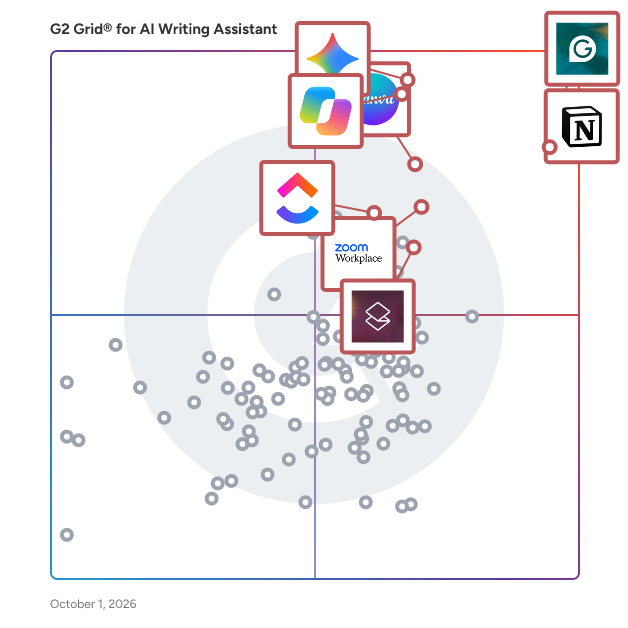
G2’s top-rated AI Writing Assistants include Grammarly, Notion, Canva, Gemini and Zoom Workplace.

What are the top-reviewed AI Writing Assistants on G2?

Grammarly

  • Number of Reviews: 6,402
  • Satisfaction: 100
  • Market Score: 99
  • G2 Score: 99

Notion

  • Number of Reviews: 4,326
  • Satisfaction: 98
  • Market Score: 87
  • G2 Score: 93

Canva

  • Number of Reviews: 90
  • Satisfaction: 72
  • Market Score: 94
  • G2 Score: 83

Gemini

  • Number of Reviews: 51
  • Satisfaction: 63
  • Market Score: 97
  • G2 Score: 80

Zoom Workplace

  • Number of Reviews: 72
  • Satisfaction: 73
  • Market Score: 83
  • G2 Score: 78

Satisfaction reflects user-reported ratings across factors such as ease of use, feature fit, and support quality. (Source 2)

Market Presence scores are calculated based on review volume, third-party signals, and overall market visibility. (Source 2)

G2 Score is a weighted composite of Satisfaction and Market Presence. (Source 2)

Learn how G2 scores products. (Source 1)

What I Often See in AI Writing Assistants

Feedback Pros: What Users Consistently Appreciate

  • Fast initial setup across everyday writing surfaces and workflows
  • “I like Notion's AI writing tool. It answers questions and clarifies directly while writing. The initial setup was great for me.” - Sissi C, Notion Review


  • Real-time grammar and spelling corrections while drafting messages
  • “Grammarly's real-time grammar and clarity suggestions help me write faster, avoid mistakes,and communicate more clearly and confidently.” - Vijay J, Grammarly Review


  • Time-saving content generation for social posts and quick drafts
  • “What stands out most is how ridiculously easy it is to make things look professional — even if you’re not a designer at all. The drag-and-drop setup, ready-made templates, and huge library of fonts, photos, icons, and elements make designing fast instead of frustrating. Also big win: everything’s in one place — presentations, posters, social posts, resumes, videos — no steep learning curve, just open and create. Basically, it turns “I have no design skills” into “wait… I made this?!” - Somnath H, Canva review

Cons: Where Many Platforms Fall Short

  • Feature-Rich Platform with Minor UI Clutter and Integration Gaps
  • “There is still some room for improvement. With so many features being added, the interface can sometimes feel slightly cluttered for new users. Additionally, better integration with certain marketing automation tools and CRM platforms would further streamline workflows for marketing teams.” - Rohan K, Zoom Workplace review


  • Free-plan limits lock advanced features behind paid tiers
  • “One thing I dislike about Grammarly is that sometimes its suggestions can feel overly strict or not fully match the intended tone or context. Occasionally, it flags sentences that are actually correct, which means I still need to review suggestions carefully. Also, some advanced features are locked behind the premium version, which can limit the full experience in the free plan.” - Khushee S., Grammarly review


  • Advanced Features Behind Paywall and Performance Lag with Complex Medical Designs
  • Some useful templates and advanced features are available only in the paid version, which can feel limiting at times. When working with high-resolution medical images, the editor occasionally slows down slightly, especially if multiple elements are added to the design. I also feel that more healthcare-specific templates or icons would make it even more suitable for medical professionals like me.” - Shubham S., Simplified review

My Expert Takeaway on AI Writing Assistants

As per G2 review data, AI writing assistants deliver the most value when organizations treat them as part of a structured content workflow rather than a standalone productivity tool. Teams are not just trying to write faster; they are trying to deliver consistent communication across multiple channels while reducing manual editing and coordination. 

The category’s strong sentiment supports this shift, with an average rating of 4.59/5 and a likelihood to recommend of 9.17/10, alongside high usability scores, such as Ease of Use and Ease of Setup, averaging around 6.3/7. These results indicate that teams quickly realize productivity gains once AI writing software becomes part of everyday writing workflows.

High-performing teams typically operationalize AI writing platforms early by creating shared prompt libraries, defining tone and style guidelines, and embedding the tools into existing writing environments like documents, email, and support systems. Organizations that balance speed with governance through templates, brand voice controls, and admin oversight achieve the strongest outcomes. For buyers comparing the best AI writing assistants or evaluating the best AI writing software, running a pilot that measures draft speed, edit effort, and consistency across multiple contributors is often the most reliable way to determine long-term fit.

AI Writing Assistants FAQs

What are the best AI writing assistants?

The best AI writing assistants depend on whether you need editing, content generation, or team governance. I recommend shortlisting tools with strong ease of use, reliable tone control, and clear admin features, then testing them on real workflows to compare accuracy and editing effort.

Popular options include Grammarly for editing and tone improvement, Notion for collaborative writing and summaries, Jasper for marketing and long-form content generation, Microsoft Copilot for document creation within Microsoft 365, and Constant Contact AI for marketing email writing. The right choice ultimately depends on your workflow and content needs.

How to use AI writing assistants?

Start with rewrite and correction workflows first, then graduate to drafting. Build a small prompt library, define tone guidelines, and require human review for factual claims. Track time saved and edit effort so teams improve prompts over time.

What are the most reliable AI writing assistants for software companies?

Software companies should choose AI writing assistants that support technical tone, structured documentation, and consistent messaging. Common options include Grammarly, Jasper, Notion AI, and Writesonic. Testing them on real product documentation or customer responses helps compare accuracy and editing effort.

What are the best AI writing apps for professionals?

Professionals often use Grammarly, Writesonic, QuillBot, and WRITER for AI-assisted writing. These tools integrate with email, documents, and browsers while offering rewriting, tone adjustment, and clarity improvements to help produce consistent, professional communication across everyday business workflows.

What are the best AI tools to write content?

The best AI tool for writing content depends on your needs. Tools like Grammarly, Writesonic, Rytr, and QuillBot help generate usable first drafts, refine tone, and improve clarity, making them suitable for marketing copy, social posts, knowledge base articles, and internal communications.

How do you use AI writing tools effectively?

Use AI writing tools as a draft accelerator, not a final author. Provide clear inputs (audience, tone, constraints), reuse proven prompts, and enforce review steps for accuracy. Measure outcomes, time-to-draft, edits required, and consistency across writers.

Sources

  1. G2 Scoring Methodologies
  2. G2 Winter 2026 Reports

Researched By: Bijou Barry

Last updated on March 17, 2026