


Designcenter Solid Edge Reviews & Product Details

Pricing

Pricing provided by Designcenter Solid Edge.

Solid Edge Design and Drafting XaaS

Starting at $90.47
Per Month

Designcenter Solid Edge Media

Designcenter Solid Edge Demo - Large Assembly
Faster performance and memory load time when developing large assemblies. New support for embedded components inside the assembly with no file reference, for simplified supplier data workflow.
Designcenter Solid Edge Demo - Next-generation Cloud-Based Collaboration
Synchronize files with cloud storage, while you work; view, measure and markup any computer-aided design (CAD) on any device; securely share projects with anyone; and, review designs in augmented reality (AR) on phones and tablets.
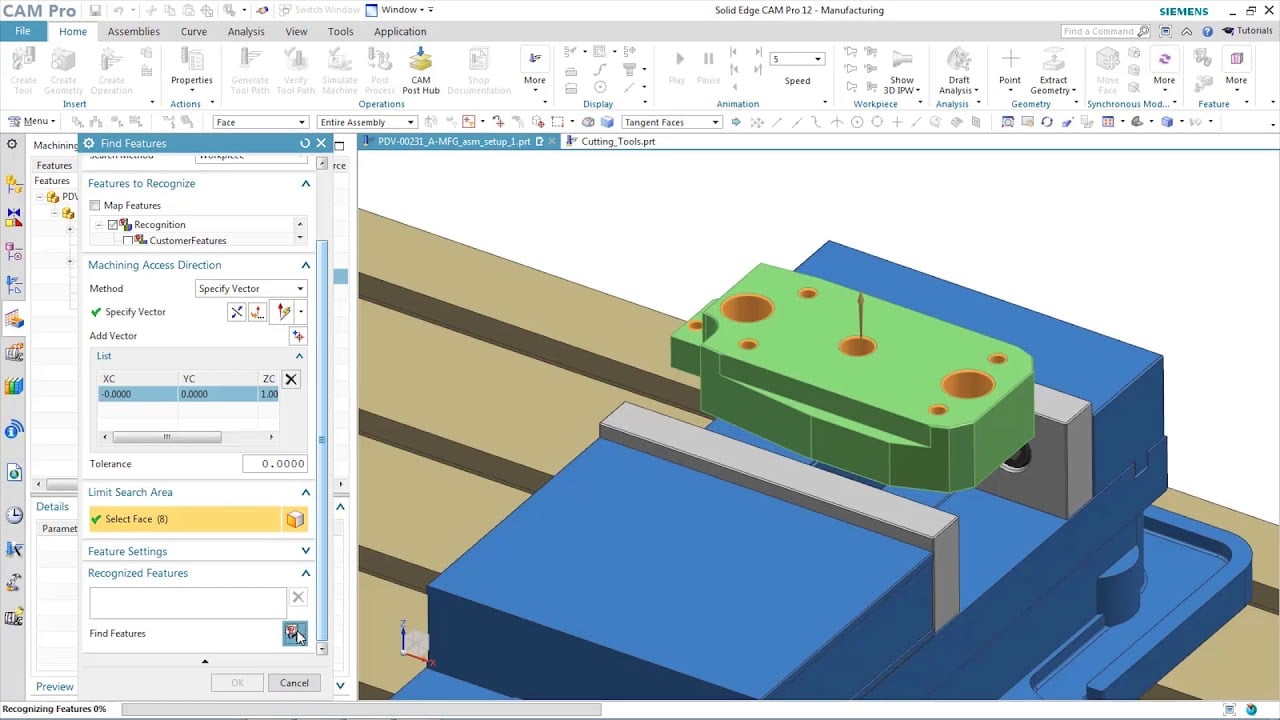
Designcenter Solid Edge Demo - CAM & Machining
Solid Edge manufacturing solutions provide fast and easy feature-based machining, allowing you to automatically determine the machining process for a wide range of features.
Designcenter Solid Edge Demo - Faster reverse engineering
Reduce time spent on reverse engineering with lightning-fast performance enhancements including deviation analysis.
Designcenter Solid Edge Demo - Technical Publications
Open, save and revise data from Teamcenter, Siemens’ powerful PLM solution, with tight integration to ensure your working with the right data, every time. Go from engineering to documentation quickly and seamlessly working directly with Solid Edge 3D models; leveraging the digital twin ensures al...
Designcenter Solid Edge Demo - FLOEFD
Better integration between flow simulation and structural simulation help create a more accurate digital twin. Add fluid pressure and temperatures results from Simcenter FLOEFD for Solid Edge for analysis in Solid Edge Simulation. Digitally validating and optimizing parts, assemblies and complete...
Play Designcenter Solid Edge Video
Product Avatar Image

Have you used Designcenter Solid Edge before?

Answer a few questions to help the Designcenter Solid Edge community

Designcenter Solid Edge Reviews (579)

View 1 Video Reviews
Reviews

Designcenter Solid Edge Reviews (579)

View 1 Video Reviews
4.3
579 reviews

Review Summary

Generated using AI from real user reviews
Users consistently praise the intuitive interface and synchronous technology of Designcenter Solid Edge, which streamline the design process and facilitate quick modifications. Many appreciate its ability to handle complex assemblies efficiently, making it a reliable choice for mechanical design. However, some users note that performance can lag with larger projects, and the learning curve may be steep for beginners.

Pros & Cons

Generated from real user reviews
View All Pros and Cons
Search reviews
Filter Reviews
Clear Results
G2 reviews are authentic and verified.
Verified User in Information Technology and Services
UI
Mid-Market (51-1000 emp.)
"Effortless Design and Development with Solid Edge"
What do you like best about Designcenter Solid Edge?

Solid Edge is extremely easy to use and provides all the needed tools and feature sets needed for any manufacturing organization to design and develop new products Review collected by and hosted on G2.com.

What do you dislike about Designcenter Solid Edge?

Data Migration tools can be improved to allow much seamless migration from other CAD tools to Solid Edge (covering Parts, Drawings, and Assemblies) while retaining all the data Review collected by and hosted on G2.com.

Bismark N.
BN
Mechanical Engineer
Small-Business (50 or fewer emp.)
"Exceptional, i use solid edge for my 3d works and its easy use is very helpful."
What do you like best about Designcenter Solid Edge?

Perfect interface for Weldment designing.

The interface for parametric CAD designs in awesome.

Built in simulations and analysis is quick and easy. Results well presented. I usually use the Metal sheet and its very convenient. Review collected by and hosted on G2.com.

What do you dislike about Designcenter Solid Edge?

Not being able to perform mathematical operations directly from the interface.

The pop-up menus are very helpful but slows the flow of designing since as designers we require the speed. Review collected by and hosted on G2.com.

Verified User in Automotive
UA
Small-Business (50 or fewer emp.)
"I'm an experienced mechanical designer with a passion for industrial robotics"
What do you like best about Designcenter Solid Edge?

One of the most impressive features has to be the Synchronous Technology. It allows me to work seamlessly with both history based and direct modeling, which really saves a lot of time, especially when I'm handling imported components from robot manufacturers like ABB, KUKA, and Fanuc. I can make geometry adjustments quickly without having to sift through a lengthy feature tree or stress over broken dependencies. Review collected by and hosted on G2.com.

What do you dislike about Designcenter Solid Edge?

What I found a bit frustrating about Solid Edge is the steep learning curve, especially if you're transitioning from more popular CAD tools like SolidWorks. Even though the user interface has seen some improvements in recent updates, it still feels somewhat less intuitive and polished. When it comes to handling large assemblies, performance can lag unless you're using high-end hardware, which is often the case in robotics projects. Plus, while file exports are usually dependable, getting models to work seamlessly in simulation or CAM environments sometimes requires a bit of manual tweaking. Review collected by and hosted on G2.com.

MA
Project manager
Small-Business (50 or fewer emp.)
"Promising, User-Friendly Alternative to AutoCAD Electric for Panel Design"
What do you like best about Designcenter Solid Edge?

I haven't try yet but its seems so advance and easy to use i would try it specially in electrical panels design, its seem so time efficient better than AutoCAD electric Review collected by and hosted on G2.com.

What do you dislike about Designcenter Solid Edge?

I need to contact a sells person to get a license price ad that annoying, it would be great if they just automate the payment and pricing methods , thats all Review collected by and hosted on G2.com.

Ali A.
AA
Research assistant
Small-Business (50 or fewer emp.)
"Decent Experience, But Room for Improvement"
What do you like best about Designcenter Solid Edge?

- Easier to edit models quickly.

- Modifying imported parts faster without breaking the model.

- Accurate drawing tools.

- Opens many file types without issues. Review collected by and hosted on G2.com.

What do you dislike about Designcenter Solid Edge?

- The interface is not really modern (kind of outdated).

- Slows down with large assemblies.

- Customer support isn't as fast/active as other popular CAD softwares like Solidworks. Review collected by and hosted on G2.com.

Verified User in Industrial Automation
II
Small-Business (50 or fewer emp.)
"I need more information about to how use it"
What do you like best about Designcenter Solid Edge?

What I liked most about Solid Edge was the accuracy of its simulations. The results feel incredibly close to reality, allowing you to confidently validate designs before manufacturing. Its intuitive interface and advanced tools make the modeling and analysis process efficient and professional. Review collected by and hosted on G2.com.

What do you dislike about Designcenter Solid Edge?

The little information there is on how to use it, I don't know if it's because I didn't search too much, but I think it should be in plain sight, apart from the fact that there isn't any way to test the tool in a more or less real environment other than a time-limited test. As a project engineer, sometimes I like to try something for more than a month to make sure it works for me. Review collected by and hosted on G2.com.

Verified User in Defense & Space
UD
Small-Business (50 or fewer emp.)
"Great for CAD Beginners, but Lacks Advanced Features"
What do you like best about Designcenter Solid Edge?

Its an accessible software for CAD begginers with a lot of online support. The interface is intuitive and has all the basic modeling functions that all CAD software has. I highly available in academia. Has FEA and shape optimization modules which is a plus. Review collected by and hosted on G2.com.

What do you dislike about Designcenter Solid Edge?

Lacks advanced modeling and sketching functions that other CAD software has, this makes using this software more tedious and time consuming. Compared to NX(CAD from same company) it feel incomplete and as a downgrade. Review collected by and hosted on G2.com.

Mostafa M.
MM
Senior Manufacturing Process Engineer
Enterprise (> 1000 emp.)
"Solid Edge blends intuitive design and strong simulation tools for complex projects"
What do you like best about Designcenter Solid Edge?

Ease of Use: Steep learning curve but powerful once mastered.

Ease of Implementation: Time-consuming setup, necessary for efficiency.

Ease of Integration: Solid Edge integrates well with various CAD systems and PLM tools

Number of Features: Solid Edge offers a comprehensive suite of features, including advanced modeling, simulation, and data management tools. Review collected by and hosted on G2.com.

What do you dislike about Designcenter Solid Edge?

Frequency of Use: Occasional users might struggle with retaining proficiency due to feature complexity.

Customer Support: It can sometimes be slow to respond during high-demand periods. Review collected by and hosted on G2.com.

Gokul M.
GM
Student
Small-Business (50 or fewer emp.)
"Powerful CAD tool with robust features"
What do you like best about Designcenter Solid Edge?

Solid Edge’s synchronous technology allows for fast, intuitive editing of models without history constraints. The user interface is clean, and integration with simulation tools is seamless. Review collected by and hosted on G2.com.

What do you dislike about Designcenter Solid Edge?

The learning curve can be steep for beginners, especially those without prior CAD experience. Some advanced features require powerful hardware and may lag on lower-end systems. Review collected by and hosted on G2.com.

Verified User in Design
UD
Small-Business (50 or fewer emp.)
"Good but needs improvement"
What do you like best about Designcenter Solid Edge?

Solid Edge offers a very intuitive interface that makes it easier to start 3D modeling without a steep learning curve. I like that it combines both direct modeling and parametric design, which gives flexibility in creating complex parts and assemblies. The built-in simulation tools and integration with Siemens PLM are also very helpful for checking designs before manufacturing. Review collected by and hosted on G2.com.

What do you dislike about Designcenter Solid Edge?

While the software is powerful, it sometimes feels heavy on system resources and can slow down when working with large assemblies. Updates could be more frequent to fix bugs, and the community support is smaller compared to other CAD software like SolidWorks, which makes troubleshooting a bit harder. Review collected by and hosted on G2.com.

Pricing Options

Pricing provided by Designcenter Solid Edge.

Solid Edge Design and Drafting XaaS

Starting at $90.47
Per Month

Solid Edge X Standard

Starting at $261.00
Per Month

Solid Edge X Advanced

Starting at $312.00
Per Month

Solid Edge X Premium

Starting at $413.00
Per Month

G2 Deals

Exclusive savings on Designcenter Solid Edge through G2 Deals

Get 25% off any monthly or annual subscription of Solid Edge and accelerate your product development process using best-in-class 3D design tools.

How to claim this offer

Claim the offer via G2 and use code G2START25 during checkout.

Designcenter Solid Edge Comparisons
Product Avatar Image
SOLIDWORKS
Compare Now
Product Avatar Image
Inventor
Compare Now
Product Avatar Image
Designcenter NX
Compare Now
Designcenter Solid Edge Features
CAD-CAM Import
Drawing
Modeling
Visualize
File Import
Push/Pull
Views
Annotate
Documentation
Data Extract
Product Avatar Image
Designcenter Solid Edge