2026 Best Software Awards are here!See the list

Best Password Managers

Brandon Summers-Miller
BS
Researched and written by Brandon Summers-Miller

This page was last updated on June 9th, 2025

Password managers store and control a user's passwords through an encrypted vault downloaded to a user’s computer or mobile device or digitally through browser plugins or extensions. As an identity management software, The best password managers help protect personal data by securing and strengthening personal passwords. They allow users to create strong and unique passwords for every website or application they log in to while saving the user from having to memorize each password. Personal password managers are typically for individual users or small groups, but paid password managers, the kind of products listed on G2, can be used by larger businesses to maintain highly secure credentials. The products can be used to share, randomize, mandate, and monitor password changes.

Some identity management products provide password features, but software specific to password management typically provide less advanced capabilities than identity and access management (IAM) software, single sign-on (SSO) solutions, and user provisioning and governance tools.

To qualify for inclusion in the Password Manager category, a product must:

Store and save passwords for websites
Automate the filling of password forms or logins
Provide tools for securely sharing credentials
Integrate with browsers or function atop applications
Allow users to create, change, or randomize passwords
Show More
Show Less

Featured Password Managers At A Glance

Leader:
Highest Performer:
Easiest to Use:
Top Trending:
Show LessShow More
Highest Performer:
Easiest to Use:
Top Trending:

G2 takes pride in showing unbiased reviews on user satisfaction in our ratings and reports. We do not allow paid placements in any of our ratings, rankings, or reports. Learn about our scoring methodologies.

No filters applied
95 Listings in Password Managers Available
(1,713)4.6 out of 5
7th Easiest To Use in Password Managers software
View top Consulting Services for 1Password
100% Off: 0
  • Overview
    Expand/Collapse Overview
  • Product Description
    How are these determined?Information
    This description is provided by the seller.

    The Most Used Enterprise Password Manager, trusted by over 180,00 businesses, 1Password helps improve security, visibility and control over how their passwords and company data are protected. Secu

    Users
    • Software Engineer
    • CEO
    Industries
    • Computer Software
    • Information Technology and Services
    Market Segment
    • 55% Small-Business
    • 32% Mid-Market
  • Pros and Cons
    Expand/Collapse Pros and Cons
  • 1Password Pros and Cons
    How are these determined?Information
    Pros and Cons are compiled from review feedback and grouped into themes to provide an easy-to-understand summary of user reviews.
    Pros
    Ease of Use
    333
    Security
    271
    Password Management
    182
    Intuitive
    144
    Easy Access
    134
    Cons
    Password Management
    95
    Expensive
    91
    Login Issues
    69
    Autofill Issues
    64
    Cost
    60
  • User Satisfaction
    Expand/Collapse User Satisfaction
  • 1Password features and usability ratings that predict user satisfaction
    9.3
    Has the product been a good partner in doing business?
    Average: 9.0
    8.9
    Admin Management
    Average: 9.0
    9.2
    Quick Login
    Average: 9.1
    9.2
    Two-Factor Authentication
    Average: 9.0
  • Seller Details
    Expand/Collapse Seller Details
  • Seller Details
    Seller
    1Password
    Company Website
    Year Founded
    2005
    HQ Location
    Ontario
    Twitter
    @1Password
    139,467 Twitter followers
    LinkedIn® Page
    www.linkedin.com
    2,911 employees on LinkedIn®
Product Description
How are these determined?Information
This description is provided by the seller.

The Most Used Enterprise Password Manager, trusted by over 180,00 businesses, 1Password helps improve security, visibility and control over how their passwords and company data are protected. Secu

Users
  • Software Engineer
  • CEO
Industries
  • Computer Software
  • Information Technology and Services
Market Segment
  • 55% Small-Business
  • 32% Mid-Market
1Password Pros and Cons
How are these determined?Information
Pros and Cons are compiled from review feedback and grouped into themes to provide an easy-to-understand summary of user reviews.
Pros
Ease of Use
333
Security
271
Password Management
182
Intuitive
144
Easy Access
134
Cons
Password Management
95
Expensive
91
Login Issues
69
Autofill Issues
64
Cost
60
1Password features and usability ratings that predict user satisfaction
9.3
Has the product been a good partner in doing business?
Average: 9.0
8.9
Admin Management
Average: 9.0
9.2
Quick Login
Average: 9.1
9.2
Two-Factor Authentication
Average: 9.0
Seller Details
Seller
1Password
Company Website
Year Founded
2005
HQ Location
Ontario
Twitter
@1Password
139,467 Twitter followers
LinkedIn® Page
www.linkedin.com
2,911 employees on LinkedIn®
(1,987)4.5 out of 5
Optimized for quick response
8th Easiest To Use in Password Managers software
View top Consulting Services for LastPass
Entry Level Price:$4.25
  • Overview
    Expand/Collapse Overview
  • Product Description
    How are these determined?Information
    This description is provided by the seller.

    LastPass is a secure, cloud-based password manager that takes the hassle out of remembering and managing passwords. It works across all your devices, so you can log in faster and stay protected everyw

    Users
    • Owner
    • CEO
    Industries
    • Information Technology and Services
    • Computer Software
    Market Segment
    • 63% Small-Business
    • 25% Mid-Market
  • Pros and Cons
    Expand/Collapse Pros and Cons
  • LastPass Pros and Cons
    How are these determined?Information
    Pros and Cons are compiled from review feedback and grouped into themes to provide an easy-to-understand summary of user reviews.
    Pros
    Ease of Use
    227
    Password Management
    170
    Security
    155
    Autofill Feature
    107
    Password Security
    99
    Cons
    Autofill Issues
    83
    Password Management
    78
    Login Issues
    66
    Password Issues
    44
    Browser Extension Issues
    43
  • User Satisfaction
    Expand/Collapse User Satisfaction
  • LastPass features and usability ratings that predict user satisfaction
    8.6
    Has the product been a good partner in doing business?
    Average: 9.0
    8.4
    Admin Management
    Average: 9.0
    9.0
    Quick Login
    Average: 9.1
    8.9
    Two-Factor Authentication
    Average: 9.0
  • Seller Details
    Expand/Collapse Seller Details
  • Seller Details
    Seller
    LastPass
    Company Website
    Year Founded
    2008
    HQ Location
    Boston, Massachusetts
    Twitter
    @LastPass
    46,137 Twitter followers
    LinkedIn® Page
    www.linkedin.com
    772 employees on LinkedIn®
Product Description
How are these determined?Information
This description is provided by the seller.

LastPass is a secure, cloud-based password manager that takes the hassle out of remembering and managing passwords. It works across all your devices, so you can log in faster and stay protected everyw

Users
  • Owner
  • CEO
Industries
  • Information Technology and Services
  • Computer Software
Market Segment
  • 63% Small-Business
  • 25% Mid-Market
LastPass Pros and Cons
How are these determined?Information
Pros and Cons are compiled from review feedback and grouped into themes to provide an easy-to-understand summary of user reviews.
Pros
Ease of Use
227
Password Management
170
Security
155
Autofill Feature
107
Password Security
99
Cons
Autofill Issues
83
Password Management
78
Login Issues
66
Password Issues
44
Browser Extension Issues
43
LastPass features and usability ratings that predict user satisfaction
8.6
Has the product been a good partner in doing business?
Average: 9.0
8.4
Admin Management
Average: 9.0
9.0
Quick Login
Average: 9.1
8.9
Two-Factor Authentication
Average: 9.0
Seller Details
Seller
LastPass
Company Website
Year Founded
2008
HQ Location
Boston, Massachusetts
Twitter
@LastPass
46,137 Twitter followers
LinkedIn® Page
www.linkedin.com
772 employees on LinkedIn®
G2 Advertising
Sponsored
G2 Advertising
Get 2x conversion than Google Ads with G2 Advertising!
G2 Advertising places your product in premium positions on high-traffic pages and on targeted competitor pages to reach buyers at key comparison moments.
(639)4.5 out of 5
Optimized for quick response
10th Easiest To Use in Password Managers software
20% Off: $2.87 user / month
  • Overview
    Expand/Collapse Overview
  • Product Description
    How are these determined?Information
    This description is provided by the seller.

    Trusted by more than 9,000 businesses worldwide, NordPass is a password management tool that upholds the finest privacy and security standards for businesses. Unlock the ease of cybersecurity and b

    Users
    • CEO
    • CTO
    Industries
    • Information Technology and Services
    • Marketing and Advertising
    Market Segment
    • 72% Small-Business
    • 25% Mid-Market
  • Pros and Cons
    Expand/Collapse Pros and Cons
  • NordPass Business Pros and Cons
    How are these determined?Information
    Pros and Cons are compiled from review feedback and grouped into themes to provide an easy-to-understand summary of user reviews.
    Pros
    Ease of Use
    198
    Security
    158
    Password Management
    131
    Intuitive
    121
    Sharing Ease
    118
    Cons
    Password Management
    92
    Password Issues
    68
    Login Issues
    55
    Autofill Issues
    50
    Browser Extension Issues
    44
  • User Satisfaction
    Expand/Collapse User Satisfaction
  • NordPass Business features and usability ratings that predict user satisfaction
    9.0
    Has the product been a good partner in doing business?
    Average: 9.0
    8.6
    Admin Management
    Average: 9.0
    8.5
    Quick Login
    Average: 9.1
    8.6
    Two-Factor Authentication
    Average: 9.0
  • Seller Details
    Expand/Collapse Seller Details
  • Seller Details
    Company Website
    Year Founded
    2012
    HQ Location
    Global
    Twitter
    @NordPass
    9,517 Twitter followers
    LinkedIn® Page
    www.linkedin.com
    1,883 employees on LinkedIn®
Product Description
How are these determined?Information
This description is provided by the seller.

Trusted by more than 9,000 businesses worldwide, NordPass is a password management tool that upholds the finest privacy and security standards for businesses. Unlock the ease of cybersecurity and b

Users
  • CEO
  • CTO
Industries
  • Information Technology and Services
  • Marketing and Advertising
Market Segment
  • 72% Small-Business
  • 25% Mid-Market
NordPass Business Pros and Cons
How are these determined?Information
Pros and Cons are compiled from review feedback and grouped into themes to provide an easy-to-understand summary of user reviews.
Pros
Ease of Use
198
Security
158
Password Management
131
Intuitive
121
Sharing Ease
118
Cons
Password Management
92
Password Issues
68
Login Issues
55
Autofill Issues
50
Browser Extension Issues
44
NordPass Business features and usability ratings that predict user satisfaction
9.0
Has the product been a good partner in doing business?
Average: 9.0
8.6
Admin Management
Average: 9.0
8.5
Quick Login
Average: 9.1
8.6
Two-Factor Authentication
Average: 9.0
Seller Details
Company Website
Year Founded
2012
HQ Location
Global
Twitter
@NordPass
9,517 Twitter followers
LinkedIn® Page
www.linkedin.com
1,883 employees on LinkedIn®
(988)4.7 out of 5
Optimized for quick response
6th Easiest To Use in Password Managers software
Entry Level Price:$4.00
  • Overview
    Expand/Collapse Overview
  • Product Description
    How are these determined?Information
    This description is provided by the seller.

    Bitwarden is an open source password manager for individuals, teams, and enterprise organizations. Ranked first in Enterprise User Satisfaction on the G2 Enterprise Grid for eleven consecutive quarter

    Users
    • IT Manager
    • CEO
    Industries
    • Information Technology and Services
    • Computer Software
    Market Segment
    • 57% Small-Business
    • 29% Mid-Market
  • Pros and Cons
    Expand/Collapse Pros and Cons
  • Bitwarden Pros and Cons
    How are these determined?Information
    Pros and Cons are compiled from review feedback and grouped into themes to provide an easy-to-understand summary of user reviews.
    Pros
    Ease of Use
    134
    Security
    87
    Password Management
    54
    Easy Setup
    46
    Cross-platform Compatibility
    43
    Cons
    Autofill Issues
    31
    Poor UI
    29
    Process Complexity
    16
    Missing Features
    15
    Learning Curve
    14
  • User Satisfaction
    Expand/Collapse User Satisfaction
  • Bitwarden features and usability ratings that predict user satisfaction
    9.3
    Has the product been a good partner in doing business?
    Average: 9.0
    8.8
    Admin Management
    Average: 9.0
    8.9
    Quick Login
    Average: 9.1
    9.1
    Two-Factor Authentication
    Average: 9.0
  • Seller Details
    Expand/Collapse Seller Details
  • Seller Details
    Seller
    Bitwarden
    Company Website
    Year Founded
    2015
    HQ Location
    Santa Barbara, CA
    Twitter
    @Bitwarden
    125,665 Twitter followers
    LinkedIn® Page
    www.linkedin.com
    242 employees on LinkedIn®
Product Description
How are these determined?Information
This description is provided by the seller.

Bitwarden is an open source password manager for individuals, teams, and enterprise organizations. Ranked first in Enterprise User Satisfaction on the G2 Enterprise Grid for eleven consecutive quarter

Users
  • IT Manager
  • CEO
Industries
  • Information Technology and Services
  • Computer Software
Market Segment
  • 57% Small-Business
  • 29% Mid-Market
Bitwarden Pros and Cons
How are these determined?Information
Pros and Cons are compiled from review feedback and grouped into themes to provide an easy-to-understand summary of user reviews.
Pros
Ease of Use
134
Security
87
Password Management
54
Easy Setup
46
Cross-platform Compatibility
43
Cons
Autofill Issues
31
Poor UI
29
Process Complexity
16
Missing Features
15
Learning Curve
14
Bitwarden features and usability ratings that predict user satisfaction
9.3
Has the product been a good partner in doing business?
Average: 9.0
8.8
Admin Management
Average: 9.0
8.9
Quick Login
Average: 9.1
9.1
Two-Factor Authentication
Average: 9.0
Seller Details
Seller
Bitwarden
Company Website
Year Founded
2015
HQ Location
Santa Barbara, CA
Twitter
@Bitwarden
125,665 Twitter followers
LinkedIn® Page
www.linkedin.com
242 employees on LinkedIn®
(1,186)4.6 out of 5
Optimized for quick response
11th Easiest To Use in Password Managers software
100% Off
  • Overview
    Expand/Collapse Overview
  • Product Description
    How are these determined?Information
    This description is provided by the seller.

    Keeper Security is transforming cybersecurity for millions of individuals and thousands of organizations globally. Built with end-to-end encryption, Keeper's intuitive cybersecurity platform is truste

    Users
    • IT Manager
    • Owner
    Industries
    • Information Technology and Services
    • Financial Services
    Market Segment
    • 42% Mid-Market
    • 42% Small-Business
  • Pros and Cons
    Expand/Collapse Pros and Cons
  • Keeper Password Manager Pros and Cons
    How are these determined?Information
    Pros and Cons are compiled from review feedback and grouped into themes to provide an easy-to-understand summary of user reviews.
    Pros
    Ease of Use
    168
    Security
    128
    Secure Sharing
    88
    Password Management
    87
    Features
    74
    Cons
    Password Management
    71
    Autofill Issues
    49
    Login Issues
    39
    Password Issues
    34
    Learning Curve
    33
  • User Satisfaction
    Expand/Collapse User Satisfaction
  • Keeper Password Manager features and usability ratings that predict user satisfaction
    9.0
    Has the product been a good partner in doing business?
    Average: 9.0
    8.8
    Admin Management
    Average: 9.0
    9.0
    Quick Login
    Average: 9.1
    9.2
    Two-Factor Authentication
    Average: 9.0
  • Seller Details
    Expand/Collapse Seller Details
  • Seller Details
    Company Website
    Year Founded
    2011
    HQ Location
    Chicago, IL
    Twitter
    @keepersecurity
    18,965 Twitter followers
    LinkedIn® Page
    www.linkedin.com
    723 employees on LinkedIn®
Product Description
How are these determined?Information
This description is provided by the seller.

Keeper Security is transforming cybersecurity for millions of individuals and thousands of organizations globally. Built with end-to-end encryption, Keeper's intuitive cybersecurity platform is truste

Users
  • IT Manager
  • Owner
Industries
  • Information Technology and Services
  • Financial Services
Market Segment
  • 42% Mid-Market
  • 42% Small-Business
Keeper Password Manager Pros and Cons
How are these determined?Information
Pros and Cons are compiled from review feedback and grouped into themes to provide an easy-to-understand summary of user reviews.
Pros
Ease of Use
168
Security
128
Secure Sharing
88
Password Management
87
Features
74
Cons
Password Management
71
Autofill Issues
49
Login Issues
39
Password Issues
34
Learning Curve
33
Keeper Password Manager features and usability ratings that predict user satisfaction
9.0
Has the product been a good partner in doing business?
Average: 9.0
8.8
Admin Management
Average: 9.0
9.0
Quick Login
Average: 9.1
9.2
Two-Factor Authentication
Average: 9.0
Seller Details
Company Website
Year Founded
2011
HQ Location
Chicago, IL
Twitter
@keepersecurity
18,965 Twitter followers
LinkedIn® Page
www.linkedin.com
723 employees on LinkedIn®
(618)4.5 out of 5
Optimized for quick response
9th Easiest To Use in Password Managers software
100% Off
  • Overview
    Expand/Collapse Overview
  • Product Description
    How are these determined?Information
    This description is provided by the seller.

    Dashlane provides complete credential security, protecting businesses against the threat of human risk. Our intelligent Omnix™ platform unifies credential protection and password management, equipping

    Users
    • CEO
    • Owner
    Industries
    • Information Technology and Services
    • Computer Software
    Market Segment
    • 64% Small-Business
    • 32% Mid-Market
  • Pros and Cons
    Expand/Collapse Pros and Cons
  • Dashlane Password Manager Pros and Cons
    How are these determined?Information
    Pros and Cons are compiled from review feedback and grouped into themes to provide an easy-to-understand summary of user reviews.
    Pros
    Ease of Use
    126
    Security
    96
    Sharing Ease
    92
    Intuitive
    74
    Secure Storage
    71
    Cons
    Autofill Issues
    59
    Password Issues
    57
    Login Issues
    46
    Password Management
    29
    Expensive
    23
  • User Satisfaction
    Expand/Collapse User Satisfaction
  • Dashlane Password Manager features and usability ratings that predict user satisfaction
    8.8
    Has the product been a good partner in doing business?
    Average: 9.0
    8.5
    Admin Management
    Average: 9.0
    9.1
    Quick Login
    Average: 9.1
    8.8
    Two-Factor Authentication
    Average: 9.0
  • Seller Details
    Expand/Collapse Seller Details
  • Seller Details
    Seller
    Dashlane
    Company Website
    Year Founded
    2009
    HQ Location
    New York
    Twitter
    @dashlane
    28,385 Twitter followers
    LinkedIn® Page
    www.linkedin.com
    301 employees on LinkedIn®
Product Description
How are these determined?Information
This description is provided by the seller.

Dashlane provides complete credential security, protecting businesses against the threat of human risk. Our intelligent Omnix™ platform unifies credential protection and password management, equipping

Users
  • CEO
  • Owner
Industries
  • Information Technology and Services
  • Computer Software
Market Segment
  • 64% Small-Business
  • 32% Mid-Market
Dashlane Password Manager Pros and Cons
How are these determined?Information
Pros and Cons are compiled from review feedback and grouped into themes to provide an easy-to-understand summary of user reviews.
Pros
Ease of Use
126
Security
96
Sharing Ease
92
Intuitive
74
Secure Storage
71
Cons
Autofill Issues
59
Password Issues
57
Login Issues
46
Password Management
29
Expensive
23
Dashlane Password Manager features and usability ratings that predict user satisfaction
8.8
Has the product been a good partner in doing business?
Average: 9.0
8.5
Admin Management
Average: 9.0
9.1
Quick Login
Average: 9.1
8.8
Two-Factor Authentication
Average: 9.0
Seller Details
Seller
Dashlane
Company Website
Year Founded
2009
HQ Location
New York
Twitter
@dashlane
28,385 Twitter followers
LinkedIn® Page
www.linkedin.com
301 employees on LinkedIn®
  • Overview
    Expand/Collapse Overview
  • Product Description
    How are these determined?Information
    This description is provided by the seller.

    Transform your organization’s IT operations with Rippling’s unified platform for identity, device, access, and security management. Centralize every IT workflow, from provisioning apps and laptops to

    Users
    • Software Engineer
    • CEO
    Industries
    • Computer Software
    • Information Technology and Services
    Market Segment
    • 61% Mid-Market
    • 27% Small-Business
  • Pros and Cons
    Expand/Collapse Pros and Cons
  • Rippling IT Pros and Cons
    How are these determined?Information
    Pros and Cons are compiled from review feedback and grouped into themes to provide an easy-to-understand summary of user reviews.
    Pros
    Ease of Use
    670
    Intuitive
    467
    Simple
    413
    Easy Access
    374
    User Interface
    361
    Cons
    Missing Features
    165
    Limited Features
    112
    Improvement Needed
    89
    Learning Curve
    75
    Poor Customer Support
    73
  • User Satisfaction
    Expand/Collapse User Satisfaction
  • Rippling IT features and usability ratings that predict user satisfaction
    8.9
    Has the product been a good partner in doing business?
    Average: 9.0
    9.4
    Admin Management
    Average: 9.0
    9.3
    Quick Login
    Average: 9.1
    9.5
    Two-Factor Authentication
    Average: 9.0
  • Seller Details
    Expand/Collapse Seller Details
  • Seller Details
    Seller
    Rippling
    Company Website
    Year Founded
    2016
    HQ Location
    San Francisco, CA
    Twitter
    @Rippling
    11,873 Twitter followers
    LinkedIn® Page
    www.linkedin.com
    6,941 employees on LinkedIn®
Product Description
How are these determined?Information
This description is provided by the seller.

Transform your organization’s IT operations with Rippling’s unified platform for identity, device, access, and security management. Centralize every IT workflow, from provisioning apps and laptops to

Users
  • Software Engineer
  • CEO
Industries
  • Computer Software
  • Information Technology and Services
Market Segment
  • 61% Mid-Market
  • 27% Small-Business
Rippling IT Pros and Cons
How are these determined?Information
Pros and Cons are compiled from review feedback and grouped into themes to provide an easy-to-understand summary of user reviews.
Pros
Ease of Use
670
Intuitive
467
Simple
413
Easy Access
374
User Interface
361
Cons
Missing Features
165
Limited Features
112
Improvement Needed
89
Learning Curve
75
Poor Customer Support
73
Rippling IT features and usability ratings that predict user satisfaction
8.9
Has the product been a good partner in doing business?
Average: 9.0
9.4
Admin Management
Average: 9.0
9.3
Quick Login
Average: 9.1
9.5
Two-Factor Authentication
Average: 9.0
Seller Details
Seller
Rippling
Company Website
Year Founded
2016
HQ Location
San Francisco, CA
Twitter
@Rippling
11,873 Twitter followers
LinkedIn® Page
www.linkedin.com
6,941 employees on LinkedIn®
(651)4.7 out of 5
Optimized for quick response
2nd Easiest To Use in Password Managers software
View top Consulting Services for IT Glue
Entry Level Price:$29.00
  • Overview
    Expand/Collapse Overview
  • Product Description
    How are these determined?Information
    This description is provided by the seller.

    IT Glue is the first documentation platform specifically built for the needs of IT professionals. With IT Glue, your team will have IT asset, vendor and software information, along with passwords, con

    Users
    • System Administrator
    • Owner
    Industries
    • Information Technology and Services
    • Computer & Network Security
    Market Segment
    • 69% Small-Business
    • 27% Mid-Market
  • Pros and Cons
    Expand/Collapse Pros and Cons
  • IT Glue Pros and Cons
    How are these determined?Information
    Pros and Cons are compiled from review feedback and grouped into themes to provide an easy-to-understand summary of user reviews.
    Pros
    Ease of Use
    98
    Document Management
    63
    Integrations
    57
    Organization
    43
    Easy Integrations
    41
    Cons
    Slow Performance
    22
    Missing Features
    20
    Search Functionality
    18
    Learning Curve
    17
    Search Limitations
    14
  • User Satisfaction
    Expand/Collapse User Satisfaction
  • IT Glue features and usability ratings that predict user satisfaction
    9.0
    Has the product been a good partner in doing business?
    Average: 9.0
    9.0
    Admin Management
    Average: 9.0
    8.9
    Quick Login
    Average: 9.1
    9.3
    Two-Factor Authentication
    Average: 9.0
  • Seller Details
    Expand/Collapse Seller Details
  • Seller Details
    Seller
    Kaseya
    Company Website
    Year Founded
    2000
    HQ Location
    Miami, FL
    Twitter
    @KaseyaCorp
    17,436 Twitter followers
    LinkedIn® Page
    www.linkedin.com
    5,512 employees on LinkedIn®
Product Description
How are these determined?Information
This description is provided by the seller.

IT Glue is the first documentation platform specifically built for the needs of IT professionals. With IT Glue, your team will have IT asset, vendor and software information, along with passwords, con

Users
  • System Administrator
  • Owner
Industries
  • Information Technology and Services
  • Computer & Network Security
Market Segment
  • 69% Small-Business
  • 27% Mid-Market
IT Glue Pros and Cons
How are these determined?Information
Pros and Cons are compiled from review feedback and grouped into themes to provide an easy-to-understand summary of user reviews.
Pros
Ease of Use
98
Document Management
63
Integrations
57
Organization
43
Easy Integrations
41
Cons
Slow Performance
22
Missing Features
20
Search Functionality
18
Learning Curve
17
Search Limitations
14
IT Glue features and usability ratings that predict user satisfaction
9.0
Has the product been a good partner in doing business?
Average: 9.0
9.0
Admin Management
Average: 9.0
8.9
Quick Login
Average: 9.1
9.3
Two-Factor Authentication
Average: 9.0
Seller Details
Seller
Kaseya
Company Website
Year Founded
2000
HQ Location
Miami, FL
Twitter
@KaseyaCorp
17,436 Twitter followers
LinkedIn® Page
www.linkedin.com
5,512 employees on LinkedIn®
(77)4.4 out of 5
13th Easiest To Use in Password Managers software
Entry Level Price:Free
  • Overview
    Expand/Collapse Overview
  • Product Description
    How are these determined?Information
    This description is provided by the seller.

    Zoho Vault is an online password manager for teams. It helps securely store, share, and manage your passwords from anywhere. With Zoho Vault, you stay organized while your passwords remain secure. Say

    Users
    No information available
    Industries
    • Information Technology and Services
    • Computer Software
    Market Segment
    • 57% Small-Business
    • 39% Mid-Market
  • Pros and Cons
    Expand/Collapse Pros and Cons
  • Zoho Vault Pros and Cons
    How are these determined?Information
    Pros and Cons are compiled from review feedback and grouped into themes to provide an easy-to-understand summary of user reviews.
    Pros
    Ease of Use
    6
    Implementation Ease
    3
    Organization
    3
    Password Sharing
    3
    Sharing
    3
    Cons
    Poor UI
    3
    Login Issues
    2
    Slow Performance
    2
    UI Issues
    2
    Autofill Issues
    1
  • User Satisfaction
    Expand/Collapse User Satisfaction
  • Zoho Vault features and usability ratings that predict user satisfaction
    8.8
    Has the product been a good partner in doing business?
    Average: 9.0
    9.2
    Admin Management
    Average: 9.0
    8.8
    Quick Login
    Average: 9.1
    9.2
    Two-Factor Authentication
    Average: 9.0
  • Seller Details
    Expand/Collapse Seller Details
  • Seller Details
    Seller
    Zoho
    Year Founded
    1996
    HQ Location
    Austin, TX
    Twitter
    @Zoho
    137,068 Twitter followers
    LinkedIn® Page
    www.linkedin.com
    29,794 employees on LinkedIn®
    Phone
    +1 (888) 900-9646
Product Description
How are these determined?Information
This description is provided by the seller.

Zoho Vault is an online password manager for teams. It helps securely store, share, and manage your passwords from anywhere. With Zoho Vault, you stay organized while your passwords remain secure. Say

Users
No information available
Industries
  • Information Technology and Services
  • Computer Software
Market Segment
  • 57% Small-Business
  • 39% Mid-Market
Zoho Vault Pros and Cons
How are these determined?Information
Pros and Cons are compiled from review feedback and grouped into themes to provide an easy-to-understand summary of user reviews.
Pros
Ease of Use
6
Implementation Ease
3
Organization
3
Password Sharing
3
Sharing
3
Cons
Poor UI
3
Login Issues
2
Slow Performance
2
UI Issues
2
Autofill Issues
1
Zoho Vault features and usability ratings that predict user satisfaction
8.8
Has the product been a good partner in doing business?
Average: 9.0
9.2
Admin Management
Average: 9.0
8.8
Quick Login
Average: 9.1
9.2
Two-Factor Authentication
Average: 9.0
Seller Details
Seller
Zoho
Year Founded
1996
HQ Location
Austin, TX
Twitter
@Zoho
137,068 Twitter followers
LinkedIn® Page
www.linkedin.com
29,794 employees on LinkedIn®
Phone
+1 (888) 900-9646
Entry Level Price:Starting at $39.95
  • Overview
    Expand/Collapse Overview
  • Product Description
    How are these determined?Information
    This description is provided by the seller.

    RoboForm for Business: A Secure and Scalable Password Management Solution RoboForm is a business-focused password management solution designed to eliminate weak, reused, and forgotten passwords—com

    Users
    • President
    • CEO
    Industries
    • Insurance
    • Information Technology and Services
    Market Segment
    • 74% Small-Business
    • 21% Mid-Market
  • Pros and Cons
    Expand/Collapse Pros and Cons
  • RoboForm Pros and Cons
    How are these determined?Information
    Pros and Cons are compiled from review feedback and grouped into themes to provide an easy-to-understand summary of user reviews.
    Pros
    Ease of Use
    30
    Cross-platform Compatibility
    14
    Easy Setup
    14
    Secure Storage
    13
    Convenience
    12
    Cons
    Poor UI
    9
    Password Management
    8
    Autofill Issues
    7
    Login Issues
    5
    Duplication Issues
    4
  • User Satisfaction
    Expand/Collapse User Satisfaction
  • RoboForm features and usability ratings that predict user satisfaction
    9.1
    Has the product been a good partner in doing business?
    Average: 9.0
    8.9
    Admin Management
    Average: 9.0
    9.3
    Quick Login
    Average: 9.1
    8.9
    Two-Factor Authentication
    Average: 9.0
  • Seller Details
    Expand/Collapse Seller Details
  • Seller Details
    Company Website
    Year Founded
    1995
    HQ Location
    Fairfax, VA
    Twitter
    @roboform
    19,900 Twitter followers
    LinkedIn® Page
    www.linkedin.com
    69 employees on LinkedIn®
Product Description
How are these determined?Information
This description is provided by the seller.

RoboForm for Business: A Secure and Scalable Password Management Solution RoboForm is a business-focused password management solution designed to eliminate weak, reused, and forgotten passwords—com

Users
  • President
  • CEO
Industries
  • Insurance
  • Information Technology and Services
Market Segment
  • 74% Small-Business
  • 21% Mid-Market
RoboForm Pros and Cons
How are these determined?Information
Pros and Cons are compiled from review feedback and grouped into themes to provide an easy-to-understand summary of user reviews.
Pros
Ease of Use
30
Cross-platform Compatibility
14
Easy Setup
14
Secure Storage
13
Convenience
12
Cons
Poor UI
9
Password Management
8
Autofill Issues
7
Login Issues
5
Duplication Issues
4
RoboForm features and usability ratings that predict user satisfaction
9.1
Has the product been a good partner in doing business?
Average: 9.0
8.9
Admin Management
Average: 9.0
9.3
Quick Login
Average: 9.1
8.9
Two-Factor Authentication
Average: 9.0
Seller Details
Company Website
Year Founded
1995
HQ Location
Fairfax, VA
Twitter
@roboform
19,900 Twitter followers
LinkedIn® Page
www.linkedin.com
69 employees on LinkedIn®
(342)4.7 out of 5
Optimized for quick response
3rd Easiest To Use in Password Managers software
Entry Level Price:$27.00
  • Overview
    Expand/Collapse Overview
  • Product Description
    How are these determined?Information
    This description is provided by the seller.

    Hudu is a comprehensive IT documentation platform designed to help organizations streamline their operations and improve team efficiency. It provides a centralized hub for storing critical documentati

    Users
    • Owner
    • Director
    Industries
    • Information Technology and Services
    • Computer & Network Security
    Market Segment
    • 70% Small-Business
    • 11% Mid-Market
  • Pros and Cons
    Expand/Collapse Pros and Cons
  • Hudu Pros and Cons
    How are these determined?Information
    Pros and Cons are compiled from review feedback and grouped into themes to provide an easy-to-understand summary of user reviews.
    Pros
    Ease of Use
    207
    Features
    111
    Integrations
    103
    Easy Setup
    95
    Simple
    85
    Cons
    Missing Features
    75
    Poor Integration
    43
    UX Improvement
    41
    Limited Features
    38
    Integration Issues
    36
  • User Satisfaction
    Expand/Collapse User Satisfaction
  • Hudu features and usability ratings that predict user satisfaction
    9.5
    Has the product been a good partner in doing business?
    Average: 9.0
    9.2
    Admin Management
    Average: 9.0
    9.3
    Quick Login
    Average: 9.1
    9.5
    Two-Factor Authentication
    Average: 9.0
  • Seller Details
    Expand/Collapse Seller Details
  • Seller Details
    Seller
    Hudu
    Company Website
    Year Founded
    2018
    HQ Location
    Fort Collins, Colorado
    Twitter
    @HuduHQ
    500 Twitter followers
    LinkedIn® Page
    www.linkedin.com
    30 employees on LinkedIn®
Product Description
How are these determined?Information
This description is provided by the seller.

Hudu is a comprehensive IT documentation platform designed to help organizations streamline their operations and improve team efficiency. It provides a centralized hub for storing critical documentati

Users
  • Owner
  • Director
Industries
  • Information Technology and Services
  • Computer & Network Security
Market Segment
  • 70% Small-Business
  • 11% Mid-Market
Hudu Pros and Cons
How are these determined?Information
Pros and Cons are compiled from review feedback and grouped into themes to provide an easy-to-understand summary of user reviews.
Pros
Ease of Use
207
Features
111
Integrations
103
Easy Setup
95
Simple
85
Cons
Missing Features
75
Poor Integration
43
UX Improvement
41
Limited Features
38
Integration Issues
36
Hudu features and usability ratings that predict user satisfaction
9.5
Has the product been a good partner in doing business?
Average: 9.0
9.2
Admin Management
Average: 9.0
9.3
Quick Login
Average: 9.1
9.5
Two-Factor Authentication
Average: 9.0
Seller Details
Seller
Hudu
Company Website
Year Founded
2018
HQ Location
Fort Collins, Colorado
Twitter
@HuduHQ
500 Twitter followers
LinkedIn® Page
www.linkedin.com
30 employees on LinkedIn®
  • Overview
    Expand/Collapse Overview
  • Product Description
    How are these determined?Information
    This description is provided by the seller.

    Password Manager Pro offers a complete solution to control, manage, monitor, and audit the entire life-cycle of privileged access. In a single package, it offers four solutions - privileged account ma

    Users
    No information available
    Industries
    No information available
    Market Segment
    • 41% Enterprise
    • 41% Mid-Market
  • Pros and Cons
    Expand/Collapse Pros and Cons
  • ManageEngine Password Manager Pro Pros and Cons
    How are these determined?Information
    Pros and Cons are compiled from review feedback and grouped into themes to provide an easy-to-understand summary of user reviews.
    Pros
    Deployment Ease
    1
    Easy Integrations
    1
    Efficiency
    1
    Implementation Ease
    1
    Monitoring
    1
    Cons
    This product has not yet received any negative sentiments.
  • User Satisfaction
    Expand/Collapse User Satisfaction
  • ManageEngine Password Manager Pro features and usability ratings that predict user satisfaction
    8.5
    Has the product been a good partner in doing business?
    Average: 9.0
    7.9
    Admin Management
    Average: 9.0
    9.2
    Quick Login
    Average: 9.1
    8.3
    Two-Factor Authentication
    Average: 9.0
  • Seller Details
    Expand/Collapse Seller Details
  • Seller Details
    Seller
    Zoho
    Year Founded
    1996
    HQ Location
    Austin, TX
    Twitter
    @Zoho
    137,068 Twitter followers
    LinkedIn® Page
    www.linkedin.com
    29,794 employees on LinkedIn®
    Phone
    +1 (888) 900-9646
Product Description
How are these determined?Information
This description is provided by the seller.

Password Manager Pro offers a complete solution to control, manage, monitor, and audit the entire life-cycle of privileged access. In a single package, it offers four solutions - privileged account ma

Users
No information available
Industries
No information available
Market Segment
  • 41% Enterprise
  • 41% Mid-Market
ManageEngine Password Manager Pro Pros and Cons
How are these determined?Information
Pros and Cons are compiled from review feedback and grouped into themes to provide an easy-to-understand summary of user reviews.
Pros
Deployment Ease
1
Easy Integrations
1
Efficiency
1
Implementation Ease
1
Monitoring
1
Cons
This product has not yet received any negative sentiments.
ManageEngine Password Manager Pro features and usability ratings that predict user satisfaction
8.5
Has the product been a good partner in doing business?
Average: 9.0
7.9
Admin Management
Average: 9.0
9.2
Quick Login
Average: 9.1
8.3
Two-Factor Authentication
Average: 9.0
Seller Details
Seller
Zoho
Year Founded
1996
HQ Location
Austin, TX
Twitter
@Zoho
137,068 Twitter followers
LinkedIn® Page
www.linkedin.com
29,794 employees on LinkedIn®
Phone
+1 (888) 900-9646
(108)4.6 out of 5
2nd Easiest To Use in Password Managers software
Entry Level Price:Free
  • Overview
    Expand/Collapse Overview
  • Product Description
    How are these determined?Information
    This description is provided by the seller.

    heylogin is the first password manager with full hardware-based end-to-end encryption. 2-factor secure by default, developed and hosted in Germany.

    Users
    • Founder
    • CEO
    Industries
    • Marketing and Advertising
    • Information Technology and Services
    Market Segment
    • 44% Small-Business
    • 2% Mid-Market
  • Pros and Cons
    Expand/Collapse Pros and Cons
  • heylogin Pros and Cons
    How are these determined?Information
    Pros and Cons are compiled from review feedback and grouped into themes to provide an easy-to-understand summary of user reviews.
    Pros
    Ease of Use
    67
    Easy Setup
    52
    Intuitive
    31
    Security
    30
    Login Efficiency
    23
    Cons
    Missing Features
    10
    Autofill Issues
    8
    Process Complexity
    8
    Mobile App Issues
    7
    Learning Curve
    6
  • User Satisfaction
    Expand/Collapse User Satisfaction
  • heylogin features and usability ratings that predict user satisfaction
    9.5
    Has the product been a good partner in doing business?
    Average: 9.0
    9.7
    Admin Management
    Average: 9.0
    9.6
    Quick Login
    Average: 9.1
    9.4
    Two-Factor Authentication
    Average: 9.0
  • Seller Details
    Expand/Collapse Seller Details
  • Seller Details
    Seller
    heylogin
    Company Website
    Year Founded
    2020
    HQ Location
    Braunschweig, DE
    LinkedIn® Page
    www.linkedin.com
    15 employees on LinkedIn®
Product Description
How are these determined?Information
This description is provided by the seller.

heylogin is the first password manager with full hardware-based end-to-end encryption. 2-factor secure by default, developed and hosted in Germany.

Users
  • Founder
  • CEO
Industries
  • Marketing and Advertising
  • Information Technology and Services
Market Segment
  • 44% Small-Business
  • 2% Mid-Market
heylogin Pros and Cons
How are these determined?Information
Pros and Cons are compiled from review feedback and grouped into themes to provide an easy-to-understand summary of user reviews.
Pros
Ease of Use
67
Easy Setup
52
Intuitive
31
Security
30
Login Efficiency
23
Cons
Missing Features
10
Autofill Issues
8
Process Complexity
8
Mobile App Issues
7
Learning Curve
6
heylogin features and usability ratings that predict user satisfaction
9.5
Has the product been a good partner in doing business?
Average: 9.0
9.7
Admin Management
Average: 9.0
9.6
Quick Login
Average: 9.1
9.4
Two-Factor Authentication
Average: 9.0
Seller Details
Seller
heylogin
Company Website
Year Founded
2020
HQ Location
Braunschweig, DE
LinkedIn® Page
www.linkedin.com
15 employees on LinkedIn®
  • Overview
    Expand/Collapse Overview
  • Product Description
    How are these determined?Information
    This description is provided by the seller.

    C2 Password is a password manager that goes beyond simple password storing, it does more! ‧ Satisfies your password management needs! C2 Password provides a convenient way for users to create, sto

    Users
    No information available
    Industries
    No information available
    Market Segment
    • 100% Small-Business
  • Pros and Cons
    Expand/Collapse Pros and Cons
  • C2 Password Pros and Cons
    How are these determined?Information
    Pros and Cons are compiled from review feedback and grouped into themes to provide an easy-to-understand summary of user reviews.
    Pros
    Ease of Use
    2
    Sharing
    2
    Autofill
    1
    Data Storage
    1
    Intuitive
    1
    Cons
    Missing Features
    2
    App Issues
    1
    Autofill Issues
    1
    Copy-Paste Issues
    1
    Folder Management
    1
  • User Satisfaction
    Expand/Collapse User Satisfaction
  • C2 Password features and usability ratings that predict user satisfaction
    9.4
    Has the product been a good partner in doing business?
    Average: 9.0
    8.5
    Admin Management
    Average: 9.0
    9.4
    Quick Login
    Average: 9.1
    7.4
    Two-Factor Authentication
    Average: 9.0
  • Seller Details
    Expand/Collapse Seller Details
  • Seller Details
    Year Founded
    2000
    HQ Location
    New Taipei City , TW
    Twitter
    @Synology
    67,348 Twitter followers
    LinkedIn® Page
    www.linkedin.com
    986 employees on LinkedIn®
Product Description
How are these determined?Information
This description is provided by the seller.

C2 Password is a password manager that goes beyond simple password storing, it does more! ‧ Satisfies your password management needs! C2 Password provides a convenient way for users to create, sto

Users
No information available
Industries
No information available
Market Segment
  • 100% Small-Business
C2 Password Pros and Cons
How are these determined?Information
Pros and Cons are compiled from review feedback and grouped into themes to provide an easy-to-understand summary of user reviews.
Pros
Ease of Use
2
Sharing
2
Autofill
1
Data Storage
1
Intuitive
1
Cons
Missing Features
2
App Issues
1
Autofill Issues
1
Copy-Paste Issues
1
Folder Management
1
C2 Password features and usability ratings that predict user satisfaction
9.4
Has the product been a good partner in doing business?
Average: 9.0
8.5
Admin Management
Average: 9.0
9.4
Quick Login
Average: 9.1
7.4
Two-Factor Authentication
Average: 9.0
Seller Details
Year Founded
2000
HQ Location
New Taipei City , TW
Twitter
@Synology
67,348 Twitter followers
LinkedIn® Page
www.linkedin.com
986 employees on LinkedIn®
  • Overview
    Expand/Collapse Overview
  • Product Description
    How are these determined?Information
    This description is provided by the seller.

    N-able™ Passportal is a cloud-based, encrypted, and efficient privileged access management solution built for MSPs. N-able Passportal offers: • Credential injection across your systems and files •

    Users
    No information available
    Industries
    • Information Technology and Services
    • Computer & Network Security
    Market Segment
    • 71% Small-Business
    • 27% Mid-Market
  • Pros and Cons
    Expand/Collapse Pros and Cons
  • N-able Passportal Pros and Cons
    How are these determined?Information
    Pros and Cons are compiled from review feedback and grouped into themes to provide an easy-to-understand summary of user reviews.
    Pros
    Easy Access
    2
    Centralized Storage
    1
    Convenience
    1
    Data Storage
    1
    Ease of Use
    1
    Cons
    Login Issues
    2
    2FA Issues
    1
    Admin Control Issues
    1
    Difficult Setup
    1
    Folder Management
    1
  • User Satisfaction
    Expand/Collapse User Satisfaction
  • N-able Passportal features and usability ratings that predict user satisfaction
    7.7
    Has the product been a good partner in doing business?
    Average: 9.0
    8.4
    Admin Management
    Average: 9.0
    8.4
    Quick Login
    Average: 9.1
    9.0
    Two-Factor Authentication
    Average: 9.0
  • Seller Details
    Expand/Collapse Seller Details
  • Seller Details
    Seller
    N-able
    HQ Location
    Morrisville, North Carolina
    Twitter
    @Nable
    15,901 Twitter followers
    LinkedIn® Page
    www.linkedin.com
    2,224 employees on LinkedIn®
    Ownership
    NYSE: NABL
Product Description
How are these determined?Information
This description is provided by the seller.

N-able™ Passportal is a cloud-based, encrypted, and efficient privileged access management solution built for MSPs. N-able Passportal offers: • Credential injection across your systems and files •

Users
No information available
Industries
  • Information Technology and Services
  • Computer & Network Security
Market Segment
  • 71% Small-Business
  • 27% Mid-Market
N-able Passportal Pros and Cons
How are these determined?Information
Pros and Cons are compiled from review feedback and grouped into themes to provide an easy-to-understand summary of user reviews.
Pros
Easy Access
2
Centralized Storage
1
Convenience
1
Data Storage
1
Ease of Use
1
Cons
Login Issues
2
2FA Issues
1
Admin Control Issues
1
Difficult Setup
1
Folder Management
1
N-able Passportal features and usability ratings that predict user satisfaction
7.7
Has the product been a good partner in doing business?
Average: 9.0
8.4
Admin Management
Average: 9.0
8.4
Quick Login
Average: 9.1
9.0
Two-Factor Authentication
Average: 9.0
Seller Details
Seller
N-able
HQ Location
Morrisville, North Carolina
Twitter
@Nable
15,901 Twitter followers
LinkedIn® Page
www.linkedin.com
2,224 employees on LinkedIn®
Ownership
NYSE: NABL

Learn More About Password Managers

Password Managers software buying insights at a glance

Password Managers software helps organizations securely store, generate, autofill, and manage credentials across applications, devices, and teams. These password managers enable businesses to centralize access to sensitive logins, enforce stronger password practices, and reduce reliance on manual credential handling. As companies operate across cloud tools, shared accounts, and distributed environments, password manager software is becoming essential infrastructure for organizations that need both security and seamless access control. The most effective password management tools and password management systems allow teams to move quickly while maintaining strict credential governance and visibility.

Organizations typically adopt password manager software to reduce password reuse, simplify onboarding, and securely share credentials across teams without exposing sensitive information. Across password managers reviews, buyers frequently highlight benefits such as reliable autofill, intuitive browser extensions, and easier credential management across desktop and mobile environments. The best password manager software stands out when it combines strong security with ease of use, helping employees adopt better password habits without adding friction. In practice, the most effective password managers function as a foundational security layer, connecting credential storage, access control, and day-to-day login workflows within a single system.

Pricing varies depending on team size, administrative controls, and the level of security and reporting required. Many password management tools offer per-user subscription pricing with tiered plans that include features like secure sharing, audit logs, and advanced admin controls. Some password management systems also provide enterprise add-ons for compliance, reporting, and identity integrations. Organizations evaluating password manager software often consider ease of use, rollout complexity, admin overhead, and long-term adoption when estimating total cost of ownership.

Top 5 FAQs from software buyers:

  • How do password managers improve security, access control, and credential visibility across teams?
  • What features should organizations evaluate when selecting the best password manager software?
  • How well do password management tools support secure sharing, admin controls, and audit visibility?
  • What level of usability and automation do password managers offer for autofill, password generation, and access management?
  • How scalable are password management systems for businesses with distributed teams, shared accounts, and growing security needs?

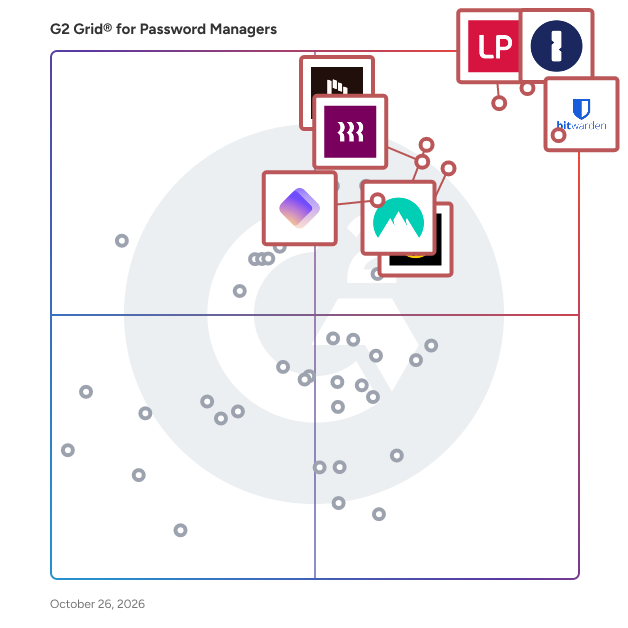
G2’s top-rated Password Managers software, based on verified reviews, includes LastPass, 1Password, NordPass Business, and Bitwarden.

What are the top-reviewed Password Managers on G2?

LastPass

  • Number of Reviews: 1,921
  • Satisfaction: 93
  • Market Score: 97
  • G2 score: 95

1Password

  • Number of Reviews: 1,655
  • Satisfaction: 92
  • Market Score: 98
  • G2 score: 95

NordPass Business

  • Number of Reviews: 622
  • Satisfaction: 91
  • Market Score: 90
  • G2 score: 90

Bitwarden

  • Number of Reviews: 956
  • Satisfaction: 95
  • Market Score: 86
  • G2 score: 90

Dashlane Password Manager

  • Number of Reviews: 609
  • Satisfaction: 84
  • Market Score: 85
  • G2 score: 84

Satisfaction reflects user-reported ratings across various factors, including ease of use, feature fit, and quality of support. (Source 2)

Market Presence scores are calculated based on review volume, third-party signals, and overall market visibility. (Source 2)

G2 Score is a weighted composite of Satisfaction and Market Presence. (Source 2)

Learn how G2 scores products. (Source 1)

What I Often See in Password Managers

Feedback Pros: What Users Consistently Appreciate

  • Seamless autofill and secure password storage simplify daily logins
  • I use 1Password to store and manage my passwords securely. It helps me log in to websites easily and keeps my personal information safe. 1Password helps me remember my passwords, so I don't need to worry about forgetting them and keeps my account secure. My favorite feature is the autofill. It helps me log in quickly without remembering many passwords. The autofill feature saves time because it fills my login details automatically, making logging in faster and easier. We switched to 1Password from another password manager because it is easier to use and more secure. The initial setup of 1Password was very quick and didn't take much time, allowing our team to start using it quickly. I would recommend 1Password because it is easy to use and helps keep passwords secure.” - Mohit N., 1Password review
  • Easy setup with seamless browser integration for frequent daily logins
  • What stands out to me about Lastpass is the overall ease of use and how smoothly it fits into daily browsing. The ease of implementation is impressive because setting it up on my browser and mobile device took very little time. It offers a strong number of features such as password generation, secure vault storage, autofill and security alerts. I also appreciate the responsive customer support when help is needed. Because I log into many platforms every day the frequency of use is very high and the ease of integration with different browsers and applications makes managing credentials simple and efficient.” - Piyush P., LastPass review
  • Open-source transparency with flexible self-hosting for security control
  • It’s free and open source – and that shouldn’t be able to work together this well - but here we are. One of the things I really appreciate is that the self-hosted option is available if you choose it (which is somewhat rare) and the fact that you’re able to check the code for yourself matters if you are the type of individual who cares about that sort of thing.” - Jeremy P., Bitwarden review

Cons: Where Many Platforms Fall Short

  • Frequent extension logouts and limited folder customization options
  • Well, sometimes the browser extension disconnects and asks for the master password too frequently, which delays certain processes. If someone loses the master password, the recovery process can be tedious. There are no custom folders and I would like to have a few more options in this regard.” - Angel B., NordPass Business review
  • Inconsistent autofill across complex sites and limited field-level control
  • I have very few problems with Dashlane and most of them creep in because of the nature of the web. Different sites have different login flows and on occasion I'll bump into a site where Dashlane doesn't know how or what to fill in. They have made improvements on that recently by adding Dashlane to the context menu. I also occasionally have problems with Dashlane wanting to help me fill things that I don't need its help filling. Like a contact record in my CRM. I can't turn dashlane off for the site because I want help logging in, but it doesn't know what I need to put into the CRM. That said, it never really gets in the way.” - Kevin R., Dashlane Password Manager review
  • Overactive autofill prompts on niche tools create occasional friction
  • Occasionally, the browser extension can be a little too aggressive with autofill prompts on less common internal tools, which creates minor friction. However, this is easily adjustable with a few clicks, and the trade-off for consistent security is well worth it.” - Michael K., 1Password review

My Expert Takeaway on Password Managers

Password manager software delivers the most value when organizations treat it as a security and access control layer rather than just a digital vault. The strongest password managers combine secure credential storage with autofill, sharing, and admin controls, allowing teams to manage access while improving day-to-day login efficiency. The best password management tools and password management systems help employees move quickly without compromising security.

Review sentiment across the category is strong. In this dataset, password manager software holds a 4.59 average star rating, with high usability scores including 6.49 for meets requirements, 6.43 for ease of use, 6.43 for ease of setup, and 6.34 for quality of support. Likelihood to recommend is also high at 9.17, showing that buyers consistently see value after adoption.

Friction tends to appear as organizations scale usage or introduce more advanced admin controls. Teams that struggle often underestimate the effort required to manage shared credentials and enforce policies across users. High-performing teams approach password managers with clear governance and consistent usage across departments.

The best password manager software balances strong security with everyday usability. Leading password managers make it easy for employees to access credentials while giving administrators visibility and control. As businesses adopt more cloud tools and support distributed teams, password management systems are becoming essential security infrastructure.

Password Managers FAQs

What are the best password managers?

The best password managers include LastPass, 1Password, NordPass Business, Bitwarden, and Dashlane. These tools combine secure vaulting, reliable autofill, and simple sharing, making them strong choices for teams that need consistent access across browsers and devices.

What are the best-rated apps to manage business passwords?

Top-rated apps to manage business passwords include 1Password, Bitwarden, Keeper Password Manager, and NordPass Business. Buyers rate these highly for balancing admin controls with usability, offering secure sharing, password generation, and smooth onboarding across teams.

What are the leading password management solutions for office use?

Leading office-ready password management solutions include 1Password, LastPass, Dashlane, and Bitwarden. These platforms centralize credentials, reduce password reuse, and support secure team sharing, making them well-suited for organizations managing multiple users and shared logins.

Which password tool is best for business security?

For business security, tools like Keeper Password Manager, 1Password, and Bitwarden stand out. These platforms are favored for strong encryption, admin visibility, and secure credential sharing while still maintaining usability across desktop, browser, and mobile environments.

What are the best user-friendly password manager software for desktops?

User-friendly desktop password manager softwares include 1Password, Dashlane, Bitwarden, and NordPass Business. These tools are known for intuitive setup, reliable browser extensions, and fast autofill, helping users manage credentials efficiently without adding friction to daily workflows.

Sources

  1. G2 Scoring Methodologies
  2. G2 Winter 2026 Reports

Researched By: Brandon Summers-Miller

Last updated on March 17, 2026